© 1996-2010 ETAP/Operation Technology, Inc. – Workshop Notes: AC Network
AC Network
© 1996-2010 ETAP/Operation Technology, Inc. - Workshop Notes: AC Network Slide 2
ETAP Overview
• One-Line Diagram
• Toolbar Format
• Dumpster
• Project View
• Project Toolbar
• Mode Toolbar
• System Toolbar
• Study Case Toolbar
• Message Log
© 1996-2010 ETAP/Operation Technology, Inc. - Workshop Notes: AC Network Slide 3
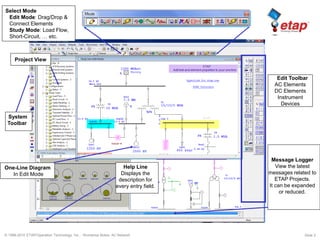
One-Line Diagram
In Edit Mode
Edit Toolbar
AC Elements
DC Elements
Instrument
Devices
System
Toolbar
Select Mode
Edit Mode: Drag/Drop &
Connect Elements
Study Mode: Load Flow,
Short-Circuit, … etc.
Project View
Message Logger
View the latest
messages related to
ETAP Projects.
It can be expanded
or reduced.
Help Line
Displays the
description for
every entry field.
© 1996-2010 ETAP/Operation Technology, Inc. - Workshop Notes: AC Network Slide 4
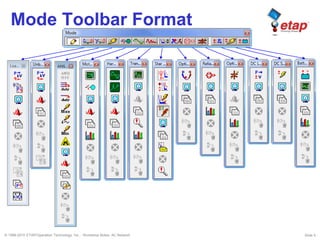
Mode Toolbar Format
© 1996-2010 ETAP/Operation Technology, Inc. - Workshop Notes: AC Network Slide 5
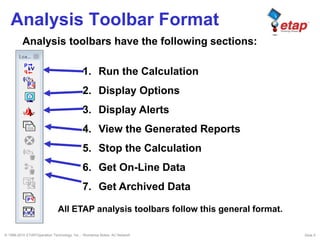
Analysis Toolbar Format
1. Run the Calculation
2. Display Options
3. Display Alerts
4. View the Generated Reports
5. Stop the Calculation
6. Get On-Line Data
7. Get Archived Data
Analysis toolbars have the following sections:
All ETAP analysis toolbars follow this general format.
© 1996-2010 ETAP/Operation Technology, Inc. - Workshop Notes: AC Network Slide 6
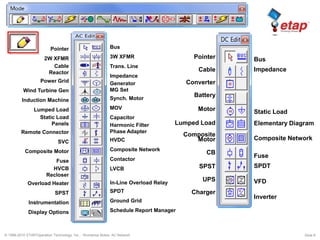
Pointer
2W XFMR
Cable
Reactor
Power Grid
Wind Turbine Gen
Induction Machine
Lumped Load
Static Load
Panels
Remote Connector
SVC
Composite Motor
Fuse
HVCB
Recloser
Overload Heater
SPST
Instrumentation
Display Options
Bus
3W XFMR
Trans. Line
Impedance
Generator
MG Set
Synch. Motor
MOV
Capacitor
Harmonic Filter
Phase Adapter
HVDC
Composite Network
Contactor
LVCB
In-Line Overload Relay
SPDT
Ground Grid
Schedule Report Manager
Pointer
Cable
Converter
Battery
Motor
Lumped Load
Composite
Motor
CB
SPST
UPS
Charger
Bus
Impedance
Static Load
Elementary Diagram
Composite Network
Fuse
SPDT
VFD
Inverter
© 1996-2010 ETAP/Operation Technology, Inc. - Workshop Notes: AC Network Slide 7
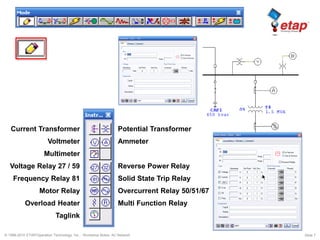
Current Transformer
Voltmeter
Multimeter
Voltage Relay 27 / 59
Frequency Relay 81
Motor Relay
Overload Heater
Taglink
Potential Transformer
Ammeter
Reverse Power Relay
Solid State Trip Relay
Overcurrent Relay 50/51/67
Multi Function Relay
© 1996-2010 ETAP/Operation Technology, Inc. - Workshop Notes: AC Network Slide 8
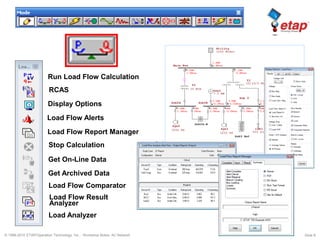
Run Load Flow Calculation
RCAS
Display Options
Load Flow Alerts
Load Flow Report Manager
Stop Calculation
Get On-Line Data
Load Flow Comparator
Get Archived Data
Load Flow Result
Analyzer
Load Analyzer
© 1996-2010 ETAP/Operation Technology, Inc. - Workshop Notes: AC Network Slide 9
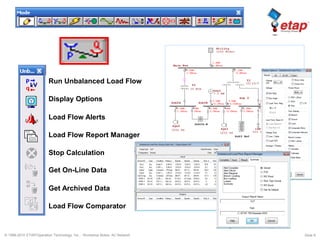
Run Unbalanced Load Flow
Display Options
Load Flow Alerts
Load Flow Report Manager
Stop Calculation
Get On-Line Data
Load Flow Comparator
Get Archived Data
© 1996-2010 ETAP/Operation Technology, Inc. - Workshop Notes: AC Network Slide 10
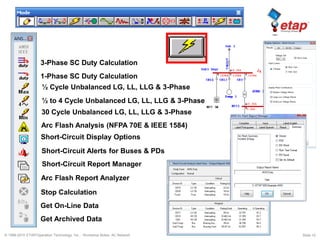
3-Phase SC Duty Calculation
1-Phase SC Duty Calculation
½ Cycle Unbalanced LG, LL, LLG & 3-Phase
½ to 4 Cycle Unbalanced LG, LL, LLG & 3-Phase
30 Cycle Unbalanced LG, LL, LLG & 3-Phase
Arc Flash Analysis (NFPA 70E & IEEE 1584)
Short-Circuit Display Options
Short-Circuit Alerts for Buses & PDs
Short-Circuit Report Manager
Stop Calculation
Get On-Line Data
Get Archived Data
Arc Flash Report Analyzer
© 1996-2010 ETAP/Operation Technology, Inc. - Workshop Notes: AC Network Slide 11
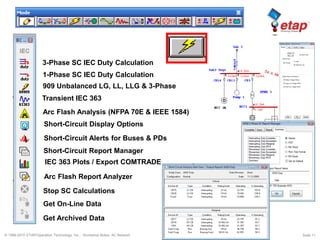
3-Phase SC IEC Duty Calculation
909 Unbalanced LG, LL, LLG & 3-Phase
Transient IEC 363
Arc Flash Analysis (NFPA 70E & IEEE 1584)
Short-Circuit Display Options
Short-Circuit Alerts for Buses & PDs
Short-Circuit Report Manager
Stop SC Calculations
Get On-Line Data
Get Archived Data
IEC 363 Plots / Export COMTRADE
1-Phase SC IEC Duty Calculation
Arc Flash Report Analyzer
© 1996-2010 ETAP/Operation Technology, Inc. - Workshop Notes: AC Network Slide 12
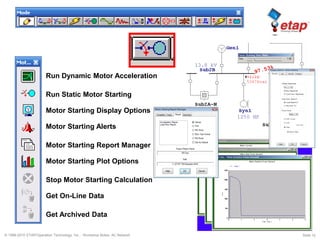
Run Dynamic Motor Acceleration
Run Static Motor Starting
Motor Starting Display Options
Stop Motor Starting Calculation
Get On-Line Data
Get Archived Data
Motor Starting Report Manager
Motor Starting Plot Options
Motor Starting Alerts
© 1996-2010 ETAP/Operation Technology, Inc. - Workshop Notes: AC Network Slide 13
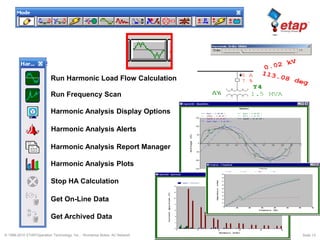
Run Harmonic Load Flow Calculation
Run Frequency Scan
Harmonic Analysis Display Options
Stop HA Calculation
Get On-Line Data
Get Archived Data
Harmonic Analysis Plots
Harmonic Analysis Report Manager
Harmonic Analysis Alerts
© 1996-2010 ETAP/Operation Technology, Inc. - Workshop Notes: AC Network Slide 14
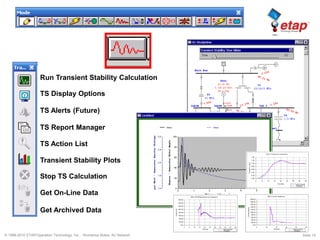
Run Transient Stability Calculation
TS Display Options
TS Report Manager
Get On-Line Data
Get Archived Data
Stop TS Calculation
Transient Stability Plots
TS Alerts (Future)
TS Action List
© 1996-2010 ETAP/Operation Technology, Inc. - Workshop Notes: AC Network Slide 15
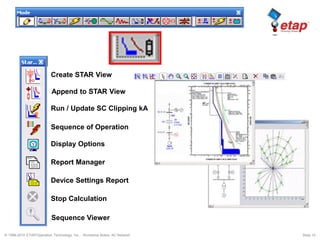
Create STAR View
Run / Update SC Clipping kA
Sequence of Operation
Report Manager
Device Settings Report
Display Options
Stop Calculation
Sequence Viewer
Append to STAR View
© 1996-2010 ETAP/Operation Technology, Inc. - Workshop Notes: AC Network Slide 16
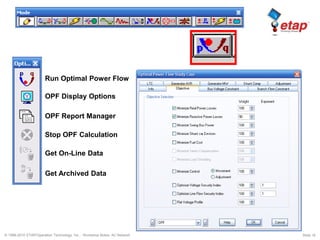
Run Optimal Power Flow
OPF Display Options
OPF Report Manager
Stop OPF Calculation
Get On-Line Data
Get Archived Data
© 1996-2010 ETAP/Operation Technology, Inc. - Workshop Notes: AC Network Slide 17
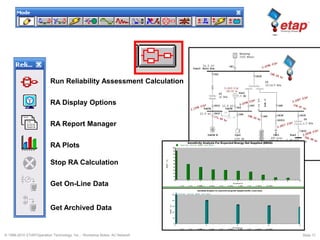
Run Reliability Assessment Calculation
RA Display Options
RA Report Manager
RA Plots
Get On-Line Data
Get Archived Data
Stop RA Calculation
© 1996-2010 ETAP/Operation Technology, Inc. - Workshop Notes: AC Network Slide 18
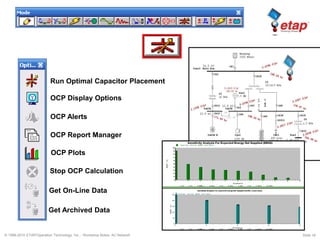
Run Optimal Capacitor Placement
OCP Display Options
OCP Alerts
OCP Report Manager
Get On-Line Data
Get Archived Data
Stop OCP Calculation
OCP Plots
© 1996-2010 ETAP/Operation Technology, Inc. - Workshop Notes: AC Network Slide 19
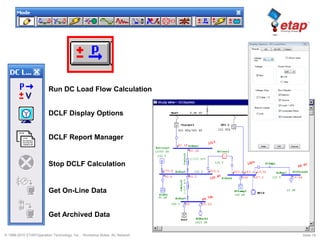
Run DC Load Flow Calculation
DCLF Display Options
DCLF Report Manager
Get On-Line Data
Get Archived Data
Stop DCLF Calculation
© 1996-2010 ETAP/Operation Technology, Inc. - Workshop Notes: AC Network Slide 20
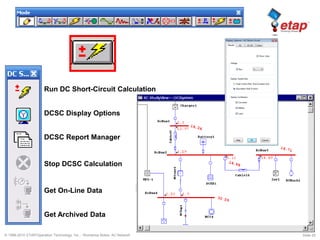
Run DC Short-Circuit Calculation
DCSC Display Options
DCSC Report Manager
Get On-Line Data
Get Archived Data
Stop DCSC Calculation
© 1996-2010 ETAP/Operation Technology, Inc. - Workshop Notes: AC Network Slide 21
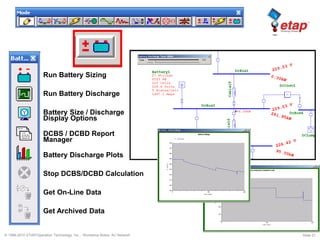
Run Battery Sizing
Run Battery Discharge
Battery Size / Discharge
Display Options
Get On-Line Data
Get Archived Data
Stop DCBS/DCBD Calculation
DCBS / DCBD Report
Manager
Battery Discharge Plots
© 1996-2010 ETAP/Operation Technology, Inc. - Workshop Notes: AC Network Slide 22
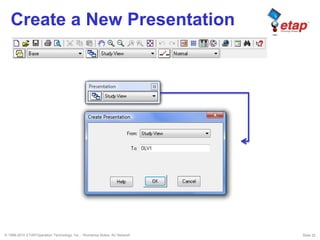
Create a New Presentation
© 1996-2010 ETAP/Operation Technology, Inc. - Workshop Notes: AC Network Slide 23
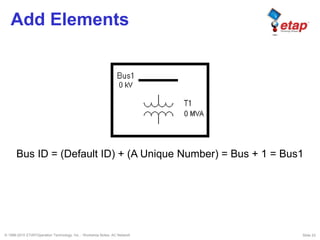
Add Elements
Bus ID = (Default ID) + (A Unique Number) = Bus + 1 = Bus1
© 1996-2010 ETAP/Operation Technology, Inc. - Workshop Notes: AC Network Slide 24
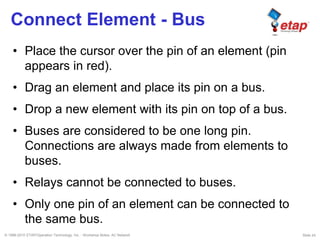
Connect Element - Bus
• Place the cursor over the pin of an element (pin
appears in red).
• Drag an element and place its pin on a bus.
• Drop a new element with its pin on top of a bus.
• Buses are considered to be one long pin.
Connections are always made from elements to
buses.
• Relays cannot be connected to buses.
• Only one pin of an element can be connected to
the same bus.
© 1996-2010 ETAP/Operation Technology, Inc. - Workshop Notes: AC Network Slide 25
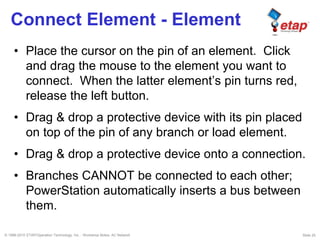
Connect Element - Element
• Place the cursor on the pin of an element. Click
and drag the mouse to the element you want to
connect. When the latter element’s pin turns red,
release the left button.
• Drag & drop a protective device with its pin placed
on top of the pin of any branch or load element.
• Drag & drop a protective device onto a connection.
• Branches CANNOT be connected to each other;
PowerStation automatically inserts a bus between
them.
© 1996-2010 ETAP/Operation Technology, Inc. - Workshop Notes: AC Network Slide 26
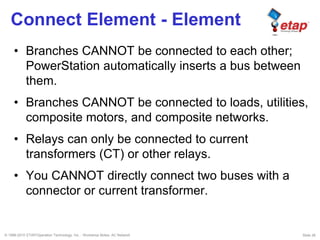
Connect Element - Element
• Branches CANNOT be connected to each other;
PowerStation automatically inserts a bus between
them.
• Branches CANNOT be connected to loads, utilities,
composite motors, and composite networks.
• Relays can only be connected to current
transformers (CT) or other relays.
• You CANNOT directly connect two buses with a
connector or current transformer.
© 1996-2010 ETAP/Operation Technology, Inc. - Workshop Notes: AC Network Slide 27
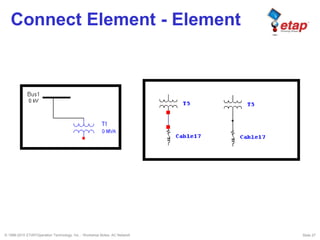
Connect Element - Element
© 1996-2010 ETAP/Operation Technology, Inc. - Workshop Notes: AC Network Slide 28
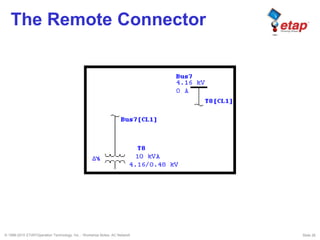
The Remote Connector
© 1996-2010 ETAP/Operation Technology, Inc. - Workshop Notes: AC Network Slide 29
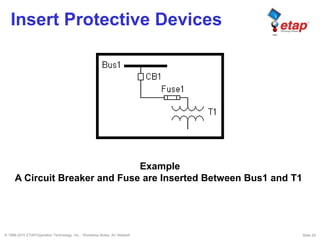
Insert Protective Devices
Example
A Circuit Breaker and Fuse are Inserted Between Bus1 and T1.
© 1996-2010 ETAP/Operation Technology, Inc. - Workshop Notes: AC Network Slide 30
Move From Dumpster
• Elements can be moved from the Dumpster
into the one-line diagram with the same IDs
by two methods:
– Right-click on the one-line diagram and select
Move From Dumpster
– Click on Edit on the Menu Bar and select Move
From
© 1996-2010 ETAP/Operation Technology, Inc. - Workshop Notes: AC Network Slide 31
Move From Dumpster
• Rules:
–Move From Dumpster can be done only in
Edit mode when Base Data is active.
–Move CANNOT be done if there are no
Cells (element groups) in the Dumpster.
–When you move a Dumpster Cell to the
one-line diagram, the desired cell needs to
be active and it gets deleted from the
Dumpster after being moved.
© 1996-2010 ETAP/Operation Technology, Inc. - Workshop Notes: AC Network Slide 32
Move From Dumpster
• Move any Dumpster Cell you desire by making it
active from the Dumpster presentation
• Entire contents of a cell are moved
• Move any Dumpster Cell into any Composite
Network (cannot move cells that contain buses and
branches into a composite motor)
• Sections 1 and 2 of the Remote Connector must
be moved from the dumpster at the same time
• IDs of the moved elements, along with the
connections, status, and properties are preserved
© 1996-2010 ETAP/Operation Technology, Inc. - Workshop Notes: AC Network Slide 33
Creating a Project
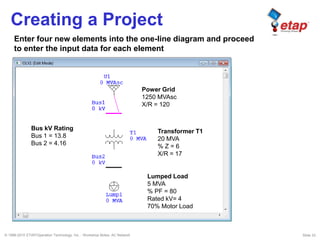
Power Grid
1250 MVAsc
X/R = 120
Transformer T1
20 MVA
% Z = 6
X/R = 17
Lumped Load
5 MVA
% PF = 80
Rated kV= 4
70% Motor Load
Bus kV Rating
Bus 1 = 13.8
Bus 2 = 4.16
Enter four new elements into the one-line diagram and proceed
to enter the input data for each element
© 1996-2010 ETAP/Operation Technology, Inc. - Workshop Notes: AC Network Slide 34
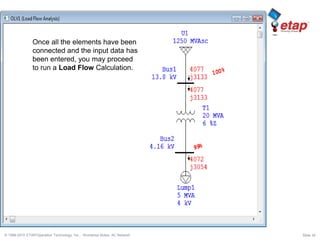
Once all the elements have been
connected and the input data has
been entered, you may proceed
to run a Load Flow Calculation.
© 1996-2010 ETAP/Operation Technology, Inc. - Workshop Notes: AC Network Slide 35
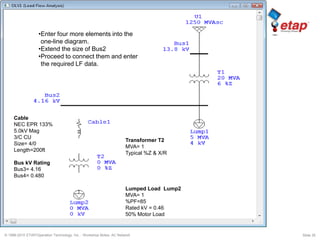
•Enter four more elements into the
one-line diagram.
•Extend the size of Bus2
•Proceed to connect them and enter
the required LF data.
Cable
NEC EPR 133%
5.0kV Mag
3/C CU
Size= 4/0
Length=200ft
Bus kV Rating
Bus3= 4.16
Bus4= 0.480
Lumped Load Lump2
MVA= 1
%PF=85
Rated kV = 0.46
50% Motor Load
Transformer T2
MVA= 1
Typical %Z & X/R
© 1996-2010 ETAP/Operation Technology, Inc. - Workshop Notes: AC Network Slide 36
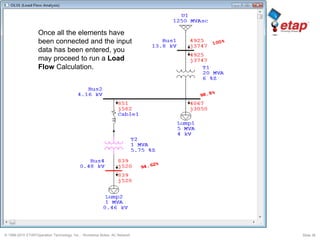
Once all the elements have
been connected and the input
data has been entered, you
may proceed to run a Load
Flow Calculation.
© 1996-2010 ETAP/Operation Technology, Inc. - Workshop Notes: AC Network Slide 37
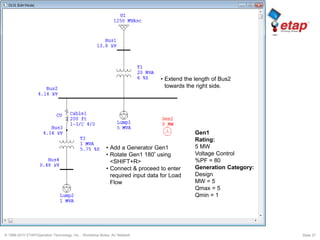
Gen1
Rating:
5 MW
Voltage Control
%PF = 80
Generation Category:
Design
MW = 5
Qmax = 5
Qmin = 1
• Extend the length of Bus2
towards the right side.
• Add a Generator Gen1
• Rotate Gen1 180º using
<SHIFT+R>
• Connect & proceed to enter
required input data for Load
Flow
© 1996-2010 ETAP/Operation Technology, Inc. - Workshop Notes: AC Network Slide 38
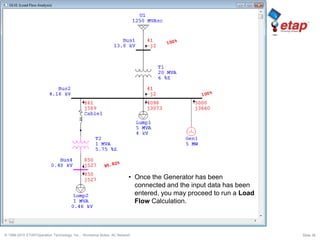
• Once the Generator has been
connected and the input data has been
entered, you may proceed to run a Load
Flow Calculation.
© 1996-2010 ETAP/Operation Technology, Inc. - Workshop Notes: AC Network Slide 39
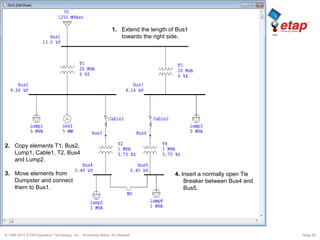
2. Copy elements T1, Bus2,
Lump1, Cable1, T2, Bus4
and Lump2.
3. Move elements from
Dumpster and connect
them to Bus1.
4. Insert a normally open Tie
Breaker between Bus4 and
Bus5.
1. Extend the length of Bus1
towards the right side.
© 1996-2010 ETAP/Operation Technology, Inc. - Workshop Notes: AC Network Slide 40
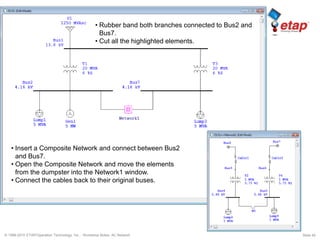
• Insert a Composite Network and connect between Bus2
and Bus7.
• Open the Composite Network and move the elements
from the dumpster into the Network1 window.
• Connect the cables back to their original buses.
• Rubber band both branches connected to Bus2 and
Bus7.
• Cut all the highlighted elements.
© 1996-2010 ETAP/Operation Technology, Inc. - Workshop Notes: AC Network Slide 41
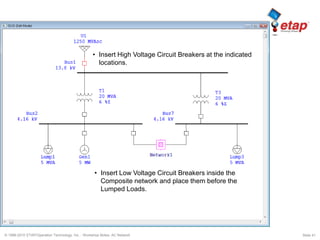
• Insert High Voltage Circuit Breakers at the indicated
locations.
• Insert Low Voltage Circuit Breakers inside the
Composite network and place them before the
Lumped Loads.
© 1996-2010 ETAP/Operation Technology, Inc. - Workshop Notes: AC Network Slide 42
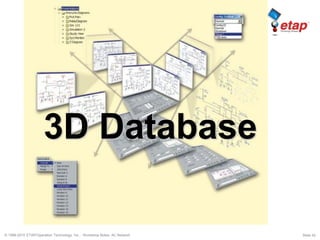
3D Database
© 1996-2010 ETAP/Operation Technology, Inc. - Workshop Notes: AC Network Slide 43
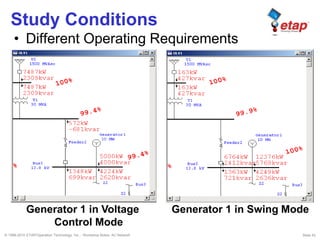
Study Conditions
• Different Operating Requirements
Generator 1 in Voltage
Control Mode
Generator 1 in Swing Mode
© 1996-2010 ETAP/Operation Technology, Inc. - Workshop Notes: AC Network Slide 44
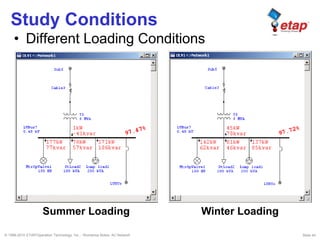
Study Conditions
• Different Loading Conditions
Summer Loading Winter Loading
© 1996-2010 ETAP/Operation Technology, Inc. - Workshop Notes: AC Network Slide 45
Study Conditions
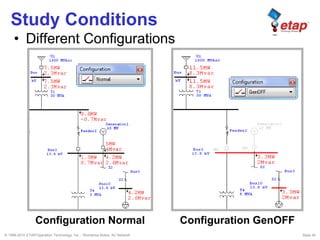
• Different Configurations
Configuration Normal Configuration GenOFF
© 1996-2010 ETAP/Operation Technology, Inc. - Workshop Notes: AC Network Slide 46
Study Conditions
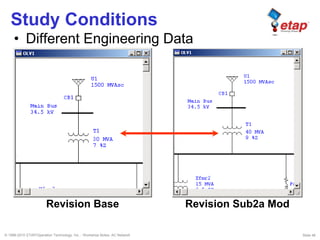
• Different Engineering Data
Revision Base Revision Sub2a Mod
© 1996-2010 ETAP/Operation Technology, Inc. - Workshop Notes: AC Network Slide 47
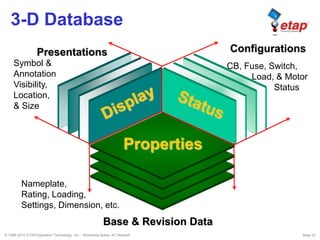
3-D Database
Base & Revision Data
CB, Fuse, Switch,
Load, & Motor
Status
Properties
Presentations Configurations
Nameplate,
Rating, Loading,
Settings, Dimension, etc.
Symbol &
Annotation
Visibility,
Location,
& Size
© 1996-2010 ETAP/Operation Technology, Inc. - Workshop Notes: AC Network Slide 48
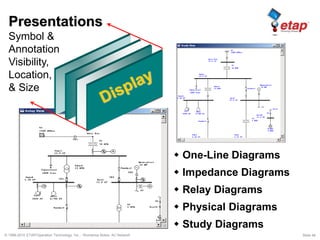
 One-Line Diagrams
 Impedance Diagrams
 Relay Diagrams
 Physical Diagrams
 Study Diagrams
Presentations
Symbol &
Annotation
Visibility,
Location,
& Size
© 1996-2010 ETAP/Operation Technology, Inc. - Workshop Notes: AC Network Slide 49
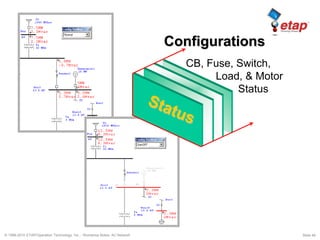
Configurations
CB, Fuse, Switch,
Load, & Motor
Status
© 1996-2010 ETAP/Operation Technology, Inc. - Workshop Notes: AC Network Slide 50
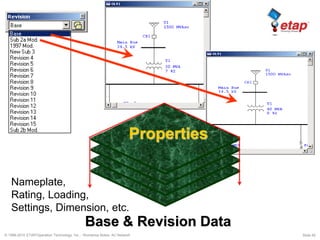
Base & Revision Data
PropertiesProperties
Nameplate,
Rating, Loading,
Settings, Dimension, etc.
© 1996-2010 ETAP/Operation Technology, Inc. - Workshop Notes: AC Network Slide 51
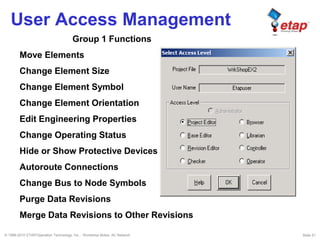
User Access Management
Group 1 Functions
Move Elements
Change Element Size
Change Element Symbol
Change Element Orientation
Edit Engineering Properties
Change Operating Status
Hide or Show Protective Devices
Autoroute Connections
Change Bus to Node Symbols
Purge Data Revisions
Merge Data Revisions to Other Revisions
© 1996-2010 ETAP/Operation Technology, Inc. - Workshop Notes: AC Network Slide 52
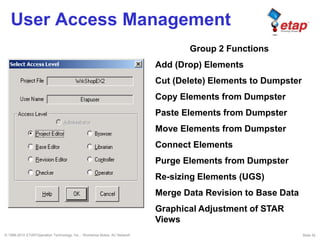
User Access Management
Group 2 Functions
Add (Drop) Elements
Cut (Delete) Elements to Dumpster
Copy Elements from Dumpster
Paste Elements from Dumpster
Move Elements from Dumpster
Connect Elements
Purge Elements from Dumpster
Re-sizing Elements (UGS)
Merge Data Revision to Base Data
Graphical Adjustment of STAR
Views
© 1996-2010 ETAP/Operation Technology, Inc. - Workshop Notes: AC Network Slide 53
User Access Management
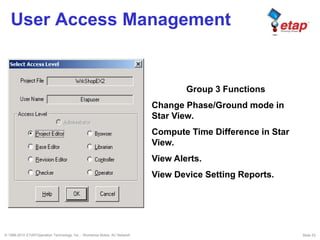
Group 3 Functions
Change Phase/Ground mode in
Star View.
Compute Time Difference in Star
View.
View Alerts.
View Device Setting Reports.
© 1996-2010 ETAP/Operation Technology, Inc. - Workshop Notes: AC Network Slide 54
User Access Management
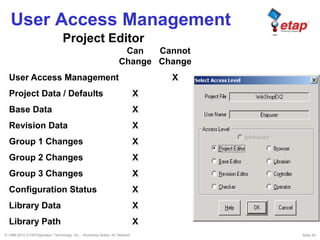
Project Editor
Can Cannot
Change Change
User Access Management X
Project Data / Defaults X
Base Data X
Revision Data X
Group 1 Changes X
Group 2 Changes X
Group 3 Changes X
Configuration Status X
Library Data X
Library Path X
© 1996-2010 ETAP/Operation Technology, Inc. - Workshop Notes: AC Network Slide 55
User Access Management
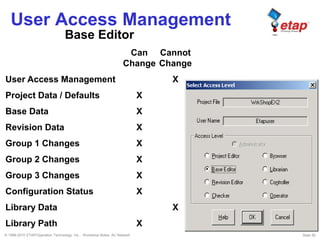
Base Editor
Can Cannot
Change Change
User Access Management X
Project Data / Defaults X
Base Data X
Revision Data X
Group 1 Changes X
Group 2 Changes X
Group 3 Changes X
Configuration Status X
Library Data X
Library Path X
© 1996-2010 ETAP/Operation Technology, Inc. - Workshop Notes: AC Network Slide 56
User Access Management
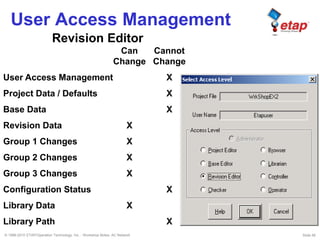
Revision Editor
Can Cannot
Change Change
User Access Management X
Project Data / Defaults X
Base Data X
Revision Data X
Group 1 Changes X
Group 2 Changes X
Group 3 Changes X
Configuration Status X
Library Data X
Library Path X
© 1996-2010 ETAP/Operation Technology, Inc. - Workshop Notes: AC Network Slide 57
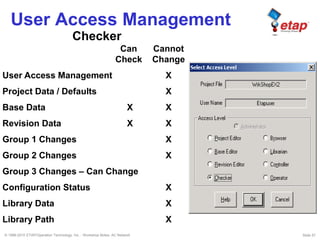
User Access Management
Checker
Can Cannot
Check Change
User Access Management X
Project Data / Defaults X
Base Data X X
Revision Data X X
Group 1 Changes X
Group 2 Changes X
Group 3 Changes – Can Change
Configuration Status X
Library Data X
Library Path X
© 1996-2010 ETAP/Operation Technology, Inc. - Workshop Notes: AC Network Slide 58
Circuit Arrangements
• Radial System
• Loop System
• Primary Selective System
• Secondary Selective System
© 1996-2010 ETAP/Operation Technology, Inc. - Workshop Notes: AC Network Slide 59
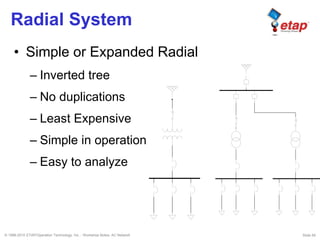
Radial System
• Simple or Expanded Radial
– Inverted tree
– No duplications
– Least Expensive
– Simple in operation
– Easy to analyze
© 1996-2010 ETAP/Operation Technology, Inc. - Workshop Notes: AC Network Slide 60
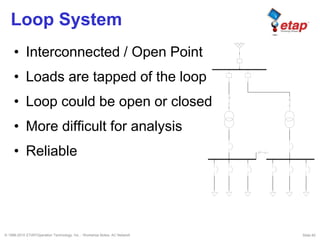
Loop System
• Interconnected / Open Point
• Loads are tapped of the loop
• Loop could be open or closed
• More difficult for analysis
• Reliable
© 1996-2010 ETAP/Operation Technology, Inc. - Workshop Notes: AC Network Slide 61
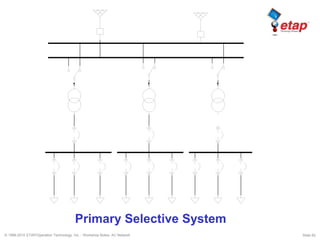
Primary Selective System
• Each transformer is supplied by two sources
• Normal operation is to supply half the load
from one source
• Manual or Automatic transfer of load
• Recommended
© 1996-2010 ETAP/Operation Technology, Inc. - Workshop Notes: AC Network Slide 62
Primary Selective System
© 1996-2010 ETAP/Operation Technology, Inc. - Workshop Notes: AC Network Slide 63
Secondary Selective System
• Each load can be supplied from either one of
the transformers
• The tie breaker is usually normally open
• If one of the transformers is out of service,
the tie breaker is closed and the total load is
supplied by the remaining transformer
• Very reliable system

ETAP - Ac networks

  • 1.
    © 1996-2010 ETAP/OperationTechnology, Inc. – Workshop Notes: AC Network AC Network
  • 2.
    © 1996-2010 ETAP/OperationTechnology, Inc. - Workshop Notes: AC Network Slide 2 ETAP Overview • One-Line Diagram • Toolbar Format • Dumpster • Project View • Project Toolbar • Mode Toolbar • System Toolbar • Study Case Toolbar • Message Log
  • 3.
    © 1996-2010 ETAP/OperationTechnology, Inc. - Workshop Notes: AC Network Slide 3 One-Line Diagram In Edit Mode Edit Toolbar AC Elements DC Elements Instrument Devices System Toolbar Select Mode Edit Mode: Drag/Drop & Connect Elements Study Mode: Load Flow, Short-Circuit, … etc. Project View Message Logger View the latest messages related to ETAP Projects. It can be expanded or reduced. Help Line Displays the description for every entry field.
  • 4.
    © 1996-2010 ETAP/OperationTechnology, Inc. - Workshop Notes: AC Network Slide 4 Mode Toolbar Format
  • 5.
    © 1996-2010 ETAP/OperationTechnology, Inc. - Workshop Notes: AC Network Slide 5 Analysis Toolbar Format 1. Run the Calculation 2. Display Options 3. Display Alerts 4. View the Generated Reports 5. Stop the Calculation 6. Get On-Line Data 7. Get Archived Data Analysis toolbars have the following sections: All ETAP analysis toolbars follow this general format.
  • 6.
    © 1996-2010 ETAP/OperationTechnology, Inc. - Workshop Notes: AC Network Slide 6 Pointer 2W XFMR Cable Reactor Power Grid Wind Turbine Gen Induction Machine Lumped Load Static Load Panels Remote Connector SVC Composite Motor Fuse HVCB Recloser Overload Heater SPST Instrumentation Display Options Bus 3W XFMR Trans. Line Impedance Generator MG Set Synch. Motor MOV Capacitor Harmonic Filter Phase Adapter HVDC Composite Network Contactor LVCB In-Line Overload Relay SPDT Ground Grid Schedule Report Manager Pointer Cable Converter Battery Motor Lumped Load Composite Motor CB SPST UPS Charger Bus Impedance Static Load Elementary Diagram Composite Network Fuse SPDT VFD Inverter
  • 7.
    © 1996-2010 ETAP/OperationTechnology, Inc. - Workshop Notes: AC Network Slide 7 Current Transformer Voltmeter Multimeter Voltage Relay 27 / 59 Frequency Relay 81 Motor Relay Overload Heater Taglink Potential Transformer Ammeter Reverse Power Relay Solid State Trip Relay Overcurrent Relay 50/51/67 Multi Function Relay
  • 8.
    © 1996-2010 ETAP/OperationTechnology, Inc. - Workshop Notes: AC Network Slide 8 Run Load Flow Calculation RCAS Display Options Load Flow Alerts Load Flow Report Manager Stop Calculation Get On-Line Data Load Flow Comparator Get Archived Data Load Flow Result Analyzer Load Analyzer
  • 9.
    © 1996-2010 ETAP/OperationTechnology, Inc. - Workshop Notes: AC Network Slide 9 Run Unbalanced Load Flow Display Options Load Flow Alerts Load Flow Report Manager Stop Calculation Get On-Line Data Load Flow Comparator Get Archived Data
  • 10.
    © 1996-2010 ETAP/OperationTechnology, Inc. - Workshop Notes: AC Network Slide 10 3-Phase SC Duty Calculation 1-Phase SC Duty Calculation ½ Cycle Unbalanced LG, LL, LLG & 3-Phase ½ to 4 Cycle Unbalanced LG, LL, LLG & 3-Phase 30 Cycle Unbalanced LG, LL, LLG & 3-Phase Arc Flash Analysis (NFPA 70E & IEEE 1584) Short-Circuit Display Options Short-Circuit Alerts for Buses & PDs Short-Circuit Report Manager Stop Calculation Get On-Line Data Get Archived Data Arc Flash Report Analyzer
  • 11.
    © 1996-2010 ETAP/OperationTechnology, Inc. - Workshop Notes: AC Network Slide 11 3-Phase SC IEC Duty Calculation 909 Unbalanced LG, LL, LLG & 3-Phase Transient IEC 363 Arc Flash Analysis (NFPA 70E & IEEE 1584) Short-Circuit Display Options Short-Circuit Alerts for Buses & PDs Short-Circuit Report Manager Stop SC Calculations Get On-Line Data Get Archived Data IEC 363 Plots / Export COMTRADE 1-Phase SC IEC Duty Calculation Arc Flash Report Analyzer
  • 12.
    © 1996-2010 ETAP/OperationTechnology, Inc. - Workshop Notes: AC Network Slide 12 Run Dynamic Motor Acceleration Run Static Motor Starting Motor Starting Display Options Stop Motor Starting Calculation Get On-Line Data Get Archived Data Motor Starting Report Manager Motor Starting Plot Options Motor Starting Alerts
  • 13.
    © 1996-2010 ETAP/OperationTechnology, Inc. - Workshop Notes: AC Network Slide 13 Run Harmonic Load Flow Calculation Run Frequency Scan Harmonic Analysis Display Options Stop HA Calculation Get On-Line Data Get Archived Data Harmonic Analysis Plots Harmonic Analysis Report Manager Harmonic Analysis Alerts
  • 14.
    © 1996-2010 ETAP/OperationTechnology, Inc. - Workshop Notes: AC Network Slide 14 Run Transient Stability Calculation TS Display Options TS Report Manager Get On-Line Data Get Archived Data Stop TS Calculation Transient Stability Plots TS Alerts (Future) TS Action List
  • 15.
    © 1996-2010 ETAP/OperationTechnology, Inc. - Workshop Notes: AC Network Slide 15 Create STAR View Run / Update SC Clipping kA Sequence of Operation Report Manager Device Settings Report Display Options Stop Calculation Sequence Viewer Append to STAR View
  • 16.
    © 1996-2010 ETAP/OperationTechnology, Inc. - Workshop Notes: AC Network Slide 16 Run Optimal Power Flow OPF Display Options OPF Report Manager Stop OPF Calculation Get On-Line Data Get Archived Data
  • 17.
    © 1996-2010 ETAP/OperationTechnology, Inc. - Workshop Notes: AC Network Slide 17 Run Reliability Assessment Calculation RA Display Options RA Report Manager RA Plots Get On-Line Data Get Archived Data Stop RA Calculation
  • 18.
    © 1996-2010 ETAP/OperationTechnology, Inc. - Workshop Notes: AC Network Slide 18 Run Optimal Capacitor Placement OCP Display Options OCP Alerts OCP Report Manager Get On-Line Data Get Archived Data Stop OCP Calculation OCP Plots
  • 19.
    © 1996-2010 ETAP/OperationTechnology, Inc. - Workshop Notes: AC Network Slide 19 Run DC Load Flow Calculation DCLF Display Options DCLF Report Manager Get On-Line Data Get Archived Data Stop DCLF Calculation
  • 20.
    © 1996-2010 ETAP/OperationTechnology, Inc. - Workshop Notes: AC Network Slide 20 Run DC Short-Circuit Calculation DCSC Display Options DCSC Report Manager Get On-Line Data Get Archived Data Stop DCSC Calculation
  • 21.
    © 1996-2010 ETAP/OperationTechnology, Inc. - Workshop Notes: AC Network Slide 21 Run Battery Sizing Run Battery Discharge Battery Size / Discharge Display Options Get On-Line Data Get Archived Data Stop DCBS/DCBD Calculation DCBS / DCBD Report Manager Battery Discharge Plots
  • 22.
    © 1996-2010 ETAP/OperationTechnology, Inc. - Workshop Notes: AC Network Slide 22 Create a New Presentation
  • 23.
    © 1996-2010 ETAP/OperationTechnology, Inc. - Workshop Notes: AC Network Slide 23 Add Elements Bus ID = (Default ID) + (A Unique Number) = Bus + 1 = Bus1
  • 24.
    © 1996-2010 ETAP/OperationTechnology, Inc. - Workshop Notes: AC Network Slide 24 Connect Element - Bus • Place the cursor over the pin of an element (pin appears in red). • Drag an element and place its pin on a bus. • Drop a new element with its pin on top of a bus. • Buses are considered to be one long pin. Connections are always made from elements to buses. • Relays cannot be connected to buses. • Only one pin of an element can be connected to the same bus.
  • 25.
    © 1996-2010 ETAP/OperationTechnology, Inc. - Workshop Notes: AC Network Slide 25 Connect Element - Element • Place the cursor on the pin of an element. Click and drag the mouse to the element you want to connect. When the latter element’s pin turns red, release the left button. • Drag & drop a protective device with its pin placed on top of the pin of any branch or load element. • Drag & drop a protective device onto a connection. • Branches CANNOT be connected to each other; PowerStation automatically inserts a bus between them.
  • 26.
    © 1996-2010 ETAP/OperationTechnology, Inc. - Workshop Notes: AC Network Slide 26 Connect Element - Element • Branches CANNOT be connected to each other; PowerStation automatically inserts a bus between them. • Branches CANNOT be connected to loads, utilities, composite motors, and composite networks. • Relays can only be connected to current transformers (CT) or other relays. • You CANNOT directly connect two buses with a connector or current transformer.
  • 27.
    © 1996-2010 ETAP/OperationTechnology, Inc. - Workshop Notes: AC Network Slide 27 Connect Element - Element
  • 28.
    © 1996-2010 ETAP/OperationTechnology, Inc. - Workshop Notes: AC Network Slide 28 The Remote Connector
  • 29.
    © 1996-2010 ETAP/OperationTechnology, Inc. - Workshop Notes: AC Network Slide 29 Insert Protective Devices Example A Circuit Breaker and Fuse are Inserted Between Bus1 and T1.
  • 30.
    © 1996-2010 ETAP/OperationTechnology, Inc. - Workshop Notes: AC Network Slide 30 Move From Dumpster • Elements can be moved from the Dumpster into the one-line diagram with the same IDs by two methods: – Right-click on the one-line diagram and select Move From Dumpster – Click on Edit on the Menu Bar and select Move From
  • 31.
    © 1996-2010 ETAP/OperationTechnology, Inc. - Workshop Notes: AC Network Slide 31 Move From Dumpster • Rules: –Move From Dumpster can be done only in Edit mode when Base Data is active. –Move CANNOT be done if there are no Cells (element groups) in the Dumpster. –When you move a Dumpster Cell to the one-line diagram, the desired cell needs to be active and it gets deleted from the Dumpster after being moved.
  • 32.
    © 1996-2010 ETAP/OperationTechnology, Inc. - Workshop Notes: AC Network Slide 32 Move From Dumpster • Move any Dumpster Cell you desire by making it active from the Dumpster presentation • Entire contents of a cell are moved • Move any Dumpster Cell into any Composite Network (cannot move cells that contain buses and branches into a composite motor) • Sections 1 and 2 of the Remote Connector must be moved from the dumpster at the same time • IDs of the moved elements, along with the connections, status, and properties are preserved
  • 33.
    © 1996-2010 ETAP/OperationTechnology, Inc. - Workshop Notes: AC Network Slide 33 Creating a Project Power Grid 1250 MVAsc X/R = 120 Transformer T1 20 MVA % Z = 6 X/R = 17 Lumped Load 5 MVA % PF = 80 Rated kV= 4 70% Motor Load Bus kV Rating Bus 1 = 13.8 Bus 2 = 4.16 Enter four new elements into the one-line diagram and proceed to enter the input data for each element
  • 34.
    © 1996-2010 ETAP/OperationTechnology, Inc. - Workshop Notes: AC Network Slide 34 Once all the elements have been connected and the input data has been entered, you may proceed to run a Load Flow Calculation.
  • 35.
    © 1996-2010 ETAP/OperationTechnology, Inc. - Workshop Notes: AC Network Slide 35 •Enter four more elements into the one-line diagram. •Extend the size of Bus2 •Proceed to connect them and enter the required LF data. Cable NEC EPR 133% 5.0kV Mag 3/C CU Size= 4/0 Length=200ft Bus kV Rating Bus3= 4.16 Bus4= 0.480 Lumped Load Lump2 MVA= 1 %PF=85 Rated kV = 0.46 50% Motor Load Transformer T2 MVA= 1 Typical %Z & X/R
  • 36.
    © 1996-2010 ETAP/OperationTechnology, Inc. - Workshop Notes: AC Network Slide 36 Once all the elements have been connected and the input data has been entered, you may proceed to run a Load Flow Calculation.
  • 37.
    © 1996-2010 ETAP/OperationTechnology, Inc. - Workshop Notes: AC Network Slide 37 Gen1 Rating: 5 MW Voltage Control %PF = 80 Generation Category: Design MW = 5 Qmax = 5 Qmin = 1 • Extend the length of Bus2 towards the right side. • Add a Generator Gen1 • Rotate Gen1 180º using <SHIFT+R> • Connect & proceed to enter required input data for Load Flow
  • 38.
    © 1996-2010 ETAP/OperationTechnology, Inc. - Workshop Notes: AC Network Slide 38 • Once the Generator has been connected and the input data has been entered, you may proceed to run a Load Flow Calculation.
  • 39.
    © 1996-2010 ETAP/OperationTechnology, Inc. - Workshop Notes: AC Network Slide 39 2. Copy elements T1, Bus2, Lump1, Cable1, T2, Bus4 and Lump2. 3. Move elements from Dumpster and connect them to Bus1. 4. Insert a normally open Tie Breaker between Bus4 and Bus5. 1. Extend the length of Bus1 towards the right side.
  • 40.
    © 1996-2010 ETAP/OperationTechnology, Inc. - Workshop Notes: AC Network Slide 40 • Insert a Composite Network and connect between Bus2 and Bus7. • Open the Composite Network and move the elements from the dumpster into the Network1 window. • Connect the cables back to their original buses. • Rubber band both branches connected to Bus2 and Bus7. • Cut all the highlighted elements.
  • 41.
    © 1996-2010 ETAP/OperationTechnology, Inc. - Workshop Notes: AC Network Slide 41 • Insert High Voltage Circuit Breakers at the indicated locations. • Insert Low Voltage Circuit Breakers inside the Composite network and place them before the Lumped Loads.
  • 42.
    © 1996-2010 ETAP/OperationTechnology, Inc. - Workshop Notes: AC Network Slide 42 3D Database
  • 43.
    © 1996-2010 ETAP/OperationTechnology, Inc. - Workshop Notes: AC Network Slide 43 Study Conditions • Different Operating Requirements Generator 1 in Voltage Control Mode Generator 1 in Swing Mode
  • 44.
    © 1996-2010 ETAP/OperationTechnology, Inc. - Workshop Notes: AC Network Slide 44 Study Conditions • Different Loading Conditions Summer Loading Winter Loading
  • 45.
    © 1996-2010 ETAP/OperationTechnology, Inc. - Workshop Notes: AC Network Slide 45 Study Conditions • Different Configurations Configuration Normal Configuration GenOFF
  • 46.
    © 1996-2010 ETAP/OperationTechnology, Inc. - Workshop Notes: AC Network Slide 46 Study Conditions • Different Engineering Data Revision Base Revision Sub2a Mod
  • 47.
    © 1996-2010 ETAP/OperationTechnology, Inc. - Workshop Notes: AC Network Slide 47 3-D Database Base & Revision Data CB, Fuse, Switch, Load, & Motor Status Properties Presentations Configurations Nameplate, Rating, Loading, Settings, Dimension, etc. Symbol & Annotation Visibility, Location, & Size
  • 48.
    © 1996-2010 ETAP/OperationTechnology, Inc. - Workshop Notes: AC Network Slide 48  One-Line Diagrams  Impedance Diagrams  Relay Diagrams  Physical Diagrams  Study Diagrams Presentations Symbol & Annotation Visibility, Location, & Size
  • 49.
    © 1996-2010 ETAP/OperationTechnology, Inc. - Workshop Notes: AC Network Slide 49 Configurations CB, Fuse, Switch, Load, & Motor Status
  • 50.
    © 1996-2010 ETAP/OperationTechnology, Inc. - Workshop Notes: AC Network Slide 50 Base & Revision Data PropertiesProperties Nameplate, Rating, Loading, Settings, Dimension, etc.
  • 51.
    © 1996-2010 ETAP/OperationTechnology, Inc. - Workshop Notes: AC Network Slide 51 User Access Management Group 1 Functions Move Elements Change Element Size Change Element Symbol Change Element Orientation Edit Engineering Properties Change Operating Status Hide or Show Protective Devices Autoroute Connections Change Bus to Node Symbols Purge Data Revisions Merge Data Revisions to Other Revisions
  • 52.
    © 1996-2010 ETAP/OperationTechnology, Inc. - Workshop Notes: AC Network Slide 52 User Access Management Group 2 Functions Add (Drop) Elements Cut (Delete) Elements to Dumpster Copy Elements from Dumpster Paste Elements from Dumpster Move Elements from Dumpster Connect Elements Purge Elements from Dumpster Re-sizing Elements (UGS) Merge Data Revision to Base Data Graphical Adjustment of STAR Views
  • 53.
    © 1996-2010 ETAP/OperationTechnology, Inc. - Workshop Notes: AC Network Slide 53 User Access Management Group 3 Functions Change Phase/Ground mode in Star View. Compute Time Difference in Star View. View Alerts. View Device Setting Reports.
  • 54.
    © 1996-2010 ETAP/OperationTechnology, Inc. - Workshop Notes: AC Network Slide 54 User Access Management Project Editor Can Cannot Change Change User Access Management X Project Data / Defaults X Base Data X Revision Data X Group 1 Changes X Group 2 Changes X Group 3 Changes X Configuration Status X Library Data X Library Path X
  • 55.
    © 1996-2010 ETAP/OperationTechnology, Inc. - Workshop Notes: AC Network Slide 55 User Access Management Base Editor Can Cannot Change Change User Access Management X Project Data / Defaults X Base Data X Revision Data X Group 1 Changes X Group 2 Changes X Group 3 Changes X Configuration Status X Library Data X Library Path X
  • 56.
    © 1996-2010 ETAP/OperationTechnology, Inc. - Workshop Notes: AC Network Slide 56 User Access Management Revision Editor Can Cannot Change Change User Access Management X Project Data / Defaults X Base Data X Revision Data X Group 1 Changes X Group 2 Changes X Group 3 Changes X Configuration Status X Library Data X Library Path X
  • 57.
    © 1996-2010 ETAP/OperationTechnology, Inc. - Workshop Notes: AC Network Slide 57 User Access Management Checker Can Cannot Check Change User Access Management X Project Data / Defaults X Base Data X X Revision Data X X Group 1 Changes X Group 2 Changes X Group 3 Changes – Can Change Configuration Status X Library Data X Library Path X
  • 58.
    © 1996-2010 ETAP/OperationTechnology, Inc. - Workshop Notes: AC Network Slide 58 Circuit Arrangements • Radial System • Loop System • Primary Selective System • Secondary Selective System
  • 59.
    © 1996-2010 ETAP/OperationTechnology, Inc. - Workshop Notes: AC Network Slide 59 Radial System • Simple or Expanded Radial – Inverted tree – No duplications – Least Expensive – Simple in operation – Easy to analyze
  • 60.
    © 1996-2010 ETAP/OperationTechnology, Inc. - Workshop Notes: AC Network Slide 60 Loop System • Interconnected / Open Point • Loads are tapped of the loop • Loop could be open or closed • More difficult for analysis • Reliable
  • 61.
    © 1996-2010 ETAP/OperationTechnology, Inc. - Workshop Notes: AC Network Slide 61 Primary Selective System • Each transformer is supplied by two sources • Normal operation is to supply half the load from one source • Manual or Automatic transfer of load • Recommended
  • 62.
    © 1996-2010 ETAP/OperationTechnology, Inc. - Workshop Notes: AC Network Slide 62 Primary Selective System
  • 63.
    © 1996-2010 ETAP/OperationTechnology, Inc. - Workshop Notes: AC Network Slide 63 Secondary Selective System • Each load can be supplied from either one of the transformers • The tie breaker is usually normally open • If one of the transformers is out of service, the tie breaker is closed and the total load is supplied by the remaining transformer • Very reliable system