




M365Conf.com
MICROSOFT 365 CONFERENCE
Getting started with SharePoint Syntex
Drew Madelung
@dmadelung
FALL: Las Vegas, NV Dec 7–9, 2021 SPRING: Las Vegas, NV April 5–7, 2022
M365Conf.com
© DEVintersection All rights reserved.
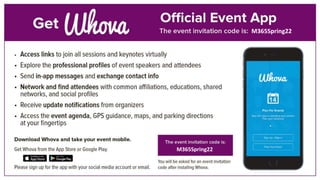
M365Spring22
M365Spring22
2022
April 5 – 7, 2022
MGM Grand
Las Vegas, NV
In-Person – April and December
December, 2022
Check website for details
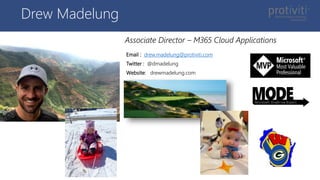
Drew Madelung
Email : drew.madelung@protiviti.com
Twitter : @dmadelung
Website: drewmadelung.com
Associate Director – M365 Cloud Applications
Why?
What?
How?
Demos on Demos
Getting started with
SharePoint Syntex
#M365Conf
Collaboration has evolved
What is your knowledge culture,
how do people share and
collaborate?
What and where does knowledge
currently sit in your organization and
where are the gaps and overlaps
across organizational departments,
geographies, applications and
repositories?
What solutions have you already
implemented around knowledge?
Workplace
insights
Expertise &
answers
Content
services
Knowledge
discovery
Connect people with
knowledge, experts
and insights
“The average interaction worker spends almost 20%
of time, searching for information.
A searchable record of knowledge can reduce, by as
much as 35%, the time employees spend searching
for company information”
Source: McKinsey and International Data Corp
The social economy: Unlocking value and productivity through social technologies
Content classification and curation:
$1.2 million to $3.3 million
Improved discovery:
$42 million to $127 million
Reduced legacy tools & professional services:
$864,482 to $1.2 million
Source: Forrester (July 2020)
New Technology: The Projected Total Economic Impact™ of Project Cortex
Setting the stage with
Content Services
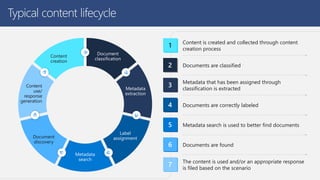
Typical content lifecycle
Document
classification
Metadata
extraction
Label
assignment
Metadata
search
Document
discovery
Content
use/
response
generation
Content
creation
1
Content is created and collected through content
creation process
Documents are classified
Metadata that has been assigned through
classification is extracted
Documents are correctly labeled
Metadata search is used to better find documents
Documents are found
7
The content is used and/or an appropriate response
is filed based on the scenario
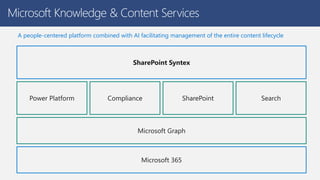
Microsoft Knowledge & Content Services
A people-centered platform combined with AI facilitating management of the entire content lifecycle
Microsoft 365
Microsoft Graph
Power Platform Search
SharePoint
Compliance
SharePoint Syntex
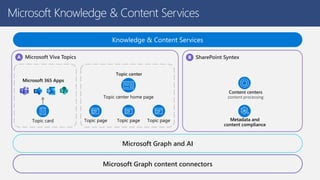
Microsoft Knowledge & Content Services
Microsoft Viva Topics SharePoint Syntex
Topic card
Microsoft 365 Apps
Topic page Topic page
Topic page
Topic center home page
Topic center
Content centers
content processing
Metadata and
content compliance
Knowledge & Content Services
Microsoft Graph and AI
Microsoft Graph content connectors
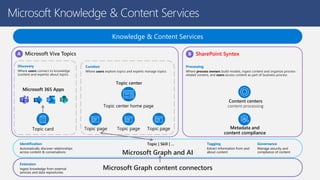
Microsoft Knowledge & Content Services
Microsoft Viva Topics SharePoint Syntex
Topic card
Microsoft 365 Apps
Topic page Topic page
Topic page
Topic center home page
Topic center
Content centers
content processing
Metadata and
content compliance
Knowledge & Content Services
Microsoft Graph and AI
Microsoft Graph content connectors
Curation
Where users explore topics and experts manage topics
Discovery
Where users connect to knowledge
(content and experts) about topics
Processing
Where process owners build models, ingest content and organize process-
related content, and users access content as part of business process
Identification
Automatically discover relationships
across content & conversations
Tagging
Extract information from and
about content
Governance
Manage security and
compliance of content
Topic | Skill | …
Extension
Ingest knowledge from external
services and data repositories
Let’s talk SharePoint Syntex
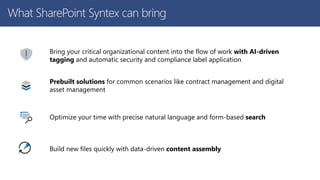
What SharePoint Syntex can bring
Bring your critical organizational content into the flow of work with AI-driven
tagging and automatic security and compliance label application
Prebuilt solutions for common scenarios like contract management and digital
asset management
Optimize your time with precise natural language and form-based search
Build new files quickly with data-driven content assembly
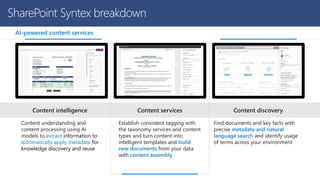
SharePoint Syntex breakdown
Content understanding and
content processing using AI
models to extract information to
automatically apply metadata for
knowledge discovery and reuse
Establish consistent tagging with
the taxonomy services and content
types and turn content into
intelligent templates and build
new documents from your data
with content assembly
Find documents and key facts with
precise metadata and natural
language search and identify usage
of terms across your environment
AI-powered content services
Content discovery
Content services
Content intelligence
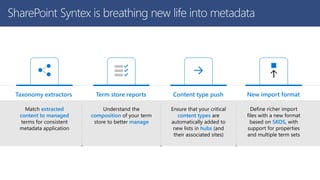
SharePoint Syntex is breathing new life into metadata
Match extracted
content to managed
terms for consistent
metadata application
Taxonomy extractors
Understand the
composition of your term
store to better manage
Term store reports
Ensure that your critical
content types are
automatically added to
new lists in hubs (and
their associated sites)
Content type push
Define richer import
files with a new format
based on SKOS, with
support for properties
and multiple term sets
New import format
Demo
What can Syntex do
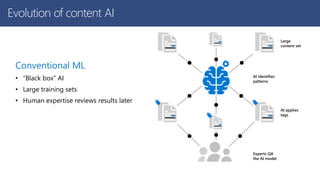
Conventional ML
• “Black box” AI
• Large training sets
• Human expertise reviews results later
Large
content set
AI identifies
patterns
AI applies
tags
Experts QA
the AI model
Evolution of content AI
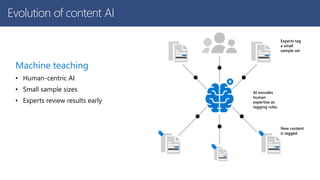
Machine teaching
• Human-centric AI
• Small sample sizes
• Experts review results early
Experts tag
a small
sample set
AI encodes
human
expertise as
tagging rules
New content
is tagged
Evolution of content AI
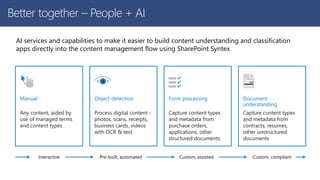
AI services and capabilities to make it easier to build content understanding and classification
apps directly into the content management flow using SharePoint Syntex
Any content, aided by
use of managed terms
and content types
Manual
Process digital content -
photos, scans, receipts,
business cards, videos
with OCR & text
Object detection
Capture content types
and metadata from
purchase orders,
applications, other
structured documents
Form processing
Capture content types
and metadata from
contracts, resumes,
other unstructured
documents
Document
understanding
Interactive Pre-built, automated Custom, assisted Custom, compliant
Better together – People + AI
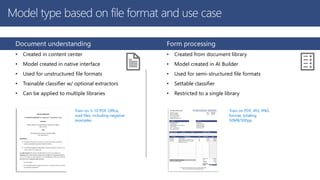
Document understanding
• Created in content center
• Model created in native interface
• Used for unstructured file formats
• Trainable classifier w/ optional extractors
• Can be applied to multiple libraries
Train on 5-10 PDF, Office,
mail files, including negative
examples
Form processing
• Created from document library
• Model created in AI Builder
• Used for semi-structured file formats
• Settable classifier
• Restricted to a single library
Train on PDF, JPG, PNG
format, totaling
50MB/500pp
Model type based on file format and use case
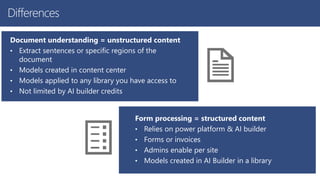
Differences
Document understanding = unstructured content
• Extract sentences or specific regions of the
document
• Models created in content center
• Models applied to any library you have access to
• Not limited by AI builder credits
Form processing = structured content
• Relies on power platform & AI builder
• Forms or invoices
• Admins enable per site
• Models created in AI Builder in a library
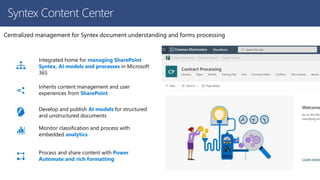
Centralized management for Syntex document understanding and forms processing
Integrated home for managing SharePoint
Syntex, AI models and processes in Microsoft
365
Inherits content management and user
experiences from SharePoint
Develop and publish AI models for structured
and unstructured documents
Monitor classification and process with
embedded analytics
Process and share content with Power
Automate and rich formatting
Syntex Content Center
Demo
Working with Syntex
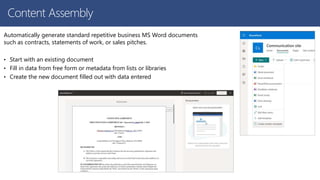
Automatically generate standard repetitive business MS Word documents
such as contracts, statements of work, or sales pitches.
• Start with an existing document
• Fill in data from free form or metadata from lists or libraries
• Create the new document filled out with data entered
Content Assembly
Demo
Content Assembly
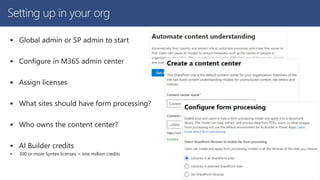
Setting up in your org
 Global admin or SP admin to start
 Configure in M365 admin center
 Assign licenses
 What sites should have form processing?
 Who owns the content center?
 AI Builder credits
 300 or more Syntex licenses = one million credits
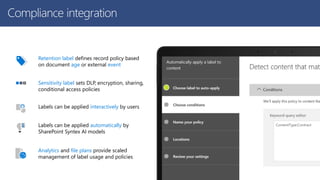
 Leverage MIP label policies for sensitivity and retention
Retention label defines record policy based
on document age or external event
Sensitivity label sets DLP, encryption, sharing,
conditional access policies
Labels can be applied interactively by users
Labels can be applied automatically by
SharePoint Syntex AI models
Analytics and file plans provide scaled
management of label usage and policies
ContentType:Contract
Compliance integration
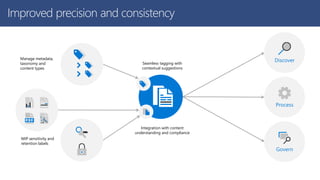
Manage metadata,
taxonomy and
content types
Process
Discover
Govern
Seamless tagging with
contextual suggestions
Integration with content
understanding and compliance
MIP sensitivity and
retention labels
Improved precision and consistency
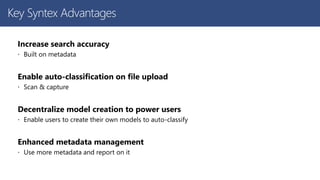
Key Syntex Advantages
Increase search accuracy
 Built on metadata
Enable auto-classification on file upload
 Scan & capture
Decentralize model creation to power users
 Enable users to create their own models to auto-classify
Enhanced metadata management
 Use more metadata and report on it
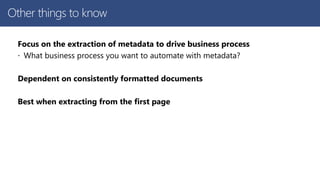
Other things to know
Focus on the extraction of metadata to drive business process
 What business process you want to automate with metadata?
Dependent on consistently formatted documents
Best when extracting from the first page
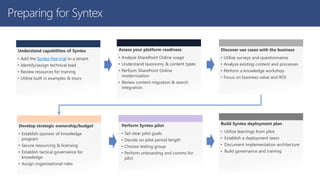
Preparing for Syntex
Understand capabilities of Syntex
• Add the Syntex free trial to a tenant
• Identify/assign technical lead
• Review resources for training
• Utilize built in examples & tours
Assess your platform readiness
• Analyze SharePoint Online usage
• Understand taxonomy & content types
• Perform SharePoint Online
modernization
• Review content migration & search
integration
Discover use cases with the business
• Utilize surveys and questionnaires
• Analyze existing content and processes
• Perform a knowledge workshop
• Focus on business value and ROI
Develop strategic ownership/budget
• Establish sponsor of knowledge
program
• Secure resourcing & licensing
• Establish tactical governance for
knowledge
• Assign organizational roles
Perform Syntex pilot
• Set clear pilot goals
• Decide on pilot period length
• Choose testing group
• Perform onboarding and comms for
pilot
Build Syntex deployment plan
• Utilize learnings from pilot
• Establish a deployment team
• Document implementation architecture
• Build governance and training
Things to think about
 Define and identify content types
 What types of content within the org
 What makes them unique
 Map to your business processes
 Prepare term store
 Think about the taxonomy
 What needs to be pushed
 Who will mange the terms
Microsoft Confidential
Syntex licensing
These require Syntex licenses
• Applying a document understanding model to a library.
• Unlicensed users can be granted access to a content center and can create document understanding models there but
can't apply them to a document library.
• Creating a form processing model via the entry point in a library
• Uploading content to a library where a document understanding or form processing model has been applied
• Running a document understanding model on-demand
• Use premium taxonomy services.
• Premium taxonomy services comprise SKOS-based term set import, pushing enterprise content types to hub-associated
sites, and term store reports.
Unlicensed users can be granted access to a content center and can create document understanding models there
but can't apply them to a document library.
Questions?
Email: drew.madelung@protiviti.com
Twitter: @dmadelung
Website: drewmadelung.com
Slides: http://bit.ly/DrewSlides

Getting started with with SharePoint Syntex

  • 1.
    M365Conf.com MICROSOFT 365 CONFERENCE Gettingstarted with SharePoint Syntex Drew Madelung @dmadelung
  • 2.
    FALL: Las Vegas,NV Dec 7–9, 2021 SPRING: Las Vegas, NV April 5–7, 2022 M365Conf.com © DEVintersection All rights reserved. M365Spring22 M365Spring22
  • 3.
    2022 April 5 –7, 2022 MGM Grand Las Vegas, NV In-Person – April and December December, 2022 Check website for details
  • 4.
    Drew Madelung Email :drew.madelung@protiviti.com Twitter : @dmadelung Website: drewmadelung.com Associate Director – M365 Cloud Applications
  • 5.
    Why? What? How? Demos on Demos Gettingstarted with SharePoint Syntex #M365Conf
  • 6.
  • 7.
    What is yourknowledge culture, how do people share and collaborate? What and where does knowledge currently sit in your organization and where are the gaps and overlaps across organizational departments, geographies, applications and repositories? What solutions have you already implemented around knowledge?
  • 8.
  • 9.
    “The average interactionworker spends almost 20% of time, searching for information. A searchable record of knowledge can reduce, by as much as 35%, the time employees spend searching for company information” Source: McKinsey and International Data Corp The social economy: Unlocking value and productivity through social technologies
  • 10.
    Content classification andcuration: $1.2 million to $3.3 million Improved discovery: $42 million to $127 million Reduced legacy tools & professional services: $864,482 to $1.2 million Source: Forrester (July 2020) New Technology: The Projected Total Economic Impact™ of Project Cortex
  • 11.
    Setting the stagewith Content Services
  • 12.
    Typical content lifecycle Document classification Metadata extraction Label assignment Metadata search Document discovery Content use/ response generation Content creation 1 Contentis created and collected through content creation process Documents are classified Metadata that has been assigned through classification is extracted Documents are correctly labeled Metadata search is used to better find documents Documents are found 7 The content is used and/or an appropriate response is filed based on the scenario
  • 13.
    Microsoft Knowledge &Content Services A people-centered platform combined with AI facilitating management of the entire content lifecycle Microsoft 365 Microsoft Graph Power Platform Search SharePoint Compliance SharePoint Syntex
  • 14.
    Microsoft Knowledge &Content Services Microsoft Viva Topics SharePoint Syntex Topic card Microsoft 365 Apps Topic page Topic page Topic page Topic center home page Topic center Content centers content processing Metadata and content compliance Knowledge & Content Services Microsoft Graph and AI Microsoft Graph content connectors
  • 15.
    Microsoft Knowledge &Content Services Microsoft Viva Topics SharePoint Syntex Topic card Microsoft 365 Apps Topic page Topic page Topic page Topic center home page Topic center Content centers content processing Metadata and content compliance Knowledge & Content Services Microsoft Graph and AI Microsoft Graph content connectors Curation Where users explore topics and experts manage topics Discovery Where users connect to knowledge (content and experts) about topics Processing Where process owners build models, ingest content and organize process- related content, and users access content as part of business process Identification Automatically discover relationships across content & conversations Tagging Extract information from and about content Governance Manage security and compliance of content Topic | Skill | … Extension Ingest knowledge from external services and data repositories
  • 16.
  • 17.
    What SharePoint Syntexcan bring Bring your critical organizational content into the flow of work with AI-driven tagging and automatic security and compliance label application Prebuilt solutions for common scenarios like contract management and digital asset management Optimize your time with precise natural language and form-based search Build new files quickly with data-driven content assembly
  • 18.
    SharePoint Syntex breakdown Contentunderstanding and content processing using AI models to extract information to automatically apply metadata for knowledge discovery and reuse Establish consistent tagging with the taxonomy services and content types and turn content into intelligent templates and build new documents from your data with content assembly Find documents and key facts with precise metadata and natural language search and identify usage of terms across your environment AI-powered content services Content discovery Content services Content intelligence
  • 19.
    SharePoint Syntex isbreathing new life into metadata Match extracted content to managed terms for consistent metadata application Taxonomy extractors Understand the composition of your term store to better manage Term store reports Ensure that your critical content types are automatically added to new lists in hubs (and their associated sites) Content type push Define richer import files with a new format based on SKOS, with support for properties and multiple term sets New import format
  • 20.
  • 21.
    Conventional ML • “Blackbox” AI • Large training sets • Human expertise reviews results later Large content set AI identifies patterns AI applies tags Experts QA the AI model Evolution of content AI
  • 22.
    Machine teaching • Human-centricAI • Small sample sizes • Experts review results early Experts tag a small sample set AI encodes human expertise as tagging rules New content is tagged Evolution of content AI
  • 23.
    AI services andcapabilities to make it easier to build content understanding and classification apps directly into the content management flow using SharePoint Syntex Any content, aided by use of managed terms and content types Manual Process digital content - photos, scans, receipts, business cards, videos with OCR & text Object detection Capture content types and metadata from purchase orders, applications, other structured documents Form processing Capture content types and metadata from contracts, resumes, other unstructured documents Document understanding Interactive Pre-built, automated Custom, assisted Custom, compliant Better together – People + AI
  • 24.
    Document understanding • Createdin content center • Model created in native interface • Used for unstructured file formats • Trainable classifier w/ optional extractors • Can be applied to multiple libraries Train on 5-10 PDF, Office, mail files, including negative examples Form processing • Created from document library • Model created in AI Builder • Used for semi-structured file formats • Settable classifier • Restricted to a single library Train on PDF, JPG, PNG format, totaling 50MB/500pp Model type based on file format and use case
  • 25.
    Differences Document understanding =unstructured content • Extract sentences or specific regions of the document • Models created in content center • Models applied to any library you have access to • Not limited by AI builder credits Form processing = structured content • Relies on power platform & AI builder • Forms or invoices • Admins enable per site • Models created in AI Builder in a library
  • 26.
    Centralized management forSyntex document understanding and forms processing Integrated home for managing SharePoint Syntex, AI models and processes in Microsoft 365 Inherits content management and user experiences from SharePoint Develop and publish AI models for structured and unstructured documents Monitor classification and process with embedded analytics Process and share content with Power Automate and rich formatting Syntex Content Center
  • 27.
  • 28.
    Automatically generate standardrepetitive business MS Word documents such as contracts, statements of work, or sales pitches. • Start with an existing document • Fill in data from free form or metadata from lists or libraries • Create the new document filled out with data entered Content Assembly
  • 29.
  • 30.
    Setting up inyour org  Global admin or SP admin to start  Configure in M365 admin center  Assign licenses  What sites should have form processing?  Who owns the content center?  AI Builder credits  300 or more Syntex licenses = one million credits
  • 31.
     Leverage MIPlabel policies for sensitivity and retention Retention label defines record policy based on document age or external event Sensitivity label sets DLP, encryption, sharing, conditional access policies Labels can be applied interactively by users Labels can be applied automatically by SharePoint Syntex AI models Analytics and file plans provide scaled management of label usage and policies ContentType:Contract Compliance integration
  • 32.
    Manage metadata, taxonomy and contenttypes Process Discover Govern Seamless tagging with contextual suggestions Integration with content understanding and compliance MIP sensitivity and retention labels Improved precision and consistency
  • 33.
    Key Syntex Advantages Increasesearch accuracy  Built on metadata Enable auto-classification on file upload  Scan & capture Decentralize model creation to power users  Enable users to create their own models to auto-classify Enhanced metadata management  Use more metadata and report on it
  • 34.
    Other things toknow Focus on the extraction of metadata to drive business process  What business process you want to automate with metadata? Dependent on consistently formatted documents Best when extracting from the first page
  • 35.
    Preparing for Syntex Understandcapabilities of Syntex • Add the Syntex free trial to a tenant • Identify/assign technical lead • Review resources for training • Utilize built in examples & tours Assess your platform readiness • Analyze SharePoint Online usage • Understand taxonomy & content types • Perform SharePoint Online modernization • Review content migration & search integration Discover use cases with the business • Utilize surveys and questionnaires • Analyze existing content and processes • Perform a knowledge workshop • Focus on business value and ROI Develop strategic ownership/budget • Establish sponsor of knowledge program • Secure resourcing & licensing • Establish tactical governance for knowledge • Assign organizational roles Perform Syntex pilot • Set clear pilot goals • Decide on pilot period length • Choose testing group • Perform onboarding and comms for pilot Build Syntex deployment plan • Utilize learnings from pilot • Establish a deployment team • Document implementation architecture • Build governance and training
  • 36.
    Things to thinkabout  Define and identify content types  What types of content within the org  What makes them unique  Map to your business processes  Prepare term store  Think about the taxonomy  What needs to be pushed  Who will mange the terms
  • 37.
    Microsoft Confidential Syntex licensing Theserequire Syntex licenses • Applying a document understanding model to a library. • Unlicensed users can be granted access to a content center and can create document understanding models there but can't apply them to a document library. • Creating a form processing model via the entry point in a library • Uploading content to a library where a document understanding or form processing model has been applied • Running a document understanding model on-demand • Use premium taxonomy services. • Premium taxonomy services comprise SKOS-based term set import, pushing enterprise content types to hub-associated sites, and term store reports. Unlicensed users can be granted access to a content center and can create document understanding models there but can't apply them to a document library.
  • 38.
    Questions? Email: drew.madelung@protiviti.com Twitter: @dmadelung Website:drewmadelung.com Slides: http://bit.ly/DrewSlides