SharePoint 
Fundamentals 
LaBrina Loving
A Little About Me 
O Originally from Chicago 
O Been in DMV for 4 years 
O Over 14 Years of Experience in IT 
O Jack of All Trades in IT: Websites, Mobile 
Apps, SharePoint, Database…. 
O Been working in SharePoint since 2008 
O Currently work at AARP as a Solution 
Architect
Agenda 
O What Is SharePoint 
O Why SharePoint 
O SharePoint Building Blocks 
O SharePoint Terminology 
O Deep-Dive & Demos 
O SharePoint Careers 
O SharePoint Resources 
OWrap-up & Questions
What Is SharePoint 
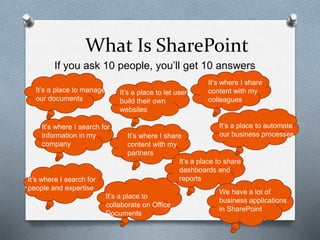
If you ask 10 people, you’ll get 10 answers 
It’s a place to manage 
our documents 
It’s a place to automate 
our business processes 
It’s where I search for 
information in my 
company 
It’s where I share 
content with my 
colleagues 
It’s a place to let users 
build their own 
websites 
It’s where I share 
content with my 
partners 
It’s where I search for 
people and expertise 
It’s a place to 
collaborate on Office 
Documents 
It’s a place to share 
dashboards and 
reports 
We have a lot of 
business applications 
in SharePoint
SharePoint IS… 
O A Product 
O You Install It 
O You Configure It 
O You Maintain It 
O A Platform 
O You extend it 
O You use it to build other things 
O You integrate it to other systems
Why should I Learn 
SharePoint 
O It is one of the most widely deployed platforms 
in the world. 
O As of 2013, SharePoint had over 150 million 
licenses sold 
O Microsoft is adding about 20,000 SharePoint 
users every day 
O 80% of Fortune 500 companies use 
SharePoint 
O Federal Government is one of the biggest 
users of SharePoint
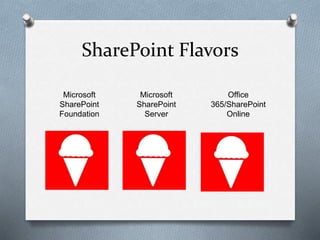
SharePoint Flavors 
Microsoft 
SharePoint 
Foundation 
Microsoft 
SharePoint 
Server 
Office 
365/SharePoint 
Online
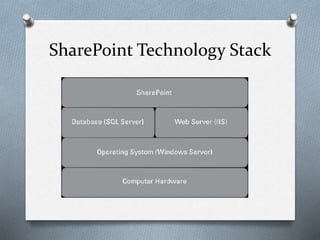
SharePoint Technology Stack
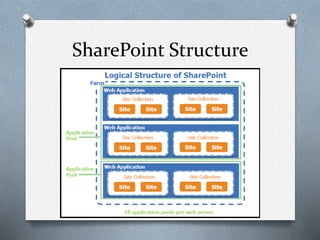
SharePoint Structure
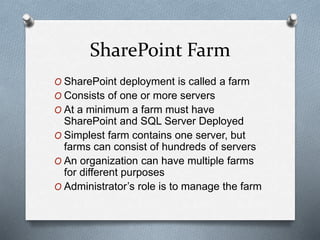
SharePoint Farm 
O SharePoint deployment is called a farm 
O Consists of one or more servers 
O At a minimum a farm must have 
SharePoint and SQL Server Deployed 
O Simplest farm contains one server, but 
farms can consist of hundreds of servers 
O An organization can have multiple farms 
for different purposes 
O Administrator’s role is to manage the farm
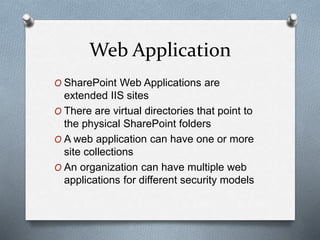
Web Application 
O SharePoint Web Applications are 
extended IIS sites 
O There are virtual directories that point to 
the physical SharePoint folders 
O A web application can have one or more 
site collections 
O An organization can have multiple web 
applications for different security models
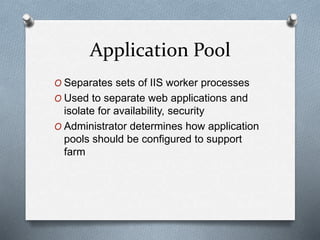
Application Pool 
O Separates sets of IIS worker processes 
O Used to separate web applications and 
isolate for availability, security 
O Administrator determines how application 
pools should be configured to support 
farm
Content Database 
O Stores all configuration and settings of 
SharePoint deployment 
O Stores all content for all sites
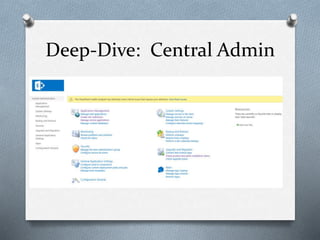
Deep-Dive: Central Admin
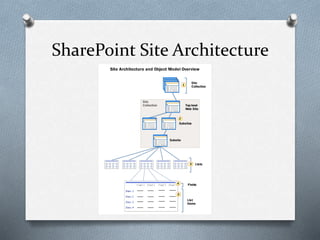
SharePoint Site Architecture
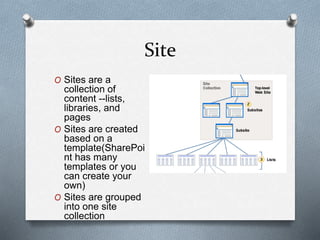
Site Collection 
O Logical collection of sites(1 or more) 
O Sites form a tree structure 
O One site is root or top-level 
O Site collection’s content is stored in 
content database
Site 
O Sites are a 
collection of 
content --lists, 
libraries, and 
pages 
O Sites are created 
based on a 
template(SharePoi 
nt has many 
templates or you 
can create your 
own) 
O Sites are grouped 
into one site 
collection
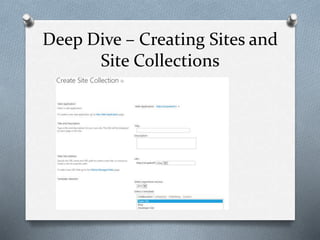
Deep Dive – Creating Sites and 
Site Collections
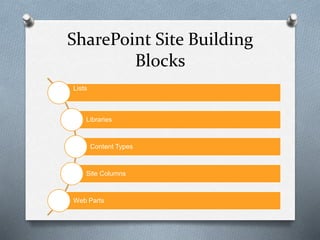
SharePoint Site Building 
Blocks 
Lists 
Libraries 
Content Types 
Site Columns 
Web Parts
Lists 
O Data storage for all content in SharePoint 
(everything is really a list) 
O Users can add, edit, delete items in a list 
O Multiple views can be created in lists 
O Lists have other interesting features like: 
O Workflow 
O Versioning 
O Data is stored in rows and columns like 
Excel
Libraries 
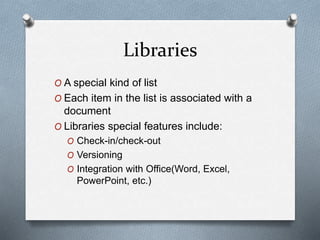
O A special kind of list 
O Each item in the list is associated with a 
document 
O Libraries special features include: 
O Check-in/check-out 
O Versioning 
O Integration with Office(Word, Excel, 
PowerPoint, etc.)
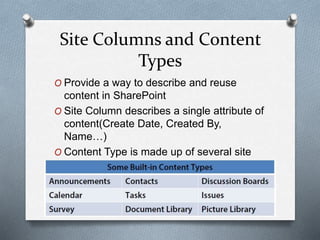
Site Columns and Content 
Types 
O Provide a way to describe and reuse 
content in SharePoint 
O Site Column describes a single attribute of 
content(Create Date, Created By, 
Name…) 
O Content Type is made up of several site 
columns
Web Parts 
O Reusable building blocks of functionality 
O Generally used in portal style sites(think 
MSN) 
O SharePoint comes with many web parts or 
you can create your own
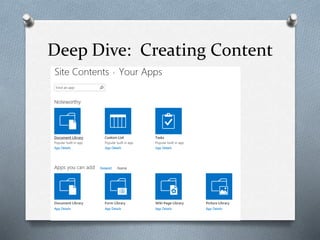
Deep Dive: Creating Content
Securing Your SharePoint Site 
O Administrators can grant access at several 
levels: 
O Site Collection 
O Site 
O List/Library 
O Row-level 
OMain permission groups are: 
O Owners: administrative privilege within the 
context 
O Members: can contribute to and manage lists 
and libraries 
O Visitors: read-only access to content
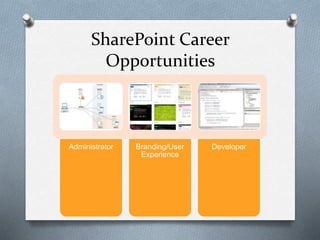
SharePoint Career 
Opportunities 
Administrator Branding/User 
Experience 
Developer
SharePoint Admin Description 
O Skills Required: 
Working knowledge of Microsoft SharePoint site administration – permission 
management, create/manage views of lists and document libraries. 
Knowledge in the customization, configuration, and administration 
of SharePoint, including creating sites, document libraries and metadata. 
Experience with Microsoft Business Intelligence, PerformancePoint analytics, 
SQL Server including SQL Server Reporting Services or other relational 
database systems. 
Exhibits creative thinking with ability to act as a change agent. 
Excellent oral and written communications. 
Effective interpersonal skills. 
Good decision making skills, with ability to consider the business implications 
of the application of technology to the current and future business 
environment. 
Strong analytical skills. 
Working Knowledge of accounting that includes spreadsheets and relational 
data bases programs for data processing techniques. 
Proficient in Microsoft Office applications.
Certification Paths 
O New 2013 exams broken down by Server 
Admin and Developer paths 
O Server Admin Certification require Windows 
Server 2012 exams 
O 2010 exams are still available and just have 
one exam 
O For more information: 
https://www.microsoft.com/learning/en-us/ 
sharepoint-certification.aspx
Continuing the SharePoint 
Journey 
O Great Training Resources 
O Technet - http://technet.microsoft.com/en-us/ 
sharepoint/fp123606.aspx, 
http://technet.microsoft.com/en-us/ 
library/cc262880(v=office.15).aspx 
O Pluralsight(pay, but free trials and I have 
vouchers) http://www.pluralsight.com 
O Safari Books Online(pay, but free trials and 
I have vouchers) 
O End User SharePoint
Continuing The Journey 
O Setting Up Your own Environment 
O Download free trial of SharePoint 
http://technet.microsoft.com/en-us/evalcenter/hh973397.aspx 
O Review installation guide 
O http://social.technet.microsoft.com/wiki/contents/articles/14209.s 
harepoint-2013-installation-step-by-step.aspx 
http://stevegoodyear.wordpress.com/sharepoint-2013-build-guide/ 
O Use Windows Azure or Cloudshare to practice installation 
O Windows Azure - 
http://www.pointbeyond.com/2012/07/06/building-multi-server-sharepoint- 
farm-in-windows-azure/ 
O Cloudshare - http://www.cloudshare.com/ 
O Sign-up for Office365 SharePoint http://office.microsoft.com/en-us/ 
try/
Continuing The Journey 
O SharePoint Networking Events 
O SharePoint Saturday 
http://www.spsevents.org/ 
O FEDSPUG - 
http://www.meetup.com/fedspug-wspdc/
My Contact Info 
O Email: labrina.loving@gmail.com 
O Twitter: @chixcancode 
O LinkedIn: 
https://www.linkedin.com/in/chixcancode
Questions

SharePoint The Beginning

  • 1.
  • 2.
    A Little AboutMe O Originally from Chicago O Been in DMV for 4 years O Over 14 Years of Experience in IT O Jack of All Trades in IT: Websites, Mobile Apps, SharePoint, Database…. O Been working in SharePoint since 2008 O Currently work at AARP as a Solution Architect
  • 3.
    Agenda O WhatIs SharePoint O Why SharePoint O SharePoint Building Blocks O SharePoint Terminology O Deep-Dive & Demos O SharePoint Careers O SharePoint Resources OWrap-up & Questions
  • 4.
    What Is SharePoint If you ask 10 people, you’ll get 10 answers It’s a place to manage our documents It’s a place to automate our business processes It’s where I search for information in my company It’s where I share content with my colleagues It’s a place to let users build their own websites It’s where I share content with my partners It’s where I search for people and expertise It’s a place to collaborate on Office Documents It’s a place to share dashboards and reports We have a lot of business applications in SharePoint
  • 5.
    SharePoint IS… OA Product O You Install It O You Configure It O You Maintain It O A Platform O You extend it O You use it to build other things O You integrate it to other systems
  • 6.
    Why should ILearn SharePoint O It is one of the most widely deployed platforms in the world. O As of 2013, SharePoint had over 150 million licenses sold O Microsoft is adding about 20,000 SharePoint users every day O 80% of Fortune 500 companies use SharePoint O Federal Government is one of the biggest users of SharePoint
  • 7.
    SharePoint Flavors Microsoft SharePoint Foundation Microsoft SharePoint Server Office 365/SharePoint Online
  • 8.
  • 9.
  • 10.
    SharePoint Farm OSharePoint deployment is called a farm O Consists of one or more servers O At a minimum a farm must have SharePoint and SQL Server Deployed O Simplest farm contains one server, but farms can consist of hundreds of servers O An organization can have multiple farms for different purposes O Administrator’s role is to manage the farm
  • 11.
    Web Application OSharePoint Web Applications are extended IIS sites O There are virtual directories that point to the physical SharePoint folders O A web application can have one or more site collections O An organization can have multiple web applications for different security models
  • 12.
    Application Pool OSeparates sets of IIS worker processes O Used to separate web applications and isolate for availability, security O Administrator determines how application pools should be configured to support farm
  • 13.
    Content Database OStores all configuration and settings of SharePoint deployment O Stores all content for all sites
  • 14.
  • 15.
  • 16.
    Site Collection OLogical collection of sites(1 or more) O Sites form a tree structure O One site is root or top-level O Site collection’s content is stored in content database
  • 17.
    Site O Sitesare a collection of content --lists, libraries, and pages O Sites are created based on a template(SharePoi nt has many templates or you can create your own) O Sites are grouped into one site collection
  • 18.
    Deep Dive –Creating Sites and Site Collections
  • 19.
    SharePoint Site Building Blocks Lists Libraries Content Types Site Columns Web Parts
  • 20.
    Lists O Datastorage for all content in SharePoint (everything is really a list) O Users can add, edit, delete items in a list O Multiple views can be created in lists O Lists have other interesting features like: O Workflow O Versioning O Data is stored in rows and columns like Excel
  • 21.
    Libraries O Aspecial kind of list O Each item in the list is associated with a document O Libraries special features include: O Check-in/check-out O Versioning O Integration with Office(Word, Excel, PowerPoint, etc.)
  • 22.
    Site Columns andContent Types O Provide a way to describe and reuse content in SharePoint O Site Column describes a single attribute of content(Create Date, Created By, Name…) O Content Type is made up of several site columns
  • 23.
    Web Parts OReusable building blocks of functionality O Generally used in portal style sites(think MSN) O SharePoint comes with many web parts or you can create your own
  • 24.
  • 25.
    Securing Your SharePointSite O Administrators can grant access at several levels: O Site Collection O Site O List/Library O Row-level OMain permission groups are: O Owners: administrative privilege within the context O Members: can contribute to and manage lists and libraries O Visitors: read-only access to content
  • 26.
    SharePoint Career Opportunities Administrator Branding/User Experience Developer
  • 27.
    SharePoint Admin Description O Skills Required: Working knowledge of Microsoft SharePoint site administration – permission management, create/manage views of lists and document libraries. Knowledge in the customization, configuration, and administration of SharePoint, including creating sites, document libraries and metadata. Experience with Microsoft Business Intelligence, PerformancePoint analytics, SQL Server including SQL Server Reporting Services or other relational database systems. Exhibits creative thinking with ability to act as a change agent. Excellent oral and written communications. Effective interpersonal skills. Good decision making skills, with ability to consider the business implications of the application of technology to the current and future business environment. Strong analytical skills. Working Knowledge of accounting that includes spreadsheets and relational data bases programs for data processing techniques. Proficient in Microsoft Office applications.
  • 28.
    Certification Paths ONew 2013 exams broken down by Server Admin and Developer paths O Server Admin Certification require Windows Server 2012 exams O 2010 exams are still available and just have one exam O For more information: https://www.microsoft.com/learning/en-us/ sharepoint-certification.aspx
  • 29.
    Continuing the SharePoint Journey O Great Training Resources O Technet - http://technet.microsoft.com/en-us/ sharepoint/fp123606.aspx, http://technet.microsoft.com/en-us/ library/cc262880(v=office.15).aspx O Pluralsight(pay, but free trials and I have vouchers) http://www.pluralsight.com O Safari Books Online(pay, but free trials and I have vouchers) O End User SharePoint
  • 30.
    Continuing The Journey O Setting Up Your own Environment O Download free trial of SharePoint http://technet.microsoft.com/en-us/evalcenter/hh973397.aspx O Review installation guide O http://social.technet.microsoft.com/wiki/contents/articles/14209.s harepoint-2013-installation-step-by-step.aspx http://stevegoodyear.wordpress.com/sharepoint-2013-build-guide/ O Use Windows Azure or Cloudshare to practice installation O Windows Azure - http://www.pointbeyond.com/2012/07/06/building-multi-server-sharepoint- farm-in-windows-azure/ O Cloudshare - http://www.cloudshare.com/ O Sign-up for Office365 SharePoint http://office.microsoft.com/en-us/ try/
  • 31.
    Continuing The Journey O SharePoint Networking Events O SharePoint Saturday http://www.spsevents.org/ O FEDSPUG - http://www.meetup.com/fedspug-wspdc/
  • 32.
    My Contact Info O Email: labrina.loving@gmail.com O Twitter: @chixcancode O LinkedIn: https://www.linkedin.com/in/chixcancode
  • 33.