Ergonomics of Computer Usage Dr Sanjoy Sanyal MBBS, MS, MSc (UK), ADPHA, ADHRD Seychelles Presented in Seychelles medical college in September 2007
A few simple measures can avoid a lot of pain in the neck (pun unintended!)
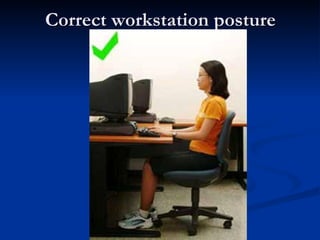
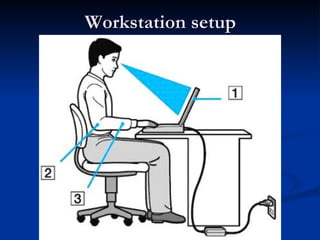
Posturing body parts Computer  directly in front Forearms  horizontal Wrists  in neutral, comfortable position Upper arms  hang naturally at sides Breaks  during sessions
 
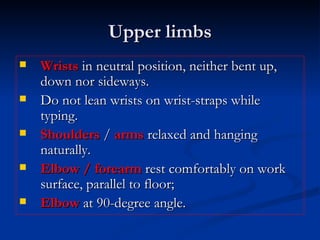
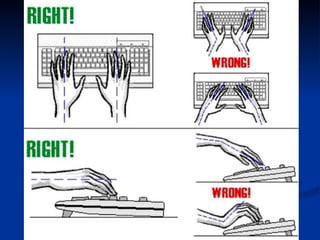
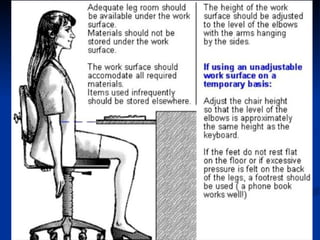
Upper limbs Wrists  in neutral position, neither bent up, down nor sideways.  Do not lean wrists on wrist-straps while typing.  Shoulders  /  arms  relaxed and hanging naturally. Elbow / forearm  rest comfortably on work surface, parallel to floor;  Elbow  at 90-degree angle.


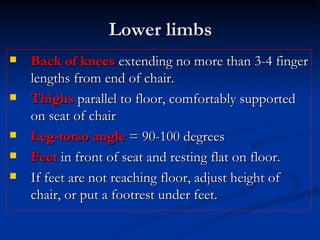
Lower limbs Back of knees  extending no more than 3-4 finger lengths from end of chair. Thighs  parallel to floor, comfortably supported on seat of chair Leg-torso angle  = 90-100 degrees Feet  in front of seat and resting flat on floor.  If feet are not reaching floor, adjust height of chair, or put a footrest under feet.
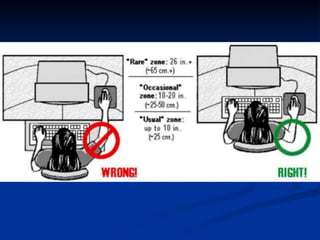
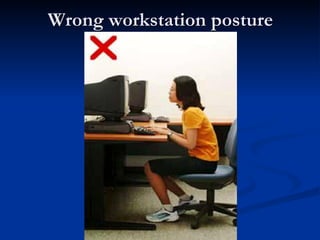
Wrong workstation posture
Correct workstation posture
Spine and back Back  in full contact with backrest Lumbar curve  of chair fitting lumbar spine  Avoid improper  body   alignment Neck  straight or slightly forward. Avoid looking up and improper neck posture
 
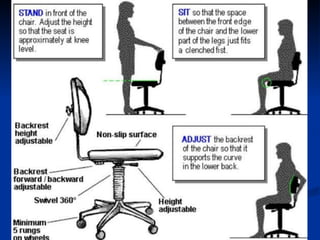
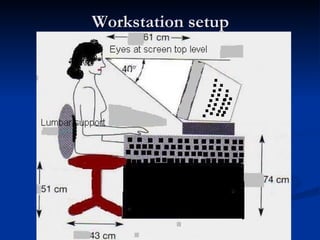
Chair Adjustable backrest  - tilts easily, yet provides solid back support Curved  lumbar support   Able to be raised / lowered, swiveled / locked at different angles Average adult : Seat 1½ feet (45 cm) above ground, placed 1½ feet (45 cm) from table; table 2 -2 ½ feet (60-75 cm) high.
 
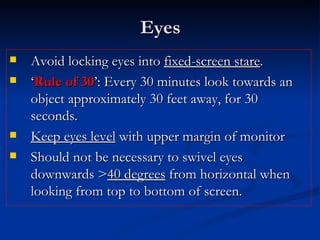
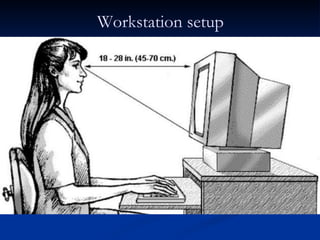
Eyes Avoid locking eyes into  fixed-screen stare .  ‘ Rule of 30 ’: Every 30 minutes look towards an object approximately 30 feet away, for 30 seconds. Keep eyes level  with upper margin of monitor  Should not be necessary to swivel eyes downwards > 40 degrees  from horizontal when looking from top to bottom of screen.
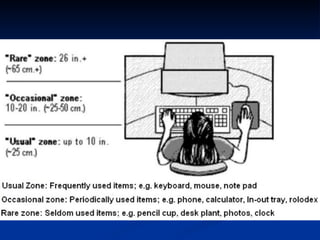
Workstation setup
Workstation setup
Workstation setup
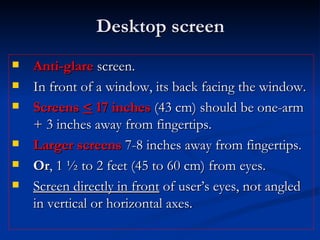
Desktop screen Anti-glare  screen. In front of a window, its back facing the window.  Screens  <  17 inches  (43 cm) should be one-arm + 3 inches away from fingertips.  Larger screens  7-8 inches away from fingertips. Or , 1 ½ to 2 feet (45 to 60 cm) from eyes. Screen directly in front  of user’s eyes, not angled in vertical or horizontal axes.
Laptop screen Adjust viewing angle for:  Best display  Least eye strain Least muscle fatigue Optimum brightness
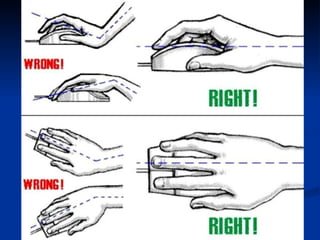
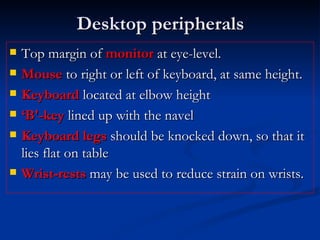
Desktop peripherals Top margin of  monitor  at eye-level.  Mouse  to right or left of keyboard, at same height. Keyboard  located at elbow height  ‘ B'-key  lined up with the navel Keyboard legs  should be knocked down, so that it lies flat on table Wrist-rests  may be used to reduce strain on wrists.
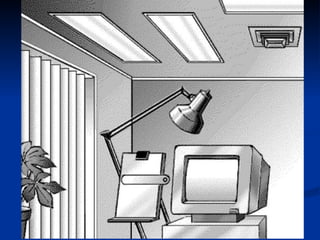
Room lighting Work area  adequately lit / ventilated. Windows/lights  should not create glare / reflection on display Indirect light  to avoid bright spots on display Overhead lighting is best, or Fluorescent light with a grid or shield covering the fixture
 
“ Keep head on your shoulders, Watch your hand,  Look straight,  Keep an eye on your back.”
References  Dr Venkata Ramana Rao , RSI specialist, myotherapist and ergonomist; RSI Healthcare. Rich Epstein , Director of the Moore Center for Rehabilitation, Stamford and a founder of the Moore Center Ergonomics and Injury Prevention Company
THAN-Q

Ergonomics Of Computer Usage

  • 1.
    Ergonomics of ComputerUsage Dr Sanjoy Sanyal MBBS, MS, MSc (UK), ADPHA, ADHRD Seychelles Presented in Seychelles medical college in September 2007
  • 2.
    A few simplemeasures can avoid a lot of pain in the neck (pun unintended!)
  • 3.
    Posturing body partsComputer directly in front Forearms horizontal Wrists in neutral, comfortable position Upper arms hang naturally at sides Breaks during sessions
  • 4.
  • 5.
    Upper limbs Wrists in neutral position, neither bent up, down nor sideways. Do not lean wrists on wrist-straps while typing. Shoulders / arms relaxed and hanging naturally. Elbow / forearm rest comfortably on work surface, parallel to floor; Elbow at 90-degree angle.
  • 6.
  • 7.
  • 8.
  • 9.
    Lower limbs Backof knees extending no more than 3-4 finger lengths from end of chair. Thighs parallel to floor, comfortably supported on seat of chair Leg-torso angle = 90-100 degrees Feet in front of seat and resting flat on floor. If feet are not reaching floor, adjust height of chair, or put a footrest under feet.
  • 10.
  • 11.
  • 12.
    Spine and backBack in full contact with backrest Lumbar curve of chair fitting lumbar spine Avoid improper body alignment Neck straight or slightly forward. Avoid looking up and improper neck posture
  • 13.
  • 14.
    Chair Adjustable backrest - tilts easily, yet provides solid back support Curved lumbar support Able to be raised / lowered, swiveled / locked at different angles Average adult : Seat 1½ feet (45 cm) above ground, placed 1½ feet (45 cm) from table; table 2 -2 ½ feet (60-75 cm) high.
  • 15.
  • 16.
    Eyes Avoid lockingeyes into fixed-screen stare . ‘ Rule of 30 ’: Every 30 minutes look towards an object approximately 30 feet away, for 30 seconds. Keep eyes level with upper margin of monitor Should not be necessary to swivel eyes downwards > 40 degrees from horizontal when looking from top to bottom of screen.
  • 17.
  • 18.
  • 19.
  • 20.
    Desktop screen Anti-glare screen. In front of a window, its back facing the window. Screens < 17 inches (43 cm) should be one-arm + 3 inches away from fingertips. Larger screens 7-8 inches away from fingertips. Or , 1 ½ to 2 feet (45 to 60 cm) from eyes. Screen directly in front of user’s eyes, not angled in vertical or horizontal axes.
  • 21.
    Laptop screen Adjustviewing angle for: Best display Least eye strain Least muscle fatigue Optimum brightness
  • 22.
    Desktop peripherals Topmargin of monitor at eye-level. Mouse to right or left of keyboard, at same height. Keyboard located at elbow height ‘ B'-key lined up with the navel Keyboard legs should be knocked down, so that it lies flat on table Wrist-rests may be used to reduce strain on wrists.
  • 23.
    Room lighting Workarea adequately lit / ventilated. Windows/lights should not create glare / reflection on display Indirect light to avoid bright spots on display Overhead lighting is best, or Fluorescent light with a grid or shield covering the fixture
  • 24.
  • 25.
    “ Keep headon your shoulders, Watch your hand, Look straight, Keep an eye on your back.”
  • 26.
    References DrVenkata Ramana Rao , RSI specialist, myotherapist and ergonomist; RSI Healthcare. Rich Epstein , Director of the Moore Center for Rehabilitation, Stamford and a founder of the Moore Center Ergonomics and Injury Prevention Company
  • 27.