NATIONAL INSTITUTE OF TECHNOLOGY,DURGAPUR
SUBMITTED BY:
NIDHI KAKANI
SOFTWARE ENGINEERING
ASSIGNMENTS
ROLL NO:
15/CA/679
INDEX
SR. NO. CONTENTS PAGE NO.
1. ASSIGNMENT-1 (QUESTION) 3
2. SYSTEM SCOPE AND ASSUMPTIONS 4-5
3. NOTATIONS AND E-R DIAGRAM 6-7
4. NOTATIONS AND DATA FLOW DIAGRAMS 7-12
5. JUSTIFICATION 13
6. ASSIGNMENT-2(QUESTION) 14
7. SYSTEM SCOPE AND ASSUMPTONS 15-16
8. NOTATIONS AND E-R DIAGRAM 17-18
9. NOTATIONS AND DATA FLOW DIAGRAMS 19-22
10. NOTATIONS AND STATE TRANSITION DIAGRAMS 23-24
11. JUSTIFICATION 25
12. ACKNOWLEDGEMENT 26
ASSIGNMENT -1
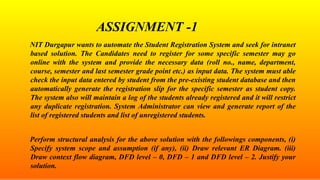
NIT Durgapur wants to automate the Student Registration System and seek for intranet
based solution. The Candidates need to register for some specific semester may go
online with the system and provide the necessary data (roll no., name, department,
course, semester and last semester grade point etc.) as input data. The system must able
check the input data entered by student from the pre-existing student database and then
automatically generate the registration slip for the specific semester as student copy.
The system also will maintain a log of the students already registered and it will restrict
any duplicate registration. System Administrator can view and generate report of the
list of registered students and list of unregistered students.
Perform structural analysis for the above solution with the followings components, (i)
Specify system scope and assumption (if any), (ii) Draw relevant ER Diagram. (iii)
Draw context flow diagram, DFD level – 0, DFD – 1 and DFD level – 2. Justify your
solution.
SYSTEM SCOPE :
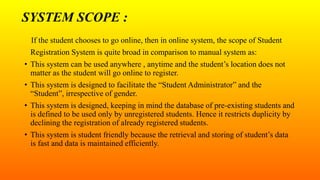
If the student chooses to go online, then in online system, the scope of Student
Registration System is quite broad in comparison to manual system as:
• This system can be used anywhere , anytime and the student’s location does not
matter as the student will go online to register.
• This system is designed to facilitate the “Student Administrator” and the
“Student”, irrespective of gender.
• This system is designed, keeping in mind the database of pre-existing students and
is defined to be used only by unregistered students. Hence it restricts duplicity by
declining the registration of already registered students.
• This system is student friendly because the retrieval and storing of student’s data
is fast and data is maintained efficiently.
SYSTEM ASSUMPTIONS :
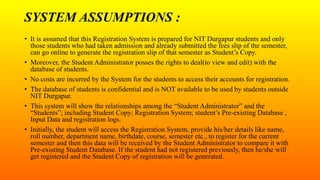
• It is assumed that this Registration System is prepared for NIT Durgapur students and only
those students who had taken admission and already submitted the fees slip of the semester,
can go online to generate the registration slip of that semester as Student’s Copy.
• Moreover, the Student Administrator posses the rights to deal(to view and edit) with the
database of students.
• No costs are incurred by the System for the students to access their accounts for registration.
• The database of students is confidential and is NOT available to be used by students outside
NIT Durgapur.
• This system will show the relationships among the “Student Administrator” and the
“Students”; including Student Copy; Registration System; student’s Pre-existing Database ,
Input Data and registration logs.
• Initially, the student will access the Registration System, provide his/her details like name,
roll number, department name, birthdate, course, semester etc., to register for the current
semester and then this data will be received by the Student Administrator to compare it with
Pre-existing Student Database. If the student had not registered previously, then he/she will
get registered and the Student Copy of registration will be generated.
NOTATIONS FOR E-R DIAGRAM :
• Represent An Entity
• Relationship Among Entity
• Attribute Of An Entity
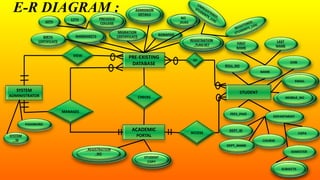
E-R DIAGRAM :
SYSTEM
ADMINISTRATOR
STUDENT
ACADEMIC
PORTAL
VIEW
OF
MANAGES
PRE-EXISTING
DATABASE
CHECKS
ACCESS
NOTATIONS FOR DFD :
• Source,
Destination,
External
Entity,
Interface
• Processes
• Data Store • Data Flow Line
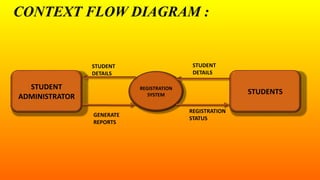
CONTEXT FLOW DIAGRAM :
STUDENT
ADMINISTRATOR
REGISTRATION
SYSTEM STUDENTS
STUDENT
DETAILS
STUDENT
DETAILS
REGISTRATION
STATUS
GENERATE
REPORTS
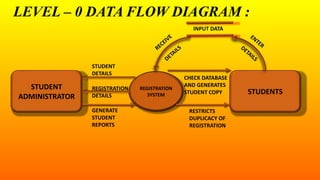
LEVEL – 0 DATA FLOW DIAGRAM :
STUDENT
ADMINISTRATOR
REGISTRATION
SYSTEM STUDENTS
STUDENT
DETAILS
RESTRICTS
DUPLICACY OF
REGISTRATION
GENERATE
STUDENT
REPORTS
CHECK DATABASE
AND GENERATES
STUDENT COPY
REGISTRATION
DETAILS
INPUT DATA
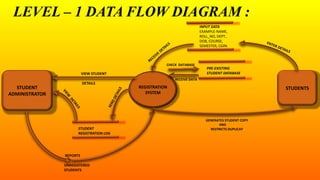
LEVEL – 1 DATA FLOW DIAGRAM :
STUDENT
ADMINISTRATOR
REGISTRATION
SYSTEM
STUDENTS
CHECK DATABASE
INPUT DATA
EXAMPLE-NAME,
ROLL_NO, DEPT.,
DOB, COURSE,
SEMESTER, CGPA
STUDENT
REGISTRATION LOG
PRE-EXISTING
STUDENT DATABASE
RECEIVE DATA
GENERATES STUDENT COPY
AND
RESTRICTS DUPLICAY
VIEW STUDENT
DETAILS
REPORTS
UNREGISTERED
STUDENTS
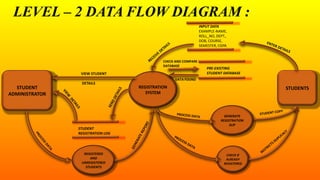
LEVEL – 2 DATA FLOW DIAGRAM :
STUDENT
ADMINISTRATOR
REGISTRATION
SYSTEM
STUDENTS
CHECK AND COMPARE
DATABASE
INPUT DATA
EXAMPLE-NAME,
ROLL_NO, DEPT.,
DOB, COURSE,
SEMESTER, CGPA
GENERATE
REGISTRATION
SLIP
CHECK IF
ALREADY
REGISTERED
STUDENT
REGISTRATION LOG
PRE-EXISTING
STUDENT DATABASE
REGISTERED
AND
UNREGISTERED
STUDENTS
DATA FOUND
VIEW STUDENT
DETAILS
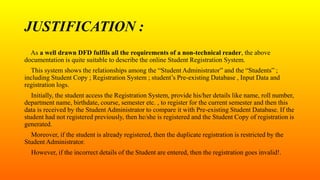
JUSTIFICATION :
As a well drawn DFD fulfils all the requirements of a non-technical reader, the above
documentation is quite suitable to describe the online Student Registration System.
This system shows the relationships among the “Student Administrator” and the “Students” ;
including Student Copy ; Registration System ; student’s Pre-existing Database , Input Data and
registration logs.
Initially, the student access the Registration System, provide his/her details like name, roll number,
department name, birthdate, course, semester etc. , to register for the current semester and then this
data is received by the Student Administrator to compare it with Pre-existing Student Database. If the
student had not registered previously, then he/she is registered and the Student Copy of registration is
generated.
Moreover, if the student is already registered, then the duplicate registration is restricted by the
Student Administrator.
However, if the incorrect details of the Student are entered, then the registration goes invalid!.
ASSIGNMENT -2
XYZ Bank is a facilitator for public banking system with many branches in different
region. They would like to automate the banking Processing System. The bank
facilitates deposit, withdrawal and fixed deposit system from its saving accounts.
Customer may have joint account as well as many account in any branch of the bank.
Withdrawal or deposit can be done from any branch of the bank. The bank also has
facility of ATM. On any transaction, the system will able to maintain the transaction
record in some log. Using which, system administrator can generate report for account
wise transaction per day.
Perform structural analysis for the above solution with the followings components, (i)
Specify system scope and assumption (if any), (ii) Draw relevant ER Diagram. (iii)
Draw context flow diagram, DFD level – 0 and DFD level – I. (iv) Relevant State
Transition Diagrams (STD). Justify your solution.
SYSTEM SCOPE :
• This bank Processing System is designed to facilitate the “Bank Administrator”
and the “Customer”, irrespective of gender.
• This system provides security with the use of customer’s signature and ATM PIN
number, so that any unauthorised customer cannot access bank accounts. Only the
authorised one will have the proper access authority.
• This system is designed keeping in mind the requirements of the Branch
Administrator and the Processing System ; and is defined to be used for the
different bank branches.
• This system is customer friendly because the retrieval and storing of database is
fast and the data is maintained efficiently.
SYSTEM ASSUMPTIONS :
• It is assumed that the customers who have bank accounts and Aadhar card as ID proof will
only access this branch Processing System.
• It is also assumed that the customer database such as mobile number, ID proofs, addresses
etc., already exists in the Processing System.
• No costs are incurred by the Processing System from the customers to access their accounts.
• The resources and database of the Processing System are highly confidential and are NOT
available to be used by unknown customers.
• The documentation shows the relationship among the System Administrator and the
Customer; including cash transaction slips ; Branch Processing System, ATMs, customer
databases and transaction logs.
• Initially the customer will access the bank branch or ATM, update his/her details like account
type (savings/joint/other accounts), account number, amount details(either to deposit or
withdraw), signature or PIN(to authorise his/her identity) and then deposit or withdraw the
cash and then get his/her transaction slip.
NOTATIONS FOR ER DIAGRAM :
• Represent An Entity
• Relationship Among Entity
• Attribute Of An Entity
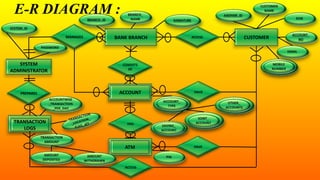
E-R DIAGRAM :
SYSTEM
ADMINISTRATOR
CUSTOMERBANK BRANCH
PREPARES
CONSISTS
OF
MANAGES
HAS
HAVE
ACCESS
ATM HAVE
ACCOUNT
TRANSACTION
LOGS
ACCOUNT
TRANSACTION
LOGS
ACCESS
ATM
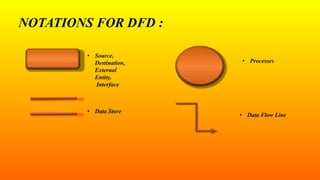
NOTATIONS FOR DFD :
• Source,
Destination,
External
Entity,
Interface
• Processes
• Data Store
• Data Flow Line
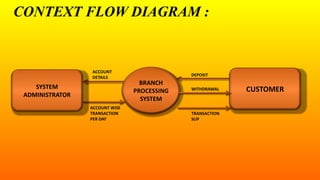
CONTEXT FLOW DIAGRAM :
ACCOUNT
DETAILS
WITHDRAWAL
ACCOUNT WISE
TRANSACTION
PER DAY
SYSTEM
ADMINISTRATOR
CUSTOMER
BRANCH
PROCESSING
SYSTEM
DEPOSIT
TRANSACTION
SLIP
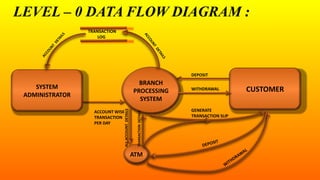
LEVEL – 0 DATA FLOW DIAGRAM :
GENERATE
TRANSACTION SLIP
SYSTEM
ADMINISTRATOR
CUSTOMER
BRANCH
PROCESSING
SYSTEM
DEPOSIT
ATM
TRANSACTION
LOG
TRANSACTIONDETAILS
ALLACCOUNTDETAILS
ACCOUNT WISE
TRANSACTION
PER DAY
WITHDRAWAL
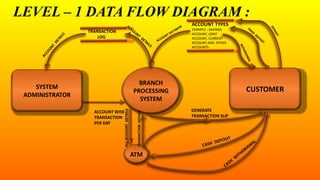
LEVEL – 1 DATA FLOW DIAGRAM :
GENERATE
TRANSACTION SLIP
SYSTEM
ADMINISTRATOR
CUSTOMER
BRANCH
PROCESSING
SYSTEM
ATM
TRANSACTION
LOG
TRANSACTIONDETAILS
ALLACCOUNTDETAILS
ACCOUNT WISE
TRANSACTION
PER DAY
ACCOUNT TYPES
EXAMPLE : SAVINGS
ACCOUNT, JOINT
ACCOUNT, CURRENT
ACCOUNT AND OTHER
ACCOUNTS.
NOTATIONS FOR STATE TRANSITION
DIAGRAM :
• Start State
• End State
• State/New State
• Event Causing Transition
/ Action That Occurs
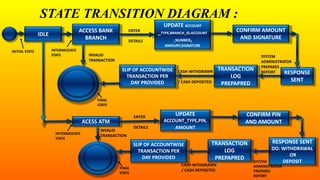
STATE TRANSITION DIAGRAM :
RESPONSE
SENT
TRANSACTION
LOG
PREPAPRED
SLIP OF ACCOUNTWISE
TRANSACTION PER
DAY PROVIDED
UPDATE
ACCOUNT_TYPE,PIN,
AMOUNT
RESPONSE SENT
DO: WITHDRAWAL
OR
DEPOSIT
ACESS ATM
CONFIRM AMOUNT
AND SIGNATURE
UPDATE ACCOUNT
_TYPE,BRANCH_ID,ACCOUNT
_NUMBER,
AMOUNT,SIGNATURE
ACCESS BANK
BRANCH
IDLE
CONFIRM PIN
AND AMOUNT
TRANSACTION
LOG
PREPAPRED
SLIP OF ACCOUNTWISE
TRANSACTION PER
DAY PROVIDED
INITIAL STATE
ENTER
DETAILS
INTERMEDIATE
STATE SYSTEM
ADMINISTRATOR
PREPARES
REPORT
FINAL
STATE
CASH WITHDRAWN
/ CASH DEPOSITED
INVALID
TRANSACTIONINTERMEDIATE
STATE
FINAL
STATE
ENTER
DETAILS
INVALID
TRANSACTION
SYSTEM
ADMINISTRATOR
PREPARES
REPORT
CASH WITHDRAWN
/ CASH DEPOSITED
JUSTIFICATION :
“A well drawn DFD is intuitively obvious to a non-technical reader”.
The above documentation shows the relationship among the System Administrator and the
Customer ; including cash transaction slips ; Branch Processing System, ATMs, customer databases
and transaction logs.
Initially the customer access bank branch or ATM, update his/her details like account type
(savings/joint/other accounts), account number, amount details(either to deposit or withdraw),
signature or PIN(to authorise his/her identity) and then deposit or withdraw the cash and get his/her
transaction slip.
Meanwhile, the system administrator goes through the record of account wise transactions per day
per customer , so that the transaction limit per day of each customer is not crossed.
However, if the customer enters wrong details in the System or insert wrong ATM card in the
machine at initial stage only, then the transaction goes invalid!.
E-R DIAGRAMS, DFD'S AND STATE TRANSITION DIAGRAMS !!

E-R DIAGRAMS, DFD'S AND STATE TRANSITION DIAGRAMS !!

  • 1.
    NATIONAL INSTITUTE OFTECHNOLOGY,DURGAPUR SUBMITTED BY: NIDHI KAKANI SOFTWARE ENGINEERING ASSIGNMENTS ROLL NO: 15/CA/679
  • 2.
    INDEX SR. NO. CONTENTSPAGE NO. 1. ASSIGNMENT-1 (QUESTION) 3 2. SYSTEM SCOPE AND ASSUMPTIONS 4-5 3. NOTATIONS AND E-R DIAGRAM 6-7 4. NOTATIONS AND DATA FLOW DIAGRAMS 7-12 5. JUSTIFICATION 13 6. ASSIGNMENT-2(QUESTION) 14 7. SYSTEM SCOPE AND ASSUMPTONS 15-16 8. NOTATIONS AND E-R DIAGRAM 17-18 9. NOTATIONS AND DATA FLOW DIAGRAMS 19-22 10. NOTATIONS AND STATE TRANSITION DIAGRAMS 23-24 11. JUSTIFICATION 25 12. ACKNOWLEDGEMENT 26
  • 3.
    ASSIGNMENT -1 NIT Durgapurwants to automate the Student Registration System and seek for intranet based solution. The Candidates need to register for some specific semester may go online with the system and provide the necessary data (roll no., name, department, course, semester and last semester grade point etc.) as input data. The system must able check the input data entered by student from the pre-existing student database and then automatically generate the registration slip for the specific semester as student copy. The system also will maintain a log of the students already registered and it will restrict any duplicate registration. System Administrator can view and generate report of the list of registered students and list of unregistered students. Perform structural analysis for the above solution with the followings components, (i) Specify system scope and assumption (if any), (ii) Draw relevant ER Diagram. (iii) Draw context flow diagram, DFD level – 0, DFD – 1 and DFD level – 2. Justify your solution.
  • 4.
    SYSTEM SCOPE : Ifthe student chooses to go online, then in online system, the scope of Student Registration System is quite broad in comparison to manual system as: • This system can be used anywhere , anytime and the student’s location does not matter as the student will go online to register. • This system is designed to facilitate the “Student Administrator” and the “Student”, irrespective of gender. • This system is designed, keeping in mind the database of pre-existing students and is defined to be used only by unregistered students. Hence it restricts duplicity by declining the registration of already registered students. • This system is student friendly because the retrieval and storing of student’s data is fast and data is maintained efficiently.
  • 5.
    SYSTEM ASSUMPTIONS : •It is assumed that this Registration System is prepared for NIT Durgapur students and only those students who had taken admission and already submitted the fees slip of the semester, can go online to generate the registration slip of that semester as Student’s Copy. • Moreover, the Student Administrator posses the rights to deal(to view and edit) with the database of students. • No costs are incurred by the System for the students to access their accounts for registration. • The database of students is confidential and is NOT available to be used by students outside NIT Durgapur. • This system will show the relationships among the “Student Administrator” and the “Students”; including Student Copy; Registration System; student’s Pre-existing Database , Input Data and registration logs. • Initially, the student will access the Registration System, provide his/her details like name, roll number, department name, birthdate, course, semester etc., to register for the current semester and then this data will be received by the Student Administrator to compare it with Pre-existing Student Database. If the student had not registered previously, then he/she will get registered and the Student Copy of registration will be generated.
  • 6.
    NOTATIONS FOR E-RDIAGRAM : • Represent An Entity • Relationship Among Entity • Attribute Of An Entity
  • 7.
  • 8.
    NOTATIONS FOR DFD: • Source, Destination, External Entity, Interface • Processes • Data Store • Data Flow Line
  • 9.
    CONTEXT FLOW DIAGRAM: STUDENT ADMINISTRATOR REGISTRATION SYSTEM STUDENTS STUDENT DETAILS STUDENT DETAILS REGISTRATION STATUS GENERATE REPORTS
  • 10.
    LEVEL – 0DATA FLOW DIAGRAM : STUDENT ADMINISTRATOR REGISTRATION SYSTEM STUDENTS STUDENT DETAILS RESTRICTS DUPLICACY OF REGISTRATION GENERATE STUDENT REPORTS CHECK DATABASE AND GENERATES STUDENT COPY REGISTRATION DETAILS INPUT DATA
  • 11.
    LEVEL – 1DATA FLOW DIAGRAM : STUDENT ADMINISTRATOR REGISTRATION SYSTEM STUDENTS CHECK DATABASE INPUT DATA EXAMPLE-NAME, ROLL_NO, DEPT., DOB, COURSE, SEMESTER, CGPA STUDENT REGISTRATION LOG PRE-EXISTING STUDENT DATABASE RECEIVE DATA GENERATES STUDENT COPY AND RESTRICTS DUPLICAY VIEW STUDENT DETAILS REPORTS UNREGISTERED STUDENTS
  • 12.
    LEVEL – 2DATA FLOW DIAGRAM : STUDENT ADMINISTRATOR REGISTRATION SYSTEM STUDENTS CHECK AND COMPARE DATABASE INPUT DATA EXAMPLE-NAME, ROLL_NO, DEPT., DOB, COURSE, SEMESTER, CGPA GENERATE REGISTRATION SLIP CHECK IF ALREADY REGISTERED STUDENT REGISTRATION LOG PRE-EXISTING STUDENT DATABASE REGISTERED AND UNREGISTERED STUDENTS DATA FOUND VIEW STUDENT DETAILS
  • 13.
    JUSTIFICATION : As awell drawn DFD fulfils all the requirements of a non-technical reader, the above documentation is quite suitable to describe the online Student Registration System. This system shows the relationships among the “Student Administrator” and the “Students” ; including Student Copy ; Registration System ; student’s Pre-existing Database , Input Data and registration logs. Initially, the student access the Registration System, provide his/her details like name, roll number, department name, birthdate, course, semester etc. , to register for the current semester and then this data is received by the Student Administrator to compare it with Pre-existing Student Database. If the student had not registered previously, then he/she is registered and the Student Copy of registration is generated. Moreover, if the student is already registered, then the duplicate registration is restricted by the Student Administrator. However, if the incorrect details of the Student are entered, then the registration goes invalid!.
  • 14.
    ASSIGNMENT -2 XYZ Bankis a facilitator for public banking system with many branches in different region. They would like to automate the banking Processing System. The bank facilitates deposit, withdrawal and fixed deposit system from its saving accounts. Customer may have joint account as well as many account in any branch of the bank. Withdrawal or deposit can be done from any branch of the bank. The bank also has facility of ATM. On any transaction, the system will able to maintain the transaction record in some log. Using which, system administrator can generate report for account wise transaction per day. Perform structural analysis for the above solution with the followings components, (i) Specify system scope and assumption (if any), (ii) Draw relevant ER Diagram. (iii) Draw context flow diagram, DFD level – 0 and DFD level – I. (iv) Relevant State Transition Diagrams (STD). Justify your solution.
  • 15.
    SYSTEM SCOPE : •This bank Processing System is designed to facilitate the “Bank Administrator” and the “Customer”, irrespective of gender. • This system provides security with the use of customer’s signature and ATM PIN number, so that any unauthorised customer cannot access bank accounts. Only the authorised one will have the proper access authority. • This system is designed keeping in mind the requirements of the Branch Administrator and the Processing System ; and is defined to be used for the different bank branches. • This system is customer friendly because the retrieval and storing of database is fast and the data is maintained efficiently.
  • 16.
    SYSTEM ASSUMPTIONS : •It is assumed that the customers who have bank accounts and Aadhar card as ID proof will only access this branch Processing System. • It is also assumed that the customer database such as mobile number, ID proofs, addresses etc., already exists in the Processing System. • No costs are incurred by the Processing System from the customers to access their accounts. • The resources and database of the Processing System are highly confidential and are NOT available to be used by unknown customers. • The documentation shows the relationship among the System Administrator and the Customer; including cash transaction slips ; Branch Processing System, ATMs, customer databases and transaction logs. • Initially the customer will access the bank branch or ATM, update his/her details like account type (savings/joint/other accounts), account number, amount details(either to deposit or withdraw), signature or PIN(to authorise his/her identity) and then deposit or withdraw the cash and then get his/her transaction slip.
  • 17.
    NOTATIONS FOR ERDIAGRAM : • Represent An Entity • Relationship Among Entity • Attribute Of An Entity
  • 18.
    E-R DIAGRAM : SYSTEM ADMINISTRATOR CUSTOMERBANKBRANCH PREPARES CONSISTS OF MANAGES HAS HAVE ACCESS ATM HAVE ACCOUNT TRANSACTION LOGS ACCOUNT TRANSACTION LOGS ACCESS ATM
  • 19.
    NOTATIONS FOR DFD: • Source, Destination, External Entity, Interface • Processes • Data Store • Data Flow Line
  • 20.
    CONTEXT FLOW DIAGRAM: ACCOUNT DETAILS WITHDRAWAL ACCOUNT WISE TRANSACTION PER DAY SYSTEM ADMINISTRATOR CUSTOMER BRANCH PROCESSING SYSTEM DEPOSIT TRANSACTION SLIP
  • 21.
    LEVEL – 0DATA FLOW DIAGRAM : GENERATE TRANSACTION SLIP SYSTEM ADMINISTRATOR CUSTOMER BRANCH PROCESSING SYSTEM DEPOSIT ATM TRANSACTION LOG TRANSACTIONDETAILS ALLACCOUNTDETAILS ACCOUNT WISE TRANSACTION PER DAY WITHDRAWAL
  • 22.
    LEVEL – 1DATA FLOW DIAGRAM : GENERATE TRANSACTION SLIP SYSTEM ADMINISTRATOR CUSTOMER BRANCH PROCESSING SYSTEM ATM TRANSACTION LOG TRANSACTIONDETAILS ALLACCOUNTDETAILS ACCOUNT WISE TRANSACTION PER DAY ACCOUNT TYPES EXAMPLE : SAVINGS ACCOUNT, JOINT ACCOUNT, CURRENT ACCOUNT AND OTHER ACCOUNTS.
  • 23.
    NOTATIONS FOR STATETRANSITION DIAGRAM : • Start State • End State • State/New State • Event Causing Transition / Action That Occurs
  • 24.
    STATE TRANSITION DIAGRAM: RESPONSE SENT TRANSACTION LOG PREPAPRED SLIP OF ACCOUNTWISE TRANSACTION PER DAY PROVIDED UPDATE ACCOUNT_TYPE,PIN, AMOUNT RESPONSE SENT DO: WITHDRAWAL OR DEPOSIT ACESS ATM CONFIRM AMOUNT AND SIGNATURE UPDATE ACCOUNT _TYPE,BRANCH_ID,ACCOUNT _NUMBER, AMOUNT,SIGNATURE ACCESS BANK BRANCH IDLE CONFIRM PIN AND AMOUNT TRANSACTION LOG PREPAPRED SLIP OF ACCOUNTWISE TRANSACTION PER DAY PROVIDED INITIAL STATE ENTER DETAILS INTERMEDIATE STATE SYSTEM ADMINISTRATOR PREPARES REPORT FINAL STATE CASH WITHDRAWN / CASH DEPOSITED INVALID TRANSACTIONINTERMEDIATE STATE FINAL STATE ENTER DETAILS INVALID TRANSACTION SYSTEM ADMINISTRATOR PREPARES REPORT CASH WITHDRAWN / CASH DEPOSITED
  • 25.
    JUSTIFICATION : “A welldrawn DFD is intuitively obvious to a non-technical reader”. The above documentation shows the relationship among the System Administrator and the Customer ; including cash transaction slips ; Branch Processing System, ATMs, customer databases and transaction logs. Initially the customer access bank branch or ATM, update his/her details like account type (savings/joint/other accounts), account number, amount details(either to deposit or withdraw), signature or PIN(to authorise his/her identity) and then deposit or withdraw the cash and get his/her transaction slip. Meanwhile, the system administrator goes through the record of account wise transactions per day per customer , so that the transaction limit per day of each customer is not crossed. However, if the customer enters wrong details in the System or insert wrong ATM card in the machine at initial stage only, then the transaction goes invalid!.