



CONSUMERIZATION


David Stoeckel, Flexible Work styles Specialist
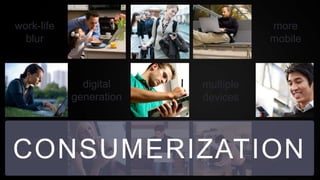
work-life                           more
  blur                              mobile


              digital    multiple
            generation   devices


  tech                               fast
CONSUMERIZATION
 savvy                              paced
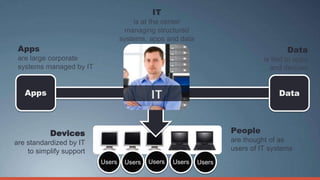
IT
                                      is at the center
                                   managing structured
                                  systems, apps and data
 Apps                                                                                Data
 are large corporate                                                         is tied to apps
 systems managed by IT                                                         and devices


   Apps                                                                           Data


           Devices                                                 People
are standardized by IT                                             are thought of as
    to simplify support                                            users of IT systems
                          Users    Users   Users   Users   Users
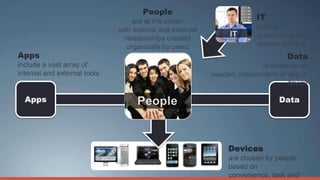
People
                                   are at the center
                                                                         IT
                              with internal and external                 provides
                                relationships created                    governance and
                                 organically by users                    service delivery
Apps                                                                              Data
include a vast array of                                                   is available as
internal and external tools                                needed, independent of app or
                                                                                   device

  Apps                                                                          Data


                                                                Devices
                                                                are chosen by people
                                                                based on
                                                                convenience, task and
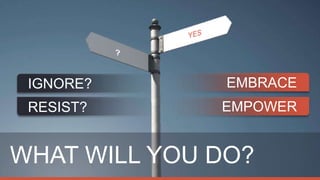
IGNORE?       EMBRACE
 RESIST?      EMPOWER


WHAT WILL YOU DO?
CHALLENGES
       How do you…
        Provide anytime, anywhere access?
         Fuel user passion and productivity?
          Keep your system and data
           safe?
           Streamline operations and drive
              competitive advantage?
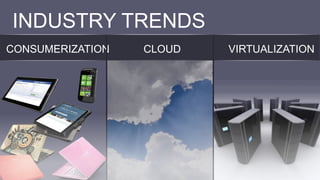
INDUSTRY TRENDS
CONSUMERIZATION   CLOUD   VIRTUALIZATION
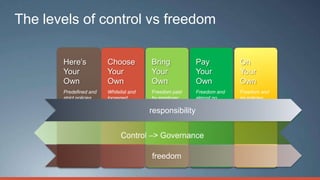
The levels of control vs freedom

       Here’s            Choose          Bring            Pay           On
       Your              Your            Your             Your          Your
       Own               Own             Own              Own           Own
       Predefined and    Whitelist and   Freedom paid     Freedom and   Freedom and
       strict policies   loosened        by employer      almost no     no policies
                         policies        and loose        policies
                                         responsibility
                                         policies


                                         freedom
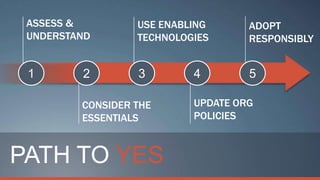
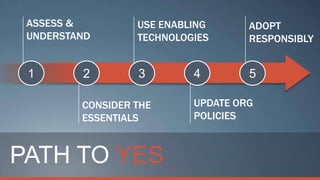
ASSESS &         USE ENABLING      ADOPT
 UNDERSTAND       TECHNOLOGIES      RESPONSIBLY


 1       2        3        4        5

         CONSIDER THE      UPDATE ORG
         ESSENTIALS        POLICIES


PATH TO YES
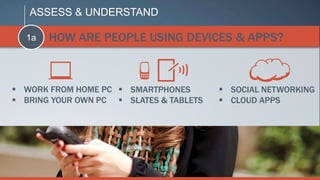
ASSESS & UNDERSTAND

  1a   HOW ARE PEOPLE USING DEVICES & APPS?


 WORK FROM HOME PC  SMARTPHONES         SOCIAL NETWORKING
 BRING YOUR OWN PC  SLATES & TABLETS    CLOUD APPS
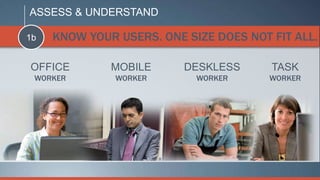
ASSESS & UNDERSTAND

1b   KNOW YOUR USERS. ONE SIZE DOES NOT FIT ALL.

OFFICE        MOBILE      DESKLESS      TASK
 WORKER        WORKER       WORKER      WORKER
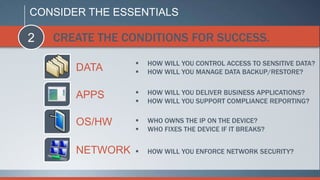
CONSIDER THE ESSENTIALS

2   CREATE THE CONDITIONS FOR SUCCESS.
                    HOW WILL YOU CONTROL ACCESS TO SENSITIVE DATA?
       DATA         HOW WILL YOU MANAGE DATA BACKUP/RESTORE?


       APPS         HOW WILL YOU DELIVER BUSINESS APPLICATIONS?
                    HOW WILL YOU SUPPORT COMPLIANCE REPORTING?


       OS/HW        WHO OWNS THE IP ON THE DEVICE?
                    WHO FIXES THE DEVICE IF IT BREAKS?


       NETWORK      HOW WILL YOU ENFORCE NETWORK SECURITY?
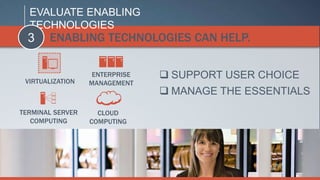
EVALUATE ENABLING
  TECHNOLOGIES
  3    ENABLING TECHNOLOGIES CAN HELP.


 VIRTUALIZATION
                   ENTERPRISE    SUPPORT USER CHOICE
                  MANAGEMENT
                                 MANAGE THE ESSENTIALS
TERMINAL SERVER     CLOUD
   COMPUTING      COMPUTING
UPDATE ORGANIZATIONAL POLICIES

4   POLICIES CAN ENABLE AND PROTECT.
    IT       LEGAL     FINANCE         HR
ADOPT RESPONSIBLY

5   HARNESS THE POWER OF YES.

 SET CLEAR SUCCESS METRICS
 PLAN FOR CONTINUOUS SERVICE IMPROVEMENTS
 DRIVE BUSINESS VALUE
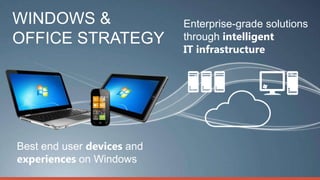
WINDOWS &                   Enterprise-grade solutions
OFFICE STRATEGY             through intelligent
                            IT infrastructure


Best end user devices and
experiences on Windows
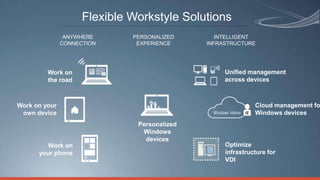
Flexible Workstyle Solutions
                ANYWHERE      PERSONALIZED       INTELLIGENT
               CONNECTION      EXPERIENCE     INFRASTRUCTURE


         Work on                                   Unified management
         the road                                  across devices


Work on your                                                 Cloud management fo
 own device                                                  Windows devices
                               Personalized
                                Windows
                                 devices
         Work on                                   Optimize
      your phone                                   infrastructure for
                                                   VDI
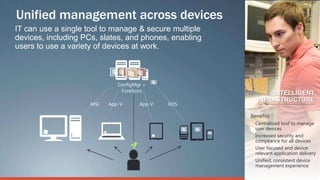
Unified management across devices
IT can use a single tool to manage & secure multiple
devices, including PCs, slates, and phones, enabling
users to use a variety of devices at work.


                              ConfigMgr +
                               Forefront
                                                              INTELLIGENT
                                                          INFRASTRUCTURE
                     MSI   App-V      App-V   RDS

                                                       Benefits
                                                       • Centralized tool to manage
                                                         user devices
                                                       • Increased security and
                                                         compliance for all devices
                                                       • User focused and device
                                                         relevant application delivery
                                                       • Unified, consistent device
                                                         management experience
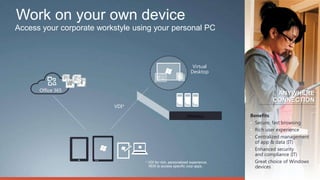
Work on your own device
Access your corporate workstyle using your personal PC


                                                                 Virtual
                                                                Desktop


      Office 365
                                                                                        ANYWHERE
                                                                                       CONNECTION
                          VDI*
                                                             FIREWALL         Benefits
                                                                              • Secure, fast browsing
                                                                              • Rich user experience
                                                                              • Centralized management
                                                                                of app & data (IT)
                                                                              • Enhanced security
                                                                                and compliance (IT)
                                   * VDI for rich, personalized experience.   • Great choice of Windows
                                     RDS to access specific corp apps.          devices
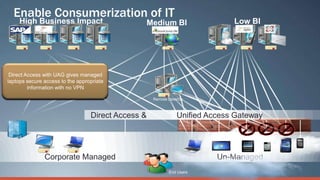
Enable Consumerization of IT


                Direct Access &      Unified Access Gateway


     Corporate Managed                         Un-Managed
                                  End Users
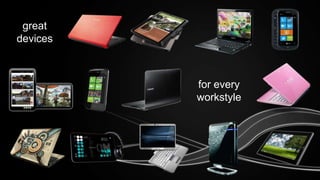
great
devices


          for every
          workstyle
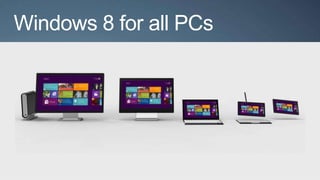
Windows 8 for all PCs
ASSESS &         USE ENABLING      ADOPT
 UNDERSTAND       TECHNOLOGIES      RESPONSIBLY


 1       2        3        4        5

         CONSIDER THE      UPDATE ORG
         ESSENTIALS        POLICIES


PATH TO YES
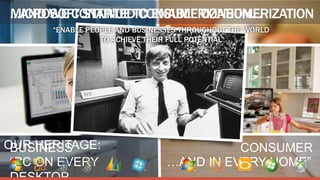
…AND WE CONTINUE TO ENABLE CONSUMERIZATION
MICROSOFT STARTED CONSUMERIZATION…
      “ENABLE PEOPLE AND BUSINESSES THROUGHOUT THE WORLD
                 TO ACHIEVE THEIR FULL POTENTIAL”


OUR HERITAGE:
 BUSINESS                                 CONSUMER
 “PC ON EVERY                   …AND IN EVERY HOME”
WE CAN HELP YOU SAY
Appendix
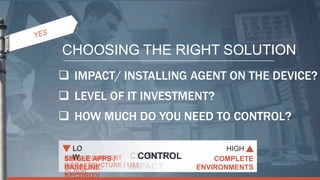
CHOOSING THE RIGHT SOLUTION
 IMPACT/ INSTALLING AGENT ON THE DEVICE?
 LEVEL OF IT INVESTMENT?
 HOW MUCH DO YOU NEED TO CONTROL?

  LO                                  HIGH
SINGLE CURRENT CLIENT
  W
EXTEND AGENT
NO/LITEAPPS /         COST
                    CONTROL         BUILD NEW
                                      AGENTS
                                   COMPLETE
INFRASTRUCTURE / USE
INSTALLED
BASELINE          IMPACT      INFRASTRUCTURE
                                   INSTALLED
                              ENVIRONMENTS
CLOUD
SECURITY
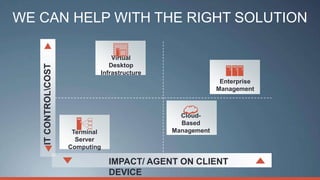
WE CAN HELP WITH THE RIGHT SOLUTION

                                 Virtual
                                Desktop
   IT CONTROLCOST

                             Infrastructure
                                                            Enterprise
                                                           Management


                                                Cloud-
                                                Based
                      Terminal                Management
                       Server
                     Computing

                                 IMPACT/ AGENT ON CLIENT
                                 DEVICE
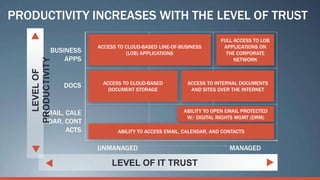
PRODUCTIVITY INCREASES WITH THE LEVEL OF TRUST
                                                                      FULL ACCESS TO LOB
                         ACCESS TO CLOUD-BASED LINE-OF-BUSINESS        APPLICATIONS ON
              BUSINESS             (LOB) APPLICATIONS                   THE CORPORATE
                  APPS                                                     NETWORK
   PRODUCTIVITY
     LEVEL OF


                          ACCESS TO CLOUD-BASED          ACCESS TO INTERNAL DOCUMENTS
                  DOCS
                            DOCUMENT STORAGE              AND SITES OVER THE INTERNET


         EMAIL, CALE                                    ABILITY TO OPEN EMAIL PROTECTED
                                                         W/ DIGITAL RIGHTS MGMT (DRM)
         NDAR, CONT
                ACTS            ABILITY TO ACCESS EMAIL, CALENDAR, AND CONTACTS


                         UNMANAGED                                       MANAGED

                              LEVEL OF IT TRUST
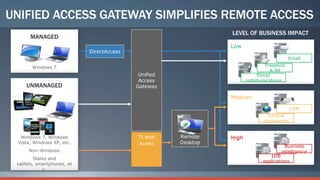
UNIFIED ACCESS GATEWAY SIMPLIFIES REMOTE ACCESS
                                                                LEVEL OF BUSINESS IMPACT
      MANAGED
                                                                Low
                            DirectAccess
                                                                                         Email

       Windows 7                                                              Presence
                                                                                & IM
                                            Unified                       Voice/
                                            Access                     communications
     UNMANAGED                             Gateway

                                                                Medium

                                                                                          CRM
                                                                                Central
                                                                              documents
                                                       <
                                                       >
  Windows 7, Windows                       TS Web     Remote    High
 Vista, Windows XP, etc.                   Access     Desktop
                                                                                       Business
      Non-Windows                                                                    intelligence
                                                                                LOB
        Slates and
                                                                             applications
 tablets, smartphones, et
            c.
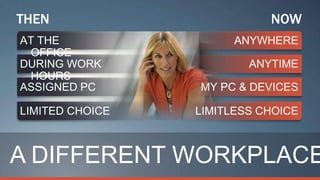
THEN             NOW


A DIFFERENT WORKPLACE
CONSUMERIZATION
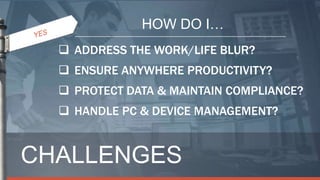
HOW DO I…
   ADDRESS THE WORK/LIFE BLUR?
   ENSURE ANYWHERE PRODUCTIVITY?
   PROTECT DATA & MAINTAIN COMPLIANCE?
   HANDLE PC & DEVICE MANAGEMENT?


CHALLENGES
MICROSOFT CAN HELP YOU MANAGE COMPLEXITY

 MANAGE ACCESS TO
  INFORMATION
 DELIVER SECURITY AND
  MANAGEMENT
  ESSENTIALS
 ENABLE THE
  ENTERPRISE WITH
  SOCIAL CAPABILITIES
MICROSOFT CAN HELP YOU MANAGE COMPLEXITY


 MANAGE ACCESS TO
  INFORMATION

  HANDLING THE PROLIFERATION OF MOBILE DEVICES
  SIMPLIFYING SECURITY AND MANAGEMENT
  PROVIDING A CONSISTENT APPLICATION EXPERIENCE
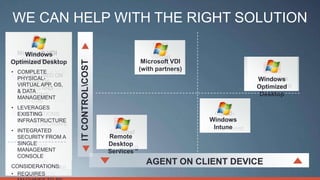
WE CAN HELP WITH THE RIGHT SOLUTION

     Remote
  Microsoft VDI
    Windows
    Windows
     Desktop                                           Virtual
 (with partners)
      Intune                                       Microsoft VDI


                    IT CONTROLCOST
Optimized Desktop
     Services                                         Desktop
                                                  (with partners)
•
•
•
  VERY LOW
  COMPLETE
  NO MAINTENANCE
  CAN BE USED ON
                                                   Infrastructure
  PHYSICAL-
  COST                                                                            Enterprise
                                                                                  Windows
• A RANGE OF
  MONTH-TO- OS,
  VIRTUAL APP,                                                                   Management
                                                                                  Optimized
  DEVICES AND
  MONTH PAYMENT
• & DATA THAN
  LEVERAGES
  OPERATING
  RATHER                                                                           Desktop
  MANAGEMENT
  EXISTING
  SYSTEMS
  YEARS
• LEVERAGES
  INFRASTRUCTU
• ACCESS TO
CONSIDERATIONS:
  EXISTING
  RE                                                                  Cloud-
  ADVANCED
  INFRASTRUCTURE                                                     Windows
                                                                       Based
• LESS RESPONSIVE
• MANAGEMENT
  SIMPLE SETUP:
• USER (MDOP)
  INTEGRATED
                                                                      Intune
                                                                    Management
  TOOLS                                Terminal
  NO IT TRAINING
  EXPERIENCE
  SECURITY FROM A                      Remote
                                        Server
• SINGLE
CONSIDERATIONS:
  EXPENSIVE                            Desktop
                                      Computing
• MANAGEMENT
• NO OS
CONSIDERATIONS:
  REQUIRES
                                       Services
  CONSOLE
  DEPLOYMENT
• ADDITIONAL
  LESS RESPONSIVE
CONSIDERATIONS:
                                                    AGENT ON CLIENT DEVICE
• NO SOFTWARE
  USER EXPERIENCE
  INFRASTRUCTURE
• DISTRIBUTION
  REQUIRES
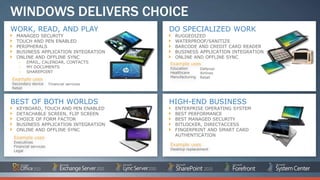
WINDOWS DELIVERS CHOICE
WORK, READ, AND PLAY                      DO SPECIALIZED WORK
  MANAGED SECURITY                          RUGGEDIZED
  TOUCH AND PEN ENABLED                     WATERPROOF/SANITIZE
  PERIPHERALS                               BARCODE AND CREDIT CARD READER
  BUSINESS APPLICATION INTEGRATION          BUSINESS APPLICATION INTEGRATION
  ONLINE AND OFFLINE SYNC                   ONLINE AND OFFLINE SYNC
   – EMAIL, CALENDAR, CONTACTS            Example uses
   – MY DOCUMENTS                         Education       Defense
   – SHAREPOINT                           Healthcare      Airlines
                                          Manufacturing   Retail
Example uses
Secondary device     Financial services
Retail


BEST OF BOTH WORLDS                       HIGH-END BUSINESS
  KEYBOARD, TOUCH AND PEN ENABLED           ENTERPRISE OPERATING SYSTEM
  DETACHABLE SCREEN, FLIP SCREEN            BEST PERFORMANCE
  CHOICE OF FORM FACTOR                     BEST MANAGED SECURITY
  BUSINESS APPLICATION INTEGRATION          BITLOCKER, DIRECTACCESS
  ONLINE AND OFFLINE SYNC                   FINGERPRINT AND SMART CARD
                                            AUTHENTICATION
Example uses
Executives
Financial services                        Example uses
Legal                                     Desktop replacement
MICROSOFT CAN HELP YOU MANAGE COMPLEXITY


 DELIVER SECURITY AND
  MANAGEMENT
  ESSENTIALS
  END–TO-END SECURITY AND MANAGEMENT
  PRODUCTIVITY AND DEVELOPMENT PLATFORM
  SPANS CONNECTED DEVICES
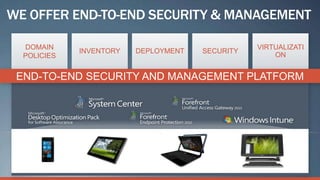
WE OFFER END-TO-END SECURITY & MANAGEMENT

  DOMAIN                                         VIRTUALIZATI
             INVENTORY   DEPLOYMENT   SECURITY
  POLICIES                                           ON


 END-TO-END SECURITY AND MANAGEMENT PLATFORM
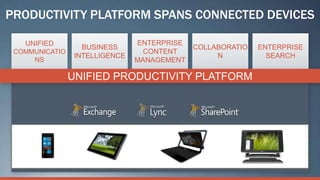
PRODUCTIVITY PLATFORM SPANS CONNECTED DEVICES

   UNIFIED                      ENTERPRISE
                   BUSINESS                  COLLABORATIO   ENTERPRISE
 COMMUNICATIO                     CONTENT
                 INTELLIGENCE                     N           SEARCH
     NS                         MANAGEMENT

                UNIFIED PRODUCTIVITY PLATFORM
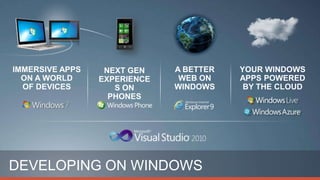
DEVELOPING ON WINDOWS
MICROSOFT CAN HELP YOU MANAGE COMPLEXITY


 ENABLE THE
  ENTERPRISE WITH
  SOCIAL CAPABILITIES

  Integrating consumer social apps
  Delivering enterprise-equivalent social apps
You Can Say Yes to the Social Enterprise
                             CONSUMER SOCIAL APPS


                             ENTERPRISE SOCIAL APPS


YOU CAN SAY YES TO THE SOCIAL ENTERPRISE
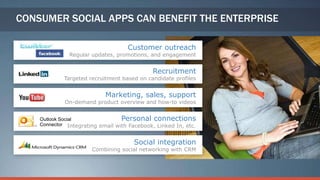
CONSUMER SOCIAL APPS CAN BENEFIT THE ENTERPRISE

                                    Customer outreach
              Regular updates, promotions, and engagement


                                             Recruitment
             Targeted recruitment based on candidate profiles


                            Marketing, sales, support
             On-demand product overview and how-to videos


    Outlook Social                Personal connections
    Connector Integrating email with Facebook, Linked In, etc.


                                      Social integration
                       Combining social networking with CRM
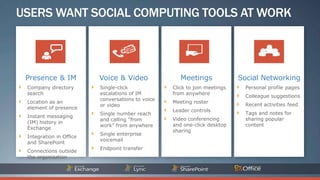
USERS WANT SOCIAL COMPUTING TOOLS AT WORK


 Presence & IM           Voice & Video               Meetings              Social Networking
 Company directory       Single-click             Click to join meetings     Personal profile pages
 search                  escalations of IM        from anywhere
                                                                             Colleague suggestions
                         conversations to voice
 Location as an                                   Meeting roster
                         or video                                            Recent activities feed
 element of presence
                                                  Leader controls
                         Single number reach                                 Tags and notes for
 Instant messaging
                         and calling “from        Video conferencing         sharing popular
 (IM) history in
                         work” from anywhere      and one-click desktop      content
 Exchange
                                                  sharing
                         Single enterprise
 Integration in Office
                         voicemail
 and SharePoint
                         Endpoint transfer
 Connections outside
 the organization
8 MILLION SOLD IN 60 DAYS
INFRASTRUCTUR
             E
             P L AT F O R M S

             A P P L I C AT I O N
             S
             TOOLS


WORLDCLASS ENTERPRISE
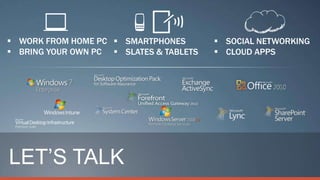
 WORK FROM HOME PC  SMARTPHONES         SOCIAL NETWORKING
 BRING YOUR OWN PC  SLATES & TABLETS    CLOUD APPS


LET’S TALK
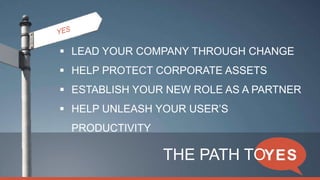
 LEAD YOUR COMPANY THROUGH CHANGE
 HELP PROTECT CORPORATE ASSETS
 ESTABLISH YOUR NEW ROLE AS A PARTNER
 HELP UNLEASH YOUR USER’S
 PRODUCTIVITY

                THE PATH TO
CONSUMER EXPERIENCES
 ACROSS PC, PHONE, & TV
+


CREATE, CONNECT, AND SHARE, ANYWHERE

Consumerization 5 Steps Ds

  • 1.
  • 2.
    work-life more blur mobile digital multiple generation devices tech fast CONSUMERIZATION savvy paced
  • 3.
    IT is at the center managing structured systems, apps and data Apps Data are large corporate is tied to apps systems managed by IT and devices Apps Data Devices People are standardized by IT are thought of as to simplify support users of IT systems Users Users Users Users Users
  • 4.
    People are at the center IT with internal and external provides relationships created governance and organically by users service delivery Apps Data include a vast array of is available as internal and external tools needed, independent of app or device Apps Data Devices are chosen by people based on convenience, task and
  • 5.
    IGNORE? EMBRACE RESIST? EMPOWER WHAT WILL YOU DO?
  • 6.
    CHALLENGES How do you…  Provide anytime, anywhere access?  Fuel user passion and productivity?  Keep your system and data safe?  Streamline operations and drive competitive advantage?
  • 7.
  • 8.
    The levels ofcontrol vs freedom Here’s Choose Bring Pay On Your Your Your Your Your Own Own Own Own Own Predefined and Whitelist and Freedom paid Freedom and Freedom and strict policies loosened by employer almost no no policies policies and loose policies responsibility policies freedom
  • 9.
    ASSESS & USE ENABLING ADOPT UNDERSTAND TECHNOLOGIES RESPONSIBLY 1 2 3 4 5 CONSIDER THE UPDATE ORG ESSENTIALS POLICIES PATH TO YES
  • 10.
    ASSESS & UNDERSTAND 1a HOW ARE PEOPLE USING DEVICES & APPS?  WORK FROM HOME PC  SMARTPHONES  SOCIAL NETWORKING  BRING YOUR OWN PC  SLATES & TABLETS  CLOUD APPS
  • 11.
    ASSESS & UNDERSTAND 1b KNOW YOUR USERS. ONE SIZE DOES NOT FIT ALL. OFFICE MOBILE DESKLESS TASK WORKER WORKER WORKER WORKER
  • 12.
    CONSIDER THE ESSENTIALS 2 CREATE THE CONDITIONS FOR SUCCESS.  HOW WILL YOU CONTROL ACCESS TO SENSITIVE DATA? DATA  HOW WILL YOU MANAGE DATA BACKUP/RESTORE? APPS  HOW WILL YOU DELIVER BUSINESS APPLICATIONS?  HOW WILL YOU SUPPORT COMPLIANCE REPORTING? OS/HW  WHO OWNS THE IP ON THE DEVICE?  WHO FIXES THE DEVICE IF IT BREAKS? NETWORK  HOW WILL YOU ENFORCE NETWORK SECURITY?
  • 13.
    EVALUATE ENABLING TECHNOLOGIES 3 ENABLING TECHNOLOGIES CAN HELP. VIRTUALIZATION ENTERPRISE  SUPPORT USER CHOICE MANAGEMENT  MANAGE THE ESSENTIALS TERMINAL SERVER CLOUD COMPUTING COMPUTING
  • 14.
    UPDATE ORGANIZATIONAL POLICIES 4 POLICIES CAN ENABLE AND PROTECT. IT LEGAL FINANCE HR
  • 15.
    ADOPT RESPONSIBLY 5 HARNESS THE POWER OF YES.  SET CLEAR SUCCESS METRICS  PLAN FOR CONTINUOUS SERVICE IMPROVEMENTS  DRIVE BUSINESS VALUE
  • 16.
    WINDOWS & Enterprise-grade solutions OFFICE STRATEGY through intelligent IT infrastructure Best end user devices and experiences on Windows
  • 17.
    Flexible Workstyle Solutions ANYWHERE PERSONALIZED INTELLIGENT CONNECTION EXPERIENCE INFRASTRUCTURE Work on Unified management the road across devices Work on your Cloud management fo own device Windows devices Personalized Windows devices Work on Optimize your phone infrastructure for VDI
  • 18.
    Unified management acrossdevices IT can use a single tool to manage & secure multiple devices, including PCs, slates, and phones, enabling users to use a variety of devices at work. ConfigMgr + Forefront INTELLIGENT INFRASTRUCTURE MSI App-V App-V RDS Benefits • Centralized tool to manage user devices • Increased security and compliance for all devices • User focused and device relevant application delivery • Unified, consistent device management experience
  • 19.
    Work on yourown device Access your corporate workstyle using your personal PC Virtual Desktop Office 365 ANYWHERE CONNECTION VDI* FIREWALL Benefits • Secure, fast browsing • Rich user experience • Centralized management of app & data (IT) • Enhanced security and compliance (IT) * VDI for rich, personalized experience. • Great choice of Windows RDS to access specific corp apps. devices
  • 20.
    Enable Consumerization ofIT Direct Access & Unified Access Gateway Corporate Managed Un-Managed End Users
  • 21.
    great devices for every workstyle
  • 23.
  • 24.
    ASSESS & USE ENABLING ADOPT UNDERSTAND TECHNOLOGIES RESPONSIBLY 1 2 3 4 5 CONSIDER THE UPDATE ORG ESSENTIALS POLICIES PATH TO YES
  • 25.
    …AND WE CONTINUETO ENABLE CONSUMERIZATION MICROSOFT STARTED CONSUMERIZATION… “ENABLE PEOPLE AND BUSINESSES THROUGHOUT THE WORLD TO ACHIEVE THEIR FULL POTENTIAL” OUR HERITAGE: BUSINESS CONSUMER “PC ON EVERY …AND IN EVERY HOME”
  • 26.
    WE CAN HELPYOU SAY
  • 27.
  • 28.
    CHOOSING THE RIGHTSOLUTION  IMPACT/ INSTALLING AGENT ON THE DEVICE?  LEVEL OF IT INVESTMENT?  HOW MUCH DO YOU NEED TO CONTROL? LO HIGH SINGLE CURRENT CLIENT W EXTEND AGENT NO/LITEAPPS / COST CONTROL BUILD NEW AGENTS COMPLETE INFRASTRUCTURE / USE INSTALLED BASELINE IMPACT INFRASTRUCTURE INSTALLED ENVIRONMENTS CLOUD SECURITY
  • 29.
    WE CAN HELPWITH THE RIGHT SOLUTION Virtual Desktop IT CONTROLCOST Infrastructure Enterprise Management Cloud- Based Terminal Management Server Computing IMPACT/ AGENT ON CLIENT DEVICE
  • 30.
    PRODUCTIVITY INCREASES WITHTHE LEVEL OF TRUST FULL ACCESS TO LOB ACCESS TO CLOUD-BASED LINE-OF-BUSINESS APPLICATIONS ON BUSINESS (LOB) APPLICATIONS THE CORPORATE APPS NETWORK PRODUCTIVITY LEVEL OF ACCESS TO CLOUD-BASED ACCESS TO INTERNAL DOCUMENTS DOCS DOCUMENT STORAGE AND SITES OVER THE INTERNET EMAIL, CALE ABILITY TO OPEN EMAIL PROTECTED W/ DIGITAL RIGHTS MGMT (DRM) NDAR, CONT ACTS ABILITY TO ACCESS EMAIL, CALENDAR, AND CONTACTS UNMANAGED MANAGED LEVEL OF IT TRUST
  • 31.
    UNIFIED ACCESS GATEWAYSIMPLIFIES REMOTE ACCESS LEVEL OF BUSINESS IMPACT MANAGED Low DirectAccess Email Windows 7 Presence & IM Unified Voice/ Access communications UNMANAGED Gateway Medium CRM Central documents < > Windows 7, Windows TS Web Remote High Vista, Windows XP, etc. Access Desktop Business Non-Windows intelligence LOB Slates and applications tablets, smartphones, et c.
  • 32.
    THEN NOW A DIFFERENT WORKPLACE
  • 33.
  • 34.
    HOW DO I…  ADDRESS THE WORK/LIFE BLUR?  ENSURE ANYWHERE PRODUCTIVITY?  PROTECT DATA & MAINTAIN COMPLIANCE?  HANDLE PC & DEVICE MANAGEMENT? CHALLENGES
  • 35.
    MICROSOFT CAN HELPYOU MANAGE COMPLEXITY  MANAGE ACCESS TO INFORMATION  DELIVER SECURITY AND MANAGEMENT ESSENTIALS  ENABLE THE ENTERPRISE WITH SOCIAL CAPABILITIES
  • 36.
    MICROSOFT CAN HELPYOU MANAGE COMPLEXITY  MANAGE ACCESS TO INFORMATION  HANDLING THE PROLIFERATION OF MOBILE DEVICES  SIMPLIFYING SECURITY AND MANAGEMENT  PROVIDING A CONSISTENT APPLICATION EXPERIENCE
  • 37.
    WE CAN HELPWITH THE RIGHT SOLUTION Remote Microsoft VDI Windows Windows Desktop Virtual (with partners) Intune Microsoft VDI IT CONTROLCOST Optimized Desktop Services Desktop (with partners) • • • VERY LOW COMPLETE NO MAINTENANCE CAN BE USED ON Infrastructure PHYSICAL- COST Enterprise Windows • A RANGE OF MONTH-TO- OS, VIRTUAL APP, Management Optimized DEVICES AND MONTH PAYMENT • & DATA THAN LEVERAGES OPERATING RATHER Desktop MANAGEMENT EXISTING SYSTEMS YEARS • LEVERAGES INFRASTRUCTU • ACCESS TO CONSIDERATIONS: EXISTING RE Cloud- ADVANCED INFRASTRUCTURE Windows Based • LESS RESPONSIVE • MANAGEMENT SIMPLE SETUP: • USER (MDOP) INTEGRATED Intune Management TOOLS Terminal NO IT TRAINING EXPERIENCE SECURITY FROM A Remote Server • SINGLE CONSIDERATIONS: EXPENSIVE Desktop Computing • MANAGEMENT • NO OS CONSIDERATIONS: REQUIRES Services CONSOLE DEPLOYMENT • ADDITIONAL LESS RESPONSIVE CONSIDERATIONS: AGENT ON CLIENT DEVICE • NO SOFTWARE USER EXPERIENCE INFRASTRUCTURE • DISTRIBUTION REQUIRES
  • 38.
    WINDOWS DELIVERS CHOICE WORK,READ, AND PLAY DO SPECIALIZED WORK MANAGED SECURITY RUGGEDIZED TOUCH AND PEN ENABLED WATERPROOF/SANITIZE PERIPHERALS BARCODE AND CREDIT CARD READER BUSINESS APPLICATION INTEGRATION BUSINESS APPLICATION INTEGRATION ONLINE AND OFFLINE SYNC ONLINE AND OFFLINE SYNC – EMAIL, CALENDAR, CONTACTS Example uses – MY DOCUMENTS Education Defense – SHAREPOINT Healthcare Airlines Manufacturing Retail Example uses Secondary device Financial services Retail BEST OF BOTH WORLDS HIGH-END BUSINESS KEYBOARD, TOUCH AND PEN ENABLED ENTERPRISE OPERATING SYSTEM DETACHABLE SCREEN, FLIP SCREEN BEST PERFORMANCE CHOICE OF FORM FACTOR BEST MANAGED SECURITY BUSINESS APPLICATION INTEGRATION BITLOCKER, DIRECTACCESS ONLINE AND OFFLINE SYNC FINGERPRINT AND SMART CARD AUTHENTICATION Example uses Executives Financial services Example uses Legal Desktop replacement
  • 39.
    MICROSOFT CAN HELPYOU MANAGE COMPLEXITY  DELIVER SECURITY AND MANAGEMENT ESSENTIALS END–TO-END SECURITY AND MANAGEMENT PRODUCTIVITY AND DEVELOPMENT PLATFORM SPANS CONNECTED DEVICES
  • 40.
    WE OFFER END-TO-ENDSECURITY & MANAGEMENT DOMAIN VIRTUALIZATI INVENTORY DEPLOYMENT SECURITY POLICIES ON END-TO-END SECURITY AND MANAGEMENT PLATFORM
  • 41.
    PRODUCTIVITY PLATFORM SPANSCONNECTED DEVICES UNIFIED ENTERPRISE BUSINESS COLLABORATIO ENTERPRISE COMMUNICATIO CONTENT INTELLIGENCE N SEARCH NS MANAGEMENT UNIFIED PRODUCTIVITY PLATFORM
  • 42.
  • 43.
    MICROSOFT CAN HELPYOU MANAGE COMPLEXITY  ENABLE THE ENTERPRISE WITH SOCIAL CAPABILITIES Integrating consumer social apps Delivering enterprise-equivalent social apps
  • 44.
    You Can SayYes to the Social Enterprise CONSUMER SOCIAL APPS ENTERPRISE SOCIAL APPS YOU CAN SAY YES TO THE SOCIAL ENTERPRISE
  • 45.
    CONSUMER SOCIAL APPSCAN BENEFIT THE ENTERPRISE Customer outreach Regular updates, promotions, and engagement Recruitment Targeted recruitment based on candidate profiles Marketing, sales, support On-demand product overview and how-to videos Outlook Social Personal connections Connector Integrating email with Facebook, Linked In, etc. Social integration Combining social networking with CRM
  • 46.
    USERS WANT SOCIALCOMPUTING TOOLS AT WORK Presence & IM Voice & Video Meetings Social Networking Company directory Single-click Click to join meetings Personal profile pages search escalations of IM from anywhere Colleague suggestions conversations to voice Location as an Meeting roster or video Recent activities feed element of presence Leader controls Single number reach Tags and notes for Instant messaging and calling “from Video conferencing sharing popular (IM) history in work” from anywhere and one-click desktop content Exchange sharing Single enterprise Integration in Office voicemail and SharePoint Endpoint transfer Connections outside the organization
  • 47.
    8 MILLION SOLDIN 60 DAYS
  • 49.
    INFRASTRUCTUR E P L AT F O R M S A P P L I C AT I O N S TOOLS WORLDCLASS ENTERPRISE
  • 50.
     WORK FROMHOME PC  SMARTPHONES  SOCIAL NETWORKING  BRING YOUR OWN PC  SLATES & TABLETS  CLOUD APPS LET’S TALK
  • 51.
     LEAD YOURCOMPANY THROUGH CHANGE  HELP PROTECT CORPORATE ASSETS  ESTABLISH YOUR NEW ROLE AS A PARTNER  HELP UNLEASH YOUR USER’S PRODUCTIVITY THE PATH TO
  • 52.
  • 53.
    + CREATE, CONNECT, ANDSHARE, ANYWHERE

Editor's Notes

  • #2 SUMMARYWe Can Help You Unleash the Potential of Consumerization.As consumers get their hands on smarter devices and applications, they are excited to bring these technologies to work and put them to good use. And they want you to support them. People are coming into work with much higher expectations of IT – they want better devices and applications, more options and freedom, and faster, uninterrupted service. These growing expectations are putting increasing pressure on IT to provide compelling solutions for their end users while maintaining a secure and well-managed environment. How can we help? Microsoft and Windows can help your business navigate these new realities of work – what many are calling the consumerization of IT. We can equip IT organizations with guidance on how to embrace and utilize consumerization responsibly, be your trusted advisor, and help you lead your business as you harness the potential of consumerization.We can help you say YES.OUTLINE OF THE PITCHSection 1:Consumerization – What is it? And why should you care? (slides 2-7)Approximate Time: 10 minSection 2: Guidance &amp; Best Practices: Path to YES (slides 8-14)Approximate Time: 10 minSection 3: Why Microsoft? Why Windows? (slides 15-22)Approximate Time: 5 minSection 4: Specific Guidance – Windows BG (slides 23-31)Approximate Time: 20 minTotal Time: 45 min + Discussion
  • #3 “You embrace the risks responsibly”
  • #4 Key Messages:Proliferation of consumer devices and digital generation entering work-force lead to higher user expectations of technology at work.Ubiquitous connectivity, fast paced nature of the modern business erode the line between people’s personal and professional life. As a result, people’s individual workstyles are increasingly important part of how things get done.Users increasingly have final say in what technology they use to get job done – this is the trend called Consumerization.We (Microsoft) believe consumerization is great as it unleashes people’s productivity and passion and has the opportunity to drive innovation and competitive advantage. We believe there is a power in saying “Yes” to users and their technology requests, and embracing consumerization in a responsible way.  Talk Track:Device proliferation, with users having broad access to consumer devices at home, leads to higher user expectations of technology at work. Indeed, according to the recent IDC study, the affluent user around the world ($98K annual income) owns on average 4.8 devices, while in the US there are 6.6 devices owned by the affluent user. Overall, there are estimated 700M personal computing devices WW in 2010, this expected to double by 2014 to 1.47B personal computing devices. Digital generation entering the work place raises these expectations to a whole new level – a generation that has grown up completely fluent in the language of digital technology—from texting, instant messaging, and blogs to Facebook, YouTube, and Twitter—has dramatically different expectations about the tools they should be able to use at work. These tech savvy users are also increasingly mobile, and operate in a fast paced environment. The dynamic environment, along with ubiquitous connectivity erodes the lines between people’s life and work. As the line between people’s life and work gets blurred, people’s personalities and individual workstyles have an increasing impact on how they get their work done and what technology they prefer to use. As a result, users increasingly want a say in what technology they use to get job done – this is the trend called Consumerization of IT. Examples of Consumerization: BYOD (users bringing and using their own PC/ slate/ phone) to work; using social networking at work and for work.A recent Forrester Research study showed that 35 percent of workers in the United States either buy their own smartphone for work, or use unsanctioned Web sites, or download unapproved applications on a work computer. Why? 24% of do-it-yourselfers say the technology is better than what their job provides. 36% say they need it, and their employer won’t provide an alternative. And nearly 40 percent say they use it at home and, well, they want it at work, too.Consumerization is great as it unleashes people’s productivity and passion, innovation and competitive advantage. We (Microsoft) believe there is a power in saying “Yes” to users and their technology requests in a responsible way and our goal at Microsoft is to partner with you in IT to enable you to embrace these trends but also ensure the environment remains secure and well managed.But embracing Consumerization is not easy for companies and it represents some key challenges (Segway to the next slide).
  • #5 To begin, take a look at the current model in which IT had organized their relationship to apps, data, devices and users. The old model of IT has IT at the center is at the center managing structured systems, apps and data. Apps are large corporate systems managed by IT and data is tied to apps and devices. Devicesare standardized by IT to simplify support an peopleare thought of as users of IT systems.This modular, bucket driven approach doesn’t take into account the changing dynamics of today’s digital workstyle and workforce.
  • #6 The combined influences of consumerization, new devices, Gen-V and digital workstyles means that IT organizations need to shift how theyposition people, apps, data, and devices. In the new model, people are at the center with internal and external relationships created organically by users. People expect that apps will be on-demand, self-service, task-specific tools.Data will be created, stored, shared and accessed based on tasks and relationships, not apps or devices. Data is available as needed, independent of app or deviceDevices and locations will be determined by end user and they will use multiple each day without thinking about it. Mobile will be a dominant use case, not an occasional one. In the new model, IT will play a critical role in governance and self-service enablement, but they will no longer be the center of the equation
  • #7 Key Point: Conzumerization is inevitable. And while there are risks, they are far outweighed by the potential benefits. With the growing trend of consumerization, IT has a few options for how to address…You can ignore. Naïve approach as this is a growing trend. You can resist. Consequence will be unhappy workers and untapped potential.We at Microsoft believe consumerization has potential to be very valuable to businesses. While there are certainly risks involved, if proper steps are taken, those risks can be mitigated. Moreover, the risks are far outweighed by the potential benefits in terms of user productivity and passion, innovation, competitive advantage, and even cost savings. So we believe you should you should embrace and empower consumerization. Say YES!We believe there is power is saying YES in a responsible way – and there is great opportunity for IT Leaders to drive their companies through this transition.
  • #8 Key Message:Consumerization presents a number of challenges to a typical enterprise and is hard to embark on.We (Microsoft) can help. Talk Track: As mentioned, we believe Consumerization is great as it unleashes people’s productivity and passion, innovation and competitive advantage. And a recent survey by analysts shows that most CIOs believe it is positive as well – over 80% of CIOs rated it as net positive for their organization.However, it is a very hard thing to embark on for a typical enterprise.A recent study by McAfee surveyed IT execs from 300+ enterprise companies in North America, and demonstrated that companies have on average $2M loss associated with a security incident when their user would inappropriately share confidential data on a social networking site. Typical issue that consumerization brings up is, for example, how do you give your employees the connection they need to key apps and data from the road and from variety of devices, so they will stay productive and passionate while at the same time protecting sensitive corporate data? We want to help you address the key challenges/questions of today:Provide anytime, anywhere access to your users;Keep your system and data safe;Support multiple devices while streamlining device management and cutting costs.
  • #9 Key Message:Virtualization and Cloud Computing are great enabling technologies that can help with the task of embracing consumerization and supporting users while managing the essentials (such as security).The rapid adoption of these two technologies is also a catalyst to a more rapid adoption of consumerization.Given the trends and technology choices companies have, developing a well thought through technology strategy for the enterprise is more important than ever. Talk Track: So clearly, consumerization is causing challenges in a typical enterprise.Fortunately, advances in two key areas of technology give great tools to IT to enable the users while addressing the needs and requirements of the business. One area is cloud computing. With cloud-based solutions, it’s not only possible to scale your corporate resources so that the capabilities for your users are available, across locations and devices – but also makes it easier for your company to adopt and stay on the latest technology without investing in the on-premise infrastructure. Many CIOs we talk to consider the move to cloud computing as inevitable. For example, if a user can now use Office 365 to get their work done and can access these Office documents from any device and from anywhere they are – it is easy to see how that can facilitate more diverse workstyles and consumerization.The second area is virtualization. Technologies such as Application Virtualization, virtual desktop infrastructure (VDI), and remote desktop services (RDS) giving corporate IT departments a platform for providing users access to information technology resources , often in personalized way, while maintaining the highest levels of security, compliance, and cost-effectiveness.Today virtualization is becoming a mainstream solution and we hear from analysts that 75% to 100% of customers are inquiring about virtualization.So with virtualization and cloud technologies, as well as with many established management technologies, IT has a broad array of tools to address the challenges and opportunities of consumerization.Given the technology choices companies have, having a well thought through technology strategy for the enterprise is more important than ever. The important question each CIO and each company should ask themselves is: what are the key capabilities they want to deliver to their users and their business?
  • #11 Key Point: There is a responsible path to embracing consumerization (i.e.saying YES).Assess &amp; Understand what users are doing and why.Manager the Essentials including data security, device and application management, etc.Update Organizational Policies, not just IT, but Legal, HR, etc.Use Enabling Technologies such as desktop virtualization &amp; cloud computing.Pilot &amp; Adoptconsumerization scenarios and use to drive business results.
  • #12 Key Point: The first step is understanding what your users are doing and why.Ask…What are users doing today? Why?What’s working? What’s not?What do they need that they don’t have?
  • #13 Key Point: As part of understanding your users, it helps to create a profile of different types of users. Remember, one solution does not fit all.
  • #14 Key Point: Next step is to create conditions for success by managing the essentials.DATAHow will you control access to sensitive data?How will you manage data backup/restore?APPSHow will you deliver business applications? How will you support compliance reporting?OS/HWWho owns the IP on the device?Who fixes the device if it breaks?NETWORKHow will you enforce network security?
  • #15 Key Point: ….Consumerization isn’t just an IT issue… in addition to updating IT policies, review policies in other departments:LegalFinance/AuditHuman Resources
  • #16 Key Point:Next step is to update org policies…Consumerization isn’t just an IT issue… in addition to updating IT policies, review policies in other departments:LegalFinance/AuditHuman Resources
  • #17 Key Point: Next step is to pilot and adopt consumerization…Set success metricsRun a pilot firstPlan for continuous service improvements…because consumerization is here to stay, your IT environment will need to remain flexible to keep up
  • #18 Key Messages:Windows strategy is: to deliver compelling end user experiences and devices, while providing enterprise-grade technologies to ITThese capabilities are: anywhere connectivity, personal experience, intelligent infrastructure Talk Track: How do we enable you to support diverse workstyles of your users? At Microsoft, in addition to providing you the capabilities by utilizing the power of these advances in cloud computing, virtualization, and building on the consumerization trend, we enable this through our core Windows strategy. Our strategy for Windows is: To deliver compelling end user experiences and devices that give your employees more freedom to accomplish tasks in ways that work best for them. At the same time, these experiences and devices must be built on enterprise-grade technologies that customerscount on to meet the security and manageability requirements of your business.This is our strategy today and our strategy for the future. We are in a unique position to deliver in both of these areas, as we are the only company that has very deep enterprise expertise and a deep consumer expertise at the same time. This has been in our DNA from the start “(a) computer in every home and on every desk” and we are continuing to deliver great technologies in both the consumer space (Kinnect, Win Phone 7, Bing) as well as the business space (from Azure to Windows Intune to Office 365 to System Center to SQL Server..)We build our products and make investments to support our vision, and that starts with Windows 7. We will continue invest in new scenarios and improve existing scenarios both in terms of security, manageability and user experience in our future products, but there are a lot of products you can use today. With Windows 7 and existing Microsoft technologies, you have a solid foundation. Here are 7 scenarios are already enabled and available to you today.
  • #19 Key Messages:We believe it’s time to give users more freedom, more flexibility to get great work done and drive business value. We have workstyle solutions to support diverse workstyles; we would like to explore specific ones with you today (those that are most relevant to the needs of your business). Talk Track: We believe it’s time to give users more freedom, more flexibility to get great work done and drive business value. Windows solutions offers three tangible business benefits to enable flexible workstyles : Greater productivity because people can work anywhere, on a variety of devices with instant access to the information they need and the people they count on, using the applications, services, and social networking tools they are used to. Greater effectiveness through tools and capabilities that anticipate people’s needs, remember their preferences, and adapt to their workstyles. An intelligent infrastructure that’s smart, safe, cost-effective, and easy to manage.{Guidance to field: choose 2-3 scenarios that are most compelling to you customer for drill down, and make these scenarios real with scenario demos}
  • #20 Key Messages for this scenario (slides 8-10):With Flexible Workstyle Solutions, customers can support wide range of user devices in their enterprise.The benefits include: centralized tool to manage all user devices, increased security and compliance for all devices and user focused and device relevant application delivery. Talk Track: Ethan represents so many IT managers who face the challenge of managing all the devices people bring to work today. Ethan’s corporation originally tried to block the use of personal devices, such as personal phones or tablets to work. However, they realized that people just circumvent the restriction, by sending documents to their personal email account and etc, resulting in business data being everywhere without IT knowledge. The organization decided that it is a good thing if people want to work outside normal work hr. And if using their personal device gives them more flexibility and ease of use to do more work, then they should embrace and support them. The question is how to efficiently support these devices?  
  • #21 Key Messages:With Flexible Workstyle Solutions, customers can support wide range of user devices in their enterprise.The benefits include: centralized tool to manage all user devices, increased security and compliance for all devices and user focused and device relevant application delivery. Talk Track: System Center Config Manager 2012 is the answer Ethan has been looking for. With Config Manager 2012, Ethan can use the same platform to manage Windows PCs or tablets, IOS devices, Android devices with a single console view. And with Forefront endpoint device security solution integrated into the product, Ethan doesn’t need to purchase and setup a parallel anti-virus software management infrastructure. More importantly, ConfigManager 2012 is a user-centric management model, so that access, authentication, authorization and reporting is based on user and each device accessing the corporate network is associated with the user. For example, the infrastructure is intelligent enough to know a user is accessing from a corporate owned PC that meets all corporate data security policy, so that data encryption is enabled on the PC with sufficient memory and storage, and that network connection is with Direct Access or VPN. In that case, when the user is trying to access or install apps from the ConfigManager application catalog, the device gets a wide choice of applications available to user based the functional role, and also the choice of installing these apps via MSI or app-V or run it as remote app or apps in a remote desktop. If that user is accessing from a smartphone or personal device, then Ethan can setup the policy so that the user only gets the choice of accessing and running apps as remote apps and the selection of applications can also be limited. Ethan will also have the ability to track and report out exactly who has access to corporate network, and with which devices. He can also determine how long each device has been accessing the corporate network and if the user is the primary user on that device.
  • #22 Key Messages to this scenario (slides 11-14):With Flexible Workstyle solutions, customers can enable their users to utilize their personal PC or slate/ media tablet for work The benefits include : rich user experience, centralized management of app &amp; data, enhanced security and compliance, great choice of Windows devices  Talk Track: Today’s knowledge workers juggle hectic schedules and endless lists of responsibilities. Even on vacation and during family time, they often need to stay current with what’s going on in the office. Media tablets can be a great solution to enable workstyles that fit the modern lifestyle and allow users to manage it with one device for both personal and professional needs, while travelling or on vacationFor example, Lisa is a business manager with a busy work schedule. She plans to take a family vacation and she decides to bring her own media tablet so that she can play games or read books for fun while checking her work items and review documents briefly.
  • #23 Key Messages With Flexible Workstyle solutions, customers can enable their users to utilize their personal PC or slate/ media tablet for work The benefits include : rich user experience, centralized management of app &amp; data, Enhanced security and compliance; great choice of Windows devices Talk Track: With a light touch on the remote access icon on her media tablet, she was able to login and open a virtual desktop running in her corporate data center with all her data, applications and settings, as if she was working in the office. For instance, she can access her corporate SharePoint sites, such as HR web, and enter her timesheet, which she forgot to do before leaving for vacation. In the process of checking her emails, Lisa realized some of her colleagues have questions on the details of the business deal she was working on. She used Office Lync on her tablets to IM and talk to her colleagues who are at the office or traveling. Lisa clarified the problems and issues within 10 minutes and felt good that all this was communicated via secure corporate network connection even through a public network from her hotel. At night, when Lisa has a moment to herself she remembered she needed to deliver a presentation on business process the day after she gets back, and wanted to get started. Instead of logging into her virtual desktop, she just got onto the internet, and accessed her corporate Visio and PowerPoint applications hosted on the website, and worked for about 30 minutes. Lisa saved her work online which means the data is stored safely somewhere in a data center, and she will be able to access and work easily later on the trip, even when she is only using her phone in the car.
  • #25 Key Messages to this scenario (slides 15-17):The amazing devices Windows supports can be personalized for people like Blake who use different machines throughout the work day.Many people like Blake travel constantly and want something lighter to do their work on as they go from place to place. And Blake enjoys the touch and writing experience from his Windows slate.Switching devices used to mean spending a lot of time keeping everything in sync and up to date.Application virtualization, Windows 7 roaming user profile and folder redirection, and System Center Configuration Manager allow Blake access to a personal desktop from any device. And he can have consistent experience both online and offline. At the same time, these technologies provide Blake’s IT department centralized management of application access and delivery based on rules and policies. Our technologies keep apps, data, and settings connected to individuals and not just devices, so people can stay productive and have flexibility to have different workstyles.BitLocker technology encrypts the PC hard-drive, so data will be saved even when the PC is stolen.Talk Track: While it’s not uncommon for users to switch between a couple different laptops when working in the office or at home, keeping everything up to date and in sync so that data, applications, and settings are consistent and everything works the way it should on every device continues to be a challenge. How can you support your employees so that it doesn’t matter what device they use? With our solutions, you can ensure that the devices are all completely synchronized at all times.The amazing devices Windows supports can be personalized for employees like Blake who use different machines throughout the work day. As a business manager, Blake travels a lot for business meetings. He uses his laptops when he works at office or home, but he wants to travel light when he is on the road, and he prefers using his ultra-thin and light tablet. Many people like Blake travel constantly likely will want something lighter to do their work on as they go from place to place.The challenge some people have with multiple devices is to have their data, apps and settings follow them so that everything just works the way it should- and it really doesn’t matter which hardware is used. Switching devices used to mean spending a lot of time keeping everything in sync and up to date.
  • #26 Key Messages:The amazing devices Windows supports can be personalized for people like Blake who use different machines throughout the work day.Many people like Blake travel constantly and want something lighter to do their work on as they go from place to place. And Blake enjoys the touch and writing experience from his Windows slate.Switching devices used to mean spending a lot of time keeping everything in sync and up to date.Application virtualization, Windows 7 roaming user profile and folder redirection, and System Center Configuration Manager allow Blake access to a personal desktop from any device. And he can have consistent experience both online and offline. At the same time, these technologies provide Blake’s IT department centralized management of application access and delivery based on rules and policies. Our technologies keep apps, data, and settings connected to individuals and not just devices, so people can stay productive and have flexibility to have different workstyles.BitLocker technology encrypts the PC hard-drive, so data will be saved even when the PC is stolen.Talk Track: Well, Blake doesn’t worry about synchronizing data or settings when he switches computers, since these two are always in sync. Our technologies allow Blake access to a personal desktop from any device by using Windows 7 roaming user profile and folder redirection, application virtualization, Windows Server 2008 and System Center Configuration Manager 2012. At Blake’s company, his IT uses roaming user profile, folder redirection and offline cache built into Windows 7, and all Blake’s settings and data are automatically stored in a company server and made available locally in cache on his devices so that Blake can use them even when not connected online. Every time Blake logs into his computer, he always has the latest settings, and documents no matter which computer he uses. Also with application virtualization, no application is installed on his PCs – when he logs into the machine, a software agent will automatically populates the icons of the applications which Blake has access to. Once he clicks on the icon, the application will stream down and be cached locally for his use. So, just like settings and data, Blake always has the latest version of the application when he logs in and no matter which computer he has. When Blake is traveling and realizes he wants access to a new retail app to show his customer designs, he can just request access via web catalog either available on his pc in add/remote program section or go to a corporate app portal. Both are enabled via System Center Configuration Manager. Once he is approved and IT grants him access in the app server, the icon of this app just shows up on his PC. Our technologies keep apps, data, and settings connected to individuals and not just devices, so people can have consistent experiences both online and offline, stay productive, and have the flexibility to enjoy their preferred workstyle. At the same time, these technologies provide Blake’s IT department centralized management of application access and delivery based on rules and policies. While we call this scenario “personalized PC” here, this is really about roaming user scenarios we have been discussing for the last couple years. In this way, we will enable a user to roam from PC to PC, even when these PCs are shared, and provide them an individualized and consistent experience no matter which PC they are using at that time…
  • #27 Key Messages:Windows has a wide array of great devices, from, laptops to tablets to slates, and desktops to smartphones for every workstyleThe benefits include : great choice of devices; productivity from anywhere for users while also making these devices secure, easy to manage and support for the companiesTalk Track: If your users haven’t found a great device like Lisa, Windows has a wide array of great devices, from, laptops to tablets to slates, and desktops to smartphones for every workstyle. Windows devices deliver productivity from anywhere. Your usersExpect to be connected; On multiple devices; To be productive (get real stuff done even on a mobile device);Anywhere and anytime.Windows devices offer choices Form factors, Colors, Hardware Features.Next-level Windows 7 features: Pen and Handwriting, Multi-touch, Fingerprint scanning, accelerated graphics. Location awareness and more.Rich applications.It’s about the users choosing their work style experience that’s unique and personal to them. Windows devices are secure, easy to manage and support for companies. Enterprise-class data protection: BitLocker Drive Encryption with TPM chips;Unified device management with System Center;Enterprise Support SLAs for devices through OEMs and HW vendors
  • #28 Key Messages: With Windows 7 and Office 2010, Frank can access the data, apps, files, and people he needs to stay productive on the road. Microsoft Direct Access provides secure internet connection through encryption and instantly link Frank to important documents, while Lync allows him to chat with colleagues during the day and his family at night.Frank can also stay connected to his family through his Windows Live account.Our technologies will enable a workstyle that making work and personal connection easier.Talk Track: Frank is an architect, and like Blake, he is constantly on the road. Frank’s main concern is staying connected to the resources he needs.
  • #29 Key Messages to this scenario (slides 18-20): With Windows 7 and Office 2010, Frank can access the data, apps, files, and people he needs to stay productive on the road.Microsoft Direct Access provides secure internet connection through encryption and instantly link Frank to important documents, while Lync allows him to chat with colleagues during the day and his family at night.Frank can also stay connected to his family through his Windows Live account.Our technologies will enable a workstyle that making work and personal connection easier.Talk Track: With Windows 7 and Office 2010, Frank can access the data, apps, files, and people he needs to stay productive on the road.Frank’s laptop is setup Windows Direct Access, so as soon as Frank logs into his computer, it automatically connects to Frank’s corporate resources and networks via an encrypted connection tunnel as long as Frank has internet access via mobile broadband or WiFi hotspots, no matter where he is. At same time, using the same secure connection, Frank’s PC can be monitored, patched and provisioned by his IT department. For instance, Frank’s PC will automatically go through a scanning process to ensure that the latest anti-virus software is in place and there is no virus reported before connection is granted. If he wants to find his colleagues, he just needs to IM or call them via Office Lync, with a single click via a secure corporate connection. For instance, once Frank was working on a plane using in-flight Wi-Fi and was able to use Lync to call his colleague who was traveling and working from a hotel in Mumbai. They were able to show each other documents via Lync and talk through the changes and issues, as if both of them were sitting in the office. Frank can also stay connected to his family through his Windows Live account. When Frank has down time, he talks to his family and catches up on what they are doing. His looks up new photos of his children playing in soccer games, and he also listens to new piece of music his daughter just learned to play-- all from SkyDrive where his wife loads everything the family does. All Frank needs to do is to log onto his personal Live account, and he gets to participate in the joy and happiness of his family and follow his children’s growing up even though he is thousands of miles away. Microsoft DirectAccess and an internet connection instantly link Frank to important documents while Lync allows him to chat with colleagues during the day and his family at night. For people like Frank in your organization, ourWorkstyle solutions will make their work and personal connection easier.
  • #30 Key Messages to this scenario (slides 21-23)Employees like Holly want to use their phones to do more than view documents and send text messages. They want to access corporate SharePoint sites and edit docs. With Flexible Workstyle solutions, people can get real work done on their phones and achieve new levels of productivity all with their mobile phone.Access to documents and the ability to download and edit them is now just a touch away on a Windows phone using Microsoft Mobile Office.And IT can manage access and remotely wipe device to ensure data security.Talk Track: Mobile phones are smarter, faster, and they are everywhere today.Holly is a busy professional and a soccer mom. She tries hard to balance busy workload while participating in her children’s activities. As she drives her children to different practices she needs a mobile work solution that allows her to work anywhere and anytime when she can and wants to. And the device of Holly’s choice to work is her phone –because it is small and she carries it with her at all times. Employees like Holly want to use their phones to do more than view documents and send text messages.
  • #31 Key Messages: Employees like Holly want to use their phones to do more than view documents and send text messages. They want to access corporate SharePoint sites and edit docs. With Flexible Workstyle solutions, people can get real work done on their phones and achieve new levels of productivity all with their mobile phone.Access to documents and the ability to download and edit them is now just a touch away on a Windows phone using Microsoft Mobile Office.And IT can manage access and remotely wipe device to ensure data security.Talk Track: With Flexible Workstyle solutions, people can get real work done and can achieve new levels of productivity all with their mobile phone.Holly was able to access documents posted on her team Sharepoint sites and view and edit documents, such as Excel, Word or PowerPoint and save them right back to the share. Holly was also able to set it to local cache mode, so that the documents will be available on her phone without her having to download each time. And if there are changes to these documents, the documents on Holly’s phone will be automatically updated and Holly will always have the latest info at her fingertips. . Access to documents and the ability to download and edit them is now just a touch away on a phone using Microsoft Mobile Office, corporate emails; Sharepoint sites &amp; Office 365 apps. Holly’s IT department feels good about enabling Holly to have the flexible workstyle she needs because they can easily authenticate and authorize Holly’s access from her phone and remotely wipe the device when it is lost.
  • #32 Key Messages to this scenario (slides 24-26):Keeping a corporate network safe and secure can be costly for organizations.IT pros like David face the challenge of keeping non-network PCs secure without incurring huge costs to the business.David decides to use Windows Intune, an online solution, to manage all the PCs he’s responsible for keeping secure and update to date. By choosing Windows Intune, David is able to manage security and updates from one console without the costs of an on-premise infrastructure. He is able to remotely monitor all these PCs and track inventory of software assets. Talk Track: Keeping a corporate network safe and secure can be costly for organizations.IT pros like David face the challenge of keeping non-network PCs secure without incurring huge costs to the business.David’s company has a lot of contractors working on site and telecommuters using their own PCs to do work and access David’s corporate resources. David wants to ensure that these devices are meeting the company requirements to connect to the corporate network and resources but does not want to pay for software licensing by providing corporate desktop images or adding these contractors to the existing corporate directory services, especially since the turn-over rate on contractors are super high.
  • #33 Key Messages: Keeping a corporate network safe and secure can be costly for organizations.IT pros like David face the challenge of keeping non-network PCs secure without incurring huge costs to the business.David decides to use Windows Intune, an online solution, to manage all the PCs he’s responsible for keeping secure and update to date. By choosing Windows Intune, David is able to manage security and updates from one console without the costs of an on-premise infrastructure. He is able to remotely monitor all these PCs and track inventory of software assets. Talk Track: David decides to use Windows Intune, an online solution, to manage all the PCs he’s charged with keeping secure.David can remotely log into a management console and centrally:Manage the deployment of Microsoft® updates and service packs to all these non-domain joined PCs.Manage and update endpoint protection policies onto these devices even when these devices were outside the corporate firewall. Push and deploy Microsoft Malware Protection Engine to ensure these devices have the latest anti-malware software in place. David can provide remote assistance to resolve PC issues as long as the PC has an internet connection. David can track hardware and software inventory to efficiently manage corporate licenses used. These PCs have access to enterprise features available in Windows 7 Enterprise SKU, such as Bitlocker encryption capability to ensure data is safe even when the device is lost. By choosing Windows Intune, David selects a Flexible Workstyle solution that allows him to manage security and updates from one console without the costs of an on-premise infrastructure.
  • #34 Key Messages to this scenario (slides 27-29) Many organizations are using virtual desktop infrastructure solutions to give employees connection to the corporate server from any location on any device while also saving on costs of server infrastructure investments.Many IT pros like Carol are challenged to maximize the organization’s investment in VDI and Flexible Workstyle solutions help them do just that.With Hyper-V, physical memory is more efficiently used because memory is allocated based on real-time work requirements. It increases VM density and supports more users with the same hardware.Application Virtualization shared cache capability provides a better user experience and requires less network bandwidth.Our virtualization technologies will help optimize your infrastructure for VDI and make it smart and efficient.Talk Track: Providing users with remote desktop access from any device is essential as companies look for ways to reduce server infrastructure investments and improve the cost-effectiveness of a virtual desktop infrastructure. Many organizations are using virtual desktop infrastructure solutions to give employees connection to the corporate server from any location on any device while also saving on costs of server infrastructure investments. Many IT pros like Carol are challenged to maximize the organization’s investment in VDI and Flexible Workstyle solutions help them do just that.
  • #35 Key Messages: Many organizations are using virtual desktop infrastructure solutions to give employees connection to the corporate server from any location on any device while also saving on costs of server infrastructure investments.Many IT pros like Carol are challenged to maximize the organization’s investment in VDI and Flexible Workstyle solutions help them do just that.With Hyper-V, physical memory is more efficiently used because memory is allocated based on real-time work requirements. It increases VM density and supports more users with the same hardware.Application Virtualization shared cache capability provides a better user experience and requires less network bandwidth.Our virtualization technologies will help optimize your infrastructure for VDI and make it smart and efficient.Talk Track: With Hyper-V, physical memory is more efficiently used because memory is allocated based on real-time work requirements.Dynamic memory capability provided by Hyper-V, lets you pool available physical memory on the host server and dynamically allocate that memory to virtual machines based on workload needs at real time. This allows more efficient usage of physical memory resources, and thus enables more VMs to be running simultaneously on a virtualization host without noticeable performance impact. For example, Carol’s users are allocated 2 GB of memory for their desktops. However, most users at most time are working on documents and uses 768MB or less memory. So, for a server with 32GB memory, instead of running 16 VMs per server, Carol was able to run 50+ VMs on that server.  Application Virtualization provides a better user experience and requires less network bandwidth.All the VMs in Carol’s virtual desktop infrastructure are dynamically provisioned using application virtualization so that no applications are physically installed in the image, only an app-V agent, so that Carol only needs to save a few image templates on the SAN. When users log-in, the applications icons automatically populate based on user profile and access to applications. And when the users click the icon, the applications will stream down from an app-server to the VM. With Shared Cache capability, multiple VMs can share the same cache so that the applications do not need to be streamed down multiple times for different VMs.Flexible Workstyle solutions make optimizing an infrastructure for VDI smart and efficient.
  • #36 Key Messages: It is clear that consumerization is happening in the enterprise today and businesses have to respond and address this trend by enabling different workstyles. Windows can help. Our goal and our Windows strategy is to provide you technologies to enable diverse workstyles that your employees are asking for while meeting your business needs.As we discussed our solutions today for different workstyles, we want to show you our commitment and capability to provide great user experiences with a variety of attractive devices and an intelligent infrastructure that is smart, safe, cost-effective and easy to manage. This is true not just for technologies today, but for our future products as well. And I would like to talk to you about our future roadmap.
  • #37 Our goal is to provide Windows for every Workstyle: As we discussed, Windows 7, and other existing technologies, already make a solid step towards providing solutions to enable diverse workstyles within your organization.Windows strategy is the same for Windows 8, which is to enable more and better workstyles with technologies people in today’s new workplace are asking for. The strategy for Windows remains the same: Provide great user experiences over a variety of amazing devices;While providing you with an intelligent infrastructure that is smart, safe, cost-effective and easy to manage. {Please use the following scripts as it is}So with that context in mind, let’s clarify what we announced on June 1st regarding the next version of Windows and what that means for the steps you should take today in your organization.
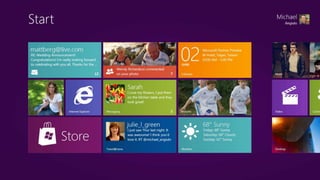
  • #38 {Please use the following scripts as it is}On June 1st, our senior leadership demonstrated the next generation of Windows, internally code-named “Windows 8,” for the first time. We demoed a wide range of devices with new hardware technologies to take advantage of the new user experience – which puts people truly at the center by letting them interact with Windows in entirely new ways.The demo showed a new generation of touch capable hardware. Here are a few aspects of the new interface we demoed: First, we demoed fast launching of apps from a tile-based Start screen, which replaces the Windows Start menu with a customizable, scalable full-screen view of apps.Then, we showed Live tiles with notifications, always up-to-date information from your apps.Next, we demoed fluid, natural switching between running apps.Afterwards, we showed Windows 8’s convenient ability to snap and resize an app to the side of the screen, so you can really multitask using the capabilities of Windows.We then demoed Web-connected and Web-powered apps built using HTML5 and JavaScript that have access to the full power of the PC.We also demoed fully touch-optimized browsing, with all the power of hardware-accelerated Internet Explorer 10.Although the new user interface is designed and optimized for touch, it works equally well with a mouse and keyboard. Our approach means flexibility — you get to use whatever kind of device you prefer, with peripherals you choose, to run the apps you love. This is sure to inspire a new generation of hardware and software development, improving the experience for PC users around the world. 
  • #39 {Please use the following scripts as it is}Windows 8 is an innovative shift in Windows design that is designed for hundreds of millions of computers of all different kinds, all different size screens, whether or not it has touch. Windows 8 spans the entire breadth of the PCs shipping from laptops, to desktops, to all-in-ones, to slates/tablets. Windows 8 is an upgrade for the entire ecosystem of PCs. In Computex Taiwan, our corporate vice president, Michael Anguilo showcased Windows 8’s ability to work across both x86 and ARM-based architectures, with a variety of early prototypes running the new operating system to our hardware partners. Not only will Windows 8 run on a wide range of new devices, we also extended the trend that we started with Windows 7 on keeping our system requirements either flat, or reducing them over time. So, Windows 8 will be able to run on a wide range of machines, because it will have the same system requirements or lower.
  • #40 Key Point: There is a responsible path to embracing consumerization (i.e.saying YES).Assess &amp; Understand what users are doing and why.Manager the Essentials including data security, device and application management, etc.Update Organizational Policies, not just IT, but Legal, HR, etc.Use Enabling Technologies such as desktop virtualization &amp; cloud computing.Pilot &amp; Adoptconsumerization scenarios and use to drive business results.
  • #41 Company is rooted in a vision that encompasses personal and professional, work and life.Today, Microsoft delivers solutions that power the worlds largest enterprises, schools, government offices, and small businesses….as well hundreds of millions of homes.On the CONSUMER Side:Windows 7 – xxx licenses soldHotmail: 360 Million UsersWindows Live Messenger: Ranked #1XBOX: 40 M consols soldXBOX Live: 25 million membersOffice: 30 copies of Office 2010 sold every minuteBing: 21.4 M usersUnlike other consumer technology companies such as Apple, Twitter, Facebook or Google…Microsoft also is a business tech company.Windows 7 widely deployed in businesses.SQL Server is the most widely shipped DB (45.5)Exchange is the leading enterprise email system.More than 70% of the Fortune 100 companies have OCSSharePoint took the number one spot away from IBM in IDC’s Business Collaboration Platform category.Windows Server Most Widely Shipped Server OS (76.8%) 1.4 million people on Dynamics CRMMore than 50% of the Fortune Global 500 companies use Microsoft’s Online Services
  • #44 Key Point: Many of companies today are experiencing consumerization in full force. Address the work/life blur?Ensure anywhere productivity?Protect data &amp; maintain compliance?Streamline pc &amp; device management?
  • #46 Timing: 4 minutes Key Points:How much access a device has to enterprise resources—including email, documents, and business applications—should depend on to what degree the device meets organizational criteria. The more the organization trusts the device, the greater the access. The level of access to information dictates how productive a user can be when working from the device. There are different ways to enable access depending on the level of trust, so even a completely unmanaged device can have some level of access to keep users productive. Script:So, what do you do when an executive says to you “you’ve got to make this iPad work”? I say iPad because it’s the latest craze to hit the consumer—and business—market, but you can really substitute in any unmanaged device, whether Windows or otherwise.One way to approach this is to think about three categories of IT trust: (1) at one end of the spectrum you have completely unmanaged devices; (2) at the other end of the spectrum you have fully managed devices, those you are most comfortable with; and (3) in between you have devices that meet certain criteria and enable some degree of control. Smartphones are a great example of a device sitting in this middle ground. If you are using Microsoft Exchange ActiveSync® technology to provide access to Microsoft Exchange–based email, then you also have the ability to enforce specific policies, such as requiring the device to enforce password protection and only allowing devices that provide you with the ability to remotely wipe the device in the event that it is lost or stolen. Depending on the level of IT trust, you could control access to different types of information from the device based on how critical or sensitive that information is. For example, your email, calendar, and contacts could generally be considered low business impact information, so we’ve put that at the bottom of the list here. You should be able to enable all devices, regardless of level of trust, some degree of access to email. However, with messages that are protected by digital rights management (DRM), unmanaged devices may not support access or you may choose to impose policies to prevent it. Centrally stored documents could fall into a medium business impact category. For managed devices, and even devices that you have some limited degree of control over, you may want to provide full access to internal documents and sites over the Internet. A great example of this is Windows Phone 7, which has access to Microsoft SharePoint® sites as a capability built right into the phone’s operating system. On the other hand, line-of-business (LOB) applications typically fall into a high business impact category, so you may want to block access to those applications on the corporate network except for managed devices.For those devices that don’t meet the minimum requirements, one way to enable access to email, documents, and LOB applications is through cloud-based services. Microsoft Exchange Online, Microsoft SharePoint Online, and Microsoft Dynamics® CRM Online are some examples of these services, but with the Windows Azure® platform, you can also develop your own cloud-based applications. And finally, although not an optimal solution, you could also provide access to a virtualized Windows desktop from an unmanaged slate device, which could deliver the information your user needs to stay productive while virtually eliminating the risk.As you can see, really regardless of the level of IT trust, you can enable some degree of access to any of these categories to help keep users productive. The difference is in how you enable that access, what that experience is like, and how you manage the inherent risks.
  • #48 Key Point: The workplace has changed DRAMATICALLY in the last 5 years. It used to be that employees works primarily in the office or worksite. Now, with smart devices and wireless connections available everywhere, they work – in the office, at home, on the plane, at the park…anywhere.It used to be that most work got done during work hours. Now with globalization and the blurring lines between work and life, employees work at unpredictable times during the day. Productivity happens anytime.It used to be that work primarily gone done with a PC on a desk. Today information workers have a host of devices from mobile PCs, smartphones, media tablets, and slate PCs.All this boils down to more and more choice for the end-user. More choice in how they get the job done. What devices they use. What applications they use. Anywhere. Anytime. On any device.This is what work is like today.
  • #49 Key Point: Many of companies today are experiencing consumerization in full force. As consumers get their hands on smarter devices and applications, they are excited to bring these technologies to work and put them to good use. And they want YOU to support them. Workers are wanting more say in what they use to get the job done.Industry experts have coined this term, the “consumerization of IT” Key drivers of this growing trend include: More Choice: End users have more access to smarter, cheaper devices, social networking sites and cloud services.Enabling Technologies: Wireless networks, cloud services, virtualization, powerful &amp; intuitive devices, etc. are enabling, if not fueling this trend.Work/Life Blur: Work styles have evolved to a point where the lines between work and life have blurred. Users want technology consistently across the office, home, and in between.User Expectations: Ultimately, user expectations have increased; they expect technology at work to be as good as their technology at home. Why should we care of consumerization? Gartner calls this trend “the single most influential trend affecting the technology sector in the coming decade.”People are coming into work with much higher expectations of IT – they want better devices and applications, more options and freedom, and faster, uninterrupted service. These growing expectations are putting increasing pressure on IT to provide compelling solutions for their end users while maintaining a secure and well-managed environment. And the reality is… the trend is accelerating.69% of workers make their own decisions about mobile devices, and corporate IT rarely has any impact of influence over the decision (Yankee).And, 77 percent of workers who have a Facebook account use it during work hours (Nucleus Research).
  • #50 Key Point: Many of companies today are experiencing consumerization in full force. Address the work/life blur?Ensure anywhere productivity?Protect data &amp; maintain compliance?Streamline pc &amp; device management?
  • #51 Timing: 2 minutes Key Points:Microsoft is addressing the proliferation of devices in three ways: Providing a variety of options for enabling access to information from different mobile devices based on level of IT trust.Delivering security and management tools to simplify and streamline the management of an increasingly complex and varied IT environment.Delivering productivity tools and an application platform that supports a common experience across devices. Script:A consequence of device proliferation—combined with users’ expectations of an increasingly mobile and flexible work style—is complexity. One thing is certain: the number of devices used for work purposes is only going to increase, as new, innovative form factors appear and as the consumerization trend further entrenches. This is great news for your users and the business, as people will find increasingly efficient ways to do their work and novel, engaging ways to interact with customers. However, it certainly doesn’t make life any easier for those in the IT department. Having a unified security and management solution will go a long way toward addressing this complexity. With the Microsoft System Center suite today, you have an integrated toolset to use with all managed Windows-based PCs and devices, and looking to the future, you can expect System Center to provide additional capabilities to help you manage the proliferation of devices and form factors in your enterprise. With Forefront Unified Access Gateway, you can enable your employees—as well as partners and vendors—to access your corporate network resources remotely from both managed and unmanaged PCs and mobile devices; the single, centralized platform helps simplify management.And finally, to deliver the best possible experience across the new and emerging devices in use in your business, we believe the answer is to provide a consistent interface. With our “PC, phone, and browser” approach, we aim to provide that common user experience, regardless of form factor. And with development based on the same standards across devices, we’re even making it easy for you to take your custom applications, designed for the desktop, and move them to the cloud or to another device with minimal effort.So, managing access to information across devices is one piece of the consumerization story. Let’s turn to the second piece: enabling the social enterprise.
  • #52 Timing: 1 minute Key Points:Users expect to use the device that will best fit their needs to get their work done. The key to managing these devices and enabling information access without exposing your business to risk is a comprehensive security and management solution.Users will get the most from their devices when they can have consistent and device-relevant access to their productivity and business applications.  Script:The first area I mentioned is about managing access to enterprise information and resources across devices. There are three key aspects that I’d like to look at:First, how do you handle the proliferation of devices?Second, since security concerns don’t go away, how can you make it simpler to manage those devices and address security? And third, how can you provide a consistent application experience across those devices, to help keep your users productive?
  • #54 Timing: 3 minutes Key Points:With Windows, users have choice in device form factors. Regardless of the type of device, with Windows-based devices users can have all of the same productivity tools that they currently use on their Windows-based PC or laptop. Presenter Guidance:If the Slate Compete Kit is available from the Microsoft Technology Center (MTC), replace this slide with a hands-on demonstration of different device options. Script:Windows-based devices offer you exceptional choice to fit the device to the task. Up until now we’ve been talking about all kinds of devices from various vendors and different considerations for accessing information with them. Now I’d like to take a moment to highlight for you the kinds of Windows-based slates and tablets that are available. They range from those optimized for consuming content (whether reading or listening or watching), to those designed for specific industries, to powerful devices complete with keyboards and high-performance components—the full gamut of form factors that we looked at earlier. With Windows-based slates in the simplest “work, read, and play” category, you get touch-based computing plus the option of using a pen with your device, managed security, the ability to connect peripherals, and the option of integrating the device with your business applications. Another significant benefit is the option of online and offline sync. When you’re offline, you don’t need to stop working. You can continue to use your email, access files in your My Documents folder, and access local copies of your SharePoint content. The next time you connect, that content will all automatically sync. You essentially get all the benefits of Windows 7, but in a more portable, touch-based form factor. These slates are ideal as a secondary device and for those working in retail and financial services.With the more specialized devices, you get all of those same benefits, but with additional features: the devices might be waterproof and sanitizable, they might have a built-in barcode or credit card reader, or they might be especially rugged. These devices are typically developed for businesses in specific industries, such as education, healthcare, manufacturing, defense, airlines, or retail.As you move up to the convertible device, you add that integrated keyboard. For people like executives, those working in financial services or as part of a legal team, or who simply need to create a lot of text-based content, the added keyboard can make a significant difference to how useful the device is for work.And last but not least, the high-end business devices. With these, you get the best performance, the best-managed security, full encryption capabilities with BitLocker® data encryption, the simplest access to the corporate network through DirectAccess, and built-in authentication options such as through fingerprint or smart card readers. These devices are running Windows 7 Enterprise and offer all of the same benefits that you have with your PC, but in a convertible form factor.No matter which of these devices you choose, you can run all of the same productivity tools that you already use on your PC or laptop, because these devices all use Windows 7. That means you don’t need to feel limited in terms of the work that you can perform simply because you are using an alternative form factor.  
  • #55 Timing: 1 minute Key Points:Users expect to use the device that will best fit their needs to get their work done. The key to managing these devices and enabling information access without exposing your business to risk is a comprehensive security and management solution.Users will get the most from their devices when they can have consistent and device-relevant access to their productivity and business applications.  Script:The first area I mentioned is about managing access to enterprise information and resources across devices. There are three key aspects that I’d like to look at:First, how do you handle the proliferation of devices?Second, since security concerns don’t go away, how can you make it simpler to manage those devices and address security? And third, how can you provide a consistent application experience across those devices, to help keep your users productive?
  • #56 Timing: 2 minutes Key Points:In an increasingly complex IT environment, security and management likewise have become more complex.Microsoft offers an end-to-end security and management platform that can enable enterprises to use a single approach to manage the range of Windows-based devices accessing their network and internal resources.Script:In an increasingly complex IT environment, security and management likewise become more complex. Microsoft’s comprehensive security and management platform extends to any device running the Windows operating system. One of the benefits of using Windows-based devices is that you can use the same Microsoft tools you may already use to manage your existing Windows infrastructure—whether your goal is to apply domain policies, track and manage your inventory, deploy updates and patches, monitor and manage security, or deliver a virtualized desktop. Having a single management and security platform will simplify your maintenance and management burden and minimize the number of tools that your IT staff needs to learn and use.Looking to the future, we want to continue to deliver a single security and management platform for your heterogeneous client infrastructure. Just as our server management platform has evolved to provide a centralized management solution for monitoring cross-platform environments, such as Linux and UNIX, and managing different hypervisor technologies including VMware, our client management technologies are evolving. We understand the desire to support access to enterprise applications and information from a diverse range of devices and operating systems, and our Forefront Unified Access Gateway today provides an effective solution for both managed and unmanaged devices. Moving forward, Microsoft is committed to delivering security and management solutions that can help you balance your users’ desire for access from virtually any device with your need for security, privacy, control, and compliance.
  • #57 Timing: 2 minutes Key Points:We focus on delivering a consistent experience across our productivity platform, which spans form factors and delivery models, from on-premises servers to cloud services to mobile applications. Script:Our focus on delivering a consistent experience across devices isn’t just about building custom applications. It’s something embedded across our productivity platform. We look at business productivity through the five capabilities listed across the top of the slide: unified communications, business intelligence, enterprise content management, collaboration, and enterprise search. The three platforms listed at the bottom of the slide are the foundation for these capabilities. Each includes on-premise, cloud, and mobile options:With Exchange, your users can have the ability to access their email, voice mail, instant messaging (IM), and more from virtually any platform, anywhere—on their PC through the Microsoft Outlook® messaging and collaboration client, on their phone (whether that’s an iPhone, Blackberry, Windows phone, or other) through Exchange ActiveSync, and through all major web browsers with the Microsoft Outlook Web App.With Microsoft Lync™ communications software, you can give your users presence and IM, audio and video calling, web conferencing, and desktop- and application-sharing capabilities—again through an interface that is consistent across the PC, phone, and browser. Mobile clients for Lync will be available for all major smartphone platforms.And with SharePoint 2010, we’ve improved cross-browser support so you can access SharePoint from the Windows Internet Explorer® browser, Firefox, Safari—in fact, from any of the modern leading PC and phone browsers, including from your iPhone or iPad. Our goal is to deliver a productivity platform that works together and that provides a similar experience no matter what device you’re on.  
  • #59 Timing: 1 minute Key Points:Users expect to use the device that will best fit their needs to get their work done. The key to managing these devices and enabling information access without exposing your business to risk is a comprehensive security and management solution.Users will get the most from their devices when they can have consistent and device-relevant access to their productivity and business applications.  Script:The first area I mentioned is about managing access to enterprise information and resources across devices. There are three key aspects that I’d like to look at:First, how do you handle the proliferation of devices?Second, since security concerns don’t go away, how can you make it simpler to manage those devices and address security? And third, how can you provide a consistent application experience across those devices, to help keep your users productive?
  • #60 Timing: 2 minutes Key Points:Social computing is unavoidable in the enterprise, and policies are essentially to guide and control usage.We see two opportunities for social computing in the enterprise: Integrating consumer social applications into everyday processes and tools as appropriate.Offering enterprise applications that deliver a consumer-like experience without compromising security and privacy. Script:There seems little doubt anymore thatit’s riskier to ignore or resist the social computing trend than it is to find ways of embracing and adopting social computing into the enterprise. In fact, Gartner ranks the topic “business gets social” as one of seven “money-making initiatives” that enterprises should consider in the next few years. They claim that “Savvy business and IT leaders are not content to watch from the sidelines as these changes unfold. They are getting smart about social and serious about exploring, and possibly exploiting, the opportunities these new relationship dynamics promise.&quot;However, as critical as social computing is becoming to the enterprise, there are some inherent risks. The challenge, as with all of the consumerization of IT trend, is to find ways to incorporate social technologies while safeguarding the network from attack and protecting the business from the damage that can be caused through inappropriate information disclosure—competitively, legally, and in terms of customer approval. Regardless of the extent of adoption, policies are essential to guide usage and, where appropriate, control access.Businesses have an opportunity to incorporate social technologies in two ways:Integrating popular consumer applications into everyday business processes and business tools, in particular to create opportunities to connect and engage with customers, vendors, and other members of the public.Implementing enterprise-grade tools for employee collaboration that deliver social capabilities similar to those offered through consumer tools but with the necessary security and privacy. Additional Information:Ken McGee, “The 2011 Gartner Scenario: Current States and Future Directions of the IT Industry,” Gartner, Inc., January 20, 2011, http://www.gartner.com/DisplayDocument?doc_cd=209949&amp;ref=g_rss
  • #61 Timing: 4 minutes Key Points:Consumer social applications have become a powerful—and essential—tool for engaging with customers and potential new employees.They can help businesses make more personal connections with and provide regular updates to customers, partners, and suppliers and provide a new vehicle for marketing, sales, and customer support. They can also present new avenues for recruitment.Integrating social networking into everyday business tools—such as email and customer relationship management—can be an effective and efficient way for employees to build a more comprehensive, “single view” of customers.  Script:So, with the right policies in place, what could you achieve by integrating consumer social applications into your business? Let’s look at some of the most immediate opportunities:You can use consumer social networking sites (like Facebook, MySpace, and Bebo) and microblogging through Twitter to build a community of followers—made up of your customers, employees, partners, vendors, and other interested parties. These online communities are a great forum for sharing updates on your business, running promotions, engaging with customers in a more immediate and personal style, and responding to feedback and issues. This last point is an important one. What’s great about social networking is that it’s not a one-way communication medium. Those businesses harnessing social media most effectively are actively listening and responding to their customers online—and proactively addressing complaints and problems head on before they spiral into a public relations (PR) nightmare. For example, they might have a group of employees tasked with and empowered to monitor “tweets” about the business and to respond in real time as a way to deliver a differentiated, responsive, and personal service experience to customers.Business-oriented social networking sites, such as LinkedIn, are also a great tool for recruitment. Rather than relying on potential candidates to seek your company out, you can proactively identify top potential recruits based on their profiles and connections to your current employees.You can use online video channels as a way to share information about your business and product or service offerings. Forrester calls out video as one of the four technologies that “empower your customers and employees alike.” According to Forrester, “people upload 24 hours of new video to YouTube every minute.” Perhaps more important is the rate at which videos are being watched: according to ComScore, in November 2010, in the United States alone, 172 million viewers “engaged in nearly 5.2 billion viewing sessions during the course of the month.” ComScore also reports that “84.2 percent of the U.S. Internet audience viewed online video” in that month. Video is clearly a potentially powerful way to share information about your company and inspire excitement and interest. However, the potential for video doesn’t end there: it’s also a great tool for training, and video conferencing can transform internal and external communications. Integrating social media into your everyday business tools can make it much easier to tap into social networks in a consistent and effective way. One thing that we love here at Microsoft is how, right in our email application, through the Outlook Social Connector, we can see a history of our interactions with our contacts and their activities in social networks. This helps us stay connected and current with the latest updates from within our communities—whether our colleagues, our customers, or external vendors. Integration of social networks with your customer relationship management (CRM) system provides an even better way of listening to customer conversations and engaging social customers on their terms—and then managing and measuring those efforts. It also helps you get closer to a true 360-degree view of your customers, to help fine tune your sales, marketing, and service activities. For example, the Social Networking Accelerator for Microsoft Dynamics CRM is designed to help users discover online conversations, identify influential people, and engage with them on social networking sites right from within the CRM system. It also gives you powerful analytics to help you both capture data and make sense of it, to help you actually see results from your efforts.Consumer social applications offer tremendous potential to help you improve marketing, sales, and customer service performance and differentiate your business. However, there will certainly be some instances where consumer social apps will simply NOT be appropriate for use in your enterprise, because they expose your business to too much risk. That doesn’t mean that you have to say “no” altogether. Additional Information:Ted Schadler, “Welcome to the Empowered Era: An Empowered Report: Reinvent Yourself To Serve Empowered Customers And Employees,” Forrester Research, Inc., November 1, 2010, http://www.forrester.com/rb/Research/welcome_to_empowered_era/q/id/57265/t/2 (Forrester login required) “comScore Releases November 2010 U.S. Online Video Rankings,” ComScore press release, December 16, 2010, http://www.comscore.com/Press_Events/Press_Releases/2010/12/comScore_Releases_November_2010_U.S._Online_Video_Rankings
  • #62 Timing: 6 minutes Key Points:Enterprise social capabilities can help improve communication and collaboration by enabling users to connect with each other using more versatile and convenient tools. Microsoft offers a number of enterprise-ready social computing tools—such as instant messaging, presence, and audio and video calling plus social networking—that provide a consumer-like experience while delivering the security, privacy, and control that businesses require. Script:Consumer social computing tools like instant messaging (IM) and video calling are widely popular because they are so effective and convenient—and your users will want to use them at and for work. And in fact, many do. Consider Skype, a very popular consumer voice and video Internet calling service. Forrester reports that “Skype has 124 million monthly visitors, and 37% use Skype for business.” But does Skype deliver the security that your business requires? For example, if your employees are using the text chatting feature to discuss confidential business matters, what risks is this exposing the business to if those communications aren’t encrypted or secure? In some cases, it simply may not be appropriate to embrace certain consumer applications into the enterprise. The answer is to deliver those same capabilities through enterprise-ready tools. Enterprise-ready social computing tools deliver the privacy, encryption, and auditing capabilities that businesses need to protect their confidential information and meet regulatory compliance requirements.We’ve been incorporating social features into our enterprise productivity platform for years, and many of our enterprise customers have some or all of these tools already in place. Let’s have a look at some examples of how you can use them:Presence &amp; IM. With Lync, you can deliver enterprise-ready presence and IM, two technologies that many people can’t imagine living without anymore. Some of the features available with Lync include:The ability to search for colleagues in the company directory; view the availability, photos, and personal notes of close contacts; and initiate conversations with a single click. The ability to publish your current location through presence, so your contacts will know, for example, if you’re working from the office or at home.The ability to keep track of your IM conversation history with every contact for subsequent retrieval and continuance.The convenience of being able to see people’s presence status and initiate conversations right from within Office documents and on SharePoint sites.The ability to connect with people outside your organization, including other organizations using the same technology as well as those on public IM networks such as the MSN® and Windows Live® networks, Yahoo!, and AOL. This way, users don’t need to use more than one tool to keep in touch with work contacts and personal contacts.Voice and video.Lync also lets you make audio or video calls—much like Skype—and can serve as a standalone voice offering that users can access in the office, at home, or on the road from phones, PCs, and desktop applications. Some of the benefits include:From an IM conversation, users can escalate to an audio or video call with a single click for a richer and more personal experience.Whether they’re working at the office, at home, or on the go with a mobile phone, users can receive work calls at the same number. Likewise, when they’re making calls, even if they’re calling from a mobile phone, they can do so through work and present their work identity.Users can specify a single location for their work voice mail by directing unanswered calls from their mobile phone to the enterprise voice mail system.If they’re talking through a PC and need to move to another location, users can easily move the call to a mobile device without disrupting the conversation through endpoint transfer. Meetings. Holding online meetings is a powerful way to stay productive when time or distance prevents in-person meetings. Benefits of Lync web conferencing include:Whether someone is working from a computer or on their mobile phone, they can get meeting reminders and then join conferences with a single click—all from within Outlook.With a meeting roster feature, participants can see who is in the meeting and who the active speaker is at any point of time.Leader controls give the person running the meeting the ability to allow, eject, or mute participants, making it easy to control conferences.Video conferencing and one-click desktop sharing can enable more productive, more collaborative meetings.Social networking. While public social networking sites like Facebook aren’t the ideal tools for internal communications and networking—for simple reasons like confidentiality—there’s no reason you can’t create your own internal online communities. SharePoint is designed to help bring people together:Users can share information about their background, role, interests, skills, and previous projects through their own profile page.They can also quickly build a network of colleagues with automatic suggestions based on reporting structure, memberships, and common contacts.A feed that reports a user’s regular activities lets people visiting his or her personal page know what he or she is up to.And with tags and notes, users can share their favorite sites, help categorize content and make it more discoverable, and let others know what they found useful with the “I like it” tag.These technologies are all examples of how you can deliver consumer-like social experiences in the enterprise without exposing your organization to risk. Additional Information:Ted Schadler, “Welcome to the Empowered Era: An Empowered Report: Reinvent Yourself To Serve Empowered Customers And Employees,” Forrester Research, Inc., November 1, 2010, http://www.forrester.com/rb/Research/welcome_to_empowered_era/q/id/57265/t/2 (Forrester login required)
  • #66 Key Point: Microsoft has enterprise-ready solutions that can help you address consumerization trends. When it’s “bring your own” device scenarios, slates/tablets, social networking, or cloud apps, Microsoft has enterprise-ready solutions that can help you address your users needs around consumerization.
  • #67 Key Point: In closing, here are key opportunities for you with regards to consumerization:Lead your company through changeHelp protect corporate assetsEstablish your new role as a partner Help unleash your user’s productivity
  • #69 Key Point: The promise of Windows: Windows helps you create, connect, and share, anywhere.We have a great product in Windows 7 and customers are very satisfied with how Windows 7 has simplified their PC experience. But the promise of Windows goes beyond the PC. People do a lot of different things with technology today. We create, we connect, we consumer, we share, and many of us have different PCs and devices and stuff stored in different places – at home, at work, and places in between.Our stuff is hard to get to when we want to and our devices are not always connected. Windows 7 takes the PC to a whole new level. With Windows 7 and Windows Live, it’s like having your own personal cloud. You’ll have easy access to your stuff virtually anywhere and more creative ways to edit and share your photos and videos.The Windows Promise for people is a product of this new reality. Windows helps you create, connect, and share, anywhere – across all your devices, for work and life.