education.au limited, 2005
education.au limited
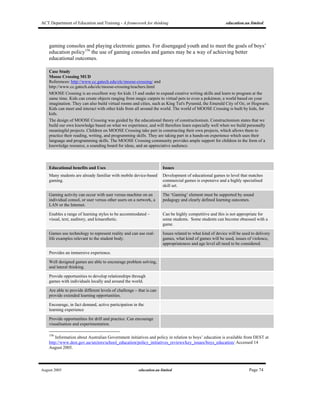
EMERGING TECHNOLOGIES
A framework for thinking
ACT Department of Education and
Training
Final Report
August 2005
ACT Department of Education and Training - A framework for thinking education.au limited
August 2005 education.au limited Page i
Table of Contents
1 Executive Summary..........................................................................1
Main Findings.........................................................................................................1
2 About this Report..............................................................................6
3 The ACT Context...............................................................................8
4 General Trends in Emerging Technologies..................................10
5 The Environmental Context for Emerging Technologies............12
5.1 Political and Legal Environment ......................................................................12
5.1.1 Governance and Security .......................................................................12
5.1.2 Policy Framework ...................................................................................13
5.1.3 Digital Rights and Intellectual Property...................................................14
5.1.4 Equity and Accessibility ..........................................................................15
5.2 Social and Cultural Environment .....................................................................17
5.2.1 Cultural Change ......................................................................................17
5.3 Educational Environment..................................................................................18
5.3.1 Pedagogy and ICT..................................................................................18
5.3.2 Professional Development (PD) and Support.........................................18
5.4 Technology Environment..................................................................................19
5.4.1 Sustainability...........................................................................................19
5.4.2 Open Source Software............................................................................20
5.4.3 Web Services..........................................................................................21
6 Emerging Technologies for Consideration ..................................22
6.1 Infrastructure Layers .........................................................................................22
ACT Department of Education and Training - A framework for thinking education.au limited
August 2005 education.au limited Page ii
6.2 Standards............................................................................................................22
6.2.1 National Interoperability Frameworks .....................................................22
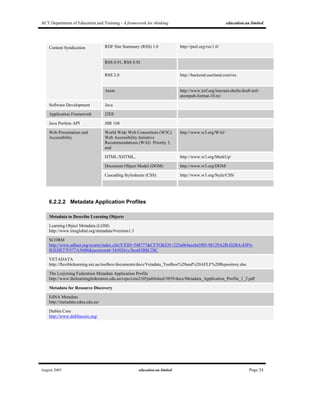
6.2.2 Technical Standards ...............................................................................23
6.3 Technical Infrastructure ....................................................................................28
6.4 Web-based Administrative Tools and Applications Infrastructure ..............32
6.4.1 Learning Management Systems.............................................................32
6.4.2 Student Management Systems...............................................................34
6.4.3 Digital Student Report Card Systems.....................................................36
6.4.4 Plagiarism Detection Systems ................................................................37
6.4.5 Online Collaborative Workspaces...........................................................38
6.4.6 Virtual Classroom Software Systems .....................................................40
6.4.7 e-Portfolios..............................................................................................42
6.5 Content Infrastructure .......................................................................................45
6.5.1 Learning Objects.....................................................................................45
6.5.2 Utilising Existing Content and Information Services...............................48
7 Teaching and Learning Tools ........................................................50
7.1 Creating the Smart Classroom .........................................................................50
7.1.1 Interactive Whiteboards ..........................................................................50
7.1.2 Online Tutors: Ask a Teacher/Tutor........................................................52
7.1.3 Personal Communications......................................................................53
Delivery Devices...................................................................................63
7.2 Mobile Devices: The Digital Backpack.............................................................63
7.2.1 Storage Devices......................................................................................63
7.2.2 Personal Digital Entertainment Devices (PDEs) and MP3 Players........64
ACT Department of Education and Training - A framework for thinking education.au limited
August 2005 education.au limited Page iii
7.2.3 Personal Digital Assistants (PDAs) (also known as Handheld Devices)67
7.2.4 Mobile Phones ........................................................................................68
7.2.5 Laptops ...................................................................................................70
7.2.6 TabletPCs ...............................................................................................72
7.2.7 Gaming Devices......................................................................................73
7.2.8 Assistive and Adaptive Technologies .....................................................75
7.3 Content Delivery Methods.................................................................................77
7.3.1 Content Syndication................................................................................77
7.3.2 Podcasts .................................................................................................78
7.3.3 Vodcasts .................................................................................................80
7.3.4 Blogs .......................................................................................................81
7.3.5 Wikis........................................................................................................83
7.3.6 Voice over Internet Protocol (VoIP) ........................................................84
7.3.7 Digital TV.................................................................................................86
7.4 Other Devices, Concepts, and Technologies..................................................88
7.4.1 Moblogs and Photoblogs ........................................................................88
7.4.2 Digital Cameras ......................................................................................88
7.4.3 Scanners.................................................................................................89
7.4.4 Swarming (also called ‘meetups)............................................................89
7.4.5 Peer-to-peer Networking and Technologies...........................................89
7.4.6 Internet Protocol Version 6 (IPv6)...........................................................90
7.4.7 Chipification, RFID, Smart Cards............................................................90
7.4.8 Solar Powered Computer Networks and Schools ..................................92
8 Decision-Making Matrix..................................................................93
ACT Department of Education and Training - A framework for thinking education.au limited
August 2005 education.au limited Page iv
8.1 Teaching and Learning outcomes....................................................................93
8.2 Teacher Acceptance ..........................................................................................93
8.3 Student Acceptance and Parental Support.....................................................93
8.4 Leadership in use and take-up .........................................................................93
8.5 Relevant, Available and Cost effective Content .............................................94
8.6 Sustainability, Resourcing, Risk, Extensibility...............................................94
8.7 Interoperability and Integration........................................................................94
8.8 Applicability........................................................................................................94
9 References.......................................................................................95
ACT Department of Education and Training - A framework for thinking education.au limited
August 2005 education.au limited Page v
Authorship
This document was authored by Jenny Millea, Dr Ian Green and Garry Putland of education.au
limited. Valuable advice and commentary was provided by other education.au limited staff, including
Geoff Hendrick, Jerry Leeson, Jon Mason, Kerrie Smith, James Stewart-Rattray, Nancye Stenalis, and
Gerry White. In addition, Jo Stewart-Rattray of Vectra Corporation provided an expert overview of
emerging security and governance issues. We also wish to acknowledge the important guidance,
commentary and feedback afforded by the staff of ACT DET through a series of workshops and
follow-up phone consultation. In particular Beverley Forner, Karen Carlton, Peter Fenwick and
Gordon White gave us thoughtful, detailed advice that assisted significantly in fashioning this report
into its final shape.
Notes
Australian spelling has been used throughout this document except where content is sourced from a
quote where American spelling is used.
Figures
Figure Description
Figure 1 Education and training policy framework influencing ACT DET.
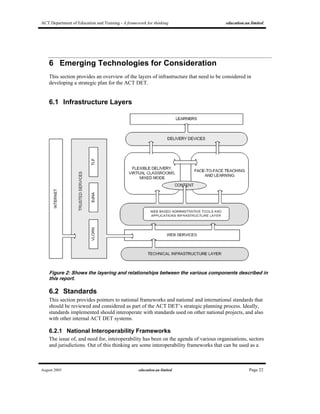
Figure 2 Layering and relationships between the various components described in this report.
Figure 3 Information and Communication Technology for Victorian Schools 2002
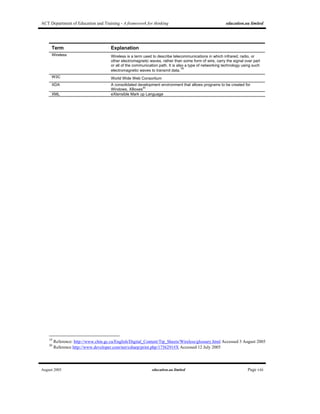
List of Definitions
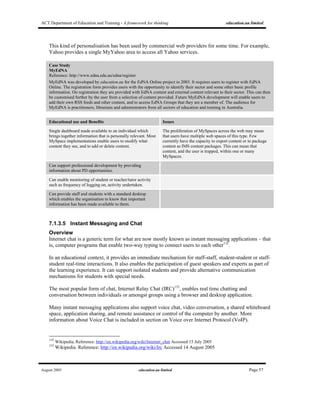
Term Explanation
ACT Australian Capital Territory
AV Audio Visual
AVETMISS Australian Vocational Education and Training Management, Information and Statistical
Standard
Blog A web log or diary, maintained by an individual or community
Bluetooth A global initiative by Ericsson, IBM, Intel, Nokia and Toshiba to set a standard for
cable-free connectivity between mobile phones, mobile PCs, handheld computers and
other peripherals. It will use short-range radio links in the 2.gGHZ Instrumentation
Scientific and Medical (ISM) "free band".
1
CD Compact disc
2
DEST Australian Government Department of Education, Science and Technology.
DRM Digital Rights Management
DVD DVD is an optical disc storage media format that can be used for storing data,
including movies with high video and sound quality.
3
1
Reference http://www.3gnewsroom.com/html/glossary/b.shtml Accessed 12 July 2005
2
Wikipedia, Reference http://en.wikipedia.org/wiki/Compact_disc Accessed 12 July 2005
ACT Department of Education and Training - A framework for thinking education.au limited
August 2005 education.au limited Page vi
Term Explanation
Ebook or e-book Electronic book. Can be provided in a variety of electronic formats such as Word or
PDF.
e-Portfolio Electronic (or digital) portfolio.
EdNA Education Network Australia
Firewire FireWire (also known as i.Link or IEEE 1394) is a personal computer and digital video
serial bus interface standard offering high-speed communications and isochronous
real-time data services. FireWire can be considered a successor technology to the
obsolescent SCSI Parallel Interface.
4
FM Frequency modulation
5
GB Gigabyte – A measure of computer memory or disk space consisting of about one
thousand million bytes (a thousand megabytes). The actual value is 1,073,741,824
bytes
GPS Global Positioning System
HTML Hypertext Mark Up Language
ICT Information and Communications Technology
IMS IMS Global Learning Consortium
6
IP Intellectual property
iPod Apple proprietary portable media player, storage device and PDA
IRC Internet Relay Chat
IR Technology Infra Red Technology
IT Information Technology
iTunes iTunes is a media player, written by Apple Computer, for playing and organizing digital
music, video files, and purchasing digital music files in the FairPlay digital rights
management format.
7
LAMS Learning Activity Management System
LAN Local Area Network
LCD Liquid crystal display
LMS Learning Management System
Mlearning or mLearning or m-
learning
Mobile learning – refers to education activities facilitated by the use of a mobile device
such as a laptop, mobile phone or PDA and typically conducted outside of the regular
classroom.
MMS Multimedia Message Service, a store-and-forward method of transmitting graphics,
video clips, sound files and short text messages over wireless networks using the WAP
protocol
8
MP3 Standard compressed format for audio files. The name is derived from MPEG-1, Audio
Layer 3 and more formally known as ISO/IEC 11172-3 Layer 3
9
.
NTIS National Training Information Service
OH&S Occupational Health and Safety
PC Personal Computer
PDA Personal Digital Assistant
PDE Personal Digital Entertainment Devices
PDF Portable Digital Format
3
Wikipedia, Reference http://en.wikipedia.org/wiki/Dvd Accessed 12 July 2005
4
Wikipedia, Reference http://en.wikipedia.org/wiki/FireWire Accessed 12 July 2005
5
Wikipedia, Reference http://en.wikipedia.org/wiki/Fm Accessed 12 July 2005
6
IMS Global Consortium, Reference http://www.imsglobal.org/ Accessed 12 July 2005
7
Wikipedia, Reference http://en.wikipedia.org/wiki/ITunes Accessed 12 July 2005
8
Reference http://www.interactmobile.com/document/glossary.html Accessed 12 July 2005
9
International Standards Organization. Reference:
http://www.iso.ch/iso/en/CatalogueDetailPage.CatalogueDetail?CSNUMBER=22412&ICS1=35&ICS2=40&ICS3=&scopeli
st= Accessed 14 August 2005
ACT Department of Education and Training - A framework for thinking education.au limited
August 2005 education.au limited Page vii
Term Explanation
Podcasting Podcasting is a method of publishing audio files via the Internet, allowing users to
subscribe to a feed to receive new files automatically.
10
RDF Resource Description Framework
11
RFID Radio Frequency Identification
RSS RDF Site Summary or Really Simple Syndication
SCORM Shareable Content Object Reference Model.
12
Sharepoint Microsoft Office SharePoint Portal Server 2003 (the current release) is a Web Portal
which belongs to the Microsoft Office family
13
Skype Skype is a proprietary peer-to-peer Internet telephony (VoIP) network. The network is
provided by all combined users of the free desktop software application.
14
SMS Short Message Service: available on digital GSM networks allowing text messages of
up to 160 characters to be sent and received via the network operator's message
center to your mobile phone, or from the Internet, using a so-called "SMS gateway"
website. If the phone is powered off or out of range, messages are stored in the
network and are delivered at the next opportunity.
15
SOAP Simple Object Access Protocol
TCO Total Cost of Ownership
TLF The Le@rning Federation
USB Universal Serial Bus standardised software/hardware formats providing for high speed
communication between PCs and peripheral devices
VET Vocational Education and Training
VoIP Voice over Internet Protocol – a standardised format providing for phone calls to be
made over the Internet, VoIP can be supplied by commercial providers, but is also
available to users via freeware such as Skype.
VLE Virtual Learning Environment
Vlogging Video logging: a video version of blogging which combines video, text images and links
VLORN VET Learning Object Repository Network
VoWLAN Voice over Wireless LAN
Vodcasting Video on demand web casting
16
VPN Virtual Private Network – a local computer network set up for an organisation or
community
WLAN Wireless Local Area Network
Wi-Fi The most common format for short-distance wireless communication between PCs,
peripheral devices and networks.
Is short for ‘ Wireless Fidelity’ and is meant to be used generically when referring of
any type of 802.11 network, whether 802.11b, 802.11a, dual-band, etc. The term is
promulgated by the Wi-Fi Alliance
17
.
Wi-MAX Stands for ‘Worldwide Interoperability for Microwave Access’. This is a long-distance
wireless broadband distribution system, with claimed ranges of 30km for line of sight
communication.
Wiki A Wiki or wiki (pronounced wǐkē, wēkē or vēkē; see pronunciation section below) is a
website (or other hypertext document collection) that allows users to add content, as
on an Internet forum, but also allows anyone to edit the content. "Wiki" also refers to
the collaborative software used to create such a website (see Wiki software).
18
10
Wikipedia, Reference http://en.wikipedia.org/wiki/Podcasting Accessed 12 July 2005
11
Wikipedia, Reference http://en.wikipedia.org/wiki/Resource_Description_Framework Accessed 12 July 2005
12
Wikipedia, Reference http://en.wikipedia.org/wiki/SCORM Accessed 12 July 2005
13
Wikipedia, Reference http://en.wikipedia.org/wiki/Sharepoint 12 July 2005
14
Wikipedia, Reference http://en.wikipedia.org/wiki/Skype Accessed 12 July 2005
15
Reference http://www.polyphonic-ringtones-ring-tones.co.uk/glossary.html Accessed 12 July 2005
16
Wikipedia, Reference http://en.wikipedia.org/wiki/Vodcast Accessed 12 July 2005
17
Reference http://www.interactmobile.com/document/glossary.html Accessed 12 July 2005
18
Wikipedia, Reference: http://en.wikipedia.org/wiki/Wiki Accessed 12 July 2005
ACT Department of Education and Training - A framework for thinking education.au limited
August 2005 education.au limited Page viii
Term Explanation
Wireless Wireless is a term used to describe telecommunications in which infrared, radio, or
other electromagnetic waves, rather than some form of wire, carry the signal over part
or all of the communication path. It is also a type of networking technology using such
electromagnetic waves to transmit data.19
W3C World Wide Web Consortium
XDA A consolidated development environment that allows programs to be created for
Windows, XBoxes
20
XML eXtensible Mark up Language
19
Reference: http://www.chin.gc.ca/English/Digital_Content/Tip_Sheets/Wireless/glossary.html Accessed 3 August 2005
20
Reference http://www.developer.com/net/csharp/print.php/1756291#X Accessed 12 July 2005
ACT Department of Education and Training - A framework for thinking education.au limited
August 2005 education.au limited Page ix
Copyright
© Australian Capital Territory, Canberra, September 2005
This work is copyright. Apart from any use as permitted under Copyright ACT 1968, no part may be
reproduced by any process without written permission from the Department of Education and
Training.
This publication is licensed under the National Educational Access Licence for Schools (NEALS).
Schools administered or represented by parties to this agreement may reproduce and/or make
available online or electronically transmit this publication for educational uses.
Produced for the Department of Education and Training by education.au limited.
This report is also available online at http://www.det.act.gov.au/
Inquiries about this publication should be directed to:
ACT Department of Education and Training
Ministerial and Communication
PO Box 1584
Tuggeranong ACT 2901
AUSTRALIA
Telephone: 02 6205 9160
Contact Details
Street address
ACT Department of Education and Training
186 Reed Street
Tuggeranong ACT 2901
AUSTRALIA
Postal address
ACT Department of Education and Training
PO Box 1584
Tuggeranong ACT 2901
AUSTRALIA
General inquiries
Telephone 02 6207 5111
Facsimile 02 6205 9333
Website address
http://www.det.act.gov.au/
ACT Department of Education and Training - A framework for thinking education.au limited
August 2005 education.au limited Page 1
1 Executive Summary
The Australian Capital Territory Department of Education (ACT DET) currently manages 96 teaching
institutions in the government sector including primary schools, secondary high schools, colleges, and
special education schools. Together these have total enrolments of close to 36,000 students, and
employ more than 2,500 staff21
. ACT DET services a total population in the ACT of 324,00022
. In
2004 ACT DET connected all schools to broadband, and launched its Learning Technologies Plan for
ACT Government Schools and Preschools 2004-200623
.
ACT DET commissioned education.au limited to undertake a consultancy to report on emerging
technologies as pertinent to education and training in the pre-school, school and VET sectors in the
ACT. This report is the outcome of that commission, reviewing emerging educational technologies,
looking at the impacts of educational policy developments, and pointing to the likely associated high
level business requirements.
In this report, the term ‘technology’ is used in a broad sense to enable a holistic approach to
identifying and meeting the needs of ACT DET for the future. Emerging technologies considered
include infrastructures of various kinds, classroom and teaching tools, and delivery devices.
The focus is on technologies that directly relate to the delivery and enhancement of teaching and
learning, though some administrative support technologies and general infrastructure requirements are
also considered.
Main Findings
General Trends
Predicting the likely adoption and evolution of emerging technology is, of course, a best guess
scenario, given the rapid state of change in the digital world. Nevertheless, there is considerable
agreement in the literature, and in education policies framing commitments to ICT, on general trends.
These emphasise mobility; interoperability; convergence; divergence; integration; richness of content;
security; creativity, interactivity and collaboration; and utilisation of open source software as a
potential alternative.
Importance of Environmental Context
The implementation and use of emerging technologies cannot be divorced from the environment –
this includes the political and legal; social and cultural; educational; and technology environments that
are already in place and evolving. As part of the process of planning for the future, it is vital that the
wider environmental context is fully considered.
21
Australian Bureau of Statistics, 2005, 4221.0 Schools Australia 2004.
Reference:
http://www.abs.gov.au/AUSSTATS/abs@.nsf/lookupresponses/b77bf16fc5c87aafca256fb1007fc4b8?opendocument
Accessed 3 August 2005
22
Australian Bureau of Statistics, 3235.8.55.001 Population by Age and Sex, Australian Capital Territory.
Reference: http://www.abs.gov.au/ausstats/abs@.nsf/0/06d43402866a696bca256ec300029ce5?OpenDocument Accessed 3
August 2005
23
ACT Department of Education and Training, 2004, Learning Technologies Plan for ACT Government Schools and
Preschools 2004-2006.
Reference: http://activated.decs.act.gov.au/admin/ltplan/pdf/LTPlan.pdf Accessed 3 August 2005
ACT Department of Education and Training - A framework for thinking education.au limited
August 2005 education.au limited Page 2
Governance and security arrangements for ICT systems will need system-wide agreed frameworks,
policies, and adoption of guidelines which balance risk and return.
Positioning the ACT DET to take advantage of emerging technologies will require acknowledgement
of the need for cultural change and processes to support and manage it. Students today are ‘native
speakers’ of the digital language of computers, video games and the Internet24
. Many devices
described in this report are banned by schools. A shift in culture is crucial to ensure that students’ uses
of these devices are embraced as educational opportunities and that they become tools of the trade,
rather than be considered contraband.
Many students are entering their school or college with multiple literacies that go beyond text, and
this trend will strengthen over the coming years. Educators will need to acknowledge and recognise
these new literacies, and build upon and extend them.
The success of such an approach will require that teachers/tutors have access to professional
development opportunities to develop confidence in the use of educational technology, as well as
informal support environments of peers.
Visionary leadership will be needed to encourage flexible educational environments, encourage risk
taking, and inspire teachers/tutors to ‘have a go’ and enhance their own levels of digital literacy. The
need for teachers/tutors to continually update skills requires a long term commitment, and resourcing.
Encouraging innovative ideas and rewarding staff for sharing new practices will assist in building
capacity within the education environment, enhance the system’s relevance to its student body, and
meet the needs of the knowledge society.
Use of emerging technologies, delivery devices and new methods of content distribution will require a
flexible, simple and open digital rights management (DRM) regime that enables and supports sharing
and exchange of content rather than blocking or limiting it. Cross-jurisdictional agreements on rights
arrangements and trusted services agreements are precursors of content and data sharing across
systems.
Decisions about emerging technologies need to be made in light of budgetary reality. ICT expenditure
is a recurring cost, and is an additional cost rather than a replacement for something else.
Implementation of new infrastructure and devices to create the ACT education system for the future
will require additional expenditure. Infrastructure and device decisions need to be made with
consideration of the general trends to reduce risk and ensure relevance.
Budgetary issues at a system level also impact at an individual level. The introduction of emerging
technologies has the potential to widen the digital divide, rather than enhance access. Portable devices
such as mobile phones and MP3 players can be used as educational tools, but ACT DET will need to
provide access to devices to students and staff, without any associated stigma, to those who are not in
a position to supply their own.
The emerging technologies identified can also reduce the digital divide - groups with particular
learning difficulties can be assisted through access to learning activities which suit their learning
24
Reference http://www.marcprensky.com/writing/Prensky%20-%20Digital%20Natives,%20Digital%20Immigrants%20-
%20Part1.pdf
ACT Department of Education and Training - A framework for thinking education.au limited
August 2005 education.au limited Page 3
styles, preference and/or learning need. No longer does there need to be a ‘one size fits all’ approach
to learning. Multi-modal options and device independent access will be the norm.
The ACT Context
A relatively small jurisdiction such as ACT DET has the opportunity to leverage the activity of larger
systems and projects nationally and internationally. One obvious area for consideration is utilising
open source software. Open source software is software that has source code that is open, viewable,
unrestricted and redistributable. The interest in open source has been attractive to governments and
school systems around the world because of the reduced licence costs. The same procurement
standards should apply as to any ICT purchase, but a growing number of open source applications are
custom built for the education environment by large consortia or extended developer communities
which makes many of them reliable, and professionally supported.
A smaller and less complex organisational structure allows the ACT DET jurisdiction to be fleet
footed. Innovation and ideas can be nurtured and implemented by sponsors who have responsibility
for taking forward the initiative. Cross-portfolio communication is far more frequent and reliable and
contributes to the shared vision and ownership of strategic and system-wide initiatives.
A curriculum renewal initiative to be undertaken by the ACT DET seems to be an ideal opportunity
for the system to incorporate strategic professional learning for integrating information and
communication technologies into curriculum and curriculum delivery, including assessment and
reporting practices.
The ACT DET has already made significant steps towards providing a foundation for system-wide
change. The system has access to good bandwidth, a platform for providing services to support
learning and learning environments (myclasses), and programs of professional development.
Further, the provision of web services, through projects such as EdNA, can provide the possibility of
delivering content that is managed and maintained elsewhere. Web services can enable customised
services to be delivered into customised/personalised portals, handheld devices, and other publishing
platforms.
Web services also enable one set of data to be shared by multiple applications, such as a Student
Information System, an e-Portfolio, and an Assessment and Reporting system. The utilisation of a
shared infrastructure based on interoperability and national and international standards can result in
significant cost savings. Other national projects such as The Le@rning Federation and the VET
Learning Object Repository Network also provide the opportunity to access and use high quality
learning objects within the ACT jurisdiction and to publish and provide access to those objects
through the ACT’s own technical infrastructure. Interoperability, data and content sharing will
become important components of any jurisdiction’s technical and business infrastructure.
Emerging Technologies
Emerging technologies described in this report have been divided into infrastructure technologies,
smart classroom technologies and the digital backpack which covers devices and content delivery
mechanisms for the future.
The consultancy found that wireless technologies such as WiFi, WiMAX and Bluetooth, which
support the provision of WAN wireless broadband and enable campus wireless mobility, will become
ACT Department of Education and Training - A framework for thinking education.au limited
August 2005 education.au limited Page 4
the technical infrastructure of choice - removing or reducing the need for cabling and avoiding the
need for modifications to heritage or old buildings. Wireless connectivity will release students and
teachers from the computer room and set them free to conduct learning in whatever environment is
most appropriate – real-world @work learning, or learning through an activity which is then recorded
to a device for later listening, such as a podcast, or viewing through a blog, vlog or photolog,
uploaded to an e-Portfolio or shared in a learning management system. Portable devices such as
PDAs, MP3 players, TabletPCs, gaming devices, navigational (GPS) handhelds, and mobile phones
are emerging technologies for education and training that have clear applications and exciting
possibilities. Issues about security, equity, storage, and privacy all need to be managed and will be
challenging to address. Technologies used in the commercial sector such as RFID tagging and Smart
cards may go some way to addressing some of the security issues.
Convergence of the functions of various systems and devices was also identified. Learning
management systems, collaborative workspaces, student management systems, virtual classrooms,
electronic student report cards, and e-Portfolio systems have overlapping purposes and functionality.
It is likely that this trend of convergence and divergence will continue. This can be managed by
ensuring that the data held within a system is interoperable with the data of any other; that is, content
and data storage, and data management infrastructure must be based on international standards, such
as IMS content packaging, to enable data exchange between systems. Content must be described
using international or national metadata standards with elements selected for use that are interoperable
with those used by other jurisdictions, sectors and systems as well as meeting the needs of ACT DET.
This will support universal data export, import, sharing and resource discovery.
Decision-Making Matrix
A large number of emerging technologies and trends were identified in the course of this consultancy
and more will arise over the coming years. Many will have some obvious immediate educational
relevance, but the educational relevance of others will be marginal or non existent. To assist in
thinking about emerging technologies, the consultancy identified questions that should be asked
when exploring the potential of an emerging technology for adoption.
These include issues around teaching and learning outcomes; teacher acceptance; student acceptance
and parental support; leadership in use and take-up; the availability of relevant, available and cost
effective content; sustainability, resourcing, risk and extensibility; interoperability and integration;
and applicability. Each of these has an associated set of implications for any particular emerging
technology.
The report describes each of the technologies, provides case studies and examples of where the
technologies are already in use, describes the educational benefits and identifies the main issues
associated with their adoption.
High Level Business Requirements
In consultation with the ACT DET, and in particular through an ACT DET workshop focused on the
penultimate draft of the report, a number of high level business requirements were identified. These
underpin the strategic direction for the ACT DET, and are needed to maintain the quality and
competitiveness of the government school system in the digital age. These are:
• Quality outcomes and a contemporary education for all
ACT Department of Education and Training - A framework for thinking education.au limited
August 2005 education.au limited Page 5
• Shift the pedagogical/curricular emphasis further towards learner-centred pedagogy and
personalised learning;
• Foster cultural change in educational practice and educational institutions - change that
responds to changing social, economic and environmental demands in the wider society;
• Improve access to rich learning environments (informal and formal) which extend beyond
the classroom to the local and virtual environment;
• Equip students with the skills and concepts needed to participate in the knowledge
economy;
• Ensure equity of access for socio-economically disadvantaged learners;
• Provide assistive technologies for learners with a disability.
• An adaptable and responsive teaching profession
• Provide flexible approaches to professional learning;
• Develop skills for efficient and effective use of rich technologies;
• Reward innovation and collaboration;
• Embed ICT in curriculum development and pedagogical practice.
• Information access for school communities through improved business, administrative and
communication practice
• Use communications to inform and interact with wider community;
• Provide consistent reporting mechanisms;
• Leverage knowledge across global and local communities.
• Capacity planning for a continually changing future
• Develop system-wide strategic frameworks to support school-based planning;
• Develop capacity to respond more quickly to changing external environment;
• Maximise purchase power through leverage;
• Provide suitable infrastructural support for ICT, and develop digital age educational spaces,
when replacing and revitalising schools and colleges.
ACT Department of Education and Training - A framework for thinking education.au limited
August 2005 education.au limited Page 6
2 About this Report
The ACT Department of Education and Training (ACT DET) commissioned education.au limited to
undertake a consultancy to report on emerging technologies as they potentially impact upon education
and training in the pre-school, school and VET sectors in the ACT.
The report seeks to provide advice to ACT DET on:
a) Likely high level business requirements;
b) Likely impacts of educational policy developments on services and infrastructures;
c) Emerging educational technologies over the next five years.
While some limited opportunity has been afforded for consultation with stakeholders through
workshops and telephone interviews, this report is primarily a desk-based investigation and not an on-
site review. It is based on research into, and synthesis of, a wide body of literature that assesses the
current and likely future functions of ICT in education both locally and internationally. As well we
have accessed relevant knowledge held by expert education.au staff, as staff of a national ICT agency
owned by all Australia’s ministers of education and training.
We have accepted the definition below, which enables us to look broadly across the emerging
technology landscape.
A technology is still emerging if it is not yet a “must-have”. For example, a few years ago
email was an optional technology. In fact, it was limited in its effectiveness as a
communication tool when only some people in an organization had regular access to it.
Today, it is a must-have, must-use technology for most people in most organizations.25
In this sense a technology can be a standard expectation in the commercial or business world, while
still being considered as ‘emerging’ in the education sector.
For the purposes of this report, emerging technologies include infrastructures of various kinds,
delivery devices, and classroom and teaching tools.
We have focused largely on emerging technologies that directly relate to the delivery and
enhancement of teaching and learning, though some administrative support technologies and general
infrastructure requirements are also considered.
Section 3 highlights issues in the ACT that impact on its capacity to implement ICT.
Section 4 of the report overviews the general trends in emerging technologies.
Section 5 surveys the environmental context that surround the take-up of technology in education,
looking to the array of environments – political and legal; social and cultural, educational; and
technology – in which the emerging technologies are situated.
Sections 6 and 7 review a range of emerging technologies relevant to educational settings.
25
Consortium of School Networking Emerging Technologies Committee, 2004, Hot Technologies for K-12 Schools: the
2005 guide for technology decision makers, Washington DC: Consortium of School Networking.
ACT Department of Education and Training - A framework for thinking education.au limited
August 2005 education.au limited Page 7
Finally, section 8 identifies a decision-making matrix that could be used when exploring the potential
of an emerging technology.
ACT Department of Education and Training - A framework for thinking education.au limited
August 2005 education.au limited Page 8
3 The ACT Context
While this report is primarily a desk-based review of emerging technologies in education, and not an
on-site assessment of the ACT’s past or present level of effective take-up of ICT in education, it is
nevertheless worth noting a number of ways in which the ACT jurisdiction would appear to be well-
positioned in this respect:
Knowledge-based industry
Firstly, the ACT itself is well-situated as a knowledge economy, with an expansion of knowledge-
based industries planned to “form the base of Canberra’s future growth26
”. The confluence in the ACT
of public and private sectors underpinned by knowledge and information technology, together with
the presence of leading-edge research institutions, such as the Australian National University, makes
for an ICT-savvy business and economic environment. This raises the expectations of employers of
the level of ICT literacy that students will have on completion of their schooling, and creates
challenges for the jurisdiction in ensuring that those expectations are met. At the same time it makes
for a wealth of ICT expertise, equipment and infrastructure that the ACT DET should be able to
leverage.
High levels of disposable income
The ACT has Australia’s highest levels of disposable income in comparison with other states and
territories. For example, the average per capita disposable income in Canberra in 2002-03 was
$36,831, compared with $24,677 for Australia overall27
. Unemployment and work-force participation
rates were also the best in the nation at this time28
.
The higher disposable income combined with exposure to knowledge-based industries and a high
proportion of employment centred on education and government is translated into higher levels of
consumer spending on home technology as well as greater levels of both home internet and home
broadband connections29
. This generally raises expectations in regard to what level of resourcing of
equipment and connectivity is to be provided by the home, as opposed to the jurisdiction. It also
means that there may be an earlier adoption than elsewhere in the country of personalised learning,
that is, a greater level of take-up of home/remote learning activities mediated through broadband
connection to a learning management system on a school or jurisdictional server.
Digital Divide issues
At the same time, it should not be forgotten that despite its generally high socio-economic indicators
the ACT does have a significant number of people on low incomes. The Canberra Plan figures
indicate that ‘close to one-in-thirteen adults and one-in-nine children live in poverty30
’. There is
26
Chief Minister’s Department, ACT, 2004, The Canberra Plan, ACT: ACT Dept of Urban Services, p11.
27
ABS Australian National Accounts, State Accounts, ABS Catalogue number 5220.0, cited in Chief Minister’s
Departmentt, ACT, 2004, Building our community: the Canberra Social Plan, ACT: ACT Departmentt of Urban Services,
p20
28
ibid
29
In 2003 53% of Australians were able to access the Internet from home. In the ACT it was 66%.
Reference:
http://www.abs.gov.au/Ausstats/abs@.nsf/94713ad445ff1425ca25682000192af2/5fd96b99b19469acca256d97002c8643!Ope
nDocument
30
Chief Minister’s Department, ACT, 2004, Building our community: the Canberra Social Plan, ACT: ACT Department of
Urban Services, p20.
ACT Department of Education and Training - A framework for thinking education.au limited
August 2005 education.au limited Page 9
strong awareness by educators of the potential equity problems this raises in respect of access to
equipment and connectivity, with concerns about the ‘digital divide’ an issue raised repeatedly during
the workshops conducted during the researching of this report. The ACT jurisdiction is in a healthy
position to deal with these issues, with a good track record of government policy, and a series of
implementation strategies, associated with ACT Government’s 2001-2005 Digital Divide program31
.
With the Digital Divide program now devolved to line agencies it would appear to be an appropriate
time for ACT DET to refine its own policies on these issues.
There is a supportive government framework, with the Canberra Plan for example committing the
ACT Government to ensuring that “government schools are resourced to deliver information and
communication technology (ICT) skills to students, irrespective of school size and financial
capacity”32
.
Forward-looking ICT policy
The ACT jurisdiction has a near decade-long history of forward looking ICT policy, with the ‘IT in
Schools’ program commencing in 1998, and resulting now in solid infrastructure and equipment
levels33
. In 2004 all schools were connected to broadband, and the Learning Technologies Plan for
ACT Government Schools and Preschools 2004-2006 is now being implemented34
.
An innovative jurisdiction
The ACT DET has a strong awareness of the value of maintaining a profile as an innovative
jurisdiction. The curriculum renewal process currently under way provides opportunities for the ACT
DET to maintain its leading-edge status by placing student-centred personalised learning, built around
appropriate utilisation of technology, at the forefront. Similarly, the envisaged program for renewal
and revitalisation of school buildings and premises can accommodate the development of learning
spaces suitable to digital age education, the features of which we describe in this report. These
initiatives will be essential to public schooling in the ACT enhancing its competitive edge against the
private school sector, in a context in which cashed-up private schools are increasingly able to invest in
ICT, and thus represent a strong attraction to students from home backgrounds and peer cultures in
which ICT is an integral aspect of day-to-day life.
31
See http://www.actco.org.au/actgovernment-digitaldivideprogram-communitytechnologycentres/actgovernment-
digitaldivideprogram.html, Accessed 27 July, 2005
32
Chief Minister’s Departmentt, ACT, 2004, Building our community: the Canberra Social Plan, ACT: ACT Department of
Urban Services, p52.
33
Turner, John, 2005, ACT DET School/College Infrastructure Survey, ms. (draft report to ACT DET).
34
ACT DET, 2004, Learning Technologies Plan for ACT Government Schools and Preschools 2004-2006, Reference:
http://activated.decs.act.gov.au/admin/ltplan/pdf/LTPlan.pdf Accessed 11 August 2005
ACT Department of Education and Training - A framework for thinking education.au limited
August 2005 education.au limited Page 10
4 General Trends in Emerging Technologies
Predicting the likely adoption and evolution of emerging technology is, of course, a best guess
scenario, given the rapid state of change in the digital world.
Further, there is much about technological innovation, driven strongly as it is by manufacturers’
second guessing of what will excite the consumer market that is accidental, opportunistic and
fashionable.
The aim of this report is to search out those technologies that have the capacity to service, support and
enhance the educational process, not to embrace technological innovations merely for their own sakes.
While the integration of emerging technology into education portends a paradigm shift - a
revolutionary one according to many - in both pedagogical practice and educational philosophy, the
way forward is not always clear.
There is, however, considerable agreement in the literature on the general trends in emerging
technology. These involve an emphasis on:
Mobility
‘Always on’ devices are becoming more compact and portable, and wireless high-speed broadband
access becoming widely accessible.
Interoperability
Devices are being developed to communicate seamlessly with each other, and data tagged for
recognition by, and interaction with, as full a range of systems and programs; the requirement for
maximal interoperability of digital systems will be supported by an increasing range of web services,
that is, technologies that facilitate effective connections and exchanges between those systems.
Convergence
Increasing miniaturisation and integration of hardware enables formerly uni-functional devices to
become multi-purpose - for example, the convergence of functionality between mobile phones, PDAs
and media players.
Divergence
Simultaneous with a trend towards convergence is a degree of divergence, with both free user choice
and practical constraints creating a place for devices with restricted functionality. For example, with
CD/DVD read-write capability adding to size, weight, heat and battery demand in laptops, this trend
may see users opting for smaller handhelds or tablets as their personal computers, using these in
tandem with shared high-end desktops with full media editing and burning capacity.
Integration
Increasing availability of customisable, intuitive interfaces to programs, services and data which
reflect the natural ways in which human beings think about and organise the world.
Richness of content
Involves the ability to readily manipulate, that is, transfer, store, and search large files, and to manage,
analyse and report on large constantly updated data sets, and to combine and recombine different
kinds of data.
ACT Department of Education and Training - A framework for thinking education.au limited
August 2005 education.au limited Page 11
Security
The increasing digitisation of information creates high-level requirements for the security and
protection of sensitive and private data, and for the validation of official, certified information. In this
context, ‘trusted services’, that is, providers recognised by government as capable of guaranteeing
safe handling of secure, sensitive and validated digital data, will occupy an important role.
Creativity, interactivity and collaboration
With easy to use tools available that enable anyone to publish on the web in a range of formats and
media, the opportunity to support creativity, interactivity and collaboration will be greater, and the
means to participate, either synchronously or asynchronously, will be more diverse.
Open source
Open source programs present alternatives to proprietary software, reducing some of the current
software monopolies and placing pressure on proprietary pricing structures. Open source software is
not, contrary to some popular misconceptions, free, but its costs tend to lie in customisation and
development in particular contexts rather than in straight purchase, and its license fees tend to
significantly undercut equivalent proprietary programs. The effect of the growing open source
community is thus to push down the outright price of software, and to shift the cost emphasis from
purchase only to service and implementation packages.
Many of these trends are obvious in the wider society, with high levels of commercial sector and
household adoption.
To be relevant in five years and beyond to its students and staff, the ACT DET must leapfrog current
thinking and put in place business and technology frameworks that can adapt to the ever-changing
environment. This is not to ‘keep up with the Jones’s’ but to ensure that students are educated for the
society in which they live, and develop the knowledge and skills they need to successfully survive and
navigate an increasingly complex world.
ACT DET must develop a culture of ‘relentless innovation’ where openness to and trialling of
emerging technologies and their pedagogical relevance and impact is an ongoing part of teacher,
student and administrator experience. That is, innovation becomes an ordinary day-to-day activity
built into the thinking and planning processes of both the system and of individual schools. Innovative
thinking becomes part of a process of continuous improvement with the goal of ensuring ongoing
high quality learning experiences for students and continued relevance of activities in education to the
needs of the knowledge society.
ACT Department of Education and Training - A framework for thinking education.au limited
August 2005 education.au limited Page 12
5 The Environmental Context for Emerging Technologies
The implementation and use of technology cannot be divorced from its environment, that is, the
governance and security; political and legal; social and cultural; educational and technology
environments that are already in place.
The effective take up and utilisation of technology is not a function of its availability, but a function
of a complex interplay of factors that will be unique to the ACT, but will be driven by both internal
priorities and the wider Australian and international context.
This report considers new and emerging technologies and their relevance to the ACT’s particular
environment.
As part of the process of planning for the future it is expected that the ACT will review the viability of
emerging technologies in the light of the broader context – that is, the decisions to be made are not
purely about technology.
The intent of highlighting the environmental context is not to constrain thinking about what
implementation of innovative approaches to technology in education and training should be made, but
to point to areas where work outside the technology sphere itself will have to be undertaken to ensure
that the investment in the emerging technologies framework provides the expected outcomes.
We address each of the areas briefly and provide some indicators of what actions need to be taken to
ensure that the implementation and utilisation of the emerging technologies identified are not
impeded.
5.1 Political and Legal Environment
5.1.1 Governance and Security
ICT provides key infrastructure for the efficient and effective management of school functions as
diverse as financial management and the provision of learning activities. Good governance of ICT is
critical to success as it enables organisations to monitor risk and measure the performance of the
organisation.
Within education systems, governance is shared between the local and jurisdiction levels.
Increasingly, management of ICT infrastructure and operations has been devolved to schools and this
means that policy frameworks which enable schools to make informed decisions and implement
systems which meet both local and system level strategic directions are critical. The trend for students
and staff to use portable devices within and external to these environments increases the complexity
of issues to be addressed.
ACT Department of Education and Training - A framework for thinking education.au limited
August 2005 education.au limited Page 13
Interoperability and Standards
The MCEETYA ICT in Schools Taskforce, Learning Architectures Framework35
document states
that:
Significant overarching ICT considerations that apply across all layers of the school’s or
organisation’s Learning Architecture in order to achieve education objectives include:
Interoperability and standards;
Security and privacy;
Risk and return.
Interoperability is the “The ability of systems and data to work seamlessly together” 36
.
Standards and specifications generally provide an environment that is more predictable, efficient,
dependable and safer than one that is assembled in an ad-hoc manner. Standards stimulate innovation
and development of products and services while reducing the duplication of effort, unnecessary costs,
and complexity.
Security
“Easy access and security are diametrically opposed” 37
and there is no such thing as total security.
When thinking about security, a key element in the decision-making process is how much risk is
acceptable and what is an acceptable balance between risk and access.
Security is also related to the rights and privileges that people within a network environment are
assigned. Policies around acceptable use and privacy ensure that data and information are protected
from unauthorised use, and need to be explicit. As portable devices are introduced into secure
environments, policies which balance access and security will need to be developed.
Increasingly, sensitive data relating to personal or confidential information will transcend multiple
secure systems. The ability for data to be transferred successfully and without intervention from
unauthorised access will depend upon the building of trusted systems and services where business
rules and policies for transfer of data are embedded into the web services environment which link the
trusted systems. This will be extremely important for nationally aggregated data.
Governance and security of ICT systems will require system-wide agreed frameworks, policies and
adoption of framework guidelines which balance risk and return, access and safety.
5.1.2 Policy Framework
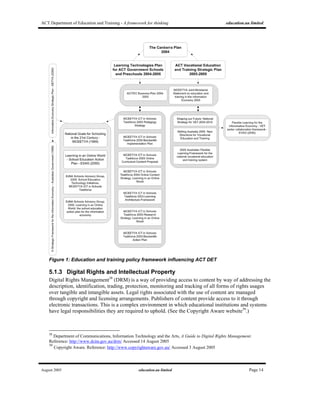
A range of policies that frame the use and implementation of ICT in education and training at a
jurisdictional and at a national level is in place. The ACT’s activities need to meet these policy
objectives, and the ACT DET also has a responsibility to influence the national and jurisdictional
agendas to ensure that policy frameworks meet the needs of their population.
35
MCEETYA ICT in Schools Taskforce, Learning Architectures Framework.
Reference: http://icttaskforce.edna.edu.au/documents/learning_architecture.pdf Accessed 14 August 2005
36
Centre for Educational Technology Interoperability Standards (CETIS), CETIS Reference.
Reference http://www.cetis.ac.uk/encyclopedia/entries/20011126153126 Accessed 19 July 2005
37
O’Dell, Dr Bob, T.H.E. Journal, 2004, Security for Educational Systems and Networks: A Concept of Security.
Reference http://www.thejournal.com/thefocus/36.cfm Accessed 19 July 2005
ACT Department of Education and Training - A framework for thinking education.au limited
August 2005 education.au limited Page 14
Figure 1: Education and training policy framework influencing ACT DET
5.1.3 Digital Rights and Intellectual Property
Digital Rights Management38
(DRM) is a way of providing access to content by way of addressing the
description, identification, trading, protection, monitoring and tracking of all forms of rights usages
over tangible and intangible assets. Legal rights associated with the use of content are managed
through copyright and licensing arrangements. Publishers of content provide access to it through
electronic transactions. This is a complex environment in which educational institutions and systems
have legal responsibilities they are required to uphold. (See the Copyright Aware website39
.)
38
Department of Communications, Information Technology and the Arts, A Guide to Digital Rights Management.
Reference: http://www.dcita.gov.au/drm/ Accessed 14 August 2005
39
Copyright Aware. Reference: http://www.copyrightaware.gov.au/ Accessed 3 August 2005
ACT Department of Education and Training - A framework for thinking education.au limited
August 2005 education.au limited Page 15
The Creative Commons40
(CC) initiative is striving to create flexible copyright systems. The
development of this licensing regime was in response to the potential to lock down digital content.
At one pole is a vision of total control - a world in which every last use of a work is regulated and
in which “all rights reserved” (and then some) is the norm. At the other end is a vision of anarchy
- a world in which creators enjoy a wide range of freedom but are left vulnerable to
exploitation.41
A major thrust of the CC initiative is to find a middle ground between these two extremes, ensuring
that authorship of intellectual property continues to be recognised, but providing a managed,
standardised framework for that recognition to be maintained as aspects of the original material are
taken up, adapted and reshaped by subsequent authors.
The Le@rning Federation42
(TLF) and AEShareNet43
have developed licensing arrangements for
access to content including rights to modify and re-purpose content. Digital rights management
systems are being put in place to monitor, track and audit the use of content that is freely available
and content that is made available on the payment of a fee.
A key on-going issue is the perception by students and teachers/tutors that online content is freely
available, and has no rights associated with its use. This perception is partially caused by the range of
licensing regimes that apply to different kinds of content in different ways and at different levels, and
exemptions that the education sector has for some kinds of content in some circumstances. For
example, AEShareNet supports five different types of licensing. Screenrights44
provides access and
rights to use to the education sector any program that is broadcast free to air. And the music industry,
for example, has had some difficulty in controlling legitimate access to material that is downloaded
from the Internet.
Licensing of software and software applications is another major issue for individual institutions and
education systems. The particular issue here relates to compliance with licensing conditions
negotiated at the point of purchase. As the numbers of devices increase, costs based on licensing
models which are calculated on the number of seats will become unsustainable.
The persistence, discoverability and longevity of content are also an issue that needs to be managed in
a digital environment. Appropriate information management and archiving policies and procedures
need to be in place to ensure that important content does not simply disappear.
5.1.4 Equity and Accessibility
Equity of Access
The use of emerging technologies has the capacity to widen the digital divide, particularly for those
groups that are socially, financially and politically disadvantaged. Devices such as computers, mobile
phones, PDAs and media players can be expensive to purchase and costly to operate and maintain.
40
Creative Commons. Reference: http://creativecommons.org/ Accessed 14 August 2005
41
ibid
42
The Le@rning Federation. Reference: http://www.thelearningefederation.edu.au/ Accessed 3 August 2005
43
AEShareNet. Reference: http://www.aesharenet.com.au/ Accessed 3 August 2005
44
Screenrights. Reference: http://www.screen.org/ Accessed 3 August 2005
ACT Department of Education and Training - A framework for thinking education.au limited
August 2005 education.au limited Page 16
Education and training systems have an important role in providing access to such devices for
students for education and training purposes.
The education system needs to recognise the learning skills that students have developed in their
media-rich out-of-school environment, and learn to build upon the capability of the community.
Schools have always done this with extra-curricular activities such as music and sport.
Most Australians have the capacity to access the Internet through community centres and local
libraries, or at home45
. This is a resource that can be exploited by students at no direct cost in those
community and library settings. It is through this baseline equity of access that all students have the
opportunity to develop appropriate skills and knowledge for employment and career development in a
knowledge-based society.
Jurisdictions and government already have policies and practices in place to support equity of access
and these need to be applied to emerging technologies. The ACT Government’s Digital Divide
program is an example of such initiatives46
.
Accessibility
Innovative use of emerging technologies can improve accessibility for those with a disability. The
power of ICTs is in their capacity to support individualised learning. Groups or individuals with
learning difficulties can be assisted by the development of learning activities which suit their learning
styles or preferences and/or learning need. No longer do we have to have a ‘one size fits all’ approach
to learning or content delivery. It is important, though, that teachers/tutors, who are specialists in their
knowledge of learning difficulties, are able to see the potential of technologies to assist such groups
and are supported in developing resources using them.
In developing online teaching and learning resources, international standards such as the World Wide
Web (W3C) consortium47
must be applied, and there is legislation in most countries which provides
for minimum conditions for accessibility.
Assistive technologies are developing at a fast rate and where they provide access that was previously
not possible, they should be seriously considered. This is a specialist area and there are companies
that devote their attention to this market. More information about Accessibility and Assistive
Technologies is available in The Digital Backpack section of this report.
45
In 2003 53% of Australians were able to access the Internet from home. In the ACT it was 66%.
Reference:
http://www.abs.gov.au/Ausstats/abs@.nsf/94713ad445ff1425ca25682000192af2/5fd96b99b19469acca256d97002c8643!Ope
nDocument
46
ACT Government, Reference: http://www.actco.org.au/actgovernment-digitaldivideprogram-
communitytechnologycentres/actgovernment-digitaldivideprogram.html Accessed 14 August 2005
47
World Wide Web Consortium, Web Content Accessibility Guidelines 1.0.
Reference: http://www.w3.org/TR/WAI-WEBCONTENT/ Accessed 3 August 2005
ACT Department of Education and Training - A framework for thinking education.au limited
August 2005 education.au limited Page 17
5.2 Social and Cultural Environment
5.2.1 Cultural Change
Changes in students
“Today’s students are no longer the people our educational system was designed to teach” 48
.
Prensky suggests our education systems need to change to meet the needs of the ‘digital native’. Many
of our students today are ‘native speakers’ of the digital language of computers, video games and the
Internet49
and this trend will continue to strengthen. However, many of the devices that are viewed as
effective educational tools in this report are currently banned, or otherwise highly restricted, by
schools.
A shift in culture is crucial to ensure that students’ uses of these devices are embraced as educational
opportunities and that they become tools of the trade, rather than be considered contraband.
Many students enter their educational institution with multiple literacies that go beyond text.
Educators need to acknowledge and recognise these literacies and build upon and extend them.
Technologies can provide students with more options about how they participate in learning activities,
and often provide the incentives for unmotivated or disengaged students to achieve.
Changes in perception of extent of ‘education community’
Through the communications capabilities of emerging technologies, education communities extend
beyond the institution’s grounds into parent communities, the general community, into industry,
libraries, museums, and the global community.
Conversely, the educational organisation’s facilities can now be made available for teachers/tutors at
home, or wherever they are. This could be seen as an opportunity for more flexible working
conditions, and has the potential to fundamentally alter teaching practice.
Changes to teaching practice
Teachers/tutors are being required to adopt and use ICT as an alternative, or add-on, to traditional
face-to-face ‘chalk and talk’ teaching strategies. This requires significant changes in teaching practice
and in the management of teachers’/tutors’ day-to-day tasks.
Access to formal professional development opportunities, and informal support environments for
change management at institutional and system level, are required to encourage and support change,
and ensure teachers are supported.
Changes in leadership focus
Leadership is also important in cultural change. Educational environments that are flexible and
encourage risk taking inspire teachers/tutors to experiment with the powerful new tools. Encouraging
innovative ideas and rewarding staff for sharing new practices will assist in building educational
environments which are contemporary and relevant.
48
Prensky, Marc, 2001, Digital Natives, Digital Immigrants.
Reference: http://www.marcprensky.com/writing/Prensky%20-%20Digital%20Natives,%20Digital%20Immigrants%20-
%20Part1.pdf
49
ibid
ACT Department of Education and Training - A framework for thinking education.au limited
August 2005 education.au limited Page 18
5.3 Educational Environment
5.3.1 Pedagogy and ICT
The MCEETYA ICT in Schools Taskforce has recently released a statement about ‘Pedagogy
Strategy’50
. The strategy articulates the following principles for developing innovative pedagogies for
learning in an online world including:
• Learner focus;
• Educational soundness;
• Professional learning;
• Diversity of perspectives;
• Collaboration.
Quality teaching and learning that integrates information communication technologies depends on:
• Pedagogical knowledge and skills;
• Understanding the potential of ICT to support learning;
• Knowledge of current and emerging technologies;
• Opportunities to explore and develop skills in the use of ICT.
5.3.2 Professional Development (PD) and Support
Confidence essential
The take up and success of new technologies is reliant on support of its implementation by
teachers/tutors and administrators, and also their feelings of confidence when using the technology.
Long term commitment to PD needed
The need for teachers/tutors to continually update their skills requires a long term commitment to
resourcing by education systems to support them as they learn about, and become confident users of,
the selected technologies. In this process, the educational purpose and outcomes for students, need to
be highlighted at all stages.
Self Assessment Tools
Self-assessment tools for measuring progress of ICT skill development amongst teachers have been
developed by state systems to assist teachers/tutors to identify their strengths and weaknesses, and to
develop plans for improvement in the integration of ICTs with teaching practice.
Online Professional Development Opportunities
Teachers/tutors can access online professional development. There are local activities, such as
ACTivatED,51
and national activities such as EdNA Groups52
which provide a platform for
professional development support activities. VET groups such as the Australian Flexible Learning
Framework’s Networks Community53
and international groups, such as TAPPEDIN54
also provide
50
MCEETYA ICT in Schools Taskforce, 2005, Pedagogy Strategy.
Reference: http://www.icttaskforce.edna.edu.au/documents/learning_online_pedagogy_05.pdf
51
ACT Department of Education and Training, ACTivatED.
Reference: http://activated.decs.act.gov.au/ Accessed 3 August 2005
52
EdNA Online, EdNA Groups.
Reference: http://groups.edna.edu.au/ Accessed 3 August 2005
53
FLAG, 2005, Australian Flexible Learning Framework, Networks of the Australian Flexible Learning Community.
Reference: http://flexiblelearning.net.au/networks/ Accessed 3 August 2005
54
TappedIn. Reference: http://tappedin.org/tappedin/ Accessed 3 August 2005
ACT Department of Education and Training - A framework for thinking education.au limited
August 2005 education.au limited Page 19
online methods of improving teachers’/tutors’ understanding and confidence in using ICT in
education.
These groups provide access to resources, information and the opportunity for discussion and
information exchange within a particular domain. The use of online professional development will
increase in acceptance as a flexible learning tool as teacher/tutor confidence and engagement with
ICTs improves.
Visionary leadership
Visionary leadership55
by school leaders, system administrators, and at the political level, recognises
the critical role of teachers/tutors in ensuring the power of information and communication
technologies is used to transform pedagogies and learning in educational environments. This
leadership ensures teachers develop the knowledge, competence, skills and confidence to exercise
professional judgement in utilising ICT in learning. For example, the Australian Government has
established the National Quality Institute for Teaching and School Leadership56
which will provide
support for accreditation of quality teaching within Australia as well as rewarding excellence in
teaching through awards.
5.4 Technology Environment
5.4.1 Sustainability
The technology environment is one of relentless innovation and dynamic change. How are assessment
and adoption of the emerging technologies to be managed to ensure access, equity, pedagogical
soundness, teacher support, student relevance, improved teaching outcomes, and buy-in by the whole
education community? In tight budgetary environment, with the increasing costs of supporting and
adopting emerging technologies, how can technology usage not only be maintained, but improved and
supported so that teachers/tutors and students have access to the best and latest rather than the older
and second-hand?
Evidence suggests that the introduction of ICT into the education sector has resulted in a
corresponding increase in pressure on the total institution and system budgets because ICT has been
‘added’ to existing infrastructure costs rather than having ‘replaced’ something else.
As educational institutions continue to increase their purchase of ICT infrastructure, strategic financial
and ICT planning is required to ensure that they can budget adequately for the upfront and ongoing
costs of ICTs. This means that the institution’s leadership must make decisions that shift the balance
of capital spending to recurrent spending for ICTs. Judicious decision-making about what
technologies and devices to adopt are also necessary and must be made in reference to the wider
education and training environment.
55
MCEETYA ICT in Schools Taskforce, 2005, Pedagogy Strategy.
Reference: http://www.icttaskforce.edna.edu.au/documents/learning_online_pedagogy_05.pdf Accessed 3 August 2005
56
National Institute for Quality Teaching and School Leadership
Reference: http://www.niqtsl.edu.au/ Accessed 3 August 2005
ACT Department of Education and Training - A framework for thinking education.au limited
August 2005 education.au limited Page 20
The total cost of ownership (TCO)57
for ICT must include hardware, software, connectivity, network,
consumables, training, maintenance and technical support. Hidden costs – such as access to power for
charging up computers and other devices, and in some schools re-configuration of power, rewiring,
secure storage, replacement and insurance costs, must also be taken into account. Download charges
will also grow as usage and popularity increases.
Software licence costs also increase. Software licence models which are based on per seat costs are
not sustainable in the long run and other models need to be negotiated with software vendors.
Regulatory compliance on such issues as privacy, security and legal increase costs significantly.
With the emerging trend for students to bring their own devices into schools, is this time right for
parents to pay for these devices which shifts costs from school provision to the parents? There are
obviously equity implications in such an approach.
5.4.2 Open Source Software
Open source software has source code that is open, viewable, unrestricted and redistributable58
. It is
made available under licence and can be modified and contributed into the open source community
for further modification and enhancement. This does not necessarily mean that open source products
are free. For example, Jahia59
, a portal content management system, is licensed under a ‘collaborative
source’ licence model for which there is a cost. The code, though, is made available to the
collaborative source community.
Many software applications which are being developed in the education and training space are being
made available as open source software. There are some good examples of learning systems – the
Learning Activity Management System (LAMS)60
and Moodle61
, a Course Management System have
wide acceptance in Australia and overseas.
Open source is attractive to governments and school systems around the world because of the reduced
licence costs. In the UK, for instance, Open Source Watch62
, funded by the British Government
through JISC63
“provides unbiased advice and guidance about free and open source software for UK
further and higher education”.
However, Hudson and Moyle64
state in their 2004 report to the MCEETYA ICT in Schools Taskforce:
57
British Educational Communications and Technology Agency (Becta), 2005, Becta’s View, Strategic Financial Planning
for ICT.
Reference: http://www.becta.org.uk/corporate/publications/documents/Strategic_financial_planning.pdf
58
Hudson, Felix and Moyle, Katherine, Department of Education and Children’s Services, South Australia, 2004, Open
Source Software Suitable for Use in Australian and New Zealand Schools.
Reference: http://www.educationau.edu.au/research/open_source_aust_nz.pdf Accessed 3 August 2005
59
Jahia, Reference: http://www.jahia.org/jahia/Jahia Accessed 3 August 2005
60
The LAMS Foundation, Learning Activity Management System (LAMS).
Reference: http://www.lamsfoundation.org/ Accessed 3 August 2005
61
Moodle, Reference: http://moodle.org/ Accessed 3 August 2005
62
Open Source Watch, http://www.oss-watch.ac.uk/ Accessed 3 August 2005
63
Joint Information Systems Committee (JISC). Reference: http://www.jisc.ac.uk/ Accessed 3 August 2005
64
Hudson, Felix and Moyle, Katherine, Department of Education and Children’s Services, South Australia, 2004, Open
Source Software Suitable for Use in Australian and New Zealand Schools.
Reference: http://www.educationau.edu.au/research/open_source_aust_nz.pdf
ACT Department of Education and Training - A framework for thinking education.au limited
August 2005 education.au limited Page 21
Software infrastructure in schools and sectors for the most part are not ‘green field sites’, and so
the choices about the acquisition and provision of software similarly are not black and white;
either/or decisions, but a matter of weighing up the risks and the benefits for particular contexts.
Decisions about technology procurement should balance risk and new skill sets that may be required
to maintain and develop software applications. There is now a significant amount of open source
software relevant to the education and training sector - for example, there are a significant number of
open source products in the e-Portfolio area65
- and hence the decision-making process, should include
open source software as an option.
5.4.3 Web Services
Web services are expanding rapidly as the need for application-to-application communication and
interoperability increases. These services provide a standards-based communications and transfer
methodology between different software applications. Web services are important in building
distributed applications where the code is independent of operating systems, applications and data.
They enable distributed systems to interact with each other over the Internet more easily.
Web services content can be published to many environments, that is they are re-usable for various
purposes and can be published in multiple web locations.
Web services can enable customised services to be delivered into customised/personalised portals,
handheld devices, and other publishing platforms. Web services enables one set of data to be shared
by multiple applications, such as a Student Information System, e-Portfolio, and Assessment and
Reporting system.
Some examples of web services include:
• News feeds using Really Simple Syndication (RSS), enabling news headlines, updates and
other content to be automatically distributed from source sites to subscribers’ devices
including PCs, PDAs or desktop-based feedreaders or news reader software applications66
.
They can also be published to websites to deliver real-time updating of content. For example,
EdNA Online67
and the Government Education Portal use their own RSS feeds for the news
content on their websites and this content is also available for institutions or individuals to
access remotely through other sites or through their desktop newsreader or feedreader
software. EdNA Online also provides a set of XML web services68
for most of its content.
• The Le@rning Federation’s Learning Exchange69
distributes learning objects to local state
and territory repositories from the national repository using a set of XML web services. These
enable a search for learning objects, retrieving metadata for a learning object and
downloading a list of learning objects.
65
For example, the Open Source Portfolio Initiative at http://www.osportfolio.org/ and dotFOLIO which is currently under
development at http://www.weg.ee.usyd.edu.au/projects/dotfolio/ Accessed 14 August 2005
66
Some examples of feedreader and newsreader software can be found at http://blogspace.com/rss/readers Accessed 14
August 2005
67
EdNA Online, The Developer’s Kit, RSS Services.
Reference: http://www.edna.edu.au/edna/page3041.html Accessed 14 August 2005
68
EdNA Online, The Developer’s Kit, XML Services.
Reference: http://www.edna.edu.au/edna/page3035.html Accessed 14 August 2005
69
The Le@rning Federation, Developing and Managing Online Curriculum Content.
Reference: http://www.thelearningfederation.edu.au/tlf2/showMe.asp?nodeID=480 Accessed 14 August 2005
ACT Department of Education and Training - A framework for thinking education.au limited
August 2005 education.au limited Page 22
6 Emerging Technologies for Consideration
This section provides an overview of the layers of infrastructure that need to be considered in
developing a strategic plan for the ACT DET.
6.1 Infrastructure Layers
Figure 2: Shows the layering and relationships between the various components described in
this report.
6.2 Standards
This section provides pointers to national frameworks and national and international standards that
should be reviewed and considered as part of the ACT DET’s strategic planning process. Ideally,
standards implemented should interoperate with standards used on other national projects, and also
with other internal ACT DET systems.
6.2.1 National Interoperability Frameworks
The issue of, and need for, interoperability has been on the agenda of various organisations, sectors
and jurisdictions. Out of this thinking are some interoperability frameworks that can be used as a
ACT Department of Education and Training - A framework for thinking education.au limited
August 2005 education.au limited Page 23
starting point for thinking about interoperability within the ACT DET environment and as the basis
for any specific ACT DET infrastructure.
Australian Government Technical Interoperability Framework
http://www.agimo.gov.au/publications/2005/04/agtifv2
This technical interoperability framework has been developed by the Australian Government
Information Management Office (AGIMO) for Australian government departments and agencies.
VET Interoperability Framework
http://www.flexiblelearning.net.au/interop/
The VET Interoperability Framework aims to develop a seamless web of technical infrastructure and
information services to support VET teaching and learning.
6.2.2 Technical Standards
These standards are used widely as the basis for technical infrastructure development.
6.2.2.1 Generic Industry Standards
Standard Description Associated URL
Internet Transport HTTP 1.1 http://www.w3.org/Protocols/rfc2616/rfc2616.html
Internet File Transfer FTP (RFC 959 )with restart and
recovery
HTTP (RFC 2626)for file transfer
Email SMTP/MIME (multiple RFCs)
Metadata Definition of
content
W3C XML schema
Data transformation XSL (Extensible Stylesheet Language) http://www.w3.org/TR/xsl/
UML (Unified Modelling Language)Data modelling and
description
RDF (Resource Discovery
Framework)
http://www.w3.org/TR/REC-rdf-
syntaxspecsandprods.htm
Web services description Web Services Description Language
(WSDL)
http://www.w3c.org/TR/wsdl/
Web Services Transport Simple Object Access Protocol
(SOAP)
http://www.w3.org/TR/SOAP/
Web services directory Universal Description, Discover and
Integration (UDDI)
http://www.uddi.org/
ACT Department of Education and Training - A framework for thinking education.au limited
August 2005 education.au limited Page 24
RDF Site Summary (RSS) 1.0 http://purl.org/rss/1.0/
RSS 0.91, RSS 0.92
RSS 2.0 http://backend.userland.com/rss
Content Syndication
Atom http://www.ietf.org/internet-drafts/draft-ietf-
atompub-format-10.txt
Software Development Java
Application Framework J2EE
Java Portlets API JSR 168
World Wide Web Consortium (W3C)
Web Accessibility Initiative
Recommendations (WAI) Priority 3,
and
http://www.w3.org/WAI/
HTML/XHTML, http://www.w3.org/MarkUp/
Document Object Model (DOM) http://www.w3.org/DOM/
Cascading Stylesheets (CSS) http://www.w3.org/Style/CSS/
Web Presentation and
Accessibility
6.2.2.2 Metadata Application Profiles
Metadata to Describe Learning Objects
Learning Object Metadata (LOM)
http://www.imsglobal.org/metadata/#version1.3
SCORM
http://www.adlnet.org/scorm/index.cfm?CFID=548777&CFTOKEN=225e064eecba5f05-98129A2B-D2BA-83F6-
B2EDF27F977A36B8&jsessionid=5430261c3bca$3B$C2$C
VETADATA
http://flexiblelearning.net.au/toolbox/documents/docs/Vetadata_Toolbox%20and%20AFLF%20Repository.doc
The Le@rning Federation Metadata Application Profile
http://www.thelearningfederation.edu.au/repo/cms2/tlf/published/3859/docs/Metadata_Application_Profile_1_2.pdf
Metadata for Resource Discovery
EdNA Metadata
http://metadata.edna.edu.au/
Dublin Core
http://www.dublincore.org/
ACT Department of Education and Training - A framework for thinking education.au limited
August 2005 education.au limited Page 25
6.2.2.3 Content and Repository Interoperability Standards
Learner Profiling Associated URL
IMS Learner Information Package http://www.imsglobal.org/profiles/
e-Portfolios
IMS e-Portfolio Specification http://www.imsglobal.org/ep/index.html
Open Source Portfolio Initiative http://www.theospi.org
Content
IMS Content Packaging Specification http://www.imsglobal.org/content/packaging/
Repository Interoperability
CORDRA http://cordra.lsal.cmu.edu
IMS Content Packaging Specification http://www.imsglobal.org/content/packaging/
IMS Resource List Interoperability http://www.imsglobal.org/rli/
Other
The Le@rning Federation Specifications http://www.thelearningfederation.edu.au/tlf2/showMe.asp?nodeID=89
ACT Department of Education and Training - A framework for thinking education.au limited
August 2005 education.au limited Page 26
6.2.2.4 Education-specific Standards
Standard Description Associated URL
Dublin Core DCMI metadata V1.1,
DC Qualifiers
http://dublincore.org/documents/dces/Learning Resource
Metadata Schemas and
Profiles
EdNA Metadata Standard V1.1 http://metadata.edna.edu.au/
RDF, Dublin Core XML encoding,Metadata Representation
IMS Metadata Binding Specification http://www.imsglobal.org/metadata/index.cfm
For Vocabulary AGIFT
SCIS, ScoT, ATED, VOCED, OZJAC
IMS Digital Repositories Specification http://www.imsglobal.org/digitalrepositories/Distributed Repository
Interchange
CORDRA http://cordra.lsal.cmu.edu/cordra/
JISC/DEST E-Learning Framework http://www.elframework.org/E-learning Architecture
Framework
Open Knowledge Initiative http://web.mit.edu/oki/index.html
Metadata Harvesting Open Archives Initiative Protocol for
Metadata Harvesting version 2.0
http://www.openarchives.org/OAI/openarchivespr
otocol.html
Z39.50 Functional Area C Level 1 of
the Bath Profile - release 2
http://www.loc.gov/z3950/agency/
http://www.nlc-bnc.ca/bath/tp-bath2-e.htm
Federated Search/Query
SRW/SRU version 1.1 with CQL
Query Grammar
http://lcweb.loc.gov/z3950/agency/zing/srw/
Shibboleth http://shibboleth.internet2.edu/Federated Single Sign On
and Access Control
XACML http://www.oasis-
open.org/committees/tc_home.php?wg_abbrev=xa
cml
Creative Commons http://creativecommons.org/Resource Licensing
AEShareNet http://www.aesharenet.com.au/
OAI-PMH Identifiers
URI http://www.w3.org/Addressing/
Digital Object Identifier (DOI) http://www.doi.org/
Handles http://www.handle.net/
Resource Identifiers
OpenURL version 1.0 http://library.caltech.edu/openurl/Standard.htm
ACT Department of Education and Training - A framework for thinking education.au limited
August 2005 education.au limited Page 27
IEEE LOM XML schemas http://ltsc.ieee.org/xsd/lomv1.0/
Australian VET LOM Profile:
VETADATA
http://www.flexiblelearning.net.au/interop/topics/v
ocab.htm
Learning Object Metadata
The Learning Federation Metadata
Profile
http://www.thelearningfederation.edu.au/
Learning Object Packaging IMS Content Packaging http://www.imsglobal.org/content/packaging/
IMS ePortfolio http://www.imsglobal.org/specifications.htmlE-Portfolios
IMS Learner Information Package http://www.imsglobal.org/profiles/index.cfm
iCAL, http://www.ietf.org/rfc/rfc2445.txtCalendars
RSS 2.0 http://backend.userland.com/rss
ODRL http://odrl.net/
XrML http://www.xrml.org/
Digital Rights Management
XACML http://www.oasis-
open.org/committees/tc_home.php?wg_abbrev=xa
cml
eduPerson http://www.educause.edu/eduperson/Identity Management
FOAF http://www.foaf-project.org/
Assessment IMS Question & Test Interoperability
(QTI)
http://www.imsglobal.org/question/index.html
Learning Design IMS Learning Design http://www.imsglobal.org/learningdesign/index.cf
m
Shareable Content SCORM http://www.adlnet.org/scorm/index.cfm
ACT Department of Education and Training - A framework for thinking education.au limited
August 2005 education.au limited Page 28
6.3 Technical Infrastructure
Technical infrastructure decisions must be made with one eye on emerging and possible future
technologies, and one on the legacy environment.
At a basic infrastructure level educational institutions will need to be serviced by high-speed
broadband, capable of carrying exponentially increased volumes of data. The provision of broadband
to institutions not serviced well by current or envisaged network arrangements may be supplemented
by two emerging technologies: WiMAX and Powerline. WiMAX uses the IEEE 802.16 standard70
and can provide high-speed wireless broadband over Wide Area Networks (WANs), with a claimed
range of thirty or so miles under line of sight conditions71
. Powerline is a means of carrying
broadband signals through power cables (see below).
WLANs
While data will, in the main, be delivered to and from institutions via the current cabling systems,
within the schools and colleges the connections will be wireless. Wireless Local Area Networks
(WLANs) will become an essential and integral part of every school and college’s infrastructure.
Wi-Fi
WLANS, using the evolving Wi-Fi format, will be the major pipeline through which staff and student
devices, be these laptops, handhelds, TabletPC, gaming devices, media players or whatever,
communicate with the school and education systems, as well as the external Internet generally.
Bluetooth (see below) will continue to co-exist with WiFi as a standard format for peripheral-to-PC
and some other device to device communication.
The Wi-Fi Alliance72
is a group of more than 200 companies that promotes Wi-Fi technology, and
also provides certification and interoperability testing services to ensure that devices are Wi-Fi-ready
and compliant. More than 2,000 devices have been tested. Wi-Fi-ready products use the IEEE
802.1173
specification. This broad agreement on the specification ensures relatively low risk for
organisations looking to use Wi-Fi technology and devices. But always important to keep in mind is
that standards and specifications are under constant review and evolve to meet emerging needs – and
in this space it is usually the needs of the commercial sector that are given priority because they are
the members of the alliances or special interest groups. ACT DET will need to monitor the landscape
and seek avenues where the education sector can influence the shape of innovation and new
developments.
Note that Wi-Fi is not a single format, but rather is found in different versions. The initial roll-out for
consumer wireless networks used what is known as the 802.11b standard. This is now being
superceded by the faster 802.11g (and some proprietary variants), though backwards compatibility
with the 802.11b standard is built into all commercial 802.11g equipment. Other Wi-Fi formats,
including 802.11e, 802.11i and 802.11n, claiming improved security and/or speed benefits, are in the
70
IEEE, Get802.16.
Reference: http://standards.ieee.org/getieee802/802.16.html Accessed 3 August 2005
71
Intel. WiMAX – Broadband Wireless Access Technology.
Reference: http://www.intel.com/netcomms/technologies/WiMAX/ website. Accessed 14 August 2005
72
WiFi Alliance. What is WiFi?
Reference: http://www.wi-fi.org/OpenSection/index.asp Accessed 3 August 2005
73
IEEE Standards Association, Get IEEE 802.
Reference: http://standards.ieee.org/getieee802/802.11.html Accessed 3 August 2005
ACT Department of Education and Training - A framework for thinking education.au limited
August 2005 education.au limited Page 29
offing. The adoption of each successive Wi-Fi standard will require replacement of wireless
broadcasting equipment and upgrading of device wireless cards if the newer format is to be taken full
advantage of. The good news for less opulent jurisdictions is that backward compatibility looks set to
continue, and that even the current 802.11b standard is more than sufficient for most intra-campus
data transfer needs74
.
Other Wireless Specifications
Wireless specifications such as Bluetooth75
and Zigbee76
also need to be considered. Both Bluetooth
and Zigbee are low power solutions that provide multiple channels for use. Bluetooth works on radio
frequency and provides for different bands of operation – so one set of Bluetooth devices in one class
doesn’t interfere necessarily with the set in the class next door. Critical is the capacity of Bluetooth to
crawl over the spectrum to find an unused radio band and thus provide additional capacity. Bluetooth
enables wireless communication between any electronic device that supports the specification. The
Bluetooth Special Interest Group (SIG) is made up of numerous companies from the
telecommunications, computing and automotive industries with a mission to “support a collaborative
environment and drive programs to develop and advance Bluetooth wireless technology in order to
exceed personal connectivity expectations and meet the needs of a changing world”.
Zigbee77
is another wireless protocol recently agreed as a standard based on the IEEE 802.15.4
focused on providing a low power solution that will extend battery life.
Security
Network security will be an important issue to manage within the local school environment. Networks
designed for student activity may need to be insulated from the official administrative network in
order to reduce the possibility of hacking and rogue use. Student networks will need to be monitored
to ensure that they are child-safe and that they are not carrying illegal files that violate copyright or
intellectual property licensing. In addition, procedures will need to be put in place to prevent device to
device piracy. IEEE has developed a security specification for Wi-Fi called Wi-Fi Protected Access
(WPA)78
which may go some way to securing the network.
Secure storage and backup of student electronic files will need to be managed both at an individual
device level and at an aggregated level on servers, backup tapes or other school or system
infrastructure.
Interoperability
One of the issues in the wireless space is lack of interoperability between various wireless
technologies – such as Wi-Fi and Bluetooth, but the various groups involved are beginning to
cooperate in looking at ways of developing seamless movement between them79
. Interoperability
74
Webpedia. Reference: http://www.webopedia.com/quick_ref/WLANStandards.asp Accessed 14 August 2005
75
Bluetooth, How Bluetooth Works.
Reference: http://www.bluetooth.com/howitworks.asp Accessed 14 August 2005
76
Zigbee Alliance. Reference: http://www.zigbee.com/ Accessed 14 August 2005
77
IEEE, IEEE802.15 WPAN Task Group 4 (TGL)
Reference: http://www.ieee802.org/15/pub/TG4.html Accessed 14 August 2005
78
Wi-Fi Alliance, 2003, Wi-Fi Protected Access: Strong, standards-based, interoperable security for today’s Wi-Fi
Networks.
Reference: http://www.wi-fi.org/membersonly/getfile.asp?f=Whitepaper_Wi-Fi_Security4-29-03.pdf Accessed 3 August
2005
79
ZDNet Australia, 2005, Donoghue, Andrew, Wireless Standards a Complete Mess.
Reference:
http://zdnet.com.au/news/communications/soa/Wireless_standards_a_complete_mess_Experts/0,2000061791,39193787,00.h
tm Accessed 3 August 2005
ACT Department of Education and Training - A framework for thinking education.au limited
August 2005 education.au limited Page 30
issues have to be addressed as part of the decision-making about adoption of wireless technologies as
do performance issues. Different wireless technologies have different ranges and different power
levels and are suitable for different purposes
Powerline
Powerline, as the name suggests, is a means of delivering broadband over electricity cables, and is
under commercial development in the USA80
. Powerline also has office and domestic applications,
providing for devices to be networked via the electrical wiring in home or office power circuits. This
is not a wireless application, but requires devices to be physically connected to power points81
.
Powerline plug-in network connectivity is able to supplement wireless LANs in educational settings.
Case Studies82
References
Victorian Department of Education
and Training: Wireless Networks
for Schools (WINS)
The Victorian Department of Education and Training announced in January 2005 that
it would deploy a wireless network infrastructure in 1600 primary and secondary
schools.
Reference:
http://investaustralia.hyperlink.net.au/media/IS_ICT_Wireless.pdf
Seoul National University Seoul National University recently established a wireless LAN infrastructure on the
SNU campus. Now, when students install MagicLAN Cards on their laptops, it is
possible for them to access the Internet regardless of their location – whether it is a
college classroom, an auditorium or a computer room. Students can obtain these cards
by purchasing or renting them from locations on campus.
Reference: http://www.Wi-
Fi.org/OpenSection/case_study.asp?TID=5&CaseStudyID=27
Trinity College, Ontario, USA Trinity College is a private school founded in 1865. Trinity College wanted to give its
junior school students the chance to work with laptops in their everyday classroom
environment. Traditional cabling methods were out of the question because they
would compromise the historic façade of Boulden House, the junior school building.
Avaya technicians installed six access points in the library resource center and in
various classrooms throughout the building. As students move from classroom to
classroom, the wireless network hands the signal from one access point to another,
just as a cellphone system provides continuous coverage for users on the move.
Reference
http://www.Wi-Fi.org/OpenSection/case_study.asp?TID=5&CaseStudyID=15
New Brunswick School District,
NJ, USA
The New Brunswick School District (New Brunswick, NJ) is using SpectraLink's
NetLink Wireless Telephones throughout its 13 schools. The NetLink Wireless
Telephones are integrated with Cisco's CallManager and Aironet wireless LAN
access points in each school. The NetLink Wireless Telephones have improved safety
and security for the schools by providing mobile communication capabilities for
every teacher and staff member throughout the campus – both inside and outside the
school buildings.
Reference: http://www.Wi-
Fi.org/OpenSection/case_study.asp?TID=5&CaseStudyID=102
80
Richardson, Tim, 2005, ‘The Register’, IBM Plugs into Powerline Broadband. Reference:
http://64.233.179.104/search?q=cache:vlysYSYFx6wJ:www.theregister.co.uk/2005/07/11/ibm_broadband/+powerline&hl=e
n Accessed Google Archive 14 August 2005
81
Powerline Communications. Reference: http://www.powerlinecommunications.net/whatispowerline.htm Accessed
14 August 2005
82
All case study text is directly copied from the reference links.
ACT Department of Education and Training - A framework for thinking education.au limited
August 2005 education.au limited Page 31
Morris Brown College,USA Since 2000, all Morris Brown College students have been using Toshiba Satellite
2180CDT notebook computers that allow wireless Internet access anywhere on
campus. The cost of the notebook computers is included in the student tuition
package. Students can access email from campus along with other documentation -
such as syllabi for individual classes. Students and faculty believe the notebooks
provide tremendous advantages in the organization of their studies and in preparation
for the professional world.
Reference:
http://www.Wi-Fi.org/OpenSection/case_study.asp?TID=5&CaseStudyID=29
Ryerson University Eighty wireless access points were installed throughout the residence and twelve
buildings on the university campus, and wireless cards and antennas were distributed
to students and faculty. These access points transmit frequencies to laptops and PDAs
equipped with Avaya’s wireless PC cards, enabling students to roam between access
points in the residence and on campus, similar to a cellular network. Avaya’s wireless
technology also increases student/faculty efficiency and productivity by enabling
unlimited mobility within a building, plus providing LAN access for users at remote,
antenna-linked locations.
Reference:
http://www.Wi-Fi.org/OpenSection/case_study.asp?TID=5&CaseStudyID=14
Anglia Polytechnic, Chelmsford,
UK
Anglia Polytechnic University, of Chelmsford, England, installed SpectraLink’s
NetLink Wireless Telephones as part of the university’s plan to create a high-tech
education facility that will serve as a model for future campus expansions. The school
selected NetLink Wireless Telephones because the system seamlessly integrates with
the university’s existing Mitel SX2000 PBX. This interoperability also allows the
school to continue working with Proxim, which provided the wireless LAN
infrastructure consisting of 46 Wi-Fi access points. The faculty uses the NetLink
Wireless Telephones throughout the four-story, high-tech glass building while
attending classes, meeting with students, and conducting research.
Reference:
http://www.Wi-Fi.org/OpenSection/case_study.asp?TID=5&CaseStudyID=91
Wireless Multimedia IP Project,
Chile
The University of La Frontera (UFRO) in Temuco, Chile and the Universidad
Tecnica Federico Santa Maria (UTFSM) in Valparaiso, Chile are using a combination
of Agere Systems ORiNOCO® Outdoor Routers, Access Points, and World PC Cards
to set up an outdoor, point-to-multi-point wireless network between themselves and
approximately eighty other educational institutions. In addition, UFRO and UTFSM
have implemented this ‘Wireless Multimedia IP Network’ as a test bed for a future
project that will monitor volcanoes in the area. Dubbed the ‘Volcanic Monitoring and
Warning System’, the project will use video and wireless technologies to enable
researchers to monitor two of the world’s most active volcanoes, helping to prevent
disaster and, quite possibly, save lives.
Reference: http://www.Wi-
Fi.org/OpenSection/case_study.asp?TID=5&CaseStudyID=63
New Zealand Implementation of a Wi-MAX network to provide high speed broadband wireless
access to the Internet for remote and rural users.
Reference: http://www.intel.com/netcomms/technologies/WiMAX/experiences.htm
ACT Department of Education and Training - A framework for thinking education.au limited
August 2005 education.au limited Page 32
6.4 Web-based Administrative Tools and Applications
Infrastructure
ACT DET must identify the core administrative tools and software applications that are required to
deliver and administer education and training for the future. This may include software applications
that are currently used, as well as applications that are likely to become part of the education and
training landscape.
This will include a mix of learning delivery and administrative applications. Ideally, these
applications are interoperable and either deliver data from a single database, or more likely, there is
the capacity to meaningfully bring together the data from different applications using web services to
enable web-based reporting and administration that meets the needs of ACT DET, reporting
requirements for students and parents, information that is needed in order to plan for the future and
evaluate success or failure, and information that is required by the Commonwealth.
Such applications will include learning management applications, course management applications,
student administration, timetabling and enrolment applications, room booking applications, student
report card applications, plagiarism detection applications, e-Portfolio applications, collaborative
workspace applications and applications that provide virtual classroom functionality.
The functionality of some of these applications overlaps to a greater or lesser degree and there is
considerable convergence between some of these applications and this trend is likely to continue. At
the same time, there is likely to be divergence in the ways some of these applications evolve. Overall,
it is unlikely that any single application will deliver the wide range of functionality required by ACT
DET, nor be extensible and sufficiently flexible to deliver new functionality in response to changing
needs.
To avoid duplication of data input, and ensure integrity of data the applications must be able to
exchange data and/or use data logged in the databases of each other, and data must be able to be
synchronised as necessary. Seamless movement for users from one system to the other through
identity management, permissions-based access, and single sign-on is essential. Decisions about core
data to be collected needs to be structured according to national and international metadata standards,
and then adapted for location conditions.
Choices about applications must be made on the basis of interoperability with existing applications
and applications that may be implemented in the future, and possible future needs.
6.4.1 Learning Management Systems
Overview
The delivery of quality e-learning programs from a technology perspective relies on effective
Learning Management System (LMSs) software applications. LMSs enable teachers to combine
content and tools which can complement or replace aspects of traditional face-to-face instruction.
LMSs may enable mixing of online, face-to-face and other modes of instruction, or they may deliver a
self-contained online-only program.
ACT Department of Education and Training - A framework for thinking education.au limited
August 2005 education.au limited Page 33
They enable an educator to combine instructional/explanatory materials with a structured set of
learning activities, and can include quizzes, self-assessment, and assignment submission and return,
and many include communication and collaborative tools.
LMSs can also incorporate data about the learning program and individual student performance and
engagement, compiling results, monitoring their access to material and participation in activities and
can thus serve as a basis for student report card reporting systems.
Defining an Learning Management System
A learning management system is:
Internet based software that deploys, manages, tracks and reports on interaction between the learner
and the content & the learner and the instructor. In particular, learning management systems perform
student registration, track learner progress, record test scores, and indicate course completions, and
finally allow instructor trainers to assess the performance of their students.83
Examples of Learning Management Systems
However, LMSs may contain more or less of the functionality described. Some applications such as
LAMS (Learning Activity Management System)84
focus on providing tools to enable the sequencing
of activities for students. Others, such as Moodle, are ‘course management systems’ which enable a
range of learning activities to be undertaken, and courses and lessons to be created, quizzes to be
created, assignments to be uploaded and SCORM content packages to be imported and exported85
.
Applications like myclasses86
are focused on one education sector (K-12). myclasses is a hosted
service provided to a school or school system, rather than being bought and hosted internally by an
individual school or system. For small systems such as ACT DET hosted services are appealing, as
long as they can interact with other software applications being used. myclasses has a range of tools
including class pages, a learning object viewer, the capacity to print multiple web pages to a single
PDF, it enables submission of homework files, has an e-Learning folio tool, and supports standards
such as XML and IMS. myclasses also provides integration with other products from the same range
to expand services and capacity.
Some kind of advanced learning management system is critical for ACT DET if it is to take advantage
of the emerging technologies on offer, and to comply with developing requirements for transparency,
tracking and reporting.
myportfolio is a product in the myclasses suite and interacts closely with myclasses to provide a
record of student achievement, reflection of their learning journey and presented in a way that enables
communication with a variety of audiences.
Implications
However, a learning management system must be able to either interact with other software
applications that deliver other required outcomes, and/or enable the export and import of data to and
from other applications. The capacity to share data and content and not have it locked within one
application will be critical as will be the capacity to deliver reports based on the activity that has
83
Engineering Education Centre
Reference: http://eec.lboro.ac.uk/learningtech/jtor.htm#lms Accessed 4 August 2005
84
LAMS. Reference: http://www.lamsinternational.com/ Accessed 8 August 2005
85
Moodle Features Demo. Reference: http://moodle.org/course/view.php?id=34 Accessed 8 August 2005
86
myinternet, myclasses, Reference: http://www.myInternet.com.au/products/myclasses.html Accessed 8 August 2005
ACT Department of Education and Training - A framework for thinking education.au limited
August 2005 education.au limited Page 34
occurred within an LMS. The ability to build custom reports compatible with the requirements at
jurisdictional and national level will also be essential.
Risk reduction in this area can be achieved by selecting products that support national and
internationally accepted standards for metadata, information and data exchange, content packaging,
and learner profiling87
.
Educational Uses and Benefits Issues
Enables tracking of student progress including the number of
times a task is attempted. Individual pathways are possible
based on learner’s responses to each segment of the
program.
The versatility of programs to respond to individual students
learning styles or ability will be dependent on a rich store of
suitable content. Access to instructional design skills as well
as diagnostic skills in identifying and designing appropriate
learning activities will be required.
Enables the construction and management of sequences of
learning.
Access to a repository of learning content as well as the
ability to find or create new content is essential. This has
significant implications for teacher professional
development.
Can monitor the achievement of prerequisite knowledge
through formative assessments, pre-entry testing or in the
case of VET, recognition of prior learning (RPL).
Self assessment activities can be managed by a LMS but the
more highly individualised the situation the more that
intervention by qualified staff will be required.
Supports the integration of learning with assessment and
reporting
Security and privacy of data and personal information.
Enables individual, group and course management views
and reporting.
The more personalised or complex the LMS the more time is
likely to be required for development or professional
development and support to ensure that it is used optimally.
Courses can be designed to suit the needs and abilities of
individual students
Overlap of functions between various software application
types requires methods of integration and data management
and ability to exchange data.
Applications must support national and international
standards.
Various packages required single sign on to enable seamless
movement between them, based on roles and permissions.
6.4.2 Student Management Systems
Overview
Student management systems involve jurisdictional and school-based administrative functions. These
can include financial, timetabling, student records, and reporting. For example, the PowerSchool88
application from Apple provides attendance records, grade checks, report cards and form letters. It
enables parents to review their child’s performance online, and also enables students to review their
progress. It is compliant with the Schools Interoperability Framework89
.
87
AICTEC, Technical Standards, Learner Profiling.
Reference: http://standards.edna.edu.au/search/browse.html?category=0:19159:19140 Accessed 8 August 2005
88
Apple Computer, PowerSchool.
Reference: http://www.apple.com/education/powerschool/ Accessed 8 August 2005
89
Schools Interoperability Framework.
Reference: http://www.sifinfo.org/ Accessed 8 August 2005
ACT Department of Education and Training - A framework for thinking education.au limited
August 2005 education.au limited Page 35
Increasingly, these systems are web-based and enable educational institutions to provide data at
jurisdictional and national level.
In New Zealand, the Ministry of Education has implemented a national Student Management System
project to support schools and school systems in implementing Student Management Systems. They
provide a list of accredited Student Management Systems from which schools can choose and
guidelines to assist in the selection.
The Ministry of Education, NZ, states that:
A good SMS makes life easier for school principals, administrators and teachers. Some of the many uses
include:
• Enabling staff across a school to collate, analyse and retrieve information
• Automating key returns e.g. roll returns
• Tracking attendance and providing reports showing trends in student attendance
• Recording assessment in formats suitable for NZQA and others and providing reports showing how
individuals are tracking toward their performance objectives
• Enabling the sharing of data with other software applications, other schools, the Ministry and
agencies without having to re-key it90
.
In Victoria, TAFE VC provides a single interface for all student enrolments into TAFE. This
information can then be transferred to individual TAFE student management systems using data
packaged according to the IMS Learning Information Package Specification91
.
Student Management Systems should be selected in relation to how they interact with data produced
in other applications such as learning management systems and e-Portfolios as reporting may require
collation of data from multiple applications.
Again the framework of national and international standards to underpin these applications is vital to
ensure a capacity for data sharing, collation and automated reporting.
Educational Uses and Benefits Issues
Enables the more effective administration of class
construction, timetabling and so on, and effective use of
specialist facilities.
Security of data and privacy. It is essential that permissions
are obtained.
Information on attendance can be directed to parents or
employers as required
Authentication of the user will need to be addressed. Needs
to be based on user and role permissions. Need single sign
on between this and other applications.
Broad use of community facilities, off campus learning can
be enabled through monitoring of student activity via
handheld devices.
Needs to support national and international standards to
enable data exchange.
90
New Zealand Ministry of Education, About SMS.
Reference:
http://www.minedu.govt.nz/index.cfm?layout=document&documentid=9800&indexid=5646&indexparentid=1010&goto=0
0#TopOfPage Accessed 8 August 2005
91
TAFE VC.
Reference: http://www.otte.vic.gov.au/learningtechnologies/initiate/flex.htm Accessed 8 August 2005
ACT Department of Education and Training - A framework for thinking education.au limited
August 2005 education.au limited Page 36
Can provide ability to report according to school,
jurisdictional and national requirements.
Needs to be able to interact with other school applications
such as learning management systems and e-Portfolios.
Can be used to effectively manage infrastructure and
highlight over or under use of facilities.
6.4.3 Digital Student Report Card Systems
Overview
Part of the Australian Government’s national agenda for school education is:
Establishing greater national consistency in schooling across Australia including:
• Development of a national system for the transmission of student information for
students moving from one jurisdiction to another;
Improving information to parents including:
• Plain English Report Cards;
• Making more school performance information publicly available92
.
With much key student information in digital format and stored in databases, the automation of
student reports is possible. Data on student grades, assessment results, attendance, performance
profile, and comparative ranking can be automatically generated from various sources through
Student Management Systems. The power to do this, however, relies on the Report Card System
being able to compile information from the various systems in which it is stored, and it having the
capacity to identify the student through a student identity number or profile that is shared between the
various applications that make up the Web-based Tools and Administrative Infrastructure.
A digital report card can embed real examples of a student’s work from their individual e-Portfolio or
the school’s learning management system; it can include comments from teachers (in audio, video or
text), and can be compiled from data entered through the life of the student’s education experience at
an institution, and potentially at a system level. This information could be shared between education
sectors as a student progresses or between states and territories as a student shifts from one
jurisdiction to another .
Educators will track each student’s progress through a database which will be integrated with LMSs
and their e-Portfolio, as well as the Student Administration System. The report card will thus be able
to track LMS activity and access, assignment response and performance, participation in forums and
other collaborative and communication activities, and automatically provide statistics for the teacher.
It would be expected that this information is available through parents in real-time through a browser
interface with communication tools and calendaring available to enable parents to contact educators,
or provide communication with the institutions. Students can also access their Digital Report Card and
see their progress.
92
DEST, School Education Summary.
Reference: http://www.dest.gov.au/sectors/school_education/School_education_summary2.htm Accessed 8 August 2005
ACT Department of Education and Training - A framework for thinking education.au limited
August 2005 education.au limited Page 37
The data is standardised to meet national reporting requirements and can be exported from the Digital
Student Report Card System using national and international interoperability standards.
Educational Uses and Benefits Issues
Enables links to e-Portfolio and SMS/LMS systems Privacy issues will need to be addressed.
Provides more transparent ‘anytime’ reporting to parents.
Enables reporting to parents directly via a secure link with
electronic sign off
It will need strong security that is roles and permissions
based.
Ability to support national objectives on reporting. It will rely on interoperable standards, a student identity
profile system, and the capacity to collect information from
different systems and compile it.
6.4.4 Plagiarism Detection Systems
Overview
Plagiarism is becoming an increasing problem in the education system. It is the practice of using the
work or ideas of others and submitting it as your own without appropriate acknowledgement. In the
higher education system in particular, it has become a significant problem which is being countered
through the use of plagiarism detection systems.
These systems can examine digital text in an assignment against repositories of existing text and, by
comparing the nature and frequencies of particular word strings, provide feedback to the educator on
the likelihood that a particular piece of work submitted, or parts of it, have been plagiarised. For
example, turnitin93
searches against 4.5 billion pages, with 40 million new ones added each day, and
against 10 million papers submitted to their system. The system then provides a custom report called
an ‘originality report’ and provides examples of where a text string is a close or exact match to a text
string in their dataset. Educators can then make a decision about whether plagiarism has been detected
or not.
turnitin, like many applications in the education space, provides duplicate functions with other
application types in this section - such as a grade book, peer review capacity for students, a digital
portfolio, and will eventually also provide communication and collaborative tools.
While perhaps not relevant for the junior levels of the school sector plagiarism detection systems are
important at the senior secondary levels and in post-compulsory training. The programs are not just
for the use of teachers undertaking assessment, as students can have their work examined by these
programs before submission.
But importantly, students need to be taught about appropriate use and appropriate forms of
acknowledgement to reduce the incidence of plagiarism.
Case Study
Allan, G; Callagher, L; Connors, M; Joyce, D; Rees, M, 2005, Policies, technology and processes for promoting academic
integrity: some Australasian perspectives on academic integrity in the Internet age, Paper presented at EDUCAUSE
93
turnitin, Plagiarism Prevention.
Reference: http://www.turnitin.com/static/products_services/plagiarism_prevention.html Accessed 8 August 2005
ACT Department of Education and Training - A framework for thinking education.au limited
August 2005 education.au limited Page 38
conference, April 2005.
Reference: https://www.turnitin.com/static/resource_files/paperabstract.pdf
Five tertiary institutions in Australia and New Zealand undertaken an academic study of the implementation and effect of the
turnitin anti-plagiarism software.
Case Study
JISC, Bull, Dr J., Coughlan, E., Collins, C., Sharp, D.
Technical Review of Plagiarism Detection Software Report
Reference: http://www.jisc.ac.uk/uploaded_documents/luton.pdf
A Joint Information Systems Committee (UK) funded report into the software. Results from the user perspective trial show
that most of the software and services were relatively effective at detecting plagiarism. In contrast to the user perspective, the
technical rating is based very much on how the structure is installed and delivered, rather than to what the structure delivers
in terms of validity of results.
6.4.5 Online Collaborative Workspaces
Overview
Collaborative communication tools have been one of the successes of the Internet story. Bulletin
Board94
systems were the precursor of the World Wide Web and experienced huge popularity during
their heyday. Email-based discussion lists have been the Internet’s ‘killer application’ (discussed in
more detail below) and used for ongoing long term dialogue and discussion between many millions of
email users world-wide.
Web forums95
followed on from bulletin board systems in the 1990s, once the World Wide Web got
underway. Forums are frequently the cornerstone of a collaborative workspace environment which is
typically comprised of a space where members of a group can meet virtually, share documents and
digital resources, and use other web-based tools. Forums can be considered ‘collaborative
workspaces’ in terms of the functions they provide. And most collaborative workspaces include forum
functionality.
Collaborative workspaces provide tools that enable participants to express ideas, contribute to
multipart, multi-threaded dialogues, and the opportunity to collaborate on projects, either
synchronously or asynchronously. They can provide other functionality including chat rooms,
document upload, sharing and management, shared calendaring, blogs, wikis, HTML publishing
capacity, quizzes and polls, and surveys.
Rather than being discrete ‘collaborative workspaces’ or ‘online communities’ the functions of this
type of application are being built into many other types of applications.
To demonstrate the overlap of functionality, consider EdNA Groups96
. EdNA Online uses Moodle,
which is a course management software application, to deliver its collaborative workspace or ‘groups’
functionality. Only minor modifications needed to be made to Moodle to provide a collaborative
workspace environment with many useful tools and services.
94
History of the Internet, Chapter 3, What does a Network Do? 1970-1978.
Reference: http://www.historyoftheInternet.com/chap3.html Accessed 8 August 2005
95
Wikipedia, Reference: http://en.wikipedia.org/wiki/Web_forum Accessed 8 August 2005
96
EdNA Online, EdNA Groups.
Reference: http://groups.edna.edu.au/ Reference 8 August 2005
ACT Department of Education and Training - A framework for thinking education.au limited
August 2005 education.au limited Page 39
Collaborative workspaces will both diverge and converge in terms of functionality. Existing toolsets
like Moodle are likely to include the capacity to contribute to a collaborative workspace or class via
handheld Wi-Fi devices with email, SMS or MMS, and support vlogs, photologs and mobisode
functions. Collaborative tools are core to LMS’s and Virtual Learning Environments and may form
part of an e-Portfolio application where reflective and/or collaborative learning activities are part of a
course of study.
Collaborative workspaces and the tools within them are of significant value to educators and
practitioners for professional development, both formal and informal, and support and exchange with
peers.
EdNA Groups was launched in March 2005, and as of August 2005 supports more than 280 groups
that have been established by groups of educators, practitioners and educational administrators for a
variety of purposes.
The question for ACT DET is whether it needs a separate collaborative workspace system or whether
other applications that may be currently used or used in the future, may provide these services to
students and staff.
Case Study
EdNA Groups
Reference: http://groups.edna.edu.au/
EdNA Groups is the third generation of collaborative tools provided by EdNA Online. The first iteration was the provision
of the Janison forum software which provided forums and chats, the capacity to share documents and to make forums public
or private. The disadvantage of this is that it was a discrete service which did not integrate with any other services and was a
hosted solution which limited the control the project had over it. The second iteration was to customise Jahia, an open source
content management system, and to utilise components of it as a community area.
To do this Jahia’s portlet environment was customised to deliver EdNA’s web services into any of the communities. This
provided a way to quickly populate a new community area with relevant, high quality education and training related
resources. It also enabled external resources that were available as RSS to be included in a community space. However,
Jahia did not provide adequate communication and collaborative tools within its core environment and substantial
customisation would be required to develop that capacity. Instead, an evaluation process was undertaken of tools that would
combine the capacity of the Janison software and the Jahia community customisation that education.au had undertaken.
education.au also sort a solution which had an upgrade path so that as new tools became popular – such as vlogs - an
upgrade rather than a redevelopment would make that new service available to EdNA’s users. Moodle was selected because
it combined a substantial set of tools with a robust developer community around its open source code. Internal developers at
education.au worked to modify Moodle to meet the needs of a collaborative workspace and to integrate it with EdNA’s
single sign on solution which was under development at the same time. As a result EdNA now provides a robust and fully
featured collaborative workspace. In 2005 it will be upgraded to Moodle 1.5 with the new features it offers, and also
integrated with LAMS to enable the use of EdNA Groups in a broader education and training context.
Educational Uses and Benefits Issues
Provides capacity to support distributed classes and extend
expertise of tutors/teachers to other groups.
This software needs to develop to take into account new
devices that may be used for participation and contribution –
such as PDAs/handhelds.
Provides collaboration tools which can replace or
complement face-to-face interaction.
The software needs to be standards compliant so content can
be exported as necessary. It is also necessary to ensure that
all content in the system could be exported in a standard
format so that an educational institution or organisation is
not bound to that software package.
Enables mix of face-to-face, online and flexible delivery to Students and staff need to learn how to make the most of
these new environments to deliver and obtain good teaching
ACT Department of Education and Training - A framework for thinking education.au limited
August 2005 education.au limited Page 40
cater to the needs of different student bodies. and learning outcomes. Professional development support
will be required.
Provides support for remote and regional teachers and
learners and also for users to access courses not available in
their own city or state.
Use of the tools requires research to ensure that it is being
used to achieve better or equivalent outcomes to traditional
face-to-face teaching methods.
6.4.6 Virtual Classroom Software Systems
Overview
Many of our educational activities in future will take place within virtual classrooms, also known as
virtual learning environments.
Virtual classroom software systems can deliver an interactive learning environment to students with a
PC and an Internet connection. Typically, virtual classroom software presents the student with a
screen consisting of an instructional area, bordered by items such as a class/location list area, a
message board, the syllabus, and content accessed through a media library or web links. There is
capacity to upload assignments, and capacity for the teacher/tutor to interact by audio and video with
the class, and send announcements and emails to students globally or individually. It includes the
ability for the teacher/tutor to load files which may include podcasts of lectures or discussions. Some
also enable the students to see and manage their own files, and view their grades and progress. In
addition, records of classes can be kept for asynchronous delivery.
No software other than a standard browser and a conduit (such as a downloaded VPN) to the host
server is required at the remote learner end.
Some examples of virtual classroom environments include Blackboard97
, Centra Virtual Classroom98
,
WebCT99
and myclasses.
Virtual classrooms systems like Centra also enable massing together of classes from a range of
disparate locations, and provide for a number of parallel instructional/enquiry channels. The software
runs effectively on standard broadband connections, and can function for many basic purposes even
on dial-up connections. Some versions of the program also allow for phone-in options, should an
Internet connection not be available. It provides shared whiteboards, video-conferencing, and
application sharing.
The virtual classroom makes many things possible. It reduces the need for all learners to be on-site for
learning activities. It provides for efficiencies and equities in educational activities, with for example
master teachers being able to provide classes across a number of sites simultaneously, and classes able
to be made available to remote areas where local expertise in particular subject areas may be lacking.
There are many interesting consequences of virtual classroom technology. Expertise in facilitating or
delivering particular educational activities can be distributed across jurisdictions (and even beyond
them) rather than having to be found within the school. The future might thus see emerge a range of
expert teachers who deliver their classes across a number of schools or TAFEs.
97
Blackboard is used in the VET and Higher Education sectors in Australia.
Reference: http://www.blackboard.com/products/as/ Accessed 8 August 2005
98
Centra. Reference: http://www.centra.com/products/index.asp Accessed 8 August 2005
99
WebCT. Reference: http://www.webct.com/ Accessed 8 August 2005
ACT Department of Education and Training - A framework for thinking education.au limited
August 2005 education.au limited Page 41
Schools may no longer need to balance their teaching staff right across the curriculum, but may
develop particular specialisations, attracting clusters of experts in the area to work with them (and
building quality curriculum packages), and drawing their quality instruction in other fields from other
schools via a virtual classroom.
Teachers will need to be attuned to the particular pedagogical requirements of handling multiple sets
of audiences, as well as classes that may be split between face-to-face and remote students.
They will need to understand how both to engage and to enthuse a distributed audience while
controlling the flow/turn of discussion to ensure that no site or individual feels marginalised. Larger
collocations will require a number of facilitators, with one teacher undertaking the delivery, another
monitoring the text channel, another monitoring activity at the remote sites.
Teachers and students alike will need to acquire strategies to develop a sense of social and
interpersonal cohesion in the absence of face-to-face contact.
Case Study
Mathur, Maneesh and Reid, Ian
The Use of Virtual Classroom Software in Flexible Learning
Reference: http://ausweb.scu.edu.au/aw05/papers/refereed/mathur/paper.html
A pilot study of Centra virtual classroom software at the University of SA.
Flexibility in educational provision is one of the many benefits that can result from the use of the World Wide Web in higher
education. Of particular concern is the need to blend face-to-face and technologically mediated experiences, and to provide
the capacity to mix synchronous and asynchronous collaboration as part of a flexible learning program. This paper
summarises the results of a pilot study that implemented the Centra Virtual Classroom tool at the University of South
Australia, as a means to provide high quality and flexible learning experiences to students learning at a distance in
conjunction with face-to-face interaction.
Case Study
University of Phoenix MBA Students Put WebDemo through the Paces, Give Online Collaboration Tool Top Marks
Reference: http://www.linktivity.com/case_studies/univ_phoenix.html
Series of case studies hosted by Horizon Wimba, a virtual classroom software developer (whose commercial interests need
to be considered in assessing the material).
Educational Uses and Benefits Issues
Provides capacity to support distributed classes and extend
expertise of tutors/teachers to other groups.
This software needs to develop to take into account new
devices that may be used for participation and contribution –
such as PDAs/handhelds.
Provides rich collaboration tools which mimic face-to-face
interaction, and others that support other methods of
communication.
The software needs to be standards compliant so content can
be exported as necessary. It is also necessary to ensure that
all content in the system could be exported in a standard
format so that an educational institution or organisation is
not bound to that software package.
Enables mix of face-to-face, online and flexible delivery to
cater to the needs of different student bodies.
Students and staff need to learn how to make the most of
these new environments to deliver and obtain good teaching
and learning outcomes. Professional development support
will be required.
Provides support for remote and regional teachers and
learners and also for users to access courses not available in
their own city or state.
Use of the tools requires research to ensure that it is being
used to achieve better or equivalent outcomes to traditional
face-to-face teaching methods.
ACT Department of Education and Training - A framework for thinking education.au limited
August 2005 education.au limited Page 42
6.4.7 e-Portfolios
Overview
Digital storage, file integration and connectivity enable individuals to maintain an on-going record of
their work, achievements, awards, and assessments, together with a range of ideas and reflections on
their educational and vocational journeys. Systems designed to gather and order this kind of record
are referred to as ‘e-Portfolios’ or ‘digital portfolios’. e-Portfolio implementations vary considerably
in terms of their intent and some e-Portfolio-type functions may be found contained within other
software applications, such as virtual classroom software.
Some e-Portfolio applications have been developed to assist in creating a standard framework round
e-Portfolio developments. This is a starting point for enabling export, or data exchange. These
standards include:
• IMS e-Portfolio Specification100
• Open Source e-Portfolio Initiative101
A key issue is the size available for file storage within the e-Portfolio space. In the examples provided
below, the space allowed has been limited to 10 or 20 megabytes. This is unlikely to be a sustainable
size for a lifelong e-Portfolio, particularly for learners who wish to include multimedia files as part of
their portfolio. How lifelong extended portfolios are managed will need to be reviewed and
considered. One suggestion has been that learners have their own version of the software on their own
device in an interoperable format, that can then be uploaded to a public e-Portfolio space for viewing
by others.
Another issue is how information within an e-Portfolio can be moved from one e-Portfolio
environment to another as a student progresses or moves between jurisdictions.
myinternet/myportfolio102
myinternet has built a myportfolio product especially for the school sector which integrates with its
other products. It supports SOAP, XML and IMS content packaging.
Employability Skills
The DEST funded Employability Skills e-Portfolio prototype focuses on providing to the user the
ability to demonstrate employability skills103
.
dotFOLIO
The dotFOLIO104
project at the University of Sydney focuses in its first iteration on providing a tool
to create a reflective portfolio. This will be followed with the capacity for dotFOLIO to certify grades
and student achievements, and will also map to the university’s graduate skills.
100
IMS, IMS e-Portfolio Specification. Reference: http://www.imsglobal.org/ep/index.html Accessed 8 August 2005
101
OSPI is based on the SAKAI framework.
102
myinternet, myportfolio. Reference: http://www.myinternet.com.au/products/myportfolio.html Accessed 8 August 2005
103
Contact Suzanne Curyer, Manager, National Careers Information Service, education.au limited on
scuryer@educationau.edu.au for more information about this prototype.
104
Open source e-Portfolio software includes dotFOLIO (in development) at the University of Sydney. This currently
focuses on students being able to build a reflective portfolio, but will include graduate attributes at a later stage. It is built to
work as a standalone product or as a plug-in with .LRN an open source learning management system.
ACT Department of Education and Training - A framework for thinking education.au limited
August 2005 education.au limited Page 43
Victoria University
The Victoria University e-Portfolio105
focuses on its use as a career development tool or ‘presentation
portfolio’ which maps to the university’s graduate skills profile, and it also provides the capacity to
delivery custom views of the content for special audiences, such as employers.
TAFE VC
TAFE VC in Victoria is currently trialling an online e-Portfolio106
. The purpose is to provide a
personal space for all participants in vocational training within Victoria and provide an application
which allows teachers (or any member) to work within a collaborative space on common activities.
That is, it is not specifically focused on providing a service to students, but has the capacity to be used
by staff in the creation of a professional portfolio, and also as a collaborative workspace with
colleagues. It is another demonstration of the convergence of functionality of applications in this area.
For the ACT DET, the decision has to be made about the purpose(s) of any e-Portfolio software
implementation, and what strategies would need to be put in place to make the content transferable
between schools and between schools and VET, or schools and higher education institutions.
Educational Uses and Benefits Issues
Software costs of the system may be reduced through the use
of open source e-Portfolio programs.
The effectiveness of e-Portfolios depends on them being
embedded in day-to-day classroom and wider educational
practice, rather than as an optional add-on. This may require
changes in classroom and educational mindsets that will
need to be nurtured and managed. The notion of the
maintenance of a learner-centred portfolio as integral to the
teaching and learning process could be inculcated from the
early phases of schooling.
e-Portfolios make evidence-based assessment more possible
than has previously been the case, enabling the consistent
levels of performance of a student over time to be reviewed,
rather than testing in an assignment/exam context.
In order to be fully functional, e-Portfolios require a space
(or sub-site) for each student on an institutional or
jurisdictional server. It is not feasible for students to access
the main site each time they are presented with something
that they might want to keep in their e-Portfolio. The better
place for day-to-day compilation of the Portfolio is no doubt
in a student’s portable removable storage medium (such as
an iPod device or personal server). We therefore need e-
Portfolio programs which can be run from such devices, and
which provide for automatic synchronisation with the main
server.
e-Portfolios also bring potential advantages to students who
move between schools/jurisdictions, and in their transition
from one sector to another, where lack of access to a
students learning and performance history has been a
problem.
Any e-Portfolio program needs to be fully interoperable, that
is, IMS compliant, so that data can be freely extracted and/or
exported between programs;
Access control, allowing the e-Portfolio owner to invite
people to view private presentations, and to access records,
for the purposes of a job interview, or publish a presentation
Identity management is essential. Effective e-Portfolio
systems designed to support lifelong learning have to be able
to uniquely identify learners as they progress through and
Reference http://portfolio.eng.usyd.edu.au/ and http://dotlrn.org/ Accessed 11 July 2005.
Another open source product is the Open Source Portfolio Initiative (OSPI).
Reference http://www.theospi.org/ Accessed 14 July 2005
105
This has been customised by Victoria University for use as an e-Portfolio demonstrating attainment against VU’s
graduate attributes. Reference: http://myeportfolio.vu.edu.au/ Accessed 8 August 2005
106
TAFE VC e-Portfolio. Reference: http://eport.tafevc.com.au/ Accessed 8 August 2005
ACT Department of Education and Training - A framework for thinking education.au limited
August 2005 education.au limited Page 44
that is viewable by the public; out of the various education sectors.
Reflective writing tools to encourage learners to reflect, and
to help learners provide commentary, reflection on the
contents of the portfolio;
Security is essential where official transcripts, records, and
reports are being accessed. These need to be delivered by
trusted services and have live validation.
Could provide certified assessments, providing official
records of assessment, skills, and competencies.
Could provide access to report cards, where students’
parents can log in to review and sign off their children’s
report cards.
Could provide web service capabilities, for integration into
an existing Learning Management System.
Story-telling for teaching and learning, where students can
convey to selected audiences their personal stories, and their
reflections on them to selected audiences.
Capacity to extend the concept for teachers and
administrators to build and maintain their own professional
e-Portfolios. These would provide a range of information
about each particular educator (CV, writings, interests) etc,
and would give links to blogs, podcasts, forums, and so on.
In particular, these could provide a window on to the
teaching and learning programs/activities that an educator
has originated and/or contributed to. This would provide
opportunities for other educators to look at the learning
objects and educational programs that a teacher has
developed, and perhaps also to see AV material of particular
programs in action, as well as communication tools. There
would be provision for document download, and use of
material, subject to Creative Commons or other copyright
issues.
ACT Department of Education and Training - A framework for thinking education.au limited
August 2005 education.au limited Page 45
6.5 Content Infrastructure
6.5.1 Learning Objects
Overview
Learning objects are digital resources that are marked for educational use, explicitly through their
content and/or via their metadata tags.
A learning object may be as simple as a photo tagged for its relevance to a particular subject area at a
particular level, or it may be rich and complex, a course in senior algebra, for example, or be specific
to an education sector, or area of competency.
Metadata Infrastructure
Growing agreement on metadata and interoperability standards, for example, IMS learning object
metadata, IMS content packaging and SCORM, means that nationally and globally more learning
objects are becoming available that can be imported in to local databases and LMSs.
A content infrastructure that supports metadata, thesauri, category structures and taxonomies, search
technologies and content import, export and sharing will be vital to any education jurisdiction.
Attached to this are the associated business issues related to intellectual property, copyright and
digital rights management, and the various licensing regimes that are currently available for online
resources.
Learning Objects and the ACT
Over the last five years Australia has made a considerable commitment to the development of
Australia-relevant learning objects in both the school education107
and vocational education and
training sectors108
, and to the metadata and content infrastructures surrounding them109
.
These learning objects are largely freely available to jurisdictions – apart from providing the
infrastructure to enable delivery – although not freely available to anybody. For example Le@rning
Federation learning objects are available to the ACT Department of Education and Training to
distribute through their system, but not to individual parents, for example, who may wish to use a
learning object to assist their child in a particular curriculum area.
Other jurisdictions have developed their own content infrastructure. For example, the NSW
Department of Education and Training has developed TaLE110
, which makes available learning
objects to school and VET practitioners, and it produces its own learning resources through the Centre
107
Examples of learning object products as part of The Le@rning Federation project. Reference
http://www.thelearningfederation.edu.au/tlf2/showMe.asp?nodeID=242#groups Accessed 13 July 2005
108
VET Learning objects are made available through the VET Learning Object Repository Network (VLORN), a project
funded through the Australian Flexible Learning Framework in 2004 and 2005.
Reference http://www.edna.edu.au/edna/search?SearchMode=Advancedvetmode Accessed 14 July 2005
109
The Le@rning Federation has developed a set of specifications and standards for the development and management of
learning objects at http://www.thelearningfederation.edu.au/tlf2/showMe.asp?nodeID=89. In the VET sector, the
Interoperability website at http://www.flexiblelearning.net.au/interop/ provides information about interoperability standards
to be used in the VET sector.
110
NSW Department of Education and Training, Teaching and Learning Exchange.
Reference: http://www.tale.nsw.edu.au/home.aspx Accessed 3 August 2005
ACT Department of Education and Training - A framework for thinking education.au limited
August 2005 education.au limited Page 46
of Learning Innovation111
. However, because of licensing issues, much of the content is not available
to practitioners outside the NSW system.
Duplication of Content Development Effort
The issue of duplication of content development across the various jurisdictions needs to be addressed
as part of an accessibility framework112
considered collaboratively by each of the jurisdictions – in
this context we are using the word ‘accessible’ in the sense of making content produced by an
educational jurisdiction available to other educational jurisdictions, and ideally to parents, teachers
and the general public, not in the sense of using assistive devices or mechanisms to make it accessible
to students with disabilities.
Smaller jurisdictions such as the ACT can benefit significantly from participating in such a
framework. If an accessibility framework was established that included a component of professional
peer review of digital teaching and learning resources, then the ACT’s contribution, through its
practitioners, could be to contribute to the review process and provide information about how a
learning object has been successfully used, for what subjects, and in what way.
This can enhance the usefulness of digital resources, and over time, improve the quality and relevance
of new resources developed.
International Services
The ACT could also take advantage of other national and international services that provide free
digital learning objects for use – for example websites such as www.skool.ie provide learning objects
that could be adapted for use for Australian conditions.
National Services
EdNA Online
A project like EdNA Online, that evaluates freely available online educational resources for quality
and for relevance to the Australian curriculum before including them in its database, are, over time,
likely to provide an even more important service. A national project like EdNA is in a position to
broker relationships between the jurisdictions and to provide a technical infrastructure to support
those relationships.
The ACT Education system, through ACTivatED already provides access to resources evaluated and
described by EdNA Online in key learning areas, and significant customisation could be undertaken at
minimal cost to provide an ACT-specific set of resources. A search of the Victorian Education
Channel and EdNA Online is also available.
VLORN
At the VET level, significant work is being undertaken by the Australian Flexible Learning
Framework during 2005. A number of the projects relate to supporting target groups in the use of e-
learning. These groups include youth and those with disabilities, and in particular focuses on what
111
NSW Department of Education, Science and Training, Centre for Learning Innovation.
Reference: http://www.cli.nsw.edu.au/cli/index.shtm Accessed 3 August 2005
112
The Australian Government Department of Education, Science and Training has developed an Accessibility Framework
as part of its e-research agenda. Although this is focused on ensuring access to research, a similar approach could be applied
by jurisdictions to teaching and learning resources.
Reference: http://www.dest.gov.au/sectors/research_sector/policies_issues_reviews/key_issues/accessibility_framework/
Accessed 3 August 2005
ACT Department of Education and Training - A framework for thinking education.au limited
August 2005 education.au limited Page 47
additional support users with disabilities might need through the use of adaptive or assistive
technologies.
The VET Learning Object Repository Network project provides access to VET learning objects
through a trusted system model. Each of the systems agreed to make their resources available in a
standard format to enable them to be searched via federated search technology113
, and then
downloaded as IMS packages for inclusion into learning management systems. Additional
repositories will be added during 2005.
The model for VLORN would enable the search to be included in ACT Education websites.
Future requirements for ACT DET include the capacity to incorporate external content into its own
environment including web services provided by external trusted providers, IMS content packages,
OAI harvests of suitable repositories, and federated searching of that content.
Case Study: The Le@rning Federation
Reference: http://www.thelearningfederation.edu.au/
TLF's role is to create online curriculum materials and the necessary infrastructure to ensure that teachers and students in
Australia and New Zealand can use these materials to widen and enhance their learning experiences in the classroom. TLF is
an initiative of the governments of Australia, the Australian states and territories, and New Zealand.
TLF objectives are to produce online curriculum materials for Australian and New Zealand schools that are developed within
a framework to support distributed access; represent the best education available or conceivable in the twenty-first century;
will engage teachers and students in the construction of learning and in creative and critical thinking; support the growing
innovations, enterprise and knowledge economy priorities of the governments of Australia, the Australian states and
territories, and New Zealand; encourage a marketplace for high-quality public and private online curriculum materials114
.
Case Study: The VET Learning Object Repository Network
Reference: http://www.flexiblelearning.net.au/projects/resources/2005/LearningObjectRepositoryNetwork.htm
The purpose of the 2005 Learning Object Repository Network project is to build the capacity of the Australian VET sector to
share teaching and learning resources that support flexible delivery through the establishment and embedding of agreed
principles in the design and development of resources and resource repositories.
The project will develop and extend the VET Learning Object Repository Network (VLORN) that was established in 2004.
In 2005 the focus will be on refining technical specifications and extending the operation of a network of federated
repositories in terms of more advanced services beyond those established in 2004, vis a vis, searching, viewing, downloading
and transfer of reusable learning resources.
It has resulted in the creation of a VET-focused learning object search made available through EdNA Online.
Educational Uses and benefits Issues
Able to leverage existing relationships and technologies
developed by other projects such as EdNA Online and the
VLORN project to provide access to quality learning objects
at no charge.
Some learning objects may only be available on a fee-for-
service basis with limited periods of usage.
High quality, free learning objects produced internationally Use of learning objects may change the role of the teacher to
one of facilitator and mediator between a range of learning
113
The Advanced VET Search available from EdNA Online enables a search of the currently available VLORN repositories,
and enables combination searching with other VET-specific repositories.
Reference: http://www.edna.edu.au/edna/search?SearchMode=Advancedvetmode Accessed 3 August 2005
114
The Learning Federation, Overview.
Reference http://www.thelearningfederation.edu.au/tlf2/showMe.asp?nodeID=41 Accessed 14 July 2005
ACT Department of Education and Training - A framework for thinking education.au limited
August 2005 education.au limited Page 48
can be adapted for Australian classrooms. objects, the LMS that holds the objects, and the student or
class.
Enables off-site learning. New learning objects are expensive to create and can date if
skills requirements or curricula change.
Enables teachers not expert in a subject area to still support
the learning of students in a subject area.
There can be problems of distribution of learning objects
through systems and to schools, often because of their file
size.
Some learning objects can be utilised for multiple purposes. Digital rights and intellectual property issues can make it
difficult to distribute and use learning objects – because of
the capacity for easy electronic distribution - and this can
also make it impossible to modify them for local
requirements.
Learning objects provide a standardised curriculum or set of
activities across a subject area.
Many teachers develop learning materials which they do not
perceive as ‘learning objects’ and so do not make them
available to others so multiple teachers create the same kind
of lesson plan multiple times.
6.5.2 Utilising Existing Content and Information Services
Overview
Many of the issues raised in relation to Learning Objects (above) are relevant here. It is worth
highlighting again the benefits of sharing of digital resources, inter-jurisdictional approaches to access
to those resources, and the utilisation of existing content services. This is particularly the case for a
smaller jurisdiction such as the ACT which may have insufficient critical mass to resource the large-
scale development of its own learning objects. As mentioned above, the ACT has to some degree
looked at utilising existing content services. This should be come part of a planned strategy of activity
that includes identification, customisation and contribution.
Identification
Of the thousands of digital resources available, many will be of use to the ACT’s teachers. A process
of review needs to be put in place that maps resources to curricula. In the case of The Le@rning
Federation, this work is largely done. For other resources, some initial work will reap significant
benefits. For example, the ACT currently provides access to EdNA’s browse categories through its
sites: this can be further enhanced by category customisation, addition of other resources identified by
ACT teachers, and removal of resources not considered relevant. Categories could be created that are
managed directly by editorial boards of ACT teachers.
Some examples of other sources of digital teaching and learning resources include:
• TaLE
• Victorian Education Channel
• The Learning Place115
• Flexible Learning Toolboxes116
• VLORN
115
Queensland Department of Education, The Learning Place Ready-to-Go Courses.
Reference: http://education.qld.gov.au/learningplace/onlinelearning/courses/ready.html Accessed 3 August 2005
116
Australian Flexible Learning Framework, Flexible Learning Toolboxes.
Reference: http://www.flexiblelearning.net.au/toolbox/collection/index.htm Accessed 3 August 2005
ACT Department of Education and Training - A framework for thinking education.au limited
August 2005 education.au limited Page 49
The kinds of resources that are available, however, are not limited to teaching and learning resources.
Other resources are available that support professional development, and provide information about
the education and training sector as a whole.
For example, RSS news services that can be added to a website or to an individual’s RSS reader or
newsreader can provide access to the latest information relevant to subject, discipline or industry
areas, or to education and training as a whole.
This smart information gathering can assist in keeping practitioners and education administrators
aware of activity in the education and training sector at a broader level.
Examples of such services include:
• EdNA news feeds117
• Australian Library and Information Association (ALIA) News feeds118
• Australian Flexible Learning Framework RSS 119
Educational uses and Benefits Issues
Access to free quality assured education and training
content.
Digital rights and intellectual property issues for content
need to be addressed.
Opportunity for sharing content between jurisdictions to
reduce costs overall.
Some content may not be directly applicable or appropriate
for local purposes.
Expand range and richness of content for students and
teachers.
Need to be part of a trusted service arrangement with
systems and groups that have content.
Other organisations and parties undertake the quality
assurance and maintenance of the metadata and content.
Capacity to contribute as well as to receive.
117
EdNA Online News Services.
Reference: http://www.edna.edu.au/edna/page3041.html Accessed 3 August 2005
118
ALIA News Feeds
Reference: http://www.alia.org.au/rss/ Accessed 3 August 2005
119
Australian Flexible Learning Framework, RSS Feed.
Reference: http://www.flexiblelearning.net.au/rss.htm Accessed 3 August 2005
ACT Department of Education and Training - A framework for thinking education.au limited
August 2005 education.au limited Page 50
7 Teaching and Learning Tools
In this section the report reviews a range of emerging technologies that can be used for delivery of
education and training. Decisions about which devices are most appropriate for ACT DET must be
made in light of the ACT’s goals. We suggest using the Decision Making Matrix questions for each
technology as a way of identifying the most appropriate suite of technologies, and expanding this to
include ACT policy goals.
7.1 Creating the Smart Classroom
Overview
Emerging technologies can take the form of specifically designed teaching and learning tools. Others
enhance existing teaching and learning tools, and some are innovative new tools that provide new
kinds of learning experiences.
This section highlights some teaching and learning tools that can support the development of the
smart classroom’, “where new technologies spark greater interaction between students, teachers,
parents and guardians” .120
7.1.1 Interactive Whiteboards
Overview
When used to their potential, interactive whiteboards can have a valuable role in facilitating the
delivery of digital resources to the classroom, while providing for the maintenance of traditional
board-centred classroom practice.
They have been used in the education sector for the past 3-4 years and some review literature about
their use and impact becoming available121
. For full utilisation they require access to rich digital
content and teachers need to be supported in learning how to take advantage of their many features.
Interactive whiteboards essentially consist of a whiteboard surface that displays digital files from a PC
via a data projector, can function in standard blackboard fashion; that is, be written/marked on in
various ways, and can then digitise that marked up material, incorporating it into the source file.
In their currently available form these devices require a separate data projector, which slightly
dampens their flexibility of use, though future developments look like dispensing with this need, and
providing access through other screen systems – for example, via conductive glass, plastics, LCDs,
and lasers.
120
The Queensland Government has a ‘smart classroom’ strategy launched 29 July 2005.
Reference http://education.qld.gov.au/smartclassrooms/ Accessed 12 July 2005
121
For example, Glover, Derek and Miller, David, 2002, The Introduction of Electronic Whiteboards into Schools in the
United Kingdom: Leaders, Led, and the Management of Pedagogic and Technological Change in “International Electronic
Journal for Leadership in Learning”, Volume 6, Number 24.
Reference: http://www.ucalgary.ca/~iejll/volume6/glover.html Accessed 14 August 2005
ACT Department of Education and Training - A framework for thinking education.au limited
August 2005 education.au limited Page 51
Case Study
BECTA – Interactive Whiteboards Project
Reference: http://www.becta.org.uk/leaders/leaders.cfm?section=5&id-3155
The Interactive Whiteboards Project, run by the Department for Education and Skills, widens and builds on a series of
successful pilots in primary schools which started in 2002. The pilot schemes set out to identify and disseminate leading
practice in the use of interactive whiteboards in teaching and raising standards in literacy and mathematics in Years 5 and 6.
In September 2003, Stephen Twig, Minister for London Schools, announced that every London secondary school would
receive interactive whiteboards in all of the classrooms of at least one of the three core subjects: English, maths and science.
The interactive whiteboards project aims to:
Increase the provision of interactive whiteboards in schools, to improve, develop and enhance effective pedagogy
using ICT,
Demonstrate that interactive whiteboard technology can make a positive contribution to embedding ICT in the
classroom and to raising standards through improved teaching and learning.
Case Study
The Review Project: University of Hull, 2004
Reference: http://www.thereviewproject.org/case_studies.htm
In August 2002, the University of Hull, together with Promethean, won funding from 'nesta' to carry out a research project,
looking at the use of interactive whiteboards in the classroom.
Over two years, the project focused on:
The identification of effective practice
Recording data from over 200 classroom observations in schools and colleges
Developing and maintaining a website and online learning environment to disseminate news and research findings
Delivering and evaluating suitable training models for classroom teachers
Developing digital resources for use with interactive whiteboards
The overall aim of the Project was “to promote excellence in teaching with interactive whiteboards”.
Educational uses and Benefits Issues
Enable the inclusion of notes from class to be included in
files for later distribution and use.
Current need to have data project, computer and whiteboard
reduces portability and increases cost and complexity of use.
Pre-class preparation enables focus on teaching rather than
writing lessons on a board.
Need to train and support teachers in the use of the device in
order to achieve full utilisation of its features.
Enables the shared viewing of rich media during class, and
the ability to swap from one resource to another, one
software program to another without changing devices.
Improves the class dynamic, with more contributions from
class members. This may require changes in teaching
practice.
Enables contributions and participation by students with
disabilities.
Shifts the focus of the education process to student
participation and collaborative learning.
ACT Department of Education and Training - A framework for thinking education.au limited
August 2005 education.au limited Page 52
7.1.2 Online Tutors: Ask a Teacher/Tutor
Overview
Changes in the delivery methods for education and training, from traditional face-to-face to flexible
delivery, online only, and multi-mode options, impact on the role of the teacher/tutor. If classes and
courses are available to students online, 24/7, or if there is a significant online component, then
students will have different expectations of teacher/tutor support and response times to queries.
In the VET and higher education sectors students have an expectation that staff support will be
available out of hours, and in the past this has been the case with some out-of-hours courses, and
support from IT and library staff outside of business hours and on weekends.
The availability of online learning delivery raises issues about when and how assistance, response,
and one-on-one supplementary discussion between teachers/tutors and students can best take place
and what impact this has on the role and working conditions of teacher/tutors.
Typically, student learning management systems support email and web forums for communication.
Timeliness and effectiveness of this communication can vary according to the individual course
convenor’s availability, workload and confidence using the technology.
Inability to respond in a timely fashion has a negative impact on student experiences of the learning
activities.
Schools, institutions and jurisdictions as a whole need to look to the efficient and effective provision
of online tutorial assistance and teaching support, and there may be particular teachers who for some
time have the sole job of dealing with online requests for help.
This may be a collaborative and distributed service offered using a similar model to that outlined in
the AskNOW! Project which uses chat software, staffed collaboratively at a national level, to respond
to library research questions.
Case Study: AskEdNA and AskNOW!122
EdNA Online currently operates an AskEdNA service that enables EdNA Online users to ask questions about education and
training issues via email. EdNA Online information officers respond to those emails within two working days. Enquiries are
on a range of subject areas and are generally from teachers and librarians.
At a national level the Council of State Libraries [CASL123
] provides a virtual reference desk service which it calls
‘AskNOW! This virtual reference desk is an online service “where answers are provided immediately by librarians expertly
searching library catalogues, databases and the Internet. Key features are that the process occurs in real-time using chat
software, and its ease of use by anyone with Internet access.”124
An evaluation of the service undertaken by CASL indicates that the service has been popular with users with around 45,000
requests for information during the first 18 months of operation. Of relevance to is that 30% of enquiries have been from
students seeking curriculum-related information – that is, homework help. 5% of users of AskNOW were from the ACT. 3%
of these were under 24 years of age125
.
122
AskNOW!
Reference http://www.asknow.gov.au/public/index.html Accessed 14 July 2005
123
CASL: Council of Australian State Libraries
Reference: http://www.casl.org.au/Ask.cfm Accessed 7 May 2004
124
National Library of Australia, 2003, The Virtual Reference Desk is at Your Location Now.
Reference: http://www.nla.gov.au/pressrel/2003/asknow.html Accessed 15 March 2004
ACT Department of Education and Training - A framework for thinking education.au limited
August 2005 education.au limited Page 53
Educational uses and Benefits Issues
Online tutorial and teaching support for students can help
reduce isolation experienced by some undertaking online
sources. It can impact on completion rates and student
satisfaction levels if online queries are responded to quickly
and contributions to forums are acknowledge.
Can impact on the workload of teachers/tutors who have to
respond to online requests for help, clarification, or
participate in online forums or chats.
Students can post questions and queries at times suitable for
them.
Lack of timely feedback and response to queries can be
demotivating for students.
Is likely to impact on the role of the teacher/tutor and may
change staffing arrangements.
Providing additional support can be a costly option as it may
require additional staffing. Student expectations may need to
be managed.
7.1.3 Personal Communications
Introduction
Shifts in delivery models for courses and learning activities - such as flexible delivery, e-learning and
online learning - have the potential to change the interaction mode between students and their
teacher/tutor. New and emerging technologies are being developed and utilised to create more flexible
communication environments for students, teachers/tutors and education professionals. This can
enrich the student experience through the provision of ‘guest’ teachers or lecturers in specific subject
areas, enhance and support students’ engagement and communication with their class and
teacher/tutor, and provide education professionals with peer support, and informal learning
opportunities. The examples provided here enable synchronous (real-time) electronic communications
or asynchronous communications.
7.1.3.1 Personal Conferencing
Overview
Personal conferencing uses a desktop-based conferencing software application and a computer-top
camera (web-cam) to connect students and teachers/tutors at various locations (see the information
about Centra above). In an educational context it enables distributed classes to be established, isolated
students to connect with each other and their teacher/tutor, and enables application sharing and real-
time communication.
Case Study
Becker, Louise, Overcoming Remoteness Through Video Conferencing
Northern Territory Secondary Correspondence School, Rapid Creek, NT
Reference http://production.edna.edu.au/sibling/learnit/casestudy_30.html
Case Study
Thorpe, Richard, The Use of Personal Video Conferencing for Special Needs Students in three schools in rural areas.
Journal of Information Technology, Vol. 7, No. 3, 1998
Reference: http://www.triangle.co.uk/pdf/viewpdf.asp?j=jit&vol=7&issue=3&year=1998&article=rt&id=203.9.156.1
125
Council of State Libraries, AskNOW! Live Reference Service, Evaluation of the Pilot Phase, September
2002-November 2003, pp24-25.
ACT Department of Education and Training - A framework for thinking education.au limited
August 2005 education.au limited Page 54
This case study focuses on the use of desktop (or personal) video conferencing to link groups of special needs children from
three secondary schools in a rural area of Wales. The collaboration developed out of a Superhighways project which
introduced video conferencing to a network of schools and which was aimed mainly at supporting geography teaching
through the use of satellite images of the Earth. The link was used with the special needs pupils to develop communication
and social skills and to overcome their relative isolation from other pupils with similar needs.
Educational uses and Benefits Issues
Enables students to work jointly using applications shared
online.
Probably limited to very small groups of around 5 students.
However large global video conference education events
involving teachers and students have been successfully
undertaken126
.
Links students and teachers at different sites in a shared
electronic environment.
There can be issues in ensuring students contribute
appropriately and accept any rules or policies for
participation.
Enables students with special needs to be brought together in
small groups.
For best educational results, the video conference should be
a controlled environment facilitated by the teacher/tutor to
ensure all students are able to participate.
Has the capacity to reduce feelings of isolation for rural and
remote students.
It requires a very fast Internet connection to work
effectively.
Enables interaction and peer learning. It requires access to conferencing software.
Enables real time communications.
7.1.3.2 Personalisation
Overview
The concept ‘personalisation’ includes different possibilities in an educational context. It is important
to make the distinction between customisation and personalisation.
Customisation occurs when the user can configure an interface and create a profile manually,
adding and removing elements in the profile. The control of the look and/or content is explicit
and is user-driven, i.e. the user is involved actively in the process and has control. In
personalization, on the other hand, the user is seen as being passive, or at least somewhat
less in control. It is the website that monitors, analyses and reacts to behaviour, for example,
content offered can be based on tracking surfing decisions.127
In the education sector much of the activity that occurs is related to customisation, that is, delivering
an environment that can be customised to the user’s needs. Personalisation is more problematic in that
education has traditionally not been a personalised experience, with curriculum determined by
academics, Boards of Study, or curriculum experts, the content defined by them, and the way it is
taught and learned defined by them in combination with their organisation or institution. The student’s
personalised experience is largely limited to her selecting her course, her elective subjects, deciding
whether to be on or off campus, and perhaps she may be able to select some components of her
126
Megaconference Jr 2005, An Event by and For Students of the World.
Reference http://megaconferencejr.org/ Accessed 14 July 2005
127
Bonett, Monica, Personalisation of Web Services: Opportunities and Challenges.
Reference: http://www.ariadne.ac.uk/issue28/personalization/ Accessed 3 August 2005
ACT Department of Education and Training - A framework for thinking education.au limited
August 2005 education.au limited Page 55
assessment such as the essay topic, the members of groups she works with and the like. However, her
opportunity for a truly personalised learning experience is largely limited by externalities of
standardisation which require that students attend certain classes and courses, submit a certain set of
assignments and contribute in particular ways if they wish to graduate.
Personalised education has the potential to radicalise the way learning and education is understood
and conducted. It could enable students to choose whatever they wanted to study and undertake the
kind of assignments they wished to complete. They could choose when they wanted to study, with
what education provider, with what balance of face-to-face interaction they wanted and when and to
whom they would submit accessible work. This would require a rethinking of current structures of
accreditation and certification and could have significant implications for the employment market and
teacher training.
Personalisation can also be automated to a certain extent through profiling and the use of intelligent
agents128
. In this usage, personalisation can raise some privacy issues – in that for personalisation to
work it depends on the user supplying some information about themselves to the personalisation
software, or making some choices of activities. It usually involves either registration or the use of
cookies. Once the information is available to the system an initial profile can be established which can
then be refined and modified as the system’s intelligent agent learns more about the user’s behaviour.
This can enable the system to provide information or services relevant to the user as based on
previous behaviour and the user’s profile in the system. Spyware’s129
less malicious purpose can be to
track the behaviour of users on a website.
7.1.3.3 Personaliz(s)ed Education (PE)
Personalised education provides an opportunity to rethink how education is delivered, and its purpose.
Personalised education is well suited to electronic delivery modes where parts of courses, learning
resources and learning objects could be compiled to deliver custom-built training or education
modules to meet particular needs and learning styles. These could be specific to an individual, but
may be specific to an organisation or an industry sector.
PE is an open learning environment with supportive tools to stimulate, foster, facilitate, and
strengthen teaching and learning. This environment enriches the advanced technologies to
create a paradigm shift, active and dynamic teaching and learning patterns. It provides not
only infinite space, but also delivers “just right” information that addresses the concerns of
individual differences. Everyone can get the information when s/he needs and adjusts
individual plan according to one’s own competence ... Rather than maintaining a fixed view
of what all users want or need, this asynchronous environment offers greater flexibility and
enable greater choice for users by providing PE features that include an automatic
diagnosis of each user’s knowledge/skill level and preferred teaching/learning style; an
array of high-quality, interactive learning materials and activities; individualized
(teaching/learning) planner; built-in continuous monitoring/assessment to provide
instantaneous feedback; and provide appropriate human interaction when needed.130
128
Revelli, Carlo, 2000, The Role of Intelligent Agents: a difficult definition.
Reference: http://www.agentland.com/pages/learn/revelli/agents_intelligents2.html Accessed 14 August 2005
129
Webopedia. Reference: http://www.webopedia.com/TERM/s/spyware.html Accessed 14 August 2005
130
IP, Professor Horace H.S and Fok, Apple W.P; Idea of Personal Education.
Reference: http://144.214.37.119/ICGers/applefok/PEP/IDEAPE.HTM Accessed 3 August 2005
ACT Department of Education and Training - A framework for thinking education.au limited
August 2005 education.au limited Page 56
Case Study
Centre for Personalized Education for Physicians
Reference: http://www.cpepdoc.org/assessment.htm
This website explains the process of assessing physician’s competence based on their “specialty and practice type rather than
general medical knowledge, and the breadth of experience gained in working with physician concerns in a wide range of
areas”. In that sense assessment and remediation are based on the personal experience and practice of that physician rather
than on a generic standard applicable to all physicians.
Case Study
Headline
Reference: http://www.headline.ac.uk/
Hybrid Electronic Access and Delivery in the Library Networked Environment (Headline) is one of the Hybrid Libraries
projects funded under the Electronic Libraries (eLib) Phase 3 programme of the UK Higher Education Joint Information
Systems Committee. The aims are to design and implement a working model of the hybrid library, in actual academic
environments. The project presents the user with a wide range of library resources, regardless of physical form, via a
common Web-based interface. The HeadLine model for the hybrid library is based around the user, with a user-dependent
managed environment as a fundamental part of the project design. The project created the Headline Personal Information
Environment (PIE) to provide a tailored responsive service to its users. The user has a ‘My PIE’ page where he or she can
group favourite or most used resources from the other pages. Users can also change the look and feel of the overall PIE.
Additionally, logos and links to institutional pages can be included to brand the PIE to its location. The content can also be
customised at institutional level and subject pages fixed by the partner site so that the user always has an accurate and up-to-
date view of the recommended resources in a particular subject area.131
Educational users and Benefits Issues
It could provide personalised resources for students – for
example, a student whose profile indicates that they have a
disability could be delivered content that is suitable for use
with their disability and be provided with access to
appropriate assistive technologies from their web
environment.
Personalisation relies on profiling and/or on ‘spywear’ to
track the behaviour of users on a site. This can be
unappealing to some users who may have concerns that their
data may be misused or sold on.
It could provide the capacity to mix and match learning
objects, digital resources, toolboxes to achieve a particular
learning outcome for an individual or organisation.
Standardisation of education, generic skills, agreed
competencies is all under review with a true ‘personalised’
approach to learning. However, with a rapidly changing
commercial and industrial environment, the capacity to
modify curricula, and put together new combinations of
skills is likely to become a useful enabler for the economy.
7.1.3.4 Customisation
MySpace
Many educational organisations provide their staff and students with a MyClass or MyUni interface
into a student’s or staff member’s own web-based information area. This may include access to
content related to classes and courses in which they are enrolled, forums and chat areas, information
about their tutors or teachers, lists of students, organisational announcements, capacity to email all
students or contribute to forums or chats, and timetables and schedules. (See more on this in the
earlier section about Learning Management Systems).
131
Text taken from Bonnett, Monica, Personalisation of Web Services: Opportunities and Challenges.
Reference: http://www.ariadne.ac.uk/issue28/personalization/
ACT Department of Education and Training - A framework for thinking education.au limited
August 2005 education.au limited Page 57
This kind of personalisation has been used by commercial web providers for some time. For example,
Yahoo provides a single MyYahoo area to access all Yahoo services.
Case Study
MyEdNA
Reference: http://www.edna.edu.au/edna/register
MyEdNA was developed by education.au for the EdNA Online project in 2003. It requires users to register with EdNA
Online. The registration form provides users with the opportunity to identify their sector and some other basic profile
information. On registration they are provided with EdNA content and external content relevant to their sector. This can then
be customised further by the user from a selection of content provided. Future MyEdNA development will enable users to
add their own RSS feeds and other content, and to access EdNA Groups that they are a member of. The audience for
MyEdNA is practitioners, librarians and administrators from all sectors of education and training in Australia.
Educational use and Benefits Issues
Single dashboard made available to an individual which
brings together information that is personally relevant. Most
MySpace implementations enable users to modify what
content they see, and to add or delete content.
The proliferation of MySpaces across the web may mean
that users have multiple web spaces of this type. Few
currently have the capacity to export content or to package
content as IMS content packages. This can mean that
content, and the user is trapped, within one or many
MySpaces.
Can support professional development by providing
information about PD opportunities.
Can enable monitoring of student or teacher/tutor activity
such as frequency of logging on, activity undertaken.
Can provide staff and students with a standard desktop
which enables the organisation to know that important
information has been made available to them.
7.1.3.5 Instant Messaging and Chat
Overview
Internet chat is a generic term for what are now mostly known as instant messaging applications – that
is, computer programs that enable two-way typing to connect users to each other132
.
In an educational context, it provides an immediate mechanism for staff-staff, student-student or staff-
student real-time interactions. It also enables the participation of guest speakers and experts as part of
the learning experience. It can support isolated students and provide alternative communication
mechanisms for students with special needs.
The most popular form of chat, Internet Relay Chat (IRC)133
, enables real time chatting and
conversation between individuals or amongst groups using a browser and desktop application.
Many instant messaging applications also support voice chat, video conversation, a shared whiteboard
space, application sharing, and remote assistance or control of the computer by another. More
information about Voice Chat is included in section on Voice over Internet Protocol (VoIP).
132
Wikipedia, Reference: http://en.wikipedia.org/wiki/Internet_chat Accessed 15 July 2005
133
Wikipedia. Reference: http://en.wikipedia.org/wiki/Irc Accessed 14 August 2005
ACT Department of Education and Training - A framework for thinking education.au limited
August 2005 education.au limited Page 58
Chat functions are frequently part of the toolset available in Online Collaborative Spaces, Learning
Management Systems, and Virtual Classroom Environments.
Educational uses and Benefits Issues
Enables real-time discussion as an online tutorial. Can
include guests at remote locations to enhance the learning
experience.
Safety – chat sessions should be held in controlled
environments, not on the general Internet.
Enables one-to-one social interaction to develop between
students and staff/students.
Turn taking and making sure a whole group is involved and
all participants get a say can be challenging.
Enables peer-to-peer learning. Unmoderated or unled discussions can be unfocussed and
purposeless.
Supports the delivery of online learning modules and
enables collaborative development of ideas and concepts and
collaborative problem solving.
Evidence suggests that students already feel comfortable
with the technology with one study suggesting 1 in 5
students use chat and 1 in 8 instant messaging.
Some chat software comes bundled in learning management
systems so additional infrastructure or cost is not required.
It is relatively simple to learn to use.
7.1.3.6 Web Forums
Overview
Web forums, sometimes called Internet forums, message boards, discussion boards, or bulletin boards,
are available on the web and provide a mechanism for asynchronous communications. Web forums
can be public or private. Some web forum software enables users to receive and contribute via email
and the contributions are published in the web forum automatically. Forums enable threaded
discussion on particular topics. Some software also enables the web forum to be archived.
In an educational context web forums can be used to provide a means for students to discuss issues in
a way which enables considered and researched responses, or as a means of reflecting on learning
experiences. This can be effective in supporting contributions from students who do not respond well
to time pressure, or who have difficulties expressing themselves publicly in a face-to-face class. Web
forums enable teachers/tutors to assess student contributions to class discussions in a considered way.
Students are also able to contribute at a time convenient to them.
The use of web forums is reasonably extensive in the higher education sector as the technology comes
bundled with many learning management systems such as WebCT and Blackboard.
Educational uses and Benefits Issues
Enables students to contribute to class discussions at times
convenient to them.
Web forums tend to be more successful when a moderator
seeds discussion, identifies topics and supports and validates
contributors. Teachers/tutors need to be trained in how to
most effectively run web forums.
Enables considered and researched responses. Web forums that have student participation are best
ACT Department of Education and Training - A framework for thinking education.au limited
August 2005 education.au limited Page 59
managed in a controlled environment to ensure that only
students have access. Software should have the capacity to
make individual forums private and to protect them with a
password.
Enables reporting of reflections on the learning process. Discussions can be available on the web long after the
discussion is closed. This can have privacy implications or
could be a source of embarrassment in the future if the web
forum is a public one.
Supports students who are uncomfortable speaking in public.
Is relatively simple and easy to use.
Enables threaded discussions and clusters to develop.
Is available for reviewing after the discussion is completed.
Case Study
Expedition Ice Bound
Cheryl Walters, Menai Public School, NSW
Reference: http://production.edna.edu.au/sibling/learnit/casestudy_15.html
Don and Margie MacIntyre are two Australians who made Antarctica their home for an entire year. They stayed in
Commonwealth Bay near Mawson's Hut and were the first people to winter over in Commonwealth Bay since Mawson. Don
and Margie shared their amazing experiences with schools all around Australia and the world through the Keylink and
Nexus telecommunications services. Each week Don wrote to a bulletin board which any school could access. The students
could then write back to Don and Margie and ask questions about their experiences.
The children were introduced to the project by reading the very first information Don wrote onto the electronic bulletin
board. This gave them an insight into the aims of the expedition and the personalities of Don and Margie. It also explained
the trip from Australia to Antarctica in the yacht Spirit of Sydney. From this point, a range of activities spanning all
curriculum areas captivated the children.
“They [students] came to see the computer as not only a tool to produce work but as a stimulus for learning, a source of
information and provider of unbelievable experiences.”
7.1.3.7 Email Discussion Lists
Overview
Email has become ubiquitous in mainstream society as a general mode of communication. Trillions of
emails are sent globally each year. Apart from use as a general communication tool it has had limited
formal educational use, but is still a ‘killer application’ in the sense that it is widely used as a basis for
informal learning opportunities, knowledge and information exchange, particularly between
educational professionals and discipline-specific groups134
. It is easy to use and if an individual does
not own a computer or have personal access to the Internet, s/he can still have an email account
through a free service such as Gmail135
or Hotmail, and can access the web through community
computers in public libraries, or at Internet cafes.
134
For example, EdNA Online hosts around 750 education and training email discussion or distribution lists which have
more than 60,000 subscribers. These are used by professional associations, committees, as well as to support teaching and
learning activities.
135
Gmail. Reference: http://gmail.google.com/ Accessed 8 August 2005
ACT Department of Education and Training - A framework for thinking education.au limited
August 2005 education.au limited Page 60
In an educational context it has the capacity to support discussions between geographically dispersed
groups, and the groups can be small to large. Email discussion list software can handle huge numbers
of subscribers.
Case Study
Communicating with Antarctica
Jenny Buzza, Woodlands Primary School, WA
Reference: http://production.edna.edu.au/sibling/learnit/casestudy_4.html
This case study shows what can be achieved through team work and very little in the way of technology. Although the
school did not have the technology required for an email project, and Jenny, the class teacher did not believe that she had the
expertise for such an activity, she and her class were able to gain access to the technology and expertise through Mark, a
parent at the school and a computing teacher.
The students in Jenny's Year 2/3 class were beginning a unit on Antarctica and through his contacts, Mark was able to get an
email address for the American base at McMurdo. An email was sent to Antarctica, asking if anyone would like to
correspond with an Aussie school. Back came a reply from Mitch Perry. The class had a keypal.
The students in the class were immediately captured. Here was a real, live person writing to them from Antarctica.
“The use of technology allowed the students to communicate in a real life situation with someone who was actually living in
the area they were studying. This created great excitement and motivated the students to find out more and more.”
Educational uses and Benefits Issues
Enables students to contribute to class discussions at times
convenient to them.
It requires each contributor to have an email address.
Enables considered and researched responses. Spam management and viruses delivered via email are a
continuing problem.
Enables reporting of reflections on the learning process. Email usage can have productivity and workload
implications for staff if they are expected to respond in a
timely fashion.
Supports students who are uncomfortable speaking in public. An email server or email service is required. Unless a web
mail service is used an email software client such as Eudora
or Outlook is needed.
Is simple and easy to use. Participants need to comply with list etiquette.
The discussion is not available centrally for review later,
although some email list management programs also publish
the contributions on the web.
7.1.3.8 Short Message Service (SMS)
Overview
Short Message Service is available on most mobile phones and enables the sending of text messages
to other mobile phones, other handheld devices, and to some landline phones. SMS can also be used
to send email messages to mobile phones.
SMS has been trialled in the school education sector as a mechanism to notify parents of student
absences from classes. SMS could also be used to notify students of changes in due dates for
assignments, changes to rooms for classes, in fact anything that is relevant to the whole student group.
ACT Department of Education and Training - A framework for thinking education.au limited
August 2005 education.au limited Page 61
In the UK, a survey undertaken by Orange reports that 63% of higher education students surveyed
would like their results delivered by SMS136
. A similar survey by OTEN of distance education
students in NSW found had similar results (See case study below).
As illustrated below, SMS has the capacity to deliver simple content for educational purposes through
a medium which is an integral part of youth social culture.
Case Study
Sydney: NSW Dept of Education and Training, 2005
SMS trail - supporting OTEN students, in Training agenda, Vol. 13, No. 1, Autumn 2005, p. 23-24. ISSN 1038-3891
Reference: http://www.voced.edu.au/cgi-bin/get-iso8.pl?off=59857771&db=voced&patlist=Any%3Asms
The Open Training and Education Network (OTEN), part of TAFE NSW Western Sydney Institute, delivers distance
education courses. In 2004, close to 40 per cent of enrolling students provided a mobile phone number to OTEN. As a result
of this, OTEN conducted a number of surveys to assess whether students would like to be contacted by Short Message
Service (SMS) and how costly this would be. The surveys discovered that younger students were more likely to want contact
via SMS and that notification of results was the most desired type of contact. OTEN is planning to hold a series of trials
using SMS in 2005.
Case Study
National University of Singapore – MOZAT: Mobilize for the Future
MOZAT has developed a software package – M2U for Education. A
Reference: http://www.mozat.com/en/m2u/m2u-education-student.htm
SMS Education for Students
With M2U system deployed in the school, students will be able to receive information on particular subjects on their phones
- helping them to get their studies done while they sit on the bus or walk down Princes Street on a Saturday afternoon. All
the knowledge will be stored on a database at the school and the question and answering will be handled automatically.
For person to person education experience, pupils will be able to SMS questions to their teacher, and with M2U the teacher
can comfortably reply SMS inquiry and interact with the students from a PC in office or at home.
M2U allows the school to quickly run campaign such as multiple choice questions, or carry out complex research where a
sequence of questions are asked. And results are collated, analysed and displayed in real time to the students.
Case Study
Using SMS to Manage Student Attendance
Reference: http://www.amta.org.au/default.asp?Page=508
At 11.30am each day, just after the attendance roll is marked, a computer-generated SMS text message is sent to the mobile
phones of parents whose children are not at school.
Parents can then either notify the school that their child is at home, or find out where their child has gone. Attendance rates
have increased by more than 30 per cent.
NSW Department of Education attendance officer Gill Wakefield works with schools in the region, and says the system has
been highly effective in an area where truancy is of great concern.
Educational use and Benefits Issues
It is relatively cheap There is a cost involved in each sending each message
Students already are heavy uses of SMS so there is wide
acceptance of it by them as a technology.
Maximum of 160 characters can be sent per message.
Has the capacity to delivery some educational materials to At this time it has limited educational applications.
136
m:science Messaging Technology.
Reference: http://www.m-science.com/smsinhighereducation.htm#second Accessed 15 July 2005
ACT Department of Education and Training - A framework for thinking education.au limited
August 2005 education.au limited Page 62
enable students to interact while mobile.
Can be used to notify parents of student absences. There is the potential for it to be misused – for example, as a
method of bullying or harassing students or
teachers/tutors137
.
Able to integrate with email so you can send SMS to
mobiles from an email client138
.
All students need a mobile phone and although there is solid
penetration of mobile phones in the Australian market, this
cannot be guaranteed.
7.1.3.9 Multimedia Message Service (MMS)139
Overview
MMS enables the sending of various file types over wireless networks using WAP protocols. Its most
common use is communication between mobile phones. It enables transmission of video clips, sound
files, text messages and it supports email.
Use in an educational context is still in the early days in that MMS-ready mobile phones are not yet
ubiquitous, although take-up is increasing.
Case Study
Mobisodes
The Australian: IT Today, 19 July 2005 p.33
Commercial entertainment providers are developing mobisodes – or soaps for mobile phones - to be delivered to MMS
handsets, using any carrier. Users subscribe to the mobisode and have episodes delivered to their phone on a regular basis.
Some are cartoon strip images with captions, others use familiar soap locations and storylines with well known actors. At
present the mobisodes are static images with text, rather than video scenes.
Educational uses and Benefits Issues
Potential for students to access content and services on
demand.
Not all mobile phones are MMS enabled.
Potential for students to capture ‘field’ data and send it
immediately to colleagues. This is already being used in
industry areas such as architecture.
There is a cost involved in sending each message.
Devices are interactive and so can be used for polling,
surveys, and feedback.
Content created for one phone type may not be compatible with
other phone brands.
Language and music lessons could be supplemented
using this technology.
Inefficient if messages sent to large numbers of recipients.
137
NetAlert, What is Cyberbullying, Reference: http://www.netalert.net.au/01569-What-is-Cyber-Bullying.asp Accessed 19
July 2004
138
M:science. Messaging Technology.
Reference: http://www.m-science.com/smsinhighereducation.htm#first Accessed 15 July 2005
139
Wikipedia. Reference http://en.wikipedia.org/wiki/Multimedia_Messaging_System Accessed 14 July 2005
ACT Department of Education and Training - A framework for thinking education.au limited
August 2005 education.au limited Page 63
Delivery Devices
7.2 Mobile Devices: The Digital Backpack
Introduction – The concept of Mobile Learning (mLearning)
Already in current technologies there is considerable capacity to support what is known as
‘mLearning’ (for ‘mobile learning’). mLearning, at its extreme, is the ability to receive learning
anywhere, anytime and on any device; it in a sense represents a coming together of eLearning systems
with mobile – and in particular handheld – computing140
.
mLearning is about learning in the environment, community and workplace, and about learning
directly in the course of real world engagement and in real world time frames. mLearning involves
students interacting through their hand-held devices, portable PCs, mobile phones, or GPS devices as
roaming learning activity managers.
Downloaded to the devices could be educational tasks and information, learning sequences, resources,
and the like, related to the students’ needs.
While many mLearning programs require on-going Internet or mobile phone connectivity, this is not a
necessity. mLearning can be a download-while-connected, use-later experience. (See the section on
podcasting for examples).
mLearning has the capacity to also provide simulations, games, fictional adventures and other
escapades to be constructed as educational mLearning activities. Educational programs, in this way,
can follow the lead of initiatives such as Blast Theory’s ‘I like Frank’ mobile phone game, conducted
on the streets of Adelaide in March 2004 (http://www.blasttheory.co.uk/bt/work_ilikefrank.html).
7.2.1 Storage Devices
7.2.1.1 Universal Serial Bus (USB) Drives, Portable Hard Drives, Personal Servers
Overview
For effective mobile learning, students need to be able to transfer their electronic work between
various devices and physical locations, and they need storage capacity and backup for their work.
Portable storage devices have included floppy disks and zip drives. CD and DVD are also used for
storage purposes. Newer technologies include the USB memory stick or micro-drive.
USB Memory Sticks
USB micro-drives are available in sizes up to 4GB, are portable and are now developing a strong
presence in the electronic consumer market. There are even ‘wearable’ versions of these, with
memory slotted into watches, sun glasses and other accessories.
140
Geddes, Simon, 2004, M-learning in the C21st: benefits for learners, The Knowledge Tree, Edition 6.
Reference: http://www.flexiblelearning.net.au/knowledgetree/edition06/html/pra_simon_geddes.html
ACT Department of Education and Training - A framework for thinking education.au limited
August 2005 education.au limited Page 64
Using a Mobile Device for Storage
Other mobile devices are beginning to be used as general storage devices or as external hard drives.
iPods, for example, can be used in this way. However, although suitable for interim storage an
additional device is needed for back up and long term archiving.
Portable Hard drives
Also available are USB/Firewire self-powered portable hard drives141
, with significant storage
capacity, ranging from 20 to several hundred gigabytes; the newer of these also have Ethernet
connection capacity.
Personal Servers
Personal servers142
can enable users to store all their personal files as if it was their own computer.
Wireless technology then enables the personal server to use any computer that has wireless capacity
as a drone. All files are stored, updated and maintained on the personal server. The prototype Intel
personal server is smaller than a PDA and a prototype has been embedded within a Motorola mobile
phone.
Part of the impact of portable devices will be the necessity to have policies and procedures in place to
ensure students have backed up their work, and to have it safely stored. This will mean that
jurisdictions will have to provide additional storage, retrieval, backup and archiving facilities for
electronic documents produced by students and teachers/tutors in their classes.
Educational uses and Benefits Issues
Potential for students to access content and services on
demand.
Data security issues such as privacy, viruses, backup,
information management, and file management need to
be managed by students and taught to them by teachers
as part of their general digital literacy.
Personal files are accessible from anywhere. Students
can take projects unfinished home and then return them
to school.
Theft and loss of devices could be an issue. Students
will need to take responsibility for carrying these
devices with them.
The storage of applications that are not able to fit into
portable devices, but can be run from an external hard
disk, increases flexible use of technology.
Pricing of these devices is likely to continue to drop but
an investment is still involved and this could be an
equity issue.
Have greater capacity than floppy drives.
7.2.2 Personal Digital Entertainment Devices (PDEs) and MP3 Players
Overview
Personal Digital Entertainment Devices have captured the attention of the consumer market. These
devices enable users to download, store and play audio (including podcasts (see below), photo and
video files, and in many cases to also undertake other tasks or participate in other activities.
141
Some product examples of USB portable hard-drives.
Reference: http://www.everythingusb.com/hardware/Storage/Hard_Drives.htm Accessed 3 August 2005
142
Want, Roy, Intel, Personal Server.
Reference: http://www.intel.com/research/exploratory/personal_server.htm Accessed 3 August 2005
ACT Department of Education and Training - A framework for thinking education.au limited
August 2005 education.au limited Page 65
The popularity contest has been won by the Apple iPod which has sold more than 10 million of the
devices world-wide143
; this constitutes 65% of the MP3 player market.
These devices have significant potential for educational purposes through the capacity to deliver
content in audio format, and to address the needs of auditory learners. Video and photo delivery is
also possible on many of the devices.
The devices combine high storage potential with stand-alone media player capability, and promise
near seamless integration/synchronisation with the host PC that supplies their content. New models144
have colour screens and include the ability to store, manage and display digital images.
High storage PDEs come with a range of different options, as determined by the price and
manufacturer (with Apple, Creative, iRiver and Sony producing the most common models). They
look well-placed to enhance the teaching and learning process in the classroom, even at current levels
of technological integration in education.
These can be used in a similar way to a USB memory stick – that is, as a portable storage mechanism
for digital files.
However, the PDE is not fully interactive. That is, while you can input audio and image files, it does
not accept any other data entry. Similarly, it does not necessarily communicate or interoperate
independent of its host PC.
Educational uses and Benefits Issues
A portable ‘user folder’ – that is, a means for a student to
readily transport their digital files from one location to
another; storage and transportation of multi-media
presentations; storage and display of audio and/or video pre-
packaged educational programs.
Devices that are to be used by students need to be robust and
reliable, able to withstand being transported in pockets, and
back-packs, taken on public transport, bicycles and the like.
Devices would need to be reviewed by educational
jurisdictions for their resilience before mass adoption.
Screen clarity, brightness and resistance to scratching may
be an issue for those devices with high video display usage.
Stand alone media capability – depending on the device - for
providing analogue audio through headphone or line-level
outputs; on-screen photo display and photo slideshow
(combining photos with music); on-screen video;
connectivity to a data projector.
While the Apple iTunes software, which supports the iPod,
works on both Mac and Windows platforms, some other
devices have Windows compatibility only.
Voice recording, either through an on-board condenser
microphone (with patchy results in terms of quality) or
additional microphone attachments (with near-broadcast
quality results in some cases).
The current PDE controlling software in some cases has
limitations on automatic synchronisation when the device is
in use as a removable storage medium. Manual
synchronisation is then required to transfer to the device any
new media files that have been received by the host PC.
Ability to download photos directly from a digital camera. Widespread PDE adoption may shift the onus of
responsibility for storage of one’s educational electronic
files from institutional servers to the individual. Mass
adoption of PDEs for educational use would require sound
personal backup practices, and a determination by
educational jurisdictions about what storage spaces can and
143
Apple Computers, 2005, Apple Reports First Quarter Results.
Reference: http://www.apple.com/pr/library/2005/jan/12results.html Accessed 8 August 2005
144
Apple Computer. iPod
Reference: http://www.apple.com/ipod/color/ Accessed 8 August 2005
ACT Department of Education and Training - A framework for thinking education.au limited
August 2005 education.au limited Page 66
should be provided by them.
An audio and/or photo recorder – to conduct interviews,
record notes, conversations and associated pictorial material
while in the course of projects or private study (and outside
the educational institution);
Models vary as to whether they have internal rechargeable
batteries only, or can take standard rechargeable or standard
disposable batteries. Independent industry test data should
be consulted for each PDE model, as there has been some
history of batteries not performing as claimed, and battery
life depends strongly on the range of functions being
accessed in the device. Charging devices like these – when
there are entire classes of them - is also an issue that needs to
be considered, both in terms of cost of electricity, but also
how it is done.
Automated synchronisation of audio visual files when the
device is connected to the host PC.
PDEs to date have been non-secure devices. That is, they are
not directly lockable, and any PDE can be connected to any
machine and data accessed. As such these machines are
vulnerable to theft and malicious corruption, either of the
device or of the stored data. Third-party encryption
programs are available for some devices but their
effectiveness remains unknown. Biometric security, such as
fingerprint readers, is now available for laptops, USB
memory sticks and some other devices, and should shortly
appear as a feature of PDEs.
Able to receive audio material packages through scheduled
or timeshifted ‘podcasting’.
PDEs are subject to the usual security concerns of
administrative networks as removable media capable of
swallowing large chunks of official data. Networks and data
access would need to be configured in ways that prevented
access to secure information by students at large.
Listening to audio books and study-related audio, video and
music.
As with much other emerging technology, the ready
availability of audio and video material may present
challenges to the understanding of the place of text and
reading in the educational process, and teachers will need to
respond to this.
Foreign language learning and the recording of oral
assignments in those languages.
Students and teachers alike will need to be fluent in at least
the basic recording, editing and manipulation of audio and
image files.
A range of PDA functions, synchronisable with various
desktop calendars, contact lists, and organising programs on
a host PC.
Teachers will be able to provide support material through
audio or video, rather than text, and at the same time may
find that pre-packaged audio visual curriculum material is
more professional looking, more comprehensive and more
appealing to students than anything that they can prepare at
the local institutional level.
The devices link to the host PC through standard Firewire or
USB connectors, making connectivity straightforward.
Teachers may also find that students will receive more of
their primary instruction through AV lesson modules, some
of these time shifted to suit the learner’s needs, with teachers
moving into more of a tutor role, that is, providing extension
work, further explanation, additional activities in support of
these learning modules.
ACT Department of Education and Training - A framework for thinking education.au limited
August 2005 education.au limited Page 67
7.2.3 Personal Digital Assistants (PDAs) (also known as Handheld Devices)
Overview
In addition to the functionality provided by an MP3-player-type device, digital age education has a
need for interactive mobile digital device for students. The device needs to have functionality equal to
or at least replicating the core functions of a regular computer, but with a footprint compatible with
the demands of classrooms. It needs to be able to share the student working space with print and other
hard copy material, and be affordable in the context of public education.
In trial programs this need has been filled by hand-held devices such as PDAs and PocketPCs and
these have been used in both the VET and school education sectors. The functions typically provided
by such devices include the capacity to input data via a stylus, an add-on keyboard, or the like; a
calendar and organiser functions; basic software functions such as word processing, email and
spreadsheets; data storage; wireless capacity; and syncronisation with a base PC.
Case Study
TAFE NSW New England Institute
Meredith, Sam; Builders are always on the Mobile, Aren’t they!
Reference: http://www.flexiblelearning.net.au/projects/resources/2005/Mobile%20Learning/resource/trials/builders.htm
The project makes use of mobile technology to help site managers to develop a building site induction plan which covers
Occupational Health and Safety (OH&S) and other regulatory requirements. This site induction plan is stored on a database
which in turn is accessible through mobile dial-up by a builder in the field.
The builder can complete the site induction before entering the building site by viewing the information and completing the
checklists on their mobile phone-enabled personal digital assistant (PDA). Once the builder enters the site they can achieve
sign-off by the building site manager to confirm that they have completed the site induction via the PDA.
Case Study
Ragus, Marcus, 2004, Australian Flexible Learning Framework
Mobile learning: handheld innovations in flexible learning
Reference
http://www.flexiblelearning.net.au/projects/resources/2005/Mobile%20Learning/resource/trials/mlearning_reportpt3_casestu
dies.pdf
Educational Uses and Benefits Issues
In the VET and post-compulsory training sectors,
educational material can be taken out into the workplace and
interacted with by the student on-site; similarly, for school
students undertaking project work. The range of activities
that can be undertaken in this respect is broadly analogous to
those suggested for PDEs. Handhelds have advantages over
PDEs where direct data entry and/or on-the-spot processing
or manipulation of data by various programs is integral to
the educational exercise.
Handhelds appear to be relatively fragile, compared to other
portable devices. Screens are readily scratched and damaged,
and overall life span appears to be limited. They have
questionable toughness in respect to the demands that would
be made on them in the school student situation.
Educational material summaries, ‘headlines’, alerts and so
on, can be transmitted to Wi-Fi connected handhelds via
RSS, email (or MMS/SMS for those with mobile phone
connectivity). This can be particularly useful in the post-
compulsory work-based sector, assisting educators in staging
transmissions in ways that keep students on track, alert them
Battery life has proven relatively short in some machines,
especially with those programs that place higher demands on
processing speed, and which include mobile phone
functionality.
ACT Department of Education and Training - A framework for thinking education.au limited
August 2005 education.au limited Page 68
to particular issues, remind them of due dates, and remind
them of particular topics.
Students can read ebooks on handheld devices. The
handheld has been reported as a way of attracting to
sustained reading activities students otherwise reluctant to
settle down with a book or feeling stigmatised and
disengaged by their previous lack of progress in reading.
Students can also access English and bilingual dictionaries,
as well as a variety of other standard reference material,
through their handhelds.
While peer-to-peer beaming of information is a popular
feature, mass synchronisation of a full class set of devices
has been technically difficult and time consuming.
Students can use handhelds to make notes, collect references
and links, and enter responses to class issues through the
day. These can be organised and synchronised regularly with
a base PC. Individual student contributions can then be
combined together into collaborative files and projects.
Limitations on memory of the low end devices place
constraints on breadth and power of applications.
Students can work in class with handheld devices to receive
and submit assignments electronically, compare study notes,
organise class schedules, and access databases of learning
materials. Some tests and quizzes could be performed on the
devices directly. When performing lab exercises, students
can use a spreadsheet program on the handheld to examine
their results and graph data. Students can also use the
handhelds to do science testing such as temperature probes.
Data entry can be cumbersome in the absence of an external
keyboard, whether this be by writing recognition software,
stylus selection or letter recognition programs; external
keyboards are viewed as essential in educational settings for
inputting anything beyond short notes. Also, it remains
unclear whether recognition programs are appropriate to
children in the early phases of acquiring writing skills.
Cheaper than laptops to provide to students. May be unsuitable for use for those with particular kinds of
physical disabilities or illness
Handheld devices can typically be connected to a range of
peripherals, including cameras, projectors and printers (with
the right software and compatibilities), in addition to
specialist technical and scientific equipment, for example,
soil sensors and meteorological equipment.
Small screen size may be a limitation; trial users have
suggested that the small screen size makes handhelds
unsuitable for activities based around sustained reading and
there may be OH&S issues associated with extensive and
long term use.
Some handhelds have a phone function, while many of them
have, or are in the process of acquiring, cameras and MP3
players.
Screens can be difficult to read in bright light
7.2.4 Mobile Phones
In 2002, 72% of Australians had access to a mobile phone145
. The mobile phone is ubiquitous amongst
the young, and as the technology has improved the mobile phone, as a device, is a demonstrator of
convergence of mobile technologies and device functions.
The Sony Eriksoon Z800i146
, for example, includes a 1.3 megapixel camera for stills and video, MP3
playback, USB and Bluetooth compatibility, and up to 1GB of storage. This is in addition to the usual
features available on mobile phones including SMS and MMS.
145
Australian Bureau of Statistics, Reference
http://www.abs.gov.au/Ausstats/abs@.nsf/0/85635921978DF152CA256D97002C8660?Open Accessed 13 July 2005
146
2005, 7 June, Roche, Jeremy, First Take Sony Erickson Z800i, Reference
http://zdnet.com.au/reviews/coolgear/mobiles/0,39023387,39195592,00.htm Accessed 13 July 2005
ACT Department of Education and Training - A framework for thinking education.au limited
August 2005 education.au limited Page 69
At present access to these phones is limited to those in the 3 network. But this will change quickly as
users upgrade their phones and mobile plans.
Mobile phones are already emerging as a useful technology in teaching and learning activities.
For example, the TxtMe project147
, demonstrates that SMS can provide a means of engaging particular
adolescent/young adult learners through a technology that is already an integral feature of youth
culture. It enables quick, telegraphic teacher to student and peer-to-peer communication on progress,
activity, alerts/reminders and general welfare.
Case Study
Australian Flexible Learning Framework
Jamieson, Jill
New Practices in Flexible Learning 2004: Txt Me: supporting disengaged youth using mobile technologies
Reference: http://www.flexiblelearning.net.au/projects/txtme.htm
The project recognises that mobile phone use has become a pervasive communication tool among youth culture, and has
aimed to develop recommendations and guidelines for VET providers on using this communication technology to support a
sustainable learning culture with disengaged youth. Specifically, the project sought to find new ways to engage, motivate
and sustain lifelong learning skills for these learners.
The project tested the hypothesis that m-learning strategies and mobile phone technology motivates and supports the
retention of disengaged youth in learning programs and facilitates the development of lifelong learning skills through
supporting collaborative, networked learning environments.
The overall goal of the project was to integrate readily accessible mobile technology into a vocational learning environment
for the benefit of disengaged learners.
Case Study
I like Frank
Reference: http://www.blasttheory.co.uk/bt/work_ilikefrank.html
I Like Frank took place online at http://www.ilikefrank.com and on the streets of Adelaide using 3G phones.
Players in the real city chatted with players in the virtual city as they searched for the elusive Frank. Whether playing on the
streets or logging from around the world, players built relationships, swapped information and tested the possibilities of a
new hybrid space.
Street Players received messages onto their phones that reveal that the creator of the game and Frank spent time together in
Adelaide in the past. By walking through the north eastern part of the city Street Players followed in their footsteps. The
game culminated with an interaction with a glimpsed figure at ‘Future Land’, a leafy sunken atrium between four mirrored
office blocks. Via a video call on their phone they were invited to answer the question on their postcard and address it to an
online player.
Educational uses and Benefits Issues
Many students already have a mobile phone, and the barrier
to entry is relatively low
It can’t be assumed that all students will have a mobile
phone. If they don’t and it is used as a learning tool then the
education institution will need to supply them to ensure
equity.
Mobile phones with Internet connectivity and sufficiently
fast and seamless access can be used as ancillary research
and reference devices in educational activities
Not all carriers offer all services. Different phones have
different capabilities so even if all students have a mobile
phone, the device may not enable them to participate in
particular activities if it doesn’t support that technology use.
147
Projects: New Practices in Flexible Learning 2004: Txt Me: supporting disengaged youth using mobile technologies
Reference: http://www.flexiblelearning.net.au/projects/txtme.htm Accessed 10 July 2005
ACT Department of Education and Training - A framework for thinking education.au limited
August 2005 education.au limited Page 70
Mobile phones can now be used as devices which record –
within particular file size constraints - text, audio and video
information for storage, immediate transmission and/or
transfer to a PC, making them feasible for certain types of
project/field work.
Coverage varies and can be unreliable under some
circumstances.
MMS has brought capacity for graphic and audio files to be
communicated via mobile phone, increasingly now
supplemented by phones and services capable of video
streaming.
Most mobile phone services (SMS, MMS) cost money for
each usage – that is cost of education is shifted from
education system/organisation to user. This may have equity
implications.
Mobile phones can transmit direct to the web – to mlogs, for
example. This could record in real time the activities and
findings of a class activity.
7.2.5 Laptops
Overview
A laptop is essentially a mobile computer – that is it can be operated by battery away from a mains
outlet and its size and weight means that it can be carried around. Most new laptops are now also
wireless and are able to log in to wireless networks. This enables laptop users to connect to the
Internet from any wireless hotspot and makes their computing even more mobile than before. There
are still issues with laptops in relation to battery life – laptops tend to still have the high end
configuration and power requirements of a desktop machine, and are hungry power users. Few laptops
have batteries that last for more than three hours under standard operating conditions.
The use of laptops in the classroom by students and teachers is not particularly new, but it remains far
from a standard or regular feature.
Even with the use of laptops as part of special programs, and other programs designed to make access
to computers for students more widespread, the ratio of students to computers is generally still
relatively low – in 2002 for example, the ACT had 4.5 students for each school-based computer. The
capacity of computers can also vary considerably. There are still a number of projects in the education
sector designed to repurpose second hand computers for schools with low numbers of them148
. These
are unlikely to have high end specifications149
.
The other issue is that the access to computers varies considerable from school to school – so student
access to computers in an educational environment also varies.
Laptop programs can provide a mobile resource to students that can be used for a term or a year and
enable some mobility away from a computer room and so support true integration of ICT into the
curriculum. The placement of desktops in dedicated computer rooms enables timetabled sessions and
secure lockdown, but does not facility a sense of ubiquity of ICT in the education environment.
148
Computer Technologies for Schools Project is a national project aimed at providing surplus Information and
Communications Technology (ICT) equipment to government and non-government schools around Australia. The project
sources ICT equipment from the public and private sector and arranges distribution to schools.
Reference: http://ctfs.edna.edu.au/ Accessed 8 August 2005
149
Computer Technology for Schools, What Standard of Equipment is Needed?
Reference: http://ctfs.edna.edu.au/about/equip.html Accessed 8 August 2005
ACT Department of Education and Training - A framework for thinking education.au limited
August 2005 education.au limited Page 71
In addition other ICT programs have provided teachers and tutors with laptops as a way to improve
and support their professional development in using ICT in the classroom.
Figure 2: Reference: Information and Communication Technology for Victorian Schools 2002
http://www.sofweb.vic.edu.au/ict/computer/inschools/pdf/ITstatsJune2002.pdf
Case Study
The effect of using laptop computers on achievement, attitude to science and classroom environment in science
Darrell Fisher and Ed Stolarchuk
Science and Mathematics Education Centre,
Curtin University of Technology and St Hilda's School, Southport Queensland
Reference: http://education.curtin.edu.au/waier/forums/1998/fisher.html
This study was part of an evaluation of the effectiveness of laptop computers in grades 8 and 9 science classrooms, in a
sample of Australian independent schools. Effectiveness was determined in terms of the impact laptop computers have had
on laptop students’ attitudinal and achievement outcomes and their perceptions of science classroom environment. Students'
attitudes to science were assessed using a scale from the Test of Science-Related Attitudes (TOSRA) instrument,
achievement was measured using scales from the Test of Enquiry Skills (TOES) instrument, while students' perceptions of
the science classroom environment were assessed using the Science Classroom Environment Survey (SCES). These
quantitative instruments were administered to 433 laptop and 430 non-laptop students in 14 independent schools across four
Australian states. Descriptive statistics confirmed the reliability and validity of the SCES for science laptop classroom
research. Qualitative data were collected by interviewing students and teachers in two of the fourteen schools. These data
confirmed and offered explanations for the quantitative findings, which indicated that those laptop science classrooms
characterised by opportunities for individual students to interact with the teacher and an emphasis on the skills and processes
of inquiry best promoted positive students' attitudes to science. Laptop science classrooms characterised by selective
treatment of students least promoted students' cognitive achievement in science.
Case Study
2003, ACT Melrose High School
Computer Assisted Learning Program
Reference: http://www.melrosehs.act.edu.au/programs/calp.htm
The laptop program has undergone many changes since its inception in an endeavour to provide a program that is workable
within the school, given the complement of staff and the interests of students and parents. While specialist rooms are
available for classes using laptop computers, teachers are also encouraged to run their lessons from their normal classroom,
immersing the students in the learning environment for that area. The portability concept of notebook computers and the
anytime, anywhere concept of learning allows this to occur.
Educational uses and Benefits Issues
Enables integration of ICT into daily classroom practice. Both physical and data security of the devices need to be
considered.
Provides access to rich digital media and adds variety into They can be expensive.
ACT Department of Education and Training - A framework for thinking education.au limited
August 2005 education.au limited Page 72
the education process and activities available.
Enables the use of digital learning objects developed for
specific curriculum areas.
Battery life can be a problem so recharging methods need to
be considered.
Enables students to work effectively alone, but in a wireless
network environment also has the capacity to enable
collaborative engagement.
Occupational health and safety issues can come into play
with long periods spent with a laptop keyboard, and also
carrying the laptop around from class to class.
7.2.6 TabletPCs
Overview
TabletPCs have been available in the commercial market for several years now. TabletPCs are
essentially a small screen (12”) laptop PC in which data may be directly entered onto the screen with
a special pen. Data may be stored in its hand-drawn form - a process known as ‘digital inking’- or
suitable data may be converted to text, synchronously or asynchronously, by writing recognition
programs.
Some TabletPCs provide only for pen entry, others provide a keyboard like a conventional laptop as
an alternative, and allow for the device to be used in two configurations – conventionally, with the
screen angled up from the keyboard, or as a single-panel tablet (or slate) with the screen turned
around and folded back onto the machine.
While the higher-end TabletPCs have the usual array of connectors such as USB, Firewire, and
Ethernet, as well as Wi-Fi and Bluetooth, weight, battery life and thickness are typically optimised by
omitting optical drives.
TabletPCs typically are driven by dedicated versions of operating systems, generally variants of
Windows or Linux. Currently there is no Mac system available or promised.
Case Study
Microsoft: John Paul College: Meeting individual learning Styles with the Tablet PC
Reference: http://www.microsoft.com/australia/business/casestudy/studies/jpctablet.aspx
Tony Carrucan, Director of Technology and Information, is enthusiastic about the new Tablet PC. “We particularly like the
way the Tablet PC concept supports learning in multiple modes, either through a traditional keyboard, by writing directly on
the screen, or by using speech recognition. This multiple mode model gives users a much greater range of options in how
they choose to interact with the technology.”
Educational uses and Benefits Issues
Enables students to handwrite as an alternative to a
keyboard and do this directly on the screen. Can encourage
improvement in handwriting.
The robustness of Tablet PCs in the hands of students
remains in question, however, some TabletPCs are made
specifically for the education market and so attempt to
address the robustness issue.
Mobile and portable so can be taken from class to class by
students or be used wirelessly on-site for worker training
and education.
The voice recognition systems can have problems with
learning to recognise particular accents.
If their TabletPC is hooked into their lecture room overhead
projector, teachers are able to notate on the TabletPC, or
highlight important points, as if they were using a
chalkboard which provides for greater interactivity.
The accuracy and efficiency of writing recognition programs
remains variable.
ACT Department of Education and Training - A framework for thinking education.au limited
August 2005 education.au limited Page 73
TabletPCs can be lower in processing speed than notebooks
or desktops, though the gap is disappearing and it often
depends on the specification for individual products.
Models affordable in, and optimally usable in, public
education jurisdictions do not have optical drives. CD/DVDs
would need to be burned/uploaded through the network at
multi-media workstations. (This may not be an issue, if there
are removal storage media like iPods or portable external
hard drives are available for large file transfer, and if optical
discs become used less and less for day-to-day data transfer.)
Current prices in Australia remain equivalent with laptops.
for most jurisdictions. Some new products are aimed
specifically at the education market150
.
7.2.7 Gaming Devices
For the purposes of this report games are comprised of both the device – the gaming console – and the
games or content delivery method. Games can be device-specific or the console itself – such as a
Gameboy console151
- becomes a wanted brand.
Games can be and are delivered via a range of devices other than gaming consoles – mobile phones
and PDAs, for example, usually contain a set of games, and further games can be downloaded.
Gaming can also include email-based games152
, MUDs and MOOs and Multi User Virtual
Environments (MUVEs), and thus become available on a wider range of devices.
Multi-User Domains (MUDs) 153
are multi-user online games which use text to take the game forward
by describing objects, characters and actions. Games are usually situated in a fantasy or science
fiction world. MUD Object Oriented (MOOs154
) games are also widely used and have been used in
educational contexts particularly in distance education.
There is significant interest in the use of gaming technologies to engage and value the skills of the
digital natives. Some educational learning object development is based around the idea of the game as
a learning strategy, for example, using the quest genre to seek answers related to learning activities.
Some studies suggest that gaming technology assists learners in the development of strategic thinking
and planning skills155
.
It is likely that many younger students, particularly boys, will have considerable experience with
150
For example the Nova5000 is a cut down version of the TablePC functionality with software bundled to support it, in
particular, maths and science. It’s available at an attractive price point – sub $US400.
Reference: http://www.fourier-sys.com/product_data_nova.html Accessed 14 July 2005
151
Portable Game Store displays a range of Gameboy consoles.
Reference: http://www.portablegamestore.com/gbaconsole.php Accessed 8 August 2005
152
Jasinkski, Marie and Thiagarajan, Sivasailam, 2000, Email Games.
Reference: http://www.flexiblelearning.net.au/nw2001/01_attending/papers/7_8Jasinski.doc Accessed 14 July 2005
153
Wikipedia, Reference http://en.wikipedia.org/wiki/MUD Accessed 15 July 2005
154
Wikipedia: Reference http://en.wikipedia.org/wiki/MOO Accessed 15 July 2005
155
BBC, 2002, Video Games Stimulate Learning.
Reference: http://news.bbc.co.uk/1/hi/education/1879019.stm Accessed 8 August 2005
ACT Department of Education and Training - A framework for thinking education.au limited
August 2005 education.au limited Page 74
gaming consoles and playing electronic games. For disengaged youth and to meet the goals of boys’
education policy156
the use of gaming consoles and games may be a way of achieving better
educational outcomes.
Case Study
Moose Crossing MUD
References: http://www.cc.gatech.edu/elc/moose-crossing/ and
http://www.cc.gatech.edu/elc/moose-crossing/teachers.html
MOOSE Crossing is an excellent way for kids 13 and under to expand creative writing skills and learn to program at the
same time. Kids can create objects ranging from magic carpets to virtual pets to even a pokémon; a world based on your
imagination. They can also build virtual rooms and cities, such as King Tut's Pyramid, the Emerald City of Oz, or Hogwarts.
Kids can meet and interact with other kids from all around the world. The world of MOOSE Crossing is built by kids, for
kids.
The design of MOOSE Crossing was guided by the educational theory of constructionism. Constructionism states that we
build our own knowledge based on what we experience, and will therefore learn especially well when we build personally
meaningful projects. Children on MOOSE Crossing take part in constructing their own projects, which allows them to
practice their reading, writing, and programming skills. They are taking part in a hands-on experience which uses their
language and programming skills. The MOOSE Crossing community provides ample support for children in the form of a
knowledge resource, a sounding board for ideas, and an appreciative audience.
Educational benefits and Uses Issues
Many students are already familiar with mobile device-based
gaming.
Development of educational games to level that matches
commercial games is expensive and a highly specialised
skill set.
Gaming activity can occur with user versus machine on an
individual consol, or user versus other users on a network, a
LAN or the Internet.
The ‘Gaming’ element must be supported by sound
pedagogy and clearly defined learning outcomes.
Enables a range of learning styles to be accommodated –
visual, text, auditory, and kinaesthetic.
Can be highly competitive and this is not appropriate for
some students. Some students can become obsessed with a
game.
Games use technology to represent reality and can use real-
life examples relevant to the student body.
Issues related to what kind of device will be used to delivery
games, what kind of games will be used, issues of violence,
appropriateness and age level all need to be considered.
Provides an immersive experience.
Well designed games are able to encourage problem solving,
and lateral thinking.
Provide opportunities to develop relationships through
games with individuals locally and around the world.
Are able to provide different levels of challenge – that is can
provide extended learning opportunities.
Encourage, in fact demand, active participation in the
learning experience
Provide opportunities for drill and practice. Can encourage
visualisation and experimentation.
156
Information about Australian Government initiatives and policy in relation to boys’ education is available from DEST at
http://www.dest.gov.au/sectors/school_education/policy_initiatives_reviews/key_issues/boys_education/ Accessed 14
August 2005.
ACT Department of Education and Training - A framework for thinking education.au limited
August 2005 education.au limited Page 75
Provides instant feedback.
7.2.8 Assistive and Adaptive Technologies
Overview
The Disability Discrimination Act 1992 (DDA)157
“makes it illegal for an educational authority to
discriminate on the basis of disability. This includes all public and private educational institutions,
primary and secondary schools, and tertiary institutions such as TAFE, private colleges and
universities.”
The World Wide Web Consortium (W3C) has established accessibility guidelines158
for the provision
of web-based information
In 2004 DEST published Draft Disability Standards for Education159
, which clarified and made more
explicit the obligations of education and training service providers under the DDA and the rights of
people with disabilities in relation to education and training.
In addition the various education sectors in Australia have developed their own guidelines to ensure
access and equity.
• The Le@rning Federation - Accessibility Specification160
• AVCC, 2004 - Guidelines on Information Access for Students with Print Disabilities161
• Australian Flexible Learning Framework - Access and Equity Guidelines162
The DEST Higher Education Report for the 2004 to 2006 Triennium163
states that proportion of
students with disabilities who are enrolled in higher education has been increasing gradually – 23,871
students with a disability in 2003 or 3.6% of all domestic students (Data on students with disabilities
were not collected before 1996. In 1996 there were 11,656 students with disabilities in higher
education, comprising 1.9% of total domestic students.) It should be noted that this only counts
students who have self-declared their disability, probably considerably less than the actual number of
students with disabilities.
157
Human Rights and Equal Opportunity Commission (HREOC), Disability Guide, DDA Guide: Getting an Education.
Reference: http://www.hreoc.gov.au/disability_rights/dda_guide/getting_/getting_.html Accessed 8 August 2005
158
World Wide Web Consortium, Web Content Accessibility Guidelines 1.0.
Reference: http://www.w3.org/TR/WAI-WEBCONTENT/ Accessed 8 August 2005
159
DEST, 2005, Accessibility Standards for Education, 2005.
Reference:
http://www.dest.gov.au/sectors/school_education/programmes_funding/forms_guidelines/disability_standards_for_education
.htm Accessed 8 August 2005
160
The Le@rning Federation, Accessibility Specification Version 1.5.
Reference: http://ccprod1.curriculum.edu.au/repo/cms2/tlf/published/6537/Accessibility_Specification_V1_5.pdf Accessed
8 August 2005.
161
Australian Vice-Chancellor’s Committee, 2004, Guidelines on Information Access for Students with Print Disabilities.
Reference: http://www.avcc.edu.au/documents/publications/GuidelineOnInfoAccessForStudentsWithDisabilities.doc
Accessed 8 August 2005
162
Australian Flexible Learning Framework, Guidelines.
Reference: http://www.flexiblelearning.net.au/accessequity/guidelines/guidelines.htm Accessed 8 August 2005
163
DEST, Higher Education Report for the 2004-2006 Triennium.
Reference:
http://www.dest.gov.au/sectors/higher_education/publications_resources/other_publications/higher_education_report_for_th
e_2004_to_2006_triennium.htm Accessed 8 August 2005
ACT Department of Education and Training - A framework for thinking education.au limited
August 2005 education.au limited Page 76
Statistics from The funding of vocational education and training for students with disabilities164
show
that in 2000, more than 62,000 VET students reported a disability, about 4-5% of all VET students - a
substantial increase on the 47,300 reporting a disability in 1996. Again, these are self-declared
students with a disability and possibly less than the actual number of students with disabilities.
Accessibility of online teaching and learning materials is not only a moral obligation to ensure equity
of access for students but also a legal obligation under the DDA. Education and training providers
need to ensure that education content is compliant with accessibility guidelines and standards.
Many emerging technologies can be used to provide different but equal access to education and
training materials. For example, resources that are predominantly text such as instructions and essay
questions could be provided as audio files (podcasts) for students with visual impairments, and
podcasts could be transcribed for students with hearing impairments. The utilisation of emerging
technologies provides enhanced capacity to deliver the same learning content multi-modally. This not
only ensures equity of access for students with a disability, but also supports students that have
differing learning styles.
Assistive devices include:
• Screen readers;165
• Voice recognition software;166
• Translation of musical, science or maths notation into Braille;
• Virtual pencils;167
• Alternative keyboards and mouses for people with limited use of their hands;168
,169
• Digitised speech devices and voice amplifiers;170
• Simplified programs for use of email171
In July 2005, the Australian Flexible Learning Framework has funded a project E-learning for Target
Learner Groups – Learners with Disabilities172
that will “show how employment-related training
opportunities for people with disabilities may be improved through the uses of appropriate e-learning
resources and technologies”.
How devices and content delivery methods can accommodate the needs of students with various types
and levels of disability will need to be considered as part of the device selection process.
164
NCVER, The funding of vocational education and training for students with disabilities: Volume 2.
Reference: http://www.ncver.edu.au/students/publications/1407.html Accessed 8 August 2005
165
JAWS is an example of screen reader software.
Reference: http://www.freedomscientific.com/fs_products/software_jaws.asp Accessed 3 August 2005
166
Dragon Naturally Speaking is an example of voice recognition software.
Reference: http://www.dragontalk.com/NATURAL.htm Accessed 3 August 2005
167
HenterMath, Virtual Pencil, Reference: http://www.hentermath.com/ Accessed 3 August 2005
168
Australian Disability Clearing House on Education and Training (ADCET), Assistive Technology Fact Sheet: Computer
Mouse and Keyboard Alternatives.
Reference: http://www.adcet.edu.au/uploads/documents/AT_Mouse_Alternatives_03.doc Accessed 3 August 2005
169
Novitatech, Reference: http://www.novitatech.org.au/subcategory.asp?p=247&id=3 Accessed 3 August 2005
170
Novitatech, Reference: http://www.novitatech.org.au/productlist.asp?p=247&id=1 Accessed 3 August 2005
171
Novitatech, Reference: http://www.novitatech.org.au/product.asp?p=247&id=1362&start=1 Accessed 3 August 2005
172
Australian Flexible Learning Framework, 2005, E-learning for Target Group Learners.
Reference: http://www.flexiblelearning.net.au/projects/resources/2005/ELearningForTargetLearnerGroups.htm
Accessed 3 August 2005
ACT Department of Education and Training - A framework for thinking education.au limited
August 2005 education.au limited Page 77
7.3 Content Delivery Methods
Introduction
While there are numerous possible delivery or access devices, and more will become available in the
future, there are also emerging technology applications that support the delivery of content to those
devices.
Much of the advantages of utilising these content delivery methods is on their capacity to deliver
content multi-modally. This has a number of advantages – it enables content to be delivered in modes
to suit different learning styles; and additional content can be created for different levels of ability, as
extension material, supplementary activities or in alternative formats for students with a disabilities.
Some of the technologies are very simple to use and have considerable potential for use as
collaborative teaching and learning tools, as ways of collaborative and for individual publishing. A
number of these technologies are already widely used on the web, and their educational applications
are currently being explored.
7.3.1 Content Syndication
Overview
Content syndication173
relies on content syndication protocols such as RSS174
, ATOM175
and
iCalendar176
. Content syndications means that content can be used multiple ways in multiple locations
but is only created once. A number of technologies, described below, support content syndication.
Really Simple Syndication - RSS
A range of technologies now make the prospect of web content syndication quick and simple. The
technology most used for content syndication is RSS – Really Simple Syndication and also called
RDF Site Summary. RSS provides a mechanism to add content once and to distribute it multiple times
to multiple audiences on the web using XML with information provided in an agreed structure
described in a standard – the latest standard is RSS 2.0, but RSS 1.0 is also widely used. More
information and links to the RSS standards is available in the Standards and Interoperability section
below.
Blog content is usually available as RSS, as is much content from many websites. RSS feeds, also
known as newsfeeds, can be accessed through an RSS reader which is a desktop-based application,
often free, that will read and update the feeds. Mobile devices such as PDAs can also read and update
RSS feeds. Other content delivery methods such as podcasts are encased in an RSS wrapper so they
can be downloaded and listened to via digital devices.
In an educational context, content syndication enables the personalisation of content for the purposes
of individuals, groups or jurisdications. Already there are hundreds of thousands of quality RSS feeds
173
Wikipedia, Web Syndication.
Reference: http://en.wikipedia.org/wiki/Web_syndication Accessed 8 August 2005
174
Wikipedia, RSS.
Reference: http://en.wikipedia.org/wiki/RSS_%28protocol%29 Accessed 8 August 2005
175
Wikipedia, ATOM.
Reference: http://en.wikipedia.org/wiki/Atom_%28standard%29 Accessed 8 August 2005
176
Wikipedia, iCalendar.
Reference: http://en.wikipedia.org/wiki/ICalendar Accessed 8 August 2005
ACT Department of Education and Training - A framework for thinking education.au limited
August 2005 education.au limited Page 78
generated by organisations and individuals. These can be used to support and enhance learning
activities, and for professional development purposes. They can also be used to build quality web-
based learning sequences and activities and help keep both educators and students up-to-date in their
areas of interest.
ATOM
ATOM is an alternative syndication technology which is also based on XML. It is currently awaiting
approval as an internet standard.
iCalendar
iCalendar is a standard enabling the exchange of data used in a calendar. It is standard RFC 2445177
.
Case Study
EdNA Online
http://www.edna.edu.au/edna/page3041.html
EdNA Online provides most of its information services as RSS feeds. It is both a producer of content in RSS format and a
consumer of its own RSS feeds. Content available as RSS includes news headlines for each of the education and training
sectors, recently added resources, browse categories, and search results sets. EdNA’s newsletters will be available as RSS
during 2005. This then enables other education and training organisations and systems to add any or all of these RSS feeds to
their own websites or portals. Alternatively, individuals can access particular RSS feeds through a desktop RSS reader, or
through some other kind of portable device that accesses the Internet, or through their PDAs using the Mobile EdNA service
at http://mobile.edna.edu.au/
Educational benefits and Uses Issues
Keeps students and teachers/tutors up-to-date in their areas
of interest.
It requires a technical infrastructure that will support RSS if
feeds are to be delivered to websites or portals.
Content used once can be used multiple times in multiple
locations.
To deliver non-text based content may involve developing
variations to the RSS standard.
Updating and management of the content is outsourced to
others or can be collaboratively developed.
It is relatively simple to implement.
RSS is based around internationally recognised standards so
RSS feeds and software is globally interoperable.
Some RSS reader software is free.
Educational organisations can utilise the work of others to
enrich their own content.
7.3.2 Podcasts
Overview
Podcasting enables users to locate audio files and deliver them to a host iPod or MP3 player for
playing on demand. In fact, although podcasting is named after the iPod, podcast files can be used on
177
RFC 2445, Internet Calendaring and Scheduling Core Object Specification.
Reference: http://www.faqs.org/rfcs/rfc2445.html Accessed 14 August 2005
ACT Department of Education and Training - A framework for thinking education.au limited
August 2005 education.au limited Page 79
most computer devices that will play MP3 files. It is an extension of the current use of MP3 devices
that are used largely to download and play music files.
Podcast technology is so straightforward that any computer user with a microphone can prepare an
audio file for podcasting and make it available for search, exchange, and retrieval by other users178
.
Some observers have argued that podcasting is the end of radio as we know it.
While the transmission of audio files under these conditions can still be impacted on by copyright and
intellectual property issues, the take-up of podcasting from mass media sources has been an
outstanding success, and the use of podcasting by private individuals has been hailed as an example of
the convergence of mass and private journalism, manifested elsewhere in blogging and vlogging. (See
the further discussion of blogging and vlogging in below.)
In an educational context podcasting has the capacity to make quality audio content that already exists
more available – see the Radio Australia case study below – as well as enable teachers to provide
content via audio. Radio stations’ uptake of podcasting has been rapid. They have utilised podcasting
as a method of extending their program and station audiences and get extra mileage out of their
scheduled programs.
Podcasting provides a relatively cheap and simple mechanism to meet the needs of auditory and sight
impaired users, and also enables the simple creation of extension and supplementary content. Podcasts
can also be used as an output of collaborative learning activities undertaken by groups of students.
Case Study
Radio Australia
Reference: http://www.abc.net.au/rn/podcast/default.htm
Radio Australia is providing a range of radio content as podcasts for download and use. These could be used in an
educational context. Available podcasts include items from ‘Books and Writing’, ‘Background Briefing’, ‘The Law Report’,
‘the Media Report’, the ‘Science Show’.
Educational uses and Benefits179
Issues180
Simple technology that most computer users could master. Need sufficient bandwidth to download podcasts.
Makes audio content available globally. Not usable for students with a hearing impairment.
Meets the needs of auditory learners. Not designed for two-way engagement, or interactivity.
However, it is possible to use a podcast as stimulus material
which is then discussed using other technologies.
Enables timeshifting of lecture material and instructional
material.
Because the technology is simple to use, many podcasts may
not be produced to broadcast quality.
Provides another (auditory) channel for material review. There may be intellectual property and copyright issues
associated with making content available via podcast.
May assist non native speakers.
Enables direct feedback to students.
178
For a fuller discussion of the technology structure of a podcast see Podcasting and Vodcasting: A White
Paper, Reference: http://edmarketing.apple.com/adcinstitute/wp-content/Missouri_Podcasting_White_Paper.pdf
179
Kaplan-Leiserson, Eva, 2005, Trend: Podcasting in Academic and Corporate Learning.
Reference: http://www.learningcircuits.org/2005/jun2005/0506_trends Accessed 14 July 2005
180
Educause Learning Initiative, 2005, 7 Things you should know about Podcasting
Reference: http://www.educause.edu/ir/library/pdf/ELI7003.pdf Accessed 14 July 2005
ACT Department of Education and Training - A framework for thinking education.au limited
August 2005 education.au limited Page 80
Enables instructors to review their recorded classes.
May replace full classroom or online sessions when content
allows for audio-only delivery.
Enables provision of supplementary explanatory audio
material.
Supports concept of personalised learning.
Can take advantage of existing quality podcasts already
produced by others.
7.3.3 Vodcasts
Overview
Video on Demand or vodcasting, also called vlogging or vogging is the same concept as podcasting
except that it delivers video files rather than audio files. These video files are more likely to be played
on a laptop, portable digital player, or conventional desktop computer as many MP3 players do not
currently have a screen, or do not have a screen sufficiently large, to effectively run video.
In an educational context vodcasts, like podcasts, are likely to enhance and support existing teaching
and learning activities, in the same way that curriculum-specific learning objects can. They also
provide a relatively simple mechanism to create learning objects or resource assets that can be reused
and shared.
Vodcasting also provides students with the capacity to develop content themselves, while improving
their digital literacy through the exploration of a range of software tools.
Case Study
iVog: iMovie Video Plugin Project
Adrian Miles, RMIT
Reference: http://hypertext.rmit.edu.au/vlog/archives/2005/07/07/ivog-imovie-video-plugin-project/
The aim of this is to develop a plug-in for iMovie that will:
Compress an edited video to appropriate format (ideally a decent MP4 file)
Export this compressed video directly into a blog CMS
Allow text entry to accompany the blog post (including title of post)
Automatically allow selection of categories and the usual raft of additional things that blogs support (comments
and trackback enabled, date and time of publishing)
Automatically extract a series of still frames to produce a micron (micro movie) for use as poster movie (say, 20
frames from throughout the video)
Make this micron autoplay when mouse in event occurs and load vlog clip when mouse click event occurs
Case Study
SAXophone
Reference: http://www.fgse.nova.edu/saxophone
Nine years ago, we started a project called “Students Around the World eXchanging over the phone” (or SAXophone). But
we do use high bandwidth (ISDN 128 KB) digital phone lines. Monthly, we use a borrowed videobridge to put middle and
high schools around the world together to explore various topics and to run a Global Quiz Bowl. There is no charge to join
but each school has to have its own compressed video equipment and ISDN line(s). An advantage and a disadvantage is that
it is in real time. This makes it more immediate and compelling but difficult to overcome time zone differences. However,
ACT Department of Education and Training - A framework for thinking education.au limited
August 2005 education.au limited Page 81
the students love it. We have had the US Poet Laureat interact with students, book authors discuss the meaning of their
stories, joint musical concerts, joint science experiments, Japanese paper folding, visits with astronauts at NASA, etc.
Educational uses and Benefits Issues
Enables teachers/tutors to create video of particular skills
that can be used as learning objects in a sequence of
activities and reused by others.
For good quality output need good quality video capture
devices which can be expensive.
Enables students to work collaboratively to create content.
This can be related to using the technology and increasing
their digital literacy, or this can be combined with
researching and creating video about a disciple area, topic or
skill.
Video editing software and some video editing training or
knowledge is required to create a quality product.
Provides a means to create content that will support visual
learners.
Requires knowledge of a number of software packages and
comfort with a reasonable complex level of technology. This
will require teachers to be supported by professional
development programs.
Video files tend to be large so download times and speed can
be a consideration – a broadband connection would be
essential181
. Storage for videos created for Vlogs, or for
those downloaded also needs to be considered.
There may be copyright and intellectual property
implications that need to be considered as part of the content
creation process.
It has the potential to change how media studies –
journalism, radio and television broadcasting production -
are taught.
7.3.4 Blogs
Overview
A blog is a web-based journal or log book. The individual logs are a chronologically ordered series of
web postings by a particular author, or community/group of authors. They are usually public, although
it is possible to have a private blog. Additions to a blog are controlled by user names and passwords.
Blogs can be personal, individual records, group collaborations, or institutional voices.
A crucial feature of blogs, according to Stephen Downes182
, and one in which the digital medium
shows advantages over the equivalent hard copy medium, is their capacity to introduce links into
discussion, indeed to frame their postings in the context of the links that they cite.
181
The use of BitTorrent software to enable ‘torrents’ of content, that are delivered in chunks across peer to peer networks,
can help manage large file sizes. For some basic information:
Reference: http://www.choice.com.au/viewArticle.aspx?id=104643&catId=100461&tid=100008&p=1 Accessed 15 July
2005
182
Downes, Stephen, 2004, Educational Blogging Educause Review, vol. 39, no. 5 pp14-26.
Reference: http://www.educause.edu/pub/er/erm04/erm0450.asp Accessed 8 August 2005
ACT Department of Education and Training - A framework for thinking education.au limited
August 2005 education.au limited Page 82
Blogging software is freely available, simple to use and requires no special technology beyond a
terminal, standard computer literacy, and an Internet connection. Even an Internet connection is not
necessary if the blog software is hosted on a LAN.
Most regular computer users are able to set up individual blog sites following simple online
instructions within 20 minutes using a provided server. Despite its no-frills, low-tech, text-based
status, blogging is one of the hottest technologies around. Initially used for putting personal journals
and political commentary on the web, blogging now serves a myriad of functions.
Stephen Downes183
summarises the educational value of blogging as follows:
Blogging is about, first, reading. But more important, it is about reading what is of interest to
you: your culture, your community, your ideas. And it is about engaging with the content and with
the authors of what you have read – reflecting, criticizing, questioning, and reacting. If a student
has nothing to blog about, it is not because he or she has nothing to write about or has a boring
life. It is because the student has not yet stretched out to the larger world, has not yet learned to
meaningfully engage in a community. For blogging in education to be a success, this first must be
embraced and encouraged.
In an educational context it can be used to encourage student reading and writing activities, as source
material, as a professional or e-Portfolio for either educators or students. It can be a method of
eliciting feedback and review of learning materials, professional papers and the like as well as
enabling the exchange of views and opinions. Blogs can be used with other technologies such as
podcasting and vodcasting to create rich media learning environments.
Case Study
Miles, Adrian; RMIT
Reference: http://hypertext.rmit.edu.au/vlog/
This vlog by Adrian Miles at RMIT uses a blog to explore the uses of blogs in teaching and learning activities. He discusses
process versus output184
, assessment matrices185
, and the use of a blog as a professional portfolio186
.
AEGL 101 – College Composition
Fornes, Kark, 2003, Exploring Techno/literacy
Reference: http://www.usca.edu/english/fornes/101f03/
In this blog the teacher uses the blog as a teaching tool for students providing information about the course, changes to
deadlines and requirements for students. It also has links to the student blogs created as part of the course.
183
Downes, Stephen, 2004, Educational Blogging, Educause Review.
Reference: http://www.educause.edu/pub/er/erm04/erm0450.asp Accessed 15 July 2005
184
Miles, Adrian, How Often Should I write in my blog?
Reference: http://hypertext.rmit.edu.au/vlog/archives/2005/07/09/how-often-should-i-write-in-my-blog/ Accessed 15 July
2005
185
Miles, Adrian, 2005, Assessment Matrices.
Reference: http://hypertext.rmit.edu.au/vlog/archives/2005/07/08/assessment-matrices/ Accessed 15 July 2005
186
Miles, Adrian, 2005, How Often Should I write in my Blog?
Reference: http://hypertext.rmit.edu.au/vlog/archives/2005/07/09/how-often-should-i-write-in-my-blog/ Accessed 15 July
2005.
ACT Department of Education and Training - A framework for thinking education.au limited
August 2005 education.au limited Page 83
Educational uses and Benefits Issues
Many free open source blog software programs are available
for trialling and implementation
Need to make business decisions about length of storage of
blog content and archiving.
Enables students to have a voice in their education and to
freely express views.
Students may express inappropriate or offensive material
that will need to be moderated or censored which may
undermine the validity of the tool’s use in education in
students’ eyes.
Provides a strong platform for collaborate and community-
based learning.
Blogs need to be maintained and updated regularly to be
useful.
Simple to use. The content you add to a blog could be used in unexpected
ways in the future.
Able to provide context around postings to enhance
knowledge and understanding. Others can comment and
reflex and establish a dialogue.
Immediate feedback.
Enables teachers/tutors to ask for feedback or input from
peers in relation to professional issues.
Simple to set up and use.
7.3.5 Wikis
Overview
A wiki is a web-based publishing system which enables anyone to update or change the content to a
wiki page. Wiki comes from the Hawaiian word for ‘quick’ and essentially a wiki is quick and easy to
use for web publishing. It is a collaborative publishing system and can be used for a variety of
purposes.
In an education context it can be used to support collaborative learning activities, and enable students
to develop content in group situations.
Case Study
Lamb, Brian, 2004, University of British Columbia
Reference: http://www.educause.edu/pub/er/erm04/erm0452.asp
The Faculty of Applied Science Instructional Support links wikis into its course management system authoring environment
so that design teams can quickly and collaboratively build reference lists and outlines, brainstorm instructional strategies,
and capture suggestions. Educational Technology Coordinator Jim Sibley reports: “The ability to spawn whole sites or a
series of pages astonishes people when they first see it. . . . You can quickly map out pages to cover all aspects of complex
processes or projects.”
The Career Services unit uses wiki pages to store and organize content for a major new job posting and career development
Web site that it is developing. Discussion and prototyping can get under way immediately rather than waiting for the
technical framework to be implemented. Online content creation is able to proceed rapidly, with contributions from every
member of the unit rather than a handful of Web authors. Laural Raine, a Web developer, notes: “Using the wiki has allowed
us to share and collaborate on the research that we would have otherwise done individually. This allows for easier
information management during the project, and will improve the quality of our finished product.”
An academic research unit on campus used a wiki for planning a technoculture conference - to collect supporting resources
and to gather contributions from invited participants. They used the wiki during the conference, live, with laptops and
wireless access, to record group work. Following the conference, participants subsequently edited their collaborative
authoring from a wide variety of locations, resulting in a “conference proceedings” of an altogether different sort. The
ACT Department of Education and Training - A framework for thinking education.au limited
August 2005 education.au limited Page 84
organizer, Professor Mary Bryson, observes: “[The] wiki functioned in this context as an intellectually appropriate
technology, aesthetically and politically in keeping with the theme of the event, which was the significance of ubiquitous
media in everyday life and the ways in which accessible tools mediate the construction of popular culture.”
Educational uses and Benefits Issues
It provides a dynamic, collaborative web publishing
environment.
Content is always or never authoritative as it can be changed
at any time by anyone.
Anyone can change anything so it has the potential to
change the dynamic between teacher/tutor and student.
Has specialised tagging that is different to HTML so
requires an additional skill set.
Practice defines how the wikis work so teachers/tutors do
not need to change what they do to meet the requirements of
the system.
Concepts of ownership and authorship need to be rethought
and control of content ceded by teachers/tutors to their
students as peers.
Wiki systems retain edited versions of a page so that a
history can be reviewed.
Wiki software is largely free and open source.
7.3.6 Voice over Internet Protocol (VoIP)
Overview
VoIP enables the transmission of voice across the Internet. There are two different ways this can
occur. Firstly, through instant messaging programs that enable voice transmission – well known
examples include MSN Messenger187
and ICQ188
. This enables a person to speak to others who are
registered with that software community – either one-on-one or in a group, much like a text-based
chat room but voice enabled. This can also be combined, in some programs, with text and video for a
richer experience. These technologies typically use existing standard Internet ports and so don’t give
any particular priority to voice traffic. This can result in a jumpy quality voice interaction.
The second way is using VoIP telephony. The possibilities of VoIP lie in convergence of voice, data,
video and fax, with the capacity to avoid telephone usage costs by using the VoIP as the medium.
VoIP also has the capacity to support wireless, and to deliver messages to multiple kinds of devices.
VoIP can be implemented at a system level – for example in an organisation, on a LAN or WAN – or
individual users can use a piece of software to call one-on-one to another person who also has that
software. Skype189
, a free VoIP software program is an example of this.
VoIP also can use Quality of Service (QOS) protocols to provide a better user experience of VoIP.
This can involve providing priority to VoIP data packets to ensure better sound quality.
Case Study
Jo Murray, 2004, Ellumination! Team e-moderating helps in live interviews...but how?
Reference: http://www.flexiblelearning.net.au/knowledgetree/edition06/download/murray.pdf
Jo used VOIP technologies through Elluminate to conduct real-time interviews with two geographically dispersed
participants, and enabled participants to ask questions and be part of the event.
187
Microsoft Messenger, Reference: http://messenger.msn.com/ Accessed 3 August 2005
188
ICQ. Reference: http://www.icq.com/products/whatisicq.html Accessed 3 August 2005
189
Skype, Reference: http://www.skype.com/ Accessed 3 August 2005
ACT Department of Education and Training - A framework for thinking education.au limited
August 2005 education.au limited Page 85
Educational Uses and Benefits Issues
Can be synchronous or asynchronous.190
Bandwidth and security issues need to be addressed.
Provides personal relationship development opportunity and
real team interaction which approximates face-to-face
interactions and enables one on one support of students.
Need to have microphones installed on computers used.
Provides the opportunity for a more dynamic learning
experience than other online tools that are predominantly
text based, and supports greater interactivity between
teachers/tutors and students, and between students.
Software can be operating system specific.
Enables access to Guest Experts/Remote Lecturers – for
example through live conversations using the voice chat
feature of the instant messenger programs like Yahoo, MSN,
AOL, ICQ, or dedicated voice chat tools like Paltalk191
and
Wimba192
Voice Direct.
Some fully featured VoIP programs can be expensive.
Enables students to give oral presentations or lecturers to
deliver lectures.
Enables participation on conference sessions that people are
unable to physically attend.
Be shared asynchronously via voice email (Pure Voice193
),
Wimba email or spoken discussion forums (Wimba)
Be full duplex where participants engage in a flowing two
way conversation much as we do in a telephone call.
Be ‘one way’ or semi-duplex, where a participant has to wait
for the previous speaker to finish before responding.
Be in the form of voice input only from a single source. This
type of approach is typically used for listening to lectures in
asynchronous mode.
Be in the form of voice input and text chat output
(synchronous events where a remote speaker addresses a
class group who can reply only via written text). This is
typically what occurs with tools like Real Player.
Include both voice and text in synchronous interactions
Include voice and graphic material in asynchronous mode
using programs like Powerpoint, Impactica or in
synchronous mode using virtual classrooms like
HorizonLive and Elluminate.
Include video, or graphic representation of 3D worlds using
190
All Educational Uses and Benefits for VoIP are quoted directly from Coglan, Michael, 2004, Finding Your Voice Online
- An Inquiry into the Use of Online Voice Applications in Higher Education.
Reference: http://flexiblelearning.net.au/knowledgetree/edition05/download/Coghlan.doc Accessed 3 August 2005
191
Paltalk, Reference: http://www.paltalk.com/PalTalkSite/learnaboutpaltalk.html Accessed 3 August 2005
192
HorizonWimba, Reference: http://www.horizonwimba.com/ Accessed 3 August 2005
193
PureVoice, Reference: http://www.pure-voice.net/about.php Accessed 3 August 2005
ACT Department of Education and Training - A framework for thinking education.au limited
August 2005 education.au limited Page 86
avatars.
Take the form of audioblogs. This is one of the most recent
applications of voice technology, and is usually done in
conjunction with the telephone. Users call a designated
telephone number and leave a recorded message, which is
then published to a specified webpage.
Employ voice recognition technologies that convert spoken
word to written text.
This table (below) focuses on VoIP telephony infrastructure implementation rather than the benefits
of communication at the user end.
Educational Uses and Benefits Issues
Enables convergence of various communications systems –
data, voice, and fax.
Security issues need to be addressed.
Easy and relatively simple to add new users to the system. There can be problems assuring Quality of Service.
Enables one wire to the desktop with savings in cabling
effort, installation and maintenance.
Cost savings on telephone bills.
Calls and messages can be diverted to different kinds of
devices.
7.3.7 Digital TV
Overview
Like analogue TV, digital television programming has the capacity to delivery rich multimedia
learning experiences to students.
Unlike analogue TV, however, digital TV has additional technology-based advantages beyond the
content itself. That is, it is has the potential to enable interactivity between viewers and the program,
and it enables greater control over the actual content in that a broadcast can be stopped, edited,
replayed and manipulated. This then enables richer learning experiences and more interactivity
between the learner and teacher to be developed.
Digital TV also enables ‘datacasting’194
where it is possible to embed, within digital television signals,
additional data (video, audio, graphics, text) which can then be stored on PCs. This provides an
additional means by which educational material can be distributed to educational institutions as well
as more generally to the community.
Datacasting is particularly attractive from a school education perspective, as the digital television
signal can readily communicate very large files. This potentially eases pressures on bandwidth on the
regular network, addressing the sort of problem that might arise, for example, when a large number of
schools are attempting to access the same large files (for example, a DVD) from a learning object
repository. With its capacity to deliver rich multi-media files on the back of (what will become)
194
Wikipedia, Reference: http://en.wikipedia.org/wiki/Datacasting Accessed 15 July 2005
ACT Department of Education and Training - A framework for thinking education.au limited
August 2005 education.au limited Page 87
standard home equipment, datacasting also clearly has powerful potential to enhance at-home lifelong
learning.
Though advocated as an educational tool in the USA for some years now, pilot programs for
datacasting in schools are only now beginning to gain some momentum there (see for example
http://www.datacastwisconsin.org/). However, it looks like it will be some time before datacasting is
available for educational purposes in Australia, given the murky state of policy in general in respect of
the use of the spare capacity of the digital television signal.
ACT Department of Education and Training - A framework for thinking education.au limited
August 2005 education.au limited Page 88
7.4 Other Devices, Concepts, and Technologies
Overview
Other devices are available and these may have educational and pedagogical implications in the future
or may be considered as part of changes to infrastructure. The impact on the education sector at this
time is not clear, but they are areas likely to grow in importance over the next five years. These
include, but are not limited to the following:
7.4.1 Moblogs and Photoblogs
A moblog195
is a combination of the words blog and mobile as in mobile phone. Essentially it means
the capacity to post items to a blog using a mobile phone or other mobile device. To moblog the user
needs a mobile phone and a Moblog client loaded into the phone. The user then collects images, text
and videos onto the phone and posts the collection to their blog.
A photoblog196
is a form of blog but the emphasis is on the use of photographs rather than on text as
with a standard blog. A photoblog may include text, but it will be limited.
Differences between moblogs and photoblogs are largely semantic. Both are conceptually like blogs
but with a moblog the emphasis is on updating from a mobile device, and a photoblog’s emphasis is
on photographs.
In an educational context either could be used as part of the learning activities in the visual arts, or
photography, as part of a digital storytelling exercise, or as stimulus for creating writing. They could
also be used to provide sequenced and annotated photographs of particular processes involved in
developing a particular skill.
7.4.2 Digital Cameras
The Queensland Education Department is currently running the ICT Explorers project for its school
education teachers. This includes experimenting with how digital cameras197
, PDAs and similar
devices can be used in teaching and learning. Clearly, digital cameras could be used to assist in
constructing photoblogs but already teachers have discovered numerous other uses – many of these
are related to recording sequences of activity related to particular learning activities. In other words,
many of the ideas involve developing learning objects that can be used to illustrate and expand.
195
Nokia, 2005, A Guide to Moblogging,
Reference:
http://www.nokia.com/BaseProject/Sites/NOKIA_MAIN_18022/CDA/ApplicationTemplates/About_Nokia/Content/_Static
_Files/moblogbackgrounder.pdf Accessed 19 July 2005
196
What is a photoblog?
Reference: http://wiki.photoblogs.org/wiki/What_is_a_Photoblog
197
Queensland Education Department, ICT Explorers Project, Digital Cameras in Classrooms.
Reference: http://www.learningplace.com.au/deliver/content.asp?pid=20110 Accessed 8 August 2005
ACT Department of Education and Training - A framework for thinking education.au limited
August 2005 education.au limited Page 89
7.4.3 Scanners
Scanners enable the digitisation of analogue content. These digital items can then be manipulated by
software for other purposes or included in blogs or vlogs, or incorporated into learning objects.
Scanners are also changing in size – for example scanners the size and shape of a pen or small enough
to be handheld enable teachers/tutors and students to take scanners with them to class, to the library or
onto a work site. The portability of scanning technology of this type may have copyright implications
because of the capacity to scan at will. Typically these portable scanners will hold up to 1000 pages of
text, can be used to scan small images, and have USB or infrared capability to connect to a host
computer or PDA.
7.4.4 Swarming (also called ‘meetups)
Although the concept of swarming is usually applied to animal or insect behaviour – as in a swarm of
bees – it is also used in conceptualising human behaviour. This can be through utilising examples of
animal or insect behaviour in developing human processes or behaviours. Arquilla and Ronfeldt198
refer to ‘swarm intelligence’ using the idea that:
Individually, social insects are only minimally intelligent, and their work together is largely self-
organized and unsupervised. Yet collectively they're capable of finding highly efficient solutions
to difficult problems and can adapt automatically to changing environments.
They argue that social researchers have used this concept to develop mathematical models to describe
behaviour and now apply those models to business.
Bryan Alexander, in his ‘Educause’ article, Going Nomadic, Mobile Learning in Higher Education,
suggests the concept of ‘learning swarms’, where students with a common interest come together
quickly to experience or participate in a learning event. Mobile devices of various kinds have been
used to generate swarms – these can be for political, learning or social reasons199
.
7.4.5 Peer-to-peer Networking and Technologies
A network that allows two or more computers to share their resources. Individual resources such
as hard drives, CD-ROM drives, and printers can be shared. Resources are accessible from every
computer on the peer to peer network. Because peer to peer computers have their own hard
drives that are accessible by all computers, each computer can act as both a client and a server.
Peer to peer networks are designed to be small and inexpensive200
.
Napster is probably the most famous peer-to-peer file sharing system. Peer-to-peer technology enables
students and teachers to share files with each other locally and also nationally and internationally.
Although useful for information exchange there are still unresolved intellectual property and
198
Arquilla, John and Ronfeldt, David, 2003, Swarming and the Future of Conflict.
Reference: http://www.sci.fi/~fta/swarming.htm Accessed 8 August 2005
199
Sydney Morning Herald, 2002, The Age of Swarming.
Reference: http://www.smh.com.au/articles/2002/08/16/1029114008692.html Accessed 8 August 2005
200
Information Technologies In.
Reference: http://www.itiusa.com/default.aspx?section=COMPANY&page_no=18 Accessed 14 July 2005
ACT Department of Education and Training - A framework for thinking education.au limited
August 2005 education.au limited Page 90
copyright issues associated with peer-to-peer technologies, and the volume of traffic can impact on a
network’s performance.
7.4.6 Internet Protocol Version 6 (IPv6)
The Internet currently operates on an Internet Protocol Version 4, which has a limited number of
Internet addresses. The next iteration, designed by the Internet Engineering Taskforce201
of the
Internet Protocol Version 6202
(IPv6) will provide an almost infinite number of Internet address
allocations. In effect, this will mean that there are sufficient Internet address allocations to enable
almost every device to map directly to the Internet.
Currently, the Internet is limited by national allocation tables (NATs) with limited numbers of
allocated Internet addresses. The adoption of IPv6 would eliminate the need for NATs.
The effect of the widespread adoption of IPv6 could include changes to:
• Devices to be connected to the Internet;
• Mobile use of devices;
• Security;
• File sharing;
• Peer-to-peer type applications;
• Stateless auto configuration, and
• Router renumbering.
Currently, the USA military is planning to adopt IPv6 in 2008, Japan is mandating its use, and Europe
supports IPv6. Australia is following the USA lead.
Although a small number of ISP providers in Australia do enable use of IPv6, its adoption is not
widespread and its impact at present relatively limited.
However, if every device can map directly to the Internet, then access to the Internet may become
more prolific and less restrictive. This could have significant implications for Internet use within
education and training, and certainly needs some consideration in planning processes for the future.
7.4.7 Chipification, RFID, Smart Cards
Chipification
Chipification refers to microchip communications between people and computers. The use of
microchips in animals is widespread – that is to tag animals and pets so that they can be scanned and
identified. In the USA, the federal government has approved the use of under-skin microchips in
humans for medical purposes. Typically these microchips are used to store the person’s medical
record. In Barcelona, Spain, club hoppers use a microchip203
to obtain access to a VIP area and
201
Internet Engineering Taskforce, Reference: http://www.ietf.org/ Accessed 12 August 2005
202
Asia Pacific Network Information Centre, Reference: http://www.apnic.net/services/ipv6_guide.html Accessed 12
August 2005
203
NBC, FDA Approves Computer Chip for Humans.
Reference: http://www.msnbc.msn.com/id/6237364/
ACT Department of Education and Training - A framework for thinking education.au limited
August 2005 education.au limited Page 91
through this pay for the privilege in a similar process to a smart card. Although there are considerable
objections to government’s microchipping people for civil rights reasons, the concept has the potential
to be used in the education sector204
for managing student access to buildings and education
campuses, library borrowing, managing absenteeism, and identity when taking exams, for example.
There is also the potential to imagine humans interacting directly with their computer via their
microchip.
Radio Frequency Identification Technology (RFID)
RFID has been used in the commercial sector to manage supply and delivery chains. It is a generic
term that covers technologies that enable automatic identification of people or objects.
There are several methods of identification, but the most common is to store a serial number
that identifies a person or object, and perhaps other information, on a microchip that is
attached to an antenna (the chip and the antenna together are called an RFID transponder or
an RFID tag). The antenna enables the chip to transmit the identification information to a
reader. The reader converts the radio waves reflected back from the RFID tag into digital
information that can then be passed on to computers that can make use of it. 205
The advantage of RFID technology over bar codes is that the object under RFID just needs to be in
range of a reader. With a bar code, a scanner has to actually see the code itself in order to read it. This
means that some parts of the scanning process have to be manually managed. With RFID the capacity
to automate supply and delivery chains, manage stock, object and people movement and identification
can be done without an individual scan of an item or set of items having to be undertaken.
It can also be used to minimise the opportunities for theft as movement of items can be tracked. In an
educational environment, the use of mobile devices immediately raises issues of theft, loss, and
misplacement. The implementation of RFID technology could assist in locating items, tracking their
location and movement.
Smart cards
Smart card technology is being trialled by 15 schools in Queensland206
. Smart cards are the size of
credit cards and are scanned by a reading device in the same way. They are an advance on the usual
student card used by students for many years to borrow books from a library or identify themselves in
an exam.
In the Queensland trial, Smart cards can be topped up with credit using BPay Internet or phone
banking, or by cash at the school. The Smart card has an account that can be viewed online by the
student’s parents in order to track and manage expenditure. Smart cards are used to pay for food from
the canteen, uniform purchase, at photocopiers and vending machines, for tracking student attendance
and for enabling or preventing access to secure rooms. It also supports a point system where students
204
Sanches-Klein, Jana, 1998, Cyber Futurist plants chip in arm to test human-computer interaction.
Reference: http://www.cnn.com/TECH/computing/9808/28/armchip.idg/ Accessed 14 July 2005
205
RFID Journal, Frequently Asked Questions
Reference: http://www.rfidjournal.com/faq/16/49 Accessed 3 August 2005
206
Varghese, Sam, 2004, The Age, QLD Schools Benefit from Smart Card.
Reference: http://www.theage.com.au/news/Breaking/Qld-schools-benefit-from-smart-
cards/2004/12/06/1102182194085.html?from=moreStories Accessed 3 August 2005
ACT Department of Education and Training - A framework for thinking education.au limited
August 2005 education.au limited Page 92
are rewarded with points for making healthy food choices at the canteen. Parents can also restrict use
of the card to certain days.
7.4.8 Solar Powered Computer Networks and Schools
With global warming and the commitment to reduce greenhouse emissions, how institutions are
powered is likely to become a more important political and social issue. A move to solar power is
likely to support the goals of the ACT Greenhouse Strategy and in its energy strategy states that:
It is prudent and appropriate for the ACT to maintain its present commitment to reduce
emissions by 2008 to the same level as in 1990, and to continue thereafter to work toward
further reductions207
.
Already some states and some schools have made the commitment to alternative power sources – this
includes not only powering the school but also the computer equipment and network the school
supports. An example is Barraba Central High School208
in NSW which is fully solar powered.
In this implementation it is estimated the use of solar power will save four tonnes of greenhouse
emissions annually.
207
Energy Strategies, 2003, ACT Greenhouse Strategy, 2002 Performance and Review of Strategies for the Future. p.8
Reference: http://www.environment.act.gov.au/Files/consultantsreport.pdf Accessed 3 August 2005
208
Bidwell, Brent; The Solar Powered School.
Reference: http://www.ata.org.au/articles/71barraba.pdf
ACT Department of Education and Training - A framework for thinking education.au limited
August 2005 education.au limited Page 93
8 Decision-Making Matrix
To assist in thinking about emerging technologies, and decision-making in relation to adoption of
them, the consultancy has identified a number of areas of consideration. A process may include
developing an assessment process for each emerging technology against each area, and against each
question in each area.
This could be expanded to map against the essential conditions detailed in the ACT’s Learning
Technologies Plan for ACT Government Schools and Preschools 2004-2006 and the ACT Vocational
Education and Training Strategic Plan 2005-2009 goals and strategies.
8.1 Teaching and Learning outcomes
• Is the technology likely to support and improve teaching and learning outcomes?
• Does it provide students with the digital literacies required to live and work in
contemporary society?
• Does the technology enable existing pedagogical models to be utilised?
• Does it require new thinking about teaching and learning in order to fully utilise its
potential?
8.2 Teacher Acceptance
• Will teachers accept and use this technology?
• What will be the requirements for, and impact on, teacher training and professional
development?
• How will teachers be introduced to and given on-going professional development so as to
maximize the effectiveness of this technology in the curriculum?
• What kind and levels of technical support will be provided for this technology?
• Will teachers be required to have their own device associated with this technology? If so,
what part of the cost will they need to bear?
8.3 Student Acceptance and Parental Support
• Will students find this technology relevant to their lives and their learning?
• Does the use of this technology utilise existing skills, support skill development, and
enhance skills?
• Is using this technology part of their required digital literacy in a knowledge economy?
• Are parents willing and able to support the use of this technology – both financially, if
necessary, but also by providing encouragement and support to their children?
8.4 Leadership in use and take-up
• Will this technology be supported by principals and other educational leaders?
• Will principals and others lead by example, utilising this technology in their daily practice?
• Will staff champions of this technology be recognised and supported, and provided with the
opportunity to demonstrate its best practice use to colleagues?
ACT Department of Education and Training - A framework for thinking education.au limited
August 2005 education.au limited Page 94
8.5 Relevant, Available and Cost effective Content
• Is there content already available that can be used with this technology?
• If not, can the technology be effectively implemented for teaching and learning purposes?
• Will content have to be specifically created?
8.6 Sustainability, Resourcing, Risk, Extensibility
• If we invest in this technology, is the financial investment sustainable in the long term?
• What are the resource implications for infrastructure, training, maintenance and
enhancement?
• As the sector grows, can the technology grow and extend to meet new requirements?
8.7 Interoperability and Integration
• Is this technology interoperable with current technology in place – that is, is it backwards
compatible?
• Can it be integrated with existing systems?
• Will it interoperate with other systems?
• Is it standards compliant to enable content and data sharing?
• Is there a need for a middleware layer between it and other applications, platforms or
systems?
8.8 Applicability
• Does this technology apply right across the school and college, or is it more relevant to
some sectors than others?
• What kind of technologies in particular are appropriate for early childhood, taking into
account both the fundamental skills that need to be grounded in the early childhood years,
and the fact that children will increasingly be coming to school as ‘digital natives’, with a
home background in which ICT plays an integral role in communication, entertainment and
learning?
ACT Department of Education and Training - A framework for thinking education.au limited
August 2005 education.au limited Page 95
9 References
AGIMO, SourceIT, Guide to Open Source Software for Australian Government Agencies.
Reference: http://www.sourceit.gov.au/sourceit/oss Accessed 3 August 2005
AICTEC, Technical Standards, Accessibility.
Reference: http://standards.edna.edu.au/search/browse.html?category=0:19159:18799#resulttab
Accessed 3 August 2005
AICTEC, Technical Standards, e-Portfolio Specifications.
Reference: http://standards.edna.edu.au/search/browse.html?category=0:19159:22719#resulttab
Accessed 3 August 2005
Alexander, Bryan; 2004, Going Nomadic: Mobile Learning in Higher Education.
EDUCAUSE Review, vol. 39, no. 5 (September/October 2004): 28–35.
Reference: http://www.educause.edu/pub/er/erm04/erm0451.asp?bhcp=1 Accessed 14 July 2005
Australian Flexible Learning Framework, 2005, Adaptive and Assistive Technologies in e-learning.
Reference:
http://www.flexiblelearning.net.au/projects/resources/2005/adaptive_and_assistive_technologies_in_e
learning_report.pdf Accessed 3 August 2004
Australian Mobile Telecommunications Association
Reference: http://www.amta.org.au/ Accessed 14 July 2005
Blinco, K; Mason, J; Mclean, N; Wilson, S; Trends and Issues in e-learning Infrastructure
Development.
Reference: http://www.educationau.edu.au/papers/Altilab04-Trends-Issues.pdf
Bucci, Dick, Technology Marketing Associates, The Business Case for Convergence.
Reference: http://www.voip-
report.com/wp_download/zultys_The_Business_Case_for_Convergence[1].pdf Accessed 3 August
2005 (NOTE: you have to register with VoIP News in order to access this document.)
Coglan, Michael, 2004, Finding Your Voice Online - An Inquiry into the Use of Online Voice
Applications in Higher Education.
Reference: http://flexiblelearning.net.au/knowledgetree/edition05/download/Coghlan.doc
Curyer, Suzanne, 2004, Developing e-Portfolios for Career Development and Planning in Australia.
Reference: http://www.educationau.edu.au/papers/oeb_pptSC.ppt#417,2,Presentation Overview
Cyberspace Research Centre, University of Central Lancashire, 2002, Young People’s Use of Chat
Rooms: Implications for Policy Strategies and Programs of Education
Reference: http://www.uclan.ac.uk/facs/science/psychol/Homeoff2.pdf Accessed 14 July 2005
Department of Education, Science and Training, 2005, Australia’s Future Using Educational
Technology.
ACT Department of Education and Training - A framework for thinking education.au limited
August 2005 education.au limited Page 96
Reference:
http://www.dest.gov.au/sectors/school_education/policy_initiatives_reviews/reviews/australias_future
_using_educational_technology/report.htm
Downes, Stephen, 2004, Educational Blogging.
EDUCAUSE Review, vol. 39, no. 5 (September/October 2004): 14–26.
Reference: http://www.educause.edu/pub/er/erm04/erm0450.asp
education.au limited, 2004, Shared/Common/Web Services Discussion Paper
http://www.educationau.edu.au/papers/shared-services.pdf
Elliot, Alison, 2005, Educational Imperatives for a Digital World
Reference:
http://www.acer.edu.au/publications/newsletters/eNews/2005/Jul/documents/ELLIOTT_ASLA05.pdf
Foreman, Joel, 2004, Game Based learning: How to delight and instruct in the 21st
Century.
Reference: http://www.educause.edu/pub/er/erm04/erm0454.asp Accessed 14 July 2005
Intel White Paper, Understanding Wi-Fi and WiMAX as Metro-Access Solutions.
Reference: http://www.intel.com/netcomms/technologies/WiMAX/304471.pdf
Intel, WiMAX, Wireless Broadband for the World – An Interview with Jim Johnson.
Reference: http://www.intel.com/netcomms/columns/jimj105.htm
Jobbings, Dave, 2005, Exploring the Educational Potential of Podcasting.
Reference: http://www.recap.ltd.uk/articles/podguide.html Accessed 15 July 2005
Kent, Peter; SmartBoards: Interactive Whiteboards in the Classroom, Embedding Learning
Technologies Module 13.
Reference: http://activated.decs.act.gov.au/learning/word/elt/13_SMARTBoards.pdf
Lamb, Brian, 2004; Wide Open Spaces: Wikis Ready or Not
EDUCAUSE Review, vol. 39, no. 5 (September/October 2004): 36–48.
Reference: http://www.educause.edu/pub/er/erm04/erm0452.asp
Lipset, Vicki, 2003, Dartmouth Intros Wireless VoIP.
Reference: http://www.Wi-Fiplanet.com/columns/article.php/3084501 Accessed 3 August 2005
Maher, Mary Lou and Skow, 1997, Bradford; Learning inside the Virtual Campus.
Reference: http://ultibase.rmit.edu.au/Articles/dec97/maher1.htm Accessed 14 July 2005
MCEETYA ICT in Schools Taskforce, 2005, Bandwidth Implementation Plan 2004-2005.
Reference: http://icttaskforce.edna.edu.au/documents/learning_online_bandwidth.pdf Accessed 14
July 2005
Meng, Peter, 2005, Podcasting and Vodcasting: A White Paper.
Reference: http://edmarketing.apple.com/adcinstitute/wp-
content/Missouri_Podcasting_White_Paper.pdf
ACT Department of Education and Training - A framework for thinking education.au limited
August 2005 education.au limited Page 97
Mitchell, Alice; and Saville-Smith, Carol; The Use of Computer and Video Games for Learning: A
review of the literature.
Reference: http://www.lsda.org.uk/files/PDF/1529.pdf Accessed 14 July 2005
NetSec Security Brief, Whitepaper, 2004, VoIP Telephony: What you need to know.
Reference: http://www.voip-
report.com/wp_download/VOIP_Telephony_What_you_need_to_know.pdf (NOTE: you need to
register with the VoIP News site to access this document.)
Odgers, John, 2005, Australian Flexible Learning Framework, E-learning for Target Learners –
Learners with Disabilities: An environmental scan research paper to inform the 2005 E-learning for
Target Learner Groups Project.
Reference: http://www.flexiblelearning.net.au/projects/resources/2005/Learners_with_Disabilities.pdf
Accessed 3 August 2005.
Schwager, P., Anderson, J., Kerns, R.; 2005, Faculty Perceptions of TablePCs for Teaching, Research
and Service: A College of Business Perspective.
Proceedings of the 2005 Southern Association of Information Systems Conference
Reference: http://sais.aisnet.org/SAIS2005/Schwager,%20Anderson%20&%20Kerns.pdf
The Open Source Portfolio Initiative (OSPI)
Reference: http://www.theospi.org/ Accessed 3 August 2005
Want, Roy, 2003, Intel ‘Personal Server’: mobile computing in the palm of your hand.
Reference: http://www.deviceforge.com/articles/AT5772921353.html Accessed 3 August 2005
Ward, Nigel, 2004, Intellectual Property Rights Management within The Le@rning Federation
Initiative.
Reference: http://standards.edna.edu.au/idea/nigel_ward.pdf
White, Gerry, 2005, Beyond the Horseless Carriage, Harnessing the Potential of ICT in Education
and Training.
Reference: http://www.educationau.edu.au/papers/horseless_carriages_GW.pdf
White, Gerry, 2004, Getting the Most out of Our Online Teaching Resources.
Reference: http://www.educationau.edu.au/papers/getting_most_online_resources.pdf
Zimitat, Craig, 2004, Changing student use and perceptions of learning technologies, 2002-2004
Reference: http://www.ascilite.org.au/conferences/perth04/procs/zimitat.html

emerging technologies _act_2005

  • 1.
    education.au limited, 2005 education.aulimited EMERGING TECHNOLOGIES A framework for thinking ACT Department of Education and Training Final Report August 2005
  • 2.
    ACT Department ofEducation and Training - A framework for thinking education.au limited August 2005 education.au limited Page i Table of Contents 1 Executive Summary..........................................................................1 Main Findings.........................................................................................................1 2 About this Report..............................................................................6 3 The ACT Context...............................................................................8 4 General Trends in Emerging Technologies..................................10 5 The Environmental Context for Emerging Technologies............12 5.1 Political and Legal Environment ......................................................................12 5.1.1 Governance and Security .......................................................................12 5.1.2 Policy Framework ...................................................................................13 5.1.3 Digital Rights and Intellectual Property...................................................14 5.1.4 Equity and Accessibility ..........................................................................15 5.2 Social and Cultural Environment .....................................................................17 5.2.1 Cultural Change ......................................................................................17 5.3 Educational Environment..................................................................................18 5.3.1 Pedagogy and ICT..................................................................................18 5.3.2 Professional Development (PD) and Support.........................................18 5.4 Technology Environment..................................................................................19 5.4.1 Sustainability...........................................................................................19 5.4.2 Open Source Software............................................................................20 5.4.3 Web Services..........................................................................................21 6 Emerging Technologies for Consideration ..................................22 6.1 Infrastructure Layers .........................................................................................22
  • 3.
    ACT Department ofEducation and Training - A framework for thinking education.au limited August 2005 education.au limited Page ii 6.2 Standards............................................................................................................22 6.2.1 National Interoperability Frameworks .....................................................22 6.2.2 Technical Standards ...............................................................................23 6.3 Technical Infrastructure ....................................................................................28 6.4 Web-based Administrative Tools and Applications Infrastructure ..............32 6.4.1 Learning Management Systems.............................................................32 6.4.2 Student Management Systems...............................................................34 6.4.3 Digital Student Report Card Systems.....................................................36 6.4.4 Plagiarism Detection Systems ................................................................37 6.4.5 Online Collaborative Workspaces...........................................................38 6.4.6 Virtual Classroom Software Systems .....................................................40 6.4.7 e-Portfolios..............................................................................................42 6.5 Content Infrastructure .......................................................................................45 6.5.1 Learning Objects.....................................................................................45 6.5.2 Utilising Existing Content and Information Services...............................48 7 Teaching and Learning Tools ........................................................50 7.1 Creating the Smart Classroom .........................................................................50 7.1.1 Interactive Whiteboards ..........................................................................50 7.1.2 Online Tutors: Ask a Teacher/Tutor........................................................52 7.1.3 Personal Communications......................................................................53 Delivery Devices...................................................................................63 7.2 Mobile Devices: The Digital Backpack.............................................................63 7.2.1 Storage Devices......................................................................................63 7.2.2 Personal Digital Entertainment Devices (PDEs) and MP3 Players........64
  • 4.
    ACT Department ofEducation and Training - A framework for thinking education.au limited August 2005 education.au limited Page iii 7.2.3 Personal Digital Assistants (PDAs) (also known as Handheld Devices)67 7.2.4 Mobile Phones ........................................................................................68 7.2.5 Laptops ...................................................................................................70 7.2.6 TabletPCs ...............................................................................................72 7.2.7 Gaming Devices......................................................................................73 7.2.8 Assistive and Adaptive Technologies .....................................................75 7.3 Content Delivery Methods.................................................................................77 7.3.1 Content Syndication................................................................................77 7.3.2 Podcasts .................................................................................................78 7.3.3 Vodcasts .................................................................................................80 7.3.4 Blogs .......................................................................................................81 7.3.5 Wikis........................................................................................................83 7.3.6 Voice over Internet Protocol (VoIP) ........................................................84 7.3.7 Digital TV.................................................................................................86 7.4 Other Devices, Concepts, and Technologies..................................................88 7.4.1 Moblogs and Photoblogs ........................................................................88 7.4.2 Digital Cameras ......................................................................................88 7.4.3 Scanners.................................................................................................89 7.4.4 Swarming (also called ‘meetups)............................................................89 7.4.5 Peer-to-peer Networking and Technologies...........................................89 7.4.6 Internet Protocol Version 6 (IPv6)...........................................................90 7.4.7 Chipification, RFID, Smart Cards............................................................90 7.4.8 Solar Powered Computer Networks and Schools ..................................92 8 Decision-Making Matrix..................................................................93
  • 5.
    ACT Department ofEducation and Training - A framework for thinking education.au limited August 2005 education.au limited Page iv 8.1 Teaching and Learning outcomes....................................................................93 8.2 Teacher Acceptance ..........................................................................................93 8.3 Student Acceptance and Parental Support.....................................................93 8.4 Leadership in use and take-up .........................................................................93 8.5 Relevant, Available and Cost effective Content .............................................94 8.6 Sustainability, Resourcing, Risk, Extensibility...............................................94 8.7 Interoperability and Integration........................................................................94 8.8 Applicability........................................................................................................94 9 References.......................................................................................95
  • 6.
    ACT Department ofEducation and Training - A framework for thinking education.au limited August 2005 education.au limited Page v Authorship This document was authored by Jenny Millea, Dr Ian Green and Garry Putland of education.au limited. Valuable advice and commentary was provided by other education.au limited staff, including Geoff Hendrick, Jerry Leeson, Jon Mason, Kerrie Smith, James Stewart-Rattray, Nancye Stenalis, and Gerry White. In addition, Jo Stewart-Rattray of Vectra Corporation provided an expert overview of emerging security and governance issues. We also wish to acknowledge the important guidance, commentary and feedback afforded by the staff of ACT DET through a series of workshops and follow-up phone consultation. In particular Beverley Forner, Karen Carlton, Peter Fenwick and Gordon White gave us thoughtful, detailed advice that assisted significantly in fashioning this report into its final shape. Notes Australian spelling has been used throughout this document except where content is sourced from a quote where American spelling is used. Figures Figure Description Figure 1 Education and training policy framework influencing ACT DET. Figure 2 Layering and relationships between the various components described in this report. Figure 3 Information and Communication Technology for Victorian Schools 2002 List of Definitions Term Explanation ACT Australian Capital Territory AV Audio Visual AVETMISS Australian Vocational Education and Training Management, Information and Statistical Standard Blog A web log or diary, maintained by an individual or community Bluetooth A global initiative by Ericsson, IBM, Intel, Nokia and Toshiba to set a standard for cable-free connectivity between mobile phones, mobile PCs, handheld computers and other peripherals. It will use short-range radio links in the 2.gGHZ Instrumentation Scientific and Medical (ISM) "free band". 1 CD Compact disc 2 DEST Australian Government Department of Education, Science and Technology. DRM Digital Rights Management DVD DVD is an optical disc storage media format that can be used for storing data, including movies with high video and sound quality. 3 1 Reference http://www.3gnewsroom.com/html/glossary/b.shtml Accessed 12 July 2005 2 Wikipedia, Reference http://en.wikipedia.org/wiki/Compact_disc Accessed 12 July 2005
  • 7.
    ACT Department ofEducation and Training - A framework for thinking education.au limited August 2005 education.au limited Page vi Term Explanation Ebook or e-book Electronic book. Can be provided in a variety of electronic formats such as Word or PDF. e-Portfolio Electronic (or digital) portfolio. EdNA Education Network Australia Firewire FireWire (also known as i.Link or IEEE 1394) is a personal computer and digital video serial bus interface standard offering high-speed communications and isochronous real-time data services. FireWire can be considered a successor technology to the obsolescent SCSI Parallel Interface. 4 FM Frequency modulation 5 GB Gigabyte – A measure of computer memory or disk space consisting of about one thousand million bytes (a thousand megabytes). The actual value is 1,073,741,824 bytes GPS Global Positioning System HTML Hypertext Mark Up Language ICT Information and Communications Technology IMS IMS Global Learning Consortium 6 IP Intellectual property iPod Apple proprietary portable media player, storage device and PDA IRC Internet Relay Chat IR Technology Infra Red Technology IT Information Technology iTunes iTunes is a media player, written by Apple Computer, for playing and organizing digital music, video files, and purchasing digital music files in the FairPlay digital rights management format. 7 LAMS Learning Activity Management System LAN Local Area Network LCD Liquid crystal display LMS Learning Management System Mlearning or mLearning or m- learning Mobile learning – refers to education activities facilitated by the use of a mobile device such as a laptop, mobile phone or PDA and typically conducted outside of the regular classroom. MMS Multimedia Message Service, a store-and-forward method of transmitting graphics, video clips, sound files and short text messages over wireless networks using the WAP protocol 8 MP3 Standard compressed format for audio files. The name is derived from MPEG-1, Audio Layer 3 and more formally known as ISO/IEC 11172-3 Layer 3 9 . NTIS National Training Information Service OH&S Occupational Health and Safety PC Personal Computer PDA Personal Digital Assistant PDE Personal Digital Entertainment Devices PDF Portable Digital Format 3 Wikipedia, Reference http://en.wikipedia.org/wiki/Dvd Accessed 12 July 2005 4 Wikipedia, Reference http://en.wikipedia.org/wiki/FireWire Accessed 12 July 2005 5 Wikipedia, Reference http://en.wikipedia.org/wiki/Fm Accessed 12 July 2005 6 IMS Global Consortium, Reference http://www.imsglobal.org/ Accessed 12 July 2005 7 Wikipedia, Reference http://en.wikipedia.org/wiki/ITunes Accessed 12 July 2005 8 Reference http://www.interactmobile.com/document/glossary.html Accessed 12 July 2005 9 International Standards Organization. Reference: http://www.iso.ch/iso/en/CatalogueDetailPage.CatalogueDetail?CSNUMBER=22412&ICS1=35&ICS2=40&ICS3=&scopeli st= Accessed 14 August 2005
  • 8.
    ACT Department ofEducation and Training - A framework for thinking education.au limited August 2005 education.au limited Page vii Term Explanation Podcasting Podcasting is a method of publishing audio files via the Internet, allowing users to subscribe to a feed to receive new files automatically. 10 RDF Resource Description Framework 11 RFID Radio Frequency Identification RSS RDF Site Summary or Really Simple Syndication SCORM Shareable Content Object Reference Model. 12 Sharepoint Microsoft Office SharePoint Portal Server 2003 (the current release) is a Web Portal which belongs to the Microsoft Office family 13 Skype Skype is a proprietary peer-to-peer Internet telephony (VoIP) network. The network is provided by all combined users of the free desktop software application. 14 SMS Short Message Service: available on digital GSM networks allowing text messages of up to 160 characters to be sent and received via the network operator's message center to your mobile phone, or from the Internet, using a so-called "SMS gateway" website. If the phone is powered off or out of range, messages are stored in the network and are delivered at the next opportunity. 15 SOAP Simple Object Access Protocol TCO Total Cost of Ownership TLF The Le@rning Federation USB Universal Serial Bus standardised software/hardware formats providing for high speed communication between PCs and peripheral devices VET Vocational Education and Training VoIP Voice over Internet Protocol – a standardised format providing for phone calls to be made over the Internet, VoIP can be supplied by commercial providers, but is also available to users via freeware such as Skype. VLE Virtual Learning Environment Vlogging Video logging: a video version of blogging which combines video, text images and links VLORN VET Learning Object Repository Network VoWLAN Voice over Wireless LAN Vodcasting Video on demand web casting 16 VPN Virtual Private Network – a local computer network set up for an organisation or community WLAN Wireless Local Area Network Wi-Fi The most common format for short-distance wireless communication between PCs, peripheral devices and networks. Is short for ‘ Wireless Fidelity’ and is meant to be used generically when referring of any type of 802.11 network, whether 802.11b, 802.11a, dual-band, etc. The term is promulgated by the Wi-Fi Alliance 17 . Wi-MAX Stands for ‘Worldwide Interoperability for Microwave Access’. This is a long-distance wireless broadband distribution system, with claimed ranges of 30km for line of sight communication. Wiki A Wiki or wiki (pronounced wǐkē, wēkē or vēkē; see pronunciation section below) is a website (or other hypertext document collection) that allows users to add content, as on an Internet forum, but also allows anyone to edit the content. "Wiki" also refers to the collaborative software used to create such a website (see Wiki software). 18 10 Wikipedia, Reference http://en.wikipedia.org/wiki/Podcasting Accessed 12 July 2005 11 Wikipedia, Reference http://en.wikipedia.org/wiki/Resource_Description_Framework Accessed 12 July 2005 12 Wikipedia, Reference http://en.wikipedia.org/wiki/SCORM Accessed 12 July 2005 13 Wikipedia, Reference http://en.wikipedia.org/wiki/Sharepoint 12 July 2005 14 Wikipedia, Reference http://en.wikipedia.org/wiki/Skype Accessed 12 July 2005 15 Reference http://www.polyphonic-ringtones-ring-tones.co.uk/glossary.html Accessed 12 July 2005 16 Wikipedia, Reference http://en.wikipedia.org/wiki/Vodcast Accessed 12 July 2005 17 Reference http://www.interactmobile.com/document/glossary.html Accessed 12 July 2005 18 Wikipedia, Reference: http://en.wikipedia.org/wiki/Wiki Accessed 12 July 2005
  • 9.
    ACT Department ofEducation and Training - A framework for thinking education.au limited August 2005 education.au limited Page viii Term Explanation Wireless Wireless is a term used to describe telecommunications in which infrared, radio, or other electromagnetic waves, rather than some form of wire, carry the signal over part or all of the communication path. It is also a type of networking technology using such electromagnetic waves to transmit data.19 W3C World Wide Web Consortium XDA A consolidated development environment that allows programs to be created for Windows, XBoxes 20 XML eXtensible Mark up Language 19 Reference: http://www.chin.gc.ca/English/Digital_Content/Tip_Sheets/Wireless/glossary.html Accessed 3 August 2005 20 Reference http://www.developer.com/net/csharp/print.php/1756291#X Accessed 12 July 2005
  • 10.
    ACT Department ofEducation and Training - A framework for thinking education.au limited August 2005 education.au limited Page ix Copyright © Australian Capital Territory, Canberra, September 2005 This work is copyright. Apart from any use as permitted under Copyright ACT 1968, no part may be reproduced by any process without written permission from the Department of Education and Training. This publication is licensed under the National Educational Access Licence for Schools (NEALS). Schools administered or represented by parties to this agreement may reproduce and/or make available online or electronically transmit this publication for educational uses. Produced for the Department of Education and Training by education.au limited. This report is also available online at http://www.det.act.gov.au/ Inquiries about this publication should be directed to: ACT Department of Education and Training Ministerial and Communication PO Box 1584 Tuggeranong ACT 2901 AUSTRALIA Telephone: 02 6205 9160 Contact Details Street address ACT Department of Education and Training 186 Reed Street Tuggeranong ACT 2901 AUSTRALIA Postal address ACT Department of Education and Training PO Box 1584 Tuggeranong ACT 2901 AUSTRALIA General inquiries Telephone 02 6207 5111 Facsimile 02 6205 9333 Website address http://www.det.act.gov.au/
  • 11.
    ACT Department ofEducation and Training - A framework for thinking education.au limited August 2005 education.au limited Page 1 1 Executive Summary The Australian Capital Territory Department of Education (ACT DET) currently manages 96 teaching institutions in the government sector including primary schools, secondary high schools, colleges, and special education schools. Together these have total enrolments of close to 36,000 students, and employ more than 2,500 staff21 . ACT DET services a total population in the ACT of 324,00022 . In 2004 ACT DET connected all schools to broadband, and launched its Learning Technologies Plan for ACT Government Schools and Preschools 2004-200623 . ACT DET commissioned education.au limited to undertake a consultancy to report on emerging technologies as pertinent to education and training in the pre-school, school and VET sectors in the ACT. This report is the outcome of that commission, reviewing emerging educational technologies, looking at the impacts of educational policy developments, and pointing to the likely associated high level business requirements. In this report, the term ‘technology’ is used in a broad sense to enable a holistic approach to identifying and meeting the needs of ACT DET for the future. Emerging technologies considered include infrastructures of various kinds, classroom and teaching tools, and delivery devices. The focus is on technologies that directly relate to the delivery and enhancement of teaching and learning, though some administrative support technologies and general infrastructure requirements are also considered. Main Findings General Trends Predicting the likely adoption and evolution of emerging technology is, of course, a best guess scenario, given the rapid state of change in the digital world. Nevertheless, there is considerable agreement in the literature, and in education policies framing commitments to ICT, on general trends. These emphasise mobility; interoperability; convergence; divergence; integration; richness of content; security; creativity, interactivity and collaboration; and utilisation of open source software as a potential alternative. Importance of Environmental Context The implementation and use of emerging technologies cannot be divorced from the environment – this includes the political and legal; social and cultural; educational; and technology environments that are already in place and evolving. As part of the process of planning for the future, it is vital that the wider environmental context is fully considered. 21 Australian Bureau of Statistics, 2005, 4221.0 Schools Australia 2004. Reference: http://www.abs.gov.au/AUSSTATS/abs@.nsf/lookupresponses/b77bf16fc5c87aafca256fb1007fc4b8?opendocument Accessed 3 August 2005 22 Australian Bureau of Statistics, 3235.8.55.001 Population by Age and Sex, Australian Capital Territory. Reference: http://www.abs.gov.au/ausstats/abs@.nsf/0/06d43402866a696bca256ec300029ce5?OpenDocument Accessed 3 August 2005 23 ACT Department of Education and Training, 2004, Learning Technologies Plan for ACT Government Schools and Preschools 2004-2006. Reference: http://activated.decs.act.gov.au/admin/ltplan/pdf/LTPlan.pdf Accessed 3 August 2005
  • 12.
    ACT Department ofEducation and Training - A framework for thinking education.au limited August 2005 education.au limited Page 2 Governance and security arrangements for ICT systems will need system-wide agreed frameworks, policies, and adoption of guidelines which balance risk and return. Positioning the ACT DET to take advantage of emerging technologies will require acknowledgement of the need for cultural change and processes to support and manage it. Students today are ‘native speakers’ of the digital language of computers, video games and the Internet24 . Many devices described in this report are banned by schools. A shift in culture is crucial to ensure that students’ uses of these devices are embraced as educational opportunities and that they become tools of the trade, rather than be considered contraband. Many students are entering their school or college with multiple literacies that go beyond text, and this trend will strengthen over the coming years. Educators will need to acknowledge and recognise these new literacies, and build upon and extend them. The success of such an approach will require that teachers/tutors have access to professional development opportunities to develop confidence in the use of educational technology, as well as informal support environments of peers. Visionary leadership will be needed to encourage flexible educational environments, encourage risk taking, and inspire teachers/tutors to ‘have a go’ and enhance their own levels of digital literacy. The need for teachers/tutors to continually update skills requires a long term commitment, and resourcing. Encouraging innovative ideas and rewarding staff for sharing new practices will assist in building capacity within the education environment, enhance the system’s relevance to its student body, and meet the needs of the knowledge society. Use of emerging technologies, delivery devices and new methods of content distribution will require a flexible, simple and open digital rights management (DRM) regime that enables and supports sharing and exchange of content rather than blocking or limiting it. Cross-jurisdictional agreements on rights arrangements and trusted services agreements are precursors of content and data sharing across systems. Decisions about emerging technologies need to be made in light of budgetary reality. ICT expenditure is a recurring cost, and is an additional cost rather than a replacement for something else. Implementation of new infrastructure and devices to create the ACT education system for the future will require additional expenditure. Infrastructure and device decisions need to be made with consideration of the general trends to reduce risk and ensure relevance. Budgetary issues at a system level also impact at an individual level. The introduction of emerging technologies has the potential to widen the digital divide, rather than enhance access. Portable devices such as mobile phones and MP3 players can be used as educational tools, but ACT DET will need to provide access to devices to students and staff, without any associated stigma, to those who are not in a position to supply their own. The emerging technologies identified can also reduce the digital divide - groups with particular learning difficulties can be assisted through access to learning activities which suit their learning 24 Reference http://www.marcprensky.com/writing/Prensky%20-%20Digital%20Natives,%20Digital%20Immigrants%20- %20Part1.pdf
  • 13.
    ACT Department ofEducation and Training - A framework for thinking education.au limited August 2005 education.au limited Page 3 styles, preference and/or learning need. No longer does there need to be a ‘one size fits all’ approach to learning. Multi-modal options and device independent access will be the norm. The ACT Context A relatively small jurisdiction such as ACT DET has the opportunity to leverage the activity of larger systems and projects nationally and internationally. One obvious area for consideration is utilising open source software. Open source software is software that has source code that is open, viewable, unrestricted and redistributable. The interest in open source has been attractive to governments and school systems around the world because of the reduced licence costs. The same procurement standards should apply as to any ICT purchase, but a growing number of open source applications are custom built for the education environment by large consortia or extended developer communities which makes many of them reliable, and professionally supported. A smaller and less complex organisational structure allows the ACT DET jurisdiction to be fleet footed. Innovation and ideas can be nurtured and implemented by sponsors who have responsibility for taking forward the initiative. Cross-portfolio communication is far more frequent and reliable and contributes to the shared vision and ownership of strategic and system-wide initiatives. A curriculum renewal initiative to be undertaken by the ACT DET seems to be an ideal opportunity for the system to incorporate strategic professional learning for integrating information and communication technologies into curriculum and curriculum delivery, including assessment and reporting practices. The ACT DET has already made significant steps towards providing a foundation for system-wide change. The system has access to good bandwidth, a platform for providing services to support learning and learning environments (myclasses), and programs of professional development. Further, the provision of web services, through projects such as EdNA, can provide the possibility of delivering content that is managed and maintained elsewhere. Web services can enable customised services to be delivered into customised/personalised portals, handheld devices, and other publishing platforms. Web services also enable one set of data to be shared by multiple applications, such as a Student Information System, an e-Portfolio, and an Assessment and Reporting system. The utilisation of a shared infrastructure based on interoperability and national and international standards can result in significant cost savings. Other national projects such as The Le@rning Federation and the VET Learning Object Repository Network also provide the opportunity to access and use high quality learning objects within the ACT jurisdiction and to publish and provide access to those objects through the ACT’s own technical infrastructure. Interoperability, data and content sharing will become important components of any jurisdiction’s technical and business infrastructure. Emerging Technologies Emerging technologies described in this report have been divided into infrastructure technologies, smart classroom technologies and the digital backpack which covers devices and content delivery mechanisms for the future. The consultancy found that wireless technologies such as WiFi, WiMAX and Bluetooth, which support the provision of WAN wireless broadband and enable campus wireless mobility, will become
  • 14.
    ACT Department ofEducation and Training - A framework for thinking education.au limited August 2005 education.au limited Page 4 the technical infrastructure of choice - removing or reducing the need for cabling and avoiding the need for modifications to heritage or old buildings. Wireless connectivity will release students and teachers from the computer room and set them free to conduct learning in whatever environment is most appropriate – real-world @work learning, or learning through an activity which is then recorded to a device for later listening, such as a podcast, or viewing through a blog, vlog or photolog, uploaded to an e-Portfolio or shared in a learning management system. Portable devices such as PDAs, MP3 players, TabletPCs, gaming devices, navigational (GPS) handhelds, and mobile phones are emerging technologies for education and training that have clear applications and exciting possibilities. Issues about security, equity, storage, and privacy all need to be managed and will be challenging to address. Technologies used in the commercial sector such as RFID tagging and Smart cards may go some way to addressing some of the security issues. Convergence of the functions of various systems and devices was also identified. Learning management systems, collaborative workspaces, student management systems, virtual classrooms, electronic student report cards, and e-Portfolio systems have overlapping purposes and functionality. It is likely that this trend of convergence and divergence will continue. This can be managed by ensuring that the data held within a system is interoperable with the data of any other; that is, content and data storage, and data management infrastructure must be based on international standards, such as IMS content packaging, to enable data exchange between systems. Content must be described using international or national metadata standards with elements selected for use that are interoperable with those used by other jurisdictions, sectors and systems as well as meeting the needs of ACT DET. This will support universal data export, import, sharing and resource discovery. Decision-Making Matrix A large number of emerging technologies and trends were identified in the course of this consultancy and more will arise over the coming years. Many will have some obvious immediate educational relevance, but the educational relevance of others will be marginal or non existent. To assist in thinking about emerging technologies, the consultancy identified questions that should be asked when exploring the potential of an emerging technology for adoption. These include issues around teaching and learning outcomes; teacher acceptance; student acceptance and parental support; leadership in use and take-up; the availability of relevant, available and cost effective content; sustainability, resourcing, risk and extensibility; interoperability and integration; and applicability. Each of these has an associated set of implications for any particular emerging technology. The report describes each of the technologies, provides case studies and examples of where the technologies are already in use, describes the educational benefits and identifies the main issues associated with their adoption. High Level Business Requirements In consultation with the ACT DET, and in particular through an ACT DET workshop focused on the penultimate draft of the report, a number of high level business requirements were identified. These underpin the strategic direction for the ACT DET, and are needed to maintain the quality and competitiveness of the government school system in the digital age. These are: • Quality outcomes and a contemporary education for all
  • 15.
    ACT Department ofEducation and Training - A framework for thinking education.au limited August 2005 education.au limited Page 5 • Shift the pedagogical/curricular emphasis further towards learner-centred pedagogy and personalised learning; • Foster cultural change in educational practice and educational institutions - change that responds to changing social, economic and environmental demands in the wider society; • Improve access to rich learning environments (informal and formal) which extend beyond the classroom to the local and virtual environment; • Equip students with the skills and concepts needed to participate in the knowledge economy; • Ensure equity of access for socio-economically disadvantaged learners; • Provide assistive technologies for learners with a disability. • An adaptable and responsive teaching profession • Provide flexible approaches to professional learning; • Develop skills for efficient and effective use of rich technologies; • Reward innovation and collaboration; • Embed ICT in curriculum development and pedagogical practice. • Information access for school communities through improved business, administrative and communication practice • Use communications to inform and interact with wider community; • Provide consistent reporting mechanisms; • Leverage knowledge across global and local communities. • Capacity planning for a continually changing future • Develop system-wide strategic frameworks to support school-based planning; • Develop capacity to respond more quickly to changing external environment; • Maximise purchase power through leverage; • Provide suitable infrastructural support for ICT, and develop digital age educational spaces, when replacing and revitalising schools and colleges.
  • 16.
    ACT Department ofEducation and Training - A framework for thinking education.au limited August 2005 education.au limited Page 6 2 About this Report The ACT Department of Education and Training (ACT DET) commissioned education.au limited to undertake a consultancy to report on emerging technologies as they potentially impact upon education and training in the pre-school, school and VET sectors in the ACT. The report seeks to provide advice to ACT DET on: a) Likely high level business requirements; b) Likely impacts of educational policy developments on services and infrastructures; c) Emerging educational technologies over the next five years. While some limited opportunity has been afforded for consultation with stakeholders through workshops and telephone interviews, this report is primarily a desk-based investigation and not an on- site review. It is based on research into, and synthesis of, a wide body of literature that assesses the current and likely future functions of ICT in education both locally and internationally. As well we have accessed relevant knowledge held by expert education.au staff, as staff of a national ICT agency owned by all Australia’s ministers of education and training. We have accepted the definition below, which enables us to look broadly across the emerging technology landscape. A technology is still emerging if it is not yet a “must-have”. For example, a few years ago email was an optional technology. In fact, it was limited in its effectiveness as a communication tool when only some people in an organization had regular access to it. Today, it is a must-have, must-use technology for most people in most organizations.25 In this sense a technology can be a standard expectation in the commercial or business world, while still being considered as ‘emerging’ in the education sector. For the purposes of this report, emerging technologies include infrastructures of various kinds, delivery devices, and classroom and teaching tools. We have focused largely on emerging technologies that directly relate to the delivery and enhancement of teaching and learning, though some administrative support technologies and general infrastructure requirements are also considered. Section 3 highlights issues in the ACT that impact on its capacity to implement ICT. Section 4 of the report overviews the general trends in emerging technologies. Section 5 surveys the environmental context that surround the take-up of technology in education, looking to the array of environments – political and legal; social and cultural, educational; and technology – in which the emerging technologies are situated. Sections 6 and 7 review a range of emerging technologies relevant to educational settings. 25 Consortium of School Networking Emerging Technologies Committee, 2004, Hot Technologies for K-12 Schools: the 2005 guide for technology decision makers, Washington DC: Consortium of School Networking.
  • 17.
    ACT Department ofEducation and Training - A framework for thinking education.au limited August 2005 education.au limited Page 7 Finally, section 8 identifies a decision-making matrix that could be used when exploring the potential of an emerging technology.
  • 18.
    ACT Department ofEducation and Training - A framework for thinking education.au limited August 2005 education.au limited Page 8 3 The ACT Context While this report is primarily a desk-based review of emerging technologies in education, and not an on-site assessment of the ACT’s past or present level of effective take-up of ICT in education, it is nevertheless worth noting a number of ways in which the ACT jurisdiction would appear to be well- positioned in this respect: Knowledge-based industry Firstly, the ACT itself is well-situated as a knowledge economy, with an expansion of knowledge- based industries planned to “form the base of Canberra’s future growth26 ”. The confluence in the ACT of public and private sectors underpinned by knowledge and information technology, together with the presence of leading-edge research institutions, such as the Australian National University, makes for an ICT-savvy business and economic environment. This raises the expectations of employers of the level of ICT literacy that students will have on completion of their schooling, and creates challenges for the jurisdiction in ensuring that those expectations are met. At the same time it makes for a wealth of ICT expertise, equipment and infrastructure that the ACT DET should be able to leverage. High levels of disposable income The ACT has Australia’s highest levels of disposable income in comparison with other states and territories. For example, the average per capita disposable income in Canberra in 2002-03 was $36,831, compared with $24,677 for Australia overall27 . Unemployment and work-force participation rates were also the best in the nation at this time28 . The higher disposable income combined with exposure to knowledge-based industries and a high proportion of employment centred on education and government is translated into higher levels of consumer spending on home technology as well as greater levels of both home internet and home broadband connections29 . This generally raises expectations in regard to what level of resourcing of equipment and connectivity is to be provided by the home, as opposed to the jurisdiction. It also means that there may be an earlier adoption than elsewhere in the country of personalised learning, that is, a greater level of take-up of home/remote learning activities mediated through broadband connection to a learning management system on a school or jurisdictional server. Digital Divide issues At the same time, it should not be forgotten that despite its generally high socio-economic indicators the ACT does have a significant number of people on low incomes. The Canberra Plan figures indicate that ‘close to one-in-thirteen adults and one-in-nine children live in poverty30 ’. There is 26 Chief Minister’s Department, ACT, 2004, The Canberra Plan, ACT: ACT Dept of Urban Services, p11. 27 ABS Australian National Accounts, State Accounts, ABS Catalogue number 5220.0, cited in Chief Minister’s Departmentt, ACT, 2004, Building our community: the Canberra Social Plan, ACT: ACT Departmentt of Urban Services, p20 28 ibid 29 In 2003 53% of Australians were able to access the Internet from home. In the ACT it was 66%. Reference: http://www.abs.gov.au/Ausstats/abs@.nsf/94713ad445ff1425ca25682000192af2/5fd96b99b19469acca256d97002c8643!Ope nDocument 30 Chief Minister’s Department, ACT, 2004, Building our community: the Canberra Social Plan, ACT: ACT Department of Urban Services, p20.
  • 19.
    ACT Department ofEducation and Training - A framework for thinking education.au limited August 2005 education.au limited Page 9 strong awareness by educators of the potential equity problems this raises in respect of access to equipment and connectivity, with concerns about the ‘digital divide’ an issue raised repeatedly during the workshops conducted during the researching of this report. The ACT jurisdiction is in a healthy position to deal with these issues, with a good track record of government policy, and a series of implementation strategies, associated with ACT Government’s 2001-2005 Digital Divide program31 . With the Digital Divide program now devolved to line agencies it would appear to be an appropriate time for ACT DET to refine its own policies on these issues. There is a supportive government framework, with the Canberra Plan for example committing the ACT Government to ensuring that “government schools are resourced to deliver information and communication technology (ICT) skills to students, irrespective of school size and financial capacity”32 . Forward-looking ICT policy The ACT jurisdiction has a near decade-long history of forward looking ICT policy, with the ‘IT in Schools’ program commencing in 1998, and resulting now in solid infrastructure and equipment levels33 . In 2004 all schools were connected to broadband, and the Learning Technologies Plan for ACT Government Schools and Preschools 2004-2006 is now being implemented34 . An innovative jurisdiction The ACT DET has a strong awareness of the value of maintaining a profile as an innovative jurisdiction. The curriculum renewal process currently under way provides opportunities for the ACT DET to maintain its leading-edge status by placing student-centred personalised learning, built around appropriate utilisation of technology, at the forefront. Similarly, the envisaged program for renewal and revitalisation of school buildings and premises can accommodate the development of learning spaces suitable to digital age education, the features of which we describe in this report. These initiatives will be essential to public schooling in the ACT enhancing its competitive edge against the private school sector, in a context in which cashed-up private schools are increasingly able to invest in ICT, and thus represent a strong attraction to students from home backgrounds and peer cultures in which ICT is an integral aspect of day-to-day life. 31 See http://www.actco.org.au/actgovernment-digitaldivideprogram-communitytechnologycentres/actgovernment- digitaldivideprogram.html, Accessed 27 July, 2005 32 Chief Minister’s Departmentt, ACT, 2004, Building our community: the Canberra Social Plan, ACT: ACT Department of Urban Services, p52. 33 Turner, John, 2005, ACT DET School/College Infrastructure Survey, ms. (draft report to ACT DET). 34 ACT DET, 2004, Learning Technologies Plan for ACT Government Schools and Preschools 2004-2006, Reference: http://activated.decs.act.gov.au/admin/ltplan/pdf/LTPlan.pdf Accessed 11 August 2005
  • 20.
    ACT Department ofEducation and Training - A framework for thinking education.au limited August 2005 education.au limited Page 10 4 General Trends in Emerging Technologies Predicting the likely adoption and evolution of emerging technology is, of course, a best guess scenario, given the rapid state of change in the digital world. Further, there is much about technological innovation, driven strongly as it is by manufacturers’ second guessing of what will excite the consumer market that is accidental, opportunistic and fashionable. The aim of this report is to search out those technologies that have the capacity to service, support and enhance the educational process, not to embrace technological innovations merely for their own sakes. While the integration of emerging technology into education portends a paradigm shift - a revolutionary one according to many - in both pedagogical practice and educational philosophy, the way forward is not always clear. There is, however, considerable agreement in the literature on the general trends in emerging technology. These involve an emphasis on: Mobility ‘Always on’ devices are becoming more compact and portable, and wireless high-speed broadband access becoming widely accessible. Interoperability Devices are being developed to communicate seamlessly with each other, and data tagged for recognition by, and interaction with, as full a range of systems and programs; the requirement for maximal interoperability of digital systems will be supported by an increasing range of web services, that is, technologies that facilitate effective connections and exchanges between those systems. Convergence Increasing miniaturisation and integration of hardware enables formerly uni-functional devices to become multi-purpose - for example, the convergence of functionality between mobile phones, PDAs and media players. Divergence Simultaneous with a trend towards convergence is a degree of divergence, with both free user choice and practical constraints creating a place for devices with restricted functionality. For example, with CD/DVD read-write capability adding to size, weight, heat and battery demand in laptops, this trend may see users opting for smaller handhelds or tablets as their personal computers, using these in tandem with shared high-end desktops with full media editing and burning capacity. Integration Increasing availability of customisable, intuitive interfaces to programs, services and data which reflect the natural ways in which human beings think about and organise the world. Richness of content Involves the ability to readily manipulate, that is, transfer, store, and search large files, and to manage, analyse and report on large constantly updated data sets, and to combine and recombine different kinds of data.
  • 21.
    ACT Department ofEducation and Training - A framework for thinking education.au limited August 2005 education.au limited Page 11 Security The increasing digitisation of information creates high-level requirements for the security and protection of sensitive and private data, and for the validation of official, certified information. In this context, ‘trusted services’, that is, providers recognised by government as capable of guaranteeing safe handling of secure, sensitive and validated digital data, will occupy an important role. Creativity, interactivity and collaboration With easy to use tools available that enable anyone to publish on the web in a range of formats and media, the opportunity to support creativity, interactivity and collaboration will be greater, and the means to participate, either synchronously or asynchronously, will be more diverse. Open source Open source programs present alternatives to proprietary software, reducing some of the current software monopolies and placing pressure on proprietary pricing structures. Open source software is not, contrary to some popular misconceptions, free, but its costs tend to lie in customisation and development in particular contexts rather than in straight purchase, and its license fees tend to significantly undercut equivalent proprietary programs. The effect of the growing open source community is thus to push down the outright price of software, and to shift the cost emphasis from purchase only to service and implementation packages. Many of these trends are obvious in the wider society, with high levels of commercial sector and household adoption. To be relevant in five years and beyond to its students and staff, the ACT DET must leapfrog current thinking and put in place business and technology frameworks that can adapt to the ever-changing environment. This is not to ‘keep up with the Jones’s’ but to ensure that students are educated for the society in which they live, and develop the knowledge and skills they need to successfully survive and navigate an increasingly complex world. ACT DET must develop a culture of ‘relentless innovation’ where openness to and trialling of emerging technologies and their pedagogical relevance and impact is an ongoing part of teacher, student and administrator experience. That is, innovation becomes an ordinary day-to-day activity built into the thinking and planning processes of both the system and of individual schools. Innovative thinking becomes part of a process of continuous improvement with the goal of ensuring ongoing high quality learning experiences for students and continued relevance of activities in education to the needs of the knowledge society.
  • 22.
    ACT Department ofEducation and Training - A framework for thinking education.au limited August 2005 education.au limited Page 12 5 The Environmental Context for Emerging Technologies The implementation and use of technology cannot be divorced from its environment, that is, the governance and security; political and legal; social and cultural; educational and technology environments that are already in place. The effective take up and utilisation of technology is not a function of its availability, but a function of a complex interplay of factors that will be unique to the ACT, but will be driven by both internal priorities and the wider Australian and international context. This report considers new and emerging technologies and their relevance to the ACT’s particular environment. As part of the process of planning for the future it is expected that the ACT will review the viability of emerging technologies in the light of the broader context – that is, the decisions to be made are not purely about technology. The intent of highlighting the environmental context is not to constrain thinking about what implementation of innovative approaches to technology in education and training should be made, but to point to areas where work outside the technology sphere itself will have to be undertaken to ensure that the investment in the emerging technologies framework provides the expected outcomes. We address each of the areas briefly and provide some indicators of what actions need to be taken to ensure that the implementation and utilisation of the emerging technologies identified are not impeded. 5.1 Political and Legal Environment 5.1.1 Governance and Security ICT provides key infrastructure for the efficient and effective management of school functions as diverse as financial management and the provision of learning activities. Good governance of ICT is critical to success as it enables organisations to monitor risk and measure the performance of the organisation. Within education systems, governance is shared between the local and jurisdiction levels. Increasingly, management of ICT infrastructure and operations has been devolved to schools and this means that policy frameworks which enable schools to make informed decisions and implement systems which meet both local and system level strategic directions are critical. The trend for students and staff to use portable devices within and external to these environments increases the complexity of issues to be addressed.
  • 23.
    ACT Department ofEducation and Training - A framework for thinking education.au limited August 2005 education.au limited Page 13 Interoperability and Standards The MCEETYA ICT in Schools Taskforce, Learning Architectures Framework35 document states that: Significant overarching ICT considerations that apply across all layers of the school’s or organisation’s Learning Architecture in order to achieve education objectives include: Interoperability and standards; Security and privacy; Risk and return. Interoperability is the “The ability of systems and data to work seamlessly together” 36 . Standards and specifications generally provide an environment that is more predictable, efficient, dependable and safer than one that is assembled in an ad-hoc manner. Standards stimulate innovation and development of products and services while reducing the duplication of effort, unnecessary costs, and complexity. Security “Easy access and security are diametrically opposed” 37 and there is no such thing as total security. When thinking about security, a key element in the decision-making process is how much risk is acceptable and what is an acceptable balance between risk and access. Security is also related to the rights and privileges that people within a network environment are assigned. Policies around acceptable use and privacy ensure that data and information are protected from unauthorised use, and need to be explicit. As portable devices are introduced into secure environments, policies which balance access and security will need to be developed. Increasingly, sensitive data relating to personal or confidential information will transcend multiple secure systems. The ability for data to be transferred successfully and without intervention from unauthorised access will depend upon the building of trusted systems and services where business rules and policies for transfer of data are embedded into the web services environment which link the trusted systems. This will be extremely important for nationally aggregated data. Governance and security of ICT systems will require system-wide agreed frameworks, policies and adoption of framework guidelines which balance risk and return, access and safety. 5.1.2 Policy Framework A range of policies that frame the use and implementation of ICT in education and training at a jurisdictional and at a national level is in place. The ACT’s activities need to meet these policy objectives, and the ACT DET also has a responsibility to influence the national and jurisdictional agendas to ensure that policy frameworks meet the needs of their population. 35 MCEETYA ICT in Schools Taskforce, Learning Architectures Framework. Reference: http://icttaskforce.edna.edu.au/documents/learning_architecture.pdf Accessed 14 August 2005 36 Centre for Educational Technology Interoperability Standards (CETIS), CETIS Reference. Reference http://www.cetis.ac.uk/encyclopedia/entries/20011126153126 Accessed 19 July 2005 37 O’Dell, Dr Bob, T.H.E. Journal, 2004, Security for Educational Systems and Networks: A Concept of Security. Reference http://www.thejournal.com/thefocus/36.cfm Accessed 19 July 2005
  • 24.
    ACT Department ofEducation and Training - A framework for thinking education.au limited August 2005 education.au limited Page 14 Figure 1: Education and training policy framework influencing ACT DET 5.1.3 Digital Rights and Intellectual Property Digital Rights Management38 (DRM) is a way of providing access to content by way of addressing the description, identification, trading, protection, monitoring and tracking of all forms of rights usages over tangible and intangible assets. Legal rights associated with the use of content are managed through copyright and licensing arrangements. Publishers of content provide access to it through electronic transactions. This is a complex environment in which educational institutions and systems have legal responsibilities they are required to uphold. (See the Copyright Aware website39 .) 38 Department of Communications, Information Technology and the Arts, A Guide to Digital Rights Management. Reference: http://www.dcita.gov.au/drm/ Accessed 14 August 2005 39 Copyright Aware. Reference: http://www.copyrightaware.gov.au/ Accessed 3 August 2005
  • 25.
    ACT Department ofEducation and Training - A framework for thinking education.au limited August 2005 education.au limited Page 15 The Creative Commons40 (CC) initiative is striving to create flexible copyright systems. The development of this licensing regime was in response to the potential to lock down digital content. At one pole is a vision of total control - a world in which every last use of a work is regulated and in which “all rights reserved” (and then some) is the norm. At the other end is a vision of anarchy - a world in which creators enjoy a wide range of freedom but are left vulnerable to exploitation.41 A major thrust of the CC initiative is to find a middle ground between these two extremes, ensuring that authorship of intellectual property continues to be recognised, but providing a managed, standardised framework for that recognition to be maintained as aspects of the original material are taken up, adapted and reshaped by subsequent authors. The Le@rning Federation42 (TLF) and AEShareNet43 have developed licensing arrangements for access to content including rights to modify and re-purpose content. Digital rights management systems are being put in place to monitor, track and audit the use of content that is freely available and content that is made available on the payment of a fee. A key on-going issue is the perception by students and teachers/tutors that online content is freely available, and has no rights associated with its use. This perception is partially caused by the range of licensing regimes that apply to different kinds of content in different ways and at different levels, and exemptions that the education sector has for some kinds of content in some circumstances. For example, AEShareNet supports five different types of licensing. Screenrights44 provides access and rights to use to the education sector any program that is broadcast free to air. And the music industry, for example, has had some difficulty in controlling legitimate access to material that is downloaded from the Internet. Licensing of software and software applications is another major issue for individual institutions and education systems. The particular issue here relates to compliance with licensing conditions negotiated at the point of purchase. As the numbers of devices increase, costs based on licensing models which are calculated on the number of seats will become unsustainable. The persistence, discoverability and longevity of content are also an issue that needs to be managed in a digital environment. Appropriate information management and archiving policies and procedures need to be in place to ensure that important content does not simply disappear. 5.1.4 Equity and Accessibility Equity of Access The use of emerging technologies has the capacity to widen the digital divide, particularly for those groups that are socially, financially and politically disadvantaged. Devices such as computers, mobile phones, PDAs and media players can be expensive to purchase and costly to operate and maintain. 40 Creative Commons. Reference: http://creativecommons.org/ Accessed 14 August 2005 41 ibid 42 The Le@rning Federation. Reference: http://www.thelearningefederation.edu.au/ Accessed 3 August 2005 43 AEShareNet. Reference: http://www.aesharenet.com.au/ Accessed 3 August 2005 44 Screenrights. Reference: http://www.screen.org/ Accessed 3 August 2005
  • 26.
    ACT Department ofEducation and Training - A framework for thinking education.au limited August 2005 education.au limited Page 16 Education and training systems have an important role in providing access to such devices for students for education and training purposes. The education system needs to recognise the learning skills that students have developed in their media-rich out-of-school environment, and learn to build upon the capability of the community. Schools have always done this with extra-curricular activities such as music and sport. Most Australians have the capacity to access the Internet through community centres and local libraries, or at home45 . This is a resource that can be exploited by students at no direct cost in those community and library settings. It is through this baseline equity of access that all students have the opportunity to develop appropriate skills and knowledge for employment and career development in a knowledge-based society. Jurisdictions and government already have policies and practices in place to support equity of access and these need to be applied to emerging technologies. The ACT Government’s Digital Divide program is an example of such initiatives46 . Accessibility Innovative use of emerging technologies can improve accessibility for those with a disability. The power of ICTs is in their capacity to support individualised learning. Groups or individuals with learning difficulties can be assisted by the development of learning activities which suit their learning styles or preferences and/or learning need. No longer do we have to have a ‘one size fits all’ approach to learning or content delivery. It is important, though, that teachers/tutors, who are specialists in their knowledge of learning difficulties, are able to see the potential of technologies to assist such groups and are supported in developing resources using them. In developing online teaching and learning resources, international standards such as the World Wide Web (W3C) consortium47 must be applied, and there is legislation in most countries which provides for minimum conditions for accessibility. Assistive technologies are developing at a fast rate and where they provide access that was previously not possible, they should be seriously considered. This is a specialist area and there are companies that devote their attention to this market. More information about Accessibility and Assistive Technologies is available in The Digital Backpack section of this report. 45 In 2003 53% of Australians were able to access the Internet from home. In the ACT it was 66%. Reference: http://www.abs.gov.au/Ausstats/abs@.nsf/94713ad445ff1425ca25682000192af2/5fd96b99b19469acca256d97002c8643!Ope nDocument 46 ACT Government, Reference: http://www.actco.org.au/actgovernment-digitaldivideprogram- communitytechnologycentres/actgovernment-digitaldivideprogram.html Accessed 14 August 2005 47 World Wide Web Consortium, Web Content Accessibility Guidelines 1.0. Reference: http://www.w3.org/TR/WAI-WEBCONTENT/ Accessed 3 August 2005
  • 27.
    ACT Department ofEducation and Training - A framework for thinking education.au limited August 2005 education.au limited Page 17 5.2 Social and Cultural Environment 5.2.1 Cultural Change Changes in students “Today’s students are no longer the people our educational system was designed to teach” 48 . Prensky suggests our education systems need to change to meet the needs of the ‘digital native’. Many of our students today are ‘native speakers’ of the digital language of computers, video games and the Internet49 and this trend will continue to strengthen. However, many of the devices that are viewed as effective educational tools in this report are currently banned, or otherwise highly restricted, by schools. A shift in culture is crucial to ensure that students’ uses of these devices are embraced as educational opportunities and that they become tools of the trade, rather than be considered contraband. Many students enter their educational institution with multiple literacies that go beyond text. Educators need to acknowledge and recognise these literacies and build upon and extend them. Technologies can provide students with more options about how they participate in learning activities, and often provide the incentives for unmotivated or disengaged students to achieve. Changes in perception of extent of ‘education community’ Through the communications capabilities of emerging technologies, education communities extend beyond the institution’s grounds into parent communities, the general community, into industry, libraries, museums, and the global community. Conversely, the educational organisation’s facilities can now be made available for teachers/tutors at home, or wherever they are. This could be seen as an opportunity for more flexible working conditions, and has the potential to fundamentally alter teaching practice. Changes to teaching practice Teachers/tutors are being required to adopt and use ICT as an alternative, or add-on, to traditional face-to-face ‘chalk and talk’ teaching strategies. This requires significant changes in teaching practice and in the management of teachers’/tutors’ day-to-day tasks. Access to formal professional development opportunities, and informal support environments for change management at institutional and system level, are required to encourage and support change, and ensure teachers are supported. Changes in leadership focus Leadership is also important in cultural change. Educational environments that are flexible and encourage risk taking inspire teachers/tutors to experiment with the powerful new tools. Encouraging innovative ideas and rewarding staff for sharing new practices will assist in building educational environments which are contemporary and relevant. 48 Prensky, Marc, 2001, Digital Natives, Digital Immigrants. Reference: http://www.marcprensky.com/writing/Prensky%20-%20Digital%20Natives,%20Digital%20Immigrants%20- %20Part1.pdf 49 ibid
  • 28.
    ACT Department ofEducation and Training - A framework for thinking education.au limited August 2005 education.au limited Page 18 5.3 Educational Environment 5.3.1 Pedagogy and ICT The MCEETYA ICT in Schools Taskforce has recently released a statement about ‘Pedagogy Strategy’50 . The strategy articulates the following principles for developing innovative pedagogies for learning in an online world including: • Learner focus; • Educational soundness; • Professional learning; • Diversity of perspectives; • Collaboration. Quality teaching and learning that integrates information communication technologies depends on: • Pedagogical knowledge and skills; • Understanding the potential of ICT to support learning; • Knowledge of current and emerging technologies; • Opportunities to explore and develop skills in the use of ICT. 5.3.2 Professional Development (PD) and Support Confidence essential The take up and success of new technologies is reliant on support of its implementation by teachers/tutors and administrators, and also their feelings of confidence when using the technology. Long term commitment to PD needed The need for teachers/tutors to continually update their skills requires a long term commitment to resourcing by education systems to support them as they learn about, and become confident users of, the selected technologies. In this process, the educational purpose and outcomes for students, need to be highlighted at all stages. Self Assessment Tools Self-assessment tools for measuring progress of ICT skill development amongst teachers have been developed by state systems to assist teachers/tutors to identify their strengths and weaknesses, and to develop plans for improvement in the integration of ICTs with teaching practice. Online Professional Development Opportunities Teachers/tutors can access online professional development. There are local activities, such as ACTivatED,51 and national activities such as EdNA Groups52 which provide a platform for professional development support activities. VET groups such as the Australian Flexible Learning Framework’s Networks Community53 and international groups, such as TAPPEDIN54 also provide 50 MCEETYA ICT in Schools Taskforce, 2005, Pedagogy Strategy. Reference: http://www.icttaskforce.edna.edu.au/documents/learning_online_pedagogy_05.pdf 51 ACT Department of Education and Training, ACTivatED. Reference: http://activated.decs.act.gov.au/ Accessed 3 August 2005 52 EdNA Online, EdNA Groups. Reference: http://groups.edna.edu.au/ Accessed 3 August 2005 53 FLAG, 2005, Australian Flexible Learning Framework, Networks of the Australian Flexible Learning Community. Reference: http://flexiblelearning.net.au/networks/ Accessed 3 August 2005 54 TappedIn. Reference: http://tappedin.org/tappedin/ Accessed 3 August 2005
  • 29.
    ACT Department ofEducation and Training - A framework for thinking education.au limited August 2005 education.au limited Page 19 online methods of improving teachers’/tutors’ understanding and confidence in using ICT in education. These groups provide access to resources, information and the opportunity for discussion and information exchange within a particular domain. The use of online professional development will increase in acceptance as a flexible learning tool as teacher/tutor confidence and engagement with ICTs improves. Visionary leadership Visionary leadership55 by school leaders, system administrators, and at the political level, recognises the critical role of teachers/tutors in ensuring the power of information and communication technologies is used to transform pedagogies and learning in educational environments. This leadership ensures teachers develop the knowledge, competence, skills and confidence to exercise professional judgement in utilising ICT in learning. For example, the Australian Government has established the National Quality Institute for Teaching and School Leadership56 which will provide support for accreditation of quality teaching within Australia as well as rewarding excellence in teaching through awards. 5.4 Technology Environment 5.4.1 Sustainability The technology environment is one of relentless innovation and dynamic change. How are assessment and adoption of the emerging technologies to be managed to ensure access, equity, pedagogical soundness, teacher support, student relevance, improved teaching outcomes, and buy-in by the whole education community? In tight budgetary environment, with the increasing costs of supporting and adopting emerging technologies, how can technology usage not only be maintained, but improved and supported so that teachers/tutors and students have access to the best and latest rather than the older and second-hand? Evidence suggests that the introduction of ICT into the education sector has resulted in a corresponding increase in pressure on the total institution and system budgets because ICT has been ‘added’ to existing infrastructure costs rather than having ‘replaced’ something else. As educational institutions continue to increase their purchase of ICT infrastructure, strategic financial and ICT planning is required to ensure that they can budget adequately for the upfront and ongoing costs of ICTs. This means that the institution’s leadership must make decisions that shift the balance of capital spending to recurrent spending for ICTs. Judicious decision-making about what technologies and devices to adopt are also necessary and must be made in reference to the wider education and training environment. 55 MCEETYA ICT in Schools Taskforce, 2005, Pedagogy Strategy. Reference: http://www.icttaskforce.edna.edu.au/documents/learning_online_pedagogy_05.pdf Accessed 3 August 2005 56 National Institute for Quality Teaching and School Leadership Reference: http://www.niqtsl.edu.au/ Accessed 3 August 2005
  • 30.
    ACT Department ofEducation and Training - A framework for thinking education.au limited August 2005 education.au limited Page 20 The total cost of ownership (TCO)57 for ICT must include hardware, software, connectivity, network, consumables, training, maintenance and technical support. Hidden costs – such as access to power for charging up computers and other devices, and in some schools re-configuration of power, rewiring, secure storage, replacement and insurance costs, must also be taken into account. Download charges will also grow as usage and popularity increases. Software licence costs also increase. Software licence models which are based on per seat costs are not sustainable in the long run and other models need to be negotiated with software vendors. Regulatory compliance on such issues as privacy, security and legal increase costs significantly. With the emerging trend for students to bring their own devices into schools, is this time right for parents to pay for these devices which shifts costs from school provision to the parents? There are obviously equity implications in such an approach. 5.4.2 Open Source Software Open source software has source code that is open, viewable, unrestricted and redistributable58 . It is made available under licence and can be modified and contributed into the open source community for further modification and enhancement. This does not necessarily mean that open source products are free. For example, Jahia59 , a portal content management system, is licensed under a ‘collaborative source’ licence model for which there is a cost. The code, though, is made available to the collaborative source community. Many software applications which are being developed in the education and training space are being made available as open source software. There are some good examples of learning systems – the Learning Activity Management System (LAMS)60 and Moodle61 , a Course Management System have wide acceptance in Australia and overseas. Open source is attractive to governments and school systems around the world because of the reduced licence costs. In the UK, for instance, Open Source Watch62 , funded by the British Government through JISC63 “provides unbiased advice and guidance about free and open source software for UK further and higher education”. However, Hudson and Moyle64 state in their 2004 report to the MCEETYA ICT in Schools Taskforce: 57 British Educational Communications and Technology Agency (Becta), 2005, Becta’s View, Strategic Financial Planning for ICT. Reference: http://www.becta.org.uk/corporate/publications/documents/Strategic_financial_planning.pdf 58 Hudson, Felix and Moyle, Katherine, Department of Education and Children’s Services, South Australia, 2004, Open Source Software Suitable for Use in Australian and New Zealand Schools. Reference: http://www.educationau.edu.au/research/open_source_aust_nz.pdf Accessed 3 August 2005 59 Jahia, Reference: http://www.jahia.org/jahia/Jahia Accessed 3 August 2005 60 The LAMS Foundation, Learning Activity Management System (LAMS). Reference: http://www.lamsfoundation.org/ Accessed 3 August 2005 61 Moodle, Reference: http://moodle.org/ Accessed 3 August 2005 62 Open Source Watch, http://www.oss-watch.ac.uk/ Accessed 3 August 2005 63 Joint Information Systems Committee (JISC). Reference: http://www.jisc.ac.uk/ Accessed 3 August 2005 64 Hudson, Felix and Moyle, Katherine, Department of Education and Children’s Services, South Australia, 2004, Open Source Software Suitable for Use in Australian and New Zealand Schools. Reference: http://www.educationau.edu.au/research/open_source_aust_nz.pdf
  • 31.
    ACT Department ofEducation and Training - A framework for thinking education.au limited August 2005 education.au limited Page 21 Software infrastructure in schools and sectors for the most part are not ‘green field sites’, and so the choices about the acquisition and provision of software similarly are not black and white; either/or decisions, but a matter of weighing up the risks and the benefits for particular contexts. Decisions about technology procurement should balance risk and new skill sets that may be required to maintain and develop software applications. There is now a significant amount of open source software relevant to the education and training sector - for example, there are a significant number of open source products in the e-Portfolio area65 - and hence the decision-making process, should include open source software as an option. 5.4.3 Web Services Web services are expanding rapidly as the need for application-to-application communication and interoperability increases. These services provide a standards-based communications and transfer methodology between different software applications. Web services are important in building distributed applications where the code is independent of operating systems, applications and data. They enable distributed systems to interact with each other over the Internet more easily. Web services content can be published to many environments, that is they are re-usable for various purposes and can be published in multiple web locations. Web services can enable customised services to be delivered into customised/personalised portals, handheld devices, and other publishing platforms. Web services enables one set of data to be shared by multiple applications, such as a Student Information System, e-Portfolio, and Assessment and Reporting system. Some examples of web services include: • News feeds using Really Simple Syndication (RSS), enabling news headlines, updates and other content to be automatically distributed from source sites to subscribers’ devices including PCs, PDAs or desktop-based feedreaders or news reader software applications66 . They can also be published to websites to deliver real-time updating of content. For example, EdNA Online67 and the Government Education Portal use their own RSS feeds for the news content on their websites and this content is also available for institutions or individuals to access remotely through other sites or through their desktop newsreader or feedreader software. EdNA Online also provides a set of XML web services68 for most of its content. • The Le@rning Federation’s Learning Exchange69 distributes learning objects to local state and territory repositories from the national repository using a set of XML web services. These enable a search for learning objects, retrieving metadata for a learning object and downloading a list of learning objects. 65 For example, the Open Source Portfolio Initiative at http://www.osportfolio.org/ and dotFOLIO which is currently under development at http://www.weg.ee.usyd.edu.au/projects/dotfolio/ Accessed 14 August 2005 66 Some examples of feedreader and newsreader software can be found at http://blogspace.com/rss/readers Accessed 14 August 2005 67 EdNA Online, The Developer’s Kit, RSS Services. Reference: http://www.edna.edu.au/edna/page3041.html Accessed 14 August 2005 68 EdNA Online, The Developer’s Kit, XML Services. Reference: http://www.edna.edu.au/edna/page3035.html Accessed 14 August 2005 69 The Le@rning Federation, Developing and Managing Online Curriculum Content. Reference: http://www.thelearningfederation.edu.au/tlf2/showMe.asp?nodeID=480 Accessed 14 August 2005
  • 32.
    ACT Department ofEducation and Training - A framework for thinking education.au limited August 2005 education.au limited Page 22 6 Emerging Technologies for Consideration This section provides an overview of the layers of infrastructure that need to be considered in developing a strategic plan for the ACT DET. 6.1 Infrastructure Layers Figure 2: Shows the layering and relationships between the various components described in this report. 6.2 Standards This section provides pointers to national frameworks and national and international standards that should be reviewed and considered as part of the ACT DET’s strategic planning process. Ideally, standards implemented should interoperate with standards used on other national projects, and also with other internal ACT DET systems. 6.2.1 National Interoperability Frameworks The issue of, and need for, interoperability has been on the agenda of various organisations, sectors and jurisdictions. Out of this thinking are some interoperability frameworks that can be used as a
  • 33.
    ACT Department ofEducation and Training - A framework for thinking education.au limited August 2005 education.au limited Page 23 starting point for thinking about interoperability within the ACT DET environment and as the basis for any specific ACT DET infrastructure. Australian Government Technical Interoperability Framework http://www.agimo.gov.au/publications/2005/04/agtifv2 This technical interoperability framework has been developed by the Australian Government Information Management Office (AGIMO) for Australian government departments and agencies. VET Interoperability Framework http://www.flexiblelearning.net.au/interop/ The VET Interoperability Framework aims to develop a seamless web of technical infrastructure and information services to support VET teaching and learning. 6.2.2 Technical Standards These standards are used widely as the basis for technical infrastructure development. 6.2.2.1 Generic Industry Standards Standard Description Associated URL Internet Transport HTTP 1.1 http://www.w3.org/Protocols/rfc2616/rfc2616.html Internet File Transfer FTP (RFC 959 )with restart and recovery HTTP (RFC 2626)for file transfer Email SMTP/MIME (multiple RFCs) Metadata Definition of content W3C XML schema Data transformation XSL (Extensible Stylesheet Language) http://www.w3.org/TR/xsl/ UML (Unified Modelling Language)Data modelling and description RDF (Resource Discovery Framework) http://www.w3.org/TR/REC-rdf- syntaxspecsandprods.htm Web services description Web Services Description Language (WSDL) http://www.w3c.org/TR/wsdl/ Web Services Transport Simple Object Access Protocol (SOAP) http://www.w3.org/TR/SOAP/ Web services directory Universal Description, Discover and Integration (UDDI) http://www.uddi.org/
  • 34.
    ACT Department ofEducation and Training - A framework for thinking education.au limited August 2005 education.au limited Page 24 RDF Site Summary (RSS) 1.0 http://purl.org/rss/1.0/ RSS 0.91, RSS 0.92 RSS 2.0 http://backend.userland.com/rss Content Syndication Atom http://www.ietf.org/internet-drafts/draft-ietf- atompub-format-10.txt Software Development Java Application Framework J2EE Java Portlets API JSR 168 World Wide Web Consortium (W3C) Web Accessibility Initiative Recommendations (WAI) Priority 3, and http://www.w3.org/WAI/ HTML/XHTML, http://www.w3.org/MarkUp/ Document Object Model (DOM) http://www.w3.org/DOM/ Cascading Stylesheets (CSS) http://www.w3.org/Style/CSS/ Web Presentation and Accessibility 6.2.2.2 Metadata Application Profiles Metadata to Describe Learning Objects Learning Object Metadata (LOM) http://www.imsglobal.org/metadata/#version1.3 SCORM http://www.adlnet.org/scorm/index.cfm?CFID=548777&CFTOKEN=225e064eecba5f05-98129A2B-D2BA-83F6- B2EDF27F977A36B8&jsessionid=5430261c3bca$3B$C2$C VETADATA http://flexiblelearning.net.au/toolbox/documents/docs/Vetadata_Toolbox%20and%20AFLF%20Repository.doc The Le@rning Federation Metadata Application Profile http://www.thelearningfederation.edu.au/repo/cms2/tlf/published/3859/docs/Metadata_Application_Profile_1_2.pdf Metadata for Resource Discovery EdNA Metadata http://metadata.edna.edu.au/ Dublin Core http://www.dublincore.org/
  • 35.
    ACT Department ofEducation and Training - A framework for thinking education.au limited August 2005 education.au limited Page 25 6.2.2.3 Content and Repository Interoperability Standards Learner Profiling Associated URL IMS Learner Information Package http://www.imsglobal.org/profiles/ e-Portfolios IMS e-Portfolio Specification http://www.imsglobal.org/ep/index.html Open Source Portfolio Initiative http://www.theospi.org Content IMS Content Packaging Specification http://www.imsglobal.org/content/packaging/ Repository Interoperability CORDRA http://cordra.lsal.cmu.edu IMS Content Packaging Specification http://www.imsglobal.org/content/packaging/ IMS Resource List Interoperability http://www.imsglobal.org/rli/ Other The Le@rning Federation Specifications http://www.thelearningfederation.edu.au/tlf2/showMe.asp?nodeID=89
  • 36.
    ACT Department ofEducation and Training - A framework for thinking education.au limited August 2005 education.au limited Page 26 6.2.2.4 Education-specific Standards Standard Description Associated URL Dublin Core DCMI metadata V1.1, DC Qualifiers http://dublincore.org/documents/dces/Learning Resource Metadata Schemas and Profiles EdNA Metadata Standard V1.1 http://metadata.edna.edu.au/ RDF, Dublin Core XML encoding,Metadata Representation IMS Metadata Binding Specification http://www.imsglobal.org/metadata/index.cfm For Vocabulary AGIFT SCIS, ScoT, ATED, VOCED, OZJAC IMS Digital Repositories Specification http://www.imsglobal.org/digitalrepositories/Distributed Repository Interchange CORDRA http://cordra.lsal.cmu.edu/cordra/ JISC/DEST E-Learning Framework http://www.elframework.org/E-learning Architecture Framework Open Knowledge Initiative http://web.mit.edu/oki/index.html Metadata Harvesting Open Archives Initiative Protocol for Metadata Harvesting version 2.0 http://www.openarchives.org/OAI/openarchivespr otocol.html Z39.50 Functional Area C Level 1 of the Bath Profile - release 2 http://www.loc.gov/z3950/agency/ http://www.nlc-bnc.ca/bath/tp-bath2-e.htm Federated Search/Query SRW/SRU version 1.1 with CQL Query Grammar http://lcweb.loc.gov/z3950/agency/zing/srw/ Shibboleth http://shibboleth.internet2.edu/Federated Single Sign On and Access Control XACML http://www.oasis- open.org/committees/tc_home.php?wg_abbrev=xa cml Creative Commons http://creativecommons.org/Resource Licensing AEShareNet http://www.aesharenet.com.au/ OAI-PMH Identifiers URI http://www.w3.org/Addressing/ Digital Object Identifier (DOI) http://www.doi.org/ Handles http://www.handle.net/ Resource Identifiers OpenURL version 1.0 http://library.caltech.edu/openurl/Standard.htm
  • 37.
    ACT Department ofEducation and Training - A framework for thinking education.au limited August 2005 education.au limited Page 27 IEEE LOM XML schemas http://ltsc.ieee.org/xsd/lomv1.0/ Australian VET LOM Profile: VETADATA http://www.flexiblelearning.net.au/interop/topics/v ocab.htm Learning Object Metadata The Learning Federation Metadata Profile http://www.thelearningfederation.edu.au/ Learning Object Packaging IMS Content Packaging http://www.imsglobal.org/content/packaging/ IMS ePortfolio http://www.imsglobal.org/specifications.htmlE-Portfolios IMS Learner Information Package http://www.imsglobal.org/profiles/index.cfm iCAL, http://www.ietf.org/rfc/rfc2445.txtCalendars RSS 2.0 http://backend.userland.com/rss ODRL http://odrl.net/ XrML http://www.xrml.org/ Digital Rights Management XACML http://www.oasis- open.org/committees/tc_home.php?wg_abbrev=xa cml eduPerson http://www.educause.edu/eduperson/Identity Management FOAF http://www.foaf-project.org/ Assessment IMS Question & Test Interoperability (QTI) http://www.imsglobal.org/question/index.html Learning Design IMS Learning Design http://www.imsglobal.org/learningdesign/index.cf m Shareable Content SCORM http://www.adlnet.org/scorm/index.cfm
  • 38.
    ACT Department ofEducation and Training - A framework for thinking education.au limited August 2005 education.au limited Page 28 6.3 Technical Infrastructure Technical infrastructure decisions must be made with one eye on emerging and possible future technologies, and one on the legacy environment. At a basic infrastructure level educational institutions will need to be serviced by high-speed broadband, capable of carrying exponentially increased volumes of data. The provision of broadband to institutions not serviced well by current or envisaged network arrangements may be supplemented by two emerging technologies: WiMAX and Powerline. WiMAX uses the IEEE 802.16 standard70 and can provide high-speed wireless broadband over Wide Area Networks (WANs), with a claimed range of thirty or so miles under line of sight conditions71 . Powerline is a means of carrying broadband signals through power cables (see below). WLANs While data will, in the main, be delivered to and from institutions via the current cabling systems, within the schools and colleges the connections will be wireless. Wireless Local Area Networks (WLANs) will become an essential and integral part of every school and college’s infrastructure. Wi-Fi WLANS, using the evolving Wi-Fi format, will be the major pipeline through which staff and student devices, be these laptops, handhelds, TabletPC, gaming devices, media players or whatever, communicate with the school and education systems, as well as the external Internet generally. Bluetooth (see below) will continue to co-exist with WiFi as a standard format for peripheral-to-PC and some other device to device communication. The Wi-Fi Alliance72 is a group of more than 200 companies that promotes Wi-Fi technology, and also provides certification and interoperability testing services to ensure that devices are Wi-Fi-ready and compliant. More than 2,000 devices have been tested. Wi-Fi-ready products use the IEEE 802.1173 specification. This broad agreement on the specification ensures relatively low risk for organisations looking to use Wi-Fi technology and devices. But always important to keep in mind is that standards and specifications are under constant review and evolve to meet emerging needs – and in this space it is usually the needs of the commercial sector that are given priority because they are the members of the alliances or special interest groups. ACT DET will need to monitor the landscape and seek avenues where the education sector can influence the shape of innovation and new developments. Note that Wi-Fi is not a single format, but rather is found in different versions. The initial roll-out for consumer wireless networks used what is known as the 802.11b standard. This is now being superceded by the faster 802.11g (and some proprietary variants), though backwards compatibility with the 802.11b standard is built into all commercial 802.11g equipment. Other Wi-Fi formats, including 802.11e, 802.11i and 802.11n, claiming improved security and/or speed benefits, are in the 70 IEEE, Get802.16. Reference: http://standards.ieee.org/getieee802/802.16.html Accessed 3 August 2005 71 Intel. WiMAX – Broadband Wireless Access Technology. Reference: http://www.intel.com/netcomms/technologies/WiMAX/ website. Accessed 14 August 2005 72 WiFi Alliance. What is WiFi? Reference: http://www.wi-fi.org/OpenSection/index.asp Accessed 3 August 2005 73 IEEE Standards Association, Get IEEE 802. Reference: http://standards.ieee.org/getieee802/802.11.html Accessed 3 August 2005
  • 39.
    ACT Department ofEducation and Training - A framework for thinking education.au limited August 2005 education.au limited Page 29 offing. The adoption of each successive Wi-Fi standard will require replacement of wireless broadcasting equipment and upgrading of device wireless cards if the newer format is to be taken full advantage of. The good news for less opulent jurisdictions is that backward compatibility looks set to continue, and that even the current 802.11b standard is more than sufficient for most intra-campus data transfer needs74 . Other Wireless Specifications Wireless specifications such as Bluetooth75 and Zigbee76 also need to be considered. Both Bluetooth and Zigbee are low power solutions that provide multiple channels for use. Bluetooth works on radio frequency and provides for different bands of operation – so one set of Bluetooth devices in one class doesn’t interfere necessarily with the set in the class next door. Critical is the capacity of Bluetooth to crawl over the spectrum to find an unused radio band and thus provide additional capacity. Bluetooth enables wireless communication between any electronic device that supports the specification. The Bluetooth Special Interest Group (SIG) is made up of numerous companies from the telecommunications, computing and automotive industries with a mission to “support a collaborative environment and drive programs to develop and advance Bluetooth wireless technology in order to exceed personal connectivity expectations and meet the needs of a changing world”. Zigbee77 is another wireless protocol recently agreed as a standard based on the IEEE 802.15.4 focused on providing a low power solution that will extend battery life. Security Network security will be an important issue to manage within the local school environment. Networks designed for student activity may need to be insulated from the official administrative network in order to reduce the possibility of hacking and rogue use. Student networks will need to be monitored to ensure that they are child-safe and that they are not carrying illegal files that violate copyright or intellectual property licensing. In addition, procedures will need to be put in place to prevent device to device piracy. IEEE has developed a security specification for Wi-Fi called Wi-Fi Protected Access (WPA)78 which may go some way to securing the network. Secure storage and backup of student electronic files will need to be managed both at an individual device level and at an aggregated level on servers, backup tapes or other school or system infrastructure. Interoperability One of the issues in the wireless space is lack of interoperability between various wireless technologies – such as Wi-Fi and Bluetooth, but the various groups involved are beginning to cooperate in looking at ways of developing seamless movement between them79 . Interoperability 74 Webpedia. Reference: http://www.webopedia.com/quick_ref/WLANStandards.asp Accessed 14 August 2005 75 Bluetooth, How Bluetooth Works. Reference: http://www.bluetooth.com/howitworks.asp Accessed 14 August 2005 76 Zigbee Alliance. Reference: http://www.zigbee.com/ Accessed 14 August 2005 77 IEEE, IEEE802.15 WPAN Task Group 4 (TGL) Reference: http://www.ieee802.org/15/pub/TG4.html Accessed 14 August 2005 78 Wi-Fi Alliance, 2003, Wi-Fi Protected Access: Strong, standards-based, interoperable security for today’s Wi-Fi Networks. Reference: http://www.wi-fi.org/membersonly/getfile.asp?f=Whitepaper_Wi-Fi_Security4-29-03.pdf Accessed 3 August 2005 79 ZDNet Australia, 2005, Donoghue, Andrew, Wireless Standards a Complete Mess. Reference: http://zdnet.com.au/news/communications/soa/Wireless_standards_a_complete_mess_Experts/0,2000061791,39193787,00.h tm Accessed 3 August 2005
  • 40.
    ACT Department ofEducation and Training - A framework for thinking education.au limited August 2005 education.au limited Page 30 issues have to be addressed as part of the decision-making about adoption of wireless technologies as do performance issues. Different wireless technologies have different ranges and different power levels and are suitable for different purposes Powerline Powerline, as the name suggests, is a means of delivering broadband over electricity cables, and is under commercial development in the USA80 . Powerline also has office and domestic applications, providing for devices to be networked via the electrical wiring in home or office power circuits. This is not a wireless application, but requires devices to be physically connected to power points81 . Powerline plug-in network connectivity is able to supplement wireless LANs in educational settings. Case Studies82 References Victorian Department of Education and Training: Wireless Networks for Schools (WINS) The Victorian Department of Education and Training announced in January 2005 that it would deploy a wireless network infrastructure in 1600 primary and secondary schools. Reference: http://investaustralia.hyperlink.net.au/media/IS_ICT_Wireless.pdf Seoul National University Seoul National University recently established a wireless LAN infrastructure on the SNU campus. Now, when students install MagicLAN Cards on their laptops, it is possible for them to access the Internet regardless of their location – whether it is a college classroom, an auditorium or a computer room. Students can obtain these cards by purchasing or renting them from locations on campus. Reference: http://www.Wi- Fi.org/OpenSection/case_study.asp?TID=5&CaseStudyID=27 Trinity College, Ontario, USA Trinity College is a private school founded in 1865. Trinity College wanted to give its junior school students the chance to work with laptops in their everyday classroom environment. Traditional cabling methods were out of the question because they would compromise the historic façade of Boulden House, the junior school building. Avaya technicians installed six access points in the library resource center and in various classrooms throughout the building. As students move from classroom to classroom, the wireless network hands the signal from one access point to another, just as a cellphone system provides continuous coverage for users on the move. Reference http://www.Wi-Fi.org/OpenSection/case_study.asp?TID=5&CaseStudyID=15 New Brunswick School District, NJ, USA The New Brunswick School District (New Brunswick, NJ) is using SpectraLink's NetLink Wireless Telephones throughout its 13 schools. The NetLink Wireless Telephones are integrated with Cisco's CallManager and Aironet wireless LAN access points in each school. The NetLink Wireless Telephones have improved safety and security for the schools by providing mobile communication capabilities for every teacher and staff member throughout the campus – both inside and outside the school buildings. Reference: http://www.Wi- Fi.org/OpenSection/case_study.asp?TID=5&CaseStudyID=102 80 Richardson, Tim, 2005, ‘The Register’, IBM Plugs into Powerline Broadband. Reference: http://64.233.179.104/search?q=cache:vlysYSYFx6wJ:www.theregister.co.uk/2005/07/11/ibm_broadband/+powerline&hl=e n Accessed Google Archive 14 August 2005 81 Powerline Communications. Reference: http://www.powerlinecommunications.net/whatispowerline.htm Accessed 14 August 2005 82 All case study text is directly copied from the reference links.
  • 41.
    ACT Department ofEducation and Training - A framework for thinking education.au limited August 2005 education.au limited Page 31 Morris Brown College,USA Since 2000, all Morris Brown College students have been using Toshiba Satellite 2180CDT notebook computers that allow wireless Internet access anywhere on campus. The cost of the notebook computers is included in the student tuition package. Students can access email from campus along with other documentation - such as syllabi for individual classes. Students and faculty believe the notebooks provide tremendous advantages in the organization of their studies and in preparation for the professional world. Reference: http://www.Wi-Fi.org/OpenSection/case_study.asp?TID=5&CaseStudyID=29 Ryerson University Eighty wireless access points were installed throughout the residence and twelve buildings on the university campus, and wireless cards and antennas were distributed to students and faculty. These access points transmit frequencies to laptops and PDAs equipped with Avaya’s wireless PC cards, enabling students to roam between access points in the residence and on campus, similar to a cellular network. Avaya’s wireless technology also increases student/faculty efficiency and productivity by enabling unlimited mobility within a building, plus providing LAN access for users at remote, antenna-linked locations. Reference: http://www.Wi-Fi.org/OpenSection/case_study.asp?TID=5&CaseStudyID=14 Anglia Polytechnic, Chelmsford, UK Anglia Polytechnic University, of Chelmsford, England, installed SpectraLink’s NetLink Wireless Telephones as part of the university’s plan to create a high-tech education facility that will serve as a model for future campus expansions. The school selected NetLink Wireless Telephones because the system seamlessly integrates with the university’s existing Mitel SX2000 PBX. This interoperability also allows the school to continue working with Proxim, which provided the wireless LAN infrastructure consisting of 46 Wi-Fi access points. The faculty uses the NetLink Wireless Telephones throughout the four-story, high-tech glass building while attending classes, meeting with students, and conducting research. Reference: http://www.Wi-Fi.org/OpenSection/case_study.asp?TID=5&CaseStudyID=91 Wireless Multimedia IP Project, Chile The University of La Frontera (UFRO) in Temuco, Chile and the Universidad Tecnica Federico Santa Maria (UTFSM) in Valparaiso, Chile are using a combination of Agere Systems ORiNOCO® Outdoor Routers, Access Points, and World PC Cards to set up an outdoor, point-to-multi-point wireless network between themselves and approximately eighty other educational institutions. In addition, UFRO and UTFSM have implemented this ‘Wireless Multimedia IP Network’ as a test bed for a future project that will monitor volcanoes in the area. Dubbed the ‘Volcanic Monitoring and Warning System’, the project will use video and wireless technologies to enable researchers to monitor two of the world’s most active volcanoes, helping to prevent disaster and, quite possibly, save lives. Reference: http://www.Wi- Fi.org/OpenSection/case_study.asp?TID=5&CaseStudyID=63 New Zealand Implementation of a Wi-MAX network to provide high speed broadband wireless access to the Internet for remote and rural users. Reference: http://www.intel.com/netcomms/technologies/WiMAX/experiences.htm
  • 42.
    ACT Department ofEducation and Training - A framework for thinking education.au limited August 2005 education.au limited Page 32 6.4 Web-based Administrative Tools and Applications Infrastructure ACT DET must identify the core administrative tools and software applications that are required to deliver and administer education and training for the future. This may include software applications that are currently used, as well as applications that are likely to become part of the education and training landscape. This will include a mix of learning delivery and administrative applications. Ideally, these applications are interoperable and either deliver data from a single database, or more likely, there is the capacity to meaningfully bring together the data from different applications using web services to enable web-based reporting and administration that meets the needs of ACT DET, reporting requirements for students and parents, information that is needed in order to plan for the future and evaluate success or failure, and information that is required by the Commonwealth. Such applications will include learning management applications, course management applications, student administration, timetabling and enrolment applications, room booking applications, student report card applications, plagiarism detection applications, e-Portfolio applications, collaborative workspace applications and applications that provide virtual classroom functionality. The functionality of some of these applications overlaps to a greater or lesser degree and there is considerable convergence between some of these applications and this trend is likely to continue. At the same time, there is likely to be divergence in the ways some of these applications evolve. Overall, it is unlikely that any single application will deliver the wide range of functionality required by ACT DET, nor be extensible and sufficiently flexible to deliver new functionality in response to changing needs. To avoid duplication of data input, and ensure integrity of data the applications must be able to exchange data and/or use data logged in the databases of each other, and data must be able to be synchronised as necessary. Seamless movement for users from one system to the other through identity management, permissions-based access, and single sign-on is essential. Decisions about core data to be collected needs to be structured according to national and international metadata standards, and then adapted for location conditions. Choices about applications must be made on the basis of interoperability with existing applications and applications that may be implemented in the future, and possible future needs. 6.4.1 Learning Management Systems Overview The delivery of quality e-learning programs from a technology perspective relies on effective Learning Management System (LMSs) software applications. LMSs enable teachers to combine content and tools which can complement or replace aspects of traditional face-to-face instruction. LMSs may enable mixing of online, face-to-face and other modes of instruction, or they may deliver a self-contained online-only program.
  • 43.
    ACT Department ofEducation and Training - A framework for thinking education.au limited August 2005 education.au limited Page 33 They enable an educator to combine instructional/explanatory materials with a structured set of learning activities, and can include quizzes, self-assessment, and assignment submission and return, and many include communication and collaborative tools. LMSs can also incorporate data about the learning program and individual student performance and engagement, compiling results, monitoring their access to material and participation in activities and can thus serve as a basis for student report card reporting systems. Defining an Learning Management System A learning management system is: Internet based software that deploys, manages, tracks and reports on interaction between the learner and the content & the learner and the instructor. In particular, learning management systems perform student registration, track learner progress, record test scores, and indicate course completions, and finally allow instructor trainers to assess the performance of their students.83 Examples of Learning Management Systems However, LMSs may contain more or less of the functionality described. Some applications such as LAMS (Learning Activity Management System)84 focus on providing tools to enable the sequencing of activities for students. Others, such as Moodle, are ‘course management systems’ which enable a range of learning activities to be undertaken, and courses and lessons to be created, quizzes to be created, assignments to be uploaded and SCORM content packages to be imported and exported85 . Applications like myclasses86 are focused on one education sector (K-12). myclasses is a hosted service provided to a school or school system, rather than being bought and hosted internally by an individual school or system. For small systems such as ACT DET hosted services are appealing, as long as they can interact with other software applications being used. myclasses has a range of tools including class pages, a learning object viewer, the capacity to print multiple web pages to a single PDF, it enables submission of homework files, has an e-Learning folio tool, and supports standards such as XML and IMS. myclasses also provides integration with other products from the same range to expand services and capacity. Some kind of advanced learning management system is critical for ACT DET if it is to take advantage of the emerging technologies on offer, and to comply with developing requirements for transparency, tracking and reporting. myportfolio is a product in the myclasses suite and interacts closely with myclasses to provide a record of student achievement, reflection of their learning journey and presented in a way that enables communication with a variety of audiences. Implications However, a learning management system must be able to either interact with other software applications that deliver other required outcomes, and/or enable the export and import of data to and from other applications. The capacity to share data and content and not have it locked within one application will be critical as will be the capacity to deliver reports based on the activity that has 83 Engineering Education Centre Reference: http://eec.lboro.ac.uk/learningtech/jtor.htm#lms Accessed 4 August 2005 84 LAMS. Reference: http://www.lamsinternational.com/ Accessed 8 August 2005 85 Moodle Features Demo. Reference: http://moodle.org/course/view.php?id=34 Accessed 8 August 2005 86 myinternet, myclasses, Reference: http://www.myInternet.com.au/products/myclasses.html Accessed 8 August 2005
  • 44.
    ACT Department ofEducation and Training - A framework for thinking education.au limited August 2005 education.au limited Page 34 occurred within an LMS. The ability to build custom reports compatible with the requirements at jurisdictional and national level will also be essential. Risk reduction in this area can be achieved by selecting products that support national and internationally accepted standards for metadata, information and data exchange, content packaging, and learner profiling87 . Educational Uses and Benefits Issues Enables tracking of student progress including the number of times a task is attempted. Individual pathways are possible based on learner’s responses to each segment of the program. The versatility of programs to respond to individual students learning styles or ability will be dependent on a rich store of suitable content. Access to instructional design skills as well as diagnostic skills in identifying and designing appropriate learning activities will be required. Enables the construction and management of sequences of learning. Access to a repository of learning content as well as the ability to find or create new content is essential. This has significant implications for teacher professional development. Can monitor the achievement of prerequisite knowledge through formative assessments, pre-entry testing or in the case of VET, recognition of prior learning (RPL). Self assessment activities can be managed by a LMS but the more highly individualised the situation the more that intervention by qualified staff will be required. Supports the integration of learning with assessment and reporting Security and privacy of data and personal information. Enables individual, group and course management views and reporting. The more personalised or complex the LMS the more time is likely to be required for development or professional development and support to ensure that it is used optimally. Courses can be designed to suit the needs and abilities of individual students Overlap of functions between various software application types requires methods of integration and data management and ability to exchange data. Applications must support national and international standards. Various packages required single sign on to enable seamless movement between them, based on roles and permissions. 6.4.2 Student Management Systems Overview Student management systems involve jurisdictional and school-based administrative functions. These can include financial, timetabling, student records, and reporting. For example, the PowerSchool88 application from Apple provides attendance records, grade checks, report cards and form letters. It enables parents to review their child’s performance online, and also enables students to review their progress. It is compliant with the Schools Interoperability Framework89 . 87 AICTEC, Technical Standards, Learner Profiling. Reference: http://standards.edna.edu.au/search/browse.html?category=0:19159:19140 Accessed 8 August 2005 88 Apple Computer, PowerSchool. Reference: http://www.apple.com/education/powerschool/ Accessed 8 August 2005 89 Schools Interoperability Framework. Reference: http://www.sifinfo.org/ Accessed 8 August 2005
  • 45.
    ACT Department ofEducation and Training - A framework for thinking education.au limited August 2005 education.au limited Page 35 Increasingly, these systems are web-based and enable educational institutions to provide data at jurisdictional and national level. In New Zealand, the Ministry of Education has implemented a national Student Management System project to support schools and school systems in implementing Student Management Systems. They provide a list of accredited Student Management Systems from which schools can choose and guidelines to assist in the selection. The Ministry of Education, NZ, states that: A good SMS makes life easier for school principals, administrators and teachers. Some of the many uses include: • Enabling staff across a school to collate, analyse and retrieve information • Automating key returns e.g. roll returns • Tracking attendance and providing reports showing trends in student attendance • Recording assessment in formats suitable for NZQA and others and providing reports showing how individuals are tracking toward their performance objectives • Enabling the sharing of data with other software applications, other schools, the Ministry and agencies without having to re-key it90 . In Victoria, TAFE VC provides a single interface for all student enrolments into TAFE. This information can then be transferred to individual TAFE student management systems using data packaged according to the IMS Learning Information Package Specification91 . Student Management Systems should be selected in relation to how they interact with data produced in other applications such as learning management systems and e-Portfolios as reporting may require collation of data from multiple applications. Again the framework of national and international standards to underpin these applications is vital to ensure a capacity for data sharing, collation and automated reporting. Educational Uses and Benefits Issues Enables the more effective administration of class construction, timetabling and so on, and effective use of specialist facilities. Security of data and privacy. It is essential that permissions are obtained. Information on attendance can be directed to parents or employers as required Authentication of the user will need to be addressed. Needs to be based on user and role permissions. Need single sign on between this and other applications. Broad use of community facilities, off campus learning can be enabled through monitoring of student activity via handheld devices. Needs to support national and international standards to enable data exchange. 90 New Zealand Ministry of Education, About SMS. Reference: http://www.minedu.govt.nz/index.cfm?layout=document&documentid=9800&indexid=5646&indexparentid=1010&goto=0 0#TopOfPage Accessed 8 August 2005 91 TAFE VC. Reference: http://www.otte.vic.gov.au/learningtechnologies/initiate/flex.htm Accessed 8 August 2005
  • 46.
    ACT Department ofEducation and Training - A framework for thinking education.au limited August 2005 education.au limited Page 36 Can provide ability to report according to school, jurisdictional and national requirements. Needs to be able to interact with other school applications such as learning management systems and e-Portfolios. Can be used to effectively manage infrastructure and highlight over or under use of facilities. 6.4.3 Digital Student Report Card Systems Overview Part of the Australian Government’s national agenda for school education is: Establishing greater national consistency in schooling across Australia including: • Development of a national system for the transmission of student information for students moving from one jurisdiction to another; Improving information to parents including: • Plain English Report Cards; • Making more school performance information publicly available92 . With much key student information in digital format and stored in databases, the automation of student reports is possible. Data on student grades, assessment results, attendance, performance profile, and comparative ranking can be automatically generated from various sources through Student Management Systems. The power to do this, however, relies on the Report Card System being able to compile information from the various systems in which it is stored, and it having the capacity to identify the student through a student identity number or profile that is shared between the various applications that make up the Web-based Tools and Administrative Infrastructure. A digital report card can embed real examples of a student’s work from their individual e-Portfolio or the school’s learning management system; it can include comments from teachers (in audio, video or text), and can be compiled from data entered through the life of the student’s education experience at an institution, and potentially at a system level. This information could be shared between education sectors as a student progresses or between states and territories as a student shifts from one jurisdiction to another . Educators will track each student’s progress through a database which will be integrated with LMSs and their e-Portfolio, as well as the Student Administration System. The report card will thus be able to track LMS activity and access, assignment response and performance, participation in forums and other collaborative and communication activities, and automatically provide statistics for the teacher. It would be expected that this information is available through parents in real-time through a browser interface with communication tools and calendaring available to enable parents to contact educators, or provide communication with the institutions. Students can also access their Digital Report Card and see their progress. 92 DEST, School Education Summary. Reference: http://www.dest.gov.au/sectors/school_education/School_education_summary2.htm Accessed 8 August 2005
  • 47.
    ACT Department ofEducation and Training - A framework for thinking education.au limited August 2005 education.au limited Page 37 The data is standardised to meet national reporting requirements and can be exported from the Digital Student Report Card System using national and international interoperability standards. Educational Uses and Benefits Issues Enables links to e-Portfolio and SMS/LMS systems Privacy issues will need to be addressed. Provides more transparent ‘anytime’ reporting to parents. Enables reporting to parents directly via a secure link with electronic sign off It will need strong security that is roles and permissions based. Ability to support national objectives on reporting. It will rely on interoperable standards, a student identity profile system, and the capacity to collect information from different systems and compile it. 6.4.4 Plagiarism Detection Systems Overview Plagiarism is becoming an increasing problem in the education system. It is the practice of using the work or ideas of others and submitting it as your own without appropriate acknowledgement. In the higher education system in particular, it has become a significant problem which is being countered through the use of plagiarism detection systems. These systems can examine digital text in an assignment against repositories of existing text and, by comparing the nature and frequencies of particular word strings, provide feedback to the educator on the likelihood that a particular piece of work submitted, or parts of it, have been plagiarised. For example, turnitin93 searches against 4.5 billion pages, with 40 million new ones added each day, and against 10 million papers submitted to their system. The system then provides a custom report called an ‘originality report’ and provides examples of where a text string is a close or exact match to a text string in their dataset. Educators can then make a decision about whether plagiarism has been detected or not. turnitin, like many applications in the education space, provides duplicate functions with other application types in this section - such as a grade book, peer review capacity for students, a digital portfolio, and will eventually also provide communication and collaborative tools. While perhaps not relevant for the junior levels of the school sector plagiarism detection systems are important at the senior secondary levels and in post-compulsory training. The programs are not just for the use of teachers undertaking assessment, as students can have their work examined by these programs before submission. But importantly, students need to be taught about appropriate use and appropriate forms of acknowledgement to reduce the incidence of plagiarism. Case Study Allan, G; Callagher, L; Connors, M; Joyce, D; Rees, M, 2005, Policies, technology and processes for promoting academic integrity: some Australasian perspectives on academic integrity in the Internet age, Paper presented at EDUCAUSE 93 turnitin, Plagiarism Prevention. Reference: http://www.turnitin.com/static/products_services/plagiarism_prevention.html Accessed 8 August 2005
  • 48.
    ACT Department ofEducation and Training - A framework for thinking education.au limited August 2005 education.au limited Page 38 conference, April 2005. Reference: https://www.turnitin.com/static/resource_files/paperabstract.pdf Five tertiary institutions in Australia and New Zealand undertaken an academic study of the implementation and effect of the turnitin anti-plagiarism software. Case Study JISC, Bull, Dr J., Coughlan, E., Collins, C., Sharp, D. Technical Review of Plagiarism Detection Software Report Reference: http://www.jisc.ac.uk/uploaded_documents/luton.pdf A Joint Information Systems Committee (UK) funded report into the software. Results from the user perspective trial show that most of the software and services were relatively effective at detecting plagiarism. In contrast to the user perspective, the technical rating is based very much on how the structure is installed and delivered, rather than to what the structure delivers in terms of validity of results. 6.4.5 Online Collaborative Workspaces Overview Collaborative communication tools have been one of the successes of the Internet story. Bulletin Board94 systems were the precursor of the World Wide Web and experienced huge popularity during their heyday. Email-based discussion lists have been the Internet’s ‘killer application’ (discussed in more detail below) and used for ongoing long term dialogue and discussion between many millions of email users world-wide. Web forums95 followed on from bulletin board systems in the 1990s, once the World Wide Web got underway. Forums are frequently the cornerstone of a collaborative workspace environment which is typically comprised of a space where members of a group can meet virtually, share documents and digital resources, and use other web-based tools. Forums can be considered ‘collaborative workspaces’ in terms of the functions they provide. And most collaborative workspaces include forum functionality. Collaborative workspaces provide tools that enable participants to express ideas, contribute to multipart, multi-threaded dialogues, and the opportunity to collaborate on projects, either synchronously or asynchronously. They can provide other functionality including chat rooms, document upload, sharing and management, shared calendaring, blogs, wikis, HTML publishing capacity, quizzes and polls, and surveys. Rather than being discrete ‘collaborative workspaces’ or ‘online communities’ the functions of this type of application are being built into many other types of applications. To demonstrate the overlap of functionality, consider EdNA Groups96 . EdNA Online uses Moodle, which is a course management software application, to deliver its collaborative workspace or ‘groups’ functionality. Only minor modifications needed to be made to Moodle to provide a collaborative workspace environment with many useful tools and services. 94 History of the Internet, Chapter 3, What does a Network Do? 1970-1978. Reference: http://www.historyoftheInternet.com/chap3.html Accessed 8 August 2005 95 Wikipedia, Reference: http://en.wikipedia.org/wiki/Web_forum Accessed 8 August 2005 96 EdNA Online, EdNA Groups. Reference: http://groups.edna.edu.au/ Reference 8 August 2005
  • 49.
    ACT Department ofEducation and Training - A framework for thinking education.au limited August 2005 education.au limited Page 39 Collaborative workspaces will both diverge and converge in terms of functionality. Existing toolsets like Moodle are likely to include the capacity to contribute to a collaborative workspace or class via handheld Wi-Fi devices with email, SMS or MMS, and support vlogs, photologs and mobisode functions. Collaborative tools are core to LMS’s and Virtual Learning Environments and may form part of an e-Portfolio application where reflective and/or collaborative learning activities are part of a course of study. Collaborative workspaces and the tools within them are of significant value to educators and practitioners for professional development, both formal and informal, and support and exchange with peers. EdNA Groups was launched in March 2005, and as of August 2005 supports more than 280 groups that have been established by groups of educators, practitioners and educational administrators for a variety of purposes. The question for ACT DET is whether it needs a separate collaborative workspace system or whether other applications that may be currently used or used in the future, may provide these services to students and staff. Case Study EdNA Groups Reference: http://groups.edna.edu.au/ EdNA Groups is the third generation of collaborative tools provided by EdNA Online. The first iteration was the provision of the Janison forum software which provided forums and chats, the capacity to share documents and to make forums public or private. The disadvantage of this is that it was a discrete service which did not integrate with any other services and was a hosted solution which limited the control the project had over it. The second iteration was to customise Jahia, an open source content management system, and to utilise components of it as a community area. To do this Jahia’s portlet environment was customised to deliver EdNA’s web services into any of the communities. This provided a way to quickly populate a new community area with relevant, high quality education and training related resources. It also enabled external resources that were available as RSS to be included in a community space. However, Jahia did not provide adequate communication and collaborative tools within its core environment and substantial customisation would be required to develop that capacity. Instead, an evaluation process was undertaken of tools that would combine the capacity of the Janison software and the Jahia community customisation that education.au had undertaken. education.au also sort a solution which had an upgrade path so that as new tools became popular – such as vlogs - an upgrade rather than a redevelopment would make that new service available to EdNA’s users. Moodle was selected because it combined a substantial set of tools with a robust developer community around its open source code. Internal developers at education.au worked to modify Moodle to meet the needs of a collaborative workspace and to integrate it with EdNA’s single sign on solution which was under development at the same time. As a result EdNA now provides a robust and fully featured collaborative workspace. In 2005 it will be upgraded to Moodle 1.5 with the new features it offers, and also integrated with LAMS to enable the use of EdNA Groups in a broader education and training context. Educational Uses and Benefits Issues Provides capacity to support distributed classes and extend expertise of tutors/teachers to other groups. This software needs to develop to take into account new devices that may be used for participation and contribution – such as PDAs/handhelds. Provides collaboration tools which can replace or complement face-to-face interaction. The software needs to be standards compliant so content can be exported as necessary. It is also necessary to ensure that all content in the system could be exported in a standard format so that an educational institution or organisation is not bound to that software package. Enables mix of face-to-face, online and flexible delivery to Students and staff need to learn how to make the most of these new environments to deliver and obtain good teaching
  • 50.
    ACT Department ofEducation and Training - A framework for thinking education.au limited August 2005 education.au limited Page 40 cater to the needs of different student bodies. and learning outcomes. Professional development support will be required. Provides support for remote and regional teachers and learners and also for users to access courses not available in their own city or state. Use of the tools requires research to ensure that it is being used to achieve better or equivalent outcomes to traditional face-to-face teaching methods. 6.4.6 Virtual Classroom Software Systems Overview Many of our educational activities in future will take place within virtual classrooms, also known as virtual learning environments. Virtual classroom software systems can deliver an interactive learning environment to students with a PC and an Internet connection. Typically, virtual classroom software presents the student with a screen consisting of an instructional area, bordered by items such as a class/location list area, a message board, the syllabus, and content accessed through a media library or web links. There is capacity to upload assignments, and capacity for the teacher/tutor to interact by audio and video with the class, and send announcements and emails to students globally or individually. It includes the ability for the teacher/tutor to load files which may include podcasts of lectures or discussions. Some also enable the students to see and manage their own files, and view their grades and progress. In addition, records of classes can be kept for asynchronous delivery. No software other than a standard browser and a conduit (such as a downloaded VPN) to the host server is required at the remote learner end. Some examples of virtual classroom environments include Blackboard97 , Centra Virtual Classroom98 , WebCT99 and myclasses. Virtual classrooms systems like Centra also enable massing together of classes from a range of disparate locations, and provide for a number of parallel instructional/enquiry channels. The software runs effectively on standard broadband connections, and can function for many basic purposes even on dial-up connections. Some versions of the program also allow for phone-in options, should an Internet connection not be available. It provides shared whiteboards, video-conferencing, and application sharing. The virtual classroom makes many things possible. It reduces the need for all learners to be on-site for learning activities. It provides for efficiencies and equities in educational activities, with for example master teachers being able to provide classes across a number of sites simultaneously, and classes able to be made available to remote areas where local expertise in particular subject areas may be lacking. There are many interesting consequences of virtual classroom technology. Expertise in facilitating or delivering particular educational activities can be distributed across jurisdictions (and even beyond them) rather than having to be found within the school. The future might thus see emerge a range of expert teachers who deliver their classes across a number of schools or TAFEs. 97 Blackboard is used in the VET and Higher Education sectors in Australia. Reference: http://www.blackboard.com/products/as/ Accessed 8 August 2005 98 Centra. Reference: http://www.centra.com/products/index.asp Accessed 8 August 2005 99 WebCT. Reference: http://www.webct.com/ Accessed 8 August 2005
  • 51.
    ACT Department ofEducation and Training - A framework for thinking education.au limited August 2005 education.au limited Page 41 Schools may no longer need to balance their teaching staff right across the curriculum, but may develop particular specialisations, attracting clusters of experts in the area to work with them (and building quality curriculum packages), and drawing their quality instruction in other fields from other schools via a virtual classroom. Teachers will need to be attuned to the particular pedagogical requirements of handling multiple sets of audiences, as well as classes that may be split between face-to-face and remote students. They will need to understand how both to engage and to enthuse a distributed audience while controlling the flow/turn of discussion to ensure that no site or individual feels marginalised. Larger collocations will require a number of facilitators, with one teacher undertaking the delivery, another monitoring the text channel, another monitoring activity at the remote sites. Teachers and students alike will need to acquire strategies to develop a sense of social and interpersonal cohesion in the absence of face-to-face contact. Case Study Mathur, Maneesh and Reid, Ian The Use of Virtual Classroom Software in Flexible Learning Reference: http://ausweb.scu.edu.au/aw05/papers/refereed/mathur/paper.html A pilot study of Centra virtual classroom software at the University of SA. Flexibility in educational provision is one of the many benefits that can result from the use of the World Wide Web in higher education. Of particular concern is the need to blend face-to-face and technologically mediated experiences, and to provide the capacity to mix synchronous and asynchronous collaboration as part of a flexible learning program. This paper summarises the results of a pilot study that implemented the Centra Virtual Classroom tool at the University of South Australia, as a means to provide high quality and flexible learning experiences to students learning at a distance in conjunction with face-to-face interaction. Case Study University of Phoenix MBA Students Put WebDemo through the Paces, Give Online Collaboration Tool Top Marks Reference: http://www.linktivity.com/case_studies/univ_phoenix.html Series of case studies hosted by Horizon Wimba, a virtual classroom software developer (whose commercial interests need to be considered in assessing the material). Educational Uses and Benefits Issues Provides capacity to support distributed classes and extend expertise of tutors/teachers to other groups. This software needs to develop to take into account new devices that may be used for participation and contribution – such as PDAs/handhelds. Provides rich collaboration tools which mimic face-to-face interaction, and others that support other methods of communication. The software needs to be standards compliant so content can be exported as necessary. It is also necessary to ensure that all content in the system could be exported in a standard format so that an educational institution or organisation is not bound to that software package. Enables mix of face-to-face, online and flexible delivery to cater to the needs of different student bodies. Students and staff need to learn how to make the most of these new environments to deliver and obtain good teaching and learning outcomes. Professional development support will be required. Provides support for remote and regional teachers and learners and also for users to access courses not available in their own city or state. Use of the tools requires research to ensure that it is being used to achieve better or equivalent outcomes to traditional face-to-face teaching methods.
  • 52.
    ACT Department ofEducation and Training - A framework for thinking education.au limited August 2005 education.au limited Page 42 6.4.7 e-Portfolios Overview Digital storage, file integration and connectivity enable individuals to maintain an on-going record of their work, achievements, awards, and assessments, together with a range of ideas and reflections on their educational and vocational journeys. Systems designed to gather and order this kind of record are referred to as ‘e-Portfolios’ or ‘digital portfolios’. e-Portfolio implementations vary considerably in terms of their intent and some e-Portfolio-type functions may be found contained within other software applications, such as virtual classroom software. Some e-Portfolio applications have been developed to assist in creating a standard framework round e-Portfolio developments. This is a starting point for enabling export, or data exchange. These standards include: • IMS e-Portfolio Specification100 • Open Source e-Portfolio Initiative101 A key issue is the size available for file storage within the e-Portfolio space. In the examples provided below, the space allowed has been limited to 10 or 20 megabytes. This is unlikely to be a sustainable size for a lifelong e-Portfolio, particularly for learners who wish to include multimedia files as part of their portfolio. How lifelong extended portfolios are managed will need to be reviewed and considered. One suggestion has been that learners have their own version of the software on their own device in an interoperable format, that can then be uploaded to a public e-Portfolio space for viewing by others. Another issue is how information within an e-Portfolio can be moved from one e-Portfolio environment to another as a student progresses or moves between jurisdictions. myinternet/myportfolio102 myinternet has built a myportfolio product especially for the school sector which integrates with its other products. It supports SOAP, XML and IMS content packaging. Employability Skills The DEST funded Employability Skills e-Portfolio prototype focuses on providing to the user the ability to demonstrate employability skills103 . dotFOLIO The dotFOLIO104 project at the University of Sydney focuses in its first iteration on providing a tool to create a reflective portfolio. This will be followed with the capacity for dotFOLIO to certify grades and student achievements, and will also map to the university’s graduate skills. 100 IMS, IMS e-Portfolio Specification. Reference: http://www.imsglobal.org/ep/index.html Accessed 8 August 2005 101 OSPI is based on the SAKAI framework. 102 myinternet, myportfolio. Reference: http://www.myinternet.com.au/products/myportfolio.html Accessed 8 August 2005 103 Contact Suzanne Curyer, Manager, National Careers Information Service, education.au limited on scuryer@educationau.edu.au for more information about this prototype. 104 Open source e-Portfolio software includes dotFOLIO (in development) at the University of Sydney. This currently focuses on students being able to build a reflective portfolio, but will include graduate attributes at a later stage. It is built to work as a standalone product or as a plug-in with .LRN an open source learning management system.
  • 53.
    ACT Department ofEducation and Training - A framework for thinking education.au limited August 2005 education.au limited Page 43 Victoria University The Victoria University e-Portfolio105 focuses on its use as a career development tool or ‘presentation portfolio’ which maps to the university’s graduate skills profile, and it also provides the capacity to delivery custom views of the content for special audiences, such as employers. TAFE VC TAFE VC in Victoria is currently trialling an online e-Portfolio106 . The purpose is to provide a personal space for all participants in vocational training within Victoria and provide an application which allows teachers (or any member) to work within a collaborative space on common activities. That is, it is not specifically focused on providing a service to students, but has the capacity to be used by staff in the creation of a professional portfolio, and also as a collaborative workspace with colleagues. It is another demonstration of the convergence of functionality of applications in this area. For the ACT DET, the decision has to be made about the purpose(s) of any e-Portfolio software implementation, and what strategies would need to be put in place to make the content transferable between schools and between schools and VET, or schools and higher education institutions. Educational Uses and Benefits Issues Software costs of the system may be reduced through the use of open source e-Portfolio programs. The effectiveness of e-Portfolios depends on them being embedded in day-to-day classroom and wider educational practice, rather than as an optional add-on. This may require changes in classroom and educational mindsets that will need to be nurtured and managed. The notion of the maintenance of a learner-centred portfolio as integral to the teaching and learning process could be inculcated from the early phases of schooling. e-Portfolios make evidence-based assessment more possible than has previously been the case, enabling the consistent levels of performance of a student over time to be reviewed, rather than testing in an assignment/exam context. In order to be fully functional, e-Portfolios require a space (or sub-site) for each student on an institutional or jurisdictional server. It is not feasible for students to access the main site each time they are presented with something that they might want to keep in their e-Portfolio. The better place for day-to-day compilation of the Portfolio is no doubt in a student’s portable removable storage medium (such as an iPod device or personal server). We therefore need e- Portfolio programs which can be run from such devices, and which provide for automatic synchronisation with the main server. e-Portfolios also bring potential advantages to students who move between schools/jurisdictions, and in their transition from one sector to another, where lack of access to a students learning and performance history has been a problem. Any e-Portfolio program needs to be fully interoperable, that is, IMS compliant, so that data can be freely extracted and/or exported between programs; Access control, allowing the e-Portfolio owner to invite people to view private presentations, and to access records, for the purposes of a job interview, or publish a presentation Identity management is essential. Effective e-Portfolio systems designed to support lifelong learning have to be able to uniquely identify learners as they progress through and Reference http://portfolio.eng.usyd.edu.au/ and http://dotlrn.org/ Accessed 11 July 2005. Another open source product is the Open Source Portfolio Initiative (OSPI). Reference http://www.theospi.org/ Accessed 14 July 2005 105 This has been customised by Victoria University for use as an e-Portfolio demonstrating attainment against VU’s graduate attributes. Reference: http://myeportfolio.vu.edu.au/ Accessed 8 August 2005 106 TAFE VC e-Portfolio. Reference: http://eport.tafevc.com.au/ Accessed 8 August 2005
  • 54.
    ACT Department ofEducation and Training - A framework for thinking education.au limited August 2005 education.au limited Page 44 that is viewable by the public; out of the various education sectors. Reflective writing tools to encourage learners to reflect, and to help learners provide commentary, reflection on the contents of the portfolio; Security is essential where official transcripts, records, and reports are being accessed. These need to be delivered by trusted services and have live validation. Could provide certified assessments, providing official records of assessment, skills, and competencies. Could provide access to report cards, where students’ parents can log in to review and sign off their children’s report cards. Could provide web service capabilities, for integration into an existing Learning Management System. Story-telling for teaching and learning, where students can convey to selected audiences their personal stories, and their reflections on them to selected audiences. Capacity to extend the concept for teachers and administrators to build and maintain their own professional e-Portfolios. These would provide a range of information about each particular educator (CV, writings, interests) etc, and would give links to blogs, podcasts, forums, and so on. In particular, these could provide a window on to the teaching and learning programs/activities that an educator has originated and/or contributed to. This would provide opportunities for other educators to look at the learning objects and educational programs that a teacher has developed, and perhaps also to see AV material of particular programs in action, as well as communication tools. There would be provision for document download, and use of material, subject to Creative Commons or other copyright issues.
  • 55.
    ACT Department ofEducation and Training - A framework for thinking education.au limited August 2005 education.au limited Page 45 6.5 Content Infrastructure 6.5.1 Learning Objects Overview Learning objects are digital resources that are marked for educational use, explicitly through their content and/or via their metadata tags. A learning object may be as simple as a photo tagged for its relevance to a particular subject area at a particular level, or it may be rich and complex, a course in senior algebra, for example, or be specific to an education sector, or area of competency. Metadata Infrastructure Growing agreement on metadata and interoperability standards, for example, IMS learning object metadata, IMS content packaging and SCORM, means that nationally and globally more learning objects are becoming available that can be imported in to local databases and LMSs. A content infrastructure that supports metadata, thesauri, category structures and taxonomies, search technologies and content import, export and sharing will be vital to any education jurisdiction. Attached to this are the associated business issues related to intellectual property, copyright and digital rights management, and the various licensing regimes that are currently available for online resources. Learning Objects and the ACT Over the last five years Australia has made a considerable commitment to the development of Australia-relevant learning objects in both the school education107 and vocational education and training sectors108 , and to the metadata and content infrastructures surrounding them109 . These learning objects are largely freely available to jurisdictions – apart from providing the infrastructure to enable delivery – although not freely available to anybody. For example Le@rning Federation learning objects are available to the ACT Department of Education and Training to distribute through their system, but not to individual parents, for example, who may wish to use a learning object to assist their child in a particular curriculum area. Other jurisdictions have developed their own content infrastructure. For example, the NSW Department of Education and Training has developed TaLE110 , which makes available learning objects to school and VET practitioners, and it produces its own learning resources through the Centre 107 Examples of learning object products as part of The Le@rning Federation project. Reference http://www.thelearningfederation.edu.au/tlf2/showMe.asp?nodeID=242#groups Accessed 13 July 2005 108 VET Learning objects are made available through the VET Learning Object Repository Network (VLORN), a project funded through the Australian Flexible Learning Framework in 2004 and 2005. Reference http://www.edna.edu.au/edna/search?SearchMode=Advancedvetmode Accessed 14 July 2005 109 The Le@rning Federation has developed a set of specifications and standards for the development and management of learning objects at http://www.thelearningfederation.edu.au/tlf2/showMe.asp?nodeID=89. In the VET sector, the Interoperability website at http://www.flexiblelearning.net.au/interop/ provides information about interoperability standards to be used in the VET sector. 110 NSW Department of Education and Training, Teaching and Learning Exchange. Reference: http://www.tale.nsw.edu.au/home.aspx Accessed 3 August 2005
  • 56.
    ACT Department ofEducation and Training - A framework for thinking education.au limited August 2005 education.au limited Page 46 of Learning Innovation111 . However, because of licensing issues, much of the content is not available to practitioners outside the NSW system. Duplication of Content Development Effort The issue of duplication of content development across the various jurisdictions needs to be addressed as part of an accessibility framework112 considered collaboratively by each of the jurisdictions – in this context we are using the word ‘accessible’ in the sense of making content produced by an educational jurisdiction available to other educational jurisdictions, and ideally to parents, teachers and the general public, not in the sense of using assistive devices or mechanisms to make it accessible to students with disabilities. Smaller jurisdictions such as the ACT can benefit significantly from participating in such a framework. If an accessibility framework was established that included a component of professional peer review of digital teaching and learning resources, then the ACT’s contribution, through its practitioners, could be to contribute to the review process and provide information about how a learning object has been successfully used, for what subjects, and in what way. This can enhance the usefulness of digital resources, and over time, improve the quality and relevance of new resources developed. International Services The ACT could also take advantage of other national and international services that provide free digital learning objects for use – for example websites such as www.skool.ie provide learning objects that could be adapted for use for Australian conditions. National Services EdNA Online A project like EdNA Online, that evaluates freely available online educational resources for quality and for relevance to the Australian curriculum before including them in its database, are, over time, likely to provide an even more important service. A national project like EdNA is in a position to broker relationships between the jurisdictions and to provide a technical infrastructure to support those relationships. The ACT Education system, through ACTivatED already provides access to resources evaluated and described by EdNA Online in key learning areas, and significant customisation could be undertaken at minimal cost to provide an ACT-specific set of resources. A search of the Victorian Education Channel and EdNA Online is also available. VLORN At the VET level, significant work is being undertaken by the Australian Flexible Learning Framework during 2005. A number of the projects relate to supporting target groups in the use of e- learning. These groups include youth and those with disabilities, and in particular focuses on what 111 NSW Department of Education, Science and Training, Centre for Learning Innovation. Reference: http://www.cli.nsw.edu.au/cli/index.shtm Accessed 3 August 2005 112 The Australian Government Department of Education, Science and Training has developed an Accessibility Framework as part of its e-research agenda. Although this is focused on ensuring access to research, a similar approach could be applied by jurisdictions to teaching and learning resources. Reference: http://www.dest.gov.au/sectors/research_sector/policies_issues_reviews/key_issues/accessibility_framework/ Accessed 3 August 2005
  • 57.
    ACT Department ofEducation and Training - A framework for thinking education.au limited August 2005 education.au limited Page 47 additional support users with disabilities might need through the use of adaptive or assistive technologies. The VET Learning Object Repository Network project provides access to VET learning objects through a trusted system model. Each of the systems agreed to make their resources available in a standard format to enable them to be searched via federated search technology113 , and then downloaded as IMS packages for inclusion into learning management systems. Additional repositories will be added during 2005. The model for VLORN would enable the search to be included in ACT Education websites. Future requirements for ACT DET include the capacity to incorporate external content into its own environment including web services provided by external trusted providers, IMS content packages, OAI harvests of suitable repositories, and federated searching of that content. Case Study: The Le@rning Federation Reference: http://www.thelearningfederation.edu.au/ TLF's role is to create online curriculum materials and the necessary infrastructure to ensure that teachers and students in Australia and New Zealand can use these materials to widen and enhance their learning experiences in the classroom. TLF is an initiative of the governments of Australia, the Australian states and territories, and New Zealand. TLF objectives are to produce online curriculum materials for Australian and New Zealand schools that are developed within a framework to support distributed access; represent the best education available or conceivable in the twenty-first century; will engage teachers and students in the construction of learning and in creative and critical thinking; support the growing innovations, enterprise and knowledge economy priorities of the governments of Australia, the Australian states and territories, and New Zealand; encourage a marketplace for high-quality public and private online curriculum materials114 . Case Study: The VET Learning Object Repository Network Reference: http://www.flexiblelearning.net.au/projects/resources/2005/LearningObjectRepositoryNetwork.htm The purpose of the 2005 Learning Object Repository Network project is to build the capacity of the Australian VET sector to share teaching and learning resources that support flexible delivery through the establishment and embedding of agreed principles in the design and development of resources and resource repositories. The project will develop and extend the VET Learning Object Repository Network (VLORN) that was established in 2004. In 2005 the focus will be on refining technical specifications and extending the operation of a network of federated repositories in terms of more advanced services beyond those established in 2004, vis a vis, searching, viewing, downloading and transfer of reusable learning resources. It has resulted in the creation of a VET-focused learning object search made available through EdNA Online. Educational Uses and benefits Issues Able to leverage existing relationships and technologies developed by other projects such as EdNA Online and the VLORN project to provide access to quality learning objects at no charge. Some learning objects may only be available on a fee-for- service basis with limited periods of usage. High quality, free learning objects produced internationally Use of learning objects may change the role of the teacher to one of facilitator and mediator between a range of learning 113 The Advanced VET Search available from EdNA Online enables a search of the currently available VLORN repositories, and enables combination searching with other VET-specific repositories. Reference: http://www.edna.edu.au/edna/search?SearchMode=Advancedvetmode Accessed 3 August 2005 114 The Learning Federation, Overview. Reference http://www.thelearningfederation.edu.au/tlf2/showMe.asp?nodeID=41 Accessed 14 July 2005
  • 58.
    ACT Department ofEducation and Training - A framework for thinking education.au limited August 2005 education.au limited Page 48 can be adapted for Australian classrooms. objects, the LMS that holds the objects, and the student or class. Enables off-site learning. New learning objects are expensive to create and can date if skills requirements or curricula change. Enables teachers not expert in a subject area to still support the learning of students in a subject area. There can be problems of distribution of learning objects through systems and to schools, often because of their file size. Some learning objects can be utilised for multiple purposes. Digital rights and intellectual property issues can make it difficult to distribute and use learning objects – because of the capacity for easy electronic distribution - and this can also make it impossible to modify them for local requirements. Learning objects provide a standardised curriculum or set of activities across a subject area. Many teachers develop learning materials which they do not perceive as ‘learning objects’ and so do not make them available to others so multiple teachers create the same kind of lesson plan multiple times. 6.5.2 Utilising Existing Content and Information Services Overview Many of the issues raised in relation to Learning Objects (above) are relevant here. It is worth highlighting again the benefits of sharing of digital resources, inter-jurisdictional approaches to access to those resources, and the utilisation of existing content services. This is particularly the case for a smaller jurisdiction such as the ACT which may have insufficient critical mass to resource the large- scale development of its own learning objects. As mentioned above, the ACT has to some degree looked at utilising existing content services. This should be come part of a planned strategy of activity that includes identification, customisation and contribution. Identification Of the thousands of digital resources available, many will be of use to the ACT’s teachers. A process of review needs to be put in place that maps resources to curricula. In the case of The Le@rning Federation, this work is largely done. For other resources, some initial work will reap significant benefits. For example, the ACT currently provides access to EdNA’s browse categories through its sites: this can be further enhanced by category customisation, addition of other resources identified by ACT teachers, and removal of resources not considered relevant. Categories could be created that are managed directly by editorial boards of ACT teachers. Some examples of other sources of digital teaching and learning resources include: • TaLE • Victorian Education Channel • The Learning Place115 • Flexible Learning Toolboxes116 • VLORN 115 Queensland Department of Education, The Learning Place Ready-to-Go Courses. Reference: http://education.qld.gov.au/learningplace/onlinelearning/courses/ready.html Accessed 3 August 2005 116 Australian Flexible Learning Framework, Flexible Learning Toolboxes. Reference: http://www.flexiblelearning.net.au/toolbox/collection/index.htm Accessed 3 August 2005
  • 59.
    ACT Department ofEducation and Training - A framework for thinking education.au limited August 2005 education.au limited Page 49 The kinds of resources that are available, however, are not limited to teaching and learning resources. Other resources are available that support professional development, and provide information about the education and training sector as a whole. For example, RSS news services that can be added to a website or to an individual’s RSS reader or newsreader can provide access to the latest information relevant to subject, discipline or industry areas, or to education and training as a whole. This smart information gathering can assist in keeping practitioners and education administrators aware of activity in the education and training sector at a broader level. Examples of such services include: • EdNA news feeds117 • Australian Library and Information Association (ALIA) News feeds118 • Australian Flexible Learning Framework RSS 119 Educational uses and Benefits Issues Access to free quality assured education and training content. Digital rights and intellectual property issues for content need to be addressed. Opportunity for sharing content between jurisdictions to reduce costs overall. Some content may not be directly applicable or appropriate for local purposes. Expand range and richness of content for students and teachers. Need to be part of a trusted service arrangement with systems and groups that have content. Other organisations and parties undertake the quality assurance and maintenance of the metadata and content. Capacity to contribute as well as to receive. 117 EdNA Online News Services. Reference: http://www.edna.edu.au/edna/page3041.html Accessed 3 August 2005 118 ALIA News Feeds Reference: http://www.alia.org.au/rss/ Accessed 3 August 2005 119 Australian Flexible Learning Framework, RSS Feed. Reference: http://www.flexiblelearning.net.au/rss.htm Accessed 3 August 2005
  • 60.
    ACT Department ofEducation and Training - A framework for thinking education.au limited August 2005 education.au limited Page 50 7 Teaching and Learning Tools In this section the report reviews a range of emerging technologies that can be used for delivery of education and training. Decisions about which devices are most appropriate for ACT DET must be made in light of the ACT’s goals. We suggest using the Decision Making Matrix questions for each technology as a way of identifying the most appropriate suite of technologies, and expanding this to include ACT policy goals. 7.1 Creating the Smart Classroom Overview Emerging technologies can take the form of specifically designed teaching and learning tools. Others enhance existing teaching and learning tools, and some are innovative new tools that provide new kinds of learning experiences. This section highlights some teaching and learning tools that can support the development of the smart classroom’, “where new technologies spark greater interaction between students, teachers, parents and guardians” .120 7.1.1 Interactive Whiteboards Overview When used to their potential, interactive whiteboards can have a valuable role in facilitating the delivery of digital resources to the classroom, while providing for the maintenance of traditional board-centred classroom practice. They have been used in the education sector for the past 3-4 years and some review literature about their use and impact becoming available121 . For full utilisation they require access to rich digital content and teachers need to be supported in learning how to take advantage of their many features. Interactive whiteboards essentially consist of a whiteboard surface that displays digital files from a PC via a data projector, can function in standard blackboard fashion; that is, be written/marked on in various ways, and can then digitise that marked up material, incorporating it into the source file. In their currently available form these devices require a separate data projector, which slightly dampens their flexibility of use, though future developments look like dispensing with this need, and providing access through other screen systems – for example, via conductive glass, plastics, LCDs, and lasers. 120 The Queensland Government has a ‘smart classroom’ strategy launched 29 July 2005. Reference http://education.qld.gov.au/smartclassrooms/ Accessed 12 July 2005 121 For example, Glover, Derek and Miller, David, 2002, The Introduction of Electronic Whiteboards into Schools in the United Kingdom: Leaders, Led, and the Management of Pedagogic and Technological Change in “International Electronic Journal for Leadership in Learning”, Volume 6, Number 24. Reference: http://www.ucalgary.ca/~iejll/volume6/glover.html Accessed 14 August 2005
  • 61.
    ACT Department ofEducation and Training - A framework for thinking education.au limited August 2005 education.au limited Page 51 Case Study BECTA – Interactive Whiteboards Project Reference: http://www.becta.org.uk/leaders/leaders.cfm?section=5&id-3155 The Interactive Whiteboards Project, run by the Department for Education and Skills, widens and builds on a series of successful pilots in primary schools which started in 2002. The pilot schemes set out to identify and disseminate leading practice in the use of interactive whiteboards in teaching and raising standards in literacy and mathematics in Years 5 and 6. In September 2003, Stephen Twig, Minister for London Schools, announced that every London secondary school would receive interactive whiteboards in all of the classrooms of at least one of the three core subjects: English, maths and science. The interactive whiteboards project aims to: Increase the provision of interactive whiteboards in schools, to improve, develop and enhance effective pedagogy using ICT, Demonstrate that interactive whiteboard technology can make a positive contribution to embedding ICT in the classroom and to raising standards through improved teaching and learning. Case Study The Review Project: University of Hull, 2004 Reference: http://www.thereviewproject.org/case_studies.htm In August 2002, the University of Hull, together with Promethean, won funding from 'nesta' to carry out a research project, looking at the use of interactive whiteboards in the classroom. Over two years, the project focused on: The identification of effective practice Recording data from over 200 classroom observations in schools and colleges Developing and maintaining a website and online learning environment to disseminate news and research findings Delivering and evaluating suitable training models for classroom teachers Developing digital resources for use with interactive whiteboards The overall aim of the Project was “to promote excellence in teaching with interactive whiteboards”. Educational uses and Benefits Issues Enable the inclusion of notes from class to be included in files for later distribution and use. Current need to have data project, computer and whiteboard reduces portability and increases cost and complexity of use. Pre-class preparation enables focus on teaching rather than writing lessons on a board. Need to train and support teachers in the use of the device in order to achieve full utilisation of its features. Enables the shared viewing of rich media during class, and the ability to swap from one resource to another, one software program to another without changing devices. Improves the class dynamic, with more contributions from class members. This may require changes in teaching practice. Enables contributions and participation by students with disabilities. Shifts the focus of the education process to student participation and collaborative learning.
  • 62.
    ACT Department ofEducation and Training - A framework for thinking education.au limited August 2005 education.au limited Page 52 7.1.2 Online Tutors: Ask a Teacher/Tutor Overview Changes in the delivery methods for education and training, from traditional face-to-face to flexible delivery, online only, and multi-mode options, impact on the role of the teacher/tutor. If classes and courses are available to students online, 24/7, or if there is a significant online component, then students will have different expectations of teacher/tutor support and response times to queries. In the VET and higher education sectors students have an expectation that staff support will be available out of hours, and in the past this has been the case with some out-of-hours courses, and support from IT and library staff outside of business hours and on weekends. The availability of online learning delivery raises issues about when and how assistance, response, and one-on-one supplementary discussion between teachers/tutors and students can best take place and what impact this has on the role and working conditions of teacher/tutors. Typically, student learning management systems support email and web forums for communication. Timeliness and effectiveness of this communication can vary according to the individual course convenor’s availability, workload and confidence using the technology. Inability to respond in a timely fashion has a negative impact on student experiences of the learning activities. Schools, institutions and jurisdictions as a whole need to look to the efficient and effective provision of online tutorial assistance and teaching support, and there may be particular teachers who for some time have the sole job of dealing with online requests for help. This may be a collaborative and distributed service offered using a similar model to that outlined in the AskNOW! Project which uses chat software, staffed collaboratively at a national level, to respond to library research questions. Case Study: AskEdNA and AskNOW!122 EdNA Online currently operates an AskEdNA service that enables EdNA Online users to ask questions about education and training issues via email. EdNA Online information officers respond to those emails within two working days. Enquiries are on a range of subject areas and are generally from teachers and librarians. At a national level the Council of State Libraries [CASL123 ] provides a virtual reference desk service which it calls ‘AskNOW! This virtual reference desk is an online service “where answers are provided immediately by librarians expertly searching library catalogues, databases and the Internet. Key features are that the process occurs in real-time using chat software, and its ease of use by anyone with Internet access.”124 An evaluation of the service undertaken by CASL indicates that the service has been popular with users with around 45,000 requests for information during the first 18 months of operation. Of relevance to is that 30% of enquiries have been from students seeking curriculum-related information – that is, homework help. 5% of users of AskNOW were from the ACT. 3% of these were under 24 years of age125 . 122 AskNOW! Reference http://www.asknow.gov.au/public/index.html Accessed 14 July 2005 123 CASL: Council of Australian State Libraries Reference: http://www.casl.org.au/Ask.cfm Accessed 7 May 2004 124 National Library of Australia, 2003, The Virtual Reference Desk is at Your Location Now. Reference: http://www.nla.gov.au/pressrel/2003/asknow.html Accessed 15 March 2004
  • 63.
    ACT Department ofEducation and Training - A framework for thinking education.au limited August 2005 education.au limited Page 53 Educational uses and Benefits Issues Online tutorial and teaching support for students can help reduce isolation experienced by some undertaking online sources. It can impact on completion rates and student satisfaction levels if online queries are responded to quickly and contributions to forums are acknowledge. Can impact on the workload of teachers/tutors who have to respond to online requests for help, clarification, or participate in online forums or chats. Students can post questions and queries at times suitable for them. Lack of timely feedback and response to queries can be demotivating for students. Is likely to impact on the role of the teacher/tutor and may change staffing arrangements. Providing additional support can be a costly option as it may require additional staffing. Student expectations may need to be managed. 7.1.3 Personal Communications Introduction Shifts in delivery models for courses and learning activities - such as flexible delivery, e-learning and online learning - have the potential to change the interaction mode between students and their teacher/tutor. New and emerging technologies are being developed and utilised to create more flexible communication environments for students, teachers/tutors and education professionals. This can enrich the student experience through the provision of ‘guest’ teachers or lecturers in specific subject areas, enhance and support students’ engagement and communication with their class and teacher/tutor, and provide education professionals with peer support, and informal learning opportunities. The examples provided here enable synchronous (real-time) electronic communications or asynchronous communications. 7.1.3.1 Personal Conferencing Overview Personal conferencing uses a desktop-based conferencing software application and a computer-top camera (web-cam) to connect students and teachers/tutors at various locations (see the information about Centra above). In an educational context it enables distributed classes to be established, isolated students to connect with each other and their teacher/tutor, and enables application sharing and real- time communication. Case Study Becker, Louise, Overcoming Remoteness Through Video Conferencing Northern Territory Secondary Correspondence School, Rapid Creek, NT Reference http://production.edna.edu.au/sibling/learnit/casestudy_30.html Case Study Thorpe, Richard, The Use of Personal Video Conferencing for Special Needs Students in three schools in rural areas. Journal of Information Technology, Vol. 7, No. 3, 1998 Reference: http://www.triangle.co.uk/pdf/viewpdf.asp?j=jit&vol=7&issue=3&year=1998&article=rt&id=203.9.156.1 125 Council of State Libraries, AskNOW! Live Reference Service, Evaluation of the Pilot Phase, September 2002-November 2003, pp24-25.
  • 64.
    ACT Department ofEducation and Training - A framework for thinking education.au limited August 2005 education.au limited Page 54 This case study focuses on the use of desktop (or personal) video conferencing to link groups of special needs children from three secondary schools in a rural area of Wales. The collaboration developed out of a Superhighways project which introduced video conferencing to a network of schools and which was aimed mainly at supporting geography teaching through the use of satellite images of the Earth. The link was used with the special needs pupils to develop communication and social skills and to overcome their relative isolation from other pupils with similar needs. Educational uses and Benefits Issues Enables students to work jointly using applications shared online. Probably limited to very small groups of around 5 students. However large global video conference education events involving teachers and students have been successfully undertaken126 . Links students and teachers at different sites in a shared electronic environment. There can be issues in ensuring students contribute appropriately and accept any rules or policies for participation. Enables students with special needs to be brought together in small groups. For best educational results, the video conference should be a controlled environment facilitated by the teacher/tutor to ensure all students are able to participate. Has the capacity to reduce feelings of isolation for rural and remote students. It requires a very fast Internet connection to work effectively. Enables interaction and peer learning. It requires access to conferencing software. Enables real time communications. 7.1.3.2 Personalisation Overview The concept ‘personalisation’ includes different possibilities in an educational context. It is important to make the distinction between customisation and personalisation. Customisation occurs when the user can configure an interface and create a profile manually, adding and removing elements in the profile. The control of the look and/or content is explicit and is user-driven, i.e. the user is involved actively in the process and has control. In personalization, on the other hand, the user is seen as being passive, or at least somewhat less in control. It is the website that monitors, analyses and reacts to behaviour, for example, content offered can be based on tracking surfing decisions.127 In the education sector much of the activity that occurs is related to customisation, that is, delivering an environment that can be customised to the user’s needs. Personalisation is more problematic in that education has traditionally not been a personalised experience, with curriculum determined by academics, Boards of Study, or curriculum experts, the content defined by them, and the way it is taught and learned defined by them in combination with their organisation or institution. The student’s personalised experience is largely limited to her selecting her course, her elective subjects, deciding whether to be on or off campus, and perhaps she may be able to select some components of her 126 Megaconference Jr 2005, An Event by and For Students of the World. Reference http://megaconferencejr.org/ Accessed 14 July 2005 127 Bonett, Monica, Personalisation of Web Services: Opportunities and Challenges. Reference: http://www.ariadne.ac.uk/issue28/personalization/ Accessed 3 August 2005
  • 65.
    ACT Department ofEducation and Training - A framework for thinking education.au limited August 2005 education.au limited Page 55 assessment such as the essay topic, the members of groups she works with and the like. However, her opportunity for a truly personalised learning experience is largely limited by externalities of standardisation which require that students attend certain classes and courses, submit a certain set of assignments and contribute in particular ways if they wish to graduate. Personalised education has the potential to radicalise the way learning and education is understood and conducted. It could enable students to choose whatever they wanted to study and undertake the kind of assignments they wished to complete. They could choose when they wanted to study, with what education provider, with what balance of face-to-face interaction they wanted and when and to whom they would submit accessible work. This would require a rethinking of current structures of accreditation and certification and could have significant implications for the employment market and teacher training. Personalisation can also be automated to a certain extent through profiling and the use of intelligent agents128 . In this usage, personalisation can raise some privacy issues – in that for personalisation to work it depends on the user supplying some information about themselves to the personalisation software, or making some choices of activities. It usually involves either registration or the use of cookies. Once the information is available to the system an initial profile can be established which can then be refined and modified as the system’s intelligent agent learns more about the user’s behaviour. This can enable the system to provide information or services relevant to the user as based on previous behaviour and the user’s profile in the system. Spyware’s129 less malicious purpose can be to track the behaviour of users on a website. 7.1.3.3 Personaliz(s)ed Education (PE) Personalised education provides an opportunity to rethink how education is delivered, and its purpose. Personalised education is well suited to electronic delivery modes where parts of courses, learning resources and learning objects could be compiled to deliver custom-built training or education modules to meet particular needs and learning styles. These could be specific to an individual, but may be specific to an organisation or an industry sector. PE is an open learning environment with supportive tools to stimulate, foster, facilitate, and strengthen teaching and learning. This environment enriches the advanced technologies to create a paradigm shift, active and dynamic teaching and learning patterns. It provides not only infinite space, but also delivers “just right” information that addresses the concerns of individual differences. Everyone can get the information when s/he needs and adjusts individual plan according to one’s own competence ... Rather than maintaining a fixed view of what all users want or need, this asynchronous environment offers greater flexibility and enable greater choice for users by providing PE features that include an automatic diagnosis of each user’s knowledge/skill level and preferred teaching/learning style; an array of high-quality, interactive learning materials and activities; individualized (teaching/learning) planner; built-in continuous monitoring/assessment to provide instantaneous feedback; and provide appropriate human interaction when needed.130 128 Revelli, Carlo, 2000, The Role of Intelligent Agents: a difficult definition. Reference: http://www.agentland.com/pages/learn/revelli/agents_intelligents2.html Accessed 14 August 2005 129 Webopedia. Reference: http://www.webopedia.com/TERM/s/spyware.html Accessed 14 August 2005 130 IP, Professor Horace H.S and Fok, Apple W.P; Idea of Personal Education. Reference: http://144.214.37.119/ICGers/applefok/PEP/IDEAPE.HTM Accessed 3 August 2005
  • 66.
    ACT Department ofEducation and Training - A framework for thinking education.au limited August 2005 education.au limited Page 56 Case Study Centre for Personalized Education for Physicians Reference: http://www.cpepdoc.org/assessment.htm This website explains the process of assessing physician’s competence based on their “specialty and practice type rather than general medical knowledge, and the breadth of experience gained in working with physician concerns in a wide range of areas”. In that sense assessment and remediation are based on the personal experience and practice of that physician rather than on a generic standard applicable to all physicians. Case Study Headline Reference: http://www.headline.ac.uk/ Hybrid Electronic Access and Delivery in the Library Networked Environment (Headline) is one of the Hybrid Libraries projects funded under the Electronic Libraries (eLib) Phase 3 programme of the UK Higher Education Joint Information Systems Committee. The aims are to design and implement a working model of the hybrid library, in actual academic environments. The project presents the user with a wide range of library resources, regardless of physical form, via a common Web-based interface. The HeadLine model for the hybrid library is based around the user, with a user-dependent managed environment as a fundamental part of the project design. The project created the Headline Personal Information Environment (PIE) to provide a tailored responsive service to its users. The user has a ‘My PIE’ page where he or she can group favourite or most used resources from the other pages. Users can also change the look and feel of the overall PIE. Additionally, logos and links to institutional pages can be included to brand the PIE to its location. The content can also be customised at institutional level and subject pages fixed by the partner site so that the user always has an accurate and up-to- date view of the recommended resources in a particular subject area.131 Educational users and Benefits Issues It could provide personalised resources for students – for example, a student whose profile indicates that they have a disability could be delivered content that is suitable for use with their disability and be provided with access to appropriate assistive technologies from their web environment. Personalisation relies on profiling and/or on ‘spywear’ to track the behaviour of users on a site. This can be unappealing to some users who may have concerns that their data may be misused or sold on. It could provide the capacity to mix and match learning objects, digital resources, toolboxes to achieve a particular learning outcome for an individual or organisation. Standardisation of education, generic skills, agreed competencies is all under review with a true ‘personalised’ approach to learning. However, with a rapidly changing commercial and industrial environment, the capacity to modify curricula, and put together new combinations of skills is likely to become a useful enabler for the economy. 7.1.3.4 Customisation MySpace Many educational organisations provide their staff and students with a MyClass or MyUni interface into a student’s or staff member’s own web-based information area. This may include access to content related to classes and courses in which they are enrolled, forums and chat areas, information about their tutors or teachers, lists of students, organisational announcements, capacity to email all students or contribute to forums or chats, and timetables and schedules. (See more on this in the earlier section about Learning Management Systems). 131 Text taken from Bonnett, Monica, Personalisation of Web Services: Opportunities and Challenges. Reference: http://www.ariadne.ac.uk/issue28/personalization/
  • 67.
    ACT Department ofEducation and Training - A framework for thinking education.au limited August 2005 education.au limited Page 57 This kind of personalisation has been used by commercial web providers for some time. For example, Yahoo provides a single MyYahoo area to access all Yahoo services. Case Study MyEdNA Reference: http://www.edna.edu.au/edna/register MyEdNA was developed by education.au for the EdNA Online project in 2003. It requires users to register with EdNA Online. The registration form provides users with the opportunity to identify their sector and some other basic profile information. On registration they are provided with EdNA content and external content relevant to their sector. This can then be customised further by the user from a selection of content provided. Future MyEdNA development will enable users to add their own RSS feeds and other content, and to access EdNA Groups that they are a member of. The audience for MyEdNA is practitioners, librarians and administrators from all sectors of education and training in Australia. Educational use and Benefits Issues Single dashboard made available to an individual which brings together information that is personally relevant. Most MySpace implementations enable users to modify what content they see, and to add or delete content. The proliferation of MySpaces across the web may mean that users have multiple web spaces of this type. Few currently have the capacity to export content or to package content as IMS content packages. This can mean that content, and the user is trapped, within one or many MySpaces. Can support professional development by providing information about PD opportunities. Can enable monitoring of student or teacher/tutor activity such as frequency of logging on, activity undertaken. Can provide staff and students with a standard desktop which enables the organisation to know that important information has been made available to them. 7.1.3.5 Instant Messaging and Chat Overview Internet chat is a generic term for what are now mostly known as instant messaging applications – that is, computer programs that enable two-way typing to connect users to each other132 . In an educational context, it provides an immediate mechanism for staff-staff, student-student or staff- student real-time interactions. It also enables the participation of guest speakers and experts as part of the learning experience. It can support isolated students and provide alternative communication mechanisms for students with special needs. The most popular form of chat, Internet Relay Chat (IRC)133 , enables real time chatting and conversation between individuals or amongst groups using a browser and desktop application. Many instant messaging applications also support voice chat, video conversation, a shared whiteboard space, application sharing, and remote assistance or control of the computer by another. More information about Voice Chat is included in section on Voice over Internet Protocol (VoIP). 132 Wikipedia, Reference: http://en.wikipedia.org/wiki/Internet_chat Accessed 15 July 2005 133 Wikipedia. Reference: http://en.wikipedia.org/wiki/Irc Accessed 14 August 2005
  • 68.
    ACT Department ofEducation and Training - A framework for thinking education.au limited August 2005 education.au limited Page 58 Chat functions are frequently part of the toolset available in Online Collaborative Spaces, Learning Management Systems, and Virtual Classroom Environments. Educational uses and Benefits Issues Enables real-time discussion as an online tutorial. Can include guests at remote locations to enhance the learning experience. Safety – chat sessions should be held in controlled environments, not on the general Internet. Enables one-to-one social interaction to develop between students and staff/students. Turn taking and making sure a whole group is involved and all participants get a say can be challenging. Enables peer-to-peer learning. Unmoderated or unled discussions can be unfocussed and purposeless. Supports the delivery of online learning modules and enables collaborative development of ideas and concepts and collaborative problem solving. Evidence suggests that students already feel comfortable with the technology with one study suggesting 1 in 5 students use chat and 1 in 8 instant messaging. Some chat software comes bundled in learning management systems so additional infrastructure or cost is not required. It is relatively simple to learn to use. 7.1.3.6 Web Forums Overview Web forums, sometimes called Internet forums, message boards, discussion boards, or bulletin boards, are available on the web and provide a mechanism for asynchronous communications. Web forums can be public or private. Some web forum software enables users to receive and contribute via email and the contributions are published in the web forum automatically. Forums enable threaded discussion on particular topics. Some software also enables the web forum to be archived. In an educational context web forums can be used to provide a means for students to discuss issues in a way which enables considered and researched responses, or as a means of reflecting on learning experiences. This can be effective in supporting contributions from students who do not respond well to time pressure, or who have difficulties expressing themselves publicly in a face-to-face class. Web forums enable teachers/tutors to assess student contributions to class discussions in a considered way. Students are also able to contribute at a time convenient to them. The use of web forums is reasonably extensive in the higher education sector as the technology comes bundled with many learning management systems such as WebCT and Blackboard. Educational uses and Benefits Issues Enables students to contribute to class discussions at times convenient to them. Web forums tend to be more successful when a moderator seeds discussion, identifies topics and supports and validates contributors. Teachers/tutors need to be trained in how to most effectively run web forums. Enables considered and researched responses. Web forums that have student participation are best
  • 69.
    ACT Department ofEducation and Training - A framework for thinking education.au limited August 2005 education.au limited Page 59 managed in a controlled environment to ensure that only students have access. Software should have the capacity to make individual forums private and to protect them with a password. Enables reporting of reflections on the learning process. Discussions can be available on the web long after the discussion is closed. This can have privacy implications or could be a source of embarrassment in the future if the web forum is a public one. Supports students who are uncomfortable speaking in public. Is relatively simple and easy to use. Enables threaded discussions and clusters to develop. Is available for reviewing after the discussion is completed. Case Study Expedition Ice Bound Cheryl Walters, Menai Public School, NSW Reference: http://production.edna.edu.au/sibling/learnit/casestudy_15.html Don and Margie MacIntyre are two Australians who made Antarctica their home for an entire year. They stayed in Commonwealth Bay near Mawson's Hut and were the first people to winter over in Commonwealth Bay since Mawson. Don and Margie shared their amazing experiences with schools all around Australia and the world through the Keylink and Nexus telecommunications services. Each week Don wrote to a bulletin board which any school could access. The students could then write back to Don and Margie and ask questions about their experiences. The children were introduced to the project by reading the very first information Don wrote onto the electronic bulletin board. This gave them an insight into the aims of the expedition and the personalities of Don and Margie. It also explained the trip from Australia to Antarctica in the yacht Spirit of Sydney. From this point, a range of activities spanning all curriculum areas captivated the children. “They [students] came to see the computer as not only a tool to produce work but as a stimulus for learning, a source of information and provider of unbelievable experiences.” 7.1.3.7 Email Discussion Lists Overview Email has become ubiquitous in mainstream society as a general mode of communication. Trillions of emails are sent globally each year. Apart from use as a general communication tool it has had limited formal educational use, but is still a ‘killer application’ in the sense that it is widely used as a basis for informal learning opportunities, knowledge and information exchange, particularly between educational professionals and discipline-specific groups134 . It is easy to use and if an individual does not own a computer or have personal access to the Internet, s/he can still have an email account through a free service such as Gmail135 or Hotmail, and can access the web through community computers in public libraries, or at Internet cafes. 134 For example, EdNA Online hosts around 750 education and training email discussion or distribution lists which have more than 60,000 subscribers. These are used by professional associations, committees, as well as to support teaching and learning activities. 135 Gmail. Reference: http://gmail.google.com/ Accessed 8 August 2005
  • 70.
    ACT Department ofEducation and Training - A framework for thinking education.au limited August 2005 education.au limited Page 60 In an educational context it has the capacity to support discussions between geographically dispersed groups, and the groups can be small to large. Email discussion list software can handle huge numbers of subscribers. Case Study Communicating with Antarctica Jenny Buzza, Woodlands Primary School, WA Reference: http://production.edna.edu.au/sibling/learnit/casestudy_4.html This case study shows what can be achieved through team work and very little in the way of technology. Although the school did not have the technology required for an email project, and Jenny, the class teacher did not believe that she had the expertise for such an activity, she and her class were able to gain access to the technology and expertise through Mark, a parent at the school and a computing teacher. The students in Jenny's Year 2/3 class were beginning a unit on Antarctica and through his contacts, Mark was able to get an email address for the American base at McMurdo. An email was sent to Antarctica, asking if anyone would like to correspond with an Aussie school. Back came a reply from Mitch Perry. The class had a keypal. The students in the class were immediately captured. Here was a real, live person writing to them from Antarctica. “The use of technology allowed the students to communicate in a real life situation with someone who was actually living in the area they were studying. This created great excitement and motivated the students to find out more and more.” Educational uses and Benefits Issues Enables students to contribute to class discussions at times convenient to them. It requires each contributor to have an email address. Enables considered and researched responses. Spam management and viruses delivered via email are a continuing problem. Enables reporting of reflections on the learning process. Email usage can have productivity and workload implications for staff if they are expected to respond in a timely fashion. Supports students who are uncomfortable speaking in public. An email server or email service is required. Unless a web mail service is used an email software client such as Eudora or Outlook is needed. Is simple and easy to use. Participants need to comply with list etiquette. The discussion is not available centrally for review later, although some email list management programs also publish the contributions on the web. 7.1.3.8 Short Message Service (SMS) Overview Short Message Service is available on most mobile phones and enables the sending of text messages to other mobile phones, other handheld devices, and to some landline phones. SMS can also be used to send email messages to mobile phones. SMS has been trialled in the school education sector as a mechanism to notify parents of student absences from classes. SMS could also be used to notify students of changes in due dates for assignments, changes to rooms for classes, in fact anything that is relevant to the whole student group.
  • 71.
    ACT Department ofEducation and Training - A framework for thinking education.au limited August 2005 education.au limited Page 61 In the UK, a survey undertaken by Orange reports that 63% of higher education students surveyed would like their results delivered by SMS136 . A similar survey by OTEN of distance education students in NSW found had similar results (See case study below). As illustrated below, SMS has the capacity to deliver simple content for educational purposes through a medium which is an integral part of youth social culture. Case Study Sydney: NSW Dept of Education and Training, 2005 SMS trail - supporting OTEN students, in Training agenda, Vol. 13, No. 1, Autumn 2005, p. 23-24. ISSN 1038-3891 Reference: http://www.voced.edu.au/cgi-bin/get-iso8.pl?off=59857771&db=voced&patlist=Any%3Asms The Open Training and Education Network (OTEN), part of TAFE NSW Western Sydney Institute, delivers distance education courses. In 2004, close to 40 per cent of enrolling students provided a mobile phone number to OTEN. As a result of this, OTEN conducted a number of surveys to assess whether students would like to be contacted by Short Message Service (SMS) and how costly this would be. The surveys discovered that younger students were more likely to want contact via SMS and that notification of results was the most desired type of contact. OTEN is planning to hold a series of trials using SMS in 2005. Case Study National University of Singapore – MOZAT: Mobilize for the Future MOZAT has developed a software package – M2U for Education. A Reference: http://www.mozat.com/en/m2u/m2u-education-student.htm SMS Education for Students With M2U system deployed in the school, students will be able to receive information on particular subjects on their phones - helping them to get their studies done while they sit on the bus or walk down Princes Street on a Saturday afternoon. All the knowledge will be stored on a database at the school and the question and answering will be handled automatically. For person to person education experience, pupils will be able to SMS questions to their teacher, and with M2U the teacher can comfortably reply SMS inquiry and interact with the students from a PC in office or at home. M2U allows the school to quickly run campaign such as multiple choice questions, or carry out complex research where a sequence of questions are asked. And results are collated, analysed and displayed in real time to the students. Case Study Using SMS to Manage Student Attendance Reference: http://www.amta.org.au/default.asp?Page=508 At 11.30am each day, just after the attendance roll is marked, a computer-generated SMS text message is sent to the mobile phones of parents whose children are not at school. Parents can then either notify the school that their child is at home, or find out where their child has gone. Attendance rates have increased by more than 30 per cent. NSW Department of Education attendance officer Gill Wakefield works with schools in the region, and says the system has been highly effective in an area where truancy is of great concern. Educational use and Benefits Issues It is relatively cheap There is a cost involved in each sending each message Students already are heavy uses of SMS so there is wide acceptance of it by them as a technology. Maximum of 160 characters can be sent per message. Has the capacity to delivery some educational materials to At this time it has limited educational applications. 136 m:science Messaging Technology. Reference: http://www.m-science.com/smsinhighereducation.htm#second Accessed 15 July 2005
  • 72.
    ACT Department ofEducation and Training - A framework for thinking education.au limited August 2005 education.au limited Page 62 enable students to interact while mobile. Can be used to notify parents of student absences. There is the potential for it to be misused – for example, as a method of bullying or harassing students or teachers/tutors137 . Able to integrate with email so you can send SMS to mobiles from an email client138 . All students need a mobile phone and although there is solid penetration of mobile phones in the Australian market, this cannot be guaranteed. 7.1.3.9 Multimedia Message Service (MMS)139 Overview MMS enables the sending of various file types over wireless networks using WAP protocols. Its most common use is communication between mobile phones. It enables transmission of video clips, sound files, text messages and it supports email. Use in an educational context is still in the early days in that MMS-ready mobile phones are not yet ubiquitous, although take-up is increasing. Case Study Mobisodes The Australian: IT Today, 19 July 2005 p.33 Commercial entertainment providers are developing mobisodes – or soaps for mobile phones - to be delivered to MMS handsets, using any carrier. Users subscribe to the mobisode and have episodes delivered to their phone on a regular basis. Some are cartoon strip images with captions, others use familiar soap locations and storylines with well known actors. At present the mobisodes are static images with text, rather than video scenes. Educational uses and Benefits Issues Potential for students to access content and services on demand. Not all mobile phones are MMS enabled. Potential for students to capture ‘field’ data and send it immediately to colleagues. This is already being used in industry areas such as architecture. There is a cost involved in sending each message. Devices are interactive and so can be used for polling, surveys, and feedback. Content created for one phone type may not be compatible with other phone brands. Language and music lessons could be supplemented using this technology. Inefficient if messages sent to large numbers of recipients. 137 NetAlert, What is Cyberbullying, Reference: http://www.netalert.net.au/01569-What-is-Cyber-Bullying.asp Accessed 19 July 2004 138 M:science. Messaging Technology. Reference: http://www.m-science.com/smsinhighereducation.htm#first Accessed 15 July 2005 139 Wikipedia. Reference http://en.wikipedia.org/wiki/Multimedia_Messaging_System Accessed 14 July 2005
  • 73.
    ACT Department ofEducation and Training - A framework for thinking education.au limited August 2005 education.au limited Page 63 Delivery Devices 7.2 Mobile Devices: The Digital Backpack Introduction – The concept of Mobile Learning (mLearning) Already in current technologies there is considerable capacity to support what is known as ‘mLearning’ (for ‘mobile learning’). mLearning, at its extreme, is the ability to receive learning anywhere, anytime and on any device; it in a sense represents a coming together of eLearning systems with mobile – and in particular handheld – computing140 . mLearning is about learning in the environment, community and workplace, and about learning directly in the course of real world engagement and in real world time frames. mLearning involves students interacting through their hand-held devices, portable PCs, mobile phones, or GPS devices as roaming learning activity managers. Downloaded to the devices could be educational tasks and information, learning sequences, resources, and the like, related to the students’ needs. While many mLearning programs require on-going Internet or mobile phone connectivity, this is not a necessity. mLearning can be a download-while-connected, use-later experience. (See the section on podcasting for examples). mLearning has the capacity to also provide simulations, games, fictional adventures and other escapades to be constructed as educational mLearning activities. Educational programs, in this way, can follow the lead of initiatives such as Blast Theory’s ‘I like Frank’ mobile phone game, conducted on the streets of Adelaide in March 2004 (http://www.blasttheory.co.uk/bt/work_ilikefrank.html). 7.2.1 Storage Devices 7.2.1.1 Universal Serial Bus (USB) Drives, Portable Hard Drives, Personal Servers Overview For effective mobile learning, students need to be able to transfer their electronic work between various devices and physical locations, and they need storage capacity and backup for their work. Portable storage devices have included floppy disks and zip drives. CD and DVD are also used for storage purposes. Newer technologies include the USB memory stick or micro-drive. USB Memory Sticks USB micro-drives are available in sizes up to 4GB, are portable and are now developing a strong presence in the electronic consumer market. There are even ‘wearable’ versions of these, with memory slotted into watches, sun glasses and other accessories. 140 Geddes, Simon, 2004, M-learning in the C21st: benefits for learners, The Knowledge Tree, Edition 6. Reference: http://www.flexiblelearning.net.au/knowledgetree/edition06/html/pra_simon_geddes.html
  • 74.
    ACT Department ofEducation and Training - A framework for thinking education.au limited August 2005 education.au limited Page 64 Using a Mobile Device for Storage Other mobile devices are beginning to be used as general storage devices or as external hard drives. iPods, for example, can be used in this way. However, although suitable for interim storage an additional device is needed for back up and long term archiving. Portable Hard drives Also available are USB/Firewire self-powered portable hard drives141 , with significant storage capacity, ranging from 20 to several hundred gigabytes; the newer of these also have Ethernet connection capacity. Personal Servers Personal servers142 can enable users to store all their personal files as if it was their own computer. Wireless technology then enables the personal server to use any computer that has wireless capacity as a drone. All files are stored, updated and maintained on the personal server. The prototype Intel personal server is smaller than a PDA and a prototype has been embedded within a Motorola mobile phone. Part of the impact of portable devices will be the necessity to have policies and procedures in place to ensure students have backed up their work, and to have it safely stored. This will mean that jurisdictions will have to provide additional storage, retrieval, backup and archiving facilities for electronic documents produced by students and teachers/tutors in their classes. Educational uses and Benefits Issues Potential for students to access content and services on demand. Data security issues such as privacy, viruses, backup, information management, and file management need to be managed by students and taught to them by teachers as part of their general digital literacy. Personal files are accessible from anywhere. Students can take projects unfinished home and then return them to school. Theft and loss of devices could be an issue. Students will need to take responsibility for carrying these devices with them. The storage of applications that are not able to fit into portable devices, but can be run from an external hard disk, increases flexible use of technology. Pricing of these devices is likely to continue to drop but an investment is still involved and this could be an equity issue. Have greater capacity than floppy drives. 7.2.2 Personal Digital Entertainment Devices (PDEs) and MP3 Players Overview Personal Digital Entertainment Devices have captured the attention of the consumer market. These devices enable users to download, store and play audio (including podcasts (see below), photo and video files, and in many cases to also undertake other tasks or participate in other activities. 141 Some product examples of USB portable hard-drives. Reference: http://www.everythingusb.com/hardware/Storage/Hard_Drives.htm Accessed 3 August 2005 142 Want, Roy, Intel, Personal Server. Reference: http://www.intel.com/research/exploratory/personal_server.htm Accessed 3 August 2005
  • 75.
    ACT Department ofEducation and Training - A framework for thinking education.au limited August 2005 education.au limited Page 65 The popularity contest has been won by the Apple iPod which has sold more than 10 million of the devices world-wide143 ; this constitutes 65% of the MP3 player market. These devices have significant potential for educational purposes through the capacity to deliver content in audio format, and to address the needs of auditory learners. Video and photo delivery is also possible on many of the devices. The devices combine high storage potential with stand-alone media player capability, and promise near seamless integration/synchronisation with the host PC that supplies their content. New models144 have colour screens and include the ability to store, manage and display digital images. High storage PDEs come with a range of different options, as determined by the price and manufacturer (with Apple, Creative, iRiver and Sony producing the most common models). They look well-placed to enhance the teaching and learning process in the classroom, even at current levels of technological integration in education. These can be used in a similar way to a USB memory stick – that is, as a portable storage mechanism for digital files. However, the PDE is not fully interactive. That is, while you can input audio and image files, it does not accept any other data entry. Similarly, it does not necessarily communicate or interoperate independent of its host PC. Educational uses and Benefits Issues A portable ‘user folder’ – that is, a means for a student to readily transport their digital files from one location to another; storage and transportation of multi-media presentations; storage and display of audio and/or video pre- packaged educational programs. Devices that are to be used by students need to be robust and reliable, able to withstand being transported in pockets, and back-packs, taken on public transport, bicycles and the like. Devices would need to be reviewed by educational jurisdictions for their resilience before mass adoption. Screen clarity, brightness and resistance to scratching may be an issue for those devices with high video display usage. Stand alone media capability – depending on the device - for providing analogue audio through headphone or line-level outputs; on-screen photo display and photo slideshow (combining photos with music); on-screen video; connectivity to a data projector. While the Apple iTunes software, which supports the iPod, works on both Mac and Windows platforms, some other devices have Windows compatibility only. Voice recording, either through an on-board condenser microphone (with patchy results in terms of quality) or additional microphone attachments (with near-broadcast quality results in some cases). The current PDE controlling software in some cases has limitations on automatic synchronisation when the device is in use as a removable storage medium. Manual synchronisation is then required to transfer to the device any new media files that have been received by the host PC. Ability to download photos directly from a digital camera. Widespread PDE adoption may shift the onus of responsibility for storage of one’s educational electronic files from institutional servers to the individual. Mass adoption of PDEs for educational use would require sound personal backup practices, and a determination by educational jurisdictions about what storage spaces can and 143 Apple Computers, 2005, Apple Reports First Quarter Results. Reference: http://www.apple.com/pr/library/2005/jan/12results.html Accessed 8 August 2005 144 Apple Computer. iPod Reference: http://www.apple.com/ipod/color/ Accessed 8 August 2005
  • 76.
    ACT Department ofEducation and Training - A framework for thinking education.au limited August 2005 education.au limited Page 66 should be provided by them. An audio and/or photo recorder – to conduct interviews, record notes, conversations and associated pictorial material while in the course of projects or private study (and outside the educational institution); Models vary as to whether they have internal rechargeable batteries only, or can take standard rechargeable or standard disposable batteries. Independent industry test data should be consulted for each PDE model, as there has been some history of batteries not performing as claimed, and battery life depends strongly on the range of functions being accessed in the device. Charging devices like these – when there are entire classes of them - is also an issue that needs to be considered, both in terms of cost of electricity, but also how it is done. Automated synchronisation of audio visual files when the device is connected to the host PC. PDEs to date have been non-secure devices. That is, they are not directly lockable, and any PDE can be connected to any machine and data accessed. As such these machines are vulnerable to theft and malicious corruption, either of the device or of the stored data. Third-party encryption programs are available for some devices but their effectiveness remains unknown. Biometric security, such as fingerprint readers, is now available for laptops, USB memory sticks and some other devices, and should shortly appear as a feature of PDEs. Able to receive audio material packages through scheduled or timeshifted ‘podcasting’. PDEs are subject to the usual security concerns of administrative networks as removable media capable of swallowing large chunks of official data. Networks and data access would need to be configured in ways that prevented access to secure information by students at large. Listening to audio books and study-related audio, video and music. As with much other emerging technology, the ready availability of audio and video material may present challenges to the understanding of the place of text and reading in the educational process, and teachers will need to respond to this. Foreign language learning and the recording of oral assignments in those languages. Students and teachers alike will need to be fluent in at least the basic recording, editing and manipulation of audio and image files. A range of PDA functions, synchronisable with various desktop calendars, contact lists, and organising programs on a host PC. Teachers will be able to provide support material through audio or video, rather than text, and at the same time may find that pre-packaged audio visual curriculum material is more professional looking, more comprehensive and more appealing to students than anything that they can prepare at the local institutional level. The devices link to the host PC through standard Firewire or USB connectors, making connectivity straightforward. Teachers may also find that students will receive more of their primary instruction through AV lesson modules, some of these time shifted to suit the learner’s needs, with teachers moving into more of a tutor role, that is, providing extension work, further explanation, additional activities in support of these learning modules.
  • 77.
    ACT Department ofEducation and Training - A framework for thinking education.au limited August 2005 education.au limited Page 67 7.2.3 Personal Digital Assistants (PDAs) (also known as Handheld Devices) Overview In addition to the functionality provided by an MP3-player-type device, digital age education has a need for interactive mobile digital device for students. The device needs to have functionality equal to or at least replicating the core functions of a regular computer, but with a footprint compatible with the demands of classrooms. It needs to be able to share the student working space with print and other hard copy material, and be affordable in the context of public education. In trial programs this need has been filled by hand-held devices such as PDAs and PocketPCs and these have been used in both the VET and school education sectors. The functions typically provided by such devices include the capacity to input data via a stylus, an add-on keyboard, or the like; a calendar and organiser functions; basic software functions such as word processing, email and spreadsheets; data storage; wireless capacity; and syncronisation with a base PC. Case Study TAFE NSW New England Institute Meredith, Sam; Builders are always on the Mobile, Aren’t they! Reference: http://www.flexiblelearning.net.au/projects/resources/2005/Mobile%20Learning/resource/trials/builders.htm The project makes use of mobile technology to help site managers to develop a building site induction plan which covers Occupational Health and Safety (OH&S) and other regulatory requirements. This site induction plan is stored on a database which in turn is accessible through mobile dial-up by a builder in the field. The builder can complete the site induction before entering the building site by viewing the information and completing the checklists on their mobile phone-enabled personal digital assistant (PDA). Once the builder enters the site they can achieve sign-off by the building site manager to confirm that they have completed the site induction via the PDA. Case Study Ragus, Marcus, 2004, Australian Flexible Learning Framework Mobile learning: handheld innovations in flexible learning Reference http://www.flexiblelearning.net.au/projects/resources/2005/Mobile%20Learning/resource/trials/mlearning_reportpt3_casestu dies.pdf Educational Uses and Benefits Issues In the VET and post-compulsory training sectors, educational material can be taken out into the workplace and interacted with by the student on-site; similarly, for school students undertaking project work. The range of activities that can be undertaken in this respect is broadly analogous to those suggested for PDEs. Handhelds have advantages over PDEs where direct data entry and/or on-the-spot processing or manipulation of data by various programs is integral to the educational exercise. Handhelds appear to be relatively fragile, compared to other portable devices. Screens are readily scratched and damaged, and overall life span appears to be limited. They have questionable toughness in respect to the demands that would be made on them in the school student situation. Educational material summaries, ‘headlines’, alerts and so on, can be transmitted to Wi-Fi connected handhelds via RSS, email (or MMS/SMS for those with mobile phone connectivity). This can be particularly useful in the post- compulsory work-based sector, assisting educators in staging transmissions in ways that keep students on track, alert them Battery life has proven relatively short in some machines, especially with those programs that place higher demands on processing speed, and which include mobile phone functionality.
  • 78.
    ACT Department ofEducation and Training - A framework for thinking education.au limited August 2005 education.au limited Page 68 to particular issues, remind them of due dates, and remind them of particular topics. Students can read ebooks on handheld devices. The handheld has been reported as a way of attracting to sustained reading activities students otherwise reluctant to settle down with a book or feeling stigmatised and disengaged by their previous lack of progress in reading. Students can also access English and bilingual dictionaries, as well as a variety of other standard reference material, through their handhelds. While peer-to-peer beaming of information is a popular feature, mass synchronisation of a full class set of devices has been technically difficult and time consuming. Students can use handhelds to make notes, collect references and links, and enter responses to class issues through the day. These can be organised and synchronised regularly with a base PC. Individual student contributions can then be combined together into collaborative files and projects. Limitations on memory of the low end devices place constraints on breadth and power of applications. Students can work in class with handheld devices to receive and submit assignments electronically, compare study notes, organise class schedules, and access databases of learning materials. Some tests and quizzes could be performed on the devices directly. When performing lab exercises, students can use a spreadsheet program on the handheld to examine their results and graph data. Students can also use the handhelds to do science testing such as temperature probes. Data entry can be cumbersome in the absence of an external keyboard, whether this be by writing recognition software, stylus selection or letter recognition programs; external keyboards are viewed as essential in educational settings for inputting anything beyond short notes. Also, it remains unclear whether recognition programs are appropriate to children in the early phases of acquiring writing skills. Cheaper than laptops to provide to students. May be unsuitable for use for those with particular kinds of physical disabilities or illness Handheld devices can typically be connected to a range of peripherals, including cameras, projectors and printers (with the right software and compatibilities), in addition to specialist technical and scientific equipment, for example, soil sensors and meteorological equipment. Small screen size may be a limitation; trial users have suggested that the small screen size makes handhelds unsuitable for activities based around sustained reading and there may be OH&S issues associated with extensive and long term use. Some handhelds have a phone function, while many of them have, or are in the process of acquiring, cameras and MP3 players. Screens can be difficult to read in bright light 7.2.4 Mobile Phones In 2002, 72% of Australians had access to a mobile phone145 . The mobile phone is ubiquitous amongst the young, and as the technology has improved the mobile phone, as a device, is a demonstrator of convergence of mobile technologies and device functions. The Sony Eriksoon Z800i146 , for example, includes a 1.3 megapixel camera for stills and video, MP3 playback, USB and Bluetooth compatibility, and up to 1GB of storage. This is in addition to the usual features available on mobile phones including SMS and MMS. 145 Australian Bureau of Statistics, Reference http://www.abs.gov.au/Ausstats/abs@.nsf/0/85635921978DF152CA256D97002C8660?Open Accessed 13 July 2005 146 2005, 7 June, Roche, Jeremy, First Take Sony Erickson Z800i, Reference http://zdnet.com.au/reviews/coolgear/mobiles/0,39023387,39195592,00.htm Accessed 13 July 2005
  • 79.
    ACT Department ofEducation and Training - A framework for thinking education.au limited August 2005 education.au limited Page 69 At present access to these phones is limited to those in the 3 network. But this will change quickly as users upgrade their phones and mobile plans. Mobile phones are already emerging as a useful technology in teaching and learning activities. For example, the TxtMe project147 , demonstrates that SMS can provide a means of engaging particular adolescent/young adult learners through a technology that is already an integral feature of youth culture. It enables quick, telegraphic teacher to student and peer-to-peer communication on progress, activity, alerts/reminders and general welfare. Case Study Australian Flexible Learning Framework Jamieson, Jill New Practices in Flexible Learning 2004: Txt Me: supporting disengaged youth using mobile technologies Reference: http://www.flexiblelearning.net.au/projects/txtme.htm The project recognises that mobile phone use has become a pervasive communication tool among youth culture, and has aimed to develop recommendations and guidelines for VET providers on using this communication technology to support a sustainable learning culture with disengaged youth. Specifically, the project sought to find new ways to engage, motivate and sustain lifelong learning skills for these learners. The project tested the hypothesis that m-learning strategies and mobile phone technology motivates and supports the retention of disengaged youth in learning programs and facilitates the development of lifelong learning skills through supporting collaborative, networked learning environments. The overall goal of the project was to integrate readily accessible mobile technology into a vocational learning environment for the benefit of disengaged learners. Case Study I like Frank Reference: http://www.blasttheory.co.uk/bt/work_ilikefrank.html I Like Frank took place online at http://www.ilikefrank.com and on the streets of Adelaide using 3G phones. Players in the real city chatted with players in the virtual city as they searched for the elusive Frank. Whether playing on the streets or logging from around the world, players built relationships, swapped information and tested the possibilities of a new hybrid space. Street Players received messages onto their phones that reveal that the creator of the game and Frank spent time together in Adelaide in the past. By walking through the north eastern part of the city Street Players followed in their footsteps. The game culminated with an interaction with a glimpsed figure at ‘Future Land’, a leafy sunken atrium between four mirrored office blocks. Via a video call on their phone they were invited to answer the question on their postcard and address it to an online player. Educational uses and Benefits Issues Many students already have a mobile phone, and the barrier to entry is relatively low It can’t be assumed that all students will have a mobile phone. If they don’t and it is used as a learning tool then the education institution will need to supply them to ensure equity. Mobile phones with Internet connectivity and sufficiently fast and seamless access can be used as ancillary research and reference devices in educational activities Not all carriers offer all services. Different phones have different capabilities so even if all students have a mobile phone, the device may not enable them to participate in particular activities if it doesn’t support that technology use. 147 Projects: New Practices in Flexible Learning 2004: Txt Me: supporting disengaged youth using mobile technologies Reference: http://www.flexiblelearning.net.au/projects/txtme.htm Accessed 10 July 2005
  • 80.
    ACT Department ofEducation and Training - A framework for thinking education.au limited August 2005 education.au limited Page 70 Mobile phones can now be used as devices which record – within particular file size constraints - text, audio and video information for storage, immediate transmission and/or transfer to a PC, making them feasible for certain types of project/field work. Coverage varies and can be unreliable under some circumstances. MMS has brought capacity for graphic and audio files to be communicated via mobile phone, increasingly now supplemented by phones and services capable of video streaming. Most mobile phone services (SMS, MMS) cost money for each usage – that is cost of education is shifted from education system/organisation to user. This may have equity implications. Mobile phones can transmit direct to the web – to mlogs, for example. This could record in real time the activities and findings of a class activity. 7.2.5 Laptops Overview A laptop is essentially a mobile computer – that is it can be operated by battery away from a mains outlet and its size and weight means that it can be carried around. Most new laptops are now also wireless and are able to log in to wireless networks. This enables laptop users to connect to the Internet from any wireless hotspot and makes their computing even more mobile than before. There are still issues with laptops in relation to battery life – laptops tend to still have the high end configuration and power requirements of a desktop machine, and are hungry power users. Few laptops have batteries that last for more than three hours under standard operating conditions. The use of laptops in the classroom by students and teachers is not particularly new, but it remains far from a standard or regular feature. Even with the use of laptops as part of special programs, and other programs designed to make access to computers for students more widespread, the ratio of students to computers is generally still relatively low – in 2002 for example, the ACT had 4.5 students for each school-based computer. The capacity of computers can also vary considerably. There are still a number of projects in the education sector designed to repurpose second hand computers for schools with low numbers of them148 . These are unlikely to have high end specifications149 . The other issue is that the access to computers varies considerable from school to school – so student access to computers in an educational environment also varies. Laptop programs can provide a mobile resource to students that can be used for a term or a year and enable some mobility away from a computer room and so support true integration of ICT into the curriculum. The placement of desktops in dedicated computer rooms enables timetabled sessions and secure lockdown, but does not facility a sense of ubiquity of ICT in the education environment. 148 Computer Technologies for Schools Project is a national project aimed at providing surplus Information and Communications Technology (ICT) equipment to government and non-government schools around Australia. The project sources ICT equipment from the public and private sector and arranges distribution to schools. Reference: http://ctfs.edna.edu.au/ Accessed 8 August 2005 149 Computer Technology for Schools, What Standard of Equipment is Needed? Reference: http://ctfs.edna.edu.au/about/equip.html Accessed 8 August 2005
  • 81.
    ACT Department ofEducation and Training - A framework for thinking education.au limited August 2005 education.au limited Page 71 In addition other ICT programs have provided teachers and tutors with laptops as a way to improve and support their professional development in using ICT in the classroom. Figure 2: Reference: Information and Communication Technology for Victorian Schools 2002 http://www.sofweb.vic.edu.au/ict/computer/inschools/pdf/ITstatsJune2002.pdf Case Study The effect of using laptop computers on achievement, attitude to science and classroom environment in science Darrell Fisher and Ed Stolarchuk Science and Mathematics Education Centre, Curtin University of Technology and St Hilda's School, Southport Queensland Reference: http://education.curtin.edu.au/waier/forums/1998/fisher.html This study was part of an evaluation of the effectiveness of laptop computers in grades 8 and 9 science classrooms, in a sample of Australian independent schools. Effectiveness was determined in terms of the impact laptop computers have had on laptop students’ attitudinal and achievement outcomes and their perceptions of science classroom environment. Students' attitudes to science were assessed using a scale from the Test of Science-Related Attitudes (TOSRA) instrument, achievement was measured using scales from the Test of Enquiry Skills (TOES) instrument, while students' perceptions of the science classroom environment were assessed using the Science Classroom Environment Survey (SCES). These quantitative instruments were administered to 433 laptop and 430 non-laptop students in 14 independent schools across four Australian states. Descriptive statistics confirmed the reliability and validity of the SCES for science laptop classroom research. Qualitative data were collected by interviewing students and teachers in two of the fourteen schools. These data confirmed and offered explanations for the quantitative findings, which indicated that those laptop science classrooms characterised by opportunities for individual students to interact with the teacher and an emphasis on the skills and processes of inquiry best promoted positive students' attitudes to science. Laptop science classrooms characterised by selective treatment of students least promoted students' cognitive achievement in science. Case Study 2003, ACT Melrose High School Computer Assisted Learning Program Reference: http://www.melrosehs.act.edu.au/programs/calp.htm The laptop program has undergone many changes since its inception in an endeavour to provide a program that is workable within the school, given the complement of staff and the interests of students and parents. While specialist rooms are available for classes using laptop computers, teachers are also encouraged to run their lessons from their normal classroom, immersing the students in the learning environment for that area. The portability concept of notebook computers and the anytime, anywhere concept of learning allows this to occur. Educational uses and Benefits Issues Enables integration of ICT into daily classroom practice. Both physical and data security of the devices need to be considered. Provides access to rich digital media and adds variety into They can be expensive.
  • 82.
    ACT Department ofEducation and Training - A framework for thinking education.au limited August 2005 education.au limited Page 72 the education process and activities available. Enables the use of digital learning objects developed for specific curriculum areas. Battery life can be a problem so recharging methods need to be considered. Enables students to work effectively alone, but in a wireless network environment also has the capacity to enable collaborative engagement. Occupational health and safety issues can come into play with long periods spent with a laptop keyboard, and also carrying the laptop around from class to class. 7.2.6 TabletPCs Overview TabletPCs have been available in the commercial market for several years now. TabletPCs are essentially a small screen (12”) laptop PC in which data may be directly entered onto the screen with a special pen. Data may be stored in its hand-drawn form - a process known as ‘digital inking’- or suitable data may be converted to text, synchronously or asynchronously, by writing recognition programs. Some TabletPCs provide only for pen entry, others provide a keyboard like a conventional laptop as an alternative, and allow for the device to be used in two configurations – conventionally, with the screen angled up from the keyboard, or as a single-panel tablet (or slate) with the screen turned around and folded back onto the machine. While the higher-end TabletPCs have the usual array of connectors such as USB, Firewire, and Ethernet, as well as Wi-Fi and Bluetooth, weight, battery life and thickness are typically optimised by omitting optical drives. TabletPCs typically are driven by dedicated versions of operating systems, generally variants of Windows or Linux. Currently there is no Mac system available or promised. Case Study Microsoft: John Paul College: Meeting individual learning Styles with the Tablet PC Reference: http://www.microsoft.com/australia/business/casestudy/studies/jpctablet.aspx Tony Carrucan, Director of Technology and Information, is enthusiastic about the new Tablet PC. “We particularly like the way the Tablet PC concept supports learning in multiple modes, either through a traditional keyboard, by writing directly on the screen, or by using speech recognition. This multiple mode model gives users a much greater range of options in how they choose to interact with the technology.” Educational uses and Benefits Issues Enables students to handwrite as an alternative to a keyboard and do this directly on the screen. Can encourage improvement in handwriting. The robustness of Tablet PCs in the hands of students remains in question, however, some TabletPCs are made specifically for the education market and so attempt to address the robustness issue. Mobile and portable so can be taken from class to class by students or be used wirelessly on-site for worker training and education. The voice recognition systems can have problems with learning to recognise particular accents. If their TabletPC is hooked into their lecture room overhead projector, teachers are able to notate on the TabletPC, or highlight important points, as if they were using a chalkboard which provides for greater interactivity. The accuracy and efficiency of writing recognition programs remains variable.
  • 83.
    ACT Department ofEducation and Training - A framework for thinking education.au limited August 2005 education.au limited Page 73 TabletPCs can be lower in processing speed than notebooks or desktops, though the gap is disappearing and it often depends on the specification for individual products. Models affordable in, and optimally usable in, public education jurisdictions do not have optical drives. CD/DVDs would need to be burned/uploaded through the network at multi-media workstations. (This may not be an issue, if there are removal storage media like iPods or portable external hard drives are available for large file transfer, and if optical discs become used less and less for day-to-day data transfer.) Current prices in Australia remain equivalent with laptops. for most jurisdictions. Some new products are aimed specifically at the education market150 . 7.2.7 Gaming Devices For the purposes of this report games are comprised of both the device – the gaming console – and the games or content delivery method. Games can be device-specific or the console itself – such as a Gameboy console151 - becomes a wanted brand. Games can be and are delivered via a range of devices other than gaming consoles – mobile phones and PDAs, for example, usually contain a set of games, and further games can be downloaded. Gaming can also include email-based games152 , MUDs and MOOs and Multi User Virtual Environments (MUVEs), and thus become available on a wider range of devices. Multi-User Domains (MUDs) 153 are multi-user online games which use text to take the game forward by describing objects, characters and actions. Games are usually situated in a fantasy or science fiction world. MUD Object Oriented (MOOs154 ) games are also widely used and have been used in educational contexts particularly in distance education. There is significant interest in the use of gaming technologies to engage and value the skills of the digital natives. Some educational learning object development is based around the idea of the game as a learning strategy, for example, using the quest genre to seek answers related to learning activities. Some studies suggest that gaming technology assists learners in the development of strategic thinking and planning skills155 . It is likely that many younger students, particularly boys, will have considerable experience with 150 For example the Nova5000 is a cut down version of the TablePC functionality with software bundled to support it, in particular, maths and science. It’s available at an attractive price point – sub $US400. Reference: http://www.fourier-sys.com/product_data_nova.html Accessed 14 July 2005 151 Portable Game Store displays a range of Gameboy consoles. Reference: http://www.portablegamestore.com/gbaconsole.php Accessed 8 August 2005 152 Jasinkski, Marie and Thiagarajan, Sivasailam, 2000, Email Games. Reference: http://www.flexiblelearning.net.au/nw2001/01_attending/papers/7_8Jasinski.doc Accessed 14 July 2005 153 Wikipedia, Reference http://en.wikipedia.org/wiki/MUD Accessed 15 July 2005 154 Wikipedia: Reference http://en.wikipedia.org/wiki/MOO Accessed 15 July 2005 155 BBC, 2002, Video Games Stimulate Learning. Reference: http://news.bbc.co.uk/1/hi/education/1879019.stm Accessed 8 August 2005
  • 84.
    ACT Department ofEducation and Training - A framework for thinking education.au limited August 2005 education.au limited Page 74 gaming consoles and playing electronic games. For disengaged youth and to meet the goals of boys’ education policy156 the use of gaming consoles and games may be a way of achieving better educational outcomes. Case Study Moose Crossing MUD References: http://www.cc.gatech.edu/elc/moose-crossing/ and http://www.cc.gatech.edu/elc/moose-crossing/teachers.html MOOSE Crossing is an excellent way for kids 13 and under to expand creative writing skills and learn to program at the same time. Kids can create objects ranging from magic carpets to virtual pets to even a pokémon; a world based on your imagination. They can also build virtual rooms and cities, such as King Tut's Pyramid, the Emerald City of Oz, or Hogwarts. Kids can meet and interact with other kids from all around the world. The world of MOOSE Crossing is built by kids, for kids. The design of MOOSE Crossing was guided by the educational theory of constructionism. Constructionism states that we build our own knowledge based on what we experience, and will therefore learn especially well when we build personally meaningful projects. Children on MOOSE Crossing take part in constructing their own projects, which allows them to practice their reading, writing, and programming skills. They are taking part in a hands-on experience which uses their language and programming skills. The MOOSE Crossing community provides ample support for children in the form of a knowledge resource, a sounding board for ideas, and an appreciative audience. Educational benefits and Uses Issues Many students are already familiar with mobile device-based gaming. Development of educational games to level that matches commercial games is expensive and a highly specialised skill set. Gaming activity can occur with user versus machine on an individual consol, or user versus other users on a network, a LAN or the Internet. The ‘Gaming’ element must be supported by sound pedagogy and clearly defined learning outcomes. Enables a range of learning styles to be accommodated – visual, text, auditory, and kinaesthetic. Can be highly competitive and this is not appropriate for some students. Some students can become obsessed with a game. Games use technology to represent reality and can use real- life examples relevant to the student body. Issues related to what kind of device will be used to delivery games, what kind of games will be used, issues of violence, appropriateness and age level all need to be considered. Provides an immersive experience. Well designed games are able to encourage problem solving, and lateral thinking. Provide opportunities to develop relationships through games with individuals locally and around the world. Are able to provide different levels of challenge – that is can provide extended learning opportunities. Encourage, in fact demand, active participation in the learning experience Provide opportunities for drill and practice. Can encourage visualisation and experimentation. 156 Information about Australian Government initiatives and policy in relation to boys’ education is available from DEST at http://www.dest.gov.au/sectors/school_education/policy_initiatives_reviews/key_issues/boys_education/ Accessed 14 August 2005.
  • 85.
    ACT Department ofEducation and Training - A framework for thinking education.au limited August 2005 education.au limited Page 75 Provides instant feedback. 7.2.8 Assistive and Adaptive Technologies Overview The Disability Discrimination Act 1992 (DDA)157 “makes it illegal for an educational authority to discriminate on the basis of disability. This includes all public and private educational institutions, primary and secondary schools, and tertiary institutions such as TAFE, private colleges and universities.” The World Wide Web Consortium (W3C) has established accessibility guidelines158 for the provision of web-based information In 2004 DEST published Draft Disability Standards for Education159 , which clarified and made more explicit the obligations of education and training service providers under the DDA and the rights of people with disabilities in relation to education and training. In addition the various education sectors in Australia have developed their own guidelines to ensure access and equity. • The Le@rning Federation - Accessibility Specification160 • AVCC, 2004 - Guidelines on Information Access for Students with Print Disabilities161 • Australian Flexible Learning Framework - Access and Equity Guidelines162 The DEST Higher Education Report for the 2004 to 2006 Triennium163 states that proportion of students with disabilities who are enrolled in higher education has been increasing gradually – 23,871 students with a disability in 2003 or 3.6% of all domestic students (Data on students with disabilities were not collected before 1996. In 1996 there were 11,656 students with disabilities in higher education, comprising 1.9% of total domestic students.) It should be noted that this only counts students who have self-declared their disability, probably considerably less than the actual number of students with disabilities. 157 Human Rights and Equal Opportunity Commission (HREOC), Disability Guide, DDA Guide: Getting an Education. Reference: http://www.hreoc.gov.au/disability_rights/dda_guide/getting_/getting_.html Accessed 8 August 2005 158 World Wide Web Consortium, Web Content Accessibility Guidelines 1.0. Reference: http://www.w3.org/TR/WAI-WEBCONTENT/ Accessed 8 August 2005 159 DEST, 2005, Accessibility Standards for Education, 2005. Reference: http://www.dest.gov.au/sectors/school_education/programmes_funding/forms_guidelines/disability_standards_for_education .htm Accessed 8 August 2005 160 The Le@rning Federation, Accessibility Specification Version 1.5. Reference: http://ccprod1.curriculum.edu.au/repo/cms2/tlf/published/6537/Accessibility_Specification_V1_5.pdf Accessed 8 August 2005. 161 Australian Vice-Chancellor’s Committee, 2004, Guidelines on Information Access for Students with Print Disabilities. Reference: http://www.avcc.edu.au/documents/publications/GuidelineOnInfoAccessForStudentsWithDisabilities.doc Accessed 8 August 2005 162 Australian Flexible Learning Framework, Guidelines. Reference: http://www.flexiblelearning.net.au/accessequity/guidelines/guidelines.htm Accessed 8 August 2005 163 DEST, Higher Education Report for the 2004-2006 Triennium. Reference: http://www.dest.gov.au/sectors/higher_education/publications_resources/other_publications/higher_education_report_for_th e_2004_to_2006_triennium.htm Accessed 8 August 2005
  • 86.
    ACT Department ofEducation and Training - A framework for thinking education.au limited August 2005 education.au limited Page 76 Statistics from The funding of vocational education and training for students with disabilities164 show that in 2000, more than 62,000 VET students reported a disability, about 4-5% of all VET students - a substantial increase on the 47,300 reporting a disability in 1996. Again, these are self-declared students with a disability and possibly less than the actual number of students with disabilities. Accessibility of online teaching and learning materials is not only a moral obligation to ensure equity of access for students but also a legal obligation under the DDA. Education and training providers need to ensure that education content is compliant with accessibility guidelines and standards. Many emerging technologies can be used to provide different but equal access to education and training materials. For example, resources that are predominantly text such as instructions and essay questions could be provided as audio files (podcasts) for students with visual impairments, and podcasts could be transcribed for students with hearing impairments. The utilisation of emerging technologies provides enhanced capacity to deliver the same learning content multi-modally. This not only ensures equity of access for students with a disability, but also supports students that have differing learning styles. Assistive devices include: • Screen readers;165 • Voice recognition software;166 • Translation of musical, science or maths notation into Braille; • Virtual pencils;167 • Alternative keyboards and mouses for people with limited use of their hands;168 ,169 • Digitised speech devices and voice amplifiers;170 • Simplified programs for use of email171 In July 2005, the Australian Flexible Learning Framework has funded a project E-learning for Target Learner Groups – Learners with Disabilities172 that will “show how employment-related training opportunities for people with disabilities may be improved through the uses of appropriate e-learning resources and technologies”. How devices and content delivery methods can accommodate the needs of students with various types and levels of disability will need to be considered as part of the device selection process. 164 NCVER, The funding of vocational education and training for students with disabilities: Volume 2. Reference: http://www.ncver.edu.au/students/publications/1407.html Accessed 8 August 2005 165 JAWS is an example of screen reader software. Reference: http://www.freedomscientific.com/fs_products/software_jaws.asp Accessed 3 August 2005 166 Dragon Naturally Speaking is an example of voice recognition software. Reference: http://www.dragontalk.com/NATURAL.htm Accessed 3 August 2005 167 HenterMath, Virtual Pencil, Reference: http://www.hentermath.com/ Accessed 3 August 2005 168 Australian Disability Clearing House on Education and Training (ADCET), Assistive Technology Fact Sheet: Computer Mouse and Keyboard Alternatives. Reference: http://www.adcet.edu.au/uploads/documents/AT_Mouse_Alternatives_03.doc Accessed 3 August 2005 169 Novitatech, Reference: http://www.novitatech.org.au/subcategory.asp?p=247&id=3 Accessed 3 August 2005 170 Novitatech, Reference: http://www.novitatech.org.au/productlist.asp?p=247&id=1 Accessed 3 August 2005 171 Novitatech, Reference: http://www.novitatech.org.au/product.asp?p=247&id=1362&start=1 Accessed 3 August 2005 172 Australian Flexible Learning Framework, 2005, E-learning for Target Group Learners. Reference: http://www.flexiblelearning.net.au/projects/resources/2005/ELearningForTargetLearnerGroups.htm Accessed 3 August 2005
  • 87.
    ACT Department ofEducation and Training - A framework for thinking education.au limited August 2005 education.au limited Page 77 7.3 Content Delivery Methods Introduction While there are numerous possible delivery or access devices, and more will become available in the future, there are also emerging technology applications that support the delivery of content to those devices. Much of the advantages of utilising these content delivery methods is on their capacity to deliver content multi-modally. This has a number of advantages – it enables content to be delivered in modes to suit different learning styles; and additional content can be created for different levels of ability, as extension material, supplementary activities or in alternative formats for students with a disabilities. Some of the technologies are very simple to use and have considerable potential for use as collaborative teaching and learning tools, as ways of collaborative and for individual publishing. A number of these technologies are already widely used on the web, and their educational applications are currently being explored. 7.3.1 Content Syndication Overview Content syndication173 relies on content syndication protocols such as RSS174 , ATOM175 and iCalendar176 . Content syndications means that content can be used multiple ways in multiple locations but is only created once. A number of technologies, described below, support content syndication. Really Simple Syndication - RSS A range of technologies now make the prospect of web content syndication quick and simple. The technology most used for content syndication is RSS – Really Simple Syndication and also called RDF Site Summary. RSS provides a mechanism to add content once and to distribute it multiple times to multiple audiences on the web using XML with information provided in an agreed structure described in a standard – the latest standard is RSS 2.0, but RSS 1.0 is also widely used. More information and links to the RSS standards is available in the Standards and Interoperability section below. Blog content is usually available as RSS, as is much content from many websites. RSS feeds, also known as newsfeeds, can be accessed through an RSS reader which is a desktop-based application, often free, that will read and update the feeds. Mobile devices such as PDAs can also read and update RSS feeds. Other content delivery methods such as podcasts are encased in an RSS wrapper so they can be downloaded and listened to via digital devices. In an educational context, content syndication enables the personalisation of content for the purposes of individuals, groups or jurisdications. Already there are hundreds of thousands of quality RSS feeds 173 Wikipedia, Web Syndication. Reference: http://en.wikipedia.org/wiki/Web_syndication Accessed 8 August 2005 174 Wikipedia, RSS. Reference: http://en.wikipedia.org/wiki/RSS_%28protocol%29 Accessed 8 August 2005 175 Wikipedia, ATOM. Reference: http://en.wikipedia.org/wiki/Atom_%28standard%29 Accessed 8 August 2005 176 Wikipedia, iCalendar. Reference: http://en.wikipedia.org/wiki/ICalendar Accessed 8 August 2005
  • 88.
    ACT Department ofEducation and Training - A framework for thinking education.au limited August 2005 education.au limited Page 78 generated by organisations and individuals. These can be used to support and enhance learning activities, and for professional development purposes. They can also be used to build quality web- based learning sequences and activities and help keep both educators and students up-to-date in their areas of interest. ATOM ATOM is an alternative syndication technology which is also based on XML. It is currently awaiting approval as an internet standard. iCalendar iCalendar is a standard enabling the exchange of data used in a calendar. It is standard RFC 2445177 . Case Study EdNA Online http://www.edna.edu.au/edna/page3041.html EdNA Online provides most of its information services as RSS feeds. It is both a producer of content in RSS format and a consumer of its own RSS feeds. Content available as RSS includes news headlines for each of the education and training sectors, recently added resources, browse categories, and search results sets. EdNA’s newsletters will be available as RSS during 2005. This then enables other education and training organisations and systems to add any or all of these RSS feeds to their own websites or portals. Alternatively, individuals can access particular RSS feeds through a desktop RSS reader, or through some other kind of portable device that accesses the Internet, or through their PDAs using the Mobile EdNA service at http://mobile.edna.edu.au/ Educational benefits and Uses Issues Keeps students and teachers/tutors up-to-date in their areas of interest. It requires a technical infrastructure that will support RSS if feeds are to be delivered to websites or portals. Content used once can be used multiple times in multiple locations. To deliver non-text based content may involve developing variations to the RSS standard. Updating and management of the content is outsourced to others or can be collaboratively developed. It is relatively simple to implement. RSS is based around internationally recognised standards so RSS feeds and software is globally interoperable. Some RSS reader software is free. Educational organisations can utilise the work of others to enrich their own content. 7.3.2 Podcasts Overview Podcasting enables users to locate audio files and deliver them to a host iPod or MP3 player for playing on demand. In fact, although podcasting is named after the iPod, podcast files can be used on 177 RFC 2445, Internet Calendaring and Scheduling Core Object Specification. Reference: http://www.faqs.org/rfcs/rfc2445.html Accessed 14 August 2005
  • 89.
    ACT Department ofEducation and Training - A framework for thinking education.au limited August 2005 education.au limited Page 79 most computer devices that will play MP3 files. It is an extension of the current use of MP3 devices that are used largely to download and play music files. Podcast technology is so straightforward that any computer user with a microphone can prepare an audio file for podcasting and make it available for search, exchange, and retrieval by other users178 . Some observers have argued that podcasting is the end of radio as we know it. While the transmission of audio files under these conditions can still be impacted on by copyright and intellectual property issues, the take-up of podcasting from mass media sources has been an outstanding success, and the use of podcasting by private individuals has been hailed as an example of the convergence of mass and private journalism, manifested elsewhere in blogging and vlogging. (See the further discussion of blogging and vlogging in below.) In an educational context podcasting has the capacity to make quality audio content that already exists more available – see the Radio Australia case study below – as well as enable teachers to provide content via audio. Radio stations’ uptake of podcasting has been rapid. They have utilised podcasting as a method of extending their program and station audiences and get extra mileage out of their scheduled programs. Podcasting provides a relatively cheap and simple mechanism to meet the needs of auditory and sight impaired users, and also enables the simple creation of extension and supplementary content. Podcasts can also be used as an output of collaborative learning activities undertaken by groups of students. Case Study Radio Australia Reference: http://www.abc.net.au/rn/podcast/default.htm Radio Australia is providing a range of radio content as podcasts for download and use. These could be used in an educational context. Available podcasts include items from ‘Books and Writing’, ‘Background Briefing’, ‘The Law Report’, ‘the Media Report’, the ‘Science Show’. Educational uses and Benefits179 Issues180 Simple technology that most computer users could master. Need sufficient bandwidth to download podcasts. Makes audio content available globally. Not usable for students with a hearing impairment. Meets the needs of auditory learners. Not designed for two-way engagement, or interactivity. However, it is possible to use a podcast as stimulus material which is then discussed using other technologies. Enables timeshifting of lecture material and instructional material. Because the technology is simple to use, many podcasts may not be produced to broadcast quality. Provides another (auditory) channel for material review. There may be intellectual property and copyright issues associated with making content available via podcast. May assist non native speakers. Enables direct feedback to students. 178 For a fuller discussion of the technology structure of a podcast see Podcasting and Vodcasting: A White Paper, Reference: http://edmarketing.apple.com/adcinstitute/wp-content/Missouri_Podcasting_White_Paper.pdf 179 Kaplan-Leiserson, Eva, 2005, Trend: Podcasting in Academic and Corporate Learning. Reference: http://www.learningcircuits.org/2005/jun2005/0506_trends Accessed 14 July 2005 180 Educause Learning Initiative, 2005, 7 Things you should know about Podcasting Reference: http://www.educause.edu/ir/library/pdf/ELI7003.pdf Accessed 14 July 2005
  • 90.
    ACT Department ofEducation and Training - A framework for thinking education.au limited August 2005 education.au limited Page 80 Enables instructors to review their recorded classes. May replace full classroom or online sessions when content allows for audio-only delivery. Enables provision of supplementary explanatory audio material. Supports concept of personalised learning. Can take advantage of existing quality podcasts already produced by others. 7.3.3 Vodcasts Overview Video on Demand or vodcasting, also called vlogging or vogging is the same concept as podcasting except that it delivers video files rather than audio files. These video files are more likely to be played on a laptop, portable digital player, or conventional desktop computer as many MP3 players do not currently have a screen, or do not have a screen sufficiently large, to effectively run video. In an educational context vodcasts, like podcasts, are likely to enhance and support existing teaching and learning activities, in the same way that curriculum-specific learning objects can. They also provide a relatively simple mechanism to create learning objects or resource assets that can be reused and shared. Vodcasting also provides students with the capacity to develop content themselves, while improving their digital literacy through the exploration of a range of software tools. Case Study iVog: iMovie Video Plugin Project Adrian Miles, RMIT Reference: http://hypertext.rmit.edu.au/vlog/archives/2005/07/07/ivog-imovie-video-plugin-project/ The aim of this is to develop a plug-in for iMovie that will: Compress an edited video to appropriate format (ideally a decent MP4 file) Export this compressed video directly into a blog CMS Allow text entry to accompany the blog post (including title of post) Automatically allow selection of categories and the usual raft of additional things that blogs support (comments and trackback enabled, date and time of publishing) Automatically extract a series of still frames to produce a micron (micro movie) for use as poster movie (say, 20 frames from throughout the video) Make this micron autoplay when mouse in event occurs and load vlog clip when mouse click event occurs Case Study SAXophone Reference: http://www.fgse.nova.edu/saxophone Nine years ago, we started a project called “Students Around the World eXchanging over the phone” (or SAXophone). But we do use high bandwidth (ISDN 128 KB) digital phone lines. Monthly, we use a borrowed videobridge to put middle and high schools around the world together to explore various topics and to run a Global Quiz Bowl. There is no charge to join but each school has to have its own compressed video equipment and ISDN line(s). An advantage and a disadvantage is that it is in real time. This makes it more immediate and compelling but difficult to overcome time zone differences. However,
  • 91.
    ACT Department ofEducation and Training - A framework for thinking education.au limited August 2005 education.au limited Page 81 the students love it. We have had the US Poet Laureat interact with students, book authors discuss the meaning of their stories, joint musical concerts, joint science experiments, Japanese paper folding, visits with astronauts at NASA, etc. Educational uses and Benefits Issues Enables teachers/tutors to create video of particular skills that can be used as learning objects in a sequence of activities and reused by others. For good quality output need good quality video capture devices which can be expensive. Enables students to work collaboratively to create content. This can be related to using the technology and increasing their digital literacy, or this can be combined with researching and creating video about a disciple area, topic or skill. Video editing software and some video editing training or knowledge is required to create a quality product. Provides a means to create content that will support visual learners. Requires knowledge of a number of software packages and comfort with a reasonable complex level of technology. This will require teachers to be supported by professional development programs. Video files tend to be large so download times and speed can be a consideration – a broadband connection would be essential181 . Storage for videos created for Vlogs, or for those downloaded also needs to be considered. There may be copyright and intellectual property implications that need to be considered as part of the content creation process. It has the potential to change how media studies – journalism, radio and television broadcasting production - are taught. 7.3.4 Blogs Overview A blog is a web-based journal or log book. The individual logs are a chronologically ordered series of web postings by a particular author, or community/group of authors. They are usually public, although it is possible to have a private blog. Additions to a blog are controlled by user names and passwords. Blogs can be personal, individual records, group collaborations, or institutional voices. A crucial feature of blogs, according to Stephen Downes182 , and one in which the digital medium shows advantages over the equivalent hard copy medium, is their capacity to introduce links into discussion, indeed to frame their postings in the context of the links that they cite. 181 The use of BitTorrent software to enable ‘torrents’ of content, that are delivered in chunks across peer to peer networks, can help manage large file sizes. For some basic information: Reference: http://www.choice.com.au/viewArticle.aspx?id=104643&catId=100461&tid=100008&p=1 Accessed 15 July 2005 182 Downes, Stephen, 2004, Educational Blogging Educause Review, vol. 39, no. 5 pp14-26. Reference: http://www.educause.edu/pub/er/erm04/erm0450.asp Accessed 8 August 2005
  • 92.
    ACT Department ofEducation and Training - A framework for thinking education.au limited August 2005 education.au limited Page 82 Blogging software is freely available, simple to use and requires no special technology beyond a terminal, standard computer literacy, and an Internet connection. Even an Internet connection is not necessary if the blog software is hosted on a LAN. Most regular computer users are able to set up individual blog sites following simple online instructions within 20 minutes using a provided server. Despite its no-frills, low-tech, text-based status, blogging is one of the hottest technologies around. Initially used for putting personal journals and political commentary on the web, blogging now serves a myriad of functions. Stephen Downes183 summarises the educational value of blogging as follows: Blogging is about, first, reading. But more important, it is about reading what is of interest to you: your culture, your community, your ideas. And it is about engaging with the content and with the authors of what you have read – reflecting, criticizing, questioning, and reacting. If a student has nothing to blog about, it is not because he or she has nothing to write about or has a boring life. It is because the student has not yet stretched out to the larger world, has not yet learned to meaningfully engage in a community. For blogging in education to be a success, this first must be embraced and encouraged. In an educational context it can be used to encourage student reading and writing activities, as source material, as a professional or e-Portfolio for either educators or students. It can be a method of eliciting feedback and review of learning materials, professional papers and the like as well as enabling the exchange of views and opinions. Blogs can be used with other technologies such as podcasting and vodcasting to create rich media learning environments. Case Study Miles, Adrian; RMIT Reference: http://hypertext.rmit.edu.au/vlog/ This vlog by Adrian Miles at RMIT uses a blog to explore the uses of blogs in teaching and learning activities. He discusses process versus output184 , assessment matrices185 , and the use of a blog as a professional portfolio186 . AEGL 101 – College Composition Fornes, Kark, 2003, Exploring Techno/literacy Reference: http://www.usca.edu/english/fornes/101f03/ In this blog the teacher uses the blog as a teaching tool for students providing information about the course, changes to deadlines and requirements for students. It also has links to the student blogs created as part of the course. 183 Downes, Stephen, 2004, Educational Blogging, Educause Review. Reference: http://www.educause.edu/pub/er/erm04/erm0450.asp Accessed 15 July 2005 184 Miles, Adrian, How Often Should I write in my blog? Reference: http://hypertext.rmit.edu.au/vlog/archives/2005/07/09/how-often-should-i-write-in-my-blog/ Accessed 15 July 2005 185 Miles, Adrian, 2005, Assessment Matrices. Reference: http://hypertext.rmit.edu.au/vlog/archives/2005/07/08/assessment-matrices/ Accessed 15 July 2005 186 Miles, Adrian, 2005, How Often Should I write in my Blog? Reference: http://hypertext.rmit.edu.au/vlog/archives/2005/07/09/how-often-should-i-write-in-my-blog/ Accessed 15 July 2005.
  • 93.
    ACT Department ofEducation and Training - A framework for thinking education.au limited August 2005 education.au limited Page 83 Educational uses and Benefits Issues Many free open source blog software programs are available for trialling and implementation Need to make business decisions about length of storage of blog content and archiving. Enables students to have a voice in their education and to freely express views. Students may express inappropriate or offensive material that will need to be moderated or censored which may undermine the validity of the tool’s use in education in students’ eyes. Provides a strong platform for collaborate and community- based learning. Blogs need to be maintained and updated regularly to be useful. Simple to use. The content you add to a blog could be used in unexpected ways in the future. Able to provide context around postings to enhance knowledge and understanding. Others can comment and reflex and establish a dialogue. Immediate feedback. Enables teachers/tutors to ask for feedback or input from peers in relation to professional issues. Simple to set up and use. 7.3.5 Wikis Overview A wiki is a web-based publishing system which enables anyone to update or change the content to a wiki page. Wiki comes from the Hawaiian word for ‘quick’ and essentially a wiki is quick and easy to use for web publishing. It is a collaborative publishing system and can be used for a variety of purposes. In an education context it can be used to support collaborative learning activities, and enable students to develop content in group situations. Case Study Lamb, Brian, 2004, University of British Columbia Reference: http://www.educause.edu/pub/er/erm04/erm0452.asp The Faculty of Applied Science Instructional Support links wikis into its course management system authoring environment so that design teams can quickly and collaboratively build reference lists and outlines, brainstorm instructional strategies, and capture suggestions. Educational Technology Coordinator Jim Sibley reports: “The ability to spawn whole sites or a series of pages astonishes people when they first see it. . . . You can quickly map out pages to cover all aspects of complex processes or projects.” The Career Services unit uses wiki pages to store and organize content for a major new job posting and career development Web site that it is developing. Discussion and prototyping can get under way immediately rather than waiting for the technical framework to be implemented. Online content creation is able to proceed rapidly, with contributions from every member of the unit rather than a handful of Web authors. Laural Raine, a Web developer, notes: “Using the wiki has allowed us to share and collaborate on the research that we would have otherwise done individually. This allows for easier information management during the project, and will improve the quality of our finished product.” An academic research unit on campus used a wiki for planning a technoculture conference - to collect supporting resources and to gather contributions from invited participants. They used the wiki during the conference, live, with laptops and wireless access, to record group work. Following the conference, participants subsequently edited their collaborative authoring from a wide variety of locations, resulting in a “conference proceedings” of an altogether different sort. The
  • 94.
    ACT Department ofEducation and Training - A framework for thinking education.au limited August 2005 education.au limited Page 84 organizer, Professor Mary Bryson, observes: “[The] wiki functioned in this context as an intellectually appropriate technology, aesthetically and politically in keeping with the theme of the event, which was the significance of ubiquitous media in everyday life and the ways in which accessible tools mediate the construction of popular culture.” Educational uses and Benefits Issues It provides a dynamic, collaborative web publishing environment. Content is always or never authoritative as it can be changed at any time by anyone. Anyone can change anything so it has the potential to change the dynamic between teacher/tutor and student. Has specialised tagging that is different to HTML so requires an additional skill set. Practice defines how the wikis work so teachers/tutors do not need to change what they do to meet the requirements of the system. Concepts of ownership and authorship need to be rethought and control of content ceded by teachers/tutors to their students as peers. Wiki systems retain edited versions of a page so that a history can be reviewed. Wiki software is largely free and open source. 7.3.6 Voice over Internet Protocol (VoIP) Overview VoIP enables the transmission of voice across the Internet. There are two different ways this can occur. Firstly, through instant messaging programs that enable voice transmission – well known examples include MSN Messenger187 and ICQ188 . This enables a person to speak to others who are registered with that software community – either one-on-one or in a group, much like a text-based chat room but voice enabled. This can also be combined, in some programs, with text and video for a richer experience. These technologies typically use existing standard Internet ports and so don’t give any particular priority to voice traffic. This can result in a jumpy quality voice interaction. The second way is using VoIP telephony. The possibilities of VoIP lie in convergence of voice, data, video and fax, with the capacity to avoid telephone usage costs by using the VoIP as the medium. VoIP also has the capacity to support wireless, and to deliver messages to multiple kinds of devices. VoIP can be implemented at a system level – for example in an organisation, on a LAN or WAN – or individual users can use a piece of software to call one-on-one to another person who also has that software. Skype189 , a free VoIP software program is an example of this. VoIP also can use Quality of Service (QOS) protocols to provide a better user experience of VoIP. This can involve providing priority to VoIP data packets to ensure better sound quality. Case Study Jo Murray, 2004, Ellumination! Team e-moderating helps in live interviews...but how? Reference: http://www.flexiblelearning.net.au/knowledgetree/edition06/download/murray.pdf Jo used VOIP technologies through Elluminate to conduct real-time interviews with two geographically dispersed participants, and enabled participants to ask questions and be part of the event. 187 Microsoft Messenger, Reference: http://messenger.msn.com/ Accessed 3 August 2005 188 ICQ. Reference: http://www.icq.com/products/whatisicq.html Accessed 3 August 2005 189 Skype, Reference: http://www.skype.com/ Accessed 3 August 2005
  • 95.
    ACT Department ofEducation and Training - A framework for thinking education.au limited August 2005 education.au limited Page 85 Educational Uses and Benefits Issues Can be synchronous or asynchronous.190 Bandwidth and security issues need to be addressed. Provides personal relationship development opportunity and real team interaction which approximates face-to-face interactions and enables one on one support of students. Need to have microphones installed on computers used. Provides the opportunity for a more dynamic learning experience than other online tools that are predominantly text based, and supports greater interactivity between teachers/tutors and students, and between students. Software can be operating system specific. Enables access to Guest Experts/Remote Lecturers – for example through live conversations using the voice chat feature of the instant messenger programs like Yahoo, MSN, AOL, ICQ, or dedicated voice chat tools like Paltalk191 and Wimba192 Voice Direct. Some fully featured VoIP programs can be expensive. Enables students to give oral presentations or lecturers to deliver lectures. Enables participation on conference sessions that people are unable to physically attend. Be shared asynchronously via voice email (Pure Voice193 ), Wimba email or spoken discussion forums (Wimba) Be full duplex where participants engage in a flowing two way conversation much as we do in a telephone call. Be ‘one way’ or semi-duplex, where a participant has to wait for the previous speaker to finish before responding. Be in the form of voice input only from a single source. This type of approach is typically used for listening to lectures in asynchronous mode. Be in the form of voice input and text chat output (synchronous events where a remote speaker addresses a class group who can reply only via written text). This is typically what occurs with tools like Real Player. Include both voice and text in synchronous interactions Include voice and graphic material in asynchronous mode using programs like Powerpoint, Impactica or in synchronous mode using virtual classrooms like HorizonLive and Elluminate. Include video, or graphic representation of 3D worlds using 190 All Educational Uses and Benefits for VoIP are quoted directly from Coglan, Michael, 2004, Finding Your Voice Online - An Inquiry into the Use of Online Voice Applications in Higher Education. Reference: http://flexiblelearning.net.au/knowledgetree/edition05/download/Coghlan.doc Accessed 3 August 2005 191 Paltalk, Reference: http://www.paltalk.com/PalTalkSite/learnaboutpaltalk.html Accessed 3 August 2005 192 HorizonWimba, Reference: http://www.horizonwimba.com/ Accessed 3 August 2005 193 PureVoice, Reference: http://www.pure-voice.net/about.php Accessed 3 August 2005
  • 96.
    ACT Department ofEducation and Training - A framework for thinking education.au limited August 2005 education.au limited Page 86 avatars. Take the form of audioblogs. This is one of the most recent applications of voice technology, and is usually done in conjunction with the telephone. Users call a designated telephone number and leave a recorded message, which is then published to a specified webpage. Employ voice recognition technologies that convert spoken word to written text. This table (below) focuses on VoIP telephony infrastructure implementation rather than the benefits of communication at the user end. Educational Uses and Benefits Issues Enables convergence of various communications systems – data, voice, and fax. Security issues need to be addressed. Easy and relatively simple to add new users to the system. There can be problems assuring Quality of Service. Enables one wire to the desktop with savings in cabling effort, installation and maintenance. Cost savings on telephone bills. Calls and messages can be diverted to different kinds of devices. 7.3.7 Digital TV Overview Like analogue TV, digital television programming has the capacity to delivery rich multimedia learning experiences to students. Unlike analogue TV, however, digital TV has additional technology-based advantages beyond the content itself. That is, it is has the potential to enable interactivity between viewers and the program, and it enables greater control over the actual content in that a broadcast can be stopped, edited, replayed and manipulated. This then enables richer learning experiences and more interactivity between the learner and teacher to be developed. Digital TV also enables ‘datacasting’194 where it is possible to embed, within digital television signals, additional data (video, audio, graphics, text) which can then be stored on PCs. This provides an additional means by which educational material can be distributed to educational institutions as well as more generally to the community. Datacasting is particularly attractive from a school education perspective, as the digital television signal can readily communicate very large files. This potentially eases pressures on bandwidth on the regular network, addressing the sort of problem that might arise, for example, when a large number of schools are attempting to access the same large files (for example, a DVD) from a learning object repository. With its capacity to deliver rich multi-media files on the back of (what will become) 194 Wikipedia, Reference: http://en.wikipedia.org/wiki/Datacasting Accessed 15 July 2005
  • 97.
    ACT Department ofEducation and Training - A framework for thinking education.au limited August 2005 education.au limited Page 87 standard home equipment, datacasting also clearly has powerful potential to enhance at-home lifelong learning. Though advocated as an educational tool in the USA for some years now, pilot programs for datacasting in schools are only now beginning to gain some momentum there (see for example http://www.datacastwisconsin.org/). However, it looks like it will be some time before datacasting is available for educational purposes in Australia, given the murky state of policy in general in respect of the use of the spare capacity of the digital television signal.
  • 98.
    ACT Department ofEducation and Training - A framework for thinking education.au limited August 2005 education.au limited Page 88 7.4 Other Devices, Concepts, and Technologies Overview Other devices are available and these may have educational and pedagogical implications in the future or may be considered as part of changes to infrastructure. The impact on the education sector at this time is not clear, but they are areas likely to grow in importance over the next five years. These include, but are not limited to the following: 7.4.1 Moblogs and Photoblogs A moblog195 is a combination of the words blog and mobile as in mobile phone. Essentially it means the capacity to post items to a blog using a mobile phone or other mobile device. To moblog the user needs a mobile phone and a Moblog client loaded into the phone. The user then collects images, text and videos onto the phone and posts the collection to their blog. A photoblog196 is a form of blog but the emphasis is on the use of photographs rather than on text as with a standard blog. A photoblog may include text, but it will be limited. Differences between moblogs and photoblogs are largely semantic. Both are conceptually like blogs but with a moblog the emphasis is on updating from a mobile device, and a photoblog’s emphasis is on photographs. In an educational context either could be used as part of the learning activities in the visual arts, or photography, as part of a digital storytelling exercise, or as stimulus for creating writing. They could also be used to provide sequenced and annotated photographs of particular processes involved in developing a particular skill. 7.4.2 Digital Cameras The Queensland Education Department is currently running the ICT Explorers project for its school education teachers. This includes experimenting with how digital cameras197 , PDAs and similar devices can be used in teaching and learning. Clearly, digital cameras could be used to assist in constructing photoblogs but already teachers have discovered numerous other uses – many of these are related to recording sequences of activity related to particular learning activities. In other words, many of the ideas involve developing learning objects that can be used to illustrate and expand. 195 Nokia, 2005, A Guide to Moblogging, Reference: http://www.nokia.com/BaseProject/Sites/NOKIA_MAIN_18022/CDA/ApplicationTemplates/About_Nokia/Content/_Static _Files/moblogbackgrounder.pdf Accessed 19 July 2005 196 What is a photoblog? Reference: http://wiki.photoblogs.org/wiki/What_is_a_Photoblog 197 Queensland Education Department, ICT Explorers Project, Digital Cameras in Classrooms. Reference: http://www.learningplace.com.au/deliver/content.asp?pid=20110 Accessed 8 August 2005
  • 99.
    ACT Department ofEducation and Training - A framework for thinking education.au limited August 2005 education.au limited Page 89 7.4.3 Scanners Scanners enable the digitisation of analogue content. These digital items can then be manipulated by software for other purposes or included in blogs or vlogs, or incorporated into learning objects. Scanners are also changing in size – for example scanners the size and shape of a pen or small enough to be handheld enable teachers/tutors and students to take scanners with them to class, to the library or onto a work site. The portability of scanning technology of this type may have copyright implications because of the capacity to scan at will. Typically these portable scanners will hold up to 1000 pages of text, can be used to scan small images, and have USB or infrared capability to connect to a host computer or PDA. 7.4.4 Swarming (also called ‘meetups) Although the concept of swarming is usually applied to animal or insect behaviour – as in a swarm of bees – it is also used in conceptualising human behaviour. This can be through utilising examples of animal or insect behaviour in developing human processes or behaviours. Arquilla and Ronfeldt198 refer to ‘swarm intelligence’ using the idea that: Individually, social insects are only minimally intelligent, and their work together is largely self- organized and unsupervised. Yet collectively they're capable of finding highly efficient solutions to difficult problems and can adapt automatically to changing environments. They argue that social researchers have used this concept to develop mathematical models to describe behaviour and now apply those models to business. Bryan Alexander, in his ‘Educause’ article, Going Nomadic, Mobile Learning in Higher Education, suggests the concept of ‘learning swarms’, where students with a common interest come together quickly to experience or participate in a learning event. Mobile devices of various kinds have been used to generate swarms – these can be for political, learning or social reasons199 . 7.4.5 Peer-to-peer Networking and Technologies A network that allows two or more computers to share their resources. Individual resources such as hard drives, CD-ROM drives, and printers can be shared. Resources are accessible from every computer on the peer to peer network. Because peer to peer computers have their own hard drives that are accessible by all computers, each computer can act as both a client and a server. Peer to peer networks are designed to be small and inexpensive200 . Napster is probably the most famous peer-to-peer file sharing system. Peer-to-peer technology enables students and teachers to share files with each other locally and also nationally and internationally. Although useful for information exchange there are still unresolved intellectual property and 198 Arquilla, John and Ronfeldt, David, 2003, Swarming and the Future of Conflict. Reference: http://www.sci.fi/~fta/swarming.htm Accessed 8 August 2005 199 Sydney Morning Herald, 2002, The Age of Swarming. Reference: http://www.smh.com.au/articles/2002/08/16/1029114008692.html Accessed 8 August 2005 200 Information Technologies In. Reference: http://www.itiusa.com/default.aspx?section=COMPANY&page_no=18 Accessed 14 July 2005
  • 100.
    ACT Department ofEducation and Training - A framework for thinking education.au limited August 2005 education.au limited Page 90 copyright issues associated with peer-to-peer technologies, and the volume of traffic can impact on a network’s performance. 7.4.6 Internet Protocol Version 6 (IPv6) The Internet currently operates on an Internet Protocol Version 4, which has a limited number of Internet addresses. The next iteration, designed by the Internet Engineering Taskforce201 of the Internet Protocol Version 6202 (IPv6) will provide an almost infinite number of Internet address allocations. In effect, this will mean that there are sufficient Internet address allocations to enable almost every device to map directly to the Internet. Currently, the Internet is limited by national allocation tables (NATs) with limited numbers of allocated Internet addresses. The adoption of IPv6 would eliminate the need for NATs. The effect of the widespread adoption of IPv6 could include changes to: • Devices to be connected to the Internet; • Mobile use of devices; • Security; • File sharing; • Peer-to-peer type applications; • Stateless auto configuration, and • Router renumbering. Currently, the USA military is planning to adopt IPv6 in 2008, Japan is mandating its use, and Europe supports IPv6. Australia is following the USA lead. Although a small number of ISP providers in Australia do enable use of IPv6, its adoption is not widespread and its impact at present relatively limited. However, if every device can map directly to the Internet, then access to the Internet may become more prolific and less restrictive. This could have significant implications for Internet use within education and training, and certainly needs some consideration in planning processes for the future. 7.4.7 Chipification, RFID, Smart Cards Chipification Chipification refers to microchip communications between people and computers. The use of microchips in animals is widespread – that is to tag animals and pets so that they can be scanned and identified. In the USA, the federal government has approved the use of under-skin microchips in humans for medical purposes. Typically these microchips are used to store the person’s medical record. In Barcelona, Spain, club hoppers use a microchip203 to obtain access to a VIP area and 201 Internet Engineering Taskforce, Reference: http://www.ietf.org/ Accessed 12 August 2005 202 Asia Pacific Network Information Centre, Reference: http://www.apnic.net/services/ipv6_guide.html Accessed 12 August 2005 203 NBC, FDA Approves Computer Chip for Humans. Reference: http://www.msnbc.msn.com/id/6237364/
  • 101.
    ACT Department ofEducation and Training - A framework for thinking education.au limited August 2005 education.au limited Page 91 through this pay for the privilege in a similar process to a smart card. Although there are considerable objections to government’s microchipping people for civil rights reasons, the concept has the potential to be used in the education sector204 for managing student access to buildings and education campuses, library borrowing, managing absenteeism, and identity when taking exams, for example. There is also the potential to imagine humans interacting directly with their computer via their microchip. Radio Frequency Identification Technology (RFID) RFID has been used in the commercial sector to manage supply and delivery chains. It is a generic term that covers technologies that enable automatic identification of people or objects. There are several methods of identification, but the most common is to store a serial number that identifies a person or object, and perhaps other information, on a microchip that is attached to an antenna (the chip and the antenna together are called an RFID transponder or an RFID tag). The antenna enables the chip to transmit the identification information to a reader. The reader converts the radio waves reflected back from the RFID tag into digital information that can then be passed on to computers that can make use of it. 205 The advantage of RFID technology over bar codes is that the object under RFID just needs to be in range of a reader. With a bar code, a scanner has to actually see the code itself in order to read it. This means that some parts of the scanning process have to be manually managed. With RFID the capacity to automate supply and delivery chains, manage stock, object and people movement and identification can be done without an individual scan of an item or set of items having to be undertaken. It can also be used to minimise the opportunities for theft as movement of items can be tracked. In an educational environment, the use of mobile devices immediately raises issues of theft, loss, and misplacement. The implementation of RFID technology could assist in locating items, tracking their location and movement. Smart cards Smart card technology is being trialled by 15 schools in Queensland206 . Smart cards are the size of credit cards and are scanned by a reading device in the same way. They are an advance on the usual student card used by students for many years to borrow books from a library or identify themselves in an exam. In the Queensland trial, Smart cards can be topped up with credit using BPay Internet or phone banking, or by cash at the school. The Smart card has an account that can be viewed online by the student’s parents in order to track and manage expenditure. Smart cards are used to pay for food from the canteen, uniform purchase, at photocopiers and vending machines, for tracking student attendance and for enabling or preventing access to secure rooms. It also supports a point system where students 204 Sanches-Klein, Jana, 1998, Cyber Futurist plants chip in arm to test human-computer interaction. Reference: http://www.cnn.com/TECH/computing/9808/28/armchip.idg/ Accessed 14 July 2005 205 RFID Journal, Frequently Asked Questions Reference: http://www.rfidjournal.com/faq/16/49 Accessed 3 August 2005 206 Varghese, Sam, 2004, The Age, QLD Schools Benefit from Smart Card. Reference: http://www.theage.com.au/news/Breaking/Qld-schools-benefit-from-smart- cards/2004/12/06/1102182194085.html?from=moreStories Accessed 3 August 2005
  • 102.
    ACT Department ofEducation and Training - A framework for thinking education.au limited August 2005 education.au limited Page 92 are rewarded with points for making healthy food choices at the canteen. Parents can also restrict use of the card to certain days. 7.4.8 Solar Powered Computer Networks and Schools With global warming and the commitment to reduce greenhouse emissions, how institutions are powered is likely to become a more important political and social issue. A move to solar power is likely to support the goals of the ACT Greenhouse Strategy and in its energy strategy states that: It is prudent and appropriate for the ACT to maintain its present commitment to reduce emissions by 2008 to the same level as in 1990, and to continue thereafter to work toward further reductions207 . Already some states and some schools have made the commitment to alternative power sources – this includes not only powering the school but also the computer equipment and network the school supports. An example is Barraba Central High School208 in NSW which is fully solar powered. In this implementation it is estimated the use of solar power will save four tonnes of greenhouse emissions annually. 207 Energy Strategies, 2003, ACT Greenhouse Strategy, 2002 Performance and Review of Strategies for the Future. p.8 Reference: http://www.environment.act.gov.au/Files/consultantsreport.pdf Accessed 3 August 2005 208 Bidwell, Brent; The Solar Powered School. Reference: http://www.ata.org.au/articles/71barraba.pdf
  • 103.
    ACT Department ofEducation and Training - A framework for thinking education.au limited August 2005 education.au limited Page 93 8 Decision-Making Matrix To assist in thinking about emerging technologies, and decision-making in relation to adoption of them, the consultancy has identified a number of areas of consideration. A process may include developing an assessment process for each emerging technology against each area, and against each question in each area. This could be expanded to map against the essential conditions detailed in the ACT’s Learning Technologies Plan for ACT Government Schools and Preschools 2004-2006 and the ACT Vocational Education and Training Strategic Plan 2005-2009 goals and strategies. 8.1 Teaching and Learning outcomes • Is the technology likely to support and improve teaching and learning outcomes? • Does it provide students with the digital literacies required to live and work in contemporary society? • Does the technology enable existing pedagogical models to be utilised? • Does it require new thinking about teaching and learning in order to fully utilise its potential? 8.2 Teacher Acceptance • Will teachers accept and use this technology? • What will be the requirements for, and impact on, teacher training and professional development? • How will teachers be introduced to and given on-going professional development so as to maximize the effectiveness of this technology in the curriculum? • What kind and levels of technical support will be provided for this technology? • Will teachers be required to have their own device associated with this technology? If so, what part of the cost will they need to bear? 8.3 Student Acceptance and Parental Support • Will students find this technology relevant to their lives and their learning? • Does the use of this technology utilise existing skills, support skill development, and enhance skills? • Is using this technology part of their required digital literacy in a knowledge economy? • Are parents willing and able to support the use of this technology – both financially, if necessary, but also by providing encouragement and support to their children? 8.4 Leadership in use and take-up • Will this technology be supported by principals and other educational leaders? • Will principals and others lead by example, utilising this technology in their daily practice? • Will staff champions of this technology be recognised and supported, and provided with the opportunity to demonstrate its best practice use to colleagues?
  • 104.
    ACT Department ofEducation and Training - A framework for thinking education.au limited August 2005 education.au limited Page 94 8.5 Relevant, Available and Cost effective Content • Is there content already available that can be used with this technology? • If not, can the technology be effectively implemented for teaching and learning purposes? • Will content have to be specifically created? 8.6 Sustainability, Resourcing, Risk, Extensibility • If we invest in this technology, is the financial investment sustainable in the long term? • What are the resource implications for infrastructure, training, maintenance and enhancement? • As the sector grows, can the technology grow and extend to meet new requirements? 8.7 Interoperability and Integration • Is this technology interoperable with current technology in place – that is, is it backwards compatible? • Can it be integrated with existing systems? • Will it interoperate with other systems? • Is it standards compliant to enable content and data sharing? • Is there a need for a middleware layer between it and other applications, platforms or systems? 8.8 Applicability • Does this technology apply right across the school and college, or is it more relevant to some sectors than others? • What kind of technologies in particular are appropriate for early childhood, taking into account both the fundamental skills that need to be grounded in the early childhood years, and the fact that children will increasingly be coming to school as ‘digital natives’, with a home background in which ICT plays an integral role in communication, entertainment and learning?
  • 105.
    ACT Department ofEducation and Training - A framework for thinking education.au limited August 2005 education.au limited Page 95 9 References AGIMO, SourceIT, Guide to Open Source Software for Australian Government Agencies. Reference: http://www.sourceit.gov.au/sourceit/oss Accessed 3 August 2005 AICTEC, Technical Standards, Accessibility. Reference: http://standards.edna.edu.au/search/browse.html?category=0:19159:18799#resulttab Accessed 3 August 2005 AICTEC, Technical Standards, e-Portfolio Specifications. Reference: http://standards.edna.edu.au/search/browse.html?category=0:19159:22719#resulttab Accessed 3 August 2005 Alexander, Bryan; 2004, Going Nomadic: Mobile Learning in Higher Education. EDUCAUSE Review, vol. 39, no. 5 (September/October 2004): 28–35. Reference: http://www.educause.edu/pub/er/erm04/erm0451.asp?bhcp=1 Accessed 14 July 2005 Australian Flexible Learning Framework, 2005, Adaptive and Assistive Technologies in e-learning. Reference: http://www.flexiblelearning.net.au/projects/resources/2005/adaptive_and_assistive_technologies_in_e learning_report.pdf Accessed 3 August 2004 Australian Mobile Telecommunications Association Reference: http://www.amta.org.au/ Accessed 14 July 2005 Blinco, K; Mason, J; Mclean, N; Wilson, S; Trends and Issues in e-learning Infrastructure Development. Reference: http://www.educationau.edu.au/papers/Altilab04-Trends-Issues.pdf Bucci, Dick, Technology Marketing Associates, The Business Case for Convergence. Reference: http://www.voip- report.com/wp_download/zultys_The_Business_Case_for_Convergence[1].pdf Accessed 3 August 2005 (NOTE: you have to register with VoIP News in order to access this document.) Coglan, Michael, 2004, Finding Your Voice Online - An Inquiry into the Use of Online Voice Applications in Higher Education. Reference: http://flexiblelearning.net.au/knowledgetree/edition05/download/Coghlan.doc Curyer, Suzanne, 2004, Developing e-Portfolios for Career Development and Planning in Australia. Reference: http://www.educationau.edu.au/papers/oeb_pptSC.ppt#417,2,Presentation Overview Cyberspace Research Centre, University of Central Lancashire, 2002, Young People’s Use of Chat Rooms: Implications for Policy Strategies and Programs of Education Reference: http://www.uclan.ac.uk/facs/science/psychol/Homeoff2.pdf Accessed 14 July 2005 Department of Education, Science and Training, 2005, Australia’s Future Using Educational Technology.
  • 106.
    ACT Department ofEducation and Training - A framework for thinking education.au limited August 2005 education.au limited Page 96 Reference: http://www.dest.gov.au/sectors/school_education/policy_initiatives_reviews/reviews/australias_future _using_educational_technology/report.htm Downes, Stephen, 2004, Educational Blogging. EDUCAUSE Review, vol. 39, no. 5 (September/October 2004): 14–26. Reference: http://www.educause.edu/pub/er/erm04/erm0450.asp education.au limited, 2004, Shared/Common/Web Services Discussion Paper http://www.educationau.edu.au/papers/shared-services.pdf Elliot, Alison, 2005, Educational Imperatives for a Digital World Reference: http://www.acer.edu.au/publications/newsletters/eNews/2005/Jul/documents/ELLIOTT_ASLA05.pdf Foreman, Joel, 2004, Game Based learning: How to delight and instruct in the 21st Century. Reference: http://www.educause.edu/pub/er/erm04/erm0454.asp Accessed 14 July 2005 Intel White Paper, Understanding Wi-Fi and WiMAX as Metro-Access Solutions. Reference: http://www.intel.com/netcomms/technologies/WiMAX/304471.pdf Intel, WiMAX, Wireless Broadband for the World – An Interview with Jim Johnson. Reference: http://www.intel.com/netcomms/columns/jimj105.htm Jobbings, Dave, 2005, Exploring the Educational Potential of Podcasting. Reference: http://www.recap.ltd.uk/articles/podguide.html Accessed 15 July 2005 Kent, Peter; SmartBoards: Interactive Whiteboards in the Classroom, Embedding Learning Technologies Module 13. Reference: http://activated.decs.act.gov.au/learning/word/elt/13_SMARTBoards.pdf Lamb, Brian, 2004; Wide Open Spaces: Wikis Ready or Not EDUCAUSE Review, vol. 39, no. 5 (September/October 2004): 36–48. Reference: http://www.educause.edu/pub/er/erm04/erm0452.asp Lipset, Vicki, 2003, Dartmouth Intros Wireless VoIP. Reference: http://www.Wi-Fiplanet.com/columns/article.php/3084501 Accessed 3 August 2005 Maher, Mary Lou and Skow, 1997, Bradford; Learning inside the Virtual Campus. Reference: http://ultibase.rmit.edu.au/Articles/dec97/maher1.htm Accessed 14 July 2005 MCEETYA ICT in Schools Taskforce, 2005, Bandwidth Implementation Plan 2004-2005. Reference: http://icttaskforce.edna.edu.au/documents/learning_online_bandwidth.pdf Accessed 14 July 2005 Meng, Peter, 2005, Podcasting and Vodcasting: A White Paper. Reference: http://edmarketing.apple.com/adcinstitute/wp- content/Missouri_Podcasting_White_Paper.pdf
  • 107.
    ACT Department ofEducation and Training - A framework for thinking education.au limited August 2005 education.au limited Page 97 Mitchell, Alice; and Saville-Smith, Carol; The Use of Computer and Video Games for Learning: A review of the literature. Reference: http://www.lsda.org.uk/files/PDF/1529.pdf Accessed 14 July 2005 NetSec Security Brief, Whitepaper, 2004, VoIP Telephony: What you need to know. Reference: http://www.voip- report.com/wp_download/VOIP_Telephony_What_you_need_to_know.pdf (NOTE: you need to register with the VoIP News site to access this document.) Odgers, John, 2005, Australian Flexible Learning Framework, E-learning for Target Learners – Learners with Disabilities: An environmental scan research paper to inform the 2005 E-learning for Target Learner Groups Project. Reference: http://www.flexiblelearning.net.au/projects/resources/2005/Learners_with_Disabilities.pdf Accessed 3 August 2005. Schwager, P., Anderson, J., Kerns, R.; 2005, Faculty Perceptions of TablePCs for Teaching, Research and Service: A College of Business Perspective. Proceedings of the 2005 Southern Association of Information Systems Conference Reference: http://sais.aisnet.org/SAIS2005/Schwager,%20Anderson%20&%20Kerns.pdf The Open Source Portfolio Initiative (OSPI) Reference: http://www.theospi.org/ Accessed 3 August 2005 Want, Roy, 2003, Intel ‘Personal Server’: mobile computing in the palm of your hand. Reference: http://www.deviceforge.com/articles/AT5772921353.html Accessed 3 August 2005 Ward, Nigel, 2004, Intellectual Property Rights Management within The Le@rning Federation Initiative. Reference: http://standards.edna.edu.au/idea/nigel_ward.pdf White, Gerry, 2005, Beyond the Horseless Carriage, Harnessing the Potential of ICT in Education and Training. Reference: http://www.educationau.edu.au/papers/horseless_carriages_GW.pdf White, Gerry, 2004, Getting the Most out of Our Online Teaching Resources. Reference: http://www.educationau.edu.au/papers/getting_most_online_resources.pdf Zimitat, Craig, 2004, Changing student use and perceptions of learning technologies, 2002-2004 Reference: http://www.ascilite.org.au/conferences/perth04/procs/zimitat.html