Embedded system and
Development
Rajani Bhandari
Senior Project Manager
HCL Technologies
2
Topics
Introduction to Embedded systems
How embedded is different from PC
Design constraints in embedded software
Examples of Embedded applications
Software development cycle in embedded
applications
Architecture of embedded applications.
Development Guidelines
3
Introduction to Embedded systems
4
Introduction of Embedded system
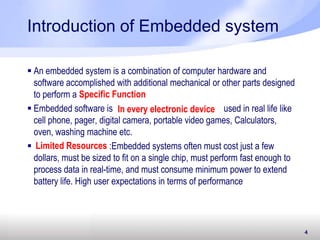
 An embedded system is a combination of computer hardware and
software accomplished with additional mechanical or other parts designed
to perform a
 Embedded software is used in real life like
cell phone, pager, digital camera, portable video games, Calculators,
oven, washing machine etc.
 : :Embedded systems often must cost just a few
dollars, must be sized to fit on a single chip, must perform fast enough to
process data in real-time, and must consume minimum power to extend
battery life. High user expectations in terms of performance
Specific Function
In every electronic device
Limited Resources
5
Connect via peripherals
 Embedded Systems talk with the outside world via peripherals,
such as:
 Serial Communication Interfaces (SCI): RS-232, RS-422, RS-485
etc.
 Universal Serial Bus (USB)
 Multi Media Cards (SD Cards, Compact Flash etc.)
 Networks: Ethernet, Lon Works, etc.
 Analog to Digital/Digital to Analog (ADC/DAC)
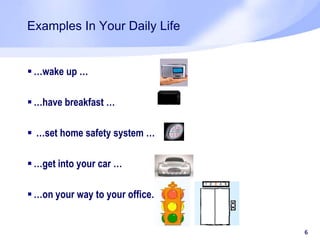
Examples In Your Daily Life
 …wake up …
 …have breakfast …
 …set home safety system …
 …get into your car …
 …on your way to your office…
6
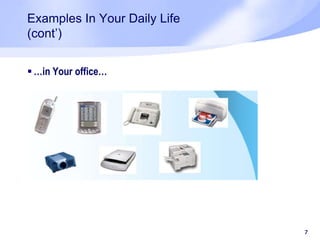
Examples In Your Daily Life
(cont’)
 …in Your office…
7
Examples In Your Daily Life
(cont’)
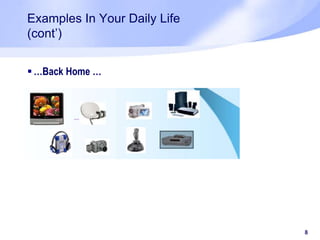
 …Back Home …
8
9
9
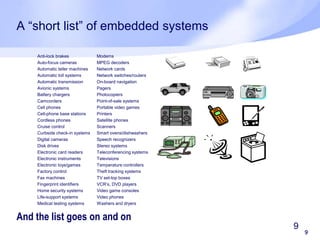
A “short list” of embedded systems
And the list goes on and on
Anti-lock brakes
Auto-focus cameras
Automatic teller machines
Automatic toll systems
Automatic transmission
Avionic systems
Battery chargers
Camcorders
Cell phones
Cell-phone base stations
Cordless phones
Cruise control
Curbside check-in systems
Digital cameras
Disk drives
Electronic card readers
Electronic instruments
Electronic toys/games
Factory control
Fax machines
Fingerprint identifiers
Home security systems
Life-support systems
Medical testing systems
Modems
MPEG decoders
Network cards
Network switches/routers
On-board navigation
Pagers
Photocopiers
Point-of-sale systems
Portable video games
Printers
Satellite phones
Scanners
Smart ovens/dishwashers
Speech recognizers
Stereo systems
Teleconferencing systems
Televisions
Temperature controllers
Theft tracking systems
TV set-top boxes
VCR’s, DVD players
Video game consoles
Video phones
Washers and dryers
10
Embedded Vs PC
11
Difference - Embedded and PC
 An embedded system have defined process and function whereas PC
is generic
 Computer system can be manufactured with general requirement and the
manufacturer does not know what the customer will do, while embedded
system is Application Specific .
 Numerous embedded system make up the computer
 Tightly constrained: Embedded system design is tightly constraint.
Important factors to be considered are as cost, size, performance, and
power.
 Reactive and real-time:
 Continually reacts to changes in the system’s environment.
 Must compute certain results in real-time without delay
Difference - Embedded and PC App- Coding
12
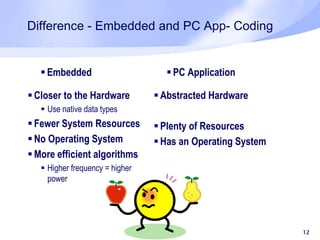
 Embedded
 Closer to the Hardware
 Use native data types
 Fewer System Resources
 No Operating System
 More efficient algorithms
 Higher frequency = higher
power
 PC Application
 Abstracted Hardware
 Plenty of Resources
 Has an Operating System
Embedded vs PC App - Testing
Embedded
 Debugging is very difficult
 Emulators or simulators are
required at the time of
development
 Usually a simple interface
 Often involves extra hardware
PC Application
 Usually simple to get a basic
debug output
 Can be very sophisticated
testing
14
Design challenges
Design Challenges
15
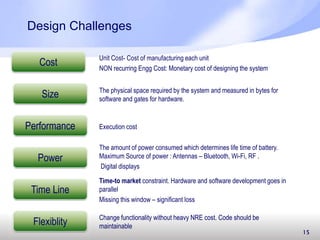
Cost Unit Cost- Cost of manufacturing each unit
NON recurring Engg Cost: Monetary cost of designing the system
The physical space required by the system and measured in bytes for
software and gates for hardware.
Execution cost
The amount of power consumed which determines life time of battery.
Maximum Source of power : Antennas – Bluetooth, Wi-Fi, RF .
Digital displays
Time-to market constraint. Hardware and software development goes in
parallel
Missing this window – significant loss
Size
Performance
Power
Time Line
Flexiblity Change functionality without heavy NRE cost. Code should be
maintainable
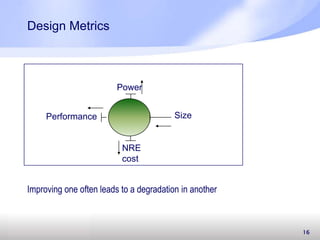
Design Metrics
16
SizePerformance
Power
NRE
cost
Improving one often leads to a degradation in another
Examples of embedded system
17
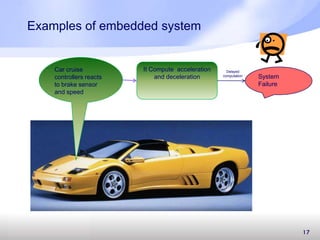
Car cruise
controllers reacts
to brake sensor
and speed
It Compute acceleration
and deceleration System
Failure
Delayed
computation
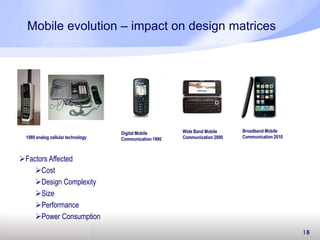
Mobile evolution – impact on design matrices
18
1980 analog cellular technology
Digital Mobile
Communication 1990
Wide Band Mobile
Communication 2000
Broadband Mobile
Communication 2010
Factors Affected
Cost
Design Complexity
Size
Performance
Power Consumption
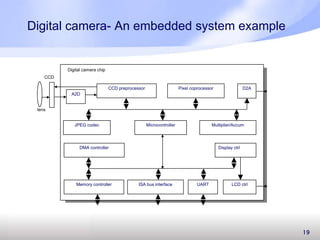
Digital camera- An embedded system example
19
Microcontroller
CCD preprocessor Pixel coprocessor
A2D
D2A
JPEG codec
DMA controller
Memory controller ISA bus interface UART LCD ctrl
Display ctrl
Multiplier/Accum
Digital camera chip
lens
CCD
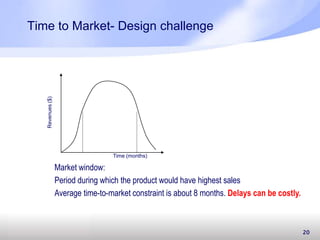
Time to Market- Design challenge
20
Revenues($)
Time (months)
Market window:
Period during which the product would have highest sales
Average time-to-market constraint is about 8 months. Delays can be costly.
Design Challenge
21
After decision of mass production of embedded system and a small
bug found at that time may be very expensive. Even a 1 day delay can
cost equivalent ……… Any Guesses??
22
Software Development Life cycle
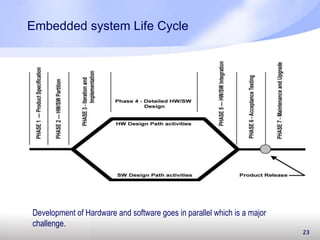
Embedded system Life Cycle
23
Development of Hardware and software goes in parallel which is a major
challenge.
24
Architecture of embedded application
25
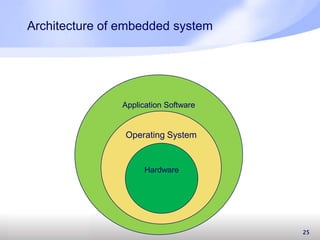
Architecture of embedded system
Application Software
Operating System
Hardware
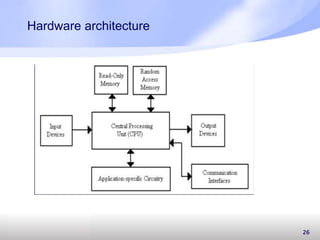
Hardware architecture
26
27
Development Guidelines
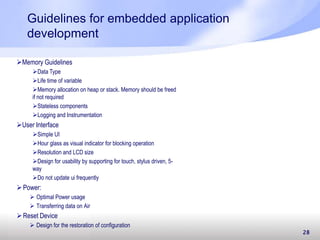
Guidelines for embedded application
development
Power:
 Optimal Power usage
 Transferring data on Air
Reset Device
 Design for the restoration of configuration
28
Memory Guidelines
Data Type
Life time of variable
Memory allocation on heap or stack. Memory should be freed
if not required
Stateless components
Logging and Instrumentation
User Interface
Simple UI
Hour glass as visual indicator for blocking operation
Resolution and LCD size
Design for usability by supporting for touch, stylus driven, 5-
way
Do not update ui frequently
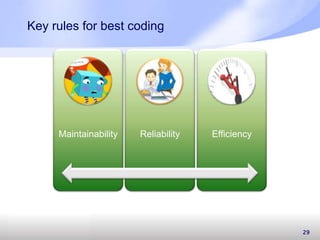
Key rules for best coding
29
Maintainability Reliability Efficiency
Maintenance problems
 Unstructured code
 Insufficient domain knowledge
 Insufficient documentation
30
Efficiency
 Optimal Utilization of Resources
 Design and architecture of software
 Memory management
31
32
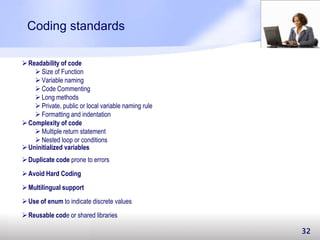
Coding standards
Readability of code
 Size of Function
 Variable naming
 Code Commenting
 Long methods
 Private, public or local variable naming rule
 Formatting and indentation
Complexity of code
 Multiple return statement
 Nested loop or conditions
Uninitialized variables
Duplicate code prone to errors
Avoid Hard Coding
Use of enum to indicate discrete values
Multilingual support
Reusable code or shared libraries
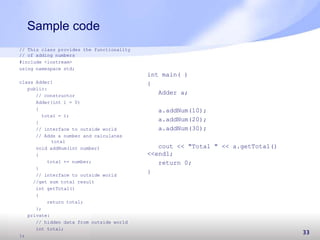
Sample code
33
// This class provides the functionality
// of adding numbers
#include <iostream>
using namespace std;
class Adder{
public:
// constructor
Adder(int i = 0)
{
total = i;
}
// interface to outside world
// Adds a number and calculates
total
void addNum(int number)
{
total += number;
}
// interface to outside world
//get sum total result
int getTotal()
{
return total;
};
private:
// hidden data from outside world
int total;
};
int main( )
{
Adder a;
a.addNum(10);
a.addNum(20);
a.addNum(30);
cout << "Total " << a.getTotal()
<<endl;
return 0;
}
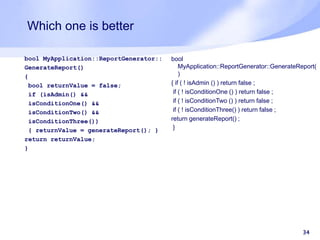
Which one is better
bool MyApplication::ReportGenerator::
GenerateReport()
{
bool returnValue = false;
if (isAdmin() &&
isConditionOne() &&
isConditionTwo() &&
isConditionThree())
{ returnValue = generateReport(); }
return returnValue;
}
34
bool
MyApplication::ReportGenerator::GenerateReport(
)
{ if ( ! isAdmin () ) return false ;
if ( ! isConditionOne () ) return false ;
if ( ! isConditionTwo () ) return false ;
if ( ! isConditionThree() ) return false ;
return generateReport() ;
}
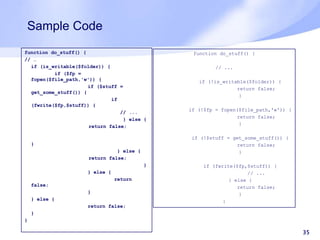
Sample Code
35
function do_stuff() {
// …
if (is_writable($folder)) {
if ($fp =
fopen($file_path,'w')) {
if ($stuff =
get_some_stuff()) {
if
(fwrite($fp,$stuff)) {
// ...
} else {
return false;
}
} else {
return false;
}
} else {
return
false;
}
} else {
return false;
}
}
function do_stuff() {
// ...
if (!is_writable($folder)) {
return false;
}
if (!$fp = fopen($file_path,'w')) {
return false;
}
if (!$stuff = get_some_stuff()) {
return false;
}
if (fwrite($fp,$stuff)) {
// ...
} else {
return false;
}
}
36
Quality software On-time to bring customer
Delight



Good Coding and Design brings >>>
Questions ??
37
Thanks!!
38

Embedded system and development

  • 1.
    Embedded system and Development RajaniBhandari Senior Project Manager HCL Technologies
  • 2.
    2 Topics Introduction to Embeddedsystems How embedded is different from PC Design constraints in embedded software Examples of Embedded applications Software development cycle in embedded applications Architecture of embedded applications. Development Guidelines
  • 3.
  • 4.
    4 Introduction of Embeddedsystem  An embedded system is a combination of computer hardware and software accomplished with additional mechanical or other parts designed to perform a  Embedded software is used in real life like cell phone, pager, digital camera, portable video games, Calculators, oven, washing machine etc.  : :Embedded systems often must cost just a few dollars, must be sized to fit on a single chip, must perform fast enough to process data in real-time, and must consume minimum power to extend battery life. High user expectations in terms of performance Specific Function In every electronic device Limited Resources
  • 5.
    5 Connect via peripherals Embedded Systems talk with the outside world via peripherals, such as:  Serial Communication Interfaces (SCI): RS-232, RS-422, RS-485 etc.  Universal Serial Bus (USB)  Multi Media Cards (SD Cards, Compact Flash etc.)  Networks: Ethernet, Lon Works, etc.  Analog to Digital/Digital to Analog (ADC/DAC)
  • 6.
    Examples In YourDaily Life  …wake up …  …have breakfast …  …set home safety system …  …get into your car …  …on your way to your office… 6
  • 7.
    Examples In YourDaily Life (cont’)  …in Your office… 7
  • 8.
    Examples In YourDaily Life (cont’)  …Back Home … 8
  • 9.
    9 9 A “short list”of embedded systems And the list goes on and on Anti-lock brakes Auto-focus cameras Automatic teller machines Automatic toll systems Automatic transmission Avionic systems Battery chargers Camcorders Cell phones Cell-phone base stations Cordless phones Cruise control Curbside check-in systems Digital cameras Disk drives Electronic card readers Electronic instruments Electronic toys/games Factory control Fax machines Fingerprint identifiers Home security systems Life-support systems Medical testing systems Modems MPEG decoders Network cards Network switches/routers On-board navigation Pagers Photocopiers Point-of-sale systems Portable video games Printers Satellite phones Scanners Smart ovens/dishwashers Speech recognizers Stereo systems Teleconferencing systems Televisions Temperature controllers Theft tracking systems TV set-top boxes VCR’s, DVD players Video game consoles Video phones Washers and dryers
  • 10.
  • 11.
    11 Difference - Embeddedand PC  An embedded system have defined process and function whereas PC is generic  Computer system can be manufactured with general requirement and the manufacturer does not know what the customer will do, while embedded system is Application Specific .  Numerous embedded system make up the computer  Tightly constrained: Embedded system design is tightly constraint. Important factors to be considered are as cost, size, performance, and power.  Reactive and real-time:  Continually reacts to changes in the system’s environment.  Must compute certain results in real-time without delay
  • 12.
    Difference - Embeddedand PC App- Coding 12  Embedded  Closer to the Hardware  Use native data types  Fewer System Resources  No Operating System  More efficient algorithms  Higher frequency = higher power  PC Application  Abstracted Hardware  Plenty of Resources  Has an Operating System
  • 13.
    Embedded vs PCApp - Testing Embedded  Debugging is very difficult  Emulators or simulators are required at the time of development  Usually a simple interface  Often involves extra hardware PC Application  Usually simple to get a basic debug output  Can be very sophisticated testing
  • 14.
  • 15.
    Design Challenges 15 Cost UnitCost- Cost of manufacturing each unit NON recurring Engg Cost: Monetary cost of designing the system The physical space required by the system and measured in bytes for software and gates for hardware. Execution cost The amount of power consumed which determines life time of battery. Maximum Source of power : Antennas – Bluetooth, Wi-Fi, RF . Digital displays Time-to market constraint. Hardware and software development goes in parallel Missing this window – significant loss Size Performance Power Time Line Flexiblity Change functionality without heavy NRE cost. Code should be maintainable
  • 16.
  • 17.
    Examples of embeddedsystem 17 Car cruise controllers reacts to brake sensor and speed It Compute acceleration and deceleration System Failure Delayed computation
  • 18.
    Mobile evolution –impact on design matrices 18 1980 analog cellular technology Digital Mobile Communication 1990 Wide Band Mobile Communication 2000 Broadband Mobile Communication 2010 Factors Affected Cost Design Complexity Size Performance Power Consumption
  • 19.
    Digital camera- Anembedded system example 19 Microcontroller CCD preprocessor Pixel coprocessor A2D D2A JPEG codec DMA controller Memory controller ISA bus interface UART LCD ctrl Display ctrl Multiplier/Accum Digital camera chip lens CCD
  • 20.
    Time to Market-Design challenge 20 Revenues($) Time (months) Market window: Period during which the product would have highest sales Average time-to-market constraint is about 8 months. Delays can be costly.
  • 21.
    Design Challenge 21 After decisionof mass production of embedded system and a small bug found at that time may be very expensive. Even a 1 day delay can cost equivalent ……… Any Guesses??
  • 22.
  • 23.
    Embedded system LifeCycle 23 Development of Hardware and software goes in parallel which is a major challenge.
  • 24.
  • 25.
    25 Architecture of embeddedsystem Application Software Operating System Hardware
  • 26.
  • 27.
  • 28.
    Guidelines for embeddedapplication development Power:  Optimal Power usage  Transferring data on Air Reset Device  Design for the restoration of configuration 28 Memory Guidelines Data Type Life time of variable Memory allocation on heap or stack. Memory should be freed if not required Stateless components Logging and Instrumentation User Interface Simple UI Hour glass as visual indicator for blocking operation Resolution and LCD size Design for usability by supporting for touch, stylus driven, 5- way Do not update ui frequently
  • 29.
    Key rules forbest coding 29 Maintainability Reliability Efficiency
  • 30.
    Maintenance problems  Unstructuredcode  Insufficient domain knowledge  Insufficient documentation 30
  • 31.
    Efficiency  Optimal Utilizationof Resources  Design and architecture of software  Memory management 31
  • 32.
    32 Coding standards Readability ofcode  Size of Function  Variable naming  Code Commenting  Long methods  Private, public or local variable naming rule  Formatting and indentation Complexity of code  Multiple return statement  Nested loop or conditions Uninitialized variables Duplicate code prone to errors Avoid Hard Coding Use of enum to indicate discrete values Multilingual support Reusable code or shared libraries
  • 33.
    Sample code 33 // Thisclass provides the functionality // of adding numbers #include <iostream> using namespace std; class Adder{ public: // constructor Adder(int i = 0) { total = i; } // interface to outside world // Adds a number and calculates total void addNum(int number) { total += number; } // interface to outside world //get sum total result int getTotal() { return total; }; private: // hidden data from outside world int total; }; int main( ) { Adder a; a.addNum(10); a.addNum(20); a.addNum(30); cout << "Total " << a.getTotal() <<endl; return 0; }
  • 34.
    Which one isbetter bool MyApplication::ReportGenerator:: GenerateReport() { bool returnValue = false; if (isAdmin() && isConditionOne() && isConditionTwo() && isConditionThree()) { returnValue = generateReport(); } return returnValue; } 34 bool MyApplication::ReportGenerator::GenerateReport( ) { if ( ! isAdmin () ) return false ; if ( ! isConditionOne () ) return false ; if ( ! isConditionTwo () ) return false ; if ( ! isConditionThree() ) return false ; return generateReport() ; }
  • 35.
    Sample Code 35 function do_stuff(){ // … if (is_writable($folder)) { if ($fp = fopen($file_path,'w')) { if ($stuff = get_some_stuff()) { if (fwrite($fp,$stuff)) { // ... } else { return false; } } else { return false; } } else { return false; } } else { return false; } } function do_stuff() { // ... if (!is_writable($folder)) { return false; } if (!$fp = fopen($file_path,'w')) { return false; } if (!$stuff = get_some_stuff()) { return false; } if (fwrite($fp,$stuff)) { // ... } else { return false; } }
  • 36.
    36 Quality software On-timeto bring customer Delight    Good Coding and Design brings >>>
  • 37.
  • 38.

Editor's Notes

  • #7 Cruise controler stereo et
  • #16 The time-to market constraint has become especially demanding. Introducing an embedded system to the marketplace early can make a big difference in the system’s profitability, since market time-windows for products are becoming quite short, often measured in months. Hardware and software development goes in parallelMissing this window (meaning the product begins being sold further to the right on the time scale) can mean significantloss in sales.
  • #17 The design measures typically compete with one another: improving one often leads to a degradation in another. For example, if we reduce an implementation’s size, its performance may suffer. Designer should comfortable with a variety of hardware and software implementation technologies, and must be able to migrate from one technology to another, in order to find the best implementation for a given application and constraints. Also he must be software and hardware expert .
  • #18 A car&apos;s cruise controller continually monitors and reacts to speed and brake sensors. It must compute acceleration or decelerations amounts repeatedly within a limited time; a delayed computation result could result in a failure to maintain control of the car. In contrast, a desktop system typically focuses on computations, with relatively infrequent (from the computer’s perspective) reactions to input devices. In addition, a delay in those computations, while perhaps inconvenient to the computer user, typically does not result in a system failure.
  • #20 Single-functioned -- always a digital cameraTightly-constrained -- Low cost, low power, small, fastReactive and real-time -- only to a small extentCCD:complete mixed-signal processing IC for digital cameras,A2D- analog to digital conversionCCD imager output signal in a video camera, a digital still camera, security camera, or similar applicationsPixel Processor: The pixel processor receives raw data from the pixel chips and formats it for useCodec: A codec is a device or computer program capable of encoding or decoding a digital data stream or signal.A microcontroller (sometimes abbreviated µC, uC or MCU) is a small computer on a single integrated circuit containing a processor core, memory, and programmable input/output peripheralsAn accumulator is a register for short-term, intermediate storage of arithmetic and ... and manipulation of imagery, GPS, satellite photography and historical data, ...
  • #24 Product specifications are driven by market mainly and also change very frequently like camera or mobile. Development of Hardware and software goes in parallel which is a major challenge.
  • #29 Stateless components are preferred when scalability or performance are important. Design the components to accept all the needed values as input parameters instead of relying upon object properties when calling methods. Doing so eliminates the need to preserve object state between method calls. When it is necessary to maintain state, consider using alternative methods, such as maintaining state in a database.limited memory available on small device- logging and instrumentation should be limited Take into account the various screen sizes and resolutions of your target devices when designing your application UIDesign devices so that parts can be powered off when not in use.Transferring data on Airuse batch burst and shut down communication when not needed
  • #30 Reliability measures the level of risk and the likelihood of potential application failures. It also measures the defects injected due to modifications made to the softwareMaintainability- how muchadaptle to change and readable and easy to understandEffecience is linked with performance