Unit 1: Web Fundamentals
Lesson 3: HTML and Email
August 20, 2013
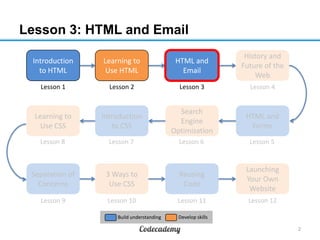
Lesson 3: HTML and Email
2
Introduction
to HTML
Learning to
Use HTML
HTML and
Email
History and
Future of the
Web
HTML and
Forms
Search
Engine
Optimization
Learning to
Use CSS
Introduction
to CSS
Reusing
Code
3 Ways to
Use CSS
Separation of
Concerns
Launching
Your Own
Website
Lesson 1 Lesson 2 Lesson 3 Lesson 4
Lesson 8 Lesson 7 Lesson 6 Lesson 5
Lesson 9 Lesson 10 Lesson 11 Lesson 12
Build understanding Develop skills
Recap from last time (I)
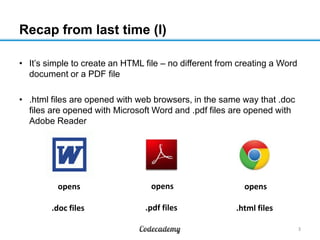
• It’s simple to create an HTML file – no different from creating a Word
document or a PDF file
• .html files are opened with web browsers, in the same way that .doc
files are opened with Microsoft Word and .pdf files are opened with
Adobe Reader
3
opens
.doc files
opens
.pdf files
opens
.html files
Recap from last time (II)
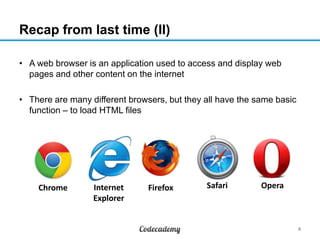
• A web browser is an application used to access and display web
pages and other content on the internet
• There are many different browsers, but they all have the same basic
function – to load HTML files
4
Chrome Internet
Explorer
Firefox Safari Opera
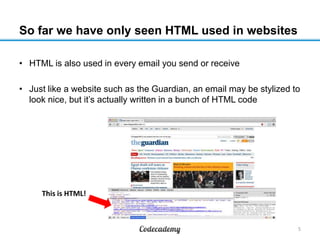
So far we have only seen HTML used in websites
• HTML is also used in every email you send or receive
• Just like a website such as the Guardian, an email may be stylized to
look nice, but it’s actually written in a bunch of HTML code
5
This is HTML!
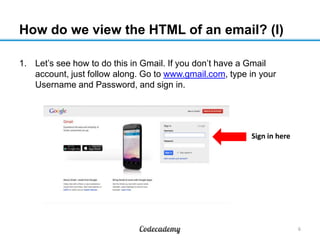
How do we view the HTML of an email? (I)
1. Let’s see how to do this in Gmail. If you don’t have a Gmail
account, just follow along. Go to www.gmail.com, type in your
Username and Password, and sign in.
6
Sign in here
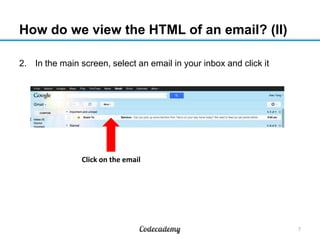
How do we view the HTML of an email? (II)
2. In the main screen, select an email in your inbox and click it
7
Click on the email
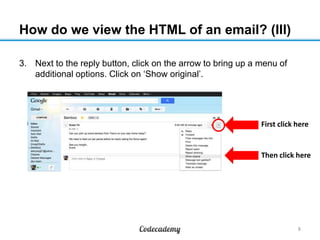
How do we view the HTML of an email? (III)
3. Next to the reply button, click on the arrow to bring up a menu of
additional options. Click on ‘Show original’.
8
First click here
Then click here
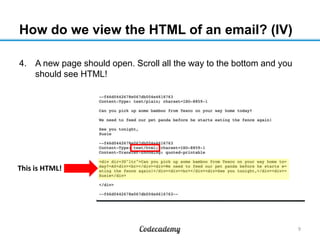
How do we view the HTML of an email? (IV)
4. A new page should open. Scroll all the way to the bottom and you
should see HTML!
9
This is HTML!
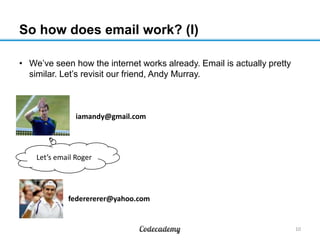
So how does email work? (I)
• We’ve seen how the internet works already. Email is actually pretty
similar. Let’s revisit our friend, Andy Murray.
10
Let’s email Roger
iamandy@gmail.com
federererer@yahoo.com
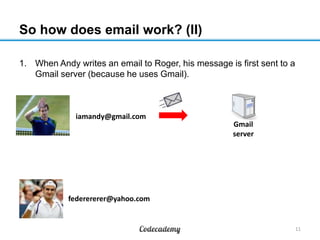
So how does email work? (II)
1. When Andy writes an email to Roger, his message is first sent to a
Gmail server (because he uses Gmail).
11
iamandy@gmail.com
federererer@yahoo.com
Gmail
server
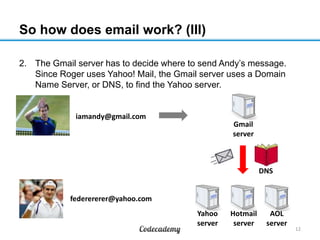
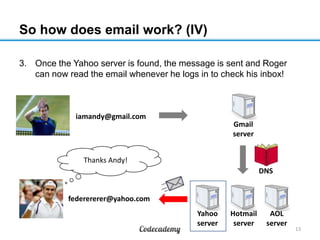
So how does email work? (III)
2. The Gmail server has to decide where to send Andy’s message.
Since Roger uses Yahoo! Mail, the Gmail server uses a Domain
Name Server, or DNS, to find the Yahoo server.
12
iamandy@gmail.com
federererer@yahoo.com
Gmail
server
Hotmail
server
Yahoo
server
AOL
server
DNS
So how does email work? (IV)
3. Once the Yahoo server is found, the message is sent and Roger
can now read the email whenever he logs in to check his inbox!
13
Thanks Andy!
iamandy@gmail.com
federererer@yahoo.com
Gmail
server
Hotmail
server
Yahoo
server
AOL
server
DNS
Email vs. Websites (I)
• Both rely on servers to
transmit information
• Both involve sending and
receiving HTML
• Both use DNS to find the
right servers to use
14
How are they similar? How are they different?
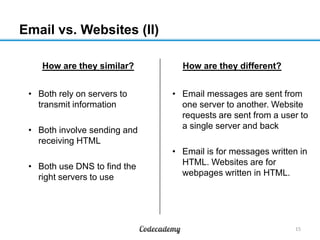
Email vs. Websites (II)
• Both rely on servers to
transmit information
• Both involve sending and
receiving HTML
• Both use DNS to find the
right servers to use
15
• Email messages are sent from
one server to another. Website
requests are sent from a user to
a single server and back
• Email is for messages written in
HTML. Websites are for
webpages written in HTML.
How are they similar? How are they different?
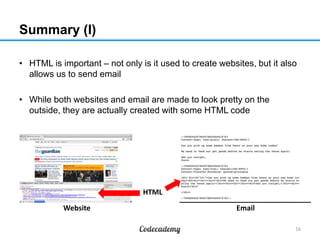
Summary (I)
• HTML is important – not only is it used to create websites, but it also
allows us to send email
• While both websites and email are made to look pretty on the
outside, they are actually created with some HTML code
16
Website Email
HTML
Summary (II)
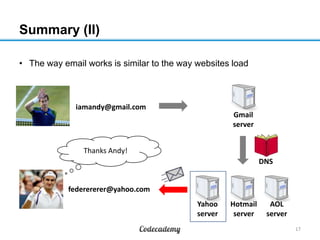
• The way email works is similar to the way websites load
17
Thanks Andy!
iamandy@gmail.com
federererer@yahoo.com
Gmail
server
Hotmail
server
Yahoo
server
AOL
server
DNS
What to do on your own
1. Go to URL to complete the Codecademy course online
2. Do the practice set on the material learned
1. Take the follow-up quiz to test your understanding
18

Lesson 103 23 aug13-1430-ay

  • 1.
    Unit 1: WebFundamentals Lesson 3: HTML and Email August 20, 2013
  • 2.
    Lesson 3: HTMLand Email 2 Introduction to HTML Learning to Use HTML HTML and Email History and Future of the Web HTML and Forms Search Engine Optimization Learning to Use CSS Introduction to CSS Reusing Code 3 Ways to Use CSS Separation of Concerns Launching Your Own Website Lesson 1 Lesson 2 Lesson 3 Lesson 4 Lesson 8 Lesson 7 Lesson 6 Lesson 5 Lesson 9 Lesson 10 Lesson 11 Lesson 12 Build understanding Develop skills
  • 3.
    Recap from lasttime (I) • It’s simple to create an HTML file – no different from creating a Word document or a PDF file • .html files are opened with web browsers, in the same way that .doc files are opened with Microsoft Word and .pdf files are opened with Adobe Reader 3 opens .doc files opens .pdf files opens .html files
  • 4.
    Recap from lasttime (II) • A web browser is an application used to access and display web pages and other content on the internet • There are many different browsers, but they all have the same basic function – to load HTML files 4 Chrome Internet Explorer Firefox Safari Opera
  • 5.
    So far wehave only seen HTML used in websites • HTML is also used in every email you send or receive • Just like a website such as the Guardian, an email may be stylized to look nice, but it’s actually written in a bunch of HTML code 5 This is HTML!
  • 6.
    How do weview the HTML of an email? (I) 1. Let’s see how to do this in Gmail. If you don’t have a Gmail account, just follow along. Go to www.gmail.com, type in your Username and Password, and sign in. 6 Sign in here
  • 7.
    How do weview the HTML of an email? (II) 2. In the main screen, select an email in your inbox and click it 7 Click on the email
  • 8.
    How do weview the HTML of an email? (III) 3. Next to the reply button, click on the arrow to bring up a menu of additional options. Click on ‘Show original’. 8 First click here Then click here
  • 9.
    How do weview the HTML of an email? (IV) 4. A new page should open. Scroll all the way to the bottom and you should see HTML! 9 This is HTML!
  • 10.
    So how doesemail work? (I) • We’ve seen how the internet works already. Email is actually pretty similar. Let’s revisit our friend, Andy Murray. 10 Let’s email Roger iamandy@gmail.com federererer@yahoo.com
  • 11.
    So how doesemail work? (II) 1. When Andy writes an email to Roger, his message is first sent to a Gmail server (because he uses Gmail). 11 iamandy@gmail.com federererer@yahoo.com Gmail server
  • 12.
    So how doesemail work? (III) 2. The Gmail server has to decide where to send Andy’s message. Since Roger uses Yahoo! Mail, the Gmail server uses a Domain Name Server, or DNS, to find the Yahoo server. 12 iamandy@gmail.com federererer@yahoo.com Gmail server Hotmail server Yahoo server AOL server DNS
  • 13.
    So how doesemail work? (IV) 3. Once the Yahoo server is found, the message is sent and Roger can now read the email whenever he logs in to check his inbox! 13 Thanks Andy! iamandy@gmail.com federererer@yahoo.com Gmail server Hotmail server Yahoo server AOL server DNS
  • 14.
    Email vs. Websites(I) • Both rely on servers to transmit information • Both involve sending and receiving HTML • Both use DNS to find the right servers to use 14 How are they similar? How are they different?
  • 15.
    Email vs. Websites(II) • Both rely on servers to transmit information • Both involve sending and receiving HTML • Both use DNS to find the right servers to use 15 • Email messages are sent from one server to another. Website requests are sent from a user to a single server and back • Email is for messages written in HTML. Websites are for webpages written in HTML. How are they similar? How are they different?
  • 16.
    Summary (I) • HTMLis important – not only is it used to create websites, but it also allows us to send email • While both websites and email are made to look pretty on the outside, they are actually created with some HTML code 16 Website Email HTML
  • 17.
    Summary (II) • Theway email works is similar to the way websites load 17 Thanks Andy! iamandy@gmail.com federererer@yahoo.com Gmail server Hotmail server Yahoo server AOL server DNS
  • 18.
    What to doon your own 1. Go to URL to complete the Codecademy course online 2. Do the practice set on the material learned 1. Take the follow-up quiz to test your understanding 18