June 12 , 2021
Dubai – MuleSoft Meetup Group
Error Handling in MuleSoft
2
● Introductions
● Error Handling
● Retry
● Reprocessing
● Log Management
● Wrap-up
Agenda
3
●About the organizer & Speaker:
Introductions
A SHOW OF HANDS:
Who is new to this Meetup?
Error Handling in MuleSoft
5
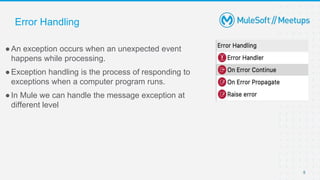
●An exception occurs when an unexpected event
happens while processing.
●Exception handling is the process of responding to
exceptions when a computer program runs.
●In Mule we can handle the message exception at
different level
Error Handling
Error Handling
● At Project level using Default error handler
● At Project level using Custom Global error handler
● At Flow level in exception handling using :
On Error Continue
On Error Propagate
Raise Error
● With in Flow or at processor level using try scope
6
Error Handling
● Whenever there is an error occurred in a Flow, an error Object is created
● It contains many properties . Eg : error.description , error.errorType etc
● Mule identifies based on error Type and then route to respective blocks that
are placed in Error Handler.
● errorType is combination of Namespace and Identifier :
Eg : HTTP:UNAUTHORIZED
● Here :
namespace = HTTP
Identifier = UNAUTHORIZED
7
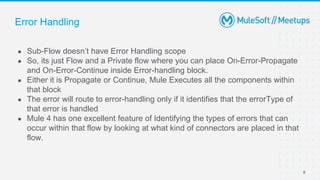
Error Handling
● Sub-Flow doesn’t have Error Handling scope
● So, its just Flow and a Private flow where you can place On-Error-Propagate
and On-Error-Continue inside Error-handling block.
● Either it is Propagate or Continue, Mule Executes all the components within
that block
● The error will route to error-handling only if it identifies that the errorType of
that error is handled
● Mule 4 has one excellent feature of Identifying the types of errors that can
occur within that flow by looking at what kind of connectors are placed in that
flow.
8
Error Handling
9
Error Handling
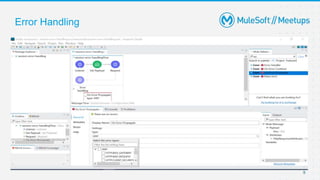
● See if anything is present in Error-Handling
● Even if there are on-errorpropagate and on-error-continue blocks, see that if
that errorType is handled
● If NOT, then Mule will use default Error Handling
● If your flow is not called by any other flow , then it will display default value
that is set in Error-Response and gives status code as 500 bad default if
nothing is set manually
10
11
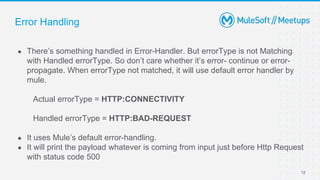
Error Handling
● There’s something handled in Error-Handler. But errorType is not Matching
with Handled errorType. So don’t care whether it’s error- continue or error-
propagate. When errorType not matched, it will use default error handler by
mule.
Actual errorType = HTTP:CONNECTIVITY
Handled errorType = HTTP:BAD-REQUEST
● It uses Mule’s default error-handling.
● It will print the payload whatever is coming from input just before Http Request
with status code 500
12
13
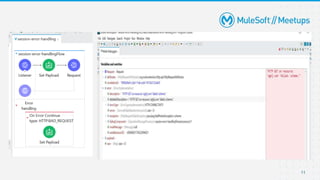
Error Handling
● There’s something handled in Error-Handler. And errorType is Matching with
Handled errorType.
Actual errorType = HTTP:CONNECTIVITY
Handled errorType = HTTP:CONNECTIVITY
● The flow is using On-Error-Continue . It executes all components in this block.
In this block we are setting payload message with value “Error Handled in
Main flow”.
● it will execute processors in Error-Continue and end the process with 200
status
14
Error Handling
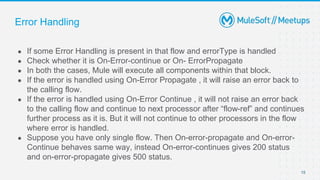
● If some Error Handling is present in that flow and errorType is handled
● Check whether it is On-Error-continue or On- ErrorPropagate
● In both the cases, Mule will execute all components within that block.
● If the error is handled using On-Error Propagate , it will raise an error back to
the calling flow.
● If the error is handled using On-Error Continue , it will not raise an error back
to the calling flow and continue to next processor after “flow-ref” and continues
further process as it is. But it will not continue to other processors in the flow
where error is handled.
● Suppose you have only single flow. Then On-error-propagate and On-error-
Continue behaves same way, instead On-error-continues gives 200 status
and on-error-propagate gives 500 status.
15
Error Handling
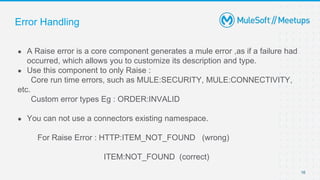
● A Raise error is a core component generates a mule error ,as if a failure had
occurred, which allows you to customize its description and type.
● Use this component to only Raise :
Core run time errors, such as MULE:SECURITY, MULE:CONNECTIVITY,
etc.
Custom error types Eg : ORDER:INVALID
● You can not use a connectors existing namespace.
For Raise Error : HTTP:ITEM_NOT_FOUND (wrong)
ITEM:NOT_FOUND (correct)
16
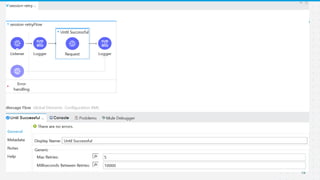
Retry
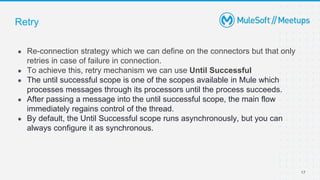
● Re-connection strategy which we can define on the connectors but that only
retries in case of failure in connection.
● To achieve this, retry mechanism we can use Until Successful
● The until successful scope is one of the scopes available in Mule which
processes messages through its processors until the process succeeds.
● After passing a message into the until successful scope, the main flow
immediately regains control of the thread.
● By default, the Until Successful scope runs asynchronously, but you can
always configure it as synchronous.
17
Retry
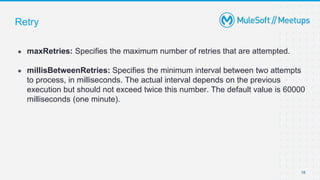
● maxRetries: Specifies the maximum number of retries that are attempted.
● millisBetweenRetries: Specifies the minimum interval between two attempts
to process, in milliseconds. The actual interval depends on the previous
execution but should not exceed twice this number. The default value is 60000
milliseconds (one minute).
18
19
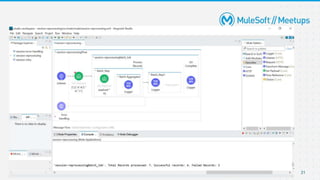
Reprocessing
● MuleSoft allows you to process messages as a batch which can be achieved
by batch scope.
● Batch scope in a mule application can divide the input payload into individual
records, performs actions on these individual records, and then sends the
processed data to target systems.
● Within an application, you can initiate a Batch Job scope, which splits
messages into individual records, performs actions upon each record, and
then reports on the results and potentially pushes the processed output to
other systems or queues.
20
21
Log Management
● Logging is useful for monitoring and troubleshooting your Mule
applications and the Mule server whether that's recording errors raised by
the application or specific details, such as status notifications, custom
metadata, and payloads.
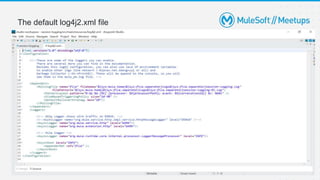
● Loggers can be configured to determine what specific packages are to be
logged and to what depth where packages are a grouped set of classes and
interfaces, represented by a namespace.
● Appenders essentially describe how to deliver the logging events to a
destination. Think about where you typically see log events outputted from
your Mule applications the Console view in Anypoint Studio and the log files of
the application itself both are examples of Appenders
22
The default log4j2.xml file
23
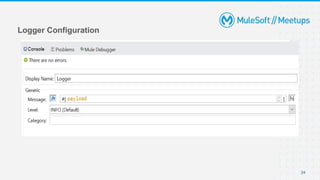
Logger Configuration
24
Fields:
Message, Level, Category
● Message :
Specifies the Mule log message.
By default, messages are logged to the application’s log file.
● Level :
Specifies the log level.
Available options are DEBUG , ERROR , INFO(Default) , TRACE , WARN
● Category :
Optional setting that specifies a category name that it adds to log4j2.xml
file. For example, you might use a category to route your log messages
based on your category, or you might set log levels based on category.
25
26
● Share:
○ Tweet using the hashtag #MuleSoftMeetups
○ Invite your network to join: https://meetups.mulesoft.com/dubai/
Feedback:
○ Fill out the survey feedback and suggest topics for upcoming events
○ Contact MuleSoft at meetups@mulesoft.com for ways to improve the program
What’s next?
Introduce yourself to your neighbor
Networking time
Thank you

Mule soft meetup__dubai_12_june- Error Handling

  • 1.
    June 12 ,2021 Dubai – MuleSoft Meetup Group Error Handling in MuleSoft
  • 2.
    2 ● Introductions ● ErrorHandling ● Retry ● Reprocessing ● Log Management ● Wrap-up Agenda
  • 3.
    3 ●About the organizer& Speaker: Introductions A SHOW OF HANDS: Who is new to this Meetup?
  • 4.
  • 5.
    5 ●An exception occurswhen an unexpected event happens while processing. ●Exception handling is the process of responding to exceptions when a computer program runs. ●In Mule we can handle the message exception at different level Error Handling
  • 6.
    Error Handling ● AtProject level using Default error handler ● At Project level using Custom Global error handler ● At Flow level in exception handling using : On Error Continue On Error Propagate Raise Error ● With in Flow or at processor level using try scope 6
  • 7.
    Error Handling ● Wheneverthere is an error occurred in a Flow, an error Object is created ● It contains many properties . Eg : error.description , error.errorType etc ● Mule identifies based on error Type and then route to respective blocks that are placed in Error Handler. ● errorType is combination of Namespace and Identifier : Eg : HTTP:UNAUTHORIZED ● Here : namespace = HTTP Identifier = UNAUTHORIZED 7
  • 8.
    Error Handling ● Sub-Flowdoesn’t have Error Handling scope ● So, its just Flow and a Private flow where you can place On-Error-Propagate and On-Error-Continue inside Error-handling block. ● Either it is Propagate or Continue, Mule Executes all the components within that block ● The error will route to error-handling only if it identifies that the errorType of that error is handled ● Mule 4 has one excellent feature of Identifying the types of errors that can occur within that flow by looking at what kind of connectors are placed in that flow. 8
  • 9.
  • 10.
    Error Handling ● Seeif anything is present in Error-Handling ● Even if there are on-errorpropagate and on-error-continue blocks, see that if that errorType is handled ● If NOT, then Mule will use default Error Handling ● If your flow is not called by any other flow , then it will display default value that is set in Error-Response and gives status code as 500 bad default if nothing is set manually 10
  • 11.
  • 12.
    Error Handling ● There’ssomething handled in Error-Handler. But errorType is not Matching with Handled errorType. So don’t care whether it’s error- continue or error- propagate. When errorType not matched, it will use default error handler by mule. Actual errorType = HTTP:CONNECTIVITY Handled errorType = HTTP:BAD-REQUEST ● It uses Mule’s default error-handling. ● It will print the payload whatever is coming from input just before Http Request with status code 500 12
  • 13.
  • 14.
    Error Handling ● There’ssomething handled in Error-Handler. And errorType is Matching with Handled errorType. Actual errorType = HTTP:CONNECTIVITY Handled errorType = HTTP:CONNECTIVITY ● The flow is using On-Error-Continue . It executes all components in this block. In this block we are setting payload message with value “Error Handled in Main flow”. ● it will execute processors in Error-Continue and end the process with 200 status 14
  • 15.
    Error Handling ● Ifsome Error Handling is present in that flow and errorType is handled ● Check whether it is On-Error-continue or On- ErrorPropagate ● In both the cases, Mule will execute all components within that block. ● If the error is handled using On-Error Propagate , it will raise an error back to the calling flow. ● If the error is handled using On-Error Continue , it will not raise an error back to the calling flow and continue to next processor after “flow-ref” and continues further process as it is. But it will not continue to other processors in the flow where error is handled. ● Suppose you have only single flow. Then On-error-propagate and On-error- Continue behaves same way, instead On-error-continues gives 200 status and on-error-propagate gives 500 status. 15
  • 16.
    Error Handling ● ARaise error is a core component generates a mule error ,as if a failure had occurred, which allows you to customize its description and type. ● Use this component to only Raise : Core run time errors, such as MULE:SECURITY, MULE:CONNECTIVITY, etc. Custom error types Eg : ORDER:INVALID ● You can not use a connectors existing namespace. For Raise Error : HTTP:ITEM_NOT_FOUND (wrong) ITEM:NOT_FOUND (correct) 16
  • 17.
    Retry ● Re-connection strategywhich we can define on the connectors but that only retries in case of failure in connection. ● To achieve this, retry mechanism we can use Until Successful ● The until successful scope is one of the scopes available in Mule which processes messages through its processors until the process succeeds. ● After passing a message into the until successful scope, the main flow immediately regains control of the thread. ● By default, the Until Successful scope runs asynchronously, but you can always configure it as synchronous. 17
  • 18.
    Retry ● maxRetries: Specifiesthe maximum number of retries that are attempted. ● millisBetweenRetries: Specifies the minimum interval between two attempts to process, in milliseconds. The actual interval depends on the previous execution but should not exceed twice this number. The default value is 60000 milliseconds (one minute). 18
  • 19.
  • 20.
    Reprocessing ● MuleSoft allowsyou to process messages as a batch which can be achieved by batch scope. ● Batch scope in a mule application can divide the input payload into individual records, performs actions on these individual records, and then sends the processed data to target systems. ● Within an application, you can initiate a Batch Job scope, which splits messages into individual records, performs actions upon each record, and then reports on the results and potentially pushes the processed output to other systems or queues. 20
  • 21.
  • 22.
    Log Management ● Loggingis useful for monitoring and troubleshooting your Mule applications and the Mule server whether that's recording errors raised by the application or specific details, such as status notifications, custom metadata, and payloads. ● Loggers can be configured to determine what specific packages are to be logged and to what depth where packages are a grouped set of classes and interfaces, represented by a namespace. ● Appenders essentially describe how to deliver the logging events to a destination. Think about where you typically see log events outputted from your Mule applications the Console view in Anypoint Studio and the log files of the application itself both are examples of Appenders 22
  • 23.
  • 24.
  • 25.
    Fields: Message, Level, Category ●Message : Specifies the Mule log message. By default, messages are logged to the application’s log file. ● Level : Specifies the log level. Available options are DEBUG , ERROR , INFO(Default) , TRACE , WARN ● Category : Optional setting that specifies a category name that it adds to log4j2.xml file. For example, you might use a category to route your log messages based on your category, or you might set log levels based on category. 25
  • 26.
    26 ● Share: ○ Tweetusing the hashtag #MuleSoftMeetups ○ Invite your network to join: https://meetups.mulesoft.com/dubai/ Feedback: ○ Fill out the survey feedback and suggest topics for upcoming events ○ Contact MuleSoft at meetups@mulesoft.com for ways to improve the program What’s next?
  • 27.
    Introduce yourself toyour neighbor Networking time
  • 28.