Mule ESB 3.6
Java Messaging Services (JMS)
Prepared By: Rupesh Sinha
Overview
− Java Messaging Services (JMS)
− JMS Messaging model
− JMS backchannel
− Message filters in JMS
− JMS transformers in Mule
− Example configuration for ActiveMQ
Java Messaging Services (JMS)
• A message oriented middleware
• Supports creation of message based
applications
• Supports loosely coupled middleware
• Supports transactions
• Supports reliability
JMS Messaging Model
• JMS supports two models for messaging
− JMS Queue
− JMS Topic
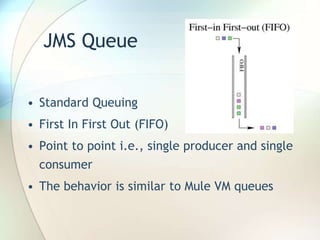
JMS Queue
• Standard Queuing
• First In First Out (FIFO)
• Point to point i.e., single producer and single
consumer
• The behavior is similar to Mule VM queues
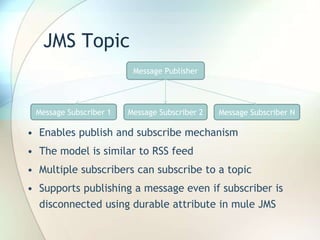
JMS Topic
• Enables publish and subscribe mechanism
• The model is similar to RSS feed
• Multiple subscribers can subscribe to a topic
• Supports publishing a message even if subscriber is
disconnected using durable attribute in mule JMS
Message Publisher
Message Subscriber 1 Message Subscriber 2 Message Subscriber N
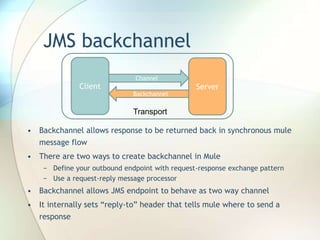
JMS backchannel
• Backchannel allows response to be returned back in synchronous mule
message flow
• There are two ways to create backchannel in Mule
− Define your outbound endpoint with request-response exchange pattern
− Use a request-reply message processor
• Backchannel allows JMS endpoint to behave as two way channel
• It internally sets “reply-to” header that tells mule where to send a
response
Client Server
Channel
Backchannel
Transport
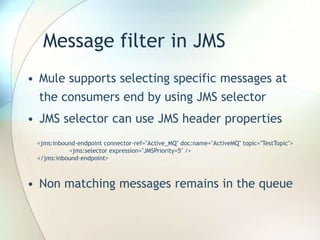
Message filter in JMS
• Mule supports selecting specific messages at
the consumers end by using JMS selector
• JMS selector can use JMS header properties
• Non matching messages remains in the queue
<jms:inbound-endpoint connector-ref="Active_MQ" doc:name="ActiveMQ" topic="TestTopic">
<jms:selector expression="JMSPriority=5" />
</jms:inbound-endpoint>
JMS transformers in Mule
• The default transformers applied to JMS endpoints are as
follows:
− inbound = JMSMessageToObject
− outbound = ObjectToJMSMessage
− response = ObjectToJMSMessage
• The transformation happens to/from as given below
JMS Type Java Type
javax.jms.TextMessage java.lang.String
javax.jms.ObjectMessage java.lang.Object
javax.jms.BytesMessage byte[]
javax.jms.MapMessage java.util.Map
javax.jms.StreamMessage java.io.InputStream
Example configuration for Active MQ
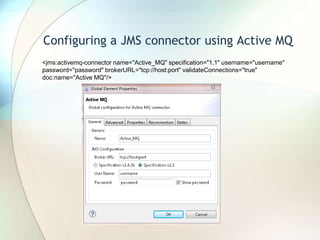
• Configuring a JMS connector using ActiveMQ
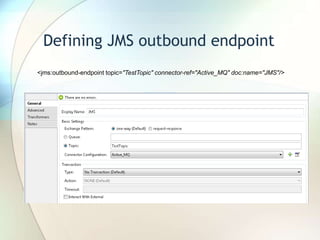
• Defining JMS outbound endpoint
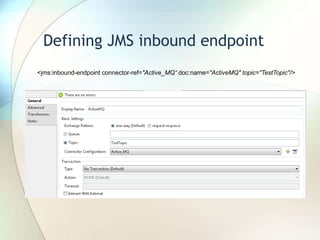
• Defining JMS inbound endpoint
• The example configuration for JMS connector
and inbound/outbound endpoints are given in
coming slides and configuration is using a JMS
topic
Configuring a JMS connector using Active MQ
<jms:activemq-connector name="Active_MQ" specification="1.1" username="username"
password="password" brokerURL="tcp://host:port" validateConnections="true"
doc:name="Active MQ"/>
Defining JMS outbound endpoint
<jms:outbound-endpoint topic="TestTopic" connector-ref="Active_MQ" doc:name="JMS"/>
Defining JMS inbound endpoint
<jms:inbound-endpoint connector-ref="Active_MQ“ doc:name="ActiveMQ" topic="TestTopic"/>
For more details, please refer the MuleSoft reference document at below URL
http://www.mulesoft.org/documentation/display/current/JMS+Transport+Reference
Thanks for watching

Mule JMS Transport

  • 1.
    Mule ESB 3.6 JavaMessaging Services (JMS) Prepared By: Rupesh Sinha
  • 2.
    Overview − Java MessagingServices (JMS) − JMS Messaging model − JMS backchannel − Message filters in JMS − JMS transformers in Mule − Example configuration for ActiveMQ
  • 3.
    Java Messaging Services(JMS) • A message oriented middleware • Supports creation of message based applications • Supports loosely coupled middleware • Supports transactions • Supports reliability
  • 4.
    JMS Messaging Model •JMS supports two models for messaging − JMS Queue − JMS Topic
  • 5.
    JMS Queue • StandardQueuing • First In First Out (FIFO) • Point to point i.e., single producer and single consumer • The behavior is similar to Mule VM queues
  • 6.
    JMS Topic • Enablespublish and subscribe mechanism • The model is similar to RSS feed • Multiple subscribers can subscribe to a topic • Supports publishing a message even if subscriber is disconnected using durable attribute in mule JMS Message Publisher Message Subscriber 1 Message Subscriber 2 Message Subscriber N
  • 7.
    JMS backchannel • Backchannelallows response to be returned back in synchronous mule message flow • There are two ways to create backchannel in Mule − Define your outbound endpoint with request-response exchange pattern − Use a request-reply message processor • Backchannel allows JMS endpoint to behave as two way channel • It internally sets “reply-to” header that tells mule where to send a response Client Server Channel Backchannel Transport
  • 8.
    Message filter inJMS • Mule supports selecting specific messages at the consumers end by using JMS selector • JMS selector can use JMS header properties • Non matching messages remains in the queue <jms:inbound-endpoint connector-ref="Active_MQ" doc:name="ActiveMQ" topic="TestTopic"> <jms:selector expression="JMSPriority=5" /> </jms:inbound-endpoint>
  • 9.
    JMS transformers inMule • The default transformers applied to JMS endpoints are as follows: − inbound = JMSMessageToObject − outbound = ObjectToJMSMessage − response = ObjectToJMSMessage • The transformation happens to/from as given below JMS Type Java Type javax.jms.TextMessage java.lang.String javax.jms.ObjectMessage java.lang.Object javax.jms.BytesMessage byte[] javax.jms.MapMessage java.util.Map javax.jms.StreamMessage java.io.InputStream
  • 10.
    Example configuration forActive MQ • Configuring a JMS connector using ActiveMQ • Defining JMS outbound endpoint • Defining JMS inbound endpoint • The example configuration for JMS connector and inbound/outbound endpoints are given in coming slides and configuration is using a JMS topic
  • 11.
    Configuring a JMSconnector using Active MQ <jms:activemq-connector name="Active_MQ" specification="1.1" username="username" password="password" brokerURL="tcp://host:port" validateConnections="true" doc:name="Active MQ"/>
  • 12.
    Defining JMS outboundendpoint <jms:outbound-endpoint topic="TestTopic" connector-ref="Active_MQ" doc:name="JMS"/>
  • 13.
    Defining JMS inboundendpoint <jms:inbound-endpoint connector-ref="Active_MQ“ doc:name="ActiveMQ" topic="TestTopic"/>
  • 14.
    For more details,please refer the MuleSoft reference document at below URL http://www.mulesoft.org/documentation/display/current/JMS+Transport+Reference
  • 15.