Presented By
Sindhu VL
 Based on the concept of Event Driven Architecture
(EDA), Mule works by responding to messages
initiated by external resources (i.e. events).
 At the simplest level, Mule applications accept and
process events as messages through several message
processors plugged together in a flow.
 Alternatively, large or streaming messages can be
processed as records in a batch job.
 Understanding the basic flow architecture and batch
job structure is key to understanding Mule.
 Essentially every Mule flow contains a series
of message processors that accept, then process
messages.
 Mule applications usually contain multiple linked
flows and/or batch jobs, which, in combination,
perform the integration required for your use case.
Flows :
 A flow is the construct within which you link together
several individual elements to handle the receipt,
processing, and eventual routing of a message. You can
connect many flows together to build a complete
application which you can then deploy on premise, on
Mule or another application server, or in the cloud.
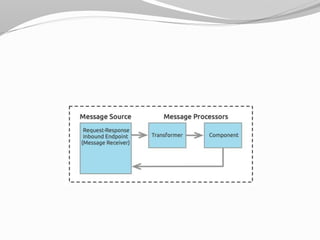
 At the simplest level, flows are sequences of message-
processing events. A message that enters a flow may pass
through a wide variety of processors. In the example
diagram below, Mule receives the message through a
request-response inbound endpoint, transforms the
content into a new format, and processes the business logic
in a component before returning a response via the
message source.
 The units with which flows are constructed are known
generically as building blocks (in Studio’s graphical
representation of a flow) or elements (in XML
configuration). In general, a building block corresponds to
an icon in the Anypoint Studio GUI, which in turn
represents a message source, processor, or component. A
building block is a visual representation of an XML
element within the Mule application’s configuration file.
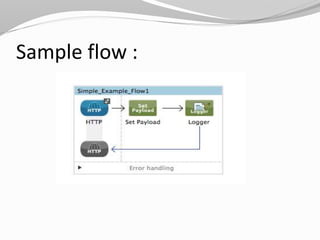
 The example below is a simple flow created in
Anypoint Studio’s visual editor; click theXML Editor tab to
view the XML version of the same flow.
Sample flow :
Batch Jobs :
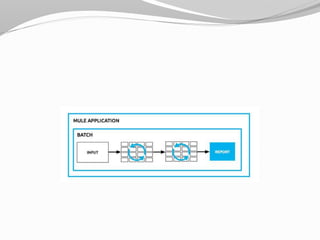
 A batch job is a top-level element in Mule which
exists outside all Mule flows. Batch jobs split large
messages into records which Mule processes
asynchronously; just as flows process messages, batch
jobs process records.
 A batch job contains one or more batch steps which,
in turn, contain any number of message processors
that act upon records as they move through the batch
job. During batch processing, you can use record-
level variables (recordVars) and MEL expressions to
enrich, route or otherwise act upon records.
 A batch job executes when triggered by either a batch
executor in a Mule flow or a message source in a
batch-accepting input; when triggered, Mule creates a
new batch job instance.
 When all records have passed through all batch steps,
the batch job instance ends and the batch job
result can be summarized in a report to indicate
which records succeeded and which failed during
processing.
Message Sources :
 Mule processes messages (i.e. events) initiated in external
resources. For example, a message can be initiated by an event
such as a consumer request from a mobile device, or a change to
data in a database, or the creation of a new customer ID in a SaaS
application.
 The first building block of most flows or batch jobs is a receiver
which receives new messages and places them in the queue for
processing. This message source – in the example above, an
inbound HTTP endpoint – receives messages from one or more
external sources, thus triggering the execution of a flow or batch
job. Message sources in Mule are usually Anypoint Connectors,
elements which provide connectivity to a specific external
source, either via a standard protocol (such as HTTP, FTP, SMTP)
or a third-party API (such as Salesforce.com, Twitter, or
MongoDB.)
Message Processors :
 In Mule, message processors are grouped together by
category.
 Mule transformers are the key to exchanging data
between nodes, as they allow Mule to convert message
payload data to a format that another application can
understand. Mule also enables content enrichment of
messages which allows you to retrieve additional data
during processing and attach it to the message.
 Mule uses components to conduct backend processes for
specific business logic such as checking customer and inventory
databases. Components route messages to the correct
application, such as an order fulfillment system. Mule
uses Staged Event-Driven Architecture (SEDA) for core
asynchronous message processing in flows.
 Importantly, components don’t have to have any Mule-specific
code; they can simply be POJOs, Spring beans, Java beans,
Groovy scripts, or web services containing the business logic for
processing data.
 Components can even be developed in other languages such as
Python, JavaScript, Ruby, and PHP. Mule’s catalog of building
blocks support the most commonly used Enterprise Integration
Patterns.
 Flows and batch jobs can also include filters, scopes,
and routers. For example, you can use a filter to whitelist IP
addresses from which your application accepts messages; you
can use a scope to "wrap" around several message processors and
cache the result of the processing they perform; you can use a
router to send messages down different paths in your application
depending on the content of the message payload.
 Mule includes a variety of filters, scopes, and routers to
customize how a flow or batch job processes messages.
 When you configure the individual elements that link together
to make your flow or batch job, you can use Mule Expression
Language to extract information about the message or its
environment and instruct Mule to make processing decisions
based on that information.
ThankYou!!!!!!!

Mule concepts

  • 1.
  • 2.
     Based onthe concept of Event Driven Architecture (EDA), Mule works by responding to messages initiated by external resources (i.e. events).  At the simplest level, Mule applications accept and process events as messages through several message processors plugged together in a flow.  Alternatively, large or streaming messages can be processed as records in a batch job.
  • 3.
     Understanding thebasic flow architecture and batch job structure is key to understanding Mule.  Essentially every Mule flow contains a series of message processors that accept, then process messages.  Mule applications usually contain multiple linked flows and/or batch jobs, which, in combination, perform the integration required for your use case.
  • 4.
    Flows :  Aflow is the construct within which you link together several individual elements to handle the receipt, processing, and eventual routing of a message. You can connect many flows together to build a complete application which you can then deploy on premise, on Mule or another application server, or in the cloud.  At the simplest level, flows are sequences of message- processing events. A message that enters a flow may pass through a wide variety of processors. In the example diagram below, Mule receives the message through a request-response inbound endpoint, transforms the content into a new format, and processes the business logic in a component before returning a response via the message source.
  • 6.
     The unitswith which flows are constructed are known generically as building blocks (in Studio’s graphical representation of a flow) or elements (in XML configuration). In general, a building block corresponds to an icon in the Anypoint Studio GUI, which in turn represents a message source, processor, or component. A building block is a visual representation of an XML element within the Mule application’s configuration file.  The example below is a simple flow created in Anypoint Studio’s visual editor; click theXML Editor tab to view the XML version of the same flow.
  • 7.
  • 8.
    Batch Jobs : A batch job is a top-level element in Mule which exists outside all Mule flows. Batch jobs split large messages into records which Mule processes asynchronously; just as flows process messages, batch jobs process records.  A batch job contains one or more batch steps which, in turn, contain any number of message processors that act upon records as they move through the batch job. During batch processing, you can use record- level variables (recordVars) and MEL expressions to enrich, route or otherwise act upon records.
  • 10.
     A batchjob executes when triggered by either a batch executor in a Mule flow or a message source in a batch-accepting input; when triggered, Mule creates a new batch job instance.  When all records have passed through all batch steps, the batch job instance ends and the batch job result can be summarized in a report to indicate which records succeeded and which failed during processing.
  • 11.
    Message Sources : Mule processes messages (i.e. events) initiated in external resources. For example, a message can be initiated by an event such as a consumer request from a mobile device, or a change to data in a database, or the creation of a new customer ID in a SaaS application.  The first building block of most flows or batch jobs is a receiver which receives new messages and places them in the queue for processing. This message source – in the example above, an inbound HTTP endpoint – receives messages from one or more external sources, thus triggering the execution of a flow or batch job. Message sources in Mule are usually Anypoint Connectors, elements which provide connectivity to a specific external source, either via a standard protocol (such as HTTP, FTP, SMTP) or a third-party API (such as Salesforce.com, Twitter, or MongoDB.)
  • 12.
    Message Processors : In Mule, message processors are grouped together by category.  Mule transformers are the key to exchanging data between nodes, as they allow Mule to convert message payload data to a format that another application can understand. Mule also enables content enrichment of messages which allows you to retrieve additional data during processing and attach it to the message.
  • 13.
     Mule usescomponents to conduct backend processes for specific business logic such as checking customer and inventory databases. Components route messages to the correct application, such as an order fulfillment system. Mule uses Staged Event-Driven Architecture (SEDA) for core asynchronous message processing in flows.  Importantly, components don’t have to have any Mule-specific code; they can simply be POJOs, Spring beans, Java beans, Groovy scripts, or web services containing the business logic for processing data.  Components can even be developed in other languages such as Python, JavaScript, Ruby, and PHP. Mule’s catalog of building blocks support the most commonly used Enterprise Integration Patterns.
  • 14.
     Flows andbatch jobs can also include filters, scopes, and routers. For example, you can use a filter to whitelist IP addresses from which your application accepts messages; you can use a scope to "wrap" around several message processors and cache the result of the processing they perform; you can use a router to send messages down different paths in your application depending on the content of the message payload.  Mule includes a variety of filters, scopes, and routers to customize how a flow or batch job processes messages.  When you configure the individual elements that link together to make your flow or batch job, you can use Mule Expression Language to extract information about the message or its environment and instruct Mule to make processing decisions based on that information.
  • 15.