COMMUNITY DEVELOPMENT MANAGEMENT
LUM HKAUNG (LAPYAW)
M.I.T
A BOUT ELECTRONIC MEETING
 Since, 1960, technologists and policy makers have discussed remote “distributed” group
decision making via computer network. To make more efficient and fair, and to purify
interaction, removing “irrelevant” resources of bias such as personal charisma.
 Started with several long term, short term and different experiments and researches.
 Electronic meeting started since 1980 in U.S.A, using computer technologies to make
meetings more effective and efficient.
WHY ELECTRONIC MEETING EMERGE?
 (M.C Grath, 1984) addressed why and how group decision making is predictable. (face to face)
 Computer and telecommunication technology are changing in how people can meet and how
they make decisions making in groups.
 Good participation.
 To increase Equity in Decision Making.
 To avoid dominated by loud talkers. (often occur in face to face meeting)
 Usually 20 percent of the participants dominate 80 percent of the time.
 To avoid personality, gender segregation.
 Personal charisma.
WHAT IS ELECTRONIC MEETING ? (GROUP SUPPORT SYSTEM)
 Web-based meeting format that allows visual and audio transfer through Voice Over Internet
Protocol (VoIP). Discussion takes place in real-time and may include graph, document and
chart displays. Some software programs allow for recording and playback functions.
 Group support system, GSS software offers organizations a range of applications from
brainstorming to categorizing to analyzing alternatives. GSS tools are mostly used for the
purpose of decision making, and also known as Group Decision Support Systems (GDSS).
 Modern EMS, supported multimedia files.
ELECTRONIC MEETING SYSTEM (EMS)
 EMS is a way of conducting meeting supported by computer technologies.
 A type of software system that is used to facilitate problem solving and decision making
within and across organization.
 EMS environments typically consist of a number of networked computer work stations and a set
of flexible software tools.
 EMS is a system of meeting support consisting of specialised software and processes.
 Each individual is provided with a personal computer with a private screen, but the information
entered is anonymously displayed on a public screen.
 Software specifically designed to support and streamline group decision making focuses the
participants on a collaboratively derived text and meeting agenda displayed on the public
screen.
 The meeting takes place in a decision room equipped with a U-shaped seating arrangement for
group members. (design may be different)
 Each participant used a keyboard to input brainstorm ideas in the system, respond to ideas, and
comment on the thoughts of others.
ELECTRONIC MEETING ( VIRTUAL TEAM )
 Virtual team members use the internet, intranets, and other networks to communicate,
coordinate and collaborate with each other on tasks and projects even though they may work
in different geographical locations and for different organizations.
 People make up the virtual teams, purpose is the task holds together with teams.
 Virtual teams’ purpose: cooperative goals, interdependent tasks and concrete results.
 In a standard meeting room, virtual team sit at tables and use computers that are intranet or
internet.
 Team/ Members /………
REQUIREMENTS AND TOOLS
Software
E MEETING ROOM SAMPLE
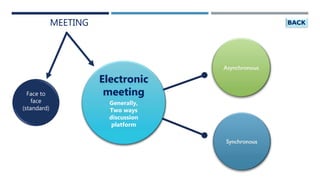
MEETING
Electronic
meeting
Generally,
Two ways
discussion
platform
Face to
face
(standard)
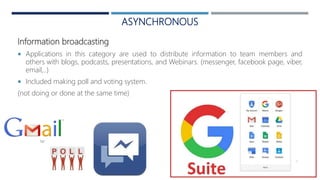
ASYNCHRONOUS
Information broadcasting
 Applications in this category are used to distribute information to team members and
others with blogs, podcasts, presentations, and Webinars. (messenger, facebook page, viber,
email,..)
 Included making poll and voting system.
(not doing or done at the same time)
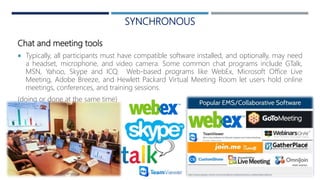
SYNCHRONOUS
Chat and meeting tools
 Typically, all participants must have compatible software installed, and optionally, may need
a headset, microphone, and video camera. Some common chat programs include GTalk,
MSN, Yahoo, Skype and ICQ. Web-based programs like WebEx, Microsoft Office Live
Meeting, Adobe Breeze, and Hewlett Packard Virtual Meeting Room let users hold online
meetings, conferences, and training sessions.
(doing or done at the same time)
PARTICULARITIES AND CHALLENGES OF E-MEETING
PARTICULARITIES
 Safe travel cost.
 Less pressure to conform with senior group.
(independent)
 Remove bias personality.
 EMS enfances participation, produces faster
decisions.
 More participant and purify inter-
relationship.
 More idea.
 Appropriateness when distance, time zones,
organizational or social different. When
existing group has less opportunity for face
to face interaction.
CHALLENGES
 Managing people we have never met
can be challenging.
 Connection poor speed and
breakdown.
References:
• S. L Hodges, Electronic meeting systems –
what they are and how they could benefit Australian gove
nment organisations, (2010)
• Cristina raulea, Ciprian raulea, The impact of electronic
communication technology on teamwork, Research Gate,
(2010)
• Kiesler, Sara and Sproull, Lee, Group decision making and
Communication technology, 1992
• Galaczy, Patricia. Electronic Meeting Systems, Industrial
Relations Centre Queen’s University, 1999.
• Burdett, Jane. Changing Channels: Using the Electronic
Changing Channels: Using the Electronic Meeting System
Increase Equity Meeting System to Increase Equity
• in Decision Making, Organizational Systems Research
Association, 2000
• Mc Grath, J. E, Groups: Interaction and performance,
Englewood Cliffs, NJ: Prentice-Hall, (1984)
THANK YOU
LAPYAW LUM HKAUNG
Master of Arts in Community
Development
COMMUNITY DEVELOPMENT MANAGEMENT

Electronic meeting

  • 1.
  • 3.
    A BOUT ELECTRONICMEETING  Since, 1960, technologists and policy makers have discussed remote “distributed” group decision making via computer network. To make more efficient and fair, and to purify interaction, removing “irrelevant” resources of bias such as personal charisma.  Started with several long term, short term and different experiments and researches.  Electronic meeting started since 1980 in U.S.A, using computer technologies to make meetings more effective and efficient.
  • 4.
    WHY ELECTRONIC MEETINGEMERGE?  (M.C Grath, 1984) addressed why and how group decision making is predictable. (face to face)  Computer and telecommunication technology are changing in how people can meet and how they make decisions making in groups.  Good participation.  To increase Equity in Decision Making.  To avoid dominated by loud talkers. (often occur in face to face meeting)  Usually 20 percent of the participants dominate 80 percent of the time.  To avoid personality, gender segregation.  Personal charisma.
  • 5.
    WHAT IS ELECTRONICMEETING ? (GROUP SUPPORT SYSTEM)  Web-based meeting format that allows visual and audio transfer through Voice Over Internet Protocol (VoIP). Discussion takes place in real-time and may include graph, document and chart displays. Some software programs allow for recording and playback functions.  Group support system, GSS software offers organizations a range of applications from brainstorming to categorizing to analyzing alternatives. GSS tools are mostly used for the purpose of decision making, and also known as Group Decision Support Systems (GDSS).  Modern EMS, supported multimedia files.
  • 6.
    ELECTRONIC MEETING SYSTEM(EMS)  EMS is a way of conducting meeting supported by computer technologies.  A type of software system that is used to facilitate problem solving and decision making within and across organization.  EMS environments typically consist of a number of networked computer work stations and a set of flexible software tools.  EMS is a system of meeting support consisting of specialised software and processes.  Each individual is provided with a personal computer with a private screen, but the information entered is anonymously displayed on a public screen.  Software specifically designed to support and streamline group decision making focuses the participants on a collaboratively derived text and meeting agenda displayed on the public screen.  The meeting takes place in a decision room equipped with a U-shaped seating arrangement for group members. (design may be different)  Each participant used a keyboard to input brainstorm ideas in the system, respond to ideas, and comment on the thoughts of others.
  • 7.
    ELECTRONIC MEETING (VIRTUAL TEAM )  Virtual team members use the internet, intranets, and other networks to communicate, coordinate and collaborate with each other on tasks and projects even though they may work in different geographical locations and for different organizations.  People make up the virtual teams, purpose is the task holds together with teams.  Virtual teams’ purpose: cooperative goals, interdependent tasks and concrete results.  In a standard meeting room, virtual team sit at tables and use computers that are intranet or internet.  Team/ Members /………
  • 8.
  • 9.
  • 10.
  • 11.
    ASYNCHRONOUS Information broadcasting  Applicationsin this category are used to distribute information to team members and others with blogs, podcasts, presentations, and Webinars. (messenger, facebook page, viber, email,..)  Included making poll and voting system. (not doing or done at the same time)
  • 12.
    SYNCHRONOUS Chat and meetingtools  Typically, all participants must have compatible software installed, and optionally, may need a headset, microphone, and video camera. Some common chat programs include GTalk, MSN, Yahoo, Skype and ICQ. Web-based programs like WebEx, Microsoft Office Live Meeting, Adobe Breeze, and Hewlett Packard Virtual Meeting Room let users hold online meetings, conferences, and training sessions. (doing or done at the same time)
  • 13.
    PARTICULARITIES AND CHALLENGESOF E-MEETING PARTICULARITIES  Safe travel cost.  Less pressure to conform with senior group. (independent)  Remove bias personality.  EMS enfances participation, produces faster decisions.  More participant and purify inter- relationship.  More idea.  Appropriateness when distance, time zones, organizational or social different. When existing group has less opportunity for face to face interaction. CHALLENGES  Managing people we have never met can be challenging.  Connection poor speed and breakdown.
  • 14.
    References: • S. LHodges, Electronic meeting systems – what they are and how they could benefit Australian gove nment organisations, (2010) • Cristina raulea, Ciprian raulea, The impact of electronic communication technology on teamwork, Research Gate, (2010) • Kiesler, Sara and Sproull, Lee, Group decision making and Communication technology, 1992 • Galaczy, Patricia. Electronic Meeting Systems, Industrial Relations Centre Queen’s University, 1999. • Burdett, Jane. Changing Channels: Using the Electronic Changing Channels: Using the Electronic Meeting System Increase Equity Meeting System to Increase Equity • in Decision Making, Organizational Systems Research Association, 2000 • Mc Grath, J. E, Groups: Interaction and performance, Englewood Cliffs, NJ: Prentice-Hall, (1984)
  • 15.
    THANK YOU LAPYAW LUMHKAUNG Master of Arts in Community Development COMMUNITY DEVELOPMENT MANAGEMENT