Johannes Pernaa
PhD, Beng
Version 2.0
Edumol user guide
18.5.2017
Content
● Edumol history
● Architechture
● Basic tools, buttons & operations
Edumol history
● 2008–2010:
● Jmol-based site
● Java
● 2010–2014
● iPads arrived
● Site continued via Jmol
● 2014 – Edumol 1.0
● JSmol had been developed
● Edumol changed its core to Jsmol
● 2017 – Edumol inspired molecular modeling book was launched
Field of
compu-
tational
chemistry
Edumol
features
3D user interface
Notice: Protein has to be reatrieved via PDB ID, like ”2mlt” returns melittin.
Base
● File
● Open & save file
● Export 3D to Blender or 3D printing
● Export Image
● Export mol to ChemSketch
● 3D canvas
● Height + width if needed
● Background color
● High resolution for fast web connection
● NIST search via chemical formula
Export 3D
● Works really fine.
3D-printing works really fine.
Move
● Rotate via 1 click
● Front, right, up
● X, Y, Z -axis
● Click atom and center molecule
● Spin
● Set high resolution on, if you wish
● to see the molecule rotating
Model & Biomodel
● Molecule models
● CPK
● Ball-and-stick
● Try all out
● Biomodel options
● Structures
● Colors
● Hydrogen bonds
Visualize
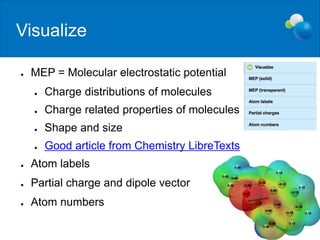
● MEP = Molecular electrostatic potential
● Charge distributions of molecules
● Charge related properties of molecules
● Shape and size
● Good article from Chemistry LibreTexts
● Atom labels
● Partial charge and dipole vector
● Atom numbers
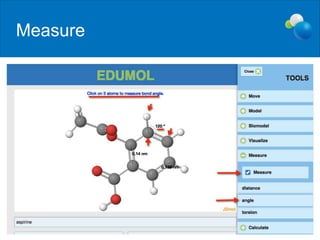
Measure
Calculate
● Works only for geometrical optimization
● MMFF94 molecular mechanics calculations
2D editing
FEATURES
● JSME 2D editing tools
● Intergrated to JSmol core
● Search structures
from databases
● If NCI is down, 2D isn't
working
● Note! Protein structures can't
be edited in 2D side
Learn molecular modeling
Introduction to Molecular Modeling in Chemistry Education
This book offers theoretical
insights and hands-on modeling
activities. The goal is to learn how
to implement molecular modeling
in chemistry teaching.
The exercises are performed using
Edumol.fi web application, which is
a free JSmol-JSME-based
molecular modeling and
visualization service.
Order the book.

Edumol user guide (V 2.0)

  • 1.
    Johannes Pernaa PhD, Beng Version2.0 Edumol user guide 18.5.2017
  • 2.
    Content ● Edumol history ●Architechture ● Basic tools, buttons & operations
  • 3.
    Edumol history ● 2008–2010: ●Jmol-based site ● Java ● 2010–2014 ● iPads arrived ● Site continued via Jmol ● 2014 – Edumol 1.0 ● JSmol had been developed ● Edumol changed its core to Jsmol ● 2017 – Edumol inspired molecular modeling book was launched
  • 4.
  • 5.
  • 6.
    3D user interface Notice:Protein has to be reatrieved via PDB ID, like ”2mlt” returns melittin.
  • 7.
    Base ● File ● Open& save file ● Export 3D to Blender or 3D printing ● Export Image ● Export mol to ChemSketch ● 3D canvas ● Height + width if needed ● Background color ● High resolution for fast web connection ● NIST search via chemical formula
  • 8.
    Export 3D ● Worksreally fine. 3D-printing works really fine.
  • 9.
    Move ● Rotate via1 click ● Front, right, up ● X, Y, Z -axis ● Click atom and center molecule ● Spin ● Set high resolution on, if you wish ● to see the molecule rotating
  • 10.
    Model & Biomodel ●Molecule models ● CPK ● Ball-and-stick ● Try all out ● Biomodel options ● Structures ● Colors ● Hydrogen bonds
  • 11.
    Visualize ● MEP =Molecular electrostatic potential ● Charge distributions of molecules ● Charge related properties of molecules ● Shape and size ● Good article from Chemistry LibreTexts ● Atom labels ● Partial charge and dipole vector ● Atom numbers
  • 12.
  • 13.
    Calculate ● Works onlyfor geometrical optimization ● MMFF94 molecular mechanics calculations
  • 14.
    2D editing FEATURES ● JSME2D editing tools ● Intergrated to JSmol core ● Search structures from databases ● If NCI is down, 2D isn't working ● Note! Protein structures can't be edited in 2D side
  • 15.
    Learn molecular modeling Introductionto Molecular Modeling in Chemistry Education This book offers theoretical insights and hands-on modeling activities. The goal is to learn how to implement molecular modeling in chemistry teaching. The exercises are performed using Edumol.fi web application, which is a free JSmol-JSME-based molecular modeling and visualization service. Order the book.