INTEGRATING TECHNOLOGY
Session 5
Smart Technologies
Presentation Tools
Boardmaker
AGENDA
Questions?
Smart Notebook
Presentation Tools
Keynote/Powerpoint
Slideshare
Google Docs - presentation
Prezi
Boardmaker
ALL THINGS SMART
work through some tutorials
investigate some resources
try out the smartboard - if you do not have experience
WHY IS SMARTNOTEBOOK
GREAT FOR TEACHERS?
Organizes lessons
Easily tweaked year to year
Easy to share
Engaging
Use as center
LET’S TRY IT OUT!
Online Free tutorials & other resources- use this page to tailor
your learning (scroll down to SMART Notebook)
Open Notebook software on the computer (under applications)
Watch several video tutorials and follow along in the software
Try a few templates.
Create an activity using what you learned.
Export the file as a pdf to your desktop for use later.
RESOURCES
At each website investigate several activities and lessons
Smart Exchange - free lessons shared and searchable
Scholastic - categories of lessons on Smart Exchange
Check each of the five categories out for great ideas
The Notebook Gallery - a collection of Notebook resources
Cybrary Man - HUGE list of links
Free Templates for all grade levels and subject areas
Let’s get Smart - a clearly illustrated blog post about using Smart
POWERPOINT OR KEYNOTE
Present information in an organized fashion
Very easy to use
Structuring your talk - please be sure to read
Keynote - tutorials
Powerpoint Activities
Parade of Games in Powerpoint - try several
Powerpoint Templates for Teachers - try several
SLIDESHARE
share your powerpoint or keynote online
easily embed presentation into blog or website
Go to www.slideshare.net
Create a free account
upload your powerpoint presentation or pdf file
public unless you upgrade
POSTING YOUR SLIDESHARE TO
NING
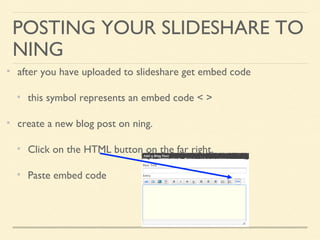
after you have uploaded to slideshare get embed code
this symbol represents an embed code < >
create a new blog post on ning.
Click on the HTML button on the far right.
Paste embed code
GOOGLE PRESENTATION
Create on Google or upload an existing powerpoint (no keynote)
limited bells and whistles
need internet connection
can publish and have viewers join in chat during presentation
Let’s try it out - Log into your Google account.
Here’s my Common Core Assessment comparison presentation
Great for collaboration
PREZI
Dynamic presentation
Ability to share online
Slick
Go to Prezi.com
create a prezi presentation
Death to Powerpoint, long live Prezi - Travis Allen iSchool initiative
The Ultimate Guide to Prezi
PRACTICE
Create, upload and post to your blog on the ning to Slideshare:
a SMART notebook activity and export to a pdf.
a Powerpoint or Keynote presentation.
Save and upload a Powerpoint presentation to Google docs
Create a Prezi presentation.
Cannot upload to Slideshare or embed, only link to the ning.
BOARDMAKER
Go to the Mayer-Johnson website
Software trials tab in center
Choose Boardmaker Online to download
Assignment: Create a five page communication board, book or
activity. The board can be either an assistive communication tool or
subject specific.
Video tutorials on Ning
BOARDMAKER
Possibilities
re-write a book or story
a picture book for a lesson your subject area
visual vocabulary for your subject area (also great for ESL students)
daily schedule or calendar
recipe with cooking directions
communication book
a game to teach anything (Bingo works well)
weekly newsletter
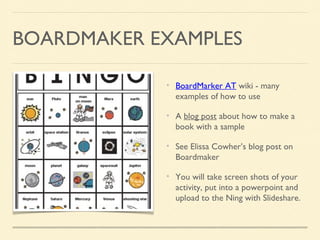
BOARDMAKER EXAMPLES
BoardMarker AT wiki - many
examples of how to use
A blog post about how to make a
book with a sample
See Elissa Cowher’s blog post on
Boardmaker
You will take screen shots of your
activity, put into a powerpoint and
upload to the Ning with Slideshare.

Edu614 session 5 spring 15 smart, presentation tools boardmaker

  • 1.
    INTEGRATING TECHNOLOGY Session 5 SmartTechnologies Presentation Tools Boardmaker
  • 3.
  • 4.
    ALL THINGS SMART workthrough some tutorials investigate some resources try out the smartboard - if you do not have experience
  • 5.
    WHY IS SMARTNOTEBOOK GREATFOR TEACHERS? Organizes lessons Easily tweaked year to year Easy to share Engaging Use as center
  • 6.
    LET’S TRY ITOUT! Online Free tutorials & other resources- use this page to tailor your learning (scroll down to SMART Notebook) Open Notebook software on the computer (under applications) Watch several video tutorials and follow along in the software Try a few templates. Create an activity using what you learned. Export the file as a pdf to your desktop for use later.
  • 7.
    RESOURCES At each websiteinvestigate several activities and lessons Smart Exchange - free lessons shared and searchable Scholastic - categories of lessons on Smart Exchange Check each of the five categories out for great ideas The Notebook Gallery - a collection of Notebook resources Cybrary Man - HUGE list of links Free Templates for all grade levels and subject areas Let’s get Smart - a clearly illustrated blog post about using Smart
  • 8.
    POWERPOINT OR KEYNOTE Presentinformation in an organized fashion Very easy to use Structuring your talk - please be sure to read Keynote - tutorials Powerpoint Activities Parade of Games in Powerpoint - try several Powerpoint Templates for Teachers - try several
  • 9.
    SLIDESHARE share your powerpointor keynote online easily embed presentation into blog or website Go to www.slideshare.net Create a free account upload your powerpoint presentation or pdf file public unless you upgrade
  • 10.
    POSTING YOUR SLIDESHARETO NING after you have uploaded to slideshare get embed code this symbol represents an embed code < > create a new blog post on ning. Click on the HTML button on the far right. Paste embed code
  • 11.
    GOOGLE PRESENTATION Create onGoogle or upload an existing powerpoint (no keynote) limited bells and whistles need internet connection can publish and have viewers join in chat during presentation Let’s try it out - Log into your Google account. Here’s my Common Core Assessment comparison presentation Great for collaboration
  • 12.
    PREZI Dynamic presentation Ability toshare online Slick Go to Prezi.com create a prezi presentation Death to Powerpoint, long live Prezi - Travis Allen iSchool initiative The Ultimate Guide to Prezi
  • 13.
    PRACTICE Create, upload andpost to your blog on the ning to Slideshare: a SMART notebook activity and export to a pdf. a Powerpoint or Keynote presentation. Save and upload a Powerpoint presentation to Google docs Create a Prezi presentation. Cannot upload to Slideshare or embed, only link to the ning.
  • 14.
    BOARDMAKER Go to theMayer-Johnson website Software trials tab in center Choose Boardmaker Online to download Assignment: Create a five page communication board, book or activity. The board can be either an assistive communication tool or subject specific. Video tutorials on Ning
  • 15.
    BOARDMAKER Possibilities re-write a bookor story a picture book for a lesson your subject area visual vocabulary for your subject area (also great for ESL students) daily schedule or calendar recipe with cooking directions communication book a game to teach anything (Bingo works well) weekly newsletter
  • 16.
    BOARDMAKER EXAMPLES BoardMarker ATwiki - many examples of how to use A blog post about how to make a book with a sample See Elissa Cowher’s blog post on Boardmaker You will take screen shots of your activity, put into a powerpoint and upload to the Ning with Slideshare.