Integrating Technology for All
Session Two
Share, Store, Collaborate
Agenda
Questions on using ning? assignments?
Twitter
Feedly
Remind
All things Google
Use Google Chrome for your browser tonight
a note on blog posts
Please be specific when responding to the reading
EX. Alan November has a lot of good ideas about
motivating students to own their learning. Write about
some of the actual ideas presented in the chapter and
your response to them.
For the November book, you are to respond to your
choice of two questions at the end of the chapter.
These responses can be in one blog post.
Check your spelling and grammar.
Remind
Send messages safely to your students
They cannot respond
Phone numbers and email addresses are private
Communicate with parents
Chat coming soon with ability to set office hours
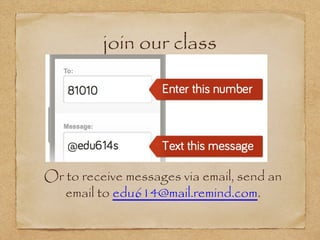
join our class
Or to receive messages via email, send an
email to edu614@mail.remind.com.
Feedly
RSS (really simple syndication) reader
bring updates of blogs to your Feedly
a visual display
organize into collections
can use on iPad
take a look
search by interest - top right
Subscribing to a blog
not found in the search
Have Feedly open
in another tab or window have the blog open
copy the url or title of the blog
on Feedly - click + Add Content
paste the url or title
organize into collections to make your life easier
A great place to search for blogs in your
area:
 Educational Blogs by Discipline
RSS Feed - Blogs to follow
Google Drive
Collaboration
Share privately or publicly
Email a document
Access from any computer with internet access
Google apps
•
Drive
•
Docs (like word)
•
Slides (like powerpoint)
•
Forms 
•
Sheets (like excel)
•
Calendar 
•
How to search for more
Add-Ons
Can search once you have Docs or Sheets
open
Free Add ons for teachers
15 best Google Drive Add Ons for Education
Free Google Apps Add Ons for Teachers
 Google Forms
Forms
Google Forms for teachers - a must read guide
5 Time Saving Ways Teachers can use Google Forms
Let’s try Flubaroo out with a Google form
Flubaroo Overview
A task for you
Create a form with at least five questions
that have a correct answer.
Follow the directions on how to make a
form and grade with Flubaroo.
 Google Apps
Five Essential Google Drive Skills For Teachers
Tips & Tricks for using Google Apps
Apps in Action - from Google
 Google Apps
Google Apps Lesson Plan Selector
Google Classroom Presentation
- has tips on regular apps
**A great list of Google support
on many different aspects.
Twitter
Best professional development for me
An interesting blog post on teachers blogging
and
Ten Websites to Help Students Connect with Books
-found on Twitter this week
10 steps for Educators new to twitter
The following was prepared by Joey Estes for
a parent technology night.
Twitter is a Cool Tool
•
By joining Twitter, you can connect with people all over the world
about things that interest you.
•
Imagine having literally thousands of people to bounce ideas off of,
share best practices, and to give you recommendations for your
next good read.
•
All information is shared via 140 characters or less.
Time to Join!
•
Once you have decided that Twitter is something you would like to
explore, go to the website and sign up for an account. It’s free!
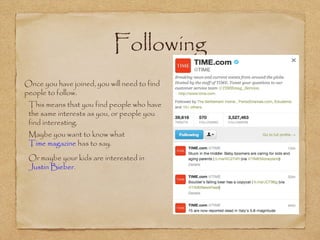
Following
•
Once you have joined, you will need to find
people to follow.
•
This means that you find people who have
the same interests as you, or people you
find interesting.
•
Maybe you want to know what
Time magazine has to say.
•
Or maybe your kids are interested in
Justin Bieber.
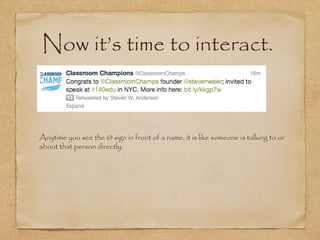
Now it’s time to interact.
•
Anytime you see the @ sign in front of a name, it is like someone is talking to or
about that person directly.
Links
•
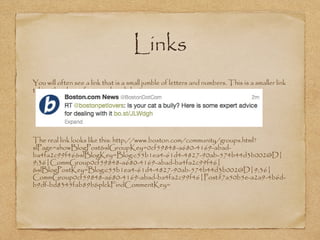
You will often see a link that is a small jumble of letters and numbers. This is a smaller link
taking the place of a super long link.
•
The real link looks like this: http://www.boston.com/community/groups.html?
slPage=showBlogPost&slGroupKey=0cf59848-a680-4169-abad-
ba4fa2c99f46&slBlogKey=Blog:c55b1ea4-61d4-4827-90ab-574b44d3b002@D|
9;36|CommGroup0cf59848-a680-4169-abad-ba4fa2c99f46|
&slBlogPostKey=Blog:c55b1ea4-61d4-4827-90ab-574b44d3b002@D|9;36|
CommGroup0cf59848-a680-4169-abad-ba4fa2c99f46|Post:f7a50b5e-a2a9-4b6d-
b9df-bd8345fab89b&plckFindCommentKey=
Hashtags
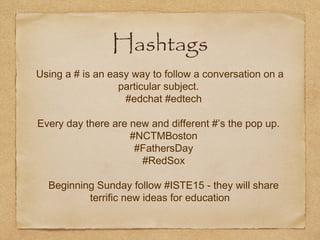
Using a # is an easy way to follow a conversation on a
particular subject.
#edchat #edtech
Every day there are new and different #’s the pop up.
#NCTMBoston
#FathersDay
#RedSox
Beginning Sunday follow #ISTE15 - they will share
terrific new ideas for education
Search Twitter for Educational Content
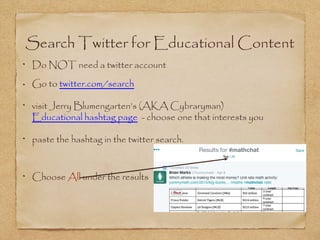
Do NOT need a twitter account
Go to twitter.com/search
visit Jerry Blumengarten’s (AKA Cybraryman)
Educational hashtag page - choose one that interests you
paste the hashtag in the twitter search.
Choose All under the results
Twitter
•
Why Teachers Should Be Using Twitter.
•
Twitter Chat Tools
•
Getting Started with Twitter in Schools
•
Using Twitter for student chats

Edu614 session 3 summer 15

  • 1.
    Integrating Technology forAll Session Two Share, Store, Collaborate
  • 2.
    Agenda Questions on usingning? assignments? Twitter Feedly Remind All things Google Use Google Chrome for your browser tonight
  • 3.
    a note onblog posts Please be specific when responding to the reading EX. Alan November has a lot of good ideas about motivating students to own their learning. Write about some of the actual ideas presented in the chapter and your response to them. For the November book, you are to respond to your choice of two questions at the end of the chapter. These responses can be in one blog post. Check your spelling and grammar.
  • 4.
    Remind Send messages safelyto your students They cannot respond Phone numbers and email addresses are private Communicate with parents Chat coming soon with ability to set office hours
  • 5.
    join our class Orto receive messages via email, send an email to edu614@mail.remind.com.
  • 6.
    Feedly RSS (really simplesyndication) reader bring updates of blogs to your Feedly a visual display organize into collections can use on iPad take a look search by interest - top right
  • 7.
    Subscribing to ablog not found in the search not found in the search Have Feedly open in another tab or window have the blog open copy the url or title of the blog on Feedly - click + Add Content paste the url or title organize into collections to make your life easier
  • 8.
    A great placeto search for blogs in your area:  Educational Blogs by Discipline RSS Feed - Blogs to follow
  • 9.
    Google Drive Collaboration Share privatelyor publicly Email a document Access from any computer with internet access
  • 10.
    Google apps • Drive • Docs (likeword) • Slides (like powerpoint) • Forms  • Sheets (like excel) • Calendar  • How to search for more
  • 11.
    Add-Ons Can search onceyou have Docs or Sheets open Free Add ons for teachers 15 best Google Drive Add Ons for Education Free Google Apps Add Ons for Teachers
  • 12.
     Google Forms Forms Google Formsfor teachers - a must read guide 5 Time Saving Ways Teachers can use Google Forms Let’s try Flubaroo out with a Google form Flubaroo Overview
  • 13.
    A task foryou Create a form with at least five questions that have a correct answer. Follow the directions on how to make a form and grade with Flubaroo.
  • 14.
     Google Apps Five EssentialGoogle Drive Skills For Teachers Tips & Tricks for using Google Apps Apps in Action - from Google
  • 15.
     Google Apps Google AppsLesson Plan Selector Google Classroom Presentation - has tips on regular apps **A great list of Google support on many different aspects.
  • 16.
    Twitter Best professional developmentfor me An interesting blog post on teachers blogging and Ten Websites to Help Students Connect with Books -found on Twitter this week 10 steps for Educators new to twitter The following was prepared by Joey Estes for a parent technology night.
  • 17.
    Twitter is aCool Tool • By joining Twitter, you can connect with people all over the world about things that interest you. • Imagine having literally thousands of people to bounce ideas off of, share best practices, and to give you recommendations for your next good read. • All information is shared via 140 characters or less.
  • 18.
    Time to Join! • Onceyou have decided that Twitter is something you would like to explore, go to the website and sign up for an account. It’s free!
  • 19.
    Following • Once you havejoined, you will need to find people to follow. • This means that you find people who have the same interests as you, or people you find interesting. • Maybe you want to know what Time magazine has to say. • Or maybe your kids are interested in Justin Bieber.
  • 20.
    Now it’s timeto interact. • Anytime you see the @ sign in front of a name, it is like someone is talking to or about that person directly.
  • 21.
    Links • You will oftensee a link that is a small jumble of letters and numbers. This is a smaller link taking the place of a super long link. • The real link looks like this: http://www.boston.com/community/groups.html? slPage=showBlogPost&slGroupKey=0cf59848-a680-4169-abad- ba4fa2c99f46&slBlogKey=Blog:c55b1ea4-61d4-4827-90ab-574b44d3b002@D| 9;36|CommGroup0cf59848-a680-4169-abad-ba4fa2c99f46| &slBlogPostKey=Blog:c55b1ea4-61d4-4827-90ab-574b44d3b002@D|9;36| CommGroup0cf59848-a680-4169-abad-ba4fa2c99f46|Post:f7a50b5e-a2a9-4b6d- b9df-bd8345fab89b&plckFindCommentKey=
  • 22.
    Hashtags Using a #is an easy way to follow a conversation on a particular subject. #edchat #edtech Every day there are new and different #’s the pop up. #NCTMBoston #FathersDay #RedSox Beginning Sunday follow #ISTE15 - they will share terrific new ideas for education
  • 23.
    Search Twitter forEducational Content Do NOT need a twitter account Go to twitter.com/search visit Jerry Blumengarten’s (AKA Cybraryman) Educational hashtag page - choose one that interests you paste the hashtag in the twitter search. Choose All under the results
  • 24.
    Twitter • Why Teachers ShouldBe Using Twitter. • Twitter Chat Tools • Getting Started with Twitter in Schools • Using Twitter for student chats