EAP-TLS
KARRI HUHTANEN
RADIATOR SOFTWARE OY
Background
I have been working with RADIUS based roaming since 2002, eduroam from
2003 — first as a researcher at Tampere University of Technology.

Founded a company called Arch Red to do Wi-Fi authentication and
roaming. Arch Red is running Finnish top-level RADIUS servers for CSC/
Funet as a production service since 2004.

Arch Red worked as a reseller for Open System Consultants’ Radiator
product since 2003. Later we did consultation, support and integration
under Open System Consultants’ brand.

In 2013 Arch Red acquired Open System Consultants and the Radiator
product.

Arch Red changed its name to Radiator Software and nowadays we focus in
developing Radiator AAA server products and services for our customers.
EAP-TLS is easy …
… for RADIUS server. At the minimum one needs only to
configure RADIUS server certificate and the CA certificate for
client certificate verification.

… to configure improperly. Understanding how certificates,
certificate revocation, root and intermediate CAs, PKI etc works
requires significant effort. Designing and deploying working
model requires even more.

… only when one does not need to care about the client
certificates, their configuration, provisioning and
management.
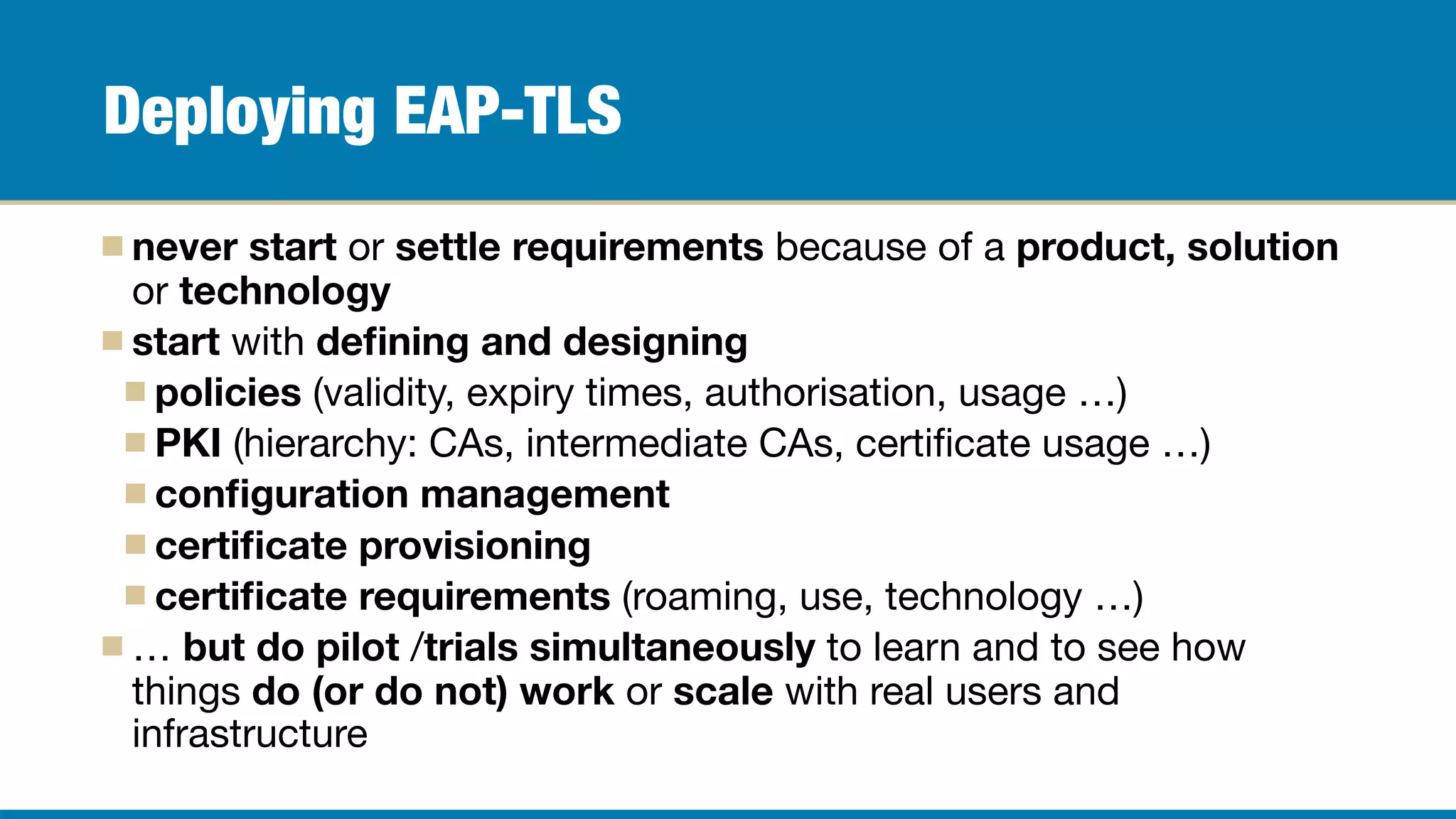
Deploying EAP-TLS
never start or settle requirements because of a product, solution
or technology
start with defining and designing
policies (validity, expiry times, authorisation, usage …)

PKI (hierarchy: CAs, intermediate CAs, certificate usage …)

configuration management
certificate provisioning
certificate requirements (roaming, use, technology …)

… but do pilot /trials simultaneously to learn and to see how
things do (or do not) work or scale with real users and
infrastructure
Start with simple trial …
Try self-signed CA, manually created
client certificates first (or Radiator’s
certificates directory)

eduroam managed IdP as a service for
roaming EAP-TLS tests

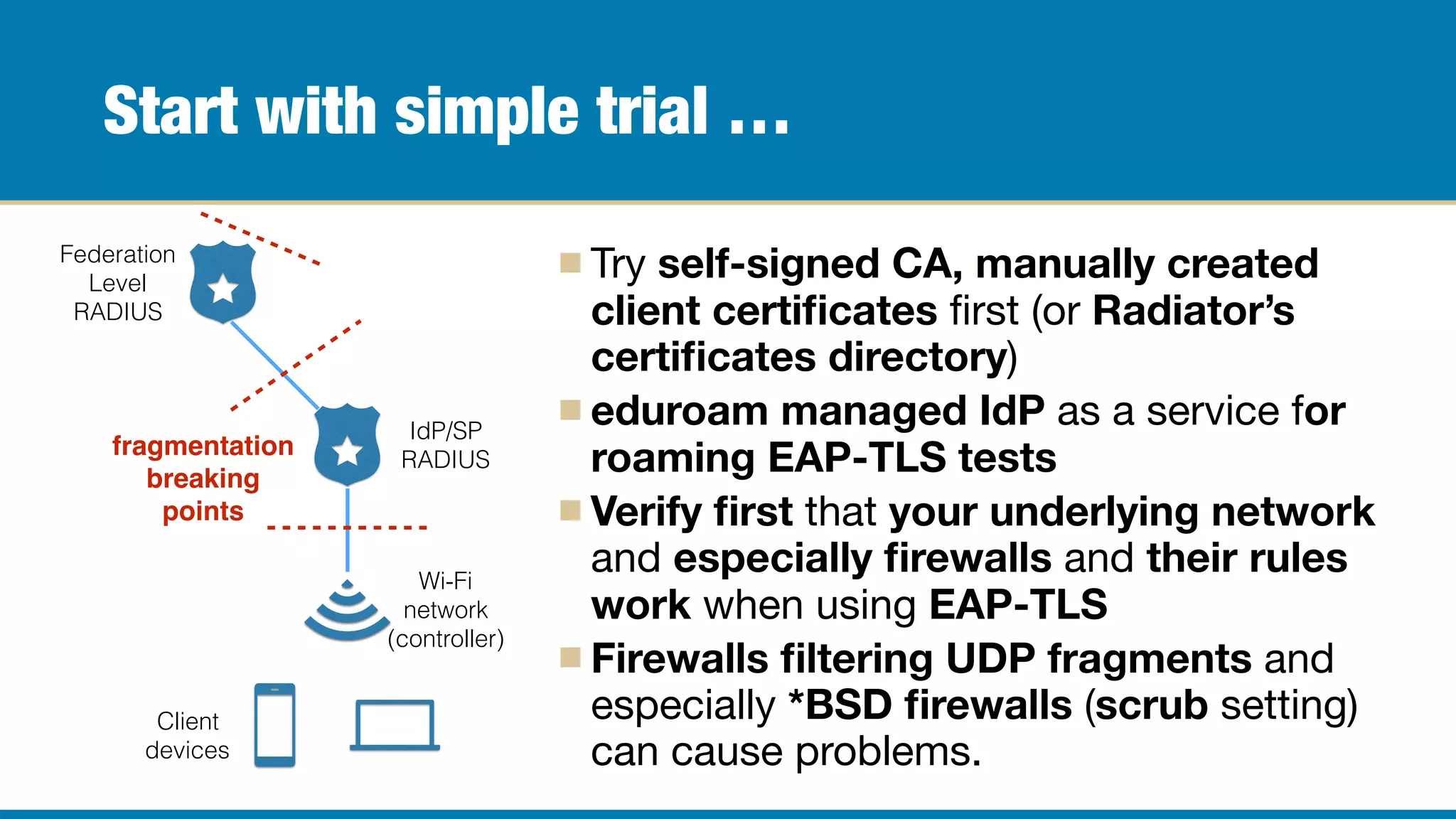
Verify first that your underlying network
and especially firewalls and their rules
work when using EAP-TLS

Firewalls filtering UDP fragments and
especially *BSD firewalls (scrub setting)
can cause problems.
Federation
Level
RADIUS
IdP/SP
RADIUS
Wi-Fi
network
(controller)
Client
devices
fragmentation
breaking
points
Why? Because network level has a lot to test…
Large certificates, long certificate chains can cause network
devices to fragment EAP-TLS authentication in different ways.

Firewalls configured to analyse/assemble or drop UDP/
RADIUS fragments may cause TLS communication to fail.

TLS communication failures can only be logged / detected in
the end user device or home organisation RADIUS.
eduroam managed IdP uses smaller elliptic curve based
certificates => does not proof that all certificates work
Radiator tips: EAPTLS_TraceState (for TLS debugging),
EAPTLS_MaxFragmentSize (adjust TLS max fragment size)
Add basic automatic certificate validation…
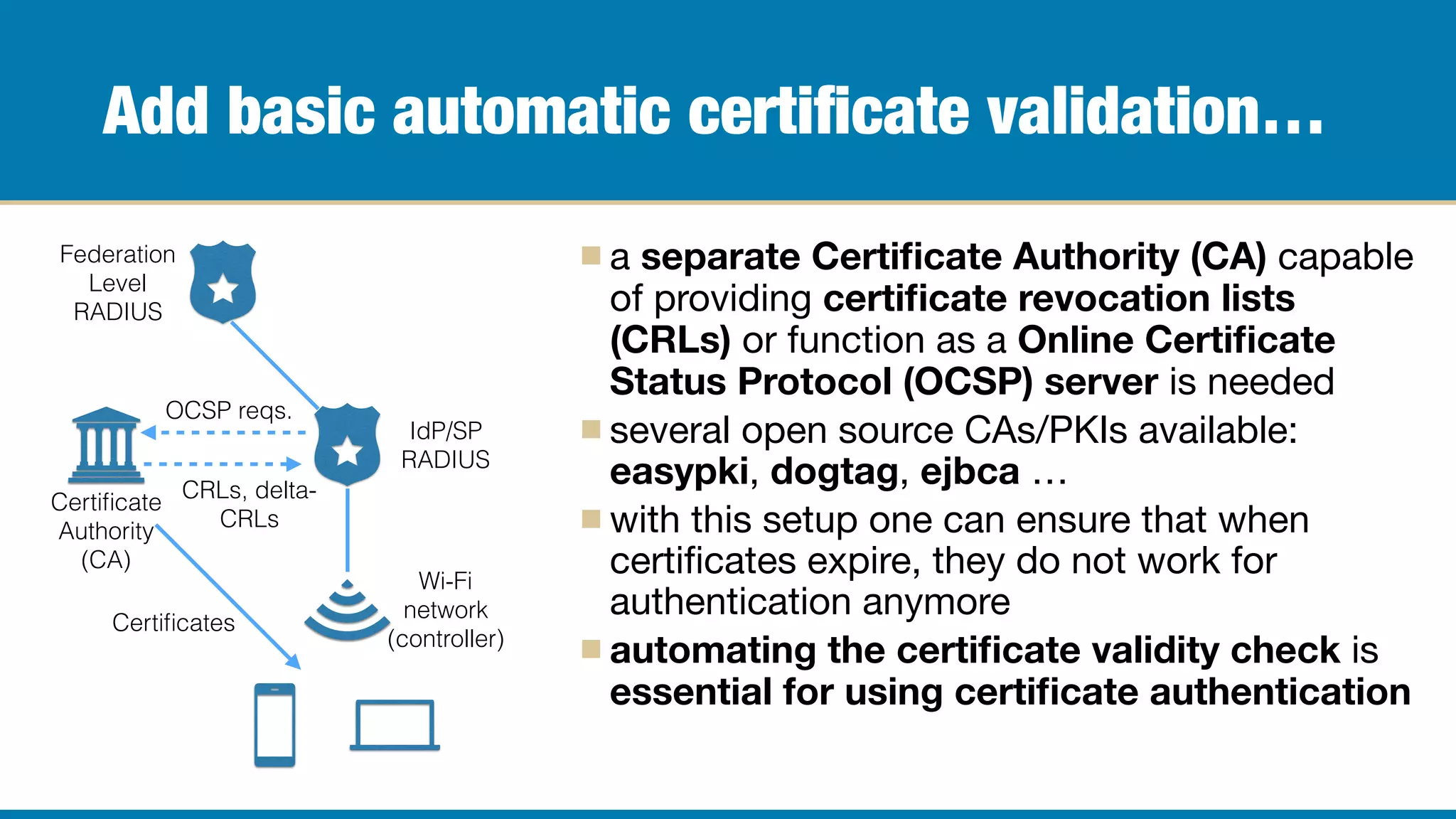
a separate Certificate Authority (CA) capable
of providing certificate revocation lists
(CRLs) or function as a Online Certificate
Status Protocol (OCSP) server is needed

several open source CAs/PKIs available:
easypki, dogtag, ejbca …

with this setup one can ensure that when
certificates expire, they do not work for
authentication anymore

automating the certificate validity check is
essential for using certificate authentication
Federation
Level
RADIUS
IdP/SP
RADIUS
Wi-Fi
network
(controller)
Certificate
Authority
(CA)
OCSP reqs.
CRLs, delta-
CRLs
Certificates
Tips and tricks with CAs and PKI…
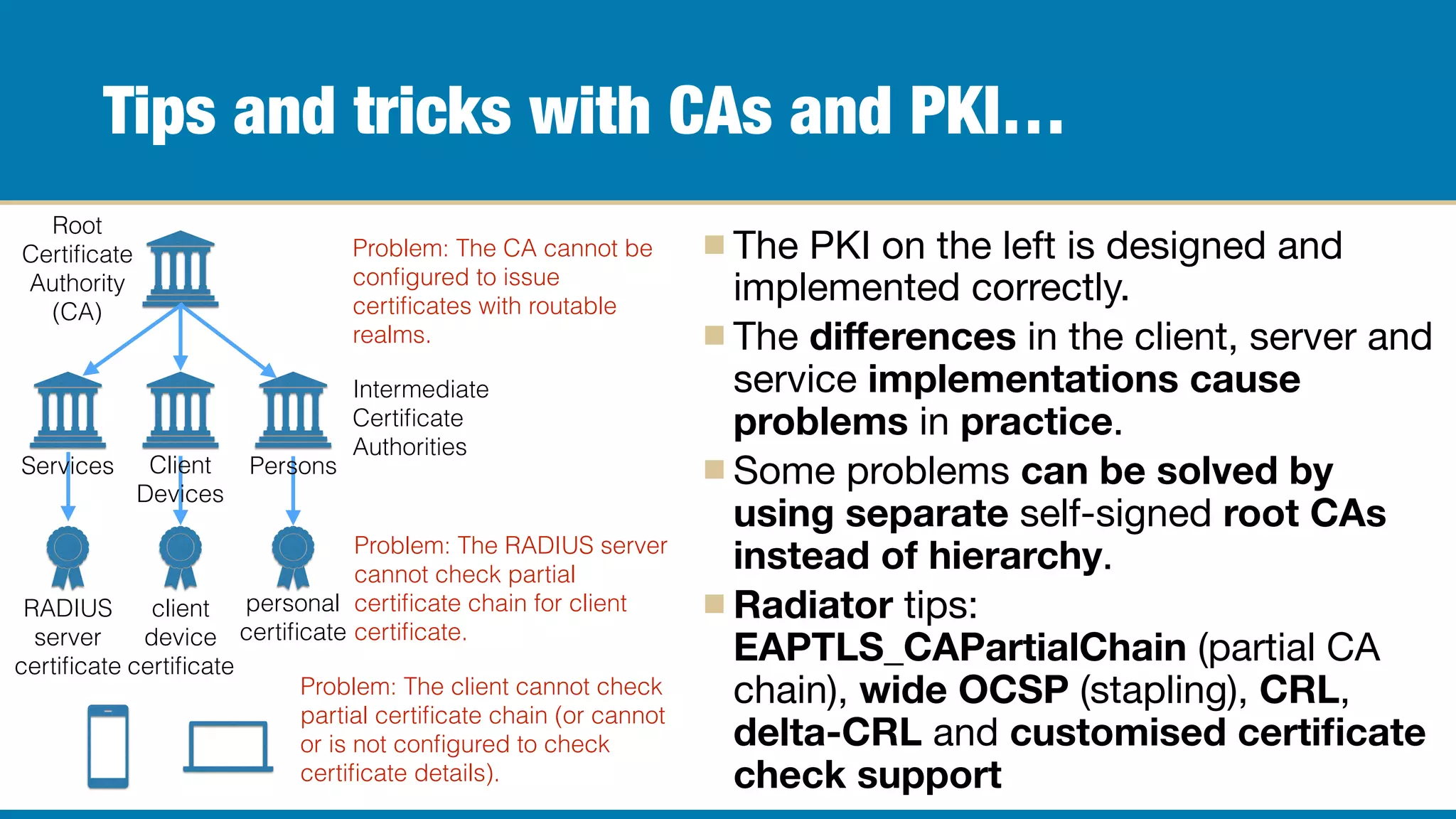
The PKI on the left is designed and
implemented correctly.

The differences in the client, server and
service implementations cause
problems in practice.

Some problems can be solved by
using separate self-signed root CAs
instead of hierarchy.

Radiator tips:
EAPTLS_CAPartialChain (partial CA
chain), wide OCSP (stapling), CRL,
delta-CRL and customised certificate
check support
Root
Certificate
Authority
(CA)
Intermediate
Certificate
Authorities
RADIUS
server
certificate
client
device
certificate
personal
certificate
PersonsClient
Devices
Services
Problem: The client cannot check
partial certificate chain (or cannot
or is not configured to check
certificate details).
Problem: The RADIUS server
cannot check partial
certificate chain for client
certificate.
Problem: The CA cannot be
configured to issue
certificates with routable
realms.
Add connection to authorisation database…
Authorisation database can be Active
Directory, LDAP, SQL with additional
information about the client certificate.

CA, CRLs and OCSP can be sometimes
replaced by client certificate check
against the authorisation database.

Authorisation database can contain
additional information such as VLAN
assignments, account active/locked etc.

How flexible/complex/simple the
authorisation checks can be depends on
the IdP RADIUS product.
Federation
Level
RADIUS
IdP
RADIUS
Wi-Fi
network
(controller)
Certificate
Authority
(CA)
OCSP reqs.
CRLs, delta-
CRLs
Certificates
LDAP,
SQL,
etc.
IdP
Authorisation
Database
(AD, LDAP,
SQL)
<Handler Realm=/^karrin.net$/>
Identifier AUTH-HANDLER-KARRIN-NET
AccountingAccepted
<AuthBy SQL>
Identifier AUTH-HANDLER-KARRIN-NET-AUTHBY-SQL
DBSource dbi:SQLite:dbname=/etc/radiator/userdb.sqlite3
AuthSelect SELECT PASSWORD,CHECKATTR,REPLYATTR FROM USERIDS WHERE
USERID=? AND STATUS='ACTIVE'
AuthSelectParam %0
AuthColumnDef 0, User-Password, check
AuthColumnDef 1, GENERIC, check
AuthColumnDef 2, GENERIC, reply
NoDefault
#EAPTLS_TraceState
#EAPType TLS,PEAP
EAPType TLS,TTLS,PEAP
EAPTLS_CertificateType PEM
#EAPTLS_Protocols TLSv1.2
EAPTLS_CAFile %D/certificates/karrin-net-people-ca.crt
# allow partial chain (whole CA chain is not validated)
EAPTLS_CAPartialChain
EAPTLS_CertificateChainFile %D/certificates/wifi.karrin.net-bundle.crt
EAPTLS_PrivateKeyFile %D/certificates/wifi.karrin.net.key
EAPTLS_MaxFragmentSize 1000
EAPAnonymous %0
EAPTLS_CopyToInnerRequest NAS-IP-Address, NAS-Identifier, NAS-Port,
Calling-Station-Id, Called-Station-Id, Operator-Name, Chargeable-User-Identity
AutoMPPEKeys
</AuthBy>
AuthLog AUTHLOG-FILE
AcctLog ACCTLOG-FILE
</Handler>
sqlite> .schema userids
CREATE TABLE USERIDS(
USERID TEXT NOT NULL,
PASSWORD TEXT NOT NULL,
CHECKATTR TEXT,
REPLYATTR TEXT,
STATUS TEXT NOT NULL);
CREATE INDEX IDX_USERID ON USERIDS(USERID);
CREATE INDEX IDX_USERID_STATUS ON
USERIDS(USERID,STATUS);
sqlite> select * from userids;
kh+ipad@karrin.net|********||Tunnel-
Type=1:VLAN,Tunnel-Medium-Type=1:Ether_802,Tunnel-
Private-Group-ID=1:64|ACTIVE
kh+nexus6@karrin.net|********||Tunnel-
Type=1:VLAN,Tunnel-Medium-Type=1:Ether_802,Tunnel-
Private-Group-ID=1:64|ACTIVE
kh+exopc@karrin.net|********||Tunnel-Medium-
Type=1:Ether_802,Tunnel-Private-Group-ID=1:128|ACTIVE
kh+exopc2@karrin.net|********||Tunnel-Medium-
Type=1:Ether_802,Tunnel-Private-Group-ID=1:256|ACTIVE
Radiator EAP-TLS handler and
sqlite3 authorisation database
for certificate authentication and
dynamic VLAN selection.
Deploy certificate management service…
Properly distributing and configuring
certificates in the end user devices is
difficult.

For managed devices (Windows domain/
Intune) or for Apple devices it is easier,
but Android/Linux devices are hard.

Currently there seems to be no better
approach than to have an app in the
device talking to a service.

One commercial option is SecureW2.

Certificate signing requests created in
the actual device are even harder.
IdP
RADIUS
Wi-Fi
network
(controller)
Certificate
Management
Service
OCSP reqs.
CRLs, delta-
CRLs
Certificates
LDAP,
SQL,
etc.
IdP
Authorisation
Database
(AD, LDAP,
SQL)
Certificate
(signing)
requests
Certificate
request
authorisation
requests
… and you are done… sort of … maybe …
If everything presented before works for you, it’s brilliant … and
you are brilliant.

Unfortunately any organisation who does not have the first step
right will break your organisation’s users’ roaming.

Sometimes even the packet filters / firewalls in front of federation
level RADIUS servers need configuration adjustments.

Deploying certificate based authentication requires design,
competence and support from infrastructure and service
vendors — choose wisely, select vendors and solutions, for
which you can get support for design, deployment and
production.
Questions?
Find this presentation and more from:
https://blog.radiatorsoftware.com/
https://slideshare.net/radiatorsoftware/
https://slideshare.net/khuhtanen/
https://twitter.com/OSCRadiator
This presentation will be presented second time in the JISC govroam stakeholders’ meeting
(23rd of October 2019 in London, United Kingdom)

EAP-TLS (extended version)

  • 1.
  • 2.
    Background I have beenworking with RADIUS based roaming since 2002, eduroam from 2003 — first as a researcher at Tampere University of Technology. Founded a company called Arch Red to do Wi-Fi authentication and roaming. Arch Red is running Finnish top-level RADIUS servers for CSC/ Funet as a production service since 2004. Arch Red worked as a reseller for Open System Consultants’ Radiator product since 2003. Later we did consultation, support and integration under Open System Consultants’ brand. In 2013 Arch Red acquired Open System Consultants and the Radiator product. Arch Red changed its name to Radiator Software and nowadays we focus in developing Radiator AAA server products and services for our customers.
  • 3.
    EAP-TLS is easy… … for RADIUS server. At the minimum one needs only to configure RADIUS server certificate and the CA certificate for client certificate verification. … to configure improperly. Understanding how certificates, certificate revocation, root and intermediate CAs, PKI etc works requires significant effort. Designing and deploying working model requires even more. … only when one does not need to care about the client certificates, their configuration, provisioning and management.
  • 4.
    Deploying EAP-TLS never startor settle requirements because of a product, solution or technology start with defining and designing policies (validity, expiry times, authorisation, usage …) PKI (hierarchy: CAs, intermediate CAs, certificate usage …) configuration management certificate provisioning certificate requirements (roaming, use, technology …) … but do pilot /trials simultaneously to learn and to see how things do (or do not) work or scale with real users and infrastructure
  • 5.
    Start with simpletrial … Try self-signed CA, manually created client certificates first (or Radiator’s certificates directory) eduroam managed IdP as a service for roaming EAP-TLS tests Verify first that your underlying network and especially firewalls and their rules work when using EAP-TLS Firewalls filtering UDP fragments and especially *BSD firewalls (scrub setting) can cause problems. Federation Level RADIUS IdP/SP RADIUS Wi-Fi network (controller) Client devices fragmentation breaking points
  • 6.
    Why? Because networklevel has a lot to test… Large certificates, long certificate chains can cause network devices to fragment EAP-TLS authentication in different ways. Firewalls configured to analyse/assemble or drop UDP/ RADIUS fragments may cause TLS communication to fail. TLS communication failures can only be logged / detected in the end user device or home organisation RADIUS. eduroam managed IdP uses smaller elliptic curve based certificates => does not proof that all certificates work Radiator tips: EAPTLS_TraceState (for TLS debugging), EAPTLS_MaxFragmentSize (adjust TLS max fragment size)
  • 7.
    Add basic automaticcertificate validation… a separate Certificate Authority (CA) capable of providing certificate revocation lists (CRLs) or function as a Online Certificate Status Protocol (OCSP) server is needed several open source CAs/PKIs available: easypki, dogtag, ejbca … with this setup one can ensure that when certificates expire, they do not work for authentication anymore automating the certificate validity check is essential for using certificate authentication Federation Level RADIUS IdP/SP RADIUS Wi-Fi network (controller) Certificate Authority (CA) OCSP reqs. CRLs, delta- CRLs Certificates
  • 8.
    Tips and trickswith CAs and PKI… The PKI on the left is designed and implemented correctly. The differences in the client, server and service implementations cause problems in practice. Some problems can be solved by using separate self-signed root CAs instead of hierarchy. Radiator tips: EAPTLS_CAPartialChain (partial CA chain), wide OCSP (stapling), CRL, delta-CRL and customised certificate check support Root Certificate Authority (CA) Intermediate Certificate Authorities RADIUS server certificate client device certificate personal certificate PersonsClient Devices Services Problem: The client cannot check partial certificate chain (or cannot or is not configured to check certificate details). Problem: The RADIUS server cannot check partial certificate chain for client certificate. Problem: The CA cannot be configured to issue certificates with routable realms.
  • 9.
    Add connection toauthorisation database… Authorisation database can be Active Directory, LDAP, SQL with additional information about the client certificate. CA, CRLs and OCSP can be sometimes replaced by client certificate check against the authorisation database. Authorisation database can contain additional information such as VLAN assignments, account active/locked etc. How flexible/complex/simple the authorisation checks can be depends on the IdP RADIUS product. Federation Level RADIUS IdP RADIUS Wi-Fi network (controller) Certificate Authority (CA) OCSP reqs. CRLs, delta- CRLs Certificates LDAP, SQL, etc. IdP Authorisation Database (AD, LDAP, SQL)
  • 10.
    <Handler Realm=/^karrin.net$/> Identifier AUTH-HANDLER-KARRIN-NET AccountingAccepted <AuthBySQL> Identifier AUTH-HANDLER-KARRIN-NET-AUTHBY-SQL DBSource dbi:SQLite:dbname=/etc/radiator/userdb.sqlite3 AuthSelect SELECT PASSWORD,CHECKATTR,REPLYATTR FROM USERIDS WHERE USERID=? AND STATUS='ACTIVE' AuthSelectParam %0 AuthColumnDef 0, User-Password, check AuthColumnDef 1, GENERIC, check AuthColumnDef 2, GENERIC, reply NoDefault #EAPTLS_TraceState #EAPType TLS,PEAP EAPType TLS,TTLS,PEAP EAPTLS_CertificateType PEM #EAPTLS_Protocols TLSv1.2 EAPTLS_CAFile %D/certificates/karrin-net-people-ca.crt # allow partial chain (whole CA chain is not validated) EAPTLS_CAPartialChain EAPTLS_CertificateChainFile %D/certificates/wifi.karrin.net-bundle.crt EAPTLS_PrivateKeyFile %D/certificates/wifi.karrin.net.key EAPTLS_MaxFragmentSize 1000 EAPAnonymous %0 EAPTLS_CopyToInnerRequest NAS-IP-Address, NAS-Identifier, NAS-Port, Calling-Station-Id, Called-Station-Id, Operator-Name, Chargeable-User-Identity AutoMPPEKeys </AuthBy> AuthLog AUTHLOG-FILE AcctLog ACCTLOG-FILE </Handler> sqlite> .schema userids CREATE TABLE USERIDS( USERID TEXT NOT NULL, PASSWORD TEXT NOT NULL, CHECKATTR TEXT, REPLYATTR TEXT, STATUS TEXT NOT NULL); CREATE INDEX IDX_USERID ON USERIDS(USERID); CREATE INDEX IDX_USERID_STATUS ON USERIDS(USERID,STATUS); sqlite> select * from userids; kh+ipad@karrin.net|********||Tunnel- Type=1:VLAN,Tunnel-Medium-Type=1:Ether_802,Tunnel- Private-Group-ID=1:64|ACTIVE kh+nexus6@karrin.net|********||Tunnel- Type=1:VLAN,Tunnel-Medium-Type=1:Ether_802,Tunnel- Private-Group-ID=1:64|ACTIVE kh+exopc@karrin.net|********||Tunnel-Medium- Type=1:Ether_802,Tunnel-Private-Group-ID=1:128|ACTIVE kh+exopc2@karrin.net|********||Tunnel-Medium- Type=1:Ether_802,Tunnel-Private-Group-ID=1:256|ACTIVE Radiator EAP-TLS handler and sqlite3 authorisation database for certificate authentication and dynamic VLAN selection.
  • 11.
    Deploy certificate managementservice… Properly distributing and configuring certificates in the end user devices is difficult. For managed devices (Windows domain/ Intune) or for Apple devices it is easier, but Android/Linux devices are hard. Currently there seems to be no better approach than to have an app in the device talking to a service. One commercial option is SecureW2. Certificate signing requests created in the actual device are even harder. IdP RADIUS Wi-Fi network (controller) Certificate Management Service OCSP reqs. CRLs, delta- CRLs Certificates LDAP, SQL, etc. IdP Authorisation Database (AD, LDAP, SQL) Certificate (signing) requests Certificate request authorisation requests
  • 12.
    … and youare done… sort of … maybe … If everything presented before works for you, it’s brilliant … and you are brilliant. Unfortunately any organisation who does not have the first step right will break your organisation’s users’ roaming. Sometimes even the packet filters / firewalls in front of federation level RADIUS servers need configuration adjustments. Deploying certificate based authentication requires design, competence and support from infrastructure and service vendors — choose wisely, select vendors and solutions, for which you can get support for design, deployment and production.
  • 13.
    Questions? Find this presentationand more from: https://blog.radiatorsoftware.com/ https://slideshare.net/radiatorsoftware/ https://slideshare.net/khuhtanen/ https://twitter.com/OSCRadiator This presentation will be presented second time in the JISC govroam stakeholders’ meeting (23rd of October 2019 in London, United Kingdom)