








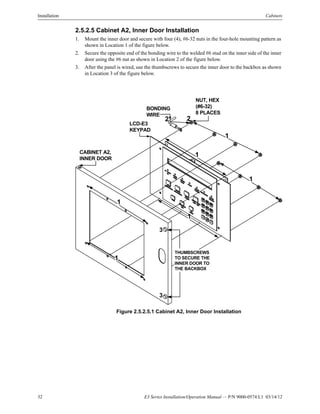
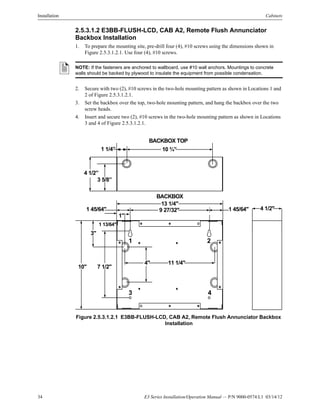
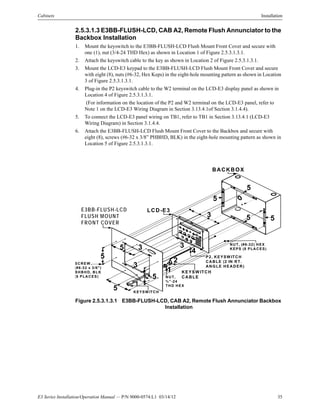
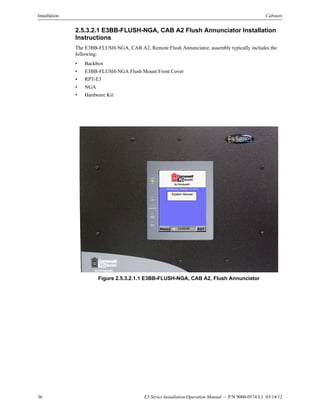










L1P/N 9000-0574:L1 ECN 11-0520
Document 9000-0574
03/14/12 Rev:
E3 Series®
Expandable Emergency
Evacuation System
Installation/Operation Manual
®
2 E3 Series Installation/Operation Manual — P/N 9000-0574:L1 03/14/12
Important Limitations
While a fire alarm system may lower insurance rates,
it is not a substitute for fire insurance!
An automatic fire alarm system- typically made up of
smoke detectors, heat detectors, manual pull stations,
audible warning devices, and a fire alarm control panel with
remote notification capability - can provide early warning of
a developing fire. Such a system, however, does not
assure protection against property damage or loss of life
resulting from a fire.
The Manufacturer recommends that smoke and/or heat
detectors be located throughout a protected premise
following the recommendations of the current edition of the
National Fire Protection Association, Standard 72 (NFPA
72), manufacturer’s recommendations, State and local
codes, and the recommendations contained in the Guide
for Proper Use of System Smoke Detectors, which are
made available at no charge to all installing dealers. These
documents can be found at http://www.systemsensor.co/
html/applict.html. A study by the Federal Emergency
Management Agency (an agency of the United States
government) indicated that smoke detectors may not go off
in as many as 35% of all fires. While fire alarm systems are
designed to provide early warning against fire, they do not
guarantee warning or protection against fire. A fire alarm
system may not provide timely or adequate warning, or
simply may not function, for a variety of reasons.
Smoke Detectors may not sense fire where smoke cannot
reach the detectors such as in chimneys, in or behind
walls, on roofs, or on the other side of closed doors. Smoke
detectors also may not sense a fire on another level or floor
of a building. A second-floor detector, for example, may not
sense a first-floor or basement fire.
Particles of combustion or “smoke” from a developing
fire may not reach the sensing chambers of smoke
detectors because:
• Barriers such as closed or partially closed doors,
walls, or chimneys may inhibit particle or smoke flow.
• Smoke particles may become “cold,” stratify, and not
reach the ceiling or upper walls where detectors are
located.
• Smoke particles may be blown away from detectors by
air outlets.
• Smoke particles may be drawn into air returns before
reaching the detector.
The amount of “smoke” present may be insufficient to
alarm smoke detectors. Smoke detectors are designed to
alarm at various levels of smoke density. If such density
levels are not created by a developing fire at the location of
detectors, the detectors will not go into alarm.
Smoke detectors, even when working properly, have
sensing limitations. Detectors that have photoelectronic
sensing chambers tend to detect smoldering fires better
than flaming fires, which have little visible smoke.
Detectors that have ionizing-type sensing chambers tend
to detect fast-flaming fires better than smoldering fires.
Because fires develop in different ways and are often
unpredictable in their growth, neither type of detector is
necessarily best and a given type of detector may not
provide adequate warning of a fire.
Smoke detectors cannot be expected to provide adequate
warning of fires caused by arson, children playing with
matches (especially in bedrooms), smoking in bed, and
violent explosions (caused by escaping gas, improper
storage of flammable materials, etc.).
Heat detectors do not sense particles of combustion and
alarm only when heat on their sensors increases at a
predetermined rate or reaches a predetermined level.
Rate-of-rise heat detectors may be subject to reduced
sensitivity over time. For this reason, the rate-of-rise
feature of each detector should be tested at least once per
year by a qualified fire protection specialist. Heat detectors
are designed to protect property, not life.
IMPORTANT! Smoke detectors must be installed in the
same room as the control panel and in rooms used by the
system for the connection of alarm transmission wiring,
communications, signaling, and/or power. If detectors are
not so located, a developing fire may damage the alarm
system, crippling its ability to report a fire.
Audible warning devices such as bells may not alert
people if these devices are located on the other side of
closed or partly open doors or are located on another floor
of a building. Any warning device may fail to alert people
with a disability or those who have recently consumed
drugs, alcohol or medication. Please note that:
• Strobes can, under certain circumstances, cause
seizures in people with conditions such as epilepsy.
• Studies have shown that certain people, even when
they hear a fire alarm signal, do not respond or
comprehend the meaning of the signal. It is the
property owner’s responsibility to conduct fire drills
and other training exercise to make people aware of
fire alarm signals and instruct them on the proper
reaction to alarm signals.
• In rare instances, the sounding of a warning device
can cause temporary or permanent hearing loss.
A fire alarm system will not operate without any electrical
power. If AC power fails the system will operate from
standby batteries only for a specified time and only if the
batteries have been properly maintained and replaced
regularly.
Equipment used in the system may not be technically
compatible with the control panel. It is essential to use only
equipment listed for service with your control panel.
Telephone lines needed to transmit alarm signals from a
premise to a central monitoring station may be out of
service or temporarily disabled. For added protection
against telephone line failure, backup radio transmission
systems are recommended.
The most common cause of fire alarm malfunction is
inadequate maintenance. To keep the entire fire alarm
system in excellent working order, ongoing maintenance is
required per the manufacturer’s recommendations, and UL
and NFPA standards. At a minimum, the requirements of
NFPA 72 shall be followed. Environments with large
amounts of dust, dirt or high air velocity require more
frequent maintenance. A maintenance agreement should
be arranged through the local manufacturer’s
representative. Maintenance should be scheduled monthly.
E3 Series Installation/Operation Manual — P/N 9000-0574:L1 03/14/12 3
Installation Precautions
Adherence to the following will aid in problem-free
installation with long-term reliability:
WARNING - Several different sources of power can be
connected to the fire alarm control panel. Disconnect all
sources of power before servicing. Control unit and
associated equipment may be damaged by removing
and/or inserting cards, modules, or interconnecting
cables while the unit is energized. Do not attempt to
install, service, or operate this unit until manuals are read
and understood.
CAUTION - System Re-acceptance Test after
Software Changes: To ensure proper system operation,
this product must be tested in accordance with NFPA 72
after any programming operation or change in site-
specific software. Reacceptance testing is required after
any change, addition or deletion of system components,
or after any modification, repair or adjustment to system
hardware or wiring. All components, circuits, system
operations, or software functions known to be affected
by a change must be 100% tested. In addition, to ensure
that other operations are not inadvertently affected, at
least 10% of initiating devices that are not directly
affected by the change, up to a maximum of 50 devices,
must also be tested and proper system operation
verified.
This system meets NFPA requirements for operation at
0-49° C/32-120° F and at a relative humidity 93% ± 2%
RH (non-condensing) at 32° C ± 2° C (90° F ± 3° F).

However, the useful life of the system’s standby batteries
and the electronic components may be adversely
affected by extreme temperature ranges and humidity.
Therefore, it is recommended that this system and its
peripherals be installed in an environment with a normal
room temperature of 15-27° C/60-80° F.
Verify that wire sizes are adequate for all initiating and
indicating device loops. Most devices cannot tolerate
more than a 10% I.R. drop from the specified device
voltage.
Follow the instructions in the installation, operating,
and programming manuals. These instructions must be
followed to avoid damage to the control panel and
associated equipment FACP operation and reliability
depend upon proper installation.
Survivability
Per the National Fire Alarm Code, NFPA 72, all circuits
necessary for the operation of the notification appliances
shall be protected until they enter the evacuation
signaling zone that they serve. Any of the following
methods shall be considered acceptable as meeting
these requirements:
1) A 2-hour rated cable or cable system

2) A 2-hour rated enclosure
3) Performance alternatives approved by Authority
Having Jurisdiction (AHJ).
Like all solid state electronic devices, this system
may operate erratically or can be damaged when
subjected to lightning induced transients. Although no
system is completely immune from lightning transients
and interference, proper grounding will reduce
susceptibility. Overhead or outside aerial wiring is not
recommended, due to an increased susceptibility to
nearby lightning strikes. Consult with the Technical
Services Department if any problems are anticipated or
encountered.
Disconnect AC power and batteries prior to removing
or inserting circuit boards. Failure to do so can damage
circuits.
Remove all electronic assemblies prior to any drilling,
filing, reaming, or punching of the enclosure. When
possible, make all cable entries from the sides or rear.
Before making modifications, verify that they will not
interfere with battery, transformer, or printed circuit board
location.
Do not tighten screw terminals more than 9 in-lbs.
Over-tightening may damage threads, resulting in
reduced terminal contact pressure and difficulty with
screw terminal removal.
This system contains static-sensitive components.
Always ground yourself with a proper wrist strap before
handling any circuits so that static charges are removed
from the body. Use static suppressive packaging to
protect electronic assemblies removed from the unit.
Precau-D2-8-2008
Gamewell-FCI®, SmartScan®, and E3 Series® are registered trademarks of Honeywell International Inc. Echelon® is a registered trademark and
LonWorks™ is a trademark of Echelon Corporation. ARCNET® is a registered trademark of Datapoint Corporation. Microsoft® and Windows® are
registered trademarks of the Microsoft Corporation. LEXAN® is a registered trademark of GE Plastics, a subsidiary of General Electric Company.
©2012 by Honeywell International Inc. All rights reserved. Unauthorized use of this document is strictly prohibited.
FCC Warning
WARNING: This equipment generates, uses, and can
radiate radio frequency energy and if not installed and
used in accordance with the instruction manual may
cause interference to radio communications. It has been
tested and found to comply with the limits for Class A
computing devices pursuant to Subpart B of Part 15 of
FCC Rules, which is designed to provide reasonable
protection against such interference when devices are
operating in a commercial environment. Operation of this
equipment in a residential area is likely to cause
interference, in which case the user will be required to
correct the interference at his or her own expense.
Canadian Requirements
This digital apparatus does not exceed the Class A limits
for radiation noise emissions from digital apparatus set
out in the Radio Interference Regulations of the
Canadian Department of Communications.
Le present appareil numerique n’emet pas de bruits
radioelectriques depassant les limites applicables aux
appareils numeriques de la Classe A prescrites dan le
Reglement sur le brouillage radioelectrique edicte par le
ministere des Communications du Canada.
4 E3 Series Installation/Operation Manual — P/N 9000-0574:L1 03/14/12
Software Downloads
In order to supply the latest features and functionality in fire alarms and life safety technology to our customers, we make
frequent upgrades to the embedded software in our products. To ensure that you are installing and programming the latest
features, we strongly recommend that you download the most current version of software for each product prior to
commissioning any system. Contact Technical Support with any questions about software and the appropriate version for
a specific application.
Documentation Feedback
Your feedback helps us keep out documentation up-to-date and accurate. If you have any comments or suggestions about
our online Help or printed manuals, you can email us.
Please include the following information:
• Product name and version number (if applicable)
• Printed manual or online Help
• Topic Title (for online Help)
• Page number (for printed manual)
• Brief description of content you think should be improved or corrected
• Your suggestion for how to correct/improve documentation
Send email messages to:
FireSystems.TechPubs@honeywell.com
Please note this email address is for documentation feedback only. If you have any technical issues, please contact
Technical Services
E3 Series Installation/Operation Manual — P/N 9000-0574:L1 03/14/12 5
Table of Contents
Section 1: System Overview....................................................................................................9
1.1: General Description.......................................................................................................................................9
1.2: Standards........................................................................................................................................................9
1.3: Features..........................................................................................................................................................9
1.3.1: Optional Features...............................................................................................................................10
1.4: Product Models Nomenclature ....................................................................................................................10
1.5: System Components ....................................................................................................................................11
1.5.1: Control and Indicator Sub-Assembly (LCD-E3)...............................................................................11
1.5.2: Intelligent Loop Interface - Main Board (ILI-MB-E3) .....................................................................12
1.5.3: Intelligent Loop Interface XP95 - Main Board (ILI95-MB-E3) .......................................................12
1.5.4: Addressable Node Expander (ANX).................................................................................................12
1.5.5: Power Supply - 9 Amperes (PM-9/PM-9G)......................................................................................12
1.6: Optional Modules ........................................................................................................................................13
1.6.1: Addressable Switch Sub-Assembly (ASM-16).................................................................................13
1.6.2: Digital Alarm Communicator Transmitter (DACT-E3)....................................................................13
1.6.3: Repeater (RPT-E3) ............................................................................................................................13
1.6.4: Intelligent Loop Interface - Slave Board (ILI-S-E3).........................................................................13
1.6.5: Intelligent Loop Interface XP95 - Slave Board (ILI95-S-E3)...........................................................13
1.6.6: Addressable Node Expander (ANX).................................................................................................14
1.6.7: Remote LED Driver (ANU-48).........................................................................................................14
1.6.8: LCD Network Graphic Annunciator (NGA).....................................................................................14
1.6.9: Remote LCD Display (LCD-7100/RAN-7100) ................................................................................14
1.6.10: Intelligent Network Interface – Voice Gateway (INI-VG Series)...................................................14
1.6.11: AM-50 Series, 50 Watt Amplifiers..................................................................................................15
1.7: Specifications...............................................................................................................................................16
1.7.1: Power Supply (PM-9/PM-9G)...........................................................................................................16
1.7.2: Signaling Line Circuits (ILI-E3 or ILI95-E3 Series) ........................................................................16
1.7.3: Notification Appliance Circuits (ILI-MB-E3 or ILI95-MB-E3).......................................................17
1.7.4: Alarm Dry Contacts (ILI-MB-E3 or ILI95-MB-E3).........................................................................17
1.7.5: Trouble Dry Contacts (ILI-MB-E3 or ILI95-MB-E3) ......................................................................17
1.7.6: Supervisory Dry Contacts (ILI-MB-E3 or ILI95-MB-E3)................................................................17
1.7.7: Earth Ground Connection (ILI-MB-E3 or ILI95-MB-E3)................................................................17
1.7.8: 24 VDC Power, System (ILI-MB-E3 or ILI95-MB-E3)...................................................................17
1.7.9: RS-232 Port .......................................................................................................................................17
1.7.10: Battery Connection (PM-9/PM-9G)................................................................................................18
1.7.11: City Master Box Output (ILI-MB-E3 or ILI95-MB-E3).................................................................18
1.7.12: Remote Signaling Output (Polarity Reversal).................................................................................18
1.7.13: Releasing Service (ILI-MB-E3 or ILI95-MB-E3)...........................................................................18
Section 2: Installation.............................................................................................................20
2.1: General.........................................................................................................................................................20
2.2: Installation Requirements ............................................................................................................................20
2.3: Unpacking and Inspecting Components ......................................................................................................20
2.4: Mounting Sub-assemblies............................................................................................................................20
2.5: Cabinets .......................................................................................................................................................21
2.5.1: Cabinet A1, Installation Instructions.................................................................................................21
2.5.2: Cabinet A2, Installation Instructions.................................................................................................27
2.5.3: E3 Series, Remote Flush Annunciators.............................................................................................33
2.5.4: Cabinet AA, 2-Bay Installation Instructions .....................................................................................39
2.5.5: Cabinet AA, 3-Bay Installation Instructions .....................................................................................45
2.5.6: Cabinet B Installation Instructions ....................................................................................................48
2.5.7: Cabinet C, E3-INX-C Plate Installation Instructions ........................................................................56
2.5.8: Cabinet C, E3-INCC-C Plate Installation Instructions......................................................................63
2.5.9: Cabinet D Installation Instructions....................................................................................................78
Table of Contents
6 E3 Series Installation/Operation Manual — P/N 9000-0574:L1 03/14/12
2.6: Gamewell and FCI Legacy Retrofit Kits .....................................................................................................91
2.6.1: IF600 Retrofit Kit for Gamewell 602 and 610 Panels Installation Instructions (B-Slim Cabinet) ...91
2.6.2: 600XL Retrofit Kit for Gamewell 600XL Cabinets and 632 Panels Installation Instructions..........98
2.6.3: RAN-7100, Remote Alphanumeric Annunciator Installation Instructions ....................................104
2.6.4: 7200 CAB-B Retrofit Installation Instructions................................................................................107
2.6.5: 7200 CAB-C Retrofit Installation Instructions................................................................................115
2.6.6: KDU Retrofit Installation Instructions ............................................................................................122
Section 3: E3 Series System Connections......................................................................... 126
3.1: ILI-MB-E3 and ILI95-MB-E3 Connections..............................................................................................126
3.1.1: Auxiliary Power Output, Resettable/Non-Resettable......................................................................126
3.1.2: Relay Connections...........................................................................................................................126
3.1.3: Signaling Line Circuits....................................................................................................................127
3.1.4: B200S Sounder Base .......................................................................................................................128
3.1.5: Notification Appliance Circuits.......................................................................................................130
3.1.6: ILI-MB-E3 and ILI95-MB-E3 Outputs...........................................................................................130
3.1.7: ILI-MB-E3 and ILI95-MB-E3 Specifications.................................................................................130
3.2: Intelligent Loop Interface-Main Board Connections.................................................................................131
3.2.1: Intelligent Loop Interface-Main Board (ILI-MB-E3) Wiring Connections ....................................132
3.2.2: ILI-MB-E3 Wiring Diagram............................................................................................................134
3.3: Intelligent Loop Interface XP95-Main Board Connections.......................................................................135
3.3.1: Intelligent Loop Interface XP95 - Main Board (ILI95-MB-E3) Wiring Connections ....................136
3.3.2: ILI95-MB-E3 Wiring Diagram........................................................................................................138
3.4: Intelligent Loop Interface - Slave Board (ILI-S-E3) Connections ............................................................139
3.4.1: Signaling Line Circuits....................................................................................................................139
3.4.2: Intelligent Loop Interface - Slave Board Sub-Assembly.................................................................140
3.4.3: Intelligent Loop Interface - Slave Board (ILI-S-E3) Wiring Connections......................................141
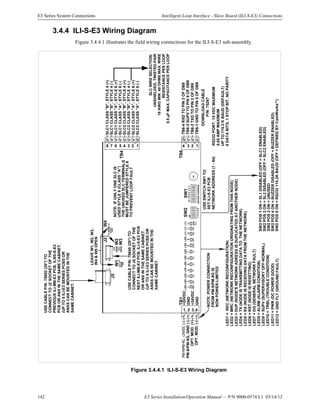
3.4.4: ILI-S-E3 Wiring Diagram................................................................................................................142
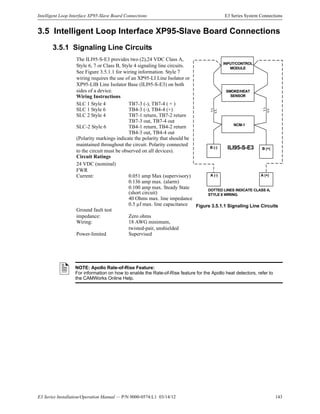
3.5: Intelligent Loop Interface XP95-Slave Board Connections ......................................................................143
3.5.1: Signaling Line Circuits....................................................................................................................143
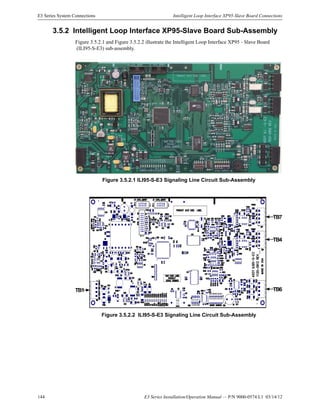
3.5.2: Intelligent Loop Interface XP95-Slave Board Sub-Assembly.........................................................144
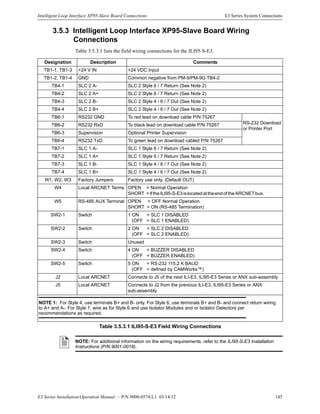
3.5.3: Intelligent Loop Interface XP95-Slave Board Wiring Connections................................................145
3.5.4: ILI95-S-E3 Wiring Diagram............................................................................................................146
3.6: ILI-E3 and ILI95-E3 Series Programming Address Switch Settings ........................................................147
3.7: Addressable Node Expander (ANX) Connections ....................................................................................148
3.7.1: ANX Specifications.........................................................................................................................148
3.7.2: Minimum Configuration..................................................................................................................148
3.7.3: ANX Wiring Requirements .............................................................................................................149
3.7.4: FocalPoint Gateway-3 Wiring .........................................................................................................149
3.7.5: License.............................................................................................................................................149
3.7.6: Addressable Node Expander-Single Ring (ANX-SR).....................................................................150
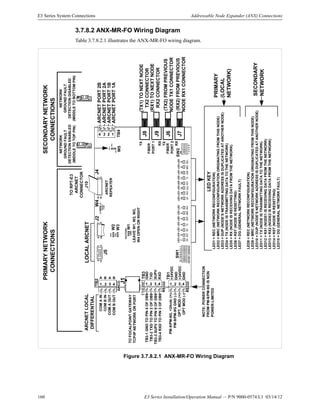
3.7.7: Addressable Node Expander-Multi-Ring Twisted-Pair (ANX-MR-UTP)......................................153
3.7.8: Addressable Node Expander Multi-Ring Fiber-Optic Pair (ANX-MR-FO) ...................................157
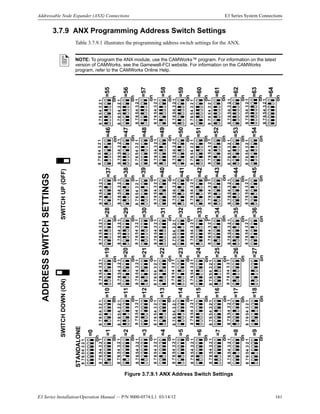
3.7.9: ANX Programming Address Switch Settings..................................................................................161
3.8: PM-9/PM-9G Power Supply Connections.................................................................................................162
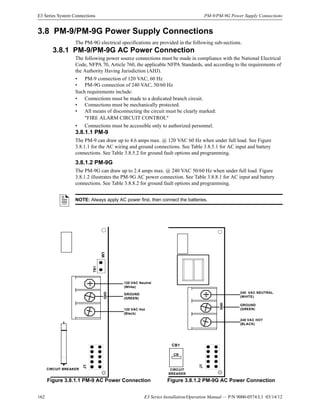
3.8.1: PM-9/PM-9G AC Power Connection..............................................................................................162
3.8.2: PM-9/PM-9GBattery Connections ..................................................................................................163
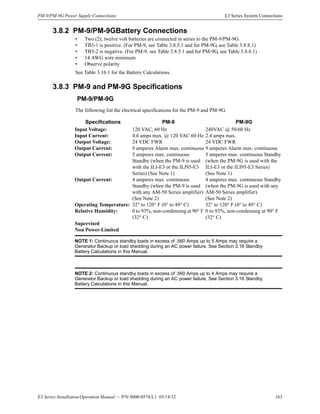
3.8.3: PM-9 and PM-9G Specifications.....................................................................................................163
3.8.4: PM-9 Power Supply Sub-Assembly ................................................................................................164
3.8.5: PM-9 Power Supply Wiring Connections .......................................................................................165
3.8.6: PM-9 Wiring Diagram.....................................................................................................................166
3.8.7: PM-9G Power Supply Sub-Assembly .............................................................................................167
3.8.8: PM-9G Power Supply Wiring Connections ....................................................................................168
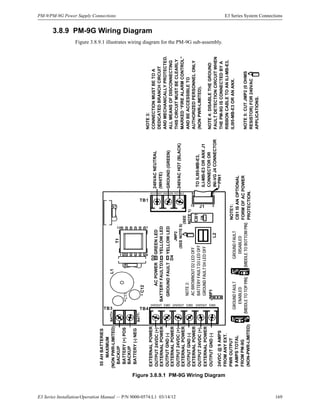
3.8.9: PM-9G Wiring Diagram..................................................................................................................169
3.9: ASM-16 Addressable Switch Module Connections ..................................................................................170
3.9.1: Specifications...................................................................................................................................170
3.9.2: Addressable Switch Module (ASM-16) Sub-Assembly..................................................................171
Table of Contents
E3 Series Installation/Operation Manual — P/N 9000-0574:L1 03/14/12 7
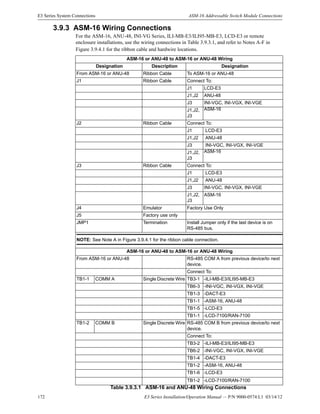
3.9.3: ASM-16 Wiring Connections..........................................................................................................172
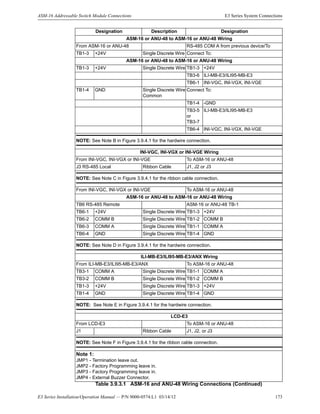
3.9.4: ASM-16 and ANU-48 Wiring Connections....................................................................................174
3.9.5: ASM-16 Wiring Diagram................................................................................................................175
3.9.6: ASM-16 Programming Address Switch Settings............................................................................176
3.10: Digital Alarm Communicator Transmitter (DACT-E3) Connections......................................................177
3.10.1: Central Station Reporting..............................................................................................................177
3.10.2: Telephone Requirements...............................................................................................................178
3.10.3: Specifications.................................................................................................................................178
3.10.4: Digital Alarm Communicator (DACT-E3) Sub-Assembly...........................................................179
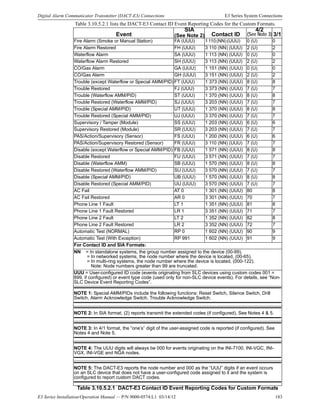
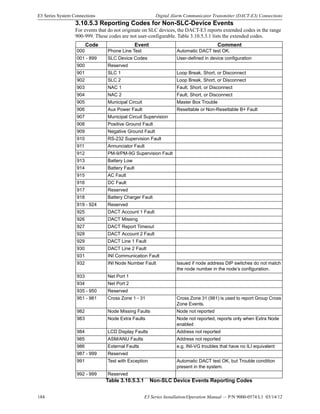
3.10.5: DACT-E3 Contact ID Event Reporting Codes in CAMWorks.....................................................180
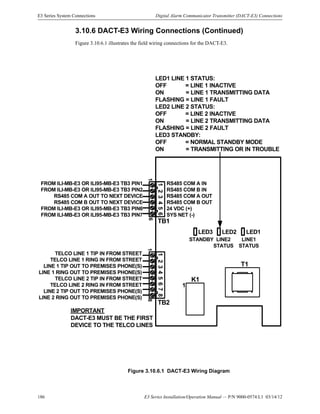
3.10.6: DACT-E3 Wiring Connections .....................................................................................................185
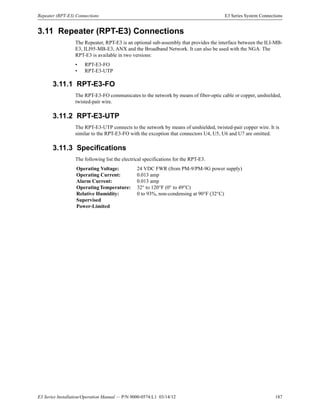
3.11: Repeater (RPT-E3) Connections..............................................................................................................187
3.11.1: RPT-E3-FO....................................................................................................................................187
3.11.2: RPT-E3-UTP .................................................................................................................................187
3.11.3: Specifications.................................................................................................................................187
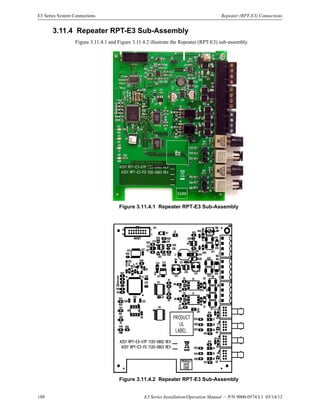
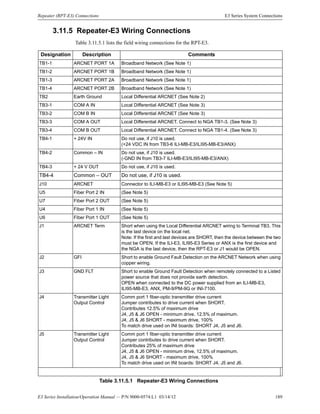
3.11.4: Repeater RPT-E3 Sub-Assembly ..................................................................................................188
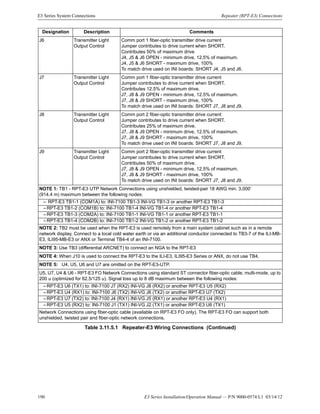
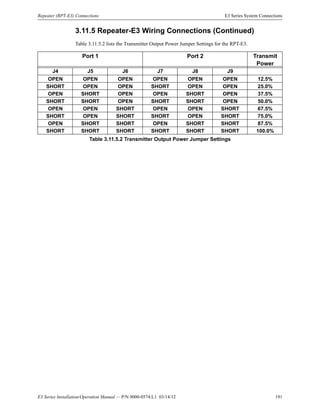
3.11.5: Repeater-E3 Wiring Connections..................................................................................................189
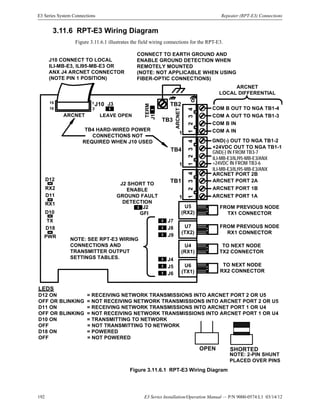
3.11.6: RPT-E3 Wiring Diagram...............................................................................................................192
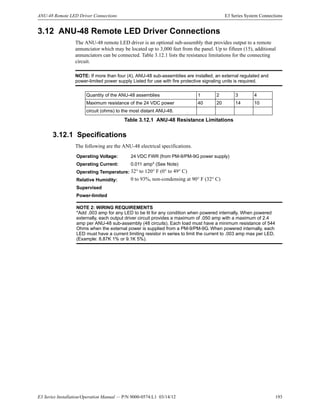
3.12: ANU-48 Remote LED Driver Connections.............................................................................................193
3.12.1: Specifications.................................................................................................................................193
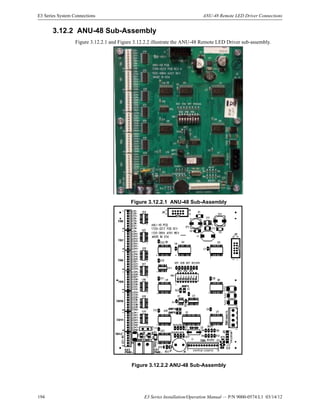
3.12.2: ANU-48 Sub-Assembly.................................................................................................................194
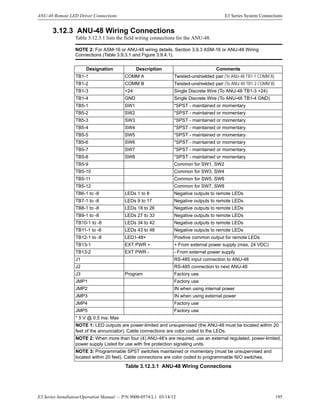
3.12.3: ANU-48 Wiring Connections........................................................................................................195
3.12.4: ANU-48 Wiring Diagram..............................................................................................................196
3.12.5: ANU-48 Programming Address Switch Settings..........................................................................197
3.13: LCD-E3 Connections...............................................................................................................................198
3.13.1: Specifications.................................................................................................................................198
3.13.2: LCD-E3 Sub-Assembly.................................................................................................................198
3.13.3: LCD-E3 Wiring Connections........................................................................................................199
3.13.4: LCD-E3 Wiring Diagram..............................................................................................................200
3.14: NGA Connections....................................................................................................................................201
3.14.1: Specifications.................................................................................................................................201
3.14.2: NGA Wiring Connections .............................................................................................................202
3.14.3: NGA Wiring Diagram ...................................................................................................................203
3.15: LCD-7100/RAN-7100 Remote Display Connections .............................................................................204
3.15.1: LCD-7100/RAN-7100 Cabinets....................................................................................................204
3.15.2: Specifications.................................................................................................................................204
3.15.3: LCD-7100/RAN-7100 Remote Display Sub-Assembly................................................................204
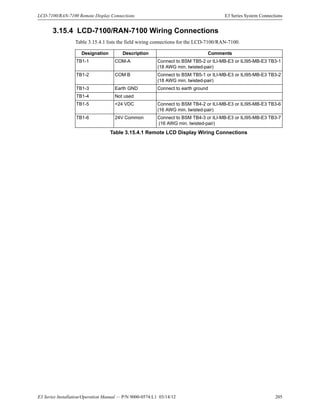
3.15.4: LCD-7100/RAN-7100 Wiring Connections..................................................................................205
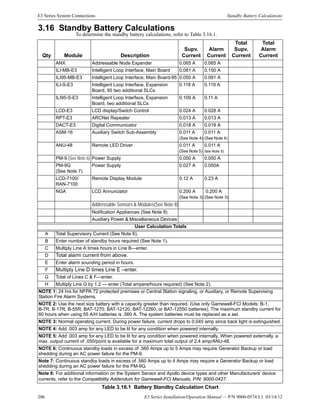
3.16: Standby Battery Calculations...................................................................................................................206
3.17: Analog Sensors ........................................................................................................................................207
3.17.1: Address Switches...........................................................................................................................207
3.17.2: Drift Compensation .......................................................................................................................207
3.17.3: Addressable Modules ....................................................................................................................207
3.17.4: Monitor Modules...........................................................................................................................207
3.17.5: Control Modules............................................................................................................................207
3.17.6: System Response to Input Devices................................................................................................207
Section 4: Programming/Operation Instructions...............................................................208
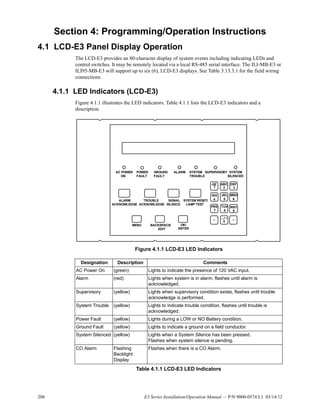
4.1: LCD-E3 Panel Display Operation .............................................................................................................208
4.1.1: LED Indicators (LCD-E3)...............................................................................................................208
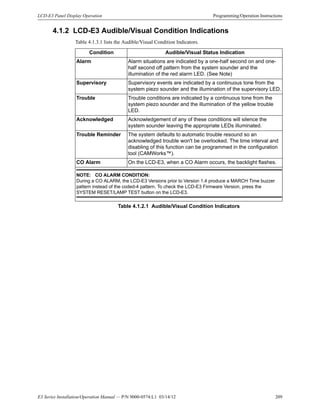
4.1.2: LCD-E3 Audible/Visual Condition Indications ..............................................................................209
4.1.3: Switches (LCD-E3) .........................................................................................................................210
4.1.4: Carbon Monoxide (CO) Alarm Operation.......................................................................................211
4.2: NGA Panel Display Operation ..................................................................................................................212
4.2.1: NGA LED Indicators.......................................................................................................................212
4.2.2: NGA Switches.................................................................................................................................213
4.2.3: System Reset ...................................................................................................................................213
Table of Contents
8 E3 Series Installation/Operation Manual — P/N 9000-0574:L1 03/14/12
4.2.4: Acknowledge Alarm Events............................................................................................................213
4.2.5: Silence System Outputs ...................................................................................................................213
4.2.6: Trouble / Supervisory Off-Normal Acknowledge...........................................................................213
4.2.7: Carbon Monoxide (CO) Alarm Operation.......................................................................................214
Section 5: Programming ...................................................................................................... 215
5.1: MAIN LCD-E3 Menu Selections ..............................................................................................................215
5.2: WALK / DRILL Menu Selection...............................................................................................................215
5.3: I/O Menu Selection....................................................................................................................................216
5.4: CLOCK Menu Selection............................................................................................................................216
5.5: MISC Menu Selection................................................................................................................................216
5.6: LOG Menu Selection .................................................................................................................................216
5.7: INFO Menu Selection................................................................................................................................216
Section 6: Power Up Procedure .......................................................................................... 217
6.1: General.......................................................................................................................................................217
6.2: To Set the System Time .............................................................................................................................217
6.3: Automatic Configuration ...........................................................................................................................217
Section 7: Test and Maintenance ........................................................................................ 219
7.1: Test.............................................................................................................................................................219
7.2: Maintenance...............................................................................................................................................219
Section 8: Power-Limited – Non Power-Limited Wiring.................................................... 221
8.1: E3 Series Control Panel Circuit Wiring Requirements..............................................................................222
8.2: E3 Series Power-Limited and Non Power-Limited Diagram ....................................................................223
Index ...................................................................................................................................... 224
E3 Series Installation/Operation Manual — P/N 9000-0574:L1 03/14/12 9
Section 1: System Overview
1.1 General Description
The Gamewell-FCI E3 Series® Expandable Emergency Evacuation System is a multiprocessor
based analog/addressable fire alarm control panel. It employs the high-speed Velocit® sensors with
a rapid response polling speed that provides the flexibility demanded for emergency evacuation
systems. It is designed for commercial, industrial and institutional fire alarm applications.
1.2 Standards
The E3 Series System complies with the following Standards.
Underwriters Laboratories Standards
The E3 Series® System is Listed by Underwriter’s Laboratories under Standard UL 864, 9th
Edition. It is suitable for the following signaling services that comply with the Underwriters
Laboratories Standards:
• Automatic Fire Detector Alarm
• Manual Fire Alarm
• Waterflow Alarm
• Supervisory
• Automatic Smoke Alarm, non-coded and master coded operation
• Releasing Device Service
• General Purpose Signaling Devices and Systems:
– UL Standard 2017
NFPA Standards
When the System is configured and installed under the supervision of a Gamewell-FCI factory
trained and certified distributor, the E3 Series Systems complies with the requirements of the
following National Fire Protection Association (NFPA) Standards:
• NFPA 13 Installation of Sprinkler Systems
• NFPA 16 Deluge Foam - Water Sprinkler Systems
• NFPA 72 National Fire Alarm Code:
– Central Station Fire Alarm Systems
– Local Fire Alarm Systems
– Auxiliary Fire Alarm Systems
– Remote Station Fire Alarm Systems
– Proprietary Fire Alarm Systems
1.3 Features
The following list the features of the E3 Series System.
• Two (2), Class A, Style 6, 7* or Class B, Style 4 Signaling Line Circuits
• Two (2), Class A, Style Z or Class B, Style Y Notification Appliance Circuits, 2.0 amp each
• Alarm, Trouble and Supervisory dry contacts
• Accommodates 159 Gamewell-FCI Approved, UL®
Listed compatible analog sensors per
signaling line circuit (ILI-MB-E3 or ILI-S-E3 only).
• Accommodates 159 Gamewell-FCI Approved, UL Listed compatible addressable
monitor/control devices per signaling line circuit (ILI-MB-E3 or ILI-S-E3 only)
• Accommodates 126 Gamewell-FCI Approved, UL Listed compatible sensors/modules
per signaling line circuit (ILI95-MB-E3 or ILI95-S-E3 only)
• 80-character alphanumeric LCD display (40 characters user-defined)
4100 event history buffer (non-volatile)
• Power-limited
• Resettable/non-resettable 2.0 amp @ 24 VDC power output each
• Alarm verification
• Walk test
• Multi-level alarm processing
• Positive Alarm Sequence (PAS) operation
• NAC Sync
For additional information on the NAC Sync, refer to Section 3.1.5.
• Trouble reminder
• Integral RS-232 port
• ANX network interface communicates between the E3 Series fire alarm control panel and the
FocalPoint Graphic Workstation
*Style 7 operation requires System Sensor, M500X Isolator Module (ILI-MB-E3 or ILI-S-E3) or
XP95-LI Line Isolator and XP95-LIB Line Isolator Base (ILI95-MB-E3 or ILI95-S-E3).
10 E3 Series Installation/Operation Manual — P/N 9000-0574:L1 03/14/12
System Overview Product Models Nomenclature
1.3.1 Optional Features
• Remote DACT-E3 Digital Alarm Communicator Transmitter
• RPT-E3 ARCNET Repeater
• Remote ANU-48 Remote LED Driver
• Remote ASM-16 Addressable Switch Sub-assembly
• Remote Network Graphic Display
• LCD-7100/RAN-7100 Remote LCD Display
1.4 Product Models Nomenclature
Table 1.4.1 lists the nomenclature of the models included in each of the product line series that
appear in this Manual. To determine which models are associated with the particular series that is
mentioned in this Manual, refer to Table 1.2.1.
E3 Series®
Nomenclature
E3 Control Panel ILI-MB-E3 ANU-48 FPT-Works AM-50-25
E3 Broadband ILI-S-E3 LCD-E3 FPT-Mobile AM-50-70
E3 Classic ILI95-MB-E3 RPT-E3 INI-VGC INCC-MIC
INCC ILI95-S-E3 DACT-E3 INI-VCE INCC-TEL
PM-9 ANX IPDACT-2 INI-VGX E3 LOC
PM-9G ASM-16 NGA INX E3 LOC-TEL
AM-50 Series AA Series
AM-50-25 AM-50-70 AA-100 AA-120
ILI-E3 Series ILI95-E3 Series
ILI-MB-E3 ILI-S-E3 ILI95-MB-E3 ILI95-S-E3
INI-VG Series
INI-VGC INI-VGE INI-VGX
Velociti®
Series
Velociti Series Modules Velociti Series Sensors
AMM-2F AOM-2RF MMI-6SF ABD-2F ATD-L2F/RL2R/HL2F
AMM-4F AOM-2SF MMI-10F ASD-FILTREXF B200S/SR
AMM-2IF AOM-TELF MMO-6RF ASD-IL2F Intelligent Bases
AMM-4SF M500X MMO-6SF ASD-LS MCS-ACCL. 2F
ASD-PL2F/PTL2F/PL2FR NCM-1
MS-7 Series
MS-7AF/SF MS-7 MS-7LOB MS-7LR MS-7LRA
MS-7P
Table 1.4.1 Product Models Nomenclature
E3 Series Installation/Operation Manual — P/N 9000-0574:L1 03/14/12 11
System Components System Overview
1.5 System Components
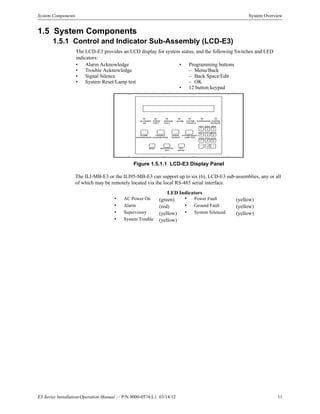
1.5.1 Control and Indicator Sub-Assembly (LCD-E3)
Figure 1.5.1.1 LCD-E3 Display Panel
The ILI-MB-E3 or the ILI95-MB-E3 can support up to six (6), LCD-E3 sub-assemblies, any or all
of which may be remotely located via the local RS-485 serial interface.
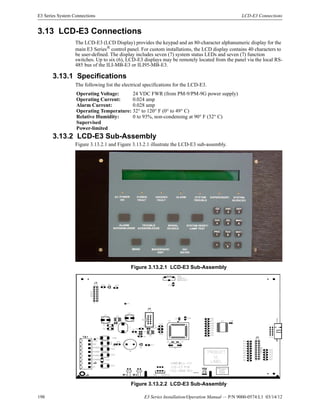
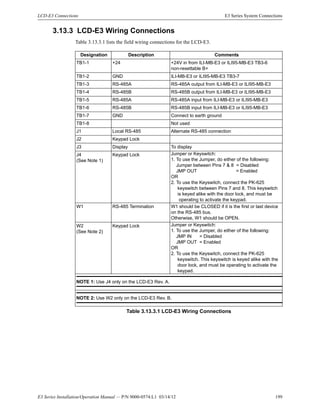
The LCD-E3 provides an LCD display for system status, and the following Switches and LED
indicators:
• Alarm Acknowledge • Programming buttons
• Trouble Acknowledge – Menu/Back
• Signal Silence – Back Space/Edit
• System Reset/Lamp test – OK
• 12 button keypad
LED Indicators
• AC Power On (green) • Power Fault (yellow)
• Alarm (red) • Ground Fault (yellow)
• Supervisory (yellow) • System Silenced (yellow)
• System Trouble (yellow)
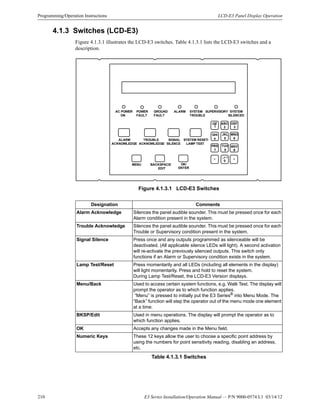
AC PO W ER
ON
PO W ER
FAULT
G ROUND
FAULT
ALARM SYSTEM
TRO UBLE
SUPERVISORY SYSTEM
SILENCED
M ENU
ABC
2
M NO
6
_.
-Q Z
1
DEF
3
G HI
4
JKL
5
PRS
7
TUV
8
W XY
9
< >
0
,
BACKSPACE/
EDIT
ALARM
ACKNOW LEDG E
TROUBLE
ACKNOW LEDGE
SIGNAL
SILENCE
SYSTEM RESET/
LAM P TEST
OK/
ENTER
12 E3 Series Installation/Operation Manual — P/N 9000-0574:L1 03/14/12
System Overview System Components
1.5.2 Intelligent Loop Interface - Main Board (ILI-MB-E3)
These units are the main operating sub-assembly for the E3 control. The units provide two (2),
signaling line circuits and terminals for the connection of all sub-assemblies. Each unit can support
an LCD-E3, DACT-E3 and up to a total of sixteen (16), ASM-16 and/or ANU-48 sub-assemblies.
The units occupy one node on the Broadband network. The Alarm signals lock-in. The Supervisory
Signals can be either latched-in or not latched-in, depending on the CAMWorks™. Trouble signals
do not lock-in. The following sensors and modules are used with each unit.
• The ILI-MB-E3 accommodates the ASD/ATD Series sensors and AMM/MMI/AOM/MMO
Series modules.
For a comprehensive list, refer to the Compatibility Addendum to Gamewell-FCI Manuals,
P/N 9000-0427.
• Municipal Connection/Releasing Output
The ILI-MB-E3 provides a non power-limited output for a local energy City Master Box or a
Releasing Solenoid.
For a comprehensive list, refer to the Compatibility Addendum to Gamewell-FCI Manuals,
P/N 9000-0427.
• Audible Sounder
An Alarm/Trouble/Supervisory sounder is located on the ILI-MB-E3.
1.5.3 Intelligent Loop Interface XP95 - Main Board (ILI95-MB-E3)
These units are the main operating sub-assembly for the E3 control. The units provide two (2),
signaling line circuits and terminals for the connection of all sub-assemblies. Each unit can support
an LCD-E3, DACT-E3 and up to a total of sixteen (16), ASM-16 and/or ANU-48 sub-assemblies.
The units occupy one node on the Broadband network. The alarm signals latch-in. The Supervisory
Signals can be either latched-in or not latched-in, depending on the CAMWorks™. Trouble signals
do not lock-in. The following sensors and modules are used with each unit.
• The ILI95-MB-E3 accommodates the Apollo Series of sensors and modules.
For a comprehensive list, refer to the Compatibility Addendum to Gamewell-FCI Manuals,
P/N 9000-0427.
• Municipal Connection/Releasing Output
The ILI95-MB-E3 provides a non power-limited output for a local energy City Master Box or
Releasing Solenoid.
For a comprehensive list, refer to the Compatibility Addendum to Gamewell-FCI Manuals,
P/N 9000-0427.
• Audible Sounder
An Alarm/Trouble/Supervisory sounder is located on the ILI95-MB-E3.
1.5.4 Addressable Node Expander (ANX)
The Addressable Node Expander (ANX) is a network interface sub-assembly that communicates
between the Gamewell-FCI E3 Series fire alarm control panel and the FocalPoint Graphic
Workstation. This interface allows the E3 Series System to expand networks to a minimum of 122
nodes and allows Ethernet Connectivity.
For additional information on the ANX, refer to the ANX Installation Instructions, P/N 9001-0064.
For additional information on the Ethernet connection to the FocalPoint panels, refer to the
following Manuals:
• FocalPoint Gateway-3 Embedded Installation & Operation Manual, PN 53373 Rev B.
• ONXYWORKS FocalPoint GATEWAY Embedded Installation & Operation Manual, PN 53182
Rev C
1.5.5 Power Supply - 9 Amperes (PM-9/PM-9G)
The PM-9/PM-9G is a 9 ampere regulated power supply with a battery charger that provides
operating power to the panel. The battery charger can maintain batteries up to 55 A/H (with an
external battery cabinet). (Batteries not furnished).
E3 Series Installation/Operation Manual — P/N 9000-0574:L1 03/14/12 13
Optional Modules System Overview
1.6 Optional Modules
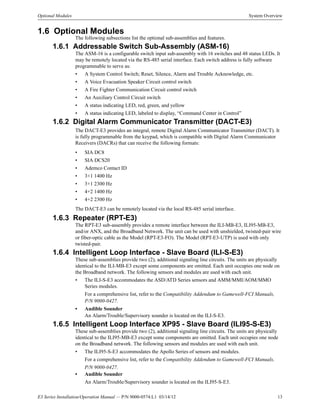
The following subsections list the optional sub-assemblies and features.
1.6.1 Addressable Switch Sub-Assembly (ASM-16)
The ASM-16 is a configurable switch input sub-assembly with 16 switches and 48 status LEDs. It
may be remotely located via the RS-485 serial interface. Each switch address is fully software
programmable to serve as:
• A System Control Switch; Reset, Silence, Alarm and Trouble Acknowledge, etc.
• A Voice Evacuation Speaker Circuit control switch
• A Fire Fighter Communication Circuit control switch
• An Auxiliary Control Circuit switch
• A status indicating LED, red, green, and yellow
• A status indicating LED, labeled to display, “Command Center in Control”
1.6.2 Digital Alarm Communicator Transmitter (DACT-E3)
The DACT-E3 provides an integral, remote Digital Alarm Communicator Transmitter (DACT). It
is fully programmable from the keypad, which is compatible with Digital Alarm Communicator
Receivers (DACRs) that can receive the following formats:
• SIA DC8
• SIA DCS20
• Ademco Contact ID
• 3+1 1400 Hz
• 3+1 2300 Hz
• 4+2 1400 Hz
• 4+2 2300 Hz
The DACT-E3 can be remotely located via the local RS-485 serial interface.
1.6.3 Repeater (RPT-E3)
The RPT-E3 sub-assembly provides a remote interface between the ILI-MB-E3, ILI95-MB-E3,
and/or ANX, and the Broadband Network. The unit can be used with unshielded, twisted-pair wire
or fiber-optic cable as the Model (RPT-E3-FO). The Model (RPT-E3-UTP) is used with only
twisted-pair.
1.6.4 Intelligent Loop Interface - Slave Board (ILI-S-E3)
These sub-assemblies provide two (2), additional signaling line circuits. The units are physically
identical to the ILI-MB-E3 except some components are omitted. Each unit occupies one node on
the Broadband network. The following sensors and modules are used with each unit.
• The ILI-S-E3 accommodates the ASD/ATD Series sensors and AMM/MMI/AOM/MMO
Series modules.
For a comprehensive list, refer to the Compatibility Addendum to Gamewell-FCI Manuals,
P/N 9000-0427.
• Audible Sounder
An Alarm/Trouble/Supervisory sounder is located on the ILI-S-E3.
1.6.5 Intelligent Loop Interface XP95 - Slave Board (ILI95-S-E3)
These sub-assemblies provide two (2), additional signaling line circuits. The units are physically
identical to the ILI95-MB-E3 except some components are omitted. Each unit occupies one node
on the Broadband network. The following sensors and modules are used with each unit.
• The ILI95-S-E3 accommodates the Apollo Series of sensors and modules.
For a comprehensive list, refer to the Compatibility Addendum to Gamewell-FCI Manuals,
P/N 9000-0427.
• Audible Sounder
An Alarm/Trouble/Supervisory sounder is located on the ILI95-S-E3.
14 E3 Series Installation/Operation Manual — P/N 9000-0574:L1 03/14/12
System Overview Optional Modules
1.6.6 Addressable Node Expander (ANX)
The ANX (Addressable Node Expander) is a network interface sub-assembly component of the
Gamewell-FCI, E3 Series® fire alarm control panel. The ANX network interface communicates
between the E3 Series fire alarm control panel and the FocalPoint Graphic Workstation. There are
three types of ANX sub-assemblies:
• Addressable Node Expander - Single Ring (ANX-SR)
• Addressable Node Expander - Multi-Ring Twisted Pair (ANX-MR-UTP)
• Addressable Node Expander - Multi-Ring Fiber Optic (ANX-MR-FO)
Each of the three ANX sub-assemblies provides Ethernet connectivity via a 10/100Mbps Ethernet
port using the Micro Internet Protocol (uIP™) firmware module. For additional information on the
ANX and the Micro Internet Protocol (uIP™) firmware module, refer to Section 3.7.
1.6.7 Remote LED Driver (ANU-48)
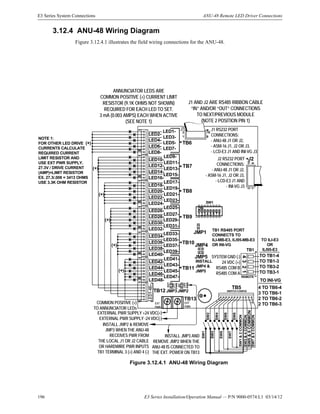
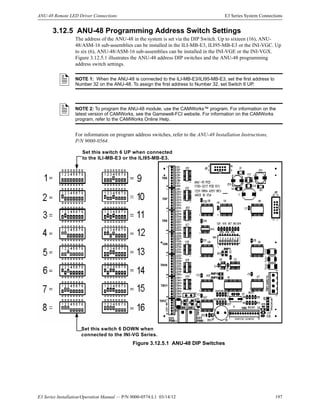
The ANU-48 LED Driver provides output for up to forty-eight (48), remote LEDs. The ILI-MB-E3
and ILI95-MB-E3 will support up to a total of sixteen (16), ANU-48 and/or ASM-16 units. The
ANU-48 can be remotely located via the RS-485 serial interface.
1.6.8 LCD Network Graphic Annunciator (NGA)
The NGA mounts in the E3 Series enclosure or it may be remotely located. It provides an LCD
display of system events, together with system status indicating LEDs and touch-screen switches
for Alarm Acknowledge, Trouble Acknowledge, Signal Silence and System Reset. The NGA
occupies one node on the Broadband network. The background display can be programmed to
display, “Command Center in Control.”
1.6.9 Remote LCD Display (LCD-7100/RAN-7100)
The LCD-7100/RAN-7100 Remote LCD Display provides an 80-character display and function
keys for the following:
It features a key switch that renders the keypad inoperative until activated. The E3 Series System
can support up to five (5), LCD-7100/RAN-7100 displays. The 80-character display shows all
pertinent information except for menus.
1.6.10 Intelligent Network Interface – Voice Gateway (INI-VG
Series)
The INI-VG Voice Gateway provides a network interface for the E3 Series Expandable Emergency
Evacuation System.
• The INI-VGC-FO or INI-VGC-UTP is used in conjunction with the Voice Evacuation
Command Center (INCC-C).
• The INI-VGX-FO or INI-VGX-UTP is used with the E3 Series®
Broadband System.
• The INI-VGE-FO or INI-VGE-UTP is used with the E3 Series®
Classic System.
Each of the INI-VG Series sub-assemblies occupy one node on the Broadband Network.
• “Alarm Acknowledge” • “System Reset/Lamp Test”
• “Trouble Acknowledge” • “System Drill Test”
• “Signal Silence”
E3 Series Installation/Operation Manual — P/N 9000-0574:L1 03/14/12 15
Optional Modules System Overview
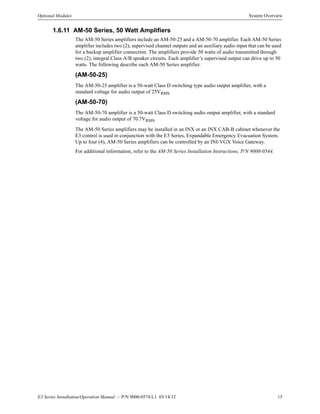
1.6.11 AM-50 Series, 50 Watt Amplifiers
The AM-50 Series amplifiers include an AM-50-25 and a AM-50-70 amplifier. Each AM-50 Series
amplifier includes two (2), supervised channel outputs and an auxiliary audio input that can be used
for a backup amplifier connection. The amplifiers provide 50 watts of audio transmitted through
two (2), integral Class A/B speaker circuits. Each amplifier’s supervised output can drive up to 50
watts. The following describe each AM-50 Series amplifier.
(AM-50-25)
The AM-50-25 amplifier is a 50-watt Class D switching type audio output amplifier, with a
standard voltage for audio output of 25VRMS.
(AM-50-70)
The AM-50-70 amplifier is a 50-watt Class D switching audio output amplifier, with a standard
voltage for audio output of 70.7VRMS.
The AM-50 Series amplifiers may be installed in an INX or an INX CAB-B cabinet whenever the
E3 control is used in conjunction with the E3 Series, Expandable Emergency Evacuation System.
Up to four (4), AM-50 Series amplifiers can be controlled by an INI-VGX Voice Gateway.
For additional information, refer to the AM-50 Series Installation Instructions, P/N 9000-0544.
16 E3 Series Installation/Operation Manual — P/N 9000-0574:L1 03/14/12
System Overview Specifications
1.7 Specifications
1.7.1 Power Supply (PM-9/PM-9G)
The following are the specifications for the PM-9 and PM-9G power supply sub-assemblies.
1.7.2 Signaling Line Circuits (ILI-E3 or ILI95-E3 Series)
• Two (2), Class “A”, Style 6, 7,* or Class “B” Style 4 circuits
• 24 VDC nominal
• Power-limited
• Supervised
• 40 Ohm max. line impedance
• 0.5 µf max. capacitance
• Capacity of 159 analog sensors and 159 addressable devices per circuit (ILI-MB-E3 or
ILI-S-E3)
• Capacity of 126 sensors/modules per circuit (ILI95-MB-E3 or ILI95-S-E3)
*Style 7 operation requires System Sensor, M500X Isolator Module (ILI-MB-E3 or ILI-S-E3) or
XP95-LI Line Isolator and XP95-LIB Line Isolator Base (ILI95-MB-E3 or ILI95-S-E3).
Refer to the Compatibility Addendum to Gamewell-FCI Manuals, P/N 9000-0427, Section 1 for a
list of UL Listed, compatible sensors/modules.
Specifications PM-9 PM-9G
Input Voltage: 120 VAC, 60 Hz 240 VAC @ 50/60 Hz
Input Current: 4.6 amps max. @ 120 VAC 60 Hz 2.4 amps max.
Output Voltage: 24 VDC FWR 24 VDC FWR
Output Current: 9 amperes Alarm max. continuous 9 amperes Alarm max. continuous
Output Current: 5 amperes max. continuous
Standby (when the PM-9 is used
with the ILI-E3 or the ILI95-E3
Series) (See Note 1)
5 amperes max. continuous Standby
(when the PM-9G is used with the
ILI-E3 or the ILI95-E3 Series)
(See Note 1)
Output Current 4 amperes max. continuous
Standby (when the PM-9 is used
with any AM-50 Series amplifier)
(See Note 2)
4 amperes max. continuous Standby
(when the PM-9G is used with any
AM-50 Series amplifier) (See Note 2)
Operating Temperature: 32° to 120° F (0° to 49° C) 32° to 120° F (0° to 49° C)
Relative Humidity: 0 to 93%,
non-condensingat90°F(32°C)
0 to 93%,
non-condensing at 90° F (32° C)
Supervised
Non Power-Limited
NOTE 1: Continuous standby loads in excess of .560 Amps up to 5 Amps may require a
Generator Backup or load shedding during an AC power failure. See Section 3.16 (Standby
Battery Calculations Chart) in this Manual.
NOTE 2: Continuous standby loads in excess of .560 Amps up to 4 Amps may require a
Generator Backup or load shedding during an AC power failure. See Section 3.16 (Standby
Battery Calculations Chart) in this Manual.
Table 1.5.1.1 PM-9/PM-9G Specifications
E3 Series Installation/Operation Manual — P/N 9000-0574:L1 03/14/12 17
Specifications System Overview
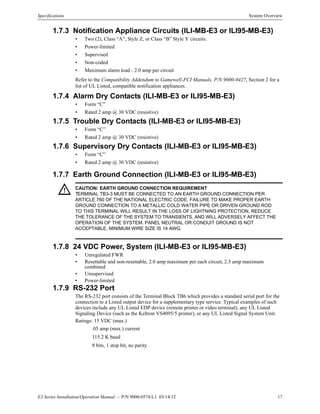
1.7.3 Notification Appliance Circuits (ILI-MB-E3 or ILI95-MB-E3)
• Two (2), Class “A”, Style Z, or Class “B” Style Y circuits.
• Power-limited
• Supervised
• Non-coded
• Maximum alarm load - 2.0 amp per circuit
Refer to the Compatibility Addendum to Gamewell-FCI Manuals, P/N 9000-0427, Section 2 for a
list of UL Listed, compatible notification appliances.
1.7.4 Alarm Dry Contacts (ILI-MB-E3 or ILI95-MB-E3)
• Form “C”
• Rated 2 amp @ 30 VDC (resistive)
1.7.5 Trouble Dry Contacts (ILI-MB-E3 or ILI95-MB-E3)
• Form “C”
• Rated 2 amp @ 30 VDC (resistive)
1.7.6 Supervisory Dry Contacts (ILI-MB-E3 or ILI95-MB-E3)
• Form “C”
• Rated 2 amp @ 30 VDC (resistive)
1.7.7 Earth Ground Connection (ILI-MB-E3 or ILI95-MB-E3)
1.7.8 24 VDC Power, System (ILI-MB-E3 or ILI95-MB-E3)
• Unregulated FWR
• Resettable and non-resettable, 2.0 amp maximum per each circuit, 2.5 amp maximum
combined
• Unsupervised
• Power-limited
1.7.9 RS-232 Port
The RS-232 port consists of the Terminal Block TB6 which provides a standard serial port for the
connection to a Listed output device for a supplementary type service. Typical examples of such
devices include any UL Listed EDP device (remote printer or video terminal), any UL Listed
Signaling Device (such as the Keltron VS4095/5 printer), or any UL Listed Signal System Unit.
Ratings: 15 VDC (max.)
.05 amp (max.) current
115.2 K baud
8 bits, 1 stop bit, no parity
! CAUTION: EARTH GROUND CONNECTION REQUIREMENT
TERMINAL TB3-3 MUST BE CONNECTED TO AN EARTH GROUND CONNECTION PER
ARTICLE 760 OF THE NATIONAL ELECTRIC CODE. FAILURE TO MAKE PROPER EARTH
GROUND CONNECTION TO A METALLIC COLD WATER PIPE OR DRIVEN GROUND ROD
TO THIS TERMINAL WILL RESULT IN THE LOSS OF LIGHTNING PROTECTION, REDUCE
THE TOLERANCE OF THE SYSTEM TO TRANSIENTS, AND WILL ADVERSELY AFFECT THE
OPERATION OF THE SYSTEM. PANEL NEUTRAL OR CONDUIT GROUND IS NOT
ACCEPTABLE, MINIMUM WIRE SIZE IS 14 AWG.
18 E3 Series Installation/Operation Manual — P/N 9000-0574:L1 03/14/12
System Overview Specifications
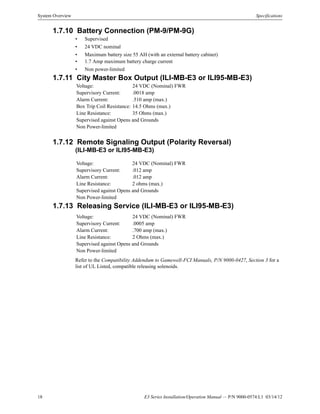
1.7.10 Battery Connection (PM-9/PM-9G)
• Supervised
• 24 VDC nominal
• Maximum battery size 55 AH (with an external battery cabinet)
• 1.7 Amp maximum battery charge current
• Non power-limited
1.7.11 City Master Box Output (ILI-MB-E3 or ILI95-MB-E3)
1.7.12 Remote Signaling Output (Polarity Reversal)
(ILI-MB-E3 or ILI95-MB-E3)
1.7.13 Releasing Service (ILI-MB-E3 or ILI95-MB-E3)
Refer to the Compatibility Addendum to Gamewell-FCI Manuals, P/N 9000-0427, Section 3 for a
list of UL Listed, compatible releasing solenoids.
Voltage: 24 VDC (Nominal) FWR
Supervisory Current: .0018 amp
Alarm Current: .510 amp (max.)
Box Trip Coil Resistance: 14.5 Ohms (max.)
Line Resistance: 35 Ohms (max.)
Supervised against Opens and Grounds
Non Power-limited
Voltage: 24 VDC (Nominal) FWR
Supervisory Current: .012 amp
Alarm Current: .012 amp
Line Resistance: 2 ohms (max.)
Supervised against Opens and Grounds
Non Power-limited
Voltage: 24 VDC (Nominal) FWR
Supervisory Current: .0005 amp
Alarm Current: .700 amp (max.)
Line Resistance: 2 Ohms (max.)
Supervised against Opens and Grounds
Non Power-limited
E3 Series Installation/Operation Manual — P/N 9000-0574:L1 03/14/12 19
Specifications System Overview
Notes
20 E3 Series Installation/Operation Manual — P/N 9000-0574:L1 03/14/12
Section 2: Installation
2.1 General
The E3 Series®
System is a modular system and is shipped unassembled. The backbox, doors, and
sub-assemblies are individually packaged and can be easily assembled.
2.2 Installation Requirements
All components of the E3 Series® System should be located per the following requirements:
• Installations are to be indoors only, in dry locations, protected from rain, water, and rapid
changes in temperature that could cause condensation. Equipment must be securely mounted
on rigid, permanent walls.
• Operating temperature shall not exceed the range of 32° to 120° F (0 to 49° C).
• Operating humidity not to exceed 93% non-condensing at 90° F (32° C).
• There should be adequate space around the installation to allow easy access for operation and
servicing.
• All sub-assemblies and components are to be located in compliance with local and national
codes.
• All installation field wiring shall be in compliance with local and national codes.
2.3 Unpacking and Inspecting Components
Remove all sub-assemblies and accessories from their shipping cartons to access the enclosure.
Remove and inspect the enclosure for shipping damage. Inspect all electronic sub-assemblies for
damage without removing them from their anti-static protective bags. If any pieces are found
damaged, notify the shipping carrier immediately. Report missing components to the Gamewell-
FCI Customer Service.
2.4 Mounting Sub-assemblies
1. The ILI-MB-E3, ILI95-MB-E3 and/or ANX consist of a main operating board with pluggable
terminal strips. Install this sub-assembly immediately unless any optional units are to be used
in the system. Refer to the Installation Instructions P/N 9000-0579, P/N 9001-0017 and 9001-
0064. Before installing the ILI-MB-E3, ILI95-MB-E3 and/or ANX into the system backbox,
refer to the Installation Instructions shipped with each sub-assembly for the proper procedures:
2. Install the door after the sub-assemblies are in place. Note that the door can only be installed
(or removed) when it is opened at least 90° from the backbox.
E3 Series Installation/Operation Manual — P/N 9000-0574:L1 03/14/12 21
Cabinets Installation
2.5 Cabinets
The E3 Series control panel may be assembled in various cabinet configurations to suit the
installation. Typical arrangements are shown. The following are the cabinet options:
• Cabinets A1 and A2
• Cabinet AA (remote)
• Cabinet B
• B-Slim Cabinet
• Cabinet C
• Cabinet D
2.5.1 Cabinet A1, Installation Instructions
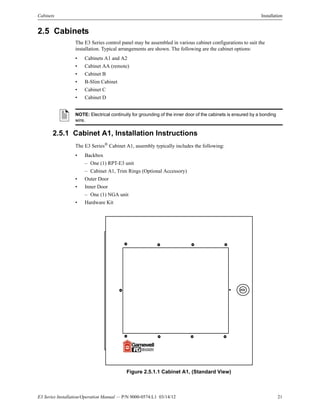
The E3 Series® Cabinet A1, assembly typically includes the following:
• Backbox
– One (1) RPT-E3 unit
– Cabinet A1, Trim Rings (Optional Accessory)
• Outer Door
• Inner Door
– One (1) NGA unit
• Hardware Kit
Figure 2.5.1.1 Cabinet A1, (Standard View)
NOTE: Electrical continuity for grounding of the inner door of the cabinets is ensured by a bonding
wire.
22 E3 Series Installation/Operation Manual — P/N 9000-0574:L1 03/14/12
Installation Cabinets
2.5.1.1 Cabinet A1, Backbox Installation
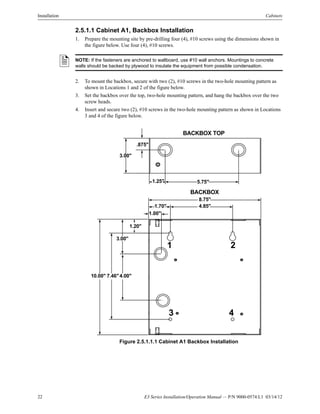
1. Prepare the mounting site by pre-drilling four (4), #10 screws using the dimensions shown in
the figure below. Use four (4), #10 screws.
2. To mount the backbox, secure with two (2), #10 screws in the two-hole mounting pattern as
shown in Locations 1 and 2 of the figure below.
3. Set the backbox over the top, two-hole mounting pattern, and hang the backbox over the two
screw heads.
4. Insert and secure two (2), #10 screws in the two-hole mounting pattern as shown in Locations
3 and 4 of the figure below.
Figure 2.5.1.1.1 Cabinet A1 Backbox Installation
NOTE: If the fasteners are anchored to wallboard, use #10 wall anchors. Mountings to concrete
walls should be backed by plywood to insulate the equipment from possible condensation.
.875"
3.00"
1.25" 5.75"
BACKBOX TOP
8.75"
4.85"1.70"
1.00"
1.20"
3.00"
4.00"7.46"10.00"
BACKBOX
1 2
3 4
E3 Series Installation/Operation Manual — P/N 9000-0574:L1 03/14/12 23
Cabinets Installation
2.5.1.2 Cabinet A1, Trim Rings Installation (Optional Accessory)
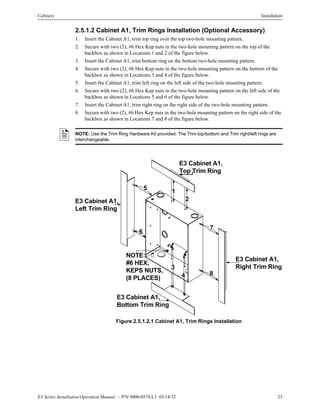
1. Insert the Cabinet A1, trim top ring over the top two-hole mounting pattern.
2. Secure with two (2), #6 Hex Kep nuts in the two-hole mounting pattern on the top of the
backbox as shown in Locations 1 and 2 of the figure below.
3. Insert the Cabinet A1, trim bottom ring on the bottom two-hole mounting pattern.
4. Secure with two (2), #6 Hex Kep nuts in the two-hole mounting pattern on the bottom of the
backbox as shown in Locations 3 and 4 of the figure below.
5. Insert the Cabinet A1, trim left ring on the left side of the two-hole mounting pattern.
6. Secure with two (2), #6 Hex Kep nuts in the two-hole mounting pattern on the left side of the
backbox as shown in Locations 5 and 6 of the figure below.
7. Insert the Cabinet A1, trim right ring on the right side of the two-hole mounting pattern.
8. Secure with two (2), #6 Hex Kep nuts in the two-hole mounting pattern on the right side of the
backbox as shown in Locations 7 and 8 of the figure below.
Figure 2.5.1.2.1 Cabinet A1, Trim Rings Installation
NOTE: Use the Trim Ring Hardware Kit provided. The Trim top/bottom and Trim right/left rings are
interchangeable.
NOTE:
#6 HEX,
KEPS NUTS,
(8 PLACES)
E3 Cabinet A1,
Left Trim Ring
E3 Cabinet A1,
Top Trim Ring
E3 Cabinet A1,
Bottom Trim Ring
4
3
6
E3 Cabinet A1,
Right Trim Ring
2
5
7
8
1
24 E3 Series Installation/Operation Manual — P/N 9000-0574:L1 03/14/12
Installation Cabinets
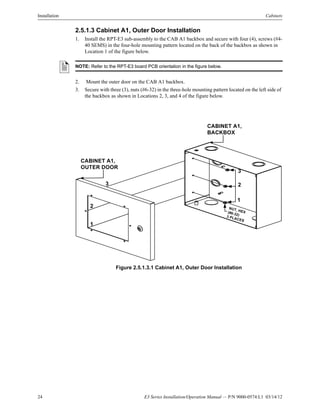
2.5.1.3 Cabinet A1, Outer Door Installation
1. Install the RPT-E3 sub-assembly to the CAB A1 backbox and secure with four (4), screws (#4-
40 SEMS) in the four-hole mounting pattern located on the back of the backbox as shown in
Location 1 of the figure below.
2. Mount the outer door on the CAB A1 backbox.
3. Secure with three (3), nuts (#6-32) in the three-hole mounting pattern located on the left side of
the backbox as shown in Locations 2, 3, and 4 of the figure below.
Figure 2.5.1.3.1 Cabinet A1, Outer Door Installation
NOTE: Refer to the RPT-E3 board PCB orientation in the figure below.
3
2
1
3
2
1
CABINET A1,
OUTER DOOR
CABINET A1,
BACKBOX
NUT, HEX(#6-32)3 PLACES
E3 Series Installation/Operation Manual — P/N 9000-0574:L1 03/14/12 25
Cabinets Installation
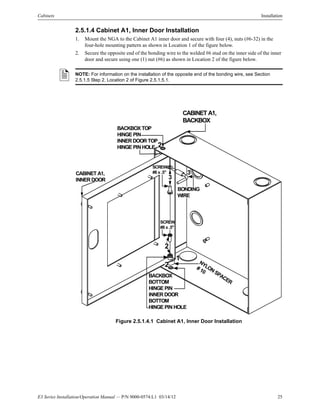
2.5.1.4 Cabinet A1, Inner Door Installation
1. Mount the NGA to the Cabinet A1 inner door and secure with four (4), nuts (#6-32) in the
four-hole mounting pattern as shown in Location 1 of the figure below.
2. Secure the opposite end of the bonding wire to the welded #6 stud on the inner side of the inner
door and secure using one (1) nut (#6) as shown in Location 2 of the figure below.
Figure 2.5.1.4.1 Cabinet A1, Inner Door Installation
NOTE: For information on the installation of the opposite end of the bonding wire, see Section
2.5.1.5 Step 2, Location 2 of Figure 2.5.1.5.1.
CABINET A1,
BACKBOX
BONDING
WIRE
CABINET A1,
INNER DOOR
BACKBOX
BOTTOM
HINGE PIN
INNER DOOR
BOTTOM
HINGE PIN HOLE
SCREW
#8 x .5"
SCREW
#8 x .5"
NYLONSPACER
# 10
3
2
1
BACKBOX TOP
HINGE PIN
INNER DOOR TOP
HINGE PIN HOLE 2
2
3
26 E3 Series Installation/Operation Manual — P/N 9000-0574:L1 03/14/12
Installation Cabinets
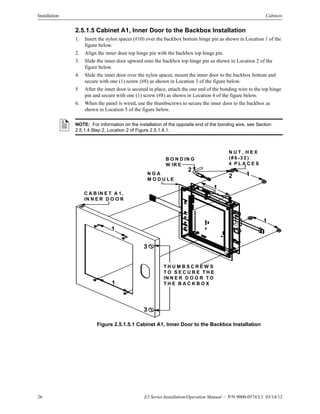
2.5.1.5 Cabinet A1, Inner Door to the Backbox Installation
1. Insert the nylon spacer (#10) over the backbox bottom hinge pin as shown in Location 1 of the
figure below.
2. Align the inner door top hinge pin with the backbox top hinge pin.
3. Slide the inner door upward onto the backbox top hinge pin as shown in Location 2 of the
figure below.
4. Slide the inner door over the nylon spacer, mount the inner door to the backbox bottom and
secure with one (1) screw (#8) as shown in Location 3 of the figure below.
5. After the inner door is secured in place, attach the one end of the bonding wire to the top hinge
pin and secure with one (1) screw (#8) as shown in Location 4 of the figure below.
6. When the panel is wired, use the thumbscrews to secure the inner door to the backbox as
shown in Location 5 of the figure below.
Figure 2.5.1.5.1 Cabinet A1, Inner Door to the Backbox Installation
NOTE: For information on the installation of the opposite end of the bonding wire, see Section
2.5.1.4 Step 2, Location 2 of Figure 2.5.1.4.1.
2
2
1
1
1
1
1
3
3
C A B IN E T A 1 ,
IN N E R D O O R
T H U M B S C R E W S
T O S E C U R E T H E
IN N E R D O O R T O
T H E B A C K B O X
N G A
M O D U L E
B O N D IN G
W IR E
N U T , H E X
(# 6 -3 2 )
4 P L A C E S
E3 Series Installation/Operation Manual — P/N 9000-0574:L1 03/14/12 27
Cabinets Installation
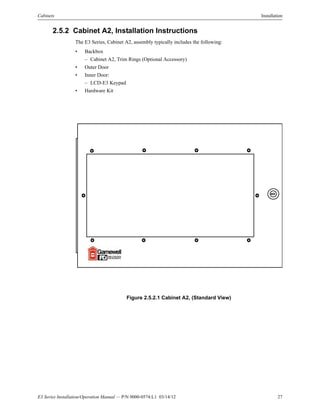
2.5.2 Cabinet A2, Installation Instructions
The E3 Series, Cabinet A2, assembly typically includes the following:
• Backbox
– Cabinet A2, Trim Rings (Optional Accessory)
• Outer Door
• Inner Door:
– LCD-E3 Keypad
• Hardware Kit
Figure 2.5.2.1 Cabinet A2, (Standard View)
28 E3 Series Installation/Operation Manual — P/N 9000-0574:L1 03/14/12
Installation Cabinets
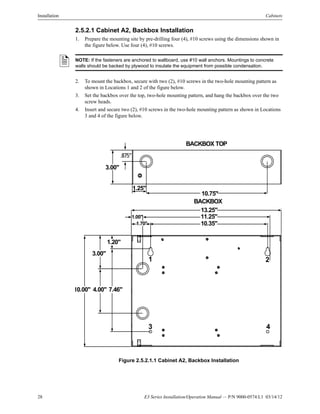
2.5.2.1 Cabinet A2, Backbox Installation
1. Prepare the mounting site by pre-drilling four (4), #10 screws using the dimensions shown in
the figure below. Use four (4), #10 screws.
2. To mount the backbox, secure with two (2), #10 screws in the two-hole mounting pattern as
shown in Locations 1 and 2 of the figure below.
3. Set the backbox over the top, two-hole mounting pattern, and hang the backbox over the two
screw heads.
4. Insert and secure two (2), #10 screws in the two-hole mounting pattern as shown in Locations
3 and 4 of the figure below.
Figure 2.5.2.1.1 Cabinet A2, Backbox Installation
NOTE: If the fasteners are anchored to wallboard, use #10 wall anchors. Mountings to concrete
walls should be backed by plywood to insulate the equipment from possible condensation.
3.00"
.875"
1.25"
10.75"
BACKBOX TOP
13.25"
11.25"
10.35"
1.00"
1.70"
1.20"
3.00"
10.00" 4.00" 7.46"
BACKBOX
1 2
3 4
E3 Series Installation/Operation Manual — P/N 9000-0574:L1 03/14/12 29
Cabinets Installation
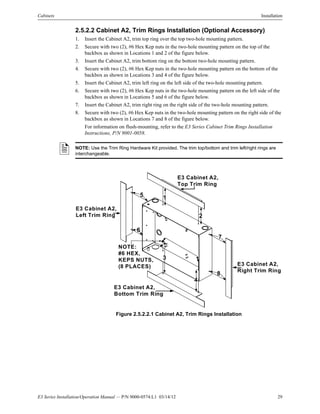
2.5.2.2 Cabinet A2, Trim Rings Installation (Optional Accessory)
1. Insert the Cabinet A2, trim top ring over the top two-hole mounting pattern.
2. Secure with two (2), #6 Hex Kep nuts in the two-hole mounting pattern on the top of the
backbox as shown in Locations 1 and 2 of the figure below.
3. Insert the Cabinet A2, trim bottom ring on the bottom two-hole mounting pattern.
4. Secure with two (2), #6 Hex Kep nuts in the two-hole mounting pattern on the bottom of the
backbox as shown in Locations 3 and 4 of the figure below.
5. Insert the Cabinet A2, trim left ring on the left side of the two-hole mounting pattern.
6. Secure with two (2), #6 Hex Kep nuts in the two-hole mounting pattern on the left side of the
backbox as shown in Locations 5 and 6 of the figure below.
7. Insert the Cabinet A2, trim right ring on the right side of the two-hole mounting pattern.
8. Secure with two (2), #6 Hex Kep nuts in the two-hole mounting pattern on the right side of the
backbox as shown in Locations 7 and 8 of the figure below.
For information on flush-mounting, refer to the E3 Series Cabinet Trim Rings Installation
Instructions, P/N 9001-0058.
Figure 2.5.2.2.1 Cabinet A2, Trim Rings Installation
NOTE: Use the Trim Ring Hardware Kit provided. The trim top/bottom and trim left/right rings are
interchangeable.
6
8
NOTE:
#6 HEX,
KEPS NUTS,
(8 PLACES)
E3 Cabinet A2,
Left Trim Ring
E3 Cabinet A2,
Right Trim Ring
E3 Cabinet A2,
Top Trim Ring
E3 Cabinet A2,
Bottom Trim Ring
3
1
2
4
5
7
30 E3 Series Installation/Operation Manual — P/N 9000-0574:L1 03/14/12
Installation Cabinets
2.5.2.3 Cabinet A2, Outer Door Installation
1. Mount the outer door on the backbox.
2. Secure with three (3), #6-32 nuts in the three-hole mounting pattern on the left side of the
backbox as shown in Locations 1, 2, and 3 of the figure below.
Figure 2.5.2.3.1 Cabinet A2, Outer Door Installation
CABINET A2,
BACKBOX
CABINET A2,
OUTER DOOR
NUT, HEX (#6-32)
3 PLACES
3
2
1
3
2
1
E3 Series Installation/Operation Manual — P/N 9000-0574:L1 03/14/12 31
Cabinets Installation
2.5.2.4 Cabinet A2, Inner Door to the Backbox Installation
1. Place the nylon spacer (#10) over the backbox bottom hinge pin as shown in Location 1 of the
figure below.
2. Mount the inner door to the backbox by sliding the inner door, top hinge pin hole onto the
backbox top hinge pin as shown in Location 2.
3. Align the inner door bottom hinge pin hole with the backbox bottom hinge pin.
4. Slide the door over the inner door bottom hinge pin hole on top of the nylon spacer, and secure
using the #8 x .5” screw as shown in Location 2 of the figure below.
5. After the inner door is secured in place, attach the one end of the bonding wire to the top hinge
pin using the #8 x .5” screw as shown in Location 3 of the figure below.
NOTE: For information on the installation of the opposite end of the bonding wire, see Section
2.5.2.5, Step 2, Location 2 of Figure 2.5.2.5.1.
Figure 2.5.2.4.1 Cabinet A2, Inner Door to the Backbox Installation
CABINET A2,
BACKBOX
CABINET A2,
INNER DOOR
BONDING
WIRE
BACKBOX
BOTTOM
HINGE PIN
INNER DOOR
BOTTOM
HINGE PIN HOLE
NYLON
SPACER
#10
SCREW
#8 x .5"
SCREW
#8 x .5"
3
2
1
BACKBOX TOP
HINGE PIN
INNER DOOR TOP
HINGE PIN HOLE 2
2
3
32 E3 Series Installation/Operation Manual — P/N 9000-0574:L1 03/14/12
Installation Cabinets
2.5.2.5 Cabinet A2, Inner Door Installation
1. Mount the inner door and secure with four (4), #6-32 nuts in the four-hole mounting pattern as
shown in Location 1 of the figure below.
2. Secure the opposite end of the bonding wire to the welded #6 stud on the inner side of the inner
door using the #6 nut as shown in Location 2 of the figure below.
3. After the panel is wired, use the thumbscrews to secure the inner door to the backbox as shown
in Location 3 of the figure below.
Figure 2.5.2.5.1 Cabinet A2, Inner Door Installation
BONDING
WIRE
NUT, HEX
(#6-32)
8 PLACES
CABINET A2,
INNER DOOR
LCD-E3
KEYPAD
1
1
1
1
2 2
1
1
THUMBSCREWS
TO SECURE THE
INNER DOOR TO
THE BACKBOX
3
3
E3 Series Installation/Operation Manual — P/N 9000-0574:L1 03/14/12 33
Cabinets Installation
2.5.3 E3 Series, Remote Flush Annunciators
The E3 Series System offers the following two (2) types of Remote Flush Annunciators for the
Cabinet A.
• E3BB-FLUSH-LCD, CAB A2 Remote Flush Annunciator
• RAN-7100, Remote Alphanumeric Remote Flush Annunciator
2.5.3.1.1 E3BB-FLUSH-LCD, CAB A2 Flush Annunciator Installation
Instructions
The E3BB-FLUSH-LCD, CAB A2, Remote Flush Annunciator, assembly typically requires the
following:
• Backbox
• E3BB-FLUSH-LCD Flush Mount Front Cover
• LCD-E3 Keypad
• Keyswitch and cable
• Hardware Kit
Figure 2.5.3.1.1.1 E3BB-FLUSH-LCD, CAB A2, Remote Flush Annunciator
34 E3 Series Installation/Operation Manual — P/N 9000-0574:L1 03/14/12
Installation Cabinets
2.5.3.1.2 E3BB-FLUSH-LCD, CAB A2, Remote Flush Annunciator
Backbox Installation
1. To prepare the mounting site, pre-drill four (4), #10 screws using the dimensions shown in
Figure 2.5.3.1.2.1. Use four (4), #10 screws.
2. Secure with two (2), #10 screws in the two-hole mounting pattern as shown in Locations 1 and
2 of Figure 2.5.3.1.2.1.
3. Set the backbox over the top, two-hole mounting pattern, and hang the backbox over the two
screw heads.
4. Insert and secure two (2), #10 screws in the two-hole mounting pattern as shown in Locations
3 and 4 of Figure 2.5.3.1.2.1.
Figure 2.5.3.1.2.1 E3BB-FLUSH-LCD, CAB A2, Remote Flush Annunciator Backbox
Installation
NOTE: If the fasteners are anchored to wallboard, use #10 wall anchors. Mountings to concrete
walls should be backed by plywood to insulate the equipment from possible condensation.
BACKBOX
13 1/4"
9 27/32"
1"
1 45/64"
3"
1 13/64"
10" 7 1/2"
4" 11 1/4"
BACKBOX TOP
10 ¾”1 1/4”
3 5/8”
4 1/2”
4 1/2"1 45/64"
1 2
43
E3 Series Installation/Operation Manual — P/N 9000-0574:L1 03/14/12 35
Cabinets Installation
2.5.3.1.3 E3BB-FLUSH-LCD, CAB A2, Remote Flush Annunciator to the
Backbox Installation
1. Mount the keyswitch to the E3BB-FLUSH-LCD Flush Mount Front Cover and secure with
one (1), nut (3/4-24 THD Hex) as shown in Location 1 of Figure 2.5.3.1.3.1.
2. Attach the keyswitch cable to the key as shown in Location 2 of Figure 2.5.3.1.3.1.
3. Mount the LCD-E3 keypad to the E3BB-FLUSH-LCD Flush Mount Front Cover and secure
with eight (8), nuts (#6-32, Hex Keps) in the eight-hole mounting pattern as shown in Location
3 of Figure 2.5.3.1.3.1.
4. Plug-in the P2 keyswitch cable to the W2 terminal on the LCD-E3 display panel as shown in
Location 4 of Figure 2.5.3.1.3.1.
(For information on the location of the P2 and W2 terminal on the LCD-E3 panel, refer to
Note 1 on the LCD-E3 Wiring Diagram in Section 3.13.4.1of Section 3.1.4.4).
5. To connect the LCD-E3 panel wiring on TB1, refer to TB1 in Section 3.13.4.1 (LCD-E3
Wiring Diagram) in Section 3.1.4.4.
6. Attach the E3BB-FLUSH-LCD Flush Mount Front Cover to the Backbox and secure with
eight (8), screws (#6-32 x 3/8” PHBHD, BLK) in the eight-hole mounting pattern as shown in
Location 5 of Figure 2.5.3.1.3.1.
Figure 2.5.3.1.3.1 E3BB-FLUSH-LCD, CAB A2, Remote Flush Annunciator Backbox
Installation
E3BB-FLUSH-LCD
FLUSH MOUNT
FRONT COVER
LCD-E3
BACKBOX
1
2
3
4
5
KEYSW ITCH
KEYSW ITCH
CABLENUT,
¾ ”-24
THD HEX
1
P2, KEYSW ITCH
CABLE (2 IN RT.
ANGLE HEADER)
NUT, (#6-32) HEX
KEPS (8 PLACES)
SCREW ,
(#6-32 x 3/8")
BHBHD, BLK
(8 PLACES)
3
3 3
5
5
5
5
5
5
5
36 E3 Series Installation/Operation Manual — P/N 9000-0574:L1 03/14/12
Installation Cabinets
2.5.3.2.1 E3BB-FLUSH-NGA, CAB A2 Flush Annunciator Installation
Instructions
The E3BB-FLUSH-NGA, CAB A2, Remote Flush Annunciator, assembly typically includes the
following:
• Backbox
• E3BB-FLUSH-NGA Flush Mount Front Cover
• RPT-E3
• NGA
• Hardware Kit
Figure 2.5.3.2.1.1 E3BB-FLUSH-NGA, CAB A2, Flush Annunciator
E3 Series Installation/Operation Manual — P/N 9000-0574:L1 03/14/12 37
Cabinets Installation
2.5.3.2.2 E3BB-FLUSH-NGA, CAB A2, Remote Flush Annunciator
Backbox Installation
1. To prepare the mounting site, pre-drill four (4), #10 screws using the dimensions shown in
Figure 2.5.3.2.2.1. Use four (4), #10 screws.
2. Secure with two (2), #10 screws in the two-hole mounting pattern as shown in Locations 1 and
2 of Figure 2.5.3.2.2.1.
3. Set the backbox over the top, two-hole mounting pattern, and hang the backbox over the two
screw heads.
4. Insert and secure two (2), #10 screws in the two-hole mounting pattern as shown in Locations
3 and 4 of Figure 2.5.3.2.2.1.
Figure 2.5.3.2.2.1 E3BB-FLUSH-NGA, CAB A2, Remote Flush Annunciator Backbox
Installation
NOTE: If the fasteners are anchored to wallboard, use #10 wall anchors. Mountings to concrete
walls should be backed by plywood to insulate the equipment from possible condensation.
BACKBOX
13 1/4"
9 27/32"
1"
1 45/64"
3"
1 13/64"
10" 7 1/2"
4" 11 1/4"
BACKBOX TOP
10 ¾”1 1/4”
3 5/8”
4 1/2”
4 1/2"1 45/64"
1 2
43
38 E3 Series Installation/Operation Manual — P/N 9000-0574:L1 03/14/12
Installation Cabinets
2.5.3.2.3 E3BB-FLUSH-NGA, CAB A2, Remote Flush Annunciator to
the Backbox Installation
1. Mount the RTP-E3 to the E3BB-FLUSH-NGA Flush Mount Backbox and secure with four (4),
screws (#4-40 x 1/4”) in the four-hole mounting pattern as shown in Location 1 of
Figure 2.5.3.2.3.1
2. Mount the NGA to the E3BB-FLUSH-NGA Flush Mount Front Cover and secure with four
(4), nuts (#6-32, Hex Keps) in the four-hole mounting pattern as shown in Location 2 of
Figure 2.5.3.2.3.1.
3. To connect the NGA panel wiring, refer to Figure 3.13.4.1 (NGA Wiring Diagram) in
Figure 3.14.3.1.
4. Attach the E3BB-FLUSH-NGA Flush Mount Front Cover to the Backbox and secure with
eight (8), screws (#6-32 x 3/8”) in the eight-hole mounting pattern as shown in Location 3 of
Figure 2.5.3.2.3.1.
Figure 2.5.3.2.3.1 E3BB-FLUSH-NGA, CAB A2, Remote Flush Annunciator Backbox
N G A
N U T , (#6-32) H E X
K E P S (4 P L A C E S )
B A C K B O X
E3B B -N G A FLU SH
M O U N T FR O N T C O VER
S C R E W ,
(#6-32 x 3/8")
(8 P L A C E S )
R PT-E3
3
3
3
2
2
2
2
3
3
3
3
1
1
S C R E W ,
(#4-40 X ¼ ” S E M S )
(4 P LA C E S )
E3 Series Installation/Operation Manual — P/N 9000-0574:L1 03/14/12 39
Cabinets Installation
2.5.4 Cabinet AA, 2-Bay Installation Instructions
The E3 Series®
, Cabinet AA, 2-Bay assembly typically includes the following:
• Backbox
– One (1), INI-VG Series unit
– Cabinet AA, Trim Rings (Optional Accessory)
• Outer Door
• Inner Door, 2-Bay:
– One (1), LCD-E3 unit
– One (1), ASM-16 unit
– One (1), Blank Plate Optional
• Hardware Kit
Figure 2.5.4.1 Cabinet AA, 2-Bay Standard View
NOTE: Cabinet AA may be used with the 2-Bay and 3-Bay outer door. A microphone can be
installed as an optional accessory in the blank plate. For information on the Cabinet AA
installation, refer Section 2.5.4 and Section 2.5.5.
40 E3 Series Installation/Operation Manual — P/N 9000-0574:L1 03/14/12
Installation Cabinets
2.5.4.1 Cabinet AA, 2-Bay and 3-Bay Backbox Installation
1. Prepare the mounting site by pre-drilling four (4), #10 screws using the dimensions shown in
the figure below. Use four (4), #10 screws.
NOTE: If the fasteners are anchored to wallboard, use #10 wall anchors. Mountings to concrete
walls should be backed by plywood to insulate the equipment from possible condensation.
2. To mount the backbox, secure with two (2), #10 screws in the two-hole mounting pattern as
shown in Locations 1 and 2 of the figure below.
3. Set the backbox over the top, two-hole mounting pattern, and hang the backbox over the two
screw heads.
4. Insert and secure two (2), #10 screws in the two-hole mounting pattern as shown in Locations
3 and 4 of the figure below.
NOTE: Add knockouts to the left and right side of the rear panel of the backbox. Do not add
knockouts in the center or top of the backbox. To add larger knockouts, increase the size of the
existing knockouts.
Figure 2.5.4.1.1 Cabinet AA, 2-Bay and 3-Bay Backbox Installation
1 1/4”
1 1/4” 16 3/4”
4 1/4”
CABINET AA BACKBOX TOP
CABINET AA BACKBOX
19 1/4”
17 1/4”
15 27/32”1 45/64"
1"
4"
3"
10"
1 13/64"
7 29/64"
1 2
3 4
E3 Series Installation/Operation Manual — P/N 9000-0574:L1 03/14/12 41
Cabinets Installation
2.5.4.2 Cabinet AA, Trim Rings Installation (Optional Accessory)
1. Insert the Cabinet AA, trim top ring over the top three-hole mounting pattern.
2. Secure with three (3), #6 Hex Kep nuts in the three-hole mounting pattern on the top of the
backbox as shown in Locations 1, 2 and 3 of the figure below.
3. Insert the Cabinet AA, trim bottom ring on the bottom three-hole mounting pattern.
4. Secure with three (3), #6 Hex Kep nuts in the three-hole mounting pattern on the bottom of the
backbox as shown in Locations 4, 5 and 6 of the figure below.
5. Insert the Cabinet AA, trim left ring on the left side of the two-hole mounting pattern.
6. Secure with two (2), #6 Hex Kep nuts in the two-hole mounting pattern on the left side of the
backbox as shown in Locations 7 and 8 of the figure below.
7. Insert the Cabinet AA, trim right ring on the right side of the two-hole mounting pattern.
8. Secure with two (2), #6 Hex Kep nuts in the two-hole mounting pattern on the right side of the
backbox as shown in Locations 9 and 10 of the figure below.
For information on flush-mounting, refer to the E3 Series Cabinet Trim Rings Installation
Instructions P/N 9001-0058.
Figure 2.5.4.2.1 Cabinet AA, Trim Ring Installation
NOTE: Use the Trim Ring Hardware Kit provided. The trim top/bottom and trim left/right rings are
interchangeable.
E3 Cabinet AA,
Left Trim Ring
NOTE:
#6 HEX,
KEPS NUTS,
(10 PLACES)
6
7
8
9
10
E3 Cabinet AA,
Top Trim Ring
E3 Cabinet AA,
Right Trim Ring
E3 Cabinet AA,
Bottom Trim Ring
1
2
3
4
5
42 E3 Series Installation/Operation Manual — P/N 9000-0574:L1 03/14/12
Installation Cabinets
2.5.4.3 Cabinet AA, 2-Bay and 3-Bay Outer Door Installation
1. Install the INI-VG Series sub-assembly to the CAB AA backbox and secure with four (4),
screws (#4-40 SEMS) in the four-hole mounting pattern located on the back of the backbox as
shown in Location 1 of the figure below.
2. Mount the 2-bay or 3-bay outer door on the backbox.
3. Secure with three (3), #6-32 nuts in the three-hole mounting pattern on the left side of the
backbox as shown in Locations 2, 3, and 4 of the figure below.
Figure 2.5.4.3.1 Cabinet AA, 2-Bay and 3-Bay Outer Door Installation
NOTE: Refer to the RPT-E3 board PCB orientation in the figure below.
CAB
AA, BACKBOX
NUT, #6-32, HEX KEPS,
3 PLACES, DOOR TO
BACKBOX MOUNTING
OUTER DOOR
INI-VGSERIES
SCREW, #4-40,
6 PLACES,
PCB TO BACKBOX
MOUNTING
NOTE: PCB
ORIENTATION
1
1
1
1
2
3
4
2
3
4
E3 Series Installation/Operation Manual — P/N 9000-0574:L1 03/14/12 43
Cabinets Installation
2.5.4.4 Cabinet AA, 2-Bay, Inner Door Installation
1. Mount the LCD-E3 keypad on the inner door and secure with eight (8), #6-32 nuts in the eight-
hole mounting pattern as shown in Location 1 of the figure below.
2. Mount the ASM-16 on the inner door and secure with four (4), #6-32 nuts in the four-hole
mounting pattern as shown in Location 2 of the figure below.
3. Secure the opposite end of the bonding wire to the welded #6 stud on the inner side of the inner
door using the #6 nut as shown in Location 3 of the figure below.
Figure 2.5.4.4.1 Cabinet AA, 2-Bay Inner Door Installation
NOTE: For information on the installation of the opposite end of the bonding wire, see Section
2.5.4.4 Step 2, Location 2 of Figure 2.5.4.4.1.
NUT, HEX
(#6-32)
12 PLACES
ASM-16
1
1
1
1
1
2
2
2
2
3
3
1
BONDING
WIRE
CABINET AA, 2-BAY,
INNER DOOR
LCD-E3
KEYPAD 1
2
2
44 E3 Series Installation/Operation Manual — P/N 9000-0574:L1 03/14/12
Installation Cabinets
2.5.4.5 Cabinet AA, 2-Bay Inner Door to the Backbox Installation
1. Place the nylon spacer (#10) over the backbox, bottom hinge pin as shown in Location 1 of the
figure below.
2. Mount the inner door to the backbox by sliding the inner door top hinge pin hole onto the
backbox top hinge pin as shown in Location 2 of the figure below.
3. Align the inner door bottom hinge pin hole with the backbox bottom hinge pin.
4. Slide the inner door over the inner door bottom hinge pin hole on top of the nylon spacer, and
secure using the #8 x .5” screw as shown in Location 3 of the figure below.
5. After the inner door is secured in place, attach the one end of the bonding wire to the top hinge
pin using the #8 screw as shown in Location 4 of the figure below.
6. When the panel is wired, use the thumbscrews to secure the inner door to the backbox as
shown in Location 5 of the figure below
NOTE: For information on the installation of the opposite end of the bonding wire, see Section
2.5.4.5, Step 3 and Location 3 of Figure 2.5.4.4.1.
Figure 2.5.4.5.1 Cabinet AA, 2-Bay Inner Door to the Backbox Installation
ASM-16
LCD-E3
BONDING
WIRE
BACKBOX TOP
HINGE PIN
2
4
3
THUMBSCREWS
TO SECURE THE
INNER DOOR TO
THE BACKBOX
4
5
5
SCREW,
#8-32 SEMS,
2 PLACES
3
CAB AA
BACKBOX
INNER DOOR
(2-BAY)
2
NYLON
SPACER
#10
1
3
BACKBOX
BOTTOM
HINGE PIN
E3 Series Installation/Operation Manual — P/N 9000-0574:L1 03/14/12 45
Cabinets Installation
2.5.5 Cabinet AA, 3-Bay Installation Instructions
The E3 Series®
Cabinet AA, 3-Bay assembly typically includes the following:
• Backbox
– One (1), INI-VG Series unit
• Outer Door
• Inner Door, 3-Bay:
• Hardware Kit
Figure 2.5.5.1 Cabinet AA, 3-Bay (Standard View)
– ASM-16s (max. 2 units) – MIC (Optional)
– One (1), NGA unit – Blank Plates Optional
46 E3 Series Installation/Operation Manual — P/N 9000-0574:L1 03/14/12
Installation Cabinets
2.5.5.1 Cabinet AA, 3-Bay, Inner Door Installation
1. Mount the two (2), ASM-16 sub-assemblies on the inner door and secure with eight (8), #6-32
nuts in each of the two (2), four-hole mounting patterns as shown in Locations 1 and 3 of the
figure below.
2. Mount the NGA sub-assembly on the inner door and secure with four (4), #6-32 nuts in the
four-hole mounting pattern as shown in Location 2 of the figure below.
3. Secure the opposite end of the bonding wire to the welded #6 stud on the inner side of the inner
door using the #6 nut as shown in Location 4 of the figure below.
Figure 2.5.5.1.1 Cabinet AA, 3-Bay Inner Door Installation
NOTE: For information on the installation of the opposite end of the bonding wire, see Section
2.5.5.1 Step 2, Location 2 of Figure 2.5.5.2.1.
NUT, HEX,
(#6-32")
12 PLACES
BONDING
WIRE
INNER DOOR,
(3-BAY)
ASM-16
ASM-16
NGA
2
1
1
2
3
3
1
2
3
1
2
3
1
31
2
2
3
4
4
E3 Series Installation/Operation Manual — P/N 9000-0574:L1 03/14/12 47
Cabinets Installation
2.5.5.2 Cabinet AA, 3-Bay, Inner Door to the Backbox Installation
1. Place the nylon spacer (#10) over the backbox bottom hinge pin as shown in Location 1 of the
figure below.
2. Mount the inner door to the backbox by sliding the inner door, top hinge pin hole onto the
backbox top hinge pin as shown in Location 2.
3. Align the inner door bottom hinge pin hole with the backbox bottom hinge pin.
4. Slide the inner door over the inner door bottom hinge pin hole on top of the nylon spacer, and
secure using the #8 screw as shown in Location 3 of the figure below.
5. After the inner door is secured in place, attach the one end of the bonding wire to the top hinge
pin using the #8 screw as shown in Location 4 of the figure below.
6. When the panel is wired, use the thumbscrews to secure the inner door to the backbox as
shown in Location 5 of the figure below
NOTE: For information on the installation of the opposite end of the bonding wire, see Section
2.5.5.1, Step 3 and Location 4 of Figure 2.5.5.1.1.
Figure 2.5.5.2.1 Cabinet AA, 3-Bay Backbox Sub-Assembly Installation
CAB AA
BACKBOX
NGA
ASM-16
ASM-16
THUMBSCREWS
TO SECURE THE
INNER DOOR TO
THE BACKBOX
NYLON SPACER
# 10
BACKBOX TOP
HINGE PIN
2
BONDING
WIRE
4
SCREW,
#8-32 SEMS,
2 PLACES
4
1
3
BACKBOX
BOTTOM
HINGE PIN
32
3
INNER DOOR
(3-BAY)
5
5
48 E3 Series Installation/Operation Manual — P/N 9000-0574:L1 03/14/12
Installation Cabinets
2.5.6 Cabinet B Installation Instructions
The Cabinet B assembly typically houses the following:
• Backbox:
– ILI-MB-E3/ILI95-MB-E3
– PM-9/PM-9G
– Batteries
• Optional (Mounted on top of the ILI-MB-E3/ILI95-MB-E3)
– DACT-E3/RPT-E3
– ILI-S-E3/ILI95-S-E3 (Optional in place of the DACT-E3/RPT-E3)
– ANX (Optional in place of the DACT-E3/RPT-E3)
• Optional Accessory
– E3 Cabinet B, Trim Rings
• Outer Door
• Inner Door, 2-Bay:
– LCD-E3
– ASM-16 or blank Plate
• Hardware Kit
Figure 2.5.6.1 Cabinet B, Standard View
E3 Series Installation/Operation Manual — P/N 9000-0574:L1 03/14/12 49
Cabinets Installation
2.5.6.1 Cabinet B, Backbox Installation
1. Prepare the mounting site by pre-drilling four (4), #10 screws, using the dimensions shown in
figure below. Use four (4), #10 screws.
NOTE: If the fasteners are anchored to wallboard, use #10 wall anchors. Mountings to concrete
walls should be backed by plywood to insulate the equipment from possible condensation.
2. Secure with two (2), #10 screws in the two-hole mounting pattern as shown in Locations 1 and
2 of the figure below.
3. Set the backbox over the top, two-hole mounting pattern, and hang the backbox over the two
screw heads.
4. Insert and secure two (2), #10 screws in the two-hole mounting pattern as shown in Locations
3 and 4 of the figure below.
NOTE: Add knockouts to the left and right side of the rear panel of the backbox. Do not add
knockouts in the center or top of the backbox, above the ILI-MB-E3/ILI95-MB-E3, behind or below
the batteries. To add larger knockouts, increase the size of the existing knockouts.
Figure 2.5.6.1.1 Cabinet B, Backbox Installation
16.00"
19.38"
16.69"
BACKBOX TOP
BACKBOX
SIDE PANEL
BACKBOX
19 3/8"
1.50" 16.38"
1.25"
8.00"
1.50"
BACKBOX DEPTH = 4.50"
1.35"
1 2
3 4
.25"
.50"
3.38"
2.25"
4.50"
50 E3 Series Installation/Operation Manual — P/N 9000-0574:L1 03/14/12
Installation Cabinets
2.5.6.2 Cabinet B Trim Rings Installation (Optional Accessory)
1. Insert the Cabinet B, trim top ring over the top three-hole mounting pattern.
2. Secure with three (3), #6 Hex Kep nuts in the three-hole mounting pattern on the top of the
backbox as shown in Locations 1, 2 and 3 of the figure below.
3. Insert the Cabinet B, trim bottom ring on the bottom three-hole mounting pattern.
4. Secure with three (3), #6 Hex Kep nuts in the three-hole mounting pattern on the bottom of the
backbox as shown in Locations 4, 5 and 6 of the figure below.
5. Insert the Cabinet B, trim left ring on the left side of the three-hole mounting pattern.
6. Secure with three (3), #6 Hex Kep nuts in the three-hole mounting pattern on the left side of
the backbox as shown in Locations 7, 8 and 9 of the figure below.
7. Insert the Cabinet B, trim right ring on the right side of the three-hole mounting pattern.
8. Secure with three (3), #6 Hex Kep nuts in the three-hole mounting pattern on the right side of
the backbox as shown in Locations 10, 11 and 12 of the figure below.
For information on flush-mounting, refer to the E3 Series Cabinet Trim Rings Installation
Instructions, P/N 9001-0058.
Figure 2.5.6.2.1 Cabinet B, Trim Rings Installation
NOTE: Use the Trim Ring Hardware Kit provided. The trim top/bottom and trim left/right rings are
interchangeable.
E3 Cabinet B,
Left Trim Ring
E3 Cabinet B,
Bottom Trim Ring
NOTES:
#6 HEX,
KEPS NUTS
(12 PLACES)
E3 Cabinet B,
Right Trim Ring
8
9
E3 Cabinet B,
Top Trim Ring
10
12
1
3
6
5
4
7
11
2
E3 Series Installation/Operation Manual — P/N 9000-0574:L1 03/14/12 51
Cabinets Installation
2.5.6.3 Cabinet B, Outer Door Installation
1. Mount the outer door on the backbox.
2. Secure with four (4), #6 nuts in the four-hole mounting pattern on the left side of the backbox
as shown in Locations 1, 2, 3, and 4 of the figure below.
Figure 2.5.6.3.1 Cabinet B, Outer Door Installation
CABINETB,
OUTERDOOR
1
2
3
4
CABINETB,
BACKBOX
NUT,#6,HEX
4PLACES
52 E3 Series Installation/Operation Manual — P/N 9000-0574:L1 03/14/12
Installation Cabinets
2.5.6.4 Cabinet B, Backbox Sub-Assembly Installation (Typical)
1. Mount the ILI-MB-E3/ILI95-MB-E3 over the standoffs in the backbox and secure the eight,
(8), standoffs, (3/16” hex, #4-40 x 1.0”) in the eight-hole mounting pattern as shown in
Location 1 of Figure 2.5.6.4.2. (Note: PCB orientation).
2. Mount the DACT-E3 and the RPT-E3 on top of the ILI-MB-E3/ILI95-MB-E3 and secure the
eight (8), screws (#4-40 x 3/8”) into the eight (8), standoffs as shown in Location 2 of
Figure 2.5.6.4.2. (Note: PCB orientation).
3. Set the PM-9/PM-9G over the standoffs in the backbox and secure the six (6), screws (#4-40 x
3/8”) in the six-hole mounting pattern as shown in Location 3 of Figure 2.5.6.4.2. (Note: PCB
orientation).
4. Place the batteries in the backbox. The cabinet will accommodate two (2) batteries up to a
maximum of 18 amp/hours capacity.
Figure 2.5.6.4.1 Cabinet B, Backbox Sub-Assembly (Standard View)
NOTE: You can replace the DACT-E3/RPT-E3 with the ANX and mount the ANX on top of the ILI-
MB-E3/ILI95-MB-E3.
BATTERIES
ILI-MB-E3/ILI95-MB-E3
DACT-E3 RPT-E3
PM-9/PM-9G
PM-9/PM-9G PCB
E3 Series Installation/Operation Manual — P/N 9000-0574:L1 03/14/12 53
Cabinets Installation
Figure 2.5.6.4.2 Cabinet B, Backbox Sub-Assembly (Exploded View)
CABINET B,
BACKBOX
ILI-MB-E3/
ILI95-MB-E3
DACT-E3
PM-9/PM-9G RPT-E3
(NOTE: PCB
ORIENTATION)
BATTERIES
ILI-MB-E3/ILI95-MB-E3,
8-HOLE MOUNTING
PATTERN
PM-9/PM-9G,
6-HOLE MOUNTING
PATTERN
STANDOFF,
3/16", #4-40 x 1.0"
8 PLACES PER
ILI-MB-E3/ILI95-MB-E3 PCB
SCREW,
#4-40 X 3/8"
4 PLACES PER
DACT-E3 PCB
SCREW,
#4-40 X 3/8"
6 PLACES PER
PM-9/PM-9G PCB
SCREW,
#4-40 X 3/8"
4 PLACES PER
RPT-E3 PCB
(NOTE: PCB
ORIENTATION)
(NOTE: PCB
ORIENTATION)
(NOTE: PCB
ORIENTATION)
1
3
1
3
3
2
2
2
ILI-MB-E3/
ILI95-MB-E3
PM-9/PM-9G
DACT-E3
RPT-E3
NOTE: THE ANX CAN
MOUNT ON TOP OF THE
ILI-MB-E3/ILI95-MB-E3
(IN PLACE OF THE
DACT-E3/RPT-E3).
2
2
3
3
54 E3 Series Installation/Operation Manual — P/N 9000-0574:L1 03/14/12
Installation Cabinets
2.5.6.5 Cabinet B, Inner Door to the Backbox Installation
1. Place the nylon spacer (5/8” x .314ID x .312) over the backbox, bottom hinge pin as shown in
Location 1 of the figure below.
2. Mount the inner door to the backbox by sliding the inner door top hinge pin hole onto the
backbox top hinge pin as shown in Location 2.
3. Align the inner door bottom hinge pin hole with the backbox bottom hinge pin.
4. Slide the inner door over the inner door bottom hinge pin hole on top of the nylon spacer, and
secure using the #8 x .5” screw as shown in Location 2 of the figure below.
5. After the inner door is secured in place, attach one end of the bonding wire to the top hinge pin
using the #8 x .5” screw as shown in Location 3 of the figure below.
NOTE: For information on the installation of the opposite end of the bonding wire, see Section
2.5.6.6, Step 3 and Location 3 of Figure 2.5.6.6.1.
Figure 2.5.6.5.1 Cabinet B, Inner Door to the Backbox Installation
CABINET B,
INNER DOOR
CABINET B,
BACKBOX
NYLON SPACER
5/8"OD
X .314ID
X .312
SCREW
#8 x .5" BONDING
WIRE
SCREW,
#8 x .5"
1
2
3
2
INNER DOOR TOP
HINGE PIN HOLE
BACKBOX TOP
HINGE PIN
INNER DOOR
BOTTOM
HINGE PIN HOLE
BACKBOX
BOTTOM
HINGE PIN
3
2
E3 Series Installation/Operation Manual — P/N 9000-0574:L1 03/14/12 55
Cabinets Installation
2.5.6.6 Cabinet B, Inner Door Installation
1. Mount the LCD-E3 keypad on the inner door and secure with eight (8), #6-32 nuts in the eight-
hole mounting pattern as shown in Location 1 of the figure below.
2. Mount the ASM-16 on the inner door and secure with four (4), #6-32 nuts in the four-hole
mounting pattern as shown in Location 2 of the figure below.
3. Secure the opposite end of the bonding wire to the welded #6 stud on the inner side of the inner
door using the #6 nut as shown in Location 3 of the figure below.
4. After the panel is wired, use the thumbscrews to secure the inner door to the backbox as shown
in Location 4 of the figure below.
Figure 2.5.6.6.1 Cabinet B, Inner Door Installation
LCD-E3
KEYPAD ASM-16
CABINET B,
INNER DOOR
2
2
1 2
1
2
NUT, HEX
(#6-32)
12 PLACES
1
1
1
2
BONDING
WIRE
3
3
THUMBSCREWS
TO SECURE THE
INNER DOOR TO
THE BACKBOX
4
4
56 E3 Series Installation/Operation Manual — P/N 9000-0574:L1 03/14/12
Installation Cabinets
2.5.7 Cabinet C, E3-INX-C Plate Installation Instructions
The Cabinet C Assembly typically houses the following:
• Backbox:
– Telephone Assembly - Two Batteries
– Microphone Assembly
– E3 Cabinet C, Trim Rings (Optional Accessory)
• E3-INX-C Plate Outer Door
• E3-INX-C Plate:
• Hardware Kit
Figure 2.5.7.1 Cabinet C, Standard View
– ILI-MB-E3/ILI95-MB-E3/ANX – PM-9/PM-9G
– DACT-E3 – INI-VG Series
– RPT-E3 – Up to a maximum of four (4), AM-50 Series
amplifiers (Optional)
E3 Series Installation/Operation Manual — P/N 9000-0574:L1 03/14/12 57
Cabinets Installation
2.5.7.1 Cabinet C, Backbox Installation
1. Prepare the mounting site by pre-drilling four (4), #10 screws, using the dimensions shown in
the figure below. Use four (4), #10 screws.
NOTE: If the fasteners are anchored to a wallboard, use #10 wall anchors. Mountings to concrete
walls should be backed by plywood to insulate the equipment from possible condensation.
2. Secure with two (2), #10 screws in the two-hole mounting pattern as shown in Locations 1 and
2 of the figure below.
3. Set the backbox over the top, two-hole mounting pattern, and hang the backbox over the two
screw heads.
4. Insert and secure two (2), #10 screws in the two-hole mounting pattern as shown in Locations
3 and 4 of the figure below.
Figure 2.5.7.1.1 Cabinet C, Backbox Installation
NOTE: Add knockouts to the left and right side of the rear panel of the backbox. Do not add
knockouts in the center or top of the backbox, above the ILI-MB-E3/ILI95-MB-E3/ANX, behind or
below the batteries. To add larger knockouts, increase the size of the existing knockouts.
BACKBOX
SIDE PANEL
2.25"
1.50"
8.00"
8.00"30.00"
BACKBOX
19.38"
27.31"
.25"
.50"
16.00"
1.35"
3.38"
1 2
3 4
1.70"
BACKBOX TOP
1.25"
16.38"
BACKBOX DEPTH – 4.50"
4.50"
58 E3 Series Installation/Operation Manual — P/N 9000-0574:L1 03/14/12
Installation Cabinets
2.5.7.2 Cabinet C, Trim Rings Installation (Optional Accessory)
1. Insert the Cabinet C, trim top ring over the top three-hole mounting pattern.
2. Secure with three (3), #6 Hex Kep nuts in the three-hole mounting pattern on the top of the
backbox as shown in Locations 1, 2 and 3 of the figure below.
3. Insert the Cabinet C, trim bottom ring on the bottom three-hole mounting pattern.
4. Secure with three (3), #6 Hex Kep nuts in the three-hole mounting pattern on the bottom of the
backbox as shown in Locations 4, 5 and 6 of the figure below.
5. Insert the Cabinet C, trim left ring on the left side of the four-hole mounting pattern.
6. Secure with four (4), #6 Hex Kep nuts in the four-hole mounting pattern on the left side of the
backbox as shown in Locations 7, 8, 9 and 10 of the figure below.
7. Insert the Cabinet C, trim right ring on the right side of the four-hole mounting pattern.
8. Secure with four (4), #6 Hex Kep nuts in the four-hole mounting pattern on the right side of the
backbox as shown in Locations 11, 12, 13 and 14 of the figure below.
For information on flush-mounting, refer to the E3 Series Cabinet Trim Rings Installation
Instructions, P/N 9001-0058.
Figure 2.5.7.2.1 Cabinet C, Trim Rings Installation
NOTE: Use the Trim Ring Hardware Kit provided. The trim top/bottom and trim left/right rings are
interchangeable.
NOTE:
#6 HEX,
KEPS NUTS,
(14 PLACES)
E3 Cabinet C,
Top Trim Ring
E3 Cabinet C,
Bottom Trim Ring
E3 Cabinet C,
Right Trim Ring
7
8
9
10
13
E3 Cabinet C,
Left Trim Ring
14
1
2
3
6
5
4
10
12
E3 Series Installation/Operation Manual — P/N 9000-0574:L1 03/14/12 59
Cabinets Installation
2.5.7.3 Cabinet C, E3-INX-C, Outer Door Installation
Mount the E3-INX C Plate outer door to the backbox, by securing four (4), #6-32 nuts in the four-
hole mounting pattern on the left side of the backbox. See Locations 1, 2, 3, and 4 of the figure
below.
Figure 2.5.7.3.1 Cabinet C, E3-INX C Plate Outer Door Installation
NUT, HEX, #6-32
4PLACES
CABINETC, INXE3
OUTERDOOR
CABINETC,
BACKBOX
1
2
3
4
60 E3 Series Installation/Operation Manual — P/N 9000-0574:L1 03/14/12
Installation Cabinets
2.5.7.4 Cabinet C, E3-INX-C Plate, Installation
1. Mount the ILI-MB-E3/ILI95-MB-E3/ANX over the standoffs on the E3-INX C plate and
secure with eight (8), standoffs, (3/16” hex, #4-40 x 1”) in the eight-hole mounting pattern as
shown in Location 1 of Figure 2.5.7.4.2.
2. Mount the DACT-E3 and the RPT-E3 on top of the ILI-MB-E3/ILI95-MB-E3/ANX and secure
with eight (8), screws (#4-40 x 1/4”) into the eight (8), standoffs as shown in Location 2 of
Figure 2.5.7.4.2.
3. Mount the PM-9/PM-9G over the standoffs on the E3-INX-C PLATE plate and secure with six
(6), standoffs (1/4” hex, #4-40 x 2 1/4”) in the six-hole mounting pattern as shown in Location
3 of Figure 2.5.7.4.2.
4. Mount the PM-9/PM-9G Adapter Plate on top of the PM-9/PM-9G and secure with six (6),
screws (#4-40 x 1/4”) into the six (6), standoffs as shown in Location 4 of Figure 2.5.7.4.2.
5. Mount the INI-VG Series sub-assembly on the PM-9/PM-9G Adapter Plate and secure with six
(6), screws (#4-40 x 1/4”) as shown in Location 5 of Figure 2.5.7.4.2.
6. Mount two (2), AM-50 Series amplifiers on the E3-INX-C plate and secure with eight (8),
standoffs (3/16” #4-40 x 1 1/4”) in the two (2), four-hole mounting patterns as shown in
Location 6.
7. Mount two (2), AM-50 Series amplifiers on top of the two (2), AM-50 Series amplifiers, and
secure eight (8), screws (#4-40 x 1/4”) into the eight (8), standoffs as shown in Location 7 of
Figure 2.5.7.4.2.
Figure 2.5.7.4.1 Cabinet C, E3-INX C Plate (Standard View)
PM-9/PM-9G
ILI-MB-E3/ILI95-MB-E3/ANX
INI-VG SERIES
DACT-E3 RPT-E3
AM-50 SERIES
AM-50 SERIES
AM-50SERIESPCB
AM-50 SERIES
AM-50 SERIES
AM-50SERIESPCB
E3 Series Installation/Operation Manual — P/N 9000-0574:L1 03/14/12 61
Cabinets Installation
Figure 2.5.7.4.2 Cabinet C, E3-INX-C Plate (Exploded View)
CABINET C,
E3-INX-C PLATE
2
2
ILI-MB-E3/
ILI95-MB-E3/
ANX
DACT-E3
RPT-E3
PM-9/PM-9G
AM-50SERIES
INI-VGSERIES
PM-9/PM-9G
ADAPTER PLATE
5
5
SCREW,
#4-40 x ¼”
12 PLACES
5
4
SCREW,
#4-40 x ¼”
8 PLACES
ILI-MB-E3/
ILI95-MB-E3/ANX
STANDOFF,
3/16" HEX
#4-40 x 1”
8 PLACES
STANDOFF,
¼” HEX
#4-40 x 2 1/4"
6 PLACES
PM-9/PM-9G
AM-50 SERIES
STANDOFF,
3/16" HEX
#4-40 x 1 ¼”
8 PLACES MAX.
SCREW,
#4-40 x ¼”
8 PLACES
1
3
4
4
4
4
44
6
7
7
6
7
AM-50SERIES
AM-50SERIES
62 E3 Series Installation/Operation Manual — P/N 9000-0574:L1 03/14/12
Installation Cabinets
2.5.7.5 Cabinet C, E3-INX-C Sub-Assemblies Plate to the Backbox
Installation
Mount the E3-INX-C Plate sub-assemblies plate to the studs in the backbox and secure with six (6),
#10-32 nuts as shown in Locations 1 thru 6 of the figure below.
Figure 2.5.7.5.1 Cabinet C, E3-INX-C Plate to the Backbox Installation
CABINET C,
BACKBOX
CABINET C, E3-INX-C
SUB-ASSEMBLIES PLATE
1
1
1
3
3
2 4
BATTERIES
NUT, HEX,
#10-32
6 PLACES
6
5
2
4
DACT-E3
RPT-E3
INI-VGSERIES
AM-50 SERIES
AM-50 SERIES
ILI-MB-E3/
ILI-MB95-E3/ANX
5
6
E3 Series Installation/Operation Manual — P/N 9000-0574:L1 03/14/12 63
Cabinets Installation
2.5.8 Cabinet C, E3-INCC-C Plate Installation Instructions
The Cabinet C, E3-INCC-C Plate Assembly typically houses the following:
• Backbox
– Two Batteries (up to 19 AH)
• E3-INCC-C Plate Outer Door
• E3-INCC-C Plate:
• E3-ILI-C Plate:
• AM-50 Extender Plate (Optional):
– AM-50 Series amplifiers
• INCC-E3 PLATE 7-Bay Inner Door (Optional):
• INCC-E3 8-Bay Inner Door:
• Hardware Kit
Figure 2.5.8.1 Cabinet C, E3-INCC-C Standard View
– ILI-MB-E3/ILI95-MB-E3/ANX – INI-VGC, INI-VGX
– DACT-E3 – PM-9/PM-9G
– RPT-E3
– ILI-MB-E3/ILI95-MB-E3/ANX – RPT-E3
– (2) ILI-E3 or ILI95-E3 Series – PM-9/PM-9G
– DACT-E3
– (1) LCD-E3 keypad – Combination of four (4) ASM-16s or ANU-48s
– (1), INCC-TEL – (1), INCC-MIC
– (1) – (1), INCC-TEL
– Combination of five (5),
ASM-16s, ANU-48s
– (1), INCC-MIC
64 E3 Series Installation/Operation Manual — P/N 9000-0574:L1 03/14/12
Installation Cabinets
2.5.8.1 Cabinet C, E3-INCC-C Plate, Outer Door Installation
Mount the E3-INCC-C Plate outer door on the backbox, by securing four (4), #6-32 nuts in the
four-hole mounting pattern on the left side of the backbox. See Locations 1 thru 4 of the figure
below.
Figure 2.5.8.1.1 Cabinet C, E3-INCC-C Outer Door Installation
CABINET C, E3-INCC-C,
OUTER DOOR
NUT, HEX #6-32
4 PLACES
1
2
3
4
CABINET C,
BACKBOX
1
2
3
4
E3 Series Installation/Operation Manual — P/N 9000-0574:L1 03/14/12 65
Cabinets Installation
2.5.8.2 Cabinet C, E3-INCC-C Plate Installation
1. Mount the ILI-MB-E3/ILI95-MB-E3/ANX over the standoffs on the E3-INCC-C plate and
secure by inserting eight (8), standoffs, (3/16” hex, #4-40 x 1”) in the eight-hole mounting
pattern as shown in Location 1 of Figure 2.5.8.2.2.
2. Mount the DACT-E3 and the RPT-E3 on top of the ILI-MB-E3/ILI95-MB-E3/ANX and secure
with eight (8), screws (#4-40 x 1/4”) into the eight (8), standoffs as shown in Location 2 of
Figure 2.5.8.2.2.
3. Mount the PM-9/PM-9G over the standoffs on the E3-INCC-C plate and secure with six (6),
screws (#4-40 x .1/4”) in the six-hole mounting pattern as shown in Location 3 of
Figure 2.5.8.2.2.
4. Mount the INI-VG over the standoffs on the E3-INCC-C plate and secure with six (6), screws
(#4-40 x .1/4”) in the six-hole mounting pattern as shown in Location 4 of Figure 2.5.8.2.2.
.
Figure 2.5.8.2.1 Cabinet C, E3-INCC-C Plate (Standard View)
INI-VG SERIES
PM-9/PM-9G
DACT-E3 RPT-E3
ILI-MB-E3/ILI95-MB-E3/ANX
PM-9G PCB
66 E3 Series Installation/Operation Manual — P/N 9000-0574:L1 03/14/12
Installation Cabinets
Figure 2.5.8.2.2 Cabinet C, E3-INCC-C Plate Installation
CABINET C,
E3-INCC-C PLATE
1
4
SCREW,
#4-40 x ¼”
8 PLACES
3
SCREW,
#4-40 x ¼”
6 PLACES
ILI-MB-E3/
ILI95-MB-E3/
ANX
PM-9/PM-9G
INI-VG
SERIES
DACT-E3
RPT-E3
STANDOFF,
3/16" HEX
#4-40 x 1”
8 PLACES
SCREW,
#4-40 x ¼”
6 PLACES
2
E3 Series Installation/Operation Manual — P/N 9000-0574:L1 03/14/12 67
Cabinets Installation
2.5.8.3 Cabinet C, E3-INCC-C PLATE, Sub-Assembly Plate to the
Backbox Installation
Mount the Cabinet C, E3-INCC-C sub-assembly plate on the studs in the backbox and secure with
six (6), #10-32 nuts as shown in Locations 1 thru 6 of the figure below.
.
Figure 2.5.8.3.1 Cabinet C, E3-INCC-C Sub-Assembly Plate to the Backbox
Installation
6
1
23
4
5
CABINET C, E3-INCC-C,
SUB-ASSEMBLIES PLATE
CABINET C,
BACKBOX
BATTERIES
NUT, HEX
#10-32
6 PLACES
1
3
4
5
6
2
DACT-E3
RPT-E3
PM-9/PM-9G
INI-VG
SERIES
68 E3 Series Installation/Operation Manual — P/N 9000-0574:L1 03/14/12
Installation Cabinets
2.5.8.4 Cabinet C, E3-ILI-C Plate Installation
1. Mount the first, ILI-MB-E3/ILI95-MB-E3/ANX over the standoffs on the E3-ILI-C plate and
secure the eight (8), standoffs, (3/16” hex, #4-40 x 1”) in the eight-hole mounting pattern as
shown in Location 1 of Figure 2.5.8.4.2.
2. Mount the DACT-E3 and the RPT-E3 on top of the ILI-MB-E3/ILI95-MB-E3/ANX and secure
the eight (8), screws (#4-40 x 1/4”) into the eight (8), standoffs as shown in Location 2 of
Figure 2.5.8.4.2.
3. Mount the PM-9/PM-9G on the E3-ILI-C plate and secure the eight (8), screws (3/16” hex, #4-
40 x 1/4”) in the eight-hole mounting pattern as shown in Location 3 of Figure 2.5.8.4.2.
4. Mount the second, ILI-E3 or ILI95-E3 Series sub-assembly on the E3-ILI-C plate and secure
the eight (8), standoffs (3/16” hex, #4-40 x 1/4”) into the eight (8), standoffs as shown in
Location 4 of Figure 2.5.8.4.2.
5. Mount the third, ILI-E3 or ILI95-E3 Series sub-assembly on top of the second ILI-E3 or
ILI95-E3 Series sub-assembly and secure the eight (8), screws (#4-40 x 1/4”) into the eight (8),
standoffs as shown in Location 5 of Figure 2.5.8.4.2.
Figure 2.5.8.4.1 Cabinet C, E3-ILI-C Plate (Standard View)
ILI-E3, ILI95-E3
SERIES OR ANX
PM-9/PM-9G
DACT-E3 RPT-E3
ILI-MB-E3/ILI95-MB-E3/ANX
PM-9G PCB
E3 Series Installation/Operation Manual — P/N 9000-0574:L1 03/14/12 69
Cabinets Installation
Figure 2.5.8.4.2 Cabinet C, E3-ILI-C Plate (Exploded View)
1
2
3
4
3
1
4
5
5
2
2
5
5
2
5
5
CABINET C,
E3-ILI-C PLATE
ILI-MB-E3/
ILI95-MB-E3/
ANX
PM-9/PM-9G
ILI-E3,
ILI95-E3 SERIES
OR ANX
DACT-E3
RPT-E3
STANDOFF,
3/16" HEX
#4-40 X 1"
8 PLACES
SCREW
3/16" HEX
#4-40 X ¼”
8 PLACES
STANDOFF,
3/16" HEX
#4-40 X 1"
8 PLACES
SCREW,
#4-40 X ¼”
8 PLACES
SCREW,
#4-40 X ¼”
8 PLACES
ILI-E3,
ILI95-E3 SERIES
OR ANX
70 E3 Series Installation/Operation Manual — P/N 9000-0574:L1 03/14/12
Installation Cabinets
2.5.8.5 Cabinet C, AM-50 Extender Plate Installation
1. The AM-50 Extender Plate is an optional plate that can be installed as an add-on plate to either
the E3-INCC-C Plate or E3-ILI-C plates.
2. Mount the AM-50 Series amplifiers over the screws on the Cabinet C, AM-50 Extender Plate
and secure with four (4), screws (#4-40 x ¼”) in the four-hole mounting pattern as shown in
Location 1 of the figure below.
3. Place the E3-INCC-C plate or E3-ILI-C plate over the AM-50 extender plate and install using
two (2) nuts (#10-32) in the two-hole mounting pattern as shown in Location 2 of the figure
below.
Figure 2.5.8.5.1 Cabinet C, AM-50 Extender Plate Installation
CAB-C, AM-50
EXTENDER PLATE1A M -50
S ER IES
AM-50SERIES
S C R E W ,
#4-40 X 25 LG
P H P D , S EM S
2
1
C A B -C , A M -50
EX TE N D E R P LA TE
2
N U T, H EX
#10-32
2 P LA C ES
1
1
E3 Series Installation/Operation Manual — P/N 9000-0574:L1 03/14/12 71
Cabinets Installation
2.5.8.6 Cabinet C, AM-50 Extender Plate to the Backbox Installation
1. Place the Cabinet C, E3-INCC-C plate or E3-ILI-C sub-assembly plate over the AM-50
Extender Plate.
2. Mount the Cabinet C, E3-INCC-C plate or E3-ILI-C sub-assembly plate and AM-50 Extender
Plate on the studs in the backbox and secure with six (6), #10-32 nuts as shown in Locations 1
thru 6 of the figure below.
Figure 2.5.8.6.1 Cabinet C, AM-50 Extender Plate to the Backbox Installation
DACT-E3
RPT-E3
PM-9/PM-9G
INI-VG
SERIES
CABINETC,
AM-50EXTENDERPLATEAM-50SERIES
1
3
5
2
4
6
3 2
4
5
6
1
5
6
ILI-MB-E3/
ILI95-MB-E3/
ANX
CABINET C,
BACKBOX
CABINET C, E3-INCC-C
SUB-ASSEMBLIES PLATE
(See Note)
NUT, HEX
#10-32
6 PLACES
NOTE: Install the AM-50
Extender Plate to either the
E3-INCC-C or E3-ILI-C plate.
72 E3 Series Installation/Operation Manual — P/N 9000-0574:L1 03/14/12
Installation Cabinets
2.5.8.7 FPT-GATE-3 Extender Plate Installation
The FPT-GATE-3 Extender Plate is an optional plate that can be installed as an add-on plate to the
following plates.
1. Mount the FocalPoint Gateway (FPT-GATE-3) sub-assembly over the screws on the Cabinet
C, FPT-GATE-3 Extender Plate and secure with four (4), screws (#4-40 x 1/4” SEMS) in the
four-hole mounting pattern as shown in Location 1 of the figure below.
2. Mount the PNET-1 using the nut (#6 HEX KEPS) onto the FPT-GATE-3 Extender Plate as
shown in Location 2 of the figure below.
3. Mount the PNET-1 ground strap to the FPT-GATE-3 Extender Plate using the nut (#6 HEX
KEPS) as shown in Location 3 of the figure below.
4. Place any of the following plates over the FPT-GATE-3 Extender Plate and install using two
(2) nuts (#10-32) in the two-hole mounting pattern as shown in Location 4 of the figure below.
Figure 2.5.8.7.1 FPT-GATE-3 Extender Plate Installation
• Cabinet C, E3-ILI-C plate • Cabinet D, E3-INX-D plate
• Cabinet C, E3-INCC-C Plate • Cabinet D, E3-INCC-D plate
• Cabinet C, E3-ILI-C plate • Cabinet D, E3-INX-D plate
• Cabinet C, E3-INCC-C Plate • Cabinet D, E3-INCC-D plate
NOTE: In the cabinet backbox, the FPT-GATE-3 Extender Plate can be installed in the space
reserved for the batteries. If the batteries are installed in the same location, relocate the batteries
to a separate battery box.
FOCALPOINT GATEWAY
CAB-C/D, FPT-GATE-3
EXTENDER
PLATE
PNET-1
1
CAB-C/D, FPT-GATE-3
EXTENDER PLATE
4
NUT, #6 HEX KEPS
(PNET-1 GROUND
STRAP TO PLATE
MOUNTING)
CABLE TO
INTERNET
SCREW,
#4-40 X ¼” SEMS
(4 PLACES)
(FPT GATE PCB TO
PLATE MOUNTING)
3
NUT, #6 HEX KEPS
(PNET-1 TO PLATE
MOUNTING)
CABLE TO
FOCALPOINT
FPT-GATE-3
2
1
1
1
1
4
3
GROUNDSTRAP
E3 Series Installation/Operation Manual — P/N 9000-0574:L1 03/14/12 73
Cabinets Installation
2.5.8.8 FPT-GATE-3 Extender Plate to the Backbox Installation
1. Place any of the following sub-assembly plates over the FPT-GATE-3 Extender Plate.
2. Mount any of the above Cabinet C or Cabinet D sub-assembly plates and FPT-GATE-3
Extender Plate on the studs in the backbox and secure with six (6), #10-32 nuts as shown in
Locations 1 thru 6 of the figure below.
Figure 2.5.8.8.1 Cabinet C, FPT-GATE-3 Extender Plate to the Backbox Installation
• Cabinet C, E3-ILI-C plate • Cabinet D, E3-INX-D plate
• Cabinet C, E3-INCC-C Plate • Cabinet D, E3-INCC-D plate
FPT-GATE-3
EXTENDER PLATE
FPT-GATE-3
DACT-E3 RPT-E3
PM-9/PM-9G
INI-VG
SERIES
ILI-MB-E3/
ILI95-MB-E3/
ANX
CABINET C,
BACKBOX
CABINET C, E3-INCC-C
SUB-ASSEMBLIES
PLATE (See Note)
NUT, HEX
#10-32
6 PLACES
NOTE: Install the FPT-GATE-3
Extender Plate to either the
Cabinet C, E3-ILI-C/E3-INCC-C
plates, or Cabinet D, E3-INX-C/
E3-INCC-C plates.
1
3
5
2
4
6
5
6
3
2
1
4
5
6
74 E3 Series Installation/Operation Manual — P/N 9000-0574:L1 03/14/12
Installation Cabinets
2.5.8.9 Cabinet C, INCC-E3, 7-Bay Inner Door to the Backbox
Installation
1. Place the nylon spacer (5/8” x .314ID x .312) over the backbox bottom hinge pin hole as
shown in Location 1 of the figure below.
2. Mount the INCC-E3, 7-bay inner door to the backbox by sliding the inner door top hinge pin
hole onto the backbox top hinge pin hole as shown in Location 2 of the figure below.
3. Align the inner door bottom hinge pin hole with the backbox bottom hinge pin.
4. Slide the inner door over the inner door bottom hinge pin hole on top of the nylon spacer, and
secure using the #8 x 5” screw as shown in Location 2 of the figure below.
5. After the inner door is secured in place, attach one end of the bonding wire to the top hinge pin
hole using the #8 x .5” screw as shown in Location 3 of the figure below.
NOTE 1: The 7-bay or 8-bay inner door is optional.
NOTE 2: For information on the installation of the opposite end of the bonding wire, Section
2.5.9.10, Step 5 and Location 5 of Figure 2.5.8.10.1.
Figure 2.5.8.9.1 Cabinet C, INCC-E3, 7-Bay Inner Door to the Backbox Installation
BA CK B O X
INC C-E3,
INN ER DO O R
BAC KBO X
BO TTO M
HING E PIN
IN NER DO O R
BO TTO M
HING E PIN HO LE
B ACK BO X TO P
H IN G E PIN
INN ER D O O R TO P
H IN G E PIN H O LE
NYLON SPACER
5/8" OD
x .314ID
x .312
1
SC R EW ,
#8 x .5"
3SC REW ,
#8 x .5"
BO N D IN G
W IRE
2
2
3
2
E3 Series Installation/Operation Manual — P/N 9000-0574:L1 03/14/12 75
Cabinets Installation
2.5.8.10 Cabinet C, INCC-E3, 7-Bay Inner Door Installation
1. Mount the first, top row of the ASM-16 and LCD-E3 keypad sub-assemblies to the INCC-E3,
7-bay inner door and secure with six (6), #6-32 nuts as shown in Location 1 of the figure
below.
2. Interlock the first, bottom row of the ASM-16 and LCD-E3 keypad with the second, top row of
the ASM-16 sub-assemblies, and mount the units to the INCC-E3, 7-bay inner door by
securing six (6), #6-32 nuts as shown in Location 2 of the figure below.
3. Interlock the second, bottom row of the ASM-16 sub-assemblies with the third, top row of the
telephone and microphone box, and mount the units to the INCC-E3, 7-bay inner door by
securing six (6), #6-32 nuts as shown in Location 3 of the figure below.
4. Mount the third, bottom row of the telephone and microphone box to the INCC-E3, 7-bay
inner door by securing six (6), #6-32 nuts as shown in Location 4 of the figure below.
5. Secure the opposite end of the bonding wire to the welded #6 stud on the inner side of the inner
door using the #6 nut as shown in Location 5 of the figure below.
6. After the panel is wired, use the thumbscrews to secure the inner door to the backbox as shown
in Location 6 of the figure below.
Figure 2.5.8.10.1 Cabinet C, INCC-E3, 7-Bay Inner Door Installation
LCD-E3KEYPAD
ASM-16
4 PLACES
MAX.
TELEPHONE BOX
MICROPHONE
BOX
CABINET C, INCC-E3,
7-BAY INNER DOOR
1
1
2
2
4
4
3
3
4
1
2
3
NUT, HEX,
(#6-32)
24 PLACES
BONDING
WIRE
THUMBSCREWS
TO SECURE THE
INNER DOOR TO
THE BACKBOX
5
5
6
6
76 E3 Series Installation/Operation Manual — P/N 9000-0574:L1 03/14/12
Installation Cabinets
2.5.8.11 Cabinet C, INCC-E3, 8-Bay Inner Door to the Backbox
Installation
1. Place the nylon spacer (5/8” x .314ID x .312) over the backbox bottom hinge pin as shown in
Location 1 of the figure below.
2. Mount the INCC-E3, 8-bay inner door to the backbox, by sliding the inner door top hinge pin
hole onto the backbox top hinge pin as shown in Location 2 of the figure below.
3. Align the inner door bottom hinge pin hole with the backbox bottom hinge pin.
4. Slide the inner door over the inner door bottom hinge pin hole on top of the nylon spacer, and
secure using the #8 x .5” screw as shown in Location 2 of the figure below.
5. After the inner door is secured in place, attach one end of the bonding wire to the top hinge pin
using the #8 x .5” screw as shown in Location 3 of the figure below.
NOTE: For information on the installation of the opposite end of the bonding wire, see Section
2.5.9.12, Step 5 and Location 5 of Figure 2.5.8.12.1.
Figure 2.5.8.11.1 Cabinet C, INCC-E3 8-Bay Inner Door to the Backbox Installation
BACKBOXBACKBOX TOP
HINGE PIN
INNER DOOR TOP
HINGE PIN HOLE
CABINET C, INCC-E3
8-BAY INNER DOOR
NYLON
SPACER
5/8"OD x .314D x .312L
BACKBOX
BOTTOM
HINGE PIN
INNER DOOR
BOTTOM
HINGE PIN HOLE
3SCREW,
#8 x .5"
BONDING
WIRE
2
SCREW,
#8 x .5"
1
2
3
2
E3 Series Installation/Operation Manual — P/N 9000-0574:L1 03/14/12 77
Cabinets Installation
2.5.8.12 Cabinet C, INCC-E3, 8-Bay Inner Door Installation
1. Mount the first, top row of the ASM-16 sub-assemblies to the INCC-E3, 8-bay inner door and
secure with six (6), #6-32 nuts as shown in Location 1 of the figure below.
2. Interlock the first, bottom row of the ASM-16 and with the second, top row of the ASM-16
sub-assemblies, and mount the units to the INCC-E3, 8-bay inner door by securing six (6), #6-
32 nuts as shown in Location 2 of the figure below.
3. Interlock the third, bottom row of the ASM-16 sub-assemblies with the fourth, top row of the
telephone and microphone box, and mount the units to the INCC-E3, 8-bay inner door by
securing six (6), #6-32 nuts as shown in Location 3 of the figure below.
4. Mount the fourth, bottom row of the telephone and microphone box to the INCC-E3, 8-bay
inner door by securing six (6), #6-32 nuts as shown in Location 4 of the figure below.
5. Secure the opposite end of the bonding wire to the welded #6 stud on the inner side of the inner
door using the #6 nut as shown in Location 5 of the figure below.
6. After the panel is wired, use the thumbscrews to secure the inner door to the backbox as shown
in Location 6 of the figure below.
Figure 2.5.8.12.1 Cabinet C, INCC-E3, 8-Bay Inner Door Installation
CABINET C, INCC-E3,
8-BAY INNER DOOR
1
2
3
4
NUT, HEX,
(#6-32)
24 PLACES
ASM-16
5 PLACES MAX.
NGA
BONDING
WIRE
MICROPHONE
BOX
TELEPHONE BOX
1
1
2
3
4
2
3
4
THUMBSCREWS
TO SECURE THE
INNER DOOR TO
THE BACKBOX
5
5
6
6
78 E3 Series Installation/Operation Manual — P/N 9000-0574:L1 03/14/12
Installation Cabinets
2.5.9 Cabinet D Installation Instructions
The Cabinet D assembly typically houses the following:
Figure 2.5.9.1 Cabinet D, Plexiglass Door Figure 2.5.9.2 Cabinet D INX Door
• Backbox:
– Two Batteries (up to 18 AH) – E3 Cabinet D, Trim Ring
(Optional Accessory)
• Outer Door
• Cab D, E3-INX-D, Backplate:
– ILI-MB-E3/ILI95-MB-E3/ANX – INI-VG Series
– DACT-E3 – PM-9/PM-9G
– RPT-E3 – Two (2) AM-50 Series amplifiers
• Cab D, E3-INCC-D Plate:
– Up to five (5) ILI-MB-E3/ILI95-MB-E3/ANX
or ILI-S-E3/ILI95-S-E3 (optional)
– INI-VG Series
– DACT-E3 – PM-9/PM-9G
– RPT-E3
• Inner Door 1:
– (1), LCD-E3 Display – (1), INCC-MIC
– Combination of ten (10), ASM-16s or
ANU-48s
– Blank Plate(s) (optional)
– (1), INCC-TEL
• Inner Door 2 (Optional):
– (1), – (1), INCC-MIC
– Combination of twelve (12), ASM-16s or
ANU-48s
– Blank Plate(s) (optional)
– (1), INCC-TEL
• Hardware Kit
E3 Series Installation/Operation Manual — P/N 9000-0574:L1 03/14/12 79
Cabinets Installation
2.5.9.1 Cabinet D, Plexiglass and INX Door Backbox Installation
1. Prepare the mounting site by pre-drilling four (4), #10 screws mounted to the studs, using the
dimensions shown in the figure below. Use four (4), #10 screws.
NOTE: If the fasteners are anchored to a wallboard, use #10 wall anchors.Mountings to concrete
walls should be backed by plywood to insulate the equipment from possible condensation.
2. Secure with two (2), #10 screws in the two-hole mounting pattern as shown in Locations 1 and
2 of the figure below.
3. Set the backbox over the top, two-hole mounting pattern, and hang the backbox on the two
screw heads.
4. Insert and secure two (2), #10 screws in the two-hole mounting pattern as shown in Locations
3 and 4 of the figure below.
Figure 2.5.9.1.1 Cabinet D, INX Door Backbox Installation
NOTE: Add knockouts to the left and right side of the rear panel of the backbox. Do not add
knockouts in the center or top of the backbox, above the ILI-MB-E3/ILI95-MB-E3/ANX, behind or
below the batteries. To add larger knockouts, increase the size of the existing knockouts.
4.50"
BACKBOX TOP
1.25"
16.38"
BACKBOX DEPTH – 4.50"
1.50"
41.00"
BACKBOX
19.38"
38.31"
.25"
.50"
16.00"
1.35"
3.38"
1 2
3 4
1.70" 1.50"
BACKBOX
SIDE PANEL
4.50"
2.25"
8.00"
8.00"
8.00"
8.00"
80 E3 Series Installation/Operation Manual — P/N 9000-0574:L1 03/14/12
Installation Cabinets
2.5.9.2 E3 Cabinet D, Trim Rings Installation (Optional Accessory)
1. Insert the Cabinet D, trim top ring over the top three-hole mounting pattern.
2. Secure with three (3), #6 Hex Kep nuts in the three-hole mounting pattern on the top of the
backbox as shown in Locations 1, 2 and 3 of the figure below.
3. Insert the Cabinet D, trim bottom ring on the bottom three-hole mounting pattern.
4. Secure with three (3), #6 Hex Kep nuts in the three-hole mounting pattern on the bottom of the
backbox as shown in Locations 4, 5 and 6 of the figure below.
5. Insert the Cabinet D, trim left ring on the left side of the five-hole mounting pattern.
6. Secure with five (5), #6 Hex Kep nuts in the five-hole mounting pattern on the left side of the
backbox as shown in Locations 7, 8, 9, 10 and 11 of the figure below.
7. Insert the Cabinet D, trim right ring on the right side of the five-hole mounting pattern.
8. Secure with five (5), #6 Hex Kep nuts in the five-hole mounting pattern on the right side of the
backbox as shown in Locations 12, 13, 14, 15 and 16 of the figure below.
For information on flush-mounting, refer to the E3 Series Cabinet Trim Rings Installation
Instructions, P/N 9000-0058.
Figure 2.5.9.2.1 Cabinet D, Trim Ring Installation
NOTE: Use the Trim Ring Hardware Kit provided. The trim top/bottom and trim left/right rings are
interchangeable.
NOTE:
#6 HEX,
KEPS NUTS
(16 PLACES)
E3 Cabinet D,
Top Trim Ring
E3 Cabinet D,
Right Trim Ring
E3 Cabinet D,
Bottom Trim Ring
E3 Cabinet D,
Left Trim Ring
7
8
11
16
15
14
13
12
10
9
1
2
3
5
4
6
E3 Series Installation/Operation Manual — P/N 9000-0574:L1 03/14/12 81
Cabinets Installation
2.5.9.3 Cabinet D, Outer Door Installation
1. Mount the door over the studs on the backbox.
2. Secure with four (4), #6-32 nuts in the four-hole mounting pattern on the left side of the
backbox. See Locations 1 thru 6 of the figure below.
Figure 2.5.9.3.1 Cabinet D, Outer Door Installation
CABINETD,
BACKBOX
CABINETD,
OUTERDOOR
NUT, HEX, #6-32
6PLACES
1
2
3
4
5
6
82 E3 Series Installation/Operation Manual — P/N 9000-0574:L1 03/14/12
Installation Cabinets
2.5.9.4 Cabinet D, E3-INX-D Plate Installation
1. Mount the ILI-MB-E3/ILI95-MB-E3/ANX over the standoffs on the E3-INX-D plate and
secure the eight (8), standoffs, (3/16” hex, #4-40 x 1”) in the eight-hole mounting pattern as
shown in Location 1 of Figure 2.5.9.4.2.
2. Mount the DACT-E3 and the RPT-E3 on top of the ILI-MB-E3/ILI95-MB-E3/ANX and secure
the eight (8), screws (#4-40 x 1/4”) into the eight (8), standoffs as shown in Location 2 of
Figure 2.5.9.4.2.
3. Mount the INI-VG Series sub-assembly on the E3-INX-D plate and secure the six (6), screws
(#4-40 x 1/4”) into the six-hole mounting pattern as shown in Location 3 of Figure 2.5.9.4.2.
4. Mount the PM-9/PM-9G on the E3-INX-D plate and secure the six (6), screws (#4-40 x 1/4”)
into the six-hole mounting pattern as shown in Location 4 of Figure 2.5.9.4.2.
5. Mount the AM-50 Series amplifiers on the E3-INX-D plate and secure the (8). screws (#4-40 x
1/4”) into the eight-hole mounting pattern as shown in Location 5 of Figure 2.5.9.4.2.
6. Mount the AM-50 Series amplifiers on the E3-INX-D plate and secure the eight (8), screws
(#4-40 x 1/4”) into the eight-hole mounting pattern as shown in Location 6 of Figure 2.5.9.4.2.
Figure 2.5.9.4.1 Cabinet D, E3-INX-D Plate (Standard View)
ILI-MB-E3/ILI95-MB-E3/ANX
AM-50 SERIES
DACT-E3 RPT-E3
INI-VG
SERIES
PM-9/PM-9G
AM-50 SERIES
PM-9/PM-9G PCB
E3 Series Installation/Operation Manual — P/N 9000-0574:L1 03/14/12 83
Cabinets Installation
Figure 2.5.9.4.2 Cabinet D, E3-INX-D Backplate Installation
PM-9/PM-9G
INI-VGSERIES
AM-50SERIES
AM-50SERIES
ILI-MB-E3/
ILI95-MB-E3/
ANX
DACT-E3
RPT-E3
STANDOFF,
3/16" HEX
#4-40 x 1”
8 PLACES1
SCREW,
#4-40 x ¼”
6 PLACES3
SCREW,
#4-40 x ¼”
8 PLACES4
SCREW,
#4-40 x ¼”
4 PLACES5
SCREW,
#4-40 x ¼”
4 PLACES6
CABINET D,
E3-INX-D PLATE
2
1
3
SCREW,
#4-40 x ¼”
8 PLACES
4
5
6
NOTE: IF NO BATTERIES ARE
REQUIRED IN CABINET D,
INSTALL THE FPT-GATE-3
EXTENDER PLATE.
(OPTIONAL).
FPT-GATE-3 EXTENDER
PLATE
(OPTIONAL)
84 E3 Series Installation/Operation Manual — P/N 9000-0574:L1 03/14/12
Installation Cabinets
2.5.9.5 Cabinet D, E3-INCC-D Plate Installation
1. Mount the ILI-MB-E3/ILI95-MB-E3/ANX over the standoffs on the E3-INCC-D plate and
secure the eight (8), standoffs, (3/16” hex, #4-40 x 1”) in the eight-hole mounting pattern as
shown in Location 1 of Figure 2.5.9.5.2.
2. Mount the DACT-E3 and the RPT-E3 on top of the ILI-MB-E3/ILI95-MB-E3/ANX and secure
the eight (8), screws (#4-40 x 1/4”) into the eight (8), standoffs as shown in Location 2 of
Figure 2.5.9.5.2.
3. Mount the PM-9/PM-9G on the E3-INCC-D plate and secure the eight (8), screws (#4-40 x
1/4”) into the eight-hole mounting pattern, as shown in Location 3 of Figure 2.5.9.5.2.
4. Mount the INI-VG on the E3-INCC-D plate and secure the six (6), screws (#4-40 x 1/4”) into
the six-hole mounting pattern, as shown in Location 4 of Figure 2.5.9.5.2.
5. Mount the first ILI-E3, ILI95-E3 Series or ANX sub-assembly on the E3-INCC-D plate and
secure the (8). screws (#4-40 x 1/4”) into the eight-hole mounting pattern as shown in Location
5 of Figure 2.5.9.5.2.
6. Mount the second ILI-E3, ILI95-E3 Series or ANX sub-assembly on the E3-INCC-D plate and
secure the eight (8), screws (#4-40 x 1/4”) into the eight-hole mounting pattern, as shown in
Location 6 of Figure 2.5.9.5.2.
7. Mount the third ILI-E3, ILI95-E3 Series or ANX sub-assembly on top of the ILI-E3, ILI95-E3
Series or ANX and secure the eight (8), screws (#4-40 x ¼”) into the eight (8) standoffs as
shown in Location 7 of Figure 2.5.9.5.2.
8. Mount the fourth ILI-E3, ILI95-E3 Series or ANX sub-assembly on top of the ILI-E3, ILI95-
E3 Series or ANX and secure the eight (8), screws (#4-40 x ¼”) into the eight (8) standoffs as
shown in Location 8 of Figure 2.5.9.5.2.
Figure 2.5.9.5.1 Cabinet D, E3-INCC-D Plate Installation
DACT-E3 RPT-E3
INI-VG SERIES
PM-9/PM-9G
ILI-E3, ILI95-E3
SERIES OR ANX
PM-9/PM-9G PCB
ILI-E3, ILI95-E3
SERIES OR ANX
ILI-E3, ILI95-E3
SERIES OR ANX
E3 Series Installation/Operation Manual — P/N 9000-0574:L1 03/14/12 85
Cabinets Installation
Figure 2.5.9.5.2 Cabinet D, E3-INCC-D Backplate Installation
ILI-E3, ILI95-E3
SERIESORANX
DACT-E3
RPT-E3
PM-9/PM-9G
INI-VGSERIES
CABINET D,
E3-INCC-D PLATE
STANDOFF,
3/16" HEX
#4-40 x 1”
8 PLACES
SCREW,
#4-40 x ¼”
8 PLACES
SCREW,
#4-40 x ¼”
6 PLACES
SCREW,
#4-40 x ¼”
8 PLACES
1
2
3
4
5
67
8
SCREW,
#4-40 x ¼”
8 PLACES
7
7 7
7
8
8
8
8
SCREW,
#4-40 x ¼”
8 PLACES
STANDOFF,
3/16" HEX
#4-40 x 1”
8 PLACES
STANDOFF, 3/16"
HEX, #4-40 x 1”
8 PLACES
ILI-E3, ILI95-E3
SERIES, ORANX
ILI-E3, ILI95-E3
SERIES, OR ANX
ILI-E3, ILI95-E3
SERIES, OR ANX
ILI-E3, ILI95-E3
SERIES, ORANX
86 E3 Series Installation/Operation Manual — P/N 9000-0574:L1 03/14/12
Installation Cabinets
2.5.9.6 Cabinet D, E3-INCC-D Sub-Assembly Plate to the Backbox
Installation
Mount the Cabinet D, E3-INCC-D sub-assembly plate on the studs in the backbox and secure with
eight (8), #10-32 nuts as shown in Locations 1 thru 8 of the figure below.
Figure 2.5.9.6.1 Cabinet D, E3-INCC-D Sub-Assembly Plate to the Backbox
Installation
CABINET D,
BACKBOX
CABINET D,
E3-INCC-D PLATE
(See Note)
BATTERIES
NUT, HEX
#10-32
8 PLACES
DACT-E3
RPT-E3
PM-9/PM-9G
INI-VGSERIES
ILI-E3, ILI95-
E3 SERIES
OR
ANX
ILI-E3, ILI95-E3
SERIES ORANX
1
2
3
4
5
6
1
23
4
5
6
7
8
8
7
NOTE 1: Install
either the E3-INX-D
or the E3-INCC-D plate
to the backbox.
ILI-E3, ILI95-E3
SERIES ORANX
NOTE 2: If no batteries
are required, install the
FPT-GATE-3 Extender
Plate to the Cabinet D
backbox. (Optional)
E3 Series Installation/Operation Manual — P/N 9000-0574:L1 03/14/12 87
Cabinets Installation
2.5.9.7 Cabinet D, 13-Bay Inner Door to the Backbox Installation
1. Place the nylon spacer (.625 x .312) over the backbox, bottom hinge pin as shown in Location
1 of the figure below.
2. Mount the 13-bay inner door to the backbox by sliding the inner door top hinge pin onto the
backbox top hinge pin hole as shown in Location 2 of the figure below.
3. Align the inner door bottom hinge pin hole with the backbox bottom hinge pin.
4. Slide the inner door over the inner door bottom hinge pin hole on top of the nylon spacer, and
secure using the #8 x .5” screw as shown in Location 2 of the figure below.
NOTE: The 13-bay or 14-bay inner door is optional.
5. After the inner door is secured in place, attach one end of the bonding wire to the top hinge pin
using the #8 x .5” screw as shown in Location 3 of the figure below.
NOTE: For information on the installation of the opposite end of the bonding wire, see Section
2.5.10.8, Step 7 and Location 7 of Figure 2.5.9.8.1.
Figure 2.5.9.7.1 Cabinet D, 13-Bay Inner Door to the Backbox Installation
CABINET D,
BACKBOXBACKBOX TOP
HINGE PIN
INNER DOOR TOP
HINGE PIN HOLE
CABINET D, 13-BAY
INNER DOOR
NYLON SPACER
.625 x .312
BACKBOX
BOTTOM
HINGE PIN
INNER DOOR
BOTTOM
HINGE PIN HOLE
BONDING
WIRE
SCREW,
#8 x .5"
SCREW,
#8 x .5"
1
3
2
2
3
2
88 E3 Series Installation/Operation Manual — P/N 9000-0574:L1 03/14/12
Installation Cabinets
2.5.9.8 Cabinet D, 13-Bay Inner Door Installation
1. Mount the first, top row of the LCD-E3/ASM-16s sub-assemblies to the 13-bay inner door and
secure with six (6), #6-32 nuts as shown in Location 1 of the figure below.
2. Interlock the first, bottom row of the LCD-E3/ASM-16s with the second, top row of the ASM-
16 sub-assemblies. Mount the units to the 13-bay inner door by securing six (6), #6-32 nuts as
shown in Location 2 of the figure below.
3. Interlock the second, bottom row of the second set of ASM-16 sub-assemblies with the third,
top row of the third set of ASM-16 sub-assemblies. Mount the units to the 13-bay inner door
by securing six (6), #6-32 nuts as shown in Location 3 of the figure below.
4. Interlock the third, bottom row of the third set of ASM-16 sub-assemblies with the fourth, top
row of the fourth set of ASM-16 sub-assemblies. Mount the units to the 13-bay inner door by
securing six (6), #6-32 nuts as shown in Location 4 of the figure below.
5. Interlock the fourth, bottom row of the fourth set of ASM-16 sub-assemblies with the fifth, top
row of the telephone and microphone box. Mount the units to the 13-bay inner door by
securing six (6), #6-32 nuts as shown in Location 5 of the figure below.
6. Mount the fifth, bottom row of the telephone and microphone box to the 13-bay inner door by
securing six (6), #6-32 nuts as shown in Location 6 of the figure below.
7. Secure the opposite end of the bonding wire to the welded #6 stud on the inner side of the inner
door using the #6 nut as shown in Location 7 of the figure below.
8. After the panel is wired, use the thumbscrews to secure the inner door to the backbox as shown
in Location 8 of the figure below.
Figure 2.5.9.8.1 Cabinet D, 13-Bay Inner Door Installation
C A B IN E T D ,
1 3-B A Y ,
IN N E R D O O R
LC D -E 3D ISP LA Y
TE LE P H O N E B O X
M IC R O P H O N E
B O X
1
1
2
2
3
4
5
3
1
2
3
4
5
6
6
A S M -16 ,
1 0 P L A C E S
M A X .
N U T , H E X
(#6-32)
36 P L A C E S
M A X .
4
5
6
B O N D IN G
W IR E
T H U M B S C R E W S
T O S E C U R E T H E
IN N E R D O O R T O
T H E B A C K B O X
8
8
7 7
E3 Series Installation/Operation Manual — P/N 9000-0574:L1 03/14/12 89
Cabinets Installation
2.5.9.9 Cabinet D, 14-Bay Inner Door to the Backbox Installation
1. Place the nylon spacer (.625 x .312) over the backbox, bottom hinge pin as shown in Location
1 of the figure below.
2. Mount the 14-bay inner door to the backbox, by sliding the inner door top hinge pin onto the
backbox top hinge pin hole as shown in Location 2 of the figure below.
3. Align the inner door bottom hinge pin hole with the backbox bottom hinge pin.
4. Slide the inner door over the inner door bottom hinge in hole on top of the nylon spacer, and
secure using the #8 x .5” screw as shown in Location 2 of the figure below.
5. After the inner door is secured in place, attach one end of the bonding wire to the top hinge pin
using the #8 x .5” screw as shown in Location 3 of the figure below.
NOTE 1: The 13-bay or 14-bay inner door is optional.
NOTE 2: For information on the installation of the opposite end of the bonding wire, see Section
2.5.10.10, Step 7 and Location 7 of Figure 2.5.9.10.1.
Figure 2.5.9.9.1 Cabinet D, 14-Bay Inner Door to the Backbox Installation
CABINET D,
BACKBOX
CABINET D, 14-BAY
INNER DOOR
3
SCREW,
#8 x .5"
BONDING
WIRE
BACKBOX
BOTTOM
HINGE PIN
INNER DOOR
BOTTOM
HINGE PIN HOLE
BACKBOX TOP
HINGE PIN
INNER DOOR TOP
HINGE PIN HOLE
NYLON SPACER
.625 x .312
1
2
SCREW,
#8 x .5"
2
3
2
90 E3 Series Installation/Operation Manual — P/N 9000-0574:L1 03/14/12
Installation Cabinets
2.5.9.10 Cabinet D, 14-Bay Inner Door Installation
1. Mount the first, top row of the /ASM-16s sub-assemblies to the 14-bay inner door and secure
with six (6), #6-32 nuts as shown in Location 1 of the figure below.
2. Interlock the first, bottom row of the /ASM-16s with the second, top row of the second set of
ASM-16 sub-assemblies and mount the units to the 14-bay inner door by securing six (6), #6-
32 nuts as shown in Location 2 of the figure below.
3. Interlock the second, bottom row of the second set of ASM-16 sub-assemblies with the third,
top row of the third set of ASM-16 sub-assemblies, and mount the units to the 14-bay inner
door by securing six (6), #6-32 nuts as shown in Location 3 of the figure below.
4. Interlock the third, bottom row of the third set of ASM-16 sub-assemblies with the fourth, top
row of the fourth set of ASM-16 sub-assemblies, and mount the units to the 14-bay inner door
by securing six (6), #6-32 nuts as shown in Location 4 of the figure below.
5. Interlock the fourth, bottom row of the fourth set of ASM-16 sub-assemblies with the fifth, top
row of the telephone and microphone box and mount the units to the 14-bay inner door by
securing six (6), #6-32 nuts as shown in Location 5 of the figure below.
6. Mount the fifth, bottom row of the telephone and microphone box to the 14-bay inner door by
securing six (6), #6-32 nuts as shown in Location 6 of the figure below.
7. Secure the opposite end of the bonding wire to the welded #6 stud on the inner side of the inner
door using the #6 nut as shown in Location 7 of the figure below.
8. After the panel is wired, use the thumbscrews to secure the inner door to the backbox as shown
in Location 8 of the figure below.
Figure 2.5.9.10.1 Cabinet D, 14-Bay Inner Door Installation
TELEPHONE BOX
M ICROPHONE
BOX
CABINET D, 14-BAY,
INNER DOOR
NGA
ASM -16,
11 PLACES
M AX.
NUT, HEX
(#6-32)
36 PLACES
M AX.
1
2
3
4
5
6
1
2
3
4
5
6
1
2
3
4
5
6
BONDING
W IRE
7
7
THUMBSCREW S
TO SECURE THE
INNER DOOR TO
THE BACKBOX
8
8
E3 Series Installation/Operation Manual — P/N 9000-0574:L1 03/14/12 91
Gamewell and FCI Legacy Retrofit Kits Installation
2.6 Gamewell and FCI Legacy Retrofit Kits
The Gamewell-FCI Legacy Retrofit Kits are metalwork kits that are used to retrofit the following
existing legacy cabinet installations to the Gamewell-FCI E3 Series panels.
The Gamewell Legacy Retrofit Kits provide cabinet retrofit solutions to update your installation to
an E3 Series System for the following Gamewell panels.
2.6.1 IF600 Retrofit Kit for Gamewell 602 and 610 Panels
Installation Instructions (B-Slim Cabinet)
The B-Slim Cabinet Assembly typically houses the following:
• Backbox
– batteries
• Outer Door
– Door Insert
– LCD-E3 Display
• B-Slim Plate
• B-Slim Plate (Optional mounted on top of the ILI-MB-E3/ILI95-MB-E3)
• Hardware Kit
t
Figure 2.6.1.1 B-Slim Cabinet Installation
Gamewell Legacy Retrofit Kits for
Gamewell Panels
FCI Legacy Retrofit Kits
for FCI Panels
• IF602/610 • 7200 B-Size
• 600XL/632 • 7200 C-Size
• IF600 RAN • 7200 KDU
• IF602/610 • 600XL/632 • IF600 RAN
– ILI-MB-E3 – ILI95-MB-E3 – PM-9/PM-9G
– DACT-E3 – RPT-E3 – ANX
AC PO W ER
O N
PO W ER
FAULT
G RO UND
FAULT
ALARM SYSTEM
TROUBLE
SUPERVISORY SYSTEM
SILENCED
ALARM
ACKNOWLEDGE
TROUBLE
ACKNOWLEDGE
SIGNAL
SILENCE
SYSTEM RESET/
LAMP TEST
M ENU BACKSPACE /
EDIT
OK/
ENTER
< >
-Q Z
1
ABC
2
DEF
3
GHI
4
JKL
5
MNO
6
PRS
7
TUV
8
WXY
9
-`’
0
92 E3 Series Installation/Operation Manual — P/N 9000-0574:L1 03/14/12
Installation Gamewell and FCI Legacy Retrofit Kits
2.6.1.1 B-Slim Cabinet Backbox Installation
1. To prepare the mounting site, pre-drill four (4), #10 screws, using the dimensions shown in the
figure below. Use four (4), #10 screws.
2. Secure with two (2), #10 screws in the two-hole mounting pattern as shown in Locations 1 and
2 of Figure 2.6.1.1.1.
3. Set the backbox over the top, two-hole mounting pattern, and hang the backbox over the two
screw heads.
4. Insert and secure two (2), #10 screws in the two-hole mounting patterns as shown in Locations
3 and 4 of Figure 2.6.1.1.1.
Figure 2.6.1.1.1 B-Slim Cabinet Dimensions
NOTE: If the fasteners are anchored to a wallboard, use #10 wall anchors. Mounting to concrete
walls should be backed by plywood to insulate the equipment from possible condensation.
NOTE: Add knockouts to the left and right side of the rear panel of the backbox. Do not add
knockouts in the center or top of the backbox. To add larger knockouts, increase the size of the
existing knockouts.
1.00"
14.50"
1.094" 12.00"
20.094"
1.25"
11.00"
2.00"
1.25"
1.50"
14.094"
4.00"4.00"3.05"
4.547"
1.25"
15.50"
21.50"
1 2
3 4
E3 Series Installation/Operation Manual — P/N 9000-0574:L1 03/14/12 93
Gamewell and FCI Legacy Retrofit Kits Installation
2.6.1.2 LCD-E3 Mounting Plate to the Outer Door Installation
1. Insert the keyswitch to the LCD-E3 Mounting Plate and secure with one (1) nut, (3/4” x 24
THD HEX) as shown in Location 1 of Figure 2.6.1.2.1.
2. Attach the keywitch cable to the key as shown in Location 2 of Figure 2.6.1.2.1.
3. Mount the LCD-E3 keypad to the LCD-E3 Mounting Plate and secure the eight (8), nuts (#6-
32 HEX KEPS) in the eight-hole mounting pattern as shown in Location 3 of Figure 2.6.1.2.1.
4. Plug-in the P2, keyswitch cable to the W2 terminal on the LCD-E3 panel as shown in Location
4 of Figure 2.6.1.2.1.
(For information on the location of the P2 and W2 terminal on the LCD-E3 panel, refer to Note
1 on the LCD-E3 Wiring Diagram in Figure 3.13.4.1 of Section 3.14.4).
5. Mount the LCD-E3 Mounting Plate to the Outer Door and secure the four (4), nuts (#6-32,
HEX KEP) in the four-hole mounting pattern as shown in Location 5 of Figure 2.6.1.2.1.
6. Install the keylock, PK625 to the Outer Door and secure with one (1) nut, (3/4” x 24 THD
HEX) as shown in Location 6 of Figure 2.6.1.2.1.
Figure 2.6.1.2.1 LCD-E3 Mounting Plate to the Outer Door Installation
NOTE: For additional information on the LCD-E3 sub-assembly installation, refer to the LCD-E3
Installation Instructions, P/N 9000-0582.
LCD-E3
MOUNTING PLATE
LCD-E3
KEYSWITCH, PK625
KEYLOCK,
PK625
NUT,
(¾” x 24 THD HEX)
2 PLACES
(KEYLOCK AND KEYSWITCH)
OUTER DOOR
5
KEYSWITCH
CABLE P2, KEYSWITCH CABLE
(2 PIN RT.ANGLE HEADER)
(NOTE: ATTACH TO W2 ON
THE LCD-E3 PANEL).
NUT, #6-32,
HEX KEPS
4 PLACES
NUT, #6-32
HEX KEPS
8 PLACES
3
3
3
6
6
2 4
5
5
5
1
3 1
94 E3 Series Installation/Operation Manual — P/N 9000-0574:L1 03/14/12
Installation Gamewell and FCI Legacy Retrofit Kits
2.6.1.3 B-Slim Cabinet Backbox Installation
To mount the B-Slim Cabinet outer door to the backbox, secure with four (4), #6 Hex Kep nuts in
the four-hole mounting pattern on the left side of the backbox. See Locations 1, 2, 3, and 4 of
Figure 2.6.1.3.1.
Figure 2.6.1.3.1 B-Slim Cabinet Outer Door Installation
B-SLIM CABINET
E3 OUTER DOOR
B-SLIM CABINET
BACKBOX
NUT,HEX,#6KEP
4PLACES
1
2
3
4
E3 Series Installation/Operation Manual — P/N 9000-0574:L1 03/14/12 95
Gamewell and FCI Legacy Retrofit Kits Installation
2.6.1.4 B-Slim-E3 Plate Installation
1. Mount the first ILI95-MB-E3/ILI-MB-E3 to the B-Slim-E3 Plate and secure the eight (8),
screws (#4-40) in the eight-hole mounting pattern as shown in Location 1 of Figure 2.6.1.4.2.
2. Mount the PM-9/PM-9G on the B-Slim-E3 Plate and secure the six (6), screws (#4-40) in the
six-hole mounting pattern as shown in Location 2 of Figure 2.6.1.4.2.
Figure 2.6.1.4.1 B-Slim-E3 Plate Installation
NOTE: You can mount the DACT-E3/RPT-E3 or the ANX on top of the ILI-MB-E3/ILI95-MB-E3.
ILI-MB-E3/ILI95-MB-E3
PM-9/PM-9G
PM-9/PM-9G PCB
96 E3 Series Installation/Operation Manual — P/N 9000-0574:L1 03/14/12
Installation Gamewell and FCI Legacy Retrofit Kits
Figure 2.6.1.4.2 B-Slim-E3 Plate (Exploded View)
ILI-MB-E3/ILI95-MB-E3
PM-9/PM-9G
SCREW, #4-40
8 PLACES
SCREW, #4-40
6 PLACES
B-SLIM-E3 PLATE
1
1
2
2
NOTE: MOUNT ANY OF THE
FOLLOWING OPTIONAL
MODULES ON TOP OF THE
ILI-MB-E3/ILI95-M,B-E3:
- DACT-E3/RPT-E3
- ILI-S-E3/ILI95-S-E3
- ANX
E3 Series Installation/Operation Manual — P/N 9000-0574:L1 03/14/12 97
Gamewell and FCI Legacy Retrofit Kits Installation
2.6.1.5 B-Slim-E3 Sub-Assembly Plate to Backbox Installation
Mount the B-Slim-E3 sub-assembly plate on the studs in the backbox and secure with four (4),
(#8-32) screws as shown in Locations 1 thru 4 of the figure below.
Figure 2.6.1.5.1 B-Slim-E3 Sub-Assembly Plate to Backbox Installation
B-SLIMCABINET
BACKBOX
B-SLIM-E3PLATE
ILI-MB-E3/ILI95-MB-E3
PM-9/PM-9G
1
2
3
4
1
2
3
4
SCREW, #8-32
4 PLACES
98 E3 Series Installation/Operation Manual — P/N 9000-0574:L1 03/14/12
Installation Gamewell and FCI Legacy Retrofit Kits
2.6.2 600XL Retrofit Kit for Gamewell 600XL Cabinets and 632
Panels Installation Instructions
The 600XL Cabinet Retrofit Kit Backplate Assembly typically houses the following:
Figure 2.6.2.1 600XL Retrofit Kit Mounted in the 600XL Backbox (Standard View)
• 600XL Retrofit Backplate
– Installed in the IF602XL, IF610XL, or the IF632 panels
• Select either the E3-INCC-C Plate or the E3-ILI-C Plate:
– E3 INCC-C Plate – E3-ILI-C Plate
- ILI-E3/ILI95-E3 Series - One (1), ILI-MB-E3/IL95-MB-E3
- PM-9/PM-9G - One(1), ILI-S-E3/ILI95-S-E3
- RPT-E3 - PM-9/PM-9G
- DACT-E3 - RPT-E3
- INI-VGC, INI-VGE - DACT-E3
• Inner Doors/Plates
– 600XL Retrofit Display Inner Door
– LCD-E3 Mounting Plate
- LCD-E3
– 600XL Retrofit 3-Bay Inner Door
- ASM-16, ANU-48, INCC-MIC
– Dead Front Cover, Battery Plate
• Two Batteries (up to 19 AH)
NOTE 1: Please verify the legacy Gamewell panel’s SLC device protocol before proceeding with
the installation. Gamewell-FCI offers the following two (2) separate variants of the ILI (Intelligent
Loop Interface) board for the Apollo or System Sensor protocols.
- The ILI-E3 Series supports System Sensor in the Smartscan protocol.
- The ILI95-E3 Series supports the Apollo in the XP95 protocol.
NOTE 2: For additional information on the 600XL Cabinet Retrofit Kit, refer to the 600XL Cabinet
Retrofit Kit Installation Instructions, P/N: 9001-0067.
E3 Series Installation/Operation Manual — P/N 9000-0574:L1 03/14/12 99
Gamewell and FCI Legacy Retrofit Kits Installation
2.6.2.1 E3-INCC-C Plate to 600XL Retrofit Backplate Installation
1. Mount the E3-INCC-C Plate to the 600XL Retrofit Backplate, and secure with six (6), nuts
(#10-32) in the six-hole mounting pattern as shown in Location 1 of the figure below.
Figure 2.3.1 illustrates the E3-ILI-C plate mounted to the 600XL Retrofit Backplate. You can also
mount the E3-ILI-C Plate to the 600XL Retrofit Backplate.
Figure 2.6.2.1.1 E3-INCC-C Plate to 600XL Retrofit Backplate Installation
DACT-E3
RPT-E3
PM -9/PM-9G
IN I-VGSER IE S
600XL RETR O FIT B AC K PLA TE
1
1
1
1
1
ILI-E3/ILI95-E3 SERIES/
ANX
N U T , #10-32
H E X K E P S ,
6 P L A C E S
1
N O T E : IN S T A L L E IT H E R O F
T H E F O L L O W IN G T O T H E
600X L R E T R O F IT B A C K P L A T E:
- E 3-IN C C -C P L A T E
- E 3-IL I-C P L A T E
E 3-IN C C -C P L A T E
100 E3 Series Installation/Operation Manual — P/N 9000-0574:L1 03/14/12
Installation Gamewell and FCI Legacy Retrofit Kits
2.6.2.2 600XL Retrofit Backplate to 600XL Backbox Installation
1. Mount the 600XL Retrofit Backplate on the studs in the 600XL backbox and secure with six
(6), nuts (#10-32) as shown in Location 1 of the figure below.
Figure 2.6.2.2.1 600XL Retrofit Backplate to 600XL Backbox Installation
600XL BACKBOX
INI-VGSERIES
PM-9/PM-9G
ILI-E3/ILI95-E3 SERIES/
ANX
DACT-E3
RPT-E3
1
1
1
1
1
1
NUT, #10-32
HEX KEP,
6 PLACES
600XL BACKPLATE
E3 Series Installation/Operation Manual — P/N 9000-0574:L1 03/14/12 101
Gamewell and FCI Legacy Retrofit Kits Installation
2.6.2.3 LCD-E3 Mounting Plate to 600XL Retrofit Display Inner Door
Installation
1. Insert the keyswitch snap-in plug into the keyhole in the LCD-E3 Mounting Plate as shown in
Location 1 of Figure 2.6.2.3.1.
2. Mount the LCD-E3 keypad to the LCD-E3 Mounting Plate and secure the eight (8), nuts (#6-
32 HEX KEPS) in the eight-hole mounting pattern as shown in Location 2 of Figure 2.6.2.3.1.
3. Mount the LCD-E3 Mounting Plate to the 600XL Retrofit Display Inner Door and secure the
four (4), nuts (#6-32, HEX KEPS) in the four-hole mounting pattern as shown in Location 3 of
Figure 2.6.2.3.1.
Figure 2.6.2.3.1 LCD-E3 Mounting Plate to 600XL Retrofit Display Inner Door
Installation
NOTE: For additional information on the LCD-E3 sub-assembly installation, refer to the LCD-E3
Installation Instructions, P/N 9000-0582.
600XL RETROFIT
DISPLAY INNER
DOOR
LCD-E3
MOUNTING PLATE
LCD-E3
NUT, #6-32
HEX KEPS
4 PLACES
NUT, #6-32
HEX KEPS
8 PLACES
PLUG,
DOUBLE-D
(SNAP INTO
KEYHOLE)
3
3
3
3
2
2
2
2
1
102 E3 Series Installation/Operation Manual — P/N 9000-0574:L1 03/14/12
Installation Gamewell and FCI Legacy Retrofit Kits
2.6.2.4 600XL Retrofit 3-Bay Inner Door Installation
1. Mount the three (3), ASM-16 sub-assemblies on the 600XL retrofit 3-bay inner door.
2. Secure with twelve (12), nuts (#6-32 HEX Keps) in each of the three (3), four-hole mounting
patterns as shown in Locations 1, 2, and 3 of the figure below.
Figure 2.6.2.4.1 600XL Retrofit 3-Bay Inner Door Installation
600XL RETROFIT,
3-BAY INNER DOOR
ASM-16,
(3 PLACES)
2
2
1
1
NUT, #6-32 HEX KEPS,
(12 PLACES)
1
2
2
3
3
1
2
3
1
3
1
3
2
3
E3 Series Installation/Operation Manual — P/N 9000-0574:L1 03/14/12 103
Gamewell and FCI Legacy Retrofit Kits Installation
2.6.2.5 600XL Doors/Covers BackBox Installation
1. Mount the left hinge of the 600XL Retrofit Display Inner Door to the left side of the two-hole
mounting pattern on the 600XL Backbox and secure with two (2) nuts (#6-23) as shown in
Location 1 of the figure below.
2. Install the right side of the 600XL Retrofit Display Inner Door to the right side of the two-hole
mounting pattern on the 600XL Backbox and secure with two (2) nuts (#6-23) as shown in
Location 2 of the figure below.
3. Insert the left hinge of the 600XL Retrofit 3-Bay Inner Door to the left side of the two-hole
mounting pattern on the 600XL Backbox and secure with two (2) nuts (#6-23) as shown in
Location 3 of the figure below.
4. Connect the right side of the 600XL Retrofit 3-Bay Inner Door to the right side of the two-hole
mounting pattern on the 600XL Backbox and secure with two (2) nuts (#6-23) as shown in
Location 4 of the figure below.
5. Fasten the Dead Front Plate Front Cover (used for the 12 AH batteries) to the two-hole
mounting pattern on the 600XL Backbox and secure with two (2) nuts (#6-23) as shown in
Location 5 of the figure below.
Figure 2.6.2.5.1 600XL Retrofit Doors/Covers to 600XL Backbox Installation
600XL BACKBOX
INI-VGSERIES
DACT-E3
600XL RETROFIT DISPLAY
INNER
DOOR
600XL RETROFIT 3-BAY INNER DOOR
RPT-E3
PM-9/PM-9G
ILI-E3/ILI95-E3 SERIES/ANX
DEAD
FRONT PLATE FRONT COVER
FOR BATTERIES (12 A/H)
LCD-E3
ASM-16
1
1
3
3
5
2
4
4
5
1
1
3
3
5
2
2
4
4
5
2
600XL BACK
PLATE
ASM-16
ASM-16
104 E3 Series Installation/Operation Manual — P/N 9000-0574:L1 03/14/12
Installation Gamewell and FCI Legacy Retrofit Kits
2.6.3 RAN-7100, Remote Alphanumeric Annunciator Installation
Instructions
The RAN-7100, Remote Alphanumeric Annunciator assembly typically consists of the following:
• RAN-7100 Remote Alphanumeric Annunciator
• GWRAN2-BB Surface or Flush Backbox
• PK625 Key
• Hardware Kit
Figure 2.6.3.1 RAN-7100, Remote Alphanumeric Annunciator
E3 Series Installation/Operation Manual — P/N 9000-0574:L1 03/14/12 105
Gamewell and FCI Legacy Retrofit Kits Installation
2.6.3.1 GWRAN2-BB Surface or Flush Backbox Installation
1. To prepare the mounting site, pre-drill four (4), #10 screws using the dimensions shown in
Figure 2.6.3.1.1. Use four (4), #10 screws.
2. Secure with two (2), #10 screws in the two-hole mounting pattern as shown in Locations 1 and
2 of Figure 2.6.3.1.1.
3. Set the backbox over the top, two-hole mounting pattern, and hang the backbox over the two
screw heads.
4. Insert and secure two (2), #10 screws in the two-hole mounting pattern as shown in Locations
3 and 4 of Figure 2.6.3.1.1.
Figure 2.6.3.1.1 GWRAN2-BB Surface or Flush Backbox Installation
NOTE: If the fasteners are anchored to wallboard, use #10 wall anchors. Mountings to concrete
walls should be backed by plywood to insulate the equipment from possible condensation.
2 7/16"
5 1/4"
7 ¾”1 1/8”
3 ¾”
¾”
BACKBOX SIDEBACKBOX
1 2
3 4
BACKBOX TOP
1 7/16"
10"
2 ½” 2 ½”
106 E3 Series Installation/Operation Manual — P/N 9000-0574:L1 03/14/12
Installation Gamewell and FCI Legacy Retrofit Kits
2.6.3.2 RAN-7100, Remote Alphanumeric Annunciator to the Backbox
Installation
1. To connect the RAN-7100 panel wiring on TB1, refer to TB1 in Table 3.14.4.1 (Remote LCD
Display Wiring Connections) in Section 3.1.4.4.
2. Attach the RAN-7100, Remote Alphanumeric Annunciator to the RAN2-BB Backbox and
secure with six (6), screws (#4-40 x 1/4” PHBHD, BLK PHIL) in the six-hole mounting
pattern as shown in Location 1 of Figure 2.6.3.2.1.
Figure 2.6.3.2.1 RAN-7100, Remote Alphanumeric Annunciator to the Backbox
Installation
NOTE: The PK625 keyswitch is preassembled on the RAN-7100 plate.
SCREW,
(#4-40 X ¼” BLK PHPD, PHIL)
(6 PLACES)
RAN-7100,
(REMOTE ALPHANUMERIC
ANNUNCIATOR PLATE)
GWRAN2-BB
BACKBOX
1
11
1
1
E3 Series Installation/Operation Manual — P/N 9000-0574:L1 03/14/12 107
Gamewell and FCI Legacy Retrofit Kits Installation
2.6.4 7200 CAB-B Retrofit Installation Instructions
The 7200 CAB-B Retrofit assembly typically consists of the following:
• 7200 Cabinet B, Backbox (existing)
• 7200 Cabinet B, Adapter Plate Sub-Assemblies:
– 7200 Cabinet B, E3-INCC-C Plate
– 7200 Cabinet B, E3-ILI-C Plate
• 7200 Cabinet B Retrofit, Inner Door
– Up to (7) ASM-16 sub-assemblies
– One (1) LCD-E3
• 7200 Cabinet B Retrofit, Outer Door
• Hardware Kit
Figure 2.6.4.1 illustrates the 7200 CAB-B Retrofit assembly.
Note: The photo will be provided at a later date.
Figure 2.6.4.1 7200 CAB-B Retrofit Assembly
108 E3 Series Installation/Operation Manual — P/N 9000-0574:L1 03/14/12
Installation Gamewell and FCI Legacy Retrofit Kits
2.6.4.1 7200 CAB-B Retrofit Outer and Inner Door to the Backbox
Installation
1. Mount the 7200 CAB-B Retrofit outer door hinge studs through holes in the backbox.
2. Mount the 7200 CAB-B Retrofit inner door hinge bracket holes to the studs (extending from
the backbox) to the outer door. See Location 1 in the figure below
3. Secure with six (6), #6-32 nuts in the six-hole mounting pattern on the left side of the backbox.
See Locations 2 thru 7 in the figure below.
Figure 2.6.4.1.1 7200 Cabinet B Retrofit, Outer and Inner Door Installation
7200 CAB-B
RETROFIT
OUTER DOOR
NUT, HEX, #6-32
6 PLACES
7200 CAB-B
BACKBOX
7200 CAB-B
RETROFIT
INNER DOOR
6
5
4
3
2
1
7
2
3
4
5
6
1
E3 Series Installation/Operation Manual — P/N 9000-0574:L1 03/14/12 109
Gamewell and FCI Legacy Retrofit Kits Installation
2.6.4.2 7200 Cabinet B Retrofit, E3-INCC-C Plate Installation
1. Mount the ILI-MB-E3/ILI95-MB-E3/ANX over the standoffs on the E3-INCC-C plate and
secure by inserting eight (8), standoffs, (3/16” hex, #4-40 x 1”) in the eight-hole mounting
pattern as shown in Location 1 of the figure below.
2. Mount the DACT-E3 and the RPT-E3 on top of the ILI-MB-E3/ILI95-MB-E3/ANX and secure
with eight (8), screws (#4-40 x 1/4”) into the eight (8), standoffs as shown in Location 2 of the
figure below.
3. Mount the PM-9/PM-9G over the standoffs on the E3-INCC-C plate and secure with six (6),
screws (#4-40 x .1/4”) in the six-hole mounting pattern as shown in Location 3 of the figure
below.
4. Mount the INI-VG Series over the standoffs on the E3-INCC-C plate and secure with six (6),
screws (#4-40 x .1/4”) in the six-hole mounting pattern as shown in Location 4 of the figure
below.
Figure 2.6.4.2.1 7200 Cabinet B Retrofit, E3-INCC-C Plate Installation
7200 CABINET B,
E3-INCC-C PLATE
1
4
SCREW,
#4-40 x ¼”
8 PLACES
3
SCREW,
#4-40 x ¼”
6 PLACES
ILI-MB-E3/
ILI95-MB-E3/
ANX
PM-9/PM-9G
INI-VG
SERIES
DACT-E3
RPT-E3
STANDOFF,
3/16" HEX
#4-40 x 1”
8 PLACES
SCREW,
#4-40 x ¼”
6 PLACES
2
110 E3 Series Installation/Operation Manual — P/N 9000-0574:L1 03/14/12
Installation Gamewell and FCI Legacy Retrofit Kits
2.6.4.3 7200 Cabinet B Retrofit, E3-ILI-C Plate Installation
1. Mount the first, ILI-MB-E3/ILI95-MB-E3/ANX over the standoffs on the E3-ILI-C plate and
secure the eight (8), standoffs, (3/16” hex, #4-40 x 1”) in the eight-hole mounting pattern as
shown in Location 1 of the figure below.
2. Mount the DACT-E3 and the RPT-E3 on top of the ILI-MB-E3/ILI95-MB-E3/ANX and secure
the eight (8), screws (#4-40 x 1/4”) into the eight (8), standoffs as shown in Location 2 of the
figure below.
3. Mount the PM-9/PM-9G on the E3-ILI-C plate and secure the eight (8), screws (3/16” hex, #4-
40 x 1/4”) in the eight-hole mounting pattern as shown in Location 3 of the figure below.
4. Mount the second, ILI-E3 or ILI95-E3 Series sub-assembly on the E3-ILI-C plate and secure
the eight (8), standoffs (3/16” hex, #4-40 x 1/4”) into the eight (8), standoffs as shown in
Location 4 of the figure below.
5. Mount the third, ILI-E3 or ILI95-E3 Series sub-assembly on top of the second ILI-E3 or
ILI95-E3 Series sub-assembly and secure the eight (8), screws (#4-40 x 1/4”) into the eight (8),
standoffs as shown in Location 5 of the figure below.
Figure 2.6.4.3.1 7200 Cabinet B Retrofit, E3-ILI-C Plate Installation
1
2
3
4
3
1
4
5
5
2
2
5
5
2
5
5
CABINET C,
E3-ILI-C PLATE
ILI-MB-E3/
ILI95-MB-E3/
ANX
PM-9/PM-9G
ILI-E3,
ILI95-E3 SERIES
OR ANX
DACT-E3
RPT-E3
STANDOFF,
3/16" HEX
#4-40 X 1"
8 PLACES
SCREW
3/16" HEX
#4-40 X ¼”
8 PLACES
STANDOFF,
3/16" HEX
#4-40 X 1"
8 PLACES
SCREW,
#4-40 X ¼”
8 PLACES
SCREW,
#4-40 X ¼”
8 PLACES
ILI-E3,
ILI95-E3 SERIES
OR ANX
E3 Series Installation/Operation Manual — P/N 9000-0574:L1 03/14/12 111
Gamewell and FCI Legacy Retrofit Kits Installation
2.6.4.4 7200 CAB-B Retrofit, Adapter Plate Sub-Assembly to the E3-
INCC-C/E3-ILI-C Plate Installation
1. Mount the 7200 CAB-B Retrofit, Adapter Plate Sub-Assembly, and secure with six (6), nuts
(#10-32) in the six-hole mounting pattern as shown in Location 1 of the figure below.
Figure 2.6.4.4.1 illustrates the 7200 CAB-B Retrofit, E3-INCC-C plate mounted to the 7200
Cabinet B, Adapter Plate Sub-Assembly. You can also mount the E3-ILI-C Plate to the 7200
Cabinet B, Adapter Plate Sub-Assembly.
Figure 2.6.4.4.1 7200 CAB-B Retrofit, Adapter Plate Sub-Assembly to the
E3-INCC-C/E3-ILI-C Plate Installation
7200 CABINET B,
ADAPTER
PLATE
SUB-ASSEMBLY
7200 CABINET B,
E3-INCC-C PLATE
PM-9/PM-9G
DACT-E3
RPT-E3
ILI-E3, ILI95-E3 SERIESOR ANX
INI-VGSERIES
1
NUT, #10-32
HEX KEPS,
6 PLACES
NOTE: INSTALL EITHER OF
THE FOLLOWING TO THE 7200
CABINET B ADAPTER PLATE
SUB-ASSEMBLY:
- E3-INCC-C PLATE
- E3-ILI-C PLATE
1
1
1
1
1
112 E3 Series Installation/Operation Manual — P/N 9000-0574:L1 03/14/12
Installation Gamewell and FCI Legacy Retrofit Kits
2.6.4.5 7200 CAB-B Retrofit, Adapter Plate Sub-Assembly to the
Backbox Installation
1. Mount the 7200 CAB-B Retrofit Adapter Plate Sub-Assembly on the studs in the 7200 Cabinet
B, Backbox and secure with four (4), nuts (#10) HEX Keps as shown in Locations 1 and 2 of
the figure below.
Figure 2.6.4.5.1 7200 CAB-B Retrofit, Adapter Plate Sub-Assembly to the Backbox
7200 CABINET B,
RETROFIT BACKBOX
7200 CABINET B,
ADAPTER PLATE
SUB-ASSEMBLY
PM-9/PM-9G
DACT-E3
RPT-E3
ILI-E3, ILI95-E3SERIESORANX
NUTS,
#10 HEX KEPS,
4 PLACES
NOTE 2: INSTALL EITHER OF
THE FOLLOWING 7200 CABINET B,
ADAPTER PLATE SUB-ASSEMBLY:
- E3-INCC-C PLATE
- E3-ILI-C PLATE
INI-VGSERIES
1
7200 CABINET B,
E3 INCC-C PLATE
2
2
1
1
E3 Series Installation/Operation Manual — P/N 9000-0574:L1 03/14/12 113
Gamewell and FCI Legacy Retrofit Kits Installation
2.6.4.6 7200 CAB-B Backbox, Z-Bracket Installation
1. Mount the top Z-Bracket to the top right side of the 7200 Cabinet B Backbox and secure with
two (2) nuts (#10 HEX Keps) in the two-hole mounting pattern on the upper right side of the
backbox as shown in Location 1 of Figure 2.6.4.6.1.
2. Mount the bottom Z-Bracket to the lower right side of the 7200 Cabinet B Backbox and secure
with two (2) nuts (#10 HEX Keps) in the two-hole mounting pattern on the lower right side of
the backbox as shown in Location 2 of Figure 2.6.5.6.1.
Figure 2.6.4.6.1 7200 CAB-B Retrofit, Z-Bracket
to the Adapter Plate Sub-Assembly Installation
Figure 2.6.4.6.2 7200 CAB-B Retrofit, Z-Bracket
Auxiliary View
7200 CABINET B,
ADAPTER
PLATE
SUB-ASSEMBLY
7200 CABINET B,
RETROFIT BACKBOX
PM-9/
PM-9G
DACT-E3
RPT-E3
NUTS,
#10 HEX KEPS,
4 PLACES
Z-BRACKET
Z-BRACKET
1
1
2
2
INI-VG
SERIES
7200CABINETB,
ADAPTERPLATE
SUB-ASSEMBLY
PM-9/PM-9G
DACT-E3 RPT-E3
INI-VGSERIES
NOTE1:PLACE
Z-BRACKET
ONTOTHE
ADAPTERPLATE
STUDSANDNOTE
THEORIENTATION.
NOTE2:ALIGN
MOUNTINGHOLES
OVERSTUDS.
(SEENOTE2)
(SEENOTE2)1
2
Z-BRACKET
Z-BRACKET
7200CABINETB,
RETROFITBACKBOX
114 E3 Series Installation/Operation Manual — P/N 9000-0574:L1 03/14/12
Installation Gamewell and FCI Legacy Retrofit Kits
2.6.4.7 7200 Cabinet B Retrofit, Inner Door Installation
1. Mount the LCD-E3 keypad on the inner door and secure with eight (8), #6-32 nuts in the eight-
hole mounting pattern as shown in Location 1 of the figure below.
2. Mount the 1st ASM-16 on the inner door and secure with four (4), #6-32 nuts in the four-hole
mounting pattern as shown in Location 2 of the figure below.
3. Mount the second row of the ASM-16 sub-assemblies to the 7200 Cabinet B, inner door and
secure with six (6), #6-32 nuts as shown in Location 3 of the figure below.
4. Mount the third row of the ASM-16 sub-assemblies to the 7200 Cabinet B, inner door and
secure with six (6), #6-32 nuts as shown in Location 4 of the figure below.
Figure 2.6.4.7.1 7200 Cabinet B, Inner Door Installation
7200 CABINET B,
RETROFIT
INNER DOOR
ASM-16
7 PLACES
MAXIMUM
LCD-E3
ASM-16
1
1
1
1
2
2
2
2
4
NUT, HEX
(#6-32)
36 PLACES
4
3
E3 Series Installation/Operation Manual — P/N 9000-0574:L1 03/14/12 115
Gamewell and FCI Legacy Retrofit Kits Installation
2.6.5 7200 CAB-C Retrofit Installation Instructions
The 7200 CAB-C Retrofit assembly typically consists of the following:
• 7200 Cabinet C, Retrofit Backbox
• 7200 Cabinet C, Adapter Plate Sub-Assemblies
– 7200 Cabinet C, E3-INCC-D Plate
– 7200 Cabinet C, E3-ILI-D Plate
• 7200 Cabinet C Retrofit, Inner Door
– Up to (7) ASM-16 sub-assemblies
– One (1) LCD-E3
• 7200 Cabinet C Retrofit, Outer Door
• Hardware Kit
Figure 2.6.5.1 illustrates the 7200 CAB-C Retrofit assembly.
Figure 2.6.5.1 7200 CAB-C Retrofit Assembly
116 E3 Series Installation/Operation Manual — P/N 9000-0574:L1 03/14/12
Installation Gamewell and FCI Legacy Retrofit Kits
2.6.5.1 7200 CAB-C Retrofit Outer and Inner Door to the Backbox
Installation
1. Mount the 7200 CAB-C Retrofit outer door hinge studs through holes in the backbox.
2. Mount the 7200 CAB-C Retrofit inner door hinge bracket holes to the studs (extending from
the backbox) to the outer door. See Location 1 in the figure below.
3. Secure with seven (7), #6-32 nuts in the six-hole mounting pattern on the left side of the
backbox. See Locations 2 thru 8 in the figure below.
Figure 2.6.5.1.1 7200 Cabinet C Retrofit, Outer and Inner Door Installation
7200 CAB-C
RETROFIT
OUTER DOOR
NUT, HEX, #6-32
7 PLACES
7200 CAB-C
RETROFIT
INNER DOOR
6
5
4
3
2
1
7200 CAB-C
BACKBOX
7
8
6
5
4
3
2
7
1
E3 Series Installation/Operation Manual — P/N 9000-0574:L1 03/14/12 117
Gamewell and FCI Legacy Retrofit Kits Installation
2.6.5.2 7200 Cabinet C Retrofit, E3-INCC-D Plate Installation
1. Mount the ILI-MB-E3/ILI95-MB-E3/ANX over the standoffs on the E3-INCC-D plate and
secure by inserting eight (8), standoffs, (3/16” hex, #4-40 x 1”) in the eight-hole mounting
pattern as shown in Location 1 of the figure below.
2. Mount the DACT-E3 and the RPT-E3 on top of the ILI-MB-E3/ILI95-MB-E3/ANX and secure
with eight (8), screws (#4-40 x 1/4”) into the eight (8), standoffs as shown in Location 2 of the
figure below.
3. Mount the PM-9/PM-9G over the standoffs on the E3-INCC-D plate and secure with six (6),
screws (#4-40 x .1/4”) in the six-hole mounting pattern as shown in Location 3 of the figure
below.
4. Mount the INI-VG Series over the standoffs on the E3-INCC-D plate and secure with six (6),
screws (#4-40 x .1/4”) in the six-hole mounting pattern as shown in Location 4 of the figure
below.
5. Mount the first ILI-E3, ILI95-E3 Series or ANX sub-assembly on the E3-INCC-D plate and
secure the (8). screws (#4-40 x 1/4”) into the eight-hole mounting pattern as shown in Location
5 of Figure 2.5.9.5.2.
6. Mount the second ILI-E3, ILI95-E3 Series or ANX sub-assembly on the E3-INCC-D plate and
secure the eight (8), screws (#4-40 x 1/4”) into the eight-hole mounting pattern, as shown in
Location 6 of Figure 2.5.9.5.2.
7. Mount the third ILI-E3, ILI95-E3 Series or ANX sub-assembly on top of the ILI-E3, ILI95-E3
Series or ANX and secure the eight (8), screws (#4-40 x ¼”) into the eight (8) standoffs as
shown in Location 7 of Figure 2.5.9.5.2.
8. Mount the fourth ILI-E3, ILI95-E3 Series or ANX sub-assembly on top of the ILI-E3, ILI95-
E3 Series or ANX and secure the eight (8), screws (#4-40 x ¼”) into the eight (8) standoffs as
shown in Location 8 of Figure 2.5.9.5.2.
Figure 2.6.5.2.1 7200 Cabinet C Retrofit, E3-INCC-C Plate Installation
ILI-E3, ILI95-E3
SER IES O R AN X
D A C T -E 3
R P T -E 3
PM -9/PM -9G
IN I-VG SERIES
7 2 0 0 C A B IN E T C ,
E 3 -IN C C -D P L A T E
S T A N D O F F ,
3 /1 6 " H E X
# 4 -4 0 x 1 ”
8 P L A C E S
S C R E W ,
# 4 -4 0 x ¼ ”
8 P L A C E S
S C R E W ,
# 4 -4 0 x ¼ ”
6 P L A C E S
S C R E W ,
# 4 -4 0 x ¼ ”
8 P L A C E S
1
2
3
4
5
67
8
S C R E W ,
# 4-4 0 x ¼ ”
8 P L A C E S
7
7 7
7
8
8
8
8
S C R E W ,
#4 -4 0 x ¼ ”
8 P L A C E S
S T A N D O F F ,
3 /1 6 " H E X
# 4 -4 0 x 1 ”
8 P L A C E S
S TA N D O FF, 3/16"
H EX , #4-40 x 1”
8 PLA C E S
ILI-E3, ILI95-E3
S ER IE S, O R A N X
ILI-E3, ILI95-E3
SER IE S, O R A N X
ILI-E3, ILI95-E3
SER IE S, O R A N X
ILI-E3, ILI95-E3
SE RIES, O R A N X
118 E3 Series Installation/Operation Manual — P/N 9000-0574:L1 03/14/12
Installation Gamewell and FCI Legacy Retrofit Kits
2.6.5.3 7200 CAB-C Retrofit, Adapter Plate Sub-Assembly to the E3-
INCC-D Plate Installation
1. Mount the 7200 CAB-C Retrofit, Adapter Plate Sub-Assembly, and secure with six (6), nuts
(#10-32) in the six-hole mounting pattern as shown in Location 1 of the figure below.
Figure 2.6.5.3.1 illustrates the 7200 CAB-C Retrofit, E3-INCC-D plate mounted to the 7200
Cabinet C, Adapter Plate Sub-Assembly.
Figure 2.6.5.3.1 7200 CAB-C Retrofit, Adapter Plate Sub-Assembly to the E3-INCC-D
Plate Installation
7200 CABINET C,
ADAPTER PLATE
SUB-ASSEM BLY
7200 C A B IN E T C ,
E 3-IN C C -D P LA TE
PM -9/PM -9G
DACT-E3
RPT-E3
ILI-E3, ILI95-E3 SERIES
OR ANX
N U T, #10-32
H E X K E P S,
8 P LA C E S
ILI-E3, ILI95-E3 SERIES
OR ANX
INI-VG SERIES
1
1
1
1
ILI-E3, ILI95-E3 SERIES
OR ANX
1
1
1
1
1
1
1
1
E3 Series Installation/Operation Manual — P/N 9000-0574:L1 03/14/12 119
Gamewell and FCI Legacy Retrofit Kits Installation
2.6.5.4 7200 CAB-C Retrofit, Adapter Plate Sub-Assembly to the
Backbox Installation
1. Mount the 7200 CAB-C Retrofit Adapter Plate Sub-Assembly on the studs in the 7200 Cabinet
C Backbox and secure with eight (8), nuts (#10) HEX Keps as shown in Locations 1, 2 and 3
of the figure below.
Figure 2.6.5.4.1 7200 CAB-C Retrofit, Adapter Plate Sub-Assembly to the Backbox
7200 CABINET C,
BACKBOX
7200 CABINET C,
ADAPTER PLATE
SUB-ASSEMBLY
PM-9/PM-9G
DACT-E3
RPT-E3
ILI-E3, ILI95-E3 SERIES
OR ANX
NUTS,
#10 HEX KEPS,
5 PLACES
NOTE 2: INSTALL THE
E3-INCC-D TO THE
7200 CABINET C ,
ADAPTER PLATE
SUB-ASSEMBLY:
INI-VG SERIES
7200 CABINET C,
E3 INCC-D PLATE
ILI-E3, ILI95-E3 SERIES
OR ANX
1
1
2
2
3
3
120 E3 Series Installation/Operation Manual — P/N 9000-0574:L1 03/14/12
Installation Gamewell and FCI Legacy Retrofit Kits
2.6.5.6 7200 CAB-C Backbox, Z-Bracket Installation
1. Mount the top Z-Bracket to the top right side of the 7200 Cabinet C Backbox and secure with
two (2) nuts (#10 HEX Keps) in the two-hole mounting pattern on the upper right side of the
backbox as shown in Location 1 of Figure 2.6.5.6.1.
2. Mount the bottom Z-Bracket to the lower right side of the 7200 Cabinet C Backbox and secure
with two (2) nuts (#10 HEX Keps) in the two-hole mounting pattern on the lower right side of
the backbox as shown in Location 2 of Figure 2.6.5.6.1.
Figure 2.6.5.6.2 illustrates the 7200 CAB-C Retrofit, Z-Bracket Auxiliary view.
Figure 2.6.5.6.1 7200 CAB-C Retrofit, Z-Bracket
to the Adapter Plate Sub-Assembly Installation
Figure 2.6.5.6.2 7200 CAB-C Retrofit, Z-Bracket
Auxiliary View
7200 CABINET C,
SUB-ASSEMBLIES
ADAPTER PLATE
7200 CABINET C,
BACKBOX
PM-9/
PM-9G
DACT-E3
RPT-E3
NUTS,
#10 HEX KEPS,
4 PLACES
Z-BRACKET
Z-BRACKET
INI-VG
SERIES
1
2
1
2ILI-E3, ILI95-E3 SERIES
OR ANX
ILI-E3, ILI95-E3 SERIES
OR ANX
7200 CABINET C,
SUB-ASSEMBLIES
ADAPTER PLATE
PM-9/
PM-9G
DACT-E3 RPT-E3
INI-VG SERIES
NOTE 1: PLACE
Z-BRACKET
ONTO THE
ADAPTER PLATE
STUDS AND NOTE
THE ORIENTATION.
NOTE 2: ALIGN
MOUNTING HOLES
OVER STUDS.
(SEE NOTE 2)
Z-BRACKET
(SEE NOTE 2)
Z-BRACKET
ILI-E3, ILI95-E3 SERIES
OR ANX
ILI-E3, ILI95-E3 SERIES
OR ANX
1
2
E3 Series Installation/Operation Manual — P/N 9000-0574:L1 03/14/12 121
Gamewell and FCI Legacy Retrofit Kits Installation
2.6.5.7 7200 Cabinet C Retrofit, Inner Door Installation
1. Mount the LCD-E3 keypad on the inner door and secure with eight (8), #6-32 nuts in the eight-
hole mounting pattern as shown in Location 1 of the figure below.
2. Mount the 1st ASM-16 on the inner door and secure with four (4), #6-32 nuts in the four-hole
mounting pattern as shown in Location 2 of the figure below.
3. Mount the second row of the ASM-16 sub-assemblies to the 7200 Cabinet C, inner door and
secure with six (6), #6-32 nuts as shown in Location 3 of the figure below.
4. Mount the third row of the ASM-16 sub-assemblies to the 7200 Cabinet C, inner door and
secure with six (6), #6-32 nuts as shown in Location 4 of the figure below.
Figure 2.5.6.7 7200 Cabinet C, Inner Door Installation
7200 CABINET C,
RETROFIT
INNER DOOR
ASM-16
10 PLACES
MAXIMUM
LCD-E3
ASM-16
NUT, HEX
(#6-32)
48 PLACES
1
1
2
2
1
2
2
1
3
5
4
6
122 E3 Series Installation/Operation Manual — P/N 9000-0574:L1 03/14/12
Installation Gamewell and FCI Legacy Retrofit Kits
2.6.6 KDU Retrofit Installation Instructions
The KDU Retrofit assembly typically consists of the following:
• RAN-7100 Remote Alphanumeric Annunciator
• KDU Retrofit Cover
• KDU Backbox (existing)
Figure 2.6.6.1 KDU Retrofit Assembly
E3 Series Installation/Operation Manual — P/N 9000-0574:L1 03/14/12 123
Gamewell and FCI Legacy Retrofit Kits Installation
2.6.6.1 KDU Front Cover Installation
1. Position and align the RAN-7100 pinholes to the mounting patterns on the KDU Retrofit
Cover.
2. To mount the RAN-7100 to the KDU Retrofit Cover, secure with six (6) nuts (#6) in the six-
hole mounting patterns as shown in Location 1 of the figure below.
Figure 2.6.6.1.1KDU Retrofit Cover Installation
KDU RETROFIT
COVER
RAN-7100
NUTS, (#6)
(6 PLACES)
1
1
1
1
1
1
124 E3 Series Installation/Operation Manual — P/N 9000-0574:L1 03/14/12
Installation Gamewell and FCI Legacy Retrofit Kits
2.6.6.2 KDU Retrofit Cover to the KDU Backbox Installation
1. To mount the KDU Retrofit Cover to the KDU Backbox, secure with four screws (#6-32 x 1/4”
LG SEMS) in the four-hole mounting pattern as shown in Location 1 of the figure below.
Figure 2.6.6.2.1 KDU Retrofit Cover to the KDU Backbox Installation
NOTE: For wiring information on the RAN-7100, refer to Section 3.15 in this Manual.
KDU
RETROFIT COVER
KDU BACKBOX
SCREW,
(#6-32 X ¼”)
(4 PLACES)
1
1
1
1
RAN-7100
E3 Series Installation/Operation Manual — P/N 9000-0574:L1 03/14/12 125
Gamewell and FCI Legacy Retrofit Kits Installation
Notes
126 E3 Series Installation/Operation Manual — P/N 9000-0574:L1 03/14/12
Section 3: E3 Series System Connections
3.1 ILI-MB-E3 and ILI95-MB-E3 Connections
The ILI-MB-E3 and ILI95-MB-E3 electrical specifications are provided in the following sub-
sections.
3.1.1 Auxiliary Power Output, Resettable/Non-Resettable
• TB3-4 Resettable, 24 VDC, max. 2.0 amp
Special application: Suitable for use with projected beam smoke detector Model BEAM 1224.
• TB3-6 Non-resettable, 24 VDC, max. 2.0 amp
Special application: Suitable for use with the FM Series door holders.
• TB3-5, TB3-7 Common negative
3.1.2 Relay Connections
• System Alarm Contacts
– TB5-2 Normally Open
– TB5-3 Common
– TB5-1 Normally Closed
– Rated 2 amp @ 30 VDC (resistive)
– Transfers upon any system alarm except supervisory
• Supervisory Contacts
– TB5-5 Normally Open
– TB5-6 Common
– TB5-4 Normally Closed
– Rated 2 amp @ 30 VDC (resistive)
– Transfers upon any supervisory signal.
• System Trouble Contacts
– TB5-8 Normally Open
– TB5-9 Common
– TB5-7 Normally Closed
– Rated 2 amp @ 30 VDC (resistive)
– Transfers on any system trouble, supervisory and/or alarm
NOTE: Total output is 2.5 amp maximum combined.
E3 Series Installation/Operation Manual — P/N 9000-0574:L1 03/14/12 127
ILI-MB-E3 and ILI95-MB-E3 Connections E3 Series System Connections
3.1.3 Signaling Line Circuits
The ILI-MB-E3 or ILI95-MB-E3 provides two (2),
24 VDC Class A, Style 6, 7 or Class B, Style 4
signaling line circuits. See Figure 3.1.3.1 for wiring
information. Style 7 wiring requires the use of an
M500X Isolator Module (ILI-MB-E3), or XP95-LI
Line Isolator or XP95-LIB Line Isolator Base
(ILI95-MB-E3) on both sides of a device
ILI-MB-E3 Wiring Instructions
SLC 1 Style 4 TB4-8 (+), TB4-7 (-)
SLC 2 Style 4 TB4-4 (+), TB4-3 (-)
SLC 1 Style 6 TB4-8 out, TB4-6 return
TB4-7 out, TB4-5 return
SLC-2 Style 6 TB4-4 out, TB4-4-2 return
TB4-2 out, TB4-1 return
ILI95-MB-E3 Wiring Instructions
SLC 1 Style 4 TB7-4 (+), TB7-3 (-)
SLC 2 Style 4 TB4-4 (+), TB4-3 (-)
SLC 1 Style 6 TB7-4 out, TB7-2 return
TB7-3 out, TB7-1 return
SLC 2 Style 6 TB4-4 out (+), TB4-3 out (-)
TB4-2 return (+),TB4-1 return (-)
(Polarity markings indicate the polarity that should be
maintained throughout the circuit. Polarity connected
to the circuit must be observed on all devices).
Circuit Ratings
24 VDC (nominal)
Current: 0.051 amp Max (supervisory)
0.136 amp max. (alarm)
0.100 amp max. Steady State
(short circuit)
40 Ohms max. line impedance
0.5 µf max. line capacitance
Ground fault test impedance: Zero Ohms
Wiring: 18 AWG minimum, twisted-pair, unshielded Figure 3.1.3.1 Signaling Line Circuits
Power-limited Supervised
INPUT/CONTROL
MODULE
SMOKE/HEAT
CO/SENSOR
NCM-1
ILI-MB-E3/
ILI95-MB-E3
B(-)
A(-) A(+)
B(+)
DOTTEDLINESINDICATECLASSA,
STYLE6 WIRING.
B200S
SOUNDERBASE
(ILI-MB-E3 only)
NOTE: Apollo Rate-of-Rise Feature:
For information on how to enable the Rate-of-Rise feature for the Apollo heat detectors, refer to
the CAMWorks Online Help.
128 E3 Series Installation/Operation Manual — P/N 9000-0574:L1 03/14/12
E3 Series System Connections ILI-MB-E3 and ILI95-MB-E3 Connections
3.1.4 B200S Sounder Base
The B200S sounder base is an SLC device that is controlled by the ILI-E3 Series panel. The ILI-B-
E3 and the ILI-S-E3 support the B200S sounder base. The B200S sounder base supports only the
Velociti®
Series protocol. As an SLC device, the B200S can be synchronized to sound
simultaneously, send status information to the panel, and be grouped with other sounder bases. The
B200S sounder base may be powered from a continuous-duty power supply.
3.1.4.1 B200S Sounder Base Features
The ILI-E3 Series panel provides programming support for the B200S sounder base. You can
assign output groups (controlled by the Conditional Action Maps (CAMs)) to the B200S sounder
base.
Manual Activation
Similar to other device types, you can manually activate the B200S via any of the following
devices:
During an installation, you can manually activate the sounder base (or other output device) to test
the sounder base. To manually activate the sounder base, use the I/O Menu of the LCD-E3 and/or
NGA.
Firmware Version
To determine the most recent Firmware Version to use with the following panels, refer to the
Gamewell-FCI Website (gamewell-fci.com).
Addressing
For the addressing process to operate correctly, you must connect a compatible Velociti sensor to
the sounder base. The B200S sounder base is compatible with all Velociti Series spot-type sensors
(except the ASD-LS laser sensor).
NOTE 1: To program the B200S sounder base, use the Firmware Version 2.4-001 or later for the
ILI-MB-E3 panel.
NOTE 2: The B200S sounder base supports being synced via the SLC. If you use the SLC sync,
the Sync settings must be set appropriately via the CAMWorks programming.
NOTE 3: The B200S sounder base must be powered by a compatible UL Listed continuous duty
power supply or a NAC circuit. If you use the NAC circuit to power the B200S sounder base, you
must configure each sounder base for NAC control in CAMWorks. The power supply must be UL
Standard 864 Listed, regulated and power-limited.
• LCD-E3 • Focal Point Workstation • NGA
• ILI-MB-E3 • ILI95-MB-E3 • NGA
NOTE: For a list of the compatible sensors and sounder bases, refer to the Compatibility
Addendum for Gamewell-FCI Manuals, P/N 9000-0427.
E3 Series Installation/Operation Manual — P/N 9000-0574:L1 03/14/12 129
ILI-MB-E3 and ILI95-MB-E3 Connections E3 Series System Connections
3.1.4.2 B200S Event Reporting
As an SLC device, the B200S continuously sends status information to the panel. This feature
allows the panel to supervise this device and report off-normal conditions using the displays,
printers, DACTs and other event reporting mechanisms. The end-of-line relays are not required to
supervise the B200S’s power supply. Table 3.1.4.2.1 lists the different types of trouble events the
B200S sounder base reports to the panel.
3.1.4.3 Enable/Disable Control
The B200S can be soft-disabled via the following methods:
When the B200S sounder base is disabled, the sounder will not change its on/off state.
3.1.4.4 Status Chirp
The B200S sounder base offers a periodic status chirp feature. This feature provides local
notification of non-alarm events. There is a configuration option in CAMWorks that allows the user
to choose the B200S sounder bases on the ILI-E3 Series panel to be silent or chirp during the Walk
Test. When the B200S sounder base is programmed on the ILI-E3 Series panel, the chirp feature
can be enabled or disabled on an individual point basis. The interval between chirps is set at the
node level and may range from every 5 seconds to every 75 seconds, in five second increments.
You can select the following options:
• The conditions the status chirp can be activated.
Use this selection for all sounder bases on that node that are configured to chirp.
• Program the sounder bases to chirp and signal when one of the following conditions occur:
– The sounder base or the attached sensor is reporting a trouble.
– The sounder base is reporting a trouble.
– The attached sensor is reporting a trouble.
– The sounder base’s address does not match its attached sensor’s address.
Trouble Event Trouble Condition
Missing A sounder base is configured at a particular address, but it
is not present on the loop.
Extra Address A sounder base is present at a particular address, but it is
not configured.
Fault A mismatch exists between the sensor’s address and the
base’s address. To clear this event, manually change the
sensor’s address to match the base’s address or correct
the device’s configuration in CAMWorks.
Output Fail The B200S supervises its power supply and will report to
the panel if it is not receiving external power.
Disconnect The user has manually soft-disabled the B200S sounder
base.
3.1.4.2.1 B200S Alarm Events and Conditions
• LCD-E3 • NGA
• Terminal Command • CAMs that disable the base’s output group
130 E3 Series Installation/Operation Manual — P/N 9000-0574:L1 03/14/12
E3 Series System Connections ILI-MB-E3 and ILI95-MB-E3 Connections
3.1.5 Notification Appliance Circuits
3.1.6 ILI-MB-E3 and ILI95-MB-E3 Outputs
The ILI-MB-E3 or ILI95-MB-E3 provides output for a Local Energy City Master Box, reversing
polarity output for leased line connection, or Releasing Service.
3.1.7 ILI-MB-E3 and ILI95-MB-E3 Specifications
The following lists the electrical specifications for the ILI-MB-E3 and ILI95-MB-E3.
The ILI-MB-E3 or ILI95-MB-E3 provides two (2), 24
VDC Class A, Style Z or Class B, Style Y notification
appliance circuits. The E3 NAC circuits synchronize
the horn and strobe outputs in the ILI-MB-E3 and
ILI95-MB-E3 panels. To enable the NAC Sync Option
Feature, select the Sync Option in CAMWorks. For
additional information on the NAC Sync Option, refer
to the CAMWorks Online Help.
See Figure 3.1.5.1 for wiring information.
See the Compatibility Addendum, P/N: 9000-0427, for
a list of approved compatible devices.
Figure 3.1.5.1 Notification Appliance
Circuits
Wiring Instructions:
NAC 1 – Style Y TB2-1 (+), TB2-2 ( - )
NAC 2 – Style Y TB2-5 (+), TB2-6 ( - )
NAC 1 – Style Z TB2-1 out, TB2-3 return
NAC 1 - Style Z TB2-2 out, TB2-4 return
NAC 2 – Style Z TB2-5 out, TB2-7 return
TB2-6 out, TB2-8 return
(Polarity markings indicate the polarity of the circuit in
alarm condition). Use UL Listed End of Line Resistor
EOL-N (33K), P/N 4700-0484 for Class B, Style Y
wiring.
Circuit Ratings:
24 VDC (Nominal)
Max. alarm load: - 2.0 amp/circuit
Ground fault test impedance: Zero ohms
Supervised - Power-limited
18 AWG minimum
EOL
ILI-MB-E3/
ILI95-MB-E3
B (-)
A (-) A (+)
B (+)
- +
- +
DOTTED LINES INDICATE CLASS A,
STYLE Z WIRING. REMOVE EOL
FOR CLASS A, STYLE Z
OPERATION
Ratings Master Box (NPL) Polarity Reversal (PL) Releasing Service
Nominal Voltage 24 VDC 24 VDC 24 VDC
Supervisory Current: .0018 amp .012 amp .0005 amp
Alarm Current: .510 amp (max.) .012 amp .700 amp
Line Resistance 35 Ohms (max.) 2 Ohms (max.)
Trip Coil Resistance 14.5 Ohms (max.)
Table 3.1.5.1 ILI-MB-E3 and ILI95-MB-E3 Outputs
Specifications ILI-MB-E3 ILI95-MB-E3
Operating Voltage: 24 VDC (from PM-9/PM-9G
power supply)
24 VDC (from PM-9/PM-9G
power supply)
Operating Current: 0.081 amp 0.050 amp
Alarm Current: 0.150 amp 0.091 amp
Operating Temperature: 32° to 120° F (0° to 49° C) 32° to 120° F (0° to 49° C)
Relative Humidity: 0 to 93% non-condensing at 90° F
(32° C)
0 to 93% non-condensing at 90° F
(32° C)
Supervised
Power-limited
E3 Series Installation/Operation Manual — P/N 9000-0574:L1 03/14/12 131
Intelligent Loop Interface-Main Board Connections E3 Series System Connections
3.2 Intelligent Loop Interface-Main Board Connections
Figure 3.2.1 and Figure 3.2.2 illustrate the Intelligent Loop Interface - Main Board (ILI-MB-E3)
sub-assembly.
.
Figure 3.2.1 Intelligent Loop Interface-Main Board (ILI-MB-E3) Sub-Assembly
Figure 3.2.2 Intelligent Loop Interface-Main Board (ILI-MB-E3) Sub-Assembly
TB2
TB3
TB1
TB4
TB5
TB6
132 E3 Series Installation/Operation Manual — P/N 9000-0574:L1 03/14/12
E3 Series System Connections Intelligent Loop Interface-Main Board Connections
3.2.1 Intelligent Loop Interface-Main Board (ILI-MB-E3) Wiring
Connections
Field wiring connections for the ILI-MB-E3 are shown in Table 3.2.1.1. All wiring is Power-
limited except the local energy City Box which is non power-limited.
Designation Description Comments
TB1-1, TB1-3 +24 V IN +24 VDC Input from PM-9/PM-9G TB4-1
TB1-2, TB1-4 GND Common negative from PM-9/PM-9G TB4-2
TB2-1 NAC1 B+ Notification Appliance Circuit 1 (See Note 6)
TB2-2 NAC1 B - Notification Appliance Circuit 1 (See Note 6)
TB2-3 NAC 1 A+ Notification Appliance Circuit 1 (See Note 6)
TB2-4 NAC 1 A- Notification Appliance Circuit 1 (See Note 6)
TB2-5 NAC2 B+ Notification Appliance Circuit 2 (See Note 6)
TB2-6 NAC2 B- Notification Appliance Circuit 2 (See Note 6)
TB2-7 NAC 2 A+ Notification Appliance Circuit 2 (See Note 6)
TB2-8 NAC 2 A- Notification Appliance Circuit 2 (See Note 6)
TB3-1 AUX RS485 A Output to LCD-E3, ASM-16, ANU-48, LCD-7100/RAN-7100, DACT-E3 (See
Note 3)
TB3-2 AUX RS485 B Output to LCD-E3, ASM-16, ANU-48, LCD-7100/RAN-7100, DACT-E3 (See
Note 3)
TB3-3 Earth Ground Connect to water pipe ground
TB3-4 Resettable B+ Auxiliary resettable 24 VDC power
TB3-5 GND Common negative
TB3-6 Non-resettable B+ Auxiliary non-resettable 24 VDC power
TB3-7 GND Common negative
TB3-8 Municipal Ckt + Output to Local Energy City Box or Remote Station or Releasing Solenoid -
Non Power-limited (See Note 7)
TB3-9 Municipal Ckt - Output to Local Energy City Box or Remote Station or Releasing Solenoid –
Non Power-limited (See Note 7)
TB4-1 SLC 2 A- SLC 2 Style 6 / 7 Return (See Note 5)
TB4-2 SLC 2 A+ SLC 2 Style 6 / 7 Return (See Note 5)
TB4-3 SLC 2 B- SLC 2 Style 4 / 6 / 7 Out (See Note 5)
TB4-4 SLC 2 B+ SLC 2 Style 4 /6 / 7 Out (See Note 5)
TB4-5 SLC 1 A- SLC 1 Style 6 / 7 Return (See Note 5)
TB4-6 SLC 1 A+ SLC 1 Style 6 / 7 Return (See Note 5)
TB4-7 SLC 1 B- SLC 1 Style 4 / 6 / 7 Out (See Note 5)
TB4-8 SLC 1 B+ SLC 1 Style 4 / 6/ 7 Out (See Note 5)
TB5-1 Alarm DC NC Alarm relay contact, N/C
TB5-2 Alarm DC NO Alarm relay contact, N/O
TB5-3 Alarm DC Common Alarm relay contact, Common
TB5-4 Supv DC NC Supervisory relay contact, N/C
TB5-5 Supv DC NO Supervisory relay contact, N/O
TB5-6 Supv DC Common Supervisory relay contact, Common
TB5-7 Trbl DC NC Trouble relay contact, N/C
TB5-8 Trbl DC NO Trouble relay contact, N/O
Table 3.2.1.1 ILI-MB-E3 Field Wiring Connections
E3 Series Installation/Operation Manual — P/N 9000-0574:L1 03/14/12 133
Intelligent Loop Interface-Main Board Connections E3 Series System Connections
Designation Description Comments
TB5-9 Trbl DC Common Trouble relay contact, Common
TB6-1 RS232 GND To red lead on download cable P/N 75267
RS-232 Download
or Printer Port
TB6-2 RS232 TxD To black lead on download cable P/N 75267
TB6-3 RS232 Supervision Optional Printer Supervision
TB6-4 RS232 Rxd To green lead on download cable P/N 75267
W1, W2, W3 Factory Jumpers Factory User Only (Default OUT)
W4 ARCNET Term OPEN = Normal Operations
SHORT = If the ILI-MB-E3 is located at the end of the ARCNET bus.
W5 RS-485 AUX Terminal OPEN = OFF (Normal Operations)
SHORT = ON (RS-485 Termination
W7, W8 Municipal Jumpers “MB” = For Master Box or Releasing
“PR” = For Polarity Reversal (See Note 7)
W9 Ground Fault Detection IN = ENABLE
OUT = DISABLE (See Note 1)
SW2-1 Switch 1 ON = SLC 1 DISABLED
(OFF = SLC 1 ENABLED)
SW2-2 Switch 2 ON = SLC 2 DISABLED
(OFF = SLC 2 ENABLED)
SW2-3 Switch 3 ON = NAC 1 & 2 DISABLED
(OFF = NAC 1 & 2 ENABLED)
SW2-4 Switch 4 ON = BUZZER DISABLED
(OFF = BUZZER ENABLED)
SW2-5 Switch 5 ON = RS-232 115.2 K BAUD
(OFF = defined by CAMWorks™)
J1 ILI to PM-9/PM-9G
COMM Port
Connects to PM-9/PM-9G J1(See Note 1 & 2)
J2 Local ARCNET Connects to J5 of the next ILI-E3, ILI95-E3 Series or ANX sub-assembly
J5 Local ARCNET Connects to J2 from the previous ILI-E3, ILI95-E3 Series or ANX sub-assembly
J4 ARCNET Repeater Connects to INI-VG J7 or J10 of the RPT-E3. (See Note 4)
NOTE 1: Must be IN when connected via a ribbon cable from this ILI95-MB-E3 at J1 to a PM-9/PM-9G connector J1.
Requires the removal of the JMP-1 on the PM-9/PM-9G.
Must be OUT when a ribbon cable is not installed in J1 and the ground fault detection is being provided by an INI-VG
Series node that is being powered from a common PM-9/PM-9G.
NOTE 2: Connect J1 to PM-9/PM-9G J1 only when the PM-9/PM-9G is NOT powering an INI-VG Series sub-
assembly.
NOTE 3: Use the ILI-MB-E3 Auxiliary RS485 Port (TB3-1 COM A & TB3-2 COM B) to connect to LCD-E3 (E3
annunciator module), LCD-7100/RAN-7100 (7100 Remote Annunciator Module), ASM-16 (Addressable Switch
Module), ANU-48 (LED Annunciator Driver Module), DACT-E3 (E3 Digital Communicator Transmitter).
NOTE 4: RPT-E3 (Repeater-E3 Module) is required when this ILI-MB-E3 is networked via ARCNET to an INI-VGE,
INI-VGC, INI-VGX, or another RPT-E3 equipped node. Not required for LOCAL ARCNET communication within a
single enclosure. (J2 or J5).
NOTE 5: For Style 4, use terminals B+ & B- only. For Style 6 use terminals B+ and B- & connect return wires to A+ &
A-. For Style 7, wire as for Style 6 & use Isolator Modules and/or Isolator Detectors per recommendations as required.
NOTE 6: NAC1 and NAC2 are rated as Special Application.
NOTE 7: When used for Releasing, must be configured in CAMWorks for Releasing in the General Settings Section.
Table 3.2.1.1 ILI-MB-E3 Field Wiring Connections (Continued)
NOTE: For additional information on the wiring requirements, refer to the ILI-MB-E3 Installation
Instructions, P/N 9000-0579.
134 E3 Series Installation/Operation Manual — P/N 9000-0574:L1 03/14/12
E3 Series System Connections Intelligent Loop Interface-Main Board Connections
3.2.2 ILI-MB-E3 Wiring Diagram
Figure 3.2.2.1 illustrates the field wiring connections for the ILI-MB-E3 sub-assembly.
Figure 3.2.2.1 ILI-MB-E3 Wiring Diagram
1 2 3 4
NOTE:IFONLYONESLCIS
USEDSTYLE6(CLASS"A")
THEUNUSEDSLCTERMINALS
MUSTBEJUMPEREDSTYLE6
TOPREVENTLOOPFAULT
DOWNLOADCABLE
P/N:75267
TOPM9
CONNECTORJ1
TB6-4RXDTOPIN3OFDB9
TB6-3SUPVTOPIN9OFDB9
TB6-2TXDTOPIN2OFDB9
TB6-1GNDTOPIN5OFDB9
SW2POS1ON=SL1DISABLED(OFF=SLC1ENABLED)
SW2POS2ON=SL2DISABLED(OFF=SLC2ENABLED)
SW2POS3ON=NAC1&2DISABLED(OFF=NAC1&2ENABLED)
SW2POS4ON=BUZZERDISABLED(OFF=BUZZERENABLED)
SW2POS5ON=RS232115.2KBAUD(OFF=DEFINEDBYCamWorks™)
GND
SETFORMUNICIPALCKT/RELEASEOR
REVERSEPOLARITYOUTPUT
MB=MUNICIPALCKT/RELEASE
(MIDDLE&LEFTPINSOFW7&W8)
PR=REVERSEPOLARITY
(MIDDLE&RIGHTPINSOFW7&W8)
USECABLEP/N:75645(20")TO
CONNECTTOJ5SOCKETOFNEXT
ILI-MB-E3PCB,ILI-S-E3ORANX
PCBINSAMECABINET(UPTO8
ILI-E3SERIESPCBSORANXMOUNTED
INSAMECABINETCANBECONNECTED)
LED1=REC(NETWORKRECONFIGURATION)
LED2=MRC(NETWORKRECONFIGURATIONORIGINATINGFROMTHISNODE)
LED3=DUP(NODE'SNETWORKADRESSISDUPLICATEDATANOTHERNODE)
LED4=TX(NODEISTRANSMITTINGDATATOTHENETWORK)
LED5=RX(NODEISRECEIVINGDATAFROMTHENETWORK)
LED6=RST(NODEISRESETTING)
LED7=DG(GENERALNETWORKFAULT)
LED8=ALRM(ALARMCONDITION)
LED9=SUPV(SUPERVISORYOFF-NORMAL)
LED10=TRBL(TROUBLECONDITION)
LED12=GNDFLT(GROUNDFAULT)
ALLRELAYSRATED
AT2.0AMPS@30VDC
RESISTIVE
NOTE:TROUBLEDRY
RELAYSCONTACTS
TRANSFERUPONALARM,
SUPERVISORY,TROUBLE
ORSYSTEMPOWERLOSS
TB3
W5
+24VDC
GND
+24VDCPM-9/PM-9G,+24VDC(+)
OPT.MOD.(+)
OPT.MOD.(-)
87651 2 3 44321 5 6 7 8 9
MUNICIPALCKT(-)
MUNICIPALCKT(+)
NON-RESETPWROUT
SYSTEMGROUND
SYSTEMGROUND
RESETTABLEPWROUT
SUPERVISED&NONPWR-LIMITED
WHENSETFORMUNICIPALCKT.
UNSUPERVISEDWHENSETFOR
REVERSEPOLARITY
ON
TB4
TB5
TB6
CONNECTTOEARTHGROUNDPERARTICLE780
OFTHENATIONALELECTRICALCODE.FAILURE
TOCONNECTTOAMETALLICGROUNDWATER
PIPEORGROUNDDRIVENRODWILLRESULTIN
LOSSOFLIGHTNINGPROTECTION,REDUCED
PROTECTIONAGAINSTTRANSIENTSANDCOULD
ADVERSELYAFFECTPROPERSYSTEMOPERATION.
PANELNEUTRALORCONDUITGROUNDISNOT
ACCEPTABLE.USE14AWGWIREMINIMUM.
LEAVEW1,W2,W3,
W4&W5OPEN
TORPT-E3
ARCNET
CONNECTOR
J10
TO:LCD-E3TB1-4,ASM-16TB1-1,
ANU-48TB1-1,LCD-7100/RAN-7100TB1-2,DACT-E3TB1-1
TO:LCD-E3TB1-3,ASM-16TB1-2,
ANU-48TB1-2,LCD-7100/RAN-7100
TB1-1,DACT-E3TB1-2
2.0AMPSMAX.OUTOFEACH
EXTPWROUTPUT.NOTE:
DONOTEXCEED2.5AMPSTOTAL
BOTHOUTPUTSCOMBINED
PM-9/PM-9G,GND(-)
NOTE:POWERCONNECTION
FROMPM-9/PM-9GIS
NONPOWER-LIMITED
GROUNDFAULT
DETECTIONENABLED
(MIDDLETORIGHTPIN)
GROUNDFAULT
DETECTIONDISABLED
(MIDDLETOLEFTPIN)
+
12
J1
910
ARCNETADDRESS
SW1
12354687
TB1
TB2
485A 485B RB+ GND AB+ GND MU+ MU-
MBPR
W7
MBPR
W8
J21
210
9J4
2
1
16
15
USESWITCHSW1TO
SETILI-MB-E3PCB
NETWORKADDRESS(1-64)
SETTO0(ZERO)FOR
STANDALONEMODE
SW2
12345
ENA
GFLT
DIS
W9AUXTERM
OFFON
USE
FACTORY
W1BSEL
W3
BSEL
W2
ARCNET
TERM
OFF
W4
ON
J5
10
9
2
1
4 3 2 14 3 2 1 9 8 7 6 5 1234
SLC1CLASS"B",STYLE4(+)
SLC1CLASS"B",STYLE4(-)
SLC1CLASS"A",STYLE6(-)
SLC1CLASS"A",STYLE6(+)
SLC2CLASS"A",STYLE6(+)
SLC2CLASS"A",STYLE6(-)
SLC2CLASS"B",STYLE4(-)
SLC2CLASS"B",STYLE4(+)
TROUBLECOMMON
TROUBLENORMALLYOPEN
TROUBLENORMALLYCLOSED
SUPVNORMALLYCLOSED
SUPVNORMALLYOPEN
SUPVCOMMON
ALARMCOMMON
ALARMNORMALLYOPEN
ALARMNORMALLYCLOSED
LED
9
LED
11
LED
10
LED
8
LED
7
LED
6
LED
5
LED
4
LED
3
LED
2
LED
1
PWRTRBLALRMDGRSTTXDUPMRCRECRX
LED
12
GND
FLT
SUPV
LED11=PWR(DCPOWERGOOD)
SLCWIRESELECTION:
UNSHIELDED,TWISTED-PAIR
18AWGMIN.40OHMSMAX.WIRE
RESISTANCEPERLOOP
0.5µFMAX.CAPACITANCE
PERLOOP
NOTE:
NAC1&NAC2
TYPICALSTYLEY
CLASS"B"NAC,
USE33KOHM,
1/2WEOLRESISTOR
-OR-
TYPICALSTYLEZ
CLASS"A"NAC,
NOEOLRESISTOR
REQUIRED
NACRATINGS(EACH):
24VDC(NOMINAL)
MAX.ALARMLOAD:
2.0AMPSPERCKT
SUPERVISED&
POWER-LIMITED
18AWGWIREMIN.
NAC1CLASSBOUT(+)
NAC1CLASSARETURN(+)
NAC2CLASSBOUT(-)
NAC2CLASSBOUT(+)
NAC2CLASSARETURN(+)
NAC2CLASSARETURN(-)
NAC1CLASSARETURN(-)
NAC1CLASSBOUT(-)
RS232PORT:15VDCMAXIMUM
0.05AMPMAXIMUM
UPTO115.2KBAUD(DEFAULT)
8DATABITS,1STOPBIT,NOPARITY
NOTE:NAC1&NAC2ARERATEDASSPECIALAPPLICATION.
5678
DISABLEGROUNDFAULTDETECTIONCIRCUIT:
1.ONTHEPM-9/PM-9GWHENLOCATEDINTHESAME
CABINETWITHASINGLEILI-MB-E3PCB.
E3 Series Installation/Operation Manual — P/N 9000-0574:L1 03/14/12 135
Intelligent Loop Interface XP95-Main Board Connections E3 Series System Connections
3.3 Intelligent Loop Interface XP95-Main Board Connections
Figure 3.3.1 and Figure 3.3.2 illustrate the Intelligent Loop Interface XP95 - Main Board
(ILI95-MB-E3) sub-assembly.
Figure 3.3.1 Intelligent Loop Interface XP95-Main Board (ILI95-MB-E3)
Sub-Assembly
Figure 3.3.2 Intelligent Loop Interface XP95-Main Board (ILI95-MB-E3) Sub-Assembly
TB3
TB2
TB1
TB7
TB4
TB5
TB6
136 E3 Series Installation/Operation Manual — P/N 9000-0574:L1 03/14/12
E3 Series System Connections Intelligent Loop Interface XP95-Main Board Connections
3.3.1 Intelligent Loop Interface XP95 - Main Board (ILI95-MB-E3)
Wiring Connections
Field wiring connections for the ILI95-MB-E3 is shown in Table 3.3.1.1. All wiring is Power-
limited except the local energy City Box that is non power-limited.
Designation Description Comments
TB1-1, TB1-3 +24 V IN +24 VDC Input from PM-9/PM-9G TB4-1
TB1-2, TB1-4 GND Common negative from PM-9/PM-9G TB4-2
TB2-1 NAC1 B+ Notification Appliance Circuit 1 (See Note 6)
TB2-2 NAC1 B - Notification Appliance Circuit 1 (See Note 6)
TB2-3 NAC 1 A+ Notification Appliance Circuit 1 (See Note 6)
TB2-4 NAC 1 A- Notification Appliance Circuit 1 (See Note 6)
TB2-5 NAC 2 B+ Notification Appliance Circuit 2 (See Note 6)
TB2-6 NAC 2 B- Notification Appliance Circuit 2 (See Note 6)
TB2-7 NAC 2 A+ Notification Appliance Circuit 2 (See Note 6)
TB2-8 NAC 2 A- Notification Appliance Circuit 2 (See Note 6)
TB3-1 AUX RS485 A Output to LCD-E3, ASM-16, ANU-48, LCD-7100/RAN-7100, DACT-E3 (See
Note 3)
TB3-2 AUX RS485 B Output to LCD-E3, ASM-16, ANU-48, LCD-7100/RAN-7100, DACT-E3 (See
Note 3)
TB3-3 Earth Ground Connect to water pipe ground
TB3-4 Resettable B+ Auxiliary resettable 24 VDC power
TB3-5 GND Common negative
TB3-6 Non-resettable B+ Auxiliary non-resettable 24 VDC power
TB3-7 GND Common negative
TB3-8 Municipal Ckt+ Output to Local Energy City Box or Remote Station or Releasing Solenoid -
Non Power-Limited
TB3-9 Municipal Ckt - Output to Local Energy City Box or Remote Station or Releasing Solenoid -
Non Power-Limited
TB4-1 SLC 2 A- SLC 2 Style 6 / 7 Return (See Note 5)
TB4-2 SLC 2 A+ SLC 2 Style 6 / 7 Return (See Note 5)
TB4-3 SLC 2 B- SLC 2 Style 4 / 6 / 7 Out (See Note 5)
TB4-4 SLC 2 B+ SLC 2 Style 4 / 6 / 7 Out (See Note 5)
TB5-1 Alarm DC NC Alarm relay contact, N/C
TB5-2 Alarm DC NO Alarm relay contact, N/O
TB5-3 Alarm DC Common Alarm relay contact, Common
TB5-4 Supv DC NC Supervisory relay contact, N/C
TB5-5 Supv DC NO Supervisory relay contact, N/O
TB5-6 Supv DC Common Supervisory relay contact, Common
TB5-7 Trbl DC NC Trouble relay contact, N/C
TB5-8 Trbl DC NO Trouble relay contact, N/O
TB5-9 Trbl DC Common Trouble relay contact, Common
TB6-1 RS232 GND To red lead on download cable P/N 75267
TB6-2 RS232 RxD To black lead on download cable P/N 75267 RS-232 Download
or Printer PortTB6-3 Supervision Optional Printer Supervision
TB6-4 RS232 TxD To green lead on download cable P/N 75267
TB7-1 SLC 1 A- SLC 1 Style 6 / 7 Return (See Note 5)
TB7-2 SLC 1 A+ SLC 1 Style 6 / 7 Return (See Note 5)
TB7-3 SLC 1 B- SLC 1 Style 4 / 6 / 7 Out (See Note 5)
Table 3.3.1.1 ILI95-MB-E3 Field Wiring Connections
E3 Series Installation/Operation Manual — P/N 9000-0574:L1 03/14/12 137
Intelligent Loop Interface XP95-Main Board Connections E3 Series System Connections
Designation Description Comments
TB7-4 SLC 1 B+ SLC 1 Style 4 / 6 / 7 Out / (See Note 5)
W1, W2, W3 Factory Jumpers Factory use only. (Default OUT)
W4 ARCNET Term OPEN = Normal Operation.
SHORT = If the ILI95-MB-E3 is located at the end of the ARCNET bus.
W7, W8 Municipal Jumpers “MB” = For Master Box or Releasing
“PR” = For Polarity Reversal
W9 Ground Fault Detection IN = ENABLE
OUT = DISABLE (See Note 1)
SW2-1 Switch 1 ON = SLC 1 DISABLED
(OFF = SLC 1 ENABLED)
SW2-2 Switch 2 ON = SLC 2 DISABLED
(OFF = SLC 2 ENABLED)
SW2-3 Switch 3 ON = NAC 1 & 2 DISABLED
(OFF = NAC 1 & 2 ENABLED)
SW2-4 Switch 4 ON = BUZZER DISABLED
(OFF = BUZZER ENABLED)
SW2-5 Switch 5 ON = RS-232 115.2 K BAUD
(OFF = 9600 BAUD or defined by CAMWorks™)
J1 ILI to PM-9/PM-9G
COMM Port
Connects to PM-9/PM-9G J1 (See Note 1 & 2)
J2 Local ARCNET Connects to J5 of the next ILI-E3, ILI95-E3 Series or ANX sub-assembly
J5 Local ARCNET Connects to J2 from the previous ILI-E3, ILI95-E3 Series or ANX sub-assembly
J4 ARCNET Repeater
Connector
Connects to J7 of the INI-VG J7 or J10 of the
RPT-E3. (See Note 4)
NOTE 1: Must be IN when connected via ribbon cable from this ILI95-MB-E3 at J1 to a PM-9/PM-9G connector J1.
Requires the removal of the JMP-1 on the PM-9/PM-9G.Must be OUT when a ribbon cable is not installed in J1 and
the ground fault detection is being provided by an INI-VG Series node that is being powered from a common PM-
9/PM-9G.
NOTE 2: Connect J1 to PM-9/PM-9G J1 only when the PM-9/PM-9G is NOT powering an INI-VG Series sub-
assembly.
NOTE 3: Use ILI95-MB-E3 Auxiliary RS485 Port (TB3-1 COM A & TB3-2 COM B) to connect to LCD-E3 (E3
annunciator module), LCD-7100/RAN-7100 (7100 Remote Annunciator Module), ASM-16 (Addressable Switch
Module), ANU-48 (LED Annunciator Driver Module), DACT-E3 (E3 Digital Communicator Transmitter).
NOTE 4: RPT-E3 (E3 Repeater Module) is required when this ILI95-MB-E3 is networked via ARCNET to an INI-
VGE, INI-VGC, INI-VGX, or another RPT-E3 equipped node. Not required for LOCAL ARCNET communication
within a single enclosure.(J2 or J5).
NOTE 5: For Style 4, use terminals B+ and B- only. For Style 6, use terminals B+ and B- and connect return wires to
A+ and A-. For Style 7, wire as for Style 6 and use Isolator Modules and or Isolator Detectors per recommendations
as required.
NOTE 6: NAC1 and NAC2 are rated as Special Application.
Table 3.3.1.1 ILI95-MB-E3 Field Wiring Connections (Continued)
NOTE: For additional information on the wiring requirements, refer to the ILI95-MB-E3 Installation
Instructions (P/N 9001-0017).
138 E3 Series Installation/Operation Manual — P/N 9000-0574:L1 03/14/12
E3 Series System Connections Intelligent Loop Interface XP95-Main Board Connections
3.3.2 ILI95-MB-E3 Wiring Diagram
Figure 3.3.2.1 illustrates the field wiring connections for the ILI95-MB-E3.
Figure 3.3.2.1 ILI95-MB-E3 Wiring Diagram
1 2 3 4
NOTE:IFONLYONESLCIS
USEDSTYLE6(CLASS"A")
THEUNUSEDSLCTERMINALS
MUSTBEJUMPEREDSTYLE6
TOPREVENTLOOPFAULT
DOWNLOADCABLE
P/N:75267
PM-9/PM-9GTO
CONNECTORJ1
TB6-4RXDTOPIN3OFDB9
TB6-3SUPVTOPIN9OFDB9
TB6-2TXDTOPIN2OFDB9
TB6-1GNDTOPIN5OFDB9
SETFORMUNICIPALCKT/RELEASEOR
REVERSEPOLARITYOUTPUT
MB=MUNICIPALCKT/RELEASE
(MIDDLE&LEFTPINSOFW7&W8)
PR=REVERSEPOLARITY
(MIDDLE&RIGHTPINSOFW7&W8)
USECABLEP/N:75645(20")TO
CONNECTTOJ5SOCKETOFNEXT
ILI95-MB-E3PCB,ILI95-S-E3ORANX
PCBINSAMECABINET(UPTO8
ILI95-E3SERIESPCBSORANXMOUNTED
INSAMECABINETCANBECONNECTED)
LED1=REC(NETWORKRECONFIGURATION)
LED2=MRC(NETWORKRECONFIGURATIONORIGINATINGFROMTHISNODE)
LED3=DUP(NODE'SNETWORKADRESSISDUPLICATEDATANOTHERNODE)
LED4=TX(NODEISTRANSMITTINGDATATOTHENETWORK)
LED5=RX(NODEISRECEIVINGDATAFROMTHENETWORK)
LED6=RST(NODEISRESETTING)
LED7=DG(GENERALNETWORKFAULT)
LED8=ALRM(ALARMCONDITION)
LED9=SUPV(SUPERVISORYOFF-NORMAL)
LED10=TRBL(TROUBLECONDITION)
LED12=GNDFLT(GROUNDFAULT)
ALLRELAYSRATED
AT2.0AMPS@30VDC
RESISTIVE
NOTE:TROUBLEDRY
RELAYSCONTACTS
TRANSFERUPONALARM,
SUPERVISORY,TROUBLE
ORSYSTEMPOWERLOSS
TB3
W5
ON
TB4
TB7
TB5
TB6
LEAVEW1,W2,W3,
W4&W5OPEN
TORPT-E3
ARCNET
CONNECTOR
J10
TO:LCD-E3TB1-4,ASM-16TB1-1,ANU-48TB1-1
LCD-7100/RAN-7100TB1-2,DACT-E3TB1-1
TO:LCD-E3TB1-3,ASM-16TB1-2,ANU-48TB1-2
LCD-7100/RAN-7100TB1-1,DACT-E3TB1-2
2.0AMPSMAX.OUTOFEACH
EXTPWROUTPUT.NOTE:
DONOTEXCEED2.5AMPSTOTAL
BOTHOUTPUTSCOMBINED
PM-9/PM-9G,GND(-)
NOTE:POWERCONNECTION
FROMPM-9/PM-9GIS
NON-POWERLIMITED
GROUNDFAULT
DETECTIONENABLED
(MIDDLETORIGHTPIN)
GROUNDFAULT
DETECTIONDISABLED
(MIDDLETOLEFTPIN)
+
12
J1
910
ARCNETADDRESS
SW1
12354687
TB1
TB2
485A 485B RB+ GND AB+ GND MU+ MU-
MBPR
W7
MBPR
W8
J21
210
9J4
2
1
16
15
RS232PORT:15VDCMAXIMUM
0.05AMPMAXIMUM
UPTO115.2KBAUD(DEFAULT)
8DATABITS,1STOPBIT,
NOPARITY
USESWITCHSW1TO
SETILI95-MB-E3PCB
NETWORKADDRESS(1-64)
SETTO0(ZERO)FOR
STANDALONEMODE
SW2
12345
ENA
GFLT
DIS
W9AUXTERM
OFFON
USE
FACTORY
W1BSEL
W3
BSEL
W2
ARCNET
TERM
OFF
W4
ON
J5
10
9
2
1
PM-9/PM-9G,+24VDC(+)
OPT.MOD.(+)
OPT.MOD.(-)
87651 2 3 4
NAC1CLASSBOUT(+)
NAC1CLASSARETURN(+)
4321 5 6 7 8 9
NAC2CLASSBOUT(-)
NAC2CLASSBOUT(+)
NAC2CLASSARETURN(+)
NAC2CLASSARETURN(-)
MUNICIPALCKT(-)
MUNICIPALCKT(+)
NON-RESETPWROUT
SYSTEMGROUND
SYSTEMGROUND
RESETTABLEPWROUT
SUPERVISED&NONPOWER-LIMITED
WHENSETFORMUNICIPALCKT.
UNSUPERVISEDWHENSETFOR
REVERSEPOLARITY
4 3 2 11234 4 3 2 1 9 8 7 6 5 1234
SLC1CLASS"B",STYLE4(+)
SLC1CLASS"B",STYLE4(-)
SLC1CLASS"A",STYLE6(-)
SLC1CLASS"A",STYLE6(+)
SLC2CLASS"A",STYLE6(+)
SLC2CLASS"A",STYLE6(-)
SLC2CLASS"B",STYLE4(-)
SLC2CLASS"B",STYLE4(+)
TROUBLECOMMON
TROUBLENORMALLYOPEN
TROUBLENORMALLYCLOSED
SUPVNORMALLYCLOSED
SUPVNORMALLYOPEN
SUPVCOMMON
ALARMCOMMON
ALARMNORMALLYOPEN
ALARMNORMALLYCLOSED
GND
+24VDC
GND
+24VDC
NAC1CLASSARETURN(-)
LED
12
SUPRGND
FLT
LED
9
LED
11
LED
10
LED
8
LED
7
LED
6
LED
5
LED
4
LED
3
LED
2
LED
1
PWRTRBLALRMDGRSTTXDUPMRCRECRX
LED11=PWR(DCPOWERGOOD)
NOTE:NAC1ANDNAC2ARERATEDASSPECIALAPPLICATION.
NOTE:
NAC1&NAC2
TYPICALSTYLEY
CLASS"B"NAC,
USE33KOHM,
1/2WEOLRESISTOR
-OR-
TYPICALSTYLEZ
CLASS"A"NAC,
NOEOLRESISTOR
REQUIRED
NACRATINGS(EACH):
24VDC(NOMINAL)
MAX.ALARMLOAD:
2.0AMPSPERCKT
SUPERVISED&
POWER-LIMITED
18AWGWIREMIN.
SLCWIRESELECTION:
UNSHIELDED,TWISTED-PAIR
18AWGMIN.40OHMSMAX.WIRE
RESISTANCEPERLOOP
0.5µFMAX.CAPACITANCE
PERLOOP
SW2POS3ON=NAC1&2DISABLED(OFF=NAC1&2ENABLED)
SW2POS1ON=SL1DISABLED(OFF=SLC1ENABLED)
SW2POS2ON=SL2DISABLED(OFF=SLC2ENABLED)
SW2POS4ON=BUZZERDISABLED(OFF=BUZZERENABLED)
SW2POS5ON=RS232115.2KBAUD(OFF=DEFINEDBYCAMWorks™)
NAC1CLASSBOUT(-)
CONNECTTOEARTHGROUNDPERARTICLE780
OFTHENATIONALELECTRICALCODE.FAILURE
TOCONNECTTOAMETALLICGROUNDWATER
PIPEORGROUNDDRIVENRODWILLRESULTIN
LOSSOFLIGHTNINGPROTECTION,REDUCED
PROTECTIONAGAINSTTRANSIENTSANDCOULD
ADVERSELYAFFECTPROPERSYSTEMOPERATION.
PANELNEUTRALORCONDUITGROUNDISNOT
ACCEPTABLE.USE14AWGWIREMINIMUM.
DISABLEGROUNDFAULTDETECTIONCIRCUIT:
1.ONTHEPM-9/PM-9GWHENLOCATEDINTHESAME
CABINETWITHASINGLEILI95-MB-E3PCB.
E3 Series Installation/Operation Manual — P/N 9000-0574:L1 03/14/12 139
Intelligent Loop Interface - Slave Board (ILI-S-E3) Connections E3 Series System Connections
INPUT/CONTROL
MODULE
SMOKE/HEAT
SENSOR
NCM-1
ILI-S-E3
B (-)
A (-) A (+)
B (+)
DOTTED LINES INDICATE CLASS A,
STYLE 6 WIRING.
B200S
SOUNDER BASE
3.4 Intelligent Loop Interface - Slave Board (ILI-S-E3)
Connections
3.4.1 Signaling Line Circuits
Figure 3.4.1.1 Signaling Line Circuits
The ILI-S-E3 provides two (2), 24 VDC Class A, Style
6, 7 or Class B, Style 4 signaling line circuits. See
Figure 3.4.1.1 for wiring information. Style 7 wiring
requires the use of an M500X Isolator Module, on both
sides of a device.
Wiring Instructions
SLC 1 Style 4 TB4-8 (+), TB4-7 ( - )
SLC 2 Style 4 TB4-4 (+), TB4-3 ( - )
SLC 1 Style 6 TB4-8 out, TB4-6 return
TB4-7 out, TB4-5 return
SLC-2 Style 6 TB4-4 out, TB4-4-2 return
TB4-3 out, TB4-1 return
(Polarity markings indicate the polarity that should be
maintained throughout the circuit. Polarity connected
to the circuit must be observed on all devices).
Circuit Ratings
24 VDC (nominal)
Current: 0.048 amp max. (supervisory)
0.136 amp max. (alarm)
0.100 amp max. Steady State
(short circuit)
40 Ohms max. line impedance
0.5 µf max. line capacitance
Ground fault test impedance: Zero ohms
Wiring: 18 AWG minimum, twisted-pair, unshielded
Power-limited Supervised
140 E3 Series Installation/Operation Manual — P/N 9000-0574:L1 03/14/12
E3 Series System Connections Intelligent Loop Interface - Slave Board (ILI-S-E3) Connections
3.4.2 Intelligent Loop Interface - Slave Board Sub-Assembly
Figure 3.4.2.1 and illustrate the Intelligent Loop Interface - Slave board (ILI-S-E3) sub-assembly.
Figure 3.4.2.1 ILI-S-E3 Signaling Line Circuit Sub-Assembly
Figure 3.4.2.2 ILI-S-E3 Signaling Line Circuit Sub-Assembly
TB6TB1
TB4
E3 Series Installation/Operation Manual — P/N 9000-0574:L1 03/14/12 141
Intelligent Loop Interface - Slave Board (ILI-S-E3) Connections E3 Series System Connections
3.4.3 Intelligent Loop Interface - Slave Board (ILI-S-E3) Wiring
Connections
Field wiring connections for the ILI-S-E3 is shown in Table 3.4.3.1.
Designation Description Comments
TB1-1, TB1-3 +24 V IN +24 VDC Input
TB1-2, TB1-4 GND Common negative from PM-9/PM-9G TB4-2
TB4-1 SLC 2 A- SLC 2 Style 6 / 7 Return (See Note 2)
TB4-2 SLC 2 A+ SLC 2 Style 6 / 7 Return (See Note 2)
TB4-3 SLC 2 B- SLC 2 Style 4 / 6 / 7 Out (See Note 2)
TB4-4 SLC 2 B+ SLC 2 Style 4 / 6 / 7 Out (See Note 2)
TB4-5 SLC 1 A- SLC 1 Style 6 / 7 Return (See Note 2)
TB4-6 SLC 1 A+ SLC 1 Style 6 / 7 Return (See Note 2)
TB4-7 SLC 1 B- SLC 1 Style 4 / 6 / 7 Out (See Note 2)
TB4-8 SLC 1 B+ SLC 1 Style 4 / 6 / 7 Out (See Note 2)
TB6-1 RS232 GND To red lead on download cable P/N 75267
RS-232 Download
or Printer Port
TB6-2 RS232 TxD To black lead on download cable P/N 75267
TB6-3 Supervision Optional Printer Supervision
TB6-4 RS232 RxD To green lead on download cable P/N 75267
W1, W2, W3 Factory Jumpers Factory Use Only (Default OUT)
W4 Local ARCNET OPEN = Normal Operation
SHORT = If the ILI-S-E3 or ILI-S95-E3 is located at the end of the
ARCNET bus.
SW2-1 Switch 1 ON = SLC 1 DISABLED
(OFF = SLC 1 ENABLED)
SW2-2 Switch 2 ON = SLC 2 DISABLED
(OFF = SLC 2 ENABLED)
SW2-3 Switch Unused
SW2-4 Switch 4 ON = BUZZER DISABLED
(OFF = BUZZER ENABLED)
SW2-5 Switch 5 ON = 115.2 K BAUD
(OFF = defined by CAMWorks™)
J2 Local ARCNET Connects to J5 of the next ILI-E3, ILI95-E3 Series or ANX sub-assembly
J5 Local ARCNET Connects to J2 from the previous ILI-E3, ILI95-E3 Series or ANX sub-
assembly
NOTE: For Style 4, use terminals B+ and B- only. For Style 6, use terminals B+ and B- and connect return wiring to
A+ and A-. For Style 7, wire as for Style 6 and use Isolator Modules and or Isolator Detectors per recommendations
as required.
Table 3.4.3.1 ILI-S-E3 Wiring Connections
NOTE: For additional information on the wiring requirements, refer to the ILI-S-E3 Installation
Instructions (P/N 9000-0569).
142 E3 Series Installation/Operation Manual — P/N 9000-0574:L1 03/14/12
E3 Series System Connections Intelligent Loop Interface - Slave Board (ILI-S-E3) Connections
3.4.4 ILI-S-E3 Wiring Diagram
Figure 3.4.4.1 illustrates the field wiring connections for the ILI-S-E3 sub-assembly.
Figure 3.4.4.1 ILI-S-E3 Wiring Diagram
+
ARCNETADDRESS
SW1
12354687
TB1
J21
2
10
9
RS232PORT:15VDCMAXIMUM
0.05AMPMAXIMUM
UPTO115.2KBAUD(DEFAULT)
8DATABITS,1STOPBIT,NOPARITY
USESWITCHSW1TO
SETILI-S-E3PCB
NETWORKADDRESS(1-64)
SW2
12345
USE
FACTORY
W1BSEL
W3
BSEL
W2
ARCNET
TERM
OFF
W4
ON
J5
10
9
2
1
1 2 3 4
ON
TB4
TB6
LEAVEW1,W2,W3,
W4&W5OPEN
PM-9/PM-9G,GND(-)
NOTE:POWERCONNECTION
FROMPM-9/PM-9GIS
NONPOWER-LIMITED
NOTE:IFONLYONESLCIS
USEDSTYLE6(CLASS"A")
THEUNUSEDSLCTERMINALS
MUSTBEJUMPEREDSTYLE6
TOPREVENTLOOPFAULT
DOWNLOADCABLE
P/N:75267
TB6-4RXDTOPIN3OFDB9
TB6-3SUPVTOPIN9OFDB9
TB6-2TXDTOPIN2OFDB9
TB6-1GNDTOPIN5OFDB9
SW2POS1ON=SL1DISABLED(OFF=SLC1ENABLED)
SW2POS2ON=SL2DISABLED(OFF=SLC2ENABLED)
SW2POS3ON=UNUSED
SW2POS4ON=BUZZERDISABLED(OFF=BUZZERENABLED)
SW2POS5ON=RS232115.2KBAUD(OFF=DEFINEDBYCamWorks™)
GND
LED1=REC(NETWORKRECONFIGURATION)
LED2=MRC(NETWORKRECONFIGURATIONORIGINATINGFROMTHISNODE)
LED3=DUP(NODE'SNETWORKADRESSISDUPLICATEDATANOTHERNODE)
LED4=TX(NODEISTRANSMITTINGDATATOTHENETWORK)
LED5=RX(NODEISRECEIVINGDATAFROMTHENETWORK)
LED6=RST(NODEISRESETTING)
LED7=DG(GENERALNETWORKFAULT)
LED8=ALRM(ALARMCONDITION)
LED9=SUPV(SUPERVISORYOFF-NORMAL)
LED10=TRBL(TROUBLECONDITION)
LED12=GNDFLT(GROUNDFAULT)
+24VDC
GND
+24VDCPM-9/PM-9G,+24VDC(+)
OPT.MOD.(+)
OPT.MOD.(-)
4 3 2 15678 4 3 2 1
SLC1CLASS"B",STYLE4(+)
SLC1CLASS"B",STYLE4(-)
SLC1CLASS"A",STYLE6(-)
SLC1CLASS"A",STYLE6(+)
SLC2CLASS"A",STYLE6(+)
SLC2CLASS"A",STYLE6(-)
SLC2CLASS"B",STYLE4(-)
SLC2CLASS"B",STYLE4(+)
LED
9
LED
11
LED
10
LED
8
LED
7
LED
6
LED
5
LED
4
LED
3
LED
2
LED
1
PWRTRBLALRMRSTTXDUPMRCRX
LED
12
SUPVRECGND
FLT
DG
USECABLEP/N:75802(20")TO
CONNECTTOJ2SOCKETOFTHE
PREVIOUSILI-MB-E3PCB,ILI95-S-E3
PCBORANXINTHESAMECABINET.
(UPTO8ILI-E3SERIESPCBSOR
ANXSCANBEMOUNTEDINTHE
SAMECABINET.
USECABLEP/N:75645(20")TO
CONNECTTOJ5SOCKETOFTHE
NEXTILI-MB-E3PCB,ILI-S-E3PCB
ORANXINTHESAMECABINET.
(UPTO8ILI-E3SERIESPCBSOR
ANXSCANBEMOUNTEDINTHE
SAMECABINET.
LED11=PWR(DCPOWERGOOD)
SLCWIRESELECTION:
UNSHIELDED,TWISTED-PAIR
18AWGMIN.40OHMSMAX.WIRE
RESISTANCEPERLOOP
0.5µFMAX.CAPACITANCEPERLOOP
E3 Series Installation/Operation Manual — P/N 9000-0574:L1 03/14/12 143
Intelligent Loop Interface XP95-Slave Board Connections E3 Series System Connections
INPUT/CONTROL
MODULE
NCM-1
ILI95-S-E3B (-)
A (-) A (+)
B (+)
DOTTED LINES INDICATE CLASS A,
STYLE 6 WIRING.
SMOKE/HEAT
SENSOR
3.5 Intelligent Loop Interface XP95-Slave Board Connections
3.5.1 Signaling Line Circuits
The ILI95-S-E3 provides two (2),24 VDC Class A,
Style 6, 7 or Class B, Style 4 signaling line circuits.
See Figure 3.5.1.1 for wiring information. Style 7
wiring requires the use of an XP95-LI Line Isolator or
XP95-LIB Line Isolator Base (ILI95-S-E3) on both
sides of a device.
Wiring Instructions
SLC 1 Style 4 TB7-3 (-), TB7-4 ( + )
SLC 1 Style 6 TB4-3 (-), TB4-4 (+)
SLC 2 Style 4 TB7-1 return, TB7-2 return
TB7-3 out, TB7-4 out
SLC-2 Style 6 TB4-1 return, TB4-2 return
TB4-3 out, TB4-4 out
(Polarity markings indicate the polarity that should be
maintained throughout the circuit. Polarity connected
to the circuit must be observed on all devices).
Circuit Ratings
24 VDC (nominal)
FWR
Current: 0.051 amp Max (supervisory)
0.136 amp max. (alarm)
0.100 amp max. Steady State
(short circuit)
40 Ohms max. line impedance
0.5 µf max. line capacitance
Ground fault test
impedance: Zero ohms
Wiring: 18 AWG minimum,
twisted-pair, unshielded
Power-limited Supervised
NOTE: Apollo Rate-of-Rise Feature:
For information on how to enable the Rate-of-Rise feature for the Apollo heat detectors, refer to
the CAMWorks Online Help.
Figure 3.5.1.1 Signaling Line Circuits
144 E3 Series Installation/Operation Manual — P/N 9000-0574:L1 03/14/12
E3 Series System Connections Intelligent Loop Interface XP95-Slave Board Connections
3.5.2 Intelligent Loop Interface XP95-Slave Board Sub-Assembly
Figure 3.5.2.1 and Figure 3.5.2.2 illustrate the Intelligent Loop Interface XP95 - Slave Board
(ILI95-S-E3) sub-assembly.
Figure 3.5.2.1 ILI95-S-E3 Signaling Line Circuit Sub-Assembly
Figure 3.5.2.2 ILI95-S-E3 Signaling Line Circuit Sub-Assembly
TB4
TB7
TB6TB1
E3 Series Installation/Operation Manual — P/N 9000-0574:L1 03/14/12 145
Intelligent Loop Interface XP95-Slave Board Connections E3 Series System Connections
3.5.3 Intelligent Loop Interface XP95-Slave Board Wiring
Connections
Table 3.5.3.1 lists the field wiring connections for the ILI95-S-E3.
Designation Description Comments
TB1-1, TB1-3 +24 V IN +24 VDC Input
TB1-2, TB1-4 GND Common negative from PM-9/PM-9G TB4-2
TB4-1 SLC 2 A- SLC 2 Style 6 / 7 Return (See Note 2)
TB4-2 SLC 2 A+ SLC 2 Style 6 / 7 Return (See Note 2)
TB4-3 SLC 2 B- SLC 2 Style 4 / 6 / 7 Out (See Note 2)
TB4-4 SLC 2 B+ SLC 2 Style 4 / 6 / 7 Out (See Note 2)
TB6-1 RS232 GND To red lead on download cable P/N 75267
RS-232 Download
or Printer Port
TB6-2 RS232 RxD To black lead on download cable P/N 75267
TB6-3 Supervision Optional Printer Supervision
TB6-4 RS232 TxD To green lead on download cabled P/N 75267
TB7-1 SLC 1 A- SLC 1 Style 6 / 7 Return (See Note 2)
TB7-2 SLC 1 A+ SLC 1 Style 6 / 7 Return (See Note 2)
TB7-3 SLC 1 B- SLC 1 Style 4 / 6 / 7 Out (See Note 2)
TB7-4 SLC 1 B+ SLC 1 Style 4 / 6 / 7 Out (See Note 2)
W1, W2, W3 Factory Jumpers Factory use only. (Default OUT)
W4 Local ARCNET Terms OPEN = Normal Operation
SHORT =IftheILI95-S-E3islocatedattheendoftheARCNETbus.
W5 RS-485 AUX Terminal OPEN = OFF Normal Operation
SHORT = ON (RS-485 Termination)
SW2-1 Switch 1 ON = SLC 1 DISABLED
(OFF = SLC 1 ENABLED)
SW2-2 Switch 2 ON = SLC 2 DISABLED
(OFF = SLC 2 ENABLED)
SW2-3 Switch Unused
SW2-4 Switch 4 ON = BUZZER DISABLED
(OFF = BUZZER ENABLED)
SW2-5 Switch 5 ON = RS-232 115.2 K BAUD
(OFF = defined by CAMWorks™)
J2 Local ARCNET Connects to J5 of the next ILI-E3, ILI95-E3 Series or ANX sub-assembly
J5 Local ARCNET Connects to J2 from the previous ILI-E3, ILI95-E3 Series or ANX
sub-assembly
NOTE 1: For Style 4, use terminals B+ and B- only. For Style 6, use terminals B+ and B- and connect return wiring
to A+ and A-. For Style 7, wire as for Style 6 and use Isolator Modules and or Isolator Detectors per
recommendations as required.
Table 3.5.3.1 ILI95-S-E3 Field Wiring Connections
NOTE: For additional information on the wiring requirements, refer to the ILI95-S-E3 Installation
Instructions (P/N 9001-0018).
146 E3 Series Installation/Operation Manual — P/N 9000-0574:L1 03/14/12
E3 Series System Connections Intelligent Loop Interface XP95-Slave Board Connections
3.5.4 ILI95-S-E3 Wiring Diagram
Figure 3.5.4.1 illustrates the field wiring connections for the ILI95-S-E3 sub-assembly.
Figure 3.5.4.1 ILI95-S-E3 Wiring Diagram
+
ARCNETADDRESS
SW112354687
TB1
J21
2
10
9
SW2
12345
USE
FACTORY
W1BSEL
W3
BSEL
W2
OFF
W4
ON
J5
10
9
2
1
1 2 3 4
ON
TB4
TB6
PM-9/PM-9G,GND(-)
DOWNLOADCABLE
P/N:75267
TB6-4RXDTOPIN3OFDB9
TB6-3SUPVTOPIN9OFDB9
TB6-2TXDTOPIN2OFDB9
TB6-1GNDTOPIN5OFDB9GND
+24VDC
GND
+24VDCPM-9/PM-9G,+24VDC(+)
OPT.MOD.(+)
OPT.MOD.(-)
4 3 2 11234 4 3 2 1
SLC1CLASS"B",STYLE4(+)
SLC1CLASS"B",STYLE4(-)
SLC1CLASS"A",STYLE6(-)
SLC1CLASS"A",STYLE6(+)
SLC2CLASS"A",STYLE6(+)
SLC2CLASS"A",STYLE6(-)
SLC2CLASS"B",STYLE4(-)
SLC2CLASS"B",STYLE4(+)
LED
12
SUPRGND
FLT
LED
9
LED
11
LED
10
LED
8
LED
7
LED
6
LED
5
LED
4
LED
3
LED
2
LED
1
PWRTRBLALRMDGRSTTXDUPMRCRECRX
USECABLEP/N75802(20")TO
CONNECTTOTHEJ2SOCKET
OFTHEPREVIOUSILI95-MB-E3
PCB,ILI95-S-E3PCBORANXIN
THESAMECABINET.
(UPTO8ILI95-E3SERIESPCBS
ORANXSCANBEMOUNTEDIN
THESAMECABINET).
USECABLEP/N7564(20")TO
CONNECTTOTHEJ5SOCKETOF
THENEXTILI95-MB-E3PCB,THE
ILI95-S-E3PCBORTHEANXIN
THESAMECABINET.
(UPTO8ILI95-E3SERIESPCBS
ORANXSCANBEMOUNTEDIN
THESAMECABINET).
LED1=REC(NETWORKRECONFIGURATION)
LED2=MRC(NETWORKRECONFIGURATIONORIGINATINGFROMTHISNODE)
LED3=DUP(NODE’SNETWORKADDRESSISDUPLICATEDATANOTHERNODE)
LED4=TX(NODEISTRANSMITTINGDATATOTHENETWORK)
LED5=RX(NODEISRECEIVINGDATAFROMTHENETWORK)
LED6=RST(NODEISRESETTING)
LED7=DG(GENERALNETWORKFAULT)
LED8=ALRM(ALARMCONDITION)
LED9=SUPV(SUPVERVISORYOFF-NORMAL)
LED10=TRBL(TROUBLECONDITION)
LED11=PWR(DEPOWERGOOD)
LED12=GNDFLT(GROUNDFAULT)
NOTE:POWERCONNECTION
FROMPM-9/PM-9GIS
NONPOWER-LIMITED
SW2POS1ON=SL1DISABLED(OFF=SLC1ENABLED)
SW2POS2ON=SL2DISABLED(OFF=SLC2ENABLED)
SW2POS3ON=UNUSED
SW2POS4ON=BUZZERDISABLED(OFF=BUZZERENABLED)
SW2POS5ON=RS232115.2KBAUD(OFF=DEFINEDBYCamWorks™.
USESWITCHSW1TO
SETILI95-S-E3PCB
NETWORKADDRESS(1-64)
ARCNET
TERM
NOTE:IFONLYONESLCIS
USEDSTYLE6(CLASS“A”),
THEUNUSEDSLCTERMINALS
MUSTBEJUMPEREDSTYLE6
TOPREVENTLOOPFAULT.
RS232PORT:15VDCMAXIMUM
0.05AMPMAXIMUM
UPTO115.2KBAUD(DEFAULT)
8DATABITS,1STOPBIT
NOPARITY
SLCWIRESELECTION:
UNSHIELDED,TWISTED-PAIR
18AWGMIN.40OHMSMAX.WIRE
RESISTANCEPERLOOP
0.5µFMAX.CAPACITANCEPERLOOP.
LEAVEW1,W2,W3,
W4&W5OPEN
E3 Series Installation/Operation Manual — P/N 9000-0574:L1 03/14/12 147
ILI-E3 and ILI95-E3 Series Programming Address Switch Settings E3 Series System Connections
3.6 ILI-E3 and ILI95-E3 Series Programming Address Switch
Settings
Figure 3.6.1 illustrates the programming address switch settings for the ILI-E3 and ILI95-E3
Series.
Figure 3.6.1 ILI-E3 and ILI95-E3 Series Address Switch Settings
NOTE: To program the ILI-E3/ILI95-E3 Series modules, use the CAMWorks™ program. For
information on the latest version of CAMWorks, see the Gamewell-FCI website. For information
on the CAMWorks program, refer to the CAMWorks Online Help.
on
on
on
on
on
on
on
on
on
on
on
on
on
on
on
on
on
on
on
on
on
on
on
on
on
on
on
on
on
on
on
on
=38
=37=46
=29
=28=1
=2
=3
=5
=4
=6
=8
=7=16
=14
=15
=13
=20
=19
=18
=17
=32
=30
=31=49
ADDRESSSWITCHSETTINGS
=41
=12
=11
=24
=22
=23
=21
SWITCHDOWN(ON)SWITCHUP(OFF)
17846532
17846532
17846532
17846532
17846532
17846532
17846532
17846532
17846532
17846532
17846532
17846532
17846532
17846532
17846532
17846532
17846532
17846532
17846532
17846532
17846532
17846532
on
=9
17846532
17846532
=10
on
17846532
on
=25
17846532
on
=26
on
=27
17846532
17846532
17846532
17846532
17846532
17846532
on
=33
on
=34
17846532
on
=35
17846532
17846532
on
=36
17846532
17846532
on
=39
17846532
on
=40
17846532
17846532
17846532
on
=42
on
=43
17846532
17846532
on
=44
on
=45
17846532
17846532
17846532
on
=47
on
=48
17846532
17846532
17846532
on
=50
17846532
on
=51
on
=52
17846532
17846532
on
=53
17846532
on
=54
17846532
on
=55
on
=56
17846532
on
=57
17846532
on
=58
17846532
on
=59
17846532
on
=60
17846532
on
=61
17846532
on
=62
17846532
on
on
=64
=63
17846532
17846532
17846532
on
=0
STANDALONE
148 E3 Series Installation/Operation Manual — P/N 9000-0574:L1 03/14/12
E3 Series System Connections Addressable Node Expander (ANX) Connections
3.7 Addressable Node Expander (ANX) Connections
The ANX (Addressable Node Expander) is a network interface sub-assembly component of the
Gamewell-FCI, E3 Series®
fire alarm control panel. There are three types of ANX sub-assemblies:
• Addressable Node Expander - Single Ring (ANX-SR)
• Addressable Node Expander - Multi-Ring Twisted Pair (ANX-MR-UTP)
• Addressable Node Expander - Multi-Ring Fiber Optic (ANX-MR-FO)
Each of the three ANX sub-assemblies provides Ethernet connectivity via a 10/100Mbps Ethernet
port using the Micro Internet Protocol (uIP™) firmware module (see Section 3.7.5). The Ethernet
port offers an enhanced interface between the E3 Series fire alarm control panel and the
FocalPoint®
Graphic Workstation that allows improved communication to monitor the alarm,
supervisory, and trouble conditions on the FocalPoint Graphic Workstation. The Ethernet port also
provides enhanced configuration data exchange between the E3 Series network and the PC.
Both the ANX Multi-Ring-Fiber-Optic and Twisted Pair sub-assemblies have the capacity to
expand the E3 Series network from 64 nodes to a maximum of 122 nodes. The ANX-MR-UTP
allows twisted-pair copper interconnections only. The ANX-MR-FO adds Fiber Optic connectivity.
3.7.1 ANX Specifications
The following are the electrical specifications for the Addressable Node Expander (ANX).
3.7.2 Minimum Configuration
The minimum configuration for use as a working system is as follows:
A) ILI-MB-E3/ILI95-MB-E3/ANX
B) PM-9/PM-9G Power Supply
C) LCD-E3/NGA Display Module (only one (1) is required per Networked System)
Optional modules for use with the ILI-MB-E3/ILI95-MB-E3/ANX are as follows:
A) RPT-E3 Repeater Module (Required for Distributed Network Systems)
B) INI-VG Series Voice Gateway Module
! CAUTION: SURGE SUPPRESSOR REQUIREMENT
THE FOCALPOINT GATEWAY AND ANX PRODUCTS REQUIRE THE USE OF AN EXTERNAL
SURGE PROTECTOR ON THE ETHERNET INTERFACE TO MEET UL®
SURGE/TRANSIENT
PROTECTION REQUIREMENTS. THEREFORE, IT IS RECOMMENDED TO USE SURGE
SUPPRESSOR PART NUMBER: PNET-1. THIS DEVICE MUST BE USED IN ANY ANX
INSTALLATION WHERE ITS ETHERNET PORT IS PERMANENTLY CONNECTED TO A
NETWORK.
Operating Voltage 24 VDC (from the PM-9/PM-9G power supply)
Operating/Supervisory Current: 0.065 amp
Alarm Current: 0.065 amp
Operating Temperature: 32° to 120° F (0° to 49° C)
Relative Humidity: 0 to 93%, non-condensing at 90° F (32° C)
Supervised
E3 Series Installation/Operation Manual — P/N 9000-0574:L1 03/14/12 149
Addressable Node Expander (ANX) Connections E3 Series System Connections
3.7.3 ANX Wiring Requirements
Table 3.7.3.1 lists the wiring requirements for the ANX-SR, ANX-MR-FO and ANX-MR-UTP
sub-assemblies.
3.7.4 FocalPoint Gateway-3 Wiring
The FocalPoint Gateway panel wiring information and diagrams are included in the FocalPoint
Gateway-3 Installation & Operation Manual. For information on the wiring and operation of the
FocalPoint Gateway-3 panel, refer to the FocalPoint Gateway-3 Installation & Operation Manual,
P/N 53553.
3.7.5 License
3.7.5.1 From uIP©
uIP©
is an open source software, licensed under the following BSD-style license:
Copyright (c) 2001-2006, Adam Dunkels and the Swedish Institute of Computer Science All rights
reserved.
Circuit Type Circuit Function Wire Requirements Distance
Wire Type
(See Note 1)
EIA-232
(power-limited)
Connects to Printers,
CRT, or PC.
Twisted-unshielded
pair. 18 AWG
(0.78 mm2
) minimum
50/15.24
(without modem)
16 AWG (1.30 mm2
)
ARCNET
(power-limited)
Provides the interface
between network
nodes. ARCNET
should be installed in
a separate conduit.
Twisted-unshielded
pair low capacitance
18 AWG
3,000 ft. (.914 m) 18 AWG (3.1 mm2)
Ethernet
(See Note 2)
Data Communications CAT5
(Crossover or Straight-
through)
300 ft. (100 m)
(10/100 Ethernet)
CAT5
NOTE 1: The lightning arresters are required on circuits extending between buildings; 999 meter length maximum
to meet UL 1459.
NOTE 2: The PNET1GB Ethernet circuit protector is required for permanent connections (for example, FocalPoint).
Table 3.7.3.1 ANX Wiring Requirements
NOTE 2: SOFTWARE WARRANTY DISCLAIMER
THIS SOFTWARE IS PROVIDED BY THE AUTHOR ‘AS IS’ AND ANY EXPRESS OR IMPLIED
WARRANTIES, INCLUDING, BUT NOT LIMITED TO, THE IMPLIED WARRANTIES OF
MERCHANTABILITY AND FITNESS FOR A PARTICULAR PURPOSE ARE DISCLAIMED. IN NO EVENT
SHALL THE AUTHOR BE LIABLE FOR ANY DIRECT, INDIRECT, INCIDENTAL, SPECIAL, EXEMPLARY,
OR CONSEQUENTIAL DAMAGES (INCLUDING, BUT NOT LIMITED TO, PROCUREMENT OF
SUBSTITUTE GOODS OR SERVICES; LOSS OF USE, DATA, OR PROFITS; OR BUSINESS
INTERRUPTION). HOWEVER, CAUSED AND ON ANY THEORY OF LIABILITY, WHETHER IN
CONTRACT, STRICT LIABILITY, OR TORT (INCLUDING NEGLIGENCE OR OTHERWISE) ARISING IN
ANY WAY OUT OF THE USE OF THIS SOFTWARE, EVEN IF ADVISED OF THE POSSIBILITY OF
SUCH DAMAGE.
150 E3 Series Installation/Operation Manual — P/N 9000-0574:L1 03/14/12
E3 Series System Connections Addressable Node Expander (ANX) Connections
3.7.6 Addressable Node Expander-Single Ring (ANX-SR)
The Addressable Node Expander Single Ring (ANX-SR) is a basic unit that offers the following
features:
• The unit contains a single E3 Series Local Network connection and one (1) Ethernet interface.
• Offers Ethernet connectivity for configuration and/or FocalPoint®
communication.
• The single E3 Series network interface offers a Local Network connection that uses a ribbon
cable within a single cabinet.
• To add the twisted-pair and/or fiber-optic connections for communication outside the local
network, use the RPT-E3 -UTP or RPT-E3-FO sub-assemblies.
Figure 3.7.6.1 Addressable Node Expander-Single Ring (ANX-SR) Sub-Assembly
Figure 3.7.6.2 Addressable Node Expander-Single Ring (ANX-SR) Sub-Assembly
NOTE: Since there is no secondary network component, the ANX-SR does not allow E3 Series
network expansion.
TB2
TB3
TB1
E3 Series Installation/Operation Manual — P/N 9000-0574:L1 03/14/12 151
Addressable Node Expander (ANX) Connections E3 Series System Connections
3.7.6.1 ANX-SR Wiring Connections
Table 3.7.6.1.1 lists the field wiring connections for the ANX-SR sub-assembly.
Designation Description Comments
TB1-1 +24V +24 VDC Input from the PM-9/PM-9G TB4-1
TB1-2 GND Common negative from the PM-9/PM-9G TB4-2
TB1-3 +24V
TB1-4 GND
TB2-1 COM A IN Local Differential ARCNET
TB2-2 COM B IN Local Differential ARCNET
TB2-3 COM A OUT Local Differential ARCNET
TB2-4 COM B OUT Local Differential ARCNET
TB3-1 RS-232 GND To red lead on download cable P/N 75267
RS-232 Download
or Printer Port
TB3-2 RS-232 TxD To black lead on download cable P/N 75267
TB3-3 RS-232 SUPV Optional Printer Supervision
TB3-4 RS-232 RxD To green lead on download cable P/N 75267
W1, W2, W3 Factory Jumpers Factory Use Only or Right (Default OUT)
W4 ARCNET Termination OPEN = Normal Operation
SHORT = If the ANX is located at the end of the ARCNET bus.
SW1-1 Serial Communication ON = RS-232 115.2 kbits/sec
OFF = defined by CAMWorks™
SW1-2 thru
SW1-8
ARCNET Address (See Section 4)
J1 ETHERNET To FocalPoint or TCP/IP Network Port
Green LED-Communication link established
(blinks with message traffic)
Yellow LED-100 Mbps speed (Off - 10 Mbps)
J2 Local ARCNET Connects to J5 of the next ILI-E3, ILI95-E3 Series or ANX
J4 ARCNET Repeater
Connector Connects to J10 of the RPT-E3
J5 Local ARCNET Connects to J2 from the previous ILI-E3, ILI95-E3 Series or
ANX
LED1 REC Network Reconfiguration
LED2 MRC Network Reconfiguration originating from this node
LED3 DUP Node’s Network Address is duplicated at another node
LED4 TX Node is transmitting data to the network
LED5 RX Node is receiving data from the network
LED6 RST Node is resetting
LED7 DG General Network Fault
Table 3.7.6.1.1 ANX-SR Wiring Connections
152 E3 Series Installation/Operation Manual — P/N 9000-0574:L1 03/14/12
E3 Series System Connections Addressable Node Expander (ANX) Connections
3.7.6.2 ANX-SR Wiring Diagram
Figure 3.7.6.2.1 illustrates the field wiring connections for the ANX-SR sub-assembly.
Figure 3.7.6.2.1 ANX-SR Wiring Diagram
TB2
COMAIN
COMBIN
COMAOUTTONGATB1-3
COMBOUTTONGATB1-4
LEAVEW1,W2,W3,
W4&W5OPEN
NOTE:POWERCONNECTION
FROMPM-9/PM-9GISNON
POWER-LIMITED
J21
210
9J4
2
1
16
15
ARCNET
TERM
OFF
W4
ON
J5
10
9
2
1
ARCNETADDRESS
SW1
12354687
4321
A B A B
1 2 3 4
GND
+24VDC
GND
+24VDC
TB1
1 2 3 4
GND
+24VDC
GND
+24VDC
TB3
RS232
RS232
BSEL
W2
BSEL
W3
W1USE
FACTORY
REC
SW2ON
12345
LED
1
LED
2
LED
3
LED
4
LED
5
LED
6
LED
7
MRCTXRXRSTDGDUP
LEDKEY
LED1=REC(NETWORKRECONFIGURATION)
LED2=MRC(NETWORKRECONFIGURATIONORIGINATINGFROMTHISNODE)
LED3=DUP(NODE’SNETWORKADDRESSISDUPLICATEDATANOTHERNODE)
LED4=TX(NODEISTRANSMITTINGDATATOTHENETWORK)
LED5=RX(NODEISRECEIVINGDATAFROMTHENETWORK)
LED6=RST(NODEISRESETTING)
LED7=DG(GENERALNETWORKGROUNDFAULT)
TOFOCALPOINTGATEWAY
TCP/IPNETWORKORPORT
TB3-1GNDTOPIN5OFDB9
TB3-2TXDTOPIN2OFDB9
TB3-3SUPVTOPIN9OFDB9
TB3-4RXDTOPIN3OFDB9
PM-9/PM-9G,+24vdc(+)
PM-9/PM-9GGND(-)
OPT.MOD(+)
OPTMOD(-)
J1
ARCO
ETHERNET
ARCNETLOCAL
DIFFERENTIAL
ARCNET
REPEATER
LOCAL
REPEATER
LOCAL
REPEATER
TORPT-E3
ARCNET
CONNECTOR
J10
E3 Series Installation/Operation Manual — P/N 9000-0574:L1 03/14/12 153
Addressable Node Expander (ANX) Connections E3 Series System Connections
3.7.7 Addressable Node Expander-Multi-Ring Twisted-Pair (ANX-
MR-UTP)
The Addressable Node Expander Multi-Ring, Twisted-Pair panel provides the following features:
• The unit contains a primary and secondary network interface for multi-ring communication.
• Offers Ethernet connectivity for configuration or FocalPoint®
communication.
• The primary E3 Series network interface supports a Local Network connection that uses a
ribbon cable within a single cabinet.
To add the twisted-pair and/or fiber-optic connections for primary communication outside the local
network, use the RPT-E3-UTP or RPT-E3-FO sub-assemblies.
The secondary E3 Series network connection does not allow Local Network (ribbon cable)
connections, but the secondary network does include a full twisted-pair interface. The external
RPT-E3 is not required.
Figure 3.7.7.1 ANX-MR-UTP Sub-Assembly
Figure 3.7.7.2 ANX-MR-UTP Sub-Assembly
TB4TB2
TB3
TB1
154 E3 Series Installation/Operation Manual — P/N 9000-0574:L1 03/14/12
E3 Series System Connections Addressable Node Expander (ANX) Connections
3.7.7.1 ANX-MR-UTP Wiring Connections
Table 3.7.7.1.1 lists the wiring connections for the ANX-MR-UTP.
Designation Description Comments
TB1-1 +24V +24 VDC Input from the PM-9/PM-9G TB4-1
TB1-2 GND Common negative from the PM-9/PM-9G TB4-2
TB1-3 +24V
TB1-4 GND
TB2-1 COM A IN Local Differential ARCNET
TB2-2 COM B IN Local Differential ARCNET
TB2-3 COM A OUT Local Differential ARCNET
TB2-4 COM B OUT Local Differential ARCNET
TB3-1 RS-232 GND To red lead on download cable P/N 75267
RS-232 Download
or Printer Port
TB3-2 RS-232 TxD To black lead on download cable P/N 75267
TB3-3 RS-232 SUPV Optional Printer Supervision
TB3-4 RS-232 RxD To green lead on download cable P/N 75267
TB4-1 ARCNET PORT 1A Secondary Broadband Network (See Note 1)
TB4-2 ARCNET PORT 1B Secondary Broadband Network (See Note 1)
TB4-3 ARCNET PORT 2A Secondary Broadband Network (See Note 1)
TB4-4 ARCNET PORT 2B Secondary Broadband Network (See Note 1)
W1, W2, W3 Factory Jumpers Factory Use Only or Right (Default OUT)
W4 ARCNET Termination OPEN = Normal Operation
SHORT = If the ANX is located at the end of the ARCNET bus.
W5 Network Ground Fault UP: = Supervise Secondary Network for GND FLTs
DOWN or OUT: = No Network GND FLT Supervision
SW1-1 Serial Communication ON = RS-232 115.2 kbits/sec OFF = defined by
CAMWorks™
SW1-2 thru SW1-8 Not Used
SW2-1 RING SELECT Ring/Node Assignment (See Table 3.7.7.1.2)
SW2-2 RING SELECT Ring/Node Assignment (See Table 3.7.7.1.2)
SW2-3 RING SELECT Ring/Node Assignment (See Table 3.7.7.1.2)
SW2-4 RING SELECT Ring/Node Assignment (See Table 3.7.7.1.2)
SW2-5 Not Used
J1 ETHERNET To FocalPoint or TCP/IP Network Port
Green LED-Communication link established (blinks with message
traffic)
Yellow LED-100 Mbps speed (Off = 10 Mbps)
J2 Local ARCNET Connects to J5 of the next ILI-E3, ILI95-E3 Series or ANX
J4 ARCNET Repeater Connector Connects to J10 of the RPT-E3
J5 Local ARCNET Connects to J2 from the previous ILI-E3, ILI95-E3 Series or
ANX
LED1 REC Network Reconfiguration
Primary
(Local Network)
LED2 MRC Network Reconfiguration originating from this node
LED3 DUP Node’s Network Address is duplicated at another node
LED4 TX Node is transmitting data to the network
LED5 RX Node is receiving data from the network
LED6 RST Node is resetting
LED7 DG General Network Fault
LED8 REC Network Reconfiguration
Secondary
Network
LED9 MRC Network Reconfiguration originating from this node
LED10 DUP Node’s Network Address is duplicated at another node
LED11 TX Node is transmitting data to the network
LED12 RX1 Node1 is receiving data from the network
LED13 RX2 Node2 is receiving data from the network
LED14 RST Node is resetting
LED15 DG General Network Fault
Note 1: The TB4-ANX UTP Network Connections use unshielded, twisted-pair 18 AWG min. 3,000 ft. (914.4m)
maximum between the following nodes:
• ANX TB4-1 (COM 1A) INI-VG TB1-3, RPT-E3 TB1-3
• ANX TB4-2 (COM 1B) INI-VG TB1-4, RPT-E3 TB1-4
• ANX TB4-3 (COM 2A) INI-VG TB1-1, RPT-E3 TB1-1
• ANX TB4-4 (COM 2B) INI-VG TB1-2, RPT-E3 TB1-2
Table 3.7.7.1.1 ANX-MR-UTP Wiring Connections
E3 Series Installation/Operation Manual — P/N 9000-0574:L1 03/14/12 155
Addressable Node Expander (ANX) Connections E3 Series System Connections
3.7.7.1 ANX-MR-UTP Wiring Connections (Continued)
Table 3.7.7.1.2 lists the Primary and Secondary Ring Select Switch settings for the ANX-MR-UTP.
The Primary Ring Select Switch sets the network ring number for the Primary Network (uses J2,
J4, J5, and/or TB2).
The Secondary Ring Select Switch sets the network ring number for the Secondary Network (uses
TB4).
Figure 3.7.7.1.1 illustrates the SW2 switch setting for the ANX-MR-UTP.
Figure 3.7.7.1.1 ANX-MR-UTP, SW2 Switch Setting
Primary Ring Select Switch Secondary Ring Select Switch
SW2 POS 1 SW2 POS2 SW2 POS3 SW2 POS4
Ring 0 to Ring 1 Bridge
Ring 0 Node 63 Ring 1 Node 62 (126)
0 0 0 1
Ring 1 Node 62 (126) Ring 0 Node 63
0 1 0 0
Table 3.7.7.1.2 ANX-MR-UTP Primary and Secondary Ring Select Switch Settings
Note 1:
The TB4-ANX UTP Network Connections use unshielded, twisted-pair 18 AWG min.
3,000 ft. (914.4m) maximum wire between the following nodes:
• ANX TB4-1 (COM 1A) to: INI-VG TB1-3, RPT-E3 TB1-3
• ANX TB4-2 (COM 1B) to: INI-VG TB1-4, RPT-E3 TB1-4
• ANX TB4-3 (COM 2A) to: INI-VG TB1-1, RPT-E3 TB1-1
• ANX TB4-4 (COM 2B) to: INI-VG TB1-2, RPT-E3 TB1-2
SW2
1 2 3 4 5
SETTING SHOWN: 00010
ON=1
OFF=0
156 E3 Series Installation/Operation Manual — P/N 9000-0574:L1 03/14/12
E3 Series System Connections Addressable Node Expander (ANX) Connections
3.7.7.2 ANX-MR-UTP Wiring Diagram
Figure 3.7.7.2.1 illustrates the ANX-MR-UTP wiring diagram.
Figure 3.7.7.2.1 ANX-MR-UTP Wiring Diagram
TB2
TB4
COMAIN
COMBIN
COMAOUT
COMBOUT
LEAVEW1,W2,W3,
W4OPENORRIGHT
NOTE:POWERCONNECTION
FROMPM-9/PM-9GISNON
POWER-LIMITED
NETWORK
GROUNDFAULT
DETECTIONDISABLED
(MIDDLETOBOTTOMPIN)
J2J4
2
1
16
15
ARCNET
TERM
OFF
W4
ON
J5
10
9
2
1
4 3 2 1
ARCNETPORT2B
ARCNETPORT2A
ARCNETPORT1A
ARCNETPORT1B
ARCNETADDRESS
SW1
12354687
4321
A B A B
1 2 3 4
GND
+24VDC
GND
+24VDC
TB1
1 2 3 4
GND
TXD
SUPV
RXD
TB3
RS232
RS232
BSEL
W3
BSEL
W2
W1USE
FACTORY
LEDKEY
LED1=REC(NETWORKRECONFIGURATION)
LED2=MRC(NETWORKRECONFIGURATIONORIGINATINGFROMTHISNODE)
LED3=DUP(NODE’SNETWORKADDRESSISDUPLICATEDATANOTHERNODE)
LED4=TX(NODEISTRANSMITTINGDATATOTHENETWORK)
LED5=RX(NODEISRECEIVINGDATAFROMTHENETWORK)
LED6=RST(NODEISRESETTING)
LED7=DG(GENERALNETWORKFAULT)
LED8=REC(NETWORKRECONFIGURATION)
LED9=MRC(NETWORKRECONFIGURATIONORIGINATINGFROMTHISNODE)
LED10=DUP(NODE’SNETWORKADDRESSISDUPLICATEDATANOTHERNODE)
LED11=TX(NODEISTRANSMITTINGDATATOTHENETWORK)
LED12=RX1(NODE1ISRECEIVINGDATAFROMTHENETWORK)
LED13=RX2(NODE2ISRECEIVINGDATAFROMTHENETWORK)
LED14=RST(NODEISRESETTING)
LED15=DG(GENERALNETWORKFAULT)
TOFOCALPOINTGATEWAY
TCP/IPNETWORKORPORT
TB3-1GNDTOPIN5OFDB9
TB3-2TXDTOPIN2OFDB9
TB3-3SUPVTOPIN9OFDB9
TB3-4RXDTOPIN3OFDB9
PM-9/PM-9G,+24vdc(+)
PM-9/PM-9GGND(-)
OPT.MOD(+)
OPTMOD(-)
ARCO
ETHERNET
ARCNETLOCAL
DIFFERENTIAL
ARCNET
REPEATER
NETWORK
GROUNDFAULT
DETECTIONENABLED
(MIDDLETOTOPPIN)
TORPT-E3
ARCNET
CONNECTOR
J10
W5
ENA
GFLT
DIS
SW2ON
12345RECDG
LED
1
LED
2
LED
3
LED
4
LED
5
LED
6
LED
7
MRCTXRXRSTDUPDG
LED
8
REC
LED
10
LED
11
LED
12
LED
13
LED
14
LED
15
DUPRX1RX2RSTTX
LED
9
MRC
PRIMARY
(LOCAL
NETWORK)
SECONDARY
NETWORK
1
210
9
LOCALARCNET
PRIMARYNETWORK
CONNECTIONS
SECONDARYNETWORK
CONNECTIONS
J1
E3 Series Installation/Operation Manual — P/N 9000-0574:L1 03/14/12 157
Addressable Node Expander (ANX) Connections E3 Series System Connections
3.7.8 Addressable Node Expander Multi-Ring Fiber-Optic Pair
(ANX-MR-FO)
The Addressable Node Expander Multi-Ring, Fiber-Optic panel provides the same features as the
ANX-MR-UTP with the following additional feature.
• The ANX-MR-FO network component includes fiber-optic (FO) connectivity on the
secondary network connection.
Figure 3.7.8.1 ANX-MR-FO Sub-Assembly
Figure 3.7.8.2 ANX-MR-FO Sub-Assembly PCB
TB4TB2
TB3
TB1
158 E3 Series Installation/Operation Manual — P/N 9000-0574:L1 03/14/12
E3 Series System Connections Addressable Node Expander (ANX) Connections
3.7.8.1 ANX-MR-FO Wiring Connections
Table 3.7.8.1.1 lists the wiring connections for the ANX-MR-FO.
Designation Description Comments
TB1-1 +24V +24 VDC Input from the PM-9/PM-9G TB4-1
TB1-2 GND Common negative from the PM-9/PM-9G TB4-2
TB1-3 +24V
TB1-4 GND
TB2-1 COM A IN Local Differential ARCNET
TB2-2 COM B IN Local Differential ARCNET
TB2-3 COM A OUT Local Differential ARCNET
TB2-4 COM B OUT Local Differential ARCNET
TB3-1 RS-232 GND To red lead on download cable P/N 75267
RS-232 Download
or Printer Port
TB3-2 RS-232 TxD To black lead on download cable P/N 75267
TB3-3 RS-232 SUPV Optional Printer Supervision
TB3-4 RS-232 RxD To green lead on download cable P/N 75267
TB4-1 ARCNET PORT 1A Secondary Broadband Network (See Note 1)
TB4-2 ARCNET PORT 1B Secondary Broadband Network (See Note 1)
TB4-3 ARCNET PORT 2A Secondary Broadband Network (See Note 1)
TB4-4 ARCNET PORT 2B Secondary Broadband Network (See Note 1)
W1, W2, W3 Factory Jumpers Factory Use Only or Right (Default OUT)
W4 ARCNET Termination OPEN = Normal Operation
SHORT = If the ANX is located at the end of the ARCNET bus.
W5 Network Ground Fault UP: = Supervise Secondary Network for GND FLTs
DOWN or Out: = No Network GND FLT Supervision
SW1-1 Serial Communication ON = RS-232 115.2 kbits/sec (OFF = defined by CAMWorks™)
SW1-2 thru SW1-8 Not Used
SW2-1 RING SELECT Ring/Node Assignment (See Table 3.7.8.1.2)
SW2-2 RING SELECT Ring/Node Assignment (See Table 3.7.8.1.2)
SW2-3 RING SELECT Ring/Node Assignment (See Table 3.7.8.1.2)
SW2-4 RING SELECT Ring/Node Assignment (See Table 3.7.8.1.2)
SW2-5 Not Used
J1 ETHERNET To FocalPoint or TCP/IP Network Port
Green LED-Communication link established (blinks with message traffic)
Yellow LED-100 Mbps speed (Off - 10Mbps)
J2 Local ARCNET Connects to J5 of the next ILI-E3, ILI95-E3 Series or ANX
J4 ARCNET Repeater Connector Connects to J10 of the RPT-E3
J5 Local ARCNET Connects to J2 from the previous ILI-E3, ILI95-E3 Series or
ANX
J6 Fiber Port Tx2 From previous node Tx1 Connector
J7 Fiber Port Rx2 From previous node Rx1 Connector
J8 Fiber Port Tx1 To next node Tx2 Connector
J9 Fiber Port Rx1 To next node Rx2 Connector
LED1 REC Network Reconfiguration
Primary
(Local Network)
LED2 MRC Network Reconfiguration originating from this node
LED3 DUP Node’s Network Address is duplicated at another node
LED4 TX Node is transmitting data to the network
LED5 RX Node is receiving data from the network
LED6 RST Node is resetting
LED7 DG General Network Fault
LED8 REC Network Reconfiguration
Secondary
Network
LED9 MRC Network Reconfiguration originating from this node
LED10 DUP Node’s Network Address is duplicated at another node
LED11 TX Node is transmitting data to the network
LED12 RX1 Node1 is receiving data from the network
LED13 RX2 Node2 is receiving data from the network
LED14 RST Node is resetting
LED15 DG General Network Fault
Table 3.7.8.1.1 ANX-MR-FO Wiring Connections
E3 Series Installation/Operation Manual — P/N 9000-0574:L1 03/14/12 159
Addressable Node Expander (ANX) Connections E3 Series System Connections
3.7.8.1 ANX-MR-FO Wiring Connections (Continued)
Table 3.7.8.1.2 lists the Primary and Secondary Ring Select Switch settings for the ANX-MR-FO
sub-assembly.
The Primary Ring Select Switch sets the network ring number for the Primary Network (uses J2,
J4, J5, and/or TB2).
The Secondary Ring Select Switch sets the network ring number for the Secondary Network (uses
TB4 and/or J6, J7, J8, and J9).
Figure 3.7.8.1.1 illustrates the SW2 switch setting for the ANX-MR-FO.
Figure 3.7.8.1.1 ANX-MR-FO, SW2 Switch Setting
Primary Ring Select Switch Secondary Ring Select Switch
SW2 POS 1 SW2 POS2 SW2 POS3 SW2 POS4
Ring 0 to Ring 1 Bridge
Ring 0 Node 63 Ring 1 Node 62 (126)
0 0 0 1
Ring 1 Node 62 (126) Ring 0 Node 63
0 1 0 0
Table 3.7.8.1.2 ANX-MR-FO Primary and Secondary Ring Select Switch Settings
Note 1:
The TB4-ANX UTP Network Connections use unshielded, twisted-pair 18 AWG min.
3,000 ft. (914.4m) maximum wire between the following nodes:
• ANX TB4-1 (COM 1A) to: INI-VG TB1-3, RPT-E3 TB1-3
• ANX TB4-2 (COM 1B) to: INI-VG TB1-4, RPT-E3 TB1-4
• ANX TB4-3 (COM 2A) to: INI-VG TB1-1, RPT-E3 TB1-1
• ANX TB4-4 (COM 2B) to: INI-VG TB1-2, RPT-E3 TB1-2
SW2
1 2 3 4 5
SETTING SHOWN: 00010
ON=1
OFF=0
160 E3 Series Installation/Operation Manual — P/N 9000-0574:L1 03/14/12
E3 Series System Connections Addressable Node Expander (ANX) Connections
3.7.8.2 ANX-MR-FO Wiring Diagram
Table 3.7.8.2.1 illustrates the ANX-MR-FO wiring diagram.
Figure 3.7.8.2.1 ANX-MR-FO Wiring Diagram
TB2
TB4
COMAIN
COMBIN
COMAOUT
COMBOUT
LEAVEW1,W2,W3,
W4OPENORRIGHT
NOTE:POWERCONNECTION
FROMPM-9/PM-9GISNON
POWER-LIMITED
J21
210
9J4
2
1
16
15
ARCNET
TERM
OFF
W4
ON
J5
10
9
2
1
4 3 2 1
(TX1)TONEXTNODE
TX2CONNECTOR
(RX1)TONEXTNODE
RX2CONNECTOR
ARCNETPORT2B
ARCNETPORT2A
ARCNETPORT1A
ARCNETPORT1B
(TX2)FROMPREVIOUS
NODETX1CONNECTOR
(RX2)FROMPREVIOUS
NODERX1CONNECTOR
ARCNETADDRESS
SW1
12354687
4321
A B A B
1 2 3 4
GND
+24VDC
GND
+24VDC
TB1
1 2 3 4
TB3
RS232
RS232
BSEL
W3
BSEL
W2
W1USE
FACTORY
SW2ON
12345
LEDKEY
LED1=REC(NETWORKRECONFIGURATION)
LED2=MRC(NETWORKRECONFIGURATIONORIGINATINGFROMTHISNODE)
LED3=DUP(NODE’SNETWORKADDRESSISDUPLICATEDATANOTHERNODE)
LED4=TX(NODEISTRANSMITTINGDATATOTHENETWORK)
LED5=RX(NODEISRECEIVINGDATAFROMTHENETWORK)
LED6=RST(NODEISRESETTING)
LED7=DG(GENERALNETWORKFAULT)
LED8=REC(NETWORKRECONFIGURATION)
LED9=MRC(NETWORKRECONFIGURATIONORIGINATINGFROMTHISNODE)
LED10=DUP(NODE’SNETWORKADDRESSISDUPLICATEDATANOTHERNODE)
LED11=TX(NODEISTRANSMITTINGDATATOTHENETWORK)
LED12=RX1(NODE1ISRECEIVINGDATAFROMTHENETWORK)
LED13=RX2(NODE2ISRECEIVINGDATAFROMTHENETWORK)
LED14=RST(NODEISRESETTING)
LED15=DG(GENERALNETWORKFAULT)
TOFOCALPOINTGATEWAY
TCP/IPNETWORKORPORT
TB3-1GNDTOPIN5OFDB9
TB3-2TXDTOPIN2OFDB9
TB3-3SUPVTOPIN9OFDB9
TB3-4RXDTOPIN3OFDB9
PM-9/PM-9G,+24vdc(+)
PM-9/PM-9GGND(-)
OPT.MOD(+)
OPTMOD(-)
ARCO
ETHERNET
ARCNETLOCAL
DIFFERENTIAL
J8
J9
J6
J7
ARCNET
REPEATER
TORPT-E3
ARCNET
CONNECTOR
J10
TX
RX
TX
RX
FIBER
PORT1
FIBER
PORT2
W5
ENA
GFLT
DIS
GND
TXD
SUPV
RXD
DG
LED
8
REC
LED
10
LED
11
LED
12
LED
13
LED
14
LED
15
DUPRX1RX2RSTTX
LED
9
MRCRECDG
LED
1
LED
2
LED
3
LED
4
LED
5
LED
6
LED
7
MRCTXRXRSTDUP
PRIMARY
(LOCAL
NETWORK)
SECONDARY
NETWORK
LOCALARCNET
NETWORK
GROUNDFAULT
DETECTIONENABLED
(MIDDLETOTOPPIN)
NETWORK
GROUNDFAULT
DETECTIONDISABLED
(MIDDLETOBOTTOMPIN)
PRIMARYNETWORK
CONNECTIONS
SECONDARYNETWORK
CONNECTIONS
J1
E3 Series Installation/Operation Manual — P/N 9000-0574:L1 03/14/12 161
Addressable Node Expander (ANX) Connections E3 Series System Connections
3.7.9 ANX Programming Address Switch Settings
Table 3.7.9.1 illustrates the programming address switch settings for the ANX.
Figure 3.7.9.1 ANX Address Switch Settings
NOTE: To program the ANX module, use the CAMWorks™ program. For information on the latest
version of CAMWorks, see the Gamewell-FCI website. For information on the CAMWorks
program, refer to the CAMWorks Online Help.
on
on
on
on
on
on
on
on
on
on
on
on
on
on
on
on
on
on
on
on
on
on
on
on
on
on
on
on
on
on
on
on
=38
=37=46
=29
=28=1
=2
=3
=5
=4
=6
=8
=7=16
=14
=15
=13
=20
=19
=18
=17
=32
=30
=31=49
ADDRESSSWITCHSETTINGS
=41
=12
=11
=24
=22
=23
=21
SWITCHDOWN(ON)SWITCHUP(OFF)
17846532
17846532
17846532
17846532
17846532
17846532
17846532
17846532
17846532
17846532
17846532
17846532
17846532
17846532
17846532
17846532
17846532
17846532
17846532
17846532
17846532
17846532
on
=9
17846532
17846532
=10
on
17846532
on
=25
17846532
on
=26
on
=27
17846532
17846532
17846532
17846532
17846532
17846532
on
=33
on
=34
17846532
on
=35
17846532
17846532
on
=36
17846532
17846532
on
=39
17846532
on
=40
17846532
17846532
17846532
on
=42
on
=43
17846532
17846532
on
=44
on
=45
17846532
17846532
17846532
on
=47
on
=48
17846532
17846532
17846532
on
=50
17846532
on
=51
on
=52
17846532
17846532
on
=53
17846532
on
=54
17846532
on
=55
on
=56
17846532
on
=57
17846532
on
=58
17846532
on
=59
17846532
on
=60
17846532
on
=61
17846532
on
=62
17846532
on
on
=64
=63
17846532
17846532
17846532
on
=0
STANDALONE
162 E3 Series Installation/Operation Manual — P/N 9000-0574:L1 03/14/12
E3 Series System Connections PM-9/PM-9G Power Supply Connections
3.8 PM-9/PM-9G Power Supply Connections
The PM-9G electrical specifications are provided in the following sub-sections.
3.8.1 PM-9/PM-9G AC Power Connection
The following power source connections must be made in compliance with the National Electrical
Code, NFPA 70, Article 760, the applicable NFPA Standards, and according to the requirements of
the Authority Having Jurisdiction (AHJ).
• PM-9 connection of 120 VAC, 60 Hz
• PM-9G connection of 240 VAC, 50/60 Hz
Such requirements include:
• Connections must be made to a dedicated branch circuit.
• Connections must be mechanically protected.
• All means of disconnecting the circuit must be clearly marked:
"FIRE ALARM CIRCUIT CONTROL"
• Connections must be accessible only to authorized personnel.
3.8.1.1 PM-9
The PM-9 can draw up to 4.6 amps max. @ 120 VAC 60 Hz when under full load. See Figure
3.8.1.1 for the AC wiring and ground connections. See Table 3.8.5.1 for AC input and battery
connections. See Table 3.8.5.2 for ground fault options and programming.
3.8.1.2 PM-9G
The PM-9G can draw up to 2.4 amps max. @ 240 VAC 50/60 Hz when under full load. Figure
3.8.1.2 illustrates the PM-9G AC power connection. See Table 3.8.8.1 for AC input and battery
connections. See Table 3.8.8.2 for ground fault options and programming.
NOTE: Always apply AC power first, then connect the batteries.
Figure 3.8.1.1 PM-9 AC Power Connection Figure 3.8.1.2 PM-9G AC Power Connection
J1
CIRCUIT BREAKER
120 VAC Neutral
(White)
GROUND
(GREEN)
120 VAC Hot
(Black)
W1
TB1
GND
J1
GND
CIRCUIT
BREAKER
240 VAC NEUTRAL
(WHITE)
GROUND
(GREEN)
240 VAC HOT
(BLACK)
CB1
CB
E3 Series Installation/Operation Manual — P/N 9000-0574:L1 03/14/12 163
PM-9/PM-9G Power Supply Connections E3 Series System Connections
3.8.2 PM-9/PM-9GBattery Connections
• Two (2), twelve volt batteries are connected in series to the PM-9/PM-9G.
• TB3-1 is positive. (For PM-9, see Table 3.8.5.1 and for PM-9G, see Table 3.8.8.1)
• TB3-2 is negative. (For PM-9, see Table 3.8.5.1 and for PM-9G, see Table 3.8.8.1)
• 14 AWG wire minimum
• Observe polarity
See Table 3.16.1 for the Battery Calculations.
3.8.3 PM-9 and PM-9G Specifications
PM-9/PM-9G
The following list the electrical specifications for the PM-9 and PM-9G.
Specifications PM-9 PM-9G
Input Voltage: 120 VAC, 60 Hz 240VAC @ 50/60 Hz
Input Current: 4.6 amps max. @ 120 VAC 60 Hz 2.4 amps max.
Output Voltage: 24 VDC FWR 24 VDC FWR
Output Current: 9 amperes Alarm max. continuous 9 amperes Alarm max. continuous
Output Current: 5 amperes max. continuous
Standby (when the PM-9 is used
with the ILI-E3 or the ILI95-E3
Series) (See Note 1)
5 amperes max. continuous Standby
(when the PM-9G is used with the
ILI-E3 or the ILI95-E3 Series)
(See Note 1)
Output Current: 4 amperes max. continuous
Standby (when the PM-9 is used
with any AM-50 Series amplifier)
(See Note 2)
4 amperes max. continuous Standby
(when the PM-9G is used with any
AM-50 Series amplifier)
(See Note 2)
Operating Temperature: 32° to 120° F (0° to 49° C) 32° to 120° F (0° to 49° C)
Relative Humidity: 0 to 93%, non-condensing at 90° F
(32° C)
0 to 93%, non-condensing at 90° F
(32° C)
Supervised
Non Power-Limited
NOTE 1: Continuous standby loads in excess of .560 Amps up to 5 Amps may require a
Generator Backup or load shedding during an AC power failure. See Section 3.16 Standby
Battery Calculations in this Manual.
NOTE 2: Continuous standby loads in excess of .560 Amps up to 4 Amps may require a
Generator Backup or load shedding during an AC power failure. See Section 3.16 Standby
Battery Calculations in this Manual.
164 E3 Series Installation/Operation Manual — P/N 9000-0574:L1 03/14/12
E3 Series System Connections PM-9/PM-9G Power Supply Connections
3.8.4 PM-9 Power Supply Sub-Assembly
Figure 3.8.4.1 and Figure 3.8.4.2 illustrate the PM-9 Power Supply sub-assembly.
Figure 3.8.4.1 PM-9 Power Supply Sub-Assembly
Figure 3.8.4.2 PM-9 Power Supply
E3 Series Installation/Operation Manual — P/N 9000-0574:L1 03/14/12 165
PM-9/PM-9G Power Supply Connections E3 Series System Connections
3.8.5 PM-9 Power Supply Wiring Connections
Table 3.8.5.1 lists the field wiring connection to the PM-9 Power Supply.
Table 3.8.5.2 lists the details for the Ground Fault supervision and settings.
Designation Description Comments
TB1-1 HOT/BLK Connect to hot, 120VAC, 60Hz - Non Power-limited
TB1-2 GND/GRN Connect to ground and isolated earth ground - Non Power-limited
TB1-3 NEUT/WHT Connect to neutral 120VAC, 60Hz
TB3-1 BATT+ Battery positive input - Non Power-limited
TB3-2 BATT - Battery negative input - Non Power-limited
TB4-1 24VOUT +24 VDC FWR Output to AM-50 Series amplifiers, ILI95-E3/ILI-E3 Series or
ANX, TB1-2: used to power two (2), AM-50 Series amplifiers, the
ILI95-E3/ILI-E3 Series or ANX
TB4-2 GND GND (-) Output to AM-50 Series amplifiers, ILI95-E3/ILI-E3 Series or ANX,
TB1-1: used to power two (2), AM-50 Series amplifiers, the ILI95-E3/ILI-E3
Series or ANX
TB4-3 24VOUT +24 VDC FWR Output to AM-50 Series amplifiers, ILI95-E3/ILI-E3 Series or
ANX, TB1-2: used to power 2nd pair of AM-50 Series amplifiers, ILI95-E3/ILI-E3
Series, ANX and INI-VG Series sub-assembly
TB4-4 GND GND (-) Output to AM-50 Series amplifiers, ILI95-E3/ILI-E3 Series or ANX:
TB1-1: to second pair of AM-50 Series amplifiers, ILI95-E3/ILI-E3 Series, ANX,
INI-VGX
TB4-5 24VOUT +24 VDC FWR Output to other sub-assemblies: INI-VG Series, ILI95-E3/ILI-E3
Series or ANX
TB4-6 GND GND (-) Output to INI-VG Series, ILI95-E3/ILI-E3 Series or ANX
JMP1 IN for GND Fault Detection (See Note 1)
J1 10-PIN Ribbon Cable Connect to the ILI95-MB-E3, ILI-MB-E3 or ANX Connector
J1, or INI-VG Series Connector J4 (See Note 2)
JMP2 Factory Use Only.
LED 2 Green Lights to indicate AC power
LED 3 Yellow Lights to indicate no or low battery fault
LED 4 Yellow Lights to indicate ground fault
NOTE: AC “Brown Out” condition indicated by:
LED 2 (grn) OFF
LED 3 (yel) LIT
LED 4 (yel) LIT
NOTE 1: Must be IN (Enabled) when J1 is connected to an INI-VG Series node. Must be OUT (Disabled) when J1 is
connected to an ILI-MB-E3 or an ILI95-MB-E3 node.
NOTE 2: Connect J1 to the INI-VG Series J4 when the PM-9 is supplying power to both the INI-VG Series and the
ILI-MB-E3 or the ILI95-MB-E3 node types (See Note 1).
Table 3.8.5.1 PM-9 Terminals, Jumpers and LEDs
Designation Description Comments
Ground Fault Supervision Jumper Settings CAMWorks Settings
ILI-MB-E3/ILI95-MB-E3/ANX W9 shorted on ILI,
JMP1 Open on PM-9
ILI Supervision of PM-9 enabled.
INI-VGX JMP1 shorted on PM-9,
W9 Open on ILI
VGX Supervision of PM-9
enabled
Only one node connected to a PM-9 (by Ribbon Cable) must have "Supervision of the PM-9"
Enabled in CAMWorks. All additional Nodes powered from a common PM-9 are to have their
Ground Fault jumpers open or disabled and the supervision of the PM-9 disabled in CAMWorks.
Table 3.8.5.2 Ground Fault Supervision
166 E3 Series Installation/Operation Manual — P/N 9000-0574:L1 03/14/12
E3 Series System Connections PM-9/PM-9G Power Supply Connections
3.8.6 PM-9 Wiring Diagram
Figure 3.8.6.1 illustrates the wiring diagram for the PM-9 sub-assembly.
Figure 3.8.6.1 PM-9 Wiring Diagram
J1
1
2
9
10
TB1
HOT/BLKGND/GRNNEUT/WHT
Q1
120VACNEUTRAL
(WHITE)
NOTE4:DISABLETHEGROUND
FAULTDETECTIONCIRCUIT
WHENTHEPM-9ISCONNECTED
BYARIBBONCABLETOANILI-
MB-E3,ILI95-MB-E3ORANANX.
GROUND(GREEN)
120VACHOT(BLACK)
TOILI-MB-E3/ILI95-MB-E3/
ANXJ1CONNECTOR
ORINI-VGJ4CONNECTOR
PIN1
NOTE3:
CONNECTIONMUSTBETOA
DEDICATEDBRANCHCIRCUIT
ANDMECHANICALLYPROTECTED.
ALLMEANSOFDISCONNECTING
THISCIRCUITMUSTBECLEARLY
MARKED“FIREALARMCONTROL”
ANDBEACCESSIBLETO
AUTHORIZEDPERSONNELONLY
(NON-PWRLIMITED).
Note1:
25A
BLOW
NOTE1:
EITHERCB1ORF1ARE
OPTIONALFORMSOFAC
POWERPROTECTION.
e1:
B1
B
E3 Series Installation/Operation Manual — P/N 9000-0574:L1 03/14/12 167
PM-9/PM-9G Power Supply Connections E3 Series System Connections
3.8.7 PM-9G Power Supply Sub-Assembly
Figure 3.8.7.1 and Figure 3.8.7.2 illustrate the Power Supply (PM-9G) sub-assembly.
Figure 3.8.7.1 Power Supply (PM-9G) Sub-Assembly
Figure 3.8.7.2 Power Supply (PM-9G) Sub-Assembly
168 E3 Series Installation/Operation Manual — P/N 9000-0574:L1 03/14/12
E3 Series System Connections PM-9/PM-9G Power Supply Connections
3.8.8 PM-9G Power Supply Wiring Connections
Table 3.8.8.1 list the field wiring connections to the PM-9G Power Supply.
Table 3.8.8.2 lists the details for the Ground Fault supervision and settings.
Designation Description Comments
TB1-1 HOT/BLK Connect to hot, 240 VAC, 50Hz/60Hz - Non Power-limited
TB1-2 GND/GRN Connect to ground and isolated earth ground -
Non Power-limited
TB1-3 NEU/WHT Connect to neutral 240 VAC, 50Hz/60Hz
TB3-1 BATT+ Battery positive input - Non Power-limited
TB3-2 BATT - Battery negative input - Non Power-limited
TB4-1 24VOUT + 24 VDC FWR Output to AM-50 Series amplifiers,
ILI95-E3/ILI-E3 Series or ANX, TB1-2: used to power two (2)
AM-50 Series amplifiers, the ILI95-E3/ILI-E3 Series or ANX
TB4-2 GND GND (-) Output to AM-50 Series amplifiers, ILI95-E3/ILI-E3
Series or ANX, TB1-1: used to power two (2), AM-50 Series
amplifiers, the ILI95-E3/ILI-E3 Series or ANX
TB4-3 24VOUT + 24 VDC FWR Output to AM-50 Series amplifiers,
ILI95-E3/ILI-E3 Series or ANX, TB1-2: used to power 2nd pair
of AM-50 Series amplifiers, ILI95-E3/ILI-E3 Series, ANX and
INI-VG Series
TB4-4 GND GND (-) Output to AM-50 Series amplifiers, ILI95-E3/ILI-E3
Series or ANX: TB1-1: to second pair of AM-50 Series
amplifiers, ILI95-E3/ILI-E3 Series, ANX, and INI-VGX
TB4-5 24VOUT + 24 VDC FWR Output to other sub-assemblies: INI-VG
Series, ILI95-E3/ILI-E3 Series, or ANX
TB4-6 GND Common (-) Output to INI-VG, ILI95-E3/ILI-E3 Series or ANX
JMP1 IN for GND Fault Detection (See Note 1)
J1 10-PIN Ribbon Cable Connect to the ILI95-MB-E3,
ILI-MB-E3 or ANX Connector J1, or INI-VG Series Connector
J4 (See Note 2)
JMP2 Factory Use Only
LED 2 Green Lights to indicate AC power
LED 3 Yellow Lights to indicate no or low battery fault
LED 4 Yellow Lights to indicate ground fault
NOTE: AC “Brown Out” condition indicated by:
LED 2 (grn) OFF
LED 3 (yel) LIT
LED 4 (yel) LIT
NOTE 1: Must be IN (Enabled) when J1 is connected to an INI-VG Series node. Must be OUT
(Disabled) when J1 is connected to an ILI-MB-E3 or an ILI95-MB-E3 node.
NOTE 2: Connect to J1 to the INI-VG Series J4 when the PM-9 is supplying power to both the
INI-VG Series and the ILI-MB-E3 or the ILI95-MB-E3 node types. (See Note 1)
Table 3.8.8.1 PM-9G Terminals, Jumpers and LEDs
Designation Description Comments
Ground Fault Supervision Jumper Settings CAMWorks Settings
ILI-MB-E3/ILI95-MB-E3/ANX W9 shorted on ILI,
JMP1 Open on PM-9G
ILI Supervision of PM-9G
enabled.
INI-VGX JMP1 shorted on PM-9G,
W9 Open on ILI
VGX Supervision of PM-9G
enabled
Only one node connected to a PM-9G (by Ribbon Cable) must have "Supervision of the PM-9G"
Enabled in CAMWorks. All additional Nodes powered from a common PM-9G must have their
Ground Fault jumpers open or disabled and the supervision of the PM-9G disabled in CAMWorks.
Table 3.8.8.2 Ground Fault Supervision
E3 Series Installation/Operation Manual — P/N 9000-0574:L1 03/14/12 169
PM-9/PM-9G Power Supply Connections E3 Series System Connections
3.8.9 PM-9G Wiring Diagram
Figure 3.8.9.1 illustrates wiring diagram for the PM-9G sub-assembly.
Figure 3.8.9.1 PM-9G Wiring Diagram
JMP1
TB3
BATT+
BATT-
TB4
24VOUT GND 24VOUT GND 24VOUT GND
L2
J1
1
2
9
10
TB1
HOT/ BLKGND/ GRNNEUT/ WHT
C12
C11
L1
D6
T1
Q1
55AHBATTERIES
MAXIMUM
(NONPWR-LIMITED)
BACKUP
BATTERY(+)POS
BACKUP
BATTERY(-)NEG
EXTERNALPOWER
OUTPUT24VDC(+)
EXTERNALPOWER
OUTPUTGND(-)
EXTERNALPOWER
OUTPUT24VDC(+)
EXTERNALPOWER
OUTPUTGND(-)
EXTERNALPOWER
OUTPUT24VDC(+)
EXTERNALPOWER
OUTPUTGND(-)
24VDC@9AMPS
FROMANYEXT.
PWROUTPUT
9AMPSTOTAL
FROMPM-9G
(NON-PWR-LIMITED)
GROUNDFAULT
ENABLED
(MIDDLETOTOPPIN)
GROUNDFAULT
DISABLED
(MIDDLETOBOTTOMPIN)
240VACNEUTRAL
(WHITE)
NOTE4:DISABLETHEGROUND
FAULTDETECTIONCIRCUITWHEN
THEPM-9GISCONNECTEDBYA
RIBBONCABLETOANILI-MB-E3,
ILI95-MB-E3ORANANX.
GROUND(GREEN)
240VACHOT(BLACK)
TOILI95-MB-E3,
ILI-MB-E3ORANXJ1
CONNECTOROR
INI-VGJ4CONNECTOR
PIN1
NOTE2:
ACBROWNOUTD2LEDOFF
BATTERYFAULTD3LEDOFF
GROUNDFAULTD4LEDOFF
+
+
6
7
1
12
NOTE3:
CONNECTIONMUSTBETOA
DEDICATEDBRANCHCIRCUIT
ANDMECHANICALLYPROTECTED.
ALLMEANSOFDISCONNECTING
THISCIRCUITMUSTBECLEARLY
MARKED“FIREALARMCONTROL”
ANDBEACCESSIBLETO
AUTHORIZEDPERSONNELONLY
(NONPWR-LIMITED).
NOTE1:
CB1ISANOPTIONAL
FORMOFACPOWER
PROTECTION.
D2
D4
D3
GREENLED
BATTERYFAULTYELLOWLED
GROUNDFAULTYELLOWLED
ACPOWER
NOTE5:CUTJMP2(0OHMS
RESISTOR)FOR240VAC
APPLICATIONS.
JMP2
(SEENOTE5)
x
x(SEE
NOTE1)
CB1
CB
x
x
170 E3 Series Installation/Operation Manual — P/N 9000-0574:L1 03/14/12
E3 Series System Connections ASM-16 Addressable Switch Module Connections
3.9 ASM-16 Addressable Switch Module Connections
The ASM-16 (Annunciator Switch Module) is a configurable switch input sub-assembly that is
used in the E3 Series® System. It includes sixteen (16), switches, forty-eight (48), status LEDs, and
slide-in labels to identify the status of the switches and LEDs. This sub-assembly may be remotely
located to serve as a point-type annunciator via the RS-485 serial interface on an E3 Series System.
The remote Addressable Switch Module (ASM-16) is an optional sub-assembly that may be
programmed to perform auxiliary switching functions. Connections are made to the following:
• ILI-MB-E3 or ILI95-MB-E3 TB3 to the ASM-16 TB1
• LCD-E3 J1 to the ASM-16 J2
For additional information on the connections and addressing information, refer to the ASM-16
Installation Instructions, P/N 9000-0550.
3.9.1 Specifications
The following list the electrical specifications for the ASM-16.
Operating Voltage: 24 VDC (from PM-9/PM-9G power supply)
Operating Current: 0.011 amp (with no LEDs lit)
Alarm Current: 0.011 amp
Operating Temperature: 32° to 120° F (0° to 49° C)
Relative Humidity: 0 to 93%, non-condensing at 90° F (32° C)
Supervised
Power-limited
E3 Series Installation/Operation Manual — P/N 9000-0574:L1 03/14/12 171
ASM-16 Addressable Switch Module Connections E3 Series System Connections
3.9.2 Addressable Switch Module (ASM-16) Sub-Assembly
Figure 3.9.2.1 and Figure 3.9.2.2 illustrate the Addressable Switch Module (ASM-16) sub-
assembly.
Figure 3.9.2.1 ASM-16 Rear View
Figure 3.9.2.2 ASM-16 Front View
172 E3 Series Installation/Operation Manual — P/N 9000-0574:L1 03/14/12
E3 Series System Connections ASM-16 Addressable Switch Module Connections
3.9.3 ASM-16 Wiring Connections
For the ASM-16, ANU-48, INI-VG Series, ILI-MB-E3/ILI95-MB-E3, LCD-E3 or remote
enclosure installations, use the wiring connections in Table 3.9.3.1, and refer to Notes A-F in
Figure 3.9.4.1 for the ribbon cable and hardwire locations.
ASM-16 or ANU-48 to ASM-16 or ANU-48 Wiring
Designation Description Designation
From ASM-16 or ANU-48 Ribbon Cable To ASM-16 or ANU-48
J1 Ribbon Cable Connect To:
J1 LCD-E3
J1,J2 ANU-48
J3 INI-VGC, INI-VGX, INI-VGE
J1,J2,
J3
ASM-16
J2 Ribbon Cable Connect To:
J1 LCD-E3
J1,J2 ANU-48
J3 INI-VGC, INI-VGX, INI-VGE
J1,J2,
J3
ASM-16
J3 Ribbon Cable Connect To:
J1 LCD-E3
J1,J2 ANU-48
J3 INI-VGC, INI-VGX, INI-VGE
J1,J2,
J3
ASM-16
J4 Emulator Factory Use Only
J5 Factory use only
JMP1 Termination Install Jumper only if the last device is on
RS-485 bus.
NOTE: See Note A in Figure 3.9.4.1 for the ribbon cable connection.
ASM-16 or ANU-48 to ASM-16 or ANU-48 Wiring
From ASM-16 or ANU-48 RS-485 COM A from previous device/to next
device.
Connect To:
TB1-1 COMM A Single Discrete Wire TB3-1 -ILI-MB-E3/ILI95-MB-E3
TB6-3 -INI-VGC, INI-VGX, INI-VGE
TB1-3 -DACT-E3
TB1-1 -ASM-16, ANU-48
TB1-5 -LCD-E3
TB1-1 -LCD-7100/RAN-7100
TB1-2 COMM B Single Discrete Wire RS-485 COM B from previous device/to next
device.
Connect To:
TB3-2 -ILI-MB-E3/ILI95-MB-E3
TB6-2 -INI-VGC, INI-VGX, INI-VGE
TB1-4 -DACT-E3
TB1-2 -ASM-16, ANU-48
TB1-6 -LCD-E3
TB1-2 -LCD-7100/RAN-7100
Table 3.9.3.1 ASM-16 and ANU-48 Wiring Connections
E3 Series Installation/Operation Manual — P/N 9000-0574:L1 03/14/12 173
ASM-16 Addressable Switch Module Connections E3 Series System Connections
Designation Description Designation
ASM-16 or ANU-48 to ASM-16 or ANU-48 Wiring
From ASM-16 or ANU-48 RS-485 COM A from previous device/To
TB1-3 +24V Single Discrete Wire Connect To:
ASM-16 or ANU-48 to ASM-16 or ANU-48 Wiring
TB1-3 +24V Single Discrete Wire TB1-3 +24V
TB3-6 ILI-MB-E3/ILI95-MB-E3
TB6-1 INI-VGC, INI-VGX, INI-VGE
TB1-4 GND Single Discrete Wire
Common
Connect To:
TB1-4 -GND
TB3-5
or
TB3-7
ILI-MB-E3/ILI95-MB-E3
TB6-4 INI-VGC, INI-VGX, INI-VGE
NOTE: See Note B in Figure 3.9.4.1 for the hardwire connection.
INI-VGC, INI-VGX or INI-VGE Wiring
From INI-VGC, INI-VGX or INI-VGE To ASM-16 or ANU-48
J3 RS-485 Local Ribbon Cable J1, J2 or J3
NOTE: See Note C in Figure 3.9.4.1 for the ribbon cable connection.
From INI-VGC, INI-VGX or INI-VGE To ASM-16 or ANU-48
ASM-16 or ANU-48 to ASM-16 or ANU-48 Wiring
TB6 RS-485 Remote ASM-16 or ANU-48 TB-1
TB6-1 +24V Single Discrete Wire TB1-3 +24V
TB6-2 COMM B Single Discrete Wire TB1-2 COMM B
TB6-3 COMM A Single Discrete Wire TB1-1 COMM A
TB6-4 GND Single Discrete Wire TB1-4 GND
NOTE: See Note D in Figure 3.9.4.1 for the hardwire connection.
ILI-MB-E3/ILI95-MB-E3/ANX Wiring
From ILI-MB-E3/ILI95-MB-E3/ANX To ASM-16 or ANU-48
TB3-1 COMM A Single Discrete Wire TB1-1 COMM A
TB3-2 COMM B Single Discrete Wire TB1-2 COMM B
TB1-3 +24V Single Discrete Wire TB1-3 +24V
TB1-4 GND Single Discrete Wire TB1-4 GND
NOTE: See Note E in Figure 3.9.4.1 for the hardwire connection.
LCD-E3
From LCD-E3 To ASM-16 or ANU-48
J1 Ribbon Cable J1, J2, or J3
NOTE: See Note F in Figure 3.9.4.1 for the ribbon cable connection.
Note 1:
JMP1 - Termination leave out.
JMP2 - Factory Programming leave in.
JMP3 - Factory Programming leave in.
JMP4 - External Buzzer Connector.
Table 3.9.3.1 ASM-16 and ANU-48 Wiring Connections (Continued)
174 E3 Series Installation/Operation Manual — P/N 9000-0574:L1 03/14/12
E3 Series System Connections ASM-16 Addressable Switch Module Connections
3.9.4 ASM-16 and ANU-48 Wiring Connections
Figure 3.9.4.1 illustrates the ASM-16 and ANU-48 wiring connections.
Figure 3.9.4.1 ASM-16 and ANU-48 Wiring Connections
A
A
A
A
A
A
B
B
D
E
C
FA A
AA
NOTE A:
ASM-16 or ANU-48 to ASM-16 or ANU-48 wiring
ASM-16/ANU-48 to ASM-16/ANU-48
RS-485 Connection
NOTE C and F:
From local INI-VG Series
or LCD-E3 J1(RS-485 Local)
NOTE B, D and E:
HARDWARE RS-485 Port
(to/from module in
Different INCC cabinet)
From ILI-MB-E3 or IL95-MB-E3
TB3-1, TB3-2, TB1-3 and TB1-4
RS-485 RIBBON CABLE
Connector (to/from module)
In same INCC Cabinet)
NOTE B:
To next ASM-16 or ANU-48
TB1 remote in next INCC
cabinet
NOTE A:
ASM-16 or ANU-48 to
ASM-16 or ANU-48 wiring
ASM-16/ANU-48 to ASM-16/
ANU-48 RS-485 connection
NOTE A:
ASM-16 or ANU-48 to
ASM-16 or ANU-48 wiring
ASM-16/ANU-48 to
ASM-16/ANU-48 RS-485
connection
J2
J2J2
J2J2
J2
J3J3
J3 J3 J3
J3
J1 J1 J1
J1J1J1
SW 17 SW 17
SW 17 SW 17 SW 17
JMP 1JMP 1JMP 1
JMP 1 JMP 1JMP 1
TB1
REMOTE
TB1
REMOTE
TB1
REMOTE
TB1
REMOTE
TB1
REMOTE
TB1
REMOTE
E3 Series Installation/Operation Manual — P/N 9000-0574:L1 03/14/12 175
ASM-16 Addressable Switch Module Connections E3 Series System Connections
3.9.5 ASM-16 Wiring Diagram
Figure 3.9.5.1 illustrates the field wiring connections for the ASM-16.
Figure 3.9.5.1 ASM-16 Wiring Diagram
1432
14
REMOTE
2
1
10
9
1
2
J1
9
REAR SIDE VIEW
JMP4
9
2
1
2 3 4 5 6 7 8
SW1
ON
1
J1, J2 AND J3 ARE RS-485 RIBBON CABLE
“IN” AND/OR “OUT” CONNECTIONS
TO NEXT/PREVIOUS MODULE
(NOTE POSITION PIN 1)
JMP4
REMOVE SHUNT AND
PLACE SA-C CONNECTOR
FOR EXTERNAL SOUNDER
J3 RS-485 PORT
CONNECTIONS
- ANU-48 OR J2
- ASM-16 J1, J2, OR
J3, AND
- INI-VG SERIES J3
J2 RS-485 PORT
CONNECTORS
- ANU-48 J1 OR J2
- ASM-16 J1, J2 OR
J3, AND
- INI-VG SERIES J3
TB1 RS-485 PORT
CONNECTS TO THE
INI-VG SERIES
JMP1
J1 RS-485 PORT
CONNECTIONS
- ANU-48 J1 OR J2
- ASM-16 J1, J2, OR
J3, AND
- INI-VG SERIES J3
SYSTEM GND (-)
24 VDC (+)
RS-485 COM B
RS-485 COM A
TB1 TO INI-VG
4 TO TB6-4
3 TO TB6-1
2 TO TB6-2
1 TO TB6-3
J3
10
10
J2
JMP3 JMP2
J5
FACTORY
USE ONLY
176 E3 Series Installation/Operation Manual — P/N 9000-0574:L1 03/14/12
E3 Series System Connections ASM-16 Addressable Switch Module Connections
3.9.6 ASM-16 Programming Address Switch Settings
The address of the ASM-16 in the system is set via a DIP Switch. Up to sixteen (16), ASM-
16/ANU-48 sub-assemblies can be installed in the ILI-MB-E3, ILI95-MB-E3 or the INI-VGC. Up
to six (6), ASM-16/ANU-48 sub-assemblies can be installed in the INI-VGE or the INI-VGX.
Figure 3.9.6.1 illustrates the ASM-16 programming address switches.
.
Figure 3.9.6.1 ASM-16 Programming Address Switch Settings
NOTE 1: When the ASM-16 is connected to the ILI-MB-E3/ILI95-MB-E3, set the first address to
Number 32 on the ASM-16. To assign the first address to Number 32, set Switch 6 UP.
NOTE 2: To program the ASM-16 module, use the CAMWorks™ program. For information on the
latest version of CAMWorks, see the Gamewell-FCI website. For information on the CAMWorks
program, refer to the CAMWorks Online Help.
Set this switch 6 UP when connected
to the ILI-MB-E3 or the ILI95-MB-E3.
Set this switch 6 DOWN when
connected to the INI-VG Series.
E3 Series Installation/Operation Manual — P/N 9000-0574:L1 03/14/12 177
Digital Alarm Communicator Transmitter (DACT-E3) Connections E3 Series System Connections
3.10 Digital Alarm Communicator Transmitter (DACT-E3)
Connections
The DACT-E3 digital communicator transmitter is an optional sub-assembly that features
numerous formats for the communication to a central station. It provides the following functions:
• Line seizure - takes control of the phone lines, disconnecting any premises phones using the
same lines
• Off/On-Hook - perform on and off-hook status to phone lines
• Listen for dial tone - 440 Hz tone typical in most networks
• Dialing the Central Station phone number - programmable
• Discern proper Central Station “ACK” and “Kiss-off” tone
• Transmit data to the Central Station
• Verify that data has been accepted by the Central Station
• Hang-up and release phone lines
• Communicate in a variety of formats
• Remote via the RS-485 serial interface
3.10.1 Central Station Reporting
UL Listed receivers compatible with the E3 Series® are listed in Table 3.10.1.1.
Manufacturer Receiver Model Formats
Silent Knight Model 9000. SIA-8
SIA-20
SK4/2
3/1 14
3/1 23
Silent Knight Model 9800/9500 SIA-8
SIA-20
SK4/2
3/1 14
3/1 23
Contact ID
Ademco Model 685 3/1 14
3/1 23
Sur-Guard
(Version. 1.64 or higher)
SG-MLR2-DG SIA-8
SIA-20
SK4/2
3/1 14
3/1 23
Contact ID
Osborne Hoffman Quickalert SIA-8
SIA-20
If you use the Model 9000 and the message, “HELP,” appears on the printer after you attempt to
download, the 9000 software must be upgraded.
The Model 9000 must have the Model 9307 software package, Revision 900501 or later, to print the
PROGRAMMING PASS and PROGRAMMING FAIL messages.
Table 3.10.1.1 UL Listed Receivers Compatible with the E3 Series
178 E3 Series Installation/Operation Manual — P/N 9000-0574:L1 03/14/12
E3 Series System Connections Digital Alarm Communicator Transmitter (DACT-E3) Connections
3.10.2 Telephone Requirements
• DC Ringer Equivalence Number (REN) = 0.5B
• AC Ringer Equivalence Number = 1.3
• Complies with FCC Part 8
The REN is used to determine the quantity of devices that may be connected to the telephone line.
Excessive RENs on the telephone line may result in the devices not ringing in response to an
incoming call. In most, but not all areas, the sum of the RENs should not exceed five (5).
To be certain of the number of devices that may be connected to the line, as determined by the total
RENs, contact the Telephone Company to determine the maximum REN for the calling area.
3.10.3 Specifications
The following list the electrical specifications for the DACT-E3.
Operating Voltage: 24 VDC (from PM-9/PM-9G power supply)
Operating Current: 0.018 amp
Alarm Current: 0.018 amp
Operating Temperature: 32° to 120° F (0° to 49° C)
Relative Humidity: 0 to 93%, non-condensing at 90° F (32° C)
Supervised
Power-limited
E3 Series Installation/Operation Manual — P/N 9000-0574:L1 03/14/12 179
Digital Alarm Communicator Transmitter (DACT-E3) Connections E3 Series System Connections
3.10.4 Digital Alarm Communicator (DACT-E3) Sub-Assembly
Figure 3.10.4.1 and Figure 3.10.4.2 illustrate the Digital Alarm Communicator (DACT-E3) sub-
assembly.
Figure 3.10.4.1 DACT-E3 Sub-Assembly
Figure 3.10.4.2 DACT-E3 Sub-Assembly
1
TB1
TB2
1
TVS2 TVS1
PTC1
PTC2
1
TP4
+
+
1
4
STANDBY LINE2
STATUS
LINE1
STATUS
TP1
TP2
LED3 LED2 LED1
+
TP3
T1
180 E3 Series Installation/Operation Manual — P/N 9000-0574:L1 03/14/12
E3 Series System Connections Digital Alarm Communicator Transmitter (DACT-E3) Connections
3.10.5 DACT-E3 Contact ID Event Reporting Codes in CAMWorks
In the CAMWorks program, there are two (2) types of formats used to configure the DACT-E3
Contact ID Event Reporting Codes.
• Standard Format
• Custom Format
3.10.5.1 Standard Formats
The DACT-E3 can be configured to allow each SLC device to report an event by selecting the
DACT Reporting Feature. To define the Standard format for the ILI-E3/ILI95-E3 Series panel,
enable the Standard Reporting Codes in the DACT Report Format Section of the DACT Settings
screen in CAMWorks. The Custom DACT Reporting Feature is usually disabled by default. If you
disable the Custom DACT Reporting Feature, the system uses the Standard Codes. For
information on the DACT-E3 Contact ID Event Reporting Codes for Standard Formats, refer to
Table 3.10.5.1.1.
Figure 3.10.5.1.1 illustrates an example of the DACT-E3 Contact ID Reporting Codes for Standard
formats used to configure the following types of systems.
Figure 3.10.5.1.1 Example of the DACT-E3 Contact ID Event Reporting Codes
for Standard Formats
S T A N D A L O N E S Y S T E M S C O N T A C T ID F O R M A T
E X A M P L E
N O T E : G ro u p N u m b e rs a re
tru n c a ted to ran g e [0 0-99].
[1]=N ew Event
[3]=R estoral
Event Type
N ew Event
1
[R ] [E E E ] [00 ]
Fire A larm
110 00
N ot U sed
N ot U sed
C O N T A C T ID F O R M A T
G roup
N um ber
R esponse
Type
G roup 95 Sm oke A larm
S IN G L E -R IN G
N E T W O R K E D S Y S T E M S
C O N T A C T ID F O R M A T
E X A M P L E
1
Fire A larm
110 00
N ew Event
C O N T A C T ID F O R M A T
N ode 25
M U L T I-R IN G
N E T W O R K E D S Y S T E M S C O N T A C T ID F O R M A T
E X A M P L E
[1]=N ew Event
[3]=R estoral
Event Type
N ew Event
1
[R ] [E E E ] [0 N ]
Fire A larm
110 01
N ode
N um ber 100s
C O N T A C T ID F O R M A T
N ode
N um ber
10s & 1s
R esponse
Type
N ode 103
[1]=N ew Event
[3]=R estoral
[R ] [E E E ] [00 ]
Event Type N ode
N um ber
R esponse
Type
N ot U sed
Sm oke A larm
Sm oke A larm
N O T E : T h e 100 s d ig it o f th e n o d e
n u m b er is rep o rted in th e [O N ] field .
N ot U sed
[N N T ]
03 6
[N N T ]
[G G T ]
95 6
25 6
E3 Series Installation/Operation Manual — P/N 9000-0574:L1 03/14/12 181
Digital Alarm Communicator Transmitter (DACT-E3) Connections E3 Series System Connections
Table 3.10.5.1.1 lists the DACT-E3 Contact ID Event Reporting Codes for the Standard Formats.
Event SIA ContactID 4/2 3/1
Fire Alarm (Smoke or Manual Station) FA [GGT] 1 110 [0G] [GGT] 0 [T] 0
Fire Alarm Restored FH [GGT] 3 110 [0G] [GGT] 2 [T] 2
Waterflow Alarm SA [GGT] 1 113 [0G] [GGT] 0 [T] 0
Waterflow Alarm Restored SH [GGT] 3 113 [0G] [GGT] 2 [T] 2
CO/Gas Alarm GA [GGT] 1 151 [0G] [GGT] 0 [T] 0
CO/Gas Alarm GH [GGT] 3 151 [0G] [GGT] 2 [T] 2
Trouble (except Waterflow or Special AMM/PID) FT [GGT] 1 373 [0G] [GG0] 8 [T] 8
Trouble Restored FJ [GGT] 3 373 [0G] [GG0] 7 [T] 7
Trouble (Waterflow AMM/PID) ST [GGT] 1 370 [0G] [GG0] 8 [T] 8
Trouble Restored (Waterflow AMM/PID) SJ [GGT] 3 203 [0G] [GG0] 7 [T] 7
Trouble (Special AMM/PID) UT [GGT] 1 370 [0G] [GG0] 8 [T] 8
Trouble Restored (Special AMM/PID) UJ [GGT] 3 370 [0G] [GG0] 7 [T] 7
Supervisory / Tamper (Module) SS [GGT] 1 203 [0G] [GGT] 6 [T] 6
Supervisory Restored (Module) SR [GGT] 3 203 [0G] [GGT] 7 [T] 7
PAS/Action/Supervisory (Sensor) FS [GGT] 1 200 [0G] [GGT] 6 [T] 6
PAS/Action/Supervisory Restored (Sensor) FR [GGT] 3 110 [0G] [GGT] 7 [T] 7
Disable (except Waterflow or Special AMM/PID) FB [GGT] 1 571 [0G] [GGT] 8 [T] 8
Disable Restored FU [GGT] 3 571 [0G] [GGT] 7 [T] 7
Disable (Waterflow AMM/PID) SB [GGT] 1 570 [0G] [GGT] 8 [T] 8
Disable Restored (Waterflow AMM/PID) SU [GGT] 3 570 [0G] [GGT] 7 [T] 7
Disable (Special AMM/PID) UB [GGT] 1 570 [0G] [GGT] 8 [T] 8
Disable Restored (Special AMM/PID) UU [GGT] 3 570 [0G] [GGT] 7 [T] 7
AC Fail AT 0 1 301 [0G] [000] 80 8
AC Fail Restored AR 0 3 301 [0G] [000] 70 7
Phone Line 1 Fault LT 1 1 351 [0G] [000] 81 8
Phone Line 1 Fault Restored LR 1 3 351 [0G] [000] 71 7
Phone Line 2 Fault LT 2 1 352 [0G] [000] 82 8
Phone Line 2 Fault Restored LR 2 3 352 [0G] [000] 72 7
Automatic Test (NORMAL) RP 0 1 602 [0G] [000] 90 9
Automatic Test (With Exception) RP 991 1 602 [0G] [991] 91 9
For Contact ID and SIA Formats:
GG = In standalone systems, the group number assigned to the device, 00-99.
= In networked systems, the node number where the device is located, 00-64 (000-122 in
multi-ring networks).
0G = In only multi-ring systems, represents the 100s digit of the node address.
T = Type of device or event causing the event to be reported.
0 = Any Device not listed below
1 = General Alarm Device
2 = Manual Station Alarm
3 = Supervisory Device (Non-latching)
4 = Supervisory Device (Latching)
5 = Waterflow (Non-silenceable)
6 = Smoke Alarm
7 = Non-reporting Device
8 = Multi-level Device
9 = CO/Gas Alarm Device
NOTE 1: Special AMM/PIDs include the following functions: Reset Switch, Silence Switch, Drill
Switch, Alarm Acknowledge Switch, Trouble Acknowledge Switch.
Table 3.10.5.1.1 DACT-E3 Contact ID Event Reporting Codes for Standard Formats
182 E3 Series Installation/Operation Manual — P/N 9000-0574:L1 03/14/12
E3 Series System Connections Digital Alarm Communicator Transmitter (DACT-E3) Connections
3.10.5.2 Custom Formats
The DACT-E3 can be configured to allow each SLC device to report a unique 3-digit code by
selecting the Custom DACT Reporting Feature. The user must specifically enable this feature
through configuration programming using CAMWorks™. If you enable the Custom DACT
Reporting feature, the system uses the Custom codes or optional fields. The system substitutes the
custom formats or optional fields in place of the standard codes. To enable this feature, each ILI-
MB-E3 and ILI-S-E3 must have V2.4-001 or higher ILI Firmware installed. This feature is also
available for the ILI95-MB-E3 and ILI95-S-E3. For information on the DACT-E3 Contact ID
Event Reporting Codes for Custom Formats, refer to Table 3.10.5.2.1.
Figure 3.10.5.2.1 illustrates an example of the DACT Contact ID Reporting Codes for Custom
formats used to configure the following types of systems.
Figure 3.10.5.2.1 Example of the DACT-E3 Contact ID Event Reporting Codes
for Custom Formats..
S TA N D A LO N E S Y S T E M S C O N T A C T ID F O R M A T
E X A M P L E
N O T E : G ro u p N u m b ers are
tru n cated to ran ge [00-99].
[1]=New Event
[3]=Restoral
Event Type
New Event
1
[R ] [E E E ] [G G ] [U U U ]
Fire Alarm
110 00 095
G roup 00
G roup
Num ber
C O N T A C T ID F O R M A T
Custom Device ID
S IN G L E -R IN G
N E TW O R K E D S Y S T E M S
C O N T A C T ID F O R M A T
E X A M P L E
1
Fire Alarm
110 09
New Event
C O N T A C T ID F O R M A T
M U L T I-R IN G
N E T W O R K S Y S TE M S C O N T A C T ID F O R M A T
E X A M P L E
[1]=New Event
[3]=Restoral
Event Type
New Event
1
[R ] [E E E ] [N N ]
Fire Alarm
110 09
Node
Num ber
C O N T A C T ID F O R M A T
Node 09
or 109
Node 09
[1]=New Event
[3]=Restoral
[R ] [E E E ] [N N ]
Event Type Node
Num ber
Custom ID 095
500
Custom ID 500
[U U U ]
Custom Device ID
[U U U ]
Custom Device ID
880
Custom ID 880
N O T E : N o de N u m b ers ab o ve 99
are tru n cated to ran g e [00-99].
NOTE: To use the Custom DACT Reporting Feature, all ILI-MB-E3 and ILI-S-E3 nodes on the
network must have V2.4-001 or higher ILI Firmware installed. For additional information, refer to
the CAMWorks Online Help.
E3 Series Installation/Operation Manual — P/N 9000-0574:L1 03/14/12 183
Digital Alarm Communicator Transmitter (DACT-E3) Connections E3 Series System Connections
Table 3.10.5.2.1 lists the DACT-E3 Contact ID Event Reporting Codes for the Custom Formats.
Event
SIA
(See Note 2) Contact ID
4/2
(See Note 3) 3/1
Fire Alarm (Smoke or Manual Station) FA (UUU) 1110(NN)(UUU) 0 (U) 0
Fire Alarm Restored FH (UUU) 3 110 (NN) (UUU) 2 (U) 2
Waterflow Alarm SA (UUU) 1 113 (NN) (UUU) 0 (U) 0
Waterflow Alarm Restored SH (UUU) 3 113 (NN) (UUU) 2 (U) 2
CO/Gas Alarm GA (UUU) 1 151 (NN) (UUU) 0 (U) 0
CO/Gas Alarm GH (UUU) 3 151 (NN) (UUU) 2 (U) 2
Trouble (except Waterflow or Special AMM/PID) FT (UUU) 1 373 (NN) (UUU) 8 (U) 8
Trouble Restored FJ (UUU) 3 373 (NN) (UUU) 7 (U) 7
Trouble (Waterflow AMM/PID) ST (UUU) 1 370 (NN) (UUU) 8 (U) 8
Trouble Restored (Waterflow AMM/PID) SJ (UUU) 3 203 (NN) (UUU) 7 (U) 7
Trouble (Special AMM/PID) UT (UUU) 1 370 (NN) (UUU) 8 (U) 8
Trouble Restored (Special AMM/PID) UJ (UUU) 3 370 (NN) (UUU) 7 (U) 7
Supervisory / Tamper (Module) SS (UUU) 1 203 (NN) (UUU) 6 (U) 6
Supervisory Restored (Module) SR (UUU) 3 203 (NN) (UUU) 7 (U) 7
PAS/Action/Supervisory (Sensor) FS (UUU) 1 200 (NN) (UUU) 6 (U) 6
PAS/Action/Supervisory Restored (Sensor) FR (UUU) 3 110 (NN) (UUU) 7 (U) 7
Disable (except Waterflow or Special AMM/PID) FB (UUU) 1 571 (NN) (UUU) 8 (U) 8
Disable Restored FU (UUU) 3 571 (NN) (UUU) 7 (U) 7
Disable (Waterflow AMM) SB (UUU) 1 570 (NN) (UUU) 8 (U) 8
Disable Restored (Waterflow AMM/PID) SU (UUU) 3 570 (NN) (UUU) 7 (U) 7
Disable (Special AMM/PID) UB (UUU) 1 570 (NN) (UUU) 8 (U) 8
Disable Restored (Special AMM/PID) UU (UUU) 3 570 (NN) (UUU) 7 (U) 7
AC Fail AT 0 1 301 (NN) (UUU) 80 8
AC Fail Restored AR 0 3 301 (NN) (UUU) 70 7
Phone Line 1 Fault LT 1 1 351 (NN) (UUU) 81 8
Phone Line 1 Fault Restored LR 1 3 351 (NN) (UUU) 71 7
Phone Line 2 Fault LT 2 1 352 (NN) (UUU) 82 8
Phone Line 2 Fault Restored LR 2 3 352 (NN) (UUU) 72 7
Automatic Test (NORMAL) RP 0 1 602 (NN) (UUU) 90 9
Automatic Test (With Exception) RP 991 1 602 (NN) (UUU) 91 9
For Contact ID and SIA Formats:
NN = In standalone systems, the group number assigned to the device (00-99).
= In networked systems, the node number where the device is located, (00-65).
= In multi-ring systems, the node number where the device is located, (000-122).
Note: Node numbers greater than 99 are truncated.
UUU = User-configured ID code (events originating from SLC devices using custom codes 001 =
899, if configured) or event type code (used only for non-SLC device events). For details, see “Non-
SLC Device Event Reporting Codes”.
NOTE 1: Special AMM/PIDs include the following functions: Reset Switch, Silence Switch, Drill
Switch, Alarm Acknowledge Switch, Trouble Acknowledge Switch.
NOTE 2: In SIA format, (2) reports transmit the extended codes (if configured). See Notes 4 & 5.
NOTE 3: In 4/1 format, the “one’s” digit of the user-assigned code is reported (if configured). See
Notes 4 and Note 5.
NOTE 4: The UUU digits will always be 000 for events originating on the INI-7100, INI-VGC, INI-
VGX, INI-VGE and NGA nodes.
NOTE 5: The DACT-E3 reports the node number and 000 as the “UUU” digits if an event occurs
on an SLC device that does not have a user-configured code assigned to it and the system is
configured to report custom DACT codes.
Table 3.10.5.2.1 DACT-E3 Contact ID Event Reporting Codes for Custom Formats
184 E3 Series Installation/Operation Manual — P/N 9000-0574:L1 03/14/12
E3 Series System Connections Digital Alarm Communicator Transmitter (DACT-E3) Connections
3.10.5.3 Reporting Codes for Non-SLC-Device Events
For events that do not originate on SLC devices, the DACT-E3 reports extended codes in the range
900-999. These codes are not user-configurable. Table 3.10.5.3.1 lists the extended codes.
Code Event Comment
000 Phone Line Test Automatic DACT test OK.
001 - 899 SLC Device Codes User-defined in device configuration
900 Reserved
901 SLC 1 Loop Break, Short, or Disconnect
902 SLC 2 Loop Break, Short, or Disconnect
903 NAC 1 Fault, Short, or Disconnect
904 NAC 2 Fault, Short, or Disconnect
905 Municipal Circuit Master Box Trouble
906 Aux Power Fault Resettable or Non-Resettable B+ Fault
907 Municipal Circuit Supervision
908 Positive Ground Fault
909 Negative Ground Fault
910 RS-232 Supervision Fault
911 Annunciator Fault
912 PM-9/PM-9G Supervision Fault
913 Battery Low
914 Battery Fault
915 AC Fault
916 DC Fault
917 Reserved
918 Battery Charger Fault
919 - 924 Reserved
925 DACT Account 1 Fault
926 DACT Missing
927 DACT Report Timeout
928 DACT Account 2 Fault
929 DACT Line 1 Fault
930 DACT Line 2 Fault
931 INI Communication Fault
932 INI Node Number Fault Issued if node address DIP switches do not match
the node number in the node’s configuration.
933 Net Port 1
934 Net Port 2
935 - 950 Reserved
951 - 981 Cross Zone 1 - 31 Cross Zone 31 (981) is used to report Group Cross
Zone Events.
982 Node Missing Faults Node not reported
983 Node Extra Faults Node not reported, reports only when Extra Node
enabled
984 LCD Display Faults Address not reported
985 ASM/ANU Faults Address not reported
986 External Faults e.g. INI-VG troubles that have no ILI equivalent
987 - 999 Reserved
991 Test with Exception Automatic DACT test OK, but Trouble condition
present in the system.
992 - 999 Reserved
Table 3.10.5.3.1 Non-SLC Device Events Reporting Codes
E3 Series Installation/Operation Manual — P/N 9000-0574:L1 03/14/12 185
Digital Alarm Communicator Transmitter (DACT-E3) Connections E3 Series System Connections
3.10.6 DACT-E3 Wiring Connections
Table 3.10.6.1 lists the DACT-E3 wiring connections.
Designation Description Comments
TB1-1 COM A IN COM A from ILI-MB-E3/ILI95-MB-E3/ANX
TB1-2 COM B IN COM B from ILI-MB-E3/ILI95-MB-E3/ANX
TB1-3 COM A OUT COM A OUT to other devices
TB1-4 COM B OUT COM B OUT to other devices
TB1-5 +24 V IN + 24 VDC from PM-9/PM-9G TB4-1, TB4-3 or TB4-5
TB1-6 GND GND from PM-9/PM-9G TB4-2, TB4-4 or TB4-6
TB2-1 T1 Tip Line 1 Tip IN from street Non power-limited
TB2-2 T1 Ring Line 1 Ring IN from street Non power-limited
TB2-3 P1 Tip Line 1 Tip OUT to phone Non power-limited
TB2-4 P1 Ring Line 1 Ring OUT to phone Non power-limited
TB2-5 T2 Tip Line 2 Tip IN from street Non power-limited
TB2-6 T2 Ring Line 2 Ring IN from street Non power-limited
TB2-7 P2 Tip Line 2 Tip OUT to phone Non power-limited
TB2-8 P2 Ring Line 2 Ring OUT to phone Non power-limited
Table 3.10.6.1 DACT-E3 Wiring Connections
186 E3 Series Installation/Operation Manual — P/N 9000-0574:L1 03/14/12
E3 Series System Connections Digital Alarm Communicator Transmitter (DACT-E3) Connections
3.10.6 DACT-E3 Wiring Connections (Continued)
Figure 3.10.6.1 illustrates the field wiring connections for the DACT-E3.
Figure 3.10.6.1 DACT-E3 Wiring Diagram
1
TB2
8
87651234
TB1
6
465321
K1
1
T1
1
LED1 LINE 1 STATUS:
OFF = LINE 1 INACTIVE
ON = LINE 1 TRANSMITTING DATA
FLASHING = LINE 1 FAULT
LED2 LINE 2 STATUS:
OFF = LINE 2 INACTIVE
ON = LINE 2 TRANSMITTING DATA
FLASHING = LINE 2 FAULT
LED3 STANDBY:
OFF = NORMAL STANDBY MODE
ON = TRANSMITTING OR IN TROUBLE
LED1LED2LED3
STANDBY LINE2
STATUS
LINE1
STATUS
DACT-E3 MUST BE THE FIRST
DEVICE TO THE TELCO LINES
IMPORTANT
FROM ILI-MB-E3 OR ILI95-MB-E3 TB3 PIN1
FROM ILI-MB-E3 OR ILI95-MB-E3 TB3 PIN2
RS485 COM A OUT TO NEXT DEVICE
RS485 COM B OUT TO NEXT DEVICE
FROM ILI-MB-E3 OR ILI95-MB-E3 TB3 PIN6
FROM ILI-MB-E3 OR ILI95-MB-E3 TB3 PIN7
TELCO LINE 1 TIP IN FROM STREET
TELCO LINE 1 RING IN FROM STREET
LINE 1 TIP OUT TO PREMISES PHONE(S)
LINE 1 RING OUT TO PREMISES PHONE(S)
TELCO LINE 2 TIP IN FROM STREET
TELCO LINE 2 RING IN FROM STREET
LINE 2 TIP OUT TO PREMISES PHONE(S)
LINE 2 RING OUT TO PREMISES PHONE(S)
RS485 COM A IN
RS485 COM B IN
RS485 COM A OUT
RS485 COM B OUT
24 VDC (+)
SYS NET (-)
E3 Series Installation/Operation Manual — P/N 9000-0574:L1 03/14/12 187
Repeater (RPT-E3) Connections E3 Series System Connections
3.11 Repeater (RPT-E3) Connections
The Repeater, RPT-E3 is an optional sub-assembly that provides the interface between the ILI-MB-
E3, ILI95-MB-E3, ANX and the Broadband Network. It can also be used with the NGA. The
RPT-E3 is available in two versions:
• RPT-E3-FO
• RPT-E3-UTP
3.11.1 RPT-E3-FO
The RPT-E3-FO communicates to the network by means of fiber-optic cable or copper, unshielded,
twisted-pair wire.
3.11.2 RPT-E3-UTP
The RPT-E3-UTP connects to the network by means of unshielded, twisted-pair copper wire. It is
similar to the RPT-E3-FO with the exception that connectors U4, U5, U6 and U7 are omitted.
3.11.3 Specifications
The following list the electrical specifications for the RPT-E3.
Operating Voltage: 24 VDC FWR (from PM-9/PM-9G power supply)
Operating Current: 0.013 amp
Alarm Current: 0.013 amp
OperatingTemperature: 32° to 120°F (0° to 49°C)
Relative Humidity: 0 to 93%, non-condensing at 90°F (32°C)
Supervised
Power-Limited
188 E3 Series Installation/Operation Manual — P/N 9000-0574:L1 03/14/12
E3 Series System Connections Repeater (RPT-E3) Connections
3.11.4 Repeater RPT-E3 Sub-Assembly
Figure 3.11.4.1 and Figure 3.11.4.2 illustrate the Repeater (RPT-E3) sub-assembly.
Figure 3.11.4.1 Repeater RPT-E3 Sub-Assembly
Figure 3.11.4.2 Repeater RPT-E3 Sub-Assembly
E3 Series Installation/Operation Manual — P/N 9000-0574:L1 03/14/12 189
Repeater (RPT-E3) Connections E3 Series System Connections
3.11.5 Repeater-E3 Wiring Connections
Table 3.11.5.1 lists the field wiring connections for the RPT-E3.
Designation Description Comments
TB1-1 ARCNET PORT 1A Broadband Network (See Note 1)
TB1-2 ARCNET PORT 1B Broadband Network (See Note 1)
TB1-3 ARCNET PORT 2A Broadband Network (See Note 1)
TB1-4 ARCNET PORT 2B Broadband Network (See Note 1)
TB2 Earth Ground Local Differential ARCNET (See Note 2)
TB3-1 COM A IN Local Differential ARCNET (See Note 3)
TB3-2 COM B IN Local Differential ARCNET (See Note 3)
TB3-3 COM A OUT Local Differential ARCNET. Connect to NGA TB1-3. (See Note 3)
TB3-4 COM B OUT Local Differential ARCNET. Connect to NGA TB1-4. (See Note 3)
TB4-1 + 24V IN Do not use, if J10 is used.
(+24 VDC IN from TB3-6 ILI-MB-E3/ILI95-MB-E3/ANX)
TB4-2 Common – IN Do not use, if J10 is used.
(-GND IN from TB3-7 ILI-MB-E3/ILI95-MB-E3/ANX)
TB4-3 + 24 V OUT Do not use, if J10 is used.
TB4-4 Common – OUT Do not use, if J10 is used.
J10 ARCNET Connector to ILI-MB-E3 or ILI95-MB-E3 (See Note 5)
U5 Fiber Port 2 IN (See Note 5)
U7 Fiber Port 2 OUT (See Note 5)
U4 Fiber Port 1 IN (See Note 5)
U6 Fiber Port 1 OUT (See Note 5)
J1 ARCNET Term Short when using the Local Differential ARCNET wiring to Terminal TB3. This
is the last device on the local net.
Note: If the first and last devices are SHORT, then the device between the two
must be OPEN. If the ILI-E3, ILI95-E3 Series or ANX is the first device and
the NGA is the last device, then the RPT-E3 or J1 would be OPEN.
J2 GFI Short to enable Ground Fault Detection on the ARCNET Network when using
copper wiring.
J3 GND FLT Short to enable Ground Fault Detection when remotely connected to a Listed
power source that does not provide earth detection.
OPEN when connected to the DC power supplied from an ILI-MB-E3,
ILI95-MB-E3, ANX, PM-9/PM-9G or INI-7100.
J4 Transmitter Light
Output Control
Comm port 1 fiber-optic transmitter drive current
Jumper contributes to drive current when SHORT.
Contributes 12.5% of maximum drive
J4, J5 & J6 OPEN - minimum drive, 12.5% of maximum.
J4, J5 & J6 SHORT - maximum drive, 100%
To match drive used on INI boards: SHORT J4, J5 and J6.
J5 Transmitter Light
Output Control
Comm port 1 fiber-optic transmitter drive current
Jumper contributes to drive current when SHORT.
Contributes 25% of maximum drive
J4, J5 & J6 OPEN - minimum drive, 12.5% of maximum.
J4, J5 & J6 SHORT - maximum drive, 100%
To match drive used on INI boards: SHORT J4, J5 and J6.
Table 3.11.5.1 Repeater-E3 Wiring Connections
190 E3 Series Installation/Operation Manual — P/N 9000-0574:L1 03/14/12
E3 Series System Connections Repeater (RPT-E3) Connections
Designation Description Comments
J6 Transmitter Light
Output Control
Comm port 1 fiber-optic transmitter drive current
Jumper contributes to drive current when SHORT.
Contributes 50% of maximum drive
J4, J5 & J6 OPEN - minimum drive, 12.5% of maximum.
J4, J5 & J6 SHORT - maximum drive, 100%
To match drive used on INI boards: SHORT J4, J5 and J6.
J7 Transmitter Light
Output Control
Comm port 1 fiber-optic transmitter drive current
Jumper contributes to drive current when SHORT.
Contributes 12.5% of maximum drive.
J7, J8 & J9 OPEN - minimum drive, 12.5% of maximum.
J7, J8 & J9 SHORT - maximum drive, 100%
To match drive used on INI boards: SHORT J7, J8 and J9.
J8 Transmitter Light
Output Control
Comm port 2 fiber-optic transmitter drive current
Jumper contributes to drive current when SHORT.
Contributes 25% of maximum drive.
J7, J8 & J9 OPEN - minimum drive, 12.5% of maximum.
J7, J8 & J9 SHORT - maximum drive, 100%
To match drive used on INI boards: SHORT J7, J8 and J9.
J9 Transmitter Light
Output Control
Comm port 2 fiber-optic transmitter drive current
Jumper contributes to drive current when SHORT.
Contributes 50% of maximum drive.
J7, J8 & J9 OPEN - minimum drive, 12.5% of maximum.
J7, J8 & J9 SHORT - maximum drive, 100%
To match drive used on INI boards: SHORT J7, J8 and J9.
NOTE 1: TB1 - RPT-E3 UTP Network Connections using unshielded, twisted-pair 18 AWG min. 3,000’
(914.4 m) maximum between the following nodes:
– RPT-E3 TB1-1 (COM1A) to: INI-7100 TB1-3 INI-VG TB1-3 or another RPT-E3 TB1-3
– RPT-E3 TB1-2 (COM1B) to: INI-7100 TB1-4 INI-VG TB1-4 or another RPT-E3 TB1-4
– RPT-E3 TB1-3 (COM2A) to: INI-7100 TB1-1 INI-VG TB1-1 or another RPT-E3 TB1-1
– RPT-E3 TB1-4 (COM2B) to: INI-7100 TB1-2 INI-VG TB1-2 or another RPT-E3 TB1-2
NOTE 2: TB2 must be used when the RPT-E3 is used remotely from a main system cabinet such as in a remote
network display. Connect to a local cold water earth or via an additional conductor connected to TB3-7 of the ILI-MB-
E3, ILI95-MB-E3 or ANX or Terminal TB4-4 of an INI-7100.
NOTE 3: Use TB3 (differential ARCNET) to connect an NGA to the RPT-E3
NOTE 4: When J10 is used to connect the RPT-E3 to the ILI-E3, ILI95-E3 Series or ANX, do not use TB4.
NOTE 5: U4, U5, U6 and U7 are omitted on the RPT-E3-UTP.
U5, U7, U4 & U6 - RPT-E3 FO Network Connections using standard ST connector fiber-optic cable, multi-mode, up to
200 u (optimized for 62.5/125 u). Signal loss up to 8 dB maximum between the following nodes:
– RPT-E3 U6 (TX1) to: INI-7100 J7 (RX2) INI-VG J8 (RX2) or another RPT-E3 U5 (RX2)
– RPT-E3 U4 (RX1) to: INI-7100 J6 (TX2) INI-VG J6 (TX2) or another RPT-E3 U7 (TX2)
– RPT-E3 U7 (TX2) to: INI-7100 J4 (RX1) INI-VG J5 (RX1) or another RPT-E3 U4 (RX1)
– RPT-E3 U5 (RX2) to: INI-7100 J1 (TX1) INI-VG J2 (TX1) or another RPT-E3 U6 (TX1)
Network Connections using fiber-optic cable (available on RPT-E3 FO only). The RPT-E3 FO can support both
unshielded, twisted pair and fiber-optic network connections.
Table 3.11.5.1 Repeater-E3 Wiring Connections (Continued)
E3 Series Installation/Operation Manual — P/N 9000-0574:L1 03/14/12 191
Repeater (RPT-E3) Connections E3 Series System Connections
3.11.5 Repeater-E3 Wiring Connections (Continued)
Table 3.11.5.2 lists the Transmitter Output Power Jumper Settings for the RPT-E3.
Port 1 Port 2 Transmit
Power
J4 J5 J6 J7 J8 J9
OPEN OPEN OPEN OPEN OPEN OPEN 12.5%
SHORT OPEN OPEN SHORT OPEN OPEN 25.0%
OPEN SHORT OPEN OPEN SHORT OPEN 37.5%
SHORT SHORT OPEN SHORT SHORT OPEN 50.0%
OPEN OPEN SHORT OPEN OPEN SHORT 67.5%
SHORT OPEN SHORT SHORT OPEN SHORT 75.0%
OPEN SHORT SHORT OPEN SHORT SHORT 87.5%
SHORT SHORT SHORT SHORT SHORT SHORT 100.0%
Table 3.11.5.2 Transmitter Output Power Jumper Settings
192 E3 Series Installation/Operation Manual — P/N 9000-0574:L1 03/14/12
E3 Series System Connections Repeater (RPT-E3) Connections
3.11.6 RPT-E3 Wiring Diagram
Figure 3.11.6.1 illustrates the field wiring connections for the RPT-E3.
Figure 3.11.6.1 RPT-E3 Wiring Diagram
TX
PWR
D18
J5
J6
J4
J9
J8
D10
RX1
D11
D12
RX2
ARCNET
16
15
J7
LEAVE OPEN
TERM
COM B IN
COM A IN
GND(-) OUT TO NGA TB1-2
+24VDC OUT TO NGA TB1-1
GND(-) IN FROM TB3-7
ILI-MB-E3/ILI95-MB-E3/ANX
+24VDC IN FROM TB3-6
ILI-MB-E3/ILI95-MB-E3/ANX
ARCNET PORT 2B
ARCNET PORT 2A
ARCNET PORT 1A
ARCNET PORT 1B
SHORTED
1
1
TB1
324
TB4
4
1
213
1
TB3
123
TB2J3J10
2
1
4
J1
COM B OUT TO NGA TB1-4
ARCNET
COM A OUT TO NGA TB1-3
J10 CONNECT TO LOCAL
ILI-MB-E3, ILI95-MB-E3 OR
ANX J4 ARCNET CONNECTOR
(NOTE PIN 1 POSITION)
CONNECT TO EARTH GROUND AND
ENABLE GROUND DETECTION WHEN
REMOTELY MOUNTED
(NOTE: NOT APPLICABLE WHEN USING
FIBER-OPTIC CONNECTIONS)
ARCNET
LOCAL DIFFERENTIAL
TB4 HARD-WIRED POWER
CONNECTIONS NOT
REQUIRED WHEN J10 USED
U5
(RX2)
U7
(TX2)
U4
(RX1)
U6
(TX1)
LEDS
D12 ON = RECEIVING NETWORK TRANSMISSIONS INTO ARCNET PORT 2 OR U5
OFF OR BLINKING = NOT RECEIVING NETWORK TRANSMISSIONS INTO ARCNET PORT 2 OR U5
D11 ON = RECEIVING NETWORK TRANSMISSIONS INTO ARCNET PORT 1 OR U4
OFF OR BLINKING = NOT RECEIVING NETWORK TRANSMISSIONS INTO ARCNET PORT 1 OR U4
D10 ON = TRANSMITTING TO NETWORK
OFF = NOT TRANSMITTING TO NETWORK
D18 ON = POWERED
OFF = NOT POWERED
J2 SHORT TO
ENABLE
GROUND FAULT
DETECTION
NOTE: SEE RPT-E3 WIRING
CONNECTIONS AND
TRANSMITTER OUTPUT
SETTINGS TABLES.
J2
GFI
FROM PREVIOUS NODE
TX1 CONNECTOR
FROM PREVIOUS NODE
RX1 CONNECTOR
TO NEXT NODE
TX2 CONNECTOR
TO NEXT NODE
RX2 CONNECTOR
NOTE: 2-PIN SHUNT
PLACED OVER PINS
OPEN
E3 Series Installation/Operation Manual — P/N 9000-0574:L1 03/14/12 193
ANU-48 Remote LED Driver Connections E3 Series System Connections
3.12 ANU-48 Remote LED Driver Connections
The ANU-48 remote LED driver is an optional sub-assembly that provides output to a remote
annunciator which may be located up to 3,000 feet from the panel. Up to fifteen (15), additional
annunciators can be connected. Table 3.12.1 lists the resistance limitations for the connecting
circuit.
NOTE: If more than four (4), ANU-48 sub-assemblies are installed, an external regulated and
power-limited power supply Listed for use with fire protective signaling units is required.
3.12.1 Specifications
The following are the ANU-48 electrical specifications.
Quantity of the ANU-48 assemblies 1 2 3 4
Maximum resistance of the 24 VDC power 40 20 14 10
circuit (ohms) to the most distant ANU-48.
Table 3.12.1 ANU-48 Resistance Limitations
Operating Voltage: 24 VDC FWR (from PM-9/PM-9G power supply)
Operating Current: 0.011 amp* (See Note)
Operating Temperature: 32° to 120° F (0° to 49° C)
Relative Humidity: 0 to 93%, non-condensing at 90° F (32° C)
Supervised
Power-limited
NOTE 2: WIRING REQUIREMENTS
*Add .003 amp for any LED to be lit for any condition when powered internally. When powered
externally, each output driver circuit provides a maximum of .050 amp with a maximum of 2.4
amp per ANU-48 sub-assembly (48 circuits). Each load must have a minimum resistance of 544
Ohms when the external power is supplied from a PM-9/PM-9G. When powered internally, each
LED must have a current limiting resistor in series to limit the current to .003 amp max per LED.
(Example: 8.87K 1% or 9.1K 5%).
194 E3 Series Installation/Operation Manual — P/N 9000-0574:L1 03/14/12
E3 Series System Connections ANU-48 Remote LED Driver Connections
3.12.2 ANU-48 Sub-Assembly
Figure 3.12.2.1 and Figure 3.12.2.2 illustrate the ANU-48 Remote LED Driver sub-assembly.
Figure 3.12.2.1 ANU-48 Sub-Assembly
Figure 3.12.2.2 ANU-48 Sub-Assembly
E3 Series Installation/Operation Manual — P/N 9000-0574:L1 03/14/12 195
ANU-48 Remote LED Driver Connections E3 Series System Connections
3.12.3 ANU-48 Wiring Connections
Table 3.12.3.1 lists the field wiring connections for the ANU-48.
NOTE 2: For ASM-16 or ANU-48 wiring details, Section 3.9.3 ASM-16 or ANU-48 Wiring
Connections (Table 3.9.3.1 and Figure 3.9.4.1).
Designation Description Comments
TB1-1 COMM A Twisted-unshielded pair (To ANU-48 TB1-1 COMM A)
TB1-2 COMM B Twisted-unshielded pair (To ANU-48 TB1-2 COMM B)
TB1-3 +24 Single Discrete Wire (To ANU-48 TB1-3 +24)
TB1-4 GND Single Discrete Wire (To ANU-48 TB1-4 GND)
TB5-1 SW1 *SPST - maintained or momentary
TB5-2 SW2 *SPST - maintained or momentary
TB5-3 SW3 *SPST - maintained or momentary
TB5-4 SW4 *SPST - maintained or momentary
TB5-5 SW5 *SPST - maintained or momentary
TB5-6 SW6 *SPST - maintained or momentary
TB5-7 SW7 *SPST - maintained or momentary
TB5-8 SW8 *SPST - maintained or momentary
TB5-9 Common for SW1, SW2
TB5-10 Common for SW3, SW4
TB5-11 Common for SW5, SW6
TB5-12 Common for SW7, SW8
TB6-1 to -8 LEDs 1 to 8 Negative outputs to remote LEDs
TB7-1 to -8 LEDs 9 to 17 Negative outputs to remote LEDs
TB8-1 to -8 LEDs 18 to 26 Negative outputs to remote LEDs
TB9-1 to -8 LEDs 27 to 33 Negative outputs to remote LEDs
TB10-1 to -8 LEDs 34 to 42 Negative outputs to remote LEDs
TB11-1 to -8 LEDs 43 to 48 Negative outputs to remote LEDs
TB12-1 to -8 LED1-48+ Positive common output for remote LEDs
TB13-1 EXT PWR + + From external power supply (max. 24 VDC)
TB13-2 EXT PWR - - From external power supply
J1 RS-485 input connection to ANU-48
J2 RS-485 connection to next ANU-48
J3 Program Factory use
JMP1 Factory use
JMP2 IN when using internal power
JMP3 IN when using external power
JMP4 Factory use
JMP5 Factory use
* 5 V @ 0.5 ma. Max
NOTE 1: LED outputs are power-limited and unsupervised (the ANU-48 must be located within 20
feet of the annunciator). Cable connections are color coded to the LEDs.
NOTE 2: When more than four (4) ANU-48’s are required, use an external regulated, power-limited,
power supply Listed for use with fire protection signaling units.
NOTE 3: Programmable SPST switches maintained or momentary (must be unsupervised and
located within 20 feet). Cable connections are color coded to programmable N/O switches.
Table 3.12.3.1 ANU-48 Wiring Connections
196 E3 Series Installation/Operation Manual — P/N 9000-0574:L1 03/14/12
E3 Series System Connections ANU-48 Remote LED Driver Connections
3.12.4 ANU-48 Wiring Diagram
Figure 3.12.4.1 illustrates the field wiring connections for the ANU-48.
Figure 3.12.4.1 ANU-48 Wiring Diagram
2
1
10
9
188181818181
SW1
SW2
SW3
SW4
SW5
SW6
SW7
SW8
SW1&2COMMON
SW3&4COMMON
SW5&6COMMON
SW7&8COMMON
(+)
(+)
(+)
(+)
(+)
(+)
16
TB13
J1
J2
9
102
1
1 12
SWITCH CONFIGJMP3JMP2
1432
14
REMOTE
+
LED8-
LED7-LED6-
LED5-
LED4-
LED3-
LED2-
LED1-
TB6
TB7
LED14-
LED13-
LED15-
LED16-
LED11-
LED9-
LED10-
LED12-
TB1
LED18-
LED22-
LED24-
LED20-
LED21-
LED23-
LED17-
LED19-
TB8
LED28-
LED32-
LED30-
LED31-
LED29-
TB9
LED26-
LED27-
LED25-
LED40-
LED38-
LED36-
LED34-
LED35-
LED39-
LED37-
LED33-
TB10
LED43-
LED48-
LED46-
LED44-
LED47-
LED45-
TB11
LED42-
LED41-
LED1-48+
TB12
TB5
ANNUNCIATOR LEDS ARE
COMMON POSITIVE (+) CURRENT LIMIT
RESISTOR (9.1K OHMS NOT SHOWN)
REQUIRED FOR EACH LED TO SET.
3 mA (0.003 AMPS) EACH WHEN ACTIVE
(SEE NOTE 1)
J1 RS232 PORT
CONNECTIONS:
- ANU-48 J1 OR J2,
- ASM-16 J1, J2 OR J3,
- LCD-E3 J1 AND INI-VG J3
J2 RS232 PORT
CONNECTIONS:
- ANU-48 J1 OR J2,
- ASM-16 J1, J2 OR J3,
- LCD-E3 J1 AND
- INI-VG J3
EXT
PWR-
EXT
PWR-
COMMON POSITIVE (+)
TO ANNUNCIATOR LEDs
EXTERNAL PWR SUPPLY +24 VDC(+)
EXTERNAL PWR SUPPLY -24 VDC(-)
INSTALL JMP2 & REMOVE
JMP3 WHEN THE ANU-48
RECEIVES PWR FROM
THE LOCAL J1 OR J2 CABLE
OR HARDWIRE PWR INPUTS
TB1 TERMINAL 3 (+) AND 4 (-)
INSTALL JMP3 AND
REMOVE JMP2 WHEN THE
ANU-48 IS CONNECTED TO
THE EXT. POWER ON TB13
TO ILI-E3
OR
ILI95-E3
TO TB1-4
TO TB1-3
TO TB3-2
TO TB3-1
TB1 RS485 PORT
CONNECTS TO
ILI-MB-E3, ILI95-MB-E3
OR INI-VG
SYSTEM GND (-)
24 VDC (+)
RS485 COM B
RS485 COM A
ON
1 2 3 4 5 6 7 8
SW1
JMP1
JMP4
JMP5
INSTALL
JMP4 &
JMP5
J1 AND J2 ARE RS485 RIBBON CABLE
“IN” AND/OR “OUT” CONNECTIONS
TO NEXT/PREVIOUS MODULE
(NOTE 2 POSITION PIN 1)
INT
LED
PWR
LED
PWR
EXT
4 TO TB6-4
3 TO TB6-1
2 TO TB6-2
2 TO TB6-3
TO INI-VG
NOTE 1:
FOR OTHER LED DRIVE
CURRENTS CALCULATE
REQUIRED CURRENT
LIMIT RESISTOR AND
USE EXT PWR SUPPLY.
27.3V / DRIVE CURRENT
(AMP)=LIMIT RESISTOR
EX. 27.3/.008 = 3413 OHMS
USE 3.3K OHM RESISTOR
E3 Series Installation/Operation Manual — P/N 9000-0574:L1 03/14/12 197
ANU-48 Remote LED Driver Connections E3 Series System Connections
3.12.5 ANU-48 Programming Address Switch Settings
The address of the ANU-48 in the system is set via the DIP Switch. Up to sixteen (16), ANU-
48/ASM-16 sub-assemblies can be installed in the ILI-MB-E3, ILI95-MB-E3 or the INI-VGC. Up
to six (6), ANU-48/ASM-16 sub-assemblies can be installed in the INI-VGE or the INI-VGX.
Figure 3.12.5.1 illustrates the ANU-48 address DIP switches and the ANU-48 programming
address switch settings.
For information on program address switches, refer to the ANU-48 Installation Instructions,
P/N 9000-0564.
Figure 3.12.5.1 ANU-48 DIP Switches
NOTE 1: When the ANU-48 is connected to the ILI-MB-E3/ILI95-MB-E3, set the first address to
Number 32 on the ANU-48. To assign the first address to Number 32, set Switch 6 UP.
NOTE 2: To program the ANU-48 module, use the CAMWorks™ program. For information on the
latest version of CAMWorks, see the Gamewell-FCI website. For information on the CAMWorks
program, refer to the CAMWorks Online Help.
Set this switch 6 UP when connected
to the ILI-MB-E3 or the ILI95-MB-E3.
Set this switch 6 DOWN when
connected to the INI-VG Series.
198 E3 Series Installation/Operation Manual — P/N 9000-0574:L1 03/14/12
E3 Series System Connections LCD-E3 Connections
3.13 LCD-E3 Connections
The LCD-E3 (LCD Display) provides the keypad and an 80-character alphanumeric display for the
main E3 Series®
control panel. For custom installations, the LCD display contains 40 characters to
be user-defined. The display includes seven (7) system status LEDs and seven (7) function
switches. Up to six (6), LCD-E3 displays may be remotely located from the panel via the local RS-
485 bus of the ILI-MB-E3 or ILI95-MB-E3.
.
3.13.1 Specifications
The following list the electrical specifications for the LCD-E3.
3.13.2 LCD-E3 Sub-Assembly
Figure 3.13.2.1 and Figure 3.13.2.1 illustrate the LCD-E3 sub-assembly.
.
Figure 3.13.2.1 LCD-E3 Sub-Assembly
Figure 3.13.2.2 LCD-E3 Sub-Assembly
Operating Voltage: 24 VDC FWR (from PM-9/PM-9G power supply)
Operating Current: 0.024 amp
Alarm Current: 0.028 amp
Operating Temperature: 32° to 120° F (0° to 49° C)
Relative Humidity: 0 to 93%, non-condensing at 90° F (32° C)
Supervised
Power-limited
W 1 W 2
T B 1
J3
J4
J2
J1
E3 Series Installation/Operation Manual — P/N 9000-0574:L1 03/14/12 199
LCD-E3 Connections E3 Series System Connections
3.13.3 LCD-E3 Wiring Connections
Table 3.13.3.1 lists the field wiring connections for the LCD-E3.
Designation Description Comments
TB1-1 +24 +24V in from ILI-MB-E3 or ILI95-MB-E3 TB3-6
non-resettable B+
TB1-2 GND ILI-MB-E3 or ILI95-MB-E3 TB3-7
TB1-3 RS-485A RS-485A output from ILI-MB-E3 or ILI95-MB-E3
TB1-4 RS-485B RS-485B output from ILI-MB-E3 or ILI95-MB-E3
TB1-5 RS-485A RS-485A input from ILI-MB-E3 or ILI95-MB-E3
TB1-6 RS-485B RS-485B input from ILI-MB-E3 or ILI95-MB-E3
TB1-7 GND Connect to earth ground
TB1-8 Not used
J1 Local RS-485 Alternate RS-485 connection
J2 Keypad Lock
J3 Display To display
J4
(See Note 1)
Keypad Lock Jumper or Keyswitch:
1. To use the Jumper, do either of the following:
Jumper between Pins 7 & 8 = Disabled
JMP OUT = Enabled
OR
2. To use the Keyswitch, connect the PK-625
keyswitch between Pins 7 and 8. This keyswitch
is keyed alike with the door lock, and must be
operating to activate the keypad.
W1 RS-485 Termination W1 should be CLOSED if it is the first or last device
on the RS-485 bus.
Otherwise, W1 should be OPEN.
W2
(See Note 2)
Keypad Lock Jumper or Keyswitch:
1. To use the Jumper, do either of the following:
JMP IN = Disabled
JMP OUT = Enabled
OR
2. To use the Keyswitch, connect the PK-625
keyswitch. This keyswitch is keyed alike with the
door lock, and must be operating to activate the
keypad.
NOTE 1: Use J4 only on the LCD-E3 Rev. A.
NOTE 2: Use W2 only on the LCD-E3 Rev. B.
Table 3.13.3.1 LCD-E3 Wiring Connections
200 E3 Series Installation/Operation Manual — P/N 9000-0574:L1 03/14/12
E3 Series System Connections LCD-E3 Connections
3.13.4 LCD-E3 Wiring Diagram
Figure 3.13.4.1 illustrates the field wiring connections for the LCD-E3.
Figure 3.13.4.1 LCD-E3 Wiring Diagram
J1
RS485B
6
NC
87
3
1
0
76
5
SW1
4
2
12
TB1
RS485A
3
RS485A
RS485B
54
GND
+24V
21
+
9
ISP
10
DISPLAY
12
1516
J3
J4
J2
12
PIN1
RS485
W2W1
910
TONEXT:LCD-E3TB1-1OR
LCD-7100/RAN-7100TB1-5
FROMILI-MB-E3OR
ILI95-MB-E3TB3-6(+)
TONEXT:LCD-E3TB1-2OR
LCD-7100/RAN-7100TB1-6
SW1
ADDRESS
TOKEYSWITCH
LUGSON
DISPLAY
RS485
TERMINATIONP2
KEYPAD
ENABLE/DISABLE
R20
DISPLAY
BACKLIGHT
USER2O
TOADJUST
CONTRAST
OFDISPLAY
SETTOADDRESSES1THRU6
ADDRESSES0(ZERO)&7ARE
NOTUSED(DONOTSETMULTIPLE
LCD-E3sTOTHESAMEADDRESS).
FACTORYUSEONLY
DONOTCONNECT
FROM
LCD-E3
DISPLAY
KEYPAD
21
KEYPAD
1920
RS485PORT
CONNECTSTO
ANU-48J1ORJ2
ASM-16H1,J2ORJ3
RS485RIBBONCABLE
FORCONNECTIONTO
NEXTMODULEON
INNERDOOR
FROMILI-MB-E3OR
ILI95-MB-E3TB3-7
FROMILI-MB-E3OR
ILI95-MB-E3TB3-1
FROMILI-MB-E3OR
ILI95-MB-E3TB3-2
TONEXT:LCD-E3TB1-3
LCD-7100/RAN-7100TB1-1
TONEXT:LCD-E3TB1-4
ORLCD-7100/RAN-7100TB1-2
NOTE1:CONNECT
P2KEYSWITCH
CABLETOW2.
E3 Series Installation/Operation Manual — P/N 9000-0574:L1 03/14/12 201
NGA Connections E3 Series System Connections
3.14 NGA Connections
The NGA LCD Graphic Annunciator is a software programmable touchscreen interface used for
the Gamewell-FCI emergency voice evacuation systems. It provides 625K baud ARCNET
communications and has an RS-232 interface. Up to 512 user-defined messages can be configured.
3.14.1 Specifications
The following are the NGA specifications.
Operating Voltage: 24 VDC (from PM-9/PM-9G power supply)
Operating Current: 0.200 amp* (See Note)
Alarm Current: 0.200 amp
Operating Temperature: 32° to 120° F (0° to 49° C)
Relative Humidity: 0to93%,non-condensingat90°F(32°C)
Supervised
Power-limited:
NOTE: Normal operating current. During a power failure, the current drops to 0.045 amp, since
the backlight is extinguished.
202 E3 Series Installation/Operation Manual — P/N 9000-0574:L1 03/14/12
E3 Series System Connections NGA Connections
3.14.2 NGA Wiring Connections
Table 14.2.1 and Figure 3.14.3.1illustrate the NGA electrical connections.
Designation Description Comments
TB1-1 NGA TB1-1 24 VDC IN (+) from ILI/ILI95-MB TB3-6 or RPT-E3
TB4-3
TB1-2 NGA TB1-2 SYS GND IN (-) from ILI/ILI95-MB TB3-7 or
RPT-E3 TB4-4
TB1-3 NGA TB1-3 Differential ARCNET COM A IN from RPT-E3
TB3-3 or ANX TB2-3
TB1-4 NGA TB1-4 Differential ARCNET COM B IN from RPT-E3
TB3-4 or ANX TB2-4
TB1-5 24 VDC OUT (+) to next device
TB1-6 SYS GND OUT (-) to next device
TB1-7 Differential ARCNET COM A OUT to next device
TB1-8 Differential ARCNET COM B OUT to next device
TB1-9 RxD RxD to computer DB9 PIN 3, Printer DB25 PIN 2, or RS232
RxD GRN download cable
TB1-10 Supervision SUPV to computer DB9 PIN 9, Printer DB25 PIN 20, or RS232
Supv download cable
TB1-11 TxD TxD to computer DB9 PIN 2, Printer DB25 PIN 3, or RS232
TxD BLK download cable
TB1-12 GND GND to computer DB9 PIN 5, Printer DB25 PIN 7, or RS232
GND RED download cable
J1 Internal use To overlay
J2 Factory use only
J3 Program Factory use only
J4 RS-485 Connects to J7 of INI-VG
J5 Internal use To overlay
J6 Internal use
J7 Internal use
W1 Factory use only
W2 Factory use only
W3 Factory use only
W4 ARCNET TERM OFF
W5 RS-485 TERM OFF
Table 3.14.2.1 NGA Wiring Connections
E3 Series Installation/Operation Manual — P/N 9000-0574:L1 03/14/12 203
NGA Connections E3 Series System Connections
3.14.3 NGA Wiring Diagram
Figure 3.14.3.1 illustrates the wiring connections for the NGA.
Figure 3.14.3.1 NGA Wiring Diagram
SUPVTOCOMPUTERDB9PIN9ORPRINTERDB25PIN20
RxDTOCOMPUTERDB9PIN3ORPRINTERDB25PIN2
TxDTOCOMPUTERDB9PIN2ORPRINTERDB25PIN3
GNDTOCOMPUTERDB9PIN5ORPRINTERDB25PIN7
RS232TxD
RS232Gnd
RS232Supv
RS232RxD
129 1011
RED
BLK
GRN
RS232PORT:15VDCMAX.,0.05AMPMAX.UPTO115.2KBAUD.115.2KBAUDREQUIREDFOR
CONFIGURATIONDOWNLOADSVIANGA,8DATABITS,1STOPBIT,NOPARITY
PIN1REARVIEW
24VDCIN(+)FROMILI/ILI95-MB/ANXTB3-6ORRPT-E3TB4-3
SYSGNDIN(-)FROMILI/ILI95-MB/ANXTB3-7ORRPT-E3TB4-4
DIFFERENTIALARCNETCOMAINFROMRPT-E3TB3-3ORANXTB2-3
DIFFERENTIALARCNETCOMBINFROMRPT-E3TB3-4ORANXTB2-4
DIFFERENTIALARCNETCOMBOUTTONEXTDEVICE
DIFFERENTIALARCNETCOMAOUTTONEXTDEVICE
24VDCOUT(+)TONEXTDEVICE
SYSGNDOUT(-)TONEXTDEVICE
J2
LOCALRS485
2 3 5 6 7 8 941
TB1
11 1210
J6
RS485
W4TERM
ARCNET
W3W2
BSEL0BSEL1
W1
TO OVERLAY
J1
W5TERM
CONNECTSTOLOCALINI-VGARCNETREPEATER
J7CONNECTOR–CABLEASSEMBLYPN75618
(MAX.DISTANCE36")
CONNECTTHENGATOTHE
ARCNETREPEATERJ4OR
WIRETOTHEDIFFERENTIAL
ARCNET
COMA&COMBB
DONOTCONNECTTHENGABOTH
ATTHESAMETIME.
INSTALLW2&W3ACROSSTHE
MIDDLEANDBOTTOMPINS.
ARCNET
REPEATER
J4
J3
TAG
FACTORY
USE
DONOT
INSTALL
DONOTCONNECTTO
THEEXTERNALPOWER
SUPPLYWHENTHENGA
J4ISUSED.
DOWNLOADCABLE
P/N75267
BACKLIGHT
J7
+
LED11
LED10
LED9
LED8
LED7
LED6
LED5
LED4
LED3
LED2
LED1
PWR
TRBL
SUPV
ALRM
DG
RST
RX
TX
DUP
MRC
REC
204 E3 Series Installation/Operation Manual — P/N 9000-0574:L1 03/14/12
E3 Series System Connections LCD-7100/RAN-7100 Remote Display Connections
3.15 LCD-7100/RAN-7100 Remote Display Connections
The E3 Series® System can accommodate up to five (5), Remote Display sub-assemblies via the
RS-485 serial interface. The LCD-7100/RAN-7100 Serial Remote Annunciator provides an 80-
character display and function keys for the following:
The 80-character display shows all pertinent information except for menus. Keypad functions are
enabled only when the keylock is turned to the “Unlocked” position, with the exception of the
“Trouble Acknowledge” switch that silences the local audible trouble sounder.
Operating LEDs provided are:
3.15.1 LCD-7100/RAN-7100 Cabinets
The LCD-7100/RAN-7100 is flush or surface mounted on a standard four-gang electrical box.
3.15.2 Specifications
The following are the LCD-7100/RAN-7100 specifications:
3.15.3 LCD-7100/RAN-7100 Remote Display Sub-Assembly
Figure 3.15.3.1 illustrates the LCD-7100 remote display sub-assembly.
Figure 3.15.3.1 LCD-7100/RAN-7100 Remote Display Sub-Assembly
• “Alarm Acknowledge” • “System Reset/Lamp Test”
• “Trouble Acknowledge” • “System Drill Test”
• “Signal Silence”
• “Alarm” • “Power Fault”
• “Supervisory” • “System Silenced”
• “SystemTrouble” • “NAC #1 Silenced” and “NAC #2 Silenced”
Operating Voltage: 24 VDC FWR (from PM-9/PM-9G power supply)
Operating Current: 0.050 amp
Alarm Current: 0.075 amp
Operating Temperature: 32° to 120° F (0° to 49° C)
Relative Humidity: 0 to 93%, non-condensing at 90° F (32° C)
Supervised
Power-limited
NOTE: CO ALARM:
If a CO Alarm Event occurs on the LCD-7100/RAN-7100, the backlight flashes and an audible
signal sounds.
E3 Series Installation/Operation Manual — P/N 9000-0574:L1 03/14/12 205
LCD-7100/RAN-7100 Remote Display Connections E3 Series System Connections
3.15.4 LCD-7100/RAN-7100 Wiring Connections
Table 3.15.4.1 lists the field wiring connections for the LCD-7100/RAN-7100.
Designation Description Comments
TB1-1 COM-A Connect to BSM TB5-2 or ILI-MB-E3 or ILI95-MB-E3 TB3-1
(18 AWG min. twisted-pair)
TB1-2 COM B Connect to BSM TB5-1 or ILI-MB-E3 or ILI95-MB-E3 TB3-2
(18 AWG min. twisted-pair)
TB1-3 Earth GND Connect to earth ground
TB1-4 Not used
TB1-5 +24 VDC Connect to BSM TB4-2 or ILI-MB-E3 or ILI95-MB-E3 TB3-6
(16 AWG min. twisted-pair)
TB1-6 24V Common Connect to BSM TB4-3 or ILI-MB-E3 or ILI95-MB-E3 TB3-7
(16 AWG min. twisted-pair)
Table 3.15.4.1 Remote LCD Display Wiring Connections
206 E3 Series Installation/Operation Manual — P/N 9000-0574:L1 03/14/12
E3 Series System Connections Standby Battery Calculations
3.16 Standby Battery Calculations
To determine the standby battery calculations, refer to Table 3.16.1.
Qty Module Description
Supv.
Current
Alarm
Current
Total
Supv.
Current
Total
Alarm
Current
ANX Addressable Node Expander 0.065 A 0.065 A
ILI-MB-E3 Intelligent Loop Interface, Main Board 0.081 A 0.150 A
ILI95-MB-E3 Intelligent Loop Interface, Main Board-95 0.050 A 0.091 A
ILI-S-E3 Intelligent Loop Interface, Expansion
Board, 95 two additional SLCs
0.118 A 0.119 A
ILI95-S-E3 Intelligent Loop Interface, Expansion
Board, two additional SLCs
0.109 A 0.11 A
LCD-E3 LCD display/Switch Control 0.024 A 0.028 A
RPT-E3 ARCNet Repeater 0.013 A 0.013 A
DACT-E3 Digital Communicator 0.018 A 0.018 A
ASM-16 Auxiliary Switch Sub-Assembly 0.011 A
(See Note 4)
0.011 A
(See Note 4)
ANU-48 Remote LED Driver 0.011 A
(See Note 5)
0.011 A
See Note 5)
PM-9 (See Note 6) Power Supply 0.050 A 0.050 A
PM-9G
(See Note 7)
Power Supply 0.027 A 0.050A
LCD-7100/
RAN-7100
Remote Display Module 0.12 A 0.23 A
NGA LCD Annunciator 0.200 A
(See Note 3)
0.200 A
(See Note 3)
Addressable Sensors & Modules(See Note 8)
Notification Appliances (See Note 8)
Auxiliary Power & Miscellaneous Devices
User Calculation Totals
A Total Supervisory Current (See Note 6).
B Enter number of standby hours required (See Note 1).
C Multiply Line A times hours in Line B—enter.
D Total alarm current from above.
E Enter alarm sounding period in hours.
F Multiply Line D times Line E –enter.
G Total of Lines C & F—enter.
H Multiply Line G by 1.2 --- enter (Total ampere/hours required) (See Note 2).
NOTE 1: 24 hrs for NFPA 72 protected premises or Central Station signaling, or Auxiliary, or Remote Supervising
Station Fire Alarm Systems.
NOTE 2: Use the next size battery with a capacity greater than required. (Use only Gamewell-FCI Models: B-1,
B-7R, B-17R, B-55R, BAT-1270, BAT-12120, BAT-12260, or BAT-12550 batteries). The maximum standby current for
60 hours when using 55 A/H batteries is .560 A. The system batteries must be replaced as a set.
NOTE 3: Normal operating current. During power failure, current drops to 0.045 amp since back light is extinguished.
NOTE 4: Add .003 amp for any LED to be lit for any condition when powered internally.
NOTE 5: Add .003 amp for any LED to be lit for any condition when powered internally. When powered externally, a
max. output current of .050/point is available for a maximum total output of 2.4 amp/ANU-48.
NOTE 6: Continuous standby loads in excess of .560 Amps up to 5 Amps may require Generator Backup or load
shedding during an AC power failure for the PM-9.
Note 7: Continuous standby loads in excess of .560 Amps up to 4 Amps may require a Generator Backup or load
shedding during an AC power failure for the PM-9G.
Note 8: For additional information on the System Sensor and Apollo device types and other Manufacturers’ device
currents, refer to the Compatibility Addendum for Gamewell-FCI Manuals, P/N: 9000-0427.
Table 3.16.1 Battery Standby Calculation Chart
E3 Series Installation/Operation Manual — P/N 9000-0574:L1 03/14/12 207
Analog Sensors E3 Series System Connections
3.17 Analog Sensors
The E3 Series®
, signaling line circuits accommodate only Gamewell-FCI approved, UL Listed,
Factory Mutual Approved analog sensors and bases. Each ILI-E3 Series signaling line circuit can
accommodate 159 sensor address points, using Address numbers 01 to 159. The ILI95-E3 Series
accommodates 126 sensors/modules, using Address numbers 01 to 126.
For a list of approved sensors and bases, refer to the Compatibility Addendum, P/N 9000-0427.
3.17.1 Address Switches
Addresses are set on each sensor or module.
3.17.2 Drift Compensation
The E3 Series® contains a program that performs continuous testing of analog sensors, including
sensitivity tests. This program will compensate all analog sensors for age and environmental
conditions. If a problem occurs in a sensor, a “Failed Test”, “Dirty” or “Very Dirty” indication for
the specific device will appear on the system display and will be recorded in the Event Log and the
Serial Port.
3.17.3 Addressable Modules
The E3 Series® accommodates only Gamewell-FCI approved, UL Listed, Factory Mutual
Approved addressable modules. Each ILI-E3 Series SLC can accommodate 159 addressable
module points, using Addresses 01 through 159. The ILI95-E3 Series accommodates 126
sensors/modules, using Address numbers 01 to 126. The modules that occupy this address range
consist of Monitor (input) modules and Control (output) modules.
For a list of approved modules, refer to the Compatibility Addendum to Gamewell-FCI Manuals,
P/N 9000-0427.
3.17.4 Monitor Modules
Dry contact devices and two wire smoke detectors can be monitored by these modules, which act as
the interface between the manual station, waterflow switch, etc. and the control panel.
For a list of approved modules, refer to the Compatibility Addendum to Gamewell-FCI Manuals,
P/N 9000-0427.
3.17.5 Control Modules
Notification appliances, relays and circuits using compatible voltages (through an internal dry
contact) can be controlled by these modules.
For a list of approved modules, refer to the Compatibility Addendum to Gamewell-FCI Manuals,
P/N 9000-0427.
3.17.6 System Response to Input Devices
The E3 Series System allows the programming of the response of the system to an activated input
device by the selection of the "Input Device Type." The reaction of the system may be an Alarm,
Supervisory or Tamper event when an input module (AMM type) or sensor (smoke detector) is set
to the appropriate device type. Also, most SLC input device types, such as a Supervisory device,
may produce either a latching or self-restoring event as selected in the configuration programming
tool (CAMWorks™). For more information, see the CAMWorks "HELP" menu.
NOTE: UL 864 requires that PAS (positive alarm sequence) be used only for alarm signals from
automatic alarm devices such as smoke detectors.
To provide the PAS Bypass function, an input device (such as a monitor module or ASM switch)
must be provided and programmed for this purpose using the configuration programming tool
(CAMWorks).
208 E3 Series Installation/Operation Manual — P/N 9000-0574:L1 03/14/12
Section 4: Programming/Operation Instructions
4.1 LCD-E3 Panel Display Operation
The LCD-E3 provides an 80-character display of system events including indicating LEDs and
control switches. It may be remotely located via a local RS-485 serial interface. The ILI-MB-E3 or
ILI95-MB-E3 will support up to six (6), LCD-E3 displays. See Table 3.13.3.1 for the field wiring
connections.
4.1.1 LED Indicators (LCD-E3)
Figure 4.1.1 illustrates the LED indicators. Table 4.1.1 lists the LCD-E3 indicators and a
description.
Figure 4.1.1 LCD-E3 LED Indicators
AC POWER
ON
POWER
FAULT
GROUND
FAULT
ALARM SYSTEM
TROUBLE
SUPERVISORY SYSTEM
SILENCED
ALARM
ACKNOWLEDGE
TROUBLE
ACKNOWLEDGE
SIGNAL
SILENCE
SYSTEM RESET/
LAMP TEST
MENU BACKSPACE/
EDIT
OK/
ENTER
ABC
2
MNO
6
.
-QZ
1
DEF
3
GHI
4
JKL
5
PRS
7
TUV
8
WXY
9
< >
0
_ ,
Designation Description Comments
AC Power On (green) Lights to indicate the presence of 120 VAC input.
Alarm (red) Lights when system is in alarm, flashes until alarm is
acknowledged.
Supervisory (yellow) Lights when supervisory condition exists, flashes until trouble
acknowledge is performed.
System Trouble (yellow) Lights to indicate trouble condition, flashes until trouble is
acknowledged.
Power Fault (yellow) Lights during a LOW or NO Battery condition.
Ground Fault (yellow) Lights to indicate a ground on a field conductor.
System Silenced (yellow) Lights when a System Silence has been pressed.
Flashes when system silence is pending.
CO Alarm Flashing
Backlight
Display
Flashes when there is a CO Alarm.
Table 4.1.1 LCD-E3 LED Indicators
E3 Series Installation/Operation Manual — P/N 9000-0574:L1 03/14/12 209
LCD-E3 Panel Display Operation Programming/Operation Instructions
4.1.2 LCD-E3 Audible/Visual Condition Indications
Table 4.1.3.1 lists the Audible/Visual Condition Indicators.
Condition Audible/Visual Status Indication
Alarm Alarm situations are indicated by a one-half second on and one-
half second off pattern from the system sounder and the
illumination of the red alarm LED. (See Note)
Supervisory Supervisory events are indicated by a continuous tone from the
system piezo sounder and the illumination of the supervisory LED.
Trouble Trouble conditions are indicated by a continuous tone from the
system piezo sounder and the illumination of the yellow trouble
LED.
Acknowledged Acknowledgement of any of these conditions will silence the
system sounder leaving the appropriate LEDs illuminated.
Trouble Reminder The system defaults to automatic trouble resound so an
acknowledged trouble won't be overlooked. The time interval and
disabling of this function can be programmed in the configuration
tool (CAMWorks™).
CO Alarm On the LCD-E3, when a CO Alarm occurs, the backlight flashes.
NOTE: CO ALARM CONDITION:
During a CO ALARM, the LCD-E3 Versions prior to Version 1.4 produce a MARCH Time buzzer
pattern instead of the coded-4 pattern. To check the LCD-E3 Firmware Version, press the
SYSTEM RESET/LAMP TEST button on the LCD-E3.
Table 4.1.2.1 Audible/Visual Condition Indicators
210 E3 Series Installation/Operation Manual — P/N 9000-0574:L1 03/14/12
Programming/Operation Instructions LCD-E3 Panel Display Operation
4.1.3 Switches (LCD-E3)
Figure 4.1.3.1 illustrates the LCD-E3 switches. Table 4.1.3.1 lists the LCD-E3 switches and a
description.
Figure 4.1.3.1 LCD-E3 Switches
Designation Comments
Alarm Acknowledge Silences the panel audible sounder. This must be pressed once for each
Alarm condition present in the system.
Trouble Acknowledge Silences the panel audible sounder. This must be pressed once for each
Trouble or Supervisory condition present in the system.
Signal Silence Press once and any outputs programmed as silenceable will be
deactivated. (All applicable silence LEDs will light). A second activation
will re-activate the previously silenced outputs. This switch only
functions if an Alarm or Supervisory condition exists in the system.
Lamp Test/Reset Press momentarily and all LEDs (including all elements in the display)
will light momentarily. Press and hold to reset the system.
During Lamp Test/Reset, the LCD-E3 Version displays.
Menu/Back Used to access certain system functions, e.g. Walk Test. The display will
prompt the operator as to which function applies.
“Menu” is pressed to initially put the E3 Series®
into Menu Mode. The
“Back” function will step the operator out of the menu mode one element
at a time.
BKSP/Edit Used in menu operations. The display will prompt the operator as to
which function applies.
OK Accepts any changes made in the Menu field.
Numeric Keys These 12 keys allow the user to choose a specific point address by
using the numbers for point sensitivity reading, disabling an address,
etc.
Table 4.1.3.1 Switches
AC POWER
ON
POWER
FAULT
GROUND
FAULT
ALARM SYSTEM
TROUBLE
SUPERVISORY SYSTEM
SILENCED
ALARM
ACKNOWLEDGE
TROUBLE
ACKNOWLEDGE
SIGNAL
SILENCE
SYSTEM RESET/
LAMP TEST
MENU BACKSPACE/
EDIT
OK/
ENTER
ABC
2
MNO
6
.
-QZ
1
DEF
3
GHI
4
JKL
5
PRS
7
TUV
8
WXY
9
< >
0
_ ,
E3 Series Installation/Operation Manual — P/N 9000-0574:L1 03/14/12 211
LCD-E3 Panel Display Operation Programming/Operation Instructions
4.1.4 Carbon Monoxide (CO) Alarm Operation
When a Carbon Monoxide (CO) Alarm event occurs, a text message labeled, "CO ALARM"
appears on the top right corner of the display panel. If the CO Alarm is the highest priority event,
the following occurs:
• The Main window displays the following:
– Device that originated the event
– Time Stamp
– Descriptor
• The piezo buzzer broadcasts a coded-4 pattern.
After all Photo/CO alarms are acknowledged on the E3 Series control panel, the coded-4
pattern stops. The system reports the CO Alarm to the network with all of the display nodes
reporting, "CO ALARM."
4.1.4.1 CO Alarm Persistent Text Indicators
While the system displays the current event, Table 4.1.4.1.1 lists the following text indicators that
show the following types of events that occurred.
In response to the CO Alarm, the LED indicator on the MCS-COF device appears lit solid green. If
both a CO and fire alarm occur on the same device, the LED toggles between a green signal,
indicating a CO Alarm and a red signal indicating a fire alarm. This feature shows that both events
originated from the same device. The MCS-COF remains in alarm until you reset the E3 Series
control panel.
.
Indicator Event
COALRM Indicates that a CO Alarm occurred in the region to which the ILI-MB-E3
or ILI95-MB-E3 belongs. If Global Reporting is enabled, the CO Alarm
indicates any other areas in the system.
RELEASE Indicates that a Releasing Event occurred in the region to which the ILI-
MB-E3 or ILI95-MB-E3 belongs.
CO & REL Indicates that a CO Alarm occurred in the region to which the ILI-MB-E3
or ILI95-MB-E3 belongs. If Global Reporting is enabled, the CO Alarm
indicates any other areas in the system.
This text indicator also shows that a Releasing Event occurred in the
region to which the ILI-MB-E3 or ILI95-MB-E3 belongs.
Table 4.1.4.1.1 CO Alarm Persistent Text Indicators
NOTE: During a CO ALARM, the LCD-E3 Versions prior to Version 1.4 produce a MARCH Time
buzzer pattern instead of the coded-4 pattern. To check the LCD-E3 Firmware Version, press the
SYSTEM RESET/LAMP TEST button on the LCD-E3.
NOTE: For additional information on the MCS-COF, refer to the following documents:
- NGA Installation Instructions (P/N: 9000-0568)
- LCD-E3 Installation Instructions (P/N: 9000-0582)
- E3 Series and 7100 Series Control Panels SLC Wiring Manual, (P/N: 50106645-001)
For information on the programming of the MCS-COF, refer to the CAMWorks Online Help.
212 E3 Series Installation/Operation Manual — P/N 9000-0574:L1 03/14/12
Programming/Operation Instructions NGA Panel Display Operation
4.2 NGA Panel Display Operation
The NGA LCD Graphic Annunciator is a software programmable touchscreen interface used for
the Gamewell-FCI emergency voice evacuation systems. It provides an LCD display of system
events, together with system status indicating LEDs, and touch-screen switches for the following
conditions:
The background display can be programmed to be labeled as, “Command Center in Control” if
required. The NGA mounts in the E3 Series®
enclosure or it may be installed in a remote location.
It occupies one (1), node on the Broadband network.
4.2.1 NGA LED Indicators
The NGA LED indicators are optional for applications consisting of fewer than eight (8) 7100
nodes or a network that also includes one or more ILI-MB-E3/ILI95-MB-E3/ANX nodes.
Table 4.2.1.1 lists the LEDs on the NGA.
Table 4.2.1.2 lists the Diagnostic LEDs on the circuit board.
Figure 4.2.1.1 NGA Sub-Assembly
• Alarm Acknowledge • Signal Silence
• Trouble Acknowledge • System Reset
NOTE: The evacuation system is programmed to provide a 1KHz default evacuation tone.
Figure 4.2.1.1 illustrates the NGA Screen.
LED Description
Green Power On
Red Alarm
Yellow Supervisory
Yellow System Trouble
Yellow Ground Fault
Table 4.2.1.1 NGA LEDs
Designation Description Comments
LED1 REC Network is reconfiguring
LED2 MRC This node is initiating a network reconfiguration
LED3 DUP Duplicate node address or switch error
LED4 TX The sub-assembly is transmitting network data
LED5 RX The sub-assembly is receiving network data
LED6 RST Firmware fault
LED7 DG Trouble condition
Table 4.2.1.2 Diagnostic LEDs
E3 Series Installation/Operation Manual — P/N 9000-0574:L1 03/14/12 213
NGA Panel Display Operation Programming/Operation Instructions
4.2.2 NGA Switches
These touch-screen switches are used to control the E3 Series Broadband panel. Access to these
keys is enabled by unlocking the key switch. The switches are listed as follows:
4.2.3 System Reset
To reset the system, do the following:
1. Turn the key switch to the “Unlock” position to open access to the system controls.
2. Press the System Reset switch for five seconds until the alphanumeric display shows
"Resetting…"
3. Release the System Reset Switch.
4.2.4 Acknowledge Alarm Events
To activate the Acknowledge Alarm, do the following:
1. Turn the key switch to the “Unlock” position to open access to the system controls.
2. Press the Alarm Acknowledge Switch once to silence the audible sounder.
The flashing red Alarm indicating LED will light steadily.
4.2.5 Silence System Outputs
To activate the Silence System outputs, do the following:
1. Turn the key switch to the “Unlock” position to open access to the system controls.
2. Press the Signal Silence Switch ONCE to silence all outputs programmed to be silenceable.
• If it is OFF, press the System Silence switch to SILENCE.
• If it is ON, press the System Silence switch to UNSILENCE.
The subsequent alarm event will re-sound already silenced system outputs.
3. Press the System Silence switch again to silence.
4.2.6 Trouble / Supervisory Off-Normal Acknowledge
To activate the Trouble/Supervisory Off-Normal Acknowledge, do the following:
1. Turn the key switch to the “Unlock” position to open access to the system controls.
2. Press the Trouble Acknowledge Switch to silence the audible sounder. The flashing yellow
Trouble indicating LED will light steadily.
• System Reset • Silence System Outputs
• Acknowledge Alarm Events • Trouble / Supervisory Off-Normal Acknowledge
NOTE: The E3 Series Broadband is designed to acknowledge one alarm event at a time.
Repeat this process for every alarm event on the system.
NOTE: Be sure to observe the status of the System Silence indicating LED.
NOTE: Subsequent trouble and off-normal events will re-sound the audible sounder. Operate the
Trouble Acknowledge Switch again to acknowledge new events.
214 E3 Series Installation/Operation Manual — P/N 9000-0574:L1 03/14/12
Programming/Operation Instructions NGA Panel Display Operation
4.2.7 Carbon Monoxide (CO) Alarm Operation
When a Carbon Monoxide (CO) Alarm event occurs, a text message labeled, "CO ALARM"
appears on the top right corner of the display panel. Figure 4.2.7.1 illustrates the NGA screen with
the "CO ALARM" Event displayed.
4.2.7.1 CO Alarm Persistent Text Indicators
While the system displays the current event, Table 4.2.7.1.1 lists the following text indicators that
show the following types of events that occurred.
CO Alarm Event
If the CO Alarm is the highest priority event, the
following occurs:
• The Main window displays the following:
– Device that originated the event
– Time Stamp
– Descriptor
• The piezo buzzer broadcasts a coded-4
pattern.
After all Photo/CO alarms are acknowledged
on the E3 Series control panel, the coded-4
pattern stops. The system reports the CO
Alarm to the network with all of the display
nodes reporting, "CO ALARM."
In response to the CO Alarm, the LED indicator
on the MCS-COF device appears lit solid green.
If both a CO and fire alarm occur on the same
device, the LED toggles between a green signal,
indicating a CO Alarm and a red signal
indicating a fire alarm. This feature shows that
both events originated from the same device. The
MCS-COF remains in alarm until you reset the
E3 Series control panel.
Figure 4.2.7.1 NGA Screen with CO
ALARM Event Displayed
Indicator Event
CO ALARM Indicates that a CO Alarm occurred in the region to which the ILI-MB-E3
or ILI95-MB-E3 belongs. If Global Reporting is enabled, the CO Alarm
indicates any other areas in the system.
RELEASE Indicates that a Releasing Event occurred in the region to which the ILI-
MB-E3 or ILI95-MB-E3 belongs.
CO ALARM/
RELEASE
Indicates that a CO Alarm occurred in the region to which the ILI-MB-E3
or ILI95-MB-E3 belongs. If Global Reporting is enabled, the CO Alarm
indicates any other areas in the system.
This text indicator also shows that a Releasing Event occurred in the
region to which the ILI-MB-E3 or ILI95-MB-E3 belongs.
Table 4.2.7.1.1 CO Alarm Persistent Text Indicators
NOTE: For additional information on the MCS-COF, refer to the following documents:
- NGA Installation Instructions (P/N: 9000-0568)
- LCD-E3 Installation Instructions (P/N: 9000-0582)
- E3 Series and 7100 Series Control Panels SLC Wiring Manual, (P/N: 50106645-001)
For information on the programming of the MCS-COF, refer to the CAMWorks Online Help.
E3 Series Installation/Operation Manual — P/N 9000-0574:L1 03/14/12 215
MAIN LCD-E3 Menu Selections Programming
Section 5: Programming
UL Standard 864 Programming Requirements
System programming is performed via a portable computer and the Gamewell-FCI CAMWorks™
Configuration. The following menu options are available via the optional LCD-E3 display/keypad
module.
5.1 MAIN LCD-E3 Menu Selections
Table 5.1.1 lists the Main LCD-E3 Menu selection and description.
5.2 WALK / DRILL Menu Selection
Table 5.2.1 lists the Walk / Drill Menu selection and description.
NOTE: NOTICE to users, installers, Authorities Having Jurisdiction (AHJ), and other involved
parties:
This product incorporates field programmable software. In order for the product to comply with the
requirements in the Standard for Control Units and Accessories for Fire Alarm Systems, UL 864 9th
Edition, certain programming features or options must be limited to specific values or not used at all
as indicated below.
Program Feature Permitted in UL 864 Possible Settings
Settings Permitted in
UL 864
Trouble Reminder Yes Enabled or Disabled Enabled
Menu Selection Description
CONFIG. Pressing CONFIG on the main menu automatically opens the
Autoconfig Menu, where automatic configuration of the system is
accomplished. There are two modes:
“Clear and Reconfigure” – Can be used to initialize a completely new
sub-assembly prior to FCP configuration.
“Update SLCs only” This feature provides the ability to preload the
system with a full configuration, then use Autoconfigure to activate
only those circuit devices that are physically present.
The process can be repeated as new SLC sections are connected or
temporarily removed.
Table 5.1.1 Main LCD-E3 Menu Selections
Menu Selection Description
Drill ON/OFF Is a simple ON or OFF selection. ON will activate the NACs, while
OFF will deactivate the NACs.
Audible Test Is a simple ON or OFF selection for an audible walk test. The NACs
will sound twice for a trouble, 3 times for a supervisory signal and 4
times for an alarm.
Table 5.2.1 Walk / Drill Menu Selection
216 E3 Series Installation/Operation Manual — P/N 9000-0574:L1 03/14/12
Programming I/O Menu Selection
5.3 I/O Menu Selection
Table 5.3.1 lists the I/O Menu selection and description.
5.4 CLOCK Menu Selection
Table 5.4.1 lists the Clock Menu selection and description.
5.5 MISC Menu Selection
This selection opens a “MISC OPTS” Menu that allows the user to change the RS232 port Baud
rate, or perform a hard reset of the ILI-MB-E3/ILI95-MB-E3/ANX. Baud rate options are provided
to allow connection to a variety of printers. Table 5.5.1 lists the available Baud rates.
Although this change is temporary, it doesn’t change the configuration.
5.6 LOG Menu Selection
Table 5.6.1 lists the Log Menu selection and description.
5.7 INFO Menu Selection
This selection displays the Firmware Version and time/date of the last configuration change in the
E3 Series®
. It shows a code for the type of the most recent configuration update. The codes are as
follows:
1. CAMWorks™ Configuration Upload.
2. Auto configuration (Options 1 or 2 on the Autoconfig Menu).
3. Network node map change.
4. Manual update via the “CS” terminal command.
Menu Selection Description
Output ON/OFF Forces the toggling on or off of a specified output. These outputs can
include NAC 1, NAC 2, Municipal Circuit (if present) and any
Addressable Control Point.
Enable/Disable Allows the user to take any addressable device on either SLC and
disconnect it through software. While disabled, a point will report a
trouble until it is enabled, but will not cause or respond to an alarm.
Table 5.3.1 I/O Menu Selection
Menu Selection Description
Time Is set in 24 hour notation. It is set with hours, then minutes “HHMM”.
Date Is set as month, date and year “MMDDYY”.
Table 5.4.1 Clock Menu Selection
Baud Rates
• 115200 • 4800
• 19200 • 2400
• 9600 • 1200
Table 5.5.1 Baud Rates
Menu Selection Description
Display Log Opens the System Display to all events in the buffer memory.
Print Log Sends the entire buffer memory to the RS-232 port.
Clear Log (Hard reset) will eliminate all events stored in the buffer memory.
Sensitivity Report Will send sensor sensitivity information to the RS-232 port.
Table 5.6.1 Log Menu Selection
E3 Series Installation/Operation Manual — P/N 9000-0574:L1 03/14/12 217
Section 6: Power Up Procedure
6.1 General
1. Ensure that all cables and optional modules (if any) are installed and secured per the
Installation Instructions. DO NOT install any field wiring at this time. Connect the End-of-
Line devices to the notification appliance and municipal (if installed) circuits.
2. Power the panel with AC first. The system will initialize and indicate a “Battery Missing”
condition.
3. Connect the batteries, taking care to observe polarity.
4. The system should be in normal condition. You may proceed with the installation of field
wiring. Check all wiring prior to connection to the control panel. Do not use this panel as a
circuit tester.
6.2 To Set the System Time
1. Press the <MENU/Back> button on the keypad and enter the Level 1 password, XXXXXX.
2. To display the Main Menu, press the <OK> button.
3. To display the Clock Menu, press the Number 4.
4. The following numbers indicate the number that opens the Time or Date setup:
– Number 1 opens the Time setup.
– Number 2 opens the Date setup.
5. To enter the data, use the keypad and press the <OK> button when each section is completed.
The <OK> button acts as an <Enter> key.
6. Press the <Reset/Lamptest> button and ensure that the Time and Date remain correct.
6.3 Automatic Configuration
1. Press the <Menu/Back> button on the keypad and enter the Level 4 password, YYYYYY.
2. To display the Main Menu, press the <OK> button.
3. To display the Configuration Menu, press the Number 1.
4. Since this is the first time the system is configured, press the Number 1 to initiate the Clear,
then Configure process. This process will place all of the system settings to the factory default
and then read all of the devices correctly connected to the two (2) SLCs. After this process is
complete, the system may be given an initial test to ensure all of the devices have been
installed into the system memory.
!
WARNING: POWER UP REQUIREMENTS:
PRIOR TO THE APPLICATION OF POWER TO THE SYSTEM, ALL CIRCUITS MUST BE CLEAR
OF SHORTS, GROUNDS AND STRAY VOLTAGES. FAILURE TO DO SO COULD CAUSE
IRREVERSIBLE DAMAGE TO THE EQUIPMENT.
NOTE: Auto-configuration is only possible for ILI-MB-E3 and ILI-S-E3 nodes that use the Velociti®
protocol.
218 E3 Series Installation/Operation Manual — P/N 9000-0574:L1 03/14/12
Power Up Procedure Automatic Configuration
Notes
E3 Series Installation/Operation Manual — P/N 9000-0574:L1 03/14/12 219
Section 7: Test and Maintenance
7.1 Test
The system must be tested periodically in accordance with the requirements of NFPA 72, National
Fire Alarm Code and/or applicable state and local codes.
7.2 Maintenance
We recommend the replacement of the system standby batteries after three years of service unless
otherwise indicated by the battery manufacturer. There are no user serviceable components in this
equipment. Sub-assemblies should be returned to the factory for servicing.
220 E3 Series Installation/Operation Manual — P/N 9000-0574:L1 03/14/12
Test and Maintenance Maintenance
Notes
E3 Series Installation/Operation Manual — P/N 9000-0574:L1 03/14/12 221
Section 8: Power-Limited – Non Power-Limited Wiring
UL Standard 864, (Control Units for Fire Protective Signaling Systems), requires that a minimum
of 1/4 inch separation be maintained between power-limited circuits and non power-limited
circuits. The control unit is designed so the required separation between these circuits (power-
limited vs. non power-limited) is maintained at the field wiring terminals.
In order to fully comply with the intent of these requirements, however, the minimum 1/4 inch
separation must also be maintained between the field wiring conductors of power-limited circuits
and non power-limited circuits. This may be accomplished by routing the field wiring as shown in
Figure 8.2.1.
Unless otherwise indicated on the unit, all field-wiring circuits are power-limited except:
• AC power circuit
• Standby battery circuit
• Telephone line connections
• Master Box / Releasing
222 E3 Series Installation/Operation Manual — P/N 9000-0574:L1 03/14/12
Power-Limited – Non Power-Limited Wiring E3 Series Control Panel Circuit Wiring Requirements
8.1 E3 Series Control Panel Circuit Wiring Requirements
Table 8.1.1 provides the circuit wiring requirements for the E3 Series control panel.
Circuit Type Circuit Function Wire Requirements
Distance
(feet/meters)
Typical Wire Type*
SLC
(power-limited)
Connects to
intelligent and
addressable
modules.
Twisted-unshielded pair, 12 to 18 AWG
(3.1 to 0.78 mm2
) 40 Ohms maximum
per length of Style 6 & 7 loops. 40
Ohms combined-branch circuits
maximum for Style 4 loop.
MC cable with 2 conductor twisted.
10,000 ft. (3,000 m) 12 AWG (3.1 mm2
)
8,000 ft. (2,400 m) 14 AWG (2.00 mm2)
4,875 ft. (1,450 m) 16 AWG (1.30 mm2
)
3,225 ft. (980 m) 18 AWG (0.78 mm2
)
Or Shielded wire, in conduit or outside of
conduit or MC cable.
MC cable with 3 conductor twisted.
1,000 ft. (304.8 m) 12 to 18 AWG
(3.1 to 0.78 mm2
)
Note: Maximum total capacitance of all
SLC wiring (both between conductors
and from any conductor to ground)
should not exceed 0.5 microfarads.
EIA-485
(power-limited)
Connects to
LCD-E3,ASM-16,
and ANU-48
modules
Twisted-unshielded pair with a
characteristic impedance of 120
Ohms. 18 AWG (0.78 mm2
) minimum.
3,000 ft .(maximum) 16 AWG (1.30 mm2
)
EIA-232
(power-limited)
Connects to
Printers, CRT,
E3 or PC.
Twisted-unshielded pair. 18 AWG
(0.78 mm2
) minimum
50/15.24
(without modem)
16 AWG (1.30 mm2
)
NAC
Notification
Appliance
Circuit
E3
(power-limited)
12-18 AWG (3.1 to 0.78 mm2
). At
alarm current level, no more than a 1.2
V drop at the end of the circuit, or sized
to provide the minimum rated
operating voltage of the appliances
used.
To meet 1.2 V drop, or
sized to provide the
minimum rated
operating voltage of
the appliances used.
12 to 18 AWG
(3.1 to 0.78 mm2
)
24 VDC Power
Runs
(power-limited)
To Transmitter
Annunciator
12-18 AWG (3.1 to 0.78 mm2
). Size
wire so that no more than 1.2 V drop
across wire run from supply source to
end of any branch.
To meet 1.2 volt drop 12 to 18 AWG
(3.1 to 0.78 mm2
)
CHG-120 External battery
charger
12 AWG (3.1 mm2
) in conduit 20/6.1 (maximum) 12 AWG (3.1 mm2
)
ARCNET
(power-limited)
Provides interface
between network
nodes.
ARCNET should
be installed in a
separate conduit.
Twisted-unshielded pair, low
capacitance 18 AWG
3,000 ft. (.914 m) 18 AWG (3.1 mm2)
Note: Lightning arresters required on circuits extending between buildings; 999 meter length maximum to meet UL
1459.
Table 8.1.1 E3 Series Control Panel Wiring Requirements
E3 Series Installation/Operation Manual — P/N 9000-0574:L1 03/14/12 223
E3 Series Power-Limited and Non Power-Limited Diagram Power-Limited – Non Power-Limited Wiring
8.2 E3 Series Power-Limited and Non Power-Limited Diagram
Figure 8.2.1 illustrates the power-limited and non power-limited wiring of the E3 Series control
panel
.
Figure 8.2.1 E3 Series Power-Limited and Non Power-Limited Wiring
E3 Series Panels
* Non Power-Limited
circuit wiring
* Non Power-Limited
circuit wiring
* Non Power-Limited
circuit wiring
* Non Power-Limited
circuit wiring
*NOTE: All other
circuits are
Power-Limited
Dotted line
denotes Non Power-
Limited wiring
PM-9/PM-9G
NOTE: Route all Non-Power-Limited wiring via individual knockouts on the sides of the cabinet.
ILI-MB-E3/ILI95-MB-E3/ANX
RPT-E3DACT-E3
224 E3 Series Installation/Operation Manual — P/N 9000-0574:L1 03/14/12
Index
A
AC Power Connections
PM-9 165
Address Switch Settings
ANU-48 197
ANX 161
ASM-16 176
ILI95-E3 Series 147
ILI-E3 Series 147
AM-50 Series Amplifiers 15
ANU-48 14
ANX-Addressable Node Expander 12
ANX-MR-FO 157
ANX-MR-UTP 153
ANX-SR 150
ASM 170
ASM-16 13
B
B200S Sounder Base 128
Battery Connection
PM-9 18
PM-9G 18
C
Cabinet Installations
Cabinet A2 27
Cabinet A2 E3BB-FLUSH-LCD Annunci-
ator 33
Cabinet A2 E3BB-FLUSH-NGA Annun-
ciator 36
Cabinet AA, 2-Bay 39
Cabinet AA, 3-Bay 45
Cabinet AA, RAN-7100 104
Cabinet AA1 21
Cabinet B 48
Cabinet C, AM-50 Extender Plate 70
Cabinet C, E3-INCC-C Plate 63
Cabinet C, E3-INX-C Plate 56
Cabinet C, INCC-E3, 7-Bay Inner Door to
Backbox 74
Cabinet C, INCC-E3, 8-Bay Inner Door to
Backbox 76
Cabinet D 78
Cabinet D, 13-Bay Inner Door to Backbox
87
Cabinet D, 14-Bay Inner Door to Backbox
89
Cabinet D, E3-INCC-D Plate 84
Cabinet D, E3-INX-D Plate 82
FPT-GATE-3 Extender Plate 72
FPT-GATE-3 Extender Plate to Backbox
73
Cabinet Retrofit Installations
600XL 98
600XL Doors/Covers BackBox 103
600XL Retrofit 3-Bay Inner Door 102
600XL Retrofit Backplate to 600XL Back-
box 100
600XL, E3-INCC-C Plate to 600XL Retro-
fit Backplate 99
B-Slim Cabinet 91
B-Slim Cabinet Backbox 92, 94
B-Slim Cabinet-LCD-E3 Mounting Plate
to the Outer Door 93
B-Slim-E3 Plate 95
B-Slim-E3 Sub-Assembly Plate to Back-
box 97
KDU Front Cover 123
KDU Retrofit 122
KDU Retrofit Cover to the KDU Backbox
124
LCD-E3 Mounting Plate to 600XL Retrofit
Display Inner Door 101
RAN-7100 104
RAN-7100, GWRAN2-BB Surface or
Flush Backbox 105
RAN-7100, Remote Alphanumeric An-
nunciator to the Backbox 106
Cabinets A1 and A2 21
CO Alarm
Persistent Text Indicators 211, 214
D
DACT-E3 13
Contact ID Event Reporting Codes 180
Custom Formats 182
Standard Fomats 180
Digital 177
E
E3 Series®, Remote Flush Annunciators
E3BB-FLUSH-LCD, CAB A2 33
RAN-7100 33
F
FPT-GATE-3 Extender Plate 72
G
Ground Fault Supervision
PM-9 165
PM-9G 168
E3 Series Installation/Operation Manual — P/N 9000-0574:L1 03/14/12 225
I
ILI95-MB-E3 12
ILI95-S-E3 13
ILI-MB-E3 12
ILI-S-E3 13
INI-VG Series 14
L
LCD-7100/RAN-7100 14
LCD-E3 11
Audible/Visual Condition Indications 209
CO Alarm Operation 211
CO Alarm Persistent Text Indicators 211
LED Indicators 208
Menus 215
Switches 210
N
NGA 14, 212
CO Alarm Operation 214
CO Alarm Persistent Text Indicators 214
LED Indicators 212
Operation 213
Switches 213
P
PM-9 12
PM-9G 12
Power Supply Connections
PM-9 162
PM-9G 162
Power-Up procedure 217
Primary and Secondary Ring Select Switch Set-
tings
ANX-MR-FO 159
ANX-MR-UTP 155
R
RAN-7100 10
Remote Flush Annunciators
E3BB-FLUSH-LCD, CAB A2 33
RAN-7100 104
RPT-E3 13
S
Setting Automatic Configuration 217
Setting System Time 217
Specifications
ANU-48 193
ANX 148
ASM-16 170
DACT-E3 178
ILI95-MB-E3 130
ILI-MB-E3 130
LCD-7100/RAN-7100 204
LCD-E3 198
PM-9 163
PM-9G 163
RPT-E3 187
Standby Battery Calculations 206
ANU-48 206
ANX 206
ASM-16 206
DACT-E3 206
ILI95-MB-E3 206
ILI95-S-E3 206
ILI-MB-E3 206
ILI-S-E3 206
LCD-7100/RAN-7100 206
LCD-E3 206
NGA 206
PM-9 206
PM-9G 206
RPT-E3 206
U
uIP© Software License Disclaimer 149
W
Wiring Connections
ANU-48 195
ANX-MR-FO 158
ANX-MR-UTP 154
ANX-SR 151
ASM-16 172
DACT-E3 185
ILI95-MB-E3 126, 136, 137
ILI95-S-E3 145, 146
ILI-MB-E3 126, 132
ILI-S-E3 139
LCD-7100/RAN-7100 205
LCD-E3 199
PM-9 165
PM-9G 168
Repeater-E3 189
Wiring Diagrams
ANU-48 196
ANX-MR-FO 160
ANX-MR-UTP 156
ANX-SR 152
ASM-16 175
DACT-E3 186
ILI95-MB-E3 138
ILI95-S-E3 146
ILI-MB-E3 134
ILI-S-E3 142
LCD-E3 200
PM-9 166
PM-9G 169
226 E3 Series Installation/Operation Manual — P/N 9000-0574:L1 03/14/12
RPT-E3 192
Wiring Requirements
ANX 149
E3 Series Control Panel 222
Manufacturer Warranties and Limitation of Liability
Manufacturer Warranties. Subject to the limitations set forth herein,
Manufacturer warrants that the Products manufactured by it in its
Northford, Connecticut facility and sold by it to its authorized
Distributors shall be free, under normal use and service, from defects
in material and workmanship for a period of thirty six months (36)
months from the date of manufacture (effective Jan. 1, 2009). The
Products manufactured and sold by Manufacturer are date stamped at
the time of production. Manufacturer does not warrant Products that
are not manufactured by it in its Northford, Connecticut facility but
assigns to its Distributor, to the extent possible, any warranty offered
by the manufacturer of such product. This warranty shall be void if a
Product is altered, serviced or repaired by anyone other than
Manufacturer or its authorized Distributors. This warranty shall also
be void if there is a failure to maintain the Products and the systems in
which they operate in proper working conditions.
MANUFACTURER MAKES NO FURTHER WARRANTIES, AND
DISCLAIMS ANY AND ALL OTHER WARRANTIES, EITHER
EXPRESSED OR IMPLIED, WITH RESPECT TO THE PRODUCTS,
TRADEMARKS, PROGRAMS AND SERVICES RENDERED BY
MANUFACTURER INCLUDING WITHOUT LIMITATION,
INFRINGEMENT, TITLE, MERCHANTABILITY, OR FITNESS FOR
ANY PARTICULAR PURPOSE. MANUFACTURER SHALL NOT BE
LIABLE FOR ANY PERSONAL INJURY OR DEATH WHICH MAY
ARISE IN THE COURSE OF, OR AS A RESULT OF, PERSONAL,
COMMERCIAL OR INDUSTRIAL USES OF ITS PRODUCTS.
This document constitutes the only warranty made by Manufacturer
with respect to its products and replaces all previous warranties and is
the only warranty made by Manufacturer. No increase or alteration,
written or verbal, of the obligation of this warranty is authorized.
Manufacturer does not represent that its products will prevent any loss
by fire or otherwise.
Warranty Claims. Manufacturer shall replace or repair, at
Manufacturer's discretion, each part returned by its authorized
Distributor and acknowledged by Manufacturer to be defective,
provided that such part shall have been returned to Manufacturer with
all charges prepaid and the authorized Distributor has completed
Manufacturer's Return Material Authorization form. The replacement
part shall come from Manufacturer's stock and may be new or
refurbished. THE FOREGOING IS DISTRIBUTOR'S SOLE AND
EXCLUSIVE REMEDY IN THE EVENT OF A WARRANTY CLAIM.
Warn-HL-08-2009.fm
E3 Series Installation/Operation Manual — P/N 9000-0574:L1 03/14/12 227
Gamewell-FCI
12 Clintonville Road
Northford, CT 06472-1610 USA
203-484-7161
fax 203-484-7118
www.gamewell-fci.com

E3 series system 9000 0574

  • 1.
    L1P/N 9000-0574:L1 ECN11-0520 Document 9000-0574 03/14/12 Rev: E3 Series® Expandable Emergency Evacuation System Installation/Operation Manual ®
  • 2.
    2 E3 SeriesInstallation/Operation Manual — P/N 9000-0574:L1 03/14/12 Important Limitations While a fire alarm system may lower insurance rates, it is not a substitute for fire insurance! An automatic fire alarm system- typically made up of smoke detectors, heat detectors, manual pull stations, audible warning devices, and a fire alarm control panel with remote notification capability - can provide early warning of a developing fire. Such a system, however, does not assure protection against property damage or loss of life resulting from a fire. The Manufacturer recommends that smoke and/or heat detectors be located throughout a protected premise following the recommendations of the current edition of the National Fire Protection Association, Standard 72 (NFPA 72), manufacturer’s recommendations, State and local codes, and the recommendations contained in the Guide for Proper Use of System Smoke Detectors, which are made available at no charge to all installing dealers. These documents can be found at http://www.systemsensor.co/ html/applict.html. A study by the Federal Emergency Management Agency (an agency of the United States government) indicated that smoke detectors may not go off in as many as 35% of all fires. While fire alarm systems are designed to provide early warning against fire, they do not guarantee warning or protection against fire. A fire alarm system may not provide timely or adequate warning, or simply may not function, for a variety of reasons. Smoke Detectors may not sense fire where smoke cannot reach the detectors such as in chimneys, in or behind walls, on roofs, or on the other side of closed doors. Smoke detectors also may not sense a fire on another level or floor of a building. A second-floor detector, for example, may not sense a first-floor or basement fire. Particles of combustion or “smoke” from a developing fire may not reach the sensing chambers of smoke detectors because: • Barriers such as closed or partially closed doors, walls, or chimneys may inhibit particle or smoke flow. • Smoke particles may become “cold,” stratify, and not reach the ceiling or upper walls where detectors are located. • Smoke particles may be blown away from detectors by air outlets. • Smoke particles may be drawn into air returns before reaching the detector. The amount of “smoke” present may be insufficient to alarm smoke detectors. Smoke detectors are designed to alarm at various levels of smoke density. If such density levels are not created by a developing fire at the location of detectors, the detectors will not go into alarm. Smoke detectors, even when working properly, have sensing limitations. Detectors that have photoelectronic sensing chambers tend to detect smoldering fires better than flaming fires, which have little visible smoke. Detectors that have ionizing-type sensing chambers tend to detect fast-flaming fires better than smoldering fires. Because fires develop in different ways and are often unpredictable in their growth, neither type of detector is necessarily best and a given type of detector may not provide adequate warning of a fire. Smoke detectors cannot be expected to provide adequate warning of fires caused by arson, children playing with matches (especially in bedrooms), smoking in bed, and violent explosions (caused by escaping gas, improper storage of flammable materials, etc.). Heat detectors do not sense particles of combustion and alarm only when heat on their sensors increases at a predetermined rate or reaches a predetermined level. Rate-of-rise heat detectors may be subject to reduced sensitivity over time. For this reason, the rate-of-rise feature of each detector should be tested at least once per year by a qualified fire protection specialist. Heat detectors are designed to protect property, not life. IMPORTANT! Smoke detectors must be installed in the same room as the control panel and in rooms used by the system for the connection of alarm transmission wiring, communications, signaling, and/or power. If detectors are not so located, a developing fire may damage the alarm system, crippling its ability to report a fire. Audible warning devices such as bells may not alert people if these devices are located on the other side of closed or partly open doors or are located on another floor of a building. Any warning device may fail to alert people with a disability or those who have recently consumed drugs, alcohol or medication. Please note that: • Strobes can, under certain circumstances, cause seizures in people with conditions such as epilepsy. • Studies have shown that certain people, even when they hear a fire alarm signal, do not respond or comprehend the meaning of the signal. It is the property owner’s responsibility to conduct fire drills and other training exercise to make people aware of fire alarm signals and instruct them on the proper reaction to alarm signals. • In rare instances, the sounding of a warning device can cause temporary or permanent hearing loss. A fire alarm system will not operate without any electrical power. If AC power fails the system will operate from standby batteries only for a specified time and only if the batteries have been properly maintained and replaced regularly. Equipment used in the system may not be technically compatible with the control panel. It is essential to use only equipment listed for service with your control panel. Telephone lines needed to transmit alarm signals from a premise to a central monitoring station may be out of service or temporarily disabled. For added protection against telephone line failure, backup radio transmission systems are recommended. The most common cause of fire alarm malfunction is inadequate maintenance. To keep the entire fire alarm system in excellent working order, ongoing maintenance is required per the manufacturer’s recommendations, and UL and NFPA standards. At a minimum, the requirements of NFPA 72 shall be followed. Environments with large amounts of dust, dirt or high air velocity require more frequent maintenance. A maintenance agreement should be arranged through the local manufacturer’s representative. Maintenance should be scheduled monthly.
  • 3.
    E3 Series Installation/OperationManual — P/N 9000-0574:L1 03/14/12 3 Installation Precautions Adherence to the following will aid in problem-free installation with long-term reliability: WARNING - Several different sources of power can be connected to the fire alarm control panel. Disconnect all sources of power before servicing. Control unit and associated equipment may be damaged by removing and/or inserting cards, modules, or interconnecting cables while the unit is energized. Do not attempt to install, service, or operate this unit until manuals are read and understood. CAUTION - System Re-acceptance Test after Software Changes: To ensure proper system operation, this product must be tested in accordance with NFPA 72 after any programming operation or change in site- specific software. Reacceptance testing is required after any change, addition or deletion of system components, or after any modification, repair or adjustment to system hardware or wiring. All components, circuits, system operations, or software functions known to be affected by a change must be 100% tested. In addition, to ensure that other operations are not inadvertently affected, at least 10% of initiating devices that are not directly affected by the change, up to a maximum of 50 devices, must also be tested and proper system operation verified. This system meets NFPA requirements for operation at 0-49° C/32-120° F and at a relative humidity 93% ± 2% RH (non-condensing) at 32° C ± 2° C (90° F ± 3° F). However, the useful life of the system’s standby batteries and the electronic components may be adversely affected by extreme temperature ranges and humidity. Therefore, it is recommended that this system and its peripherals be installed in an environment with a normal room temperature of 15-27° C/60-80° F. Verify that wire sizes are adequate for all initiating and indicating device loops. Most devices cannot tolerate more than a 10% I.R. drop from the specified device voltage. Follow the instructions in the installation, operating, and programming manuals. These instructions must be followed to avoid damage to the control panel and associated equipment FACP operation and reliability depend upon proper installation. Survivability Per the National Fire Alarm Code, NFPA 72, all circuits necessary for the operation of the notification appliances shall be protected until they enter the evacuation signaling zone that they serve. Any of the following methods shall be considered acceptable as meeting these requirements: 1) A 2-hour rated cable or cable system 2) A 2-hour rated enclosure 3) Performance alternatives approved by Authority Having Jurisdiction (AHJ). Like all solid state electronic devices, this system may operate erratically or can be damaged when subjected to lightning induced transients. Although no system is completely immune from lightning transients and interference, proper grounding will reduce susceptibility. Overhead or outside aerial wiring is not recommended, due to an increased susceptibility to nearby lightning strikes. Consult with the Technical Services Department if any problems are anticipated or encountered. Disconnect AC power and batteries prior to removing or inserting circuit boards. Failure to do so can damage circuits. Remove all electronic assemblies prior to any drilling, filing, reaming, or punching of the enclosure. When possible, make all cable entries from the sides or rear. Before making modifications, verify that they will not interfere with battery, transformer, or printed circuit board location. Do not tighten screw terminals more than 9 in-lbs. Over-tightening may damage threads, resulting in reduced terminal contact pressure and difficulty with screw terminal removal. This system contains static-sensitive components. Always ground yourself with a proper wrist strap before handling any circuits so that static charges are removed from the body. Use static suppressive packaging to protect electronic assemblies removed from the unit. Precau-D2-8-2008 Gamewell-FCI®, SmartScan®, and E3 Series® are registered trademarks of Honeywell International Inc. Echelon® is a registered trademark and LonWorks™ is a trademark of Echelon Corporation. ARCNET® is a registered trademark of Datapoint Corporation. Microsoft® and Windows® are registered trademarks of the Microsoft Corporation. LEXAN® is a registered trademark of GE Plastics, a subsidiary of General Electric Company. ©2012 by Honeywell International Inc. All rights reserved. Unauthorized use of this document is strictly prohibited. FCC Warning WARNING: This equipment generates, uses, and can radiate radio frequency energy and if not installed and used in accordance with the instruction manual may cause interference to radio communications. It has been tested and found to comply with the limits for Class A computing devices pursuant to Subpart B of Part 15 of FCC Rules, which is designed to provide reasonable protection against such interference when devices are operating in a commercial environment. Operation of this equipment in a residential area is likely to cause interference, in which case the user will be required to correct the interference at his or her own expense. Canadian Requirements This digital apparatus does not exceed the Class A limits for radiation noise emissions from digital apparatus set out in the Radio Interference Regulations of the Canadian Department of Communications. Le present appareil numerique n’emet pas de bruits radioelectriques depassant les limites applicables aux appareils numeriques de la Classe A prescrites dan le Reglement sur le brouillage radioelectrique edicte par le ministere des Communications du Canada.
  • 4.
    4 E3 SeriesInstallation/Operation Manual — P/N 9000-0574:L1 03/14/12 Software Downloads In order to supply the latest features and functionality in fire alarms and life safety technology to our customers, we make frequent upgrades to the embedded software in our products. To ensure that you are installing and programming the latest features, we strongly recommend that you download the most current version of software for each product prior to commissioning any system. Contact Technical Support with any questions about software and the appropriate version for a specific application. Documentation Feedback Your feedback helps us keep out documentation up-to-date and accurate. If you have any comments or suggestions about our online Help or printed manuals, you can email us. Please include the following information: • Product name and version number (if applicable) • Printed manual or online Help • Topic Title (for online Help) • Page number (for printed manual) • Brief description of content you think should be improved or corrected • Your suggestion for how to correct/improve documentation Send email messages to: FireSystems.TechPubs@honeywell.com Please note this email address is for documentation feedback only. If you have any technical issues, please contact Technical Services
  • 5.
    E3 Series Installation/OperationManual — P/N 9000-0574:L1 03/14/12 5 Table of Contents Section 1: System Overview....................................................................................................9 1.1: General Description.......................................................................................................................................9 1.2: Standards........................................................................................................................................................9 1.3: Features..........................................................................................................................................................9 1.3.1: Optional Features...............................................................................................................................10 1.4: Product Models Nomenclature ....................................................................................................................10 1.5: System Components ....................................................................................................................................11 1.5.1: Control and Indicator Sub-Assembly (LCD-E3)...............................................................................11 1.5.2: Intelligent Loop Interface - Main Board (ILI-MB-E3) .....................................................................12 1.5.3: Intelligent Loop Interface XP95 - Main Board (ILI95-MB-E3) .......................................................12 1.5.4: Addressable Node Expander (ANX).................................................................................................12 1.5.5: Power Supply - 9 Amperes (PM-9/PM-9G)......................................................................................12 1.6: Optional Modules ........................................................................................................................................13 1.6.1: Addressable Switch Sub-Assembly (ASM-16).................................................................................13 1.6.2: Digital Alarm Communicator Transmitter (DACT-E3)....................................................................13 1.6.3: Repeater (RPT-E3) ............................................................................................................................13 1.6.4: Intelligent Loop Interface - Slave Board (ILI-S-E3).........................................................................13 1.6.5: Intelligent Loop Interface XP95 - Slave Board (ILI95-S-E3)...........................................................13 1.6.6: Addressable Node Expander (ANX).................................................................................................14 1.6.7: Remote LED Driver (ANU-48).........................................................................................................14 1.6.8: LCD Network Graphic Annunciator (NGA).....................................................................................14 1.6.9: Remote LCD Display (LCD-7100/RAN-7100) ................................................................................14 1.6.10: Intelligent Network Interface – Voice Gateway (INI-VG Series)...................................................14 1.6.11: AM-50 Series, 50 Watt Amplifiers..................................................................................................15 1.7: Specifications...............................................................................................................................................16 1.7.1: Power Supply (PM-9/PM-9G)...........................................................................................................16 1.7.2: Signaling Line Circuits (ILI-E3 or ILI95-E3 Series) ........................................................................16 1.7.3: Notification Appliance Circuits (ILI-MB-E3 or ILI95-MB-E3).......................................................17 1.7.4: Alarm Dry Contacts (ILI-MB-E3 or ILI95-MB-E3).........................................................................17 1.7.5: Trouble Dry Contacts (ILI-MB-E3 or ILI95-MB-E3) ......................................................................17 1.7.6: Supervisory Dry Contacts (ILI-MB-E3 or ILI95-MB-E3)................................................................17 1.7.7: Earth Ground Connection (ILI-MB-E3 or ILI95-MB-E3)................................................................17 1.7.8: 24 VDC Power, System (ILI-MB-E3 or ILI95-MB-E3)...................................................................17 1.7.9: RS-232 Port .......................................................................................................................................17 1.7.10: Battery Connection (PM-9/PM-9G)................................................................................................18 1.7.11: City Master Box Output (ILI-MB-E3 or ILI95-MB-E3).................................................................18 1.7.12: Remote Signaling Output (Polarity Reversal).................................................................................18 1.7.13: Releasing Service (ILI-MB-E3 or ILI95-MB-E3)...........................................................................18 Section 2: Installation.............................................................................................................20 2.1: General.........................................................................................................................................................20 2.2: Installation Requirements ............................................................................................................................20 2.3: Unpacking and Inspecting Components ......................................................................................................20 2.4: Mounting Sub-assemblies............................................................................................................................20 2.5: Cabinets .......................................................................................................................................................21 2.5.1: Cabinet A1, Installation Instructions.................................................................................................21 2.5.2: Cabinet A2, Installation Instructions.................................................................................................27 2.5.3: E3 Series, Remote Flush Annunciators.............................................................................................33 2.5.4: Cabinet AA, 2-Bay Installation Instructions .....................................................................................39 2.5.5: Cabinet AA, 3-Bay Installation Instructions .....................................................................................45 2.5.6: Cabinet B Installation Instructions ....................................................................................................48 2.5.7: Cabinet C, E3-INX-C Plate Installation Instructions ........................................................................56 2.5.8: Cabinet C, E3-INCC-C Plate Installation Instructions......................................................................63 2.5.9: Cabinet D Installation Instructions....................................................................................................78
  • 6.
    Table of Contents 6E3 Series Installation/Operation Manual — P/N 9000-0574:L1 03/14/12 2.6: Gamewell and FCI Legacy Retrofit Kits .....................................................................................................91 2.6.1: IF600 Retrofit Kit for Gamewell 602 and 610 Panels Installation Instructions (B-Slim Cabinet) ...91 2.6.2: 600XL Retrofit Kit for Gamewell 600XL Cabinets and 632 Panels Installation Instructions..........98 2.6.3: RAN-7100, Remote Alphanumeric Annunciator Installation Instructions ....................................104 2.6.4: 7200 CAB-B Retrofit Installation Instructions................................................................................107 2.6.5: 7200 CAB-C Retrofit Installation Instructions................................................................................115 2.6.6: KDU Retrofit Installation Instructions ............................................................................................122 Section 3: E3 Series System Connections......................................................................... 126 3.1: ILI-MB-E3 and ILI95-MB-E3 Connections..............................................................................................126 3.1.1: Auxiliary Power Output, Resettable/Non-Resettable......................................................................126 3.1.2: Relay Connections...........................................................................................................................126 3.1.3: Signaling Line Circuits....................................................................................................................127 3.1.4: B200S Sounder Base .......................................................................................................................128 3.1.5: Notification Appliance Circuits.......................................................................................................130 3.1.6: ILI-MB-E3 and ILI95-MB-E3 Outputs...........................................................................................130 3.1.7: ILI-MB-E3 and ILI95-MB-E3 Specifications.................................................................................130 3.2: Intelligent Loop Interface-Main Board Connections.................................................................................131 3.2.1: Intelligent Loop Interface-Main Board (ILI-MB-E3) Wiring Connections ....................................132 3.2.2: ILI-MB-E3 Wiring Diagram............................................................................................................134 3.3: Intelligent Loop Interface XP95-Main Board Connections.......................................................................135 3.3.1: Intelligent Loop Interface XP95 - Main Board (ILI95-MB-E3) Wiring Connections ....................136 3.3.2: ILI95-MB-E3 Wiring Diagram........................................................................................................138 3.4: Intelligent Loop Interface - Slave Board (ILI-S-E3) Connections ............................................................139 3.4.1: Signaling Line Circuits....................................................................................................................139 3.4.2: Intelligent Loop Interface - Slave Board Sub-Assembly.................................................................140 3.4.3: Intelligent Loop Interface - Slave Board (ILI-S-E3) Wiring Connections......................................141 3.4.4: ILI-S-E3 Wiring Diagram................................................................................................................142 3.5: Intelligent Loop Interface XP95-Slave Board Connections ......................................................................143 3.5.1: Signaling Line Circuits....................................................................................................................143 3.5.2: Intelligent Loop Interface XP95-Slave Board Sub-Assembly.........................................................144 3.5.3: Intelligent Loop Interface XP95-Slave Board Wiring Connections................................................145 3.5.4: ILI95-S-E3 Wiring Diagram............................................................................................................146 3.6: ILI-E3 and ILI95-E3 Series Programming Address Switch Settings ........................................................147 3.7: Addressable Node Expander (ANX) Connections ....................................................................................148 3.7.1: ANX Specifications.........................................................................................................................148 3.7.2: Minimum Configuration..................................................................................................................148 3.7.3: ANX Wiring Requirements .............................................................................................................149 3.7.4: FocalPoint Gateway-3 Wiring .........................................................................................................149 3.7.5: License.............................................................................................................................................149 3.7.6: Addressable Node Expander-Single Ring (ANX-SR).....................................................................150 3.7.7: Addressable Node Expander-Multi-Ring Twisted-Pair (ANX-MR-UTP)......................................153 3.7.8: Addressable Node Expander Multi-Ring Fiber-Optic Pair (ANX-MR-FO) ...................................157 3.7.9: ANX Programming Address Switch Settings..................................................................................161 3.8: PM-9/PM-9G Power Supply Connections.................................................................................................162 3.8.1: PM-9/PM-9G AC Power Connection..............................................................................................162 3.8.2: PM-9/PM-9GBattery Connections ..................................................................................................163 3.8.3: PM-9 and PM-9G Specifications.....................................................................................................163 3.8.4: PM-9 Power Supply Sub-Assembly ................................................................................................164 3.8.5: PM-9 Power Supply Wiring Connections .......................................................................................165 3.8.6: PM-9 Wiring Diagram.....................................................................................................................166 3.8.7: PM-9G Power Supply Sub-Assembly .............................................................................................167 3.8.8: PM-9G Power Supply Wiring Connections ....................................................................................168 3.8.9: PM-9G Wiring Diagram..................................................................................................................169 3.9: ASM-16 Addressable Switch Module Connections ..................................................................................170 3.9.1: Specifications...................................................................................................................................170 3.9.2: Addressable Switch Module (ASM-16) Sub-Assembly..................................................................171
  • 7.
    Table of Contents E3Series Installation/Operation Manual — P/N 9000-0574:L1 03/14/12 7 3.9.3: ASM-16 Wiring Connections..........................................................................................................172 3.9.4: ASM-16 and ANU-48 Wiring Connections....................................................................................174 3.9.5: ASM-16 Wiring Diagram................................................................................................................175 3.9.6: ASM-16 Programming Address Switch Settings............................................................................176 3.10: Digital Alarm Communicator Transmitter (DACT-E3) Connections......................................................177 3.10.1: Central Station Reporting..............................................................................................................177 3.10.2: Telephone Requirements...............................................................................................................178 3.10.3: Specifications.................................................................................................................................178 3.10.4: Digital Alarm Communicator (DACT-E3) Sub-Assembly...........................................................179 3.10.5: DACT-E3 Contact ID Event Reporting Codes in CAMWorks.....................................................180 3.10.6: DACT-E3 Wiring Connections .....................................................................................................185 3.11: Repeater (RPT-E3) Connections..............................................................................................................187 3.11.1: RPT-E3-FO....................................................................................................................................187 3.11.2: RPT-E3-UTP .................................................................................................................................187 3.11.3: Specifications.................................................................................................................................187 3.11.4: Repeater RPT-E3 Sub-Assembly ..................................................................................................188 3.11.5: Repeater-E3 Wiring Connections..................................................................................................189 3.11.6: RPT-E3 Wiring Diagram...............................................................................................................192 3.12: ANU-48 Remote LED Driver Connections.............................................................................................193 3.12.1: Specifications.................................................................................................................................193 3.12.2: ANU-48 Sub-Assembly.................................................................................................................194 3.12.3: ANU-48 Wiring Connections........................................................................................................195 3.12.4: ANU-48 Wiring Diagram..............................................................................................................196 3.12.5: ANU-48 Programming Address Switch Settings..........................................................................197 3.13: LCD-E3 Connections...............................................................................................................................198 3.13.1: Specifications.................................................................................................................................198 3.13.2: LCD-E3 Sub-Assembly.................................................................................................................198 3.13.3: LCD-E3 Wiring Connections........................................................................................................199 3.13.4: LCD-E3 Wiring Diagram..............................................................................................................200 3.14: NGA Connections....................................................................................................................................201 3.14.1: Specifications.................................................................................................................................201 3.14.2: NGA Wiring Connections .............................................................................................................202 3.14.3: NGA Wiring Diagram ...................................................................................................................203 3.15: LCD-7100/RAN-7100 Remote Display Connections .............................................................................204 3.15.1: LCD-7100/RAN-7100 Cabinets....................................................................................................204 3.15.2: Specifications.................................................................................................................................204 3.15.3: LCD-7100/RAN-7100 Remote Display Sub-Assembly................................................................204 3.15.4: LCD-7100/RAN-7100 Wiring Connections..................................................................................205 3.16: Standby Battery Calculations...................................................................................................................206 3.17: Analog Sensors ........................................................................................................................................207 3.17.1: Address Switches...........................................................................................................................207 3.17.2: Drift Compensation .......................................................................................................................207 3.17.3: Addressable Modules ....................................................................................................................207 3.17.4: Monitor Modules...........................................................................................................................207 3.17.5: Control Modules............................................................................................................................207 3.17.6: System Response to Input Devices................................................................................................207 Section 4: Programming/Operation Instructions...............................................................208 4.1: LCD-E3 Panel Display Operation .............................................................................................................208 4.1.1: LED Indicators (LCD-E3)...............................................................................................................208 4.1.2: LCD-E3 Audible/Visual Condition Indications ..............................................................................209 4.1.3: Switches (LCD-E3) .........................................................................................................................210 4.1.4: Carbon Monoxide (CO) Alarm Operation.......................................................................................211 4.2: NGA Panel Display Operation ..................................................................................................................212 4.2.1: NGA LED Indicators.......................................................................................................................212 4.2.2: NGA Switches.................................................................................................................................213 4.2.3: System Reset ...................................................................................................................................213
  • 8.
    Table of Contents 8E3 Series Installation/Operation Manual — P/N 9000-0574:L1 03/14/12 4.2.4: Acknowledge Alarm Events............................................................................................................213 4.2.5: Silence System Outputs ...................................................................................................................213 4.2.6: Trouble / Supervisory Off-Normal Acknowledge...........................................................................213 4.2.7: Carbon Monoxide (CO) Alarm Operation.......................................................................................214 Section 5: Programming ...................................................................................................... 215 5.1: MAIN LCD-E3 Menu Selections ..............................................................................................................215 5.2: WALK / DRILL Menu Selection...............................................................................................................215 5.3: I/O Menu Selection....................................................................................................................................216 5.4: CLOCK Menu Selection............................................................................................................................216 5.5: MISC Menu Selection................................................................................................................................216 5.6: LOG Menu Selection .................................................................................................................................216 5.7: INFO Menu Selection................................................................................................................................216 Section 6: Power Up Procedure .......................................................................................... 217 6.1: General.......................................................................................................................................................217 6.2: To Set the System Time .............................................................................................................................217 6.3: Automatic Configuration ...........................................................................................................................217 Section 7: Test and Maintenance ........................................................................................ 219 7.1: Test.............................................................................................................................................................219 7.2: Maintenance...............................................................................................................................................219 Section 8: Power-Limited – Non Power-Limited Wiring.................................................... 221 8.1: E3 Series Control Panel Circuit Wiring Requirements..............................................................................222 8.2: E3 Series Power-Limited and Non Power-Limited Diagram ....................................................................223 Index ...................................................................................................................................... 224
  • 9.
    E3 Series Installation/OperationManual — P/N 9000-0574:L1 03/14/12 9 Section 1: System Overview 1.1 General Description The Gamewell-FCI E3 Series® Expandable Emergency Evacuation System is a multiprocessor based analog/addressable fire alarm control panel. It employs the high-speed Velocit® sensors with a rapid response polling speed that provides the flexibility demanded for emergency evacuation systems. It is designed for commercial, industrial and institutional fire alarm applications. 1.2 Standards The E3 Series System complies with the following Standards. Underwriters Laboratories Standards The E3 Series® System is Listed by Underwriter’s Laboratories under Standard UL 864, 9th Edition. It is suitable for the following signaling services that comply with the Underwriters Laboratories Standards: • Automatic Fire Detector Alarm • Manual Fire Alarm • Waterflow Alarm • Supervisory • Automatic Smoke Alarm, non-coded and master coded operation • Releasing Device Service • General Purpose Signaling Devices and Systems: – UL Standard 2017 NFPA Standards When the System is configured and installed under the supervision of a Gamewell-FCI factory trained and certified distributor, the E3 Series Systems complies with the requirements of the following National Fire Protection Association (NFPA) Standards: • NFPA 13 Installation of Sprinkler Systems • NFPA 16 Deluge Foam - Water Sprinkler Systems • NFPA 72 National Fire Alarm Code: – Central Station Fire Alarm Systems – Local Fire Alarm Systems – Auxiliary Fire Alarm Systems – Remote Station Fire Alarm Systems – Proprietary Fire Alarm Systems 1.3 Features The following list the features of the E3 Series System. • Two (2), Class A, Style 6, 7* or Class B, Style 4 Signaling Line Circuits • Two (2), Class A, Style Z or Class B, Style Y Notification Appliance Circuits, 2.0 amp each • Alarm, Trouble and Supervisory dry contacts • Accommodates 159 Gamewell-FCI Approved, UL® Listed compatible analog sensors per signaling line circuit (ILI-MB-E3 or ILI-S-E3 only). • Accommodates 159 Gamewell-FCI Approved, UL Listed compatible addressable monitor/control devices per signaling line circuit (ILI-MB-E3 or ILI-S-E3 only) • Accommodates 126 Gamewell-FCI Approved, UL Listed compatible sensors/modules per signaling line circuit (ILI95-MB-E3 or ILI95-S-E3 only) • 80-character alphanumeric LCD display (40 characters user-defined) 4100 event history buffer (non-volatile) • Power-limited • Resettable/non-resettable 2.0 amp @ 24 VDC power output each • Alarm verification • Walk test • Multi-level alarm processing • Positive Alarm Sequence (PAS) operation • NAC Sync For additional information on the NAC Sync, refer to Section 3.1.5. • Trouble reminder • Integral RS-232 port • ANX network interface communicates between the E3 Series fire alarm control panel and the FocalPoint Graphic Workstation *Style 7 operation requires System Sensor, M500X Isolator Module (ILI-MB-E3 or ILI-S-E3) or XP95-LI Line Isolator and XP95-LIB Line Isolator Base (ILI95-MB-E3 or ILI95-S-E3).
  • 10.
    10 E3 SeriesInstallation/Operation Manual — P/N 9000-0574:L1 03/14/12 System Overview Product Models Nomenclature 1.3.1 Optional Features • Remote DACT-E3 Digital Alarm Communicator Transmitter • RPT-E3 ARCNET Repeater • Remote ANU-48 Remote LED Driver • Remote ASM-16 Addressable Switch Sub-assembly • Remote Network Graphic Display • LCD-7100/RAN-7100 Remote LCD Display 1.4 Product Models Nomenclature Table 1.4.1 lists the nomenclature of the models included in each of the product line series that appear in this Manual. To determine which models are associated with the particular series that is mentioned in this Manual, refer to Table 1.2.1. E3 Series® Nomenclature E3 Control Panel ILI-MB-E3 ANU-48 FPT-Works AM-50-25 E3 Broadband ILI-S-E3 LCD-E3 FPT-Mobile AM-50-70 E3 Classic ILI95-MB-E3 RPT-E3 INI-VGC INCC-MIC INCC ILI95-S-E3 DACT-E3 INI-VCE INCC-TEL PM-9 ANX IPDACT-2 INI-VGX E3 LOC PM-9G ASM-16 NGA INX E3 LOC-TEL AM-50 Series AA Series AM-50-25 AM-50-70 AA-100 AA-120 ILI-E3 Series ILI95-E3 Series ILI-MB-E3 ILI-S-E3 ILI95-MB-E3 ILI95-S-E3 INI-VG Series INI-VGC INI-VGE INI-VGX Velociti® Series Velociti Series Modules Velociti Series Sensors AMM-2F AOM-2RF MMI-6SF ABD-2F ATD-L2F/RL2R/HL2F AMM-4F AOM-2SF MMI-10F ASD-FILTREXF B200S/SR AMM-2IF AOM-TELF MMO-6RF ASD-IL2F Intelligent Bases AMM-4SF M500X MMO-6SF ASD-LS MCS-ACCL. 2F ASD-PL2F/PTL2F/PL2FR NCM-1 MS-7 Series MS-7AF/SF MS-7 MS-7LOB MS-7LR MS-7LRA MS-7P Table 1.4.1 Product Models Nomenclature
  • 11.
    E3 Series Installation/OperationManual — P/N 9000-0574:L1 03/14/12 11 System Components System Overview 1.5 System Components 1.5.1 Control and Indicator Sub-Assembly (LCD-E3) Figure 1.5.1.1 LCD-E3 Display Panel The ILI-MB-E3 or the ILI95-MB-E3 can support up to six (6), LCD-E3 sub-assemblies, any or all of which may be remotely located via the local RS-485 serial interface. The LCD-E3 provides an LCD display for system status, and the following Switches and LED indicators: • Alarm Acknowledge • Programming buttons • Trouble Acknowledge – Menu/Back • Signal Silence – Back Space/Edit • System Reset/Lamp test – OK • 12 button keypad LED Indicators • AC Power On (green) • Power Fault (yellow) • Alarm (red) • Ground Fault (yellow) • Supervisory (yellow) • System Silenced (yellow) • System Trouble (yellow) AC PO W ER ON PO W ER FAULT G ROUND FAULT ALARM SYSTEM TRO UBLE SUPERVISORY SYSTEM SILENCED M ENU ABC 2 M NO 6 _. -Q Z 1 DEF 3 G HI 4 JKL 5 PRS 7 TUV 8 W XY 9 < > 0 , BACKSPACE/ EDIT ALARM ACKNOW LEDG E TROUBLE ACKNOW LEDGE SIGNAL SILENCE SYSTEM RESET/ LAM P TEST OK/ ENTER
  • 12.
    12 E3 SeriesInstallation/Operation Manual — P/N 9000-0574:L1 03/14/12 System Overview System Components 1.5.2 Intelligent Loop Interface - Main Board (ILI-MB-E3) These units are the main operating sub-assembly for the E3 control. The units provide two (2), signaling line circuits and terminals for the connection of all sub-assemblies. Each unit can support an LCD-E3, DACT-E3 and up to a total of sixteen (16), ASM-16 and/or ANU-48 sub-assemblies. The units occupy one node on the Broadband network. The Alarm signals lock-in. The Supervisory Signals can be either latched-in or not latched-in, depending on the CAMWorks™. Trouble signals do not lock-in. The following sensors and modules are used with each unit. • The ILI-MB-E3 accommodates the ASD/ATD Series sensors and AMM/MMI/AOM/MMO Series modules. For a comprehensive list, refer to the Compatibility Addendum to Gamewell-FCI Manuals, P/N 9000-0427. • Municipal Connection/Releasing Output The ILI-MB-E3 provides a non power-limited output for a local energy City Master Box or a Releasing Solenoid. For a comprehensive list, refer to the Compatibility Addendum to Gamewell-FCI Manuals, P/N 9000-0427. • Audible Sounder An Alarm/Trouble/Supervisory sounder is located on the ILI-MB-E3. 1.5.3 Intelligent Loop Interface XP95 - Main Board (ILI95-MB-E3) These units are the main operating sub-assembly for the E3 control. The units provide two (2), signaling line circuits and terminals for the connection of all sub-assemblies. Each unit can support an LCD-E3, DACT-E3 and up to a total of sixteen (16), ASM-16 and/or ANU-48 sub-assemblies. The units occupy one node on the Broadband network. The alarm signals latch-in. The Supervisory Signals can be either latched-in or not latched-in, depending on the CAMWorks™. Trouble signals do not lock-in. The following sensors and modules are used with each unit. • The ILI95-MB-E3 accommodates the Apollo Series of sensors and modules. For a comprehensive list, refer to the Compatibility Addendum to Gamewell-FCI Manuals, P/N 9000-0427. • Municipal Connection/Releasing Output The ILI95-MB-E3 provides a non power-limited output for a local energy City Master Box or Releasing Solenoid. For a comprehensive list, refer to the Compatibility Addendum to Gamewell-FCI Manuals, P/N 9000-0427. • Audible Sounder An Alarm/Trouble/Supervisory sounder is located on the ILI95-MB-E3. 1.5.4 Addressable Node Expander (ANX) The Addressable Node Expander (ANX) is a network interface sub-assembly that communicates between the Gamewell-FCI E3 Series fire alarm control panel and the FocalPoint Graphic Workstation. This interface allows the E3 Series System to expand networks to a minimum of 122 nodes and allows Ethernet Connectivity. For additional information on the ANX, refer to the ANX Installation Instructions, P/N 9001-0064. For additional information on the Ethernet connection to the FocalPoint panels, refer to the following Manuals: • FocalPoint Gateway-3 Embedded Installation & Operation Manual, PN 53373 Rev B. • ONXYWORKS FocalPoint GATEWAY Embedded Installation & Operation Manual, PN 53182 Rev C 1.5.5 Power Supply - 9 Amperes (PM-9/PM-9G) The PM-9/PM-9G is a 9 ampere regulated power supply with a battery charger that provides operating power to the panel. The battery charger can maintain batteries up to 55 A/H (with an external battery cabinet). (Batteries not furnished).
  • 13.
    E3 Series Installation/OperationManual — P/N 9000-0574:L1 03/14/12 13 Optional Modules System Overview 1.6 Optional Modules The following subsections list the optional sub-assemblies and features. 1.6.1 Addressable Switch Sub-Assembly (ASM-16) The ASM-16 is a configurable switch input sub-assembly with 16 switches and 48 status LEDs. It may be remotely located via the RS-485 serial interface. Each switch address is fully software programmable to serve as: • A System Control Switch; Reset, Silence, Alarm and Trouble Acknowledge, etc. • A Voice Evacuation Speaker Circuit control switch • A Fire Fighter Communication Circuit control switch • An Auxiliary Control Circuit switch • A status indicating LED, red, green, and yellow • A status indicating LED, labeled to display, “Command Center in Control” 1.6.2 Digital Alarm Communicator Transmitter (DACT-E3) The DACT-E3 provides an integral, remote Digital Alarm Communicator Transmitter (DACT). It is fully programmable from the keypad, which is compatible with Digital Alarm Communicator Receivers (DACRs) that can receive the following formats: • SIA DC8 • SIA DCS20 • Ademco Contact ID • 3+1 1400 Hz • 3+1 2300 Hz • 4+2 1400 Hz • 4+2 2300 Hz The DACT-E3 can be remotely located via the local RS-485 serial interface. 1.6.3 Repeater (RPT-E3) The RPT-E3 sub-assembly provides a remote interface between the ILI-MB-E3, ILI95-MB-E3, and/or ANX, and the Broadband Network. The unit can be used with unshielded, twisted-pair wire or fiber-optic cable as the Model (RPT-E3-FO). The Model (RPT-E3-UTP) is used with only twisted-pair. 1.6.4 Intelligent Loop Interface - Slave Board (ILI-S-E3) These sub-assemblies provide two (2), additional signaling line circuits. The units are physically identical to the ILI-MB-E3 except some components are omitted. Each unit occupies one node on the Broadband network. The following sensors and modules are used with each unit. • The ILI-S-E3 accommodates the ASD/ATD Series sensors and AMM/MMI/AOM/MMO Series modules. For a comprehensive list, refer to the Compatibility Addendum to Gamewell-FCI Manuals, P/N 9000-0427. • Audible Sounder An Alarm/Trouble/Supervisory sounder is located on the ILI-S-E3. 1.6.5 Intelligent Loop Interface XP95 - Slave Board (ILI95-S-E3) These sub-assemblies provide two (2), additional signaling line circuits. The units are physically identical to the ILI95-MB-E3 except some components are omitted. Each unit occupies one node on the Broadband network. The following sensors and modules are used with each unit. • The ILI95-S-E3 accommodates the Apollo Series of sensors and modules. For a comprehensive list, refer to the Compatibility Addendum to Gamewell-FCI Manuals, P/N 9000-0427. • Audible Sounder An Alarm/Trouble/Supervisory sounder is located on the ILI95-S-E3.
  • 14.
    14 E3 SeriesInstallation/Operation Manual — P/N 9000-0574:L1 03/14/12 System Overview Optional Modules 1.6.6 Addressable Node Expander (ANX) The ANX (Addressable Node Expander) is a network interface sub-assembly component of the Gamewell-FCI, E3 Series® fire alarm control panel. The ANX network interface communicates between the E3 Series fire alarm control panel and the FocalPoint Graphic Workstation. There are three types of ANX sub-assemblies: • Addressable Node Expander - Single Ring (ANX-SR) • Addressable Node Expander - Multi-Ring Twisted Pair (ANX-MR-UTP) • Addressable Node Expander - Multi-Ring Fiber Optic (ANX-MR-FO) Each of the three ANX sub-assemblies provides Ethernet connectivity via a 10/100Mbps Ethernet port using the Micro Internet Protocol (uIP™) firmware module. For additional information on the ANX and the Micro Internet Protocol (uIP™) firmware module, refer to Section 3.7. 1.6.7 Remote LED Driver (ANU-48) The ANU-48 LED Driver provides output for up to forty-eight (48), remote LEDs. The ILI-MB-E3 and ILI95-MB-E3 will support up to a total of sixteen (16), ANU-48 and/or ASM-16 units. The ANU-48 can be remotely located via the RS-485 serial interface. 1.6.8 LCD Network Graphic Annunciator (NGA) The NGA mounts in the E3 Series enclosure or it may be remotely located. It provides an LCD display of system events, together with system status indicating LEDs and touch-screen switches for Alarm Acknowledge, Trouble Acknowledge, Signal Silence and System Reset. The NGA occupies one node on the Broadband network. The background display can be programmed to display, “Command Center in Control.” 1.6.9 Remote LCD Display (LCD-7100/RAN-7100) The LCD-7100/RAN-7100 Remote LCD Display provides an 80-character display and function keys for the following: It features a key switch that renders the keypad inoperative until activated. The E3 Series System can support up to five (5), LCD-7100/RAN-7100 displays. The 80-character display shows all pertinent information except for menus. 1.6.10 Intelligent Network Interface – Voice Gateway (INI-VG Series) The INI-VG Voice Gateway provides a network interface for the E3 Series Expandable Emergency Evacuation System. • The INI-VGC-FO or INI-VGC-UTP is used in conjunction with the Voice Evacuation Command Center (INCC-C). • The INI-VGX-FO or INI-VGX-UTP is used with the E3 Series® Broadband System. • The INI-VGE-FO or INI-VGE-UTP is used with the E3 Series® Classic System. Each of the INI-VG Series sub-assemblies occupy one node on the Broadband Network. • “Alarm Acknowledge” • “System Reset/Lamp Test” • “Trouble Acknowledge” • “System Drill Test” • “Signal Silence”
  • 15.
    E3 Series Installation/OperationManual — P/N 9000-0574:L1 03/14/12 15 Optional Modules System Overview 1.6.11 AM-50 Series, 50 Watt Amplifiers The AM-50 Series amplifiers include an AM-50-25 and a AM-50-70 amplifier. Each AM-50 Series amplifier includes two (2), supervised channel outputs and an auxiliary audio input that can be used for a backup amplifier connection. The amplifiers provide 50 watts of audio transmitted through two (2), integral Class A/B speaker circuits. Each amplifier’s supervised output can drive up to 50 watts. The following describe each AM-50 Series amplifier. (AM-50-25) The AM-50-25 amplifier is a 50-watt Class D switching type audio output amplifier, with a standard voltage for audio output of 25VRMS. (AM-50-70) The AM-50-70 amplifier is a 50-watt Class D switching audio output amplifier, with a standard voltage for audio output of 70.7VRMS. The AM-50 Series amplifiers may be installed in an INX or an INX CAB-B cabinet whenever the E3 control is used in conjunction with the E3 Series, Expandable Emergency Evacuation System. Up to four (4), AM-50 Series amplifiers can be controlled by an INI-VGX Voice Gateway. For additional information, refer to the AM-50 Series Installation Instructions, P/N 9000-0544.
  • 16.
    16 E3 SeriesInstallation/Operation Manual — P/N 9000-0574:L1 03/14/12 System Overview Specifications 1.7 Specifications 1.7.1 Power Supply (PM-9/PM-9G) The following are the specifications for the PM-9 and PM-9G power supply sub-assemblies. 1.7.2 Signaling Line Circuits (ILI-E3 or ILI95-E3 Series) • Two (2), Class “A”, Style 6, 7,* or Class “B” Style 4 circuits • 24 VDC nominal • Power-limited • Supervised • 40 Ohm max. line impedance • 0.5 µf max. capacitance • Capacity of 159 analog sensors and 159 addressable devices per circuit (ILI-MB-E3 or ILI-S-E3) • Capacity of 126 sensors/modules per circuit (ILI95-MB-E3 or ILI95-S-E3) *Style 7 operation requires System Sensor, M500X Isolator Module (ILI-MB-E3 or ILI-S-E3) or XP95-LI Line Isolator and XP95-LIB Line Isolator Base (ILI95-MB-E3 or ILI95-S-E3). Refer to the Compatibility Addendum to Gamewell-FCI Manuals, P/N 9000-0427, Section 1 for a list of UL Listed, compatible sensors/modules. Specifications PM-9 PM-9G Input Voltage: 120 VAC, 60 Hz 240 VAC @ 50/60 Hz Input Current: 4.6 amps max. @ 120 VAC 60 Hz 2.4 amps max. Output Voltage: 24 VDC FWR 24 VDC FWR Output Current: 9 amperes Alarm max. continuous 9 amperes Alarm max. continuous Output Current: 5 amperes max. continuous Standby (when the PM-9 is used with the ILI-E3 or the ILI95-E3 Series) (See Note 1) 5 amperes max. continuous Standby (when the PM-9G is used with the ILI-E3 or the ILI95-E3 Series) (See Note 1) Output Current 4 amperes max. continuous Standby (when the PM-9 is used with any AM-50 Series amplifier) (See Note 2) 4 amperes max. continuous Standby (when the PM-9G is used with any AM-50 Series amplifier) (See Note 2) Operating Temperature: 32° to 120° F (0° to 49° C) 32° to 120° F (0° to 49° C) Relative Humidity: 0 to 93%, non-condensingat90°F(32°C) 0 to 93%, non-condensing at 90° F (32° C) Supervised Non Power-Limited NOTE 1: Continuous standby loads in excess of .560 Amps up to 5 Amps may require a Generator Backup or load shedding during an AC power failure. See Section 3.16 (Standby Battery Calculations Chart) in this Manual. NOTE 2: Continuous standby loads in excess of .560 Amps up to 4 Amps may require a Generator Backup or load shedding during an AC power failure. See Section 3.16 (Standby Battery Calculations Chart) in this Manual. Table 1.5.1.1 PM-9/PM-9G Specifications
  • 17.
    E3 Series Installation/OperationManual — P/N 9000-0574:L1 03/14/12 17 Specifications System Overview 1.7.3 Notification Appliance Circuits (ILI-MB-E3 or ILI95-MB-E3) • Two (2), Class “A”, Style Z, or Class “B” Style Y circuits. • Power-limited • Supervised • Non-coded • Maximum alarm load - 2.0 amp per circuit Refer to the Compatibility Addendum to Gamewell-FCI Manuals, P/N 9000-0427, Section 2 for a list of UL Listed, compatible notification appliances. 1.7.4 Alarm Dry Contacts (ILI-MB-E3 or ILI95-MB-E3) • Form “C” • Rated 2 amp @ 30 VDC (resistive) 1.7.5 Trouble Dry Contacts (ILI-MB-E3 or ILI95-MB-E3) • Form “C” • Rated 2 amp @ 30 VDC (resistive) 1.7.6 Supervisory Dry Contacts (ILI-MB-E3 or ILI95-MB-E3) • Form “C” • Rated 2 amp @ 30 VDC (resistive) 1.7.7 Earth Ground Connection (ILI-MB-E3 or ILI95-MB-E3) 1.7.8 24 VDC Power, System (ILI-MB-E3 or ILI95-MB-E3) • Unregulated FWR • Resettable and non-resettable, 2.0 amp maximum per each circuit, 2.5 amp maximum combined • Unsupervised • Power-limited 1.7.9 RS-232 Port The RS-232 port consists of the Terminal Block TB6 which provides a standard serial port for the connection to a Listed output device for a supplementary type service. Typical examples of such devices include any UL Listed EDP device (remote printer or video terminal), any UL Listed Signaling Device (such as the Keltron VS4095/5 printer), or any UL Listed Signal System Unit. Ratings: 15 VDC (max.) .05 amp (max.) current 115.2 K baud 8 bits, 1 stop bit, no parity ! CAUTION: EARTH GROUND CONNECTION REQUIREMENT TERMINAL TB3-3 MUST BE CONNECTED TO AN EARTH GROUND CONNECTION PER ARTICLE 760 OF THE NATIONAL ELECTRIC CODE. FAILURE TO MAKE PROPER EARTH GROUND CONNECTION TO A METALLIC COLD WATER PIPE OR DRIVEN GROUND ROD TO THIS TERMINAL WILL RESULT IN THE LOSS OF LIGHTNING PROTECTION, REDUCE THE TOLERANCE OF THE SYSTEM TO TRANSIENTS, AND WILL ADVERSELY AFFECT THE OPERATION OF THE SYSTEM. PANEL NEUTRAL OR CONDUIT GROUND IS NOT ACCEPTABLE, MINIMUM WIRE SIZE IS 14 AWG.
  • 18.
    18 E3 SeriesInstallation/Operation Manual — P/N 9000-0574:L1 03/14/12 System Overview Specifications 1.7.10 Battery Connection (PM-9/PM-9G) • Supervised • 24 VDC nominal • Maximum battery size 55 AH (with an external battery cabinet) • 1.7 Amp maximum battery charge current • Non power-limited 1.7.11 City Master Box Output (ILI-MB-E3 or ILI95-MB-E3) 1.7.12 Remote Signaling Output (Polarity Reversal) (ILI-MB-E3 or ILI95-MB-E3) 1.7.13 Releasing Service (ILI-MB-E3 or ILI95-MB-E3) Refer to the Compatibility Addendum to Gamewell-FCI Manuals, P/N 9000-0427, Section 3 for a list of UL Listed, compatible releasing solenoids. Voltage: 24 VDC (Nominal) FWR Supervisory Current: .0018 amp Alarm Current: .510 amp (max.) Box Trip Coil Resistance: 14.5 Ohms (max.) Line Resistance: 35 Ohms (max.) Supervised against Opens and Grounds Non Power-limited Voltage: 24 VDC (Nominal) FWR Supervisory Current: .012 amp Alarm Current: .012 amp Line Resistance: 2 ohms (max.) Supervised against Opens and Grounds Non Power-limited Voltage: 24 VDC (Nominal) FWR Supervisory Current: .0005 amp Alarm Current: .700 amp (max.) Line Resistance: 2 Ohms (max.) Supervised against Opens and Grounds Non Power-limited
  • 19.
    E3 Series Installation/OperationManual — P/N 9000-0574:L1 03/14/12 19 Specifications System Overview Notes
  • 20.
    20 E3 SeriesInstallation/Operation Manual — P/N 9000-0574:L1 03/14/12 Section 2: Installation 2.1 General The E3 Series® System is a modular system and is shipped unassembled. The backbox, doors, and sub-assemblies are individually packaged and can be easily assembled. 2.2 Installation Requirements All components of the E3 Series® System should be located per the following requirements: • Installations are to be indoors only, in dry locations, protected from rain, water, and rapid changes in temperature that could cause condensation. Equipment must be securely mounted on rigid, permanent walls. • Operating temperature shall not exceed the range of 32° to 120° F (0 to 49° C). • Operating humidity not to exceed 93% non-condensing at 90° F (32° C). • There should be adequate space around the installation to allow easy access for operation and servicing. • All sub-assemblies and components are to be located in compliance with local and national codes. • All installation field wiring shall be in compliance with local and national codes. 2.3 Unpacking and Inspecting Components Remove all sub-assemblies and accessories from their shipping cartons to access the enclosure. Remove and inspect the enclosure for shipping damage. Inspect all electronic sub-assemblies for damage without removing them from their anti-static protective bags. If any pieces are found damaged, notify the shipping carrier immediately. Report missing components to the Gamewell- FCI Customer Service. 2.4 Mounting Sub-assemblies 1. The ILI-MB-E3, ILI95-MB-E3 and/or ANX consist of a main operating board with pluggable terminal strips. Install this sub-assembly immediately unless any optional units are to be used in the system. Refer to the Installation Instructions P/N 9000-0579, P/N 9001-0017 and 9001- 0064. Before installing the ILI-MB-E3, ILI95-MB-E3 and/or ANX into the system backbox, refer to the Installation Instructions shipped with each sub-assembly for the proper procedures: 2. Install the door after the sub-assemblies are in place. Note that the door can only be installed (or removed) when it is opened at least 90° from the backbox.
  • 21.
    E3 Series Installation/OperationManual — P/N 9000-0574:L1 03/14/12 21 Cabinets Installation 2.5 Cabinets The E3 Series control panel may be assembled in various cabinet configurations to suit the installation. Typical arrangements are shown. The following are the cabinet options: • Cabinets A1 and A2 • Cabinet AA (remote) • Cabinet B • B-Slim Cabinet • Cabinet C • Cabinet D 2.5.1 Cabinet A1, Installation Instructions The E3 Series® Cabinet A1, assembly typically includes the following: • Backbox – One (1) RPT-E3 unit – Cabinet A1, Trim Rings (Optional Accessory) • Outer Door • Inner Door – One (1) NGA unit • Hardware Kit Figure 2.5.1.1 Cabinet A1, (Standard View) NOTE: Electrical continuity for grounding of the inner door of the cabinets is ensured by a bonding wire.
  • 22.
    22 E3 SeriesInstallation/Operation Manual — P/N 9000-0574:L1 03/14/12 Installation Cabinets 2.5.1.1 Cabinet A1, Backbox Installation 1. Prepare the mounting site by pre-drilling four (4), #10 screws using the dimensions shown in the figure below. Use four (4), #10 screws. 2. To mount the backbox, secure with two (2), #10 screws in the two-hole mounting pattern as shown in Locations 1 and 2 of the figure below. 3. Set the backbox over the top, two-hole mounting pattern, and hang the backbox over the two screw heads. 4. Insert and secure two (2), #10 screws in the two-hole mounting pattern as shown in Locations 3 and 4 of the figure below. Figure 2.5.1.1.1 Cabinet A1 Backbox Installation NOTE: If the fasteners are anchored to wallboard, use #10 wall anchors. Mountings to concrete walls should be backed by plywood to insulate the equipment from possible condensation. .875" 3.00" 1.25" 5.75" BACKBOX TOP 8.75" 4.85"1.70" 1.00" 1.20" 3.00" 4.00"7.46"10.00" BACKBOX 1 2 3 4
  • 23.
    E3 Series Installation/OperationManual — P/N 9000-0574:L1 03/14/12 23 Cabinets Installation 2.5.1.2 Cabinet A1, Trim Rings Installation (Optional Accessory) 1. Insert the Cabinet A1, trim top ring over the top two-hole mounting pattern. 2. Secure with two (2), #6 Hex Kep nuts in the two-hole mounting pattern on the top of the backbox as shown in Locations 1 and 2 of the figure below. 3. Insert the Cabinet A1, trim bottom ring on the bottom two-hole mounting pattern. 4. Secure with two (2), #6 Hex Kep nuts in the two-hole mounting pattern on the bottom of the backbox as shown in Locations 3 and 4 of the figure below. 5. Insert the Cabinet A1, trim left ring on the left side of the two-hole mounting pattern. 6. Secure with two (2), #6 Hex Kep nuts in the two-hole mounting pattern on the left side of the backbox as shown in Locations 5 and 6 of the figure below. 7. Insert the Cabinet A1, trim right ring on the right side of the two-hole mounting pattern. 8. Secure with two (2), #6 Hex Kep nuts in the two-hole mounting pattern on the right side of the backbox as shown in Locations 7 and 8 of the figure below. Figure 2.5.1.2.1 Cabinet A1, Trim Rings Installation NOTE: Use the Trim Ring Hardware Kit provided. The Trim top/bottom and Trim right/left rings are interchangeable. NOTE: #6 HEX, KEPS NUTS, (8 PLACES) E3 Cabinet A1, Left Trim Ring E3 Cabinet A1, Top Trim Ring E3 Cabinet A1, Bottom Trim Ring 4 3 6 E3 Cabinet A1, Right Trim Ring 2 5 7 8 1
  • 24.
    24 E3 SeriesInstallation/Operation Manual — P/N 9000-0574:L1 03/14/12 Installation Cabinets 2.5.1.3 Cabinet A1, Outer Door Installation 1. Install the RPT-E3 sub-assembly to the CAB A1 backbox and secure with four (4), screws (#4- 40 SEMS) in the four-hole mounting pattern located on the back of the backbox as shown in Location 1 of the figure below. 2. Mount the outer door on the CAB A1 backbox. 3. Secure with three (3), nuts (#6-32) in the three-hole mounting pattern located on the left side of the backbox as shown in Locations 2, 3, and 4 of the figure below. Figure 2.5.1.3.1 Cabinet A1, Outer Door Installation NOTE: Refer to the RPT-E3 board PCB orientation in the figure below. 3 2 1 3 2 1 CABINET A1, OUTER DOOR CABINET A1, BACKBOX NUT, HEX(#6-32)3 PLACES
  • 25.
    E3 Series Installation/OperationManual — P/N 9000-0574:L1 03/14/12 25 Cabinets Installation 2.5.1.4 Cabinet A1, Inner Door Installation 1. Mount the NGA to the Cabinet A1 inner door and secure with four (4), nuts (#6-32) in the four-hole mounting pattern as shown in Location 1 of the figure below. 2. Secure the opposite end of the bonding wire to the welded #6 stud on the inner side of the inner door and secure using one (1) nut (#6) as shown in Location 2 of the figure below. Figure 2.5.1.4.1 Cabinet A1, Inner Door Installation NOTE: For information on the installation of the opposite end of the bonding wire, see Section 2.5.1.5 Step 2, Location 2 of Figure 2.5.1.5.1. CABINET A1, BACKBOX BONDING WIRE CABINET A1, INNER DOOR BACKBOX BOTTOM HINGE PIN INNER DOOR BOTTOM HINGE PIN HOLE SCREW #8 x .5" SCREW #8 x .5" NYLONSPACER # 10 3 2 1 BACKBOX TOP HINGE PIN INNER DOOR TOP HINGE PIN HOLE 2 2 3
  • 26.
    26 E3 SeriesInstallation/Operation Manual — P/N 9000-0574:L1 03/14/12 Installation Cabinets 2.5.1.5 Cabinet A1, Inner Door to the Backbox Installation 1. Insert the nylon spacer (#10) over the backbox bottom hinge pin as shown in Location 1 of the figure below. 2. Align the inner door top hinge pin with the backbox top hinge pin. 3. Slide the inner door upward onto the backbox top hinge pin as shown in Location 2 of the figure below. 4. Slide the inner door over the nylon spacer, mount the inner door to the backbox bottom and secure with one (1) screw (#8) as shown in Location 3 of the figure below. 5. After the inner door is secured in place, attach the one end of the bonding wire to the top hinge pin and secure with one (1) screw (#8) as shown in Location 4 of the figure below. 6. When the panel is wired, use the thumbscrews to secure the inner door to the backbox as shown in Location 5 of the figure below. Figure 2.5.1.5.1 Cabinet A1, Inner Door to the Backbox Installation NOTE: For information on the installation of the opposite end of the bonding wire, see Section 2.5.1.4 Step 2, Location 2 of Figure 2.5.1.4.1. 2 2 1 1 1 1 1 3 3 C A B IN E T A 1 , IN N E R D O O R T H U M B S C R E W S T O S E C U R E T H E IN N E R D O O R T O T H E B A C K B O X N G A M O D U L E B O N D IN G W IR E N U T , H E X (# 6 -3 2 ) 4 P L A C E S
  • 27.
    E3 Series Installation/OperationManual — P/N 9000-0574:L1 03/14/12 27 Cabinets Installation 2.5.2 Cabinet A2, Installation Instructions The E3 Series, Cabinet A2, assembly typically includes the following: • Backbox – Cabinet A2, Trim Rings (Optional Accessory) • Outer Door • Inner Door: – LCD-E3 Keypad • Hardware Kit Figure 2.5.2.1 Cabinet A2, (Standard View)
  • 28.
    28 E3 SeriesInstallation/Operation Manual — P/N 9000-0574:L1 03/14/12 Installation Cabinets 2.5.2.1 Cabinet A2, Backbox Installation 1. Prepare the mounting site by pre-drilling four (4), #10 screws using the dimensions shown in the figure below. Use four (4), #10 screws. 2. To mount the backbox, secure with two (2), #10 screws in the two-hole mounting pattern as shown in Locations 1 and 2 of the figure below. 3. Set the backbox over the top, two-hole mounting pattern, and hang the backbox over the two screw heads. 4. Insert and secure two (2), #10 screws in the two-hole mounting pattern as shown in Locations 3 and 4 of the figure below. Figure 2.5.2.1.1 Cabinet A2, Backbox Installation NOTE: If the fasteners are anchored to wallboard, use #10 wall anchors. Mountings to concrete walls should be backed by plywood to insulate the equipment from possible condensation. 3.00" .875" 1.25" 10.75" BACKBOX TOP 13.25" 11.25" 10.35" 1.00" 1.70" 1.20" 3.00" 10.00" 4.00" 7.46" BACKBOX 1 2 3 4
  • 29.
    E3 Series Installation/OperationManual — P/N 9000-0574:L1 03/14/12 29 Cabinets Installation 2.5.2.2 Cabinet A2, Trim Rings Installation (Optional Accessory) 1. Insert the Cabinet A2, trim top ring over the top two-hole mounting pattern. 2. Secure with two (2), #6 Hex Kep nuts in the two-hole mounting pattern on the top of the backbox as shown in Locations 1 and 2 of the figure below. 3. Insert the Cabinet A2, trim bottom ring on the bottom two-hole mounting pattern. 4. Secure with two (2), #6 Hex Kep nuts in the two-hole mounting pattern on the bottom of the backbox as shown in Locations 3 and 4 of the figure below. 5. Insert the Cabinet A2, trim left ring on the left side of the two-hole mounting pattern. 6. Secure with two (2), #6 Hex Kep nuts in the two-hole mounting pattern on the left side of the backbox as shown in Locations 5 and 6 of the figure below. 7. Insert the Cabinet A2, trim right ring on the right side of the two-hole mounting pattern. 8. Secure with two (2), #6 Hex Kep nuts in the two-hole mounting pattern on the right side of the backbox as shown in Locations 7 and 8 of the figure below. For information on flush-mounting, refer to the E3 Series Cabinet Trim Rings Installation Instructions, P/N 9001-0058. Figure 2.5.2.2.1 Cabinet A2, Trim Rings Installation NOTE: Use the Trim Ring Hardware Kit provided. The trim top/bottom and trim left/right rings are interchangeable. 6 8 NOTE: #6 HEX, KEPS NUTS, (8 PLACES) E3 Cabinet A2, Left Trim Ring E3 Cabinet A2, Right Trim Ring E3 Cabinet A2, Top Trim Ring E3 Cabinet A2, Bottom Trim Ring 3 1 2 4 5 7
  • 30.
    30 E3 SeriesInstallation/Operation Manual — P/N 9000-0574:L1 03/14/12 Installation Cabinets 2.5.2.3 Cabinet A2, Outer Door Installation 1. Mount the outer door on the backbox. 2. Secure with three (3), #6-32 nuts in the three-hole mounting pattern on the left side of the backbox as shown in Locations 1, 2, and 3 of the figure below. Figure 2.5.2.3.1 Cabinet A2, Outer Door Installation CABINET A2, BACKBOX CABINET A2, OUTER DOOR NUT, HEX (#6-32) 3 PLACES 3 2 1 3 2 1
  • 31.
    E3 Series Installation/OperationManual — P/N 9000-0574:L1 03/14/12 31 Cabinets Installation 2.5.2.4 Cabinet A2, Inner Door to the Backbox Installation 1. Place the nylon spacer (#10) over the backbox bottom hinge pin as shown in Location 1 of the figure below. 2. Mount the inner door to the backbox by sliding the inner door, top hinge pin hole onto the backbox top hinge pin as shown in Location 2. 3. Align the inner door bottom hinge pin hole with the backbox bottom hinge pin. 4. Slide the door over the inner door bottom hinge pin hole on top of the nylon spacer, and secure using the #8 x .5” screw as shown in Location 2 of the figure below. 5. After the inner door is secured in place, attach the one end of the bonding wire to the top hinge pin using the #8 x .5” screw as shown in Location 3 of the figure below. NOTE: For information on the installation of the opposite end of the bonding wire, see Section 2.5.2.5, Step 2, Location 2 of Figure 2.5.2.5.1. Figure 2.5.2.4.1 Cabinet A2, Inner Door to the Backbox Installation CABINET A2, BACKBOX CABINET A2, INNER DOOR BONDING WIRE BACKBOX BOTTOM HINGE PIN INNER DOOR BOTTOM HINGE PIN HOLE NYLON SPACER #10 SCREW #8 x .5" SCREW #8 x .5" 3 2 1 BACKBOX TOP HINGE PIN INNER DOOR TOP HINGE PIN HOLE 2 2 3
  • 32.
    32 E3 SeriesInstallation/Operation Manual — P/N 9000-0574:L1 03/14/12 Installation Cabinets 2.5.2.5 Cabinet A2, Inner Door Installation 1. Mount the inner door and secure with four (4), #6-32 nuts in the four-hole mounting pattern as shown in Location 1 of the figure below. 2. Secure the opposite end of the bonding wire to the welded #6 stud on the inner side of the inner door using the #6 nut as shown in Location 2 of the figure below. 3. After the panel is wired, use the thumbscrews to secure the inner door to the backbox as shown in Location 3 of the figure below. Figure 2.5.2.5.1 Cabinet A2, Inner Door Installation BONDING WIRE NUT, HEX (#6-32) 8 PLACES CABINET A2, INNER DOOR LCD-E3 KEYPAD 1 1 1 1 2 2 1 1 THUMBSCREWS TO SECURE THE INNER DOOR TO THE BACKBOX 3 3
  • 33.
    E3 Series Installation/OperationManual — P/N 9000-0574:L1 03/14/12 33 Cabinets Installation 2.5.3 E3 Series, Remote Flush Annunciators The E3 Series System offers the following two (2) types of Remote Flush Annunciators for the Cabinet A. • E3BB-FLUSH-LCD, CAB A2 Remote Flush Annunciator • RAN-7100, Remote Alphanumeric Remote Flush Annunciator 2.5.3.1.1 E3BB-FLUSH-LCD, CAB A2 Flush Annunciator Installation Instructions The E3BB-FLUSH-LCD, CAB A2, Remote Flush Annunciator, assembly typically requires the following: • Backbox • E3BB-FLUSH-LCD Flush Mount Front Cover • LCD-E3 Keypad • Keyswitch and cable • Hardware Kit Figure 2.5.3.1.1.1 E3BB-FLUSH-LCD, CAB A2, Remote Flush Annunciator
  • 34.
    34 E3 SeriesInstallation/Operation Manual — P/N 9000-0574:L1 03/14/12 Installation Cabinets 2.5.3.1.2 E3BB-FLUSH-LCD, CAB A2, Remote Flush Annunciator Backbox Installation 1. To prepare the mounting site, pre-drill four (4), #10 screws using the dimensions shown in Figure 2.5.3.1.2.1. Use four (4), #10 screws. 2. Secure with two (2), #10 screws in the two-hole mounting pattern as shown in Locations 1 and 2 of Figure 2.5.3.1.2.1. 3. Set the backbox over the top, two-hole mounting pattern, and hang the backbox over the two screw heads. 4. Insert and secure two (2), #10 screws in the two-hole mounting pattern as shown in Locations 3 and 4 of Figure 2.5.3.1.2.1. Figure 2.5.3.1.2.1 E3BB-FLUSH-LCD, CAB A2, Remote Flush Annunciator Backbox Installation NOTE: If the fasteners are anchored to wallboard, use #10 wall anchors. Mountings to concrete walls should be backed by plywood to insulate the equipment from possible condensation. BACKBOX 13 1/4" 9 27/32" 1" 1 45/64" 3" 1 13/64" 10" 7 1/2" 4" 11 1/4" BACKBOX TOP 10 ¾”1 1/4” 3 5/8” 4 1/2” 4 1/2"1 45/64" 1 2 43
  • 35.
    E3 Series Installation/OperationManual — P/N 9000-0574:L1 03/14/12 35 Cabinets Installation 2.5.3.1.3 E3BB-FLUSH-LCD, CAB A2, Remote Flush Annunciator to the Backbox Installation 1. Mount the keyswitch to the E3BB-FLUSH-LCD Flush Mount Front Cover and secure with one (1), nut (3/4-24 THD Hex) as shown in Location 1 of Figure 2.5.3.1.3.1. 2. Attach the keyswitch cable to the key as shown in Location 2 of Figure 2.5.3.1.3.1. 3. Mount the LCD-E3 keypad to the E3BB-FLUSH-LCD Flush Mount Front Cover and secure with eight (8), nuts (#6-32, Hex Keps) in the eight-hole mounting pattern as shown in Location 3 of Figure 2.5.3.1.3.1. 4. Plug-in the P2 keyswitch cable to the W2 terminal on the LCD-E3 display panel as shown in Location 4 of Figure 2.5.3.1.3.1. (For information on the location of the P2 and W2 terminal on the LCD-E3 panel, refer to Note 1 on the LCD-E3 Wiring Diagram in Section 3.13.4.1of Section 3.1.4.4). 5. To connect the LCD-E3 panel wiring on TB1, refer to TB1 in Section 3.13.4.1 (LCD-E3 Wiring Diagram) in Section 3.1.4.4. 6. Attach the E3BB-FLUSH-LCD Flush Mount Front Cover to the Backbox and secure with eight (8), screws (#6-32 x 3/8” PHBHD, BLK) in the eight-hole mounting pattern as shown in Location 5 of Figure 2.5.3.1.3.1. Figure 2.5.3.1.3.1 E3BB-FLUSH-LCD, CAB A2, Remote Flush Annunciator Backbox Installation E3BB-FLUSH-LCD FLUSH MOUNT FRONT COVER LCD-E3 BACKBOX 1 2 3 4 5 KEYSW ITCH KEYSW ITCH CABLENUT, ¾ ”-24 THD HEX 1 P2, KEYSW ITCH CABLE (2 IN RT. ANGLE HEADER) NUT, (#6-32) HEX KEPS (8 PLACES) SCREW , (#6-32 x 3/8") BHBHD, BLK (8 PLACES) 3 3 3 5 5 5 5 5 5 5
  • 36.
    36 E3 SeriesInstallation/Operation Manual — P/N 9000-0574:L1 03/14/12 Installation Cabinets 2.5.3.2.1 E3BB-FLUSH-NGA, CAB A2 Flush Annunciator Installation Instructions The E3BB-FLUSH-NGA, CAB A2, Remote Flush Annunciator, assembly typically includes the following: • Backbox • E3BB-FLUSH-NGA Flush Mount Front Cover • RPT-E3 • NGA • Hardware Kit Figure 2.5.3.2.1.1 E3BB-FLUSH-NGA, CAB A2, Flush Annunciator
  • 37.
    E3 Series Installation/OperationManual — P/N 9000-0574:L1 03/14/12 37 Cabinets Installation 2.5.3.2.2 E3BB-FLUSH-NGA, CAB A2, Remote Flush Annunciator Backbox Installation 1. To prepare the mounting site, pre-drill four (4), #10 screws using the dimensions shown in Figure 2.5.3.2.2.1. Use four (4), #10 screws. 2. Secure with two (2), #10 screws in the two-hole mounting pattern as shown in Locations 1 and 2 of Figure 2.5.3.2.2.1. 3. Set the backbox over the top, two-hole mounting pattern, and hang the backbox over the two screw heads. 4. Insert and secure two (2), #10 screws in the two-hole mounting pattern as shown in Locations 3 and 4 of Figure 2.5.3.2.2.1. Figure 2.5.3.2.2.1 E3BB-FLUSH-NGA, CAB A2, Remote Flush Annunciator Backbox Installation NOTE: If the fasteners are anchored to wallboard, use #10 wall anchors. Mountings to concrete walls should be backed by plywood to insulate the equipment from possible condensation. BACKBOX 13 1/4" 9 27/32" 1" 1 45/64" 3" 1 13/64" 10" 7 1/2" 4" 11 1/4" BACKBOX TOP 10 ¾”1 1/4” 3 5/8” 4 1/2” 4 1/2"1 45/64" 1 2 43
  • 38.
    38 E3 SeriesInstallation/Operation Manual — P/N 9000-0574:L1 03/14/12 Installation Cabinets 2.5.3.2.3 E3BB-FLUSH-NGA, CAB A2, Remote Flush Annunciator to the Backbox Installation 1. Mount the RTP-E3 to the E3BB-FLUSH-NGA Flush Mount Backbox and secure with four (4), screws (#4-40 x 1/4”) in the four-hole mounting pattern as shown in Location 1 of Figure 2.5.3.2.3.1 2. Mount the NGA to the E3BB-FLUSH-NGA Flush Mount Front Cover and secure with four (4), nuts (#6-32, Hex Keps) in the four-hole mounting pattern as shown in Location 2 of Figure 2.5.3.2.3.1. 3. To connect the NGA panel wiring, refer to Figure 3.13.4.1 (NGA Wiring Diagram) in Figure 3.14.3.1. 4. Attach the E3BB-FLUSH-NGA Flush Mount Front Cover to the Backbox and secure with eight (8), screws (#6-32 x 3/8”) in the eight-hole mounting pattern as shown in Location 3 of Figure 2.5.3.2.3.1. Figure 2.5.3.2.3.1 E3BB-FLUSH-NGA, CAB A2, Remote Flush Annunciator Backbox N G A N U T , (#6-32) H E X K E P S (4 P L A C E S ) B A C K B O X E3B B -N G A FLU SH M O U N T FR O N T C O VER S C R E W , (#6-32 x 3/8") (8 P L A C E S ) R PT-E3 3 3 3 2 2 2 2 3 3 3 3 1 1 S C R E W , (#4-40 X ¼ ” S E M S ) (4 P LA C E S )
  • 39.
    E3 Series Installation/OperationManual — P/N 9000-0574:L1 03/14/12 39 Cabinets Installation 2.5.4 Cabinet AA, 2-Bay Installation Instructions The E3 Series® , Cabinet AA, 2-Bay assembly typically includes the following: • Backbox – One (1), INI-VG Series unit – Cabinet AA, Trim Rings (Optional Accessory) • Outer Door • Inner Door, 2-Bay: – One (1), LCD-E3 unit – One (1), ASM-16 unit – One (1), Blank Plate Optional • Hardware Kit Figure 2.5.4.1 Cabinet AA, 2-Bay Standard View NOTE: Cabinet AA may be used with the 2-Bay and 3-Bay outer door. A microphone can be installed as an optional accessory in the blank plate. For information on the Cabinet AA installation, refer Section 2.5.4 and Section 2.5.5.
  • 40.
    40 E3 SeriesInstallation/Operation Manual — P/N 9000-0574:L1 03/14/12 Installation Cabinets 2.5.4.1 Cabinet AA, 2-Bay and 3-Bay Backbox Installation 1. Prepare the mounting site by pre-drilling four (4), #10 screws using the dimensions shown in the figure below. Use four (4), #10 screws. NOTE: If the fasteners are anchored to wallboard, use #10 wall anchors. Mountings to concrete walls should be backed by plywood to insulate the equipment from possible condensation. 2. To mount the backbox, secure with two (2), #10 screws in the two-hole mounting pattern as shown in Locations 1 and 2 of the figure below. 3. Set the backbox over the top, two-hole mounting pattern, and hang the backbox over the two screw heads. 4. Insert and secure two (2), #10 screws in the two-hole mounting pattern as shown in Locations 3 and 4 of the figure below. NOTE: Add knockouts to the left and right side of the rear panel of the backbox. Do not add knockouts in the center or top of the backbox. To add larger knockouts, increase the size of the existing knockouts. Figure 2.5.4.1.1 Cabinet AA, 2-Bay and 3-Bay Backbox Installation 1 1/4” 1 1/4” 16 3/4” 4 1/4” CABINET AA BACKBOX TOP CABINET AA BACKBOX 19 1/4” 17 1/4” 15 27/32”1 45/64" 1" 4" 3" 10" 1 13/64" 7 29/64" 1 2 3 4
  • 41.
    E3 Series Installation/OperationManual — P/N 9000-0574:L1 03/14/12 41 Cabinets Installation 2.5.4.2 Cabinet AA, Trim Rings Installation (Optional Accessory) 1. Insert the Cabinet AA, trim top ring over the top three-hole mounting pattern. 2. Secure with three (3), #6 Hex Kep nuts in the three-hole mounting pattern on the top of the backbox as shown in Locations 1, 2 and 3 of the figure below. 3. Insert the Cabinet AA, trim bottom ring on the bottom three-hole mounting pattern. 4. Secure with three (3), #6 Hex Kep nuts in the three-hole mounting pattern on the bottom of the backbox as shown in Locations 4, 5 and 6 of the figure below. 5. Insert the Cabinet AA, trim left ring on the left side of the two-hole mounting pattern. 6. Secure with two (2), #6 Hex Kep nuts in the two-hole mounting pattern on the left side of the backbox as shown in Locations 7 and 8 of the figure below. 7. Insert the Cabinet AA, trim right ring on the right side of the two-hole mounting pattern. 8. Secure with two (2), #6 Hex Kep nuts in the two-hole mounting pattern on the right side of the backbox as shown in Locations 9 and 10 of the figure below. For information on flush-mounting, refer to the E3 Series Cabinet Trim Rings Installation Instructions P/N 9001-0058. Figure 2.5.4.2.1 Cabinet AA, Trim Ring Installation NOTE: Use the Trim Ring Hardware Kit provided. The trim top/bottom and trim left/right rings are interchangeable. E3 Cabinet AA, Left Trim Ring NOTE: #6 HEX, KEPS NUTS, (10 PLACES) 6 7 8 9 10 E3 Cabinet AA, Top Trim Ring E3 Cabinet AA, Right Trim Ring E3 Cabinet AA, Bottom Trim Ring 1 2 3 4 5
  • 42.
    42 E3 SeriesInstallation/Operation Manual — P/N 9000-0574:L1 03/14/12 Installation Cabinets 2.5.4.3 Cabinet AA, 2-Bay and 3-Bay Outer Door Installation 1. Install the INI-VG Series sub-assembly to the CAB AA backbox and secure with four (4), screws (#4-40 SEMS) in the four-hole mounting pattern located on the back of the backbox as shown in Location 1 of the figure below. 2. Mount the 2-bay or 3-bay outer door on the backbox. 3. Secure with three (3), #6-32 nuts in the three-hole mounting pattern on the left side of the backbox as shown in Locations 2, 3, and 4 of the figure below. Figure 2.5.4.3.1 Cabinet AA, 2-Bay and 3-Bay Outer Door Installation NOTE: Refer to the RPT-E3 board PCB orientation in the figure below. CAB AA, BACKBOX NUT, #6-32, HEX KEPS, 3 PLACES, DOOR TO BACKBOX MOUNTING OUTER DOOR INI-VGSERIES SCREW, #4-40, 6 PLACES, PCB TO BACKBOX MOUNTING NOTE: PCB ORIENTATION 1 1 1 1 2 3 4 2 3 4
  • 43.
    E3 Series Installation/OperationManual — P/N 9000-0574:L1 03/14/12 43 Cabinets Installation 2.5.4.4 Cabinet AA, 2-Bay, Inner Door Installation 1. Mount the LCD-E3 keypad on the inner door and secure with eight (8), #6-32 nuts in the eight- hole mounting pattern as shown in Location 1 of the figure below. 2. Mount the ASM-16 on the inner door and secure with four (4), #6-32 nuts in the four-hole mounting pattern as shown in Location 2 of the figure below. 3. Secure the opposite end of the bonding wire to the welded #6 stud on the inner side of the inner door using the #6 nut as shown in Location 3 of the figure below. Figure 2.5.4.4.1 Cabinet AA, 2-Bay Inner Door Installation NOTE: For information on the installation of the opposite end of the bonding wire, see Section 2.5.4.4 Step 2, Location 2 of Figure 2.5.4.4.1. NUT, HEX (#6-32) 12 PLACES ASM-16 1 1 1 1 1 2 2 2 2 3 3 1 BONDING WIRE CABINET AA, 2-BAY, INNER DOOR LCD-E3 KEYPAD 1 2 2
  • 44.
    44 E3 SeriesInstallation/Operation Manual — P/N 9000-0574:L1 03/14/12 Installation Cabinets 2.5.4.5 Cabinet AA, 2-Bay Inner Door to the Backbox Installation 1. Place the nylon spacer (#10) over the backbox, bottom hinge pin as shown in Location 1 of the figure below. 2. Mount the inner door to the backbox by sliding the inner door top hinge pin hole onto the backbox top hinge pin as shown in Location 2 of the figure below. 3. Align the inner door bottom hinge pin hole with the backbox bottom hinge pin. 4. Slide the inner door over the inner door bottom hinge pin hole on top of the nylon spacer, and secure using the #8 x .5” screw as shown in Location 3 of the figure below. 5. After the inner door is secured in place, attach the one end of the bonding wire to the top hinge pin using the #8 screw as shown in Location 4 of the figure below. 6. When the panel is wired, use the thumbscrews to secure the inner door to the backbox as shown in Location 5 of the figure below NOTE: For information on the installation of the opposite end of the bonding wire, see Section 2.5.4.5, Step 3 and Location 3 of Figure 2.5.4.4.1. Figure 2.5.4.5.1 Cabinet AA, 2-Bay Inner Door to the Backbox Installation ASM-16 LCD-E3 BONDING WIRE BACKBOX TOP HINGE PIN 2 4 3 THUMBSCREWS TO SECURE THE INNER DOOR TO THE BACKBOX 4 5 5 SCREW, #8-32 SEMS, 2 PLACES 3 CAB AA BACKBOX INNER DOOR (2-BAY) 2 NYLON SPACER #10 1 3 BACKBOX BOTTOM HINGE PIN
  • 45.
    E3 Series Installation/OperationManual — P/N 9000-0574:L1 03/14/12 45 Cabinets Installation 2.5.5 Cabinet AA, 3-Bay Installation Instructions The E3 Series® Cabinet AA, 3-Bay assembly typically includes the following: • Backbox – One (1), INI-VG Series unit • Outer Door • Inner Door, 3-Bay: • Hardware Kit Figure 2.5.5.1 Cabinet AA, 3-Bay (Standard View) – ASM-16s (max. 2 units) – MIC (Optional) – One (1), NGA unit – Blank Plates Optional
  • 46.
    46 E3 SeriesInstallation/Operation Manual — P/N 9000-0574:L1 03/14/12 Installation Cabinets 2.5.5.1 Cabinet AA, 3-Bay, Inner Door Installation 1. Mount the two (2), ASM-16 sub-assemblies on the inner door and secure with eight (8), #6-32 nuts in each of the two (2), four-hole mounting patterns as shown in Locations 1 and 3 of the figure below. 2. Mount the NGA sub-assembly on the inner door and secure with four (4), #6-32 nuts in the four-hole mounting pattern as shown in Location 2 of the figure below. 3. Secure the opposite end of the bonding wire to the welded #6 stud on the inner side of the inner door using the #6 nut as shown in Location 4 of the figure below. Figure 2.5.5.1.1 Cabinet AA, 3-Bay Inner Door Installation NOTE: For information on the installation of the opposite end of the bonding wire, see Section 2.5.5.1 Step 2, Location 2 of Figure 2.5.5.2.1. NUT, HEX, (#6-32") 12 PLACES BONDING WIRE INNER DOOR, (3-BAY) ASM-16 ASM-16 NGA 2 1 1 2 3 3 1 2 3 1 2 3 1 31 2 2 3 4 4
  • 47.
    E3 Series Installation/OperationManual — P/N 9000-0574:L1 03/14/12 47 Cabinets Installation 2.5.5.2 Cabinet AA, 3-Bay, Inner Door to the Backbox Installation 1. Place the nylon spacer (#10) over the backbox bottom hinge pin as shown in Location 1 of the figure below. 2. Mount the inner door to the backbox by sliding the inner door, top hinge pin hole onto the backbox top hinge pin as shown in Location 2. 3. Align the inner door bottom hinge pin hole with the backbox bottom hinge pin. 4. Slide the inner door over the inner door bottom hinge pin hole on top of the nylon spacer, and secure using the #8 screw as shown in Location 3 of the figure below. 5. After the inner door is secured in place, attach the one end of the bonding wire to the top hinge pin using the #8 screw as shown in Location 4 of the figure below. 6. When the panel is wired, use the thumbscrews to secure the inner door to the backbox as shown in Location 5 of the figure below NOTE: For information on the installation of the opposite end of the bonding wire, see Section 2.5.5.1, Step 3 and Location 4 of Figure 2.5.5.1.1. Figure 2.5.5.2.1 Cabinet AA, 3-Bay Backbox Sub-Assembly Installation CAB AA BACKBOX NGA ASM-16 ASM-16 THUMBSCREWS TO SECURE THE INNER DOOR TO THE BACKBOX NYLON SPACER # 10 BACKBOX TOP HINGE PIN 2 BONDING WIRE 4 SCREW, #8-32 SEMS, 2 PLACES 4 1 3 BACKBOX BOTTOM HINGE PIN 32 3 INNER DOOR (3-BAY) 5 5
  • 48.
    48 E3 SeriesInstallation/Operation Manual — P/N 9000-0574:L1 03/14/12 Installation Cabinets 2.5.6 Cabinet B Installation Instructions The Cabinet B assembly typically houses the following: • Backbox: – ILI-MB-E3/ILI95-MB-E3 – PM-9/PM-9G – Batteries • Optional (Mounted on top of the ILI-MB-E3/ILI95-MB-E3) – DACT-E3/RPT-E3 – ILI-S-E3/ILI95-S-E3 (Optional in place of the DACT-E3/RPT-E3) – ANX (Optional in place of the DACT-E3/RPT-E3) • Optional Accessory – E3 Cabinet B, Trim Rings • Outer Door • Inner Door, 2-Bay: – LCD-E3 – ASM-16 or blank Plate • Hardware Kit Figure 2.5.6.1 Cabinet B, Standard View
  • 49.
    E3 Series Installation/OperationManual — P/N 9000-0574:L1 03/14/12 49 Cabinets Installation 2.5.6.1 Cabinet B, Backbox Installation 1. Prepare the mounting site by pre-drilling four (4), #10 screws, using the dimensions shown in figure below. Use four (4), #10 screws. NOTE: If the fasteners are anchored to wallboard, use #10 wall anchors. Mountings to concrete walls should be backed by plywood to insulate the equipment from possible condensation. 2. Secure with two (2), #10 screws in the two-hole mounting pattern as shown in Locations 1 and 2 of the figure below. 3. Set the backbox over the top, two-hole mounting pattern, and hang the backbox over the two screw heads. 4. Insert and secure two (2), #10 screws in the two-hole mounting pattern as shown in Locations 3 and 4 of the figure below. NOTE: Add knockouts to the left and right side of the rear panel of the backbox. Do not add knockouts in the center or top of the backbox, above the ILI-MB-E3/ILI95-MB-E3, behind or below the batteries. To add larger knockouts, increase the size of the existing knockouts. Figure 2.5.6.1.1 Cabinet B, Backbox Installation 16.00" 19.38" 16.69" BACKBOX TOP BACKBOX SIDE PANEL BACKBOX 19 3/8" 1.50" 16.38" 1.25" 8.00" 1.50" BACKBOX DEPTH = 4.50" 1.35" 1 2 3 4 .25" .50" 3.38" 2.25" 4.50"
  • 50.
    50 E3 SeriesInstallation/Operation Manual — P/N 9000-0574:L1 03/14/12 Installation Cabinets 2.5.6.2 Cabinet B Trim Rings Installation (Optional Accessory) 1. Insert the Cabinet B, trim top ring over the top three-hole mounting pattern. 2. Secure with three (3), #6 Hex Kep nuts in the three-hole mounting pattern on the top of the backbox as shown in Locations 1, 2 and 3 of the figure below. 3. Insert the Cabinet B, trim bottom ring on the bottom three-hole mounting pattern. 4. Secure with three (3), #6 Hex Kep nuts in the three-hole mounting pattern on the bottom of the backbox as shown in Locations 4, 5 and 6 of the figure below. 5. Insert the Cabinet B, trim left ring on the left side of the three-hole mounting pattern. 6. Secure with three (3), #6 Hex Kep nuts in the three-hole mounting pattern on the left side of the backbox as shown in Locations 7, 8 and 9 of the figure below. 7. Insert the Cabinet B, trim right ring on the right side of the three-hole mounting pattern. 8. Secure with three (3), #6 Hex Kep nuts in the three-hole mounting pattern on the right side of the backbox as shown in Locations 10, 11 and 12 of the figure below. For information on flush-mounting, refer to the E3 Series Cabinet Trim Rings Installation Instructions, P/N 9001-0058. Figure 2.5.6.2.1 Cabinet B, Trim Rings Installation NOTE: Use the Trim Ring Hardware Kit provided. The trim top/bottom and trim left/right rings are interchangeable. E3 Cabinet B, Left Trim Ring E3 Cabinet B, Bottom Trim Ring NOTES: #6 HEX, KEPS NUTS (12 PLACES) E3 Cabinet B, Right Trim Ring 8 9 E3 Cabinet B, Top Trim Ring 10 12 1 3 6 5 4 7 11 2
  • 51.
    E3 Series Installation/OperationManual — P/N 9000-0574:L1 03/14/12 51 Cabinets Installation 2.5.6.3 Cabinet B, Outer Door Installation 1. Mount the outer door on the backbox. 2. Secure with four (4), #6 nuts in the four-hole mounting pattern on the left side of the backbox as shown in Locations 1, 2, 3, and 4 of the figure below. Figure 2.5.6.3.1 Cabinet B, Outer Door Installation CABINETB, OUTERDOOR 1 2 3 4 CABINETB, BACKBOX NUT,#6,HEX 4PLACES
  • 52.
    52 E3 SeriesInstallation/Operation Manual — P/N 9000-0574:L1 03/14/12 Installation Cabinets 2.5.6.4 Cabinet B, Backbox Sub-Assembly Installation (Typical) 1. Mount the ILI-MB-E3/ILI95-MB-E3 over the standoffs in the backbox and secure the eight, (8), standoffs, (3/16” hex, #4-40 x 1.0”) in the eight-hole mounting pattern as shown in Location 1 of Figure 2.5.6.4.2. (Note: PCB orientation). 2. Mount the DACT-E3 and the RPT-E3 on top of the ILI-MB-E3/ILI95-MB-E3 and secure the eight (8), screws (#4-40 x 3/8”) into the eight (8), standoffs as shown in Location 2 of Figure 2.5.6.4.2. (Note: PCB orientation). 3. Set the PM-9/PM-9G over the standoffs in the backbox and secure the six (6), screws (#4-40 x 3/8”) in the six-hole mounting pattern as shown in Location 3 of Figure 2.5.6.4.2. (Note: PCB orientation). 4. Place the batteries in the backbox. The cabinet will accommodate two (2) batteries up to a maximum of 18 amp/hours capacity. Figure 2.5.6.4.1 Cabinet B, Backbox Sub-Assembly (Standard View) NOTE: You can replace the DACT-E3/RPT-E3 with the ANX and mount the ANX on top of the ILI- MB-E3/ILI95-MB-E3. BATTERIES ILI-MB-E3/ILI95-MB-E3 DACT-E3 RPT-E3 PM-9/PM-9G PM-9/PM-9G PCB
  • 53.
    E3 Series Installation/OperationManual — P/N 9000-0574:L1 03/14/12 53 Cabinets Installation Figure 2.5.6.4.2 Cabinet B, Backbox Sub-Assembly (Exploded View) CABINET B, BACKBOX ILI-MB-E3/ ILI95-MB-E3 DACT-E3 PM-9/PM-9G RPT-E3 (NOTE: PCB ORIENTATION) BATTERIES ILI-MB-E3/ILI95-MB-E3, 8-HOLE MOUNTING PATTERN PM-9/PM-9G, 6-HOLE MOUNTING PATTERN STANDOFF, 3/16", #4-40 x 1.0" 8 PLACES PER ILI-MB-E3/ILI95-MB-E3 PCB SCREW, #4-40 X 3/8" 4 PLACES PER DACT-E3 PCB SCREW, #4-40 X 3/8" 6 PLACES PER PM-9/PM-9G PCB SCREW, #4-40 X 3/8" 4 PLACES PER RPT-E3 PCB (NOTE: PCB ORIENTATION) (NOTE: PCB ORIENTATION) (NOTE: PCB ORIENTATION) 1 3 1 3 3 2 2 2 ILI-MB-E3/ ILI95-MB-E3 PM-9/PM-9G DACT-E3 RPT-E3 NOTE: THE ANX CAN MOUNT ON TOP OF THE ILI-MB-E3/ILI95-MB-E3 (IN PLACE OF THE DACT-E3/RPT-E3). 2 2 3 3
  • 54.
    54 E3 SeriesInstallation/Operation Manual — P/N 9000-0574:L1 03/14/12 Installation Cabinets 2.5.6.5 Cabinet B, Inner Door to the Backbox Installation 1. Place the nylon spacer (5/8” x .314ID x .312) over the backbox, bottom hinge pin as shown in Location 1 of the figure below. 2. Mount the inner door to the backbox by sliding the inner door top hinge pin hole onto the backbox top hinge pin as shown in Location 2. 3. Align the inner door bottom hinge pin hole with the backbox bottom hinge pin. 4. Slide the inner door over the inner door bottom hinge pin hole on top of the nylon spacer, and secure using the #8 x .5” screw as shown in Location 2 of the figure below. 5. After the inner door is secured in place, attach one end of the bonding wire to the top hinge pin using the #8 x .5” screw as shown in Location 3 of the figure below. NOTE: For information on the installation of the opposite end of the bonding wire, see Section 2.5.6.6, Step 3 and Location 3 of Figure 2.5.6.6.1. Figure 2.5.6.5.1 Cabinet B, Inner Door to the Backbox Installation CABINET B, INNER DOOR CABINET B, BACKBOX NYLON SPACER 5/8"OD X .314ID X .312 SCREW #8 x .5" BONDING WIRE SCREW, #8 x .5" 1 2 3 2 INNER DOOR TOP HINGE PIN HOLE BACKBOX TOP HINGE PIN INNER DOOR BOTTOM HINGE PIN HOLE BACKBOX BOTTOM HINGE PIN 3 2
  • 55.
    E3 Series Installation/OperationManual — P/N 9000-0574:L1 03/14/12 55 Cabinets Installation 2.5.6.6 Cabinet B, Inner Door Installation 1. Mount the LCD-E3 keypad on the inner door and secure with eight (8), #6-32 nuts in the eight- hole mounting pattern as shown in Location 1 of the figure below. 2. Mount the ASM-16 on the inner door and secure with four (4), #6-32 nuts in the four-hole mounting pattern as shown in Location 2 of the figure below. 3. Secure the opposite end of the bonding wire to the welded #6 stud on the inner side of the inner door using the #6 nut as shown in Location 3 of the figure below. 4. After the panel is wired, use the thumbscrews to secure the inner door to the backbox as shown in Location 4 of the figure below. Figure 2.5.6.6.1 Cabinet B, Inner Door Installation LCD-E3 KEYPAD ASM-16 CABINET B, INNER DOOR 2 2 1 2 1 2 NUT, HEX (#6-32) 12 PLACES 1 1 1 2 BONDING WIRE 3 3 THUMBSCREWS TO SECURE THE INNER DOOR TO THE BACKBOX 4 4
  • 56.
    56 E3 SeriesInstallation/Operation Manual — P/N 9000-0574:L1 03/14/12 Installation Cabinets 2.5.7 Cabinet C, E3-INX-C Plate Installation Instructions The Cabinet C Assembly typically houses the following: • Backbox: – Telephone Assembly - Two Batteries – Microphone Assembly – E3 Cabinet C, Trim Rings (Optional Accessory) • E3-INX-C Plate Outer Door • E3-INX-C Plate: • Hardware Kit Figure 2.5.7.1 Cabinet C, Standard View – ILI-MB-E3/ILI95-MB-E3/ANX – PM-9/PM-9G – DACT-E3 – INI-VG Series – RPT-E3 – Up to a maximum of four (4), AM-50 Series amplifiers (Optional)
  • 57.
    E3 Series Installation/OperationManual — P/N 9000-0574:L1 03/14/12 57 Cabinets Installation 2.5.7.1 Cabinet C, Backbox Installation 1. Prepare the mounting site by pre-drilling four (4), #10 screws, using the dimensions shown in the figure below. Use four (4), #10 screws. NOTE: If the fasteners are anchored to a wallboard, use #10 wall anchors. Mountings to concrete walls should be backed by plywood to insulate the equipment from possible condensation. 2. Secure with two (2), #10 screws in the two-hole mounting pattern as shown in Locations 1 and 2 of the figure below. 3. Set the backbox over the top, two-hole mounting pattern, and hang the backbox over the two screw heads. 4. Insert and secure two (2), #10 screws in the two-hole mounting pattern as shown in Locations 3 and 4 of the figure below. Figure 2.5.7.1.1 Cabinet C, Backbox Installation NOTE: Add knockouts to the left and right side of the rear panel of the backbox. Do not add knockouts in the center or top of the backbox, above the ILI-MB-E3/ILI95-MB-E3/ANX, behind or below the batteries. To add larger knockouts, increase the size of the existing knockouts. BACKBOX SIDE PANEL 2.25" 1.50" 8.00" 8.00"30.00" BACKBOX 19.38" 27.31" .25" .50" 16.00" 1.35" 3.38" 1 2 3 4 1.70" BACKBOX TOP 1.25" 16.38" BACKBOX DEPTH – 4.50" 4.50"
  • 58.
    58 E3 SeriesInstallation/Operation Manual — P/N 9000-0574:L1 03/14/12 Installation Cabinets 2.5.7.2 Cabinet C, Trim Rings Installation (Optional Accessory) 1. Insert the Cabinet C, trim top ring over the top three-hole mounting pattern. 2. Secure with three (3), #6 Hex Kep nuts in the three-hole mounting pattern on the top of the backbox as shown in Locations 1, 2 and 3 of the figure below. 3. Insert the Cabinet C, trim bottom ring on the bottom three-hole mounting pattern. 4. Secure with three (3), #6 Hex Kep nuts in the three-hole mounting pattern on the bottom of the backbox as shown in Locations 4, 5 and 6 of the figure below. 5. Insert the Cabinet C, trim left ring on the left side of the four-hole mounting pattern. 6. Secure with four (4), #6 Hex Kep nuts in the four-hole mounting pattern on the left side of the backbox as shown in Locations 7, 8, 9 and 10 of the figure below. 7. Insert the Cabinet C, trim right ring on the right side of the four-hole mounting pattern. 8. Secure with four (4), #6 Hex Kep nuts in the four-hole mounting pattern on the right side of the backbox as shown in Locations 11, 12, 13 and 14 of the figure below. For information on flush-mounting, refer to the E3 Series Cabinet Trim Rings Installation Instructions, P/N 9001-0058. Figure 2.5.7.2.1 Cabinet C, Trim Rings Installation NOTE: Use the Trim Ring Hardware Kit provided. The trim top/bottom and trim left/right rings are interchangeable. NOTE: #6 HEX, KEPS NUTS, (14 PLACES) E3 Cabinet C, Top Trim Ring E3 Cabinet C, Bottom Trim Ring E3 Cabinet C, Right Trim Ring 7 8 9 10 13 E3 Cabinet C, Left Trim Ring 14 1 2 3 6 5 4 10 12
  • 59.
    E3 Series Installation/OperationManual — P/N 9000-0574:L1 03/14/12 59 Cabinets Installation 2.5.7.3 Cabinet C, E3-INX-C, Outer Door Installation Mount the E3-INX C Plate outer door to the backbox, by securing four (4), #6-32 nuts in the four- hole mounting pattern on the left side of the backbox. See Locations 1, 2, 3, and 4 of the figure below. Figure 2.5.7.3.1 Cabinet C, E3-INX C Plate Outer Door Installation NUT, HEX, #6-32 4PLACES CABINETC, INXE3 OUTERDOOR CABINETC, BACKBOX 1 2 3 4
  • 60.
    60 E3 SeriesInstallation/Operation Manual — P/N 9000-0574:L1 03/14/12 Installation Cabinets 2.5.7.4 Cabinet C, E3-INX-C Plate, Installation 1. Mount the ILI-MB-E3/ILI95-MB-E3/ANX over the standoffs on the E3-INX C plate and secure with eight (8), standoffs, (3/16” hex, #4-40 x 1”) in the eight-hole mounting pattern as shown in Location 1 of Figure 2.5.7.4.2. 2. Mount the DACT-E3 and the RPT-E3 on top of the ILI-MB-E3/ILI95-MB-E3/ANX and secure with eight (8), screws (#4-40 x 1/4”) into the eight (8), standoffs as shown in Location 2 of Figure 2.5.7.4.2. 3. Mount the PM-9/PM-9G over the standoffs on the E3-INX-C PLATE plate and secure with six (6), standoffs (1/4” hex, #4-40 x 2 1/4”) in the six-hole mounting pattern as shown in Location 3 of Figure 2.5.7.4.2. 4. Mount the PM-9/PM-9G Adapter Plate on top of the PM-9/PM-9G and secure with six (6), screws (#4-40 x 1/4”) into the six (6), standoffs as shown in Location 4 of Figure 2.5.7.4.2. 5. Mount the INI-VG Series sub-assembly on the PM-9/PM-9G Adapter Plate and secure with six (6), screws (#4-40 x 1/4”) as shown in Location 5 of Figure 2.5.7.4.2. 6. Mount two (2), AM-50 Series amplifiers on the E3-INX-C plate and secure with eight (8), standoffs (3/16” #4-40 x 1 1/4”) in the two (2), four-hole mounting patterns as shown in Location 6. 7. Mount two (2), AM-50 Series amplifiers on top of the two (2), AM-50 Series amplifiers, and secure eight (8), screws (#4-40 x 1/4”) into the eight (8), standoffs as shown in Location 7 of Figure 2.5.7.4.2. Figure 2.5.7.4.1 Cabinet C, E3-INX C Plate (Standard View) PM-9/PM-9G ILI-MB-E3/ILI95-MB-E3/ANX INI-VG SERIES DACT-E3 RPT-E3 AM-50 SERIES AM-50 SERIES AM-50SERIESPCB AM-50 SERIES AM-50 SERIES AM-50SERIESPCB
  • 61.
    E3 Series Installation/OperationManual — P/N 9000-0574:L1 03/14/12 61 Cabinets Installation Figure 2.5.7.4.2 Cabinet C, E3-INX-C Plate (Exploded View) CABINET C, E3-INX-C PLATE 2 2 ILI-MB-E3/ ILI95-MB-E3/ ANX DACT-E3 RPT-E3 PM-9/PM-9G AM-50SERIES INI-VGSERIES PM-9/PM-9G ADAPTER PLATE 5 5 SCREW, #4-40 x ¼” 12 PLACES 5 4 SCREW, #4-40 x ¼” 8 PLACES ILI-MB-E3/ ILI95-MB-E3/ANX STANDOFF, 3/16" HEX #4-40 x 1” 8 PLACES STANDOFF, ¼” HEX #4-40 x 2 1/4" 6 PLACES PM-9/PM-9G AM-50 SERIES STANDOFF, 3/16" HEX #4-40 x 1 ¼” 8 PLACES MAX. SCREW, #4-40 x ¼” 8 PLACES 1 3 4 4 4 4 44 6 7 7 6 7 AM-50SERIES AM-50SERIES
  • 62.
    62 E3 SeriesInstallation/Operation Manual — P/N 9000-0574:L1 03/14/12 Installation Cabinets 2.5.7.5 Cabinet C, E3-INX-C Sub-Assemblies Plate to the Backbox Installation Mount the E3-INX-C Plate sub-assemblies plate to the studs in the backbox and secure with six (6), #10-32 nuts as shown in Locations 1 thru 6 of the figure below. Figure 2.5.7.5.1 Cabinet C, E3-INX-C Plate to the Backbox Installation CABINET C, BACKBOX CABINET C, E3-INX-C SUB-ASSEMBLIES PLATE 1 1 1 3 3 2 4 BATTERIES NUT, HEX, #10-32 6 PLACES 6 5 2 4 DACT-E3 RPT-E3 INI-VGSERIES AM-50 SERIES AM-50 SERIES ILI-MB-E3/ ILI-MB95-E3/ANX 5 6
  • 63.
    E3 Series Installation/OperationManual — P/N 9000-0574:L1 03/14/12 63 Cabinets Installation 2.5.8 Cabinet C, E3-INCC-C Plate Installation Instructions The Cabinet C, E3-INCC-C Plate Assembly typically houses the following: • Backbox – Two Batteries (up to 19 AH) • E3-INCC-C Plate Outer Door • E3-INCC-C Plate: • E3-ILI-C Plate: • AM-50 Extender Plate (Optional): – AM-50 Series amplifiers • INCC-E3 PLATE 7-Bay Inner Door (Optional): • INCC-E3 8-Bay Inner Door: • Hardware Kit Figure 2.5.8.1 Cabinet C, E3-INCC-C Standard View – ILI-MB-E3/ILI95-MB-E3/ANX – INI-VGC, INI-VGX – DACT-E3 – PM-9/PM-9G – RPT-E3 – ILI-MB-E3/ILI95-MB-E3/ANX – RPT-E3 – (2) ILI-E3 or ILI95-E3 Series – PM-9/PM-9G – DACT-E3 – (1) LCD-E3 keypad – Combination of four (4) ASM-16s or ANU-48s – (1), INCC-TEL – (1), INCC-MIC – (1) – (1), INCC-TEL – Combination of five (5), ASM-16s, ANU-48s – (1), INCC-MIC
  • 64.
    64 E3 SeriesInstallation/Operation Manual — P/N 9000-0574:L1 03/14/12 Installation Cabinets 2.5.8.1 Cabinet C, E3-INCC-C Plate, Outer Door Installation Mount the E3-INCC-C Plate outer door on the backbox, by securing four (4), #6-32 nuts in the four-hole mounting pattern on the left side of the backbox. See Locations 1 thru 4 of the figure below. Figure 2.5.8.1.1 Cabinet C, E3-INCC-C Outer Door Installation CABINET C, E3-INCC-C, OUTER DOOR NUT, HEX #6-32 4 PLACES 1 2 3 4 CABINET C, BACKBOX 1 2 3 4
  • 65.
    E3 Series Installation/OperationManual — P/N 9000-0574:L1 03/14/12 65 Cabinets Installation 2.5.8.2 Cabinet C, E3-INCC-C Plate Installation 1. Mount the ILI-MB-E3/ILI95-MB-E3/ANX over the standoffs on the E3-INCC-C plate and secure by inserting eight (8), standoffs, (3/16” hex, #4-40 x 1”) in the eight-hole mounting pattern as shown in Location 1 of Figure 2.5.8.2.2. 2. Mount the DACT-E3 and the RPT-E3 on top of the ILI-MB-E3/ILI95-MB-E3/ANX and secure with eight (8), screws (#4-40 x 1/4”) into the eight (8), standoffs as shown in Location 2 of Figure 2.5.8.2.2. 3. Mount the PM-9/PM-9G over the standoffs on the E3-INCC-C plate and secure with six (6), screws (#4-40 x .1/4”) in the six-hole mounting pattern as shown in Location 3 of Figure 2.5.8.2.2. 4. Mount the INI-VG over the standoffs on the E3-INCC-C plate and secure with six (6), screws (#4-40 x .1/4”) in the six-hole mounting pattern as shown in Location 4 of Figure 2.5.8.2.2. . Figure 2.5.8.2.1 Cabinet C, E3-INCC-C Plate (Standard View) INI-VG SERIES PM-9/PM-9G DACT-E3 RPT-E3 ILI-MB-E3/ILI95-MB-E3/ANX PM-9G PCB
  • 66.
    66 E3 SeriesInstallation/Operation Manual — P/N 9000-0574:L1 03/14/12 Installation Cabinets Figure 2.5.8.2.2 Cabinet C, E3-INCC-C Plate Installation CABINET C, E3-INCC-C PLATE 1 4 SCREW, #4-40 x ¼” 8 PLACES 3 SCREW, #4-40 x ¼” 6 PLACES ILI-MB-E3/ ILI95-MB-E3/ ANX PM-9/PM-9G INI-VG SERIES DACT-E3 RPT-E3 STANDOFF, 3/16" HEX #4-40 x 1” 8 PLACES SCREW, #4-40 x ¼” 6 PLACES 2
  • 67.
    E3 Series Installation/OperationManual — P/N 9000-0574:L1 03/14/12 67 Cabinets Installation 2.5.8.3 Cabinet C, E3-INCC-C PLATE, Sub-Assembly Plate to the Backbox Installation Mount the Cabinet C, E3-INCC-C sub-assembly plate on the studs in the backbox and secure with six (6), #10-32 nuts as shown in Locations 1 thru 6 of the figure below. . Figure 2.5.8.3.1 Cabinet C, E3-INCC-C Sub-Assembly Plate to the Backbox Installation 6 1 23 4 5 CABINET C, E3-INCC-C, SUB-ASSEMBLIES PLATE CABINET C, BACKBOX BATTERIES NUT, HEX #10-32 6 PLACES 1 3 4 5 6 2 DACT-E3 RPT-E3 PM-9/PM-9G INI-VG SERIES
  • 68.
    68 E3 SeriesInstallation/Operation Manual — P/N 9000-0574:L1 03/14/12 Installation Cabinets 2.5.8.4 Cabinet C, E3-ILI-C Plate Installation 1. Mount the first, ILI-MB-E3/ILI95-MB-E3/ANX over the standoffs on the E3-ILI-C plate and secure the eight (8), standoffs, (3/16” hex, #4-40 x 1”) in the eight-hole mounting pattern as shown in Location 1 of Figure 2.5.8.4.2. 2. Mount the DACT-E3 and the RPT-E3 on top of the ILI-MB-E3/ILI95-MB-E3/ANX and secure the eight (8), screws (#4-40 x 1/4”) into the eight (8), standoffs as shown in Location 2 of Figure 2.5.8.4.2. 3. Mount the PM-9/PM-9G on the E3-ILI-C plate and secure the eight (8), screws (3/16” hex, #4- 40 x 1/4”) in the eight-hole mounting pattern as shown in Location 3 of Figure 2.5.8.4.2. 4. Mount the second, ILI-E3 or ILI95-E3 Series sub-assembly on the E3-ILI-C plate and secure the eight (8), standoffs (3/16” hex, #4-40 x 1/4”) into the eight (8), standoffs as shown in Location 4 of Figure 2.5.8.4.2. 5. Mount the third, ILI-E3 or ILI95-E3 Series sub-assembly on top of the second ILI-E3 or ILI95-E3 Series sub-assembly and secure the eight (8), screws (#4-40 x 1/4”) into the eight (8), standoffs as shown in Location 5 of Figure 2.5.8.4.2. Figure 2.5.8.4.1 Cabinet C, E3-ILI-C Plate (Standard View) ILI-E3, ILI95-E3 SERIES OR ANX PM-9/PM-9G DACT-E3 RPT-E3 ILI-MB-E3/ILI95-MB-E3/ANX PM-9G PCB
  • 69.
    E3 Series Installation/OperationManual — P/N 9000-0574:L1 03/14/12 69 Cabinets Installation Figure 2.5.8.4.2 Cabinet C, E3-ILI-C Plate (Exploded View) 1 2 3 4 3 1 4 5 5 2 2 5 5 2 5 5 CABINET C, E3-ILI-C PLATE ILI-MB-E3/ ILI95-MB-E3/ ANX PM-9/PM-9G ILI-E3, ILI95-E3 SERIES OR ANX DACT-E3 RPT-E3 STANDOFF, 3/16" HEX #4-40 X 1" 8 PLACES SCREW 3/16" HEX #4-40 X ¼” 8 PLACES STANDOFF, 3/16" HEX #4-40 X 1" 8 PLACES SCREW, #4-40 X ¼” 8 PLACES SCREW, #4-40 X ¼” 8 PLACES ILI-E3, ILI95-E3 SERIES OR ANX
  • 70.
    70 E3 SeriesInstallation/Operation Manual — P/N 9000-0574:L1 03/14/12 Installation Cabinets 2.5.8.5 Cabinet C, AM-50 Extender Plate Installation 1. The AM-50 Extender Plate is an optional plate that can be installed as an add-on plate to either the E3-INCC-C Plate or E3-ILI-C plates. 2. Mount the AM-50 Series amplifiers over the screws on the Cabinet C, AM-50 Extender Plate and secure with four (4), screws (#4-40 x ¼”) in the four-hole mounting pattern as shown in Location 1 of the figure below. 3. Place the E3-INCC-C plate or E3-ILI-C plate over the AM-50 extender plate and install using two (2) nuts (#10-32) in the two-hole mounting pattern as shown in Location 2 of the figure below. Figure 2.5.8.5.1 Cabinet C, AM-50 Extender Plate Installation CAB-C, AM-50 EXTENDER PLATE1A M -50 S ER IES AM-50SERIES S C R E W , #4-40 X 25 LG P H P D , S EM S 2 1 C A B -C , A M -50 EX TE N D E R P LA TE 2 N U T, H EX #10-32 2 P LA C ES 1 1
  • 71.
    E3 Series Installation/OperationManual — P/N 9000-0574:L1 03/14/12 71 Cabinets Installation 2.5.8.6 Cabinet C, AM-50 Extender Plate to the Backbox Installation 1. Place the Cabinet C, E3-INCC-C plate or E3-ILI-C sub-assembly plate over the AM-50 Extender Plate. 2. Mount the Cabinet C, E3-INCC-C plate or E3-ILI-C sub-assembly plate and AM-50 Extender Plate on the studs in the backbox and secure with six (6), #10-32 nuts as shown in Locations 1 thru 6 of the figure below. Figure 2.5.8.6.1 Cabinet C, AM-50 Extender Plate to the Backbox Installation DACT-E3 RPT-E3 PM-9/PM-9G INI-VG SERIES CABINETC, AM-50EXTENDERPLATEAM-50SERIES 1 3 5 2 4 6 3 2 4 5 6 1 5 6 ILI-MB-E3/ ILI95-MB-E3/ ANX CABINET C, BACKBOX CABINET C, E3-INCC-C SUB-ASSEMBLIES PLATE (See Note) NUT, HEX #10-32 6 PLACES NOTE: Install the AM-50 Extender Plate to either the E3-INCC-C or E3-ILI-C plate.
  • 72.
    72 E3 SeriesInstallation/Operation Manual — P/N 9000-0574:L1 03/14/12 Installation Cabinets 2.5.8.7 FPT-GATE-3 Extender Plate Installation The FPT-GATE-3 Extender Plate is an optional plate that can be installed as an add-on plate to the following plates. 1. Mount the FocalPoint Gateway (FPT-GATE-3) sub-assembly over the screws on the Cabinet C, FPT-GATE-3 Extender Plate and secure with four (4), screws (#4-40 x 1/4” SEMS) in the four-hole mounting pattern as shown in Location 1 of the figure below. 2. Mount the PNET-1 using the nut (#6 HEX KEPS) onto the FPT-GATE-3 Extender Plate as shown in Location 2 of the figure below. 3. Mount the PNET-1 ground strap to the FPT-GATE-3 Extender Plate using the nut (#6 HEX KEPS) as shown in Location 3 of the figure below. 4. Place any of the following plates over the FPT-GATE-3 Extender Plate and install using two (2) nuts (#10-32) in the two-hole mounting pattern as shown in Location 4 of the figure below. Figure 2.5.8.7.1 FPT-GATE-3 Extender Plate Installation • Cabinet C, E3-ILI-C plate • Cabinet D, E3-INX-D plate • Cabinet C, E3-INCC-C Plate • Cabinet D, E3-INCC-D plate • Cabinet C, E3-ILI-C plate • Cabinet D, E3-INX-D plate • Cabinet C, E3-INCC-C Plate • Cabinet D, E3-INCC-D plate NOTE: In the cabinet backbox, the FPT-GATE-3 Extender Plate can be installed in the space reserved for the batteries. If the batteries are installed in the same location, relocate the batteries to a separate battery box. FOCALPOINT GATEWAY CAB-C/D, FPT-GATE-3 EXTENDER PLATE PNET-1 1 CAB-C/D, FPT-GATE-3 EXTENDER PLATE 4 NUT, #6 HEX KEPS (PNET-1 GROUND STRAP TO PLATE MOUNTING) CABLE TO INTERNET SCREW, #4-40 X ¼” SEMS (4 PLACES) (FPT GATE PCB TO PLATE MOUNTING) 3 NUT, #6 HEX KEPS (PNET-1 TO PLATE MOUNTING) CABLE TO FOCALPOINT FPT-GATE-3 2 1 1 1 1 4 3 GROUNDSTRAP
  • 73.
    E3 Series Installation/OperationManual — P/N 9000-0574:L1 03/14/12 73 Cabinets Installation 2.5.8.8 FPT-GATE-3 Extender Plate to the Backbox Installation 1. Place any of the following sub-assembly plates over the FPT-GATE-3 Extender Plate. 2. Mount any of the above Cabinet C or Cabinet D sub-assembly plates and FPT-GATE-3 Extender Plate on the studs in the backbox and secure with six (6), #10-32 nuts as shown in Locations 1 thru 6 of the figure below. Figure 2.5.8.8.1 Cabinet C, FPT-GATE-3 Extender Plate to the Backbox Installation • Cabinet C, E3-ILI-C plate • Cabinet D, E3-INX-D plate • Cabinet C, E3-INCC-C Plate • Cabinet D, E3-INCC-D plate FPT-GATE-3 EXTENDER PLATE FPT-GATE-3 DACT-E3 RPT-E3 PM-9/PM-9G INI-VG SERIES ILI-MB-E3/ ILI95-MB-E3/ ANX CABINET C, BACKBOX CABINET C, E3-INCC-C SUB-ASSEMBLIES PLATE (See Note) NUT, HEX #10-32 6 PLACES NOTE: Install the FPT-GATE-3 Extender Plate to either the Cabinet C, E3-ILI-C/E3-INCC-C plates, or Cabinet D, E3-INX-C/ E3-INCC-C plates. 1 3 5 2 4 6 5 6 3 2 1 4 5 6
  • 74.
    74 E3 SeriesInstallation/Operation Manual — P/N 9000-0574:L1 03/14/12 Installation Cabinets 2.5.8.9 Cabinet C, INCC-E3, 7-Bay Inner Door to the Backbox Installation 1. Place the nylon spacer (5/8” x .314ID x .312) over the backbox bottom hinge pin hole as shown in Location 1 of the figure below. 2. Mount the INCC-E3, 7-bay inner door to the backbox by sliding the inner door top hinge pin hole onto the backbox top hinge pin hole as shown in Location 2 of the figure below. 3. Align the inner door bottom hinge pin hole with the backbox bottom hinge pin. 4. Slide the inner door over the inner door bottom hinge pin hole on top of the nylon spacer, and secure using the #8 x 5” screw as shown in Location 2 of the figure below. 5. After the inner door is secured in place, attach one end of the bonding wire to the top hinge pin hole using the #8 x .5” screw as shown in Location 3 of the figure below. NOTE 1: The 7-bay or 8-bay inner door is optional. NOTE 2: For information on the installation of the opposite end of the bonding wire, Section 2.5.9.10, Step 5 and Location 5 of Figure 2.5.8.10.1. Figure 2.5.8.9.1 Cabinet C, INCC-E3, 7-Bay Inner Door to the Backbox Installation BA CK B O X INC C-E3, INN ER DO O R BAC KBO X BO TTO M HING E PIN IN NER DO O R BO TTO M HING E PIN HO LE B ACK BO X TO P H IN G E PIN INN ER D O O R TO P H IN G E PIN H O LE NYLON SPACER 5/8" OD x .314ID x .312 1 SC R EW , #8 x .5" 3SC REW , #8 x .5" BO N D IN G W IRE 2 2 3 2
  • 75.
    E3 Series Installation/OperationManual — P/N 9000-0574:L1 03/14/12 75 Cabinets Installation 2.5.8.10 Cabinet C, INCC-E3, 7-Bay Inner Door Installation 1. Mount the first, top row of the ASM-16 and LCD-E3 keypad sub-assemblies to the INCC-E3, 7-bay inner door and secure with six (6), #6-32 nuts as shown in Location 1 of the figure below. 2. Interlock the first, bottom row of the ASM-16 and LCD-E3 keypad with the second, top row of the ASM-16 sub-assemblies, and mount the units to the INCC-E3, 7-bay inner door by securing six (6), #6-32 nuts as shown in Location 2 of the figure below. 3. Interlock the second, bottom row of the ASM-16 sub-assemblies with the third, top row of the telephone and microphone box, and mount the units to the INCC-E3, 7-bay inner door by securing six (6), #6-32 nuts as shown in Location 3 of the figure below. 4. Mount the third, bottom row of the telephone and microphone box to the INCC-E3, 7-bay inner door by securing six (6), #6-32 nuts as shown in Location 4 of the figure below. 5. Secure the opposite end of the bonding wire to the welded #6 stud on the inner side of the inner door using the #6 nut as shown in Location 5 of the figure below. 6. After the panel is wired, use the thumbscrews to secure the inner door to the backbox as shown in Location 6 of the figure below. Figure 2.5.8.10.1 Cabinet C, INCC-E3, 7-Bay Inner Door Installation LCD-E3KEYPAD ASM-16 4 PLACES MAX. TELEPHONE BOX MICROPHONE BOX CABINET C, INCC-E3, 7-BAY INNER DOOR 1 1 2 2 4 4 3 3 4 1 2 3 NUT, HEX, (#6-32) 24 PLACES BONDING WIRE THUMBSCREWS TO SECURE THE INNER DOOR TO THE BACKBOX 5 5 6 6
  • 76.
    76 E3 SeriesInstallation/Operation Manual — P/N 9000-0574:L1 03/14/12 Installation Cabinets 2.5.8.11 Cabinet C, INCC-E3, 8-Bay Inner Door to the Backbox Installation 1. Place the nylon spacer (5/8” x .314ID x .312) over the backbox bottom hinge pin as shown in Location 1 of the figure below. 2. Mount the INCC-E3, 8-bay inner door to the backbox, by sliding the inner door top hinge pin hole onto the backbox top hinge pin as shown in Location 2 of the figure below. 3. Align the inner door bottom hinge pin hole with the backbox bottom hinge pin. 4. Slide the inner door over the inner door bottom hinge pin hole on top of the nylon spacer, and secure using the #8 x .5” screw as shown in Location 2 of the figure below. 5. After the inner door is secured in place, attach one end of the bonding wire to the top hinge pin using the #8 x .5” screw as shown in Location 3 of the figure below. NOTE: For information on the installation of the opposite end of the bonding wire, see Section 2.5.9.12, Step 5 and Location 5 of Figure 2.5.8.12.1. Figure 2.5.8.11.1 Cabinet C, INCC-E3 8-Bay Inner Door to the Backbox Installation BACKBOXBACKBOX TOP HINGE PIN INNER DOOR TOP HINGE PIN HOLE CABINET C, INCC-E3 8-BAY INNER DOOR NYLON SPACER 5/8"OD x .314D x .312L BACKBOX BOTTOM HINGE PIN INNER DOOR BOTTOM HINGE PIN HOLE 3SCREW, #8 x .5" BONDING WIRE 2 SCREW, #8 x .5" 1 2 3 2
  • 77.
    E3 Series Installation/OperationManual — P/N 9000-0574:L1 03/14/12 77 Cabinets Installation 2.5.8.12 Cabinet C, INCC-E3, 8-Bay Inner Door Installation 1. Mount the first, top row of the ASM-16 sub-assemblies to the INCC-E3, 8-bay inner door and secure with six (6), #6-32 nuts as shown in Location 1 of the figure below. 2. Interlock the first, bottom row of the ASM-16 and with the second, top row of the ASM-16 sub-assemblies, and mount the units to the INCC-E3, 8-bay inner door by securing six (6), #6- 32 nuts as shown in Location 2 of the figure below. 3. Interlock the third, bottom row of the ASM-16 sub-assemblies with the fourth, top row of the telephone and microphone box, and mount the units to the INCC-E3, 8-bay inner door by securing six (6), #6-32 nuts as shown in Location 3 of the figure below. 4. Mount the fourth, bottom row of the telephone and microphone box to the INCC-E3, 8-bay inner door by securing six (6), #6-32 nuts as shown in Location 4 of the figure below. 5. Secure the opposite end of the bonding wire to the welded #6 stud on the inner side of the inner door using the #6 nut as shown in Location 5 of the figure below. 6. After the panel is wired, use the thumbscrews to secure the inner door to the backbox as shown in Location 6 of the figure below. Figure 2.5.8.12.1 Cabinet C, INCC-E3, 8-Bay Inner Door Installation CABINET C, INCC-E3, 8-BAY INNER DOOR 1 2 3 4 NUT, HEX, (#6-32) 24 PLACES ASM-16 5 PLACES MAX. NGA BONDING WIRE MICROPHONE BOX TELEPHONE BOX 1 1 2 3 4 2 3 4 THUMBSCREWS TO SECURE THE INNER DOOR TO THE BACKBOX 5 5 6 6
  • 78.
    78 E3 SeriesInstallation/Operation Manual — P/N 9000-0574:L1 03/14/12 Installation Cabinets 2.5.9 Cabinet D Installation Instructions The Cabinet D assembly typically houses the following: Figure 2.5.9.1 Cabinet D, Plexiglass Door Figure 2.5.9.2 Cabinet D INX Door • Backbox: – Two Batteries (up to 18 AH) – E3 Cabinet D, Trim Ring (Optional Accessory) • Outer Door • Cab D, E3-INX-D, Backplate: – ILI-MB-E3/ILI95-MB-E3/ANX – INI-VG Series – DACT-E3 – PM-9/PM-9G – RPT-E3 – Two (2) AM-50 Series amplifiers • Cab D, E3-INCC-D Plate: – Up to five (5) ILI-MB-E3/ILI95-MB-E3/ANX or ILI-S-E3/ILI95-S-E3 (optional) – INI-VG Series – DACT-E3 – PM-9/PM-9G – RPT-E3 • Inner Door 1: – (1), LCD-E3 Display – (1), INCC-MIC – Combination of ten (10), ASM-16s or ANU-48s – Blank Plate(s) (optional) – (1), INCC-TEL • Inner Door 2 (Optional): – (1), – (1), INCC-MIC – Combination of twelve (12), ASM-16s or ANU-48s – Blank Plate(s) (optional) – (1), INCC-TEL • Hardware Kit
  • 79.
    E3 Series Installation/OperationManual — P/N 9000-0574:L1 03/14/12 79 Cabinets Installation 2.5.9.1 Cabinet D, Plexiglass and INX Door Backbox Installation 1. Prepare the mounting site by pre-drilling four (4), #10 screws mounted to the studs, using the dimensions shown in the figure below. Use four (4), #10 screws. NOTE: If the fasteners are anchored to a wallboard, use #10 wall anchors.Mountings to concrete walls should be backed by plywood to insulate the equipment from possible condensation. 2. Secure with two (2), #10 screws in the two-hole mounting pattern as shown in Locations 1 and 2 of the figure below. 3. Set the backbox over the top, two-hole mounting pattern, and hang the backbox on the two screw heads. 4. Insert and secure two (2), #10 screws in the two-hole mounting pattern as shown in Locations 3 and 4 of the figure below. Figure 2.5.9.1.1 Cabinet D, INX Door Backbox Installation NOTE: Add knockouts to the left and right side of the rear panel of the backbox. Do not add knockouts in the center or top of the backbox, above the ILI-MB-E3/ILI95-MB-E3/ANX, behind or below the batteries. To add larger knockouts, increase the size of the existing knockouts. 4.50" BACKBOX TOP 1.25" 16.38" BACKBOX DEPTH – 4.50" 1.50" 41.00" BACKBOX 19.38" 38.31" .25" .50" 16.00" 1.35" 3.38" 1 2 3 4 1.70" 1.50" BACKBOX SIDE PANEL 4.50" 2.25" 8.00" 8.00" 8.00" 8.00"
  • 80.
    80 E3 SeriesInstallation/Operation Manual — P/N 9000-0574:L1 03/14/12 Installation Cabinets 2.5.9.2 E3 Cabinet D, Trim Rings Installation (Optional Accessory) 1. Insert the Cabinet D, trim top ring over the top three-hole mounting pattern. 2. Secure with three (3), #6 Hex Kep nuts in the three-hole mounting pattern on the top of the backbox as shown in Locations 1, 2 and 3 of the figure below. 3. Insert the Cabinet D, trim bottom ring on the bottom three-hole mounting pattern. 4. Secure with three (3), #6 Hex Kep nuts in the three-hole mounting pattern on the bottom of the backbox as shown in Locations 4, 5 and 6 of the figure below. 5. Insert the Cabinet D, trim left ring on the left side of the five-hole mounting pattern. 6. Secure with five (5), #6 Hex Kep nuts in the five-hole mounting pattern on the left side of the backbox as shown in Locations 7, 8, 9, 10 and 11 of the figure below. 7. Insert the Cabinet D, trim right ring on the right side of the five-hole mounting pattern. 8. Secure with five (5), #6 Hex Kep nuts in the five-hole mounting pattern on the right side of the backbox as shown in Locations 12, 13, 14, 15 and 16 of the figure below. For information on flush-mounting, refer to the E3 Series Cabinet Trim Rings Installation Instructions, P/N 9000-0058. Figure 2.5.9.2.1 Cabinet D, Trim Ring Installation NOTE: Use the Trim Ring Hardware Kit provided. The trim top/bottom and trim left/right rings are interchangeable. NOTE: #6 HEX, KEPS NUTS (16 PLACES) E3 Cabinet D, Top Trim Ring E3 Cabinet D, Right Trim Ring E3 Cabinet D, Bottom Trim Ring E3 Cabinet D, Left Trim Ring 7 8 11 16 15 14 13 12 10 9 1 2 3 5 4 6
  • 81.
    E3 Series Installation/OperationManual — P/N 9000-0574:L1 03/14/12 81 Cabinets Installation 2.5.9.3 Cabinet D, Outer Door Installation 1. Mount the door over the studs on the backbox. 2. Secure with four (4), #6-32 nuts in the four-hole mounting pattern on the left side of the backbox. See Locations 1 thru 6 of the figure below. Figure 2.5.9.3.1 Cabinet D, Outer Door Installation CABINETD, BACKBOX CABINETD, OUTERDOOR NUT, HEX, #6-32 6PLACES 1 2 3 4 5 6
  • 82.
    82 E3 SeriesInstallation/Operation Manual — P/N 9000-0574:L1 03/14/12 Installation Cabinets 2.5.9.4 Cabinet D, E3-INX-D Plate Installation 1. Mount the ILI-MB-E3/ILI95-MB-E3/ANX over the standoffs on the E3-INX-D plate and secure the eight (8), standoffs, (3/16” hex, #4-40 x 1”) in the eight-hole mounting pattern as shown in Location 1 of Figure 2.5.9.4.2. 2. Mount the DACT-E3 and the RPT-E3 on top of the ILI-MB-E3/ILI95-MB-E3/ANX and secure the eight (8), screws (#4-40 x 1/4”) into the eight (8), standoffs as shown in Location 2 of Figure 2.5.9.4.2. 3. Mount the INI-VG Series sub-assembly on the E3-INX-D plate and secure the six (6), screws (#4-40 x 1/4”) into the six-hole mounting pattern as shown in Location 3 of Figure 2.5.9.4.2. 4. Mount the PM-9/PM-9G on the E3-INX-D plate and secure the six (6), screws (#4-40 x 1/4”) into the six-hole mounting pattern as shown in Location 4 of Figure 2.5.9.4.2. 5. Mount the AM-50 Series amplifiers on the E3-INX-D plate and secure the (8). screws (#4-40 x 1/4”) into the eight-hole mounting pattern as shown in Location 5 of Figure 2.5.9.4.2. 6. Mount the AM-50 Series amplifiers on the E3-INX-D plate and secure the eight (8), screws (#4-40 x 1/4”) into the eight-hole mounting pattern as shown in Location 6 of Figure 2.5.9.4.2. Figure 2.5.9.4.1 Cabinet D, E3-INX-D Plate (Standard View) ILI-MB-E3/ILI95-MB-E3/ANX AM-50 SERIES DACT-E3 RPT-E3 INI-VG SERIES PM-9/PM-9G AM-50 SERIES PM-9/PM-9G PCB
  • 83.
    E3 Series Installation/OperationManual — P/N 9000-0574:L1 03/14/12 83 Cabinets Installation Figure 2.5.9.4.2 Cabinet D, E3-INX-D Backplate Installation PM-9/PM-9G INI-VGSERIES AM-50SERIES AM-50SERIES ILI-MB-E3/ ILI95-MB-E3/ ANX DACT-E3 RPT-E3 STANDOFF, 3/16" HEX #4-40 x 1” 8 PLACES1 SCREW, #4-40 x ¼” 6 PLACES3 SCREW, #4-40 x ¼” 8 PLACES4 SCREW, #4-40 x ¼” 4 PLACES5 SCREW, #4-40 x ¼” 4 PLACES6 CABINET D, E3-INX-D PLATE 2 1 3 SCREW, #4-40 x ¼” 8 PLACES 4 5 6 NOTE: IF NO BATTERIES ARE REQUIRED IN CABINET D, INSTALL THE FPT-GATE-3 EXTENDER PLATE. (OPTIONAL). FPT-GATE-3 EXTENDER PLATE (OPTIONAL)
  • 84.
    84 E3 SeriesInstallation/Operation Manual — P/N 9000-0574:L1 03/14/12 Installation Cabinets 2.5.9.5 Cabinet D, E3-INCC-D Plate Installation 1. Mount the ILI-MB-E3/ILI95-MB-E3/ANX over the standoffs on the E3-INCC-D plate and secure the eight (8), standoffs, (3/16” hex, #4-40 x 1”) in the eight-hole mounting pattern as shown in Location 1 of Figure 2.5.9.5.2. 2. Mount the DACT-E3 and the RPT-E3 on top of the ILI-MB-E3/ILI95-MB-E3/ANX and secure the eight (8), screws (#4-40 x 1/4”) into the eight (8), standoffs as shown in Location 2 of Figure 2.5.9.5.2. 3. Mount the PM-9/PM-9G on the E3-INCC-D plate and secure the eight (8), screws (#4-40 x 1/4”) into the eight-hole mounting pattern, as shown in Location 3 of Figure 2.5.9.5.2. 4. Mount the INI-VG on the E3-INCC-D plate and secure the six (6), screws (#4-40 x 1/4”) into the six-hole mounting pattern, as shown in Location 4 of Figure 2.5.9.5.2. 5. Mount the first ILI-E3, ILI95-E3 Series or ANX sub-assembly on the E3-INCC-D plate and secure the (8). screws (#4-40 x 1/4”) into the eight-hole mounting pattern as shown in Location 5 of Figure 2.5.9.5.2. 6. Mount the second ILI-E3, ILI95-E3 Series or ANX sub-assembly on the E3-INCC-D plate and secure the eight (8), screws (#4-40 x 1/4”) into the eight-hole mounting pattern, as shown in Location 6 of Figure 2.5.9.5.2. 7. Mount the third ILI-E3, ILI95-E3 Series or ANX sub-assembly on top of the ILI-E3, ILI95-E3 Series or ANX and secure the eight (8), screws (#4-40 x ¼”) into the eight (8) standoffs as shown in Location 7 of Figure 2.5.9.5.2. 8. Mount the fourth ILI-E3, ILI95-E3 Series or ANX sub-assembly on top of the ILI-E3, ILI95- E3 Series or ANX and secure the eight (8), screws (#4-40 x ¼”) into the eight (8) standoffs as shown in Location 8 of Figure 2.5.9.5.2. Figure 2.5.9.5.1 Cabinet D, E3-INCC-D Plate Installation DACT-E3 RPT-E3 INI-VG SERIES PM-9/PM-9G ILI-E3, ILI95-E3 SERIES OR ANX PM-9/PM-9G PCB ILI-E3, ILI95-E3 SERIES OR ANX ILI-E3, ILI95-E3 SERIES OR ANX
  • 85.
    E3 Series Installation/OperationManual — P/N 9000-0574:L1 03/14/12 85 Cabinets Installation Figure 2.5.9.5.2 Cabinet D, E3-INCC-D Backplate Installation ILI-E3, ILI95-E3 SERIESORANX DACT-E3 RPT-E3 PM-9/PM-9G INI-VGSERIES CABINET D, E3-INCC-D PLATE STANDOFF, 3/16" HEX #4-40 x 1” 8 PLACES SCREW, #4-40 x ¼” 8 PLACES SCREW, #4-40 x ¼” 6 PLACES SCREW, #4-40 x ¼” 8 PLACES 1 2 3 4 5 67 8 SCREW, #4-40 x ¼” 8 PLACES 7 7 7 7 8 8 8 8 SCREW, #4-40 x ¼” 8 PLACES STANDOFF, 3/16" HEX #4-40 x 1” 8 PLACES STANDOFF, 3/16" HEX, #4-40 x 1” 8 PLACES ILI-E3, ILI95-E3 SERIES, ORANX ILI-E3, ILI95-E3 SERIES, OR ANX ILI-E3, ILI95-E3 SERIES, OR ANX ILI-E3, ILI95-E3 SERIES, ORANX
  • 86.
    86 E3 SeriesInstallation/Operation Manual — P/N 9000-0574:L1 03/14/12 Installation Cabinets 2.5.9.6 Cabinet D, E3-INCC-D Sub-Assembly Plate to the Backbox Installation Mount the Cabinet D, E3-INCC-D sub-assembly plate on the studs in the backbox and secure with eight (8), #10-32 nuts as shown in Locations 1 thru 8 of the figure below. Figure 2.5.9.6.1 Cabinet D, E3-INCC-D Sub-Assembly Plate to the Backbox Installation CABINET D, BACKBOX CABINET D, E3-INCC-D PLATE (See Note) BATTERIES NUT, HEX #10-32 8 PLACES DACT-E3 RPT-E3 PM-9/PM-9G INI-VGSERIES ILI-E3, ILI95- E3 SERIES OR ANX ILI-E3, ILI95-E3 SERIES ORANX 1 2 3 4 5 6 1 23 4 5 6 7 8 8 7 NOTE 1: Install either the E3-INX-D or the E3-INCC-D plate to the backbox. ILI-E3, ILI95-E3 SERIES ORANX NOTE 2: If no batteries are required, install the FPT-GATE-3 Extender Plate to the Cabinet D backbox. (Optional)
  • 87.
    E3 Series Installation/OperationManual — P/N 9000-0574:L1 03/14/12 87 Cabinets Installation 2.5.9.7 Cabinet D, 13-Bay Inner Door to the Backbox Installation 1. Place the nylon spacer (.625 x .312) over the backbox, bottom hinge pin as shown in Location 1 of the figure below. 2. Mount the 13-bay inner door to the backbox by sliding the inner door top hinge pin onto the backbox top hinge pin hole as shown in Location 2 of the figure below. 3. Align the inner door bottom hinge pin hole with the backbox bottom hinge pin. 4. Slide the inner door over the inner door bottom hinge pin hole on top of the nylon spacer, and secure using the #8 x .5” screw as shown in Location 2 of the figure below. NOTE: The 13-bay or 14-bay inner door is optional. 5. After the inner door is secured in place, attach one end of the bonding wire to the top hinge pin using the #8 x .5” screw as shown in Location 3 of the figure below. NOTE: For information on the installation of the opposite end of the bonding wire, see Section 2.5.10.8, Step 7 and Location 7 of Figure 2.5.9.8.1. Figure 2.5.9.7.1 Cabinet D, 13-Bay Inner Door to the Backbox Installation CABINET D, BACKBOXBACKBOX TOP HINGE PIN INNER DOOR TOP HINGE PIN HOLE CABINET D, 13-BAY INNER DOOR NYLON SPACER .625 x .312 BACKBOX BOTTOM HINGE PIN INNER DOOR BOTTOM HINGE PIN HOLE BONDING WIRE SCREW, #8 x .5" SCREW, #8 x .5" 1 3 2 2 3 2
  • 88.
    88 E3 SeriesInstallation/Operation Manual — P/N 9000-0574:L1 03/14/12 Installation Cabinets 2.5.9.8 Cabinet D, 13-Bay Inner Door Installation 1. Mount the first, top row of the LCD-E3/ASM-16s sub-assemblies to the 13-bay inner door and secure with six (6), #6-32 nuts as shown in Location 1 of the figure below. 2. Interlock the first, bottom row of the LCD-E3/ASM-16s with the second, top row of the ASM- 16 sub-assemblies. Mount the units to the 13-bay inner door by securing six (6), #6-32 nuts as shown in Location 2 of the figure below. 3. Interlock the second, bottom row of the second set of ASM-16 sub-assemblies with the third, top row of the third set of ASM-16 sub-assemblies. Mount the units to the 13-bay inner door by securing six (6), #6-32 nuts as shown in Location 3 of the figure below. 4. Interlock the third, bottom row of the third set of ASM-16 sub-assemblies with the fourth, top row of the fourth set of ASM-16 sub-assemblies. Mount the units to the 13-bay inner door by securing six (6), #6-32 nuts as shown in Location 4 of the figure below. 5. Interlock the fourth, bottom row of the fourth set of ASM-16 sub-assemblies with the fifth, top row of the telephone and microphone box. Mount the units to the 13-bay inner door by securing six (6), #6-32 nuts as shown in Location 5 of the figure below. 6. Mount the fifth, bottom row of the telephone and microphone box to the 13-bay inner door by securing six (6), #6-32 nuts as shown in Location 6 of the figure below. 7. Secure the opposite end of the bonding wire to the welded #6 stud on the inner side of the inner door using the #6 nut as shown in Location 7 of the figure below. 8. After the panel is wired, use the thumbscrews to secure the inner door to the backbox as shown in Location 8 of the figure below. Figure 2.5.9.8.1 Cabinet D, 13-Bay Inner Door Installation C A B IN E T D , 1 3-B A Y , IN N E R D O O R LC D -E 3D ISP LA Y TE LE P H O N E B O X M IC R O P H O N E B O X 1 1 2 2 3 4 5 3 1 2 3 4 5 6 6 A S M -16 , 1 0 P L A C E S M A X . N U T , H E X (#6-32) 36 P L A C E S M A X . 4 5 6 B O N D IN G W IR E T H U M B S C R E W S T O S E C U R E T H E IN N E R D O O R T O T H E B A C K B O X 8 8 7 7
  • 89.
    E3 Series Installation/OperationManual — P/N 9000-0574:L1 03/14/12 89 Cabinets Installation 2.5.9.9 Cabinet D, 14-Bay Inner Door to the Backbox Installation 1. Place the nylon spacer (.625 x .312) over the backbox, bottom hinge pin as shown in Location 1 of the figure below. 2. Mount the 14-bay inner door to the backbox, by sliding the inner door top hinge pin onto the backbox top hinge pin hole as shown in Location 2 of the figure below. 3. Align the inner door bottom hinge pin hole with the backbox bottom hinge pin. 4. Slide the inner door over the inner door bottom hinge in hole on top of the nylon spacer, and secure using the #8 x .5” screw as shown in Location 2 of the figure below. 5. After the inner door is secured in place, attach one end of the bonding wire to the top hinge pin using the #8 x .5” screw as shown in Location 3 of the figure below. NOTE 1: The 13-bay or 14-bay inner door is optional. NOTE 2: For information on the installation of the opposite end of the bonding wire, see Section 2.5.10.10, Step 7 and Location 7 of Figure 2.5.9.10.1. Figure 2.5.9.9.1 Cabinet D, 14-Bay Inner Door to the Backbox Installation CABINET D, BACKBOX CABINET D, 14-BAY INNER DOOR 3 SCREW, #8 x .5" BONDING WIRE BACKBOX BOTTOM HINGE PIN INNER DOOR BOTTOM HINGE PIN HOLE BACKBOX TOP HINGE PIN INNER DOOR TOP HINGE PIN HOLE NYLON SPACER .625 x .312 1 2 SCREW, #8 x .5" 2 3 2
  • 90.
    90 E3 SeriesInstallation/Operation Manual — P/N 9000-0574:L1 03/14/12 Installation Cabinets 2.5.9.10 Cabinet D, 14-Bay Inner Door Installation 1. Mount the first, top row of the /ASM-16s sub-assemblies to the 14-bay inner door and secure with six (6), #6-32 nuts as shown in Location 1 of the figure below. 2. Interlock the first, bottom row of the /ASM-16s with the second, top row of the second set of ASM-16 sub-assemblies and mount the units to the 14-bay inner door by securing six (6), #6- 32 nuts as shown in Location 2 of the figure below. 3. Interlock the second, bottom row of the second set of ASM-16 sub-assemblies with the third, top row of the third set of ASM-16 sub-assemblies, and mount the units to the 14-bay inner door by securing six (6), #6-32 nuts as shown in Location 3 of the figure below. 4. Interlock the third, bottom row of the third set of ASM-16 sub-assemblies with the fourth, top row of the fourth set of ASM-16 sub-assemblies, and mount the units to the 14-bay inner door by securing six (6), #6-32 nuts as shown in Location 4 of the figure below. 5. Interlock the fourth, bottom row of the fourth set of ASM-16 sub-assemblies with the fifth, top row of the telephone and microphone box and mount the units to the 14-bay inner door by securing six (6), #6-32 nuts as shown in Location 5 of the figure below. 6. Mount the fifth, bottom row of the telephone and microphone box to the 14-bay inner door by securing six (6), #6-32 nuts as shown in Location 6 of the figure below. 7. Secure the opposite end of the bonding wire to the welded #6 stud on the inner side of the inner door using the #6 nut as shown in Location 7 of the figure below. 8. After the panel is wired, use the thumbscrews to secure the inner door to the backbox as shown in Location 8 of the figure below. Figure 2.5.9.10.1 Cabinet D, 14-Bay Inner Door Installation TELEPHONE BOX M ICROPHONE BOX CABINET D, 14-BAY, INNER DOOR NGA ASM -16, 11 PLACES M AX. NUT, HEX (#6-32) 36 PLACES M AX. 1 2 3 4 5 6 1 2 3 4 5 6 1 2 3 4 5 6 BONDING W IRE 7 7 THUMBSCREW S TO SECURE THE INNER DOOR TO THE BACKBOX 8 8
  • 91.
    E3 Series Installation/OperationManual — P/N 9000-0574:L1 03/14/12 91 Gamewell and FCI Legacy Retrofit Kits Installation 2.6 Gamewell and FCI Legacy Retrofit Kits The Gamewell-FCI Legacy Retrofit Kits are metalwork kits that are used to retrofit the following existing legacy cabinet installations to the Gamewell-FCI E3 Series panels. The Gamewell Legacy Retrofit Kits provide cabinet retrofit solutions to update your installation to an E3 Series System for the following Gamewell panels. 2.6.1 IF600 Retrofit Kit for Gamewell 602 and 610 Panels Installation Instructions (B-Slim Cabinet) The B-Slim Cabinet Assembly typically houses the following: • Backbox – batteries • Outer Door – Door Insert – LCD-E3 Display • B-Slim Plate • B-Slim Plate (Optional mounted on top of the ILI-MB-E3/ILI95-MB-E3) • Hardware Kit t Figure 2.6.1.1 B-Slim Cabinet Installation Gamewell Legacy Retrofit Kits for Gamewell Panels FCI Legacy Retrofit Kits for FCI Panels • IF602/610 • 7200 B-Size • 600XL/632 • 7200 C-Size • IF600 RAN • 7200 KDU • IF602/610 • 600XL/632 • IF600 RAN – ILI-MB-E3 – ILI95-MB-E3 – PM-9/PM-9G – DACT-E3 – RPT-E3 – ANX AC PO W ER O N PO W ER FAULT G RO UND FAULT ALARM SYSTEM TROUBLE SUPERVISORY SYSTEM SILENCED ALARM ACKNOWLEDGE TROUBLE ACKNOWLEDGE SIGNAL SILENCE SYSTEM RESET/ LAMP TEST M ENU BACKSPACE / EDIT OK/ ENTER < > -Q Z 1 ABC 2 DEF 3 GHI 4 JKL 5 MNO 6 PRS 7 TUV 8 WXY 9 -`’ 0
  • 92.
    92 E3 SeriesInstallation/Operation Manual — P/N 9000-0574:L1 03/14/12 Installation Gamewell and FCI Legacy Retrofit Kits 2.6.1.1 B-Slim Cabinet Backbox Installation 1. To prepare the mounting site, pre-drill four (4), #10 screws, using the dimensions shown in the figure below. Use four (4), #10 screws. 2. Secure with two (2), #10 screws in the two-hole mounting pattern as shown in Locations 1 and 2 of Figure 2.6.1.1.1. 3. Set the backbox over the top, two-hole mounting pattern, and hang the backbox over the two screw heads. 4. Insert and secure two (2), #10 screws in the two-hole mounting patterns as shown in Locations 3 and 4 of Figure 2.6.1.1.1. Figure 2.6.1.1.1 B-Slim Cabinet Dimensions NOTE: If the fasteners are anchored to a wallboard, use #10 wall anchors. Mounting to concrete walls should be backed by plywood to insulate the equipment from possible condensation. NOTE: Add knockouts to the left and right side of the rear panel of the backbox. Do not add knockouts in the center or top of the backbox. To add larger knockouts, increase the size of the existing knockouts. 1.00" 14.50" 1.094" 12.00" 20.094" 1.25" 11.00" 2.00" 1.25" 1.50" 14.094" 4.00"4.00"3.05" 4.547" 1.25" 15.50" 21.50" 1 2 3 4
  • 93.
    E3 Series Installation/OperationManual — P/N 9000-0574:L1 03/14/12 93 Gamewell and FCI Legacy Retrofit Kits Installation 2.6.1.2 LCD-E3 Mounting Plate to the Outer Door Installation 1. Insert the keyswitch to the LCD-E3 Mounting Plate and secure with one (1) nut, (3/4” x 24 THD HEX) as shown in Location 1 of Figure 2.6.1.2.1. 2. Attach the keywitch cable to the key as shown in Location 2 of Figure 2.6.1.2.1. 3. Mount the LCD-E3 keypad to the LCD-E3 Mounting Plate and secure the eight (8), nuts (#6- 32 HEX KEPS) in the eight-hole mounting pattern as shown in Location 3 of Figure 2.6.1.2.1. 4. Plug-in the P2, keyswitch cable to the W2 terminal on the LCD-E3 panel as shown in Location 4 of Figure 2.6.1.2.1. (For information on the location of the P2 and W2 terminal on the LCD-E3 panel, refer to Note 1 on the LCD-E3 Wiring Diagram in Figure 3.13.4.1 of Section 3.14.4). 5. Mount the LCD-E3 Mounting Plate to the Outer Door and secure the four (4), nuts (#6-32, HEX KEP) in the four-hole mounting pattern as shown in Location 5 of Figure 2.6.1.2.1. 6. Install the keylock, PK625 to the Outer Door and secure with one (1) nut, (3/4” x 24 THD HEX) as shown in Location 6 of Figure 2.6.1.2.1. Figure 2.6.1.2.1 LCD-E3 Mounting Plate to the Outer Door Installation NOTE: For additional information on the LCD-E3 sub-assembly installation, refer to the LCD-E3 Installation Instructions, P/N 9000-0582. LCD-E3 MOUNTING PLATE LCD-E3 KEYSWITCH, PK625 KEYLOCK, PK625 NUT, (¾” x 24 THD HEX) 2 PLACES (KEYLOCK AND KEYSWITCH) OUTER DOOR 5 KEYSWITCH CABLE P2, KEYSWITCH CABLE (2 PIN RT.ANGLE HEADER) (NOTE: ATTACH TO W2 ON THE LCD-E3 PANEL). NUT, #6-32, HEX KEPS 4 PLACES NUT, #6-32 HEX KEPS 8 PLACES 3 3 3 6 6 2 4 5 5 5 1 3 1
  • 94.
    94 E3 SeriesInstallation/Operation Manual — P/N 9000-0574:L1 03/14/12 Installation Gamewell and FCI Legacy Retrofit Kits 2.6.1.3 B-Slim Cabinet Backbox Installation To mount the B-Slim Cabinet outer door to the backbox, secure with four (4), #6 Hex Kep nuts in the four-hole mounting pattern on the left side of the backbox. See Locations 1, 2, 3, and 4 of Figure 2.6.1.3.1. Figure 2.6.1.3.1 B-Slim Cabinet Outer Door Installation B-SLIM CABINET E3 OUTER DOOR B-SLIM CABINET BACKBOX NUT,HEX,#6KEP 4PLACES 1 2 3 4
  • 95.
    E3 Series Installation/OperationManual — P/N 9000-0574:L1 03/14/12 95 Gamewell and FCI Legacy Retrofit Kits Installation 2.6.1.4 B-Slim-E3 Plate Installation 1. Mount the first ILI95-MB-E3/ILI-MB-E3 to the B-Slim-E3 Plate and secure the eight (8), screws (#4-40) in the eight-hole mounting pattern as shown in Location 1 of Figure 2.6.1.4.2. 2. Mount the PM-9/PM-9G on the B-Slim-E3 Plate and secure the six (6), screws (#4-40) in the six-hole mounting pattern as shown in Location 2 of Figure 2.6.1.4.2. Figure 2.6.1.4.1 B-Slim-E3 Plate Installation NOTE: You can mount the DACT-E3/RPT-E3 or the ANX on top of the ILI-MB-E3/ILI95-MB-E3. ILI-MB-E3/ILI95-MB-E3 PM-9/PM-9G PM-9/PM-9G PCB
  • 96.
    96 E3 SeriesInstallation/Operation Manual — P/N 9000-0574:L1 03/14/12 Installation Gamewell and FCI Legacy Retrofit Kits Figure 2.6.1.4.2 B-Slim-E3 Plate (Exploded View) ILI-MB-E3/ILI95-MB-E3 PM-9/PM-9G SCREW, #4-40 8 PLACES SCREW, #4-40 6 PLACES B-SLIM-E3 PLATE 1 1 2 2 NOTE: MOUNT ANY OF THE FOLLOWING OPTIONAL MODULES ON TOP OF THE ILI-MB-E3/ILI95-M,B-E3: - DACT-E3/RPT-E3 - ILI-S-E3/ILI95-S-E3 - ANX
  • 97.
    E3 Series Installation/OperationManual — P/N 9000-0574:L1 03/14/12 97 Gamewell and FCI Legacy Retrofit Kits Installation 2.6.1.5 B-Slim-E3 Sub-Assembly Plate to Backbox Installation Mount the B-Slim-E3 sub-assembly plate on the studs in the backbox and secure with four (4), (#8-32) screws as shown in Locations 1 thru 4 of the figure below. Figure 2.6.1.5.1 B-Slim-E3 Sub-Assembly Plate to Backbox Installation B-SLIMCABINET BACKBOX B-SLIM-E3PLATE ILI-MB-E3/ILI95-MB-E3 PM-9/PM-9G 1 2 3 4 1 2 3 4 SCREW, #8-32 4 PLACES
  • 98.
    98 E3 SeriesInstallation/Operation Manual — P/N 9000-0574:L1 03/14/12 Installation Gamewell and FCI Legacy Retrofit Kits 2.6.2 600XL Retrofit Kit for Gamewell 600XL Cabinets and 632 Panels Installation Instructions The 600XL Cabinet Retrofit Kit Backplate Assembly typically houses the following: Figure 2.6.2.1 600XL Retrofit Kit Mounted in the 600XL Backbox (Standard View) • 600XL Retrofit Backplate – Installed in the IF602XL, IF610XL, or the IF632 panels • Select either the E3-INCC-C Plate or the E3-ILI-C Plate: – E3 INCC-C Plate – E3-ILI-C Plate - ILI-E3/ILI95-E3 Series - One (1), ILI-MB-E3/IL95-MB-E3 - PM-9/PM-9G - One(1), ILI-S-E3/ILI95-S-E3 - RPT-E3 - PM-9/PM-9G - DACT-E3 - RPT-E3 - INI-VGC, INI-VGE - DACT-E3 • Inner Doors/Plates – 600XL Retrofit Display Inner Door – LCD-E3 Mounting Plate - LCD-E3 – 600XL Retrofit 3-Bay Inner Door - ASM-16, ANU-48, INCC-MIC – Dead Front Cover, Battery Plate • Two Batteries (up to 19 AH) NOTE 1: Please verify the legacy Gamewell panel’s SLC device protocol before proceeding with the installation. Gamewell-FCI offers the following two (2) separate variants of the ILI (Intelligent Loop Interface) board for the Apollo or System Sensor protocols. - The ILI-E3 Series supports System Sensor in the Smartscan protocol. - The ILI95-E3 Series supports the Apollo in the XP95 protocol. NOTE 2: For additional information on the 600XL Cabinet Retrofit Kit, refer to the 600XL Cabinet Retrofit Kit Installation Instructions, P/N: 9001-0067.
  • 99.
    E3 Series Installation/OperationManual — P/N 9000-0574:L1 03/14/12 99 Gamewell and FCI Legacy Retrofit Kits Installation 2.6.2.1 E3-INCC-C Plate to 600XL Retrofit Backplate Installation 1. Mount the E3-INCC-C Plate to the 600XL Retrofit Backplate, and secure with six (6), nuts (#10-32) in the six-hole mounting pattern as shown in Location 1 of the figure below. Figure 2.3.1 illustrates the E3-ILI-C plate mounted to the 600XL Retrofit Backplate. You can also mount the E3-ILI-C Plate to the 600XL Retrofit Backplate. Figure 2.6.2.1.1 E3-INCC-C Plate to 600XL Retrofit Backplate Installation DACT-E3 RPT-E3 PM -9/PM-9G IN I-VGSER IE S 600XL RETR O FIT B AC K PLA TE 1 1 1 1 1 ILI-E3/ILI95-E3 SERIES/ ANX N U T , #10-32 H E X K E P S , 6 P L A C E S 1 N O T E : IN S T A L L E IT H E R O F T H E F O L L O W IN G T O T H E 600X L R E T R O F IT B A C K P L A T E: - E 3-IN C C -C P L A T E - E 3-IL I-C P L A T E E 3-IN C C -C P L A T E
  • 100.
    100 E3 SeriesInstallation/Operation Manual — P/N 9000-0574:L1 03/14/12 Installation Gamewell and FCI Legacy Retrofit Kits 2.6.2.2 600XL Retrofit Backplate to 600XL Backbox Installation 1. Mount the 600XL Retrofit Backplate on the studs in the 600XL backbox and secure with six (6), nuts (#10-32) as shown in Location 1 of the figure below. Figure 2.6.2.2.1 600XL Retrofit Backplate to 600XL Backbox Installation 600XL BACKBOX INI-VGSERIES PM-9/PM-9G ILI-E3/ILI95-E3 SERIES/ ANX DACT-E3 RPT-E3 1 1 1 1 1 1 NUT, #10-32 HEX KEP, 6 PLACES 600XL BACKPLATE
  • 101.
    E3 Series Installation/OperationManual — P/N 9000-0574:L1 03/14/12 101 Gamewell and FCI Legacy Retrofit Kits Installation 2.6.2.3 LCD-E3 Mounting Plate to 600XL Retrofit Display Inner Door Installation 1. Insert the keyswitch snap-in plug into the keyhole in the LCD-E3 Mounting Plate as shown in Location 1 of Figure 2.6.2.3.1. 2. Mount the LCD-E3 keypad to the LCD-E3 Mounting Plate and secure the eight (8), nuts (#6- 32 HEX KEPS) in the eight-hole mounting pattern as shown in Location 2 of Figure 2.6.2.3.1. 3. Mount the LCD-E3 Mounting Plate to the 600XL Retrofit Display Inner Door and secure the four (4), nuts (#6-32, HEX KEPS) in the four-hole mounting pattern as shown in Location 3 of Figure 2.6.2.3.1. Figure 2.6.2.3.1 LCD-E3 Mounting Plate to 600XL Retrofit Display Inner Door Installation NOTE: For additional information on the LCD-E3 sub-assembly installation, refer to the LCD-E3 Installation Instructions, P/N 9000-0582. 600XL RETROFIT DISPLAY INNER DOOR LCD-E3 MOUNTING PLATE LCD-E3 NUT, #6-32 HEX KEPS 4 PLACES NUT, #6-32 HEX KEPS 8 PLACES PLUG, DOUBLE-D (SNAP INTO KEYHOLE) 3 3 3 3 2 2 2 2 1
  • 102.
    102 E3 SeriesInstallation/Operation Manual — P/N 9000-0574:L1 03/14/12 Installation Gamewell and FCI Legacy Retrofit Kits 2.6.2.4 600XL Retrofit 3-Bay Inner Door Installation 1. Mount the three (3), ASM-16 sub-assemblies on the 600XL retrofit 3-bay inner door. 2. Secure with twelve (12), nuts (#6-32 HEX Keps) in each of the three (3), four-hole mounting patterns as shown in Locations 1, 2, and 3 of the figure below. Figure 2.6.2.4.1 600XL Retrofit 3-Bay Inner Door Installation 600XL RETROFIT, 3-BAY INNER DOOR ASM-16, (3 PLACES) 2 2 1 1 NUT, #6-32 HEX KEPS, (12 PLACES) 1 2 2 3 3 1 2 3 1 3 1 3 2 3
  • 103.
    E3 Series Installation/OperationManual — P/N 9000-0574:L1 03/14/12 103 Gamewell and FCI Legacy Retrofit Kits Installation 2.6.2.5 600XL Doors/Covers BackBox Installation 1. Mount the left hinge of the 600XL Retrofit Display Inner Door to the left side of the two-hole mounting pattern on the 600XL Backbox and secure with two (2) nuts (#6-23) as shown in Location 1 of the figure below. 2. Install the right side of the 600XL Retrofit Display Inner Door to the right side of the two-hole mounting pattern on the 600XL Backbox and secure with two (2) nuts (#6-23) as shown in Location 2 of the figure below. 3. Insert the left hinge of the 600XL Retrofit 3-Bay Inner Door to the left side of the two-hole mounting pattern on the 600XL Backbox and secure with two (2) nuts (#6-23) as shown in Location 3 of the figure below. 4. Connect the right side of the 600XL Retrofit 3-Bay Inner Door to the right side of the two-hole mounting pattern on the 600XL Backbox and secure with two (2) nuts (#6-23) as shown in Location 4 of the figure below. 5. Fasten the Dead Front Plate Front Cover (used for the 12 AH batteries) to the two-hole mounting pattern on the 600XL Backbox and secure with two (2) nuts (#6-23) as shown in Location 5 of the figure below. Figure 2.6.2.5.1 600XL Retrofit Doors/Covers to 600XL Backbox Installation 600XL BACKBOX INI-VGSERIES DACT-E3 600XL RETROFIT DISPLAY INNER DOOR 600XL RETROFIT 3-BAY INNER DOOR RPT-E3 PM-9/PM-9G ILI-E3/ILI95-E3 SERIES/ANX DEAD FRONT PLATE FRONT COVER FOR BATTERIES (12 A/H) LCD-E3 ASM-16 1 1 3 3 5 2 4 4 5 1 1 3 3 5 2 2 4 4 5 2 600XL BACK PLATE ASM-16 ASM-16
  • 104.
    104 E3 SeriesInstallation/Operation Manual — P/N 9000-0574:L1 03/14/12 Installation Gamewell and FCI Legacy Retrofit Kits 2.6.3 RAN-7100, Remote Alphanumeric Annunciator Installation Instructions The RAN-7100, Remote Alphanumeric Annunciator assembly typically consists of the following: • RAN-7100 Remote Alphanumeric Annunciator • GWRAN2-BB Surface or Flush Backbox • PK625 Key • Hardware Kit Figure 2.6.3.1 RAN-7100, Remote Alphanumeric Annunciator
  • 105.
    E3 Series Installation/OperationManual — P/N 9000-0574:L1 03/14/12 105 Gamewell and FCI Legacy Retrofit Kits Installation 2.6.3.1 GWRAN2-BB Surface or Flush Backbox Installation 1. To prepare the mounting site, pre-drill four (4), #10 screws using the dimensions shown in Figure 2.6.3.1.1. Use four (4), #10 screws. 2. Secure with two (2), #10 screws in the two-hole mounting pattern as shown in Locations 1 and 2 of Figure 2.6.3.1.1. 3. Set the backbox over the top, two-hole mounting pattern, and hang the backbox over the two screw heads. 4. Insert and secure two (2), #10 screws in the two-hole mounting pattern as shown in Locations 3 and 4 of Figure 2.6.3.1.1. Figure 2.6.3.1.1 GWRAN2-BB Surface or Flush Backbox Installation NOTE: If the fasteners are anchored to wallboard, use #10 wall anchors. Mountings to concrete walls should be backed by plywood to insulate the equipment from possible condensation. 2 7/16" 5 1/4" 7 ¾”1 1/8” 3 ¾” ¾” BACKBOX SIDEBACKBOX 1 2 3 4 BACKBOX TOP 1 7/16" 10" 2 ½” 2 ½”
  • 106.
    106 E3 SeriesInstallation/Operation Manual — P/N 9000-0574:L1 03/14/12 Installation Gamewell and FCI Legacy Retrofit Kits 2.6.3.2 RAN-7100, Remote Alphanumeric Annunciator to the Backbox Installation 1. To connect the RAN-7100 panel wiring on TB1, refer to TB1 in Table 3.14.4.1 (Remote LCD Display Wiring Connections) in Section 3.1.4.4. 2. Attach the RAN-7100, Remote Alphanumeric Annunciator to the RAN2-BB Backbox and secure with six (6), screws (#4-40 x 1/4” PHBHD, BLK PHIL) in the six-hole mounting pattern as shown in Location 1 of Figure 2.6.3.2.1. Figure 2.6.3.2.1 RAN-7100, Remote Alphanumeric Annunciator to the Backbox Installation NOTE: The PK625 keyswitch is preassembled on the RAN-7100 plate. SCREW, (#4-40 X ¼” BLK PHPD, PHIL) (6 PLACES) RAN-7100, (REMOTE ALPHANUMERIC ANNUNCIATOR PLATE) GWRAN2-BB BACKBOX 1 11 1 1
  • 107.
    E3 Series Installation/OperationManual — P/N 9000-0574:L1 03/14/12 107 Gamewell and FCI Legacy Retrofit Kits Installation 2.6.4 7200 CAB-B Retrofit Installation Instructions The 7200 CAB-B Retrofit assembly typically consists of the following: • 7200 Cabinet B, Backbox (existing) • 7200 Cabinet B, Adapter Plate Sub-Assemblies: – 7200 Cabinet B, E3-INCC-C Plate – 7200 Cabinet B, E3-ILI-C Plate • 7200 Cabinet B Retrofit, Inner Door – Up to (7) ASM-16 sub-assemblies – One (1) LCD-E3 • 7200 Cabinet B Retrofit, Outer Door • Hardware Kit Figure 2.6.4.1 illustrates the 7200 CAB-B Retrofit assembly. Note: The photo will be provided at a later date. Figure 2.6.4.1 7200 CAB-B Retrofit Assembly
  • 108.
    108 E3 SeriesInstallation/Operation Manual — P/N 9000-0574:L1 03/14/12 Installation Gamewell and FCI Legacy Retrofit Kits 2.6.4.1 7200 CAB-B Retrofit Outer and Inner Door to the Backbox Installation 1. Mount the 7200 CAB-B Retrofit outer door hinge studs through holes in the backbox. 2. Mount the 7200 CAB-B Retrofit inner door hinge bracket holes to the studs (extending from the backbox) to the outer door. See Location 1 in the figure below 3. Secure with six (6), #6-32 nuts in the six-hole mounting pattern on the left side of the backbox. See Locations 2 thru 7 in the figure below. Figure 2.6.4.1.1 7200 Cabinet B Retrofit, Outer and Inner Door Installation 7200 CAB-B RETROFIT OUTER DOOR NUT, HEX, #6-32 6 PLACES 7200 CAB-B BACKBOX 7200 CAB-B RETROFIT INNER DOOR 6 5 4 3 2 1 7 2 3 4 5 6 1
  • 109.
    E3 Series Installation/OperationManual — P/N 9000-0574:L1 03/14/12 109 Gamewell and FCI Legacy Retrofit Kits Installation 2.6.4.2 7200 Cabinet B Retrofit, E3-INCC-C Plate Installation 1. Mount the ILI-MB-E3/ILI95-MB-E3/ANX over the standoffs on the E3-INCC-C plate and secure by inserting eight (8), standoffs, (3/16” hex, #4-40 x 1”) in the eight-hole mounting pattern as shown in Location 1 of the figure below. 2. Mount the DACT-E3 and the RPT-E3 on top of the ILI-MB-E3/ILI95-MB-E3/ANX and secure with eight (8), screws (#4-40 x 1/4”) into the eight (8), standoffs as shown in Location 2 of the figure below. 3. Mount the PM-9/PM-9G over the standoffs on the E3-INCC-C plate and secure with six (6), screws (#4-40 x .1/4”) in the six-hole mounting pattern as shown in Location 3 of the figure below. 4. Mount the INI-VG Series over the standoffs on the E3-INCC-C plate and secure with six (6), screws (#4-40 x .1/4”) in the six-hole mounting pattern as shown in Location 4 of the figure below. Figure 2.6.4.2.1 7200 Cabinet B Retrofit, E3-INCC-C Plate Installation 7200 CABINET B, E3-INCC-C PLATE 1 4 SCREW, #4-40 x ¼” 8 PLACES 3 SCREW, #4-40 x ¼” 6 PLACES ILI-MB-E3/ ILI95-MB-E3/ ANX PM-9/PM-9G INI-VG SERIES DACT-E3 RPT-E3 STANDOFF, 3/16" HEX #4-40 x 1” 8 PLACES SCREW, #4-40 x ¼” 6 PLACES 2
  • 110.
    110 E3 SeriesInstallation/Operation Manual — P/N 9000-0574:L1 03/14/12 Installation Gamewell and FCI Legacy Retrofit Kits 2.6.4.3 7200 Cabinet B Retrofit, E3-ILI-C Plate Installation 1. Mount the first, ILI-MB-E3/ILI95-MB-E3/ANX over the standoffs on the E3-ILI-C plate and secure the eight (8), standoffs, (3/16” hex, #4-40 x 1”) in the eight-hole mounting pattern as shown in Location 1 of the figure below. 2. Mount the DACT-E3 and the RPT-E3 on top of the ILI-MB-E3/ILI95-MB-E3/ANX and secure the eight (8), screws (#4-40 x 1/4”) into the eight (8), standoffs as shown in Location 2 of the figure below. 3. Mount the PM-9/PM-9G on the E3-ILI-C plate and secure the eight (8), screws (3/16” hex, #4- 40 x 1/4”) in the eight-hole mounting pattern as shown in Location 3 of the figure below. 4. Mount the second, ILI-E3 or ILI95-E3 Series sub-assembly on the E3-ILI-C plate and secure the eight (8), standoffs (3/16” hex, #4-40 x 1/4”) into the eight (8), standoffs as shown in Location 4 of the figure below. 5. Mount the third, ILI-E3 or ILI95-E3 Series sub-assembly on top of the second ILI-E3 or ILI95-E3 Series sub-assembly and secure the eight (8), screws (#4-40 x 1/4”) into the eight (8), standoffs as shown in Location 5 of the figure below. Figure 2.6.4.3.1 7200 Cabinet B Retrofit, E3-ILI-C Plate Installation 1 2 3 4 3 1 4 5 5 2 2 5 5 2 5 5 CABINET C, E3-ILI-C PLATE ILI-MB-E3/ ILI95-MB-E3/ ANX PM-9/PM-9G ILI-E3, ILI95-E3 SERIES OR ANX DACT-E3 RPT-E3 STANDOFF, 3/16" HEX #4-40 X 1" 8 PLACES SCREW 3/16" HEX #4-40 X ¼” 8 PLACES STANDOFF, 3/16" HEX #4-40 X 1" 8 PLACES SCREW, #4-40 X ¼” 8 PLACES SCREW, #4-40 X ¼” 8 PLACES ILI-E3, ILI95-E3 SERIES OR ANX
  • 111.
    E3 Series Installation/OperationManual — P/N 9000-0574:L1 03/14/12 111 Gamewell and FCI Legacy Retrofit Kits Installation 2.6.4.4 7200 CAB-B Retrofit, Adapter Plate Sub-Assembly to the E3- INCC-C/E3-ILI-C Plate Installation 1. Mount the 7200 CAB-B Retrofit, Adapter Plate Sub-Assembly, and secure with six (6), nuts (#10-32) in the six-hole mounting pattern as shown in Location 1 of the figure below. Figure 2.6.4.4.1 illustrates the 7200 CAB-B Retrofit, E3-INCC-C plate mounted to the 7200 Cabinet B, Adapter Plate Sub-Assembly. You can also mount the E3-ILI-C Plate to the 7200 Cabinet B, Adapter Plate Sub-Assembly. Figure 2.6.4.4.1 7200 CAB-B Retrofit, Adapter Plate Sub-Assembly to the E3-INCC-C/E3-ILI-C Plate Installation 7200 CABINET B, ADAPTER PLATE SUB-ASSEMBLY 7200 CABINET B, E3-INCC-C PLATE PM-9/PM-9G DACT-E3 RPT-E3 ILI-E3, ILI95-E3 SERIESOR ANX INI-VGSERIES 1 NUT, #10-32 HEX KEPS, 6 PLACES NOTE: INSTALL EITHER OF THE FOLLOWING TO THE 7200 CABINET B ADAPTER PLATE SUB-ASSEMBLY: - E3-INCC-C PLATE - E3-ILI-C PLATE 1 1 1 1 1
  • 112.
    112 E3 SeriesInstallation/Operation Manual — P/N 9000-0574:L1 03/14/12 Installation Gamewell and FCI Legacy Retrofit Kits 2.6.4.5 7200 CAB-B Retrofit, Adapter Plate Sub-Assembly to the Backbox Installation 1. Mount the 7200 CAB-B Retrofit Adapter Plate Sub-Assembly on the studs in the 7200 Cabinet B, Backbox and secure with four (4), nuts (#10) HEX Keps as shown in Locations 1 and 2 of the figure below. Figure 2.6.4.5.1 7200 CAB-B Retrofit, Adapter Plate Sub-Assembly to the Backbox 7200 CABINET B, RETROFIT BACKBOX 7200 CABINET B, ADAPTER PLATE SUB-ASSEMBLY PM-9/PM-9G DACT-E3 RPT-E3 ILI-E3, ILI95-E3SERIESORANX NUTS, #10 HEX KEPS, 4 PLACES NOTE 2: INSTALL EITHER OF THE FOLLOWING 7200 CABINET B, ADAPTER PLATE SUB-ASSEMBLY: - E3-INCC-C PLATE - E3-ILI-C PLATE INI-VGSERIES 1 7200 CABINET B, E3 INCC-C PLATE 2 2 1 1
  • 113.
    E3 Series Installation/OperationManual — P/N 9000-0574:L1 03/14/12 113 Gamewell and FCI Legacy Retrofit Kits Installation 2.6.4.6 7200 CAB-B Backbox, Z-Bracket Installation 1. Mount the top Z-Bracket to the top right side of the 7200 Cabinet B Backbox and secure with two (2) nuts (#10 HEX Keps) in the two-hole mounting pattern on the upper right side of the backbox as shown in Location 1 of Figure 2.6.4.6.1. 2. Mount the bottom Z-Bracket to the lower right side of the 7200 Cabinet B Backbox and secure with two (2) nuts (#10 HEX Keps) in the two-hole mounting pattern on the lower right side of the backbox as shown in Location 2 of Figure 2.6.5.6.1. Figure 2.6.4.6.1 7200 CAB-B Retrofit, Z-Bracket to the Adapter Plate Sub-Assembly Installation Figure 2.6.4.6.2 7200 CAB-B Retrofit, Z-Bracket Auxiliary View 7200 CABINET B, ADAPTER PLATE SUB-ASSEMBLY 7200 CABINET B, RETROFIT BACKBOX PM-9/ PM-9G DACT-E3 RPT-E3 NUTS, #10 HEX KEPS, 4 PLACES Z-BRACKET Z-BRACKET 1 1 2 2 INI-VG SERIES 7200CABINETB, ADAPTERPLATE SUB-ASSEMBLY PM-9/PM-9G DACT-E3 RPT-E3 INI-VGSERIES NOTE1:PLACE Z-BRACKET ONTOTHE ADAPTERPLATE STUDSANDNOTE THEORIENTATION. NOTE2:ALIGN MOUNTINGHOLES OVERSTUDS. (SEENOTE2) (SEENOTE2)1 2 Z-BRACKET Z-BRACKET 7200CABINETB, RETROFITBACKBOX
  • 114.
    114 E3 SeriesInstallation/Operation Manual — P/N 9000-0574:L1 03/14/12 Installation Gamewell and FCI Legacy Retrofit Kits 2.6.4.7 7200 Cabinet B Retrofit, Inner Door Installation 1. Mount the LCD-E3 keypad on the inner door and secure with eight (8), #6-32 nuts in the eight- hole mounting pattern as shown in Location 1 of the figure below. 2. Mount the 1st ASM-16 on the inner door and secure with four (4), #6-32 nuts in the four-hole mounting pattern as shown in Location 2 of the figure below. 3. Mount the second row of the ASM-16 sub-assemblies to the 7200 Cabinet B, inner door and secure with six (6), #6-32 nuts as shown in Location 3 of the figure below. 4. Mount the third row of the ASM-16 sub-assemblies to the 7200 Cabinet B, inner door and secure with six (6), #6-32 nuts as shown in Location 4 of the figure below. Figure 2.6.4.7.1 7200 Cabinet B, Inner Door Installation 7200 CABINET B, RETROFIT INNER DOOR ASM-16 7 PLACES MAXIMUM LCD-E3 ASM-16 1 1 1 1 2 2 2 2 4 NUT, HEX (#6-32) 36 PLACES 4 3
  • 115.
    E3 Series Installation/OperationManual — P/N 9000-0574:L1 03/14/12 115 Gamewell and FCI Legacy Retrofit Kits Installation 2.6.5 7200 CAB-C Retrofit Installation Instructions The 7200 CAB-C Retrofit assembly typically consists of the following: • 7200 Cabinet C, Retrofit Backbox • 7200 Cabinet C, Adapter Plate Sub-Assemblies – 7200 Cabinet C, E3-INCC-D Plate – 7200 Cabinet C, E3-ILI-D Plate • 7200 Cabinet C Retrofit, Inner Door – Up to (7) ASM-16 sub-assemblies – One (1) LCD-E3 • 7200 Cabinet C Retrofit, Outer Door • Hardware Kit Figure 2.6.5.1 illustrates the 7200 CAB-C Retrofit assembly. Figure 2.6.5.1 7200 CAB-C Retrofit Assembly
  • 116.
    116 E3 SeriesInstallation/Operation Manual — P/N 9000-0574:L1 03/14/12 Installation Gamewell and FCI Legacy Retrofit Kits 2.6.5.1 7200 CAB-C Retrofit Outer and Inner Door to the Backbox Installation 1. Mount the 7200 CAB-C Retrofit outer door hinge studs through holes in the backbox. 2. Mount the 7200 CAB-C Retrofit inner door hinge bracket holes to the studs (extending from the backbox) to the outer door. See Location 1 in the figure below. 3. Secure with seven (7), #6-32 nuts in the six-hole mounting pattern on the left side of the backbox. See Locations 2 thru 8 in the figure below. Figure 2.6.5.1.1 7200 Cabinet C Retrofit, Outer and Inner Door Installation 7200 CAB-C RETROFIT OUTER DOOR NUT, HEX, #6-32 7 PLACES 7200 CAB-C RETROFIT INNER DOOR 6 5 4 3 2 1 7200 CAB-C BACKBOX 7 8 6 5 4 3 2 7 1
  • 117.
    E3 Series Installation/OperationManual — P/N 9000-0574:L1 03/14/12 117 Gamewell and FCI Legacy Retrofit Kits Installation 2.6.5.2 7200 Cabinet C Retrofit, E3-INCC-D Plate Installation 1. Mount the ILI-MB-E3/ILI95-MB-E3/ANX over the standoffs on the E3-INCC-D plate and secure by inserting eight (8), standoffs, (3/16” hex, #4-40 x 1”) in the eight-hole mounting pattern as shown in Location 1 of the figure below. 2. Mount the DACT-E3 and the RPT-E3 on top of the ILI-MB-E3/ILI95-MB-E3/ANX and secure with eight (8), screws (#4-40 x 1/4”) into the eight (8), standoffs as shown in Location 2 of the figure below. 3. Mount the PM-9/PM-9G over the standoffs on the E3-INCC-D plate and secure with six (6), screws (#4-40 x .1/4”) in the six-hole mounting pattern as shown in Location 3 of the figure below. 4. Mount the INI-VG Series over the standoffs on the E3-INCC-D plate and secure with six (6), screws (#4-40 x .1/4”) in the six-hole mounting pattern as shown in Location 4 of the figure below. 5. Mount the first ILI-E3, ILI95-E3 Series or ANX sub-assembly on the E3-INCC-D plate and secure the (8). screws (#4-40 x 1/4”) into the eight-hole mounting pattern as shown in Location 5 of Figure 2.5.9.5.2. 6. Mount the second ILI-E3, ILI95-E3 Series or ANX sub-assembly on the E3-INCC-D plate and secure the eight (8), screws (#4-40 x 1/4”) into the eight-hole mounting pattern, as shown in Location 6 of Figure 2.5.9.5.2. 7. Mount the third ILI-E3, ILI95-E3 Series or ANX sub-assembly on top of the ILI-E3, ILI95-E3 Series or ANX and secure the eight (8), screws (#4-40 x ¼”) into the eight (8) standoffs as shown in Location 7 of Figure 2.5.9.5.2. 8. Mount the fourth ILI-E3, ILI95-E3 Series or ANX sub-assembly on top of the ILI-E3, ILI95- E3 Series or ANX and secure the eight (8), screws (#4-40 x ¼”) into the eight (8) standoffs as shown in Location 8 of Figure 2.5.9.5.2. Figure 2.6.5.2.1 7200 Cabinet C Retrofit, E3-INCC-C Plate Installation ILI-E3, ILI95-E3 SER IES O R AN X D A C T -E 3 R P T -E 3 PM -9/PM -9G IN I-VG SERIES 7 2 0 0 C A B IN E T C , E 3 -IN C C -D P L A T E S T A N D O F F , 3 /1 6 " H E X # 4 -4 0 x 1 ” 8 P L A C E S S C R E W , # 4 -4 0 x ¼ ” 8 P L A C E S S C R E W , # 4 -4 0 x ¼ ” 6 P L A C E S S C R E W , # 4 -4 0 x ¼ ” 8 P L A C E S 1 2 3 4 5 67 8 S C R E W , # 4-4 0 x ¼ ” 8 P L A C E S 7 7 7 7 8 8 8 8 S C R E W , #4 -4 0 x ¼ ” 8 P L A C E S S T A N D O F F , 3 /1 6 " H E X # 4 -4 0 x 1 ” 8 P L A C E S S TA N D O FF, 3/16" H EX , #4-40 x 1” 8 PLA C E S ILI-E3, ILI95-E3 S ER IE S, O R A N X ILI-E3, ILI95-E3 SER IE S, O R A N X ILI-E3, ILI95-E3 SER IE S, O R A N X ILI-E3, ILI95-E3 SE RIES, O R A N X
  • 118.
    118 E3 SeriesInstallation/Operation Manual — P/N 9000-0574:L1 03/14/12 Installation Gamewell and FCI Legacy Retrofit Kits 2.6.5.3 7200 CAB-C Retrofit, Adapter Plate Sub-Assembly to the E3- INCC-D Plate Installation 1. Mount the 7200 CAB-C Retrofit, Adapter Plate Sub-Assembly, and secure with six (6), nuts (#10-32) in the six-hole mounting pattern as shown in Location 1 of the figure below. Figure 2.6.5.3.1 illustrates the 7200 CAB-C Retrofit, E3-INCC-D plate mounted to the 7200 Cabinet C, Adapter Plate Sub-Assembly. Figure 2.6.5.3.1 7200 CAB-C Retrofit, Adapter Plate Sub-Assembly to the E3-INCC-D Plate Installation 7200 CABINET C, ADAPTER PLATE SUB-ASSEM BLY 7200 C A B IN E T C , E 3-IN C C -D P LA TE PM -9/PM -9G DACT-E3 RPT-E3 ILI-E3, ILI95-E3 SERIES OR ANX N U T, #10-32 H E X K E P S, 8 P LA C E S ILI-E3, ILI95-E3 SERIES OR ANX INI-VG SERIES 1 1 1 1 ILI-E3, ILI95-E3 SERIES OR ANX 1 1 1 1 1 1 1 1
  • 119.
    E3 Series Installation/OperationManual — P/N 9000-0574:L1 03/14/12 119 Gamewell and FCI Legacy Retrofit Kits Installation 2.6.5.4 7200 CAB-C Retrofit, Adapter Plate Sub-Assembly to the Backbox Installation 1. Mount the 7200 CAB-C Retrofit Adapter Plate Sub-Assembly on the studs in the 7200 Cabinet C Backbox and secure with eight (8), nuts (#10) HEX Keps as shown in Locations 1, 2 and 3 of the figure below. Figure 2.6.5.4.1 7200 CAB-C Retrofit, Adapter Plate Sub-Assembly to the Backbox 7200 CABINET C, BACKBOX 7200 CABINET C, ADAPTER PLATE SUB-ASSEMBLY PM-9/PM-9G DACT-E3 RPT-E3 ILI-E3, ILI95-E3 SERIES OR ANX NUTS, #10 HEX KEPS, 5 PLACES NOTE 2: INSTALL THE E3-INCC-D TO THE 7200 CABINET C , ADAPTER PLATE SUB-ASSEMBLY: INI-VG SERIES 7200 CABINET C, E3 INCC-D PLATE ILI-E3, ILI95-E3 SERIES OR ANX 1 1 2 2 3 3
  • 120.
    120 E3 SeriesInstallation/Operation Manual — P/N 9000-0574:L1 03/14/12 Installation Gamewell and FCI Legacy Retrofit Kits 2.6.5.6 7200 CAB-C Backbox, Z-Bracket Installation 1. Mount the top Z-Bracket to the top right side of the 7200 Cabinet C Backbox and secure with two (2) nuts (#10 HEX Keps) in the two-hole mounting pattern on the upper right side of the backbox as shown in Location 1 of Figure 2.6.5.6.1. 2. Mount the bottom Z-Bracket to the lower right side of the 7200 Cabinet C Backbox and secure with two (2) nuts (#10 HEX Keps) in the two-hole mounting pattern on the lower right side of the backbox as shown in Location 2 of Figure 2.6.5.6.1. Figure 2.6.5.6.2 illustrates the 7200 CAB-C Retrofit, Z-Bracket Auxiliary view. Figure 2.6.5.6.1 7200 CAB-C Retrofit, Z-Bracket to the Adapter Plate Sub-Assembly Installation Figure 2.6.5.6.2 7200 CAB-C Retrofit, Z-Bracket Auxiliary View 7200 CABINET C, SUB-ASSEMBLIES ADAPTER PLATE 7200 CABINET C, BACKBOX PM-9/ PM-9G DACT-E3 RPT-E3 NUTS, #10 HEX KEPS, 4 PLACES Z-BRACKET Z-BRACKET INI-VG SERIES 1 2 1 2ILI-E3, ILI95-E3 SERIES OR ANX ILI-E3, ILI95-E3 SERIES OR ANX 7200 CABINET C, SUB-ASSEMBLIES ADAPTER PLATE PM-9/ PM-9G DACT-E3 RPT-E3 INI-VG SERIES NOTE 1: PLACE Z-BRACKET ONTO THE ADAPTER PLATE STUDS AND NOTE THE ORIENTATION. NOTE 2: ALIGN MOUNTING HOLES OVER STUDS. (SEE NOTE 2) Z-BRACKET (SEE NOTE 2) Z-BRACKET ILI-E3, ILI95-E3 SERIES OR ANX ILI-E3, ILI95-E3 SERIES OR ANX 1 2
  • 121.
    E3 Series Installation/OperationManual — P/N 9000-0574:L1 03/14/12 121 Gamewell and FCI Legacy Retrofit Kits Installation 2.6.5.7 7200 Cabinet C Retrofit, Inner Door Installation 1. Mount the LCD-E3 keypad on the inner door and secure with eight (8), #6-32 nuts in the eight- hole mounting pattern as shown in Location 1 of the figure below. 2. Mount the 1st ASM-16 on the inner door and secure with four (4), #6-32 nuts in the four-hole mounting pattern as shown in Location 2 of the figure below. 3. Mount the second row of the ASM-16 sub-assemblies to the 7200 Cabinet C, inner door and secure with six (6), #6-32 nuts as shown in Location 3 of the figure below. 4. Mount the third row of the ASM-16 sub-assemblies to the 7200 Cabinet C, inner door and secure with six (6), #6-32 nuts as shown in Location 4 of the figure below. Figure 2.5.6.7 7200 Cabinet C, Inner Door Installation 7200 CABINET C, RETROFIT INNER DOOR ASM-16 10 PLACES MAXIMUM LCD-E3 ASM-16 NUT, HEX (#6-32) 48 PLACES 1 1 2 2 1 2 2 1 3 5 4 6
  • 122.
    122 E3 SeriesInstallation/Operation Manual — P/N 9000-0574:L1 03/14/12 Installation Gamewell and FCI Legacy Retrofit Kits 2.6.6 KDU Retrofit Installation Instructions The KDU Retrofit assembly typically consists of the following: • RAN-7100 Remote Alphanumeric Annunciator • KDU Retrofit Cover • KDU Backbox (existing) Figure 2.6.6.1 KDU Retrofit Assembly
  • 123.
    E3 Series Installation/OperationManual — P/N 9000-0574:L1 03/14/12 123 Gamewell and FCI Legacy Retrofit Kits Installation 2.6.6.1 KDU Front Cover Installation 1. Position and align the RAN-7100 pinholes to the mounting patterns on the KDU Retrofit Cover. 2. To mount the RAN-7100 to the KDU Retrofit Cover, secure with six (6) nuts (#6) in the six- hole mounting patterns as shown in Location 1 of the figure below. Figure 2.6.6.1.1KDU Retrofit Cover Installation KDU RETROFIT COVER RAN-7100 NUTS, (#6) (6 PLACES) 1 1 1 1 1 1
  • 124.
    124 E3 SeriesInstallation/Operation Manual — P/N 9000-0574:L1 03/14/12 Installation Gamewell and FCI Legacy Retrofit Kits 2.6.6.2 KDU Retrofit Cover to the KDU Backbox Installation 1. To mount the KDU Retrofit Cover to the KDU Backbox, secure with four screws (#6-32 x 1/4” LG SEMS) in the four-hole mounting pattern as shown in Location 1 of the figure below. Figure 2.6.6.2.1 KDU Retrofit Cover to the KDU Backbox Installation NOTE: For wiring information on the RAN-7100, refer to Section 3.15 in this Manual. KDU RETROFIT COVER KDU BACKBOX SCREW, (#6-32 X ¼”) (4 PLACES) 1 1 1 1 RAN-7100
  • 125.
    E3 Series Installation/OperationManual — P/N 9000-0574:L1 03/14/12 125 Gamewell and FCI Legacy Retrofit Kits Installation Notes
  • 126.
    126 E3 SeriesInstallation/Operation Manual — P/N 9000-0574:L1 03/14/12 Section 3: E3 Series System Connections 3.1 ILI-MB-E3 and ILI95-MB-E3 Connections The ILI-MB-E3 and ILI95-MB-E3 electrical specifications are provided in the following sub- sections. 3.1.1 Auxiliary Power Output, Resettable/Non-Resettable • TB3-4 Resettable, 24 VDC, max. 2.0 amp Special application: Suitable for use with projected beam smoke detector Model BEAM 1224. • TB3-6 Non-resettable, 24 VDC, max. 2.0 amp Special application: Suitable for use with the FM Series door holders. • TB3-5, TB3-7 Common negative 3.1.2 Relay Connections • System Alarm Contacts – TB5-2 Normally Open – TB5-3 Common – TB5-1 Normally Closed – Rated 2 amp @ 30 VDC (resistive) – Transfers upon any system alarm except supervisory • Supervisory Contacts – TB5-5 Normally Open – TB5-6 Common – TB5-4 Normally Closed – Rated 2 amp @ 30 VDC (resistive) – Transfers upon any supervisory signal. • System Trouble Contacts – TB5-8 Normally Open – TB5-9 Common – TB5-7 Normally Closed – Rated 2 amp @ 30 VDC (resistive) – Transfers on any system trouble, supervisory and/or alarm NOTE: Total output is 2.5 amp maximum combined.
  • 127.
    E3 Series Installation/OperationManual — P/N 9000-0574:L1 03/14/12 127 ILI-MB-E3 and ILI95-MB-E3 Connections E3 Series System Connections 3.1.3 Signaling Line Circuits The ILI-MB-E3 or ILI95-MB-E3 provides two (2), 24 VDC Class A, Style 6, 7 or Class B, Style 4 signaling line circuits. See Figure 3.1.3.1 for wiring information. Style 7 wiring requires the use of an M500X Isolator Module (ILI-MB-E3), or XP95-LI Line Isolator or XP95-LIB Line Isolator Base (ILI95-MB-E3) on both sides of a device ILI-MB-E3 Wiring Instructions SLC 1 Style 4 TB4-8 (+), TB4-7 (-) SLC 2 Style 4 TB4-4 (+), TB4-3 (-) SLC 1 Style 6 TB4-8 out, TB4-6 return TB4-7 out, TB4-5 return SLC-2 Style 6 TB4-4 out, TB4-4-2 return TB4-2 out, TB4-1 return ILI95-MB-E3 Wiring Instructions SLC 1 Style 4 TB7-4 (+), TB7-3 (-) SLC 2 Style 4 TB4-4 (+), TB4-3 (-) SLC 1 Style 6 TB7-4 out, TB7-2 return TB7-3 out, TB7-1 return SLC 2 Style 6 TB4-4 out (+), TB4-3 out (-) TB4-2 return (+),TB4-1 return (-) (Polarity markings indicate the polarity that should be maintained throughout the circuit. Polarity connected to the circuit must be observed on all devices). Circuit Ratings 24 VDC (nominal) Current: 0.051 amp Max (supervisory) 0.136 amp max. (alarm) 0.100 amp max. Steady State (short circuit) 40 Ohms max. line impedance 0.5 µf max. line capacitance Ground fault test impedance: Zero Ohms Wiring: 18 AWG minimum, twisted-pair, unshielded Figure 3.1.3.1 Signaling Line Circuits Power-limited Supervised INPUT/CONTROL MODULE SMOKE/HEAT CO/SENSOR NCM-1 ILI-MB-E3/ ILI95-MB-E3 B(-) A(-) A(+) B(+) DOTTEDLINESINDICATECLASSA, STYLE6 WIRING. B200S SOUNDERBASE (ILI-MB-E3 only) NOTE: Apollo Rate-of-Rise Feature: For information on how to enable the Rate-of-Rise feature for the Apollo heat detectors, refer to the CAMWorks Online Help.
  • 128.
    128 E3 SeriesInstallation/Operation Manual — P/N 9000-0574:L1 03/14/12 E3 Series System Connections ILI-MB-E3 and ILI95-MB-E3 Connections 3.1.4 B200S Sounder Base The B200S sounder base is an SLC device that is controlled by the ILI-E3 Series panel. The ILI-B- E3 and the ILI-S-E3 support the B200S sounder base. The B200S sounder base supports only the Velociti® Series protocol. As an SLC device, the B200S can be synchronized to sound simultaneously, send status information to the panel, and be grouped with other sounder bases. The B200S sounder base may be powered from a continuous-duty power supply. 3.1.4.1 B200S Sounder Base Features The ILI-E3 Series panel provides programming support for the B200S sounder base. You can assign output groups (controlled by the Conditional Action Maps (CAMs)) to the B200S sounder base. Manual Activation Similar to other device types, you can manually activate the B200S via any of the following devices: During an installation, you can manually activate the sounder base (or other output device) to test the sounder base. To manually activate the sounder base, use the I/O Menu of the LCD-E3 and/or NGA. Firmware Version To determine the most recent Firmware Version to use with the following panels, refer to the Gamewell-FCI Website (gamewell-fci.com). Addressing For the addressing process to operate correctly, you must connect a compatible Velociti sensor to the sounder base. The B200S sounder base is compatible with all Velociti Series spot-type sensors (except the ASD-LS laser sensor). NOTE 1: To program the B200S sounder base, use the Firmware Version 2.4-001 or later for the ILI-MB-E3 panel. NOTE 2: The B200S sounder base supports being synced via the SLC. If you use the SLC sync, the Sync settings must be set appropriately via the CAMWorks programming. NOTE 3: The B200S sounder base must be powered by a compatible UL Listed continuous duty power supply or a NAC circuit. If you use the NAC circuit to power the B200S sounder base, you must configure each sounder base for NAC control in CAMWorks. The power supply must be UL Standard 864 Listed, regulated and power-limited. • LCD-E3 • Focal Point Workstation • NGA • ILI-MB-E3 • ILI95-MB-E3 • NGA NOTE: For a list of the compatible sensors and sounder bases, refer to the Compatibility Addendum for Gamewell-FCI Manuals, P/N 9000-0427.
  • 129.
    E3 Series Installation/OperationManual — P/N 9000-0574:L1 03/14/12 129 ILI-MB-E3 and ILI95-MB-E3 Connections E3 Series System Connections 3.1.4.2 B200S Event Reporting As an SLC device, the B200S continuously sends status information to the panel. This feature allows the panel to supervise this device and report off-normal conditions using the displays, printers, DACTs and other event reporting mechanisms. The end-of-line relays are not required to supervise the B200S’s power supply. Table 3.1.4.2.1 lists the different types of trouble events the B200S sounder base reports to the panel. 3.1.4.3 Enable/Disable Control The B200S can be soft-disabled via the following methods: When the B200S sounder base is disabled, the sounder will not change its on/off state. 3.1.4.4 Status Chirp The B200S sounder base offers a periodic status chirp feature. This feature provides local notification of non-alarm events. There is a configuration option in CAMWorks that allows the user to choose the B200S sounder bases on the ILI-E3 Series panel to be silent or chirp during the Walk Test. When the B200S sounder base is programmed on the ILI-E3 Series panel, the chirp feature can be enabled or disabled on an individual point basis. The interval between chirps is set at the node level and may range from every 5 seconds to every 75 seconds, in five second increments. You can select the following options: • The conditions the status chirp can be activated. Use this selection for all sounder bases on that node that are configured to chirp. • Program the sounder bases to chirp and signal when one of the following conditions occur: – The sounder base or the attached sensor is reporting a trouble. – The sounder base is reporting a trouble. – The attached sensor is reporting a trouble. – The sounder base’s address does not match its attached sensor’s address. Trouble Event Trouble Condition Missing A sounder base is configured at a particular address, but it is not present on the loop. Extra Address A sounder base is present at a particular address, but it is not configured. Fault A mismatch exists between the sensor’s address and the base’s address. To clear this event, manually change the sensor’s address to match the base’s address or correct the device’s configuration in CAMWorks. Output Fail The B200S supervises its power supply and will report to the panel if it is not receiving external power. Disconnect The user has manually soft-disabled the B200S sounder base. 3.1.4.2.1 B200S Alarm Events and Conditions • LCD-E3 • NGA • Terminal Command • CAMs that disable the base’s output group
  • 130.
    130 E3 SeriesInstallation/Operation Manual — P/N 9000-0574:L1 03/14/12 E3 Series System Connections ILI-MB-E3 and ILI95-MB-E3 Connections 3.1.5 Notification Appliance Circuits 3.1.6 ILI-MB-E3 and ILI95-MB-E3 Outputs The ILI-MB-E3 or ILI95-MB-E3 provides output for a Local Energy City Master Box, reversing polarity output for leased line connection, or Releasing Service. 3.1.7 ILI-MB-E3 and ILI95-MB-E3 Specifications The following lists the electrical specifications for the ILI-MB-E3 and ILI95-MB-E3. The ILI-MB-E3 or ILI95-MB-E3 provides two (2), 24 VDC Class A, Style Z or Class B, Style Y notification appliance circuits. The E3 NAC circuits synchronize the horn and strobe outputs in the ILI-MB-E3 and ILI95-MB-E3 panels. To enable the NAC Sync Option Feature, select the Sync Option in CAMWorks. For additional information on the NAC Sync Option, refer to the CAMWorks Online Help. See Figure 3.1.5.1 for wiring information. See the Compatibility Addendum, P/N: 9000-0427, for a list of approved compatible devices. Figure 3.1.5.1 Notification Appliance Circuits Wiring Instructions: NAC 1 – Style Y TB2-1 (+), TB2-2 ( - ) NAC 2 – Style Y TB2-5 (+), TB2-6 ( - ) NAC 1 – Style Z TB2-1 out, TB2-3 return NAC 1 - Style Z TB2-2 out, TB2-4 return NAC 2 – Style Z TB2-5 out, TB2-7 return TB2-6 out, TB2-8 return (Polarity markings indicate the polarity of the circuit in alarm condition). Use UL Listed End of Line Resistor EOL-N (33K), P/N 4700-0484 for Class B, Style Y wiring. Circuit Ratings: 24 VDC (Nominal) Max. alarm load: - 2.0 amp/circuit Ground fault test impedance: Zero ohms Supervised - Power-limited 18 AWG minimum EOL ILI-MB-E3/ ILI95-MB-E3 B (-) A (-) A (+) B (+) - + - + DOTTED LINES INDICATE CLASS A, STYLE Z WIRING. REMOVE EOL FOR CLASS A, STYLE Z OPERATION Ratings Master Box (NPL) Polarity Reversal (PL) Releasing Service Nominal Voltage 24 VDC 24 VDC 24 VDC Supervisory Current: .0018 amp .012 amp .0005 amp Alarm Current: .510 amp (max.) .012 amp .700 amp Line Resistance 35 Ohms (max.) 2 Ohms (max.) Trip Coil Resistance 14.5 Ohms (max.) Table 3.1.5.1 ILI-MB-E3 and ILI95-MB-E3 Outputs Specifications ILI-MB-E3 ILI95-MB-E3 Operating Voltage: 24 VDC (from PM-9/PM-9G power supply) 24 VDC (from PM-9/PM-9G power supply) Operating Current: 0.081 amp 0.050 amp Alarm Current: 0.150 amp 0.091 amp Operating Temperature: 32° to 120° F (0° to 49° C) 32° to 120° F (0° to 49° C) Relative Humidity: 0 to 93% non-condensing at 90° F (32° C) 0 to 93% non-condensing at 90° F (32° C) Supervised Power-limited
  • 131.
    E3 Series Installation/OperationManual — P/N 9000-0574:L1 03/14/12 131 Intelligent Loop Interface-Main Board Connections E3 Series System Connections 3.2 Intelligent Loop Interface-Main Board Connections Figure 3.2.1 and Figure 3.2.2 illustrate the Intelligent Loop Interface - Main Board (ILI-MB-E3) sub-assembly. . Figure 3.2.1 Intelligent Loop Interface-Main Board (ILI-MB-E3) Sub-Assembly Figure 3.2.2 Intelligent Loop Interface-Main Board (ILI-MB-E3) Sub-Assembly TB2 TB3 TB1 TB4 TB5 TB6
  • 132.
    132 E3 SeriesInstallation/Operation Manual — P/N 9000-0574:L1 03/14/12 E3 Series System Connections Intelligent Loop Interface-Main Board Connections 3.2.1 Intelligent Loop Interface-Main Board (ILI-MB-E3) Wiring Connections Field wiring connections for the ILI-MB-E3 are shown in Table 3.2.1.1. All wiring is Power- limited except the local energy City Box which is non power-limited. Designation Description Comments TB1-1, TB1-3 +24 V IN +24 VDC Input from PM-9/PM-9G TB4-1 TB1-2, TB1-4 GND Common negative from PM-9/PM-9G TB4-2 TB2-1 NAC1 B+ Notification Appliance Circuit 1 (See Note 6) TB2-2 NAC1 B - Notification Appliance Circuit 1 (See Note 6) TB2-3 NAC 1 A+ Notification Appliance Circuit 1 (See Note 6) TB2-4 NAC 1 A- Notification Appliance Circuit 1 (See Note 6) TB2-5 NAC2 B+ Notification Appliance Circuit 2 (See Note 6) TB2-6 NAC2 B- Notification Appliance Circuit 2 (See Note 6) TB2-7 NAC 2 A+ Notification Appliance Circuit 2 (See Note 6) TB2-8 NAC 2 A- Notification Appliance Circuit 2 (See Note 6) TB3-1 AUX RS485 A Output to LCD-E3, ASM-16, ANU-48, LCD-7100/RAN-7100, DACT-E3 (See Note 3) TB3-2 AUX RS485 B Output to LCD-E3, ASM-16, ANU-48, LCD-7100/RAN-7100, DACT-E3 (See Note 3) TB3-3 Earth Ground Connect to water pipe ground TB3-4 Resettable B+ Auxiliary resettable 24 VDC power TB3-5 GND Common negative TB3-6 Non-resettable B+ Auxiliary non-resettable 24 VDC power TB3-7 GND Common negative TB3-8 Municipal Ckt + Output to Local Energy City Box or Remote Station or Releasing Solenoid - Non Power-limited (See Note 7) TB3-9 Municipal Ckt - Output to Local Energy City Box or Remote Station or Releasing Solenoid – Non Power-limited (See Note 7) TB4-1 SLC 2 A- SLC 2 Style 6 / 7 Return (See Note 5) TB4-2 SLC 2 A+ SLC 2 Style 6 / 7 Return (See Note 5) TB4-3 SLC 2 B- SLC 2 Style 4 / 6 / 7 Out (See Note 5) TB4-4 SLC 2 B+ SLC 2 Style 4 /6 / 7 Out (See Note 5) TB4-5 SLC 1 A- SLC 1 Style 6 / 7 Return (See Note 5) TB4-6 SLC 1 A+ SLC 1 Style 6 / 7 Return (See Note 5) TB4-7 SLC 1 B- SLC 1 Style 4 / 6 / 7 Out (See Note 5) TB4-8 SLC 1 B+ SLC 1 Style 4 / 6/ 7 Out (See Note 5) TB5-1 Alarm DC NC Alarm relay contact, N/C TB5-2 Alarm DC NO Alarm relay contact, N/O TB5-3 Alarm DC Common Alarm relay contact, Common TB5-4 Supv DC NC Supervisory relay contact, N/C TB5-5 Supv DC NO Supervisory relay contact, N/O TB5-6 Supv DC Common Supervisory relay contact, Common TB5-7 Trbl DC NC Trouble relay contact, N/C TB5-8 Trbl DC NO Trouble relay contact, N/O Table 3.2.1.1 ILI-MB-E3 Field Wiring Connections
  • 133.
    E3 Series Installation/OperationManual — P/N 9000-0574:L1 03/14/12 133 Intelligent Loop Interface-Main Board Connections E3 Series System Connections Designation Description Comments TB5-9 Trbl DC Common Trouble relay contact, Common TB6-1 RS232 GND To red lead on download cable P/N 75267 RS-232 Download or Printer Port TB6-2 RS232 TxD To black lead on download cable P/N 75267 TB6-3 RS232 Supervision Optional Printer Supervision TB6-4 RS232 Rxd To green lead on download cable P/N 75267 W1, W2, W3 Factory Jumpers Factory User Only (Default OUT) W4 ARCNET Term OPEN = Normal Operations SHORT = If the ILI-MB-E3 is located at the end of the ARCNET bus. W5 RS-485 AUX Terminal OPEN = OFF (Normal Operations) SHORT = ON (RS-485 Termination W7, W8 Municipal Jumpers “MB” = For Master Box or Releasing “PR” = For Polarity Reversal (See Note 7) W9 Ground Fault Detection IN = ENABLE OUT = DISABLE (See Note 1) SW2-1 Switch 1 ON = SLC 1 DISABLED (OFF = SLC 1 ENABLED) SW2-2 Switch 2 ON = SLC 2 DISABLED (OFF = SLC 2 ENABLED) SW2-3 Switch 3 ON = NAC 1 & 2 DISABLED (OFF = NAC 1 & 2 ENABLED) SW2-4 Switch 4 ON = BUZZER DISABLED (OFF = BUZZER ENABLED) SW2-5 Switch 5 ON = RS-232 115.2 K BAUD (OFF = defined by CAMWorks™) J1 ILI to PM-9/PM-9G COMM Port Connects to PM-9/PM-9G J1(See Note 1 & 2) J2 Local ARCNET Connects to J5 of the next ILI-E3, ILI95-E3 Series or ANX sub-assembly J5 Local ARCNET Connects to J2 from the previous ILI-E3, ILI95-E3 Series or ANX sub-assembly J4 ARCNET Repeater Connects to INI-VG J7 or J10 of the RPT-E3. (See Note 4) NOTE 1: Must be IN when connected via a ribbon cable from this ILI95-MB-E3 at J1 to a PM-9/PM-9G connector J1. Requires the removal of the JMP-1 on the PM-9/PM-9G. Must be OUT when a ribbon cable is not installed in J1 and the ground fault detection is being provided by an INI-VG Series node that is being powered from a common PM-9/PM-9G. NOTE 2: Connect J1 to PM-9/PM-9G J1 only when the PM-9/PM-9G is NOT powering an INI-VG Series sub- assembly. NOTE 3: Use the ILI-MB-E3 Auxiliary RS485 Port (TB3-1 COM A & TB3-2 COM B) to connect to LCD-E3 (E3 annunciator module), LCD-7100/RAN-7100 (7100 Remote Annunciator Module), ASM-16 (Addressable Switch Module), ANU-48 (LED Annunciator Driver Module), DACT-E3 (E3 Digital Communicator Transmitter). NOTE 4: RPT-E3 (Repeater-E3 Module) is required when this ILI-MB-E3 is networked via ARCNET to an INI-VGE, INI-VGC, INI-VGX, or another RPT-E3 equipped node. Not required for LOCAL ARCNET communication within a single enclosure. (J2 or J5). NOTE 5: For Style 4, use terminals B+ & B- only. For Style 6 use terminals B+ and B- & connect return wires to A+ & A-. For Style 7, wire as for Style 6 & use Isolator Modules and/or Isolator Detectors per recommendations as required. NOTE 6: NAC1 and NAC2 are rated as Special Application. NOTE 7: When used for Releasing, must be configured in CAMWorks for Releasing in the General Settings Section. Table 3.2.1.1 ILI-MB-E3 Field Wiring Connections (Continued) NOTE: For additional information on the wiring requirements, refer to the ILI-MB-E3 Installation Instructions, P/N 9000-0579.
  • 134.
    134 E3 SeriesInstallation/Operation Manual — P/N 9000-0574:L1 03/14/12 E3 Series System Connections Intelligent Loop Interface-Main Board Connections 3.2.2 ILI-MB-E3 Wiring Diagram Figure 3.2.2.1 illustrates the field wiring connections for the ILI-MB-E3 sub-assembly. Figure 3.2.2.1 ILI-MB-E3 Wiring Diagram 1 2 3 4 NOTE:IFONLYONESLCIS USEDSTYLE6(CLASS"A") THEUNUSEDSLCTERMINALS MUSTBEJUMPEREDSTYLE6 TOPREVENTLOOPFAULT DOWNLOADCABLE P/N:75267 TOPM9 CONNECTORJ1 TB6-4RXDTOPIN3OFDB9 TB6-3SUPVTOPIN9OFDB9 TB6-2TXDTOPIN2OFDB9 TB6-1GNDTOPIN5OFDB9 SW2POS1ON=SL1DISABLED(OFF=SLC1ENABLED) SW2POS2ON=SL2DISABLED(OFF=SLC2ENABLED) SW2POS3ON=NAC1&2DISABLED(OFF=NAC1&2ENABLED) SW2POS4ON=BUZZERDISABLED(OFF=BUZZERENABLED) SW2POS5ON=RS232115.2KBAUD(OFF=DEFINEDBYCamWorks™) GND SETFORMUNICIPALCKT/RELEASEOR REVERSEPOLARITYOUTPUT MB=MUNICIPALCKT/RELEASE (MIDDLE&LEFTPINSOFW7&W8) PR=REVERSEPOLARITY (MIDDLE&RIGHTPINSOFW7&W8) USECABLEP/N:75645(20")TO CONNECTTOJ5SOCKETOFNEXT ILI-MB-E3PCB,ILI-S-E3ORANX PCBINSAMECABINET(UPTO8 ILI-E3SERIESPCBSORANXMOUNTED INSAMECABINETCANBECONNECTED) LED1=REC(NETWORKRECONFIGURATION) LED2=MRC(NETWORKRECONFIGURATIONORIGINATINGFROMTHISNODE) LED3=DUP(NODE'SNETWORKADRESSISDUPLICATEDATANOTHERNODE) LED4=TX(NODEISTRANSMITTINGDATATOTHENETWORK) LED5=RX(NODEISRECEIVINGDATAFROMTHENETWORK) LED6=RST(NODEISRESETTING) LED7=DG(GENERALNETWORKFAULT) LED8=ALRM(ALARMCONDITION) LED9=SUPV(SUPERVISORYOFF-NORMAL) LED10=TRBL(TROUBLECONDITION) LED12=GNDFLT(GROUNDFAULT) ALLRELAYSRATED AT2.0AMPS@30VDC RESISTIVE NOTE:TROUBLEDRY RELAYSCONTACTS TRANSFERUPONALARM, SUPERVISORY,TROUBLE ORSYSTEMPOWERLOSS TB3 W5 +24VDC GND +24VDCPM-9/PM-9G,+24VDC(+) OPT.MOD.(+) OPT.MOD.(-) 87651 2 3 44321 5 6 7 8 9 MUNICIPALCKT(-) MUNICIPALCKT(+) NON-RESETPWROUT SYSTEMGROUND SYSTEMGROUND RESETTABLEPWROUT SUPERVISED&NONPWR-LIMITED WHENSETFORMUNICIPALCKT. UNSUPERVISEDWHENSETFOR REVERSEPOLARITY ON TB4 TB5 TB6 CONNECTTOEARTHGROUNDPERARTICLE780 OFTHENATIONALELECTRICALCODE.FAILURE TOCONNECTTOAMETALLICGROUNDWATER PIPEORGROUNDDRIVENRODWILLRESULTIN LOSSOFLIGHTNINGPROTECTION,REDUCED PROTECTIONAGAINSTTRANSIENTSANDCOULD ADVERSELYAFFECTPROPERSYSTEMOPERATION. PANELNEUTRALORCONDUITGROUNDISNOT ACCEPTABLE.USE14AWGWIREMINIMUM. LEAVEW1,W2,W3, W4&W5OPEN TORPT-E3 ARCNET CONNECTOR J10 TO:LCD-E3TB1-4,ASM-16TB1-1, ANU-48TB1-1,LCD-7100/RAN-7100TB1-2,DACT-E3TB1-1 TO:LCD-E3TB1-3,ASM-16TB1-2, ANU-48TB1-2,LCD-7100/RAN-7100 TB1-1,DACT-E3TB1-2 2.0AMPSMAX.OUTOFEACH EXTPWROUTPUT.NOTE: DONOTEXCEED2.5AMPSTOTAL BOTHOUTPUTSCOMBINED PM-9/PM-9G,GND(-) NOTE:POWERCONNECTION FROMPM-9/PM-9GIS NONPOWER-LIMITED GROUNDFAULT DETECTIONENABLED (MIDDLETORIGHTPIN) GROUNDFAULT DETECTIONDISABLED (MIDDLETOLEFTPIN) + 12 J1 910 ARCNETADDRESS SW1 12354687 TB1 TB2 485A 485B RB+ GND AB+ GND MU+ MU- MBPR W7 MBPR W8 J21 210 9J4 2 1 16 15 USESWITCHSW1TO SETILI-MB-E3PCB NETWORKADDRESS(1-64) SETTO0(ZERO)FOR STANDALONEMODE SW2 12345 ENA GFLT DIS W9AUXTERM OFFON USE FACTORY W1BSEL W3 BSEL W2 ARCNET TERM OFF W4 ON J5 10 9 2 1 4 3 2 14 3 2 1 9 8 7 6 5 1234 SLC1CLASS"B",STYLE4(+) SLC1CLASS"B",STYLE4(-) SLC1CLASS"A",STYLE6(-) SLC1CLASS"A",STYLE6(+) SLC2CLASS"A",STYLE6(+) SLC2CLASS"A",STYLE6(-) SLC2CLASS"B",STYLE4(-) SLC2CLASS"B",STYLE4(+) TROUBLECOMMON TROUBLENORMALLYOPEN TROUBLENORMALLYCLOSED SUPVNORMALLYCLOSED SUPVNORMALLYOPEN SUPVCOMMON ALARMCOMMON ALARMNORMALLYOPEN ALARMNORMALLYCLOSED LED 9 LED 11 LED 10 LED 8 LED 7 LED 6 LED 5 LED 4 LED 3 LED 2 LED 1 PWRTRBLALRMDGRSTTXDUPMRCRECRX LED 12 GND FLT SUPV LED11=PWR(DCPOWERGOOD) SLCWIRESELECTION: UNSHIELDED,TWISTED-PAIR 18AWGMIN.40OHMSMAX.WIRE RESISTANCEPERLOOP 0.5µFMAX.CAPACITANCE PERLOOP NOTE: NAC1&NAC2 TYPICALSTYLEY CLASS"B"NAC, USE33KOHM, 1/2WEOLRESISTOR -OR- TYPICALSTYLEZ CLASS"A"NAC, NOEOLRESISTOR REQUIRED NACRATINGS(EACH): 24VDC(NOMINAL) MAX.ALARMLOAD: 2.0AMPSPERCKT SUPERVISED& POWER-LIMITED 18AWGWIREMIN. NAC1CLASSBOUT(+) NAC1CLASSARETURN(+) NAC2CLASSBOUT(-) NAC2CLASSBOUT(+) NAC2CLASSARETURN(+) NAC2CLASSARETURN(-) NAC1CLASSARETURN(-) NAC1CLASSBOUT(-) RS232PORT:15VDCMAXIMUM 0.05AMPMAXIMUM UPTO115.2KBAUD(DEFAULT) 8DATABITS,1STOPBIT,NOPARITY NOTE:NAC1&NAC2ARERATEDASSPECIALAPPLICATION. 5678 DISABLEGROUNDFAULTDETECTIONCIRCUIT: 1.ONTHEPM-9/PM-9GWHENLOCATEDINTHESAME CABINETWITHASINGLEILI-MB-E3PCB.
  • 135.
    E3 Series Installation/OperationManual — P/N 9000-0574:L1 03/14/12 135 Intelligent Loop Interface XP95-Main Board Connections E3 Series System Connections 3.3 Intelligent Loop Interface XP95-Main Board Connections Figure 3.3.1 and Figure 3.3.2 illustrate the Intelligent Loop Interface XP95 - Main Board (ILI95-MB-E3) sub-assembly. Figure 3.3.1 Intelligent Loop Interface XP95-Main Board (ILI95-MB-E3) Sub-Assembly Figure 3.3.2 Intelligent Loop Interface XP95-Main Board (ILI95-MB-E3) Sub-Assembly TB3 TB2 TB1 TB7 TB4 TB5 TB6
  • 136.
    136 E3 SeriesInstallation/Operation Manual — P/N 9000-0574:L1 03/14/12 E3 Series System Connections Intelligent Loop Interface XP95-Main Board Connections 3.3.1 Intelligent Loop Interface XP95 - Main Board (ILI95-MB-E3) Wiring Connections Field wiring connections for the ILI95-MB-E3 is shown in Table 3.3.1.1. All wiring is Power- limited except the local energy City Box that is non power-limited. Designation Description Comments TB1-1, TB1-3 +24 V IN +24 VDC Input from PM-9/PM-9G TB4-1 TB1-2, TB1-4 GND Common negative from PM-9/PM-9G TB4-2 TB2-1 NAC1 B+ Notification Appliance Circuit 1 (See Note 6) TB2-2 NAC1 B - Notification Appliance Circuit 1 (See Note 6) TB2-3 NAC 1 A+ Notification Appliance Circuit 1 (See Note 6) TB2-4 NAC 1 A- Notification Appliance Circuit 1 (See Note 6) TB2-5 NAC 2 B+ Notification Appliance Circuit 2 (See Note 6) TB2-6 NAC 2 B- Notification Appliance Circuit 2 (See Note 6) TB2-7 NAC 2 A+ Notification Appliance Circuit 2 (See Note 6) TB2-8 NAC 2 A- Notification Appliance Circuit 2 (See Note 6) TB3-1 AUX RS485 A Output to LCD-E3, ASM-16, ANU-48, LCD-7100/RAN-7100, DACT-E3 (See Note 3) TB3-2 AUX RS485 B Output to LCD-E3, ASM-16, ANU-48, LCD-7100/RAN-7100, DACT-E3 (See Note 3) TB3-3 Earth Ground Connect to water pipe ground TB3-4 Resettable B+ Auxiliary resettable 24 VDC power TB3-5 GND Common negative TB3-6 Non-resettable B+ Auxiliary non-resettable 24 VDC power TB3-7 GND Common negative TB3-8 Municipal Ckt+ Output to Local Energy City Box or Remote Station or Releasing Solenoid - Non Power-Limited TB3-9 Municipal Ckt - Output to Local Energy City Box or Remote Station or Releasing Solenoid - Non Power-Limited TB4-1 SLC 2 A- SLC 2 Style 6 / 7 Return (See Note 5) TB4-2 SLC 2 A+ SLC 2 Style 6 / 7 Return (See Note 5) TB4-3 SLC 2 B- SLC 2 Style 4 / 6 / 7 Out (See Note 5) TB4-4 SLC 2 B+ SLC 2 Style 4 / 6 / 7 Out (See Note 5) TB5-1 Alarm DC NC Alarm relay contact, N/C TB5-2 Alarm DC NO Alarm relay contact, N/O TB5-3 Alarm DC Common Alarm relay contact, Common TB5-4 Supv DC NC Supervisory relay contact, N/C TB5-5 Supv DC NO Supervisory relay contact, N/O TB5-6 Supv DC Common Supervisory relay contact, Common TB5-7 Trbl DC NC Trouble relay contact, N/C TB5-8 Trbl DC NO Trouble relay contact, N/O TB5-9 Trbl DC Common Trouble relay contact, Common TB6-1 RS232 GND To red lead on download cable P/N 75267 TB6-2 RS232 RxD To black lead on download cable P/N 75267 RS-232 Download or Printer PortTB6-3 Supervision Optional Printer Supervision TB6-4 RS232 TxD To green lead on download cable P/N 75267 TB7-1 SLC 1 A- SLC 1 Style 6 / 7 Return (See Note 5) TB7-2 SLC 1 A+ SLC 1 Style 6 / 7 Return (See Note 5) TB7-3 SLC 1 B- SLC 1 Style 4 / 6 / 7 Out (See Note 5) Table 3.3.1.1 ILI95-MB-E3 Field Wiring Connections
  • 137.
    E3 Series Installation/OperationManual — P/N 9000-0574:L1 03/14/12 137 Intelligent Loop Interface XP95-Main Board Connections E3 Series System Connections Designation Description Comments TB7-4 SLC 1 B+ SLC 1 Style 4 / 6 / 7 Out / (See Note 5) W1, W2, W3 Factory Jumpers Factory use only. (Default OUT) W4 ARCNET Term OPEN = Normal Operation. SHORT = If the ILI95-MB-E3 is located at the end of the ARCNET bus. W7, W8 Municipal Jumpers “MB” = For Master Box or Releasing “PR” = For Polarity Reversal W9 Ground Fault Detection IN = ENABLE OUT = DISABLE (See Note 1) SW2-1 Switch 1 ON = SLC 1 DISABLED (OFF = SLC 1 ENABLED) SW2-2 Switch 2 ON = SLC 2 DISABLED (OFF = SLC 2 ENABLED) SW2-3 Switch 3 ON = NAC 1 & 2 DISABLED (OFF = NAC 1 & 2 ENABLED) SW2-4 Switch 4 ON = BUZZER DISABLED (OFF = BUZZER ENABLED) SW2-5 Switch 5 ON = RS-232 115.2 K BAUD (OFF = 9600 BAUD or defined by CAMWorks™) J1 ILI to PM-9/PM-9G COMM Port Connects to PM-9/PM-9G J1 (See Note 1 & 2) J2 Local ARCNET Connects to J5 of the next ILI-E3, ILI95-E3 Series or ANX sub-assembly J5 Local ARCNET Connects to J2 from the previous ILI-E3, ILI95-E3 Series or ANX sub-assembly J4 ARCNET Repeater Connector Connects to J7 of the INI-VG J7 or J10 of the RPT-E3. (See Note 4) NOTE 1: Must be IN when connected via ribbon cable from this ILI95-MB-E3 at J1 to a PM-9/PM-9G connector J1. Requires the removal of the JMP-1 on the PM-9/PM-9G.Must be OUT when a ribbon cable is not installed in J1 and the ground fault detection is being provided by an INI-VG Series node that is being powered from a common PM- 9/PM-9G. NOTE 2: Connect J1 to PM-9/PM-9G J1 only when the PM-9/PM-9G is NOT powering an INI-VG Series sub- assembly. NOTE 3: Use ILI95-MB-E3 Auxiliary RS485 Port (TB3-1 COM A & TB3-2 COM B) to connect to LCD-E3 (E3 annunciator module), LCD-7100/RAN-7100 (7100 Remote Annunciator Module), ASM-16 (Addressable Switch Module), ANU-48 (LED Annunciator Driver Module), DACT-E3 (E3 Digital Communicator Transmitter). NOTE 4: RPT-E3 (E3 Repeater Module) is required when this ILI95-MB-E3 is networked via ARCNET to an INI- VGE, INI-VGC, INI-VGX, or another RPT-E3 equipped node. Not required for LOCAL ARCNET communication within a single enclosure.(J2 or J5). NOTE 5: For Style 4, use terminals B+ and B- only. For Style 6, use terminals B+ and B- and connect return wires to A+ and A-. For Style 7, wire as for Style 6 and use Isolator Modules and or Isolator Detectors per recommendations as required. NOTE 6: NAC1 and NAC2 are rated as Special Application. Table 3.3.1.1 ILI95-MB-E3 Field Wiring Connections (Continued) NOTE: For additional information on the wiring requirements, refer to the ILI95-MB-E3 Installation Instructions (P/N 9001-0017).
  • 138.
    138 E3 SeriesInstallation/Operation Manual — P/N 9000-0574:L1 03/14/12 E3 Series System Connections Intelligent Loop Interface XP95-Main Board Connections 3.3.2 ILI95-MB-E3 Wiring Diagram Figure 3.3.2.1 illustrates the field wiring connections for the ILI95-MB-E3. Figure 3.3.2.1 ILI95-MB-E3 Wiring Diagram 1 2 3 4 NOTE:IFONLYONESLCIS USEDSTYLE6(CLASS"A") THEUNUSEDSLCTERMINALS MUSTBEJUMPEREDSTYLE6 TOPREVENTLOOPFAULT DOWNLOADCABLE P/N:75267 PM-9/PM-9GTO CONNECTORJ1 TB6-4RXDTOPIN3OFDB9 TB6-3SUPVTOPIN9OFDB9 TB6-2TXDTOPIN2OFDB9 TB6-1GNDTOPIN5OFDB9 SETFORMUNICIPALCKT/RELEASEOR REVERSEPOLARITYOUTPUT MB=MUNICIPALCKT/RELEASE (MIDDLE&LEFTPINSOFW7&W8) PR=REVERSEPOLARITY (MIDDLE&RIGHTPINSOFW7&W8) USECABLEP/N:75645(20")TO CONNECTTOJ5SOCKETOFNEXT ILI95-MB-E3PCB,ILI95-S-E3ORANX PCBINSAMECABINET(UPTO8 ILI95-E3SERIESPCBSORANXMOUNTED INSAMECABINETCANBECONNECTED) LED1=REC(NETWORKRECONFIGURATION) LED2=MRC(NETWORKRECONFIGURATIONORIGINATINGFROMTHISNODE) LED3=DUP(NODE'SNETWORKADRESSISDUPLICATEDATANOTHERNODE) LED4=TX(NODEISTRANSMITTINGDATATOTHENETWORK) LED5=RX(NODEISRECEIVINGDATAFROMTHENETWORK) LED6=RST(NODEISRESETTING) LED7=DG(GENERALNETWORKFAULT) LED8=ALRM(ALARMCONDITION) LED9=SUPV(SUPERVISORYOFF-NORMAL) LED10=TRBL(TROUBLECONDITION) LED12=GNDFLT(GROUNDFAULT) ALLRELAYSRATED AT2.0AMPS@30VDC RESISTIVE NOTE:TROUBLEDRY RELAYSCONTACTS TRANSFERUPONALARM, SUPERVISORY,TROUBLE ORSYSTEMPOWERLOSS TB3 W5 ON TB4 TB7 TB5 TB6 LEAVEW1,W2,W3, W4&W5OPEN TORPT-E3 ARCNET CONNECTOR J10 TO:LCD-E3TB1-4,ASM-16TB1-1,ANU-48TB1-1 LCD-7100/RAN-7100TB1-2,DACT-E3TB1-1 TO:LCD-E3TB1-3,ASM-16TB1-2,ANU-48TB1-2 LCD-7100/RAN-7100TB1-1,DACT-E3TB1-2 2.0AMPSMAX.OUTOFEACH EXTPWROUTPUT.NOTE: DONOTEXCEED2.5AMPSTOTAL BOTHOUTPUTSCOMBINED PM-9/PM-9G,GND(-) NOTE:POWERCONNECTION FROMPM-9/PM-9GIS NON-POWERLIMITED GROUNDFAULT DETECTIONENABLED (MIDDLETORIGHTPIN) GROUNDFAULT DETECTIONDISABLED (MIDDLETOLEFTPIN) + 12 J1 910 ARCNETADDRESS SW1 12354687 TB1 TB2 485A 485B RB+ GND AB+ GND MU+ MU- MBPR W7 MBPR W8 J21 210 9J4 2 1 16 15 RS232PORT:15VDCMAXIMUM 0.05AMPMAXIMUM UPTO115.2KBAUD(DEFAULT) 8DATABITS,1STOPBIT, NOPARITY USESWITCHSW1TO SETILI95-MB-E3PCB NETWORKADDRESS(1-64) SETTO0(ZERO)FOR STANDALONEMODE SW2 12345 ENA GFLT DIS W9AUXTERM OFFON USE FACTORY W1BSEL W3 BSEL W2 ARCNET TERM OFF W4 ON J5 10 9 2 1 PM-9/PM-9G,+24VDC(+) OPT.MOD.(+) OPT.MOD.(-) 87651 2 3 4 NAC1CLASSBOUT(+) NAC1CLASSARETURN(+) 4321 5 6 7 8 9 NAC2CLASSBOUT(-) NAC2CLASSBOUT(+) NAC2CLASSARETURN(+) NAC2CLASSARETURN(-) MUNICIPALCKT(-) MUNICIPALCKT(+) NON-RESETPWROUT SYSTEMGROUND SYSTEMGROUND RESETTABLEPWROUT SUPERVISED&NONPOWER-LIMITED WHENSETFORMUNICIPALCKT. UNSUPERVISEDWHENSETFOR REVERSEPOLARITY 4 3 2 11234 4 3 2 1 9 8 7 6 5 1234 SLC1CLASS"B",STYLE4(+) SLC1CLASS"B",STYLE4(-) SLC1CLASS"A",STYLE6(-) SLC1CLASS"A",STYLE6(+) SLC2CLASS"A",STYLE6(+) SLC2CLASS"A",STYLE6(-) SLC2CLASS"B",STYLE4(-) SLC2CLASS"B",STYLE4(+) TROUBLECOMMON TROUBLENORMALLYOPEN TROUBLENORMALLYCLOSED SUPVNORMALLYCLOSED SUPVNORMALLYOPEN SUPVCOMMON ALARMCOMMON ALARMNORMALLYOPEN ALARMNORMALLYCLOSED GND +24VDC GND +24VDC NAC1CLASSARETURN(-) LED 12 SUPRGND FLT LED 9 LED 11 LED 10 LED 8 LED 7 LED 6 LED 5 LED 4 LED 3 LED 2 LED 1 PWRTRBLALRMDGRSTTXDUPMRCRECRX LED11=PWR(DCPOWERGOOD) NOTE:NAC1ANDNAC2ARERATEDASSPECIALAPPLICATION. NOTE: NAC1&NAC2 TYPICALSTYLEY CLASS"B"NAC, USE33KOHM, 1/2WEOLRESISTOR -OR- TYPICALSTYLEZ CLASS"A"NAC, NOEOLRESISTOR REQUIRED NACRATINGS(EACH): 24VDC(NOMINAL) MAX.ALARMLOAD: 2.0AMPSPERCKT SUPERVISED& POWER-LIMITED 18AWGWIREMIN. SLCWIRESELECTION: UNSHIELDED,TWISTED-PAIR 18AWGMIN.40OHMSMAX.WIRE RESISTANCEPERLOOP 0.5µFMAX.CAPACITANCE PERLOOP SW2POS3ON=NAC1&2DISABLED(OFF=NAC1&2ENABLED) SW2POS1ON=SL1DISABLED(OFF=SLC1ENABLED) SW2POS2ON=SL2DISABLED(OFF=SLC2ENABLED) SW2POS4ON=BUZZERDISABLED(OFF=BUZZERENABLED) SW2POS5ON=RS232115.2KBAUD(OFF=DEFINEDBYCAMWorks™) NAC1CLASSBOUT(-) CONNECTTOEARTHGROUNDPERARTICLE780 OFTHENATIONALELECTRICALCODE.FAILURE TOCONNECTTOAMETALLICGROUNDWATER PIPEORGROUNDDRIVENRODWILLRESULTIN LOSSOFLIGHTNINGPROTECTION,REDUCED PROTECTIONAGAINSTTRANSIENTSANDCOULD ADVERSELYAFFECTPROPERSYSTEMOPERATION. PANELNEUTRALORCONDUITGROUNDISNOT ACCEPTABLE.USE14AWGWIREMINIMUM. DISABLEGROUNDFAULTDETECTIONCIRCUIT: 1.ONTHEPM-9/PM-9GWHENLOCATEDINTHESAME CABINETWITHASINGLEILI95-MB-E3PCB.
  • 139.
    E3 Series Installation/OperationManual — P/N 9000-0574:L1 03/14/12 139 Intelligent Loop Interface - Slave Board (ILI-S-E3) Connections E3 Series System Connections INPUT/CONTROL MODULE SMOKE/HEAT SENSOR NCM-1 ILI-S-E3 B (-) A (-) A (+) B (+) DOTTED LINES INDICATE CLASS A, STYLE 6 WIRING. B200S SOUNDER BASE 3.4 Intelligent Loop Interface - Slave Board (ILI-S-E3) Connections 3.4.1 Signaling Line Circuits Figure 3.4.1.1 Signaling Line Circuits The ILI-S-E3 provides two (2), 24 VDC Class A, Style 6, 7 or Class B, Style 4 signaling line circuits. See Figure 3.4.1.1 for wiring information. Style 7 wiring requires the use of an M500X Isolator Module, on both sides of a device. Wiring Instructions SLC 1 Style 4 TB4-8 (+), TB4-7 ( - ) SLC 2 Style 4 TB4-4 (+), TB4-3 ( - ) SLC 1 Style 6 TB4-8 out, TB4-6 return TB4-7 out, TB4-5 return SLC-2 Style 6 TB4-4 out, TB4-4-2 return TB4-3 out, TB4-1 return (Polarity markings indicate the polarity that should be maintained throughout the circuit. Polarity connected to the circuit must be observed on all devices). Circuit Ratings 24 VDC (nominal) Current: 0.048 amp max. (supervisory) 0.136 amp max. (alarm) 0.100 amp max. Steady State (short circuit) 40 Ohms max. line impedance 0.5 µf max. line capacitance Ground fault test impedance: Zero ohms Wiring: 18 AWG minimum, twisted-pair, unshielded Power-limited Supervised
  • 140.
    140 E3 SeriesInstallation/Operation Manual — P/N 9000-0574:L1 03/14/12 E3 Series System Connections Intelligent Loop Interface - Slave Board (ILI-S-E3) Connections 3.4.2 Intelligent Loop Interface - Slave Board Sub-Assembly Figure 3.4.2.1 and illustrate the Intelligent Loop Interface - Slave board (ILI-S-E3) sub-assembly. Figure 3.4.2.1 ILI-S-E3 Signaling Line Circuit Sub-Assembly Figure 3.4.2.2 ILI-S-E3 Signaling Line Circuit Sub-Assembly TB6TB1 TB4
  • 141.
    E3 Series Installation/OperationManual — P/N 9000-0574:L1 03/14/12 141 Intelligent Loop Interface - Slave Board (ILI-S-E3) Connections E3 Series System Connections 3.4.3 Intelligent Loop Interface - Slave Board (ILI-S-E3) Wiring Connections Field wiring connections for the ILI-S-E3 is shown in Table 3.4.3.1. Designation Description Comments TB1-1, TB1-3 +24 V IN +24 VDC Input TB1-2, TB1-4 GND Common negative from PM-9/PM-9G TB4-2 TB4-1 SLC 2 A- SLC 2 Style 6 / 7 Return (See Note 2) TB4-2 SLC 2 A+ SLC 2 Style 6 / 7 Return (See Note 2) TB4-3 SLC 2 B- SLC 2 Style 4 / 6 / 7 Out (See Note 2) TB4-4 SLC 2 B+ SLC 2 Style 4 / 6 / 7 Out (See Note 2) TB4-5 SLC 1 A- SLC 1 Style 6 / 7 Return (See Note 2) TB4-6 SLC 1 A+ SLC 1 Style 6 / 7 Return (See Note 2) TB4-7 SLC 1 B- SLC 1 Style 4 / 6 / 7 Out (See Note 2) TB4-8 SLC 1 B+ SLC 1 Style 4 / 6 / 7 Out (See Note 2) TB6-1 RS232 GND To red lead on download cable P/N 75267 RS-232 Download or Printer Port TB6-2 RS232 TxD To black lead on download cable P/N 75267 TB6-3 Supervision Optional Printer Supervision TB6-4 RS232 RxD To green lead on download cable P/N 75267 W1, W2, W3 Factory Jumpers Factory Use Only (Default OUT) W4 Local ARCNET OPEN = Normal Operation SHORT = If the ILI-S-E3 or ILI-S95-E3 is located at the end of the ARCNET bus. SW2-1 Switch 1 ON = SLC 1 DISABLED (OFF = SLC 1 ENABLED) SW2-2 Switch 2 ON = SLC 2 DISABLED (OFF = SLC 2 ENABLED) SW2-3 Switch Unused SW2-4 Switch 4 ON = BUZZER DISABLED (OFF = BUZZER ENABLED) SW2-5 Switch 5 ON = 115.2 K BAUD (OFF = defined by CAMWorks™) J2 Local ARCNET Connects to J5 of the next ILI-E3, ILI95-E3 Series or ANX sub-assembly J5 Local ARCNET Connects to J2 from the previous ILI-E3, ILI95-E3 Series or ANX sub- assembly NOTE: For Style 4, use terminals B+ and B- only. For Style 6, use terminals B+ and B- and connect return wiring to A+ and A-. For Style 7, wire as for Style 6 and use Isolator Modules and or Isolator Detectors per recommendations as required. Table 3.4.3.1 ILI-S-E3 Wiring Connections NOTE: For additional information on the wiring requirements, refer to the ILI-S-E3 Installation Instructions (P/N 9000-0569).
  • 142.
    142 E3 SeriesInstallation/Operation Manual — P/N 9000-0574:L1 03/14/12 E3 Series System Connections Intelligent Loop Interface - Slave Board (ILI-S-E3) Connections 3.4.4 ILI-S-E3 Wiring Diagram Figure 3.4.4.1 illustrates the field wiring connections for the ILI-S-E3 sub-assembly. Figure 3.4.4.1 ILI-S-E3 Wiring Diagram + ARCNETADDRESS SW1 12354687 TB1 J21 2 10 9 RS232PORT:15VDCMAXIMUM 0.05AMPMAXIMUM UPTO115.2KBAUD(DEFAULT) 8DATABITS,1STOPBIT,NOPARITY USESWITCHSW1TO SETILI-S-E3PCB NETWORKADDRESS(1-64) SW2 12345 USE FACTORY W1BSEL W3 BSEL W2 ARCNET TERM OFF W4 ON J5 10 9 2 1 1 2 3 4 ON TB4 TB6 LEAVEW1,W2,W3, W4&W5OPEN PM-9/PM-9G,GND(-) NOTE:POWERCONNECTION FROMPM-9/PM-9GIS NONPOWER-LIMITED NOTE:IFONLYONESLCIS USEDSTYLE6(CLASS"A") THEUNUSEDSLCTERMINALS MUSTBEJUMPEREDSTYLE6 TOPREVENTLOOPFAULT DOWNLOADCABLE P/N:75267 TB6-4RXDTOPIN3OFDB9 TB6-3SUPVTOPIN9OFDB9 TB6-2TXDTOPIN2OFDB9 TB6-1GNDTOPIN5OFDB9 SW2POS1ON=SL1DISABLED(OFF=SLC1ENABLED) SW2POS2ON=SL2DISABLED(OFF=SLC2ENABLED) SW2POS3ON=UNUSED SW2POS4ON=BUZZERDISABLED(OFF=BUZZERENABLED) SW2POS5ON=RS232115.2KBAUD(OFF=DEFINEDBYCamWorks™) GND LED1=REC(NETWORKRECONFIGURATION) LED2=MRC(NETWORKRECONFIGURATIONORIGINATINGFROMTHISNODE) LED3=DUP(NODE'SNETWORKADRESSISDUPLICATEDATANOTHERNODE) LED4=TX(NODEISTRANSMITTINGDATATOTHENETWORK) LED5=RX(NODEISRECEIVINGDATAFROMTHENETWORK) LED6=RST(NODEISRESETTING) LED7=DG(GENERALNETWORKFAULT) LED8=ALRM(ALARMCONDITION) LED9=SUPV(SUPERVISORYOFF-NORMAL) LED10=TRBL(TROUBLECONDITION) LED12=GNDFLT(GROUNDFAULT) +24VDC GND +24VDCPM-9/PM-9G,+24VDC(+) OPT.MOD.(+) OPT.MOD.(-) 4 3 2 15678 4 3 2 1 SLC1CLASS"B",STYLE4(+) SLC1CLASS"B",STYLE4(-) SLC1CLASS"A",STYLE6(-) SLC1CLASS"A",STYLE6(+) SLC2CLASS"A",STYLE6(+) SLC2CLASS"A",STYLE6(-) SLC2CLASS"B",STYLE4(-) SLC2CLASS"B",STYLE4(+) LED 9 LED 11 LED 10 LED 8 LED 7 LED 6 LED 5 LED 4 LED 3 LED 2 LED 1 PWRTRBLALRMRSTTXDUPMRCRX LED 12 SUPVRECGND FLT DG USECABLEP/N:75802(20")TO CONNECTTOJ2SOCKETOFTHE PREVIOUSILI-MB-E3PCB,ILI95-S-E3 PCBORANXINTHESAMECABINET. (UPTO8ILI-E3SERIESPCBSOR ANXSCANBEMOUNTEDINTHE SAMECABINET. USECABLEP/N:75645(20")TO CONNECTTOJ5SOCKETOFTHE NEXTILI-MB-E3PCB,ILI-S-E3PCB ORANXINTHESAMECABINET. (UPTO8ILI-E3SERIESPCBSOR ANXSCANBEMOUNTEDINTHE SAMECABINET. LED11=PWR(DCPOWERGOOD) SLCWIRESELECTION: UNSHIELDED,TWISTED-PAIR 18AWGMIN.40OHMSMAX.WIRE RESISTANCEPERLOOP 0.5µFMAX.CAPACITANCEPERLOOP
  • 143.
    E3 Series Installation/OperationManual — P/N 9000-0574:L1 03/14/12 143 Intelligent Loop Interface XP95-Slave Board Connections E3 Series System Connections INPUT/CONTROL MODULE NCM-1 ILI95-S-E3B (-) A (-) A (+) B (+) DOTTED LINES INDICATE CLASS A, STYLE 6 WIRING. SMOKE/HEAT SENSOR 3.5 Intelligent Loop Interface XP95-Slave Board Connections 3.5.1 Signaling Line Circuits The ILI95-S-E3 provides two (2),24 VDC Class A, Style 6, 7 or Class B, Style 4 signaling line circuits. See Figure 3.5.1.1 for wiring information. Style 7 wiring requires the use of an XP95-LI Line Isolator or XP95-LIB Line Isolator Base (ILI95-S-E3) on both sides of a device. Wiring Instructions SLC 1 Style 4 TB7-3 (-), TB7-4 ( + ) SLC 1 Style 6 TB4-3 (-), TB4-4 (+) SLC 2 Style 4 TB7-1 return, TB7-2 return TB7-3 out, TB7-4 out SLC-2 Style 6 TB4-1 return, TB4-2 return TB4-3 out, TB4-4 out (Polarity markings indicate the polarity that should be maintained throughout the circuit. Polarity connected to the circuit must be observed on all devices). Circuit Ratings 24 VDC (nominal) FWR Current: 0.051 amp Max (supervisory) 0.136 amp max. (alarm) 0.100 amp max. Steady State (short circuit) 40 Ohms max. line impedance 0.5 µf max. line capacitance Ground fault test impedance: Zero ohms Wiring: 18 AWG minimum, twisted-pair, unshielded Power-limited Supervised NOTE: Apollo Rate-of-Rise Feature: For information on how to enable the Rate-of-Rise feature for the Apollo heat detectors, refer to the CAMWorks Online Help. Figure 3.5.1.1 Signaling Line Circuits
  • 144.
    144 E3 SeriesInstallation/Operation Manual — P/N 9000-0574:L1 03/14/12 E3 Series System Connections Intelligent Loop Interface XP95-Slave Board Connections 3.5.2 Intelligent Loop Interface XP95-Slave Board Sub-Assembly Figure 3.5.2.1 and Figure 3.5.2.2 illustrate the Intelligent Loop Interface XP95 - Slave Board (ILI95-S-E3) sub-assembly. Figure 3.5.2.1 ILI95-S-E3 Signaling Line Circuit Sub-Assembly Figure 3.5.2.2 ILI95-S-E3 Signaling Line Circuit Sub-Assembly TB4 TB7 TB6TB1
  • 145.
    E3 Series Installation/OperationManual — P/N 9000-0574:L1 03/14/12 145 Intelligent Loop Interface XP95-Slave Board Connections E3 Series System Connections 3.5.3 Intelligent Loop Interface XP95-Slave Board Wiring Connections Table 3.5.3.1 lists the field wiring connections for the ILI95-S-E3. Designation Description Comments TB1-1, TB1-3 +24 V IN +24 VDC Input TB1-2, TB1-4 GND Common negative from PM-9/PM-9G TB4-2 TB4-1 SLC 2 A- SLC 2 Style 6 / 7 Return (See Note 2) TB4-2 SLC 2 A+ SLC 2 Style 6 / 7 Return (See Note 2) TB4-3 SLC 2 B- SLC 2 Style 4 / 6 / 7 Out (See Note 2) TB4-4 SLC 2 B+ SLC 2 Style 4 / 6 / 7 Out (See Note 2) TB6-1 RS232 GND To red lead on download cable P/N 75267 RS-232 Download or Printer Port TB6-2 RS232 RxD To black lead on download cable P/N 75267 TB6-3 Supervision Optional Printer Supervision TB6-4 RS232 TxD To green lead on download cabled P/N 75267 TB7-1 SLC 1 A- SLC 1 Style 6 / 7 Return (See Note 2) TB7-2 SLC 1 A+ SLC 1 Style 6 / 7 Return (See Note 2) TB7-3 SLC 1 B- SLC 1 Style 4 / 6 / 7 Out (See Note 2) TB7-4 SLC 1 B+ SLC 1 Style 4 / 6 / 7 Out (See Note 2) W1, W2, W3 Factory Jumpers Factory use only. (Default OUT) W4 Local ARCNET Terms OPEN = Normal Operation SHORT =IftheILI95-S-E3islocatedattheendoftheARCNETbus. W5 RS-485 AUX Terminal OPEN = OFF Normal Operation SHORT = ON (RS-485 Termination) SW2-1 Switch 1 ON = SLC 1 DISABLED (OFF = SLC 1 ENABLED) SW2-2 Switch 2 ON = SLC 2 DISABLED (OFF = SLC 2 ENABLED) SW2-3 Switch Unused SW2-4 Switch 4 ON = BUZZER DISABLED (OFF = BUZZER ENABLED) SW2-5 Switch 5 ON = RS-232 115.2 K BAUD (OFF = defined by CAMWorks™) J2 Local ARCNET Connects to J5 of the next ILI-E3, ILI95-E3 Series or ANX sub-assembly J5 Local ARCNET Connects to J2 from the previous ILI-E3, ILI95-E3 Series or ANX sub-assembly NOTE 1: For Style 4, use terminals B+ and B- only. For Style 6, use terminals B+ and B- and connect return wiring to A+ and A-. For Style 7, wire as for Style 6 and use Isolator Modules and or Isolator Detectors per recommendations as required. Table 3.5.3.1 ILI95-S-E3 Field Wiring Connections NOTE: For additional information on the wiring requirements, refer to the ILI95-S-E3 Installation Instructions (P/N 9001-0018).
  • 146.
    146 E3 SeriesInstallation/Operation Manual — P/N 9000-0574:L1 03/14/12 E3 Series System Connections Intelligent Loop Interface XP95-Slave Board Connections 3.5.4 ILI95-S-E3 Wiring Diagram Figure 3.5.4.1 illustrates the field wiring connections for the ILI95-S-E3 sub-assembly. Figure 3.5.4.1 ILI95-S-E3 Wiring Diagram + ARCNETADDRESS SW112354687 TB1 J21 2 10 9 SW2 12345 USE FACTORY W1BSEL W3 BSEL W2 OFF W4 ON J5 10 9 2 1 1 2 3 4 ON TB4 TB6 PM-9/PM-9G,GND(-) DOWNLOADCABLE P/N:75267 TB6-4RXDTOPIN3OFDB9 TB6-3SUPVTOPIN9OFDB9 TB6-2TXDTOPIN2OFDB9 TB6-1GNDTOPIN5OFDB9GND +24VDC GND +24VDCPM-9/PM-9G,+24VDC(+) OPT.MOD.(+) OPT.MOD.(-) 4 3 2 11234 4 3 2 1 SLC1CLASS"B",STYLE4(+) SLC1CLASS"B",STYLE4(-) SLC1CLASS"A",STYLE6(-) SLC1CLASS"A",STYLE6(+) SLC2CLASS"A",STYLE6(+) SLC2CLASS"A",STYLE6(-) SLC2CLASS"B",STYLE4(-) SLC2CLASS"B",STYLE4(+) LED 12 SUPRGND FLT LED 9 LED 11 LED 10 LED 8 LED 7 LED 6 LED 5 LED 4 LED 3 LED 2 LED 1 PWRTRBLALRMDGRSTTXDUPMRCRECRX USECABLEP/N75802(20")TO CONNECTTOTHEJ2SOCKET OFTHEPREVIOUSILI95-MB-E3 PCB,ILI95-S-E3PCBORANXIN THESAMECABINET. (UPTO8ILI95-E3SERIESPCBS ORANXSCANBEMOUNTEDIN THESAMECABINET). USECABLEP/N7564(20")TO CONNECTTOTHEJ5SOCKETOF THENEXTILI95-MB-E3PCB,THE ILI95-S-E3PCBORTHEANXIN THESAMECABINET. (UPTO8ILI95-E3SERIESPCBS ORANXSCANBEMOUNTEDIN THESAMECABINET). LED1=REC(NETWORKRECONFIGURATION) LED2=MRC(NETWORKRECONFIGURATIONORIGINATINGFROMTHISNODE) LED3=DUP(NODE’SNETWORKADDRESSISDUPLICATEDATANOTHERNODE) LED4=TX(NODEISTRANSMITTINGDATATOTHENETWORK) LED5=RX(NODEISRECEIVINGDATAFROMTHENETWORK) LED6=RST(NODEISRESETTING) LED7=DG(GENERALNETWORKFAULT) LED8=ALRM(ALARMCONDITION) LED9=SUPV(SUPVERVISORYOFF-NORMAL) LED10=TRBL(TROUBLECONDITION) LED11=PWR(DEPOWERGOOD) LED12=GNDFLT(GROUNDFAULT) NOTE:POWERCONNECTION FROMPM-9/PM-9GIS NONPOWER-LIMITED SW2POS1ON=SL1DISABLED(OFF=SLC1ENABLED) SW2POS2ON=SL2DISABLED(OFF=SLC2ENABLED) SW2POS3ON=UNUSED SW2POS4ON=BUZZERDISABLED(OFF=BUZZERENABLED) SW2POS5ON=RS232115.2KBAUD(OFF=DEFINEDBYCamWorks™. USESWITCHSW1TO SETILI95-S-E3PCB NETWORKADDRESS(1-64) ARCNET TERM NOTE:IFONLYONESLCIS USEDSTYLE6(CLASS“A”), THEUNUSEDSLCTERMINALS MUSTBEJUMPEREDSTYLE6 TOPREVENTLOOPFAULT. RS232PORT:15VDCMAXIMUM 0.05AMPMAXIMUM UPTO115.2KBAUD(DEFAULT) 8DATABITS,1STOPBIT NOPARITY SLCWIRESELECTION: UNSHIELDED,TWISTED-PAIR 18AWGMIN.40OHMSMAX.WIRE RESISTANCEPERLOOP 0.5µFMAX.CAPACITANCEPERLOOP. LEAVEW1,W2,W3, W4&W5OPEN
  • 147.
    E3 Series Installation/OperationManual — P/N 9000-0574:L1 03/14/12 147 ILI-E3 and ILI95-E3 Series Programming Address Switch Settings E3 Series System Connections 3.6 ILI-E3 and ILI95-E3 Series Programming Address Switch Settings Figure 3.6.1 illustrates the programming address switch settings for the ILI-E3 and ILI95-E3 Series. Figure 3.6.1 ILI-E3 and ILI95-E3 Series Address Switch Settings NOTE: To program the ILI-E3/ILI95-E3 Series modules, use the CAMWorks™ program. For information on the latest version of CAMWorks, see the Gamewell-FCI website. For information on the CAMWorks program, refer to the CAMWorks Online Help. on on on on on on on on on on on on on on on on on on on on on on on on on on on on on on on on =38 =37=46 =29 =28=1 =2 =3 =5 =4 =6 =8 =7=16 =14 =15 =13 =20 =19 =18 =17 =32 =30 =31=49 ADDRESSSWITCHSETTINGS =41 =12 =11 =24 =22 =23 =21 SWITCHDOWN(ON)SWITCHUP(OFF) 17846532 17846532 17846532 17846532 17846532 17846532 17846532 17846532 17846532 17846532 17846532 17846532 17846532 17846532 17846532 17846532 17846532 17846532 17846532 17846532 17846532 17846532 on =9 17846532 17846532 =10 on 17846532 on =25 17846532 on =26 on =27 17846532 17846532 17846532 17846532 17846532 17846532 on =33 on =34 17846532 on =35 17846532 17846532 on =36 17846532 17846532 on =39 17846532 on =40 17846532 17846532 17846532 on =42 on =43 17846532 17846532 on =44 on =45 17846532 17846532 17846532 on =47 on =48 17846532 17846532 17846532 on =50 17846532 on =51 on =52 17846532 17846532 on =53 17846532 on =54 17846532 on =55 on =56 17846532 on =57 17846532 on =58 17846532 on =59 17846532 on =60 17846532 on =61 17846532 on =62 17846532 on on =64 =63 17846532 17846532 17846532 on =0 STANDALONE
  • 148.
    148 E3 SeriesInstallation/Operation Manual — P/N 9000-0574:L1 03/14/12 E3 Series System Connections Addressable Node Expander (ANX) Connections 3.7 Addressable Node Expander (ANX) Connections The ANX (Addressable Node Expander) is a network interface sub-assembly component of the Gamewell-FCI, E3 Series® fire alarm control panel. There are three types of ANX sub-assemblies: • Addressable Node Expander - Single Ring (ANX-SR) • Addressable Node Expander - Multi-Ring Twisted Pair (ANX-MR-UTP) • Addressable Node Expander - Multi-Ring Fiber Optic (ANX-MR-FO) Each of the three ANX sub-assemblies provides Ethernet connectivity via a 10/100Mbps Ethernet port using the Micro Internet Protocol (uIP™) firmware module (see Section 3.7.5). The Ethernet port offers an enhanced interface between the E3 Series fire alarm control panel and the FocalPoint® Graphic Workstation that allows improved communication to monitor the alarm, supervisory, and trouble conditions on the FocalPoint Graphic Workstation. The Ethernet port also provides enhanced configuration data exchange between the E3 Series network and the PC. Both the ANX Multi-Ring-Fiber-Optic and Twisted Pair sub-assemblies have the capacity to expand the E3 Series network from 64 nodes to a maximum of 122 nodes. The ANX-MR-UTP allows twisted-pair copper interconnections only. The ANX-MR-FO adds Fiber Optic connectivity. 3.7.1 ANX Specifications The following are the electrical specifications for the Addressable Node Expander (ANX). 3.7.2 Minimum Configuration The minimum configuration for use as a working system is as follows: A) ILI-MB-E3/ILI95-MB-E3/ANX B) PM-9/PM-9G Power Supply C) LCD-E3/NGA Display Module (only one (1) is required per Networked System) Optional modules for use with the ILI-MB-E3/ILI95-MB-E3/ANX are as follows: A) RPT-E3 Repeater Module (Required for Distributed Network Systems) B) INI-VG Series Voice Gateway Module ! CAUTION: SURGE SUPPRESSOR REQUIREMENT THE FOCALPOINT GATEWAY AND ANX PRODUCTS REQUIRE THE USE OF AN EXTERNAL SURGE PROTECTOR ON THE ETHERNET INTERFACE TO MEET UL® SURGE/TRANSIENT PROTECTION REQUIREMENTS. THEREFORE, IT IS RECOMMENDED TO USE SURGE SUPPRESSOR PART NUMBER: PNET-1. THIS DEVICE MUST BE USED IN ANY ANX INSTALLATION WHERE ITS ETHERNET PORT IS PERMANENTLY CONNECTED TO A NETWORK. Operating Voltage 24 VDC (from the PM-9/PM-9G power supply) Operating/Supervisory Current: 0.065 amp Alarm Current: 0.065 amp Operating Temperature: 32° to 120° F (0° to 49° C) Relative Humidity: 0 to 93%, non-condensing at 90° F (32° C) Supervised
  • 149.
    E3 Series Installation/OperationManual — P/N 9000-0574:L1 03/14/12 149 Addressable Node Expander (ANX) Connections E3 Series System Connections 3.7.3 ANX Wiring Requirements Table 3.7.3.1 lists the wiring requirements for the ANX-SR, ANX-MR-FO and ANX-MR-UTP sub-assemblies. 3.7.4 FocalPoint Gateway-3 Wiring The FocalPoint Gateway panel wiring information and diagrams are included in the FocalPoint Gateway-3 Installation & Operation Manual. For information on the wiring and operation of the FocalPoint Gateway-3 panel, refer to the FocalPoint Gateway-3 Installation & Operation Manual, P/N 53553. 3.7.5 License 3.7.5.1 From uIP© uIP© is an open source software, licensed under the following BSD-style license: Copyright (c) 2001-2006, Adam Dunkels and the Swedish Institute of Computer Science All rights reserved. Circuit Type Circuit Function Wire Requirements Distance Wire Type (See Note 1) EIA-232 (power-limited) Connects to Printers, CRT, or PC. Twisted-unshielded pair. 18 AWG (0.78 mm2 ) minimum 50/15.24 (without modem) 16 AWG (1.30 mm2 ) ARCNET (power-limited) Provides the interface between network nodes. ARCNET should be installed in a separate conduit. Twisted-unshielded pair low capacitance 18 AWG 3,000 ft. (.914 m) 18 AWG (3.1 mm2) Ethernet (See Note 2) Data Communications CAT5 (Crossover or Straight- through) 300 ft. (100 m) (10/100 Ethernet) CAT5 NOTE 1: The lightning arresters are required on circuits extending between buildings; 999 meter length maximum to meet UL 1459. NOTE 2: The PNET1GB Ethernet circuit protector is required for permanent connections (for example, FocalPoint). Table 3.7.3.1 ANX Wiring Requirements NOTE 2: SOFTWARE WARRANTY DISCLAIMER THIS SOFTWARE IS PROVIDED BY THE AUTHOR ‘AS IS’ AND ANY EXPRESS OR IMPLIED WARRANTIES, INCLUDING, BUT NOT LIMITED TO, THE IMPLIED WARRANTIES OF MERCHANTABILITY AND FITNESS FOR A PARTICULAR PURPOSE ARE DISCLAIMED. IN NO EVENT SHALL THE AUTHOR BE LIABLE FOR ANY DIRECT, INDIRECT, INCIDENTAL, SPECIAL, EXEMPLARY, OR CONSEQUENTIAL DAMAGES (INCLUDING, BUT NOT LIMITED TO, PROCUREMENT OF SUBSTITUTE GOODS OR SERVICES; LOSS OF USE, DATA, OR PROFITS; OR BUSINESS INTERRUPTION). HOWEVER, CAUSED AND ON ANY THEORY OF LIABILITY, WHETHER IN CONTRACT, STRICT LIABILITY, OR TORT (INCLUDING NEGLIGENCE OR OTHERWISE) ARISING IN ANY WAY OUT OF THE USE OF THIS SOFTWARE, EVEN IF ADVISED OF THE POSSIBILITY OF SUCH DAMAGE.
  • 150.
    150 E3 SeriesInstallation/Operation Manual — P/N 9000-0574:L1 03/14/12 E3 Series System Connections Addressable Node Expander (ANX) Connections 3.7.6 Addressable Node Expander-Single Ring (ANX-SR) The Addressable Node Expander Single Ring (ANX-SR) is a basic unit that offers the following features: • The unit contains a single E3 Series Local Network connection and one (1) Ethernet interface. • Offers Ethernet connectivity for configuration and/or FocalPoint® communication. • The single E3 Series network interface offers a Local Network connection that uses a ribbon cable within a single cabinet. • To add the twisted-pair and/or fiber-optic connections for communication outside the local network, use the RPT-E3 -UTP or RPT-E3-FO sub-assemblies. Figure 3.7.6.1 Addressable Node Expander-Single Ring (ANX-SR) Sub-Assembly Figure 3.7.6.2 Addressable Node Expander-Single Ring (ANX-SR) Sub-Assembly NOTE: Since there is no secondary network component, the ANX-SR does not allow E3 Series network expansion. TB2 TB3 TB1
  • 151.
    E3 Series Installation/OperationManual — P/N 9000-0574:L1 03/14/12 151 Addressable Node Expander (ANX) Connections E3 Series System Connections 3.7.6.1 ANX-SR Wiring Connections Table 3.7.6.1.1 lists the field wiring connections for the ANX-SR sub-assembly. Designation Description Comments TB1-1 +24V +24 VDC Input from the PM-9/PM-9G TB4-1 TB1-2 GND Common negative from the PM-9/PM-9G TB4-2 TB1-3 +24V TB1-4 GND TB2-1 COM A IN Local Differential ARCNET TB2-2 COM B IN Local Differential ARCNET TB2-3 COM A OUT Local Differential ARCNET TB2-4 COM B OUT Local Differential ARCNET TB3-1 RS-232 GND To red lead on download cable P/N 75267 RS-232 Download or Printer Port TB3-2 RS-232 TxD To black lead on download cable P/N 75267 TB3-3 RS-232 SUPV Optional Printer Supervision TB3-4 RS-232 RxD To green lead on download cable P/N 75267 W1, W2, W3 Factory Jumpers Factory Use Only or Right (Default OUT) W4 ARCNET Termination OPEN = Normal Operation SHORT = If the ANX is located at the end of the ARCNET bus. SW1-1 Serial Communication ON = RS-232 115.2 kbits/sec OFF = defined by CAMWorks™ SW1-2 thru SW1-8 ARCNET Address (See Section 4) J1 ETHERNET To FocalPoint or TCP/IP Network Port Green LED-Communication link established (blinks with message traffic) Yellow LED-100 Mbps speed (Off - 10 Mbps) J2 Local ARCNET Connects to J5 of the next ILI-E3, ILI95-E3 Series or ANX J4 ARCNET Repeater Connector Connects to J10 of the RPT-E3 J5 Local ARCNET Connects to J2 from the previous ILI-E3, ILI95-E3 Series or ANX LED1 REC Network Reconfiguration LED2 MRC Network Reconfiguration originating from this node LED3 DUP Node’s Network Address is duplicated at another node LED4 TX Node is transmitting data to the network LED5 RX Node is receiving data from the network LED6 RST Node is resetting LED7 DG General Network Fault Table 3.7.6.1.1 ANX-SR Wiring Connections
  • 152.
    152 E3 SeriesInstallation/Operation Manual — P/N 9000-0574:L1 03/14/12 E3 Series System Connections Addressable Node Expander (ANX) Connections 3.7.6.2 ANX-SR Wiring Diagram Figure 3.7.6.2.1 illustrates the field wiring connections for the ANX-SR sub-assembly. Figure 3.7.6.2.1 ANX-SR Wiring Diagram TB2 COMAIN COMBIN COMAOUTTONGATB1-3 COMBOUTTONGATB1-4 LEAVEW1,W2,W3, W4&W5OPEN NOTE:POWERCONNECTION FROMPM-9/PM-9GISNON POWER-LIMITED J21 210 9J4 2 1 16 15 ARCNET TERM OFF W4 ON J5 10 9 2 1 ARCNETADDRESS SW1 12354687 4321 A B A B 1 2 3 4 GND +24VDC GND +24VDC TB1 1 2 3 4 GND +24VDC GND +24VDC TB3 RS232 RS232 BSEL W2 BSEL W3 W1USE FACTORY REC SW2ON 12345 LED 1 LED 2 LED 3 LED 4 LED 5 LED 6 LED 7 MRCTXRXRSTDGDUP LEDKEY LED1=REC(NETWORKRECONFIGURATION) LED2=MRC(NETWORKRECONFIGURATIONORIGINATINGFROMTHISNODE) LED3=DUP(NODE’SNETWORKADDRESSISDUPLICATEDATANOTHERNODE) LED4=TX(NODEISTRANSMITTINGDATATOTHENETWORK) LED5=RX(NODEISRECEIVINGDATAFROMTHENETWORK) LED6=RST(NODEISRESETTING) LED7=DG(GENERALNETWORKGROUNDFAULT) TOFOCALPOINTGATEWAY TCP/IPNETWORKORPORT TB3-1GNDTOPIN5OFDB9 TB3-2TXDTOPIN2OFDB9 TB3-3SUPVTOPIN9OFDB9 TB3-4RXDTOPIN3OFDB9 PM-9/PM-9G,+24vdc(+) PM-9/PM-9GGND(-) OPT.MOD(+) OPTMOD(-) J1 ARCO ETHERNET ARCNETLOCAL DIFFERENTIAL ARCNET REPEATER LOCAL REPEATER LOCAL REPEATER TORPT-E3 ARCNET CONNECTOR J10
  • 153.
    E3 Series Installation/OperationManual — P/N 9000-0574:L1 03/14/12 153 Addressable Node Expander (ANX) Connections E3 Series System Connections 3.7.7 Addressable Node Expander-Multi-Ring Twisted-Pair (ANX- MR-UTP) The Addressable Node Expander Multi-Ring, Twisted-Pair panel provides the following features: • The unit contains a primary and secondary network interface for multi-ring communication. • Offers Ethernet connectivity for configuration or FocalPoint® communication. • The primary E3 Series network interface supports a Local Network connection that uses a ribbon cable within a single cabinet. To add the twisted-pair and/or fiber-optic connections for primary communication outside the local network, use the RPT-E3-UTP or RPT-E3-FO sub-assemblies. The secondary E3 Series network connection does not allow Local Network (ribbon cable) connections, but the secondary network does include a full twisted-pair interface. The external RPT-E3 is not required. Figure 3.7.7.1 ANX-MR-UTP Sub-Assembly Figure 3.7.7.2 ANX-MR-UTP Sub-Assembly TB4TB2 TB3 TB1
  • 154.
    154 E3 SeriesInstallation/Operation Manual — P/N 9000-0574:L1 03/14/12 E3 Series System Connections Addressable Node Expander (ANX) Connections 3.7.7.1 ANX-MR-UTP Wiring Connections Table 3.7.7.1.1 lists the wiring connections for the ANX-MR-UTP. Designation Description Comments TB1-1 +24V +24 VDC Input from the PM-9/PM-9G TB4-1 TB1-2 GND Common negative from the PM-9/PM-9G TB4-2 TB1-3 +24V TB1-4 GND TB2-1 COM A IN Local Differential ARCNET TB2-2 COM B IN Local Differential ARCNET TB2-3 COM A OUT Local Differential ARCNET TB2-4 COM B OUT Local Differential ARCNET TB3-1 RS-232 GND To red lead on download cable P/N 75267 RS-232 Download or Printer Port TB3-2 RS-232 TxD To black lead on download cable P/N 75267 TB3-3 RS-232 SUPV Optional Printer Supervision TB3-4 RS-232 RxD To green lead on download cable P/N 75267 TB4-1 ARCNET PORT 1A Secondary Broadband Network (See Note 1) TB4-2 ARCNET PORT 1B Secondary Broadband Network (See Note 1) TB4-3 ARCNET PORT 2A Secondary Broadband Network (See Note 1) TB4-4 ARCNET PORT 2B Secondary Broadband Network (See Note 1) W1, W2, W3 Factory Jumpers Factory Use Only or Right (Default OUT) W4 ARCNET Termination OPEN = Normal Operation SHORT = If the ANX is located at the end of the ARCNET bus. W5 Network Ground Fault UP: = Supervise Secondary Network for GND FLTs DOWN or OUT: = No Network GND FLT Supervision SW1-1 Serial Communication ON = RS-232 115.2 kbits/sec OFF = defined by CAMWorks™ SW1-2 thru SW1-8 Not Used SW2-1 RING SELECT Ring/Node Assignment (See Table 3.7.7.1.2) SW2-2 RING SELECT Ring/Node Assignment (See Table 3.7.7.1.2) SW2-3 RING SELECT Ring/Node Assignment (See Table 3.7.7.1.2) SW2-4 RING SELECT Ring/Node Assignment (See Table 3.7.7.1.2) SW2-5 Not Used J1 ETHERNET To FocalPoint or TCP/IP Network Port Green LED-Communication link established (blinks with message traffic) Yellow LED-100 Mbps speed (Off = 10 Mbps) J2 Local ARCNET Connects to J5 of the next ILI-E3, ILI95-E3 Series or ANX J4 ARCNET Repeater Connector Connects to J10 of the RPT-E3 J5 Local ARCNET Connects to J2 from the previous ILI-E3, ILI95-E3 Series or ANX LED1 REC Network Reconfiguration Primary (Local Network) LED2 MRC Network Reconfiguration originating from this node LED3 DUP Node’s Network Address is duplicated at another node LED4 TX Node is transmitting data to the network LED5 RX Node is receiving data from the network LED6 RST Node is resetting LED7 DG General Network Fault LED8 REC Network Reconfiguration Secondary Network LED9 MRC Network Reconfiguration originating from this node LED10 DUP Node’s Network Address is duplicated at another node LED11 TX Node is transmitting data to the network LED12 RX1 Node1 is receiving data from the network LED13 RX2 Node2 is receiving data from the network LED14 RST Node is resetting LED15 DG General Network Fault Note 1: The TB4-ANX UTP Network Connections use unshielded, twisted-pair 18 AWG min. 3,000 ft. (914.4m) maximum between the following nodes: • ANX TB4-1 (COM 1A) INI-VG TB1-3, RPT-E3 TB1-3 • ANX TB4-2 (COM 1B) INI-VG TB1-4, RPT-E3 TB1-4 • ANX TB4-3 (COM 2A) INI-VG TB1-1, RPT-E3 TB1-1 • ANX TB4-4 (COM 2B) INI-VG TB1-2, RPT-E3 TB1-2 Table 3.7.7.1.1 ANX-MR-UTP Wiring Connections
  • 155.
    E3 Series Installation/OperationManual — P/N 9000-0574:L1 03/14/12 155 Addressable Node Expander (ANX) Connections E3 Series System Connections 3.7.7.1 ANX-MR-UTP Wiring Connections (Continued) Table 3.7.7.1.2 lists the Primary and Secondary Ring Select Switch settings for the ANX-MR-UTP. The Primary Ring Select Switch sets the network ring number for the Primary Network (uses J2, J4, J5, and/or TB2). The Secondary Ring Select Switch sets the network ring number for the Secondary Network (uses TB4). Figure 3.7.7.1.1 illustrates the SW2 switch setting for the ANX-MR-UTP. Figure 3.7.7.1.1 ANX-MR-UTP, SW2 Switch Setting Primary Ring Select Switch Secondary Ring Select Switch SW2 POS 1 SW2 POS2 SW2 POS3 SW2 POS4 Ring 0 to Ring 1 Bridge Ring 0 Node 63 Ring 1 Node 62 (126) 0 0 0 1 Ring 1 Node 62 (126) Ring 0 Node 63 0 1 0 0 Table 3.7.7.1.2 ANX-MR-UTP Primary and Secondary Ring Select Switch Settings Note 1: The TB4-ANX UTP Network Connections use unshielded, twisted-pair 18 AWG min. 3,000 ft. (914.4m) maximum wire between the following nodes: • ANX TB4-1 (COM 1A) to: INI-VG TB1-3, RPT-E3 TB1-3 • ANX TB4-2 (COM 1B) to: INI-VG TB1-4, RPT-E3 TB1-4 • ANX TB4-3 (COM 2A) to: INI-VG TB1-1, RPT-E3 TB1-1 • ANX TB4-4 (COM 2B) to: INI-VG TB1-2, RPT-E3 TB1-2 SW2 1 2 3 4 5 SETTING SHOWN: 00010 ON=1 OFF=0
  • 156.
    156 E3 SeriesInstallation/Operation Manual — P/N 9000-0574:L1 03/14/12 E3 Series System Connections Addressable Node Expander (ANX) Connections 3.7.7.2 ANX-MR-UTP Wiring Diagram Figure 3.7.7.2.1 illustrates the ANX-MR-UTP wiring diagram. Figure 3.7.7.2.1 ANX-MR-UTP Wiring Diagram TB2 TB4 COMAIN COMBIN COMAOUT COMBOUT LEAVEW1,W2,W3, W4OPENORRIGHT NOTE:POWERCONNECTION FROMPM-9/PM-9GISNON POWER-LIMITED NETWORK GROUNDFAULT DETECTIONDISABLED (MIDDLETOBOTTOMPIN) J2J4 2 1 16 15 ARCNET TERM OFF W4 ON J5 10 9 2 1 4 3 2 1 ARCNETPORT2B ARCNETPORT2A ARCNETPORT1A ARCNETPORT1B ARCNETADDRESS SW1 12354687 4321 A B A B 1 2 3 4 GND +24VDC GND +24VDC TB1 1 2 3 4 GND TXD SUPV RXD TB3 RS232 RS232 BSEL W3 BSEL W2 W1USE FACTORY LEDKEY LED1=REC(NETWORKRECONFIGURATION) LED2=MRC(NETWORKRECONFIGURATIONORIGINATINGFROMTHISNODE) LED3=DUP(NODE’SNETWORKADDRESSISDUPLICATEDATANOTHERNODE) LED4=TX(NODEISTRANSMITTINGDATATOTHENETWORK) LED5=RX(NODEISRECEIVINGDATAFROMTHENETWORK) LED6=RST(NODEISRESETTING) LED7=DG(GENERALNETWORKFAULT) LED8=REC(NETWORKRECONFIGURATION) LED9=MRC(NETWORKRECONFIGURATIONORIGINATINGFROMTHISNODE) LED10=DUP(NODE’SNETWORKADDRESSISDUPLICATEDATANOTHERNODE) LED11=TX(NODEISTRANSMITTINGDATATOTHENETWORK) LED12=RX1(NODE1ISRECEIVINGDATAFROMTHENETWORK) LED13=RX2(NODE2ISRECEIVINGDATAFROMTHENETWORK) LED14=RST(NODEISRESETTING) LED15=DG(GENERALNETWORKFAULT) TOFOCALPOINTGATEWAY TCP/IPNETWORKORPORT TB3-1GNDTOPIN5OFDB9 TB3-2TXDTOPIN2OFDB9 TB3-3SUPVTOPIN9OFDB9 TB3-4RXDTOPIN3OFDB9 PM-9/PM-9G,+24vdc(+) PM-9/PM-9GGND(-) OPT.MOD(+) OPTMOD(-) ARCO ETHERNET ARCNETLOCAL DIFFERENTIAL ARCNET REPEATER NETWORK GROUNDFAULT DETECTIONENABLED (MIDDLETOTOPPIN) TORPT-E3 ARCNET CONNECTOR J10 W5 ENA GFLT DIS SW2ON 12345RECDG LED 1 LED 2 LED 3 LED 4 LED 5 LED 6 LED 7 MRCTXRXRSTDUPDG LED 8 REC LED 10 LED 11 LED 12 LED 13 LED 14 LED 15 DUPRX1RX2RSTTX LED 9 MRC PRIMARY (LOCAL NETWORK) SECONDARY NETWORK 1 210 9 LOCALARCNET PRIMARYNETWORK CONNECTIONS SECONDARYNETWORK CONNECTIONS J1
  • 157.
    E3 Series Installation/OperationManual — P/N 9000-0574:L1 03/14/12 157 Addressable Node Expander (ANX) Connections E3 Series System Connections 3.7.8 Addressable Node Expander Multi-Ring Fiber-Optic Pair (ANX-MR-FO) The Addressable Node Expander Multi-Ring, Fiber-Optic panel provides the same features as the ANX-MR-UTP with the following additional feature. • The ANX-MR-FO network component includes fiber-optic (FO) connectivity on the secondary network connection. Figure 3.7.8.1 ANX-MR-FO Sub-Assembly Figure 3.7.8.2 ANX-MR-FO Sub-Assembly PCB TB4TB2 TB3 TB1
  • 158.
    158 E3 SeriesInstallation/Operation Manual — P/N 9000-0574:L1 03/14/12 E3 Series System Connections Addressable Node Expander (ANX) Connections 3.7.8.1 ANX-MR-FO Wiring Connections Table 3.7.8.1.1 lists the wiring connections for the ANX-MR-FO. Designation Description Comments TB1-1 +24V +24 VDC Input from the PM-9/PM-9G TB4-1 TB1-2 GND Common negative from the PM-9/PM-9G TB4-2 TB1-3 +24V TB1-4 GND TB2-1 COM A IN Local Differential ARCNET TB2-2 COM B IN Local Differential ARCNET TB2-3 COM A OUT Local Differential ARCNET TB2-4 COM B OUT Local Differential ARCNET TB3-1 RS-232 GND To red lead on download cable P/N 75267 RS-232 Download or Printer Port TB3-2 RS-232 TxD To black lead on download cable P/N 75267 TB3-3 RS-232 SUPV Optional Printer Supervision TB3-4 RS-232 RxD To green lead on download cable P/N 75267 TB4-1 ARCNET PORT 1A Secondary Broadband Network (See Note 1) TB4-2 ARCNET PORT 1B Secondary Broadband Network (See Note 1) TB4-3 ARCNET PORT 2A Secondary Broadband Network (See Note 1) TB4-4 ARCNET PORT 2B Secondary Broadband Network (See Note 1) W1, W2, W3 Factory Jumpers Factory Use Only or Right (Default OUT) W4 ARCNET Termination OPEN = Normal Operation SHORT = If the ANX is located at the end of the ARCNET bus. W5 Network Ground Fault UP: = Supervise Secondary Network for GND FLTs DOWN or Out: = No Network GND FLT Supervision SW1-1 Serial Communication ON = RS-232 115.2 kbits/sec (OFF = defined by CAMWorks™) SW1-2 thru SW1-8 Not Used SW2-1 RING SELECT Ring/Node Assignment (See Table 3.7.8.1.2) SW2-2 RING SELECT Ring/Node Assignment (See Table 3.7.8.1.2) SW2-3 RING SELECT Ring/Node Assignment (See Table 3.7.8.1.2) SW2-4 RING SELECT Ring/Node Assignment (See Table 3.7.8.1.2) SW2-5 Not Used J1 ETHERNET To FocalPoint or TCP/IP Network Port Green LED-Communication link established (blinks with message traffic) Yellow LED-100 Mbps speed (Off - 10Mbps) J2 Local ARCNET Connects to J5 of the next ILI-E3, ILI95-E3 Series or ANX J4 ARCNET Repeater Connector Connects to J10 of the RPT-E3 J5 Local ARCNET Connects to J2 from the previous ILI-E3, ILI95-E3 Series or ANX J6 Fiber Port Tx2 From previous node Tx1 Connector J7 Fiber Port Rx2 From previous node Rx1 Connector J8 Fiber Port Tx1 To next node Tx2 Connector J9 Fiber Port Rx1 To next node Rx2 Connector LED1 REC Network Reconfiguration Primary (Local Network) LED2 MRC Network Reconfiguration originating from this node LED3 DUP Node’s Network Address is duplicated at another node LED4 TX Node is transmitting data to the network LED5 RX Node is receiving data from the network LED6 RST Node is resetting LED7 DG General Network Fault LED8 REC Network Reconfiguration Secondary Network LED9 MRC Network Reconfiguration originating from this node LED10 DUP Node’s Network Address is duplicated at another node LED11 TX Node is transmitting data to the network LED12 RX1 Node1 is receiving data from the network LED13 RX2 Node2 is receiving data from the network LED14 RST Node is resetting LED15 DG General Network Fault Table 3.7.8.1.1 ANX-MR-FO Wiring Connections
  • 159.
    E3 Series Installation/OperationManual — P/N 9000-0574:L1 03/14/12 159 Addressable Node Expander (ANX) Connections E3 Series System Connections 3.7.8.1 ANX-MR-FO Wiring Connections (Continued) Table 3.7.8.1.2 lists the Primary and Secondary Ring Select Switch settings for the ANX-MR-FO sub-assembly. The Primary Ring Select Switch sets the network ring number for the Primary Network (uses J2, J4, J5, and/or TB2). The Secondary Ring Select Switch sets the network ring number for the Secondary Network (uses TB4 and/or J6, J7, J8, and J9). Figure 3.7.8.1.1 illustrates the SW2 switch setting for the ANX-MR-FO. Figure 3.7.8.1.1 ANX-MR-FO, SW2 Switch Setting Primary Ring Select Switch Secondary Ring Select Switch SW2 POS 1 SW2 POS2 SW2 POS3 SW2 POS4 Ring 0 to Ring 1 Bridge Ring 0 Node 63 Ring 1 Node 62 (126) 0 0 0 1 Ring 1 Node 62 (126) Ring 0 Node 63 0 1 0 0 Table 3.7.8.1.2 ANX-MR-FO Primary and Secondary Ring Select Switch Settings Note 1: The TB4-ANX UTP Network Connections use unshielded, twisted-pair 18 AWG min. 3,000 ft. (914.4m) maximum wire between the following nodes: • ANX TB4-1 (COM 1A) to: INI-VG TB1-3, RPT-E3 TB1-3 • ANX TB4-2 (COM 1B) to: INI-VG TB1-4, RPT-E3 TB1-4 • ANX TB4-3 (COM 2A) to: INI-VG TB1-1, RPT-E3 TB1-1 • ANX TB4-4 (COM 2B) to: INI-VG TB1-2, RPT-E3 TB1-2 SW2 1 2 3 4 5 SETTING SHOWN: 00010 ON=1 OFF=0
  • 160.
    160 E3 SeriesInstallation/Operation Manual — P/N 9000-0574:L1 03/14/12 E3 Series System Connections Addressable Node Expander (ANX) Connections 3.7.8.2 ANX-MR-FO Wiring Diagram Table 3.7.8.2.1 illustrates the ANX-MR-FO wiring diagram. Figure 3.7.8.2.1 ANX-MR-FO Wiring Diagram TB2 TB4 COMAIN COMBIN COMAOUT COMBOUT LEAVEW1,W2,W3, W4OPENORRIGHT NOTE:POWERCONNECTION FROMPM-9/PM-9GISNON POWER-LIMITED J21 210 9J4 2 1 16 15 ARCNET TERM OFF W4 ON J5 10 9 2 1 4 3 2 1 (TX1)TONEXTNODE TX2CONNECTOR (RX1)TONEXTNODE RX2CONNECTOR ARCNETPORT2B ARCNETPORT2A ARCNETPORT1A ARCNETPORT1B (TX2)FROMPREVIOUS NODETX1CONNECTOR (RX2)FROMPREVIOUS NODERX1CONNECTOR ARCNETADDRESS SW1 12354687 4321 A B A B 1 2 3 4 GND +24VDC GND +24VDC TB1 1 2 3 4 TB3 RS232 RS232 BSEL W3 BSEL W2 W1USE FACTORY SW2ON 12345 LEDKEY LED1=REC(NETWORKRECONFIGURATION) LED2=MRC(NETWORKRECONFIGURATIONORIGINATINGFROMTHISNODE) LED3=DUP(NODE’SNETWORKADDRESSISDUPLICATEDATANOTHERNODE) LED4=TX(NODEISTRANSMITTINGDATATOTHENETWORK) LED5=RX(NODEISRECEIVINGDATAFROMTHENETWORK) LED6=RST(NODEISRESETTING) LED7=DG(GENERALNETWORKFAULT) LED8=REC(NETWORKRECONFIGURATION) LED9=MRC(NETWORKRECONFIGURATIONORIGINATINGFROMTHISNODE) LED10=DUP(NODE’SNETWORKADDRESSISDUPLICATEDATANOTHERNODE) LED11=TX(NODEISTRANSMITTINGDATATOTHENETWORK) LED12=RX1(NODE1ISRECEIVINGDATAFROMTHENETWORK) LED13=RX2(NODE2ISRECEIVINGDATAFROMTHENETWORK) LED14=RST(NODEISRESETTING) LED15=DG(GENERALNETWORKFAULT) TOFOCALPOINTGATEWAY TCP/IPNETWORKORPORT TB3-1GNDTOPIN5OFDB9 TB3-2TXDTOPIN2OFDB9 TB3-3SUPVTOPIN9OFDB9 TB3-4RXDTOPIN3OFDB9 PM-9/PM-9G,+24vdc(+) PM-9/PM-9GGND(-) OPT.MOD(+) OPTMOD(-) ARCO ETHERNET ARCNETLOCAL DIFFERENTIAL J8 J9 J6 J7 ARCNET REPEATER TORPT-E3 ARCNET CONNECTOR J10 TX RX TX RX FIBER PORT1 FIBER PORT2 W5 ENA GFLT DIS GND TXD SUPV RXD DG LED 8 REC LED 10 LED 11 LED 12 LED 13 LED 14 LED 15 DUPRX1RX2RSTTX LED 9 MRCRECDG LED 1 LED 2 LED 3 LED 4 LED 5 LED 6 LED 7 MRCTXRXRSTDUP PRIMARY (LOCAL NETWORK) SECONDARY NETWORK LOCALARCNET NETWORK GROUNDFAULT DETECTIONENABLED (MIDDLETOTOPPIN) NETWORK GROUNDFAULT DETECTIONDISABLED (MIDDLETOBOTTOMPIN) PRIMARYNETWORK CONNECTIONS SECONDARYNETWORK CONNECTIONS J1
  • 161.
    E3 Series Installation/OperationManual — P/N 9000-0574:L1 03/14/12 161 Addressable Node Expander (ANX) Connections E3 Series System Connections 3.7.9 ANX Programming Address Switch Settings Table 3.7.9.1 illustrates the programming address switch settings for the ANX. Figure 3.7.9.1 ANX Address Switch Settings NOTE: To program the ANX module, use the CAMWorks™ program. For information on the latest version of CAMWorks, see the Gamewell-FCI website. For information on the CAMWorks program, refer to the CAMWorks Online Help. on on on on on on on on on on on on on on on on on on on on on on on on on on on on on on on on =38 =37=46 =29 =28=1 =2 =3 =5 =4 =6 =8 =7=16 =14 =15 =13 =20 =19 =18 =17 =32 =30 =31=49 ADDRESSSWITCHSETTINGS =41 =12 =11 =24 =22 =23 =21 SWITCHDOWN(ON)SWITCHUP(OFF) 17846532 17846532 17846532 17846532 17846532 17846532 17846532 17846532 17846532 17846532 17846532 17846532 17846532 17846532 17846532 17846532 17846532 17846532 17846532 17846532 17846532 17846532 on =9 17846532 17846532 =10 on 17846532 on =25 17846532 on =26 on =27 17846532 17846532 17846532 17846532 17846532 17846532 on =33 on =34 17846532 on =35 17846532 17846532 on =36 17846532 17846532 on =39 17846532 on =40 17846532 17846532 17846532 on =42 on =43 17846532 17846532 on =44 on =45 17846532 17846532 17846532 on =47 on =48 17846532 17846532 17846532 on =50 17846532 on =51 on =52 17846532 17846532 on =53 17846532 on =54 17846532 on =55 on =56 17846532 on =57 17846532 on =58 17846532 on =59 17846532 on =60 17846532 on =61 17846532 on =62 17846532 on on =64 =63 17846532 17846532 17846532 on =0 STANDALONE
  • 162.
    162 E3 SeriesInstallation/Operation Manual — P/N 9000-0574:L1 03/14/12 E3 Series System Connections PM-9/PM-9G Power Supply Connections 3.8 PM-9/PM-9G Power Supply Connections The PM-9G electrical specifications are provided in the following sub-sections. 3.8.1 PM-9/PM-9G AC Power Connection The following power source connections must be made in compliance with the National Electrical Code, NFPA 70, Article 760, the applicable NFPA Standards, and according to the requirements of the Authority Having Jurisdiction (AHJ). • PM-9 connection of 120 VAC, 60 Hz • PM-9G connection of 240 VAC, 50/60 Hz Such requirements include: • Connections must be made to a dedicated branch circuit. • Connections must be mechanically protected. • All means of disconnecting the circuit must be clearly marked: "FIRE ALARM CIRCUIT CONTROL" • Connections must be accessible only to authorized personnel. 3.8.1.1 PM-9 The PM-9 can draw up to 4.6 amps max. @ 120 VAC 60 Hz when under full load. See Figure 3.8.1.1 for the AC wiring and ground connections. See Table 3.8.5.1 for AC input and battery connections. See Table 3.8.5.2 for ground fault options and programming. 3.8.1.2 PM-9G The PM-9G can draw up to 2.4 amps max. @ 240 VAC 50/60 Hz when under full load. Figure 3.8.1.2 illustrates the PM-9G AC power connection. See Table 3.8.8.1 for AC input and battery connections. See Table 3.8.8.2 for ground fault options and programming. NOTE: Always apply AC power first, then connect the batteries. Figure 3.8.1.1 PM-9 AC Power Connection Figure 3.8.1.2 PM-9G AC Power Connection J1 CIRCUIT BREAKER 120 VAC Neutral (White) GROUND (GREEN) 120 VAC Hot (Black) W1 TB1 GND J1 GND CIRCUIT BREAKER 240 VAC NEUTRAL (WHITE) GROUND (GREEN) 240 VAC HOT (BLACK) CB1 CB
  • 163.
    E3 Series Installation/OperationManual — P/N 9000-0574:L1 03/14/12 163 PM-9/PM-9G Power Supply Connections E3 Series System Connections 3.8.2 PM-9/PM-9GBattery Connections • Two (2), twelve volt batteries are connected in series to the PM-9/PM-9G. • TB3-1 is positive. (For PM-9, see Table 3.8.5.1 and for PM-9G, see Table 3.8.8.1) • TB3-2 is negative. (For PM-9, see Table 3.8.5.1 and for PM-9G, see Table 3.8.8.1) • 14 AWG wire minimum • Observe polarity See Table 3.16.1 for the Battery Calculations. 3.8.3 PM-9 and PM-9G Specifications PM-9/PM-9G The following list the electrical specifications for the PM-9 and PM-9G. Specifications PM-9 PM-9G Input Voltage: 120 VAC, 60 Hz 240VAC @ 50/60 Hz Input Current: 4.6 amps max. @ 120 VAC 60 Hz 2.4 amps max. Output Voltage: 24 VDC FWR 24 VDC FWR Output Current: 9 amperes Alarm max. continuous 9 amperes Alarm max. continuous Output Current: 5 amperes max. continuous Standby (when the PM-9 is used with the ILI-E3 or the ILI95-E3 Series) (See Note 1) 5 amperes max. continuous Standby (when the PM-9G is used with the ILI-E3 or the ILI95-E3 Series) (See Note 1) Output Current: 4 amperes max. continuous Standby (when the PM-9 is used with any AM-50 Series amplifier) (See Note 2) 4 amperes max. continuous Standby (when the PM-9G is used with any AM-50 Series amplifier) (See Note 2) Operating Temperature: 32° to 120° F (0° to 49° C) 32° to 120° F (0° to 49° C) Relative Humidity: 0 to 93%, non-condensing at 90° F (32° C) 0 to 93%, non-condensing at 90° F (32° C) Supervised Non Power-Limited NOTE 1: Continuous standby loads in excess of .560 Amps up to 5 Amps may require a Generator Backup or load shedding during an AC power failure. See Section 3.16 Standby Battery Calculations in this Manual. NOTE 2: Continuous standby loads in excess of .560 Amps up to 4 Amps may require a Generator Backup or load shedding during an AC power failure. See Section 3.16 Standby Battery Calculations in this Manual.
  • 164.
    164 E3 SeriesInstallation/Operation Manual — P/N 9000-0574:L1 03/14/12 E3 Series System Connections PM-9/PM-9G Power Supply Connections 3.8.4 PM-9 Power Supply Sub-Assembly Figure 3.8.4.1 and Figure 3.8.4.2 illustrate the PM-9 Power Supply sub-assembly. Figure 3.8.4.1 PM-9 Power Supply Sub-Assembly Figure 3.8.4.2 PM-9 Power Supply
  • 165.
    E3 Series Installation/OperationManual — P/N 9000-0574:L1 03/14/12 165 PM-9/PM-9G Power Supply Connections E3 Series System Connections 3.8.5 PM-9 Power Supply Wiring Connections Table 3.8.5.1 lists the field wiring connection to the PM-9 Power Supply. Table 3.8.5.2 lists the details for the Ground Fault supervision and settings. Designation Description Comments TB1-1 HOT/BLK Connect to hot, 120VAC, 60Hz - Non Power-limited TB1-2 GND/GRN Connect to ground and isolated earth ground - Non Power-limited TB1-3 NEUT/WHT Connect to neutral 120VAC, 60Hz TB3-1 BATT+ Battery positive input - Non Power-limited TB3-2 BATT - Battery negative input - Non Power-limited TB4-1 24VOUT +24 VDC FWR Output to AM-50 Series amplifiers, ILI95-E3/ILI-E3 Series or ANX, TB1-2: used to power two (2), AM-50 Series amplifiers, the ILI95-E3/ILI-E3 Series or ANX TB4-2 GND GND (-) Output to AM-50 Series amplifiers, ILI95-E3/ILI-E3 Series or ANX, TB1-1: used to power two (2), AM-50 Series amplifiers, the ILI95-E3/ILI-E3 Series or ANX TB4-3 24VOUT +24 VDC FWR Output to AM-50 Series amplifiers, ILI95-E3/ILI-E3 Series or ANX, TB1-2: used to power 2nd pair of AM-50 Series amplifiers, ILI95-E3/ILI-E3 Series, ANX and INI-VG Series sub-assembly TB4-4 GND GND (-) Output to AM-50 Series amplifiers, ILI95-E3/ILI-E3 Series or ANX: TB1-1: to second pair of AM-50 Series amplifiers, ILI95-E3/ILI-E3 Series, ANX, INI-VGX TB4-5 24VOUT +24 VDC FWR Output to other sub-assemblies: INI-VG Series, ILI95-E3/ILI-E3 Series or ANX TB4-6 GND GND (-) Output to INI-VG Series, ILI95-E3/ILI-E3 Series or ANX JMP1 IN for GND Fault Detection (See Note 1) J1 10-PIN Ribbon Cable Connect to the ILI95-MB-E3, ILI-MB-E3 or ANX Connector J1, or INI-VG Series Connector J4 (See Note 2) JMP2 Factory Use Only. LED 2 Green Lights to indicate AC power LED 3 Yellow Lights to indicate no or low battery fault LED 4 Yellow Lights to indicate ground fault NOTE: AC “Brown Out” condition indicated by: LED 2 (grn) OFF LED 3 (yel) LIT LED 4 (yel) LIT NOTE 1: Must be IN (Enabled) when J1 is connected to an INI-VG Series node. Must be OUT (Disabled) when J1 is connected to an ILI-MB-E3 or an ILI95-MB-E3 node. NOTE 2: Connect J1 to the INI-VG Series J4 when the PM-9 is supplying power to both the INI-VG Series and the ILI-MB-E3 or the ILI95-MB-E3 node types (See Note 1). Table 3.8.5.1 PM-9 Terminals, Jumpers and LEDs Designation Description Comments Ground Fault Supervision Jumper Settings CAMWorks Settings ILI-MB-E3/ILI95-MB-E3/ANX W9 shorted on ILI, JMP1 Open on PM-9 ILI Supervision of PM-9 enabled. INI-VGX JMP1 shorted on PM-9, W9 Open on ILI VGX Supervision of PM-9 enabled Only one node connected to a PM-9 (by Ribbon Cable) must have "Supervision of the PM-9" Enabled in CAMWorks. All additional Nodes powered from a common PM-9 are to have their Ground Fault jumpers open or disabled and the supervision of the PM-9 disabled in CAMWorks. Table 3.8.5.2 Ground Fault Supervision
  • 166.
    166 E3 SeriesInstallation/Operation Manual — P/N 9000-0574:L1 03/14/12 E3 Series System Connections PM-9/PM-9G Power Supply Connections 3.8.6 PM-9 Wiring Diagram Figure 3.8.6.1 illustrates the wiring diagram for the PM-9 sub-assembly. Figure 3.8.6.1 PM-9 Wiring Diagram J1 1 2 9 10 TB1 HOT/BLKGND/GRNNEUT/WHT Q1 120VACNEUTRAL (WHITE) NOTE4:DISABLETHEGROUND FAULTDETECTIONCIRCUIT WHENTHEPM-9ISCONNECTED BYARIBBONCABLETOANILI- MB-E3,ILI95-MB-E3ORANANX. GROUND(GREEN) 120VACHOT(BLACK) TOILI-MB-E3/ILI95-MB-E3/ ANXJ1CONNECTOR ORINI-VGJ4CONNECTOR PIN1 NOTE3: CONNECTIONMUSTBETOA DEDICATEDBRANCHCIRCUIT ANDMECHANICALLYPROTECTED. ALLMEANSOFDISCONNECTING THISCIRCUITMUSTBECLEARLY MARKED“FIREALARMCONTROL” ANDBEACCESSIBLETO AUTHORIZEDPERSONNELONLY (NON-PWRLIMITED). Note1: 25A BLOW NOTE1: EITHERCB1ORF1ARE OPTIONALFORMSOFAC POWERPROTECTION. e1: B1 B
  • 167.
    E3 Series Installation/OperationManual — P/N 9000-0574:L1 03/14/12 167 PM-9/PM-9G Power Supply Connections E3 Series System Connections 3.8.7 PM-9G Power Supply Sub-Assembly Figure 3.8.7.1 and Figure 3.8.7.2 illustrate the Power Supply (PM-9G) sub-assembly. Figure 3.8.7.1 Power Supply (PM-9G) Sub-Assembly Figure 3.8.7.2 Power Supply (PM-9G) Sub-Assembly
  • 168.
    168 E3 SeriesInstallation/Operation Manual — P/N 9000-0574:L1 03/14/12 E3 Series System Connections PM-9/PM-9G Power Supply Connections 3.8.8 PM-9G Power Supply Wiring Connections Table 3.8.8.1 list the field wiring connections to the PM-9G Power Supply. Table 3.8.8.2 lists the details for the Ground Fault supervision and settings. Designation Description Comments TB1-1 HOT/BLK Connect to hot, 240 VAC, 50Hz/60Hz - Non Power-limited TB1-2 GND/GRN Connect to ground and isolated earth ground - Non Power-limited TB1-3 NEU/WHT Connect to neutral 240 VAC, 50Hz/60Hz TB3-1 BATT+ Battery positive input - Non Power-limited TB3-2 BATT - Battery negative input - Non Power-limited TB4-1 24VOUT + 24 VDC FWR Output to AM-50 Series amplifiers, ILI95-E3/ILI-E3 Series or ANX, TB1-2: used to power two (2) AM-50 Series amplifiers, the ILI95-E3/ILI-E3 Series or ANX TB4-2 GND GND (-) Output to AM-50 Series amplifiers, ILI95-E3/ILI-E3 Series or ANX, TB1-1: used to power two (2), AM-50 Series amplifiers, the ILI95-E3/ILI-E3 Series or ANX TB4-3 24VOUT + 24 VDC FWR Output to AM-50 Series amplifiers, ILI95-E3/ILI-E3 Series or ANX, TB1-2: used to power 2nd pair of AM-50 Series amplifiers, ILI95-E3/ILI-E3 Series, ANX and INI-VG Series TB4-4 GND GND (-) Output to AM-50 Series amplifiers, ILI95-E3/ILI-E3 Series or ANX: TB1-1: to second pair of AM-50 Series amplifiers, ILI95-E3/ILI-E3 Series, ANX, and INI-VGX TB4-5 24VOUT + 24 VDC FWR Output to other sub-assemblies: INI-VG Series, ILI95-E3/ILI-E3 Series, or ANX TB4-6 GND Common (-) Output to INI-VG, ILI95-E3/ILI-E3 Series or ANX JMP1 IN for GND Fault Detection (See Note 1) J1 10-PIN Ribbon Cable Connect to the ILI95-MB-E3, ILI-MB-E3 or ANX Connector J1, or INI-VG Series Connector J4 (See Note 2) JMP2 Factory Use Only LED 2 Green Lights to indicate AC power LED 3 Yellow Lights to indicate no or low battery fault LED 4 Yellow Lights to indicate ground fault NOTE: AC “Brown Out” condition indicated by: LED 2 (grn) OFF LED 3 (yel) LIT LED 4 (yel) LIT NOTE 1: Must be IN (Enabled) when J1 is connected to an INI-VG Series node. Must be OUT (Disabled) when J1 is connected to an ILI-MB-E3 or an ILI95-MB-E3 node. NOTE 2: Connect to J1 to the INI-VG Series J4 when the PM-9 is supplying power to both the INI-VG Series and the ILI-MB-E3 or the ILI95-MB-E3 node types. (See Note 1) Table 3.8.8.1 PM-9G Terminals, Jumpers and LEDs Designation Description Comments Ground Fault Supervision Jumper Settings CAMWorks Settings ILI-MB-E3/ILI95-MB-E3/ANX W9 shorted on ILI, JMP1 Open on PM-9G ILI Supervision of PM-9G enabled. INI-VGX JMP1 shorted on PM-9G, W9 Open on ILI VGX Supervision of PM-9G enabled Only one node connected to a PM-9G (by Ribbon Cable) must have "Supervision of the PM-9G" Enabled in CAMWorks. All additional Nodes powered from a common PM-9G must have their Ground Fault jumpers open or disabled and the supervision of the PM-9G disabled in CAMWorks. Table 3.8.8.2 Ground Fault Supervision
  • 169.
    E3 Series Installation/OperationManual — P/N 9000-0574:L1 03/14/12 169 PM-9/PM-9G Power Supply Connections E3 Series System Connections 3.8.9 PM-9G Wiring Diagram Figure 3.8.9.1 illustrates wiring diagram for the PM-9G sub-assembly. Figure 3.8.9.1 PM-9G Wiring Diagram JMP1 TB3 BATT+ BATT- TB4 24VOUT GND 24VOUT GND 24VOUT GND L2 J1 1 2 9 10 TB1 HOT/ BLKGND/ GRNNEUT/ WHT C12 C11 L1 D6 T1 Q1 55AHBATTERIES MAXIMUM (NONPWR-LIMITED) BACKUP BATTERY(+)POS BACKUP BATTERY(-)NEG EXTERNALPOWER OUTPUT24VDC(+) EXTERNALPOWER OUTPUTGND(-) EXTERNALPOWER OUTPUT24VDC(+) EXTERNALPOWER OUTPUTGND(-) EXTERNALPOWER OUTPUT24VDC(+) EXTERNALPOWER OUTPUTGND(-) 24VDC@9AMPS FROMANYEXT. PWROUTPUT 9AMPSTOTAL FROMPM-9G (NON-PWR-LIMITED) GROUNDFAULT ENABLED (MIDDLETOTOPPIN) GROUNDFAULT DISABLED (MIDDLETOBOTTOMPIN) 240VACNEUTRAL (WHITE) NOTE4:DISABLETHEGROUND FAULTDETECTIONCIRCUITWHEN THEPM-9GISCONNECTEDBYA RIBBONCABLETOANILI-MB-E3, ILI95-MB-E3ORANANX. GROUND(GREEN) 240VACHOT(BLACK) TOILI95-MB-E3, ILI-MB-E3ORANXJ1 CONNECTOROR INI-VGJ4CONNECTOR PIN1 NOTE2: ACBROWNOUTD2LEDOFF BATTERYFAULTD3LEDOFF GROUNDFAULTD4LEDOFF + + 6 7 1 12 NOTE3: CONNECTIONMUSTBETOA DEDICATEDBRANCHCIRCUIT ANDMECHANICALLYPROTECTED. ALLMEANSOFDISCONNECTING THISCIRCUITMUSTBECLEARLY MARKED“FIREALARMCONTROL” ANDBEACCESSIBLETO AUTHORIZEDPERSONNELONLY (NONPWR-LIMITED). NOTE1: CB1ISANOPTIONAL FORMOFACPOWER PROTECTION. D2 D4 D3 GREENLED BATTERYFAULTYELLOWLED GROUNDFAULTYELLOWLED ACPOWER NOTE5:CUTJMP2(0OHMS RESISTOR)FOR240VAC APPLICATIONS. JMP2 (SEENOTE5) x x(SEE NOTE1) CB1 CB x x
  • 170.
    170 E3 SeriesInstallation/Operation Manual — P/N 9000-0574:L1 03/14/12 E3 Series System Connections ASM-16 Addressable Switch Module Connections 3.9 ASM-16 Addressable Switch Module Connections The ASM-16 (Annunciator Switch Module) is a configurable switch input sub-assembly that is used in the E3 Series® System. It includes sixteen (16), switches, forty-eight (48), status LEDs, and slide-in labels to identify the status of the switches and LEDs. This sub-assembly may be remotely located to serve as a point-type annunciator via the RS-485 serial interface on an E3 Series System. The remote Addressable Switch Module (ASM-16) is an optional sub-assembly that may be programmed to perform auxiliary switching functions. Connections are made to the following: • ILI-MB-E3 or ILI95-MB-E3 TB3 to the ASM-16 TB1 • LCD-E3 J1 to the ASM-16 J2 For additional information on the connections and addressing information, refer to the ASM-16 Installation Instructions, P/N 9000-0550. 3.9.1 Specifications The following list the electrical specifications for the ASM-16. Operating Voltage: 24 VDC (from PM-9/PM-9G power supply) Operating Current: 0.011 amp (with no LEDs lit) Alarm Current: 0.011 amp Operating Temperature: 32° to 120° F (0° to 49° C) Relative Humidity: 0 to 93%, non-condensing at 90° F (32° C) Supervised Power-limited
  • 171.
    E3 Series Installation/OperationManual — P/N 9000-0574:L1 03/14/12 171 ASM-16 Addressable Switch Module Connections E3 Series System Connections 3.9.2 Addressable Switch Module (ASM-16) Sub-Assembly Figure 3.9.2.1 and Figure 3.9.2.2 illustrate the Addressable Switch Module (ASM-16) sub- assembly. Figure 3.9.2.1 ASM-16 Rear View Figure 3.9.2.2 ASM-16 Front View
  • 172.
    172 E3 SeriesInstallation/Operation Manual — P/N 9000-0574:L1 03/14/12 E3 Series System Connections ASM-16 Addressable Switch Module Connections 3.9.3 ASM-16 Wiring Connections For the ASM-16, ANU-48, INI-VG Series, ILI-MB-E3/ILI95-MB-E3, LCD-E3 or remote enclosure installations, use the wiring connections in Table 3.9.3.1, and refer to Notes A-F in Figure 3.9.4.1 for the ribbon cable and hardwire locations. ASM-16 or ANU-48 to ASM-16 or ANU-48 Wiring Designation Description Designation From ASM-16 or ANU-48 Ribbon Cable To ASM-16 or ANU-48 J1 Ribbon Cable Connect To: J1 LCD-E3 J1,J2 ANU-48 J3 INI-VGC, INI-VGX, INI-VGE J1,J2, J3 ASM-16 J2 Ribbon Cable Connect To: J1 LCD-E3 J1,J2 ANU-48 J3 INI-VGC, INI-VGX, INI-VGE J1,J2, J3 ASM-16 J3 Ribbon Cable Connect To: J1 LCD-E3 J1,J2 ANU-48 J3 INI-VGC, INI-VGX, INI-VGE J1,J2, J3 ASM-16 J4 Emulator Factory Use Only J5 Factory use only JMP1 Termination Install Jumper only if the last device is on RS-485 bus. NOTE: See Note A in Figure 3.9.4.1 for the ribbon cable connection. ASM-16 or ANU-48 to ASM-16 or ANU-48 Wiring From ASM-16 or ANU-48 RS-485 COM A from previous device/to next device. Connect To: TB1-1 COMM A Single Discrete Wire TB3-1 -ILI-MB-E3/ILI95-MB-E3 TB6-3 -INI-VGC, INI-VGX, INI-VGE TB1-3 -DACT-E3 TB1-1 -ASM-16, ANU-48 TB1-5 -LCD-E3 TB1-1 -LCD-7100/RAN-7100 TB1-2 COMM B Single Discrete Wire RS-485 COM B from previous device/to next device. Connect To: TB3-2 -ILI-MB-E3/ILI95-MB-E3 TB6-2 -INI-VGC, INI-VGX, INI-VGE TB1-4 -DACT-E3 TB1-2 -ASM-16, ANU-48 TB1-6 -LCD-E3 TB1-2 -LCD-7100/RAN-7100 Table 3.9.3.1 ASM-16 and ANU-48 Wiring Connections
  • 173.
    E3 Series Installation/OperationManual — P/N 9000-0574:L1 03/14/12 173 ASM-16 Addressable Switch Module Connections E3 Series System Connections Designation Description Designation ASM-16 or ANU-48 to ASM-16 or ANU-48 Wiring From ASM-16 or ANU-48 RS-485 COM A from previous device/To TB1-3 +24V Single Discrete Wire Connect To: ASM-16 or ANU-48 to ASM-16 or ANU-48 Wiring TB1-3 +24V Single Discrete Wire TB1-3 +24V TB3-6 ILI-MB-E3/ILI95-MB-E3 TB6-1 INI-VGC, INI-VGX, INI-VGE TB1-4 GND Single Discrete Wire Common Connect To: TB1-4 -GND TB3-5 or TB3-7 ILI-MB-E3/ILI95-MB-E3 TB6-4 INI-VGC, INI-VGX, INI-VGE NOTE: See Note B in Figure 3.9.4.1 for the hardwire connection. INI-VGC, INI-VGX or INI-VGE Wiring From INI-VGC, INI-VGX or INI-VGE To ASM-16 or ANU-48 J3 RS-485 Local Ribbon Cable J1, J2 or J3 NOTE: See Note C in Figure 3.9.4.1 for the ribbon cable connection. From INI-VGC, INI-VGX or INI-VGE To ASM-16 or ANU-48 ASM-16 or ANU-48 to ASM-16 or ANU-48 Wiring TB6 RS-485 Remote ASM-16 or ANU-48 TB-1 TB6-1 +24V Single Discrete Wire TB1-3 +24V TB6-2 COMM B Single Discrete Wire TB1-2 COMM B TB6-3 COMM A Single Discrete Wire TB1-1 COMM A TB6-4 GND Single Discrete Wire TB1-4 GND NOTE: See Note D in Figure 3.9.4.1 for the hardwire connection. ILI-MB-E3/ILI95-MB-E3/ANX Wiring From ILI-MB-E3/ILI95-MB-E3/ANX To ASM-16 or ANU-48 TB3-1 COMM A Single Discrete Wire TB1-1 COMM A TB3-2 COMM B Single Discrete Wire TB1-2 COMM B TB1-3 +24V Single Discrete Wire TB1-3 +24V TB1-4 GND Single Discrete Wire TB1-4 GND NOTE: See Note E in Figure 3.9.4.1 for the hardwire connection. LCD-E3 From LCD-E3 To ASM-16 or ANU-48 J1 Ribbon Cable J1, J2, or J3 NOTE: See Note F in Figure 3.9.4.1 for the ribbon cable connection. Note 1: JMP1 - Termination leave out. JMP2 - Factory Programming leave in. JMP3 - Factory Programming leave in. JMP4 - External Buzzer Connector. Table 3.9.3.1 ASM-16 and ANU-48 Wiring Connections (Continued)
  • 174.
    174 E3 SeriesInstallation/Operation Manual — P/N 9000-0574:L1 03/14/12 E3 Series System Connections ASM-16 Addressable Switch Module Connections 3.9.4 ASM-16 and ANU-48 Wiring Connections Figure 3.9.4.1 illustrates the ASM-16 and ANU-48 wiring connections. Figure 3.9.4.1 ASM-16 and ANU-48 Wiring Connections A A A A A A B B D E C FA A AA NOTE A: ASM-16 or ANU-48 to ASM-16 or ANU-48 wiring ASM-16/ANU-48 to ASM-16/ANU-48 RS-485 Connection NOTE C and F: From local INI-VG Series or LCD-E3 J1(RS-485 Local) NOTE B, D and E: HARDWARE RS-485 Port (to/from module in Different INCC cabinet) From ILI-MB-E3 or IL95-MB-E3 TB3-1, TB3-2, TB1-3 and TB1-4 RS-485 RIBBON CABLE Connector (to/from module) In same INCC Cabinet) NOTE B: To next ASM-16 or ANU-48 TB1 remote in next INCC cabinet NOTE A: ASM-16 or ANU-48 to ASM-16 or ANU-48 wiring ASM-16/ANU-48 to ASM-16/ ANU-48 RS-485 connection NOTE A: ASM-16 or ANU-48 to ASM-16 or ANU-48 wiring ASM-16/ANU-48 to ASM-16/ANU-48 RS-485 connection J2 J2J2 J2J2 J2 J3J3 J3 J3 J3 J3 J1 J1 J1 J1J1J1 SW 17 SW 17 SW 17 SW 17 SW 17 JMP 1JMP 1JMP 1 JMP 1 JMP 1JMP 1 TB1 REMOTE TB1 REMOTE TB1 REMOTE TB1 REMOTE TB1 REMOTE TB1 REMOTE
  • 175.
    E3 Series Installation/OperationManual — P/N 9000-0574:L1 03/14/12 175 ASM-16 Addressable Switch Module Connections E3 Series System Connections 3.9.5 ASM-16 Wiring Diagram Figure 3.9.5.1 illustrates the field wiring connections for the ASM-16. Figure 3.9.5.1 ASM-16 Wiring Diagram 1432 14 REMOTE 2 1 10 9 1 2 J1 9 REAR SIDE VIEW JMP4 9 2 1 2 3 4 5 6 7 8 SW1 ON 1 J1, J2 AND J3 ARE RS-485 RIBBON CABLE “IN” AND/OR “OUT” CONNECTIONS TO NEXT/PREVIOUS MODULE (NOTE POSITION PIN 1) JMP4 REMOVE SHUNT AND PLACE SA-C CONNECTOR FOR EXTERNAL SOUNDER J3 RS-485 PORT CONNECTIONS - ANU-48 OR J2 - ASM-16 J1, J2, OR J3, AND - INI-VG SERIES J3 J2 RS-485 PORT CONNECTORS - ANU-48 J1 OR J2 - ASM-16 J1, J2 OR J3, AND - INI-VG SERIES J3 TB1 RS-485 PORT CONNECTS TO THE INI-VG SERIES JMP1 J1 RS-485 PORT CONNECTIONS - ANU-48 J1 OR J2 - ASM-16 J1, J2, OR J3, AND - INI-VG SERIES J3 SYSTEM GND (-) 24 VDC (+) RS-485 COM B RS-485 COM A TB1 TO INI-VG 4 TO TB6-4 3 TO TB6-1 2 TO TB6-2 1 TO TB6-3 J3 10 10 J2 JMP3 JMP2 J5 FACTORY USE ONLY
  • 176.
    176 E3 SeriesInstallation/Operation Manual — P/N 9000-0574:L1 03/14/12 E3 Series System Connections ASM-16 Addressable Switch Module Connections 3.9.6 ASM-16 Programming Address Switch Settings The address of the ASM-16 in the system is set via a DIP Switch. Up to sixteen (16), ASM- 16/ANU-48 sub-assemblies can be installed in the ILI-MB-E3, ILI95-MB-E3 or the INI-VGC. Up to six (6), ASM-16/ANU-48 sub-assemblies can be installed in the INI-VGE or the INI-VGX. Figure 3.9.6.1 illustrates the ASM-16 programming address switches. . Figure 3.9.6.1 ASM-16 Programming Address Switch Settings NOTE 1: When the ASM-16 is connected to the ILI-MB-E3/ILI95-MB-E3, set the first address to Number 32 on the ASM-16. To assign the first address to Number 32, set Switch 6 UP. NOTE 2: To program the ASM-16 module, use the CAMWorks™ program. For information on the latest version of CAMWorks, see the Gamewell-FCI website. For information on the CAMWorks program, refer to the CAMWorks Online Help. Set this switch 6 UP when connected to the ILI-MB-E3 or the ILI95-MB-E3. Set this switch 6 DOWN when connected to the INI-VG Series.
  • 177.
    E3 Series Installation/OperationManual — P/N 9000-0574:L1 03/14/12 177 Digital Alarm Communicator Transmitter (DACT-E3) Connections E3 Series System Connections 3.10 Digital Alarm Communicator Transmitter (DACT-E3) Connections The DACT-E3 digital communicator transmitter is an optional sub-assembly that features numerous formats for the communication to a central station. It provides the following functions: • Line seizure - takes control of the phone lines, disconnecting any premises phones using the same lines • Off/On-Hook - perform on and off-hook status to phone lines • Listen for dial tone - 440 Hz tone typical in most networks • Dialing the Central Station phone number - programmable • Discern proper Central Station “ACK” and “Kiss-off” tone • Transmit data to the Central Station • Verify that data has been accepted by the Central Station • Hang-up and release phone lines • Communicate in a variety of formats • Remote via the RS-485 serial interface 3.10.1 Central Station Reporting UL Listed receivers compatible with the E3 Series® are listed in Table 3.10.1.1. Manufacturer Receiver Model Formats Silent Knight Model 9000. SIA-8 SIA-20 SK4/2 3/1 14 3/1 23 Silent Knight Model 9800/9500 SIA-8 SIA-20 SK4/2 3/1 14 3/1 23 Contact ID Ademco Model 685 3/1 14 3/1 23 Sur-Guard (Version. 1.64 or higher) SG-MLR2-DG SIA-8 SIA-20 SK4/2 3/1 14 3/1 23 Contact ID Osborne Hoffman Quickalert SIA-8 SIA-20 If you use the Model 9000 and the message, “HELP,” appears on the printer after you attempt to download, the 9000 software must be upgraded. The Model 9000 must have the Model 9307 software package, Revision 900501 or later, to print the PROGRAMMING PASS and PROGRAMMING FAIL messages. Table 3.10.1.1 UL Listed Receivers Compatible with the E3 Series
  • 178.
    178 E3 SeriesInstallation/Operation Manual — P/N 9000-0574:L1 03/14/12 E3 Series System Connections Digital Alarm Communicator Transmitter (DACT-E3) Connections 3.10.2 Telephone Requirements • DC Ringer Equivalence Number (REN) = 0.5B • AC Ringer Equivalence Number = 1.3 • Complies with FCC Part 8 The REN is used to determine the quantity of devices that may be connected to the telephone line. Excessive RENs on the telephone line may result in the devices not ringing in response to an incoming call. In most, but not all areas, the sum of the RENs should not exceed five (5). To be certain of the number of devices that may be connected to the line, as determined by the total RENs, contact the Telephone Company to determine the maximum REN for the calling area. 3.10.3 Specifications The following list the electrical specifications for the DACT-E3. Operating Voltage: 24 VDC (from PM-9/PM-9G power supply) Operating Current: 0.018 amp Alarm Current: 0.018 amp Operating Temperature: 32° to 120° F (0° to 49° C) Relative Humidity: 0 to 93%, non-condensing at 90° F (32° C) Supervised Power-limited
  • 179.
    E3 Series Installation/OperationManual — P/N 9000-0574:L1 03/14/12 179 Digital Alarm Communicator Transmitter (DACT-E3) Connections E3 Series System Connections 3.10.4 Digital Alarm Communicator (DACT-E3) Sub-Assembly Figure 3.10.4.1 and Figure 3.10.4.2 illustrate the Digital Alarm Communicator (DACT-E3) sub- assembly. Figure 3.10.4.1 DACT-E3 Sub-Assembly Figure 3.10.4.2 DACT-E3 Sub-Assembly 1 TB1 TB2 1 TVS2 TVS1 PTC1 PTC2 1 TP4 + + 1 4 STANDBY LINE2 STATUS LINE1 STATUS TP1 TP2 LED3 LED2 LED1 + TP3 T1
  • 180.
    180 E3 SeriesInstallation/Operation Manual — P/N 9000-0574:L1 03/14/12 E3 Series System Connections Digital Alarm Communicator Transmitter (DACT-E3) Connections 3.10.5 DACT-E3 Contact ID Event Reporting Codes in CAMWorks In the CAMWorks program, there are two (2) types of formats used to configure the DACT-E3 Contact ID Event Reporting Codes. • Standard Format • Custom Format 3.10.5.1 Standard Formats The DACT-E3 can be configured to allow each SLC device to report an event by selecting the DACT Reporting Feature. To define the Standard format for the ILI-E3/ILI95-E3 Series panel, enable the Standard Reporting Codes in the DACT Report Format Section of the DACT Settings screen in CAMWorks. The Custom DACT Reporting Feature is usually disabled by default. If you disable the Custom DACT Reporting Feature, the system uses the Standard Codes. For information on the DACT-E3 Contact ID Event Reporting Codes for Standard Formats, refer to Table 3.10.5.1.1. Figure 3.10.5.1.1 illustrates an example of the DACT-E3 Contact ID Reporting Codes for Standard formats used to configure the following types of systems. Figure 3.10.5.1.1 Example of the DACT-E3 Contact ID Event Reporting Codes for Standard Formats S T A N D A L O N E S Y S T E M S C O N T A C T ID F O R M A T E X A M P L E N O T E : G ro u p N u m b e rs a re tru n c a ted to ran g e [0 0-99]. [1]=N ew Event [3]=R estoral Event Type N ew Event 1 [R ] [E E E ] [00 ] Fire A larm 110 00 N ot U sed N ot U sed C O N T A C T ID F O R M A T G roup N um ber R esponse Type G roup 95 Sm oke A larm S IN G L E -R IN G N E T W O R K E D S Y S T E M S C O N T A C T ID F O R M A T E X A M P L E 1 Fire A larm 110 00 N ew Event C O N T A C T ID F O R M A T N ode 25 M U L T I-R IN G N E T W O R K E D S Y S T E M S C O N T A C T ID F O R M A T E X A M P L E [1]=N ew Event [3]=R estoral Event Type N ew Event 1 [R ] [E E E ] [0 N ] Fire A larm 110 01 N ode N um ber 100s C O N T A C T ID F O R M A T N ode N um ber 10s & 1s R esponse Type N ode 103 [1]=N ew Event [3]=R estoral [R ] [E E E ] [00 ] Event Type N ode N um ber R esponse Type N ot U sed Sm oke A larm Sm oke A larm N O T E : T h e 100 s d ig it o f th e n o d e n u m b er is rep o rted in th e [O N ] field . N ot U sed [N N T ] 03 6 [N N T ] [G G T ] 95 6 25 6
  • 181.
    E3 Series Installation/OperationManual — P/N 9000-0574:L1 03/14/12 181 Digital Alarm Communicator Transmitter (DACT-E3) Connections E3 Series System Connections Table 3.10.5.1.1 lists the DACT-E3 Contact ID Event Reporting Codes for the Standard Formats. Event SIA ContactID 4/2 3/1 Fire Alarm (Smoke or Manual Station) FA [GGT] 1 110 [0G] [GGT] 0 [T] 0 Fire Alarm Restored FH [GGT] 3 110 [0G] [GGT] 2 [T] 2 Waterflow Alarm SA [GGT] 1 113 [0G] [GGT] 0 [T] 0 Waterflow Alarm Restored SH [GGT] 3 113 [0G] [GGT] 2 [T] 2 CO/Gas Alarm GA [GGT] 1 151 [0G] [GGT] 0 [T] 0 CO/Gas Alarm GH [GGT] 3 151 [0G] [GGT] 2 [T] 2 Trouble (except Waterflow or Special AMM/PID) FT [GGT] 1 373 [0G] [GG0] 8 [T] 8 Trouble Restored FJ [GGT] 3 373 [0G] [GG0] 7 [T] 7 Trouble (Waterflow AMM/PID) ST [GGT] 1 370 [0G] [GG0] 8 [T] 8 Trouble Restored (Waterflow AMM/PID) SJ [GGT] 3 203 [0G] [GG0] 7 [T] 7 Trouble (Special AMM/PID) UT [GGT] 1 370 [0G] [GG0] 8 [T] 8 Trouble Restored (Special AMM/PID) UJ [GGT] 3 370 [0G] [GG0] 7 [T] 7 Supervisory / Tamper (Module) SS [GGT] 1 203 [0G] [GGT] 6 [T] 6 Supervisory Restored (Module) SR [GGT] 3 203 [0G] [GGT] 7 [T] 7 PAS/Action/Supervisory (Sensor) FS [GGT] 1 200 [0G] [GGT] 6 [T] 6 PAS/Action/Supervisory Restored (Sensor) FR [GGT] 3 110 [0G] [GGT] 7 [T] 7 Disable (except Waterflow or Special AMM/PID) FB [GGT] 1 571 [0G] [GGT] 8 [T] 8 Disable Restored FU [GGT] 3 571 [0G] [GGT] 7 [T] 7 Disable (Waterflow AMM/PID) SB [GGT] 1 570 [0G] [GGT] 8 [T] 8 Disable Restored (Waterflow AMM/PID) SU [GGT] 3 570 [0G] [GGT] 7 [T] 7 Disable (Special AMM/PID) UB [GGT] 1 570 [0G] [GGT] 8 [T] 8 Disable Restored (Special AMM/PID) UU [GGT] 3 570 [0G] [GGT] 7 [T] 7 AC Fail AT 0 1 301 [0G] [000] 80 8 AC Fail Restored AR 0 3 301 [0G] [000] 70 7 Phone Line 1 Fault LT 1 1 351 [0G] [000] 81 8 Phone Line 1 Fault Restored LR 1 3 351 [0G] [000] 71 7 Phone Line 2 Fault LT 2 1 352 [0G] [000] 82 8 Phone Line 2 Fault Restored LR 2 3 352 [0G] [000] 72 7 Automatic Test (NORMAL) RP 0 1 602 [0G] [000] 90 9 Automatic Test (With Exception) RP 991 1 602 [0G] [991] 91 9 For Contact ID and SIA Formats: GG = In standalone systems, the group number assigned to the device, 00-99. = In networked systems, the node number where the device is located, 00-64 (000-122 in multi-ring networks). 0G = In only multi-ring systems, represents the 100s digit of the node address. T = Type of device or event causing the event to be reported. 0 = Any Device not listed below 1 = General Alarm Device 2 = Manual Station Alarm 3 = Supervisory Device (Non-latching) 4 = Supervisory Device (Latching) 5 = Waterflow (Non-silenceable) 6 = Smoke Alarm 7 = Non-reporting Device 8 = Multi-level Device 9 = CO/Gas Alarm Device NOTE 1: Special AMM/PIDs include the following functions: Reset Switch, Silence Switch, Drill Switch, Alarm Acknowledge Switch, Trouble Acknowledge Switch. Table 3.10.5.1.1 DACT-E3 Contact ID Event Reporting Codes for Standard Formats
  • 182.
    182 E3 SeriesInstallation/Operation Manual — P/N 9000-0574:L1 03/14/12 E3 Series System Connections Digital Alarm Communicator Transmitter (DACT-E3) Connections 3.10.5.2 Custom Formats The DACT-E3 can be configured to allow each SLC device to report a unique 3-digit code by selecting the Custom DACT Reporting Feature. The user must specifically enable this feature through configuration programming using CAMWorks™. If you enable the Custom DACT Reporting feature, the system uses the Custom codes or optional fields. The system substitutes the custom formats or optional fields in place of the standard codes. To enable this feature, each ILI- MB-E3 and ILI-S-E3 must have V2.4-001 or higher ILI Firmware installed. This feature is also available for the ILI95-MB-E3 and ILI95-S-E3. For information on the DACT-E3 Contact ID Event Reporting Codes for Custom Formats, refer to Table 3.10.5.2.1. Figure 3.10.5.2.1 illustrates an example of the DACT Contact ID Reporting Codes for Custom formats used to configure the following types of systems. Figure 3.10.5.2.1 Example of the DACT-E3 Contact ID Event Reporting Codes for Custom Formats.. S TA N D A LO N E S Y S T E M S C O N T A C T ID F O R M A T E X A M P L E N O T E : G ro u p N u m b ers are tru n cated to ran ge [00-99]. [1]=New Event [3]=Restoral Event Type New Event 1 [R ] [E E E ] [G G ] [U U U ] Fire Alarm 110 00 095 G roup 00 G roup Num ber C O N T A C T ID F O R M A T Custom Device ID S IN G L E -R IN G N E TW O R K E D S Y S T E M S C O N T A C T ID F O R M A T E X A M P L E 1 Fire Alarm 110 09 New Event C O N T A C T ID F O R M A T M U L T I-R IN G N E T W O R K S Y S TE M S C O N T A C T ID F O R M A T E X A M P L E [1]=New Event [3]=Restoral Event Type New Event 1 [R ] [E E E ] [N N ] Fire Alarm 110 09 Node Num ber C O N T A C T ID F O R M A T Node 09 or 109 Node 09 [1]=New Event [3]=Restoral [R ] [E E E ] [N N ] Event Type Node Num ber Custom ID 095 500 Custom ID 500 [U U U ] Custom Device ID [U U U ] Custom Device ID 880 Custom ID 880 N O T E : N o de N u m b ers ab o ve 99 are tru n cated to ran g e [00-99]. NOTE: To use the Custom DACT Reporting Feature, all ILI-MB-E3 and ILI-S-E3 nodes on the network must have V2.4-001 or higher ILI Firmware installed. For additional information, refer to the CAMWorks Online Help.
  • 183.
    E3 Series Installation/OperationManual — P/N 9000-0574:L1 03/14/12 183 Digital Alarm Communicator Transmitter (DACT-E3) Connections E3 Series System Connections Table 3.10.5.2.1 lists the DACT-E3 Contact ID Event Reporting Codes for the Custom Formats. Event SIA (See Note 2) Contact ID 4/2 (See Note 3) 3/1 Fire Alarm (Smoke or Manual Station) FA (UUU) 1110(NN)(UUU) 0 (U) 0 Fire Alarm Restored FH (UUU) 3 110 (NN) (UUU) 2 (U) 2 Waterflow Alarm SA (UUU) 1 113 (NN) (UUU) 0 (U) 0 Waterflow Alarm Restored SH (UUU) 3 113 (NN) (UUU) 2 (U) 2 CO/Gas Alarm GA (UUU) 1 151 (NN) (UUU) 0 (U) 0 CO/Gas Alarm GH (UUU) 3 151 (NN) (UUU) 2 (U) 2 Trouble (except Waterflow or Special AMM/PID) FT (UUU) 1 373 (NN) (UUU) 8 (U) 8 Trouble Restored FJ (UUU) 3 373 (NN) (UUU) 7 (U) 7 Trouble (Waterflow AMM/PID) ST (UUU) 1 370 (NN) (UUU) 8 (U) 8 Trouble Restored (Waterflow AMM/PID) SJ (UUU) 3 203 (NN) (UUU) 7 (U) 7 Trouble (Special AMM/PID) UT (UUU) 1 370 (NN) (UUU) 8 (U) 8 Trouble Restored (Special AMM/PID) UJ (UUU) 3 370 (NN) (UUU) 7 (U) 7 Supervisory / Tamper (Module) SS (UUU) 1 203 (NN) (UUU) 6 (U) 6 Supervisory Restored (Module) SR (UUU) 3 203 (NN) (UUU) 7 (U) 7 PAS/Action/Supervisory (Sensor) FS (UUU) 1 200 (NN) (UUU) 6 (U) 6 PAS/Action/Supervisory Restored (Sensor) FR (UUU) 3 110 (NN) (UUU) 7 (U) 7 Disable (except Waterflow or Special AMM/PID) FB (UUU) 1 571 (NN) (UUU) 8 (U) 8 Disable Restored FU (UUU) 3 571 (NN) (UUU) 7 (U) 7 Disable (Waterflow AMM) SB (UUU) 1 570 (NN) (UUU) 8 (U) 8 Disable Restored (Waterflow AMM/PID) SU (UUU) 3 570 (NN) (UUU) 7 (U) 7 Disable (Special AMM/PID) UB (UUU) 1 570 (NN) (UUU) 8 (U) 8 Disable Restored (Special AMM/PID) UU (UUU) 3 570 (NN) (UUU) 7 (U) 7 AC Fail AT 0 1 301 (NN) (UUU) 80 8 AC Fail Restored AR 0 3 301 (NN) (UUU) 70 7 Phone Line 1 Fault LT 1 1 351 (NN) (UUU) 81 8 Phone Line 1 Fault Restored LR 1 3 351 (NN) (UUU) 71 7 Phone Line 2 Fault LT 2 1 352 (NN) (UUU) 82 8 Phone Line 2 Fault Restored LR 2 3 352 (NN) (UUU) 72 7 Automatic Test (NORMAL) RP 0 1 602 (NN) (UUU) 90 9 Automatic Test (With Exception) RP 991 1 602 (NN) (UUU) 91 9 For Contact ID and SIA Formats: NN = In standalone systems, the group number assigned to the device (00-99). = In networked systems, the node number where the device is located, (00-65). = In multi-ring systems, the node number where the device is located, (000-122). Note: Node numbers greater than 99 are truncated. UUU = User-configured ID code (events originating from SLC devices using custom codes 001 = 899, if configured) or event type code (used only for non-SLC device events). For details, see “Non- SLC Device Event Reporting Codes”. NOTE 1: Special AMM/PIDs include the following functions: Reset Switch, Silence Switch, Drill Switch, Alarm Acknowledge Switch, Trouble Acknowledge Switch. NOTE 2: In SIA format, (2) reports transmit the extended codes (if configured). See Notes 4 & 5. NOTE 3: In 4/1 format, the “one’s” digit of the user-assigned code is reported (if configured). See Notes 4 and Note 5. NOTE 4: The UUU digits will always be 000 for events originating on the INI-7100, INI-VGC, INI- VGX, INI-VGE and NGA nodes. NOTE 5: The DACT-E3 reports the node number and 000 as the “UUU” digits if an event occurs on an SLC device that does not have a user-configured code assigned to it and the system is configured to report custom DACT codes. Table 3.10.5.2.1 DACT-E3 Contact ID Event Reporting Codes for Custom Formats
  • 184.
    184 E3 SeriesInstallation/Operation Manual — P/N 9000-0574:L1 03/14/12 E3 Series System Connections Digital Alarm Communicator Transmitter (DACT-E3) Connections 3.10.5.3 Reporting Codes for Non-SLC-Device Events For events that do not originate on SLC devices, the DACT-E3 reports extended codes in the range 900-999. These codes are not user-configurable. Table 3.10.5.3.1 lists the extended codes. Code Event Comment 000 Phone Line Test Automatic DACT test OK. 001 - 899 SLC Device Codes User-defined in device configuration 900 Reserved 901 SLC 1 Loop Break, Short, or Disconnect 902 SLC 2 Loop Break, Short, or Disconnect 903 NAC 1 Fault, Short, or Disconnect 904 NAC 2 Fault, Short, or Disconnect 905 Municipal Circuit Master Box Trouble 906 Aux Power Fault Resettable or Non-Resettable B+ Fault 907 Municipal Circuit Supervision 908 Positive Ground Fault 909 Negative Ground Fault 910 RS-232 Supervision Fault 911 Annunciator Fault 912 PM-9/PM-9G Supervision Fault 913 Battery Low 914 Battery Fault 915 AC Fault 916 DC Fault 917 Reserved 918 Battery Charger Fault 919 - 924 Reserved 925 DACT Account 1 Fault 926 DACT Missing 927 DACT Report Timeout 928 DACT Account 2 Fault 929 DACT Line 1 Fault 930 DACT Line 2 Fault 931 INI Communication Fault 932 INI Node Number Fault Issued if node address DIP switches do not match the node number in the node’s configuration. 933 Net Port 1 934 Net Port 2 935 - 950 Reserved 951 - 981 Cross Zone 1 - 31 Cross Zone 31 (981) is used to report Group Cross Zone Events. 982 Node Missing Faults Node not reported 983 Node Extra Faults Node not reported, reports only when Extra Node enabled 984 LCD Display Faults Address not reported 985 ASM/ANU Faults Address not reported 986 External Faults e.g. INI-VG troubles that have no ILI equivalent 987 - 999 Reserved 991 Test with Exception Automatic DACT test OK, but Trouble condition present in the system. 992 - 999 Reserved Table 3.10.5.3.1 Non-SLC Device Events Reporting Codes
  • 185.
    E3 Series Installation/OperationManual — P/N 9000-0574:L1 03/14/12 185 Digital Alarm Communicator Transmitter (DACT-E3) Connections E3 Series System Connections 3.10.6 DACT-E3 Wiring Connections Table 3.10.6.1 lists the DACT-E3 wiring connections. Designation Description Comments TB1-1 COM A IN COM A from ILI-MB-E3/ILI95-MB-E3/ANX TB1-2 COM B IN COM B from ILI-MB-E3/ILI95-MB-E3/ANX TB1-3 COM A OUT COM A OUT to other devices TB1-4 COM B OUT COM B OUT to other devices TB1-5 +24 V IN + 24 VDC from PM-9/PM-9G TB4-1, TB4-3 or TB4-5 TB1-6 GND GND from PM-9/PM-9G TB4-2, TB4-4 or TB4-6 TB2-1 T1 Tip Line 1 Tip IN from street Non power-limited TB2-2 T1 Ring Line 1 Ring IN from street Non power-limited TB2-3 P1 Tip Line 1 Tip OUT to phone Non power-limited TB2-4 P1 Ring Line 1 Ring OUT to phone Non power-limited TB2-5 T2 Tip Line 2 Tip IN from street Non power-limited TB2-6 T2 Ring Line 2 Ring IN from street Non power-limited TB2-7 P2 Tip Line 2 Tip OUT to phone Non power-limited TB2-8 P2 Ring Line 2 Ring OUT to phone Non power-limited Table 3.10.6.1 DACT-E3 Wiring Connections
  • 186.
    186 E3 SeriesInstallation/Operation Manual — P/N 9000-0574:L1 03/14/12 E3 Series System Connections Digital Alarm Communicator Transmitter (DACT-E3) Connections 3.10.6 DACT-E3 Wiring Connections (Continued) Figure 3.10.6.1 illustrates the field wiring connections for the DACT-E3. Figure 3.10.6.1 DACT-E3 Wiring Diagram 1 TB2 8 87651234 TB1 6 465321 K1 1 T1 1 LED1 LINE 1 STATUS: OFF = LINE 1 INACTIVE ON = LINE 1 TRANSMITTING DATA FLASHING = LINE 1 FAULT LED2 LINE 2 STATUS: OFF = LINE 2 INACTIVE ON = LINE 2 TRANSMITTING DATA FLASHING = LINE 2 FAULT LED3 STANDBY: OFF = NORMAL STANDBY MODE ON = TRANSMITTING OR IN TROUBLE LED1LED2LED3 STANDBY LINE2 STATUS LINE1 STATUS DACT-E3 MUST BE THE FIRST DEVICE TO THE TELCO LINES IMPORTANT FROM ILI-MB-E3 OR ILI95-MB-E3 TB3 PIN1 FROM ILI-MB-E3 OR ILI95-MB-E3 TB3 PIN2 RS485 COM A OUT TO NEXT DEVICE RS485 COM B OUT TO NEXT DEVICE FROM ILI-MB-E3 OR ILI95-MB-E3 TB3 PIN6 FROM ILI-MB-E3 OR ILI95-MB-E3 TB3 PIN7 TELCO LINE 1 TIP IN FROM STREET TELCO LINE 1 RING IN FROM STREET LINE 1 TIP OUT TO PREMISES PHONE(S) LINE 1 RING OUT TO PREMISES PHONE(S) TELCO LINE 2 TIP IN FROM STREET TELCO LINE 2 RING IN FROM STREET LINE 2 TIP OUT TO PREMISES PHONE(S) LINE 2 RING OUT TO PREMISES PHONE(S) RS485 COM A IN RS485 COM B IN RS485 COM A OUT RS485 COM B OUT 24 VDC (+) SYS NET (-)
  • 187.
    E3 Series Installation/OperationManual — P/N 9000-0574:L1 03/14/12 187 Repeater (RPT-E3) Connections E3 Series System Connections 3.11 Repeater (RPT-E3) Connections The Repeater, RPT-E3 is an optional sub-assembly that provides the interface between the ILI-MB- E3, ILI95-MB-E3, ANX and the Broadband Network. It can also be used with the NGA. The RPT-E3 is available in two versions: • RPT-E3-FO • RPT-E3-UTP 3.11.1 RPT-E3-FO The RPT-E3-FO communicates to the network by means of fiber-optic cable or copper, unshielded, twisted-pair wire. 3.11.2 RPT-E3-UTP The RPT-E3-UTP connects to the network by means of unshielded, twisted-pair copper wire. It is similar to the RPT-E3-FO with the exception that connectors U4, U5, U6 and U7 are omitted. 3.11.3 Specifications The following list the electrical specifications for the RPT-E3. Operating Voltage: 24 VDC FWR (from PM-9/PM-9G power supply) Operating Current: 0.013 amp Alarm Current: 0.013 amp OperatingTemperature: 32° to 120°F (0° to 49°C) Relative Humidity: 0 to 93%, non-condensing at 90°F (32°C) Supervised Power-Limited
  • 188.
    188 E3 SeriesInstallation/Operation Manual — P/N 9000-0574:L1 03/14/12 E3 Series System Connections Repeater (RPT-E3) Connections 3.11.4 Repeater RPT-E3 Sub-Assembly Figure 3.11.4.1 and Figure 3.11.4.2 illustrate the Repeater (RPT-E3) sub-assembly. Figure 3.11.4.1 Repeater RPT-E3 Sub-Assembly Figure 3.11.4.2 Repeater RPT-E3 Sub-Assembly
  • 189.
    E3 Series Installation/OperationManual — P/N 9000-0574:L1 03/14/12 189 Repeater (RPT-E3) Connections E3 Series System Connections 3.11.5 Repeater-E3 Wiring Connections Table 3.11.5.1 lists the field wiring connections for the RPT-E3. Designation Description Comments TB1-1 ARCNET PORT 1A Broadband Network (See Note 1) TB1-2 ARCNET PORT 1B Broadband Network (See Note 1) TB1-3 ARCNET PORT 2A Broadband Network (See Note 1) TB1-4 ARCNET PORT 2B Broadband Network (See Note 1) TB2 Earth Ground Local Differential ARCNET (See Note 2) TB3-1 COM A IN Local Differential ARCNET (See Note 3) TB3-2 COM B IN Local Differential ARCNET (See Note 3) TB3-3 COM A OUT Local Differential ARCNET. Connect to NGA TB1-3. (See Note 3) TB3-4 COM B OUT Local Differential ARCNET. Connect to NGA TB1-4. (See Note 3) TB4-1 + 24V IN Do not use, if J10 is used. (+24 VDC IN from TB3-6 ILI-MB-E3/ILI95-MB-E3/ANX) TB4-2 Common – IN Do not use, if J10 is used. (-GND IN from TB3-7 ILI-MB-E3/ILI95-MB-E3/ANX) TB4-3 + 24 V OUT Do not use, if J10 is used. TB4-4 Common – OUT Do not use, if J10 is used. J10 ARCNET Connector to ILI-MB-E3 or ILI95-MB-E3 (See Note 5) U5 Fiber Port 2 IN (See Note 5) U7 Fiber Port 2 OUT (See Note 5) U4 Fiber Port 1 IN (See Note 5) U6 Fiber Port 1 OUT (See Note 5) J1 ARCNET Term Short when using the Local Differential ARCNET wiring to Terminal TB3. This is the last device on the local net. Note: If the first and last devices are SHORT, then the device between the two must be OPEN. If the ILI-E3, ILI95-E3 Series or ANX is the first device and the NGA is the last device, then the RPT-E3 or J1 would be OPEN. J2 GFI Short to enable Ground Fault Detection on the ARCNET Network when using copper wiring. J3 GND FLT Short to enable Ground Fault Detection when remotely connected to a Listed power source that does not provide earth detection. OPEN when connected to the DC power supplied from an ILI-MB-E3, ILI95-MB-E3, ANX, PM-9/PM-9G or INI-7100. J4 Transmitter Light Output Control Comm port 1 fiber-optic transmitter drive current Jumper contributes to drive current when SHORT. Contributes 12.5% of maximum drive J4, J5 & J6 OPEN - minimum drive, 12.5% of maximum. J4, J5 & J6 SHORT - maximum drive, 100% To match drive used on INI boards: SHORT J4, J5 and J6. J5 Transmitter Light Output Control Comm port 1 fiber-optic transmitter drive current Jumper contributes to drive current when SHORT. Contributes 25% of maximum drive J4, J5 & J6 OPEN - minimum drive, 12.5% of maximum. J4, J5 & J6 SHORT - maximum drive, 100% To match drive used on INI boards: SHORT J4, J5 and J6. Table 3.11.5.1 Repeater-E3 Wiring Connections
  • 190.
    190 E3 SeriesInstallation/Operation Manual — P/N 9000-0574:L1 03/14/12 E3 Series System Connections Repeater (RPT-E3) Connections Designation Description Comments J6 Transmitter Light Output Control Comm port 1 fiber-optic transmitter drive current Jumper contributes to drive current when SHORT. Contributes 50% of maximum drive J4, J5 & J6 OPEN - minimum drive, 12.5% of maximum. J4, J5 & J6 SHORT - maximum drive, 100% To match drive used on INI boards: SHORT J4, J5 and J6. J7 Transmitter Light Output Control Comm port 1 fiber-optic transmitter drive current Jumper contributes to drive current when SHORT. Contributes 12.5% of maximum drive. J7, J8 & J9 OPEN - minimum drive, 12.5% of maximum. J7, J8 & J9 SHORT - maximum drive, 100% To match drive used on INI boards: SHORT J7, J8 and J9. J8 Transmitter Light Output Control Comm port 2 fiber-optic transmitter drive current Jumper contributes to drive current when SHORT. Contributes 25% of maximum drive. J7, J8 & J9 OPEN - minimum drive, 12.5% of maximum. J7, J8 & J9 SHORT - maximum drive, 100% To match drive used on INI boards: SHORT J7, J8 and J9. J9 Transmitter Light Output Control Comm port 2 fiber-optic transmitter drive current Jumper contributes to drive current when SHORT. Contributes 50% of maximum drive. J7, J8 & J9 OPEN - minimum drive, 12.5% of maximum. J7, J8 & J9 SHORT - maximum drive, 100% To match drive used on INI boards: SHORT J7, J8 and J9. NOTE 1: TB1 - RPT-E3 UTP Network Connections using unshielded, twisted-pair 18 AWG min. 3,000’ (914.4 m) maximum between the following nodes: – RPT-E3 TB1-1 (COM1A) to: INI-7100 TB1-3 INI-VG TB1-3 or another RPT-E3 TB1-3 – RPT-E3 TB1-2 (COM1B) to: INI-7100 TB1-4 INI-VG TB1-4 or another RPT-E3 TB1-4 – RPT-E3 TB1-3 (COM2A) to: INI-7100 TB1-1 INI-VG TB1-1 or another RPT-E3 TB1-1 – RPT-E3 TB1-4 (COM2B) to: INI-7100 TB1-2 INI-VG TB1-2 or another RPT-E3 TB1-2 NOTE 2: TB2 must be used when the RPT-E3 is used remotely from a main system cabinet such as in a remote network display. Connect to a local cold water earth or via an additional conductor connected to TB3-7 of the ILI-MB- E3, ILI95-MB-E3 or ANX or Terminal TB4-4 of an INI-7100. NOTE 3: Use TB3 (differential ARCNET) to connect an NGA to the RPT-E3 NOTE 4: When J10 is used to connect the RPT-E3 to the ILI-E3, ILI95-E3 Series or ANX, do not use TB4. NOTE 5: U4, U5, U6 and U7 are omitted on the RPT-E3-UTP. U5, U7, U4 & U6 - RPT-E3 FO Network Connections using standard ST connector fiber-optic cable, multi-mode, up to 200 u (optimized for 62.5/125 u). Signal loss up to 8 dB maximum between the following nodes: – RPT-E3 U6 (TX1) to: INI-7100 J7 (RX2) INI-VG J8 (RX2) or another RPT-E3 U5 (RX2) – RPT-E3 U4 (RX1) to: INI-7100 J6 (TX2) INI-VG J6 (TX2) or another RPT-E3 U7 (TX2) – RPT-E3 U7 (TX2) to: INI-7100 J4 (RX1) INI-VG J5 (RX1) or another RPT-E3 U4 (RX1) – RPT-E3 U5 (RX2) to: INI-7100 J1 (TX1) INI-VG J2 (TX1) or another RPT-E3 U6 (TX1) Network Connections using fiber-optic cable (available on RPT-E3 FO only). The RPT-E3 FO can support both unshielded, twisted pair and fiber-optic network connections. Table 3.11.5.1 Repeater-E3 Wiring Connections (Continued)
  • 191.
    E3 Series Installation/OperationManual — P/N 9000-0574:L1 03/14/12 191 Repeater (RPT-E3) Connections E3 Series System Connections 3.11.5 Repeater-E3 Wiring Connections (Continued) Table 3.11.5.2 lists the Transmitter Output Power Jumper Settings for the RPT-E3. Port 1 Port 2 Transmit Power J4 J5 J6 J7 J8 J9 OPEN OPEN OPEN OPEN OPEN OPEN 12.5% SHORT OPEN OPEN SHORT OPEN OPEN 25.0% OPEN SHORT OPEN OPEN SHORT OPEN 37.5% SHORT SHORT OPEN SHORT SHORT OPEN 50.0% OPEN OPEN SHORT OPEN OPEN SHORT 67.5% SHORT OPEN SHORT SHORT OPEN SHORT 75.0% OPEN SHORT SHORT OPEN SHORT SHORT 87.5% SHORT SHORT SHORT SHORT SHORT SHORT 100.0% Table 3.11.5.2 Transmitter Output Power Jumper Settings
  • 192.
    192 E3 SeriesInstallation/Operation Manual — P/N 9000-0574:L1 03/14/12 E3 Series System Connections Repeater (RPT-E3) Connections 3.11.6 RPT-E3 Wiring Diagram Figure 3.11.6.1 illustrates the field wiring connections for the RPT-E3. Figure 3.11.6.1 RPT-E3 Wiring Diagram TX PWR D18 J5 J6 J4 J9 J8 D10 RX1 D11 D12 RX2 ARCNET 16 15 J7 LEAVE OPEN TERM COM B IN COM A IN GND(-) OUT TO NGA TB1-2 +24VDC OUT TO NGA TB1-1 GND(-) IN FROM TB3-7 ILI-MB-E3/ILI95-MB-E3/ANX +24VDC IN FROM TB3-6 ILI-MB-E3/ILI95-MB-E3/ANX ARCNET PORT 2B ARCNET PORT 2A ARCNET PORT 1A ARCNET PORT 1B SHORTED 1 1 TB1 324 TB4 4 1 213 1 TB3 123 TB2J3J10 2 1 4 J1 COM B OUT TO NGA TB1-4 ARCNET COM A OUT TO NGA TB1-3 J10 CONNECT TO LOCAL ILI-MB-E3, ILI95-MB-E3 OR ANX J4 ARCNET CONNECTOR (NOTE PIN 1 POSITION) CONNECT TO EARTH GROUND AND ENABLE GROUND DETECTION WHEN REMOTELY MOUNTED (NOTE: NOT APPLICABLE WHEN USING FIBER-OPTIC CONNECTIONS) ARCNET LOCAL DIFFERENTIAL TB4 HARD-WIRED POWER CONNECTIONS NOT REQUIRED WHEN J10 USED U5 (RX2) U7 (TX2) U4 (RX1) U6 (TX1) LEDS D12 ON = RECEIVING NETWORK TRANSMISSIONS INTO ARCNET PORT 2 OR U5 OFF OR BLINKING = NOT RECEIVING NETWORK TRANSMISSIONS INTO ARCNET PORT 2 OR U5 D11 ON = RECEIVING NETWORK TRANSMISSIONS INTO ARCNET PORT 1 OR U4 OFF OR BLINKING = NOT RECEIVING NETWORK TRANSMISSIONS INTO ARCNET PORT 1 OR U4 D10 ON = TRANSMITTING TO NETWORK OFF = NOT TRANSMITTING TO NETWORK D18 ON = POWERED OFF = NOT POWERED J2 SHORT TO ENABLE GROUND FAULT DETECTION NOTE: SEE RPT-E3 WIRING CONNECTIONS AND TRANSMITTER OUTPUT SETTINGS TABLES. J2 GFI FROM PREVIOUS NODE TX1 CONNECTOR FROM PREVIOUS NODE RX1 CONNECTOR TO NEXT NODE TX2 CONNECTOR TO NEXT NODE RX2 CONNECTOR NOTE: 2-PIN SHUNT PLACED OVER PINS OPEN
  • 193.
    E3 Series Installation/OperationManual — P/N 9000-0574:L1 03/14/12 193 ANU-48 Remote LED Driver Connections E3 Series System Connections 3.12 ANU-48 Remote LED Driver Connections The ANU-48 remote LED driver is an optional sub-assembly that provides output to a remote annunciator which may be located up to 3,000 feet from the panel. Up to fifteen (15), additional annunciators can be connected. Table 3.12.1 lists the resistance limitations for the connecting circuit. NOTE: If more than four (4), ANU-48 sub-assemblies are installed, an external regulated and power-limited power supply Listed for use with fire protective signaling units is required. 3.12.1 Specifications The following are the ANU-48 electrical specifications. Quantity of the ANU-48 assemblies 1 2 3 4 Maximum resistance of the 24 VDC power 40 20 14 10 circuit (ohms) to the most distant ANU-48. Table 3.12.1 ANU-48 Resistance Limitations Operating Voltage: 24 VDC FWR (from PM-9/PM-9G power supply) Operating Current: 0.011 amp* (See Note) Operating Temperature: 32° to 120° F (0° to 49° C) Relative Humidity: 0 to 93%, non-condensing at 90° F (32° C) Supervised Power-limited NOTE 2: WIRING REQUIREMENTS *Add .003 amp for any LED to be lit for any condition when powered internally. When powered externally, each output driver circuit provides a maximum of .050 amp with a maximum of 2.4 amp per ANU-48 sub-assembly (48 circuits). Each load must have a minimum resistance of 544 Ohms when the external power is supplied from a PM-9/PM-9G. When powered internally, each LED must have a current limiting resistor in series to limit the current to .003 amp max per LED. (Example: 8.87K 1% or 9.1K 5%).
  • 194.
    194 E3 SeriesInstallation/Operation Manual — P/N 9000-0574:L1 03/14/12 E3 Series System Connections ANU-48 Remote LED Driver Connections 3.12.2 ANU-48 Sub-Assembly Figure 3.12.2.1 and Figure 3.12.2.2 illustrate the ANU-48 Remote LED Driver sub-assembly. Figure 3.12.2.1 ANU-48 Sub-Assembly Figure 3.12.2.2 ANU-48 Sub-Assembly
  • 195.
    E3 Series Installation/OperationManual — P/N 9000-0574:L1 03/14/12 195 ANU-48 Remote LED Driver Connections E3 Series System Connections 3.12.3 ANU-48 Wiring Connections Table 3.12.3.1 lists the field wiring connections for the ANU-48. NOTE 2: For ASM-16 or ANU-48 wiring details, Section 3.9.3 ASM-16 or ANU-48 Wiring Connections (Table 3.9.3.1 and Figure 3.9.4.1). Designation Description Comments TB1-1 COMM A Twisted-unshielded pair (To ANU-48 TB1-1 COMM A) TB1-2 COMM B Twisted-unshielded pair (To ANU-48 TB1-2 COMM B) TB1-3 +24 Single Discrete Wire (To ANU-48 TB1-3 +24) TB1-4 GND Single Discrete Wire (To ANU-48 TB1-4 GND) TB5-1 SW1 *SPST - maintained or momentary TB5-2 SW2 *SPST - maintained or momentary TB5-3 SW3 *SPST - maintained or momentary TB5-4 SW4 *SPST - maintained or momentary TB5-5 SW5 *SPST - maintained or momentary TB5-6 SW6 *SPST - maintained or momentary TB5-7 SW7 *SPST - maintained or momentary TB5-8 SW8 *SPST - maintained or momentary TB5-9 Common for SW1, SW2 TB5-10 Common for SW3, SW4 TB5-11 Common for SW5, SW6 TB5-12 Common for SW7, SW8 TB6-1 to -8 LEDs 1 to 8 Negative outputs to remote LEDs TB7-1 to -8 LEDs 9 to 17 Negative outputs to remote LEDs TB8-1 to -8 LEDs 18 to 26 Negative outputs to remote LEDs TB9-1 to -8 LEDs 27 to 33 Negative outputs to remote LEDs TB10-1 to -8 LEDs 34 to 42 Negative outputs to remote LEDs TB11-1 to -8 LEDs 43 to 48 Negative outputs to remote LEDs TB12-1 to -8 LED1-48+ Positive common output for remote LEDs TB13-1 EXT PWR + + From external power supply (max. 24 VDC) TB13-2 EXT PWR - - From external power supply J1 RS-485 input connection to ANU-48 J2 RS-485 connection to next ANU-48 J3 Program Factory use JMP1 Factory use JMP2 IN when using internal power JMP3 IN when using external power JMP4 Factory use JMP5 Factory use * 5 V @ 0.5 ma. Max NOTE 1: LED outputs are power-limited and unsupervised (the ANU-48 must be located within 20 feet of the annunciator). Cable connections are color coded to the LEDs. NOTE 2: When more than four (4) ANU-48’s are required, use an external regulated, power-limited, power supply Listed for use with fire protection signaling units. NOTE 3: Programmable SPST switches maintained or momentary (must be unsupervised and located within 20 feet). Cable connections are color coded to programmable N/O switches. Table 3.12.3.1 ANU-48 Wiring Connections
  • 196.
    196 E3 SeriesInstallation/Operation Manual — P/N 9000-0574:L1 03/14/12 E3 Series System Connections ANU-48 Remote LED Driver Connections 3.12.4 ANU-48 Wiring Diagram Figure 3.12.4.1 illustrates the field wiring connections for the ANU-48. Figure 3.12.4.1 ANU-48 Wiring Diagram 2 1 10 9 188181818181 SW1 SW2 SW3 SW4 SW5 SW6 SW7 SW8 SW1&2COMMON SW3&4COMMON SW5&6COMMON SW7&8COMMON (+) (+) (+) (+) (+) (+) 16 TB13 J1 J2 9 102 1 1 12 SWITCH CONFIGJMP3JMP2 1432 14 REMOTE + LED8- LED7-LED6- LED5- LED4- LED3- LED2- LED1- TB6 TB7 LED14- LED13- LED15- LED16- LED11- LED9- LED10- LED12- TB1 LED18- LED22- LED24- LED20- LED21- LED23- LED17- LED19- TB8 LED28- LED32- LED30- LED31- LED29- TB9 LED26- LED27- LED25- LED40- LED38- LED36- LED34- LED35- LED39- LED37- LED33- TB10 LED43- LED48- LED46- LED44- LED47- LED45- TB11 LED42- LED41- LED1-48+ TB12 TB5 ANNUNCIATOR LEDS ARE COMMON POSITIVE (+) CURRENT LIMIT RESISTOR (9.1K OHMS NOT SHOWN) REQUIRED FOR EACH LED TO SET. 3 mA (0.003 AMPS) EACH WHEN ACTIVE (SEE NOTE 1) J1 RS232 PORT CONNECTIONS: - ANU-48 J1 OR J2, - ASM-16 J1, J2 OR J3, - LCD-E3 J1 AND INI-VG J3 J2 RS232 PORT CONNECTIONS: - ANU-48 J1 OR J2, - ASM-16 J1, J2 OR J3, - LCD-E3 J1 AND - INI-VG J3 EXT PWR- EXT PWR- COMMON POSITIVE (+) TO ANNUNCIATOR LEDs EXTERNAL PWR SUPPLY +24 VDC(+) EXTERNAL PWR SUPPLY -24 VDC(-) INSTALL JMP2 & REMOVE JMP3 WHEN THE ANU-48 RECEIVES PWR FROM THE LOCAL J1 OR J2 CABLE OR HARDWIRE PWR INPUTS TB1 TERMINAL 3 (+) AND 4 (-) INSTALL JMP3 AND REMOVE JMP2 WHEN THE ANU-48 IS CONNECTED TO THE EXT. POWER ON TB13 TO ILI-E3 OR ILI95-E3 TO TB1-4 TO TB1-3 TO TB3-2 TO TB3-1 TB1 RS485 PORT CONNECTS TO ILI-MB-E3, ILI95-MB-E3 OR INI-VG SYSTEM GND (-) 24 VDC (+) RS485 COM B RS485 COM A ON 1 2 3 4 5 6 7 8 SW1 JMP1 JMP4 JMP5 INSTALL JMP4 & JMP5 J1 AND J2 ARE RS485 RIBBON CABLE “IN” AND/OR “OUT” CONNECTIONS TO NEXT/PREVIOUS MODULE (NOTE 2 POSITION PIN 1) INT LED PWR LED PWR EXT 4 TO TB6-4 3 TO TB6-1 2 TO TB6-2 2 TO TB6-3 TO INI-VG NOTE 1: FOR OTHER LED DRIVE CURRENTS CALCULATE REQUIRED CURRENT LIMIT RESISTOR AND USE EXT PWR SUPPLY. 27.3V / DRIVE CURRENT (AMP)=LIMIT RESISTOR EX. 27.3/.008 = 3413 OHMS USE 3.3K OHM RESISTOR
  • 197.
    E3 Series Installation/OperationManual — P/N 9000-0574:L1 03/14/12 197 ANU-48 Remote LED Driver Connections E3 Series System Connections 3.12.5 ANU-48 Programming Address Switch Settings The address of the ANU-48 in the system is set via the DIP Switch. Up to sixteen (16), ANU- 48/ASM-16 sub-assemblies can be installed in the ILI-MB-E3, ILI95-MB-E3 or the INI-VGC. Up to six (6), ANU-48/ASM-16 sub-assemblies can be installed in the INI-VGE or the INI-VGX. Figure 3.12.5.1 illustrates the ANU-48 address DIP switches and the ANU-48 programming address switch settings. For information on program address switches, refer to the ANU-48 Installation Instructions, P/N 9000-0564. Figure 3.12.5.1 ANU-48 DIP Switches NOTE 1: When the ANU-48 is connected to the ILI-MB-E3/ILI95-MB-E3, set the first address to Number 32 on the ANU-48. To assign the first address to Number 32, set Switch 6 UP. NOTE 2: To program the ANU-48 module, use the CAMWorks™ program. For information on the latest version of CAMWorks, see the Gamewell-FCI website. For information on the CAMWorks program, refer to the CAMWorks Online Help. Set this switch 6 UP when connected to the ILI-MB-E3 or the ILI95-MB-E3. Set this switch 6 DOWN when connected to the INI-VG Series.
  • 198.
    198 E3 SeriesInstallation/Operation Manual — P/N 9000-0574:L1 03/14/12 E3 Series System Connections LCD-E3 Connections 3.13 LCD-E3 Connections The LCD-E3 (LCD Display) provides the keypad and an 80-character alphanumeric display for the main E3 Series® control panel. For custom installations, the LCD display contains 40 characters to be user-defined. The display includes seven (7) system status LEDs and seven (7) function switches. Up to six (6), LCD-E3 displays may be remotely located from the panel via the local RS- 485 bus of the ILI-MB-E3 or ILI95-MB-E3. . 3.13.1 Specifications The following list the electrical specifications for the LCD-E3. 3.13.2 LCD-E3 Sub-Assembly Figure 3.13.2.1 and Figure 3.13.2.1 illustrate the LCD-E3 sub-assembly. . Figure 3.13.2.1 LCD-E3 Sub-Assembly Figure 3.13.2.2 LCD-E3 Sub-Assembly Operating Voltage: 24 VDC FWR (from PM-9/PM-9G power supply) Operating Current: 0.024 amp Alarm Current: 0.028 amp Operating Temperature: 32° to 120° F (0° to 49° C) Relative Humidity: 0 to 93%, non-condensing at 90° F (32° C) Supervised Power-limited W 1 W 2 T B 1 J3 J4 J2 J1
  • 199.
    E3 Series Installation/OperationManual — P/N 9000-0574:L1 03/14/12 199 LCD-E3 Connections E3 Series System Connections 3.13.3 LCD-E3 Wiring Connections Table 3.13.3.1 lists the field wiring connections for the LCD-E3. Designation Description Comments TB1-1 +24 +24V in from ILI-MB-E3 or ILI95-MB-E3 TB3-6 non-resettable B+ TB1-2 GND ILI-MB-E3 or ILI95-MB-E3 TB3-7 TB1-3 RS-485A RS-485A output from ILI-MB-E3 or ILI95-MB-E3 TB1-4 RS-485B RS-485B output from ILI-MB-E3 or ILI95-MB-E3 TB1-5 RS-485A RS-485A input from ILI-MB-E3 or ILI95-MB-E3 TB1-6 RS-485B RS-485B input from ILI-MB-E3 or ILI95-MB-E3 TB1-7 GND Connect to earth ground TB1-8 Not used J1 Local RS-485 Alternate RS-485 connection J2 Keypad Lock J3 Display To display J4 (See Note 1) Keypad Lock Jumper or Keyswitch: 1. To use the Jumper, do either of the following: Jumper between Pins 7 & 8 = Disabled JMP OUT = Enabled OR 2. To use the Keyswitch, connect the PK-625 keyswitch between Pins 7 and 8. This keyswitch is keyed alike with the door lock, and must be operating to activate the keypad. W1 RS-485 Termination W1 should be CLOSED if it is the first or last device on the RS-485 bus. Otherwise, W1 should be OPEN. W2 (See Note 2) Keypad Lock Jumper or Keyswitch: 1. To use the Jumper, do either of the following: JMP IN = Disabled JMP OUT = Enabled OR 2. To use the Keyswitch, connect the PK-625 keyswitch. This keyswitch is keyed alike with the door lock, and must be operating to activate the keypad. NOTE 1: Use J4 only on the LCD-E3 Rev. A. NOTE 2: Use W2 only on the LCD-E3 Rev. B. Table 3.13.3.1 LCD-E3 Wiring Connections
  • 200.
    200 E3 SeriesInstallation/Operation Manual — P/N 9000-0574:L1 03/14/12 E3 Series System Connections LCD-E3 Connections 3.13.4 LCD-E3 Wiring Diagram Figure 3.13.4.1 illustrates the field wiring connections for the LCD-E3. Figure 3.13.4.1 LCD-E3 Wiring Diagram J1 RS485B 6 NC 87 3 1 0 76 5 SW1 4 2 12 TB1 RS485A 3 RS485A RS485B 54 GND +24V 21 + 9 ISP 10 DISPLAY 12 1516 J3 J4 J2 12 PIN1 RS485 W2W1 910 TONEXT:LCD-E3TB1-1OR LCD-7100/RAN-7100TB1-5 FROMILI-MB-E3OR ILI95-MB-E3TB3-6(+) TONEXT:LCD-E3TB1-2OR LCD-7100/RAN-7100TB1-6 SW1 ADDRESS TOKEYSWITCH LUGSON DISPLAY RS485 TERMINATIONP2 KEYPAD ENABLE/DISABLE R20 DISPLAY BACKLIGHT USER2O TOADJUST CONTRAST OFDISPLAY SETTOADDRESSES1THRU6 ADDRESSES0(ZERO)&7ARE NOTUSED(DONOTSETMULTIPLE LCD-E3sTOTHESAMEADDRESS). FACTORYUSEONLY DONOTCONNECT FROM LCD-E3 DISPLAY KEYPAD 21 KEYPAD 1920 RS485PORT CONNECTSTO ANU-48J1ORJ2 ASM-16H1,J2ORJ3 RS485RIBBONCABLE FORCONNECTIONTO NEXTMODULEON INNERDOOR FROMILI-MB-E3OR ILI95-MB-E3TB3-7 FROMILI-MB-E3OR ILI95-MB-E3TB3-1 FROMILI-MB-E3OR ILI95-MB-E3TB3-2 TONEXT:LCD-E3TB1-3 LCD-7100/RAN-7100TB1-1 TONEXT:LCD-E3TB1-4 ORLCD-7100/RAN-7100TB1-2 NOTE1:CONNECT P2KEYSWITCH CABLETOW2.
  • 201.
    E3 Series Installation/OperationManual — P/N 9000-0574:L1 03/14/12 201 NGA Connections E3 Series System Connections 3.14 NGA Connections The NGA LCD Graphic Annunciator is a software programmable touchscreen interface used for the Gamewell-FCI emergency voice evacuation systems. It provides 625K baud ARCNET communications and has an RS-232 interface. Up to 512 user-defined messages can be configured. 3.14.1 Specifications The following are the NGA specifications. Operating Voltage: 24 VDC (from PM-9/PM-9G power supply) Operating Current: 0.200 amp* (See Note) Alarm Current: 0.200 amp Operating Temperature: 32° to 120° F (0° to 49° C) Relative Humidity: 0to93%,non-condensingat90°F(32°C) Supervised Power-limited: NOTE: Normal operating current. During a power failure, the current drops to 0.045 amp, since the backlight is extinguished.
  • 202.
    202 E3 SeriesInstallation/Operation Manual — P/N 9000-0574:L1 03/14/12 E3 Series System Connections NGA Connections 3.14.2 NGA Wiring Connections Table 14.2.1 and Figure 3.14.3.1illustrate the NGA electrical connections. Designation Description Comments TB1-1 NGA TB1-1 24 VDC IN (+) from ILI/ILI95-MB TB3-6 or RPT-E3 TB4-3 TB1-2 NGA TB1-2 SYS GND IN (-) from ILI/ILI95-MB TB3-7 or RPT-E3 TB4-4 TB1-3 NGA TB1-3 Differential ARCNET COM A IN from RPT-E3 TB3-3 or ANX TB2-3 TB1-4 NGA TB1-4 Differential ARCNET COM B IN from RPT-E3 TB3-4 or ANX TB2-4 TB1-5 24 VDC OUT (+) to next device TB1-6 SYS GND OUT (-) to next device TB1-7 Differential ARCNET COM A OUT to next device TB1-8 Differential ARCNET COM B OUT to next device TB1-9 RxD RxD to computer DB9 PIN 3, Printer DB25 PIN 2, or RS232 RxD GRN download cable TB1-10 Supervision SUPV to computer DB9 PIN 9, Printer DB25 PIN 20, or RS232 Supv download cable TB1-11 TxD TxD to computer DB9 PIN 2, Printer DB25 PIN 3, or RS232 TxD BLK download cable TB1-12 GND GND to computer DB9 PIN 5, Printer DB25 PIN 7, or RS232 GND RED download cable J1 Internal use To overlay J2 Factory use only J3 Program Factory use only J4 RS-485 Connects to J7 of INI-VG J5 Internal use To overlay J6 Internal use J7 Internal use W1 Factory use only W2 Factory use only W3 Factory use only W4 ARCNET TERM OFF W5 RS-485 TERM OFF Table 3.14.2.1 NGA Wiring Connections
  • 203.
    E3 Series Installation/OperationManual — P/N 9000-0574:L1 03/14/12 203 NGA Connections E3 Series System Connections 3.14.3 NGA Wiring Diagram Figure 3.14.3.1 illustrates the wiring connections for the NGA. Figure 3.14.3.1 NGA Wiring Diagram SUPVTOCOMPUTERDB9PIN9ORPRINTERDB25PIN20 RxDTOCOMPUTERDB9PIN3ORPRINTERDB25PIN2 TxDTOCOMPUTERDB9PIN2ORPRINTERDB25PIN3 GNDTOCOMPUTERDB9PIN5ORPRINTERDB25PIN7 RS232TxD RS232Gnd RS232Supv RS232RxD 129 1011 RED BLK GRN RS232PORT:15VDCMAX.,0.05AMPMAX.UPTO115.2KBAUD.115.2KBAUDREQUIREDFOR CONFIGURATIONDOWNLOADSVIANGA,8DATABITS,1STOPBIT,NOPARITY PIN1REARVIEW 24VDCIN(+)FROMILI/ILI95-MB/ANXTB3-6ORRPT-E3TB4-3 SYSGNDIN(-)FROMILI/ILI95-MB/ANXTB3-7ORRPT-E3TB4-4 DIFFERENTIALARCNETCOMAINFROMRPT-E3TB3-3ORANXTB2-3 DIFFERENTIALARCNETCOMBINFROMRPT-E3TB3-4ORANXTB2-4 DIFFERENTIALARCNETCOMBOUTTONEXTDEVICE DIFFERENTIALARCNETCOMAOUTTONEXTDEVICE 24VDCOUT(+)TONEXTDEVICE SYSGNDOUT(-)TONEXTDEVICE J2 LOCALRS485 2 3 5 6 7 8 941 TB1 11 1210 J6 RS485 W4TERM ARCNET W3W2 BSEL0BSEL1 W1 TO OVERLAY J1 W5TERM CONNECTSTOLOCALINI-VGARCNETREPEATER J7CONNECTOR–CABLEASSEMBLYPN75618 (MAX.DISTANCE36") CONNECTTHENGATOTHE ARCNETREPEATERJ4OR WIRETOTHEDIFFERENTIAL ARCNET COMA&COMBB DONOTCONNECTTHENGABOTH ATTHESAMETIME. INSTALLW2&W3ACROSSTHE MIDDLEANDBOTTOMPINS. ARCNET REPEATER J4 J3 TAG FACTORY USE DONOT INSTALL DONOTCONNECTTO THEEXTERNALPOWER SUPPLYWHENTHENGA J4ISUSED. DOWNLOADCABLE P/N75267 BACKLIGHT J7 + LED11 LED10 LED9 LED8 LED7 LED6 LED5 LED4 LED3 LED2 LED1 PWR TRBL SUPV ALRM DG RST RX TX DUP MRC REC
  • 204.
    204 E3 SeriesInstallation/Operation Manual — P/N 9000-0574:L1 03/14/12 E3 Series System Connections LCD-7100/RAN-7100 Remote Display Connections 3.15 LCD-7100/RAN-7100 Remote Display Connections The E3 Series® System can accommodate up to five (5), Remote Display sub-assemblies via the RS-485 serial interface. The LCD-7100/RAN-7100 Serial Remote Annunciator provides an 80- character display and function keys for the following: The 80-character display shows all pertinent information except for menus. Keypad functions are enabled only when the keylock is turned to the “Unlocked” position, with the exception of the “Trouble Acknowledge” switch that silences the local audible trouble sounder. Operating LEDs provided are: 3.15.1 LCD-7100/RAN-7100 Cabinets The LCD-7100/RAN-7100 is flush or surface mounted on a standard four-gang electrical box. 3.15.2 Specifications The following are the LCD-7100/RAN-7100 specifications: 3.15.3 LCD-7100/RAN-7100 Remote Display Sub-Assembly Figure 3.15.3.1 illustrates the LCD-7100 remote display sub-assembly. Figure 3.15.3.1 LCD-7100/RAN-7100 Remote Display Sub-Assembly • “Alarm Acknowledge” • “System Reset/Lamp Test” • “Trouble Acknowledge” • “System Drill Test” • “Signal Silence” • “Alarm” • “Power Fault” • “Supervisory” • “System Silenced” • “SystemTrouble” • “NAC #1 Silenced” and “NAC #2 Silenced” Operating Voltage: 24 VDC FWR (from PM-9/PM-9G power supply) Operating Current: 0.050 amp Alarm Current: 0.075 amp Operating Temperature: 32° to 120° F (0° to 49° C) Relative Humidity: 0 to 93%, non-condensing at 90° F (32° C) Supervised Power-limited NOTE: CO ALARM: If a CO Alarm Event occurs on the LCD-7100/RAN-7100, the backlight flashes and an audible signal sounds.
  • 205.
    E3 Series Installation/OperationManual — P/N 9000-0574:L1 03/14/12 205 LCD-7100/RAN-7100 Remote Display Connections E3 Series System Connections 3.15.4 LCD-7100/RAN-7100 Wiring Connections Table 3.15.4.1 lists the field wiring connections for the LCD-7100/RAN-7100. Designation Description Comments TB1-1 COM-A Connect to BSM TB5-2 or ILI-MB-E3 or ILI95-MB-E3 TB3-1 (18 AWG min. twisted-pair) TB1-2 COM B Connect to BSM TB5-1 or ILI-MB-E3 or ILI95-MB-E3 TB3-2 (18 AWG min. twisted-pair) TB1-3 Earth GND Connect to earth ground TB1-4 Not used TB1-5 +24 VDC Connect to BSM TB4-2 or ILI-MB-E3 or ILI95-MB-E3 TB3-6 (16 AWG min. twisted-pair) TB1-6 24V Common Connect to BSM TB4-3 or ILI-MB-E3 or ILI95-MB-E3 TB3-7 (16 AWG min. twisted-pair) Table 3.15.4.1 Remote LCD Display Wiring Connections
  • 206.
    206 E3 SeriesInstallation/Operation Manual — P/N 9000-0574:L1 03/14/12 E3 Series System Connections Standby Battery Calculations 3.16 Standby Battery Calculations To determine the standby battery calculations, refer to Table 3.16.1. Qty Module Description Supv. Current Alarm Current Total Supv. Current Total Alarm Current ANX Addressable Node Expander 0.065 A 0.065 A ILI-MB-E3 Intelligent Loop Interface, Main Board 0.081 A 0.150 A ILI95-MB-E3 Intelligent Loop Interface, Main Board-95 0.050 A 0.091 A ILI-S-E3 Intelligent Loop Interface, Expansion Board, 95 two additional SLCs 0.118 A 0.119 A ILI95-S-E3 Intelligent Loop Interface, Expansion Board, two additional SLCs 0.109 A 0.11 A LCD-E3 LCD display/Switch Control 0.024 A 0.028 A RPT-E3 ARCNet Repeater 0.013 A 0.013 A DACT-E3 Digital Communicator 0.018 A 0.018 A ASM-16 Auxiliary Switch Sub-Assembly 0.011 A (See Note 4) 0.011 A (See Note 4) ANU-48 Remote LED Driver 0.011 A (See Note 5) 0.011 A See Note 5) PM-9 (See Note 6) Power Supply 0.050 A 0.050 A PM-9G (See Note 7) Power Supply 0.027 A 0.050A LCD-7100/ RAN-7100 Remote Display Module 0.12 A 0.23 A NGA LCD Annunciator 0.200 A (See Note 3) 0.200 A (See Note 3) Addressable Sensors & Modules(See Note 8) Notification Appliances (See Note 8) Auxiliary Power & Miscellaneous Devices User Calculation Totals A Total Supervisory Current (See Note 6). B Enter number of standby hours required (See Note 1). C Multiply Line A times hours in Line B—enter. D Total alarm current from above. E Enter alarm sounding period in hours. F Multiply Line D times Line E –enter. G Total of Lines C & F—enter. H Multiply Line G by 1.2 --- enter (Total ampere/hours required) (See Note 2). NOTE 1: 24 hrs for NFPA 72 protected premises or Central Station signaling, or Auxiliary, or Remote Supervising Station Fire Alarm Systems. NOTE 2: Use the next size battery with a capacity greater than required. (Use only Gamewell-FCI Models: B-1, B-7R, B-17R, B-55R, BAT-1270, BAT-12120, BAT-12260, or BAT-12550 batteries). The maximum standby current for 60 hours when using 55 A/H batteries is .560 A. The system batteries must be replaced as a set. NOTE 3: Normal operating current. During power failure, current drops to 0.045 amp since back light is extinguished. NOTE 4: Add .003 amp for any LED to be lit for any condition when powered internally. NOTE 5: Add .003 amp for any LED to be lit for any condition when powered internally. When powered externally, a max. output current of .050/point is available for a maximum total output of 2.4 amp/ANU-48. NOTE 6: Continuous standby loads in excess of .560 Amps up to 5 Amps may require Generator Backup or load shedding during an AC power failure for the PM-9. Note 7: Continuous standby loads in excess of .560 Amps up to 4 Amps may require a Generator Backup or load shedding during an AC power failure for the PM-9G. Note 8: For additional information on the System Sensor and Apollo device types and other Manufacturers’ device currents, refer to the Compatibility Addendum for Gamewell-FCI Manuals, P/N: 9000-0427. Table 3.16.1 Battery Standby Calculation Chart
  • 207.
    E3 Series Installation/OperationManual — P/N 9000-0574:L1 03/14/12 207 Analog Sensors E3 Series System Connections 3.17 Analog Sensors The E3 Series® , signaling line circuits accommodate only Gamewell-FCI approved, UL Listed, Factory Mutual Approved analog sensors and bases. Each ILI-E3 Series signaling line circuit can accommodate 159 sensor address points, using Address numbers 01 to 159. The ILI95-E3 Series accommodates 126 sensors/modules, using Address numbers 01 to 126. For a list of approved sensors and bases, refer to the Compatibility Addendum, P/N 9000-0427. 3.17.1 Address Switches Addresses are set on each sensor or module. 3.17.2 Drift Compensation The E3 Series® contains a program that performs continuous testing of analog sensors, including sensitivity tests. This program will compensate all analog sensors for age and environmental conditions. If a problem occurs in a sensor, a “Failed Test”, “Dirty” or “Very Dirty” indication for the specific device will appear on the system display and will be recorded in the Event Log and the Serial Port. 3.17.3 Addressable Modules The E3 Series® accommodates only Gamewell-FCI approved, UL Listed, Factory Mutual Approved addressable modules. Each ILI-E3 Series SLC can accommodate 159 addressable module points, using Addresses 01 through 159. The ILI95-E3 Series accommodates 126 sensors/modules, using Address numbers 01 to 126. The modules that occupy this address range consist of Monitor (input) modules and Control (output) modules. For a list of approved modules, refer to the Compatibility Addendum to Gamewell-FCI Manuals, P/N 9000-0427. 3.17.4 Monitor Modules Dry contact devices and two wire smoke detectors can be monitored by these modules, which act as the interface between the manual station, waterflow switch, etc. and the control panel. For a list of approved modules, refer to the Compatibility Addendum to Gamewell-FCI Manuals, P/N 9000-0427. 3.17.5 Control Modules Notification appliances, relays and circuits using compatible voltages (through an internal dry contact) can be controlled by these modules. For a list of approved modules, refer to the Compatibility Addendum to Gamewell-FCI Manuals, P/N 9000-0427. 3.17.6 System Response to Input Devices The E3 Series System allows the programming of the response of the system to an activated input device by the selection of the "Input Device Type." The reaction of the system may be an Alarm, Supervisory or Tamper event when an input module (AMM type) or sensor (smoke detector) is set to the appropriate device type. Also, most SLC input device types, such as a Supervisory device, may produce either a latching or self-restoring event as selected in the configuration programming tool (CAMWorks™). For more information, see the CAMWorks "HELP" menu. NOTE: UL 864 requires that PAS (positive alarm sequence) be used only for alarm signals from automatic alarm devices such as smoke detectors. To provide the PAS Bypass function, an input device (such as a monitor module or ASM switch) must be provided and programmed for this purpose using the configuration programming tool (CAMWorks).
  • 208.
    208 E3 SeriesInstallation/Operation Manual — P/N 9000-0574:L1 03/14/12 Section 4: Programming/Operation Instructions 4.1 LCD-E3 Panel Display Operation The LCD-E3 provides an 80-character display of system events including indicating LEDs and control switches. It may be remotely located via a local RS-485 serial interface. The ILI-MB-E3 or ILI95-MB-E3 will support up to six (6), LCD-E3 displays. See Table 3.13.3.1 for the field wiring connections. 4.1.1 LED Indicators (LCD-E3) Figure 4.1.1 illustrates the LED indicators. Table 4.1.1 lists the LCD-E3 indicators and a description. Figure 4.1.1 LCD-E3 LED Indicators AC POWER ON POWER FAULT GROUND FAULT ALARM SYSTEM TROUBLE SUPERVISORY SYSTEM SILENCED ALARM ACKNOWLEDGE TROUBLE ACKNOWLEDGE SIGNAL SILENCE SYSTEM RESET/ LAMP TEST MENU BACKSPACE/ EDIT OK/ ENTER ABC 2 MNO 6 . -QZ 1 DEF 3 GHI 4 JKL 5 PRS 7 TUV 8 WXY 9 < > 0 _ , Designation Description Comments AC Power On (green) Lights to indicate the presence of 120 VAC input. Alarm (red) Lights when system is in alarm, flashes until alarm is acknowledged. Supervisory (yellow) Lights when supervisory condition exists, flashes until trouble acknowledge is performed. System Trouble (yellow) Lights to indicate trouble condition, flashes until trouble is acknowledged. Power Fault (yellow) Lights during a LOW or NO Battery condition. Ground Fault (yellow) Lights to indicate a ground on a field conductor. System Silenced (yellow) Lights when a System Silence has been pressed. Flashes when system silence is pending. CO Alarm Flashing Backlight Display Flashes when there is a CO Alarm. Table 4.1.1 LCD-E3 LED Indicators
  • 209.
    E3 Series Installation/OperationManual — P/N 9000-0574:L1 03/14/12 209 LCD-E3 Panel Display Operation Programming/Operation Instructions 4.1.2 LCD-E3 Audible/Visual Condition Indications Table 4.1.3.1 lists the Audible/Visual Condition Indicators. Condition Audible/Visual Status Indication Alarm Alarm situations are indicated by a one-half second on and one- half second off pattern from the system sounder and the illumination of the red alarm LED. (See Note) Supervisory Supervisory events are indicated by a continuous tone from the system piezo sounder and the illumination of the supervisory LED. Trouble Trouble conditions are indicated by a continuous tone from the system piezo sounder and the illumination of the yellow trouble LED. Acknowledged Acknowledgement of any of these conditions will silence the system sounder leaving the appropriate LEDs illuminated. Trouble Reminder The system defaults to automatic trouble resound so an acknowledged trouble won't be overlooked. The time interval and disabling of this function can be programmed in the configuration tool (CAMWorks™). CO Alarm On the LCD-E3, when a CO Alarm occurs, the backlight flashes. NOTE: CO ALARM CONDITION: During a CO ALARM, the LCD-E3 Versions prior to Version 1.4 produce a MARCH Time buzzer pattern instead of the coded-4 pattern. To check the LCD-E3 Firmware Version, press the SYSTEM RESET/LAMP TEST button on the LCD-E3. Table 4.1.2.1 Audible/Visual Condition Indicators
  • 210.
    210 E3 SeriesInstallation/Operation Manual — P/N 9000-0574:L1 03/14/12 Programming/Operation Instructions LCD-E3 Panel Display Operation 4.1.3 Switches (LCD-E3) Figure 4.1.3.1 illustrates the LCD-E3 switches. Table 4.1.3.1 lists the LCD-E3 switches and a description. Figure 4.1.3.1 LCD-E3 Switches Designation Comments Alarm Acknowledge Silences the panel audible sounder. This must be pressed once for each Alarm condition present in the system. Trouble Acknowledge Silences the panel audible sounder. This must be pressed once for each Trouble or Supervisory condition present in the system. Signal Silence Press once and any outputs programmed as silenceable will be deactivated. (All applicable silence LEDs will light). A second activation will re-activate the previously silenced outputs. This switch only functions if an Alarm or Supervisory condition exists in the system. Lamp Test/Reset Press momentarily and all LEDs (including all elements in the display) will light momentarily. Press and hold to reset the system. During Lamp Test/Reset, the LCD-E3 Version displays. Menu/Back Used to access certain system functions, e.g. Walk Test. The display will prompt the operator as to which function applies. “Menu” is pressed to initially put the E3 Series® into Menu Mode. The “Back” function will step the operator out of the menu mode one element at a time. BKSP/Edit Used in menu operations. The display will prompt the operator as to which function applies. OK Accepts any changes made in the Menu field. Numeric Keys These 12 keys allow the user to choose a specific point address by using the numbers for point sensitivity reading, disabling an address, etc. Table 4.1.3.1 Switches AC POWER ON POWER FAULT GROUND FAULT ALARM SYSTEM TROUBLE SUPERVISORY SYSTEM SILENCED ALARM ACKNOWLEDGE TROUBLE ACKNOWLEDGE SIGNAL SILENCE SYSTEM RESET/ LAMP TEST MENU BACKSPACE/ EDIT OK/ ENTER ABC 2 MNO 6 . -QZ 1 DEF 3 GHI 4 JKL 5 PRS 7 TUV 8 WXY 9 < > 0 _ ,
  • 211.
    E3 Series Installation/OperationManual — P/N 9000-0574:L1 03/14/12 211 LCD-E3 Panel Display Operation Programming/Operation Instructions 4.1.4 Carbon Monoxide (CO) Alarm Operation When a Carbon Monoxide (CO) Alarm event occurs, a text message labeled, "CO ALARM" appears on the top right corner of the display panel. If the CO Alarm is the highest priority event, the following occurs: • The Main window displays the following: – Device that originated the event – Time Stamp – Descriptor • The piezo buzzer broadcasts a coded-4 pattern. After all Photo/CO alarms are acknowledged on the E3 Series control panel, the coded-4 pattern stops. The system reports the CO Alarm to the network with all of the display nodes reporting, "CO ALARM." 4.1.4.1 CO Alarm Persistent Text Indicators While the system displays the current event, Table 4.1.4.1.1 lists the following text indicators that show the following types of events that occurred. In response to the CO Alarm, the LED indicator on the MCS-COF device appears lit solid green. If both a CO and fire alarm occur on the same device, the LED toggles between a green signal, indicating a CO Alarm and a red signal indicating a fire alarm. This feature shows that both events originated from the same device. The MCS-COF remains in alarm until you reset the E3 Series control panel. . Indicator Event COALRM Indicates that a CO Alarm occurred in the region to which the ILI-MB-E3 or ILI95-MB-E3 belongs. If Global Reporting is enabled, the CO Alarm indicates any other areas in the system. RELEASE Indicates that a Releasing Event occurred in the region to which the ILI- MB-E3 or ILI95-MB-E3 belongs. CO & REL Indicates that a CO Alarm occurred in the region to which the ILI-MB-E3 or ILI95-MB-E3 belongs. If Global Reporting is enabled, the CO Alarm indicates any other areas in the system. This text indicator also shows that a Releasing Event occurred in the region to which the ILI-MB-E3 or ILI95-MB-E3 belongs. Table 4.1.4.1.1 CO Alarm Persistent Text Indicators NOTE: During a CO ALARM, the LCD-E3 Versions prior to Version 1.4 produce a MARCH Time buzzer pattern instead of the coded-4 pattern. To check the LCD-E3 Firmware Version, press the SYSTEM RESET/LAMP TEST button on the LCD-E3. NOTE: For additional information on the MCS-COF, refer to the following documents: - NGA Installation Instructions (P/N: 9000-0568) - LCD-E3 Installation Instructions (P/N: 9000-0582) - E3 Series and 7100 Series Control Panels SLC Wiring Manual, (P/N: 50106645-001) For information on the programming of the MCS-COF, refer to the CAMWorks Online Help.
  • 212.
    212 E3 SeriesInstallation/Operation Manual — P/N 9000-0574:L1 03/14/12 Programming/Operation Instructions NGA Panel Display Operation 4.2 NGA Panel Display Operation The NGA LCD Graphic Annunciator is a software programmable touchscreen interface used for the Gamewell-FCI emergency voice evacuation systems. It provides an LCD display of system events, together with system status indicating LEDs, and touch-screen switches for the following conditions: The background display can be programmed to be labeled as, “Command Center in Control” if required. The NGA mounts in the E3 Series® enclosure or it may be installed in a remote location. It occupies one (1), node on the Broadband network. 4.2.1 NGA LED Indicators The NGA LED indicators are optional for applications consisting of fewer than eight (8) 7100 nodes or a network that also includes one or more ILI-MB-E3/ILI95-MB-E3/ANX nodes. Table 4.2.1.1 lists the LEDs on the NGA. Table 4.2.1.2 lists the Diagnostic LEDs on the circuit board. Figure 4.2.1.1 NGA Sub-Assembly • Alarm Acknowledge • Signal Silence • Trouble Acknowledge • System Reset NOTE: The evacuation system is programmed to provide a 1KHz default evacuation tone. Figure 4.2.1.1 illustrates the NGA Screen. LED Description Green Power On Red Alarm Yellow Supervisory Yellow System Trouble Yellow Ground Fault Table 4.2.1.1 NGA LEDs Designation Description Comments LED1 REC Network is reconfiguring LED2 MRC This node is initiating a network reconfiguration LED3 DUP Duplicate node address or switch error LED4 TX The sub-assembly is transmitting network data LED5 RX The sub-assembly is receiving network data LED6 RST Firmware fault LED7 DG Trouble condition Table 4.2.1.2 Diagnostic LEDs
  • 213.
    E3 Series Installation/OperationManual — P/N 9000-0574:L1 03/14/12 213 NGA Panel Display Operation Programming/Operation Instructions 4.2.2 NGA Switches These touch-screen switches are used to control the E3 Series Broadband panel. Access to these keys is enabled by unlocking the key switch. The switches are listed as follows: 4.2.3 System Reset To reset the system, do the following: 1. Turn the key switch to the “Unlock” position to open access to the system controls. 2. Press the System Reset switch for five seconds until the alphanumeric display shows "Resetting…" 3. Release the System Reset Switch. 4.2.4 Acknowledge Alarm Events To activate the Acknowledge Alarm, do the following: 1. Turn the key switch to the “Unlock” position to open access to the system controls. 2. Press the Alarm Acknowledge Switch once to silence the audible sounder. The flashing red Alarm indicating LED will light steadily. 4.2.5 Silence System Outputs To activate the Silence System outputs, do the following: 1. Turn the key switch to the “Unlock” position to open access to the system controls. 2. Press the Signal Silence Switch ONCE to silence all outputs programmed to be silenceable. • If it is OFF, press the System Silence switch to SILENCE. • If it is ON, press the System Silence switch to UNSILENCE. The subsequent alarm event will re-sound already silenced system outputs. 3. Press the System Silence switch again to silence. 4.2.6 Trouble / Supervisory Off-Normal Acknowledge To activate the Trouble/Supervisory Off-Normal Acknowledge, do the following: 1. Turn the key switch to the “Unlock” position to open access to the system controls. 2. Press the Trouble Acknowledge Switch to silence the audible sounder. The flashing yellow Trouble indicating LED will light steadily. • System Reset • Silence System Outputs • Acknowledge Alarm Events • Trouble / Supervisory Off-Normal Acknowledge NOTE: The E3 Series Broadband is designed to acknowledge one alarm event at a time. Repeat this process for every alarm event on the system. NOTE: Be sure to observe the status of the System Silence indicating LED. NOTE: Subsequent trouble and off-normal events will re-sound the audible sounder. Operate the Trouble Acknowledge Switch again to acknowledge new events.
  • 214.
    214 E3 SeriesInstallation/Operation Manual — P/N 9000-0574:L1 03/14/12 Programming/Operation Instructions NGA Panel Display Operation 4.2.7 Carbon Monoxide (CO) Alarm Operation When a Carbon Monoxide (CO) Alarm event occurs, a text message labeled, "CO ALARM" appears on the top right corner of the display panel. Figure 4.2.7.1 illustrates the NGA screen with the "CO ALARM" Event displayed. 4.2.7.1 CO Alarm Persistent Text Indicators While the system displays the current event, Table 4.2.7.1.1 lists the following text indicators that show the following types of events that occurred. CO Alarm Event If the CO Alarm is the highest priority event, the following occurs: • The Main window displays the following: – Device that originated the event – Time Stamp – Descriptor • The piezo buzzer broadcasts a coded-4 pattern. After all Photo/CO alarms are acknowledged on the E3 Series control panel, the coded-4 pattern stops. The system reports the CO Alarm to the network with all of the display nodes reporting, "CO ALARM." In response to the CO Alarm, the LED indicator on the MCS-COF device appears lit solid green. If both a CO and fire alarm occur on the same device, the LED toggles between a green signal, indicating a CO Alarm and a red signal indicating a fire alarm. This feature shows that both events originated from the same device. The MCS-COF remains in alarm until you reset the E3 Series control panel. Figure 4.2.7.1 NGA Screen with CO ALARM Event Displayed Indicator Event CO ALARM Indicates that a CO Alarm occurred in the region to which the ILI-MB-E3 or ILI95-MB-E3 belongs. If Global Reporting is enabled, the CO Alarm indicates any other areas in the system. RELEASE Indicates that a Releasing Event occurred in the region to which the ILI- MB-E3 or ILI95-MB-E3 belongs. CO ALARM/ RELEASE Indicates that a CO Alarm occurred in the region to which the ILI-MB-E3 or ILI95-MB-E3 belongs. If Global Reporting is enabled, the CO Alarm indicates any other areas in the system. This text indicator also shows that a Releasing Event occurred in the region to which the ILI-MB-E3 or ILI95-MB-E3 belongs. Table 4.2.7.1.1 CO Alarm Persistent Text Indicators NOTE: For additional information on the MCS-COF, refer to the following documents: - NGA Installation Instructions (P/N: 9000-0568) - LCD-E3 Installation Instructions (P/N: 9000-0582) - E3 Series and 7100 Series Control Panels SLC Wiring Manual, (P/N: 50106645-001) For information on the programming of the MCS-COF, refer to the CAMWorks Online Help.
  • 215.
    E3 Series Installation/OperationManual — P/N 9000-0574:L1 03/14/12 215 MAIN LCD-E3 Menu Selections Programming Section 5: Programming UL Standard 864 Programming Requirements System programming is performed via a portable computer and the Gamewell-FCI CAMWorks™ Configuration. The following menu options are available via the optional LCD-E3 display/keypad module. 5.1 MAIN LCD-E3 Menu Selections Table 5.1.1 lists the Main LCD-E3 Menu selection and description. 5.2 WALK / DRILL Menu Selection Table 5.2.1 lists the Walk / Drill Menu selection and description. NOTE: NOTICE to users, installers, Authorities Having Jurisdiction (AHJ), and other involved parties: This product incorporates field programmable software. In order for the product to comply with the requirements in the Standard for Control Units and Accessories for Fire Alarm Systems, UL 864 9th Edition, certain programming features or options must be limited to specific values or not used at all as indicated below. Program Feature Permitted in UL 864 Possible Settings Settings Permitted in UL 864 Trouble Reminder Yes Enabled or Disabled Enabled Menu Selection Description CONFIG. Pressing CONFIG on the main menu automatically opens the Autoconfig Menu, where automatic configuration of the system is accomplished. There are two modes: “Clear and Reconfigure” – Can be used to initialize a completely new sub-assembly prior to FCP configuration. “Update SLCs only” This feature provides the ability to preload the system with a full configuration, then use Autoconfigure to activate only those circuit devices that are physically present. The process can be repeated as new SLC sections are connected or temporarily removed. Table 5.1.1 Main LCD-E3 Menu Selections Menu Selection Description Drill ON/OFF Is a simple ON or OFF selection. ON will activate the NACs, while OFF will deactivate the NACs. Audible Test Is a simple ON or OFF selection for an audible walk test. The NACs will sound twice for a trouble, 3 times for a supervisory signal and 4 times for an alarm. Table 5.2.1 Walk / Drill Menu Selection
  • 216.
    216 E3 SeriesInstallation/Operation Manual — P/N 9000-0574:L1 03/14/12 Programming I/O Menu Selection 5.3 I/O Menu Selection Table 5.3.1 lists the I/O Menu selection and description. 5.4 CLOCK Menu Selection Table 5.4.1 lists the Clock Menu selection and description. 5.5 MISC Menu Selection This selection opens a “MISC OPTS” Menu that allows the user to change the RS232 port Baud rate, or perform a hard reset of the ILI-MB-E3/ILI95-MB-E3/ANX. Baud rate options are provided to allow connection to a variety of printers. Table 5.5.1 lists the available Baud rates. Although this change is temporary, it doesn’t change the configuration. 5.6 LOG Menu Selection Table 5.6.1 lists the Log Menu selection and description. 5.7 INFO Menu Selection This selection displays the Firmware Version and time/date of the last configuration change in the E3 Series® . It shows a code for the type of the most recent configuration update. The codes are as follows: 1. CAMWorks™ Configuration Upload. 2. Auto configuration (Options 1 or 2 on the Autoconfig Menu). 3. Network node map change. 4. Manual update via the “CS” terminal command. Menu Selection Description Output ON/OFF Forces the toggling on or off of a specified output. These outputs can include NAC 1, NAC 2, Municipal Circuit (if present) and any Addressable Control Point. Enable/Disable Allows the user to take any addressable device on either SLC and disconnect it through software. While disabled, a point will report a trouble until it is enabled, but will not cause or respond to an alarm. Table 5.3.1 I/O Menu Selection Menu Selection Description Time Is set in 24 hour notation. It is set with hours, then minutes “HHMM”. Date Is set as month, date and year “MMDDYY”. Table 5.4.1 Clock Menu Selection Baud Rates • 115200 • 4800 • 19200 • 2400 • 9600 • 1200 Table 5.5.1 Baud Rates Menu Selection Description Display Log Opens the System Display to all events in the buffer memory. Print Log Sends the entire buffer memory to the RS-232 port. Clear Log (Hard reset) will eliminate all events stored in the buffer memory. Sensitivity Report Will send sensor sensitivity information to the RS-232 port. Table 5.6.1 Log Menu Selection
  • 217.
    E3 Series Installation/OperationManual — P/N 9000-0574:L1 03/14/12 217 Section 6: Power Up Procedure 6.1 General 1. Ensure that all cables and optional modules (if any) are installed and secured per the Installation Instructions. DO NOT install any field wiring at this time. Connect the End-of- Line devices to the notification appliance and municipal (if installed) circuits. 2. Power the panel with AC first. The system will initialize and indicate a “Battery Missing” condition. 3. Connect the batteries, taking care to observe polarity. 4. The system should be in normal condition. You may proceed with the installation of field wiring. Check all wiring prior to connection to the control panel. Do not use this panel as a circuit tester. 6.2 To Set the System Time 1. Press the <MENU/Back> button on the keypad and enter the Level 1 password, XXXXXX. 2. To display the Main Menu, press the <OK> button. 3. To display the Clock Menu, press the Number 4. 4. The following numbers indicate the number that opens the Time or Date setup: – Number 1 opens the Time setup. – Number 2 opens the Date setup. 5. To enter the data, use the keypad and press the <OK> button when each section is completed. The <OK> button acts as an <Enter> key. 6. Press the <Reset/Lamptest> button and ensure that the Time and Date remain correct. 6.3 Automatic Configuration 1. Press the <Menu/Back> button on the keypad and enter the Level 4 password, YYYYYY. 2. To display the Main Menu, press the <OK> button. 3. To display the Configuration Menu, press the Number 1. 4. Since this is the first time the system is configured, press the Number 1 to initiate the Clear, then Configure process. This process will place all of the system settings to the factory default and then read all of the devices correctly connected to the two (2) SLCs. After this process is complete, the system may be given an initial test to ensure all of the devices have been installed into the system memory. ! WARNING: POWER UP REQUIREMENTS: PRIOR TO THE APPLICATION OF POWER TO THE SYSTEM, ALL CIRCUITS MUST BE CLEAR OF SHORTS, GROUNDS AND STRAY VOLTAGES. FAILURE TO DO SO COULD CAUSE IRREVERSIBLE DAMAGE TO THE EQUIPMENT. NOTE: Auto-configuration is only possible for ILI-MB-E3 and ILI-S-E3 nodes that use the Velociti® protocol.
  • 218.
    218 E3 SeriesInstallation/Operation Manual — P/N 9000-0574:L1 03/14/12 Power Up Procedure Automatic Configuration Notes
  • 219.
    E3 Series Installation/OperationManual — P/N 9000-0574:L1 03/14/12 219 Section 7: Test and Maintenance 7.1 Test The system must be tested periodically in accordance with the requirements of NFPA 72, National Fire Alarm Code and/or applicable state and local codes. 7.2 Maintenance We recommend the replacement of the system standby batteries after three years of service unless otherwise indicated by the battery manufacturer. There are no user serviceable components in this equipment. Sub-assemblies should be returned to the factory for servicing.
  • 220.
    220 E3 SeriesInstallation/Operation Manual — P/N 9000-0574:L1 03/14/12 Test and Maintenance Maintenance Notes
  • 221.
    E3 Series Installation/OperationManual — P/N 9000-0574:L1 03/14/12 221 Section 8: Power-Limited – Non Power-Limited Wiring UL Standard 864, (Control Units for Fire Protective Signaling Systems), requires that a minimum of 1/4 inch separation be maintained between power-limited circuits and non power-limited circuits. The control unit is designed so the required separation between these circuits (power- limited vs. non power-limited) is maintained at the field wiring terminals. In order to fully comply with the intent of these requirements, however, the minimum 1/4 inch separation must also be maintained between the field wiring conductors of power-limited circuits and non power-limited circuits. This may be accomplished by routing the field wiring as shown in Figure 8.2.1. Unless otherwise indicated on the unit, all field-wiring circuits are power-limited except: • AC power circuit • Standby battery circuit • Telephone line connections • Master Box / Releasing
  • 222.
    222 E3 SeriesInstallation/Operation Manual — P/N 9000-0574:L1 03/14/12 Power-Limited – Non Power-Limited Wiring E3 Series Control Panel Circuit Wiring Requirements 8.1 E3 Series Control Panel Circuit Wiring Requirements Table 8.1.1 provides the circuit wiring requirements for the E3 Series control panel. Circuit Type Circuit Function Wire Requirements Distance (feet/meters) Typical Wire Type* SLC (power-limited) Connects to intelligent and addressable modules. Twisted-unshielded pair, 12 to 18 AWG (3.1 to 0.78 mm2 ) 40 Ohms maximum per length of Style 6 & 7 loops. 40 Ohms combined-branch circuits maximum for Style 4 loop. MC cable with 2 conductor twisted. 10,000 ft. (3,000 m) 12 AWG (3.1 mm2 ) 8,000 ft. (2,400 m) 14 AWG (2.00 mm2) 4,875 ft. (1,450 m) 16 AWG (1.30 mm2 ) 3,225 ft. (980 m) 18 AWG (0.78 mm2 ) Or Shielded wire, in conduit or outside of conduit or MC cable. MC cable with 3 conductor twisted. 1,000 ft. (304.8 m) 12 to 18 AWG (3.1 to 0.78 mm2 ) Note: Maximum total capacitance of all SLC wiring (both between conductors and from any conductor to ground) should not exceed 0.5 microfarads. EIA-485 (power-limited) Connects to LCD-E3,ASM-16, and ANU-48 modules Twisted-unshielded pair with a characteristic impedance of 120 Ohms. 18 AWG (0.78 mm2 ) minimum. 3,000 ft .(maximum) 16 AWG (1.30 mm2 ) EIA-232 (power-limited) Connects to Printers, CRT, E3 or PC. Twisted-unshielded pair. 18 AWG (0.78 mm2 ) minimum 50/15.24 (without modem) 16 AWG (1.30 mm2 ) NAC Notification Appliance Circuit E3 (power-limited) 12-18 AWG (3.1 to 0.78 mm2 ). At alarm current level, no more than a 1.2 V drop at the end of the circuit, or sized to provide the minimum rated operating voltage of the appliances used. To meet 1.2 V drop, or sized to provide the minimum rated operating voltage of the appliances used. 12 to 18 AWG (3.1 to 0.78 mm2 ) 24 VDC Power Runs (power-limited) To Transmitter Annunciator 12-18 AWG (3.1 to 0.78 mm2 ). Size wire so that no more than 1.2 V drop across wire run from supply source to end of any branch. To meet 1.2 volt drop 12 to 18 AWG (3.1 to 0.78 mm2 ) CHG-120 External battery charger 12 AWG (3.1 mm2 ) in conduit 20/6.1 (maximum) 12 AWG (3.1 mm2 ) ARCNET (power-limited) Provides interface between network nodes. ARCNET should be installed in a separate conduit. Twisted-unshielded pair, low capacitance 18 AWG 3,000 ft. (.914 m) 18 AWG (3.1 mm2) Note: Lightning arresters required on circuits extending between buildings; 999 meter length maximum to meet UL 1459. Table 8.1.1 E3 Series Control Panel Wiring Requirements
  • 223.
    E3 Series Installation/OperationManual — P/N 9000-0574:L1 03/14/12 223 E3 Series Power-Limited and Non Power-Limited Diagram Power-Limited – Non Power-Limited Wiring 8.2 E3 Series Power-Limited and Non Power-Limited Diagram Figure 8.2.1 illustrates the power-limited and non power-limited wiring of the E3 Series control panel . Figure 8.2.1 E3 Series Power-Limited and Non Power-Limited Wiring E3 Series Panels * Non Power-Limited circuit wiring * Non Power-Limited circuit wiring * Non Power-Limited circuit wiring * Non Power-Limited circuit wiring *NOTE: All other circuits are Power-Limited Dotted line denotes Non Power- Limited wiring PM-9/PM-9G NOTE: Route all Non-Power-Limited wiring via individual knockouts on the sides of the cabinet. ILI-MB-E3/ILI95-MB-E3/ANX RPT-E3DACT-E3
  • 224.
    224 E3 SeriesInstallation/Operation Manual — P/N 9000-0574:L1 03/14/12 Index A AC Power Connections PM-9 165 Address Switch Settings ANU-48 197 ANX 161 ASM-16 176 ILI95-E3 Series 147 ILI-E3 Series 147 AM-50 Series Amplifiers 15 ANU-48 14 ANX-Addressable Node Expander 12 ANX-MR-FO 157 ANX-MR-UTP 153 ANX-SR 150 ASM 170 ASM-16 13 B B200S Sounder Base 128 Battery Connection PM-9 18 PM-9G 18 C Cabinet Installations Cabinet A2 27 Cabinet A2 E3BB-FLUSH-LCD Annunci- ator 33 Cabinet A2 E3BB-FLUSH-NGA Annun- ciator 36 Cabinet AA, 2-Bay 39 Cabinet AA, 3-Bay 45 Cabinet AA, RAN-7100 104 Cabinet AA1 21 Cabinet B 48 Cabinet C, AM-50 Extender Plate 70 Cabinet C, E3-INCC-C Plate 63 Cabinet C, E3-INX-C Plate 56 Cabinet C, INCC-E3, 7-Bay Inner Door to Backbox 74 Cabinet C, INCC-E3, 8-Bay Inner Door to Backbox 76 Cabinet D 78 Cabinet D, 13-Bay Inner Door to Backbox 87 Cabinet D, 14-Bay Inner Door to Backbox 89 Cabinet D, E3-INCC-D Plate 84 Cabinet D, E3-INX-D Plate 82 FPT-GATE-3 Extender Plate 72 FPT-GATE-3 Extender Plate to Backbox 73 Cabinet Retrofit Installations 600XL 98 600XL Doors/Covers BackBox 103 600XL Retrofit 3-Bay Inner Door 102 600XL Retrofit Backplate to 600XL Back- box 100 600XL, E3-INCC-C Plate to 600XL Retro- fit Backplate 99 B-Slim Cabinet 91 B-Slim Cabinet Backbox 92, 94 B-Slim Cabinet-LCD-E3 Mounting Plate to the Outer Door 93 B-Slim-E3 Plate 95 B-Slim-E3 Sub-Assembly Plate to Back- box 97 KDU Front Cover 123 KDU Retrofit 122 KDU Retrofit Cover to the KDU Backbox 124 LCD-E3 Mounting Plate to 600XL Retrofit Display Inner Door 101 RAN-7100 104 RAN-7100, GWRAN2-BB Surface or Flush Backbox 105 RAN-7100, Remote Alphanumeric An- nunciator to the Backbox 106 Cabinets A1 and A2 21 CO Alarm Persistent Text Indicators 211, 214 D DACT-E3 13 Contact ID Event Reporting Codes 180 Custom Formats 182 Standard Fomats 180 Digital 177 E E3 Series®, Remote Flush Annunciators E3BB-FLUSH-LCD, CAB A2 33 RAN-7100 33 F FPT-GATE-3 Extender Plate 72 G Ground Fault Supervision PM-9 165 PM-9G 168
  • 225.
    E3 Series Installation/OperationManual — P/N 9000-0574:L1 03/14/12 225 I ILI95-MB-E3 12 ILI95-S-E3 13 ILI-MB-E3 12 ILI-S-E3 13 INI-VG Series 14 L LCD-7100/RAN-7100 14 LCD-E3 11 Audible/Visual Condition Indications 209 CO Alarm Operation 211 CO Alarm Persistent Text Indicators 211 LED Indicators 208 Menus 215 Switches 210 N NGA 14, 212 CO Alarm Operation 214 CO Alarm Persistent Text Indicators 214 LED Indicators 212 Operation 213 Switches 213 P PM-9 12 PM-9G 12 Power Supply Connections PM-9 162 PM-9G 162 Power-Up procedure 217 Primary and Secondary Ring Select Switch Set- tings ANX-MR-FO 159 ANX-MR-UTP 155 R RAN-7100 10 Remote Flush Annunciators E3BB-FLUSH-LCD, CAB A2 33 RAN-7100 104 RPT-E3 13 S Setting Automatic Configuration 217 Setting System Time 217 Specifications ANU-48 193 ANX 148 ASM-16 170 DACT-E3 178 ILI95-MB-E3 130 ILI-MB-E3 130 LCD-7100/RAN-7100 204 LCD-E3 198 PM-9 163 PM-9G 163 RPT-E3 187 Standby Battery Calculations 206 ANU-48 206 ANX 206 ASM-16 206 DACT-E3 206 ILI95-MB-E3 206 ILI95-S-E3 206 ILI-MB-E3 206 ILI-S-E3 206 LCD-7100/RAN-7100 206 LCD-E3 206 NGA 206 PM-9 206 PM-9G 206 RPT-E3 206 U uIP© Software License Disclaimer 149 W Wiring Connections ANU-48 195 ANX-MR-FO 158 ANX-MR-UTP 154 ANX-SR 151 ASM-16 172 DACT-E3 185 ILI95-MB-E3 126, 136, 137 ILI95-S-E3 145, 146 ILI-MB-E3 126, 132 ILI-S-E3 139 LCD-7100/RAN-7100 205 LCD-E3 199 PM-9 165 PM-9G 168 Repeater-E3 189 Wiring Diagrams ANU-48 196 ANX-MR-FO 160 ANX-MR-UTP 156 ANX-SR 152 ASM-16 175 DACT-E3 186 ILI95-MB-E3 138 ILI95-S-E3 146 ILI-MB-E3 134 ILI-S-E3 142 LCD-E3 200 PM-9 166 PM-9G 169
  • 226.
    226 E3 SeriesInstallation/Operation Manual — P/N 9000-0574:L1 03/14/12 RPT-E3 192 Wiring Requirements ANX 149 E3 Series Control Panel 222
  • 227.
    Manufacturer Warranties andLimitation of Liability Manufacturer Warranties. Subject to the limitations set forth herein, Manufacturer warrants that the Products manufactured by it in its Northford, Connecticut facility and sold by it to its authorized Distributors shall be free, under normal use and service, from defects in material and workmanship for a period of thirty six months (36) months from the date of manufacture (effective Jan. 1, 2009). The Products manufactured and sold by Manufacturer are date stamped at the time of production. Manufacturer does not warrant Products that are not manufactured by it in its Northford, Connecticut facility but assigns to its Distributor, to the extent possible, any warranty offered by the manufacturer of such product. This warranty shall be void if a Product is altered, serviced or repaired by anyone other than Manufacturer or its authorized Distributors. This warranty shall also be void if there is a failure to maintain the Products and the systems in which they operate in proper working conditions. MANUFACTURER MAKES NO FURTHER WARRANTIES, AND DISCLAIMS ANY AND ALL OTHER WARRANTIES, EITHER EXPRESSED OR IMPLIED, WITH RESPECT TO THE PRODUCTS, TRADEMARKS, PROGRAMS AND SERVICES RENDERED BY MANUFACTURER INCLUDING WITHOUT LIMITATION, INFRINGEMENT, TITLE, MERCHANTABILITY, OR FITNESS FOR ANY PARTICULAR PURPOSE. MANUFACTURER SHALL NOT BE LIABLE FOR ANY PERSONAL INJURY OR DEATH WHICH MAY ARISE IN THE COURSE OF, OR AS A RESULT OF, PERSONAL, COMMERCIAL OR INDUSTRIAL USES OF ITS PRODUCTS. This document constitutes the only warranty made by Manufacturer with respect to its products and replaces all previous warranties and is the only warranty made by Manufacturer. No increase or alteration, written or verbal, of the obligation of this warranty is authorized. Manufacturer does not represent that its products will prevent any loss by fire or otherwise. Warranty Claims. Manufacturer shall replace or repair, at Manufacturer's discretion, each part returned by its authorized Distributor and acknowledged by Manufacturer to be defective, provided that such part shall have been returned to Manufacturer with all charges prepaid and the authorized Distributor has completed Manufacturer's Return Material Authorization form. The replacement part shall come from Manufacturer's stock and may be new or refurbished. THE FOREGOING IS DISTRIBUTOR'S SOLE AND EXCLUSIVE REMEDY IN THE EVENT OF A WARRANTY CLAIM. Warn-HL-08-2009.fm E3 Series Installation/Operation Manual — P/N 9000-0574:L1 03/14/12 227
  • 228.
    Gamewell-FCI 12 Clintonville Road Northford,CT 06472-1610 USA 203-484-7161 fax 203-484-7118 www.gamewell-fci.com