Welcome to our
PRESENTATION
Library Management
System (LMS)
Presented By:
Zahidul Islam Sumon ,Project Manager
Hasibul Haque Hira, Project Creator & Software Engineer
Afzal Hossain, Project Test Mangaer
Introduction
A library management system, also known as an automated library
system software that has been developed to handle basic
housekeeping functions of a library.
It’s a well organized software solution for a library.
It help to provide information on any book present in library to the
user as well as staff member.
It keeps a track of book issued, returned and added to library.
Some Basic
Statement
 Request column for librarian for providing new books
A separate column for digital library
Student login page where student can find books issued by him/her and date
of return.
A search column to search availability of books
A teacher login page where teacher can add any events being organized in
the college
and important suggestions regarding books.
Online notice board about the workshop
Project Background Analysis
Library Management System is an application which refers to library
systems which are generally small or medium in size. It is used by
librarian to manage the library using a computerized system where he/she
can record various transactions like issue of books, return of books,
addition of new books, addition of new students etc.
Books and student maintenance modules are also included in this system
which would keep track of the students using the library and also a
detailed description about the books a library contains. With this
computerized system there will be no loss of book record or member
record which generally happens when a non computerized system is used.
Project Discription
 General Discription: Library Management System is a computerized system which helps
user(librarian) to manage the library daily activity in electronic format. It reduces the risk
of paper work such as file lost, file damaged and time consuming. It can help user to
manage the transaction or record more effectively and timesaving.
 User login: This feature used by the user to login into system. They are required to enter
user id and password before they are allowed to enter the system .The user id and
password will be verified and if invalid id is there user is allowed to not enter the system
 Search Book: We can search book based on book id ,book name ,publication or by author
name.
 Issue & Return Books: We can issue our desired book & return it after our job.
 Dashboard: We can check our purchases & issues books history from Dashboard Panel.
Task Of A
Librarian
Log In
Add New Member
Update/Delete Member
Add a Book
Update/Delete Book
Search For a Book
Check In Book
Check Out Book
Pay Late Fee
View Book Detail
View Member Detail
Search For a Member
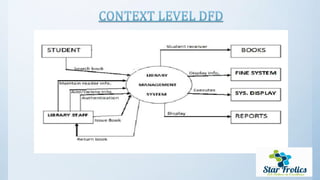
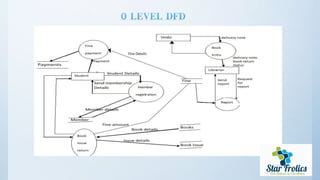
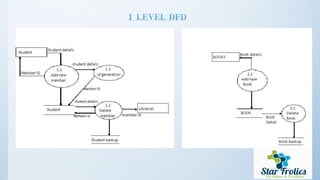
A data flow diagram(DFD) is graphical representation of the “flow” of data
through an information system.
A DFD shows what kinds of information will be input to and output from the
system.
One of the most widely used system analysis process models is the data flow
diagram.
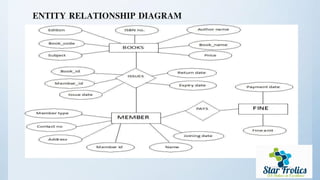
ENTITY RELATIONSHIP DIAGRAM
#SYSTEM CONFIGURATION
01. HARDWARE CONFUGRATION:-
 Intel core i3 4nd generation is used as a processor because it is
fast than other processors an provide reliable and stable and we
can run our pc for longtime.
By using this processor we can keep on developing our project
without any worries.
Ram 1 GB is used as it will provide fast reading and writing
capabilities and will in turn support in processing
02.SOFTWARE CONFUGRATION:-
 Operating system- Windows 7 is used as the operating
system as it is stable and supports more features and is more
user friendly
Database MYSQL-MYSQL is used as database as it easy to
maintain and retrieve records by simple queries which are in
English language which are easy to understand and easy to
write.
Development tools and Programming language- HTML is
used to write the whole code and develop webpages with css,
java script for styling work and php for sever side scripting.
Some Snapshot of Library
Management System (LMS)
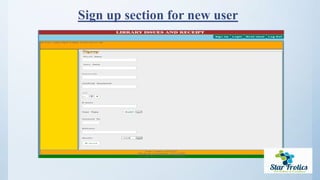
Sign up section for new user
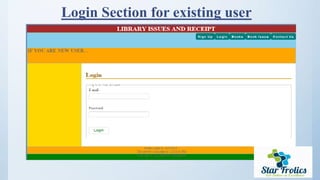
Login Section for existing user
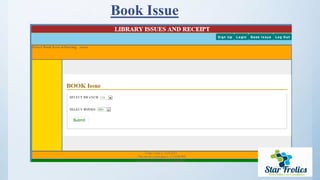
Book Issue
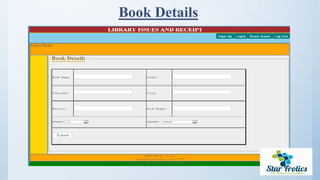
Book Details
Limitation
Majority of libraries are dependent on paper-work which turns out to be very
inefficient, and data backup is very difficult and tedious
Present day systems involve the users very little in the entire process, and also
do not consider the user wants for newer books etc.
 They are also unable to gather the information about user interests and books
that are more popular than others.
Future Scope
 To make the Software Platform – Independent.
 To make the Software general accessibility to the users.
 Giving inner topics highlights of the book searched.
 Providing space for online suggestions.
 To add more features and graphics making it User- Friendly.
Conclusion
The system has been developed using ASP and MS access , the system was able
to process and update the database with more ease. It helped in developing a
total integrated system.
Thus the project “LIBRARY MANAGEMENT SYSTEM”
can be altered in accordance with the future requirements of the organization.
Ending
GrettingsAt the end of todays presentation we express our sincere
thanks to
#Amatul Bushra Akhi Mam
Lecturer
Department of Computer Science & Engineering (CSE)
Daffodil International University (DIU)
&
#All the students of PC-B Section for co-operating us.
Thank you
The End

Library Management System - LMS

  • 1.
  • 2.
    Library Management System (LMS) PresentedBy: Zahidul Islam Sumon ,Project Manager Hasibul Haque Hira, Project Creator & Software Engineer Afzal Hossain, Project Test Mangaer
  • 3.
    Introduction A library managementsystem, also known as an automated library system software that has been developed to handle basic housekeeping functions of a library. It’s a well organized software solution for a library. It help to provide information on any book present in library to the user as well as staff member. It keeps a track of book issued, returned and added to library.
  • 4.
    Some Basic Statement  Requestcolumn for librarian for providing new books A separate column for digital library Student login page where student can find books issued by him/her and date of return. A search column to search availability of books A teacher login page where teacher can add any events being organized in the college and important suggestions regarding books. Online notice board about the workshop
  • 5.
    Project Background Analysis LibraryManagement System is an application which refers to library systems which are generally small or medium in size. It is used by librarian to manage the library using a computerized system where he/she can record various transactions like issue of books, return of books, addition of new books, addition of new students etc. Books and student maintenance modules are also included in this system which would keep track of the students using the library and also a detailed description about the books a library contains. With this computerized system there will be no loss of book record or member record which generally happens when a non computerized system is used.
  • 6.
    Project Discription  GeneralDiscription: Library Management System is a computerized system which helps user(librarian) to manage the library daily activity in electronic format. It reduces the risk of paper work such as file lost, file damaged and time consuming. It can help user to manage the transaction or record more effectively and timesaving.  User login: This feature used by the user to login into system. They are required to enter user id and password before they are allowed to enter the system .The user id and password will be verified and if invalid id is there user is allowed to not enter the system  Search Book: We can search book based on book id ,book name ,publication or by author name.  Issue & Return Books: We can issue our desired book & return it after our job.  Dashboard: We can check our purchases & issues books history from Dashboard Panel.
  • 7.
    Task Of A Librarian LogIn Add New Member Update/Delete Member Add a Book Update/Delete Book Search For a Book Check In Book Check Out Book Pay Late Fee View Book Detail View Member Detail Search For a Member
  • 8.
    A data flowdiagram(DFD) is graphical representation of the “flow” of data through an information system. A DFD shows what kinds of information will be input to and output from the system. One of the most widely used system analysis process models is the data flow diagram.
  • 12.
  • 13.
    #SYSTEM CONFIGURATION 01. HARDWARECONFUGRATION:-  Intel core i3 4nd generation is used as a processor because it is fast than other processors an provide reliable and stable and we can run our pc for longtime. By using this processor we can keep on developing our project without any worries. Ram 1 GB is used as it will provide fast reading and writing capabilities and will in turn support in processing
  • 14.
    02.SOFTWARE CONFUGRATION:-  Operatingsystem- Windows 7 is used as the operating system as it is stable and supports more features and is more user friendly Database MYSQL-MYSQL is used as database as it easy to maintain and retrieve records by simple queries which are in English language which are easy to understand and easy to write. Development tools and Programming language- HTML is used to write the whole code and develop webpages with css, java script for styling work and php for sever side scripting.
  • 15.
    Some Snapshot ofLibrary Management System (LMS)
  • 16.
    Sign up sectionfor new user
  • 17.
    Login Section forexisting user
  • 18.
  • 19.
  • 20.
    Limitation Majority of librariesare dependent on paper-work which turns out to be very inefficient, and data backup is very difficult and tedious Present day systems involve the users very little in the entire process, and also do not consider the user wants for newer books etc.  They are also unable to gather the information about user interests and books that are more popular than others.
  • 21.
    Future Scope  Tomake the Software Platform – Independent.  To make the Software general accessibility to the users.  Giving inner topics highlights of the book searched.  Providing space for online suggestions.  To add more features and graphics making it User- Friendly.
  • 22.
    Conclusion The system hasbeen developed using ASP and MS access , the system was able to process and update the database with more ease. It helped in developing a total integrated system. Thus the project “LIBRARY MANAGEMENT SYSTEM” can be altered in accordance with the future requirements of the organization.
  • 23.
    Ending GrettingsAt the endof todays presentation we express our sincere thanks to #Amatul Bushra Akhi Mam Lecturer Department of Computer Science & Engineering (CSE) Daffodil International University (DIU) & #All the students of PC-B Section for co-operating us.
  • 24.