E-BOOK MANAGEMENT
SYSTEM
Submitted by
Nawej
Debjani
Aman
&
Hrishikesh
CONTENTS
 Introduction…………………………………………………………
 Problem Analysis……………………………………………………
 Objective & Purpose…………………………………………….......
 Scop of the Project………………………………………………….
 Software provides facilities for customers & Merchant……………...
 Requirements……………………………………………………….
 Module Description ………………………………………………….
 Domain Model……………………………………………………….
 Partial Layered Architecture………………………………………...
 Logical Architecture…………………………………………………
 Risk Activity………………………………………………………….
 Safety & Security Requirements……………………………………….
 Gantt Chart……………………………………………………………
 User Interface Layer………………………………………………….
 UML Use case Diagram……………………………………………….
 UML Class Diagram………………………………………………….
 UML Sequence Diagram………………………………………………
 UML Activity Diagram……………………………………………….
 UML Collaboration Diagram………………………………………….
 UML Component Diagram………………………………………………
 UML Development Diagram……………………………………………
 Implementation & Testing………………………………………………
 Future Scope……………………………………………………………
 Conclusion………………………………………………………………
Introduction:
Bibliophilic eBooks is an online website where the customer can read and purchase eBooks
online. This web project is developed using HTML, CSS, JavaScript, PHP. Through a web
browser the customers can search for a book by its title or author, later can add to the
shopping cart and finally purchase using online transaction. The user can login using his
account details or new customers can set up an account very quickly. They should give the
details of their name, contact number and email address. The user can also give feedback to
a book by giving ratings on a score of five. The books are divided into many categories
based on genre like Fiction, Non-Fiction, Si-Fi, etc.
Problem Analysis:
The problem is to find out the book that we need with reference
to the prescribed author .The books will be categorized in to various
sections .Some of the sections include Novels, Love and Romance etc.
E-Books of various authors can be found in ease.
OBJECTIVE:
The main objective of the document is to illustrate the Requirements of project E-Book
Management system. The document gives the detailed description of both functional and non-
functional requirements. It will also explain about the features of the system interface of the system.
What the system will do, the constraint under which it must operate and how the system will react to
external stimuli. The document is developed after a number of consultations with team members and
specification of the given project.
PURPOSE:
The system is designed with end user requirements as main criteria. It includes front end tool
to receive data needed and to validate the entries. It has backend access to store validate data for
future reference .To analyzes and design an EBOOK based on Object Oriented Analysis and Design
concept
SCOPE OF THE PROJECT:
The software provides the visitor, customer and administrator a
easy and efficient way to buy and manage books in online.
Software provides following facilities to customer:
 Facilitates easy shopping online.
 Provides information about the products in categories.
 Provides e-mail facility for future correspondence.
 Provides Backup facility.
Software provides the following facilities to the merchant.
 Manages the Transportation of hard copy of Book.
 Look after the method. payment
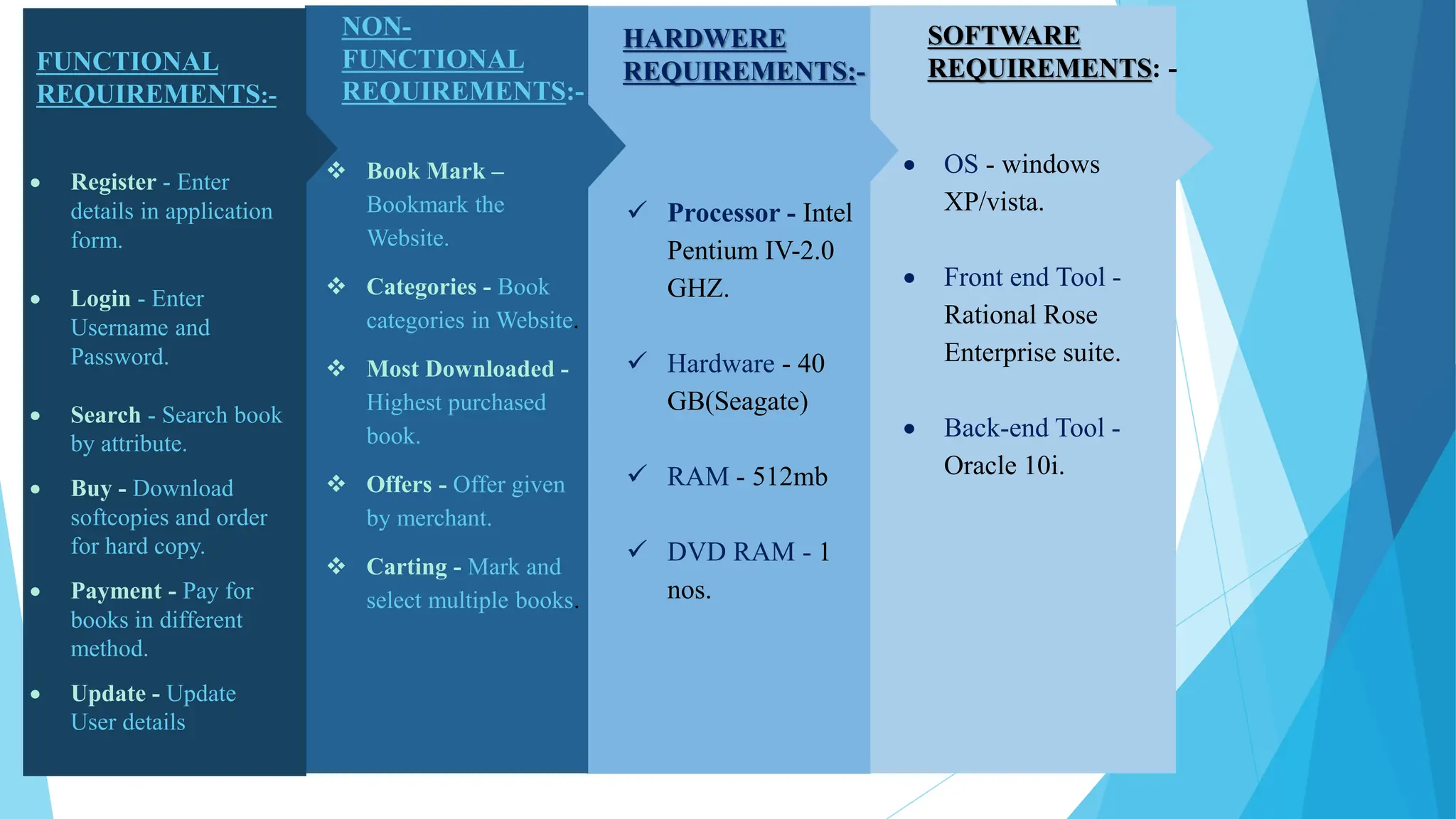
SOFTWARE
REQUIREMENTS: -
 OS - windows
XP/vista.
 Front end Tool -
Rational Rose
Enterprise suite.
 Back-end Tool -
Oracle 10i.
HARDWERE
REQUIREMENTS:-
 Processor - Intel
Pentium IV-2.0
GHZ.
 Hardware - 40
GB(Seagate)
 RAM - 512mb
 DVD RAM - 1
nos.
NON-
FUNCTIONAL
REQUIREMENTS:-
 Book Mark –
Bookmark the
Website.
 Categories - Book
categories in Website.
 Most Downloaded -
Highest purchased
book.
 Offers - Offer given
by merchant.
 Carting - Mark and
select multiple books.
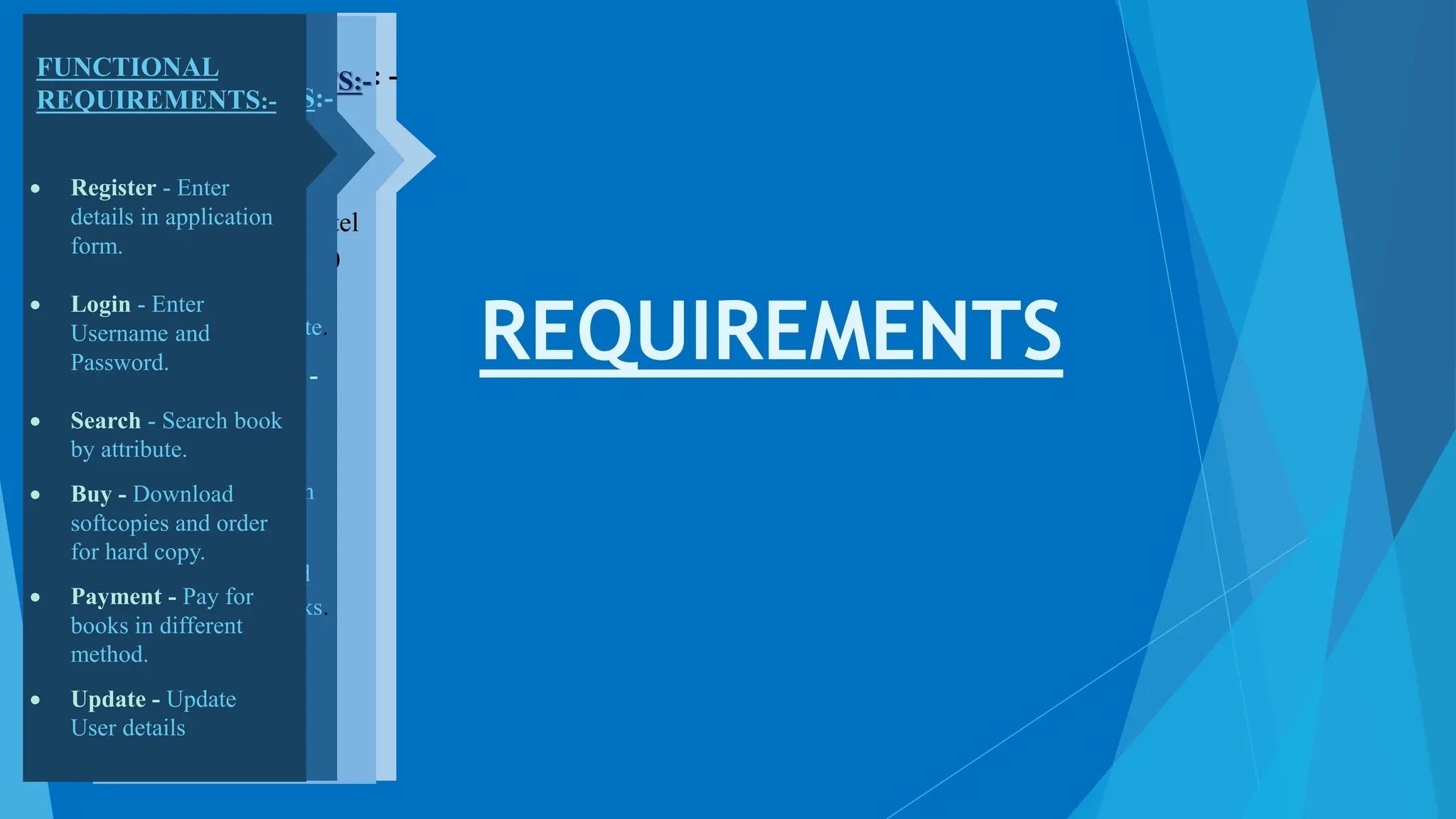
FUNCTIONAL
REQUIREMENTS:-
 Register - Enter
details in application
form.
 Login - Enter
Username and
Password.
 Search - Search book
by attribute.
 Buy - Download
softcopies and order
for hard copy.
 Payment - Pay for
books in different
method.
 Update - Update
User details
REQUIREMENTS
SOFTWARE
REQUIREMENTS: -
 OS - windows
XP/vista.
 Front end Tool -
Rational Rose
Enterprise suite.
 Back-end Tool -
Oracle 10i.
HARDWERE
REQUIREMENTS:-
 Processor - Intel
Pentium IV-2.0
GHZ.
 Hardware - 40
GB(Seagate)
 RAM - 512mb
 DVD RAM - 1
nos.
NON-
FUNCTIONAL
REQUIREMENTS:-
 Book Mark –
Bookmark the
Website.
 Categories - Book
categories in Website.
 Most Downloaded -
Highest purchased
book.
 Offers - Offer given
by merchant.
 Carting - Mark and
select multiple books.
FUNCTIONAL
REQUIREMENTS:-
 Register - Enter
details in application
form.
 Login - Enter
Username and
Password.
 Search - Search book
by attribute.
 Buy - Download
softcopies and order
for hard copy.
 Payment - Pay for
books in different
method.
 Update - Update
User details
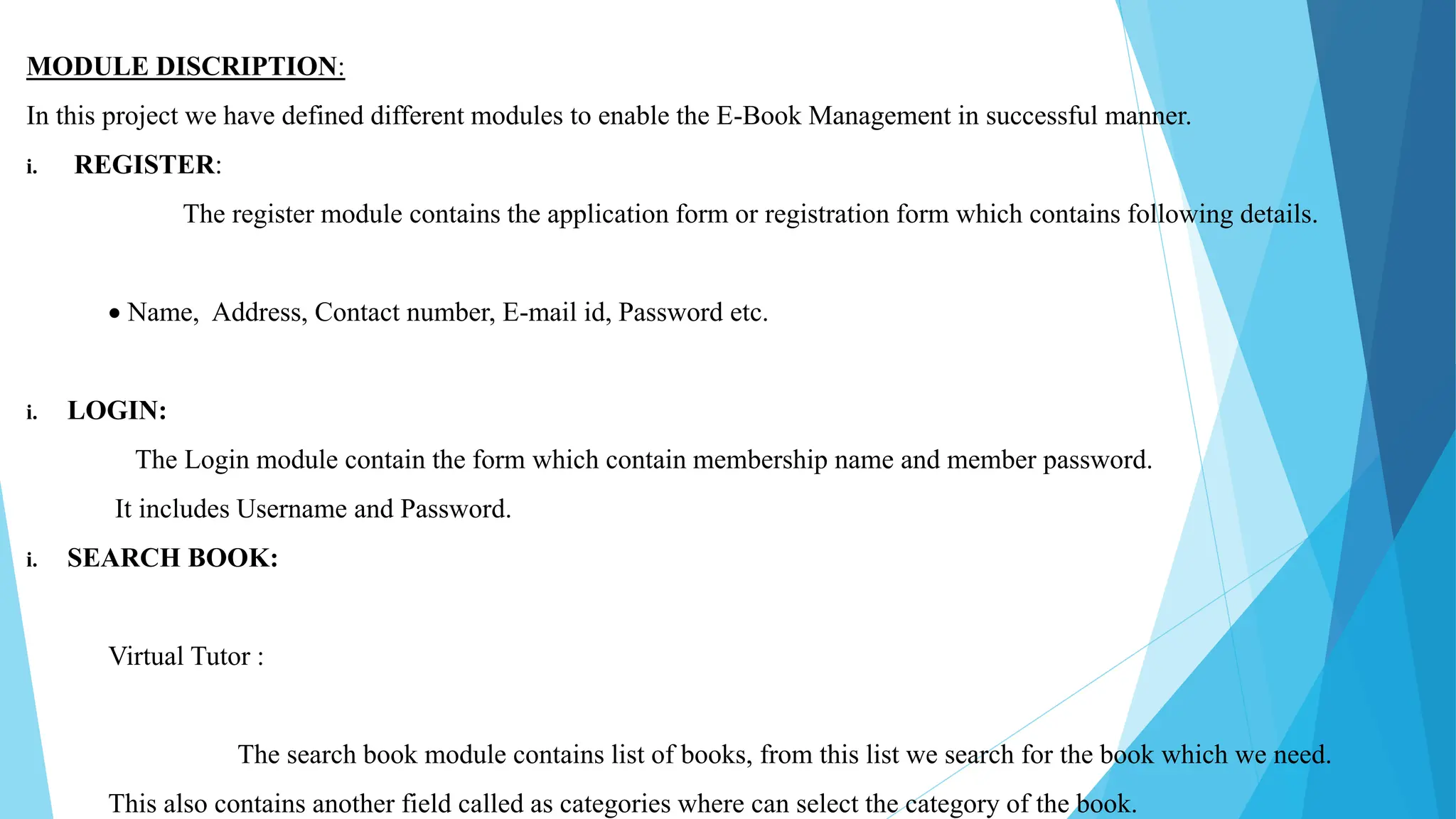
MODULE DISCRIPTION:
In this project we have defined different modules to enable the E-Book Management in successful manner.
i. REGISTER:
The register module contains the application form or registration form which contains following details.
 Name, Address, Contact number, E-mail id, Password etc.
i. LOGIN:
The Login module contain the form which contain membership name and member password.
It includes Username and Password.
i. SEARCH BOOK:
Virtual Tutor :
The search book module contains list of books, from this list we search for the book which we need.
This also contains another field called as categories where can select the category of the book.
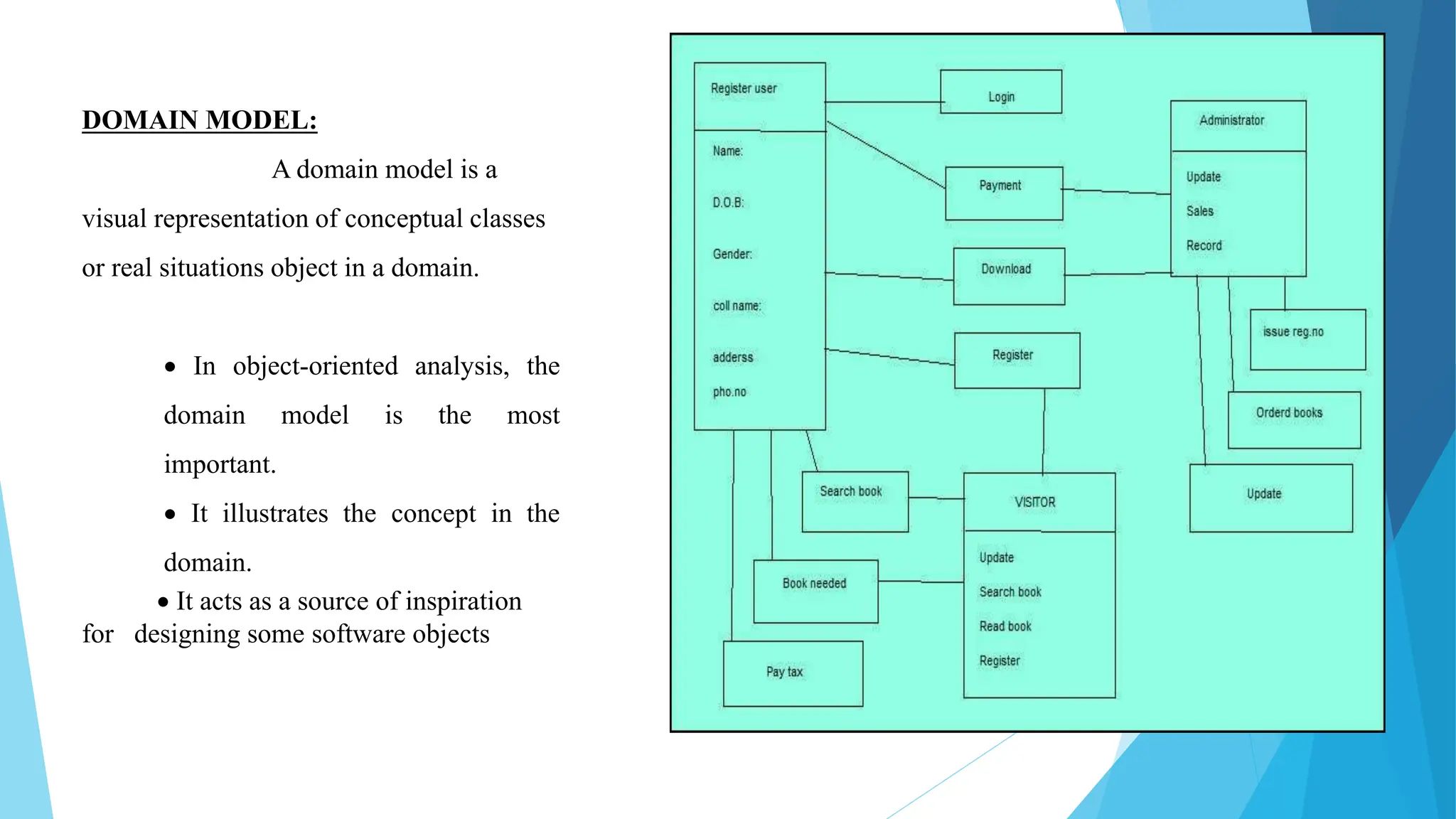
DOMAIN MODEL:
A domain model is a
visual representation of conceptual classes
or real situations object in a domain.
 In object-oriented analysis, the
domain model is the most
important.
 It illustrates the concept in the
domain.
 It acts as a source of inspiration
for designing some software objects
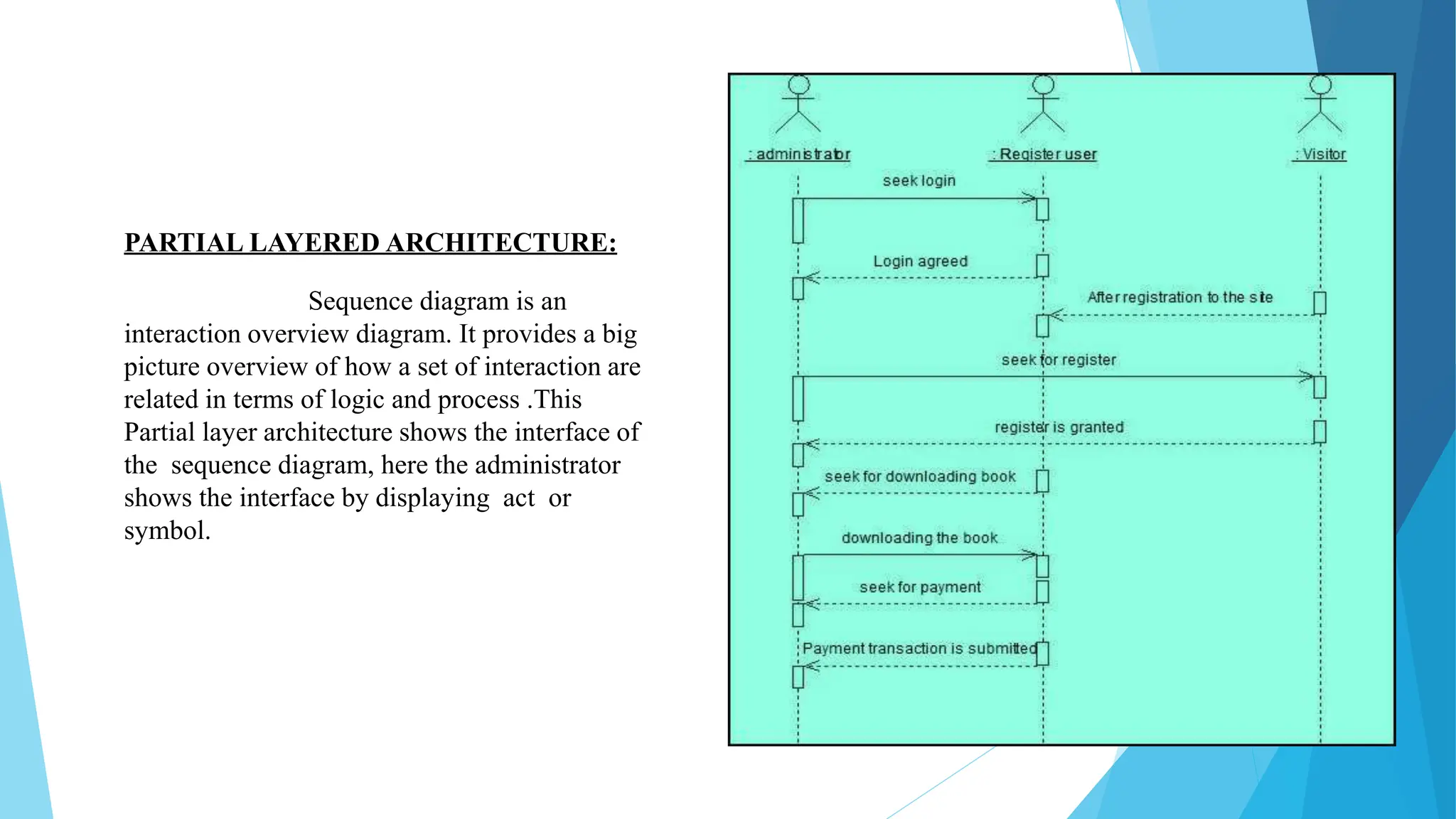
PARTIAL LAYERED ARCHITECTURE:
Sequence diagram is an
interaction overview diagram. It provides a big
picture overview of how a set of interaction are
related in terms of logic and process .This
Partial layer architecture shows the interface of
the sequence diagram, here the administrator
shows the interface by displaying act or
symbol.
LOGICALARCHITECTURE:
The Logical architecture is large scale organization of software class into packages, sub
system layer, It is called logical architecture because ther is no direction about how these
elements are display on different operating system.
RISK ACTIVITY:
• If the system fails to update the book details of unnecessary confusion may be avoided.
• When the member may not register the form correctly. It may affect the login. If the
administrator fails to save the new register and new visitor may affect in update.
• Failure of Backup details.
SAFETY REQUIREMENTS:
The database must be maintained effective from hacking.
SECURITY REQUIREMENTS:
Password for registered accounts are stored securely in a hash, the uploads made
by the user must be checked and then accepted.
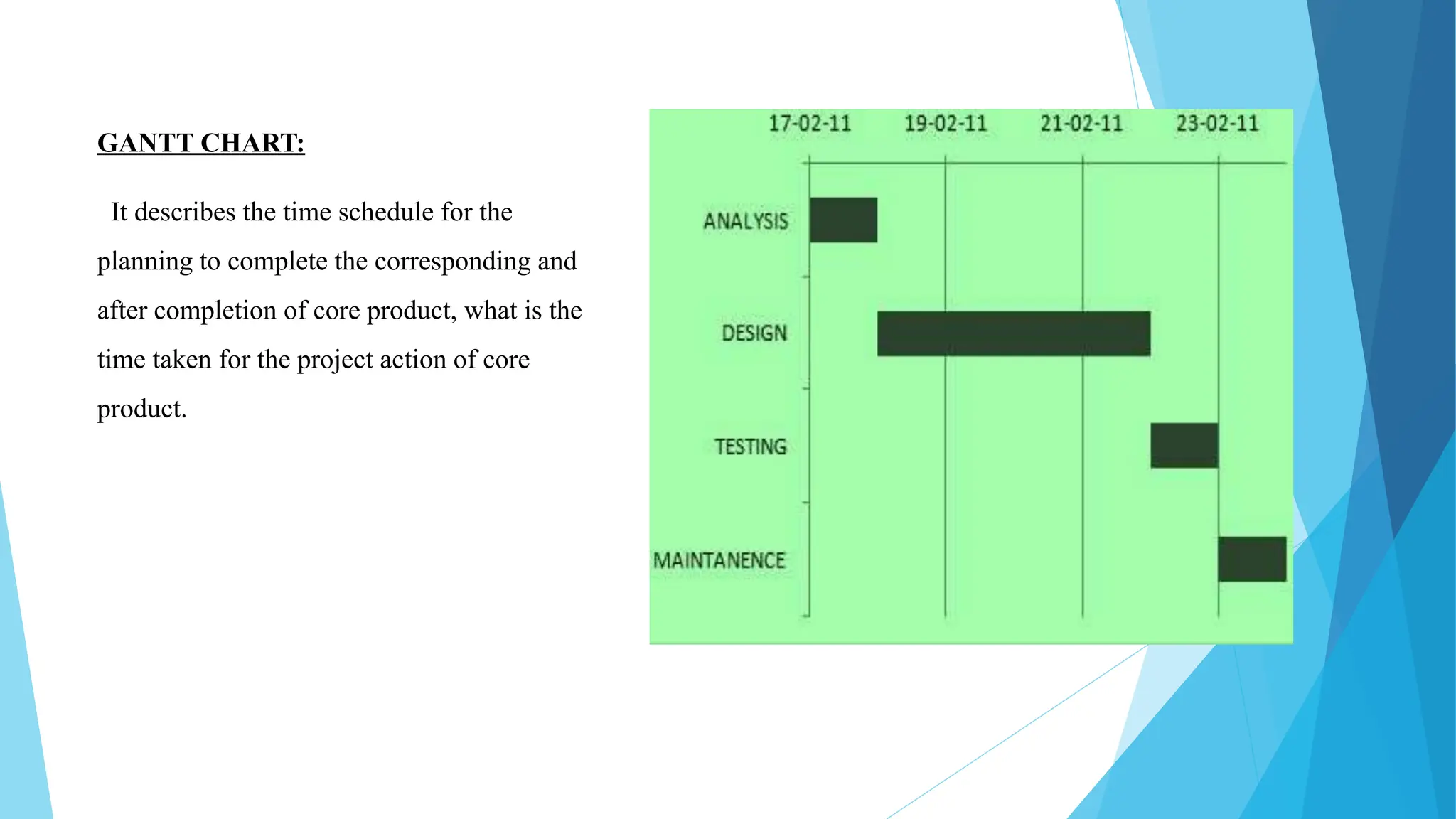
GANTT CHART:
It describes the time schedule for the
planning to complete the corresponding and
after completion of core product, what is the
time taken for the project action of core
product.
USER INTERFACE LAYER:
i. ADMIN:
The administrator is used to register a new visitor for the website. Admin can keep those records
update. Admin keep sales record i.e, now much book is downloaded and how much book is buyed
newly with copy write etc.
ii. REGISTERED USER:
Registered user can search the book whatever needs and can read the book in online. If user is
satisfied with this book, can download the book but after payment.
iii. VISITOR:
The visitor can register the application form and become a member of the website.
The visitor can search books and read the book but he must register to buy or download the book.
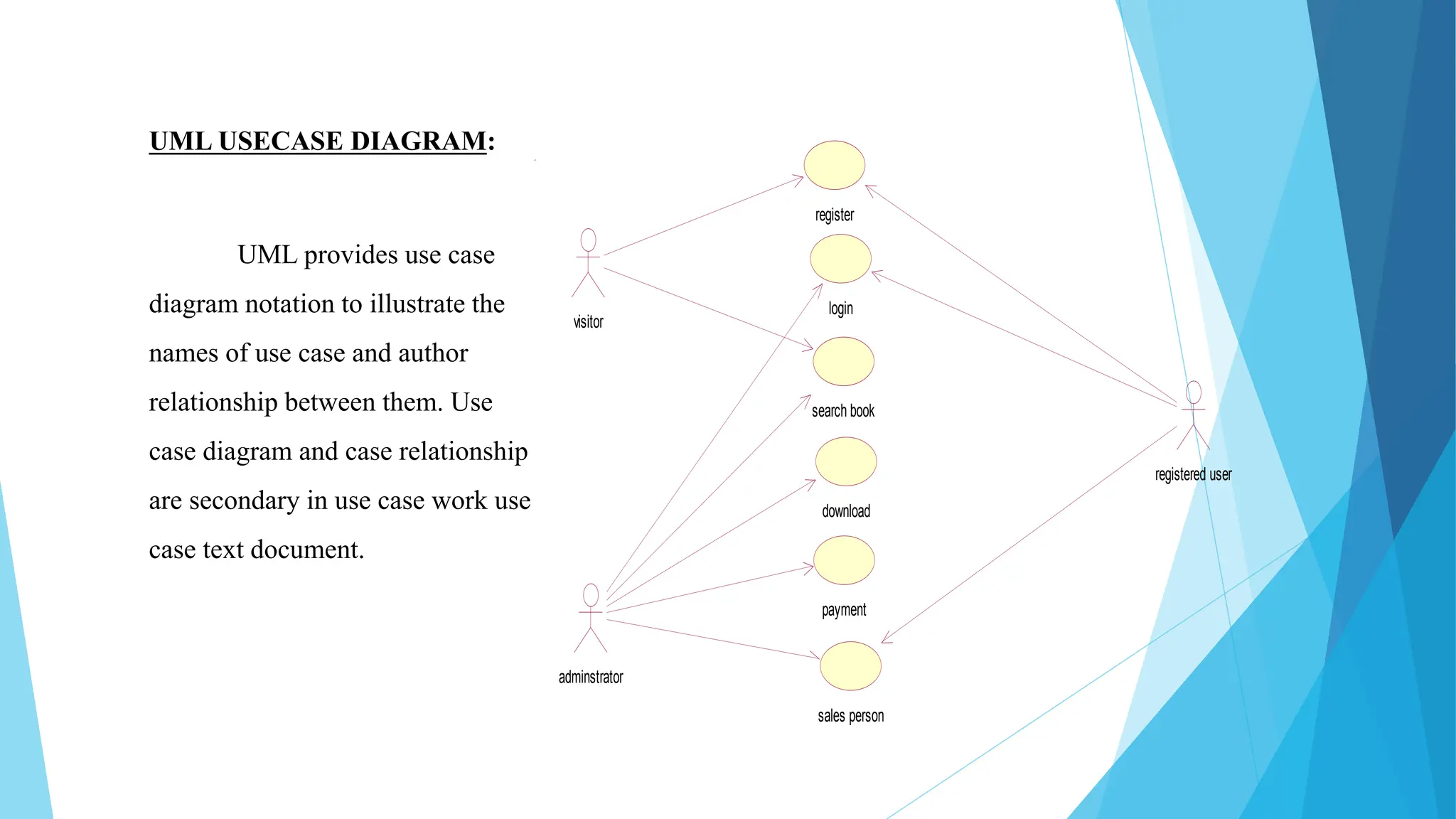
UML USECASE DIAGRAM:
UML provides use case
diagram notation to illustrate the
names of use case and author
relationship between them. Use
case diagram and case relationship
are secondary in use case work use
case text document.
register
login
search book
download
payment
sales person
adminstrator
visitor
registered user
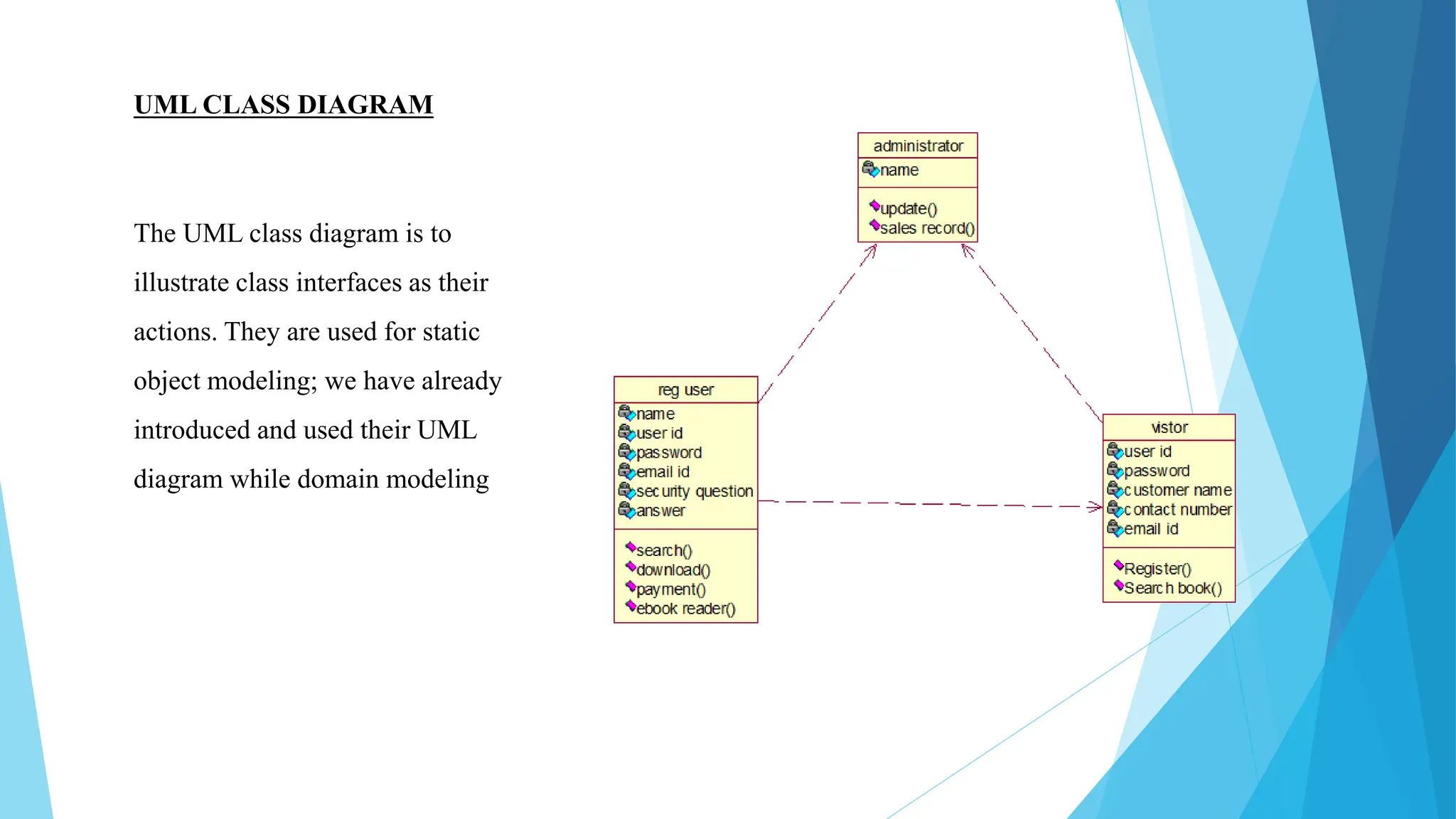
UML CLASS DIAGRAM
The UML class diagram is to
illustrate class interfaces as their
actions. They are used for static
object modeling; we have already
introduced and used their UML
diagram while domain modeling
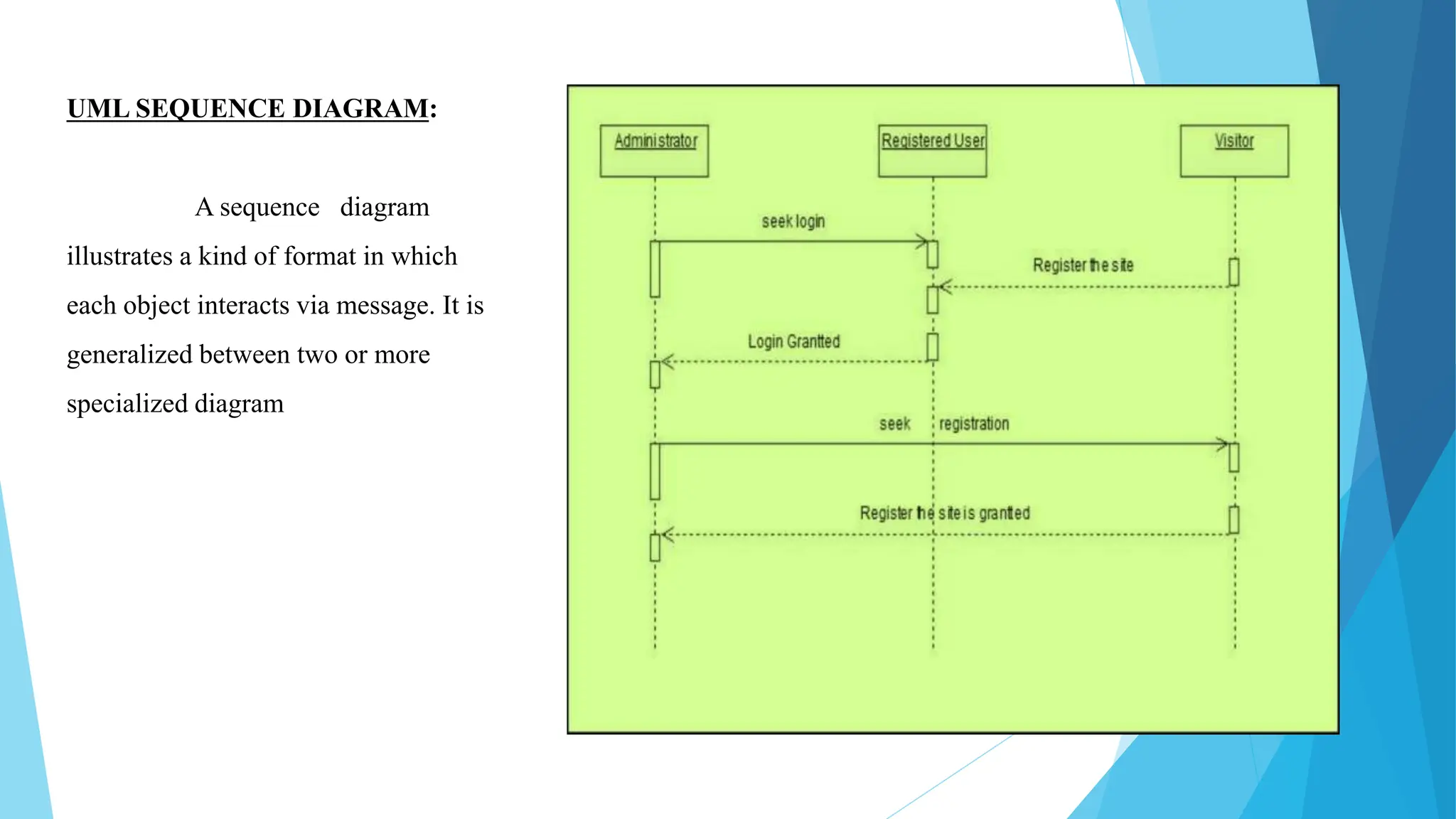
UML SEQUENCE DIAGRAM:
A sequence diagram
illustrates a kind of format in which
each object interacts via message. It is
generalized between two or more
specialized diagram
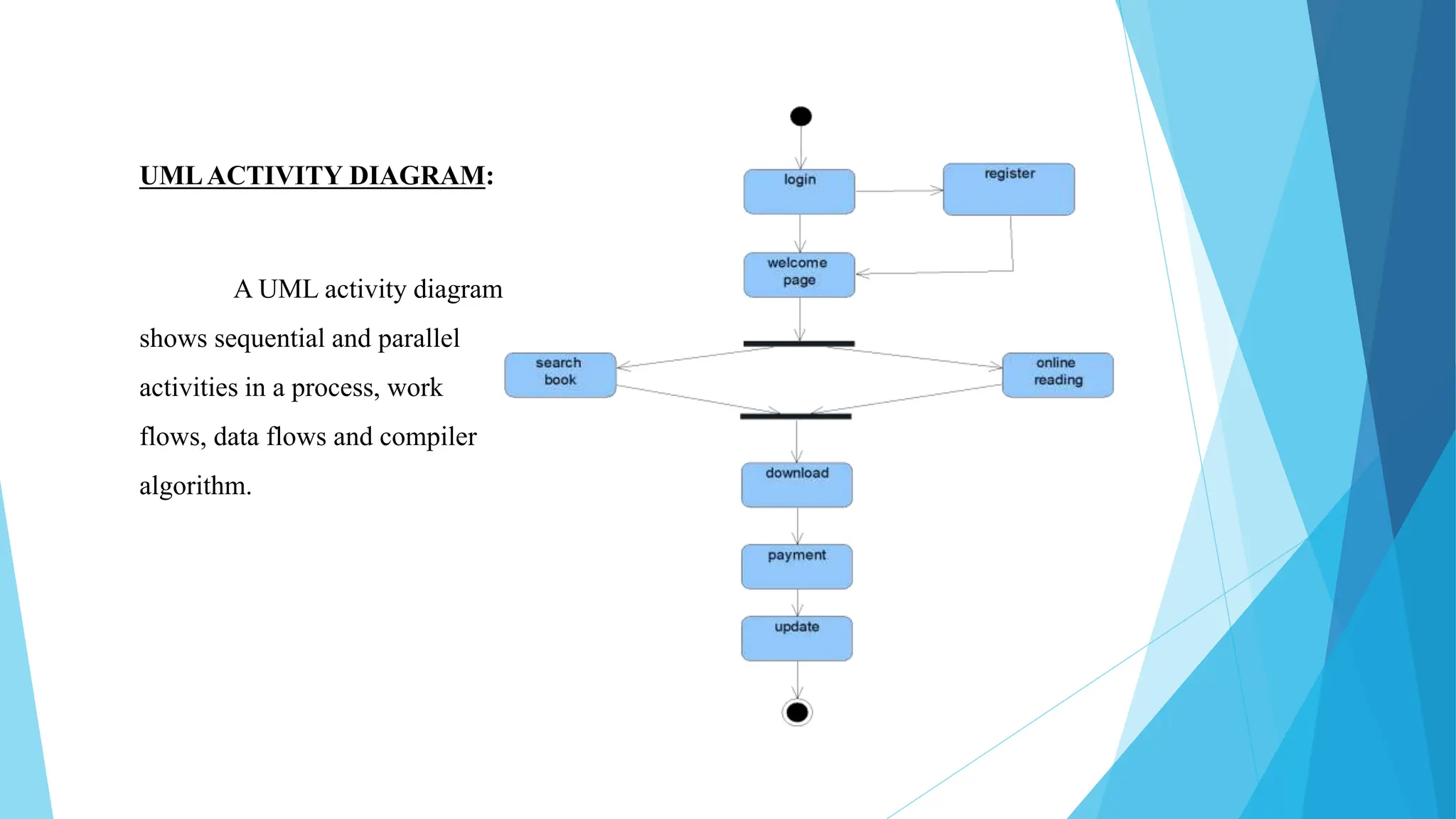
UMLACTIVITY DIAGRAM:
A UML activity diagram
shows sequential and parallel
activities in a process, work
flows, data flows and compiler
algorithm.
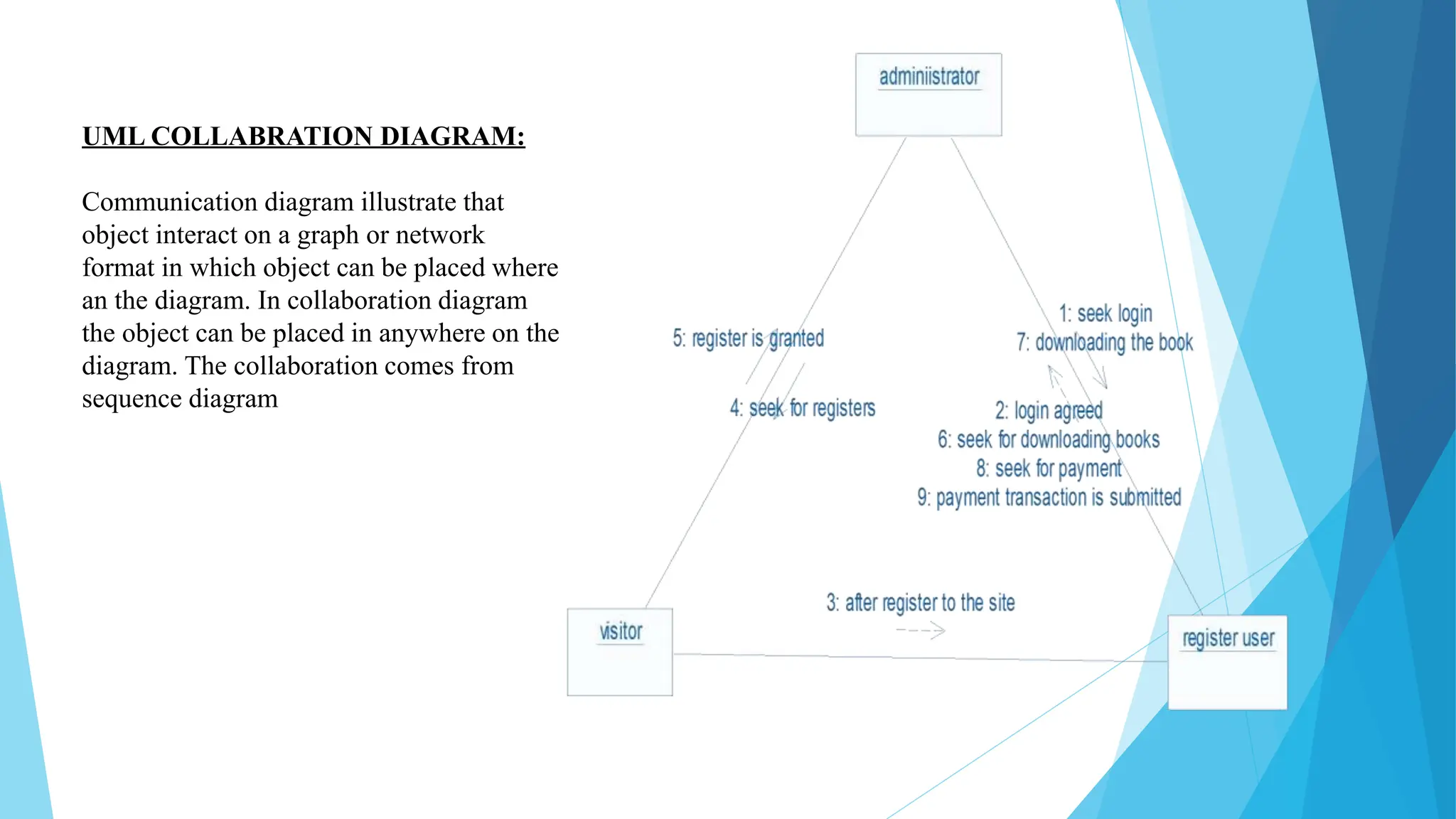
UML COLLABRATION DIAGRAM:
Communication diagram illustrate that
object interact on a graph or network
format in which object can be placed where
an the diagram. In collaboration diagram
the object can be placed in anywhere on the
diagram. The collaboration comes from
sequence diagram
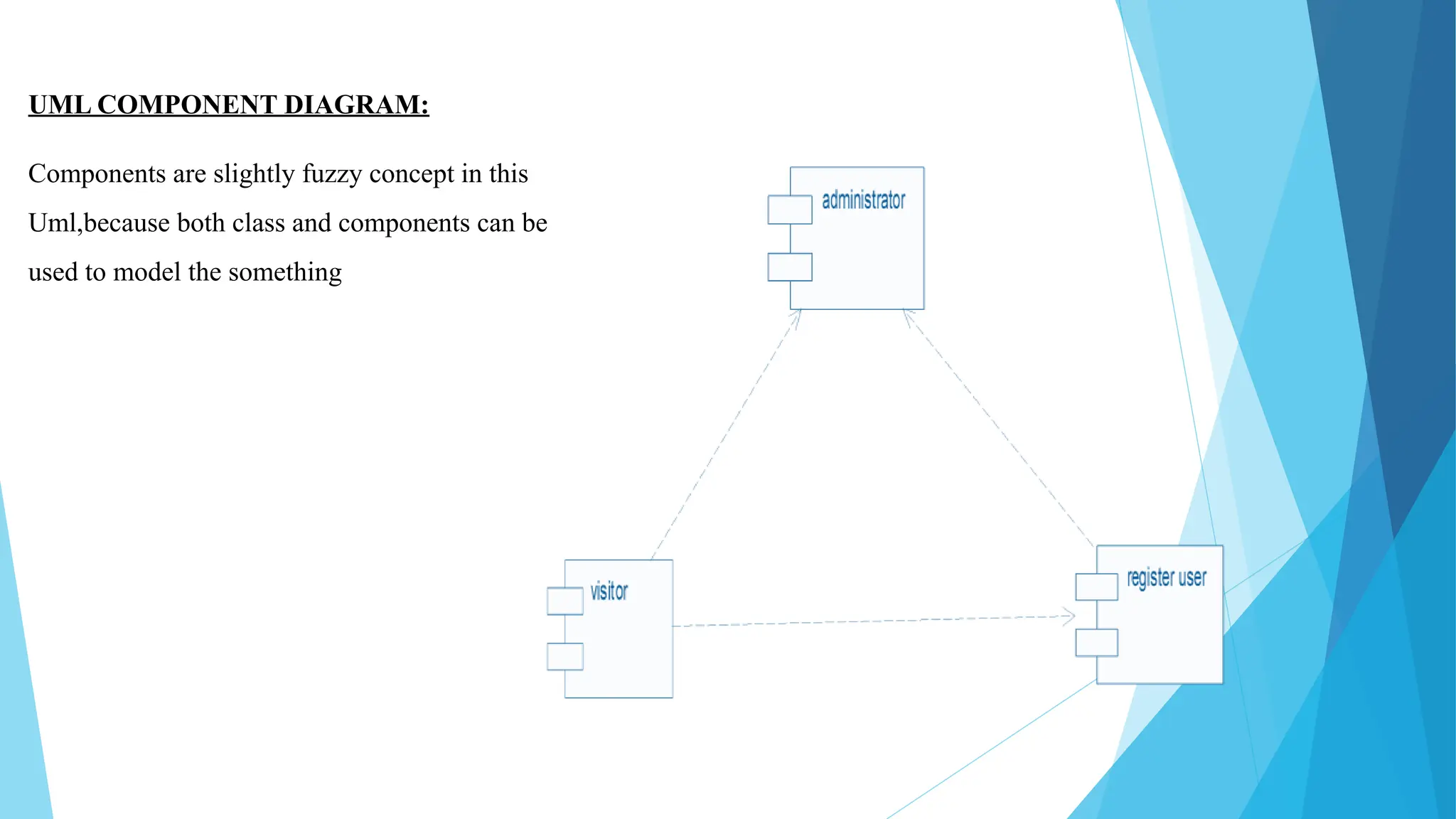
UML COMPONENT DIAGRAM:
Components are slightly fuzzy concept in this
Uml,because both class and components can be
used to model the something
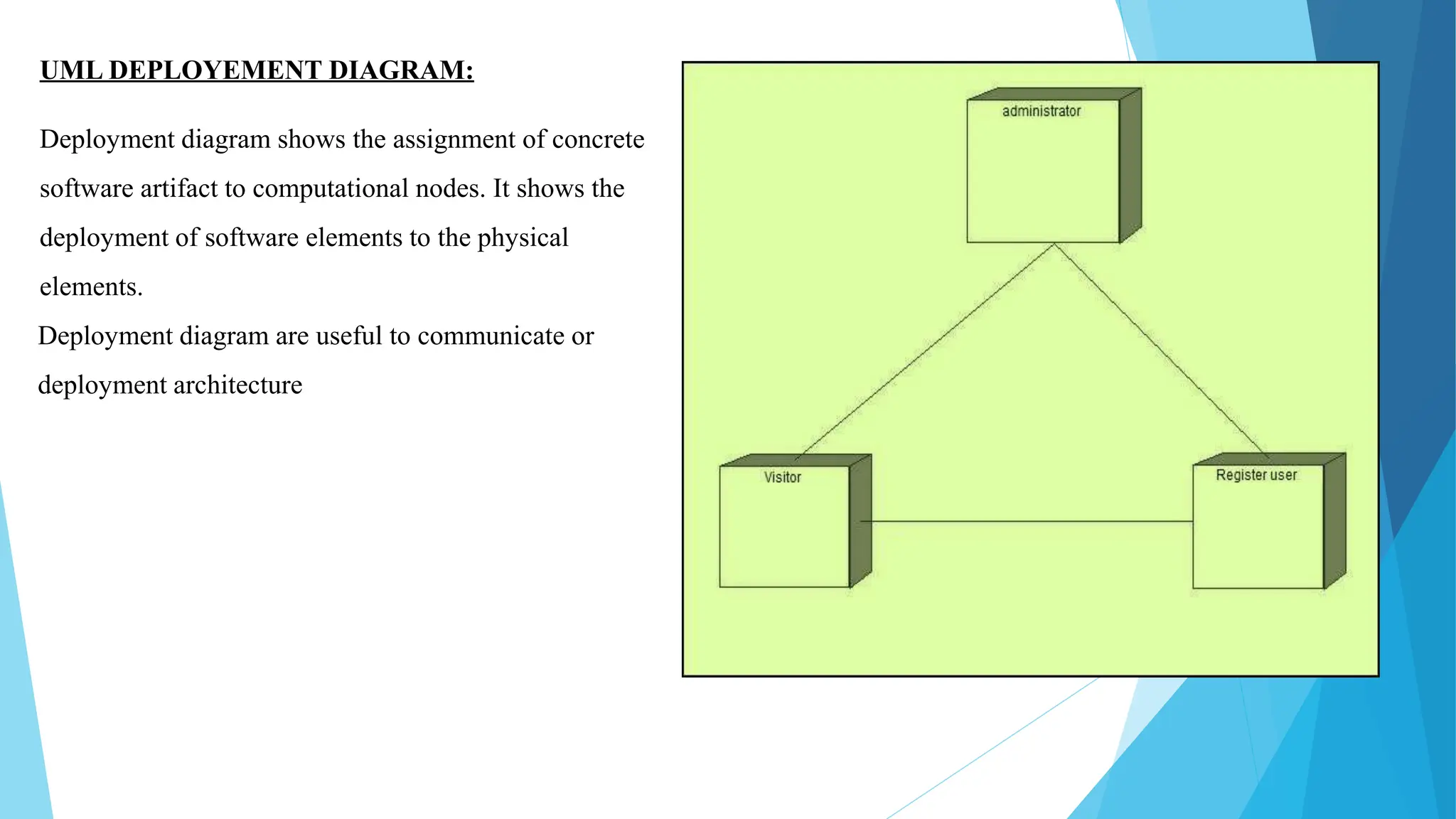
UML DEPLOYEMENT DIAGRAM:
Deployment diagram shows the assignment of concrete
software artifact to computational nodes. It shows the
deployment of software elements to the physical
elements.
Deployment diagram are useful to communicate or
deployment architecture
IMPLEMENTATION:
After the completion of UML diagrams for E-Book Management we should
generate the code. Select the tools option from main menu then select the sub
option program module in which we are going to generate the code in
JAVA/VB/J2EE. Then go ahead and select the generate code option as a
result of code generation
TESTING:
To perform the testing for the generated code again select the tools
option from menu bar and choose quality architecture option a sub
window gets opened. We are going to perform Unit Test and Scenario
testing for our project. So, select these testing option one by one and
testing activity is carried out for all the coding and testing is carried
out.
FUTURE SCOPE:
The eBook management system is gaining huge popularity among the readers. This
system is helpful for the bibliophiles who are always travelling and find it hard to
carry books everywhere. It provides with all kinds of eBooks which you can read at
anytime and anywhere. And by each day this system is increasing its popularity. It
can be accessed anywhere and anytime around the world
CONCLUSION:
Thus, the project for E-BOOK MANAGEMENT has been successfully executed and codes
are generated. In conclusion we implemented all the functionalities stated in the requirement,
all were tested and it showed that they are all working properly. Also, we implemented the
system requirement quality like responsiveness so on different devices the system adapts to suit
it, and also it works on these browsers like safari, google chrome properly
E-BOOK MANAGEMENT SYSTEM  PowerPoint Presentation

E-BOOK MANAGEMENT SYSTEM PowerPoint Presentation

  • 1.
  • 2.
    CONTENTS  Introduction…………………………………………………………  ProblemAnalysis……………………………………………………  Objective & Purpose…………………………………………….......  Scop of the Project………………………………………………….  Software provides facilities for customers & Merchant……………...  Requirements……………………………………………………….  Module Description ………………………………………………….  Domain Model……………………………………………………….  Partial Layered Architecture………………………………………...  Logical Architecture…………………………………………………  Risk Activity………………………………………………………….  Safety & Security Requirements……………………………………….
  • 3.
     Gantt Chart…………………………………………………………… User Interface Layer………………………………………………….  UML Use case Diagram……………………………………………….  UML Class Diagram………………………………………………….  UML Sequence Diagram………………………………………………  UML Activity Diagram……………………………………………….  UML Collaboration Diagram………………………………………….  UML Component Diagram………………………………………………  UML Development Diagram……………………………………………  Implementation & Testing………………………………………………  Future Scope……………………………………………………………  Conclusion………………………………………………………………
  • 4.
    Introduction: Bibliophilic eBooks isan online website where the customer can read and purchase eBooks online. This web project is developed using HTML, CSS, JavaScript, PHP. Through a web browser the customers can search for a book by its title or author, later can add to the shopping cart and finally purchase using online transaction. The user can login using his account details or new customers can set up an account very quickly. They should give the details of their name, contact number and email address. The user can also give feedback to a book by giving ratings on a score of five. The books are divided into many categories based on genre like Fiction, Non-Fiction, Si-Fi, etc.
  • 5.
    Problem Analysis: The problemis to find out the book that we need with reference to the prescribed author .The books will be categorized in to various sections .Some of the sections include Novels, Love and Romance etc. E-Books of various authors can be found in ease.
  • 6.
    OBJECTIVE: The main objectiveof the document is to illustrate the Requirements of project E-Book Management system. The document gives the detailed description of both functional and non- functional requirements. It will also explain about the features of the system interface of the system. What the system will do, the constraint under which it must operate and how the system will react to external stimuli. The document is developed after a number of consultations with team members and specification of the given project. PURPOSE: The system is designed with end user requirements as main criteria. It includes front end tool to receive data needed and to validate the entries. It has backend access to store validate data for future reference .To analyzes and design an EBOOK based on Object Oriented Analysis and Design concept
  • 7.
    SCOPE OF THEPROJECT: The software provides the visitor, customer and administrator a easy and efficient way to buy and manage books in online.
  • 8.
    Software provides followingfacilities to customer:  Facilitates easy shopping online.  Provides information about the products in categories.  Provides e-mail facility for future correspondence.  Provides Backup facility. Software provides the following facilities to the merchant.  Manages the Transportation of hard copy of Book.  Look after the method. payment
  • 9.
    SOFTWARE REQUIREMENTS: -  OS- windows XP/vista.  Front end Tool - Rational Rose Enterprise suite.  Back-end Tool - Oracle 10i. HARDWERE REQUIREMENTS:-  Processor - Intel Pentium IV-2.0 GHZ.  Hardware - 40 GB(Seagate)  RAM - 512mb  DVD RAM - 1 nos. NON- FUNCTIONAL REQUIREMENTS:-  Book Mark – Bookmark the Website.  Categories - Book categories in Website.  Most Downloaded - Highest purchased book.  Offers - Offer given by merchant.  Carting - Mark and select multiple books. FUNCTIONAL REQUIREMENTS:-  Register - Enter details in application form.  Login - Enter Username and Password.  Search - Search book by attribute.  Buy - Download softcopies and order for hard copy.  Payment - Pay for books in different method.  Update - Update User details REQUIREMENTS
  • 10.
    SOFTWARE REQUIREMENTS: -  OS- windows XP/vista.  Front end Tool - Rational Rose Enterprise suite.  Back-end Tool - Oracle 10i. HARDWERE REQUIREMENTS:-  Processor - Intel Pentium IV-2.0 GHZ.  Hardware - 40 GB(Seagate)  RAM - 512mb  DVD RAM - 1 nos. NON- FUNCTIONAL REQUIREMENTS:-  Book Mark – Bookmark the Website.  Categories - Book categories in Website.  Most Downloaded - Highest purchased book.  Offers - Offer given by merchant.  Carting - Mark and select multiple books. FUNCTIONAL REQUIREMENTS:-  Register - Enter details in application form.  Login - Enter Username and Password.  Search - Search book by attribute.  Buy - Download softcopies and order for hard copy.  Payment - Pay for books in different method.  Update - Update User details
  • 11.
    MODULE DISCRIPTION: In thisproject we have defined different modules to enable the E-Book Management in successful manner. i. REGISTER: The register module contains the application form or registration form which contains following details.  Name, Address, Contact number, E-mail id, Password etc. i. LOGIN: The Login module contain the form which contain membership name and member password. It includes Username and Password. i. SEARCH BOOK: Virtual Tutor : The search book module contains list of books, from this list we search for the book which we need. This also contains another field called as categories where can select the category of the book.
  • 13.
    DOMAIN MODEL: A domainmodel is a visual representation of conceptual classes or real situations object in a domain.  In object-oriented analysis, the domain model is the most important.  It illustrates the concept in the domain.  It acts as a source of inspiration for designing some software objects
  • 14.
    PARTIAL LAYERED ARCHITECTURE: Sequencediagram is an interaction overview diagram. It provides a big picture overview of how a set of interaction are related in terms of logic and process .This Partial layer architecture shows the interface of the sequence diagram, here the administrator shows the interface by displaying act or symbol.
  • 15.
    LOGICALARCHITECTURE: The Logical architectureis large scale organization of software class into packages, sub system layer, It is called logical architecture because ther is no direction about how these elements are display on different operating system. RISK ACTIVITY: • If the system fails to update the book details of unnecessary confusion may be avoided. • When the member may not register the form correctly. It may affect the login. If the administrator fails to save the new register and new visitor may affect in update. • Failure of Backup details.
  • 16.
    SAFETY REQUIREMENTS: The databasemust be maintained effective from hacking. SECURITY REQUIREMENTS: Password for registered accounts are stored securely in a hash, the uploads made by the user must be checked and then accepted.
  • 17.
    GANTT CHART: It describesthe time schedule for the planning to complete the corresponding and after completion of core product, what is the time taken for the project action of core product.
  • 18.
    USER INTERFACE LAYER: i.ADMIN: The administrator is used to register a new visitor for the website. Admin can keep those records update. Admin keep sales record i.e, now much book is downloaded and how much book is buyed newly with copy write etc. ii. REGISTERED USER: Registered user can search the book whatever needs and can read the book in online. If user is satisfied with this book, can download the book but after payment. iii. VISITOR: The visitor can register the application form and become a member of the website. The visitor can search books and read the book but he must register to buy or download the book.
  • 19.
    UML USECASE DIAGRAM: UMLprovides use case diagram notation to illustrate the names of use case and author relationship between them. Use case diagram and case relationship are secondary in use case work use case text document. register login search book download payment sales person adminstrator visitor registered user
  • 20.
    UML CLASS DIAGRAM TheUML class diagram is to illustrate class interfaces as their actions. They are used for static object modeling; we have already introduced and used their UML diagram while domain modeling
  • 21.
    UML SEQUENCE DIAGRAM: Asequence diagram illustrates a kind of format in which each object interacts via message. It is generalized between two or more specialized diagram
  • 22.
    UMLACTIVITY DIAGRAM: A UMLactivity diagram shows sequential and parallel activities in a process, work flows, data flows and compiler algorithm.
  • 23.
    UML COLLABRATION DIAGRAM: Communicationdiagram illustrate that object interact on a graph or network format in which object can be placed where an the diagram. In collaboration diagram the object can be placed in anywhere on the diagram. The collaboration comes from sequence diagram
  • 24.
    UML COMPONENT DIAGRAM: Componentsare slightly fuzzy concept in this Uml,because both class and components can be used to model the something
  • 25.
    UML DEPLOYEMENT DIAGRAM: Deploymentdiagram shows the assignment of concrete software artifact to computational nodes. It shows the deployment of software elements to the physical elements. Deployment diagram are useful to communicate or deployment architecture
  • 26.
    IMPLEMENTATION: After the completionof UML diagrams for E-Book Management we should generate the code. Select the tools option from main menu then select the sub option program module in which we are going to generate the code in JAVA/VB/J2EE. Then go ahead and select the generate code option as a result of code generation
  • 27.
    TESTING: To perform thetesting for the generated code again select the tools option from menu bar and choose quality architecture option a sub window gets opened. We are going to perform Unit Test and Scenario testing for our project. So, select these testing option one by one and testing activity is carried out for all the coding and testing is carried out.
  • 28.
    FUTURE SCOPE: The eBookmanagement system is gaining huge popularity among the readers. This system is helpful for the bibliophiles who are always travelling and find it hard to carry books everywhere. It provides with all kinds of eBooks which you can read at anytime and anywhere. And by each day this system is increasing its popularity. It can be accessed anywhere and anytime around the world
  • 29.
    CONCLUSION: Thus, the projectfor E-BOOK MANAGEMENT has been successfully executed and codes are generated. In conclusion we implemented all the functionalities stated in the requirement, all were tested and it showed that they are all working properly. Also, we implemented the system requirement quality like responsiveness so on different devices the system adapts to suit it, and also it works on these browsers like safari, google chrome properly