GROUP MEMBERS
• HALEEMA SADIA
0007
• AMNA BIBI
0023
INTRODUCTION
A library management system, also known as an
automated library system is software that has been
developed to handle basic housekeeping functions of a
library.
It’s a well organized software solution for a library.
It help to provide information on any book present in
library to the user as well as staff member.
PURPOSE
• TO MAKE THE EXISTING SYSTEM
MORE EFFICIENT.
• TO PROVIDE A USER FRIENDLY
ENVIRONMENT.
• MAKE FUNCTIONALITIES OF
LIBRARY FASTER.
• PROVIDE A SYSTEM WHERE THE
LIBRARY STAFF CAN CATCH
DEFAULTERS AND NOT LET THEM
ESCAPE.
FUNCTIONAL REQUIREMENTS
NON FUNCTIONAL REQUIREMENTS
ENTITY RELATIONSHIP DIAGRAM
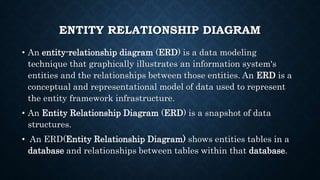
• An entity-relationship diagram (ERD) is a data modeling
technique that graphically illustrates an information system's
entities and the relationships between those entities. An ERD is a
conceptual and representational model of data used to represent
the entity framework infrastructure.
• An Entity Relationship Diagram (ERD) is a snapshot of data
structures.
• An ERD(Entity Relationship Diagram) shows entities tables in a
database and relationships between tables within that database.
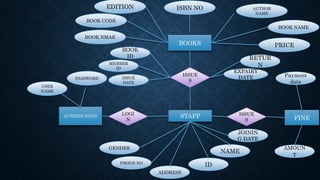
ISBN NO AUTHOR
NAME
BOOK NAME
PRICE
EDITION
BOOK CODE
BOOK NMAE
BOOKS
ISSUE
S
BOOK
ID
MEMBER
ID
ISSUE
DATE
USER
NAME
PASSWORD
STAFFLOGI
N
AUTHETCATION
RETUR
N
EXPAIRY
DATE Payment
data
GENDER
PHONE NO
ADDRESS
ID
NAME
JOININ
G DATE
ISSUE
S FINE
AMOUN
T
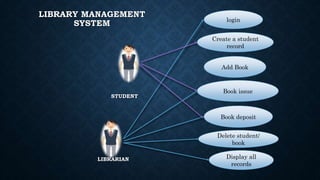
USE -CASE DIAGRAM
USE-CASE DIAGRAM
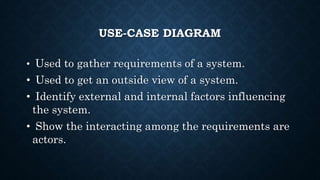
• Used to gather requirements of a system.
• Used to get an outside view of a system.
• Identify external and internal factors influencing
the system.
• Show the interacting among the requirements are
actors.
LIBRARY MANAGEMENT
SYSTEM
STUDENT
LIBRARIAN
login
Create a student
record
Add Book
Book deposit
Book issue
Delete student/
book
Display all
records
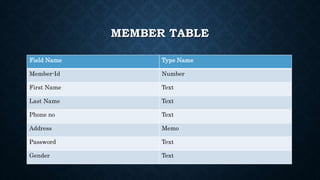
MEMBER TABLE
Field Name Type Name
Member-Id Number
First Name Text
Last Name Text
Phone no Text
Address Memo
Password Text
Gender Text
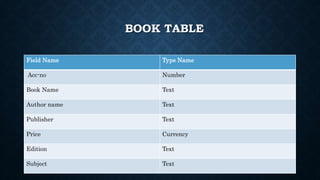
BOOK TABLE
Field Name Type Name
Acc-no Number
Book Name Text
Author name Text
Publisher Text
Price Currency
Edition Text
Subject Text
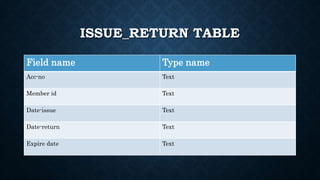
ISSUE_RETURN TABLE
Field name Type name
Acc-no Text
Member id Text
Date-issue Text
Date-return Text
Expire date Text
MODULES
• LOGIN
• SIGNUP
• BOOKS
• BOOK SEARCH
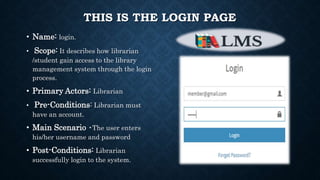
THIS IS THE LOGIN PAGE
• Name: login.
• Scope: It describes how librarian
/student gain access to the library
management system through the login
process.
• Primary Actors: Librarian
• Pre-Conditions: Librarian must
have an account.
• Main Scenario •The user enters
his/her username and password
• Post-Conditions: Librarian
successfully login to the system.
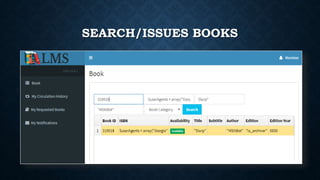
SEARCH/ISSUES BOOKS
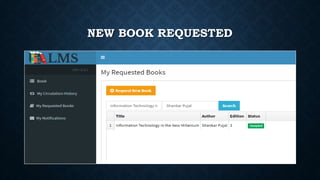
NEW BOOK REQUESTED
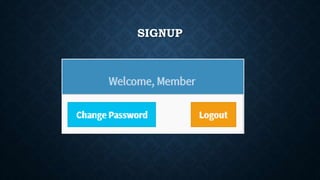
SIGNUP
HTTP://LMS.XERONEIT.NET/
SQL(SEQUENCE QUERY LANGUAGE)
• SQL is used to communicate with a database.
According to ANSI (American National Standards
Institute), it is the standard language for
relational database management systems. SQL
statements are used to perform tasks such as
update data on a database, or retrieve data from a
database.
TYPES OF SQL COMMANDS
• DDL (Data Definition Language)
• DML (Data Manipulation Language)
• DQL (Data Query Language)
• DCL (Data Control Language)
• Data administration commands.
• Transactional control commands.
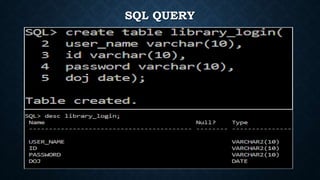
SQL CODING:-
SQL QUERY
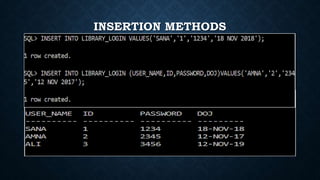
INSERTION METHODS
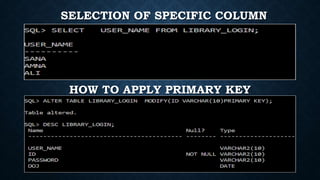
HOW TO APPLY PRIMARY KEY
SELECTION OF SPECIFIC COLUMN
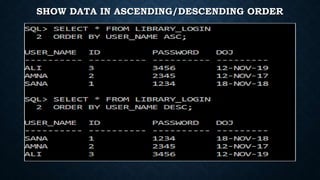
SHOW DATA IN ASCENDING/DESCENDING ORDER
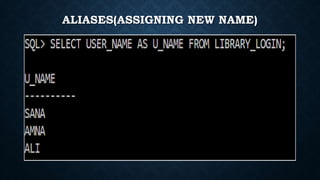
ALIASES(ASSIGNING NEW NAME)
UNIVERSITY OF CENTRAL PUNJAB

Presentation LIBRARY MANAGEMENT SYSTEM

  • 2.
    GROUP MEMBERS • HALEEMASADIA 0007 • AMNA BIBI 0023
  • 3.
    INTRODUCTION A library managementsystem, also known as an automated library system is software that has been developed to handle basic housekeeping functions of a library. It’s a well organized software solution for a library. It help to provide information on any book present in library to the user as well as staff member.
  • 4.
    PURPOSE • TO MAKETHE EXISTING SYSTEM MORE EFFICIENT. • TO PROVIDE A USER FRIENDLY ENVIRONMENT. • MAKE FUNCTIONALITIES OF LIBRARY FASTER. • PROVIDE A SYSTEM WHERE THE LIBRARY STAFF CAN CATCH DEFAULTERS AND NOT LET THEM ESCAPE.
  • 5.
  • 7.
  • 12.
  • 13.
    ENTITY RELATIONSHIP DIAGRAM •An entity-relationship diagram (ERD) is a data modeling technique that graphically illustrates an information system's entities and the relationships between those entities. An ERD is a conceptual and representational model of data used to represent the entity framework infrastructure. • An Entity Relationship Diagram (ERD) is a snapshot of data structures. • An ERD(Entity Relationship Diagram) shows entities tables in a database and relationships between tables within that database.
  • 14.
    ISBN NO AUTHOR NAME BOOKNAME PRICE EDITION BOOK CODE BOOK NMAE BOOKS ISSUE S BOOK ID MEMBER ID ISSUE DATE USER NAME PASSWORD STAFFLOGI N AUTHETCATION RETUR N EXPAIRY DATE Payment data GENDER PHONE NO ADDRESS ID NAME JOININ G DATE ISSUE S FINE AMOUN T
  • 15.
  • 16.
    USE-CASE DIAGRAM • Usedto gather requirements of a system. • Used to get an outside view of a system. • Identify external and internal factors influencing the system. • Show the interacting among the requirements are actors.


  • 17.
    LIBRARY MANAGEMENT SYSTEM STUDENT LIBRARIAN login Create astudent record Add Book Book deposit Book issue Delete student/ book Display all records
  • 18.
    MEMBER TABLE Field NameType Name Member-Id Number First Name Text Last Name Text Phone no Text Address Memo Password Text Gender Text
  • 19.
    BOOK TABLE Field NameType Name Acc-no Number Book Name Text Author name Text Publisher Text Price Currency Edition Text Subject Text
  • 20.
    ISSUE_RETURN TABLE Field nameType name Acc-no Text Member id Text Date-issue Text Date-return Text Expire date Text
  • 21.
    MODULES • LOGIN • SIGNUP •BOOKS • BOOK SEARCH
  • 23.
    THIS IS THELOGIN PAGE • Name: login. • Scope: It describes how librarian /student gain access to the library management system through the login process. • Primary Actors: Librarian • Pre-Conditions: Librarian must have an account. • Main Scenario •The user enters his/her username and password • Post-Conditions: Librarian successfully login to the system.
  • 24.
  • 25.
  • 26.
  • 27.
  • 28.
    SQL(SEQUENCE QUERY LANGUAGE) •SQL is used to communicate with a database. According to ANSI (American National Standards Institute), it is the standard language for relational database management systems. SQL statements are used to perform tasks such as update data on a database, or retrieve data from a database.
  • 29.
    TYPES OF SQLCOMMANDS • DDL (Data Definition Language) • DML (Data Manipulation Language) • DQL (Data Query Language) • DCL (Data Control Language) • Data administration commands. • Transactional control commands.
  • 30.
  • 31.
  • 32.
  • 33.
    HOW TO APPLYPRIMARY KEY SELECTION OF SPECIFIC COLUMN
  • 34.
    SHOW DATA INASCENDING/DESCENDING ORDER
  • 35.
  • 37.