Computers are used in banks for a variety of reasons. They help 
bank personnel operate more efficiently and effectively. 
Computers are used to track certain transactions and they help 
process other customer information as well. Without computers, 
it would be very hard for a bank to offer good customer service 
day in and day out. Computers help a bank save time and 
money, and can be used as an aid to generate profits.
APPLICATION OF COMPUTER IN BANK: 
• Automated Teller Machine (ATM) 
• Cash Depositing Machine 
• Green channel 
• Mobile Banking 
• Internet Banking 
• Core Banking System
• ATM is an electronic telecommunication device that enables the 
customers of a financial institution to perform financial 
transactions without the need for a human cashier, or clerk. 
• On most modern ATMs, the customer is identified by inserting a 
plastic ATM card with a magnetic stripe or a plastic smart card 
with a chip that contains a unique card number and some 
security information such as an expiration date or CVV (Card 
Verification Value)..
ADVANTAGES 
• ATM offer the convenience of multiple locations 
• You don’t have to carry cash around with you 
• You can use it to pay some retail shops 
• You can withdraw cash at any time, day or night .The banks 
don’t need to be open 
• ATMs are faster than going to the bank-no long time
DISADVANTAGES 
• ATM may be off-line(system down) 
• You may be forget your PIN number 
• Training is needed 
• Chances of robbery & Virus
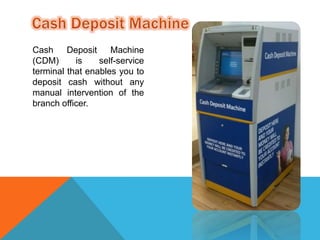
Cash Deposit Machine 
(CDM) is self-service 
terminal that enables you to 
deposit cash without any 
manual intervention of the 
branch officer.
SERVICES 
• Cash Deposits 
• Balance Enquiry 
• Viewing of previous bank transactions
FEATURES & BENEFITS 
• Instant credit in your account. 
• Immediate receipt 
• No need to fill cash deposit slips 
• No need to stand in long queues at the cash counter 
• No need to sort and arrange cash denomination wise 
• To use the CDM, you simply need to have Bank Debit Card or 
know the Bank’s account number in which you wish to deposit 
the money
DEPOSIT IN ACCOUNT USING DEBIT CARD: 
1. Insert debit card and enter PIN for validation 
2. Select account type (Saving, Current/ OD) 
3. Place the money in the cash deposit slot and click “Continue” 
4. Machine will sort the cash and will show denomination-wise 
amount to be deposited 
5. If correct, click “Deposit” 
6. Amount will be deposited and will be instantly credited to the 
account 
7. Receipt will be generated
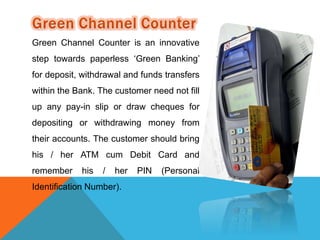
Green Channel Counter is an innovative 
step towards paperless ‘Green Banking’ 
for deposit, withdrawal and funds transfers 
within the Bank. The customer need not fill 
up any pay-in slip or draw cheques for 
depositing or withdrawing money from 
their accounts. The customer should bring 
his / her ATM cum Debit Card and 
remember his / her PIN (Personal 
Identification Number).
SERVICES 
• Cash deposits 
• Cash Withdrawals 
• Fund Transfer
FEATURES & BENEFITS 
• At the Green Channel Counter, there is a Transaction 
Processing Device (similar to Point of Sale Machine) available at 
the Single Window Operator (SWO). 
• Paper less work 
• There is no need to remember the 11 digit account number or 
carry passbook. Only the ATM cum Debit Card and PIN are 
needed. 
• Customer can use the Green Channel Counter without standing 
in queue and without taking the token. He / She may simply walk 
up to the Counter, Swipe their ATM card and execute the 
transaction. 
• Can transact up to Rs.40,000/- per transaction and no limit on 
number of transactions. 
• Odd amount (in round rupees) transactions are possible.
 Mobile banking is a system that allows customers of a financial institution 
to conduct a number of financial transactions through a mobile device 
such as a mobile phone or tablet. 
 The earliest mobile banking services were offered over SMS, a service 
known as SMS banking. With the introduction of smart phones with WAP 
support enabling the use of the mobile web in 1999, the first European 
banks started to offer mobile banking on this platform to their customers.
 In one academic model, mobile banking is defined as: 
Mobile Banking refers to provision and ailment of banking-and 
financial services with the help of mobile 
telecommunication devices. The scope of offered services 
may include facilities to conduct bank and stock market 
transactions, to administer accounts and to access 
customized information.“
ADVANTAGES 
• It utilizes the mobile connectivity of telecom operators and 
therefore does not require an internet connection. 
• With mobile banking, users of mobile phones can perform 
several financial functions conveniently and securely from their 
mobile. 
• You can check your account balance, review recent transaction, 
transfer funds, pay bills, locate ATMs, deposit cheques, manage 
investments, etc. 
• Mobile banking is available round the clock 24/7/365, it is easy 
and convenient and an ideal choice for accessing financial 
services for most mobile phone owners in the rural areas. 
• Mobile banking is said to be even more secure than 
online/internet banking
DISADVANTAGES 
• Mobile banking users are at risk of receiving fake SMS messages 
and scams. 
• The loss of a person’s mobile device often means that criminals 
can gain access to your mobile banking PIN and other sensitive 
information. 
• Modern mobile devices like Smartphone and tablets are better 
suited for mobile banking than old models of mobile phones and 
devices. 
• Regular users of mobile banking over time can accumulate 
significant charges from their banks
FUTURE FUNCTIONALITIES IN MOBILE BANKING 
Based on the 'International Review of Business Research Papers' from World 
business Institute, Australia, following are the key functional trends possible 
in world of Mobile Banking; 
 With the advent of technology and increasing use of smartphone and 
tablet based devices, the use of Mobile Banking functionality would enable 
customer connect across entire customer life cycle . 
 current mobile banking objectives of say building relationships, reducing 
cost, achieving new revenue stream will transform to enable new 
objectives targeting higher level goals such as building brand of the 
banking organization. 
 Emerging technology and functionalities would enable to create new ways 
of lead generation, prospecting as well as developing deep customer 
relationship and mobile banking world would achieve superior customer 
experience with bi-directional communications.
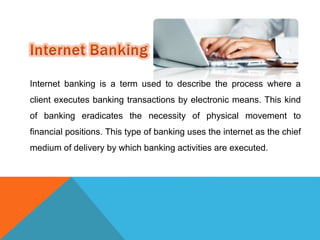
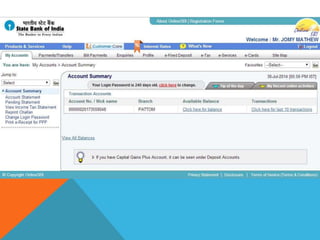
Internet banking is a term used to describe the process where a 
client executes banking transactions by electronic means. This kind 
of banking eradicates the necessity of physical movement to 
financial positions. This type of banking uses the internet as the chief 
medium of delivery by which banking activities are executed.
CLASSIFICATION OF THE ACTIVITIES 
Non-transactional 
• Account balance viewing 
• Viewing of previous bank transactions 
• Bank statement downloading 
• Viewing of images of paid cheques 
• M banking and E banking applications downloading 
• Provision of account/ bank statements
Transactional 
• Electronic funds transfer 
• Bill payments and wire transfers 
• Loan application and repayments 
• Buying investment products
ADVANTAGES 
• Convenience – Banks that offer internet banking are open for 
business transactions anywhere. services are available 24 hours a 
day and 365 days round the year. 
• At the touch of a button, actual time account balances and 
information are availed. 
• Online banking allows for easier updating and maintaining of direct 
accounts. 
• Transfer services – Online banking allows automatic funding of 
accounts from long established bank accounts via electronic funds 
transfers.
• Ease of monitoring – A client can monitor his/her spending via a 
virtual wallet through certain banks and applications and enable 
payments. 
• Ease of transaction – the speed of transaction is faster relative to 
use of ATM’s or customary banking. 
• Through Internet banking, you can keep an eye on your transactions 
and account balance all the time. 
• It also acts as a great medium for the banks to endorse their 
products and services. The services include loans, investment 
options, and many others.
DISADVANTAGES 
• Complex encryption software is used to protect account information. 
However, there are no perfect systems. Accounts are prone to 
hacking attacks, malware and illegal activities. 
• Learning – Banks with complicated sites can be difficult to navigate 
and may require one to read through tutorials to navigate them. 
• Transaction problems – face to face meeting is better in handling 
complex transactions and problems. 
• Understanding the usage of internet banking might be difficult for a 
beginner at the first go. Though there are some sites which offer a 
demo on how to access online accounts, but not all banks offer this 
facility. So, a person who is new, might face some difficulty.
• You cannot have access to online banking if you don’t have an 
internet connection; thus without the availability of internet access, it 
may not be useful. 
• Password security is a must. After receiving your password, do 
change it and memorize it otherwise your account may be misused 
by someone who gets to know your password inadvertently. 
• You cannot use it, in case, the bank’s server is down. 
• Another issue is that sometimes it becomes difficult to note whether 
your transaction was successful or not.
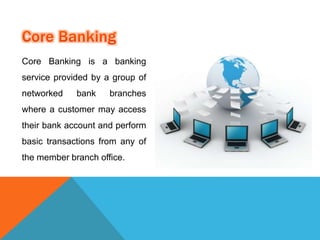
Core Banking is a banking 
service provided by a group of 
networked bank branches 
where a customer may access 
their bank account and perform 
basic transactions from any of 
the member branch office.
CENTRALIZED ONLINE REAL-TIME ELECTRONIC 
BANKING 
 Computer software is developed to perform various core operations 
of banking like recording transactions, passbook maintenance 
interest calculations on loans and deposits, customer records, 
balance of payments and withdrawals.
ADVANTAGES 
o Reduction in Transaction time 
o Minimum Chance of Mistake 
o Customer can have anywhere, more convenient and easier banking. 
o Can reduce the manpower, and that can be utilize in marketing etc. 
o Instant Information availability for decision support 
o Quick and Efficient implementation of information. 
o ATM, Mobile Banking, Internet Banking etc.
DISADVANTAGES 
o Excessive reliance on Technology. 
o Any Failure in computer system can cause entire network to go 
down. 
o If data is not protected properly and if proper care is not taken, 
hackers can gain access to the sensitive data.
E banking, internet banking and all services

E banking, internet banking and all services

  • 2.
    Computers are usedin banks for a variety of reasons. They help bank personnel operate more efficiently and effectively. Computers are used to track certain transactions and they help process other customer information as well. Without computers, it would be very hard for a bank to offer good customer service day in and day out. Computers help a bank save time and money, and can be used as an aid to generate profits.
  • 3.
    APPLICATION OF COMPUTERIN BANK: • Automated Teller Machine (ATM) • Cash Depositing Machine • Green channel • Mobile Banking • Internet Banking • Core Banking System
  • 4.
    • ATM isan electronic telecommunication device that enables the customers of a financial institution to perform financial transactions without the need for a human cashier, or clerk. • On most modern ATMs, the customer is identified by inserting a plastic ATM card with a magnetic stripe or a plastic smart card with a chip that contains a unique card number and some security information such as an expiration date or CVV (Card Verification Value)..
  • 5.
    ADVANTAGES • ATMoffer the convenience of multiple locations • You don’t have to carry cash around with you • You can use it to pay some retail shops • You can withdraw cash at any time, day or night .The banks don’t need to be open • ATMs are faster than going to the bank-no long time
  • 6.
    DISADVANTAGES • ATMmay be off-line(system down) • You may be forget your PIN number • Training is needed • Chances of robbery & Virus
  • 9.
    Cash Deposit Machine (CDM) is self-service terminal that enables you to deposit cash without any manual intervention of the branch officer.
  • 10.
    SERVICES • CashDeposits • Balance Enquiry • Viewing of previous bank transactions
  • 11.
    FEATURES & BENEFITS • Instant credit in your account. • Immediate receipt • No need to fill cash deposit slips • No need to stand in long queues at the cash counter • No need to sort and arrange cash denomination wise • To use the CDM, you simply need to have Bank Debit Card or know the Bank’s account number in which you wish to deposit the money
  • 12.
    DEPOSIT IN ACCOUNTUSING DEBIT CARD: 1. Insert debit card and enter PIN for validation 2. Select account type (Saving, Current/ OD) 3. Place the money in the cash deposit slot and click “Continue” 4. Machine will sort the cash and will show denomination-wise amount to be deposited 5. If correct, click “Deposit” 6. Amount will be deposited and will be instantly credited to the account 7. Receipt will be generated
  • 13.
    Green Channel Counteris an innovative step towards paperless ‘Green Banking’ for deposit, withdrawal and funds transfers within the Bank. The customer need not fill up any pay-in slip or draw cheques for depositing or withdrawing money from their accounts. The customer should bring his / her ATM cum Debit Card and remember his / her PIN (Personal Identification Number).
  • 14.
    SERVICES • Cashdeposits • Cash Withdrawals • Fund Transfer
  • 15.
    FEATURES & BENEFITS • At the Green Channel Counter, there is a Transaction Processing Device (similar to Point of Sale Machine) available at the Single Window Operator (SWO). • Paper less work • There is no need to remember the 11 digit account number or carry passbook. Only the ATM cum Debit Card and PIN are needed. • Customer can use the Green Channel Counter without standing in queue and without taking the token. He / She may simply walk up to the Counter, Swipe their ATM card and execute the transaction. • Can transact up to Rs.40,000/- per transaction and no limit on number of transactions. • Odd amount (in round rupees) transactions are possible.
  • 16.
     Mobile bankingis a system that allows customers of a financial institution to conduct a number of financial transactions through a mobile device such as a mobile phone or tablet.  The earliest mobile banking services were offered over SMS, a service known as SMS banking. With the introduction of smart phones with WAP support enabling the use of the mobile web in 1999, the first European banks started to offer mobile banking on this platform to their customers.
  • 17.
     In oneacademic model, mobile banking is defined as: Mobile Banking refers to provision and ailment of banking-and financial services with the help of mobile telecommunication devices. The scope of offered services may include facilities to conduct bank and stock market transactions, to administer accounts and to access customized information.“
  • 18.
    ADVANTAGES • Itutilizes the mobile connectivity of telecom operators and therefore does not require an internet connection. • With mobile banking, users of mobile phones can perform several financial functions conveniently and securely from their mobile. • You can check your account balance, review recent transaction, transfer funds, pay bills, locate ATMs, deposit cheques, manage investments, etc. • Mobile banking is available round the clock 24/7/365, it is easy and convenient and an ideal choice for accessing financial services for most mobile phone owners in the rural areas. • Mobile banking is said to be even more secure than online/internet banking
  • 19.
    DISADVANTAGES • Mobilebanking users are at risk of receiving fake SMS messages and scams. • The loss of a person’s mobile device often means that criminals can gain access to your mobile banking PIN and other sensitive information. • Modern mobile devices like Smartphone and tablets are better suited for mobile banking than old models of mobile phones and devices. • Regular users of mobile banking over time can accumulate significant charges from their banks
  • 20.
    FUTURE FUNCTIONALITIES INMOBILE BANKING Based on the 'International Review of Business Research Papers' from World business Institute, Australia, following are the key functional trends possible in world of Mobile Banking;  With the advent of technology and increasing use of smartphone and tablet based devices, the use of Mobile Banking functionality would enable customer connect across entire customer life cycle .  current mobile banking objectives of say building relationships, reducing cost, achieving new revenue stream will transform to enable new objectives targeting higher level goals such as building brand of the banking organization.  Emerging technology and functionalities would enable to create new ways of lead generation, prospecting as well as developing deep customer relationship and mobile banking world would achieve superior customer experience with bi-directional communications.
  • 21.
    Internet banking isa term used to describe the process where a client executes banking transactions by electronic means. This kind of banking eradicates the necessity of physical movement to financial positions. This type of banking uses the internet as the chief medium of delivery by which banking activities are executed.
  • 23.
    CLASSIFICATION OF THEACTIVITIES Non-transactional • Account balance viewing • Viewing of previous bank transactions • Bank statement downloading • Viewing of images of paid cheques • M banking and E banking applications downloading • Provision of account/ bank statements
  • 24.
    Transactional • Electronicfunds transfer • Bill payments and wire transfers • Loan application and repayments • Buying investment products
  • 25.
    ADVANTAGES • Convenience– Banks that offer internet banking are open for business transactions anywhere. services are available 24 hours a day and 365 days round the year. • At the touch of a button, actual time account balances and information are availed. • Online banking allows for easier updating and maintaining of direct accounts. • Transfer services – Online banking allows automatic funding of accounts from long established bank accounts via electronic funds transfers.
  • 26.
    • Ease ofmonitoring – A client can monitor his/her spending via a virtual wallet through certain banks and applications and enable payments. • Ease of transaction – the speed of transaction is faster relative to use of ATM’s or customary banking. • Through Internet banking, you can keep an eye on your transactions and account balance all the time. • It also acts as a great medium for the banks to endorse their products and services. The services include loans, investment options, and many others.
  • 27.
    DISADVANTAGES • Complexencryption software is used to protect account information. However, there are no perfect systems. Accounts are prone to hacking attacks, malware and illegal activities. • Learning – Banks with complicated sites can be difficult to navigate and may require one to read through tutorials to navigate them. • Transaction problems – face to face meeting is better in handling complex transactions and problems. • Understanding the usage of internet banking might be difficult for a beginner at the first go. Though there are some sites which offer a demo on how to access online accounts, but not all banks offer this facility. So, a person who is new, might face some difficulty.
  • 28.
    • You cannothave access to online banking if you don’t have an internet connection; thus without the availability of internet access, it may not be useful. • Password security is a must. After receiving your password, do change it and memorize it otherwise your account may be misused by someone who gets to know your password inadvertently. • You cannot use it, in case, the bank’s server is down. • Another issue is that sometimes it becomes difficult to note whether your transaction was successful or not.
  • 29.
    Core Banking isa banking service provided by a group of networked bank branches where a customer may access their bank account and perform basic transactions from any of the member branch office.
  • 30.
    CENTRALIZED ONLINE REAL-TIMEELECTRONIC BANKING  Computer software is developed to perform various core operations of banking like recording transactions, passbook maintenance interest calculations on loans and deposits, customer records, balance of payments and withdrawals.
  • 31.
    ADVANTAGES o Reductionin Transaction time o Minimum Chance of Mistake o Customer can have anywhere, more convenient and easier banking. o Can reduce the manpower, and that can be utilize in marketing etc. o Instant Information availability for decision support o Quick and Efficient implementation of information. o ATM, Mobile Banking, Internet Banking etc.
  • 32.
    DISADVANTAGES o Excessivereliance on Technology. o Any Failure in computer system can cause entire network to go down. o If data is not protected properly and if proper care is not taken, hackers can gain access to the sensitive data.