E - BANKING
Introduced
By
Priyanka shinde
Neelima Nikalje
Pushpendra Verma
Amit Doshi
WHAT IS E BANKING?
 Internet banking (or E-banking) means any user
with a personal computer and a browser can get
connected to his bank’s website to perform any
of the virtual banking functions.
 The term "electronic banking" or "e-banking"
covers both computer and telephone banking.
 In other words it is said that it is updated 'on-
line, real time'. The system is updated
immediately after every transaction
automatically.
WHY E BANKING?
 Differentiation of products from the others.
 A combination of regulatory and competitive
reasons
 Stress on branchless banking.
 Increasing volumes of banking transactions.
 Providing customers with cost effective
services
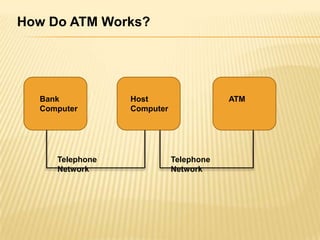
HOW ATM WORKS
 There are mainly two types of ATM’s
 Leased-line ATM
 Dial-up ATM machines
Bank
Computer
Host
Computer
ATM
Telephone
Network
Telephone
Network
How Do ATM Works?
A LEASED-LINE MACHINES
 Machine has 4 wire
 point to point dedicated telephone line which
helps in connecting it with the host processor
 preferred in places where the user volume is
high
 considered high end and the operating costs
of this type of a machine is very high.
DIAL-UP ATM MACHINES
 has a normal phone line with a modem and a
toll free number
 initial installation cost is very less
 operating costs only become a fraction of
that of a leased-line ATM.
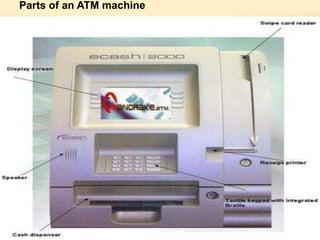
Parts of an ATM machine
PARTS OF ATM MACHINE
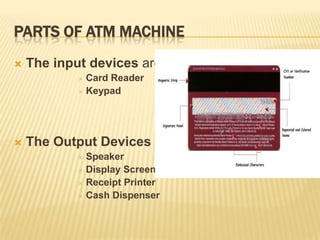
 The input devices are
 Card Reader
 Keypad
 The Output Devices
 Speaker
 Display Screen
 Receipt Printer
 Cash Dispenser
FUNCTIONS OF THE CASH DISPENSER
 Highly Efficient
 Main duty is to count each bill and give the
required amount
 If the money is worn, or even folded, they will be
moved to another section called the reject bin
 A complete record of each transaction made by
a particular ATM machine is recorded each day
and is kept as a journal.
 transaction is kept by the authorities for a period
of 2 years
ATM NETWORKING
 ATM Security
 An ATM card is secured as long as the PIN number is
kept as a secret.
 PIN number from your card as it is encrypted by strong
software’s like Triple Data Encryption Standard. To
keep your PIN number secure, there are a number of
ways.
 Select your own PIN number. Select a PIN number which
is easy to remember.
 It should not be anything that is associated to your birth
date, phone number or anything personal.
 Do not write down the PIN number on the back of your
ATM card.
MOBILE BANKING
 Current Mobile Banking Applications:
 SMS Banking
 WAP Banking
 STK (Sim Toolkit) Banking
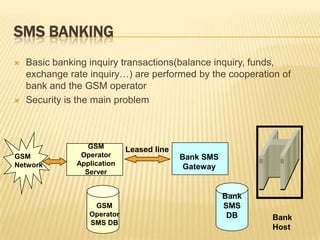
SMS BANKING
 Basic banking inquiry transactions(balance inquiry, funds,
exchange rate inquiry…) are performed by the cooperation of
bank and the GSM operator
 Security is the main problem
Leased line
GSM
Network
GSM
Operator
Application
Server
Bank SMS
Gateway
Bank
SMS
DB Bank
Host
GSM
Operator
SMS DB
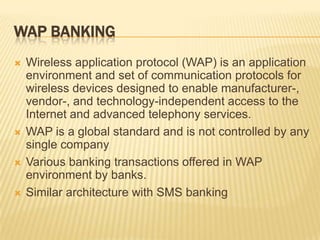
WAP BANKING
 Wireless application protocol (WAP) is an application
environment and set of communication protocols for
wireless devices designed to enable manufacturer-,
vendor-, and technology-independent access to the
Internet and advanced telephony services.
 WAP is a global standard and is not controlled by any
single company
 Various banking transactions offered in WAP
environment by banks.
 Similar architecture with SMS banking
SIM TOOLKIT
 SIM card enables to keep and load different applications.
 SIM Application Toolkit has been agreed as a GSM
standard
 SIM Application Toolkit is independent of phone
manufacturers and designs.
 SIM Application Toolkit allows the flexibility to update the
SIM to alter the services and download new services over
the air
 SIM Application Toolkit is designed as a client-server
application. On the server side, SimCard platform and the
client side, phone that supports the SIM Application
Toolkit
 In the near future, banks will start to offer banking
transactions in this platform.
E-SECURITY
 To improve the e-business, all the users should feel secure to perform the
transaction this environment
 The main concepts in e-security are:
 PKI (public key infrastructure) enables users of a basically unsecure public
network such as the Internet to securely and privately exchange data and
money through the use of a public and a private cryptographic key pair that is
obtained and shared through a trusted authority.
 Public key is a value provided by some designated authority as a key that,
combined with a private key derived from the public key, can be used to
effectively encryption messages and digital signature.
 Private or secret key is an encryption/decryption key known only to the party or
parties that exchange secret messages. Public key is used together with a
private key

E banking

  • 1.
    E - BANKING Introduced By Priyankashinde Neelima Nikalje Pushpendra Verma Amit Doshi
  • 2.
    WHAT IS EBANKING?  Internet banking (or E-banking) means any user with a personal computer and a browser can get connected to his bank’s website to perform any of the virtual banking functions.  The term "electronic banking" or "e-banking" covers both computer and telephone banking.  In other words it is said that it is updated 'on- line, real time'. The system is updated immediately after every transaction automatically.
  • 3.
    WHY E BANKING? Differentiation of products from the others.  A combination of regulatory and competitive reasons  Stress on branchless banking.  Increasing volumes of banking transactions.  Providing customers with cost effective services
  • 4.
    HOW ATM WORKS There are mainly two types of ATM’s  Leased-line ATM  Dial-up ATM machines
  • 5.
  • 6.
    A LEASED-LINE MACHINES Machine has 4 wire  point to point dedicated telephone line which helps in connecting it with the host processor  preferred in places where the user volume is high  considered high end and the operating costs of this type of a machine is very high.
  • 7.
    DIAL-UP ATM MACHINES has a normal phone line with a modem and a toll free number  initial installation cost is very less  operating costs only become a fraction of that of a leased-line ATM.
  • 8.
    Parts of anATM machine
  • 9.
    PARTS OF ATMMACHINE  The input devices are  Card Reader  Keypad  The Output Devices  Speaker  Display Screen  Receipt Printer  Cash Dispenser
  • 10.
    FUNCTIONS OF THECASH DISPENSER  Highly Efficient  Main duty is to count each bill and give the required amount  If the money is worn, or even folded, they will be moved to another section called the reject bin  A complete record of each transaction made by a particular ATM machine is recorded each day and is kept as a journal.  transaction is kept by the authorities for a period of 2 years
  • 11.
    ATM NETWORKING  ATMSecurity  An ATM card is secured as long as the PIN number is kept as a secret.  PIN number from your card as it is encrypted by strong software’s like Triple Data Encryption Standard. To keep your PIN number secure, there are a number of ways.  Select your own PIN number. Select a PIN number which is easy to remember.  It should not be anything that is associated to your birth date, phone number or anything personal.  Do not write down the PIN number on the back of your ATM card.
  • 12.
    MOBILE BANKING  CurrentMobile Banking Applications:  SMS Banking  WAP Banking  STK (Sim Toolkit) Banking
  • 13.
    SMS BANKING  Basicbanking inquiry transactions(balance inquiry, funds, exchange rate inquiry…) are performed by the cooperation of bank and the GSM operator  Security is the main problem Leased line GSM Network GSM Operator Application Server Bank SMS Gateway Bank SMS DB Bank Host GSM Operator SMS DB
  • 14.
    WAP BANKING  Wirelessapplication protocol (WAP) is an application environment and set of communication protocols for wireless devices designed to enable manufacturer-, vendor-, and technology-independent access to the Internet and advanced telephony services.  WAP is a global standard and is not controlled by any single company  Various banking transactions offered in WAP environment by banks.  Similar architecture with SMS banking
  • 15.
    SIM TOOLKIT  SIMcard enables to keep and load different applications.  SIM Application Toolkit has been agreed as a GSM standard  SIM Application Toolkit is independent of phone manufacturers and designs.  SIM Application Toolkit allows the flexibility to update the SIM to alter the services and download new services over the air  SIM Application Toolkit is designed as a client-server application. On the server side, SimCard platform and the client side, phone that supports the SIM Application Toolkit  In the near future, banks will start to offer banking transactions in this platform.
  • 16.
    E-SECURITY  To improvethe e-business, all the users should feel secure to perform the transaction this environment  The main concepts in e-security are:  PKI (public key infrastructure) enables users of a basically unsecure public network such as the Internet to securely and privately exchange data and money through the use of a public and a private cryptographic key pair that is obtained and shared through a trusted authority.  Public key is a value provided by some designated authority as a key that, combined with a private key derived from the public key, can be used to effectively encryption messages and digital signature.  Private or secret key is an encryption/decryption key known only to the party or parties that exchange secret messages. Public key is used together with a private key