Seamless Dynamics CRM telephony
integration, for all telephone systems.
Why would you want CRM telephony
integration?
1. Do you want all your telephone activity properly tracked in your CRM?
2. Do you want to increase your outbound talk-time by 50% ?
3. Do you have a budget of $150 per user?
4. Do you want enhance productivity by streaming processes and
automating workflows?
5. Do you want to improve your bottom line
- while improve your customer relationship
- while reducing your operating costs
Dynamics Telephony is for you
What functionality do you get?
1. Inbound CRM screen pop based on your customers telephone number
2. Click to dial from anywhere in your CRM
3. Call-back calendar management tool to ensure no appointments are missed
4. Automatic logging of all telephone activity in the CRM
5. All statistics stored in the CRM using standard CRM tools
6. A suite of real time dashboards to monitor telephone activity
7. A suite of management reports that capture both inbound and outbound
activity
8. CRM embedded dialler for organising your outbound list campaigns
9. No Server hardware required
Dynamics Telephony toolbar blends beautifully,
and actually results in MORE space for Dynamics CRM
Dynamics Telephony Toolbar
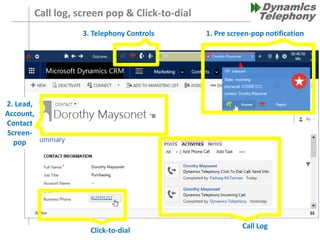
Call log, screen pop & Click-to-dial
1. Pre screen-pop notification3. Telephony Controls
2. Lead,
Account,
Contact
Screen-
pop
Click-to-dial
Call Log
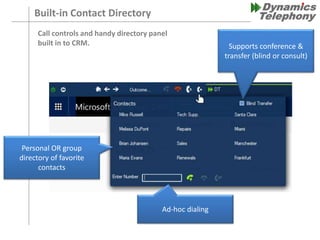
Built-in Contact Directory
Supports conference &
transfer (blind or consult)
Personal OR group
directory of favorite
contacts
Ad-hoc dialing
Call controls and handy directory panel
built in to CRM.
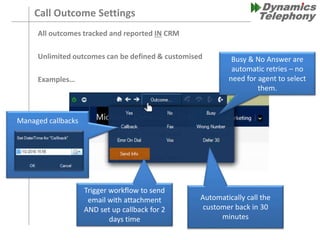
Call Outcome Settings
All outcomes tracked and reported IN CRM
Unlimited outcomes can be defined & customised
Examples…
Trigger workflow to send
email with attachment
AND set up callback for 2
days time
Automatically call the
customer back in 30
minutes
Busy & No Answer are
automatic retries – no
need for agent to select
them.
Managed callbacks
Shared, or personal, lists of contact/account/lead/phone-call entities that
Dynamics Telephony EMBEDDED PROGRESSIVE DIALER auto-feeds to a user, or
a team of users
Web leads
Customer Lists
Web Callbacks
Advanced Find
File import
Marketing Automation
Workflows
Etc.
Dynamics CRM Queue Agent Team
sales
Marketing queue auto-feed
Contact Sources
Progressive Dialer – Based on CRM Queues
PROGRESSIVE DIALER
• Auto-load the next record
• Preview time - configurable
• Auto-dial the phone call
• Auto-reschedule no answers, busies
• Outcomes – customizable, unlimited
• Wrap time - configurable
• Callbacks – same agent or group
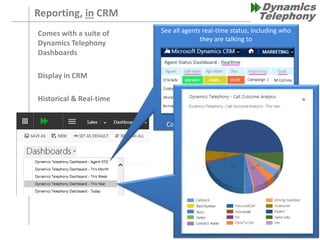
Reporting, in CRM
Comes with a suite of
Dynamics Telephony
Dashboards
Display in CRM
Historical & Real-time
See all agents real-time status, including who
they are talking to
Colour coded when thresholds exceeded.
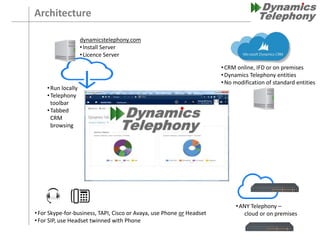
Architecture
dynamicstelephony.com
•Install Server
•Licence Server
•Run locally
•Telephony
toolbar
•Tabbed
CRM
browsing
•ANY Telephony –
cloud or on premises•For Skype-for-business, TAPI, Cisco or Avaya, use Phone or Headset
•For SIP, use Headset twinned with Phone
•CRM online, IFD or on premises
•Dynamics Telephony entities
•No modification of standard entities
Contact
Dynamics Telephony U.S. & Canada
Tel: +1 (603) 769 3041
Email: sales@dynamicstelephony.com
Website: www.dynamicstelephony.com
Dynamics Telephony EMEA
Tel: +44 203 432 6850
Email: dt_sales@dynamicstelephony.co.uk
Website: www.dynamicstelephony.com.uk
All Features:
http://dynamicstelephony.com/res/index.php/all-features/

Dynamics Telephony overview

  • 1.
    Seamless Dynamics CRMtelephony integration, for all telephone systems.
  • 2.
    Why would youwant CRM telephony integration? 1. Do you want all your telephone activity properly tracked in your CRM? 2. Do you want to increase your outbound talk-time by 50% ? 3. Do you have a budget of $150 per user? 4. Do you want enhance productivity by streaming processes and automating workflows? 5. Do you want to improve your bottom line - while improve your customer relationship - while reducing your operating costs Dynamics Telephony is for you
  • 3.
    What functionality doyou get? 1. Inbound CRM screen pop based on your customers telephone number 2. Click to dial from anywhere in your CRM 3. Call-back calendar management tool to ensure no appointments are missed 4. Automatic logging of all telephone activity in the CRM 5. All statistics stored in the CRM using standard CRM tools 6. A suite of real time dashboards to monitor telephone activity 7. A suite of management reports that capture both inbound and outbound activity 8. CRM embedded dialler for organising your outbound list campaigns 9. No Server hardware required
  • 4.
    Dynamics Telephony toolbarblends beautifully, and actually results in MORE space for Dynamics CRM Dynamics Telephony Toolbar
  • 5.
    Call log, screenpop & Click-to-dial 1. Pre screen-pop notification3. Telephony Controls 2. Lead, Account, Contact Screen- pop Click-to-dial Call Log
  • 6.
    Built-in Contact Directory Supportsconference & transfer (blind or consult) Personal OR group directory of favorite contacts Ad-hoc dialing Call controls and handy directory panel built in to CRM.
  • 7.
    Call Outcome Settings Alloutcomes tracked and reported IN CRM Unlimited outcomes can be defined & customised Examples… Trigger workflow to send email with attachment AND set up callback for 2 days time Automatically call the customer back in 30 minutes Busy & No Answer are automatic retries – no need for agent to select them. Managed callbacks
  • 8.
    Shared, or personal,lists of contact/account/lead/phone-call entities that Dynamics Telephony EMBEDDED PROGRESSIVE DIALER auto-feeds to a user, or a team of users Web leads Customer Lists Web Callbacks Advanced Find File import Marketing Automation Workflows Etc. Dynamics CRM Queue Agent Team sales Marketing queue auto-feed Contact Sources Progressive Dialer – Based on CRM Queues PROGRESSIVE DIALER • Auto-load the next record • Preview time - configurable • Auto-dial the phone call • Auto-reschedule no answers, busies • Outcomes – customizable, unlimited • Wrap time - configurable • Callbacks – same agent or group
  • 9.
    Reporting, in CRM Comeswith a suite of Dynamics Telephony Dashboards Display in CRM Historical & Real-time See all agents real-time status, including who they are talking to Colour coded when thresholds exceeded.
  • 10.
    Architecture dynamicstelephony.com •Install Server •Licence Server •Runlocally •Telephony toolbar •Tabbed CRM browsing •ANY Telephony – cloud or on premises•For Skype-for-business, TAPI, Cisco or Avaya, use Phone or Headset •For SIP, use Headset twinned with Phone •CRM online, IFD or on premises •Dynamics Telephony entities •No modification of standard entities
  • 11.
    Contact Dynamics Telephony U.S.& Canada Tel: +1 (603) 769 3041 Email: sales@dynamicstelephony.com Website: www.dynamicstelephony.com Dynamics Telephony EMEA Tel: +44 203 432 6850 Email: dt_sales@dynamicstelephony.co.uk Website: www.dynamicstelephony.com.uk All Features: http://dynamicstelephony.com/res/index.php/all-features/