SAP Solution Manager BPM
Business Process Monitoring Introduction BPM for Order to Cash BPM Screenshots Project Timeline & Deliverables BPM Specification Examples BPM Benefits Path Forward Agenda
Definition of Business Process Monitoring Business Process Monitoring is the  proactive and process-oriented monitoring of a company‘s core business processes It includes the observation of all  technical and application-related functions that are required for a smooth and reliable flow of the core business processes Goals of Business Process Monitoring Detect problem situations as early as possible in order to solve them as fast as possible -before they become critical for the business Enable the customer‘s Solution Support Organization to respond to and  to solve problems more proactively(i.e. before end-user call or open trouble tickets) Cross-application monitoring objects include: Dialog Performance, Update Errors, Background Jobs, Due List Log Throughput and Backlog Indicators (TBI) Issue resolution or escalation procedures can be configured in BP M Business Process Monitoring
Can you answer the following questions for your Order to Cash process? How many Sales Orders are open (not or only partially delivered)?  How many Sales Orders cannot be processed any further, because they are incomplete, have a delivery, billing or credit block? How many outbound deliveries are open (goods issue posting not complete)? How many picking transfer orders are open (not confirmed) in your warehouse management system? How many outbound deliveries have GI posted but no invoice was created? How many invoices have been created but were not printed?  How many sales invoices were not posted to FI? If yes, how long does it take to retrieve this information per sales organization, plant or warehouse? Why Focus on Business Process Monitoring? Application Oriented
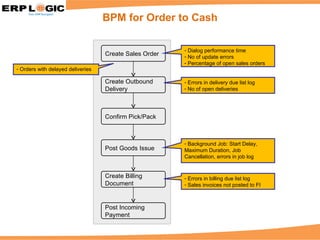
BPM for Order to Cash Create Sales Order Create Outbound Delivery Confirm Pick/Pack Post Goods Issue Create Billing Document Post Incoming Payment Dialog performance time No of update errors Percentage of open sales orders Errors in delivery due list log No of open deliveries Background Job: Start Delay, Maximum Duration, Job Cancellation, errors in job log Errors in billing due list log Sales invoices not posted to FI Orders with delayed deliveries
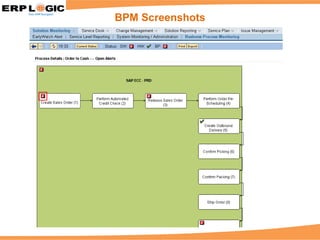
BPM Screenshots
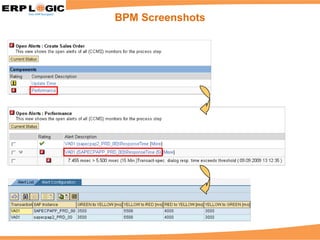
BPM Screenshots
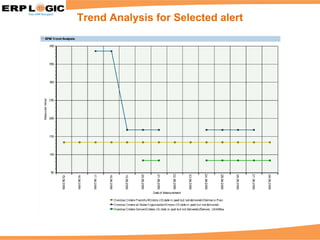
Trend Analysis for Selected alert
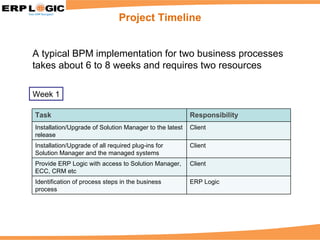
Project Timeline A typical BPM implementation for two business processes takes about 6 to 8 weeks and requires two resources Week 1 Task Responsibility Installation/Upgrade of Solution Manager to the latest release Client Installation/Upgrade of all required plug-ins for Solution Manager and the managed systems Client Provide ERP Logic with access to Solution Manager, ECC, CRM etc Client Identification of process steps in the business process ERP Logic
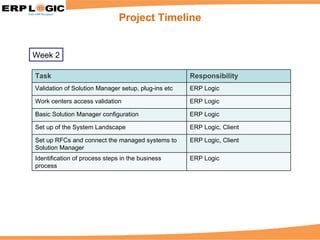
Project Timeline Week 2 Task Responsibility Validation of Solution Manager setup, plug-ins etc ERP Logic Work centers access validation ERP Logic Basic Solution Manager configuration ERP Logic Set up of the System Landscape ERP Logic, Client Set up RFCs and connect the managed systems to Solution Manager ERP Logic, Client Identification of process steps in the business process ERP Logic
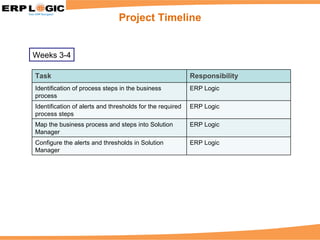
Project Timeline Weeks 3-4 Task Responsibility Identification of process steps in the business process ERP Logic Identification of alerts and thresholds for the required process steps ERP Logic Map the business process and steps into Solution Manager ERP Logic Configure the alerts and thresholds in Solution Manager ERP Logic
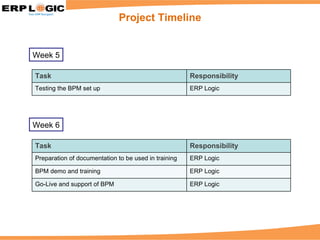
Project Timeline Week 5 Week 6 Task Responsibility Testing the BPM set up ERP Logic Task Responsibility Preparation of documentation to be used in training ERP Logic BPM demo and training ERP Logic Go-Live and support of BPM ERP Logic
Deliverables at the end of the project include: Business Process Monitoring for specified processes in Solution Manager Set-up Monitoring of Orders with delayed Delivery Set-up Monitoring of incorrectly processed Messages Set-up Monitoring of Sales Invoices not posted to FI Check Alerts for Orders with delayed Delivery Check Alerts for incorrectly processed Messages Check Alerts for Sales Invoices not posted to FI BI Integration (Trend Analysis) BPM Specifications (examples in the following slides) Training materials Expand Business Process by one Step Project Deliverables
BPM Specifications – Order to Cash
BPM Specifications – Procure to Pay
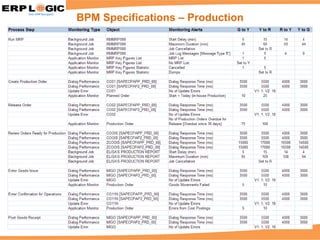
BPM Specifications – Production
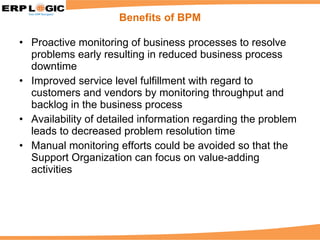
Proactive monitoring of business processes to resolve problems early resulting in reduced business process downtime Improved service level fulfillment with regard to customers and vendors by monitoring throughput and backlog in the business process Availability of detailed information regarding the problem leads to decreased problem resolution time Manual monitoring efforts could be avoided so that the Support Organization can focus on value-adding activities Benefits of BPM
Auto-reaction methods (email, SMS) lead to timely recognition of problem situations Eliminate the cost and complexity of third-party process monitoring systems Benefits of BPM
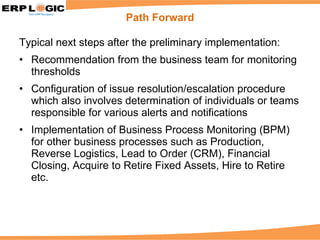
Typical next steps after the preliminary implementation: Recommendation from the business team for monitoring thresholds Configuration of issue resolution/escalation procedure which also involves determination of individuals or teams responsible for various alerts and notifications Implementation of Business Process Monitoring (BPM) for other business processes such as Production, Reverse Logistics, Lead to Order (CRM), Financial Closing, Acquire to Retire Fixed Assets, Hire to Retire etc. Path Forward
Thank You © 2009 ERP Logic Inc. All rights reserved.

Sap Solman Bpm Sales Presentation V2

  • 1.
  • 2.
    Business Process MonitoringIntroduction BPM for Order to Cash BPM Screenshots Project Timeline & Deliverables BPM Specification Examples BPM Benefits Path Forward Agenda
  • 3.
    Definition of BusinessProcess Monitoring Business Process Monitoring is the proactive and process-oriented monitoring of a company‘s core business processes It includes the observation of all technical and application-related functions that are required for a smooth and reliable flow of the core business processes Goals of Business Process Monitoring Detect problem situations as early as possible in order to solve them as fast as possible -before they become critical for the business Enable the customer‘s Solution Support Organization to respond to and to solve problems more proactively(i.e. before end-user call or open trouble tickets) Cross-application monitoring objects include: Dialog Performance, Update Errors, Background Jobs, Due List Log Throughput and Backlog Indicators (TBI) Issue resolution or escalation procedures can be configured in BP M Business Process Monitoring
  • 4.
    Can you answerthe following questions for your Order to Cash process? How many Sales Orders are open (not or only partially delivered)? How many Sales Orders cannot be processed any further, because they are incomplete, have a delivery, billing or credit block? How many outbound deliveries are open (goods issue posting not complete)? How many picking transfer orders are open (not confirmed) in your warehouse management system? How many outbound deliveries have GI posted but no invoice was created? How many invoices have been created but were not printed? How many sales invoices were not posted to FI? If yes, how long does it take to retrieve this information per sales organization, plant or warehouse? Why Focus on Business Process Monitoring? Application Oriented
  • 5.
    BPM for Orderto Cash Create Sales Order Create Outbound Delivery Confirm Pick/Pack Post Goods Issue Create Billing Document Post Incoming Payment Dialog performance time No of update errors Percentage of open sales orders Errors in delivery due list log No of open deliveries Background Job: Start Delay, Maximum Duration, Job Cancellation, errors in job log Errors in billing due list log Sales invoices not posted to FI Orders with delayed deliveries
  • 6.
  • 7.
  • 8.
    Trend Analysis forSelected alert
  • 9.
    Project Timeline Atypical BPM implementation for two business processes takes about 6 to 8 weeks and requires two resources Week 1 Task Responsibility Installation/Upgrade of Solution Manager to the latest release Client Installation/Upgrade of all required plug-ins for Solution Manager and the managed systems Client Provide ERP Logic with access to Solution Manager, ECC, CRM etc Client Identification of process steps in the business process ERP Logic
  • 10.
    Project Timeline Week2 Task Responsibility Validation of Solution Manager setup, plug-ins etc ERP Logic Work centers access validation ERP Logic Basic Solution Manager configuration ERP Logic Set up of the System Landscape ERP Logic, Client Set up RFCs and connect the managed systems to Solution Manager ERP Logic, Client Identification of process steps in the business process ERP Logic
  • 11.
    Project Timeline Weeks3-4 Task Responsibility Identification of process steps in the business process ERP Logic Identification of alerts and thresholds for the required process steps ERP Logic Map the business process and steps into Solution Manager ERP Logic Configure the alerts and thresholds in Solution Manager ERP Logic
  • 12.
    Project Timeline Week5 Week 6 Task Responsibility Testing the BPM set up ERP Logic Task Responsibility Preparation of documentation to be used in training ERP Logic BPM demo and training ERP Logic Go-Live and support of BPM ERP Logic
  • 13.
    Deliverables at theend of the project include: Business Process Monitoring for specified processes in Solution Manager Set-up Monitoring of Orders with delayed Delivery Set-up Monitoring of incorrectly processed Messages Set-up Monitoring of Sales Invoices not posted to FI Check Alerts for Orders with delayed Delivery Check Alerts for incorrectly processed Messages Check Alerts for Sales Invoices not posted to FI BI Integration (Trend Analysis) BPM Specifications (examples in the following slides) Training materials Expand Business Process by one Step Project Deliverables
  • 14.
  • 15.
    BPM Specifications –Procure to Pay
  • 16.
  • 17.
    Proactive monitoring ofbusiness processes to resolve problems early resulting in reduced business process downtime Improved service level fulfillment with regard to customers and vendors by monitoring throughput and backlog in the business process Availability of detailed information regarding the problem leads to decreased problem resolution time Manual monitoring efforts could be avoided so that the Support Organization can focus on value-adding activities Benefits of BPM
  • 18.
    Auto-reaction methods (email,SMS) lead to timely recognition of problem situations Eliminate the cost and complexity of third-party process monitoring systems Benefits of BPM
  • 19.
    Typical next stepsafter the preliminary implementation: Recommendation from the business team for monitoring thresholds Configuration of issue resolution/escalation procedure which also involves determination of individuals or teams responsible for various alerts and notifications Implementation of Business Process Monitoring (BPM) for other business processes such as Production, Reverse Logistics, Lead to Order (CRM), Financial Closing, Acquire to Retire Fixed Assets, Hire to Retire etc. Path Forward
  • 20.
    Thank You ©2009 ERP Logic Inc. All rights reserved.