SAP Dunning
                Configuration
       SAP R/3 ENTERPRISE ECC6
  Published by Team of SAP Consultants at
               SAPTOPJOBS
        Visit us at www.sap-topjobs.com

     Copyright 2009-11@SAPTOPJOBS


All rights reserved. No part of this publication may be
reproduced, stored in a retrieval system, or transmitted in any
form, or by any means electronic or mechanical including
photocopying, recording or any information storage and
retrieval system without permission in writing from
SAPTOPJOBS.
INDEX


1.   DUNNING ---------------------------------------------------------------------------------3

2.   DEFINE DUNNING AREAS---------------------------------------------------------4

3.   DEFINE DUNNING KEYS-----------------------------------------------------------5

4.   DEFINE DUNNING BLOCK REASONS ----------------------------------------6

5.   DEFINE DUNNING PROCEDURES ---------------------------------------------8

6.   CUSTOMER MASTER RECORD----------------------------------------------- 20
1. Dunning

Sometime the customers may not pay on time. In this case
you can send a payment reminder or a dunning notice to
remind them of their outstanding debts. You can configure
SAP system to dun the customers as well as vendors.
The system duns the open items from a customer or a vendor
in which the overdue item has created a debit balance.

Let us now go through the steps involved in configuring
Dunning.
2. Define Dunning Areas

IMG      Financial Accounting   Accounts Receivable and
Accounts Payable     Business Transactions     Dunning
   Basic Settings for Dunning     Define Dunning Areas

Dunning areas are used if several organizational units
are responsible for carrying out dunning within a
company code. These organizational units are represented by
dunning areas in the SAP system. Dunning areas can
correspond
to a division, a distribution channel, a sales organization or a
business area. The dunning procedure is controlled and the
dunning notices are sent separately per dunning area.

The use of dunning area is optional.

Click

Update the following:


Click
3. Define Dunning Keys

IMG   Financial Accounting     Accounts Receivable and
Accounts Payable   Business Transactions     Dunning
Basic Settings for Dunning    Define Dunning Keys

Here we can define dunning keys. We will use the SAP
standard Dunning keys which are as follows.


If you select Print sep, then the items are displayed separately.
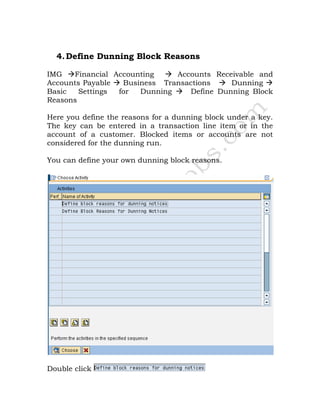
4. Define Dunning Block Reasons

IMG   Financial Accounting    Accounts Receivable and
Accounts Payable  Business Transactions    Dunning
Basic   Settings for  Dunning    Define Dunning Block
Reasons

Here you define the reasons for a dunning block under a key.
The key can be entered in a transaction line item or in the
account of a customer. Blocked items or accounts are not
considered for the dunning run.

You can define your own dunning block reasons.


Double click
Click
5. Define Dunning Procedures

IMG      Financial Accounting     Accounts Receivable and
Accounts Payable     Business Transactions     Dunning
Dunning Procedure     Define Dunning Procedures

Here you enter the settings that control the dunning program

Dunning procedures are company code independent.
They determine the dunning interval, the grace periods
for the due date determination, and the number of
dunning levels.

Click

Update the following:-

We are configuring the dunning program for items which are
in arrears for 30 days. We do not want any interest to be
calculated.
Click

You will get a message “Reference dunning procedure has 0
dunning levels”

You can specify a fix charge or have the system
calculate the charge on the basis of percentage rate you
specify.

We will not configure any dunning charges, nevertheless
we see the configuration Screens.

Click

Click
Update the following


Click


For dunning levels we assign the number of days in arrears so
that the next letter is printed which is worded differently.

Click

Update the following:
Click

Click                   from the menu path as shown below


Click

Update the following:
Click

Click

Click

Click

Update the following:


Click
Click

Click

Update the following:


Click

Update the following:
Take a drop down in the field Form
Click   of the
Note down the form name and update in the field form


Click
Click
Click

Click
Click

Click
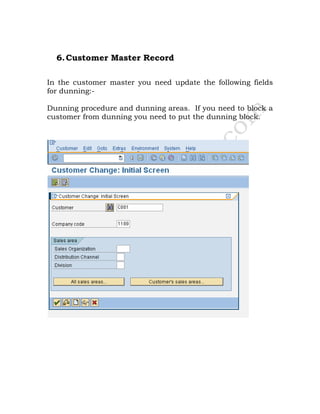
6. Customer Master Record

In the customer master you need update the following fields
for dunning:-

Dunning procedure and dunning areas. If you need to block a
customer from dunning you need to put the dunning block.
Good luck and take care.

http://www.sap-topjobs.com/SpecialPP/8431654231.html
SAP Dunning
                Configuration
       SAP R/3 ENTERPRISE ECC6
  Published by Team of SAP Consultants at
               SAPTOPJOBS
        Visit us at www.sap-topjobs.com

     Copyright 2009-11@SAPTOPJOBS


All rights reserved. No part of this publication may be
reproduced, stored in a retrieval system, or transmitted in any
form, or by any means electronic or mechanical including
photocopying, recording or any information storage and
retrieval system without permission in writing from
SAPTOPJOBS.

Dunningconfiguration ecc6

  • 1.
    SAP Dunning Configuration SAP R/3 ENTERPRISE ECC6 Published by Team of SAP Consultants at SAPTOPJOBS Visit us at www.sap-topjobs.com Copyright 2009-11@SAPTOPJOBS All rights reserved. No part of this publication may be reproduced, stored in a retrieval system, or transmitted in any form, or by any means electronic or mechanical including photocopying, recording or any information storage and retrieval system without permission in writing from SAPTOPJOBS.
  • 2.
    INDEX 1. DUNNING ---------------------------------------------------------------------------------3 2. DEFINE DUNNING AREAS---------------------------------------------------------4 3. DEFINE DUNNING KEYS-----------------------------------------------------------5 4. DEFINE DUNNING BLOCK REASONS ----------------------------------------6 5. DEFINE DUNNING PROCEDURES ---------------------------------------------8 6. CUSTOMER MASTER RECORD----------------------------------------------- 20
  • 3.
    1. Dunning Sometime thecustomers may not pay on time. In this case you can send a payment reminder or a dunning notice to remind them of their outstanding debts. You can configure SAP system to dun the customers as well as vendors. The system duns the open items from a customer or a vendor in which the overdue item has created a debit balance. Let us now go through the steps involved in configuring Dunning.
  • 4.
    2. Define DunningAreas IMG Financial Accounting Accounts Receivable and Accounts Payable Business Transactions Dunning Basic Settings for Dunning Define Dunning Areas Dunning areas are used if several organizational units are responsible for carrying out dunning within a company code. These organizational units are represented by dunning areas in the SAP system. Dunning areas can correspond to a division, a distribution channel, a sales organization or a business area. The dunning procedure is controlled and the dunning notices are sent separately per dunning area. The use of dunning area is optional. Click Update the following: Click
  • 5.
    3. Define DunningKeys IMG Financial Accounting Accounts Receivable and Accounts Payable Business Transactions Dunning Basic Settings for Dunning Define Dunning Keys Here we can define dunning keys. We will use the SAP standard Dunning keys which are as follows. If you select Print sep, then the items are displayed separately.
  • 6.
    4. Define DunningBlock Reasons IMG Financial Accounting Accounts Receivable and Accounts Payable Business Transactions Dunning Basic Settings for Dunning Define Dunning Block Reasons Here you define the reasons for a dunning block under a key. The key can be entered in a transaction line item or in the account of a customer. Blocked items or accounts are not considered for the dunning run. You can define your own dunning block reasons. Double click
  • 7.
  • 8.
    5. Define DunningProcedures IMG Financial Accounting Accounts Receivable and Accounts Payable Business Transactions Dunning Dunning Procedure Define Dunning Procedures Here you enter the settings that control the dunning program Dunning procedures are company code independent. They determine the dunning interval, the grace periods for the due date determination, and the number of dunning levels. Click Update the following:- We are configuring the dunning program for items which are in arrears for 30 days. We do not want any interest to be calculated.
  • 9.
    Click You will geta message “Reference dunning procedure has 0 dunning levels” You can specify a fix charge or have the system calculate the charge on the basis of percentage rate you specify. We will not configure any dunning charges, nevertheless we see the configuration Screens. Click Click
  • 10.
    Update the following Click Fordunning levels we assign the number of days in arrears so that the next letter is printed which is worded differently. Click Update the following:
  • 11.
    Click Click from the menu path as shown below Click Update the following:
  • 12.
  • 13.
  • 14.
    Take a dropdown in the field Form
  • 15.
    Click of the
  • 16.
    Note down theform name and update in the field form Click
  • 17.
  • 18.
  • 19.
  • 20.
    6. Customer MasterRecord In the customer master you need update the following fields for dunning:- Dunning procedure and dunning areas. If you need to block a customer from dunning you need to put the dunning block.
  • 21.
    Good luck andtake care. http://www.sap-topjobs.com/SpecialPP/8431654231.html
  • 22.
    SAP Dunning Configuration SAP R/3 ENTERPRISE ECC6 Published by Team of SAP Consultants at SAPTOPJOBS Visit us at www.sap-topjobs.com Copyright 2009-11@SAPTOPJOBS All rights reserved. No part of this publication may be reproduced, stored in a retrieval system, or transmitted in any form, or by any means electronic or mechanical including photocopying, recording or any information storage and retrieval system without permission in writing from SAPTOPJOBS.