

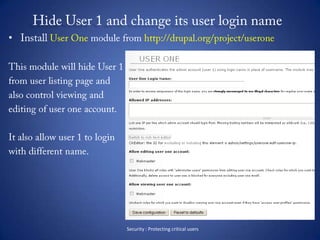
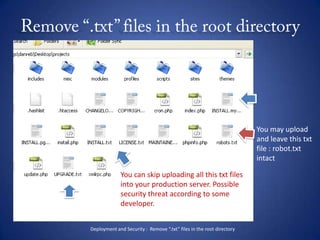
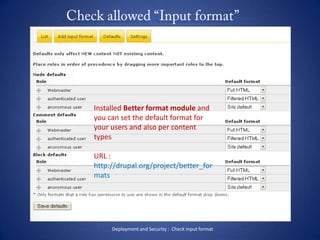
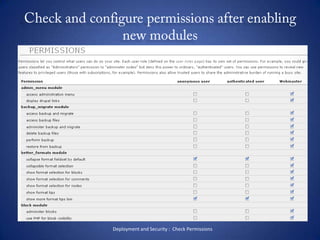

Checklist for Drupal site builder and web adminAdolfo G. Nasolhttp:// danreb.com
The TopicI’ve got the idea after attending on the last Drupal PH meet-up ( Jan 14, 2011)These are my list of best practice ( I hope it is )Drupal site building strategyDedicated for web admin, site builder, Drupal themer and junior developer and Drupal newbie.Purpose : to be able to hear feedback from fellow developer about their own strategy and practice.
About MeI am a Freelancer working as Drupal Site builder, Drupal Themer / Designer and Website adminA total of 1 year and 39 weeks since I started using Drupal and registered as a member in PhDrug -> http://groups.drupal.org/philippinesInformation and Communication Technology StudentShort Course trainers teaching Dreamweaver and Fireworks
Category checklistDeployment Performance Administration TroubleshootingSecurity
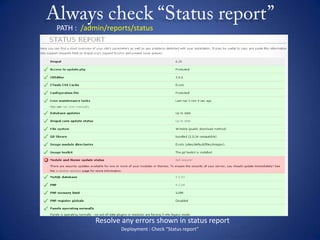
Always check “Status report”Deployment : Check “Status report”PATH :  /admin/reports/statusResolve any errors shown in status report
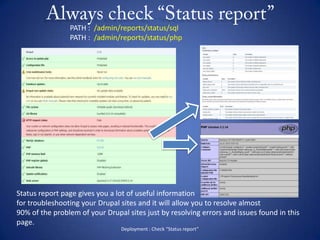
Always check “Status report”Deployment : Check “Status report”PATH :  /admin/reports/status/sqlPATH :  /admin/reports/status/phpStatus report page gives you a lot of useful informationfor troubleshooting your Drupal sites and it will allow you to resolve almost 90% of the problem of your Drupal sites just by resolving errors and issues found in this page.
Check the  “Site Information”Check if all information define here is correct such as “E-mail address and Site name”.       - use email address ending in sites domain Set the default front page, slogan if needed, footer and mission statementIf you installed Poormans cron module, you can set the time interval in this page for running cron.Deployment :  Check the “ Site Information”
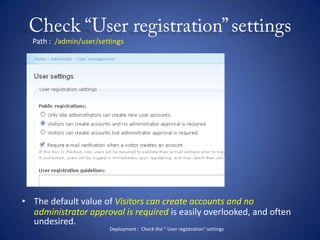
Check “User registration” settingsPath :  /admin/user/settingsThe default value of Visitors can create accounts and no administrator approval is required is easily overlooked, and often undesired.Deployment :  Check the “ User registration” settings
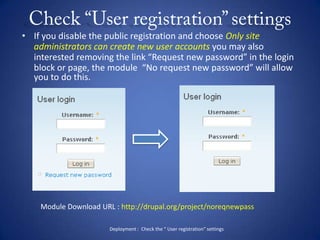
Check “User registration” settingsIf you disable the public registration and choose Only site administrators can create new user accounts you may also interested removing the link “Request new password” in the login block or page, the module  “No request new password” will allow you to do this.Module Download URL : http://drupal.org/project/noreqnewpassDeployment :  Check the “ User registration” settings
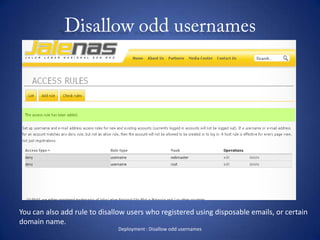
Disallow odd usernamesIf you enabled the public registration for your Drupal sites, It is recommended that you prevent users from registering on your website with some odd usernames like: root, admin, webmaster, administrator etc.To prevent this from happening:      - Go to Administer > User management > Access rules > Add rule       - Set Access type to Deny      - Set Rule type to Username      - In Mask type root       - Click the Add rule buttonRepeat this for every username you don't want to be created on your site.Deployment : Disallow odd usernames
Disallow odd usernamesDeployment : Disallow odd usernamesYou can also add rule to disallow users who registered using disposable emails, or certaindomain name.
Confirm “Email” settingsOften, placeholder email addresses will be filled in during development, and should be updated before deployment. Try to start with the correct addresses from the beginning when possible. In addition to Drupal's global site mail, email addresses is stored in a variety of places: The admin user's account, contact forms, webforms, ubercart etc.Deployment :  Confirm  “ Email” settings
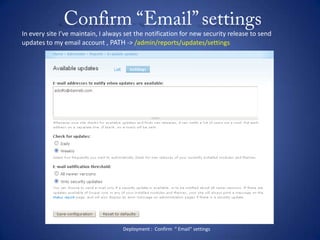
Confirm “Email” settingsIn every site I’ve maintain, I always set the notification for new security release to send updates to my email account , PATH -> /admin/reports/updates/settingsDeployment :  Confirm  “ Email” settings
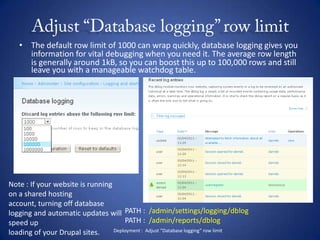
Adjust “Database logging” row limitThe default row limit of 1000 can wrap quickly, database logging gives you information for vital debugging when you need it. The average row length is generally around 1kB, so you can boost this up to 100,000 rows and still leave you with a manageable watchdog table.Note : If your website is running on a shared hosting account, turning off database logging and automatic updates will speed uploading of your Drupal sites. PATH :  /admin/settings/logging/dblogPATH :  /admin/reports/dblogDeployment :  Adjust “Database logging” row limit
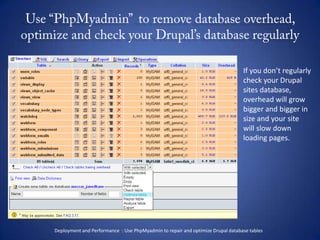
Use “PhpMyadmin”  to remove database overhead, optimize and check your Drupal’s database regularlyIf you don’t regularlycheck your Drupalsites database, overhead will growbigger and bigger insize and your sitewill slow down loading pages.Deployment and Performance  : Use PhpMyadmin to repair and optimize Drupal database tables
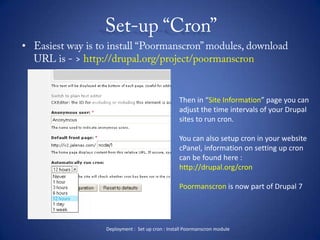
Set-up “Cron” Easiest way is to install “Poormanscron” modules, download URL is - > http://drupal.org/project/poormanscronThen in “Site Information” page you canadjust the time intervals of your Drupal sites to run cron.You can also setup cron in your websitecPanel, information on setting up croncan be found here :http://drupal.org/cronPoormanscron is now part of Drupal 7Deployment :  Set up cron : Install Poormanscron module
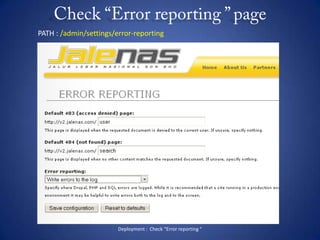
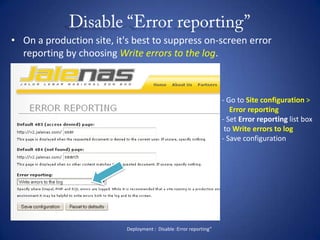
Check “Error reporting ” pageDeployment :  Check “Error reporting “PATH : /admin/settings/error-reporting
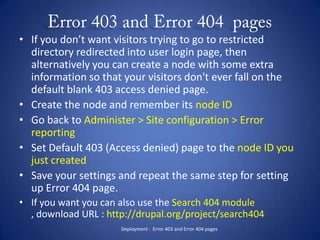
 Error 403 and Error 404  pagesIf you don’t want visitors trying to go to restricted directory redirected into user login page, then alternatively you can create a node with some extra information so that your visitors don't ever fall on the default blank 403 access denied page.Create the node and remember its node IDGo back to Administer > Site configuration > Error reportingSet Default 403 (Access denied) page to the node ID you just createdSave your settings and repeat the same step for setting up Error 404 page.If you want you can also use the Search 404 module , download URL : http://drupal.org/project/search404 Deployment :  Error 403 and Error 404 pages
 Disable “Error reporting”On a production site, it's best to suppress on-screen error reporting by choosing Write errors to the log.- Go to Site configuration >     Error reporting Set Error reporting list box to Write errors to log- Save configurationDeployment :  Disable :Error reporting”
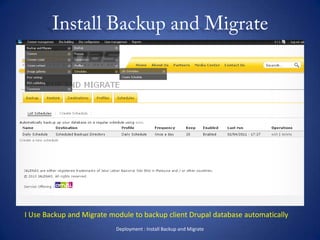
Install Backup and MigrateDeployment : Install Backup and MigrateI Use Backup and Migrate module to backup client Drupal database automatically
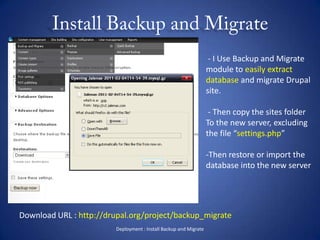
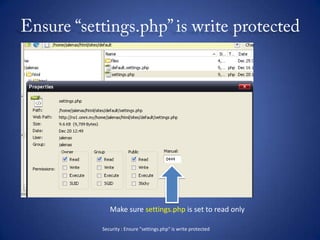
Install Backup and MigrateDeployment : Install Backup and Migrate - I Use Backup and Migrate module to easily extract database and migrate Drupal site. - Then copy the sites folder To the new server, excluding the file “settings.php”Then restore or import the database into the new serverDownload URL : http://drupal.org/project/backup_migrate
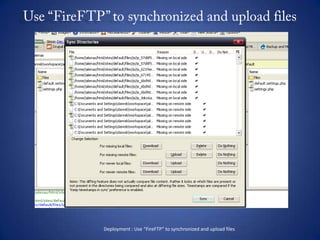
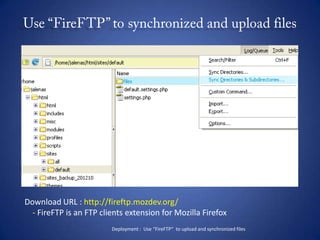
Use “FireFTP” to synchronized and upload filesDeployment : Use “FireFTP” to synchronized and upload files
Use “FireFTP” to synchronized and upload filesDownload URL : http://fireftp.mozdev.org/    - FireFTP is an FTP clients extension for Mozilla FirefoxDeployment :  Use “FireFTP”  to upload and synchronized files
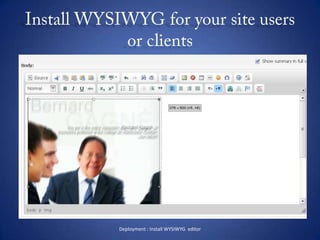
Install WYSIWYG for your site users or clientsDeployment : Install WYSIWYG  editor
Install WYSIWYG for your site users or clientsDeployment : Install WYSIWYG  editorI used the combination of the following  modules :  CKEditor  - http://drupal.org/project/ckeditor
  CKEditor link  - http://drupal.org/project/ckeditor_link
  CKEditor SWF - http://drupal.org/project/ckeditor_swf
  Image resize filter - http://drupal.org/project/image_resize_filter
  IMCE - http://drupal.org/project/imce
  IMCE Mkdir - http://drupal.org/project/imce_mkdir
  IMCE Rename - http://drupal.org/project/imce_rename
  IMCE Crop - http://drupal.org/project/imce_crop
  Better Formats - http://drupal.org/project/better_formatsWHEW! That’s a lot of modules!
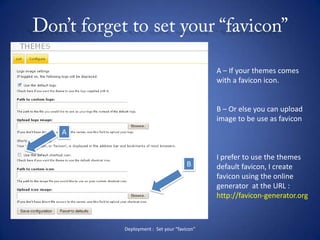
Don’t forget to set your “favicon”Deployment :  Set your “favicon”A – If your themes comeswith a favicon icon.B – Or else you can uploadimage to be use as faviconI prefer to use the themesdefault favicon, I createfavicon using the onlinegenerator  at the URL :http://favicon-generator.orgAB
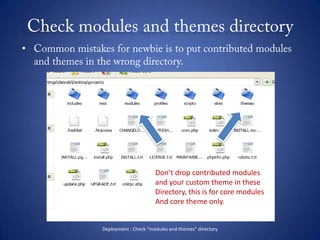
Check modules and themes directoryCommon mistakes for newbie is to put contributed modules and themes in the wrong directory.Don’t drop contributed modulesand your custom theme in theseDirectory, this is for core modulesAnd core theme only.Deployment : Check “modules and themes” directory
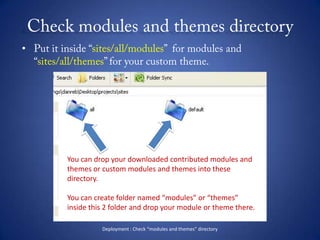
Check modules and themes directoryPut it inside “sites/all/modules”  for modules and “sites/all/themes” for your custom theme.You can drop your downloaded contributed modules and themes or custom modules and themes into these directory.You can create folder named “modules” or “themes” inside this 2 folder and drop your module or theme there.Deployment : Check “modules and themes” directory
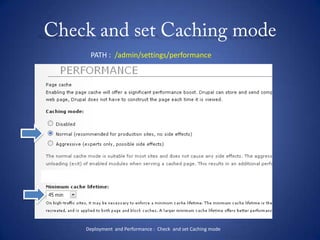
Check and set Caching modePATH :  /admin/settings/performanceDeployment  and Performance :  Check  and set Caching mode
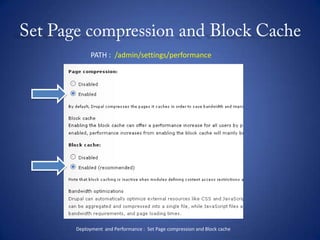
Set Page compression and Block CachePATH :  /admin/settings/performanceDeployment  and Performance :  Set Page compression and Block cache
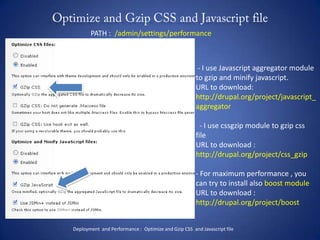
Optimize and Gzip CSS and Javascript filePATH :  /admin/settings/performance - I use Javascript aggregator module to gzip and minify javascript.URL to download: http://drupal.org/project/javascript_aggregator  - I use cssgzip module to gzip css fileURL to download :http://drupal.org/project/css_gzip For maximum performance , you can try to install also boost moduleURL to download :http://drupal.org/project/boostDeployment  and Performance :  Optimize and Gzip CSS  and Javascript file
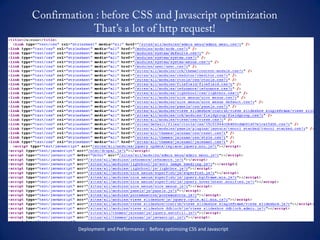
Confirmation : before CSS and Javascript optimization That’s a lot of http request!Deployment  and Performance :  Before optimizing CSS and Javascript
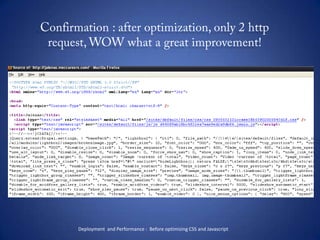
Confirmation : after optimization, only 2 http request, WOW what a great improvement!Deployment  and Performance :  Before optimizing CSS and Javascript
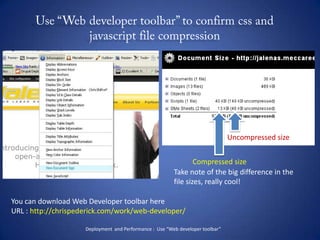
Use “Web developer toolbar” to confirm css and javascript file compressionUncompressed sizeCompressed sizeTake note of the big difference in thefile sizes, really cool!You can download Web Developer toolbar hereURL : http://chrispederick.com/work/web-developer/Deployment  and Performance :  Use “Web developer toolbar”
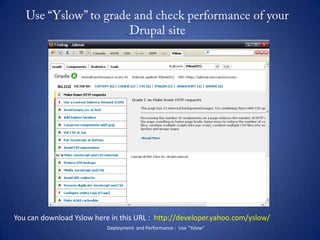
Use “Yslow” to grade and check performance of your Drupal site You can download Yslow here in this URL :  http://developer.yahoo.com/yslow/Deployment  and Performance :  Use “Yslow”
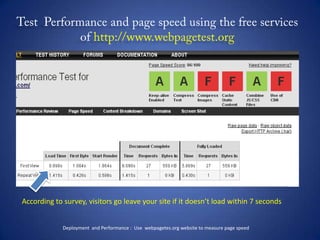
Test  Performance and page speed using the free services of http://www.webpagetest.orgAccording to survey, visitors go leave your site if it doesn’t load within 7 secondsDeployment  and Performance :  Use  webpagetes.org website to measure page speed
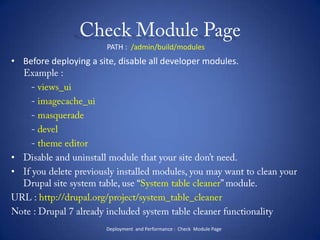
Check Module PagePATH :  /admin/build/modulesBefore deploying a site, disable all developer modules.     Example :        - views_ui        - imagecache_ui        - masquerade        - devel- theme editorDisable and uninstall module that your site don’t need.If you delete previously installed modules, you may want to clean your Drupal site system table, use “System table cleaner” module.URL : http://drupal.org/project/system_table_cleanerNote : Drupal 7 already included system table cleaner functionalityDeployment  and Performance :  Check  Module Page
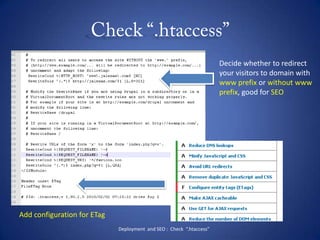
Check “.htaccess”Decide whether to redirectyour visitors to domain withwww prefix or without wwwprefix, good for SEOAdd configuration for ETagDeployment  and SEO :  Check  “.htaccess”
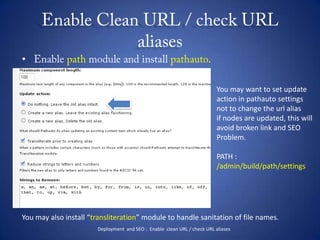
Enable Clean URL / check URL aliasesEnable path module and install pathauto.You may want to set updateaction in pathauto settingsnot to change the url aliasif nodes are updated, this willavoid broken link and SEO Problem.PATH : /admin/build/path/settingsYou may also install “transliteration” module to handle sanitation of file names.Deployment  and SEO :  Enable  clean URL / check URL aliases

Drupal Checklist for Site Builder and Web admin

  • 1.
    Checklist for Drupalsite builder and web adminAdolfo G. Nasolhttp:// danreb.com
  • 2.
    The TopicI’ve gotthe idea after attending on the last Drupal PH meet-up ( Jan 14, 2011)These are my list of best practice ( I hope it is )Drupal site building strategyDedicated for web admin, site builder, Drupal themer and junior developer and Drupal newbie.Purpose : to be able to hear feedback from fellow developer about their own strategy and practice.
  • 3.
    About MeI ama Freelancer working as Drupal Site builder, Drupal Themer / Designer and Website adminA total of 1 year and 39 weeks since I started using Drupal and registered as a member in PhDrug -> http://groups.drupal.org/philippinesInformation and Communication Technology StudentShort Course trainers teaching Dreamweaver and Fireworks
  • 4.
    Category checklistDeployment PerformanceAdministration TroubleshootingSecurity
  • 5.
    Always check “Statusreport”Deployment : Check “Status report”PATH : /admin/reports/statusResolve any errors shown in status report
  • 6.
    Always check “Statusreport”Deployment : Check “Status report”PATH : /admin/reports/status/sqlPATH : /admin/reports/status/phpStatus report page gives you a lot of useful informationfor troubleshooting your Drupal sites and it will allow you to resolve almost 90% of the problem of your Drupal sites just by resolving errors and issues found in this page.
  • 7.
    Check the “Site Information”Check if all information define here is correct such as “E-mail address and Site name”. - use email address ending in sites domain Set the default front page, slogan if needed, footer and mission statementIf you installed Poormans cron module, you can set the time interval in this page for running cron.Deployment : Check the “ Site Information”
  • 8.
    Check “User registration”settingsPath : /admin/user/settingsThe default value of Visitors can create accounts and no administrator approval is required is easily overlooked, and often undesired.Deployment : Check the “ User registration” settings
  • 9.
    Check “User registration”settingsIf you disable the public registration and choose Only site administrators can create new user accounts you may also interested removing the link “Request new password” in the login block or page, the module “No request new password” will allow you to do this.Module Download URL : http://drupal.org/project/noreqnewpassDeployment : Check the “ User registration” settings
  • 10.
    Disallow odd usernamesIfyou enabled the public registration for your Drupal sites, It is recommended that you prevent users from registering on your website with some odd usernames like: root, admin, webmaster, administrator etc.To prevent this from happening: - Go to Administer > User management > Access rules > Add rule - Set Access type to Deny - Set Rule type to Username - In Mask type root - Click the Add rule buttonRepeat this for every username you don't want to be created on your site.Deployment : Disallow odd usernames
  • 11.
    Disallow odd usernamesDeployment: Disallow odd usernamesYou can also add rule to disallow users who registered using disposable emails, or certaindomain name.
  • 12.
    Confirm “Email” settingsOften,placeholder email addresses will be filled in during development, and should be updated before deployment. Try to start with the correct addresses from the beginning when possible. In addition to Drupal's global site mail, email addresses is stored in a variety of places: The admin user's account, contact forms, webforms, ubercart etc.Deployment : Confirm “ Email” settings
  • 13.
    Confirm “Email” settingsInevery site I’ve maintain, I always set the notification for new security release to send updates to my email account , PATH -> /admin/reports/updates/settingsDeployment : Confirm “ Email” settings
  • 14.
    Adjust “Database logging”row limitThe default row limit of 1000 can wrap quickly, database logging gives you information for vital debugging when you need it. The average row length is generally around 1kB, so you can boost this up to 100,000 rows and still leave you with a manageable watchdog table.Note : If your website is running on a shared hosting account, turning off database logging and automatic updates will speed uploading of your Drupal sites. PATH : /admin/settings/logging/dblogPATH : /admin/reports/dblogDeployment : Adjust “Database logging” row limit
  • 15.
    Use “PhpMyadmin” to remove database overhead, optimize and check your Drupal’s database regularlyIf you don’t regularlycheck your Drupalsites database, overhead will growbigger and bigger insize and your sitewill slow down loading pages.Deployment and Performance : Use PhpMyadmin to repair and optimize Drupal database tables
  • 16.
    Set-up “Cron” Easiestway is to install “Poormanscron” modules, download URL is - > http://drupal.org/project/poormanscronThen in “Site Information” page you canadjust the time intervals of your Drupal sites to run cron.You can also setup cron in your websitecPanel, information on setting up croncan be found here :http://drupal.org/cronPoormanscron is now part of Drupal 7Deployment : Set up cron : Install Poormanscron module
  • 17.
    Check “Error reporting” pageDeployment : Check “Error reporting “PATH : /admin/settings/error-reporting
  • 18.
    Error 403and Error 404 pagesIf you don’t want visitors trying to go to restricted directory redirected into user login page, then alternatively you can create a node with some extra information so that your visitors don't ever fall on the default blank 403 access denied page.Create the node and remember its node IDGo back to Administer > Site configuration > Error reportingSet Default 403 (Access denied) page to the node ID you just createdSave your settings and repeat the same step for setting up Error 404 page.If you want you can also use the Search 404 module , download URL : http://drupal.org/project/search404 Deployment : Error 403 and Error 404 pages
  • 19.
    Disable “Errorreporting”On a production site, it's best to suppress on-screen error reporting by choosing Write errors to the log.- Go to Site configuration > Error reporting Set Error reporting list box to Write errors to log- Save configurationDeployment : Disable :Error reporting”
  • 20.
    Install Backup andMigrateDeployment : Install Backup and MigrateI Use Backup and Migrate module to backup client Drupal database automatically
  • 21.
    Install Backup andMigrateDeployment : Install Backup and Migrate - I Use Backup and Migrate module to easily extract database and migrate Drupal site. - Then copy the sites folder To the new server, excluding the file “settings.php”Then restore or import the database into the new serverDownload URL : http://drupal.org/project/backup_migrate
  • 22.
    Use “FireFTP” tosynchronized and upload filesDeployment : Use “FireFTP” to synchronized and upload files
  • 23.
    Use “FireFTP” tosynchronized and upload filesDownload URL : http://fireftp.mozdev.org/ - FireFTP is an FTP clients extension for Mozilla FirefoxDeployment : Use “FireFTP” to upload and synchronized files
  • 24.
    Install WYSIWYG foryour site users or clientsDeployment : Install WYSIWYG editor
  • 25.
    Install WYSIWYG foryour site users or clientsDeployment : Install WYSIWYG editorI used the combination of the following modules : CKEditor - http://drupal.org/project/ckeditor
  • 26.
    CKEditorlink - http://drupal.org/project/ckeditor_link
  • 27.
    CKEditorSWF - http://drupal.org/project/ckeditor_swf
  • 28.
    Imageresize filter - http://drupal.org/project/image_resize_filter
  • 29.
    IMCE- http://drupal.org/project/imce
  • 30.
    IMCEMkdir - http://drupal.org/project/imce_mkdir
  • 31.
    IMCERename - http://drupal.org/project/imce_rename
  • 32.
    IMCECrop - http://drupal.org/project/imce_crop
  • 33.
    BetterFormats - http://drupal.org/project/better_formatsWHEW! That’s a lot of modules!
  • 34.
    Don’t forget toset your “favicon”Deployment : Set your “favicon”A – If your themes comeswith a favicon icon.B – Or else you can uploadimage to be use as faviconI prefer to use the themesdefault favicon, I createfavicon using the onlinegenerator at the URL :http://favicon-generator.orgAB
  • 35.
    Check modules andthemes directoryCommon mistakes for newbie is to put contributed modules and themes in the wrong directory.Don’t drop contributed modulesand your custom theme in theseDirectory, this is for core modulesAnd core theme only.Deployment : Check “modules and themes” directory
  • 36.
    Check modules andthemes directoryPut it inside “sites/all/modules” for modules and “sites/all/themes” for your custom theme.You can drop your downloaded contributed modules and themes or custom modules and themes into these directory.You can create folder named “modules” or “themes” inside this 2 folder and drop your module or theme there.Deployment : Check “modules and themes” directory
  • 37.
    Check and setCaching modePATH : /admin/settings/performanceDeployment and Performance : Check and set Caching mode
  • 38.
    Set Page compressionand Block CachePATH : /admin/settings/performanceDeployment and Performance : Set Page compression and Block cache
  • 39.
    Optimize and GzipCSS and Javascript filePATH : /admin/settings/performance - I use Javascript aggregator module to gzip and minify javascript.URL to download: http://drupal.org/project/javascript_aggregator - I use cssgzip module to gzip css fileURL to download :http://drupal.org/project/css_gzip For maximum performance , you can try to install also boost moduleURL to download :http://drupal.org/project/boostDeployment and Performance : Optimize and Gzip CSS and Javascript file
  • 40.
    Confirmation : beforeCSS and Javascript optimization That’s a lot of http request!Deployment and Performance : Before optimizing CSS and Javascript
  • 41.
    Confirmation : afteroptimization, only 2 http request, WOW what a great improvement!Deployment and Performance : Before optimizing CSS and Javascript
  • 42.
    Use “Web developertoolbar” to confirm css and javascript file compressionUncompressed sizeCompressed sizeTake note of the big difference in thefile sizes, really cool!You can download Web Developer toolbar hereURL : http://chrispederick.com/work/web-developer/Deployment and Performance : Use “Web developer toolbar”
  • 43.
    Use “Yslow” tograde and check performance of your Drupal site You can download Yslow here in this URL : http://developer.yahoo.com/yslow/Deployment and Performance : Use “Yslow”
  • 44.
    Test Performanceand page speed using the free services of http://www.webpagetest.orgAccording to survey, visitors go leave your site if it doesn’t load within 7 secondsDeployment and Performance : Use webpagetes.org website to measure page speed
  • 45.
    Check Module PagePATH: /admin/build/modulesBefore deploying a site, disable all developer modules. Example : - views_ui - imagecache_ui - masquerade - devel- theme editorDisable and uninstall module that your site don’t need.If you delete previously installed modules, you may want to clean your Drupal site system table, use “System table cleaner” module.URL : http://drupal.org/project/system_table_cleanerNote : Drupal 7 already included system table cleaner functionalityDeployment and Performance : Check Module Page
  • 46.
    Check “.htaccess”Decide whetherto redirectyour visitors to domain withwww prefix or without wwwprefix, good for SEOAdd configuration for ETagDeployment and SEO : Check “.htaccess”
  • 47.
    Enable Clean URL/ check URL aliasesEnable path module and install pathauto.You may want to set updateaction in pathauto settingsnot to change the url aliasif nodes are updated, this willavoid broken link and SEO Problem.PATH : /admin/build/path/settingsYou may also install “transliteration” module to handle sanitation of file names.Deployment and SEO : Enable clean URL / check URL aliases

Editor's Notes

  • #2 Created and prepared by : Adolfo G. Nasol for Philippine Drupal User Group Drupal Camp events Feb 5 2011