
Adobe Dreamweaver CS3 Revealed CHAPTER TWO: DEVELOPING A WEB PAGE
Create head content and set page properties Create, import, and format text Add links to Web pages Use the History panel and edit code Modify and test Web pages Chapter 2 Lessons
Introduction Craft head content Choose colors for page background and text Add page content, format, and link to other pages Test links regularly
Use white space effectively Limit multimedia elements Keep it simple Use an intuitive navigation structure Apply a consistent theme Understanding Page Layout
Create Head Content A Web page is composed of two sections: Head content includes page title displayed in title bar of browser meta tags which are not visible to the Web browser Body Contains text, graphics, and links
Create Head Content Title Browser title bar Keywords Search Description Search results
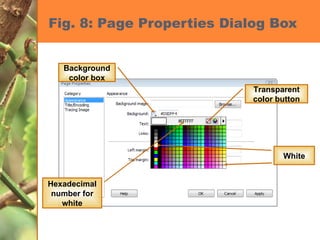
Setting Web Page Properties Background color Font color Link colors (unvisited, visited) Default: Unvisited    blue Visited    purple
Making Pages Accessible to All Techniques you can use to ensure that your Web site is accessible to individuals with disabilities Alternate text with images Avoid certain colors Supply text as an alternate source for information that is presented in an audio file www.adobe.com/accessibility
Using Appropriate Content Who is your audience? What is the age group of your audience? What is the reading level? Formal vs. informal tone Consider font sizes, amount of text and images, and amount of technical expertise needed to navigate Use consistency
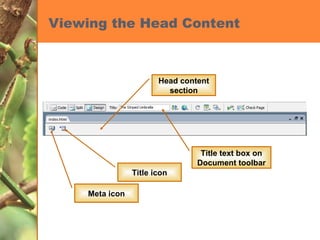
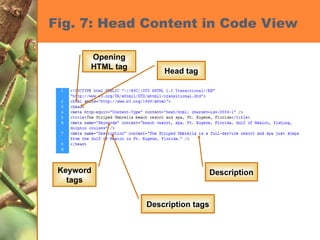
Viewing the Head Content Title text box on Document toolbar Title icon Meta icon Head content section
Entering Keywords & Descriptions Anticipate search terms Keep them short and concise List the most important keywords first Consider the use of focus groups
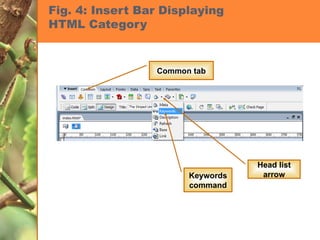
Fig. 4: Insert Bar Displaying  HTML Category  Common tab Head list arrow Keywords command
Fig. 7: Head Content in Code View Opening HTML tag Head tag Description tags Description Keyword tags
Fig. 8: Page Properties Dialog Box Background color box Transparent color button Hexadecimal number for white White
Creating, Import, and Format Text To add text to a Dreamweaver page Type in Dreamweaver Copy/paste   [Ctrl][C] and [Ctrl][V] (Windows) [Command] [C] and [Command] [V] (Macintosh) Import Word Document
Formatting Text with Property Inspector Make text attractive and easy to read Change font, size, and color Use Property Inspector to apply formatting attributes
Changing Fonts You can format your text with different fonts by choosing a font combination from the Font list in the Property inspector.  A font combination is a set of three fonts that  specify which fonts a browser should use to display the text of your Web page.  Font combinations are used so that if one font is not available, the browser will use the next one specified in the font combination.
Changing Font Sizes Default base font: 3 Select font in Property inspector Choose between 1 and 7  Change font size relative to the default base size
Formatting Paragraphs Format As text As different sizes of headings Headings Heading 1 is the largest Heading 6 is the smallest <h1>This is a big heading</h1>
Using HTML Tags or Using CSS Cascading Style Sheets (CSS) Standard practice to handle formatting and placement of objects Disable this preference temporarily
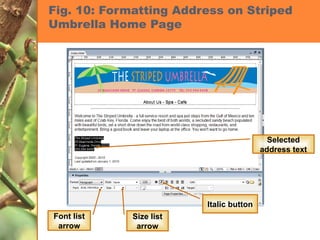
Fig. 10: Formatting Address on Striped Umbrella Home Page Selected address text Font list arrow Size list arrow Italic button
Web Filenames Do not use Spaces Special characters Punctuation Uppercase letters Number for the first character Assume case-sensitive
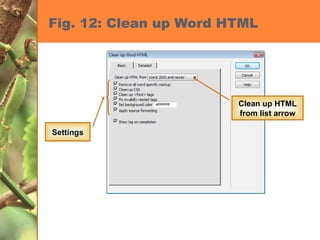
Importing Microsoft Office Documents File    Import    Word Document or Excel Document Select file to be imported, then click Formatting list arrow Always use Clean Up Word HTML command
Fig. 12: Clean up Word HTML Clean up HTML from list arrow Settings
Linking Microsoft Office Documents Drag the Word or Excel document from its current location to the location on the Web page where you would like the link to appear Select the Create a link option button in the Insert Document dialog box Save the file in your root folder so it will be uploaded when you publish your site. If it is not uploaded, the link will be broken.
Link Properties Link names should be informative Point of contact – mailto: link Two types Hypertext Graphic Formatting properties should be consistent  Address or path: relative or absolute
Broken Links Typos Pages move Sites move Sites expire
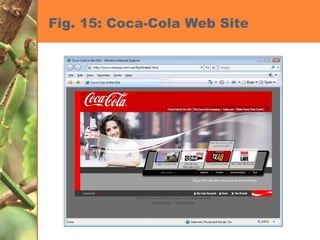
Navigation Bars Contain links to the main pages Usually located at top of side of page Backbone of the site’s navigation structure
Fig. 15: Coca-Cola Web Site
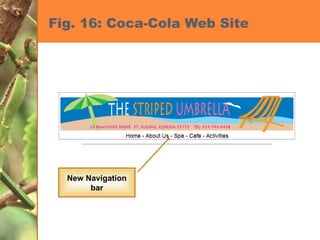
Fig. 16: Coca-Cola Web Site New Navigation bar
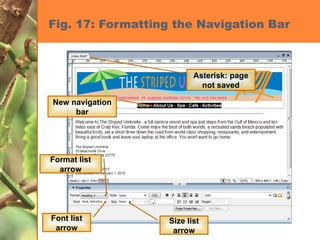
Fig. 17: Formatting the Navigation Bar New navigation bar Format list arrow Font list arrow Size list arrow Asterisk: page not saved
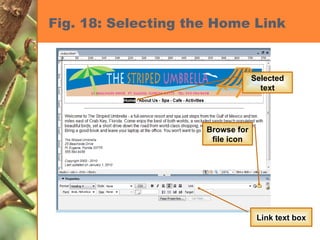
Fig. 18: Selecting the Home Link Selected text Browse for file icon Link text box
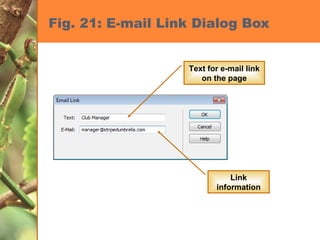
Fig. 21: E-mail Link Dialog Box Link information Text for e-mail link on the page
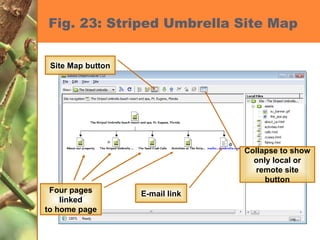
Fig. 23: Striped Umbrella Site Map Collapse to show only local or remote site button E-mail link Four pages linked to home page Site Map button
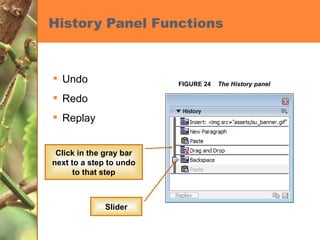
Use the History panel History panel properties: Each task is called a step 50 steps Preferences adds more Be careful…increasing steps uses memory
History Panel Functions Undo  Redo Replay FIGURE 24  The History panel Slider Click in the gray bar next to a step to undo to that step
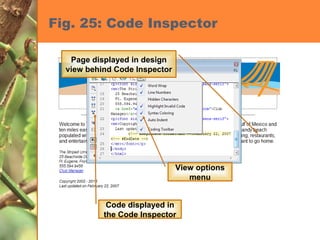
View HTML Code in Code Inspector View Code Code View Code and Design View Code Inspector Add advanced features JavaScript Rollover function
Fig. 25: Code Inspector View options menu Code displayed in the Code Inspector Page displayed in design view behind Code Inspector
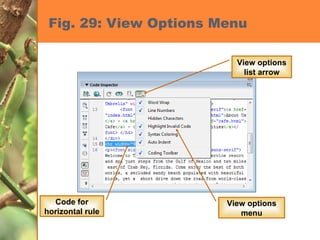
Fig. 29: View Options Menu View options list arrow Code for horizontal rule View options menu
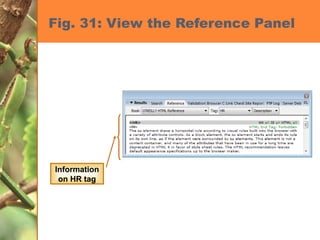
Fig. 31: View the Reference Panel Information on HR tag
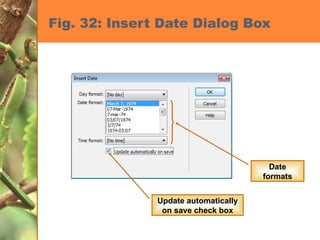
Fig. 32: Insert Date Dialog Box Update automatically on save check box Date formats
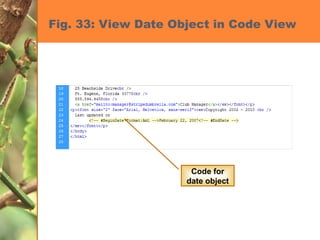
Fig. 33: View Date Object in Code View Code for date object
Modify and Test Web Pages Proofread Preview in a browser window Test links
Testing Pages Monitors Size and resolution Platforms UNIX, Mac, PC Browsers Explorer, Netscape, Firefox
Different Browsers or Screen Size You should test your pages using different browsers and a wide variety of screen sizes to ensure the best view of your page by the most people possible. Check both Windows and Macintosh platforms Testing a web page rendered in a mobile device
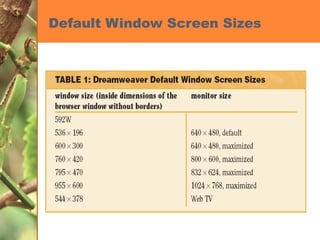
Default Window Screen Sizes
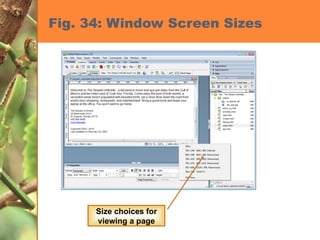
Fig. 34: Window Screen Sizes Size choices for viewing a page
“Under Construction” Don’t do it! Only causes frustration to the end user
Chapter 2 Tasks Create head content and set page properties Create, import, and format text Add links to Web pages Use the History panel and edit code Modify and test Web pages

Developing a Web Page

  • 1.
    Adobe Dreamweaver CS3Revealed CHAPTER TWO: DEVELOPING A WEB PAGE
  • 2.
    Create head contentand set page properties Create, import, and format text Add links to Web pages Use the History panel and edit code Modify and test Web pages Chapter 2 Lessons
  • 3.
    Introduction Craft headcontent Choose colors for page background and text Add page content, format, and link to other pages Test links regularly
  • 4.
    Use white spaceeffectively Limit multimedia elements Keep it simple Use an intuitive navigation structure Apply a consistent theme Understanding Page Layout
  • 5.
    Create Head ContentA Web page is composed of two sections: Head content includes page title displayed in title bar of browser meta tags which are not visible to the Web browser Body Contains text, graphics, and links
  • 6.
    Create Head ContentTitle Browser title bar Keywords Search Description Search results
  • 7.
    Setting Web PageProperties Background color Font color Link colors (unvisited, visited) Default: Unvisited  blue Visited  purple
  • 8.
    Making Pages Accessibleto All Techniques you can use to ensure that your Web site is accessible to individuals with disabilities Alternate text with images Avoid certain colors Supply text as an alternate source for information that is presented in an audio file www.adobe.com/accessibility
  • 9.
    Using Appropriate ContentWho is your audience? What is the age group of your audience? What is the reading level? Formal vs. informal tone Consider font sizes, amount of text and images, and amount of technical expertise needed to navigate Use consistency
  • 10.
    Viewing the HeadContent Title text box on Document toolbar Title icon Meta icon Head content section
  • 11.
    Entering Keywords &Descriptions Anticipate search terms Keep them short and concise List the most important keywords first Consider the use of focus groups
  • 12.
    Fig. 4: InsertBar Displaying HTML Category Common tab Head list arrow Keywords command
  • 13.
    Fig. 7: HeadContent in Code View Opening HTML tag Head tag Description tags Description Keyword tags
  • 14.
    Fig. 8: PageProperties Dialog Box Background color box Transparent color button Hexadecimal number for white White
  • 15.
    Creating, Import, andFormat Text To add text to a Dreamweaver page Type in Dreamweaver Copy/paste [Ctrl][C] and [Ctrl][V] (Windows) [Command] [C] and [Command] [V] (Macintosh) Import Word Document
  • 16.
    Formatting Text withProperty Inspector Make text attractive and easy to read Change font, size, and color Use Property Inspector to apply formatting attributes
  • 17.
    Changing Fonts Youcan format your text with different fonts by choosing a font combination from the Font list in the Property inspector. A font combination is a set of three fonts that specify which fonts a browser should use to display the text of your Web page. Font combinations are used so that if one font is not available, the browser will use the next one specified in the font combination.
  • 18.
    Changing Font SizesDefault base font: 3 Select font in Property inspector Choose between 1 and 7 Change font size relative to the default base size
  • 19.
    Formatting Paragraphs FormatAs text As different sizes of headings Headings Heading 1 is the largest Heading 6 is the smallest <h1>This is a big heading</h1>
  • 20.
    Using HTML Tagsor Using CSS Cascading Style Sheets (CSS) Standard practice to handle formatting and placement of objects Disable this preference temporarily
  • 21.
    Fig. 10: FormattingAddress on Striped Umbrella Home Page Selected address text Font list arrow Size list arrow Italic button
  • 22.
    Web Filenames Donot use Spaces Special characters Punctuation Uppercase letters Number for the first character Assume case-sensitive
  • 23.
    Importing Microsoft OfficeDocuments File  Import  Word Document or Excel Document Select file to be imported, then click Formatting list arrow Always use Clean Up Word HTML command
  • 24.
    Fig. 12: Cleanup Word HTML Clean up HTML from list arrow Settings
  • 25.
    Linking Microsoft OfficeDocuments Drag the Word or Excel document from its current location to the location on the Web page where you would like the link to appear Select the Create a link option button in the Insert Document dialog box Save the file in your root folder so it will be uploaded when you publish your site. If it is not uploaded, the link will be broken.
  • 26.
    Link Properties Linknames should be informative Point of contact – mailto: link Two types Hypertext Graphic Formatting properties should be consistent Address or path: relative or absolute
  • 27.
    Broken Links TyposPages move Sites move Sites expire
  • 28.
    Navigation Bars Containlinks to the main pages Usually located at top of side of page Backbone of the site’s navigation structure
  • 29.
  • 30.
    Fig. 16: Coca-ColaWeb Site New Navigation bar
  • 31.
    Fig. 17: Formattingthe Navigation Bar New navigation bar Format list arrow Font list arrow Size list arrow Asterisk: page not saved
  • 32.
    Fig. 18: Selectingthe Home Link Selected text Browse for file icon Link text box
  • 33.
    Fig. 21: E-mailLink Dialog Box Link information Text for e-mail link on the page
  • 34.
    Fig. 23: StripedUmbrella Site Map Collapse to show only local or remote site button E-mail link Four pages linked to home page Site Map button
  • 35.
    Use the Historypanel History panel properties: Each task is called a step 50 steps Preferences adds more Be careful…increasing steps uses memory
  • 36.
    History Panel FunctionsUndo Redo Replay FIGURE 24 The History panel Slider Click in the gray bar next to a step to undo to that step
  • 37.
    View HTML Codein Code Inspector View Code Code View Code and Design View Code Inspector Add advanced features JavaScript Rollover function
  • 38.
    Fig. 25: CodeInspector View options menu Code displayed in the Code Inspector Page displayed in design view behind Code Inspector
  • 39.
    Fig. 29: ViewOptions Menu View options list arrow Code for horizontal rule View options menu
  • 40.
    Fig. 31: Viewthe Reference Panel Information on HR tag
  • 41.
    Fig. 32: InsertDate Dialog Box Update automatically on save check box Date formats
  • 42.
    Fig. 33: ViewDate Object in Code View Code for date object
  • 43.
    Modify and TestWeb Pages Proofread Preview in a browser window Test links
  • 44.
    Testing Pages MonitorsSize and resolution Platforms UNIX, Mac, PC Browsers Explorer, Netscape, Firefox
  • 45.
    Different Browsers orScreen Size You should test your pages using different browsers and a wide variety of screen sizes to ensure the best view of your page by the most people possible. Check both Windows and Macintosh platforms Testing a web page rendered in a mobile device
  • 46.
  • 47.
    Fig. 34: WindowScreen Sizes Size choices for viewing a page
  • 48.
    “Under Construction” Don’tdo it! Only causes frustration to the end user
  • 49.
    Chapter 2 TasksCreate head content and set page properties Create, import, and format text Add links to Web pages Use the History panel and edit code Modify and test Web pages