Jonathan Kopp Partner & Global Director, Ketchum Digital @jonathankopp [email_address]
Why We’re Here G+ social networking features G+ for business Strategic considerations Competitive context
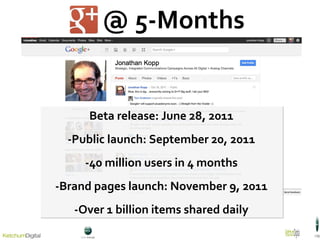
@ 5-Months Beta release: June 28, 2011 -Public launch: September 20, 2011 -40 million users in 4 months -Brand pages launch: November 9, 2011 -Over 1 billion items shared daily
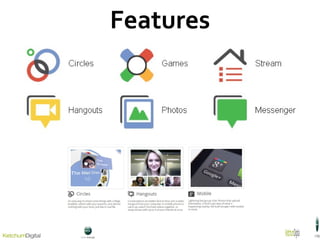
Features
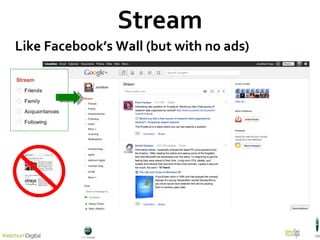
Stream Like Facebook’s Wall (but with no ads)
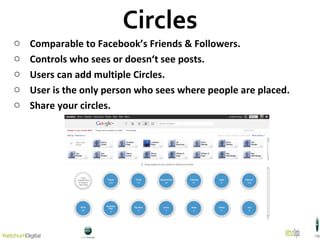
Circles Comparable to Facebook’s Friends & Followers. Controls who sees or doesn‘t  see posts. Users can add multiple Circles. User is the only person who sees where people are placed. Share your circles.
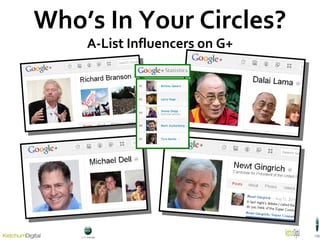
Who’s In Your Circles? A-List Influencers on G+
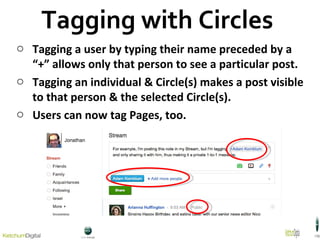
Tagging a user by typing their name preceded by a “+” allows only that person to see a particular post. Tagging an individual & Circle(s) makes a post visible to that person & the selected Circle(s). Users can now tag Pages, too. Tagging with Circles
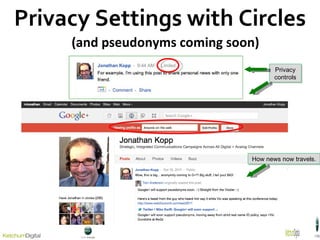
Privacy Settings with Circles (and pseudonyms coming soon) How news now travels. Privacy controls
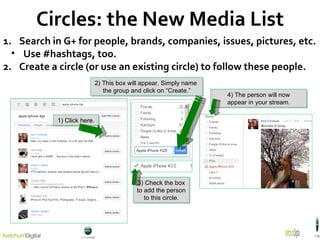
Circles: the New Media List Search in G+ for people, brands, companies, issues, pictures, etc. Use #hashtags, too. Create a circle (or use an existing circle) to follow these people. 1) Click here. 2) This box will appear. Simply name  the group and click on  “Create.” 3) Check the box to add the person to this circle. 4) The person will now appear in your stream.
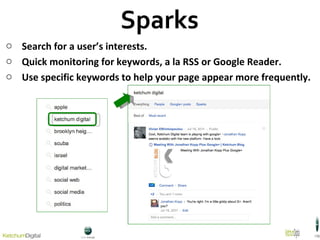
Sparks Search for a user’s interests. Quick monitoring for keywords, a la RSS or Google Reader. Use specific keywords to help your page appear more frequently.
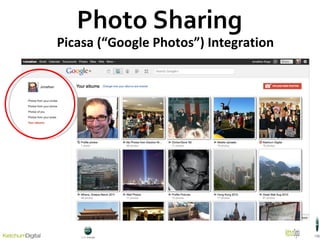
Photo Sharing Picasa (“Google Photos”) Integration
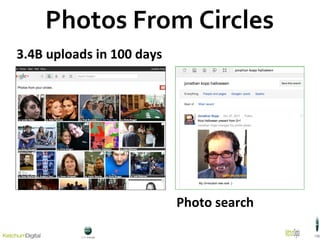
Photos From Circles 3.4B uploads in 100 days Photo search
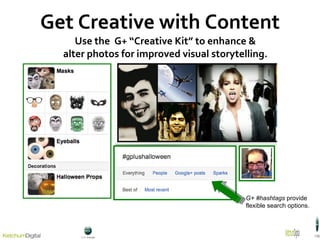
Get Creative with Content Use  the  G+ “Creative Kit” to enhance & alter photos for improved visual storytelling. G+ #hashtags  provide flexible search options.
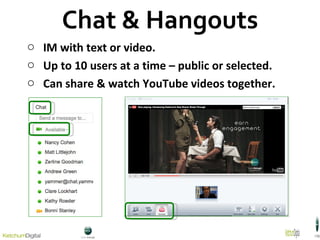
Chat & Hangouts IM with text or video. Up to 10 users at a time – public or selected. Can share & watch YouTube videos together.
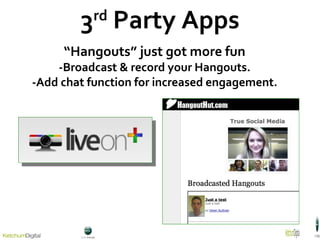
3 rd  Party Apps “ Hangouts” just got more fun -Broadcast & record your Hangouts. -Add chat function for increased engagement.
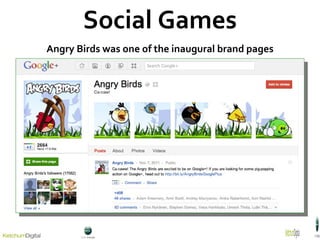
Social Games Angry Birds was one of the inaugural brand pages
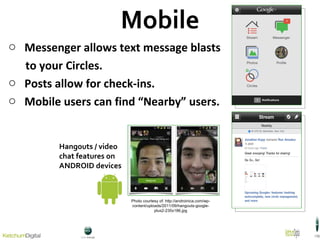
Mobile Messenger allows text message blasts  to your Circles. Posts allow for check-ins.  Mobile users can find “Nearby” users. Hangouts / video  chat features on  ANDROID devices Photo courtesy of: http://androinica.com/wp-content/uploads/2011/09/hangouts-google-plus2-235x186.jpg
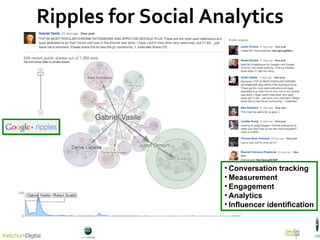
Ripples for Social Analytics Conversation tracking Measurement Engagement Analytics Influencer identification
for Business
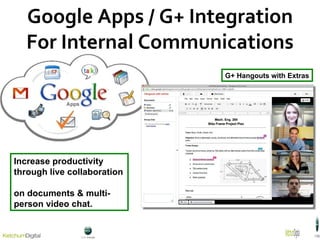
Google Apps / G+ Integration For Internal Communications G+ Hangouts with Extras Increase productivity through live collaboration  on documents & multi-person video chat.
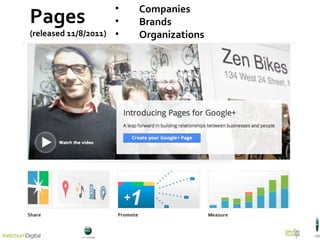
Pages (released 11/8/2011) Companies Brands Organizations
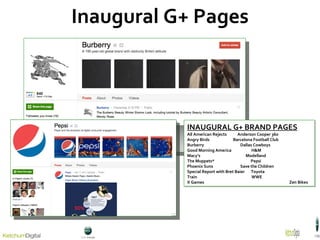
INAUGURAL G+ BRAND PAGES All American Rejects  Anderson Cooper 360  Angry Birds  Barcelona Football Club Burberry  Dallas Cowboys Good Morning America  H&M Macy’s  Modelland The Muppets*  Pepsi  Phoenix Suns  Save the Children Special Report with Bret Baier  Toyota Train  WWE X Games   Zen Bikes  Inaugural G+ Pages
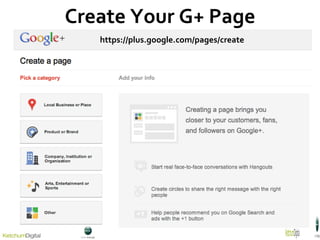
Create Your G+ Page https://plus.google.com/pages/create
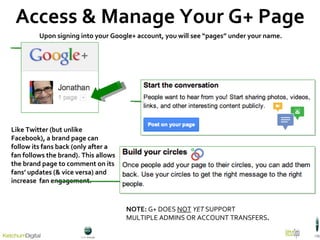
Access & Manage Your G+ Page Upon signing into your Google+ account, you will see “pages” under your name.  NOTE:  G+ DOES  NOT   YET  SUPPORT  MULTIPLE ADMINS OR ACCOUNT TRANSFERS . Like Twitter (but unlike Facebook), a brand page can follow its fans back (only after a fan follows the brand). This allows the brand page to comment on its fans’ updates (& vice versa) and increase  fan engagement.
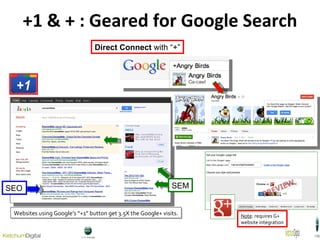
+1 & + : Geared for Google Search SEO SEM Websites using Google’s “+1” button get 3.5X the Google+ visits. Direct Connect  with “+” Note : requires G+  website integration
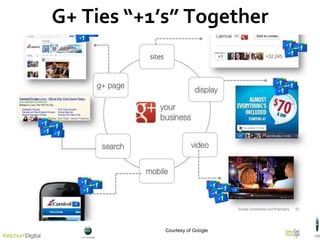
G+ Ties “+1’s” Together Courtesy of Google
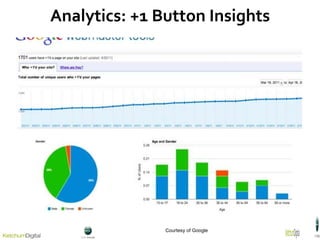
Analytics: +1 Button Insights Courtesy of Google
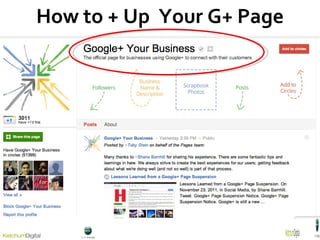
How to + Up  Your G+ Page
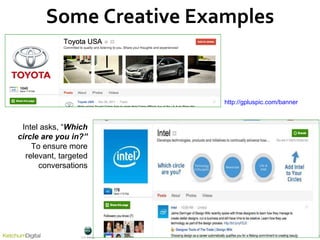
Some Creative Examples http://gpluspic.com/banner Intel asks, “ Which circle are you in? ” To ensure more relevant, targeted conversations
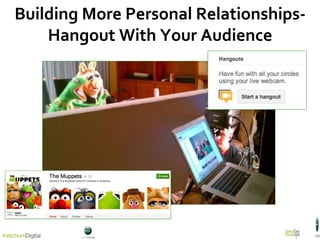
Building More Personal Relationships- Hangout With Your Audience
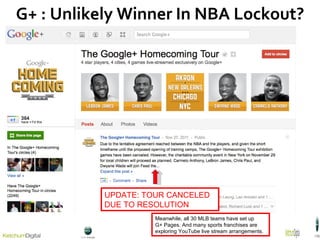
G+ : Unlikely Winner In NBA Lockout? UPDATE: TOUR CANCELED DUE TO RESOLUTION Meanwhile, all 30 MLB teams have set up  G+ Pages. And many sports franchises are exploring YouTube live stream arrangements.
Some Strategic Considerations
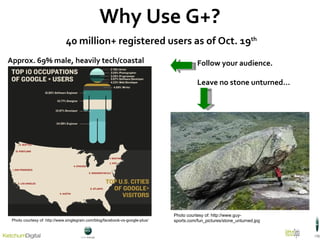
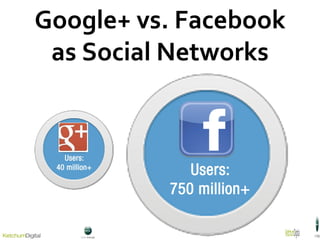
Why Use G+? 40 million+ registered users as of Oct. 19 th Approx. 69% male, heavily tech/coastal  Follow your audience. Leave no stone unturned… Photo courtesy of:  http://www.singlegrain.com/blog/facebook-vs-google-plus/ Photo courtesy of: http://www.guy-sports.com/fun_pictures/stone_unturned.jpg
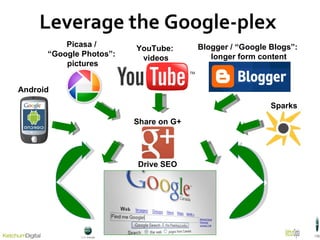
Leverage the Google-plex  Picasa /  “Google Photos”:  pictures YouTube:  videos Blogger / “Google Blogs”:  longer form content Share on G+  Drive SEO  Android Sparks
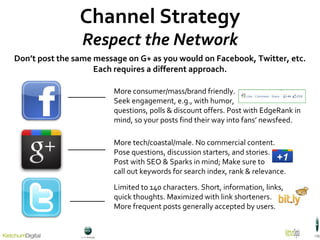
Channel Strategy Respect the Network Don ’t post the same message on G+ as you would on Facebook, Twitter, etc. Each requires a different approach. Limited to 140 characters. Short, information, links, quick thoughts. Maximized with link shorteners. More frequent posts generally accepted by users. More tech/coastal/male. No commercial content. Pose questions, discussion starters, and stories. Post with SEO & Sparks in mind; Make sure to  call out keywords for search index, rank & relevance.  More consumer/mass/brand friendly.  Seek engagement, e.g., with humor,  questions, polls & discount offers. Post with EdgeRank in mind, so your posts find their way into fans ’ newsfeed.
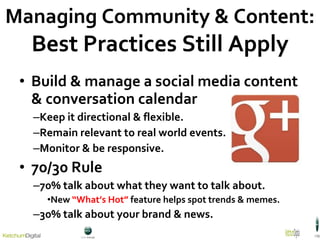
Build & manage a social media content & conversation calendar Keep it directional & flexible. Remain relevant to real world events. Monitor & be responsive. 70/30 Rule 70% talk about what they want to talk about. New  “What’s Hot”  feature helps spot trends & memes. 30% talk about your brand & news . Managing Community & Content: Best Practices Still Apply
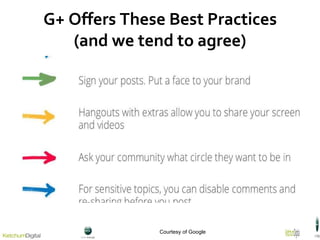
G+ Offers These Best Practices (and we tend to agree) Courtesy of Google
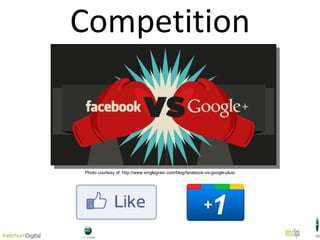
Competition Photo courtesy of: http://www.singlegrain.com/blog/facebook-vs-google-plus/
Google+ vs. Facebook as Social Networks
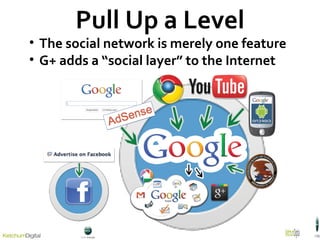
Pull Up a Level The social network is merely one feature G+ adds a “social layer” to the Internet
Key Takeaways  +/- Is new & already off to an exciting start, with deep integration into other Google products. Adds a “social layer” to the web. It features rich & ad free content, making it an uncluttered & exciting user experience, with great promise for brands & organizations. Still in “beta,” with ongoing evolutions. Hasn’t achieved anywhere near mass adoption. Adds another channel to our distribution lists.
 
Appendix
 
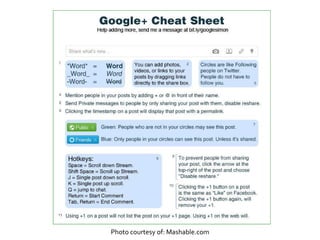
Photo courtesy of: Mashable.com
Jonathan Kopp Partner & Global Director, Ketchum Digital @jonathankopp [email_address]

Intro to Google+ for Business & Public Relations

  • 1.
    Jonathan Kopp Partner& Global Director, Ketchum Digital @jonathankopp [email_address]
  • 2.
    Why We’re HereG+ social networking features G+ for business Strategic considerations Competitive context
  • 3.
    @ 5-Months Betarelease: June 28, 2011 -Public launch: September 20, 2011 -40 million users in 4 months -Brand pages launch: November 9, 2011 -Over 1 billion items shared daily
  • 4.
  • 5.
    Stream Like Facebook’sWall (but with no ads)
  • 6.
    Circles Comparable toFacebook’s Friends & Followers. Controls who sees or doesn‘t see posts. Users can add multiple Circles. User is the only person who sees where people are placed. Share your circles.
  • 7.
    Who’s In YourCircles? A-List Influencers on G+
  • 8.
    Tagging a userby typing their name preceded by a “+” allows only that person to see a particular post. Tagging an individual & Circle(s) makes a post visible to that person & the selected Circle(s). Users can now tag Pages, too. Tagging with Circles
  • 9.
    Privacy Settings withCircles (and pseudonyms coming soon) How news now travels. Privacy controls
  • 10.
    Circles: the NewMedia List Search in G+ for people, brands, companies, issues, pictures, etc. Use #hashtags, too. Create a circle (or use an existing circle) to follow these people. 1) Click here. 2) This box will appear. Simply name the group and click on “Create.” 3) Check the box to add the person to this circle. 4) The person will now appear in your stream.
  • 11.
    Sparks Search fora user’s interests. Quick monitoring for keywords, a la RSS or Google Reader. Use specific keywords to help your page appear more frequently.
  • 12.
    Photo Sharing Picasa(“Google Photos”) Integration
  • 13.
    Photos From Circles3.4B uploads in 100 days Photo search
  • 14.
    Get Creative withContent Use the G+ “Creative Kit” to enhance & alter photos for improved visual storytelling. G+ #hashtags provide flexible search options.
  • 15.
    Chat & HangoutsIM with text or video. Up to 10 users at a time – public or selected. Can share & watch YouTube videos together.
  • 16.
    3 rd Party Apps “ Hangouts” just got more fun -Broadcast & record your Hangouts. -Add chat function for increased engagement.
  • 17.
    Social Games AngryBirds was one of the inaugural brand pages
  • 18.
    Mobile Messenger allowstext message blasts to your Circles. Posts allow for check-ins. Mobile users can find “Nearby” users. Hangouts / video chat features on ANDROID devices Photo courtesy of: http://androinica.com/wp-content/uploads/2011/09/hangouts-google-plus2-235x186.jpg
  • 19.
    Ripples for SocialAnalytics Conversation tracking Measurement Engagement Analytics Influencer identification
  • 20.
  • 21.
    Google Apps /G+ Integration For Internal Communications G+ Hangouts with Extras Increase productivity through live collaboration on documents & multi-person video chat.
  • 22.
    Pages (released 11/8/2011)Companies Brands Organizations
  • 23.
    INAUGURAL G+ BRANDPAGES All American Rejects Anderson Cooper 360 Angry Birds Barcelona Football Club Burberry Dallas Cowboys Good Morning America H&M Macy’s Modelland The Muppets* Pepsi Phoenix Suns Save the Children Special Report with Bret Baier Toyota Train WWE X Games Zen Bikes Inaugural G+ Pages
  • 24.
    Create Your G+Page https://plus.google.com/pages/create
  • 25.
    Access & ManageYour G+ Page Upon signing into your Google+ account, you will see “pages” under your name. NOTE: G+ DOES NOT YET SUPPORT MULTIPLE ADMINS OR ACCOUNT TRANSFERS . Like Twitter (but unlike Facebook), a brand page can follow its fans back (only after a fan follows the brand). This allows the brand page to comment on its fans’ updates (& vice versa) and increase fan engagement.
  • 26.
    +1 & +: Geared for Google Search SEO SEM Websites using Google’s “+1” button get 3.5X the Google+ visits. Direct Connect with “+” Note : requires G+ website integration
  • 27.
    G+ Ties “+1’s”Together Courtesy of Google
  • 28.
    Analytics: +1 ButtonInsights Courtesy of Google
  • 29.
    How to +Up Your G+ Page
  • 30.
    Some Creative Exampleshttp://gpluspic.com/banner Intel asks, “ Which circle are you in? ” To ensure more relevant, targeted conversations
  • 31.
    Building More PersonalRelationships- Hangout With Your Audience
  • 32.
    G+ : UnlikelyWinner In NBA Lockout? UPDATE: TOUR CANCELED DUE TO RESOLUTION Meanwhile, all 30 MLB teams have set up G+ Pages. And many sports franchises are exploring YouTube live stream arrangements.
  • 33.
  • 34.
    Why Use G+?40 million+ registered users as of Oct. 19 th Approx. 69% male, heavily tech/coastal Follow your audience. Leave no stone unturned… Photo courtesy of:  http://www.singlegrain.com/blog/facebook-vs-google-plus/ Photo courtesy of: http://www.guy-sports.com/fun_pictures/stone_unturned.jpg
  • 35.
    Leverage the Google-plex Picasa / “Google Photos”: pictures YouTube: videos Blogger / “Google Blogs”: longer form content Share on G+ Drive SEO Android Sparks
  • 36.
    Channel Strategy Respectthe Network Don ’t post the same message on G+ as you would on Facebook, Twitter, etc. Each requires a different approach. Limited to 140 characters. Short, information, links, quick thoughts. Maximized with link shorteners. More frequent posts generally accepted by users. More tech/coastal/male. No commercial content. Pose questions, discussion starters, and stories. Post with SEO & Sparks in mind; Make sure to call out keywords for search index, rank & relevance. More consumer/mass/brand friendly. Seek engagement, e.g., with humor, questions, polls & discount offers. Post with EdgeRank in mind, so your posts find their way into fans ’ newsfeed.
  • 37.
    Build & managea social media content & conversation calendar Keep it directional & flexible. Remain relevant to real world events. Monitor & be responsive. 70/30 Rule 70% talk about what they want to talk about. New “What’s Hot” feature helps spot trends & memes. 30% talk about your brand & news . Managing Community & Content: Best Practices Still Apply
  • 38.
    G+ Offers TheseBest Practices (and we tend to agree) Courtesy of Google
  • 39.
    Competition Photo courtesyof: http://www.singlegrain.com/blog/facebook-vs-google-plus/
  • 40.
    Google+ vs. Facebookas Social Networks
  • 41.
    Pull Up aLevel The social network is merely one feature G+ adds a “social layer” to the Internet
  • 42.
    Key Takeaways +/- Is new & already off to an exciting start, with deep integration into other Google products. Adds a “social layer” to the web. It features rich & ad free content, making it an uncluttered & exciting user experience, with great promise for brands & organizations. Still in “beta,” with ongoing evolutions. Hasn’t achieved anywhere near mass adoption. Adds another channel to our distribution lists.
  • 43.
  • 44.
  • 45.
  • 46.
    Photo courtesy of:Mashable.com
  • 47.
    Jonathan Kopp Partner& Global Director, Ketchum Digital @jonathankopp [email_address]