Google+
Warren Wood, Greg Hassel, Jimmy Churchill
Overview
Current Statistics
● Google + is the 7th ranked most active social network with more than
343 million monthly active users. http://www.statista.com/statistics/272014/global-social-networks-ranked-
by-number-of-users/
● 44% of 18-29 year olds have a Google + account in the U.S.A., but 28% of
millennials visit Google + monthly. http://expandedramblings.com/index.php/google-plus-statistics/6/
● Google + has an average growth rate of 33% a year, with users aged 45-
54 increasing their usage by 56% since 2012. http://www.socialmediatoday.com/content/new-
social-media-statistics-you-need-know
Excellent Examples
Personal Profiles
● Aaron Allen, Global Restaurant Consultant at Aaron Allen & Associates
Aaron Allen's Profile
● Excellent explanation and visualization of who he is as well as who he works for
● Links available to other platforms as well as links to blogs about the restaurant
business
● Trond Lyngbo, Head of SEO at MediaCom Norway, and SEO columnist at
Search Engine Land
Trond Lyngbo's Profile
● Clearly states and identifies what he is passionate about and how he is an expert on
the subject of SEO
● Many links to other platform profiles, what he contributes to such as blogs, and
updates frequently about his SEO passion
Excellent Examples
Company Pages
● Starbucks Coffee
○ Full explanation of company mission
○ Allows UGC and high interaction with consumers
○ Links to other company profiles on other platforms and to
their website
○ Allows suggestions for improvements from consumers
○ Frequently posts updates related to consumers and business
ventures
○ Starbucks Profile
Key Terms & Definitions
● Circles: Allows you to customize how to organize your followers and who
you follow.
○ Fully customizable, common circles are Co Workers, Family, Friends, ETC.
○ When posting a link or update, you have the ability to choose which circle can and cannot
see it
● Hangouts: This feature allows you to chat and video chat with up to ten
people at once.
○ Useful for business meetings when multiple individuals are involved and/or in different
areas
● +1 Button: This button is similar to Facebook’s “Like” button, which easily
shares posts you “+1” to your circles
Key Terms & Definitions (Cont.)
● Communities: This feature allows users to connect, share, and ask
questions about a certain topic
○ Public or private
○ Fully customizable in terms of being public, public with moderators, private with requests,
or invite only
○ Our class community is an excellent example of a private community with requests
○ Public example: Resume & Interview Tips
● Hashtag: Like Twitter, Google+ uses hashtags(#) to identify certain
keywords and topics
http://sproutsocial.com/insights/google-plus-definitions/
http://slideshare.net/sheenalena/google-plus-an-overview-of
Interesting Facts
● About 33% of the users come from the U.S.A., with over 70% speaking
English
● Over 60% of the users on Google+ are male
● 60% of users engage daily, with 80% engaging on a weekly basis
● China and Iran ban the use of Google+
http://www.bigfootdigital.co.uk/2013/09/11-surprising-facts-about-google/
Strengths of Google+
● Circles allow customization of the relationship of connections such as
Family, Co Workers, Personal friends, Etc.
● Full integration with other Google services like YouTube, Google Drive,
Gmail, Etc.
● Search engine optimization(SEO) on Google+ trumps all in this category
because content published from Google+ is more likely to come up from a
search query than from other platforms
● Google Hangouts is a unique feature that allows video chat for up to ten
people at once, which its main competitors do not offer.
http://www.dailyblogtips.com/google-plus-vs-facebook/ http://searchengineland.com/google-the-good-the-bad-the-ugly-83630
Weaknesses of Google+
● It is not nearly as popular as Facebook or Twitter in terms of social usage;
with the average time per day users look on their stream is around 12
minutes
● Google+’s contest and promotions policy limits business pages from
hosting any promotions, giveaways, or contests
● Many users complain about Google+ not being as user friendly as
Facebook and Twitter
http://searchengineland.com/google-the-good-the-bad-the-ugly-83630
http://mashable.com/2011/07/01/google-the-pros-cons/
Best Tips for Using
● Circle MGMT
○ Create content of high relevance for a particular group of people and
chose to show it to them.
● Use your name in the URL
● Link every page to your G+
● Google Alerts- Get the latest news for similar content you’ll be sharing
○ Effective for sharing and being a relevant/current source
○ FAST
Best Tips for Using
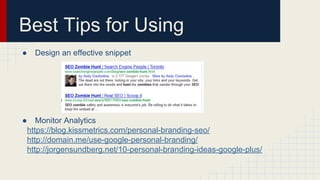
● Design an effective snippet
● Monitor Analytics
https://blog.kissmetrics.com/personal-branding-seo/
http://domain.me/use-google-personal-branding/
http://jorgensundberg.net/10-personal-branding-ideas-google-plus/
The A-Z Guide for Branding
● A-M
○ Authenticity!
■ Create and curate content that reflects who you are
○ Blog- Finding your tribe
■ They’ll help spread your word
■ Repurpose your material
○ Help Others
○ Keywords- Very effective
■ Use hashtags
○ Media-
■ G+ allows you to use all kinds of media. Use them.
http://www.plusyourbusiness.com/guide-personal-branding-using-google-plus/
https://www.youtube.com/watch?v=s_bcMQRGonc
The A-Z Guide for Branding
● N-Z
○ Network!
○ Opinions
■ People want to hear what YOU have to say
● Therefore, they will judge you
● So don’t get too crazy
○ Although that may be a good strategy
○ Slogan- Personal business card
○ Teach Others
■ Gain recognition, become an influencer, become a source
○ Voice
■ Keep a consistent voice throughout all posts
Strategies for Engagement
● Headlines!
○ Format for attention
● Use your pictures
● Smart Sharing
● Interactive Posts
○ Engage with Comments
http://moz.com/blog/google-plus-tips-seo
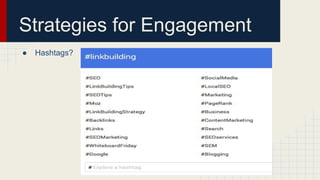
Strategies for Engagement
● Hashtags?
Other Strategies
● Tag People
● Cross Post
○ Write long messages in G+ and then Tweet the link
● Start Communities
○ Ripples
http://www.blogtyrant.com/google-plus-tips/
http://www.jeffalytics.com/measuring-google-plus/
Analytics
● How many people have YOU in their circles
● +1s
● Impressions
● Author Stats- Search Impressions, Search Clicks, Individual Post Click
Through Rate
● http://www.allmyplus.com/u/110893458888634184500#start
○ Will tell you everything
Essential Tools/Apps
● Google+ is supported by native reinforcement of UGC
Examples of tools & Apps used along with Google+(Marketing):
1.Widgets- Allow you to display company Google+ page on your website with
customizable features
2.Google+ statistics- Allow user to see top trends, social media reporting tool
for facebook and twitter, in other words almost anything is measurable..top
brands.. occupations ect..
3.Directories- For Google+ individuals that are influential in your industry
(google has its own “PlusClout” score)
Findpeopleonplus.com- A place to network with old new co workers and
professionals in your geographic area or school history.
Essential tools/Apps Cont.
4.)Browser extensions-
(Extended share) allows for shared Google+ post on any social media platform
(G++) allows for twitter and facebook to be aligned along with your Google+
feed and post for easy access
5.) Google drive- allow for secure sharing and storage of content
6.) Google+ presentation(slides) and document: Interactive way to complete
assignments online with live updates and changes made by team members.
http://www.socialmediaexaminer.com/5-top-google-tools-and-apps-for-
marketing-pros/
Tutorial
Excellent Examples
Product/Personal Branding:
1.)7 point checklist to dominate personal branding on google+
http://rebekahradice.com/dominate-your-personal-brand-using-google-plus/
2.)Great example for setting up a basic google+ account & getting noticed-
http://moz.com/beginners-guide-to-social-media/google-plus
Cont. (For business)
1.)Basic visual representation-
http://www.adweek.com/socialtimes/best-practices-using-g-business-
infographic/147440
2.)In depth by hootsuite-
https://hootsuite.com/resources/guide/google-for-business-a-guide-by-the-
hootsuite-social-media-coaches
3.)Focus more on content-
http://contentmarketinginstitute.com/2012/11/content-marketing-best-practices-
google-success/
Suggested Readings
For google+ authorship (Google Authorship is a way to link content you create with a Google+ profile.)-
http://searchengineland.com/the-definitive-guide-to-google-authorship-markup-123218
Why blog on google+ and how-
http://www.computerworld.com/article/2492324/social-media/why-i-blog-on-google---and-how-.html
Another reason why you should use google+ to blog-
http://www.forbes.com/sites/stevecooper/2013/08/31/the-one-reason-every-blogger-should-use-google/
How to properly use hashtags on google+
http://www.socialmediaexaminer.com/google-hashtags-more-exposure/
Everything you need to know about google+ ($2.51)
http://www.amazon.com/What-Plus-Google-Rest-Us-ebook/dp/B007HD7HT0

Google+ presentation

  • 1.
    Google+ Warren Wood, GregHassel, Jimmy Churchill
  • 2.
    Overview Current Statistics ● Google+ is the 7th ranked most active social network with more than 343 million monthly active users. http://www.statista.com/statistics/272014/global-social-networks-ranked- by-number-of-users/ ● 44% of 18-29 year olds have a Google + account in the U.S.A., but 28% of millennials visit Google + monthly. http://expandedramblings.com/index.php/google-plus-statistics/6/ ● Google + has an average growth rate of 33% a year, with users aged 45- 54 increasing their usage by 56% since 2012. http://www.socialmediatoday.com/content/new- social-media-statistics-you-need-know
  • 3.
    Excellent Examples Personal Profiles ●Aaron Allen, Global Restaurant Consultant at Aaron Allen & Associates Aaron Allen's Profile ● Excellent explanation and visualization of who he is as well as who he works for ● Links available to other platforms as well as links to blogs about the restaurant business ● Trond Lyngbo, Head of SEO at MediaCom Norway, and SEO columnist at Search Engine Land Trond Lyngbo's Profile ● Clearly states and identifies what he is passionate about and how he is an expert on the subject of SEO ● Many links to other platform profiles, what he contributes to such as blogs, and updates frequently about his SEO passion
  • 4.
    Excellent Examples Company Pages ●Starbucks Coffee ○ Full explanation of company mission ○ Allows UGC and high interaction with consumers ○ Links to other company profiles on other platforms and to their website ○ Allows suggestions for improvements from consumers ○ Frequently posts updates related to consumers and business ventures ○ Starbucks Profile
  • 5.
    Key Terms &Definitions ● Circles: Allows you to customize how to organize your followers and who you follow. ○ Fully customizable, common circles are Co Workers, Family, Friends, ETC. ○ When posting a link or update, you have the ability to choose which circle can and cannot see it ● Hangouts: This feature allows you to chat and video chat with up to ten people at once. ○ Useful for business meetings when multiple individuals are involved and/or in different areas ● +1 Button: This button is similar to Facebook’s “Like” button, which easily shares posts you “+1” to your circles
  • 6.
    Key Terms &Definitions (Cont.) ● Communities: This feature allows users to connect, share, and ask questions about a certain topic ○ Public or private ○ Fully customizable in terms of being public, public with moderators, private with requests, or invite only ○ Our class community is an excellent example of a private community with requests ○ Public example: Resume & Interview Tips ● Hashtag: Like Twitter, Google+ uses hashtags(#) to identify certain keywords and topics http://sproutsocial.com/insights/google-plus-definitions/ http://slideshare.net/sheenalena/google-plus-an-overview-of
  • 7.
    Interesting Facts ● About33% of the users come from the U.S.A., with over 70% speaking English ● Over 60% of the users on Google+ are male ● 60% of users engage daily, with 80% engaging on a weekly basis ● China and Iran ban the use of Google+ http://www.bigfootdigital.co.uk/2013/09/11-surprising-facts-about-google/
  • 8.
    Strengths of Google+ ●Circles allow customization of the relationship of connections such as Family, Co Workers, Personal friends, Etc. ● Full integration with other Google services like YouTube, Google Drive, Gmail, Etc. ● Search engine optimization(SEO) on Google+ trumps all in this category because content published from Google+ is more likely to come up from a search query than from other platforms ● Google Hangouts is a unique feature that allows video chat for up to ten people at once, which its main competitors do not offer. http://www.dailyblogtips.com/google-plus-vs-facebook/ http://searchengineland.com/google-the-good-the-bad-the-ugly-83630
  • 9.
    Weaknesses of Google+ ●It is not nearly as popular as Facebook or Twitter in terms of social usage; with the average time per day users look on their stream is around 12 minutes ● Google+’s contest and promotions policy limits business pages from hosting any promotions, giveaways, or contests ● Many users complain about Google+ not being as user friendly as Facebook and Twitter http://searchengineland.com/google-the-good-the-bad-the-ugly-83630 http://mashable.com/2011/07/01/google-the-pros-cons/
  • 10.
    Best Tips forUsing ● Circle MGMT ○ Create content of high relevance for a particular group of people and chose to show it to them. ● Use your name in the URL ● Link every page to your G+ ● Google Alerts- Get the latest news for similar content you’ll be sharing ○ Effective for sharing and being a relevant/current source ○ FAST
  • 11.
    Best Tips forUsing ● Design an effective snippet ● Monitor Analytics https://blog.kissmetrics.com/personal-branding-seo/ http://domain.me/use-google-personal-branding/ http://jorgensundberg.net/10-personal-branding-ideas-google-plus/
  • 12.
    The A-Z Guidefor Branding ● A-M ○ Authenticity! ■ Create and curate content that reflects who you are ○ Blog- Finding your tribe ■ They’ll help spread your word ■ Repurpose your material ○ Help Others ○ Keywords- Very effective ■ Use hashtags ○ Media- ■ G+ allows you to use all kinds of media. Use them. http://www.plusyourbusiness.com/guide-personal-branding-using-google-plus/ https://www.youtube.com/watch?v=s_bcMQRGonc
  • 13.
    The A-Z Guidefor Branding ● N-Z ○ Network! ○ Opinions ■ People want to hear what YOU have to say ● Therefore, they will judge you ● So don’t get too crazy ○ Although that may be a good strategy ○ Slogan- Personal business card ○ Teach Others ■ Gain recognition, become an influencer, become a source ○ Voice ■ Keep a consistent voice throughout all posts
  • 14.
    Strategies for Engagement ●Headlines! ○ Format for attention ● Use your pictures ● Smart Sharing ● Interactive Posts ○ Engage with Comments http://moz.com/blog/google-plus-tips-seo
  • 15.
  • 16.
    Other Strategies ● TagPeople ● Cross Post ○ Write long messages in G+ and then Tweet the link ● Start Communities ○ Ripples http://www.blogtyrant.com/google-plus-tips/ http://www.jeffalytics.com/measuring-google-plus/
  • 17.
    Analytics ● How manypeople have YOU in their circles ● +1s ● Impressions ● Author Stats- Search Impressions, Search Clicks, Individual Post Click Through Rate ● http://www.allmyplus.com/u/110893458888634184500#start ○ Will tell you everything
  • 18.
    Essential Tools/Apps ● Google+is supported by native reinforcement of UGC Examples of tools & Apps used along with Google+(Marketing): 1.Widgets- Allow you to display company Google+ page on your website with customizable features 2.Google+ statistics- Allow user to see top trends, social media reporting tool for facebook and twitter, in other words almost anything is measurable..top brands.. occupations ect.. 3.Directories- For Google+ individuals that are influential in your industry (google has its own “PlusClout” score) Findpeopleonplus.com- A place to network with old new co workers and professionals in your geographic area or school history.
  • 19.
    Essential tools/Apps Cont. 4.)Browserextensions- (Extended share) allows for shared Google+ post on any social media platform (G++) allows for twitter and facebook to be aligned along with your Google+ feed and post for easy access 5.) Google drive- allow for secure sharing and storage of content 6.) Google+ presentation(slides) and document: Interactive way to complete assignments online with live updates and changes made by team members. http://www.socialmediaexaminer.com/5-top-google-tools-and-apps-for- marketing-pros/
  • 20.
  • 21.
    Excellent Examples Product/Personal Branding: 1.)7point checklist to dominate personal branding on google+ http://rebekahradice.com/dominate-your-personal-brand-using-google-plus/ 2.)Great example for setting up a basic google+ account & getting noticed- http://moz.com/beginners-guide-to-social-media/google-plus
  • 22.
    Cont. (For business) 1.)Basicvisual representation- http://www.adweek.com/socialtimes/best-practices-using-g-business- infographic/147440 2.)In depth by hootsuite- https://hootsuite.com/resources/guide/google-for-business-a-guide-by-the- hootsuite-social-media-coaches 3.)Focus more on content- http://contentmarketinginstitute.com/2012/11/content-marketing-best-practices- google-success/
  • 23.
    Suggested Readings For google+authorship (Google Authorship is a way to link content you create with a Google+ profile.)- http://searchengineland.com/the-definitive-guide-to-google-authorship-markup-123218 Why blog on google+ and how- http://www.computerworld.com/article/2492324/social-media/why-i-blog-on-google---and-how-.html Another reason why you should use google+ to blog- http://www.forbes.com/sites/stevecooper/2013/08/31/the-one-reason-every-blogger-should-use-google/ How to properly use hashtags on google+ http://www.socialmediaexaminer.com/google-hashtags-more-exposure/ Everything you need to know about google+ ($2.51) http://www.amazon.com/What-Plus-Google-Rest-Us-ebook/dp/B007HD7HT0