Documentum Introduction  Fundamentals
Fundamentals Introducing Content Server Session   and Transaction Management The Data Model Security Services
Fundamentals… Server Internationalization Virtual Documents Work  ows Lifecycles
Fundamentals… Tasks, Events, and Inboxes Aliases Renditions
Introduction to Content Server Content Server is the foundation of Documentum’s content management system. Content Server is the core functionality that allows users to  create  capture  manage deliver  archive enterprise content
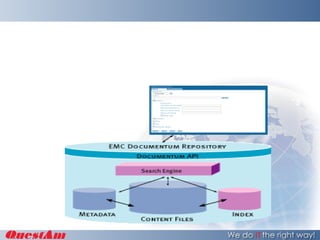
Storage and retrieval Documentum provides a single repository for content and metadata. Extensible object-oriented model to store content and metadata in the repository The metadata for each object in RDBMS Content files stored in  file systems, RDBMS Network File Systems Document Query Language (DQL).
Versioning Content Server has a powerful set of automatic versioning capabilities. Implicit Versioning System generated Explicit Versioning User Assigned
Data dictionary The data dictionary stores information about object types and attributes. Used by client applications to apply business rules or provide assistance for users. Data dictionary information for Documentum  updated with DQL CREATE TYPE and ALTER TYPE statements.
Assembly and publishing A feature of both content management and process management services,  Virtual documents  link individual documents into one larger document. An individual document - belong to multiple virtual documents. Integrates with commercial word processors and publishing tools.
Process management features Work flows Production  Adhoc Users with appropriate permissions can modify in-progress workflows Life cycles Stages of a document A document’s life cycle is defined as a lifecycle and implemented internally as a dm_policy object.
Security features Repository security ACL(default) or none. ACL define object-level permissions that apply to the object. Object-level permissions are granted to individual users and to groups. Seven levels of base object-level Five extended object-level permissions using ACLs.
Accountability Robust auditing and tracing facilities. Auditing Auditing changing Tracing Troubleshooting Electronic signatures.
Others Distributed services Multiple repositories Content Server architecture C++ (Unix / Windows)‏ Internationalization
Communicating with Content Server Documentum client applications Desktop, Webtop, DA Custom applications DFC Webservices Interactive utilities DA  IAPI and IDQL are interactive utilities that let you execute API methods and DQL
Session management A repository session’s configuration defines some basic features and functionality for the session. For example, the configuration defines with which connection brokers the client can communicate, the maximum number of connections the client can establish and the size of the client cache. A session’s configuration is defined by a session config object, a non-persistent object. A session config object is constructed from values taken from the api config object, the server config object (a persistent object that defines a Content Server’s configuration), and a connection config object (a non-persistent object that defines a particular repository connection). Most of the values found in the api config object are taken from the dmcl.ini file used by  the client. The dmcl.ini file is a client initialization file.
Transaction Management A transaction is a set of repository operations handled as an atomic unit. All operations in the transaction must succeed or none may succeed. A repository connection can have only one open transaction at any particular time. A transaction is either internal or explicit. An internal transaction is a transaction managed by Content Server. The server opens transactions, commits changes, and performs rollbacks as necessary to maintain the integrity of the data in the repository. An explicit transaction is a transaction managed by a user or client application. The transaction is opened with a DQL BEGINTRAN statement or a Begintran method. It is closed with either a COMMIT statement or Commit method,
User A user is typically an individual person.  To access objects in a repository, a person must be represented by a user object in the repository Repository users have two states, active and inactive.  An  active user  can connect to the repository and work.  An  inactive user  is not allowed to connect to the repository. A user can be a virtual person. That is, you can create a user object for a user who doesn’t exist in reality.
Group Groups are sets of users, groups, or a mixture of both.  They are used to assign permissions or client application roles to multiple users.  There are  three kinds of groups  in a repository:  standard groups, role groups, and domain groups. A  standard group  consists of a set of users. The users can be individual users or other groups. A standard group is used to assign object-level permissions to all members of the group. A  role group  is created by setting the group class attribute to role and the group name attribute to the role name.  A  domain group  represents a particular client domain. A domain group contains a set of role groups, corresponding to the roles recognized by the client application.
Repository or Docbase A repository is a virtual storehouse for the content you work on and share with other employees. Each repository provides security, tools, and processes for sharing content among many users.  A repository stores two kinds of information for a content file: •  The content  — which is the text, graphics, sound, video, binary content, or other content — that makes up the file. •  The properties ( Metadata ) , which are descriptive characteristics about the file, such as creation date, author, version number, and other information. Property values can only be edited by the file’s creator or a user with high enough security settings.
 
Questions

Documentum content server

  • 1.
  • 2.
    Fundamentals Introducing ContentServer Session and Transaction Management The Data Model Security Services
  • 3.
    Fundamentals… Server InternationalizationVirtual Documents Work  ows Lifecycles
  • 4.
    Fundamentals… Tasks, Events,and Inboxes Aliases Renditions
  • 5.
    Introduction to ContentServer Content Server is the foundation of Documentum’s content management system. Content Server is the core functionality that allows users to create capture manage deliver archive enterprise content
  • 6.
    Storage and retrievalDocumentum provides a single repository for content and metadata. Extensible object-oriented model to store content and metadata in the repository The metadata for each object in RDBMS Content files stored in file systems, RDBMS Network File Systems Document Query Language (DQL).
  • 7.
    Versioning Content Serverhas a powerful set of automatic versioning capabilities. Implicit Versioning System generated Explicit Versioning User Assigned
  • 8.
    Data dictionary Thedata dictionary stores information about object types and attributes. Used by client applications to apply business rules or provide assistance for users. Data dictionary information for Documentum updated with DQL CREATE TYPE and ALTER TYPE statements.
  • 9.
    Assembly and publishingA feature of both content management and process management services, Virtual documents link individual documents into one larger document. An individual document - belong to multiple virtual documents. Integrates with commercial word processors and publishing tools.
  • 10.
    Process management featuresWork flows Production Adhoc Users with appropriate permissions can modify in-progress workflows Life cycles Stages of a document A document’s life cycle is defined as a lifecycle and implemented internally as a dm_policy object.
  • 11.
    Security features Repositorysecurity ACL(default) or none. ACL define object-level permissions that apply to the object. Object-level permissions are granted to individual users and to groups. Seven levels of base object-level Five extended object-level permissions using ACLs.
  • 12.
    Accountability Robust auditingand tracing facilities. Auditing Auditing changing Tracing Troubleshooting Electronic signatures.
  • 13.
    Others Distributed servicesMultiple repositories Content Server architecture C++ (Unix / Windows)‏ Internationalization
  • 14.
    Communicating with ContentServer Documentum client applications Desktop, Webtop, DA Custom applications DFC Webservices Interactive utilities DA IAPI and IDQL are interactive utilities that let you execute API methods and DQL
  • 15.
    Session management Arepository session’s configuration defines some basic features and functionality for the session. For example, the configuration defines with which connection brokers the client can communicate, the maximum number of connections the client can establish and the size of the client cache. A session’s configuration is defined by a session config object, a non-persistent object. A session config object is constructed from values taken from the api config object, the server config object (a persistent object that defines a Content Server’s configuration), and a connection config object (a non-persistent object that defines a particular repository connection). Most of the values found in the api config object are taken from the dmcl.ini file used by the client. The dmcl.ini file is a client initialization file.
  • 16.
    Transaction Management Atransaction is a set of repository operations handled as an atomic unit. All operations in the transaction must succeed or none may succeed. A repository connection can have only one open transaction at any particular time. A transaction is either internal or explicit. An internal transaction is a transaction managed by Content Server. The server opens transactions, commits changes, and performs rollbacks as necessary to maintain the integrity of the data in the repository. An explicit transaction is a transaction managed by a user or client application. The transaction is opened with a DQL BEGINTRAN statement or a Begintran method. It is closed with either a COMMIT statement or Commit method,
  • 17.
    User A useris typically an individual person. To access objects in a repository, a person must be represented by a user object in the repository Repository users have two states, active and inactive. An active user can connect to the repository and work. An inactive user is not allowed to connect to the repository. A user can be a virtual person. That is, you can create a user object for a user who doesn’t exist in reality.
  • 18.
    Group Groups aresets of users, groups, or a mixture of both. They are used to assign permissions or client application roles to multiple users. There are three kinds of groups in a repository: standard groups, role groups, and domain groups. A standard group consists of a set of users. The users can be individual users or other groups. A standard group is used to assign object-level permissions to all members of the group. A role group is created by setting the group class attribute to role and the group name attribute to the role name. A domain group represents a particular client domain. A domain group contains a set of role groups, corresponding to the roles recognized by the client application.
  • 19.
    Repository or DocbaseA repository is a virtual storehouse for the content you work on and share with other employees. Each repository provides security, tools, and processes for sharing content among many users. A repository stores two kinds of information for a content file: • The content — which is the text, graphics, sound, video, binary content, or other content — that makes up the file. • The properties ( Metadata ) , which are descriptive characteristics about the file, such as creation date, author, version number, and other information. Property values can only be edited by the file’s creator or a user with high enough security settings.
  • 20.
  • 21.