Dockerfile basics
docker workshop #1
at GeekDom / Rackspace
Dockerfiles
• Dockerfiles = image representations
• Simple syntax for building images
• Automate and script the images creation
FROM
• Sets the base image for subsequent instructions
• Usage: FROM <image>
• Example: FROM ubuntu
• Needs to be the first instruction of every Dockerfile
• TIP: find images with the command: docker search
RUN
• Executes any commands on the current image and commit the
results
• Usage: RUN <command>
• Example: RUN apt-get install –y memcached
FROM ubuntu
RUN apt-get install -y memcached
• Is equivalent to:
docker run ubuntu apt-get install -y memcached
docker commit XXX
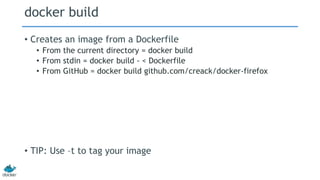
docker build
• Creates an image from a Dockerfile
• From the current directory = docker build
• From stdin = docker build - < Dockerfile
• From GitHub = docker build github.com/creack/docker-firefox
• TIP: Use –t to tag your image
Example: Memcached
FROM ubuntu
RUN echo "deb http://archive.ubuntu.com/ubuntu precise main
universe" > /etc/apt/sources.list
RUN apt-get update
RUN apt-get install -y memcached
• http://instacached.com/D1
• Docker build –t memcached .
# Commenting
• #
• http://instacached.com/D2
# Memcached
#
# VERSION 1.0
# use the ubuntu base image provided by dotCloud
FROM ubuntu
# make sure the package repository is up to date
RUN echo "deb http://archive.ubuntu.com/ubuntu precise main universe" > /etc/apt/sources.list
RUN apt-get update
# install memcached
RUN apt-get install -y memcached
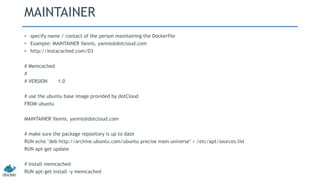
MAINTAINER
• specify name / contact of the person maintaining the Dockerfile
• Example: MAINTAINER Yannis, yannis@dotcloud.com
• http://instacached.com/D3
# Memcached
#
# VERSION 1.0
# use the ubuntu base image provided by dotCloud
FROM ubuntu
MAINTAINER Yannis, yannis@dotcloud.com
# make sure the package repository is up to date
RUN echo "deb http://archive.ubuntu.com/ubuntu precise main universe" > /etc/apt/sources.list
RUN apt-get update
# install memcached
RUN apt-get install -y memcached
ENTRYPOINT 1/2
• Triggers a command as soon as the container starts
• Example: ENTRYPOINT echo “Whale You Be My Container?”
• http://instacached.com/D4
# Whale you be my container?
#
# VERSION 0.42
# use the base image provided by dotCloud
FROM base
MAINTAINER Victor Coisne victor.coisne@dotcloud.com
# say hello when the container is launched
ENTRYPOINT echo "Whale you be my container"
ENTRYPOINT 2/2
• Run containers as executables! :)
• cat /etc/passwd | docker run -i wc
• http://instacached.com/D5
# This is wc
#
# VERSION 0.42
# use the base image provided by dotCloud
FROM base
MAINTAINER Victor Coisne victor.coisne@dotcloud.com
# count lines with wc
ENTRYPOINT ["wc", "-l"]
USER
• Sets the username to use when running the image
• Example: USER daemon
EXPOSE
• Sets ports to be publicly exposed when running the image
• Example: EXPOSE 11211
Memcached
• http://instacached.com/Dockerfile
• docker build -t memcached - < Dockerfile
• docker run memcached
• BOOM! :)
• Try it
• Python: http://instacached.com/test.py.txt
• Ruby: http://instacached.com/test.rb.txt
• PHP: http://instacached.com/test.php.txt
Online Dockerfile Tutorials
• Check our Dockerfile tutorials and test your skills here:
http://www.docker.io/learn/dockerfile/
Thank you
• GeekDom SF
• Rackspace
• Docker / dotCloud
• Blake Haggerty
• Robert Hrdinsky
• You!
www.docker.io

Dockerfile Basics Workshop #1

  • 1.
    Dockerfile basics docker workshop#1 at GeekDom / Rackspace
  • 2.
    Dockerfiles • Dockerfiles =image representations • Simple syntax for building images • Automate and script the images creation
  • 3.
    FROM • Sets thebase image for subsequent instructions • Usage: FROM <image> • Example: FROM ubuntu • Needs to be the first instruction of every Dockerfile • TIP: find images with the command: docker search
  • 4.
    RUN • Executes anycommands on the current image and commit the results • Usage: RUN <command> • Example: RUN apt-get install –y memcached FROM ubuntu RUN apt-get install -y memcached • Is equivalent to: docker run ubuntu apt-get install -y memcached docker commit XXX
  • 5.
    docker build • Createsan image from a Dockerfile • From the current directory = docker build • From stdin = docker build - < Dockerfile • From GitHub = docker build github.com/creack/docker-firefox • TIP: Use –t to tag your image
  • 6.
    Example: Memcached FROM ubuntu RUNecho "deb http://archive.ubuntu.com/ubuntu precise main universe" > /etc/apt/sources.list RUN apt-get update RUN apt-get install -y memcached • http://instacached.com/D1 • Docker build –t memcached .
  • 7.
    # Commenting • # •http://instacached.com/D2 # Memcached # # VERSION 1.0 # use the ubuntu base image provided by dotCloud FROM ubuntu # make sure the package repository is up to date RUN echo "deb http://archive.ubuntu.com/ubuntu precise main universe" > /etc/apt/sources.list RUN apt-get update # install memcached RUN apt-get install -y memcached
  • 8.
    MAINTAINER • specify name/ contact of the person maintaining the Dockerfile • Example: MAINTAINER Yannis, yannis@dotcloud.com • http://instacached.com/D3 # Memcached # # VERSION 1.0 # use the ubuntu base image provided by dotCloud FROM ubuntu MAINTAINER Yannis, yannis@dotcloud.com # make sure the package repository is up to date RUN echo "deb http://archive.ubuntu.com/ubuntu precise main universe" > /etc/apt/sources.list RUN apt-get update # install memcached RUN apt-get install -y memcached
  • 9.
    ENTRYPOINT 1/2 • Triggersa command as soon as the container starts • Example: ENTRYPOINT echo “Whale You Be My Container?” • http://instacached.com/D4 # Whale you be my container? # # VERSION 0.42 # use the base image provided by dotCloud FROM base MAINTAINER Victor Coisne victor.coisne@dotcloud.com # say hello when the container is launched ENTRYPOINT echo "Whale you be my container"
  • 10.
    ENTRYPOINT 2/2 • Runcontainers as executables! :) • cat /etc/passwd | docker run -i wc • http://instacached.com/D5 # This is wc # # VERSION 0.42 # use the base image provided by dotCloud FROM base MAINTAINER Victor Coisne victor.coisne@dotcloud.com # count lines with wc ENTRYPOINT ["wc", "-l"]
  • 11.
    USER • Sets theusername to use when running the image • Example: USER daemon
  • 12.
    EXPOSE • Sets portsto be publicly exposed when running the image • Example: EXPOSE 11211
  • 13.
    Memcached • http://instacached.com/Dockerfile • dockerbuild -t memcached - < Dockerfile • docker run memcached • BOOM! :) • Try it • Python: http://instacached.com/test.py.txt • Ruby: http://instacached.com/test.rb.txt • PHP: http://instacached.com/test.php.txt
  • 14.
    Online Dockerfile Tutorials •Check our Dockerfile tutorials and test your skills here: http://www.docker.io/learn/dockerfile/
  • 15.
    Thank you • GeekDomSF • Rackspace • Docker / dotCloud • Blake Haggerty • Robert Hrdinsky • You!
  • 16.