Docker: Containerizing
Your Applications
Docker is an open-source platform for developing, shipping, and
running applications efficiently. It solves the notorious "it works on my
machine" problem. Docker ensures consistent environments by
packaging your application with all its dependencies. Globally, over 14
million active Docker developers leverage its power.
Docker-Tutorial
https://www.tpointtech.com/docker-tutorial
+91-9599086977
Tpoint tech
Docker Fundamentals:
Images vs. Containers
Docker Image
A read-only blueprint of an application and its
dependencies. Images are immutable, layered filesystems.
They are the building blocks.
Docker Container
A runnable instance of a Docker image. Containers are
isolated, ephemeral environments. They start in
milliseconds, facilitating rapid deployment.
Docker Hub hosts over 15 million image repositories. It facilitates over
100 billion pulls annually. This ecosystem simplifies sharing and reusing
applications.
Docker-Tutorial
Tpoint tech
Building Images with
Dockerfile
A Dockerfile is a text file. It contains all the instructions to build a
Docker image. Key instructions include FROM for the base image and
RUN for commands. Use COPY to add files and EXPOSE for ports. Finally,
CMD sets the default command.
FROM python:3.9-slimCOPY . /appWORKDIR /appCMD
["python", "app.py"]
Build your image using docker build -t myapp:1.0 ..
Tpoint tech
Running & Managing Containers
docker run -p 80:8000 myapp:1.0 creates and starts
a container. It maps host port 80 to container port 8000.
docker ps lists all running containers with their details.
This command is essential for monitoring.
docker exec -it <container_id> bash executes
commands inside a running container. This is useful for
debugging.
docker stop <container_id> and docker rm
<container_id> stop and remove containers.
Docker-Tutorial
Tpoint tech
Data Persistence with Volumes
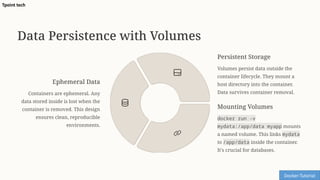
Ephemeral Data
Containers are ephemeral. Any
data stored inside is lost when the
container is removed. This design
ensures clean, reproducible
environments.
Persistent Storage
Volumes persist data outside the
container lifecycle. They mount a
host directory into the container.
Data survives container removal.
Mounting Volumes
docker run -v
mydata:/app/data myapp mounts
a named volume. This links mydata
to /app/data inside the container.
It's crucial for databases.
Docker-Tutorial
Tpoint tech
Orchestrating with Docker
Compose
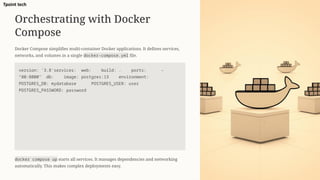
Docker Compose simplifies multi-container Docker applications. It defines services,
networks, and volumes in a single docker-compose.yml file.
version: '3.8'services: web: build: . ports: -
"80:8000" db: image: postgres:13 environment:
POSTGRES_DB: mydatabase POSTGRES_USER: user
POSTGRES_PASSWORD: password
docker compose up starts all services. It manages dependencies and networking
automatically. This makes complex deployments easy.
Tpoint tech
Key Benefits of Docker
Portability
"Build once, run anywhere." Docker ensures consistent application behavior across all environments. Development, testing, and production
become seamless.
Isolation
Each container is an isolated environment. Processes, network, and filesystem are self-contained. This prevents conflicts between applications.
Efficiency
Containers are lightweight. They share the host OS kernel, offering lower overhead than VMs. Containers boot significantly faster.
Scalability
Easily scale applications by running multiple container instances. Docker simplifies deploying and managing numerous copies of your service.
CI/CD Integration
Docker streamlines continuous integration and deployment pipelines. It provides a consistent environment from code commit to production.
Docker-Tutorial
Tpoint tech
Conclusion & Next Steps
Docker containerization simplifies application development,
deployment, and management. It provides a powerful solution for
modern software workflows.
• Explore Docker Hub for pre-built images.
• Investigate advanced Docker topics: networking, Docker Swarm,
and Kubernetes.
• Reference official Docker documentation for in-depth tutorials.
Docker-Tutorial
https://www.tpointtech.com/docker-tutorial
+91-9599086977
Tpoint tech
Tpoint tech

Docker-Containerizing-Your-Applications(PPT-23).pptx

  • 1.
    Docker: Containerizing Your Applications Dockeris an open-source platform for developing, shipping, and running applications efficiently. It solves the notorious "it works on my machine" problem. Docker ensures consistent environments by packaging your application with all its dependencies. Globally, over 14 million active Docker developers leverage its power. Docker-Tutorial https://www.tpointtech.com/docker-tutorial +91-9599086977 Tpoint tech
  • 2.
    Docker Fundamentals: Images vs.Containers Docker Image A read-only blueprint of an application and its dependencies. Images are immutable, layered filesystems. They are the building blocks. Docker Container A runnable instance of a Docker image. Containers are isolated, ephemeral environments. They start in milliseconds, facilitating rapid deployment. Docker Hub hosts over 15 million image repositories. It facilitates over 100 billion pulls annually. This ecosystem simplifies sharing and reusing applications. Docker-Tutorial Tpoint tech
  • 3.
    Building Images with Dockerfile ADockerfile is a text file. It contains all the instructions to build a Docker image. Key instructions include FROM for the base image and RUN for commands. Use COPY to add files and EXPOSE for ports. Finally, CMD sets the default command. FROM python:3.9-slimCOPY . /appWORKDIR /appCMD ["python", "app.py"] Build your image using docker build -t myapp:1.0 .. Tpoint tech
  • 4.
    Running & ManagingContainers docker run -p 80:8000 myapp:1.0 creates and starts a container. It maps host port 80 to container port 8000. docker ps lists all running containers with their details. This command is essential for monitoring. docker exec -it <container_id> bash executes commands inside a running container. This is useful for debugging. docker stop <container_id> and docker rm <container_id> stop and remove containers. Docker-Tutorial Tpoint tech
  • 5.
    Data Persistence withVolumes Ephemeral Data Containers are ephemeral. Any data stored inside is lost when the container is removed. This design ensures clean, reproducible environments. Persistent Storage Volumes persist data outside the container lifecycle. They mount a host directory into the container. Data survives container removal. Mounting Volumes docker run -v mydata:/app/data myapp mounts a named volume. This links mydata to /app/data inside the container. It's crucial for databases. Docker-Tutorial Tpoint tech
  • 6.
    Orchestrating with Docker Compose DockerCompose simplifies multi-container Docker applications. It defines services, networks, and volumes in a single docker-compose.yml file. version: '3.8'services: web: build: . ports: - "80:8000" db: image: postgres:13 environment: POSTGRES_DB: mydatabase POSTGRES_USER: user POSTGRES_PASSWORD: password docker compose up starts all services. It manages dependencies and networking automatically. This makes complex deployments easy. Tpoint tech
  • 7.
    Key Benefits ofDocker Portability "Build once, run anywhere." Docker ensures consistent application behavior across all environments. Development, testing, and production become seamless. Isolation Each container is an isolated environment. Processes, network, and filesystem are self-contained. This prevents conflicts between applications. Efficiency Containers are lightweight. They share the host OS kernel, offering lower overhead than VMs. Containers boot significantly faster. Scalability Easily scale applications by running multiple container instances. Docker simplifies deploying and managing numerous copies of your service. CI/CD Integration Docker streamlines continuous integration and deployment pipelines. It provides a consistent environment from code commit to production. Docker-Tutorial Tpoint tech
  • 8.
    Conclusion & NextSteps Docker containerization simplifies application development, deployment, and management. It provides a powerful solution for modern software workflows. • Explore Docker Hub for pre-built images. • Investigate advanced Docker topics: networking, Docker Swarm, and Kubernetes. • Reference official Docker documentation for in-depth tutorials. Docker-Tutorial https://www.tpointtech.com/docker-tutorial +91-9599086977 Tpoint tech Tpoint tech