Docker 101
Denis - Florin Rendler
December 14th, 2016
1
2
Denis – Florin RENDLER
Symfony/Magento Developer
@Evozon since 2013
Interested in PHP, DevOps and Security
Agenda
• Very short introduction on what Docker is
• Rundown of useful Docker CLI commands
• Overview of what we need to build a Docker
image
• Manage containers in a “one service per
container” architecture
• Q&A
3
4
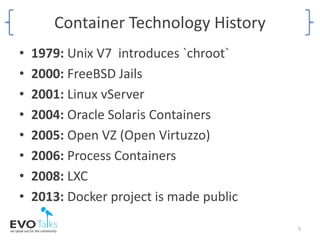
Container Technology History
• 1979: Unix V7 introduces `chroot`
• 2000: FreeBSD Jails
• 2001: Linux vServer
• 2004: Oracle Solaris Containers
• 2005: Open VZ (Open Virtuzzo)
• 2006: Process Containers
• 2008: LXC
• 2013: Docker project is made public
5
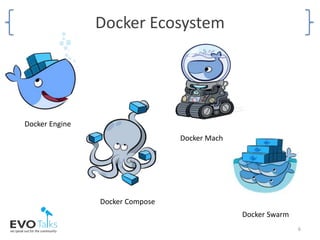
Docker Ecosystem
6
Docker Compose
Docker Machine
Docker Engine
Docker Swarm
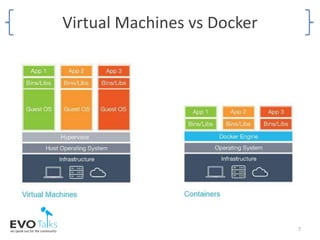
Virtual Machines vs Docker
7
8
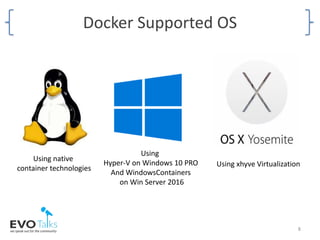
Using
Hyper-V on Windows 10 PRO
And WindowsContainers
on Win Server 2016
Using xhyve Virtualization
Docker Supported OS
Using native
container technologies
LET’S TAKE DOCKER FOR A SPIN
9
Docker Engine
• We interact with Docker Engine through the
`docker` command
• 40+ sub-commands including create, run, top,
logs, deploy, diff etc.
10
Common Docker Commands
• docker run [image_name]
• docker start [container_id]
• docker stop [container_id]
• docker ps
• docker exec --ti [container_id] bash
• docker inspect [container_id]
• docker top [container_id]
11
Docker Data Volumes
• Data volumes are Docker’s way for sharing data
• Data Volumes are initialized when a container is
created
• Data volumes can be shared and reused among
containers
• Changes to a data volume are made directly
• Changes to a data volume will not be included when
you update an image
• Data volumes persist even if the container itself is
deleted
12
Networking Docker Containers
• Map communication ports between container
and host
• Isolate containers into network groups
• Use host names instead of IPs to connect
between containers using Docker’s built-in
DNS provider
13
BUILDING A DOCKER IMAGE
Creating the project’s “gold master” image
14
Images && Containers
• An “image” is a filesystem and parameters to
use at runtime. It doesn’t have state and
never changes.
• A container is a running instance of an image.
15
Dockerfile
• An automation script file containing
instructions on how to build the image
• Allows you to configure steps for installing
software, configure software or copy file from
host
• Allows you to specify image metadata and
external config options
• Each command creates a snapshot
16
Working With Images
• docker images
• docker pull/push [image_name]
• docker rmi [image_name/image_id]
17
Dockerfile In Review
• The only required command is “FROM image”
• Group commands together to avoid unnecessary
caching
• The build/execution context is the Dockerfile’s
path
• “EXPOSE” is mostly informative
• “VOLUMES” creates a random volume on host
• Add a “CMD” or “ENTRYPOINT” command when
using base images
18
CONTAINER MANAGEMENT WITH
DOCKER-COMPOSE
19
docker-compose.yml
• YAML based definition file for declaring
services, netwoks and data volumes
• Dockerfile builds images and docker-
compose.yml manages containers
• Docker-Compose uses file composition for
service definitions
20
Disadvantages
• Kernel dependency
• Drive space
• Limited number of management tools for
production deployments
• Data needs to be stored outside containers
21
Advantages
• Solves the “It worked on my machine!”
situation
• Consistent environment for your application
• Version control and component reuse
• Application isolation
• Quick component swapping
• Portability across machines
22
Q&A Time
23
Resources
• http://blog.aquasec.com/a-brief-history-of-
containers-from-1970s-chroot-to-docker-2016
• https://docs.docker.com/
• https://github.com/rendler-denis/docker-app-
skeleton
• https://www.upguard.com/articles/docker-vs-
lxc
• https://www.phproundtable.com/episode/do
cker-and-php
24
25
Thank you for attending.

Evotalks Docker Presentation

  • 1.
    Docker 101 Denis -Florin Rendler December 14th, 2016 1
  • 2.
    2 Denis – FlorinRENDLER Symfony/Magento Developer @Evozon since 2013 Interested in PHP, DevOps and Security
  • 3.
    Agenda • Very shortintroduction on what Docker is • Rundown of useful Docker CLI commands • Overview of what we need to build a Docker image • Manage containers in a “one service per container” architecture • Q&A 3
  • 4.
  • 5.
    Container Technology History •1979: Unix V7 introduces `chroot` • 2000: FreeBSD Jails • 2001: Linux vServer • 2004: Oracle Solaris Containers • 2005: Open VZ (Open Virtuzzo) • 2006: Process Containers • 2008: LXC • 2013: Docker project is made public 5
  • 6.
    Docker Ecosystem 6 Docker Compose DockerMachine Docker Engine Docker Swarm
  • 7.
  • 8.
    8 Using Hyper-V on Windows10 PRO And WindowsContainers on Win Server 2016 Using xhyve Virtualization Docker Supported OS Using native container technologies
  • 9.
    LET’S TAKE DOCKERFOR A SPIN 9
  • 10.
    Docker Engine • Weinteract with Docker Engine through the `docker` command • 40+ sub-commands including create, run, top, logs, deploy, diff etc. 10
  • 11.
    Common Docker Commands •docker run [image_name] • docker start [container_id] • docker stop [container_id] • docker ps • docker exec --ti [container_id] bash • docker inspect [container_id] • docker top [container_id] 11
  • 12.
    Docker Data Volumes •Data volumes are Docker’s way for sharing data • Data Volumes are initialized when a container is created • Data volumes can be shared and reused among containers • Changes to a data volume are made directly • Changes to a data volume will not be included when you update an image • Data volumes persist even if the container itself is deleted 12
  • 13.
    Networking Docker Containers •Map communication ports between container and host • Isolate containers into network groups • Use host names instead of IPs to connect between containers using Docker’s built-in DNS provider 13
  • 14.
    BUILDING A DOCKERIMAGE Creating the project’s “gold master” image 14
  • 15.
    Images && Containers •An “image” is a filesystem and parameters to use at runtime. It doesn’t have state and never changes. • A container is a running instance of an image. 15
  • 16.
    Dockerfile • An automationscript file containing instructions on how to build the image • Allows you to configure steps for installing software, configure software or copy file from host • Allows you to specify image metadata and external config options • Each command creates a snapshot 16
  • 17.
    Working With Images •docker images • docker pull/push [image_name] • docker rmi [image_name/image_id] 17
  • 18.
    Dockerfile In Review •The only required command is “FROM image” • Group commands together to avoid unnecessary caching • The build/execution context is the Dockerfile’s path • “EXPOSE” is mostly informative • “VOLUMES” creates a random volume on host • Add a “CMD” or “ENTRYPOINT” command when using base images 18
  • 19.
  • 20.
    docker-compose.yml • YAML baseddefinition file for declaring services, netwoks and data volumes • Dockerfile builds images and docker- compose.yml manages containers • Docker-Compose uses file composition for service definitions 20
  • 21.
    Disadvantages • Kernel dependency •Drive space • Limited number of management tools for production deployments • Data needs to be stored outside containers 21
  • 22.
    Advantages • Solves the“It worked on my machine!” situation • Consistent environment for your application • Version control and component reuse • Application isolation • Quick component swapping • Portability across machines 22
  • 23.
  • 24.
    Resources • http://blog.aquasec.com/a-brief-history-of- containers-from-1970s-chroot-to-docker-2016 • https://docs.docker.com/ •https://github.com/rendler-denis/docker-app- skeleton • https://www.upguard.com/articles/docker-vs- lxc • https://www.phproundtable.com/episode/do cker-and-php 24
  • 25.
    25 Thank you forattending.