

WITH
Leo Lourdes
FOUNDATION IN
CYBER SECURITY
THE OBJECTIVE
To prevent or mitigate harm to or destruction of
Computer Networks, Applications, Devices, and Data.
Trainer Profile
LEO LOURDES
(MBA IT Management, BoM Hons. HRM)
Implementer of ISO 20000-1:2011
Certified in COBIT® 5
Certified in ISO 9001 Auditor (PECB)
Certified in PRINCE2® in Project Management
Certified in ITIL® Practitioner
Certified in ITIL® Intermediate Certificate in IT Service Operation
Certified in ITIL Information Security based on ISO/IEC 27002
Certified in ITIL for Cloud Computing
Certified in ITIL IT Service Management
Certified in Coaching and Calibration Skills for Call Center
Certified in Delivering Learning / Teaching by City & Guilds, United Kingdom
wecare@thinkleosolutions.com
++6016-349 1793
Experience:
Management Representative (MR) ISO 20000-1: 2011
IT Service Management (Incident, Problem, Change) Manager
Security, Compliance & Risk Management
Senior CRM Delivery Analyst
Certified Trainer
Certified IT Auditor & Consultant
CYBER SECURITY AWARENESS : DAY 2
• Vulnerabilities
• Network Security
• Access Control
• Physical Security
• Disaster Recovery
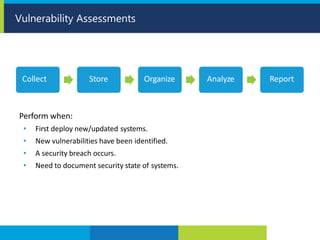
Vulnerability Assessments
Perform when:
• First deploy new/updated systems.
• New vulnerabilities have been identified.
• A security breach occurs.
• Need to document security state of systems.
Collect Store Organize Analyze Report
• Port scanner
• Protocol analyzer
• Packet analyzer
• Network enumerator
• Intelligence gathering
• Vulnerability scanner
Vulnerability Scanning
• Evaluate security by simulating an attack on a system.
• Verify a threat exists.
• Actively test and bypass security controls.
• Exploit system vulnerabilities.
• When compared to vulnerability assessment, it is:
• Less common.
• More intrusive.
• An objective measurement.
• A combination of multiple vulnerabilities to provide holistic understanding of vulnerability.
• Follow real attacker’s methodology, including target preparation/research stages.
• Difference between pen test and real attack is intent.
• Need explicit permission of target organization.
• Make sure organization knows test will not stop until attack is fully carried out.
• Report should include:
• Steps undertaken.
• Weaknesses identified.
• Recommendations.
Penetration Testing
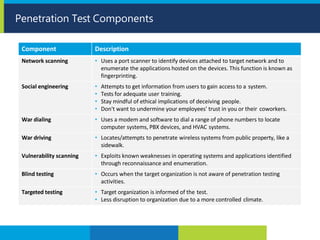
Penetration Test Components
Component Description
Network scanning • Uses a port scanner to identify devices attached to target network and to
enumerate the applications hosted on the devices. This function is known as
fingerprinting.
Social engineering • Attempts to get information from users to gain access to a system.
• Tests for adequate user training.
• Stay mindful of ethical implications of deceiving people.
• Don't want to undermine your employees' trust in you or their coworkers.
War dialing • Uses a modem and software to dial a range of phone numbers to locate
computer systems, PBX devices, and HVAC systems.
War driving • Locates/attempts to penetrate wireless systems from public property, like a
sidewalk.
Vulnerability scanning • Exploits known weaknesses in operating systems and applications identified
through reconnaissance and enumeration.
Blind testing • Occurs when the target organization is not aware of penetration testing
activities.
Targeted testing • Target organization is informed of the test.
• Less disruption to organization due to a more controlled climate.
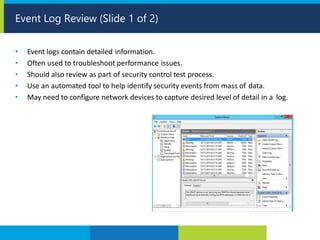
• Event logs contain detailed information.
• Often used to troubleshoot performance issues.
• Should also review as part of security control test process.
• Use an automated tool to help identify security events from mass of data.
• May need to configure network devices to capture desired level of detail in a log.
Event Log Review (Slide 1 of 2)
Common logged activities include:
• Authentication requests, both successful and unsuccessful.
• New user or group creation.
• Group membership changes.
• User privilege level changes.
• Resource access, such as opening, changing, and deleting files and folders.
• Client requests for server services.
• The number of transactions per hour of a particular service.
• Application or service shutdowns and restarts.
• System shutdowns and restarts.
• Service or system component errors and failures.
• System policy changes.
Event Log Review (Slide 2 of 2)
Wireless Security (Slide 1 of 2)
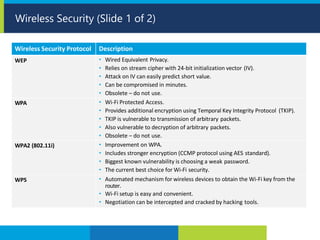
Wireless Security Protocol Description
WEP • Wired Equivalent Privacy.
• Relies on stream cipher with 24-bit initialization vector (IV).
• Attack on IV can easily predict short value.
• Can be compromised in minutes.
• Obsolete – do not use.
WPA • Wi-Fi Protected Access.
• Provides additional encryption using Temporal Key Integrity Protocol (TKIP).
• TKIP is vulnerable to transmission of arbitrary packets.
• Also vulnerable to decryption of arbitrary packets.
• Obsolete – do not use.
WPA2 (802.11i) • Improvement on WPA.
• Includes stronger encryption (CCMP protocol using AES standard).
• Biggest known vulnerability is choosing a weak password.
• The current best choice for Wi-Fi security.
WPS • Automated mechanism for wireless devices to obtain the Wi-Fi key from the
router.
• Wi-Fi setup is easy and convenient.
• Negotiation can be intercepted and cracked by hacking tools.
When implementing wireless security:
• Select WPA2 (even WPA2 personal) over WEP or WPA.
• When possible, use a RADIUS server for wireless authentication.
• If you must use a pre-shared key, make the password complex and change it
regularly.
• Manually enter Wi-Fi passwords into your device, rather than allowing them to
autoconfigure themselves by using WPS.
• If necessary, enter the MAC addresses of all devices that are permitted to connect to
the wireless network into the access point.
Wireless Security (Slide 2 of 2)
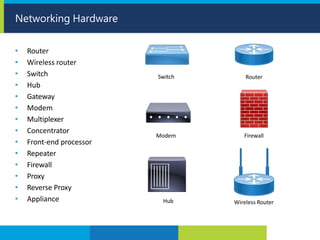
Networking Hardware
• Router
• Wireless router
• Switch
• Hub
• Gateway
• Modem
• Multiplexer
• Concentrator
• Front-end processor
• Repeater
• Firewall
• Proxy
• Reverse Proxy
• Appliance
Switch
Modem
Hub
Router
Firewall
Wireless Router
• If a router is compromised, attacker can use it in a man-in-the-middle attack.
• Like planting a bug in a room to listen in remotely.
• Can also initiate DoS attacks.
• Router must be physically protected first and foremost.
• Theft or tampering with router will result in major network issues.
• Routers are also subject to logical attacks.
• Attacker may attempt to access router using a remote protocol like Telnet/SSH.
• May also try to send excessive or malformed packets to router, causing a DoS.
Router Vulnerabilities
• Deploy the router in a secure, locked area.
• Disable all unnecessary services on the router.
• Disable any unnecessary routing protocols.
• Harden the router per the manufacturer's recommendations.
• Use SSH instead of Telnet.
• Create access control lists.
• Require strong authentication for administrator connections.
• Limit number of admin connections, and disconnect inactive sessions.
• Require authentication to a centralized server on higher-end routers.
• Create custom administrative accounts with limited privileges for support personnel.
• Ensure passwords are stored using encryption.
• Forward all security events to a central syslog server.
• Monitor activity on the router, watching for suspicious behavior.
Router Security
• Comprehensive solution to secure mobile devices as they connect to network.
• Ensures that these devices are healthy and cannot compromise network.
• Software installed on devices includes:
• Firewall
• VPN client
• Antivirus
• Anti-malware
• Encryption
• Uses client/server security model.
• Central server on network pushes updates to mobile clients and controls access.
• Endpoint security often includes mobile device management (MDM).
Endpoint Security
• Various devices enable networking capabilities.
• Often found in server rooms.
• Use the following methods to secure these devices:
• Physically secure all devices against tampering or accidents.
• Lock cabinets and rack doors.
• Use cable locks on laptops and small PCs.
• Mount power adapters, smart jacks, media converters, etc., where they can be easily
monitored and serviced.
• Consider using a "lights out" approach to server management.
• Place non-rack-mountable equipment on boltable trays above the rack floor.
• Route all cables both inside racks and in the ceiling in managed bundles and cable trays.
Physical Devices
• Physical and Logical Access Control
• Identification, Authentication, and Authorization
• Identity as a Service
• Authorization Mechanisms
• Access Control Attack Mitigation
Identity and Access Management
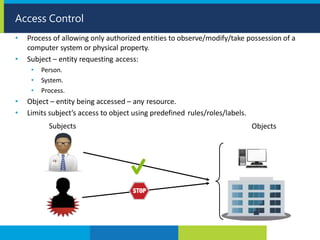
• Process of allowing only authorized entities to observe/modify/take possession of a
computer system or physical property.
• Subject – entity requesting access:
• Person.
• System.
• Process.
Access Control
• Object – entity being accessed – any resource.
• Limits subject’s access to object using predefined rules/roles/labels.
Subjects Objects
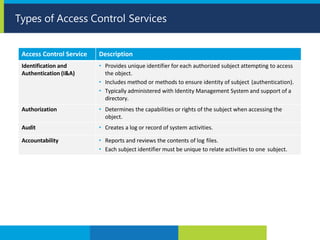
Types of Access Control Services
Access Control Service Description
Identification and
Authentication (I&A)
• Provides unique identifier for each authorized subject attempting to access
the object.
• Includes method or methods to ensure identity of subject (authentication).
• Typically administered with Identity Management System and support of a
directory.
Authorization • Determines the capabilities or rights of the subject when accessing the
object.
Audit • Creates a log or record of system activities.
Accountability • Reports and reviews the contents of log files.
• Each subject identifier must be unique to relate activities to one subject.
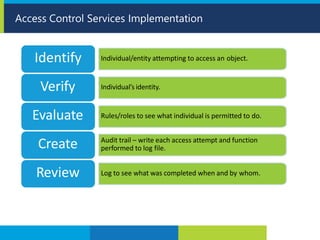
Access Control Services Implementation
Individual/entity attempting to access an object.
Identify
Individual’s identity.
Verify
Rules/roles to see what individual is permitted to do.
Evaluate
Audit trail – write each access attempt and function
performed to log file.
Create
Log to see what was completed when and by whom.
Review
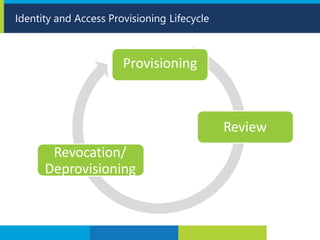
Identity and Access Provisioning Lifecycle
Provisioning
Review
Revocation/
Deprovisioning
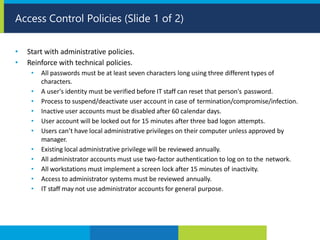
• Start with administrative policies.
• Reinforce with technical policies.
• All passwords must be at least seven characters long using three different types of
characters.
• A user's identity must be verified before IT staff can reset that person's password.
• Process to suspend/deactivate user account in case of termination/compromise/infection.
• Inactive user accounts must be disabled after 60 calendar days.
• User account will be locked out for 15 minutes after three bad logon attempts.
• Users can’t have local administrative privileges on their computer unless approved by
manager.
• Existing local administrative privilege will be reviewed annually.
• All administrator accounts must use two-factor authentication to log on to the network.
• All workstations must implement a screen lock after 15 minutes of inactivity.
• Access to administrator systems must be reviewed annually.
• IT staff may not use administrator accounts for general purpose.
Access Control Policies (Slide 1 of 2)
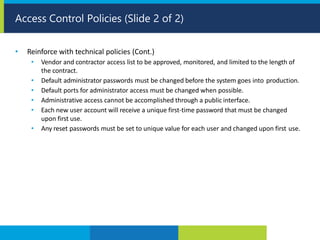
• Reinforce with technical policies (Cont.)
• Vendor and contractor access list to be approved, monitored, and limited to the length of
the contract.
• Default administrator passwords must be changed before the system goes into production.
• Default ports for administrator access must be changed when possible.
• Administrative access cannot be accomplished through a public interface.
• Each new user account will receive a unique first-time password that must be changed
upon first use.
• Any reset passwords must be set to unique value for each user and changed upon first use.
Access Control Policies (Slide 2 of 2)
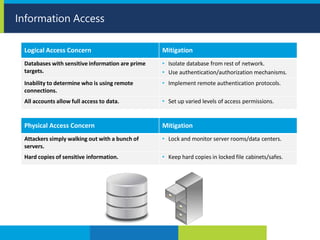
Information Access
Logical Access Concern Mitigation
Databases with sensitive information are prime
targets.
• Isolate database from rest of network.
• Use authentication/authorization mechanisms.
Inability to determine who is using remote
connections.
• Implement remote authentication protocols.
All accounts allow full access to data. • Set up varied levels of access permissions.
Physical Access Concern Mitigation
Attackers simply walking out with a bunch of
servers.
• Lock and monitor server rooms/data centers.
Hard copies of sensitive information. • Keep hard copies in locked file cabinets/safes.
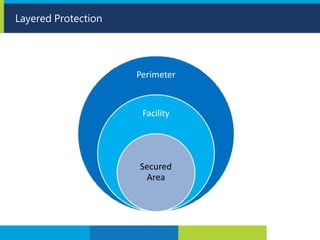
Layered Protection
Perimeter
Facility
Secured
Area
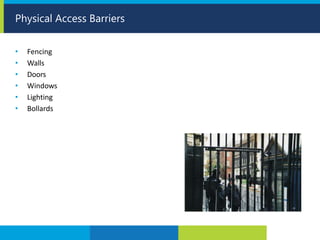
• Fencing
• Walls
• Doors
• Windows
• Lighting
• Bollards
Physical Access Barriers
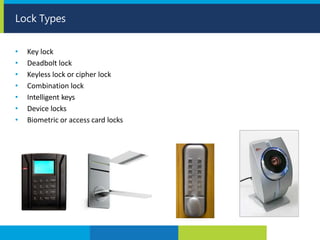
• Key lock
• Deadbolt lock
• Keyless lock or cipher lock
• Combination lock
• Intelligent keys
• Device locks
• Biometric or access card locks
Lock Types
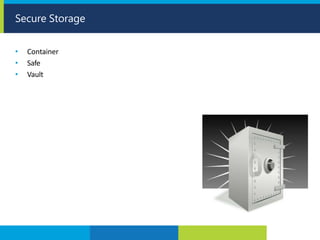
• Container
• Safe
• Vault
Secure Storage
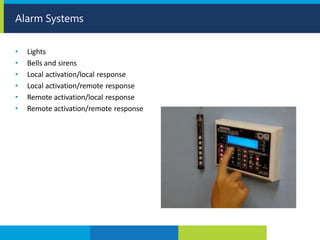
• Lights
• Bells and sirens
• Local activation/local response
• Local activation/remote response
• Remote activation/local response
• Remote activation/remote response
Alarm Systems
• Maintained by access control systems and by security guards.
• Should clearly identify:
• The name of the individual attempting access.
• The date and time of access.
• The access portal or entry point.
• The user ID entered to attempt access.
• The location of access to internal spaces, if required.
• Unsuccessful access attempts, including those during unauthorized hours.
Physical Access Logs
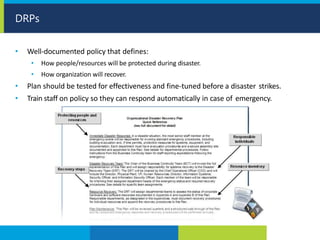
DRPs
• Well-documented policy that defines:
• How people/resources will be protected during disaster.
• How organization will recover.
• Plan should be tested for effectiveness and fine-tuned before a disaster strikes.
• Train staff on policy so they can respond automatically in case of emergency.
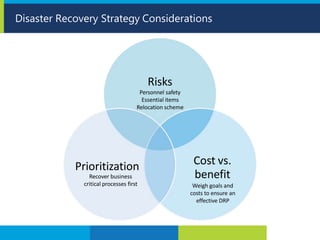
Disaster Recovery Strategy Considerations
Risks
Personnel safety
Essential items
Relocation scheme
Cost vs.
benefit
Weigh goals and
costs to ensure an
effective DRP
Prioritization
Recover business
critical processes first
END

Dncybersecurity

  • 1.
  • 2.
    CYBER SECURITY THE OBJECTIVE Toprevent or mitigate harm to or destruction of Computer Networks, Applications, Devices, and Data.
  • 3.
    Trainer Profile LEO LOURDES (MBAIT Management, BoM Hons. HRM) Implementer of ISO 20000-1:2011 Certified in COBIT® 5 Certified in ISO 9001 Auditor (PECB) Certified in PRINCE2® in Project Management Certified in ITIL® Practitioner Certified in ITIL® Intermediate Certificate in IT Service Operation Certified in ITIL Information Security based on ISO/IEC 27002 Certified in ITIL for Cloud Computing Certified in ITIL IT Service Management Certified in Coaching and Calibration Skills for Call Center Certified in Delivering Learning / Teaching by City & Guilds, United Kingdom wecare@thinkleosolutions.com ++6016-349 1793 Experience: Management Representative (MR) ISO 20000-1: 2011 IT Service Management (Incident, Problem, Change) Manager Security, Compliance & Risk Management Senior CRM Delivery Analyst Certified Trainer Certified IT Auditor & Consultant
  • 4.
    CYBER SECURITY AWARENESS: DAY 2 • Vulnerabilities • Network Security • Access Control • Physical Security • Disaster Recovery
  • 5.
    Vulnerability Assessments Perform when: •First deploy new/updated systems. • New vulnerabilities have been identified. • A security breach occurs. • Need to document security state of systems. Collect Store Organize Analyze Report
  • 6.
    • Port scanner •Protocol analyzer • Packet analyzer • Network enumerator • Intelligence gathering • Vulnerability scanner Vulnerability Scanning
  • 7.
    • Evaluate securityby simulating an attack on a system. • Verify a threat exists. • Actively test and bypass security controls. • Exploit system vulnerabilities. • When compared to vulnerability assessment, it is: • Less common. • More intrusive. • An objective measurement. • A combination of multiple vulnerabilities to provide holistic understanding of vulnerability. • Follow real attacker’s methodology, including target preparation/research stages. • Difference between pen test and real attack is intent. • Need explicit permission of target organization. • Make sure organization knows test will not stop until attack is fully carried out. • Report should include: • Steps undertaken. • Weaknesses identified. • Recommendations. Penetration Testing
  • 8.
    Penetration Test Components ComponentDescription Network scanning • Uses a port scanner to identify devices attached to target network and to enumerate the applications hosted on the devices. This function is known as fingerprinting. Social engineering • Attempts to get information from users to gain access to a system. • Tests for adequate user training. • Stay mindful of ethical implications of deceiving people. • Don't want to undermine your employees' trust in you or their coworkers. War dialing • Uses a modem and software to dial a range of phone numbers to locate computer systems, PBX devices, and HVAC systems. War driving • Locates/attempts to penetrate wireless systems from public property, like a sidewalk. Vulnerability scanning • Exploits known weaknesses in operating systems and applications identified through reconnaissance and enumeration. Blind testing • Occurs when the target organization is not aware of penetration testing activities. Targeted testing • Target organization is informed of the test. • Less disruption to organization due to a more controlled climate.
  • 9.
    • Event logscontain detailed information. • Often used to troubleshoot performance issues. • Should also review as part of security control test process. • Use an automated tool to help identify security events from mass of data. • May need to configure network devices to capture desired level of detail in a log. Event Log Review (Slide 1 of 2)
  • 10.
    Common logged activitiesinclude: • Authentication requests, both successful and unsuccessful. • New user or group creation. • Group membership changes. • User privilege level changes. • Resource access, such as opening, changing, and deleting files and folders. • Client requests for server services. • The number of transactions per hour of a particular service. • Application or service shutdowns and restarts. • System shutdowns and restarts. • Service or system component errors and failures. • System policy changes. Event Log Review (Slide 2 of 2)
  • 11.
    Wireless Security (Slide1 of 2) Wireless Security Protocol Description WEP • Wired Equivalent Privacy. • Relies on stream cipher with 24-bit initialization vector (IV). • Attack on IV can easily predict short value. • Can be compromised in minutes. • Obsolete – do not use. WPA • Wi-Fi Protected Access. • Provides additional encryption using Temporal Key Integrity Protocol (TKIP). • TKIP is vulnerable to transmission of arbitrary packets. • Also vulnerable to decryption of arbitrary packets. • Obsolete – do not use. WPA2 (802.11i) • Improvement on WPA. • Includes stronger encryption (CCMP protocol using AES standard). • Biggest known vulnerability is choosing a weak password. • The current best choice for Wi-Fi security. WPS • Automated mechanism for wireless devices to obtain the Wi-Fi key from the router. • Wi-Fi setup is easy and convenient. • Negotiation can be intercepted and cracked by hacking tools.
  • 12.
    When implementing wirelesssecurity: • Select WPA2 (even WPA2 personal) over WEP or WPA. • When possible, use a RADIUS server for wireless authentication. • If you must use a pre-shared key, make the password complex and change it regularly. • Manually enter Wi-Fi passwords into your device, rather than allowing them to autoconfigure themselves by using WPS. • If necessary, enter the MAC addresses of all devices that are permitted to connect to the wireless network into the access point. Wireless Security (Slide 2 of 2)
  • 13.
    Networking Hardware • Router •Wireless router • Switch • Hub • Gateway • Modem • Multiplexer • Concentrator • Front-end processor • Repeater • Firewall • Proxy • Reverse Proxy • Appliance Switch Modem Hub Router Firewall Wireless Router
  • 14.
    • If arouter is compromised, attacker can use it in a man-in-the-middle attack. • Like planting a bug in a room to listen in remotely. • Can also initiate DoS attacks. • Router must be physically protected first and foremost. • Theft or tampering with router will result in major network issues. • Routers are also subject to logical attacks. • Attacker may attempt to access router using a remote protocol like Telnet/SSH. • May also try to send excessive or malformed packets to router, causing a DoS. Router Vulnerabilities
  • 15.
    • Deploy therouter in a secure, locked area. • Disable all unnecessary services on the router. • Disable any unnecessary routing protocols. • Harden the router per the manufacturer's recommendations. • Use SSH instead of Telnet. • Create access control lists. • Require strong authentication for administrator connections. • Limit number of admin connections, and disconnect inactive sessions. • Require authentication to a centralized server on higher-end routers. • Create custom administrative accounts with limited privileges for support personnel. • Ensure passwords are stored using encryption. • Forward all security events to a central syslog server. • Monitor activity on the router, watching for suspicious behavior. Router Security
  • 16.
    • Comprehensive solutionto secure mobile devices as they connect to network. • Ensures that these devices are healthy and cannot compromise network. • Software installed on devices includes: • Firewall • VPN client • Antivirus • Anti-malware • Encryption • Uses client/server security model. • Central server on network pushes updates to mobile clients and controls access. • Endpoint security often includes mobile device management (MDM). Endpoint Security
  • 17.
    • Various devicesenable networking capabilities. • Often found in server rooms. • Use the following methods to secure these devices: • Physically secure all devices against tampering or accidents. • Lock cabinets and rack doors. • Use cable locks on laptops and small PCs. • Mount power adapters, smart jacks, media converters, etc., where they can be easily monitored and serviced. • Consider using a "lights out" approach to server management. • Place non-rack-mountable equipment on boltable trays above the rack floor. • Route all cables both inside racks and in the ceiling in managed bundles and cable trays. Physical Devices
  • 18.
    • Physical andLogical Access Control • Identification, Authentication, and Authorization • Identity as a Service • Authorization Mechanisms • Access Control Attack Mitigation Identity and Access Management
  • 19.
    • Process ofallowing only authorized entities to observe/modify/take possession of a computer system or physical property. • Subject – entity requesting access: • Person. • System. • Process. Access Control • Object – entity being accessed – any resource. • Limits subject’s access to object using predefined rules/roles/labels. Subjects Objects
  • 20.
    Types of AccessControl Services Access Control Service Description Identification and Authentication (I&A) • Provides unique identifier for each authorized subject attempting to access the object. • Includes method or methods to ensure identity of subject (authentication). • Typically administered with Identity Management System and support of a directory. Authorization • Determines the capabilities or rights of the subject when accessing the object. Audit • Creates a log or record of system activities. Accountability • Reports and reviews the contents of log files. • Each subject identifier must be unique to relate activities to one subject.
  • 21.
    Access Control ServicesImplementation Individual/entity attempting to access an object. Identify Individual’s identity. Verify Rules/roles to see what individual is permitted to do. Evaluate Audit trail – write each access attempt and function performed to log file. Create Log to see what was completed when and by whom. Review
  • 22.
    Identity and AccessProvisioning Lifecycle Provisioning Review Revocation/ Deprovisioning
  • 23.
    • Start withadministrative policies. • Reinforce with technical policies. • All passwords must be at least seven characters long using three different types of characters. • A user's identity must be verified before IT staff can reset that person's password. • Process to suspend/deactivate user account in case of termination/compromise/infection. • Inactive user accounts must be disabled after 60 calendar days. • User account will be locked out for 15 minutes after three bad logon attempts. • Users can’t have local administrative privileges on their computer unless approved by manager. • Existing local administrative privilege will be reviewed annually. • All administrator accounts must use two-factor authentication to log on to the network. • All workstations must implement a screen lock after 15 minutes of inactivity. • Access to administrator systems must be reviewed annually. • IT staff may not use administrator accounts for general purpose. Access Control Policies (Slide 1 of 2)
  • 24.
    • Reinforce withtechnical policies (Cont.) • Vendor and contractor access list to be approved, monitored, and limited to the length of the contract. • Default administrator passwords must be changed before the system goes into production. • Default ports for administrator access must be changed when possible. • Administrative access cannot be accomplished through a public interface. • Each new user account will receive a unique first-time password that must be changed upon first use. • Any reset passwords must be set to unique value for each user and changed upon first use. Access Control Policies (Slide 2 of 2)
  • 25.
    Information Access Logical AccessConcern Mitigation Databases with sensitive information are prime targets. • Isolate database from rest of network. • Use authentication/authorization mechanisms. Inability to determine who is using remote connections. • Implement remote authentication protocols. All accounts allow full access to data. • Set up varied levels of access permissions. Physical Access Concern Mitigation Attackers simply walking out with a bunch of servers. • Lock and monitor server rooms/data centers. Hard copies of sensitive information. • Keep hard copies in locked file cabinets/safes.
  • 26.
  • 27.
    • Fencing • Walls •Doors • Windows • Lighting • Bollards Physical Access Barriers
  • 28.
    • Key lock •Deadbolt lock • Keyless lock or cipher lock • Combination lock • Intelligent keys • Device locks • Biometric or access card locks Lock Types
  • 29.
    • Container • Safe •Vault Secure Storage
  • 30.
    • Lights • Bellsand sirens • Local activation/local response • Local activation/remote response • Remote activation/local response • Remote activation/remote response Alarm Systems
  • 31.
    • Maintained byaccess control systems and by security guards. • Should clearly identify: • The name of the individual attempting access. • The date and time of access. • The access portal or entry point. • The user ID entered to attempt access. • The location of access to internal spaces, if required. • Unsuccessful access attempts, including those during unauthorized hours. Physical Access Logs
  • 32.
    DRPs • Well-documented policythat defines: • How people/resources will be protected during disaster. • How organization will recover. • Plan should be tested for effectiveness and fine-tuned before a disaster strikes. • Train staff on policy so they can respond automatically in case of emergency.
  • 33.
    Disaster Recovery StrategyConsiderations Risks Personnel safety Essential items Relocation scheme Cost vs. benefit Weigh goals and costs to ensure an effective DRP Prioritization Recover business critical processes first
  • 34.