DIY Motion Capture
   12/5 Volumetric Society of NYC
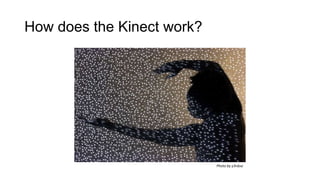
How does the Kinect work?


                            Photo by y3rdua
Getting Started: Hardware
You will need:
• A Kinect, or generic equivalent such as the Asus Xtion
• USB adapter cable, if you have a Kinect that was bundled with
  the Xbox (don’t buy the Microsoft adapter, the cheap ones work
  fine)
• Enough space to perform
Getting Started: Software

OpenNI driver bundle:
simple-openni.googlecode.com

KinectToPin:
kinecttopin.fox-gieg.com
KinectToPin
Kinect Motion Capture for After Effects
What is KinectToPin?


                              +
       A standalone motion
                                  A UI panel for After Effects
        capture application
What can you do with it?
Rig 2D character models in 3D
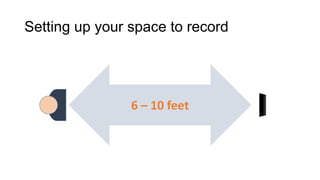
Setting up your space to record


                6 – 10 feet
Capturing
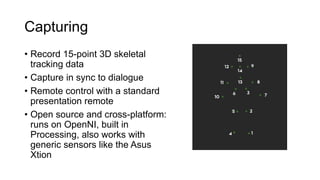
• Record 15-point 3D skeletal
  tracking data
• Capture in sync to dialogue
• Remote control with a standard
  presentation remote
• Open source and cross-platform:
  runs on OpenNI, built in
  Processing, also works with
  generic sensors like the Asus
  Xtion
Acting for Kinect
• The Kinect can’t record what it can’t see.
   • Keep your entire body in the camera’s range
   • Face the camera when capturing
   • Watch out for occluded joints (sitting down, putting your hands behind
     your back etc. can cause it to lose the track)
• It’s surprisingly good at picking up subtle posture shifts, but not
  smaller motions like laughter.
• Use a different performer for each character if possible
Importing tracking data
Native import or copy & paste
Getting data into After Effects
Data format options:
• 3D Point Controls (CS5.5+)
• 2D Point Controls (CS4+)
• Puppet pins
• Raw XML and JSON
UI Panel
• Create character
  templates
• 2D and 3D setups
• Native XML import
  (SLOW)
• Automatically add
  expressions to smooth
  tracking data
• Automate rigging
Building a Character
Rigging with the UI panel
The Puppet Tool
THREE OR MORE PINS ON ONE LAYER:   TWO PINS EACH, MULTIPLE LAYERS:
Elbows don’t bend this way. Ow.    Rotation with stretch and squash!
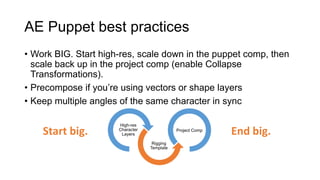
AE Puppet best practices
• Work BIG. Start high-res, scale down in the puppet comp, then
  scale back up in the project comp (enable Collapse
  Transformations).
• Precompose if you’re using vectors or shape layers
• Keep multiple angles of the same character in sync

                      High-res
    Start big.        Character
                       Layers
                                             Project Comp
                                                            End big.
                                   Rigging
                                  Template
Retargeting for arbitrary character
shapes
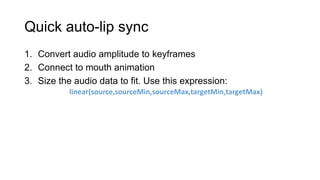
Quick auto-lip sync
1. Convert audio amplitude to keyframes
2. Connect to mouth animation
3. Size the audio data to fit. Use this expression:
           linear(source,sourceMin,sourceMax,targetMin,targetMax)
Beyond After Effects
Motion capture for live production
One last thought:

Embrace the limitations of
      the format.
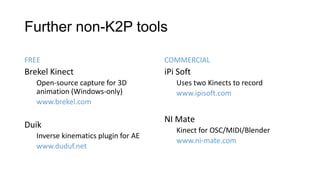
Further non-K2P tools

FREE                                  COMMERCIAL
Brekel Kinect                         iPi Soft
   Open-source capture for 3D            Uses two Kinects to record
   animation (Windows-only)              www.ipisoft.com
   www.brekel.com

                                      NI Mate
Duik
                                         Kinect for OSC/MIDI/Blender
   Inverse kinematics plugin for AE
                                         www.ni-mate.com
   www.duduf.net
Questions?
kinecttopin.fox-gieg.com
Download the software!
Contact Us
Nick Fox-Gieg      Victoria Nece
www.fox-gieg.com   www.victorianece.com
@N1ckFG            @FakeGreenDress

DIY motion capture with KinectToPin

  • 1.
    DIY Motion Capture 12/5 Volumetric Society of NYC
  • 2.
    How does theKinect work? Photo by y3rdua
  • 3.
    Getting Started: Hardware Youwill need: • A Kinect, or generic equivalent such as the Asus Xtion • USB adapter cable, if you have a Kinect that was bundled with the Xbox (don’t buy the Microsoft adapter, the cheap ones work fine) • Enough space to perform
  • 4.
    Getting Started: Software OpenNIdriver bundle: simple-openni.googlecode.com KinectToPin: kinecttopin.fox-gieg.com
  • 5.
  • 6.
    What is KinectToPin? + A standalone motion A UI panel for After Effects capture application
  • 7.
    What can youdo with it?
  • 8.
    Rig 2D charactermodels in 3D
  • 9.
    Setting up yourspace to record 6 – 10 feet
  • 10.
    Capturing • Record 15-point3D skeletal tracking data • Capture in sync to dialogue • Remote control with a standard presentation remote • Open source and cross-platform: runs on OpenNI, built in Processing, also works with generic sensors like the Asus Xtion
  • 12.
    Acting for Kinect •The Kinect can’t record what it can’t see. • Keep your entire body in the camera’s range • Face the camera when capturing • Watch out for occluded joints (sitting down, putting your hands behind your back etc. can cause it to lose the track) • It’s surprisingly good at picking up subtle posture shifts, but not smaller motions like laughter. • Use a different performer for each character if possible
  • 13.
    Importing tracking data Nativeimport or copy & paste
  • 14.
    Getting data intoAfter Effects Data format options: • 3D Point Controls (CS5.5+) • 2D Point Controls (CS4+) • Puppet pins • Raw XML and JSON
  • 15.
    UI Panel • Createcharacter templates • 2D and 3D setups • Native XML import (SLOW) • Automatically add expressions to smooth tracking data • Automate rigging
  • 16.
  • 17.
    The Puppet Tool THREEOR MORE PINS ON ONE LAYER: TWO PINS EACH, MULTIPLE LAYERS: Elbows don’t bend this way. Ow. Rotation with stretch and squash!
  • 18.
    AE Puppet bestpractices • Work BIG. Start high-res, scale down in the puppet comp, then scale back up in the project comp (enable Collapse Transformations). • Precompose if you’re using vectors or shape layers • Keep multiple angles of the same character in sync High-res Start big. Character Layers Project Comp End big. Rigging Template
  • 19.
    Retargeting for arbitrarycharacter shapes
  • 20.
    Quick auto-lip sync 1.Convert audio amplitude to keyframes 2. Connect to mouth animation 3. Size the audio data to fit. Use this expression: linear(source,sourceMin,sourceMax,targetMin,targetMax)
  • 21.
    Beyond After Effects Motioncapture for live production
  • 22.
    One last thought: Embracethe limitations of the format.
  • 23.
    Further non-K2P tools FREE COMMERCIAL Brekel Kinect iPi Soft Open-source capture for 3D Uses two Kinects to record animation (Windows-only) www.ipisoft.com www.brekel.com NI Mate Duik Kinect for OSC/MIDI/Blender Inverse kinematics plugin for AE www.ni-mate.com www.duduf.net
  • 24.
  • 25.
  • 26.
    Contact Us Nick Fox-Gieg Victoria Nece www.fox-gieg.com www.victorianece.com @N1ckFG @FakeGreenDress

Editor's Notes

  • #2 Why DIY MoCap?Motion capture is now cheap and accessibleNo longer need a giant studioIt’s FAST.Ideal use cases: short-turnaround animation, rapid prototyping etc.
  • #5 Microsoft SDK vs. OpenNI
  • #20 Can add multiple motion tracks and duplicate nullsPin names need to match control nulls
  • #23 2D vs. 3D: Avoiding the “Uncanny Valley”Awesome glitches