DIVIDE AND CONQUER:
RESOURCE SEGREGATION IN THE OPENSTACK
CLOUD
Steve Gordon (@xsgordon)
Technical Product Manager, Red Hat
Why segregate resources?
● Infrastructure
–Expose logical groupings of infrastructure based on physical
characteristics
–Expose logical groupings of infrastructure based on some abstract
functionality/capability
–“More-massive” horizontal scalability
Why segregate resources?
● Infrastructure
–Expose logical groupings of infrastructure based on physical
characteristics
–Expose logical groupings of infrastructure based on some abstract
functionality/capability
–“More-massive” horizontal scalability
● Workloads
–Ensure an even spread of a single workload
–Ensure close placement of related workloads
Segregation in datacenter virtualization
● Infrastructure segregation:
–Logical data center constructs
● Contain some number of logical clusters
● Clusters typically:
–Are relatively small (0's to 00's of nodes per cluster)
–Are tightly coupled to physical storage and network layout
● Workload segregation:
–Host-level affinity/anti-affinity
–CPU-level affinity/anti-affinity (pinning)
Segregation in an elastic cloud
● Amazon EC2:
–Infrastructure segregation:
● Regions – Separate geographic areas (e.g. us-east-1)
● Availability Zones – Isolated locations within a region (e.g. us-east-1a)
–Workload segregation:
● Placement Groups – Workload affinity within an availability zone
Segregation in an elastic cloud
● Amazon EC2:
–Infrastructure segregation:
● Regions – Separate geographic areas (e.g. us-east-1)
● Availability Zones – Isolated locations within a region (e.g. us-east-1a)
–Workload segregation:
● Placement Groups – Workload affinity within an availability zone
● OpenStack:
–Overloads some of these terms (and more!)
–Application is more flexible for deployers and operators
Segregation in an elastic cloud
● Wait a second...weren't we moving to the cloud to hide all this
infrastructure stuff from the user?
Segregation in an elastic cloud
● Wait a second...weren't we moving to the cloud to hide all this
stuff from the user?
–Yes!
● Users and applications demand some visibility of:
–Failure domains
–Premium features
● Deployers and operators determine the level of granularity
exposed.
Segregation in OpenStack
● Infrastructure segregation:
–Regions
–Cells
–Host aggregates
–Availability zones
Segregation in OpenStack
● Infrastructure segregation:
–Regions
–Cells
–Host aggregates
–Availability zones
● Workload segregation:
–Server groups
REGIONS AND CELLS
Regions
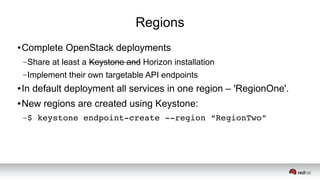
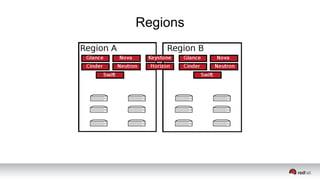
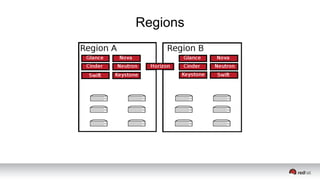
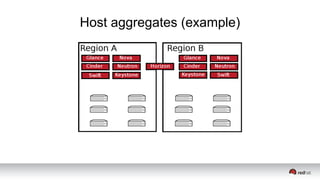
● Complete OpenStack deployments
–Share at least a Keystone and Horizon installation
–Implement their own targetable API endpoints
● In default deployment all services in one region – 'RegionOne'.
● New regions are created using Keystone:
–$ keystone endpoint­create ­­region “RegionTwo”
Regions
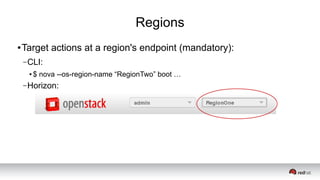
● Target actions at a region's endpoint (mandatory):
–CLI:
● $ nova --os-region-name “RegionTwo” boot …
–Horizon:
Regions
Regions
Cells
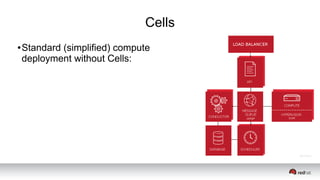
● Standard (simplified) compute
deployment without Cells:
Cells
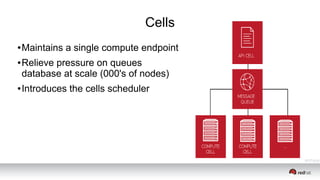
● Maintains a single compute endpoint
● Relieve pressure on queues
database at scale (000's of nodes)
● Introduces the cells scheduler
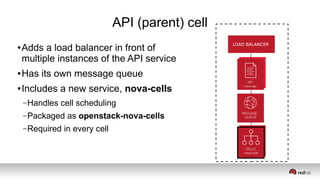
API (parent) cell
● Adds a load balancer in front of
multiple instances of the API service
● Has its own message queue
● Includes a new service, nova-cells
–Handles cell scheduling
–Packaged as openstack-nova-cells
–Required in every cell
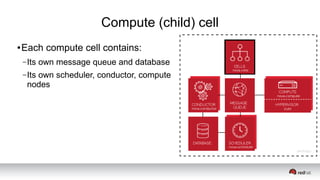
Compute (child) cell
● Each compute cell contains:
–Its own message queue and database
–Its own scheduler, conductor, compute
nodes
Common cell configuration
● Setup database and message broker for each cell
● Initialize cell database using nova-manage
● Optionally:
–Modify scheduling filter/weight configuration for cells scheduler
–Create cells JSON file to avoid need to avoid reloading from database
API (parent) cell configuration
● Nova.conf:
–Change compute_api_class
–Enable cells
–Name the cell
–Enable and start nova-cells
Compute (child) cell configuration
● nova.conf
–Disable quota driver
–Enable cells
–Name the cell
–Enable and start nova-cells
Cells pitfalls
● That all sounds pretty good – sign me up!
● Lack of “cell awareness” in other projects
● Minimal test coverage in the gate
● Some standard functionality currently broken with cells:
–Host aggregates
–Security groups
So how do they stack up?
Regions
● Supported by all services
● Separate endpoints
● Exist above scheduling
● Linked via REST APIs
Cells
● Supported by compute
● Common endpoint
● Additional scheduling layer
● Linked via RPC
HOST AGGREGATES AND
AVAILABILITY ZONES
Host aggregates
● Logical groupings of hosts based on metadata
● Typically metadata describes special capabilities hosts share:
–Fast disks for ephemeral data storage
–Fast network interfaces
–Etc.
● Hosts can be in multiple host aggregates:
–“Hosts that have SSD storage and GPUs”
Host aggregates
● Implicitly user targetable:
–Admin defines host aggregate with metadata, and a flavor that matches it
–User selects flavor with extra specifications when requesting instance
–Scheduler places instance on a host in a host aggregate that matches
(extra specifications to metadata)
–User explicitly targets a capability, not an aggregate
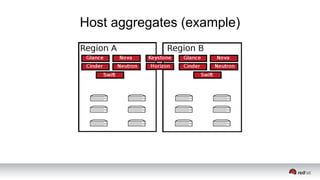
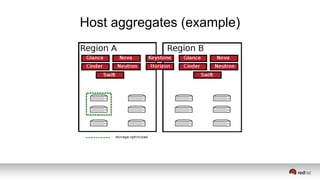
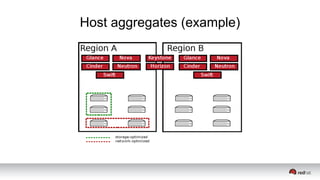
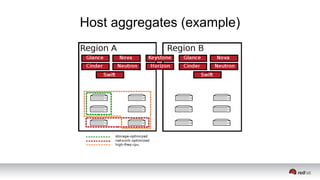
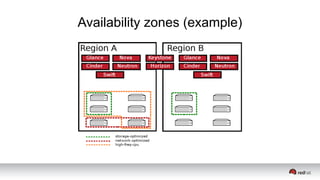
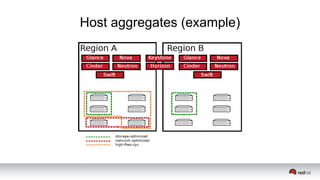
Host aggregates (example)
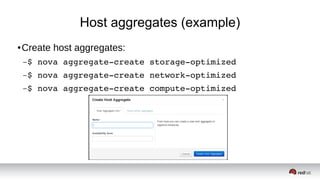
● Create host aggregates:
–$ nova aggregate­create storage­optimized
–$ nova aggregate­create network­optimized
–$ nova aggregate­create compute­optimized
Host aggregates (example)
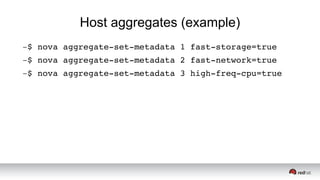
–$ nova aggregate­set­metadata 1 fast­storage=true
–$ nova aggregate­set­metadata 2 fast­network=true
–$ nova aggregate­set­metadata 3 high­freq­cpu=true
Host aggregates (example)
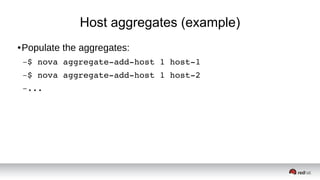
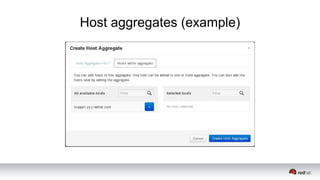
● Populate the aggregates:
–$ nova aggregate­add­host 1 host­1
–$ nova aggregate­add­host 1 host­2
–...
Host aggregates (example)
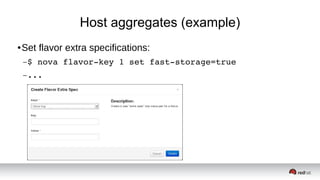
● Set flavor extra specifications:
–$ nova flavor­key 1 set fast­storage=true
–...
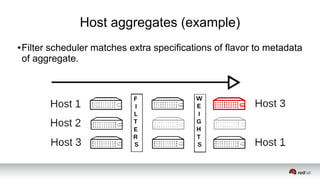
Host aggregates (example)
● Filter scheduler matches extra specifications of flavor to metadata
of aggregate.
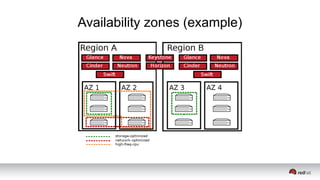
Availability zones
● Logical groupings of hosts based on arbitrary factors like:
–Location (country, data center, rack, etc.)
–Network layout
–Power source
● Explicitly user targetable:
–$ nova boot ­­availability­zone “rack­1”
● OpenStack Block Storage (Cinder) also has availability zones
Availability zones
● Host aggregates are made explicitly user targetable by creating
them as an AZ:
–$ nova aggregate­create tier­1 us­east­tier­1 
–tier­1 is the aggregate name, us­east­tier­1 is the AZ name
● Host aggregate is the availability zone in this case
–Hosts can not be in multiple availability zones
● Well...sort of.
–Hosts can be in multiple host aggregates
Availability zones (example)
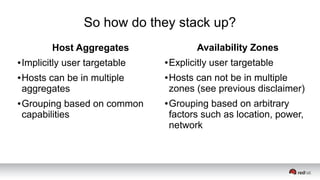
So how do they stack up?
Host Aggregates
● Implicitly user targetable
● Hosts can be in multiple
aggregates
● Grouping based on common
capabilities
Availability Zones
● Explicitly user targetable
● Hosts can not be in multiple
zones (see previous disclaimer)
● Grouping based on arbitrary
factors such as location, power,
network
WORKLOAD SEGREGATION
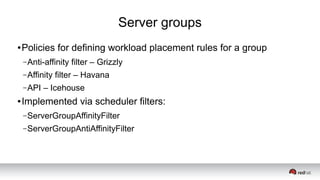
Server groups
● Policies for defining workload placement rules for a group
–Anti-affinity filter – Grizzly
–Affinity filter – Havana
–API – Icehouse
● Implemented via scheduler filters:
–ServerGroupAffinityFilter
–ServerGroupAntiAffinityFilter
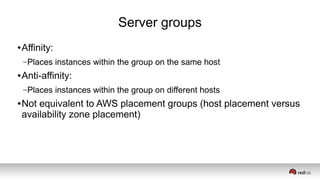
Server groups
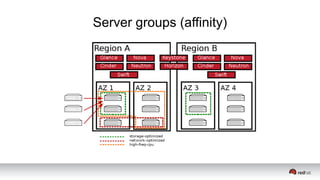
● Affinity:
–Places instances within the group on the same host
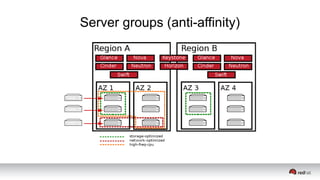
● Anti-affinity:
–Places instances within the group on different hosts
● Not equivalent to AWS placement groups (host placement versus
availability zone placement)
Server groups
● Create the server group:
–$ nova server­group­create ­­policy=anti­affinity 
my_group 
–Really defining a policy rather than a group.
● Specify the group UUID or name when launching instances:
–$ nova boot ­­image ... ­­flavor … ­­hint 
group=group_id
Server groups (affinity)
Server groups (anti-affinity)
What next?
● Relevant design sessions:
–Simultaneous Scheduling for Server Groups
● Friday, May 16 • 1:20pm – 2:00pm
–Scheduler hints for VM life cycle
● Friday, May 16 • 2:10pm – 2:50pm
–Nova Dev/Ops Session
● Friday, May 16 • 3:00pm - 3:40pm
Resources
● Operations Guide – Chapter 5 “Scaling”
–http://docs.openstack.org/trunk/openstack-ops/content/scaling.html
● Configuration Reference Guide – Chapter 2 “Compute”
–http://docs.openstack.org/trunk/config-
reference/content/section_compute-cells.html
● OpenStack in Production Blog
–http://openstack-in-production.blogspot.fr/
Divide and conquer: resource segregation in the OpenStack cloud

Divide and conquer: resource segregation in the OpenStack cloud

  • 1.
    DIVIDE AND CONQUER: RESOURCESEGREGATION IN THE OPENSTACK CLOUD Steve Gordon (@xsgordon) Technical Product Manager, Red Hat
  • 2.
    Why segregate resources? ●Infrastructure –Expose logical groupings of infrastructure based on physical characteristics –Expose logical groupings of infrastructure based on some abstract functionality/capability –“More-massive” horizontal scalability
  • 3.
    Why segregate resources? ●Infrastructure –Expose logical groupings of infrastructure based on physical characteristics –Expose logical groupings of infrastructure based on some abstract functionality/capability –“More-massive” horizontal scalability ● Workloads –Ensure an even spread of a single workload –Ensure close placement of related workloads
  • 4.
    Segregation in datacentervirtualization ● Infrastructure segregation: –Logical data center constructs ● Contain some number of logical clusters ● Clusters typically: –Are relatively small (0's to 00's of nodes per cluster) –Are tightly coupled to physical storage and network layout ● Workload segregation: –Host-level affinity/anti-affinity –CPU-level affinity/anti-affinity (pinning)
  • 5.
    Segregation in anelastic cloud ● Amazon EC2: –Infrastructure segregation: ● Regions – Separate geographic areas (e.g. us-east-1) ● Availability Zones – Isolated locations within a region (e.g. us-east-1a) –Workload segregation: ● Placement Groups – Workload affinity within an availability zone
  • 6.
    Segregation in anelastic cloud ● Amazon EC2: –Infrastructure segregation: ● Regions – Separate geographic areas (e.g. us-east-1) ● Availability Zones – Isolated locations within a region (e.g. us-east-1a) –Workload segregation: ● Placement Groups – Workload affinity within an availability zone ● OpenStack: –Overloads some of these terms (and more!) –Application is more flexible for deployers and operators
  • 7.
    Segregation in anelastic cloud ● Wait a second...weren't we moving to the cloud to hide all this infrastructure stuff from the user?
  • 8.
    Segregation in anelastic cloud ● Wait a second...weren't we moving to the cloud to hide all this stuff from the user? –Yes! ● Users and applications demand some visibility of: –Failure domains –Premium features ● Deployers and operators determine the level of granularity exposed.
  • 9.
    Segregation in OpenStack ●Infrastructure segregation: –Regions –Cells –Host aggregates –Availability zones
  • 10.
    Segregation in OpenStack ●Infrastructure segregation: –Regions –Cells –Host aggregates –Availability zones ● Workload segregation: –Server groups
  • 11.
  • 12.
    Regions ● Complete OpenStackdeployments –Share at least a Keystone and Horizon installation –Implement their own targetable API endpoints ● In default deployment all services in one region – 'RegionOne'. ● New regions are created using Keystone: –$ keystone endpoint­create ­­region “RegionTwo”
  • 13.
    Regions ● Target actionsat a region's endpoint (mandatory): –CLI: ● $ nova --os-region-name “RegionTwo” boot … –Horizon:
  • 14.
  • 15.
  • 16.
    Cells ● Standard (simplified)compute deployment without Cells:
  • 17.
    Cells ● Maintains asingle compute endpoint ● Relieve pressure on queues database at scale (000's of nodes) ● Introduces the cells scheduler
  • 18.
    API (parent) cell ●Adds a load balancer in front of multiple instances of the API service ● Has its own message queue ● Includes a new service, nova-cells –Handles cell scheduling –Packaged as openstack-nova-cells –Required in every cell
  • 19.
    Compute (child) cell ●Each compute cell contains: –Its own message queue and database –Its own scheduler, conductor, compute nodes
  • 20.
    Common cell configuration ●Setup database and message broker for each cell ● Initialize cell database using nova-manage ● Optionally: –Modify scheduling filter/weight configuration for cells scheduler –Create cells JSON file to avoid need to avoid reloading from database
  • 21.
    API (parent) cellconfiguration ● Nova.conf: –Change compute_api_class –Enable cells –Name the cell –Enable and start nova-cells
  • 22.
    Compute (child) cellconfiguration ● nova.conf –Disable quota driver –Enable cells –Name the cell –Enable and start nova-cells
  • 23.
    Cells pitfalls ● Thatall sounds pretty good – sign me up! ● Lack of “cell awareness” in other projects ● Minimal test coverage in the gate ● Some standard functionality currently broken with cells: –Host aggregates –Security groups
  • 24.
    So how dothey stack up? Regions ● Supported by all services ● Separate endpoints ● Exist above scheduling ● Linked via REST APIs Cells ● Supported by compute ● Common endpoint ● Additional scheduling layer ● Linked via RPC
  • 25.
  • 26.
    Host aggregates ● Logicalgroupings of hosts based on metadata ● Typically metadata describes special capabilities hosts share: –Fast disks for ephemeral data storage –Fast network interfaces –Etc. ● Hosts can be in multiple host aggregates: –“Hosts that have SSD storage and GPUs”
  • 27.
    Host aggregates ● Implicitlyuser targetable: –Admin defines host aggregate with metadata, and a flavor that matches it –User selects flavor with extra specifications when requesting instance –Scheduler places instance on a host in a host aggregate that matches (extra specifications to metadata) –User explicitly targets a capability, not an aggregate
  • 28.
  • 29.
    Host aggregates (example) ●Create host aggregates: –$ nova aggregate­create storage­optimized –$ nova aggregate­create network­optimized –$ nova aggregate­create compute­optimized
  • 30.
  • 31.
    Host aggregates (example) ●Populate the aggregates: –$ nova aggregate­add­host 1 host­1 –$ nova aggregate­add­host 1 host­2 –...
  • 32.
  • 33.
  • 34.
  • 35.
  • 36.
  • 37.
  • 38.
    Host aggregates (example) ●Set flavor extra specifications: –$ nova flavor­key 1 set fast­storage=true –...
  • 39.
    Host aggregates (example) ●Filter scheduler matches extra specifications of flavor to metadata of aggregate.
  • 40.
    Availability zones ● Logicalgroupings of hosts based on arbitrary factors like: –Location (country, data center, rack, etc.) –Network layout –Power source ● Explicitly user targetable: –$ nova boot ­­availability­zone “rack­1” ● OpenStack Block Storage (Cinder) also has availability zones
  • 41.
    Availability zones ● Hostaggregates are made explicitly user targetable by creating them as an AZ: –$ nova aggregate­create tier­1 us­east­tier­1  –tier­1 is the aggregate name, us­east­tier­1 is the AZ name ● Host aggregate is the availability zone in this case –Hosts can not be in multiple availability zones ● Well...sort of. –Hosts can be in multiple host aggregates
  • 42.
  • 43.
  • 44.
    So how dothey stack up? Host Aggregates ● Implicitly user targetable ● Hosts can be in multiple aggregates ● Grouping based on common capabilities Availability Zones ● Explicitly user targetable ● Hosts can not be in multiple zones (see previous disclaimer) ● Grouping based on arbitrary factors such as location, power, network
  • 45.
  • 46.
    Server groups ● Policiesfor defining workload placement rules for a group –Anti-affinity filter – Grizzly –Affinity filter – Havana –API – Icehouse ● Implemented via scheduler filters: –ServerGroupAffinityFilter –ServerGroupAntiAffinityFilter
  • 47.
    Server groups ● Affinity: –Placesinstances within the group on the same host ● Anti-affinity: –Places instances within the group on different hosts ● Not equivalent to AWS placement groups (host placement versus availability zone placement)
  • 48.
    Server groups ● Createthe server group: –$ nova server­group­create ­­policy=anti­affinity  my_group  –Really defining a policy rather than a group. ● Specify the group UUID or name when launching instances: –$ nova boot ­­image ... ­­flavor … ­­hint  group=group_id
  • 49.
  • 50.
  • 51.
    What next? ● Relevantdesign sessions: –Simultaneous Scheduling for Server Groups ● Friday, May 16 • 1:20pm – 2:00pm –Scheduler hints for VM life cycle ● Friday, May 16 • 2:10pm – 2:50pm –Nova Dev/Ops Session ● Friday, May 16 • 3:00pm - 3:40pm
  • 52.
    Resources ● Operations Guide– Chapter 5 “Scaling” –http://docs.openstack.org/trunk/openstack-ops/content/scaling.html ● Configuration Reference Guide – Chapter 2 “Compute” –http://docs.openstack.org/trunk/config- reference/content/section_compute-cells.html ● OpenStack in Production Blog –http://openstack-in-production.blogspot.fr/

Editor's Notes

  • #2 Role at Red Hat involves talking to customers, primarily about OpenStack compute Confusion about various options for compute segregation common Here we are! I'm a compute guy, so primarily talking about compute
  • #3 Physical characteristics might include: Geographic location (country, state, city, data center, rack) Power source Network layout Anything really, but typically something where a fault would take out the entire unit or it's desirable to upgrade it as one.
  • #4 Physical characteristics might include: Geographic location (country, state, city, data center, rack) Power source Network layout Anything really, but typically something where a fault would take out the entire unit or it's desirable to upgrade it as one.
  • #5 30 hosts for vSphere/ESXi cluster ~30 clusters for vCenter management
  • #6 In EC2 one user's us-east-1a may differ from anothers.
  • #13 AVAILABLE_REGIONS Some facility for sharing other facilities between regions by adding endpoints for same IP in both. Token replication, use memcached to help
  • #14 AmbiguousEndpoints
  • #31 No facility for setting metadata via Horizon, yet.
  • #41 Targeting is not mandatory. If a default is specified it is used. If no default is specified
  • #48 Not equivalent with current policies anyway.
  • #50 Trying to boot more instances in a group with affinity than the hardware allows results in NoValidHost (hard affinity)
  • #51 Trying to boot more instances than there are hosts available in a group with anti-affinity results in NoValidHost (hard anti-affinity).