OPENSTACK COMPUTE 101
OpenStack Compute 101
Stephen Gordon (@xsgordon)
Sr. Technical Product Manager,
Red Hat
OPENSTACK COMPUTE 101OPENSTACK COMPUTE 101
Agenda
● Overview
● Instance Lifecycle
● Compute Drivers
● Scaling Compute
● Segregating Compute
● New in Kilo
OPENSTACK COMPUTE 101OPENSTACK COMPUTE 101
OVERVIEW
OPENSTACK COMPUTE 101OPENSTACK COMPUTE 101
What is OpenStack?
● A group of related projects that when combined form an
Open Source cloud infrastructure platform for providing
Infrastructure-as-a-Service.
● Intended to be “massively scalable”, scales horizontally
not vertically, on commodity hardware.
● Modular architecture allows consumers of the platform
to deploy only what they need.
OPENSTACK COMPUTE 101OPENSTACK COMPUTE 101
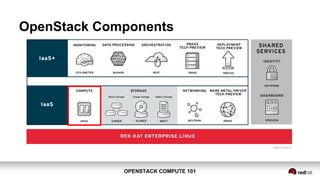
OpenStack Components
OPENSTACK COMPUTE 101OPENSTACK COMPUTE 101
What is OpenStack Compute (Nova)?
● One of the two original OpenStack projects, along with
Object Storage (Swift).
● Exposes a rich API for defining compute instances and
managing their lifecycle.
● Pluggable support for multiple common hypervisor
platforms, relatively solution agnostic.
OPENSTACK COMPUTE 101OPENSTACK COMPUTE 101
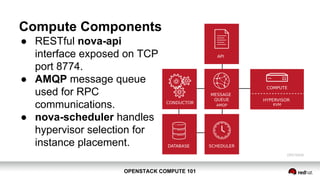
Compute Components
● RESTful nova-api
interface exposed on TCP
port 8774.
● AMQP message queue
used for RPC
communications.
● nova-scheduler handles
hypervisor selection for
instance placement.
OPENSTACK COMPUTE 101OPENSTACK COMPUTE 101
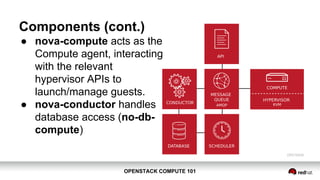
Components (cont.)
● nova-compute acts as the
Compute agent, interacting
with the relevant
hypervisor APIs to
launch/manage guests.
● nova-conductor handles
database access (no-db-
compute)
OPENSTACK COMPUTE 101OPENSTACK COMPUTE 101
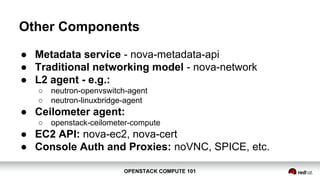
Other Components
● Metadata service - nova-metadata-api
● Traditional networking model - nova-network
● L2 agent - e.g.:
○ neutron-openvswitch-agent
○ neutron-linuxbridge-agent
● Ceilometer agent:
○ openstack-ceilometer-compute
● EC2 API: nova-ec2, nova-cert
● Console Auth and Proxies: noVNC, SPICE, etc.
OPENSTACK COMPUTE 101OPENSTACK COMPUTE 101
INSTANCE LIFECYCLE
OPENSTACK COMPUTE 101OPENSTACK COMPUTE 101
Authentication$ cat keystonerc_demo
export OS_USERNAME=demo
export OS_TENANT_NAME=demo
export OS_PASSWORD=c8500b92ed7f4ed0
export OS_AUTH_URL=http://93.184.216.34:5000/v2.0/
export PS1='[u@h W(keystone_demo)]$ '
$ source keystonerc_demo
OPENSTACK COMPUTE 101OPENSTACK COMPUTE 101
Instance Creation
● Instance creation achieved using nova boot command.
● Minimal set of arguments include selecting a flavor and
image:
$ nova boot --flavor <flavor> --image <image> 
[--nic net-id=<net-id>] <name>
● Flavor determines the “size” of an instance.
● Image determines the disk image used to boot the
instance.
OPENSTACK COMPUTE 101OPENSTACK COMPUTE 101
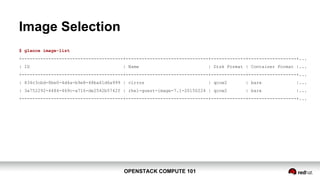
Image Selection
$ glance image-list
+--------------------------------------+-------------------------------+-------------+------------------+...
| ID | Name | Disk Format | Container Format |...
+--------------------------------------+-------------------------------+-------------+------------------+...
| 834c3cbd-8be0-4d4a-b9e8-48ba61d6a999 | cirros | qcow2 | bare |...
| 3a752292-4484-469c-a716-de2542b5742f | rhel-guest-image-7.1-20150224 | qcow2 | bare |...
+--------------------------------------+-------------------------------+-------------+------------------+...
OPENSTACK COMPUTE 101OPENSTACK COMPUTE 101
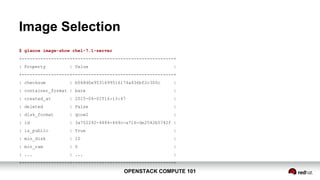
Image Selection
$ glance image-show rhel-7.1-server
+------------------+--------------------------------------+
| Property | Value |
+------------------+--------------------------------------+
| checksum | b068d0e9531699516174a436bf2c300c |
| container_format | bare |
| created_at | 2015-04-01T16:13:47 |
| deleted | False |
| disk_format | qcow2 |
| id | 3a752292-4484-469c-a716-de2542b5742f |
| is_public | True |
| min_disk | 10 |
| min_ram | 0 |
| ... | ... |
+------------------+--------------------------------------+
OPENSTACK COMPUTE 101OPENSTACK COMPUTE 101
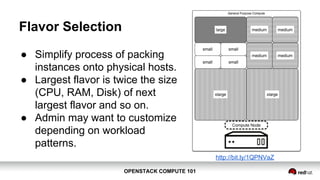
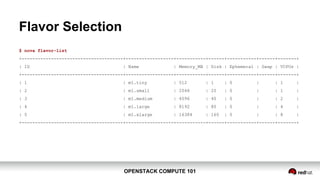
Flavor Selection
● Simplify process of packing
instances onto physical hosts.
● Largest flavor is typically twice
the size (CPU, RAM, Disk) of
next largest flavor and so on.
● Admin may want to customize
depending on workload
patterns.
http://bit.ly/1QPNVaZ
OPENSTACK COMPUTE 101OPENSTACK COMPUTE 101
Flavor Selection
$ nova flavor-list
+--------------------------------------+------------------+-----------+------+-----------+------+-------+
| ID | Name | Memory_MB | Disk | Ephemeral | Swap | VCPUs |
+--------------------------------------+------------------+-----------+------+-----------+------+-------+
| 1 | m1.tiny | 512 | 1 | 0 | | 1 |
| 2 | m1.small | 2048 | 20 | 0 | | 1 |
| 3 | m1.medium | 4096 | 40 | 0 | | 2 |
| 4 | m1.large | 8192 | 80 | 0 | | 4 |
| 5 | m1.xlarge | 16384 | 160 | 0 | | 8 |
+--------------------------------------+------------------+-----------+------+-----------+------+-------+
OPENSTACK COMPUTE 101OPENSTACK COMPUTE 101
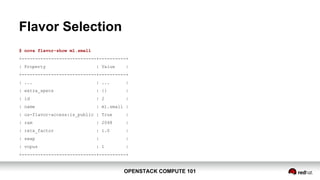
Flavor Selection
$ nova flavor-show m1.small
+----------------------------+----------+
| Property | Value |
+----------------------------+----------+
| ... | ... |
| extra_specs | {} |
| id | 2 |
| name | m1.small |
| os-flavor-access:is_public | True |
| ram | 2048 |
| rxtx_factor | 1.0 |
| swap | |
| vcpus | 1 |
+----------------------------+----------+
OPENSTACK COMPUTE 101OPENSTACK COMPUTE 101
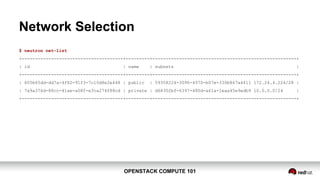
Network Selection
$ neutron net-list
+--------------------------------------+---------+------------------------------------------------------+
| id | name | subnets |
+--------------------------------------+---------+------------------------------------------------------+
| 605b65dd-dd7a-4f82-91f3-7c10d8e2e448 | public | 59358224-3090-4970-b07e-330b867a4411 172.24.4.224/28 |
| 7a9a376d-88cc-41ae-a08f-e3ca274f88cd | private | d68302bf-6397-480d-a61a-1eaa45e9edb9 10.0.0.0/24 |
+--------------------------------------+---------+------------------------------------------------------+
OPENSTACK COMPUTE 101OPENSTACK COMPUTE 101
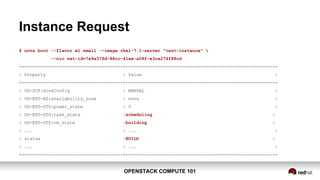
Instance Request
$ nova boot --flavor m1.small --image rhel-7.1-server "test-instance" 
--nic net-id=7a9a376d-88cc-41ae-a08f-e3ca274f88cd
+--------------------------------------+--------------------------------------------------------+
| Property | Value |
+--------------------------------------+--------------------------------------------------------+
| OS-DCF:diskConfig | MANUAL |
| OS-EXT-AZ:availability_zone | nova |
| OS-EXT-STS:power_state | 0 |
| OS-EXT-STS:task_state |scheduling |
| OS-EXT-STS:vm_state |building |
| ... | ... |
| status |BUILD |
| ... | ... |
+--------------------------------------+--------------------------------------------------------+
OPENSTACK COMPUTE 101OPENSTACK COMPUTE 101
What just happened?
● Retrieved token and endpoints from Keystone API
○ Compute end-point of the form: http[s]://<ip>:8774/v2/%(tenant_id)s
● Confirm image identifier:
○ Retrieved list of available images from Nova API
■ http://93.184.216.34:8774/v2/fc50f6843ba644baaae2af0398e7f04e/images
○ Retrieved specific image detail from Nova API
■ .../v2/fc50f6843ba644baaae2af0398e7f04e/images/3a752292-4484-469c-a716-de2542b5742f
● Confirm flavor identifier:
○ Retrieved list of available flavors from Nova API
■ ../v2/fc50f6843ba644baaae2af0398e7f04e/flavors
○ Retrieved specific flavor detail from Nova API
■ ../v2/fc50f6843ba644baaae2af0398e7f04e/flavors/2
OPENSTACK COMPUTE 101OPENSTACK COMPUTE 101
What just happened? (cont.)
● User request was sent to the compute endpoint in
JSON format:
{"server":
{"name": "test-instance",
"imageRef": "3a752292-4484-469c-a716-de2542b5742f",
"flavorRef": "2", "max_count": 1, "min_count": 1,
"networks": [{"uuid": "7a9a376d-88cc-41ae-a08f-e3ca274f88cd"}]
}
}
● Request is picked up by nova-api service.
OPENSTACK COMPUTE 101OPENSTACK COMPUTE 101
What just happened? (cont.)
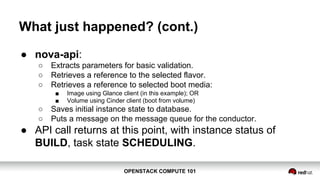
● nova-api:
○ Extracts parameters for basic validation.
○ Retrieves a reference to the selected flavor.
○ Retrieves a reference to selected boot media:
■ Image using Glance client (in this example); OR
■ Volume using Cinder client (boot from volume)
○ Saves initial instance state to database.
○ Puts a message on the message queue for the conductor.
● API call returns at this point, with instance status of
BUILD, task state SCHEDULING.
OPENSTACK COMPUTE 101OPENSTACK COMPUTE 101
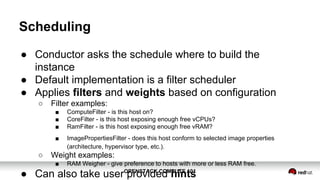
Scheduling
● Conductor asks the schedule where to build the
instance
● Default implementation is a filter scheduler
● Applies filters and weights based on configuration
○ Filter examples:
■ ComputeFilter - is this host on?
■ CoreFilter - is this host exposing enough free vCPUs?
■ RamFilter - is this host exposing enough free vRAM?
■ ImagePropertiesFilter - does this host conform to selected image properties
(architecture, hypervisor type, etc.).
○ Weight examples:
■ RAM Weigher - give preference to hosts with more or less RAM free.
● Can also take user provided hints
OPENSTACK COMPUTE 101OPENSTACK COMPUTE 101
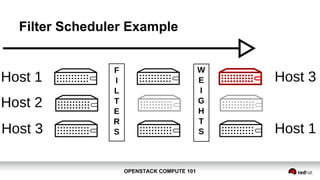
Filter Scheduler Example
OPENSTACK COMPUTE 101OPENSTACK COMPUTE 101
Filter Scheduler Example (cont.)
● Running with debug=True:
[req-... None] Starting with 3 host(s)
[req-... None] Filter RetryFilter returned 3 host(s)
[req-... None] Filter AvailabilityZoneFilter returned 3 host(s)
[req-... None] Filter RamFilter returned 2 host(s)
...
[req-... None] Filtered [(localhost.localdomain, localhost.localdomain)
ram:3208 disk:7168 io_ops:0 instances:1] _schedule ...
[req-... None] Weighed [ WeighedHost [host: (localhost.localdomain,
localhost.localdomain) ram:3208 disk:7168 io_ops:0 instances:1, weight:
1.0]] ...
OPENSTACK COMPUTE 101OPENSTACK COMPUTE 101
Scheduling (cont.)
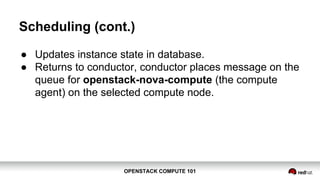
● Updates instance state in database.
● Returns to conductor, conductor places message on the
queue for openstack-nova-compute (the compute
agent) on the selected compute node.
OPENSTACK COMPUTE 101OPENSTACK COMPUTE 101
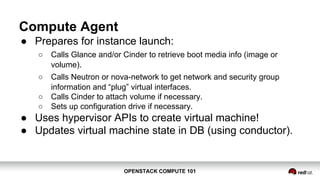
Compute Agent
● Prepares for instance launch:
○ Calls Glance and/or Cinder to retrieve boot media info (image or
volume).
○ Calls Neutron or nova-network to get network and security group
information and “plug” virtual interfaces.
○ Calls Cinder to attach volume if necessary.
○ Sets up configuration drive if necessary.
● Uses hypervisor APIs to create virtual machine!
● Updates virtual machine state in DB (using conductor).
OPENSTACK COMPUTE 101OPENSTACK COMPUTE 101
COMPUTE DRIVERS
OPENSTACK COMPUTE 101OPENSTACK COMPUTE 101
Driver Selection
● Two tools to help guide operators:
○ Driver testing status
■ “Is this driver tested using unit and/or functional tests in the gate?”
○ Hypervisor support matrix
■ “Does this driver support actions x, y, and z?”
OPENSTACK COMPUTE 101OPENSTACK COMPUTE 101
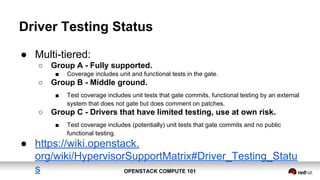
Driver Testing Status
● Multi-tiered:
○ Group A - Fully supported.
■ Coverage includes unit and functional tests in the gate.
○ Group B - Middle ground.
■ Test coverage includes unit tests that gate commits, functional testing by an external
system that does not gate but does comment on patches.
○ Group C - Drivers that have limited testing, use at own risk.
■ Test coverage includes (potentially) unit tests that gate commits and no public
functional testing.
● https://wiki.openstack.
org/wiki/HypervisorSupportMatrix#Driver_Testing_Statu
s
OPENSTACK COMPUTE 101OPENSTACK COMPUTE 101
Hypervisor Support Matrix
● Lists mandatory and optional driver capabilities:
○ http://docs.openstack.org/developer/nova/support-matrix.html
● Examples of capabilities:
○ Launch instance (mandatory)
○ Attach block volume to instance (optional)
OPENSTACK COMPUTE 101OPENSTACK COMPUTE 101
Hypervisor Support Matrix
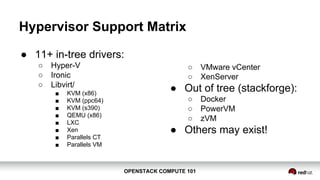
● 11+ in-tree drivers:
○ Hyper-V
○ Ironic
○ Libvirt/
■ KVM (x86)
■ KVM (ppc64)
■ KVM (s390)
■ QEMU (x86)
■ LXC
■ Xen
■ Parallels CT
■ Parallels VM
○ VMware vCenter
○ XenServer
● Out of tree (stackforge):
○ Docker
○ PowerVM
○ zVM
● Others may exist!
OPENSTACK COMPUTE 101OPENSTACK COMPUTE 101
SCALING COMPUTE
OPENSTACK COMPUTE 101OPENSTACK COMPUTE 101
Scaling Compute
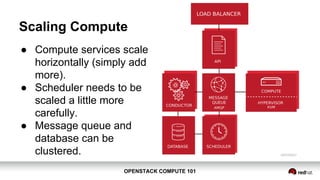
● Compute services scale
horizontally (simply add
more).
● Scheduler needs to be
scaled a little more
carefully.
● Message queue and
database can be
clustered.
OPENSTACK COMPUTE 101OPENSTACK COMPUTE 101
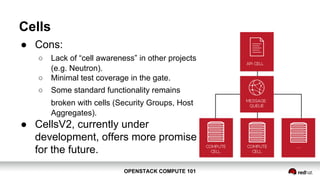
Cells
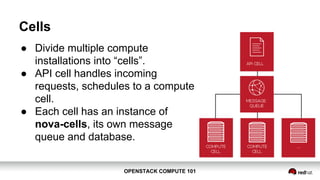
● Divide multiple compute
installations into “cells”.
● API cell handles incoming
requests, schedules to a compute
cell.
● Each cell has an instance of
nova-cells, its own message
queue and database.
OPENSTACK COMPUTE 101OPENSTACK COMPUTE 101
Cells
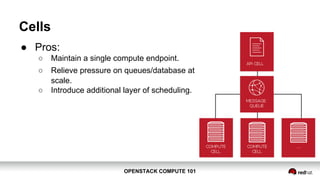
● Pros:
○ Maintain a single compute endpoint.
○ Relieve pressure on queues/database at
scale.
○ Introduce additional layer of scheduling.
OPENSTACK COMPUTE 101OPENSTACK COMPUTE 101
Cells
● Cons:
○ Lack of “cell awareness” in other projects
(e.g. Neutron).
○ Minimal test coverage in the gate.
○ Some standard functionality remains
broken with cells (Security Groups, Host
Aggregates).
● CellsV2, currently under
development, offers more promise
for the future.
OPENSTACK COMPUTE 101OPENSTACK COMPUTE 101
SEGREGATING COMPUTE
OPENSTACK COMPUTE 101OPENSTACK COMPUTE 101
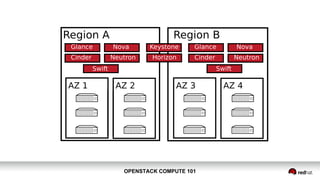
Why Segregate Compute Resources?
● Expose logical groupings:
○ Geographical region, data center, rack, power source, network, etc.
● Expose special capabilities:
○ Faster NICs, storage, special devices, etc.
● The divisions mean whatever you want them to mean!
OPENSTACK COMPUTE 101OPENSTACK COMPUTE 101
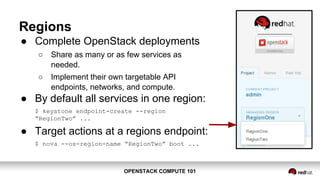
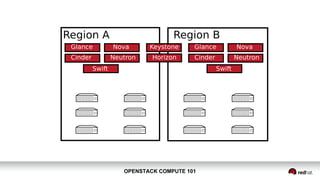
Regions
● Complete OpenStack deployments
○ Share as many or as few services as
needed.
○ Implement their own targetable API
endpoints, networks, and compute.
● By default all services in one region:
$ keystone endpoint-create --region
“RegionTwo” ...
● Target actions at a regions endpoint:
$ nova --os-region-name “RegionTwo” boot ...
OPENSTACK COMPUTE 101OPENSTACK COMPUTE 101
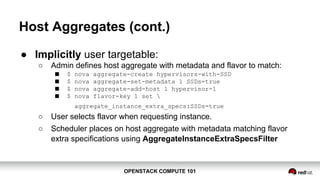
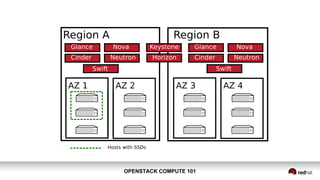
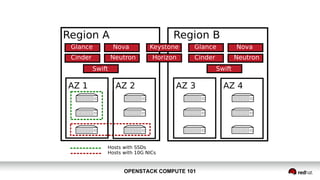
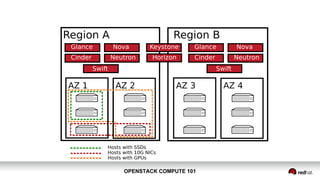
Host Aggregates
● Logical groupings of hosts based on metadata.
● Typically metadata describes capabilities hosts expose:
○ SSD hard disks for ephemeral data storage.
○ PCI devices for passthrough.
○ Etc.
● Hosts can be in multiple host aggregates:
○ “Hosts that have SSD storage and 40G interfaces”.
OPENSTACK COMPUTE 101OPENSTACK COMPUTE 101
Host Aggregates (cont.)
● Implicitly user targetable:
○ Admin defines host aggregate with metadata and flavor to match:
■ $ nova aggregate-create hypervisors-with-SSD
■ $ nova aggregate-set-metadata 1 SSDs=true
■ $ nova aggregate-add-host 1 hypervisor-1
■ $ nova flavor-key 1 set 
aggregate_instance_extra_specs:SSDs=true
○ User selects flavor when requesting instance.
○ Scheduler places on host aggregate with metadata matching flavor
extra specifications using AggregateInstanceExtraSpecsFilter
OPENSTACK COMPUTE 101OPENSTACK COMPUTE 101
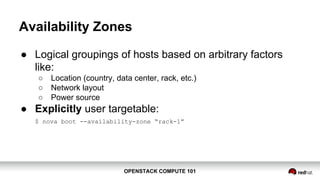
Availability Zones
● Logical groupings of hosts based on arbitrary factors
like:
○ Location (country, data center, rack, etc.)
○ Network layout
○ Power source
● Explicitly user targetable:
$ nova boot --availability-zone “rack-1”
OPENSTACK COMPUTE 101OPENSTACK COMPUTE 101
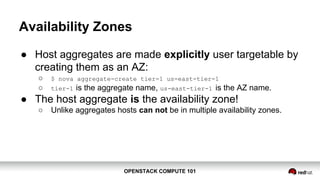
Availability Zones
● Host aggregates are made explicitly user targetable by
creating them as an AZ:
○ $ nova aggregate-create tier-1 us-east-tier-1
○ tier-1 is the aggregate name, us-east-tier-1 is the AZ name.
● The host aggregate is the availability zone!
○ Unlike aggregates hosts can not be in multiple availability zones.
OPENSTACK COMPUTE 101OPENSTACK COMPUTE 101
SEGREGATION EXAMPLE
OPENSTACK COMPUTE 101OPENSTACK COMPUTE 101
NEW IN KILO
OPENSTACK COMPUTE 101OPENSTACK COMPUTE 101
API Microversions
● Compute API V2 has been in place for some time, was
to be superseded by V3.
● Determined that implementing new major version of API
would be too difficult:
○ User impact.
○ Developer overhead.
● V2 is extended by adding “extensions”, lots of them.
OPENSTACK COMPUTE 101OPENSTACK COMPUTE 101
API Microversions
● Microversions aim to:
○ Make it possible to evolve the API incrementally.
○ Provide backwards compatibility for REST API users.
○ Improve code cleanliness to make doing the “right thing” easier.
OPENSTACK COMPUTE 101OPENSTACK COMPUTE 101
API Microversions
● Use a single monotonic counter of the form X.Y where:
○ X will only be changed due to a significant backwards incompatible
API change is made. Expected to be rarely never incremented.
○ Y will be changed when making any change to the API. Whether such
a change is backwards compatible or not will be reflected via
documentation.
● Client will specify the version it supports, e.g.:
○ X-OpenStack-Nova-API-Version: 2.114
OPENSTACK COMPUTE 101OPENSTACK COMPUTE 101
API Microversions
● Initial implementation in Kilo:
○ v2.0 API code still used to serve v2.0 API requests.
■ Plan is in Liberty v2.1 API code will serve both v2.0 and v2.1.
○ v2.0 API is frozen:
■ All new features will be added to v2.1 using microversions.
○ python-novaclient does not yet support v2.1.
OPENSTACK COMPUTE 101OPENSTACK COMPUTE 101
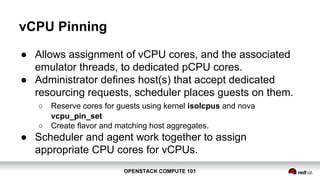
vCPU Pinning
● Allows assignment of vCPU cores, and the associated
emulator threads, to dedicated pCPU cores.
● Administrator defines host(s) that accept dedicated
resourcing requests, scheduler places guests on them.
○ Reserve cores for guests using kernel isolcpus and nova
vcpu_pin_set
○ Create flavor and matching host aggregates.
● Scheduler and agent work together to assign
appropriate CPU cores for vCPUs.
OPENSTACK COMPUTE 101OPENSTACK COMPUTE 101
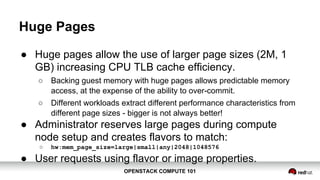
Huge Pages
● Huge pages allow the use of larger page sizes (2M, 1
GB) increasing CPU TLB cache efficiency.
○ Backing guest memory with huge pages allows predictable memory
access, at the expense of the ability to over-commit.
○ Different workloads extract different performance characteristics from
different page sizes - bigger is not always better!
● Administrator reserves large pages during compute
node setup and creates flavors to match:
○ hw:mem_page_size=large|small|any|2048|1048576
● User requests using flavor or image properties.
OPENSTACK COMPUTE 101OPENSTACK COMPUTE 101
I/O (PCIe) based NUMA Scheduling
● Extends Libvirt driver to capture NUMA locality of PCI
devices on the host.
● Extends NUMATopologyFilter to take into account
locality of any PCI devices being passed to the guest.
OPENSTACK COMPUTE 101OPENSTACK COMPUTE 101
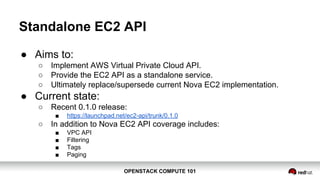
Standalone EC2 API
● Aims to:
○ Implement AWS Virtual Private Cloud API.
○ Provide the EC2 API as a standalone service.
○ Ultimately replace/supersede current Nova EC2 implementation.
● Current state:
○ Recent 0.1.0 release:
■ https://launchpad.net/ec2-api/trunk/0.1.0
○ In addition to Nova EC2 API coverage includes:
■ VPC API
■ Filtering
■ Tags
■ Paging
OPENSTACK COMPUTE 101OPENSTACK COMPUTE 101
Storage Enhancements
● Consistent snapshots using qemu-guest-agent
● Libvirt driver support for KVM/QEMU built-in iSCSI
initiator - allow direct attachment of volumes to guests.
● vCenter driver support for vSAN datastores.
● vCenter driver support for ephemeral disks.
● Libvirt and Hyper-V driver support for SMB based
volumes.
OPENSTACK COMPUTE 101OPENSTACK COMPUTE 101
New In-tree Driver Support
● Libvirt driver support for IBM System Z (KVM)
● Libvirt driver support for Parallels Cloud Server
OPENSTACK COMPUTE 101OPENSTACK COMPUTE 101
THANK YOU
@xsgordon
http://www.slideshare.net/sgordon2/

Compute 101 - OpenStack Summit Vancouver 2015

  • 1.
    OPENSTACK COMPUTE 101 OpenStackCompute 101 Stephen Gordon (@xsgordon) Sr. Technical Product Manager, Red Hat
  • 2.
    OPENSTACK COMPUTE 101OPENSTACKCOMPUTE 101 Agenda ● Overview ● Instance Lifecycle ● Compute Drivers ● Scaling Compute ● Segregating Compute ● New in Kilo
  • 3.
    OPENSTACK COMPUTE 101OPENSTACKCOMPUTE 101 OVERVIEW
  • 4.
    OPENSTACK COMPUTE 101OPENSTACKCOMPUTE 101 What is OpenStack? ● A group of related projects that when combined form an Open Source cloud infrastructure platform for providing Infrastructure-as-a-Service. ● Intended to be “massively scalable”, scales horizontally not vertically, on commodity hardware. ● Modular architecture allows consumers of the platform to deploy only what they need.
  • 5.
    OPENSTACK COMPUTE 101OPENSTACKCOMPUTE 101 OpenStack Components
  • 6.
    OPENSTACK COMPUTE 101OPENSTACKCOMPUTE 101 What is OpenStack Compute (Nova)? ● One of the two original OpenStack projects, along with Object Storage (Swift). ● Exposes a rich API for defining compute instances and managing their lifecycle. ● Pluggable support for multiple common hypervisor platforms, relatively solution agnostic.
  • 7.
    OPENSTACK COMPUTE 101OPENSTACKCOMPUTE 101 Compute Components ● RESTful nova-api interface exposed on TCP port 8774. ● AMQP message queue used for RPC communications. ● nova-scheduler handles hypervisor selection for instance placement.
  • 8.
    OPENSTACK COMPUTE 101OPENSTACKCOMPUTE 101 Components (cont.) ● nova-compute acts as the Compute agent, interacting with the relevant hypervisor APIs to launch/manage guests. ● nova-conductor handles database access (no-db- compute)
  • 9.
    OPENSTACK COMPUTE 101OPENSTACKCOMPUTE 101 Other Components ● Metadata service - nova-metadata-api ● Traditional networking model - nova-network ● L2 agent - e.g.: ○ neutron-openvswitch-agent ○ neutron-linuxbridge-agent ● Ceilometer agent: ○ openstack-ceilometer-compute ● EC2 API: nova-ec2, nova-cert ● Console Auth and Proxies: noVNC, SPICE, etc.
  • 10.
    OPENSTACK COMPUTE 101OPENSTACKCOMPUTE 101 INSTANCE LIFECYCLE
  • 11.
    OPENSTACK COMPUTE 101OPENSTACKCOMPUTE 101 Authentication$ cat keystonerc_demo export OS_USERNAME=demo export OS_TENANT_NAME=demo export OS_PASSWORD=c8500b92ed7f4ed0 export OS_AUTH_URL=http://93.184.216.34:5000/v2.0/ export PS1='[u@h W(keystone_demo)]$ ' $ source keystonerc_demo
  • 12.
    OPENSTACK COMPUTE 101OPENSTACKCOMPUTE 101 Instance Creation ● Instance creation achieved using nova boot command. ● Minimal set of arguments include selecting a flavor and image: $ nova boot --flavor <flavor> --image <image> [--nic net-id=<net-id>] <name> ● Flavor determines the “size” of an instance. ● Image determines the disk image used to boot the instance.
  • 13.
    OPENSTACK COMPUTE 101OPENSTACKCOMPUTE 101 Image Selection $ glance image-list +--------------------------------------+-------------------------------+-------------+------------------+... | ID | Name | Disk Format | Container Format |... +--------------------------------------+-------------------------------+-------------+------------------+... | 834c3cbd-8be0-4d4a-b9e8-48ba61d6a999 | cirros | qcow2 | bare |... | 3a752292-4484-469c-a716-de2542b5742f | rhel-guest-image-7.1-20150224 | qcow2 | bare |... +--------------------------------------+-------------------------------+-------------+------------------+...
  • 14.
    OPENSTACK COMPUTE 101OPENSTACKCOMPUTE 101 Image Selection $ glance image-show rhel-7.1-server +------------------+--------------------------------------+ | Property | Value | +------------------+--------------------------------------+ | checksum | b068d0e9531699516174a436bf2c300c | | container_format | bare | | created_at | 2015-04-01T16:13:47 | | deleted | False | | disk_format | qcow2 | | id | 3a752292-4484-469c-a716-de2542b5742f | | is_public | True | | min_disk | 10 | | min_ram | 0 | | ... | ... | +------------------+--------------------------------------+
  • 15.
    OPENSTACK COMPUTE 101OPENSTACKCOMPUTE 101 Flavor Selection ● Simplify process of packing instances onto physical hosts. ● Largest flavor is typically twice the size (CPU, RAM, Disk) of next largest flavor and so on. ● Admin may want to customize depending on workload patterns. http://bit.ly/1QPNVaZ
  • 16.
    OPENSTACK COMPUTE 101OPENSTACKCOMPUTE 101 Flavor Selection $ nova flavor-list +--------------------------------------+------------------+-----------+------+-----------+------+-------+ | ID | Name | Memory_MB | Disk | Ephemeral | Swap | VCPUs | +--------------------------------------+------------------+-----------+------+-----------+------+-------+ | 1 | m1.tiny | 512 | 1 | 0 | | 1 | | 2 | m1.small | 2048 | 20 | 0 | | 1 | | 3 | m1.medium | 4096 | 40 | 0 | | 2 | | 4 | m1.large | 8192 | 80 | 0 | | 4 | | 5 | m1.xlarge | 16384 | 160 | 0 | | 8 | +--------------------------------------+------------------+-----------+------+-----------+------+-------+
  • 17.
    OPENSTACK COMPUTE 101OPENSTACKCOMPUTE 101 Flavor Selection $ nova flavor-show m1.small +----------------------------+----------+ | Property | Value | +----------------------------+----------+ | ... | ... | | extra_specs | {} | | id | 2 | | name | m1.small | | os-flavor-access:is_public | True | | ram | 2048 | | rxtx_factor | 1.0 | | swap | | | vcpus | 1 | +----------------------------+----------+
  • 18.
    OPENSTACK COMPUTE 101OPENSTACKCOMPUTE 101 Network Selection $ neutron net-list +--------------------------------------+---------+------------------------------------------------------+ | id | name | subnets | +--------------------------------------+---------+------------------------------------------------------+ | 605b65dd-dd7a-4f82-91f3-7c10d8e2e448 | public | 59358224-3090-4970-b07e-330b867a4411 172.24.4.224/28 | | 7a9a376d-88cc-41ae-a08f-e3ca274f88cd | private | d68302bf-6397-480d-a61a-1eaa45e9edb9 10.0.0.0/24 | +--------------------------------------+---------+------------------------------------------------------+
  • 19.
    OPENSTACK COMPUTE 101OPENSTACKCOMPUTE 101 Instance Request $ nova boot --flavor m1.small --image rhel-7.1-server "test-instance" --nic net-id=7a9a376d-88cc-41ae-a08f-e3ca274f88cd +--------------------------------------+--------------------------------------------------------+ | Property | Value | +--------------------------------------+--------------------------------------------------------+ | OS-DCF:diskConfig | MANUAL | | OS-EXT-AZ:availability_zone | nova | | OS-EXT-STS:power_state | 0 | | OS-EXT-STS:task_state |scheduling | | OS-EXT-STS:vm_state |building | | ... | ... | | status |BUILD | | ... | ... | +--------------------------------------+--------------------------------------------------------+
  • 20.
    OPENSTACK COMPUTE 101OPENSTACKCOMPUTE 101 What just happened? ● Retrieved token and endpoints from Keystone API ○ Compute end-point of the form: http[s]://<ip>:8774/v2/%(tenant_id)s ● Confirm image identifier: ○ Retrieved list of available images from Nova API ■ http://93.184.216.34:8774/v2/fc50f6843ba644baaae2af0398e7f04e/images ○ Retrieved specific image detail from Nova API ■ .../v2/fc50f6843ba644baaae2af0398e7f04e/images/3a752292-4484-469c-a716-de2542b5742f ● Confirm flavor identifier: ○ Retrieved list of available flavors from Nova API ■ ../v2/fc50f6843ba644baaae2af0398e7f04e/flavors ○ Retrieved specific flavor detail from Nova API ■ ../v2/fc50f6843ba644baaae2af0398e7f04e/flavors/2
  • 21.
    OPENSTACK COMPUTE 101OPENSTACKCOMPUTE 101 What just happened? (cont.) ● User request was sent to the compute endpoint in JSON format: {"server": {"name": "test-instance", "imageRef": "3a752292-4484-469c-a716-de2542b5742f", "flavorRef": "2", "max_count": 1, "min_count": 1, "networks": [{"uuid": "7a9a376d-88cc-41ae-a08f-e3ca274f88cd"}] } } ● Request is picked up by nova-api service.
  • 22.
    OPENSTACK COMPUTE 101OPENSTACKCOMPUTE 101 What just happened? (cont.) ● nova-api: ○ Extracts parameters for basic validation. ○ Retrieves a reference to the selected flavor. ○ Retrieves a reference to selected boot media: ■ Image using Glance client (in this example); OR ■ Volume using Cinder client (boot from volume) ○ Saves initial instance state to database. ○ Puts a message on the message queue for the conductor. ● API call returns at this point, with instance status of BUILD, task state SCHEDULING.
  • 23.
    OPENSTACK COMPUTE 101OPENSTACKCOMPUTE 101 Scheduling ● Conductor asks the schedule where to build the instance ● Default implementation is a filter scheduler ● Applies filters and weights based on configuration ○ Filter examples: ■ ComputeFilter - is this host on? ■ CoreFilter - is this host exposing enough free vCPUs? ■ RamFilter - is this host exposing enough free vRAM? ■ ImagePropertiesFilter - does this host conform to selected image properties (architecture, hypervisor type, etc.). ○ Weight examples: ■ RAM Weigher - give preference to hosts with more or less RAM free. ● Can also take user provided hints
  • 24.
    OPENSTACK COMPUTE 101OPENSTACKCOMPUTE 101 Filter Scheduler Example
  • 25.
    OPENSTACK COMPUTE 101OPENSTACKCOMPUTE 101 Filter Scheduler Example (cont.) ● Running with debug=True: [req-... None] Starting with 3 host(s) [req-... None] Filter RetryFilter returned 3 host(s) [req-... None] Filter AvailabilityZoneFilter returned 3 host(s) [req-... None] Filter RamFilter returned 2 host(s) ... [req-... None] Filtered [(localhost.localdomain, localhost.localdomain) ram:3208 disk:7168 io_ops:0 instances:1] _schedule ... [req-... None] Weighed [ WeighedHost [host: (localhost.localdomain, localhost.localdomain) ram:3208 disk:7168 io_ops:0 instances:1, weight: 1.0]] ...
  • 26.
    OPENSTACK COMPUTE 101OPENSTACKCOMPUTE 101 Scheduling (cont.) ● Updates instance state in database. ● Returns to conductor, conductor places message on the queue for openstack-nova-compute (the compute agent) on the selected compute node.
  • 27.
    OPENSTACK COMPUTE 101OPENSTACKCOMPUTE 101 Compute Agent ● Prepares for instance launch: ○ Calls Glance and/or Cinder to retrieve boot media info (image or volume). ○ Calls Neutron or nova-network to get network and security group information and “plug” virtual interfaces. ○ Calls Cinder to attach volume if necessary. ○ Sets up configuration drive if necessary. ● Uses hypervisor APIs to create virtual machine! ● Updates virtual machine state in DB (using conductor).
  • 28.
    OPENSTACK COMPUTE 101OPENSTACKCOMPUTE 101 COMPUTE DRIVERS
  • 29.
    OPENSTACK COMPUTE 101OPENSTACKCOMPUTE 101 Driver Selection ● Two tools to help guide operators: ○ Driver testing status ■ “Is this driver tested using unit and/or functional tests in the gate?” ○ Hypervisor support matrix ■ “Does this driver support actions x, y, and z?”
  • 30.
    OPENSTACK COMPUTE 101OPENSTACKCOMPUTE 101 Driver Testing Status ● Multi-tiered: ○ Group A - Fully supported. ■ Coverage includes unit and functional tests in the gate. ○ Group B - Middle ground. ■ Test coverage includes unit tests that gate commits, functional testing by an external system that does not gate but does comment on patches. ○ Group C - Drivers that have limited testing, use at own risk. ■ Test coverage includes (potentially) unit tests that gate commits and no public functional testing. ● https://wiki.openstack. org/wiki/HypervisorSupportMatrix#Driver_Testing_Statu s
  • 31.
    OPENSTACK COMPUTE 101OPENSTACKCOMPUTE 101 Hypervisor Support Matrix ● Lists mandatory and optional driver capabilities: ○ http://docs.openstack.org/developer/nova/support-matrix.html ● Examples of capabilities: ○ Launch instance (mandatory) ○ Attach block volume to instance (optional)
  • 32.
    OPENSTACK COMPUTE 101OPENSTACKCOMPUTE 101 Hypervisor Support Matrix ● 11+ in-tree drivers: ○ Hyper-V ○ Ironic ○ Libvirt/ ■ KVM (x86) ■ KVM (ppc64) ■ KVM (s390) ■ QEMU (x86) ■ LXC ■ Xen ■ Parallels CT ■ Parallels VM ○ VMware vCenter ○ XenServer ● Out of tree (stackforge): ○ Docker ○ PowerVM ○ zVM ● Others may exist!
  • 33.
    OPENSTACK COMPUTE 101OPENSTACKCOMPUTE 101 SCALING COMPUTE
  • 34.
    OPENSTACK COMPUTE 101OPENSTACKCOMPUTE 101 Scaling Compute ● Compute services scale horizontally (simply add more). ● Scheduler needs to be scaled a little more carefully. ● Message queue and database can be clustered.
  • 35.
    OPENSTACK COMPUTE 101OPENSTACKCOMPUTE 101 Cells ● Divide multiple compute installations into “cells”. ● API cell handles incoming requests, schedules to a compute cell. ● Each cell has an instance of nova-cells, its own message queue and database.
  • 36.
    OPENSTACK COMPUTE 101OPENSTACKCOMPUTE 101 Cells ● Pros: ○ Maintain a single compute endpoint. ○ Relieve pressure on queues/database at scale. ○ Introduce additional layer of scheduling.
  • 37.
    OPENSTACK COMPUTE 101OPENSTACKCOMPUTE 101 Cells ● Cons: ○ Lack of “cell awareness” in other projects (e.g. Neutron). ○ Minimal test coverage in the gate. ○ Some standard functionality remains broken with cells (Security Groups, Host Aggregates). ● CellsV2, currently under development, offers more promise for the future.
  • 38.
    OPENSTACK COMPUTE 101OPENSTACKCOMPUTE 101 SEGREGATING COMPUTE
  • 39.
    OPENSTACK COMPUTE 101OPENSTACKCOMPUTE 101 Why Segregate Compute Resources? ● Expose logical groupings: ○ Geographical region, data center, rack, power source, network, etc. ● Expose special capabilities: ○ Faster NICs, storage, special devices, etc. ● The divisions mean whatever you want them to mean!
  • 40.
    OPENSTACK COMPUTE 101OPENSTACKCOMPUTE 101 Regions ● Complete OpenStack deployments ○ Share as many or as few services as needed. ○ Implement their own targetable API endpoints, networks, and compute. ● By default all services in one region: $ keystone endpoint-create --region “RegionTwo” ... ● Target actions at a regions endpoint: $ nova --os-region-name “RegionTwo” boot ...
  • 41.
    OPENSTACK COMPUTE 101OPENSTACKCOMPUTE 101 Host Aggregates ● Logical groupings of hosts based on metadata. ● Typically metadata describes capabilities hosts expose: ○ SSD hard disks for ephemeral data storage. ○ PCI devices for passthrough. ○ Etc. ● Hosts can be in multiple host aggregates: ○ “Hosts that have SSD storage and 40G interfaces”.
  • 42.
    OPENSTACK COMPUTE 101OPENSTACKCOMPUTE 101 Host Aggregates (cont.) ● Implicitly user targetable: ○ Admin defines host aggregate with metadata and flavor to match: ■ $ nova aggregate-create hypervisors-with-SSD ■ $ nova aggregate-set-metadata 1 SSDs=true ■ $ nova aggregate-add-host 1 hypervisor-1 ■ $ nova flavor-key 1 set aggregate_instance_extra_specs:SSDs=true ○ User selects flavor when requesting instance. ○ Scheduler places on host aggregate with metadata matching flavor extra specifications using AggregateInstanceExtraSpecsFilter
  • 43.
    OPENSTACK COMPUTE 101OPENSTACKCOMPUTE 101 Availability Zones ● Logical groupings of hosts based on arbitrary factors like: ○ Location (country, data center, rack, etc.) ○ Network layout ○ Power source ● Explicitly user targetable: $ nova boot --availability-zone “rack-1”
  • 44.
    OPENSTACK COMPUTE 101OPENSTACKCOMPUTE 101 Availability Zones ● Host aggregates are made explicitly user targetable by creating them as an AZ: ○ $ nova aggregate-create tier-1 us-east-tier-1 ○ tier-1 is the aggregate name, us-east-tier-1 is the AZ name. ● The host aggregate is the availability zone! ○ Unlike aggregates hosts can not be in multiple availability zones.
  • 45.
    OPENSTACK COMPUTE 101OPENSTACKCOMPUTE 101 SEGREGATION EXAMPLE
  • 46.
  • 47.
  • 48.
  • 49.
  • 50.
  • 51.
    OPENSTACK COMPUTE 101OPENSTACKCOMPUTE 101 NEW IN KILO
  • 52.
    OPENSTACK COMPUTE 101OPENSTACKCOMPUTE 101 API Microversions ● Compute API V2 has been in place for some time, was to be superseded by V3. ● Determined that implementing new major version of API would be too difficult: ○ User impact. ○ Developer overhead. ● V2 is extended by adding “extensions”, lots of them.
  • 53.
    OPENSTACK COMPUTE 101OPENSTACKCOMPUTE 101 API Microversions ● Microversions aim to: ○ Make it possible to evolve the API incrementally. ○ Provide backwards compatibility for REST API users. ○ Improve code cleanliness to make doing the “right thing” easier.
  • 54.
    OPENSTACK COMPUTE 101OPENSTACKCOMPUTE 101 API Microversions ● Use a single monotonic counter of the form X.Y where: ○ X will only be changed due to a significant backwards incompatible API change is made. Expected to be rarely never incremented. ○ Y will be changed when making any change to the API. Whether such a change is backwards compatible or not will be reflected via documentation. ● Client will specify the version it supports, e.g.: ○ X-OpenStack-Nova-API-Version: 2.114
  • 55.
    OPENSTACK COMPUTE 101OPENSTACKCOMPUTE 101 API Microversions ● Initial implementation in Kilo: ○ v2.0 API code still used to serve v2.0 API requests. ■ Plan is in Liberty v2.1 API code will serve both v2.0 and v2.1. ○ v2.0 API is frozen: ■ All new features will be added to v2.1 using microversions. ○ python-novaclient does not yet support v2.1.
  • 56.
    OPENSTACK COMPUTE 101OPENSTACKCOMPUTE 101 vCPU Pinning ● Allows assignment of vCPU cores, and the associated emulator threads, to dedicated pCPU cores. ● Administrator defines host(s) that accept dedicated resourcing requests, scheduler places guests on them. ○ Reserve cores for guests using kernel isolcpus and nova vcpu_pin_set ○ Create flavor and matching host aggregates. ● Scheduler and agent work together to assign appropriate CPU cores for vCPUs.
  • 57.
    OPENSTACK COMPUTE 101OPENSTACKCOMPUTE 101 Huge Pages ● Huge pages allow the use of larger page sizes (2M, 1 GB) increasing CPU TLB cache efficiency. ○ Backing guest memory with huge pages allows predictable memory access, at the expense of the ability to over-commit. ○ Different workloads extract different performance characteristics from different page sizes - bigger is not always better! ● Administrator reserves large pages during compute node setup and creates flavors to match: ○ hw:mem_page_size=large|small|any|2048|1048576 ● User requests using flavor or image properties.
  • 58.
    OPENSTACK COMPUTE 101OPENSTACKCOMPUTE 101 I/O (PCIe) based NUMA Scheduling ● Extends Libvirt driver to capture NUMA locality of PCI devices on the host. ● Extends NUMATopologyFilter to take into account locality of any PCI devices being passed to the guest.
  • 59.
    OPENSTACK COMPUTE 101OPENSTACKCOMPUTE 101 Standalone EC2 API ● Aims to: ○ Implement AWS Virtual Private Cloud API. ○ Provide the EC2 API as a standalone service. ○ Ultimately replace/supersede current Nova EC2 implementation. ● Current state: ○ Recent 0.1.0 release: ■ https://launchpad.net/ec2-api/trunk/0.1.0 ○ In addition to Nova EC2 API coverage includes: ■ VPC API ■ Filtering ■ Tags ■ Paging
  • 60.
    OPENSTACK COMPUTE 101OPENSTACKCOMPUTE 101 Storage Enhancements ● Consistent snapshots using qemu-guest-agent ● Libvirt driver support for KVM/QEMU built-in iSCSI initiator - allow direct attachment of volumes to guests. ● vCenter driver support for vSAN datastores. ● vCenter driver support for ephemeral disks. ● Libvirt and Hyper-V driver support for SMB based volumes.
  • 61.
    OPENSTACK COMPUTE 101OPENSTACKCOMPUTE 101 New In-tree Driver Support ● Libvirt driver support for IBM System Z (KVM) ● Libvirt driver support for Parallels Cloud Server
  • 62.
    OPENSTACK COMPUTE 101OPENSTACKCOMPUTE 101 THANK YOU @xsgordon http://www.slideshare.net/sgordon2/