Rethinking Disaster Prepardness
to Leverage Resources
in a Cloud and
Mobile World
Thomas Danford
Jon Calisi
Tennessee Board of Regents
Tennessee Higher Education IT Symposium – April 15, 2012
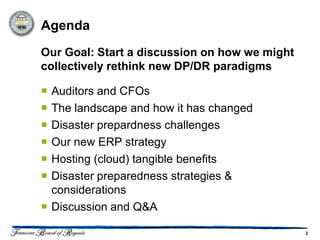
Agenda
Our Goal: Start a discussion on how we might
collectively rethink new DP/DR paradigms

 Auditors and CFOs
 The landscape and how it has changed
 Disaster prepardness challenges
 Our new ERP strategy
 Hosting (cloud) tangible benefits
 Disaster preparedness strategies &
  considerations
 Discussion and Q&A

                                               2
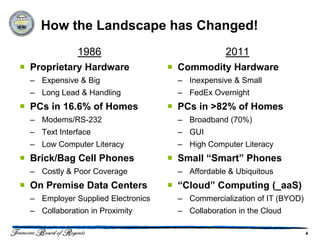
How the Landscape has Changed!
              1986                                2011
 Proprietary Hardware               Commodity Hardware
  – Expensive & Big                   – Inexpensive & Small
  – Long Lead & Handling              – FedEx Overnight
 PCs in 16.6% of Homes              PCs in >82% of Homes
  – Modems/RS-232                     – Broadband (70%)
  – Text Interface                    – GUI
  – Low Computer Literacy             – High Computer Literacy
 Brick/Bag Cell Phones              Small “Smart” Phones
  – Costly & Poor Coverage            – Affordable & Ubiquitous
 On Premise Data Centers            “Cloud” Computing (_aaS)
  – Employer Supplied Electronics     – Commercialization of IT (BYOD)
  – Collaboration in Proximity        – Collaboration in the Cloud

                                                                         4
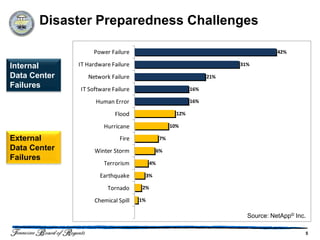
Disaster Preparedness Challenges

                   Power Failure                                                     42%

Internal      IT Hardware Failure                                        31%

Data Center      Network Failure                                   21%
Failures      IT Software Failure                            16%

                    Human Error                              16%

                           Flood                       12%

                       Hurricane                     10%

External                     Fire               7%
Data Center        Winter Storm                6%
Failures
                       Terrorism          4%

                     Earthquake          3%

                        Tornado      2%

                   Chemical Spill   1%

                                                                           Source: NetApp© Inc.

                                                                                              5
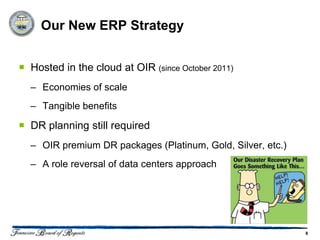
Our New ERP Strategy


 Hosted in the cloud at OIR (since October 2011)
  – Economies of scale
  – Tangible benefits

 DR planning still required
  – OIR premium DR packages (Platinum, Gold, Silver, etc.)
  – A role reversal of data centers approach


                                                             6
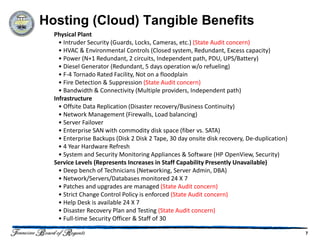
Hosting (Cloud) Tangible Benefits
  Physical Plant
    • Intruder Security (Guards, Locks, Cameras, etc.) (State Audit concern)
    • HVAC & Environmental Controls (Closed system, Redundant, Excess capacity)
    • Power (N+1 Redundant, 2 circuits, Independent path, PDU, UPS/Battery)
    • Diesel Generator (Redundant, 5 days operation w/o refueling)
    • F-4 Tornado Rated Facility, Not on a floodplain
    • Fire Detection & Suppression (State Audit concern)
    • Bandwidth & Connectivity (Multiple providers, Independent path)
  Infrastructure
    • Offsite Data Replication (Disaster recovery/Business Continuity)
    • Network Management (Firewalls, Load balancing)
    • Server Failover
    • Enterprise SAN with commodity disk space (fiber vs. SATA)
    • Enterprise Backups (Disk 2 Disk 2 Tape, 30 day onsite disk recovery, De-duplication)
    • 4 Year Hardware Refresh
    • System and Security Monitoring Appliances & Software (HP OpenView, Security)
  Service Levels (Represents Increases in Staff Capability Presently Unavailable)
    • Deep bench of Technicians (Networking, Server Admin, DBA)
    • Network/Servers/Databases monitored 24 X 7
    • Patches and upgrades are managed (State Audit concern)
    • Strict Change Control Policy is enforced (State Audit concern)
    • Help Desk is available 24 X 7
    • Disaster Recovery Plan and Testing (State Audit concern)
    • Full-time Security Officer & Staff of 30

                                                                                             7
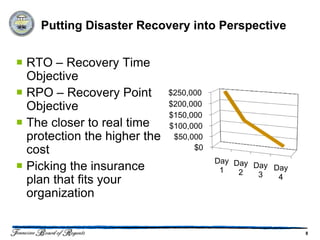
Putting Disaster Recovery into Perspective


 RTO – Recovery Time
  Objective
 RPO – Recovery Point        $250,000
  Objective                   $200,000
                              $150,000
 The closer to real time     $100,000
  protection the higher the    $50,000
  cost                              $0
                                         Day Day
 Picking the insurance                   1   2
                                                 Day Day
                                                  3   4
  plan that fits your
  organization


                                                           8
The Realities and the Objectives

 Hosting (Cloud) Resources Greatly Reduce Risk
 In a Cloud World (most) all Disasters are Local
 Higher Ed is not an IT Transactional Business

So the Objectives Should be:
 Evaluating “True Risk”
 Balancing Costs in Light of Risk
 Compliance with Audit Expectations


                                                    9
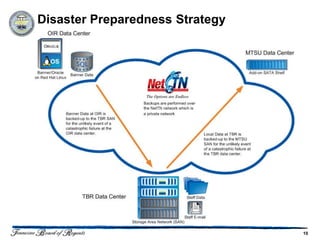
Disaster Preparedness Strategy


                                 10
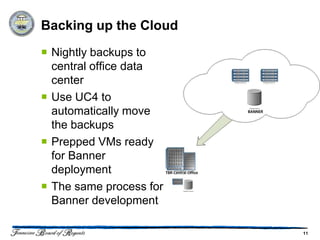
Backing up the Cloud
 Nightly backups to
  central office data
  center
 Use UC4 to
  automatically move
  the backups
 Prepped VMs ready
  for Banner
  deployment
 The same process for
  Banner development

                         11
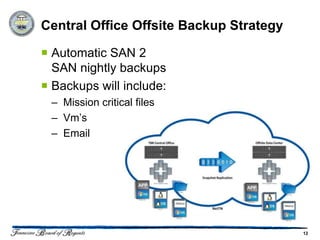
Central Office Offsite Backup Strategy

 Automatic SAN 2
  SAN nightly backups
 Backups will include:
 – Mission critical files
 – Vm’s
 – Email


                                         12
Central Office Disaster Preparedness
   Strategies

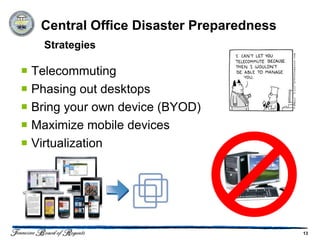
 Telecommuting
 Phasing out desktops
 Bring your own device (BYOD)
 Maximize mobile devices
 Virtualization


                                          13
Central Office Disaster Preparedness
     Resources

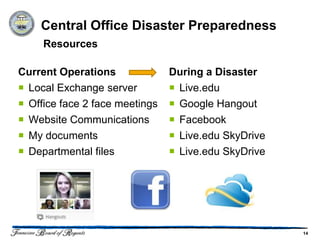
Current Operations              During a Disaster
 Local Exchange server          Live.edu
 Office face 2 face meetings    Google Hangout
 Website Communications         Facebook
 My documents                   Live.edu SkyDrive
 Departmental files             Live.edu SkyDrive


                                                      14
Employees – Communications & Mobile
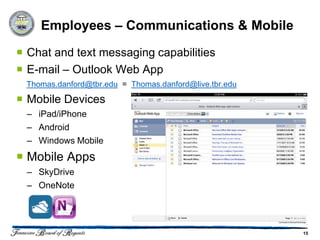
 Chat and text messaging capabilities
 E-mail – Outlook Web App
 Thomas.danford@tbr.edu = Thomas.danford@live.tbr.edu

 Mobile Devices
  – iPad/iPhone
  – Android
  – Windows Mobile
 Mobile Apps
  – SkyDrive
  – OneNote


                                                        15
Employees – Working with Files and Data
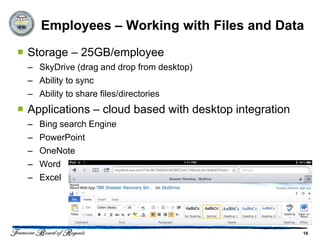
 Storage – 25GB/employee
  – SkyDrive (drag and drop from desktop)
  – Ability to sync
  – Ability to share files/directories
 Applications – cloud based with desktop integration
  –   Bing search Engine
  –   PowerPoint
  –   OneNote
  –   Word
  –   Excel


                                                        16
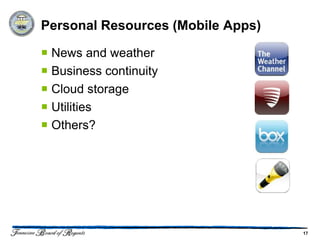
Personal Resources (Mobile Apps)

 News and weather
 Business continuity
 Cloud storage
 Utilities
 Others?


                                   17
Discussion and Q&A

 What’s happening on your campus?
 Ideas & suggestions?
 Interest in collaborating?


Thank You!
Thomas Danford                           Jon Calisi
Tennessee Board of Regents               Tennessee Board of Regents
   http://www.linkedin.com/in/tdanford
   http://twitter.com/tdanford


                                                                      18

Rethinking Disaster Prepardness THEITS12

  • 1.
    Rethinking Disaster Prepardness toLeverage Resources in a Cloud and Mobile World Thomas Danford Jon Calisi Tennessee Board of Regents Tennessee Higher Education IT Symposium – April 15, 2012
  • 2.
    Agenda Our Goal: Starta discussion on how we might collectively rethink new DP/DR paradigms  Auditors and CFOs  The landscape and how it has changed  Disaster prepardness challenges  Our new ERP strategy  Hosting (cloud) tangible benefits  Disaster preparedness strategies & considerations  Discussion and Q&A 2
  • 4.
    How the Landscapehas Changed! 1986 2011  Proprietary Hardware  Commodity Hardware – Expensive & Big – Inexpensive & Small – Long Lead & Handling – FedEx Overnight  PCs in 16.6% of Homes  PCs in >82% of Homes – Modems/RS-232 – Broadband (70%) – Text Interface – GUI – Low Computer Literacy – High Computer Literacy  Brick/Bag Cell Phones  Small “Smart” Phones – Costly & Poor Coverage – Affordable & Ubiquitous  On Premise Data Centers  “Cloud” Computing (_aaS) – Employer Supplied Electronics – Commercialization of IT (BYOD) – Collaboration in Proximity – Collaboration in the Cloud 4
  • 5.
    Disaster Preparedness Challenges Power Failure 42% Internal IT Hardware Failure 31% Data Center Network Failure 21% Failures IT Software Failure 16% Human Error 16% Flood 12% Hurricane 10% External Fire 7% Data Center Winter Storm 6% Failures Terrorism 4% Earthquake 3% Tornado 2% Chemical Spill 1% Source: NetApp© Inc. 5
  • 6.
    Our New ERPStrategy  Hosted in the cloud at OIR (since October 2011) – Economies of scale – Tangible benefits  DR planning still required – OIR premium DR packages (Platinum, Gold, Silver, etc.) – A role reversal of data centers approach 6
  • 7.
    Hosting (Cloud) TangibleBenefits Physical Plant • Intruder Security (Guards, Locks, Cameras, etc.) (State Audit concern) • HVAC & Environmental Controls (Closed system, Redundant, Excess capacity) • Power (N+1 Redundant, 2 circuits, Independent path, PDU, UPS/Battery) • Diesel Generator (Redundant, 5 days operation w/o refueling) • F-4 Tornado Rated Facility, Not on a floodplain • Fire Detection & Suppression (State Audit concern) • Bandwidth & Connectivity (Multiple providers, Independent path) Infrastructure • Offsite Data Replication (Disaster recovery/Business Continuity) • Network Management (Firewalls, Load balancing) • Server Failover • Enterprise SAN with commodity disk space (fiber vs. SATA) • Enterprise Backups (Disk 2 Disk 2 Tape, 30 day onsite disk recovery, De-duplication) • 4 Year Hardware Refresh • System and Security Monitoring Appliances & Software (HP OpenView, Security) Service Levels (Represents Increases in Staff Capability Presently Unavailable) • Deep bench of Technicians (Networking, Server Admin, DBA) • Network/Servers/Databases monitored 24 X 7 • Patches and upgrades are managed (State Audit concern) • Strict Change Control Policy is enforced (State Audit concern) • Help Desk is available 24 X 7 • Disaster Recovery Plan and Testing (State Audit concern) • Full-time Security Officer & Staff of 30 7
  • 8.
    Putting Disaster Recoveryinto Perspective  RTO – Recovery Time Objective  RPO – Recovery Point $250,000 Objective $200,000 $150,000  The closer to real time $100,000 protection the higher the $50,000 cost $0 Day Day  Picking the insurance 1 2 Day Day 3 4 plan that fits your organization 8
  • 9.
    The Realities andthe Objectives  Hosting (Cloud) Resources Greatly Reduce Risk  In a Cloud World (most) all Disasters are Local  Higher Ed is not an IT Transactional Business So the Objectives Should be:  Evaluating “True Risk”  Balancing Costs in Light of Risk  Compliance with Audit Expectations 9
  • 10.
  • 11.
    Backing up theCloud  Nightly backups to central office data center  Use UC4 to automatically move the backups  Prepped VMs ready for Banner deployment  The same process for Banner development 11
  • 12.
    Central Office OffsiteBackup Strategy  Automatic SAN 2 SAN nightly backups  Backups will include: – Mission critical files – Vm’s – Email 12
  • 13.
    Central Office DisasterPreparedness Strategies  Telecommuting  Phasing out desktops  Bring your own device (BYOD)  Maximize mobile devices  Virtualization 13
  • 14.
    Central Office DisasterPreparedness Resources Current Operations During a Disaster  Local Exchange server  Live.edu  Office face 2 face meetings  Google Hangout  Website Communications  Facebook  My documents  Live.edu SkyDrive  Departmental files  Live.edu SkyDrive 14
  • 15.
    Employees – Communications& Mobile  Chat and text messaging capabilities  E-mail – Outlook Web App Thomas.danford@tbr.edu = Thomas.danford@live.tbr.edu  Mobile Devices – iPad/iPhone – Android – Windows Mobile  Mobile Apps – SkyDrive – OneNote 15
  • 16.
    Employees – Workingwith Files and Data  Storage – 25GB/employee – SkyDrive (drag and drop from desktop) – Ability to sync – Ability to share files/directories  Applications – cloud based with desktop integration – Bing search Engine – PowerPoint – OneNote – Word – Excel 16
  • 17.
    Personal Resources (MobileApps)  News and weather  Business continuity  Cloud storage  Utilities  Others? 17
  • 18.
    Discussion and Q&A What’s happening on your campus?  Ideas & suggestions?  Interest in collaborating? Thank You! Thomas Danford Jon Calisi Tennessee Board of Regents Tennessee Board of Regents http://www.linkedin.com/in/tdanford http://twitter.com/tdanford 18