DIGITAL IMAGE
PROCESSING
INTRODUCTION
CHAPTER ONE
1
Dr. Maie Mahmoud Aboghazalah
INTRODUCTION
“One picture is worth more than ten
thousand words”
Anonymous
2
“Digital Image Processing”,
Rafael C. Gonzalez & Richard E. Woods,
Addison-Wesley, 2008
And
“Computer Vision and image processing :
A practical approach using cvip tools
Scott E umbaugh, Prentice hall 1998
http://www.mathworks.com/help/images/index.html
REFERENCES
3
FUNDAMENTALS OF
DIGITAL IMAGE
PROCESSING
A PRACTICAL APPROACH
WITH EXAMPLES IN
MATLAB
⚫ Chris Solomon
⚫ 2011 by John Wiley & Sons,
Ltd
4
COURSE OUTLINES
⚫Ch1 : Introduction
⚫Ch2 : Digital Image Fundamentals
⚫Ch3 : Intensity Transformation and Spatial
Filtering
⚫Ch4 : Filtering in The Frequency Domain
⚫Ch5 : Image Restoration and Reconstruction
⚫Ch8 : Image Compression
⚫Ch9 : Morphological Image Processing
⚫Ch10: Image Segmentation
6
CONTENTS
7
This lecture will cover:
 What is a digital image?
 What is digital image processing?
 History of digital image processing
 State of the art examples of digital image processing
 Key stages in digital image processing
COMPUTER IMAGING
⚫It’s defined as the acquisition and processing
of visual information by computer.
⚫The ultimate receiver of information is:
 Computer
 Human visual system
⚫So we have two categories:-
 Computer vision
 Image processing
8
⚫In computer vision:
The processed output images
are for use by computer.
⚫In Image processing:
The output images are for
human consumption
Computer vision and image processing
9
COMPUTER VISION
⚫One of the computer vision fields is image analysis.
⚫It involves the examination of image data to
facilitate solving a vision problem.
⚫Image analysis has 2 topics:
 Feature extraction: acquiring higher level image
information
 Pattern classification taking these higher level of
information and identifying objects within the image
10
⚫Image Processing
image in → image out
⚫Image Analysis
image in → measurements out
⚫Image Understanding
image in → high-level description out
11
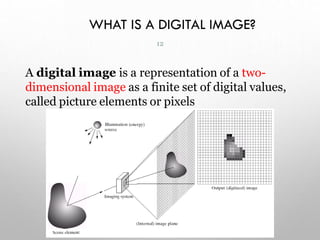
WHAT IS A DIGITAL IMAGE?
A digital image is a representation of a two-
dimensional image as a finite set of digital values,
called picture elements or pixels
12
WHAT IS A DIGITAL IMAGE? (CONT…)
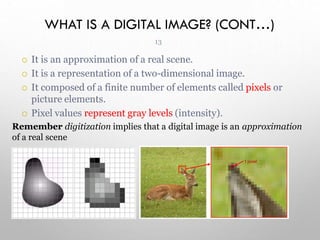
1 pixel
13
 It is an approximation of a real scene.
 It is a representation of a two-dimensional image.
 It composed of a finite number of elements called pixels or
picture elements.
 Pixel values represent gray levels (intensity).
Remember digitization implies that a digital image is an approximation
of a real scene
WHAT IS A DIGITAL IMAGE? (CONT…)
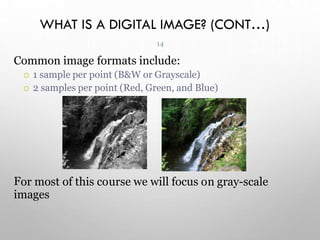
ur
or most of this co se we will focus on gray-scale
F
images
14
Common image formats include:
 1 sample per point (B&W or Grayscale)
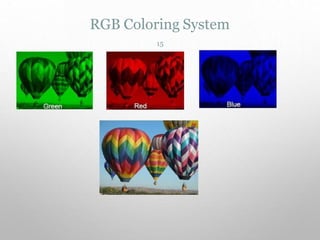
 2 samples per point (Red, Green, and Blue)
RGB Coloring System
15
WHAT IS DIGITAL IMAGE PROCESSING?
Digital image processing focuses on two major tasks
 Improvement of pictorial information for human
interpretation
 Processing of image data for storage, transmission and
representation for autonomous machine perception
 Some argument about where image processing
ends and fields such as image analysis and
computer vision start
16
WHAT IS DIP? (CONT…)
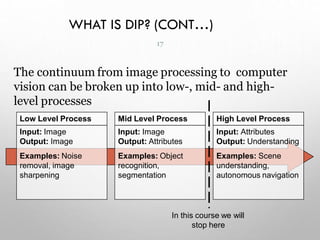
The continuum from image processing to computer
vision can be broken up into low-, mid- and high-
level processes
Low Level Process
Input: Image
Output: Image
Examples: Noise
removal, image
sharpening
Mid Level Process
Input: Image
Output: Attributes
Examples: Object
recognition,
segmentation
High Level Process
Input: Attributes
Output: Understanding
Examples: Scene
understanding,
autonomous navigation
In this course we will
stop here
17
HISTORY OF DIGITAL IMAGE PROCESSING
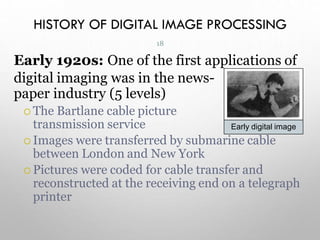
Early 1920s: One of the first applications of
digital imaging was in the news-
paper industry (5 levels)
 The Bartlane cable picture
transmission service
 Images were transferred by submarine cable
between London and New York
 Pictures were coded for cable transfer and
reconstructed at the receiving end on a telegraph
printer
Early digital image
18
HISTORY OF DIP (CONT…)
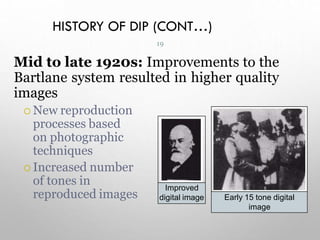
Mid to late 1920s: Improvements to the
Bartlane system resulted in higher quality
images
 New reproduction
processes based
on photographic
techniques
 Increased number
of tones in
reproduced images
Improved
digital image Early 15 tone digital
image
19
HISTORY OF DIP (CONT…)
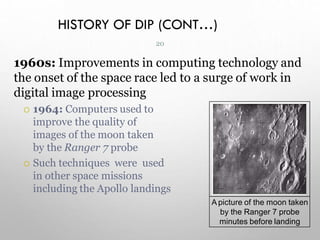
1960s: Improvements in computing technology and
the onset of the space race led to a surge of work in
digital image processing
 1964: Computers used to
improve the quality of
images of the moon taken
by the Ranger 7 probe
 Such techniques were used
in other space missions
including the Apollo landings
A picture of the moon taken
by the Ranger 7 probe
minutes before landing
20
HISTORY OF DIP (CONT…)
1970s: Digital image processing begins to be
used in medical applications
 1979: Sir Godfrey N.
Hounsfield & Prof. Allan M.
Cormack share the Nobel
Prize in medicine for the
invention of tomography ‫ىح‬
‫ط‬
‫س‬
‫مس‬
‫ر‬ ,
the technology behind
Computerised Axial
Tomography (CAT) scans
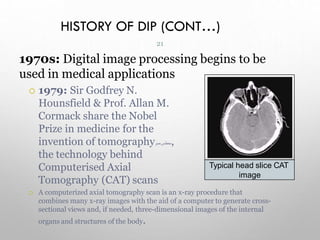
 A computerized axial tomography scan is an x-ray procedure that
combines many x-ray images with the aid of a computer to generate cross-
sectional views and, if needed, three-dimensional images of the internal
organs and structures of the body.
Typical head slice CAT
image
21
HISTORY OF DIP (CONT…)
1980s - Today: The use of digital image processing
techniques has exploded and they are now used for
all kinds of tasks in all kinds of areas
 Image enhancement/restoration
 Artistic effects
 Medical visualisation
 Industrial inspection
 Law enforcement
 Human computer interfaces
3
3
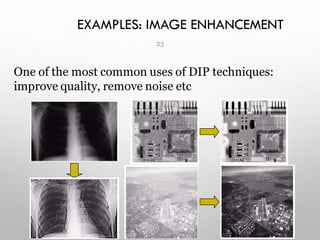
EXAMPLES: IMAGE ENHANCEMENT
One of the most common uses of DIP techniques:
improve quality, remove noise etc
23
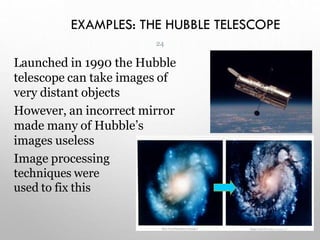
EXAMPLES: THE HUBBLE TELESCOPE
Launched in 1990 the Hubble
telescope can take images of
very distant objects
However, an incorrect mirror
made many of Hubble’s
images useless
Image processing
techniques were
used to fix this
24
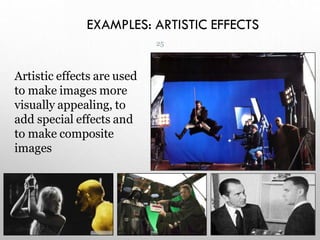
EXAMPLES: ARTISTIC EFFECTS
Artistic effects are used
to make images more
visually appealing, to
add special effects and
to make composite
images
25
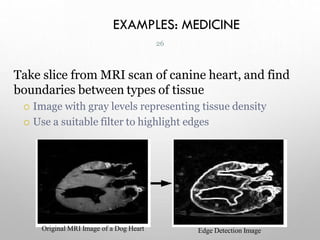
EXAMPLES: MEDICINE
Take slice from MRI scan of canine heart, and find
boundaries between types of tissue
 Image with gray levels representing tissue density
 Use a suitable filter to highlight edges
Original MRI Image of a Dog Heart Edge Detection Image
26
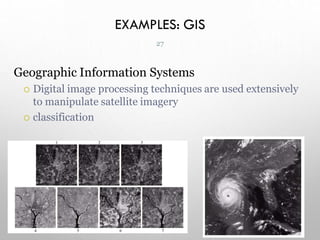
EXAMPLES: GIS
Geographic Information Systems
 Digital image processing techniques are used extensively
to manipulate satellite imagery
 classification
27
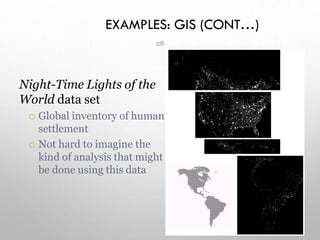
EXAMPLES: GIS (CONT…)
Night-Time Lights of the
World data set
 Global inventory of human
settlement
 Not hard to imagine the
kind of analysis that might
be done using this data
28
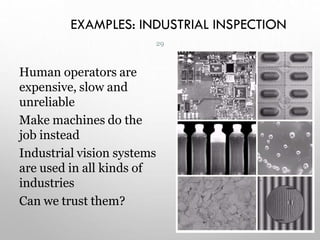
EXAMPLES: INDUSTRIAL INSPECTION
Human operators are
expensive, slow and
unreliable
Make machines do the
job instead
Industrial vision systems
are used in all kinds of
industries
Can we trust them?
29
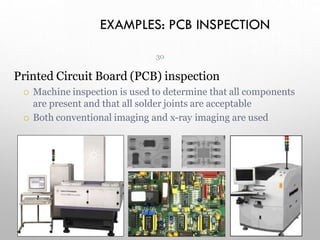
EXAMPLES: PCB INSPECTION
30
Printed Circuit Board (PCB) inspection
 Machine inspection is used to determine that all components
are present and that all solder joints are acceptable
 Both conventional imaging and x-ray imaging are used
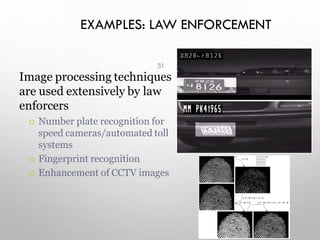
EXAMPLES: LAW ENFORCEMENT
31
Image processing techniques
are used extensively by law
enforcers
 Number plate recognition for
speed cameras/automated toll
systems
 Fingerprint recognition
 Enhancement of CCTV images
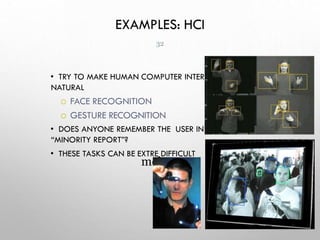
EXAMPLES: HCI
• TRY TO MAKE HUMAN COMPUTER INTERFACES MORE
NATURAL
 FACE RECOGNITION
 GESTURE RECOGNITION
• DOES ANYONE REMEMBER THE USER INTERFACE FROM
“MINORITY REPORT”?
• THESE TASKS CAN BE EXTRE DIFFICULT
mely
32
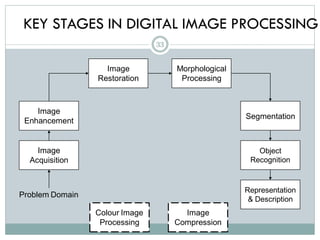
KEY STAGES IN DIGITAL IMAGE PROCESSING
Image
Acquisition
Image
Restoration
Morphological
Processing
Segmentation
Representation
& Description
Image
Enhancement
Object
Recognition
Problem Domain
Colour Image
Processing
Image
Compression
33
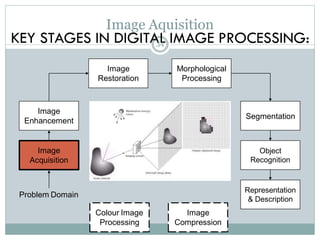
KEY STAGES IN DIGITAL IMAGE PROCESSING:
Image
Acquisition
Image
Restoration
Morphological
Processing
Segmentation
Representation
& Description
Image
Enhancement
Object
Recognition
Problem Domain
Colour Image
Processing
Image
Compression
Image Aquisition
34
Image
Acquisition
Image
Restoration
Morphological
Processing
Segmentation
Representation
& Description
Image
Enhancement
Object
Recognition
Problem Domain
Colour Image
Processing
Image
Compression
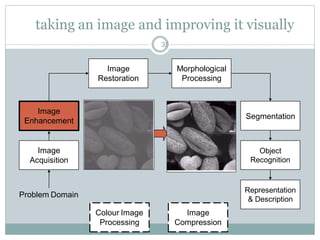
taking an image and improving it visually
35
Image
Acquisition
Image
Restoration
Morphological
Processing
Segmentation
Representation
& Description
Image
Enhancement
Object
Recognition
Problem Domain
Colour Image
Processing
Image
Compression
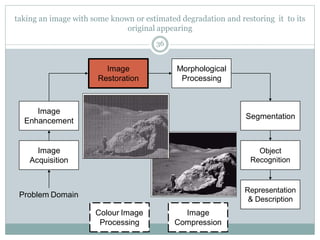
taking an image with some known or estimated degradation and restoring it to its
original appearing
36
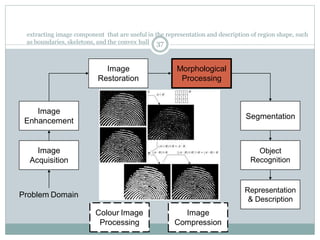
extracting image component that are useful in the representation and description of region shape, such
as boundaries, skeletons, and the convex hull
Image
Acquisition
Image
Restoration
Morphological
Processing
Segmentation
Representation
& Description
Image
Enhancement
Object
Recognition
Problem Domain
Colour Image
Processing
Image
Compression
37
Image
Acquisition
Image
Restoration
Morphological
Processing
Segmentation
Representation
& Description
Image
Enhancement
Object
Recognition
Problem Domain
Colour Image
Processing
Image
Compression
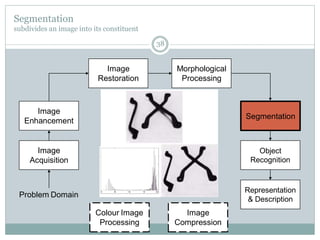
Segmentation
subdivides an image into its constituent
38
Image
Acquisition
Image
Restoration
Morphological
Processing
Segmentation
Representation
& Description
Image
Enhancement
Object
Recognition
Problem Domain
Colour Image
Processing
Image
Compression
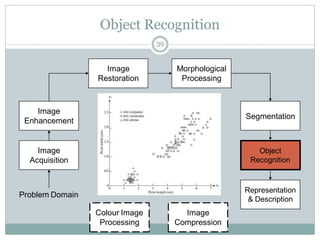
Object Recognition
39
Image
Acquisition
Image
Restoration
Morphological
Processing
Segmentation
Representation
& Description
Image
Enhancement
Object
Recognition
Problem Domain
Colour Image
Processing
Image
Compression
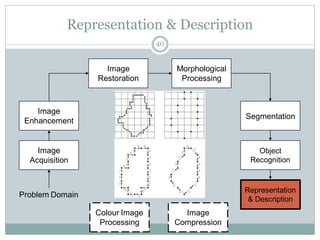
Representation & Description
40
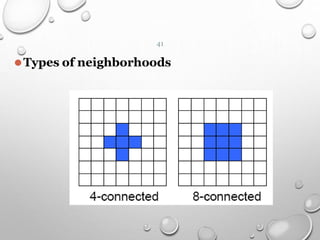
⚫Types of neighborhoods
41
Image
Acquisition
Image
Restoration
Morphological
Processing
Segmentation
Representation
& Description
Image
Enhancement
Object
Recognition
Problem Domain
Colour Image
Processing
Image
Compression
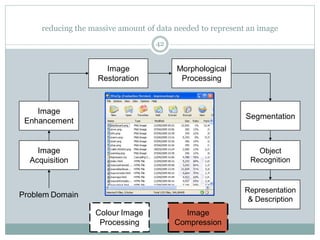
reducing the massive amount of data needed to represent an image
42
Image
Acquisition
Image
Restoration
Morphological
Processing
Segmentation
Representation
& Description
Image
Enhancement
Object
Recognition
Problem Domain
Colour Image
Processing
Image
Compression
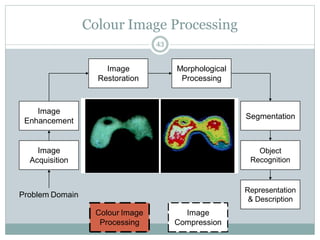
Colour Image Processing
43
SUMMARY
We have looked at:
 What is a digital image?
 What is digital image processing?
 History of digital image processing
 State of the art examples of digital image processing
 Key stages in digital image processing
Next week we start to see how it all works…
44

Dr.maie-Lec_1_Introdudfdfsdfsdfsdfction.pdf

  • 1.
  • 2.
    INTRODUCTION “One picture isworth more than ten thousand words” Anonymous 2
  • 3.
    “Digital Image Processing”, RafaelC. Gonzalez & Richard E. Woods, Addison-Wesley, 2008 And “Computer Vision and image processing : A practical approach using cvip tools Scott E umbaugh, Prentice hall 1998 http://www.mathworks.com/help/images/index.html REFERENCES 3
  • 4.
    FUNDAMENTALS OF DIGITAL IMAGE PROCESSING APRACTICAL APPROACH WITH EXAMPLES IN MATLAB ⚫ Chris Solomon ⚫ 2011 by John Wiley & Sons, Ltd 4
  • 5.
    COURSE OUTLINES ⚫Ch1 :Introduction ⚫Ch2 : Digital Image Fundamentals ⚫Ch3 : Intensity Transformation and Spatial Filtering ⚫Ch4 : Filtering in The Frequency Domain ⚫Ch5 : Image Restoration and Reconstruction ⚫Ch8 : Image Compression ⚫Ch9 : Morphological Image Processing ⚫Ch10: Image Segmentation 6
  • 6.
    CONTENTS 7 This lecture willcover:  What is a digital image?  What is digital image processing?  History of digital image processing  State of the art examples of digital image processing  Key stages in digital image processing
  • 7.
    COMPUTER IMAGING ⚫It’s definedas the acquisition and processing of visual information by computer. ⚫The ultimate receiver of information is:  Computer  Human visual system ⚫So we have two categories:-  Computer vision  Image processing 8
  • 8.
    ⚫In computer vision: Theprocessed output images are for use by computer. ⚫In Image processing: The output images are for human consumption Computer vision and image processing 9
  • 9.
    COMPUTER VISION ⚫One ofthe computer vision fields is image analysis. ⚫It involves the examination of image data to facilitate solving a vision problem. ⚫Image analysis has 2 topics:  Feature extraction: acquiring higher level image information  Pattern classification taking these higher level of information and identifying objects within the image 10
  • 10.
    ⚫Image Processing image in→ image out ⚫Image Analysis image in → measurements out ⚫Image Understanding image in → high-level description out 11
  • 11.
    WHAT IS ADIGITAL IMAGE? A digital image is a representation of a two- dimensional image as a finite set of digital values, called picture elements or pixels 12
  • 12.
    WHAT IS ADIGITAL IMAGE? (CONT…) 1 pixel 13  It is an approximation of a real scene.  It is a representation of a two-dimensional image.  It composed of a finite number of elements called pixels or picture elements.  Pixel values represent gray levels (intensity). Remember digitization implies that a digital image is an approximation of a real scene
  • 13.
    WHAT IS ADIGITAL IMAGE? (CONT…) ur or most of this co se we will focus on gray-scale F images 14 Common image formats include:  1 sample per point (B&W or Grayscale)  2 samples per point (Red, Green, and Blue)
  • 14.
  • 15.
    WHAT IS DIGITALIMAGE PROCESSING? Digital image processing focuses on two major tasks  Improvement of pictorial information for human interpretation  Processing of image data for storage, transmission and representation for autonomous machine perception  Some argument about where image processing ends and fields such as image analysis and computer vision start 16
  • 16.
    WHAT IS DIP?(CONT…) The continuum from image processing to computer vision can be broken up into low-, mid- and high- level processes Low Level Process Input: Image Output: Image Examples: Noise removal, image sharpening Mid Level Process Input: Image Output: Attributes Examples: Object recognition, segmentation High Level Process Input: Attributes Output: Understanding Examples: Scene understanding, autonomous navigation In this course we will stop here 17
  • 17.
    HISTORY OF DIGITALIMAGE PROCESSING Early 1920s: One of the first applications of digital imaging was in the news- paper industry (5 levels)  The Bartlane cable picture transmission service  Images were transferred by submarine cable between London and New York  Pictures were coded for cable transfer and reconstructed at the receiving end on a telegraph printer Early digital image 18
  • 18.
    HISTORY OF DIP(CONT…) Mid to late 1920s: Improvements to the Bartlane system resulted in higher quality images  New reproduction processes based on photographic techniques  Increased number of tones in reproduced images Improved digital image Early 15 tone digital image 19
  • 19.
    HISTORY OF DIP(CONT…) 1960s: Improvements in computing technology and the onset of the space race led to a surge of work in digital image processing  1964: Computers used to improve the quality of images of the moon taken by the Ranger 7 probe  Such techniques were used in other space missions including the Apollo landings A picture of the moon taken by the Ranger 7 probe minutes before landing 20
  • 20.
    HISTORY OF DIP(CONT…) 1970s: Digital image processing begins to be used in medical applications  1979: Sir Godfrey N. Hounsfield & Prof. Allan M. Cormack share the Nobel Prize in medicine for the invention of tomography ‫ىح‬ ‫ط‬ ‫س‬ ‫مس‬ ‫ر‬ , the technology behind Computerised Axial Tomography (CAT) scans  A computerized axial tomography scan is an x-ray procedure that combines many x-ray images with the aid of a computer to generate cross- sectional views and, if needed, three-dimensional images of the internal organs and structures of the body. Typical head slice CAT image 21
  • 21.
    HISTORY OF DIP(CONT…) 1980s - Today: The use of digital image processing techniques has exploded and they are now used for all kinds of tasks in all kinds of areas  Image enhancement/restoration  Artistic effects  Medical visualisation  Industrial inspection  Law enforcement  Human computer interfaces 3 3
  • 22.
    EXAMPLES: IMAGE ENHANCEMENT Oneof the most common uses of DIP techniques: improve quality, remove noise etc 23
  • 23.
    EXAMPLES: THE HUBBLETELESCOPE Launched in 1990 the Hubble telescope can take images of very distant objects However, an incorrect mirror made many of Hubble’s images useless Image processing techniques were used to fix this 24
  • 24.
    EXAMPLES: ARTISTIC EFFECTS Artisticeffects are used to make images more visually appealing, to add special effects and to make composite images 25
  • 25.
    EXAMPLES: MEDICINE Take slicefrom MRI scan of canine heart, and find boundaries between types of tissue  Image with gray levels representing tissue density  Use a suitable filter to highlight edges Original MRI Image of a Dog Heart Edge Detection Image 26
  • 26.
    EXAMPLES: GIS Geographic InformationSystems  Digital image processing techniques are used extensively to manipulate satellite imagery  classification 27
  • 27.
    EXAMPLES: GIS (CONT…) Night-TimeLights of the World data set  Global inventory of human settlement  Not hard to imagine the kind of analysis that might be done using this data 28
  • 28.
    EXAMPLES: INDUSTRIAL INSPECTION Humanoperators are expensive, slow and unreliable Make machines do the job instead Industrial vision systems are used in all kinds of industries Can we trust them? 29
  • 29.
    EXAMPLES: PCB INSPECTION 30 PrintedCircuit Board (PCB) inspection  Machine inspection is used to determine that all components are present and that all solder joints are acceptable  Both conventional imaging and x-ray imaging are used
  • 30.
    EXAMPLES: LAW ENFORCEMENT 31 Imageprocessing techniques are used extensively by law enforcers  Number plate recognition for speed cameras/automated toll systems  Fingerprint recognition  Enhancement of CCTV images
  • 31.
    EXAMPLES: HCI • TRYTO MAKE HUMAN COMPUTER INTERFACES MORE NATURAL  FACE RECOGNITION  GESTURE RECOGNITION • DOES ANYONE REMEMBER THE USER INTERFACE FROM “MINORITY REPORT”? • THESE TASKS CAN BE EXTRE DIFFICULT mely 32
  • 32.
    KEY STAGES INDIGITAL IMAGE PROCESSING Image Acquisition Image Restoration Morphological Processing Segmentation Representation & Description Image Enhancement Object Recognition Problem Domain Colour Image Processing Image Compression 33
  • 33.
    KEY STAGES INDIGITAL IMAGE PROCESSING: Image Acquisition Image Restoration Morphological Processing Segmentation Representation & Description Image Enhancement Object Recognition Problem Domain Colour Image Processing Image Compression Image Aquisition 34
  • 34.
  • 35.
    Image Acquisition Image Restoration Morphological Processing Segmentation Representation & Description Image Enhancement Object Recognition Problem Domain ColourImage Processing Image Compression taking an image with some known or estimated degradation and restoring it to its original appearing 36
  • 36.
    extracting image componentthat are useful in the representation and description of region shape, such as boundaries, skeletons, and the convex hull Image Acquisition Image Restoration Morphological Processing Segmentation Representation & Description Image Enhancement Object Recognition Problem Domain Colour Image Processing Image Compression 37
  • 37.
  • 38.
  • 39.
  • 40.
  • 41.
  • 42.
  • 43.
    SUMMARY We have lookedat:  What is a digital image?  What is digital image processing?  History of digital image processing  State of the art examples of digital image processing  Key stages in digital image processing Next week we start to see how it all works… 44