Digital Image
Processing
Lecture # 1, 2
Why digital signals?
 The precise signal level of the digital signal is not vital, so provides greater
noise immunity
 Digital signals are fairly immune to the imperfections of real electronic
systems which tend to spoil analog signals.
 Codes are often used either as a means of keeping the information secret
or as a means of breaking the information into pieces that are
manageable by the technology used to transmit the code.
 Digital circuit components are cheap and easily produced in many
components on a single chip.
 use less bandwidth.
 can be encrypted so secure
2
BACKGROUND
•Interest comes from two primary backgrounds
Improvement of pictorial information for human
perception
• How can an image/video be made more aesthetically pleasing
• How can an image/video be enhanced to facilitate extraction of useful
information
Processing of data for storage, transmission and
representation for autonomous machine perception
3
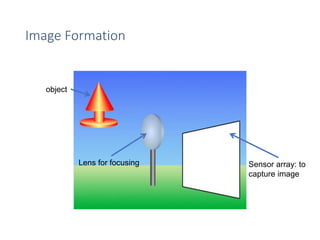
Image Formation
object
Lens for focusing Sensor array: to
capture image
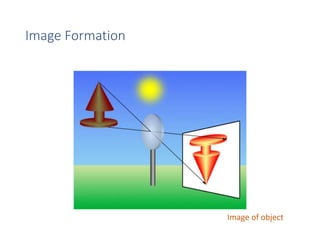
Image Formation
Image of object
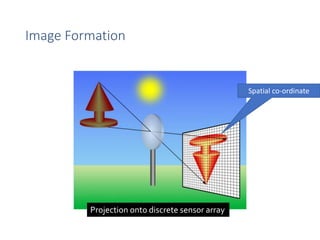
Image Formation
Projection onto discrete sensor array
Spatial co-ordinate
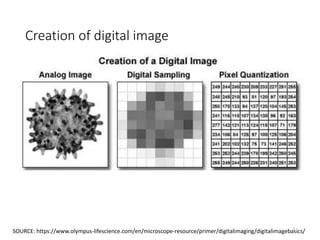
Creation of digital image
7
SOURCE: https://www.olympus-lifescience.com/en/microscope-resource/primer/digitalimaging/digitalimagebasics/
EC1768 DIGITAL IMAGE PROCESSING [3 0 0 3]
8
Basics of image processing: Fundamentals of digital image processing, image
perception, Image sensing and acquisition, sampling and Quantization, image
representation, basic relationship between pixels; image enhancement and
restoration: Spatial Domain methods: Basic grey level transformation,
Histogram equalization, Image subtraction, Spatial filtering: Smoothing,
sharpening filters, Laplacian filters, Frequency domain filters : Smoothing,
Sharpening filters, Homomorphic filtering; image transforms: Fourier transfrom,
Fast Fourier Transform Short Time Fourier Transfrom, Cosine Transform ,
discrete wavelet transform; image segmentation: Detection of discontinuities.
Edge linking and boundary detection, Thresholding, Region based
segmentation; representation & description: Représentation, boundary
descriptor, regional descriptor; Image Compression Algorithms and
standards: Lossless compression: Variable length coding, LZW coding, Bit
plane coding, predictive coding, DPCM. Lossy Compression: Transform coding,
Wavelet coding. Basics of Image compression standards: JPEG, JPEG2000;
morphological processing: Lossless compression: Variable length coding,
LZW coding, Bit plane coding, predictive coding, DPCM. Lossy Compression:
Transform coding, Wavelet coding. Basics of Image compression standards:
JPEG, JPEG2000; applications: Character recognition, Biomeical Image
processing. Watermarking, multi resolution analysis.
Course Learning Outcomes
[EC4160.1]. Correlate image perception, acquisition and analysis to develop
projects and hence develop employability skills
(analysis)
[EC4160.2]. Execute digital image manipulation and mathematical operations
(application)
[EC4160.3]. Validate Image enhancement and restoration techniques for
processing
(evaluation)
[EC4160.4]. Recognize the steps (compression, segmentation and morphological
techniques) for image processing for lifelong learning and encouraging
entrepreneurship (application)
[EC4160.5]. Evaluate use of image processing filters
(evaluation)
[EC4160.6] Apply techniques for compression and decompression on digital
9
References
REFEERENCE BOOKS
1. Digital Image Processing – Rafael C. Gonzalez, Richard E. Woods, 3rd
Edition, Pearson, 2008
2. Digital Image Processing- S Jayaraman, S Esakkirajan, T Veerakumar-
TMH, 2010.
3. Digital Image Processing- S. Sridhar, Oxford University Press, 2013
4. Fundamentals of Digital Image Processing- A.K. Jain, PHI, New Delhi
(2002).
10
Course Scheme
• Internal Assessment = 20 marks
• Includes Quizzes, (project) and class performance
• Sessional Examinations = 40 marks
• Two sessional exams of 20 marks each
• End-term Examination = 40 marks
• NOTE:
• A minimum of 75% attendance is required to appear in End-term Examination
of this course. The 25% of absence includes all types of leaves including sick
leaves.
• It is mandatory to score 35% marks in End-term Examination to clear this
course
11
Image types based on source (Imaging
modalities)
• Electromagnetic spectrum: gamma ray imaging, x-ray imaging, visible
light imaging, infrared band imaging,
• Acoustic: geological exploration
• Ultrasonic: ultrasound
• Electronic
12
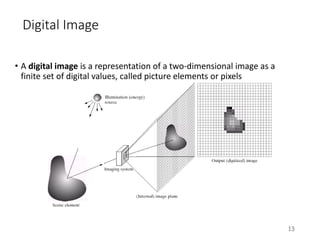
Digital Image
• A digital image is a representation of a two-dimensional image as a
finite set of digital values, called picture elements or pixels
13
Digital Image Processing
• In image processing, essentially the digital data is processed by digital
computers.
• Image is 2-D function, f(x,y): (x,y) is spatial coordinate and f is intensity
of image
• Digital image: x, y and f are all finite, discrete quantities
• Digital image processing: processing digital images by a digital
computer.
• Remember digitization implies that a digital image is an approximation
of a real scene
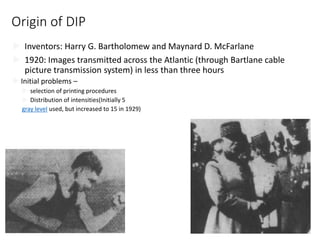
Origin of DIP
 Inventors: Harry G. Bartholomew and Maynard D. McFarlane
 1920: Images transmitted across the Atlantic (through Bartlane cable
picture transmission system) in less than three hours
 Initial problems –
 selection of printing procedures
 Distribution of intensities(Initially 5
gray level used, but increased to 15 in 1929)
15
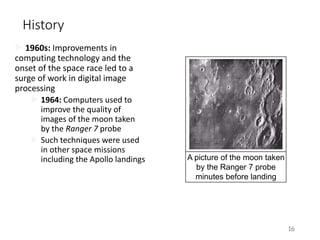
History
 1960s: Improvements in
computing technology and the
onset of the space race led to a
surge of work in digital image
processing
 1964: Computers used to
improve the quality of
images of the moon taken
by the Ranger 7 probe
 Such techniques were used
in other space missions
including the Apollo landings
16
A picture of the moon taken
by the Ranger 7 probe
minutes before landing
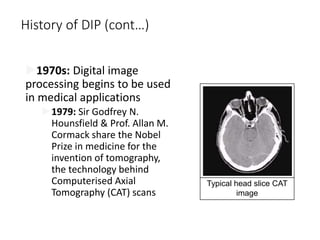
History of DIP (cont…)
1970s: Digital image
processing begins to be used
in medical applications
1979: Sir Godfrey N.
Hounsfield & Prof. Allan M.
Cormack share the Nobel
Prize in medicine for the
invention of tomography,
the technology behind
Computerised Axial
Tomography (CAT) scans
Typical head slice CAT
image
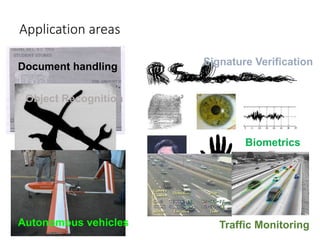
Application areas
Document handling Signature Verification
Biometrics
Object Recognition
Traffic Monitoring
Autonomous vehicles
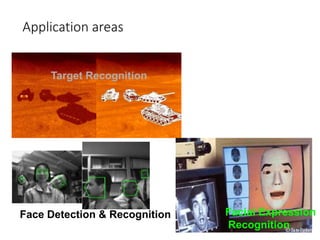
Application areas
Target Recognition
Face Detection & Recognition Facial Expression
Recognition
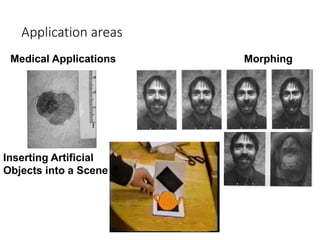
Application areas
Medical Applications Morphing
Inserting Artificial
Objects into a Scene
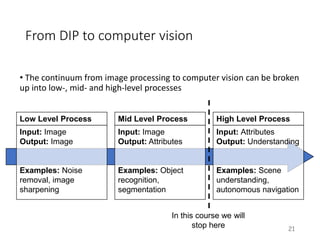
From DIP to computer vision
• The continuum from image processing to computer vision can be broken
up into low-, mid- and high-level processes
21
Low Level Process
Input: Image
Output: Image
Examples: Noise
removal, image
sharpening
Mid Level Process
Input: Image
Output: Attributes
Examples: Object
recognition,
segmentation
High Level Process
Input: Attributes
Output: Understanding
Examples: Scene
understanding,
autonomous navigation
In this course we will
stop here
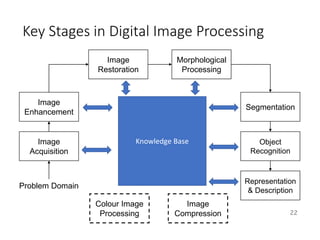
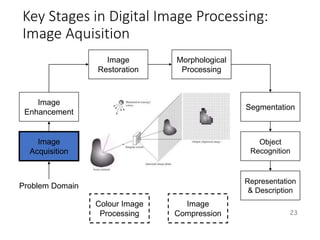
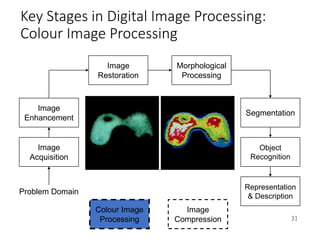
Key Stages in Digital Image Processing
22
Image
Acquisition
Image
Restoration
Morphological
Processing
Segmentation
Representation
& Description
Image
Enhancement
Object
Recognition
Problem Domain
Colour Image
Processing
Image
Compression
Knowledge Base
Key Stages in Digital Image Processing:
Image Aquisition
23
Image
Acquisition
Image
Restoration
Morphological
Processing
Segmentation
Representation
& Description
Image
Enhancement
Object
Recognition
Problem Domain
Colour Image
Processing
Image
Compression
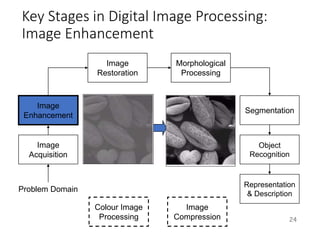
Key Stages in Digital Image Processing:
Image Enhancement
24
Image
Acquisition
Image
Restoration
Morphological
Processing
Segmentation
Representation
& Description
Image
Enhancement
Object
Recognition
Problem Domain
Colour Image
Processing
Image
Compression
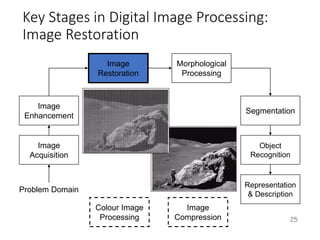
Key Stages in Digital Image Processing:
Image Restoration
25
Image
Acquisition
Image
Restoration
Morphological
Processing
Segmentation
Representation
& Description
Image
Enhancement
Object
Recognition
Problem Domain
Colour Image
Processing
Image
Compression
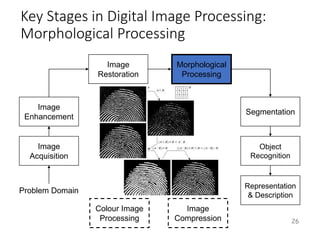
Key Stages in Digital Image Processing:
Morphological Processing
26
Image
Acquisition
Image
Restoration
Morphological
Processing
Segmentation
Representation
& Description
Image
Enhancement
Object
Recognition
Problem Domain
Colour Image
Processing
Image
Compression
Key Stages in Digital Image Processing:
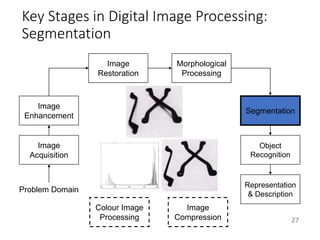
Segmentation
27
Image
Acquisition
Image
Restoration
Morphological
Processing
Segmentation
Representation
& Description
Image
Enhancement
Object
Recognition
Problem Domain
Colour Image
Processing
Image
Compression
Key Stages in Digital Image Processing:
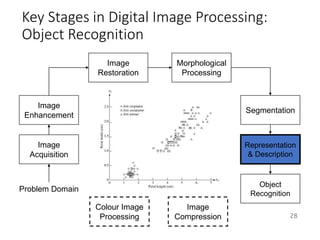
Object Recognition
28
Image
Acquisition
Image
Restoration
Morphological
Processing
Segmentation
Object
Recognition
Image
Enhancement
Representation
& Description
Problem Domain
Colour Image
Processing
Image
Compression
Key Stages in Digital Image Processing:
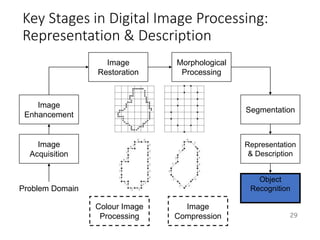
Representation & Description
29
Image
Acquisition
Image
Restoration
Morphological
Processing
Segmentation
Object
Recognition
Image
Enhancement
Representation
& Description
Problem Domain
Colour Image
Processing
Image
Compression
Key Stages in Digital Image Processing:
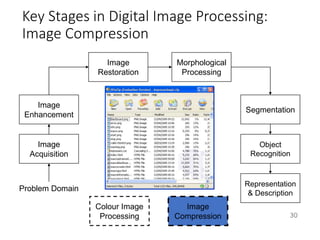
Image Compression
30
Image
Acquisition
Image
Restoration
Morphological
Processing
Segmentation
Representation
& Description
Image
Enhancement
Object
Recognition
Problem Domain
Colour Image
Processing
Image
Compression
Key Stages in Digital Image Processing:
Colour Image Processing
31
Image
Acquisition
Image
Restoration
Morphological
Processing
Segmentation
Representation
& Description
Image
Enhancement
Object
Recognition
Problem Domain
Colour Image
Processing
Image
Compression
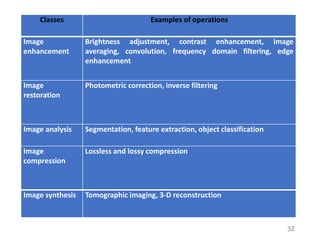
Classes Examples of operations
Image
enhancement
Brightness adjustment, contrast enhancement, image
averaging, convolution, frequency domain filtering, edge
enhancement
Image
restoration
Photometric correction, inverse filtering
Image analysis Segmentation, feature extraction, object classification
Image
compression
Lossless and lossy compression
Image synthesis Tomographic imaging, 3-D reconstruction
32
Types of images
• Binary image
• two valued [0,1] image
• Example: used where information about shape or outline is required
• Grayscale image
• Monochrome images where no. of bits define no.
of gray-levels (eg. 8 bit image has 256 graylevels)
• Color image
• 3-band monochrome image where each band corresponds to a different
color (red, Green, Blue) (8 bits per plane=> 24 bits per pixel)
Types of images
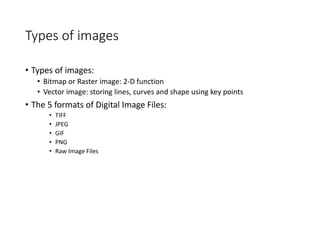
• Types of images:
• Bitmap or Raster image: 2-D function
• Vector image: storing lines, curves and shape using key points
• The 5 formats of Digital Image Files:
• TIFF
• JPEG
• GIF
• PNG
• Raw Image Files
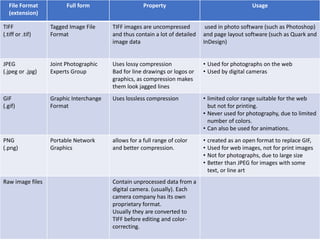
File Format
(extension)
Full form Property Usage
TIFF
(.tiff or .tif)
Tagged Image File
Format
TIFF images are uncompressed
and thus contain a lot of detailed
image data
used in photo software (such as Photoshop)
and page layout software (such as Quark and
InDesign)
JPEG
(.jpeg or .jpg)
Joint Photographic
Experts Group
Uses lossy compression
Bad for line drawings or logos or
graphics, as compression makes
them look jagged lines
• Used for photographs on the web
• Used by digital cameras
GIF
(.gif)
Graphic Interchange
Format
Uses lossless compression • limited color range suitable for the web
but not for printing.
• Never used for photography, due to limited
number of colors.
• Can also be used for animations.
PNG
(.png)
Portable Network
Graphics
allows for a full range of color
and better compression.
• created as an open format to replace GIF,
• Used for web images, not for print images
• Not for photographs, due to large size
• Better than JPEG for images with some
text, or line art
Raw image files Contain unprocessed data from a
digital camera. (usually). Each
camera company has its own
proprietary format.
Usually they are converted to
TIFF before editing and color-
correcting.
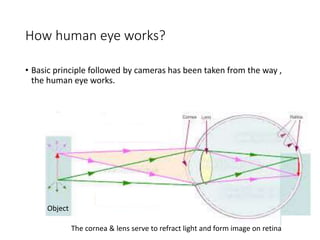
How human eye works?
• Basic principle followed by cameras has been taken from the way ,
the human eye works.
Object
The cornea & lens serve to refract light and form image on retina
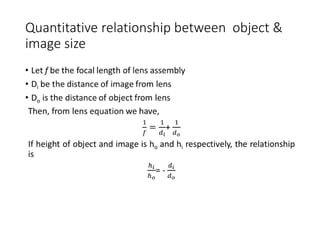
Quantitative relationship between object &
image size
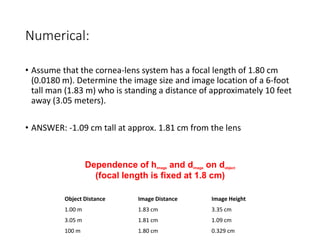
Numerical:
• Assume that the cornea-lens system has a focal length of 1.80 cm
(0.0180 m). Determine the image size and image location of a 6-foot
tall man (1.83 m) who is standing a distance of approximately 10 feet
away (3.05 meters).
• ANSWER: -1.09 cm tall at approx. 1.81 cm from the lens
Object Distance Image Distance Image Height
1.00 m 1.83 cm 3.35 cm
3.05 m 1.81 cm 1.09 cm
100 m 1.80 cm 0.329 cm
Dependence of himage and dimage on dobject
(focal length is fixed at 1.8 cm)
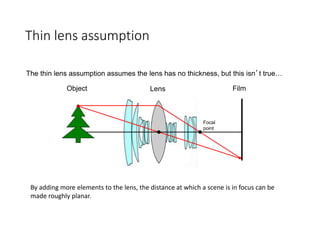
Thin lens assumption
Film
Object Lens
Focal
point
The thin lens assumption assumes the lens has no thickness, but this isn’t true…
By adding more elements to the lens, the distance at which a scene is in focus can be
made roughly planar.
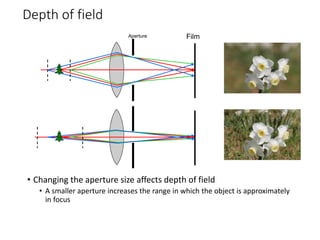
Depth of field
• Changing the aperture size affects depth of field
• A smaller aperture increases the range in which the object is approximately
in focus
Film
Aperture

EC4160-lect 1,2.ppt

  • 1.
  • 2.
    Why digital signals? The precise signal level of the digital signal is not vital, so provides greater noise immunity  Digital signals are fairly immune to the imperfections of real electronic systems which tend to spoil analog signals.  Codes are often used either as a means of keeping the information secret or as a means of breaking the information into pieces that are manageable by the technology used to transmit the code.  Digital circuit components are cheap and easily produced in many components on a single chip.  use less bandwidth.  can be encrypted so secure 2
  • 3.
    BACKGROUND •Interest comes fromtwo primary backgrounds Improvement of pictorial information for human perception • How can an image/video be made more aesthetically pleasing • How can an image/video be enhanced to facilitate extraction of useful information Processing of data for storage, transmission and representation for autonomous machine perception 3
  • 4.
    Image Formation object Lens forfocusing Sensor array: to capture image
  • 5.
  • 6.
    Image Formation Projection ontodiscrete sensor array Spatial co-ordinate
  • 7.
    Creation of digitalimage 7 SOURCE: https://www.olympus-lifescience.com/en/microscope-resource/primer/digitalimaging/digitalimagebasics/
  • 8.
    EC1768 DIGITAL IMAGEPROCESSING [3 0 0 3] 8 Basics of image processing: Fundamentals of digital image processing, image perception, Image sensing and acquisition, sampling and Quantization, image representation, basic relationship between pixels; image enhancement and restoration: Spatial Domain methods: Basic grey level transformation, Histogram equalization, Image subtraction, Spatial filtering: Smoothing, sharpening filters, Laplacian filters, Frequency domain filters : Smoothing, Sharpening filters, Homomorphic filtering; image transforms: Fourier transfrom, Fast Fourier Transform Short Time Fourier Transfrom, Cosine Transform , discrete wavelet transform; image segmentation: Detection of discontinuities. Edge linking and boundary detection, Thresholding, Region based segmentation; representation & description: Représentation, boundary descriptor, regional descriptor; Image Compression Algorithms and standards: Lossless compression: Variable length coding, LZW coding, Bit plane coding, predictive coding, DPCM. Lossy Compression: Transform coding, Wavelet coding. Basics of Image compression standards: JPEG, JPEG2000; morphological processing: Lossless compression: Variable length coding, LZW coding, Bit plane coding, predictive coding, DPCM. Lossy Compression: Transform coding, Wavelet coding. Basics of Image compression standards: JPEG, JPEG2000; applications: Character recognition, Biomeical Image processing. Watermarking, multi resolution analysis.
  • 9.
    Course Learning Outcomes [EC4160.1].Correlate image perception, acquisition and analysis to develop projects and hence develop employability skills (analysis) [EC4160.2]. Execute digital image manipulation and mathematical operations (application) [EC4160.3]. Validate Image enhancement and restoration techniques for processing (evaluation) [EC4160.4]. Recognize the steps (compression, segmentation and morphological techniques) for image processing for lifelong learning and encouraging entrepreneurship (application) [EC4160.5]. Evaluate use of image processing filters (evaluation) [EC4160.6] Apply techniques for compression and decompression on digital 9
  • 10.
    References REFEERENCE BOOKS 1. DigitalImage Processing – Rafael C. Gonzalez, Richard E. Woods, 3rd Edition, Pearson, 2008 2. Digital Image Processing- S Jayaraman, S Esakkirajan, T Veerakumar- TMH, 2010. 3. Digital Image Processing- S. Sridhar, Oxford University Press, 2013 4. Fundamentals of Digital Image Processing- A.K. Jain, PHI, New Delhi (2002). 10
  • 11.
    Course Scheme • InternalAssessment = 20 marks • Includes Quizzes, (project) and class performance • Sessional Examinations = 40 marks • Two sessional exams of 20 marks each • End-term Examination = 40 marks • NOTE: • A minimum of 75% attendance is required to appear in End-term Examination of this course. The 25% of absence includes all types of leaves including sick leaves. • It is mandatory to score 35% marks in End-term Examination to clear this course 11
  • 12.
    Image types basedon source (Imaging modalities) • Electromagnetic spectrum: gamma ray imaging, x-ray imaging, visible light imaging, infrared band imaging, • Acoustic: geological exploration • Ultrasonic: ultrasound • Electronic 12
  • 13.
    Digital Image • Adigital image is a representation of a two-dimensional image as a finite set of digital values, called picture elements or pixels 13
  • 14.
    Digital Image Processing •In image processing, essentially the digital data is processed by digital computers. • Image is 2-D function, f(x,y): (x,y) is spatial coordinate and f is intensity of image • Digital image: x, y and f are all finite, discrete quantities • Digital image processing: processing digital images by a digital computer. • Remember digitization implies that a digital image is an approximation of a real scene
  • 15.
    Origin of DIP Inventors: Harry G. Bartholomew and Maynard D. McFarlane  1920: Images transmitted across the Atlantic (through Bartlane cable picture transmission system) in less than three hours  Initial problems –  selection of printing procedures  Distribution of intensities(Initially 5 gray level used, but increased to 15 in 1929) 15
  • 16.
    History  1960s: Improvementsin computing technology and the onset of the space race led to a surge of work in digital image processing  1964: Computers used to improve the quality of images of the moon taken by the Ranger 7 probe  Such techniques were used in other space missions including the Apollo landings 16 A picture of the moon taken by the Ranger 7 probe minutes before landing
  • 17.
    History of DIP(cont…) 1970s: Digital image processing begins to be used in medical applications 1979: Sir Godfrey N. Hounsfield & Prof. Allan M. Cormack share the Nobel Prize in medicine for the invention of tomography, the technology behind Computerised Axial Tomography (CAT) scans Typical head slice CAT image
  • 18.
    Application areas Document handlingSignature Verification Biometrics Object Recognition Traffic Monitoring Autonomous vehicles
  • 19.
    Application areas Target Recognition FaceDetection & Recognition Facial Expression Recognition
  • 20.
    Application areas Medical ApplicationsMorphing Inserting Artificial Objects into a Scene
  • 21.
    From DIP tocomputer vision • The continuum from image processing to computer vision can be broken up into low-, mid- and high-level processes 21 Low Level Process Input: Image Output: Image Examples: Noise removal, image sharpening Mid Level Process Input: Image Output: Attributes Examples: Object recognition, segmentation High Level Process Input: Attributes Output: Understanding Examples: Scene understanding, autonomous navigation In this course we will stop here
  • 22.
    Key Stages inDigital Image Processing 22 Image Acquisition Image Restoration Morphological Processing Segmentation Representation & Description Image Enhancement Object Recognition Problem Domain Colour Image Processing Image Compression Knowledge Base
  • 23.
    Key Stages inDigital Image Processing: Image Aquisition 23 Image Acquisition Image Restoration Morphological Processing Segmentation Representation & Description Image Enhancement Object Recognition Problem Domain Colour Image Processing Image Compression
  • 24.
    Key Stages inDigital Image Processing: Image Enhancement 24 Image Acquisition Image Restoration Morphological Processing Segmentation Representation & Description Image Enhancement Object Recognition Problem Domain Colour Image Processing Image Compression
  • 25.
    Key Stages inDigital Image Processing: Image Restoration 25 Image Acquisition Image Restoration Morphological Processing Segmentation Representation & Description Image Enhancement Object Recognition Problem Domain Colour Image Processing Image Compression
  • 26.
    Key Stages inDigital Image Processing: Morphological Processing 26 Image Acquisition Image Restoration Morphological Processing Segmentation Representation & Description Image Enhancement Object Recognition Problem Domain Colour Image Processing Image Compression
  • 27.
    Key Stages inDigital Image Processing: Segmentation 27 Image Acquisition Image Restoration Morphological Processing Segmentation Representation & Description Image Enhancement Object Recognition Problem Domain Colour Image Processing Image Compression
  • 28.
    Key Stages inDigital Image Processing: Object Recognition 28 Image Acquisition Image Restoration Morphological Processing Segmentation Object Recognition Image Enhancement Representation & Description Problem Domain Colour Image Processing Image Compression
  • 29.
    Key Stages inDigital Image Processing: Representation & Description 29 Image Acquisition Image Restoration Morphological Processing Segmentation Object Recognition Image Enhancement Representation & Description Problem Domain Colour Image Processing Image Compression
  • 30.
    Key Stages inDigital Image Processing: Image Compression 30 Image Acquisition Image Restoration Morphological Processing Segmentation Representation & Description Image Enhancement Object Recognition Problem Domain Colour Image Processing Image Compression
  • 31.
    Key Stages inDigital Image Processing: Colour Image Processing 31 Image Acquisition Image Restoration Morphological Processing Segmentation Representation & Description Image Enhancement Object Recognition Problem Domain Colour Image Processing Image Compression
  • 32.
    Classes Examples ofoperations Image enhancement Brightness adjustment, contrast enhancement, image averaging, convolution, frequency domain filtering, edge enhancement Image restoration Photometric correction, inverse filtering Image analysis Segmentation, feature extraction, object classification Image compression Lossless and lossy compression Image synthesis Tomographic imaging, 3-D reconstruction 32
  • 33.
    Types of images •Binary image • two valued [0,1] image • Example: used where information about shape or outline is required • Grayscale image • Monochrome images where no. of bits define no. of gray-levels (eg. 8 bit image has 256 graylevels) • Color image • 3-band monochrome image where each band corresponds to a different color (red, Green, Blue) (8 bits per plane=> 24 bits per pixel)
  • 34.
    Types of images •Types of images: • Bitmap or Raster image: 2-D function • Vector image: storing lines, curves and shape using key points • The 5 formats of Digital Image Files: • TIFF • JPEG • GIF • PNG • Raw Image Files
  • 35.
    File Format (extension) Full formProperty Usage TIFF (.tiff or .tif) Tagged Image File Format TIFF images are uncompressed and thus contain a lot of detailed image data used in photo software (such as Photoshop) and page layout software (such as Quark and InDesign) JPEG (.jpeg or .jpg) Joint Photographic Experts Group Uses lossy compression Bad for line drawings or logos or graphics, as compression makes them look jagged lines • Used for photographs on the web • Used by digital cameras GIF (.gif) Graphic Interchange Format Uses lossless compression • limited color range suitable for the web but not for printing. • Never used for photography, due to limited number of colors. • Can also be used for animations. PNG (.png) Portable Network Graphics allows for a full range of color and better compression. • created as an open format to replace GIF, • Used for web images, not for print images • Not for photographs, due to large size • Better than JPEG for images with some text, or line art Raw image files Contain unprocessed data from a digital camera. (usually). Each camera company has its own proprietary format. Usually they are converted to TIFF before editing and color- correcting.
  • 36.
    How human eyeworks? • Basic principle followed by cameras has been taken from the way , the human eye works. Object The cornea & lens serve to refract light and form image on retina
  • 37.
  • 38.
    Numerical: • Assume thatthe cornea-lens system has a focal length of 1.80 cm (0.0180 m). Determine the image size and image location of a 6-foot tall man (1.83 m) who is standing a distance of approximately 10 feet away (3.05 meters). • ANSWER: -1.09 cm tall at approx. 1.81 cm from the lens Object Distance Image Distance Image Height 1.00 m 1.83 cm 3.35 cm 3.05 m 1.81 cm 1.09 cm 100 m 1.80 cm 0.329 cm Dependence of himage and dimage on dobject (focal length is fixed at 1.8 cm)
  • 39.
    Thin lens assumption Film ObjectLens Focal point The thin lens assumption assumes the lens has no thickness, but this isn’t true… By adding more elements to the lens, the distance at which a scene is in focus can be made roughly planar.
  • 40.
    Depth of field •Changing the aperture size affects depth of field • A smaller aperture increases the range in which the object is approximately in focus Film Aperture