Prof. Dr.Abbas H.Prof. Dr.Abbas H. HassinHassin AlasadiAlasadi
Email : abbashh2002@gmail.comEmail : abbashh2002@gmail.com
ReferencesReferences
“Digital Image Processing”, Rafael C.
Gonzalez & Richard E. Woods,
Addison-Wesley, 2002
Fundamentals of Digital Image
Processing A Practical Approach
with Examples in Matlab, John Wiley &
Sons, Ltd, 2011.

Lecture 1 Page 2
IntroductionIntroduction
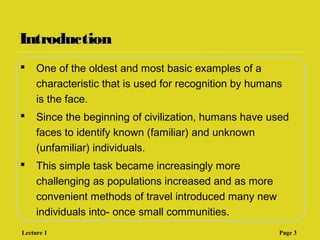
 One of the oldest and most basic examples of a
characteristic that is used for recognition by humans
is the face.
 Since the beginning of civilization, humans have used
faces to identify known (familiar) and unknown
(unfamiliar) individuals.
 This simple task became increasingly more
challenging as populations increased and as more
convenient methods of travel introduced many new
individuals into- once small communities.
Lecture 1 Page 3
ContentsContents
This lecture will cover:
 What is a digital image?
 What is digital image processing?
 History of digital image processing
 State of the art examples of digital image
processing
 Key stages in digital image processing
Lecture 1 Page 4
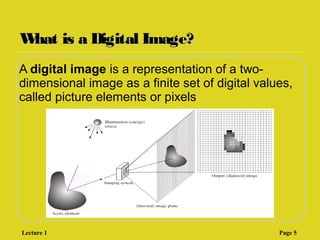
What is a Digital Image?What is a Digital Image?
A digital image is a representation of a two-
dimensional image as a finite set of digital values,
called picture elements or pixels
Lecture 1 Page 5
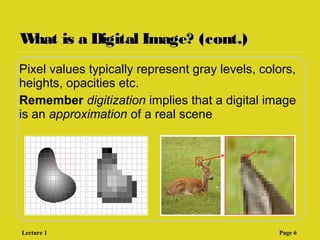
What is a Digital Image? (cont.)What is a Digital Image? (cont.)
Pixel values typically represent gray levels, colors,
heights, opacities etc.
Remember digitization implies that a digital image
is an approximation of a real scene
1 pixel
Lecture 1 Page 6
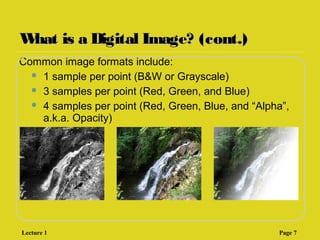
What is a Digital Image? (cont.)What is a Digital Image? (cont.)
Common image formats include:
 1 sample per point (B&W or Grayscale)
 3 samples per point (Red, Green, and Blue)
 4 samples per point (Red, Green, Blue, and “Alpha”,
a.k.a. Opacity)
Lecture 1 Page 7
What is Digital Image Processing?What is Digital Image Processing?
Digital image processing focuses on two major
tasks
 Improvement of pictorial information for
human interpretation
 Processing of image data for storage,
transmission and representation for
autonomous machine perception
Some argument about where image processing
ends and fields such as image analysis and
computer vision start
Lecture 1 Page 8
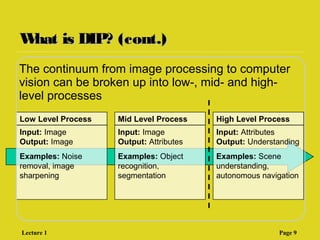
What is DIP? (cont.)What is DIP? (cont.)
The continuum from image processing to computer
vision can be broken up into low-, mid- and high-
level processes
Low Level Process
Input: Image
Output: Image
Examples: Noise
removal, image
sharpening
Mid Level Process
Input: Image
Output: Attributes
Examples: Object
recognition,
segmentation
High Level Process
Input: Attributes
Output: Understanding
Examples: Scene
understanding,
autonomous navigation
Lecture 1 Page 9
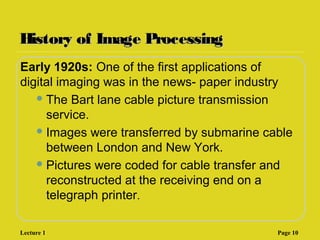
History of Image ProcessingHistory of Image Processing
Early 1920s: One of the first applications of
digital imaging was in the news- paper industry
The Bart lane cable picture transmission
service.
Images were transferred by submarine cable
between London and New York.
Pictures were coded for cable transfer and
reconstructed at the receiving end on a
telegraph printer.
Lecture 1 Page 10
History of Image ProcessingHistory of Image Processing
Mid to late 1920s: Improvements to the
Bartlane system resulted in higher quality
images
New reproduction processes based
on photographic techniques
Increased number of tones in reproduced
images
Lecture 1 Page 11
History of Image ProcessingHistory of Image Processing
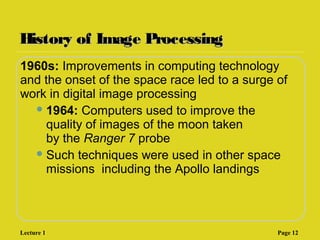
1960s: Improvements in computing technology
and the onset of the space race led to a surge of
work in digital image processing
1964: Computers used to improve the
quality of images of the moon taken
by the Ranger 7 probe
Such techniques were used in other space
missions including the Apollo landings
Lecture 1 Page 12
History of Image ProcessingHistory of Image Processing
1970s: Digital image processing begins to be
used in medical applications
1979: Sir Godfrey
N. Hounsfield & Prof. Allan M.
Cormack share the Nobel Prize
in medicine for the invention
of tomography (‫ةةةةةةةة‬ ‫,)ةةةةةة‬
the technology behind Computerised
Axial Tomography (CAT) scans
Typical head slice CAT
image
Lecture 1 Page 13
History of Image ProcessingHistory of Image Processing
1980s - Today: The use of digital image
processing techniques has exploded and they are
now used for all kinds of tasks in all kinds of areas
 Image enhancement/restoration
 Artistic effects
 Medical visualisation
 Industrial inspection ‫ةةةةةةة‬ ‫ةةةةةةة‬
 Law enforcement
 Human computer interfaces
Lecture 1 Page 14
Examples: MedicineExamples: Medicine
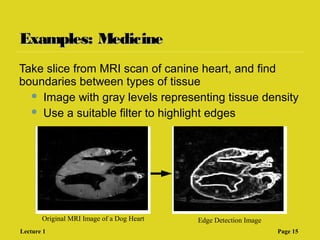
Take slice from MRI scan of canine heart, and find
boundaries between types of tissue
 Image with gray levels representing tissue density
 Use a suitable filter to highlight edges
Original MRI Image of a Dog Heart Edge Detection Image
Lecture 1 Page 15
Examples: GISExamples: GIS
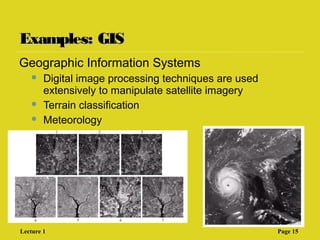
Geographic Information Systems
 Digital image processing techniques are used
extensively to manipulate satellite imagery
 Terrain classification
 Meteorology
Lecture 1 Page 15
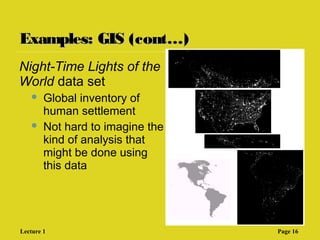
Examples: GIS (cont…)Examples: GIS (cont…)
Night-Time Lights of the
World data set
 Global inventory of
human settlement
 Not hard to imagine the
kind of analysis that
might be done using
this data
Lecture 1 Page 16
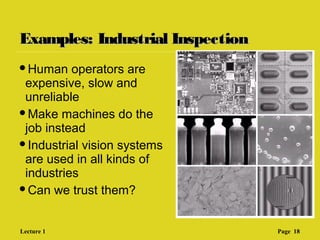
Examples: Industrial InspectionExamples: Industrial Inspection
Human operators are
expensive, slow and
unreliable
Make machines do the
job instead
Industrial vision systems
are used in all kinds of
industries
Can we trust them?
Lecture 1 Page 18
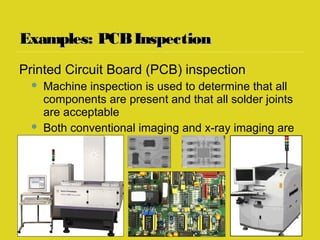
Examples: PCBInspectionExamples: PCBInspection
Printed Circuit Board (PCB) inspection
 Machine inspection is used to determine that all
components are present and that all solder joints
are acceptable
 Both conventional imaging and x-ray imaging are
used
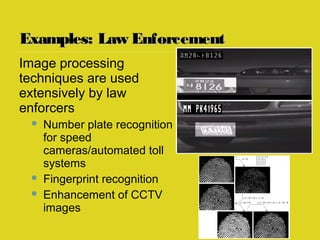
Examples: Law EnforcementExamples: Law Enforcement
Image processing
techniques are used
extensively by law
enforcers
 Number plate recognition
for speed
cameras/automated toll
systems
 Fingerprint recognition
 Enhancement of CCTV
images
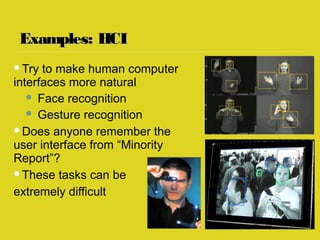
Examples: HCIExamples: HCI
Try to make human computer
interfaces more natural
 Face recognition
 Gesture recognition
Does anyone remember the
user interface from “Minority
Report”?
These tasks can be
extremely difficult
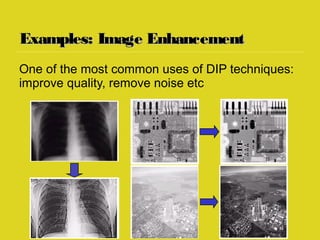
Examples: Image EnhancementExamples: Image Enhancement
One of the most common uses of DIP techniques:
improve quality, remove noise etc
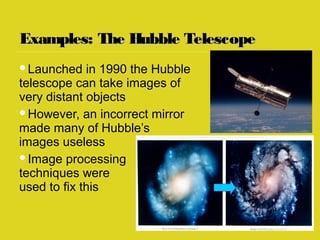
Examples: The Hubble TelescopeExamples: The Hubble Telescope
Launched in 1990 the Hubble
telescope can take images of
very distant objects
However, an incorrect mirror
made many of Hubble’s
images useless
Image processing
techniques were
used to fix this
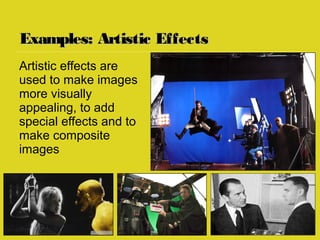
Examples: Artistic EffectsExamples: Artistic Effects
Artistic effects are
used to make images
more visually
appealing, to add
special effects and to
make composite
images
Image Processing : Introduction

Image Processing : Introduction

  • 1.
    Prof. Dr.Abbas H.Prof.Dr.Abbas H. HassinHassin AlasadiAlasadi Email : abbashh2002@gmail.comEmail : abbashh2002@gmail.com
  • 2.
    ReferencesReferences “Digital Image Processing”,Rafael C. Gonzalez & Richard E. Woods, Addison-Wesley, 2002 Fundamentals of Digital Image Processing A Practical Approach with Examples in Matlab, John Wiley & Sons, Ltd, 2011.  Lecture 1 Page 2
  • 3.
    IntroductionIntroduction  One ofthe oldest and most basic examples of a characteristic that is used for recognition by humans is the face.  Since the beginning of civilization, humans have used faces to identify known (familiar) and unknown (unfamiliar) individuals.  This simple task became increasingly more challenging as populations increased and as more convenient methods of travel introduced many new individuals into- once small communities. Lecture 1 Page 3
  • 4.
    ContentsContents This lecture willcover:  What is a digital image?  What is digital image processing?  History of digital image processing  State of the art examples of digital image processing  Key stages in digital image processing Lecture 1 Page 4
  • 5.
    What is aDigital Image?What is a Digital Image? A digital image is a representation of a two- dimensional image as a finite set of digital values, called picture elements or pixels Lecture 1 Page 5
  • 6.
    What is aDigital Image? (cont.)What is a Digital Image? (cont.) Pixel values typically represent gray levels, colors, heights, opacities etc. Remember digitization implies that a digital image is an approximation of a real scene 1 pixel Lecture 1 Page 6
  • 7.
    What is aDigital Image? (cont.)What is a Digital Image? (cont.) Common image formats include:  1 sample per point (B&W or Grayscale)  3 samples per point (Red, Green, and Blue)  4 samples per point (Red, Green, Blue, and “Alpha”, a.k.a. Opacity) Lecture 1 Page 7
  • 8.
    What is DigitalImage Processing?What is Digital Image Processing? Digital image processing focuses on two major tasks  Improvement of pictorial information for human interpretation  Processing of image data for storage, transmission and representation for autonomous machine perception Some argument about where image processing ends and fields such as image analysis and computer vision start Lecture 1 Page 8
  • 9.
    What is DIP?(cont.)What is DIP? (cont.) The continuum from image processing to computer vision can be broken up into low-, mid- and high- level processes Low Level Process Input: Image Output: Image Examples: Noise removal, image sharpening Mid Level Process Input: Image Output: Attributes Examples: Object recognition, segmentation High Level Process Input: Attributes Output: Understanding Examples: Scene understanding, autonomous navigation Lecture 1 Page 9
  • 10.
    History of ImageProcessingHistory of Image Processing Early 1920s: One of the first applications of digital imaging was in the news- paper industry The Bart lane cable picture transmission service. Images were transferred by submarine cable between London and New York. Pictures were coded for cable transfer and reconstructed at the receiving end on a telegraph printer. Lecture 1 Page 10
  • 11.
    History of ImageProcessingHistory of Image Processing Mid to late 1920s: Improvements to the Bartlane system resulted in higher quality images New reproduction processes based on photographic techniques Increased number of tones in reproduced images Lecture 1 Page 11
  • 12.
    History of ImageProcessingHistory of Image Processing 1960s: Improvements in computing technology and the onset of the space race led to a surge of work in digital image processing 1964: Computers used to improve the quality of images of the moon taken by the Ranger 7 probe Such techniques were used in other space missions including the Apollo landings Lecture 1 Page 12
  • 13.
    History of ImageProcessingHistory of Image Processing 1970s: Digital image processing begins to be used in medical applications 1979: Sir Godfrey N. Hounsfield & Prof. Allan M. Cormack share the Nobel Prize in medicine for the invention of tomography (‫ةةةةةةةة‬ ‫,)ةةةةةة‬ the technology behind Computerised Axial Tomography (CAT) scans Typical head slice CAT image Lecture 1 Page 13
  • 14.
    History of ImageProcessingHistory of Image Processing 1980s - Today: The use of digital image processing techniques has exploded and they are now used for all kinds of tasks in all kinds of areas  Image enhancement/restoration  Artistic effects  Medical visualisation  Industrial inspection ‫ةةةةةةة‬ ‫ةةةةةةة‬  Law enforcement  Human computer interfaces Lecture 1 Page 14
  • 15.
    Examples: MedicineExamples: Medicine Takeslice from MRI scan of canine heart, and find boundaries between types of tissue  Image with gray levels representing tissue density  Use a suitable filter to highlight edges Original MRI Image of a Dog Heart Edge Detection Image Lecture 1 Page 15
  • 16.
    Examples: GISExamples: GIS GeographicInformation Systems  Digital image processing techniques are used extensively to manipulate satellite imagery  Terrain classification  Meteorology Lecture 1 Page 15
  • 17.
    Examples: GIS (cont…)Examples:GIS (cont…) Night-Time Lights of the World data set  Global inventory of human settlement  Not hard to imagine the kind of analysis that might be done using this data Lecture 1 Page 16
  • 18.
    Examples: Industrial InspectionExamples:Industrial Inspection Human operators are expensive, slow and unreliable Make machines do the job instead Industrial vision systems are used in all kinds of industries Can we trust them? Lecture 1 Page 18
  • 19.
    Examples: PCBInspectionExamples: PCBInspection PrintedCircuit Board (PCB) inspection  Machine inspection is used to determine that all components are present and that all solder joints are acceptable  Both conventional imaging and x-ray imaging are used
  • 20.
    Examples: Law EnforcementExamples:Law Enforcement Image processing techniques are used extensively by law enforcers  Number plate recognition for speed cameras/automated toll systems  Fingerprint recognition  Enhancement of CCTV images
  • 21.
    Examples: HCIExamples: HCI Tryto make human computer interfaces more natural  Face recognition  Gesture recognition Does anyone remember the user interface from “Minority Report”? These tasks can be extremely difficult
  • 22.
    Examples: Image EnhancementExamples:Image Enhancement One of the most common uses of DIP techniques: improve quality, remove noise etc
  • 23.
    Examples: The HubbleTelescopeExamples: The Hubble Telescope Launched in 1990 the Hubble telescope can take images of very distant objects However, an incorrect mirror made many of Hubble’s images useless Image processing techniques were used to fix this
  • 24.
    Examples: Artistic EffectsExamples:Artistic Effects Artistic effects are used to make images more visually appealing, to add special effects and to make composite images

Editor's Notes

  • #6 Real world is continuous – an image is simply a digital approximation of this.
  • #10 Give the analogy of the character recognition system. Low Level: Cleaning up the image of some text Mid level: Segmenting the text from the background and recognising individual characters High level: Understanding what the text says