
Image	
  Processing	
  and	
  	
  
Computer	
  Vision	
  in	
  iOS	
  
Oge Marques, PhD


omarques@fau.edu


Uberaba, MG - Brazil 	

18 December 2013
Take-home message


Mobile image processing and computer vision
applications are coming of age. 	

There are many opportunities for building successful
apps that may improve the way we capture,
organize, edit, share, annotate, and retrieve images
and videos using iPhone and iPad.
Disclaimer #1	

•  I'm a teacher, researcher, graduate advisor, author,
…	


•  … not a developer
Disclaimer #2	

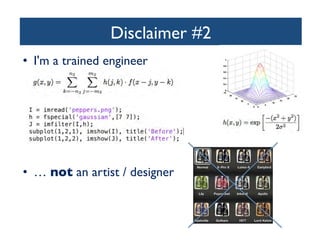
•  I'm a trained engineer	


•  … not an artist / designer
Disclaimer #3
	

•  I'm an Apple fan!	

–  Since 2001…	

•  4 iPod, 3 iPhone, 2 iPad, 2 iMac, 4
MacBook, and more (AirPort, AirPort
Express, Apple TV, etc.)	


–  Since 2010…	

•  Created and co-taught
iOS Programming classes at FAU
In 2013…
	

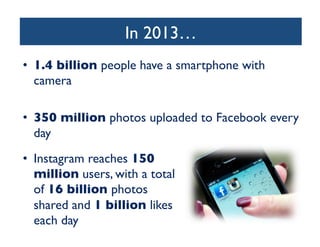
•  1.4 billion people have a smartphone with
camera	

•  350 million photos uploaded to Facebook every
day	

•  Instagram reaches 150
million users, with a total
of 16 billion photos
shared and 1 billion likes
each day
In 2013…
	

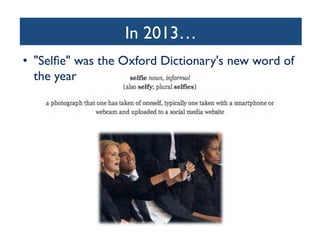
•  Selfie was the Oxford Dictionary's new word of
the year
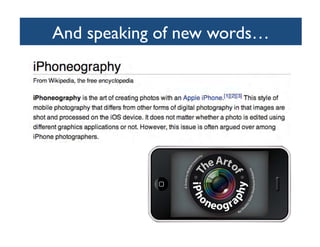
And speaking of new words…
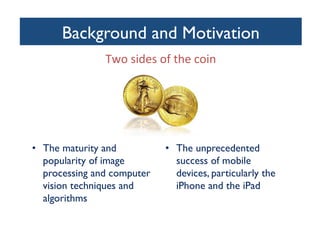
Background and Motivation
	

Two	
  sides	
  of	
  the	
  coin	


•  The maturity and
popularity of image
processing and computer
vision techniques and
algorithms	


•  The unprecedented
success of mobile
devices, particularly the
iPhone and the iPad
Motivation	

•  Rich capabilities of iPhone/iPad for image and
video processing	

•  Apple support for image and multimedia:
frameworks, libraries, etc.	

•  Third-party support for iPhone-based
development: open APIs, OpenCV, etc.	

•  Success stories and ever-growing market
Motivation	

•  Q: Why DIP and CV?	

•  A: Because they are still relevant and growing
fields whose techniques and can help solve many
problems.	

•  Q: Why iOS / mobile?	

•  A: Because some problems are better solved in
that context and some still need to be solved in a
away that is consistent with ergonomics (devices'
size etc.) and user needs (quick fix + filter before
sharing).
search. As an example, we then present the Stanford Product
Search system, a low-latency interactive visual search system.
Several sidebars in this article invite the interested reader to dig
deeper into the underlying algorithms.

each query feature vector with all t
base and is the key to very fast retr
features they have in common wit
of potentially similar images is sele
Finally, a geometric verificatio
most similar matches in the datab
spatial pattern between features of
didate database image to ensure
Example retrieval systems are pres
For mobile visual search, ther
to provide the users with an int
deployed systems typically transm
the server, which might require t
large databases, the inverted file in
memory swapping operations slow
ing stage. Further, the GV step
and thus increases the response t
the retrieval pipeline in the follow
the challenges of mobile visual se

Example: a natural use case for CBIR 	

ROBUST MOBILE IMAGE RECOGNITION
Today, the most successful algorithms for content-based image
retrieval use an approach that is referred to as bag of features
(BoFs) or bag of words (BoWs). The BoW idea is borrowed from
text retrieval. To find a particular text document, such as a Web
page, it is sufficient to use a few well-chosen words. In the
database, the document itself can be likewise represented by a

•  Content-Based Image Retrieval (CBIR) using the
Query-By-Example (QBE) paradigm	

–  The example is right there, in front of the user!	


Query
Image

[FIG1] A snapshot of an outdoor mobile visual search system
being used. The system augments the viewfinder with
information about the objects it recognizes in the image taken
with a camera phone.

Feature
Extraction

[FIG2] A Pipeline for image retrieva
from the query image. Feature mat
images in the database that have m
with the query image. The GV step
feature locations that cannot be pl
in viewing position.
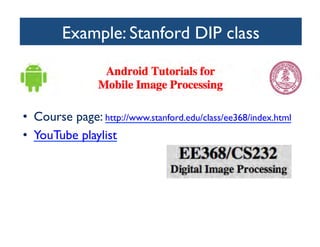
Example: Stanford DIP class 	


•  Course page: http://www.stanford.edu/class/ee368/index.html 	

•  YouTube playlist
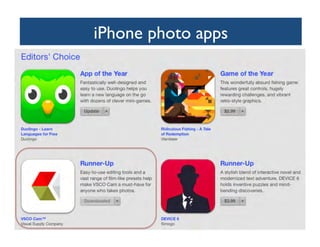
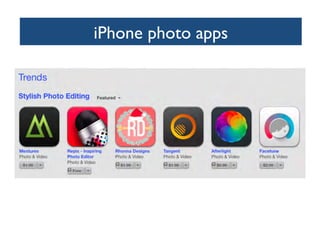
iPhone photo apps
	

•  400+ photo- and video-related apps available in
iTunes store	

–  Entire sites for reviews, discussions, etc.	

–  Subcategories include:	

•  Camera enhancements 	

•  Image editing and processing 	

•  Image sharing 	

•  Image printing, wireless transfer, etc.
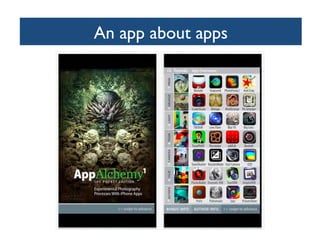
An app about apps
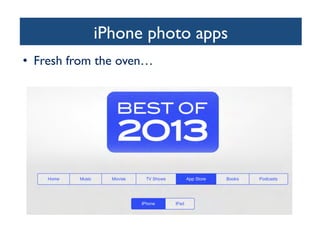
iPhone photo apps
	

•  Fresh from the oven…
iPhone photo apps
iPhone photo apps
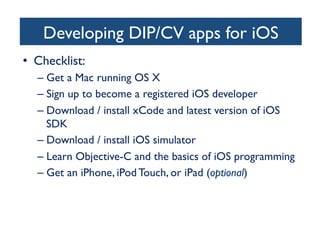
Developing DIP/CV apps for iOS
	

•  Checklist:	

–  Get a Mac running OS X 	

–  Sign up to become a registered iOS developer	

–  Download / install xCode and latest version of iOS
SDK	

–  Download / install iOS simulator	

–  Learn Objective-C and the basics of iOS programming	

–  Get an iPhone, iPod Touch, or iPad (optional)
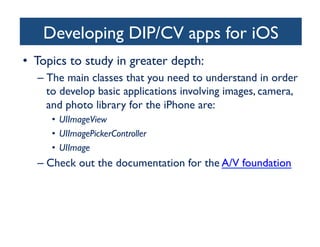
Developing DIP/CV apps for iOS
	

•  Topics to study in greater depth:	

–  The main classes that you need to understand in order
to develop basic applications involving images, camera,
and photo library for the iPhone are: 	

•  UIImageView 	

•  UIImagePickerController	

•  UIImage	


–  Check out the documentation for the A/V foundation
Developing DIP/CV apps for iOS
	

•  Topics to study in greater depth (cont'd):	

–  Learn about Core Image and its main classes:	

•  CIFilter: a mutable object that represents an effect. A filter
object has at least one input parameter and produces an
output image.	

•  CIImage: an immutable object that represents an image. 	

•  CIContext: an object through which Core Image draws the
results produced by a filter.
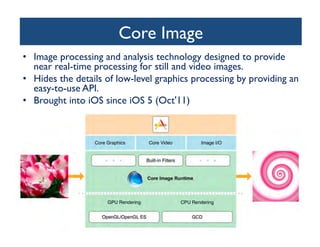
Core Image
	

•  Image processing and analysis technology designed to provide
near real-time processing for still and video images. 	

•  Hides the details of low-level graphics processing by providing an
easy-to-use API.	

•  Brought into iOS since iOS 5 (Oct'11)
OpenCV	

•  OpenCV (Open Source Computer Vision) is
a library of programming functions for realtime computer vision.	

•  OpenCV is released under a BSD license; it is
free for both academic and commercial use.	

•  Goal: to provide a simple-to-use computer
vision infrastructure that helps people build
fairly sophisticated vision applications quickly.	

•  The library has 2000+ optimized algorithms. 	

–  It is used around the world, has 2M downloads
and 40K people in the user group.
OpenCV	

•  5 main components:	

1.  CV: basic image processing and higher-level computer
vision algorithms	

2.  ML: machine learning algorithms	

3.  HighGUI: I/O routines and functions for storing and
loading video and images	

4.  CXCore: basic data structures and content upon
which the three components above rely	

5.  CvAux: defunct areas + experimental algorithms; not
well-documented.
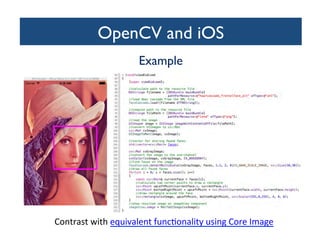
OpenCV and iOS	

Example	


Contrast	
  with	
  equivalent	
  func=onality	
  using	
  Core	
  Image	
  
A bit of advice…
	

•  Go beyond the DIP/CV and iOS boxes	

–  Learn about ergonomics, human factors, human psych,
HCI, UX	


•  Don't reinvent the wheel!	

–  Reuse code and ideas whenever possible	


•  Avoid the trap of building solutions looking for
problems	

•  Tackle ONE problem and solve it well!	

•  Beware of competition	

•  Beware of narrow windows of opportunity and
ephemeral success: timing is everything!
Learn more about it
	

•  iOS Programming	

–  Apple online documentation	

–  Core Image	


•  OpenCV 	

–  Official website	

–  Learning OpenCV book	

–  Instant OpenCV for iOS book	


•  Our work	

–  Slideshare (WVC 2011)	

–  Upcoming book (Springer Briefs, 2014)
Concluding thoughts
	

•  Mobile image processing, image search, and computer
vision-based apps have a promising future.	


•  There is a great need for good solutions to specific
problems. 	

•  I hope this talk has provided a good starting point
and many useful pointers.	

•  I look forward to working with some of you!
Let's get to work!
	

•  Which computer vision or image processing app
would you like to build?	


•  Contact me with ideas: omarques@fau.edu

Image Processing and Computer Vision in iOS

  • 1.
    Image  Processing  and     Computer  Vision  in  iOS   Oge Marques, PhD omarques@fau.edu Uberaba, MG - Brazil 18 December 2013
  • 2.
    Take-home message Mobile imageprocessing and computer vision applications are coming of age. There are many opportunities for building successful apps that may improve the way we capture, organize, edit, share, annotate, and retrieve images and videos using iPhone and iPad.
  • 3.
    Disclaimer #1 •  I'ma teacher, researcher, graduate advisor, author, … •  … not a developer
  • 4.
    Disclaimer #2 •  I'ma trained engineer •  … not an artist / designer
  • 5.
    Disclaimer #3 •  I'man Apple fan! –  Since 2001… •  4 iPod, 3 iPhone, 2 iPad, 2 iMac, 4 MacBook, and more (AirPort, AirPort Express, Apple TV, etc.) –  Since 2010… •  Created and co-taught iOS Programming classes at FAU
  • 7.
    In 2013… •  1.4billion people have a smartphone with camera •  350 million photos uploaded to Facebook every day •  Instagram reaches 150 million users, with a total of 16 billion photos shared and 1 billion likes each day
  • 8.
    In 2013… •  Selfiewas the Oxford Dictionary's new word of the year
  • 9.
    And speaking ofnew words…
  • 10.
    Background and Motivation Two  sides  of  the  coin     •  The maturity and popularity of image processing and computer vision techniques and algorithms •  The unprecedented success of mobile devices, particularly the iPhone and the iPad
  • 11.
    Motivation •  Rich capabilitiesof iPhone/iPad for image and video processing •  Apple support for image and multimedia: frameworks, libraries, etc. •  Third-party support for iPhone-based development: open APIs, OpenCV, etc. •  Success stories and ever-growing market
  • 12.
    Motivation •  Q: WhyDIP and CV? •  A: Because they are still relevant and growing fields whose techniques and can help solve many problems. •  Q: Why iOS / mobile? •  A: Because some problems are better solved in that context and some still need to be solved in a away that is consistent with ergonomics (devices' size etc.) and user needs (quick fix + filter before sharing).
  • 13.
    search. As anexample, we then present the Stanford Product Search system, a low-latency interactive visual search system. Several sidebars in this article invite the interested reader to dig deeper into the underlying algorithms. each query feature vector with all t base and is the key to very fast retr features they have in common wit of potentially similar images is sele Finally, a geometric verificatio most similar matches in the datab spatial pattern between features of didate database image to ensure Example retrieval systems are pres For mobile visual search, ther to provide the users with an int deployed systems typically transm the server, which might require t large databases, the inverted file in memory swapping operations slow ing stage. Further, the GV step and thus increases the response t the retrieval pipeline in the follow the challenges of mobile visual se Example: a natural use case for CBIR ROBUST MOBILE IMAGE RECOGNITION Today, the most successful algorithms for content-based image retrieval use an approach that is referred to as bag of features (BoFs) or bag of words (BoWs). The BoW idea is borrowed from text retrieval. To find a particular text document, such as a Web page, it is sufficient to use a few well-chosen words. In the database, the document itself can be likewise represented by a •  Content-Based Image Retrieval (CBIR) using the Query-By-Example (QBE) paradigm –  The example is right there, in front of the user! Query Image [FIG1] A snapshot of an outdoor mobile visual search system being used. The system augments the viewfinder with information about the objects it recognizes in the image taken with a camera phone. Feature Extraction [FIG2] A Pipeline for image retrieva from the query image. Feature mat images in the database that have m with the query image. The GV step feature locations that cannot be pl in viewing position.
  • 14.
    Example: Stanford DIPclass •  Course page: http://www.stanford.edu/class/ee368/index.html •  YouTube playlist
  • 15.
    iPhone photo apps • 400+ photo- and video-related apps available in iTunes store –  Entire sites for reviews, discussions, etc. –  Subcategories include: •  Camera enhancements •  Image editing and processing •  Image sharing •  Image printing, wireless transfer, etc.
  • 16.
  • 17.
    iPhone photo apps • Fresh from the oven…
  • 18.
  • 19.
  • 20.
    Developing DIP/CV appsfor iOS •  Checklist: –  Get a Mac running OS X –  Sign up to become a registered iOS developer –  Download / install xCode and latest version of iOS SDK –  Download / install iOS simulator –  Learn Objective-C and the basics of iOS programming –  Get an iPhone, iPod Touch, or iPad (optional)
  • 21.
    Developing DIP/CV appsfor iOS •  Topics to study in greater depth: –  The main classes that you need to understand in order to develop basic applications involving images, camera, and photo library for the iPhone are: •  UIImageView •  UIImagePickerController •  UIImage –  Check out the documentation for the A/V foundation
  • 22.
    Developing DIP/CV appsfor iOS •  Topics to study in greater depth (cont'd): –  Learn about Core Image and its main classes: •  CIFilter: a mutable object that represents an effect. A filter object has at least one input parameter and produces an output image. •  CIImage: an immutable object that represents an image. •  CIContext: an object through which Core Image draws the results produced by a filter.
  • 23.
    Core Image •  Imageprocessing and analysis technology designed to provide near real-time processing for still and video images. •  Hides the details of low-level graphics processing by providing an easy-to-use API. •  Brought into iOS since iOS 5 (Oct'11)
  • 24.
    OpenCV •  OpenCV (OpenSource Computer Vision) is a library of programming functions for realtime computer vision. •  OpenCV is released under a BSD license; it is free for both academic and commercial use. •  Goal: to provide a simple-to-use computer vision infrastructure that helps people build fairly sophisticated vision applications quickly. •  The library has 2000+ optimized algorithms. –  It is used around the world, has 2M downloads and 40K people in the user group.
  • 25.
    OpenCV •  5 maincomponents: 1.  CV: basic image processing and higher-level computer vision algorithms 2.  ML: machine learning algorithms 3.  HighGUI: I/O routines and functions for storing and loading video and images 4.  CXCore: basic data structures and content upon which the three components above rely 5.  CvAux: defunct areas + experimental algorithms; not well-documented.
  • 26.
    OpenCV and iOS Example Contrast  with  equivalent  func=onality  using  Core  Image  
  • 27.
    A bit ofadvice… •  Go beyond the DIP/CV and iOS boxes –  Learn about ergonomics, human factors, human psych, HCI, UX •  Don't reinvent the wheel! –  Reuse code and ideas whenever possible •  Avoid the trap of building solutions looking for problems •  Tackle ONE problem and solve it well! •  Beware of competition •  Beware of narrow windows of opportunity and ephemeral success: timing is everything!
  • 28.
    Learn more aboutit •  iOS Programming –  Apple online documentation –  Core Image •  OpenCV –  Official website –  Learning OpenCV book –  Instant OpenCV for iOS book •  Our work –  Slideshare (WVC 2011) –  Upcoming book (Springer Briefs, 2014)
  • 29.
    Concluding thoughts •  Mobileimage processing, image search, and computer vision-based apps have a promising future. •  There is a great need for good solutions to specific problems. •  I hope this talk has provided a good starting point and many useful pointers. •  I look forward to working with some of you!
  • 30.
    Let's get towork! •  Which computer vision or image processing app would you like to build? •  Contact me with ideas: omarques@fau.edu