

Google Ad Extensions
IntroductionWhat are Ad Extensions ?Ad extensions are a feature that extend the information contained in Google AdWords ads. 
Instead of just seeing ad copy, the user is presented with additional, relevant information that assists the call to action. 
Ad extensions work with your existing text ads, so there’s no need to change your keywords, bids, or ad text.
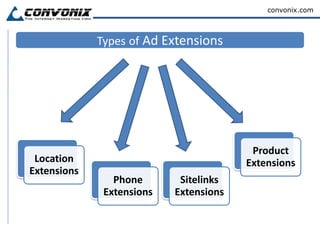
There are several types of ad extensions that provide different information included right within the ad.Typesof Ad Extensions
Benefits of Ad ExtensionsYour ads become more relevant and useful for the user, increasing the likelihood they will click on it (improved CTR).Each extension is individually track-able so you can see how well its performing.You can use extensions to funnel visitors to different landing pages within the site (more visibility). It’s like you get multiple keyword branding and calls-to-action with a single ad/keyword.
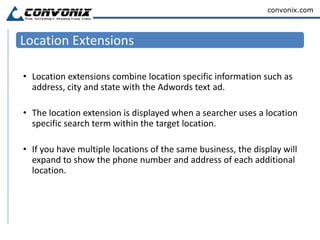
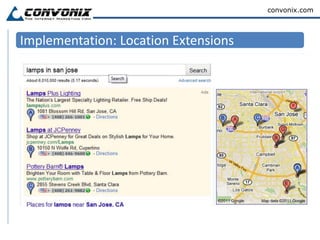
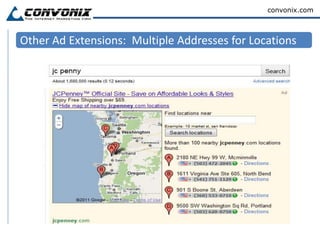
Location ExtensionsLocation extensions combine location specific information such as address, city and state with the Adwords text ad. The location extension is displayed when a searcher uses a location specific search term within the target location. If you have multiple locations of the same business, the display will expand to show the phone number and address of each additional location.
Implementation: Location Extensions
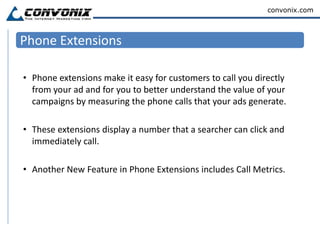
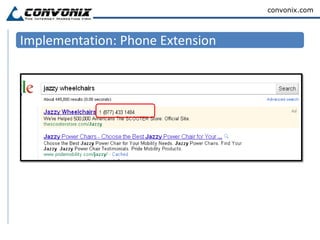
Phone ExtensionsPhone extensions make it easy for customers to call you directly from your ad and for you to better understand the value of your campaigns by measuring the phone calls that your ads generate.These extensions display a number that a searcher can click and immediately call.Another New Feature in Phone Extensions includes Call Metrics.
Implementation: Phone Extension
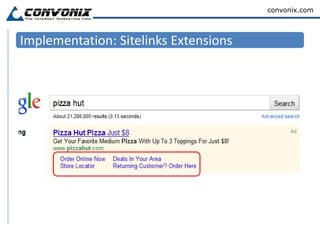
Sitelinks ExtensionsAd Sitelinks allow you to extend the value of your existing AdWords ads by providing additional links to specific, relevant content deeper within your sitemap.Ad Sitelinks will display up to four additional Destination URLs for users to choose from.On average, advertisers who use Ad Sitelinks have seen their ad click through rates improve by 30%.
Implementation: Sitelinks Extensions
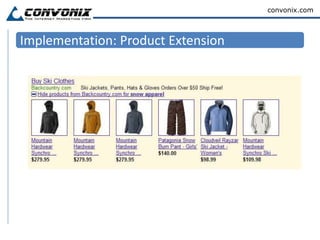
Product ExtensionsProduct extensions use a similar format, but allow advertisers to display relevant product images alongside Adwords text ads.These are perfect for ecommerce advertisers as they provide searchers with an image of the specific product they searched for.Product extensions require a Google Merchant Center account (formally Google Base) to make the connection.
Implementation: Product Extension
Other Ad Extensions:  Multiple Addresses for Locations
Other Ad Extensions: Seller Ratings
Broad MatchModifier (BMM)
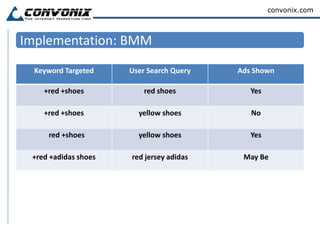
IntroductionWhat is Broad Match Modifier?The broad match modifier is an AdWords targeting feature that lets you create keywords which have greater reach than phrase match, and more control than broad match.You implement the modifier by putting a plus symbol (+) directly in front of one or more words in a broad match keyword. Each word preceded by a + must appear in the user's search exactly or as a close variant.

Google Ad Extensions - What You Need To Know

  • 1.
  • 2.
    IntroductionWhat are AdExtensions ?Ad extensions are a feature that extend the information contained in Google AdWords ads. 
  • 3.
    Instead of justseeing ad copy, the user is presented with additional, relevant information that assists the call to action. 
  • 4.
    Ad extensions workwith your existing text ads, so there’s no need to change your keywords, bids, or ad text.
  • 5.
    There are severaltypes of ad extensions that provide different information included right within the ad.Typesof Ad Extensions
  • 6.
    Benefits of AdExtensionsYour ads become more relevant and useful for the user, increasing the likelihood they will click on it (improved CTR).Each extension is individually track-able so you can see how well its performing.You can use extensions to funnel visitors to different landing pages within the site (more visibility). It’s like you get multiple keyword branding and calls-to-action with a single ad/keyword.
  • 7.
    Location ExtensionsLocation extensionscombine location specific information such as address, city and state with the Adwords text ad. The location extension is displayed when a searcher uses a location specific search term within the target location. If you have multiple locations of the same business, the display will expand to show the phone number and address of each additional location.
  • 8.
  • 9.
    Phone ExtensionsPhone extensionsmake it easy for customers to call you directly from your ad and for you to better understand the value of your campaigns by measuring the phone calls that your ads generate.These extensions display a number that a searcher can click and immediately call.Another New Feature in Phone Extensions includes Call Metrics.
  • 10.
  • 11.
    Sitelinks ExtensionsAd Sitelinksallow you to extend the value of your existing AdWords ads by providing additional links to specific, relevant content deeper within your sitemap.Ad Sitelinks will display up to four additional Destination URLs for users to choose from.On average, advertisers who use Ad Sitelinks have seen their ad click through rates improve by 30%.
  • 12.
  • 13.
    Product ExtensionsProduct extensionsuse a similar format, but allow advertisers to display relevant product images alongside Adwords text ads.These are perfect for ecommerce advertisers as they provide searchers with an image of the specific product they searched for.Product extensions require a Google Merchant Center account (formally Google Base) to make the connection.
  • 14.
  • 15.
    Other Ad Extensions: Multiple Addresses for Locations
  • 16.
    Other Ad Extensions:Seller Ratings
  • 17.
  • 18.
    IntroductionWhat is BroadMatch Modifier?The broad match modifier is an AdWords targeting feature that lets you create keywords which have greater reach than phrase match, and more control than broad match.You implement the modifier by putting a plus symbol (+) directly in front of one or more words in a broad match keyword. Each word preceded by a + must appear in the user's search exactly or as a close variant.