Google
                               Analytics
                            Presenter | Sagar Naveen Zalavadiya
                                Ex - Web Analyst @ SapientNitro
                                  Online Marketing and Strategy


If you cannot measure it, you cannot improve it.”
                 Lord Kelvin
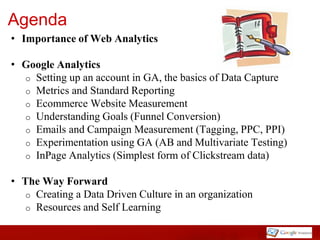
Agenda
• Importance of Web Analytics

• Google Analytics
  o Setting up an account in GA, the basics of Data Capture
  o Metrics and Standard Reporting
  o Ecommerce Website Measurement
  o Understanding Goals (Funnel Conversion)
  o Emails and Campaign Measurement (Tagging, PPC, PPI)
  o Experimentation using GA (AB and Multivariate Testing)
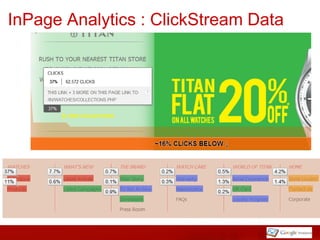
  o InPage Analytics (Simplest form of Clickstream data)


• The Way Forward
   o Creating a Data Driven Culture in an organization
   o Resources and Self Learning
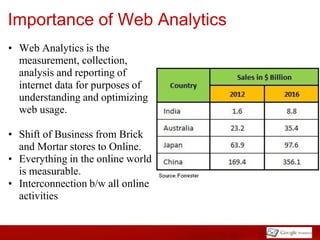
Importance of Web Analytics
• Web Analytics is the
  measurement, collection,
  analysis and reporting of
  internet data for purposes of
  understanding and optimizing
  web usage.

• Shift of Business from Brick
  and Mortar stores to Online.
• Everything in the online world
  is measurable.
• Interconnection b/w all online
  activities
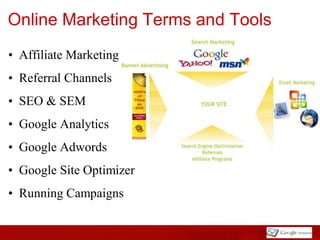
Online Marketing Terms and Tools
• Affiliate Marketing
• Referral Channels
• SEO & SEM
• Google Analytics
• Google Adwords
• Google Site Optimizer
• Running Campaigns
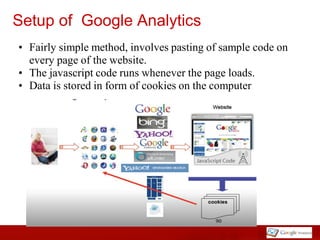
Setup of Google Analytics
• Fairly simple method, involves pasting of sample code on
  every page of the website.
• The javascript code runs whenever the page loads.
• Data is stored in form of cookies on the computer
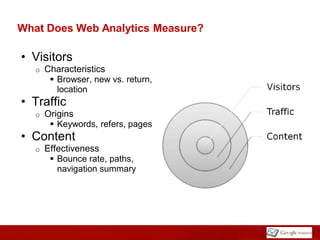
What Does Web Analytics Measure?

• Visitors
   o   Characteristics
         Browser, new vs. return,
          location
• Traffic
   o   Origins
         Keywords, refers, pages
• Content
   o   Effectiveness
         Bounce rate, paths,
          navigation summary
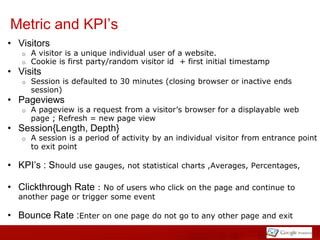
Metric and KPI’s
• Visitors
   o   A visitor is a unique individual user of a website.
   o   Cookie is first party/random visitor id + first initial timestamp
• Visits
   o   Session is defaulted to 30 minutes (closing browser or inactive ends
       session)
• Pageviews
   o   A pageview is a request from a visitor’s browser for a displayable web
       page ; Refresh = new page view
• Session{Length, Depth}
   o   A session is a period of activity by an individual visitor from entrance point
       to exit point

• KPI’s : Should use gauges, not statistical    charts ,Averages, Percentages,

• Clickthrough Rate : No of users who click      on the page and continue to
  another page or trigger some event

• Bounce Rate :Enter on one page do not go to any other page and exit
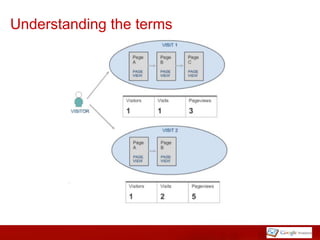
Understanding the terms
Standard Reporting
• Audience/Visitors :
     Number of Visitors , Number of Page views , Page views per Visitor,
     Bounce Rate , New vs. Returning, Visitor Loyalty , Number of
     Return Visits , Frequency/ Recency of Visits
• Traffic Sources :
     Direct Traffic, Referring Sites, Search Engines[Paid vs Organic,
     Keywords, Adwords Integration]
• Content :
     Top Pages ,In-Page Analytics, Time on Page, Exits from that Page
     Site Search, Event Tracking
• Goals :
     Contact Forms ,Purchase funnel, Newsletter Signups
• Ecommerce :
     Number of Sales ,Conversion Rate, Average Sale Value, Product
     Performance, Visits until Purchase, Days until Purchase
• Event Tracking:
     Event Categories, Event Actions, Trending Events
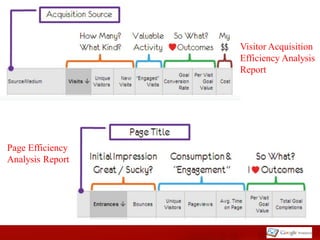
Visitor Acquisition
                  Efficiency Analysis
                  Report


Page Efficiency
Analysis Report
Goals
• Select page you want visitor to see to reach the goal
   o Goal is usually Thank you or confirmation page
       Types of Goals
           Thank you page on contact form
           PDF Download for White Paper
           Newsletter Signup
           Feed Subscriptions
           More than 15 visits or time > 10mins
• Set-up Goals under
   o Analytics Settings -> Profile Settings -> Conversion Goals and
     Funnel
       Select up to 4 goals per profile
           Set up duplicate profiles to add more goals
   o Enter URL of Goal Page
       Ex. /Confirmation.aspx
   o Name the goal


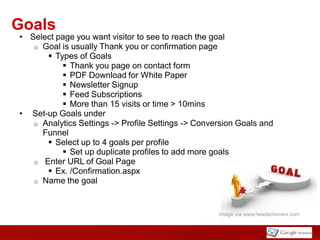
                                                    Image via www.headachecare.com
Funnel Visualization Report
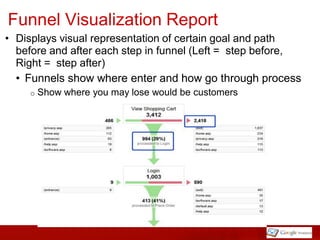
• Displays visual representation of certain goal and path
  before and after each step in funnel (Left = step before,
  Right = step after)
  • Funnels show where enter and how go through process
     o   Show where you may lose would be customers
Goal Value
• Assign monetary value for non-ecommerce goals
• Example
   o Sales team can close 10% of people who request to be
     contacted
   o Average Transaction is $500
   o Assign $50 (i.e. 10% of $500) to your "Contact Us" goal


        Image via http://risingsouthfoundation.com
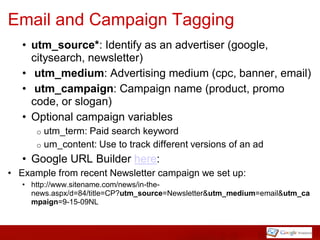
Email and Campaign Tagging
   • utm_source*: Identify as an advertiser (google,
     citysearch, newsletter)
   • utm_medium: Advertising medium (cpc, banner, email)
   • utm_campaign: Campaign name (product, promo
     code, or slogan)
   • Optional campaign variables
      o utm_term: Paid search keyword
      o um_content: Use to track different versions of an ad
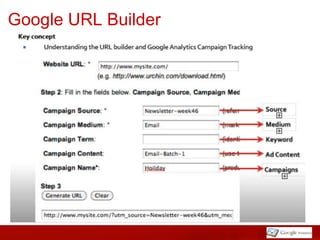
   • Google URL Builder here:
• Example from recent Newsletter campaign we set up:
   • http://www.sitename.com/news/in-the-
     news.aspx/d=84/title=CP?utm_source=Newsletter&utm_medium=email&utm_ca
     mpaign=9-15-09NL
Google URL Builder
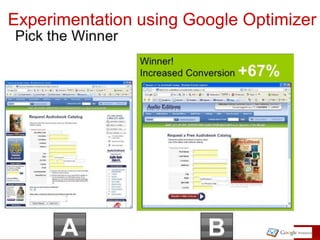
Experimentation using Google Optimizer
InPage Analytics : ClickStream Data
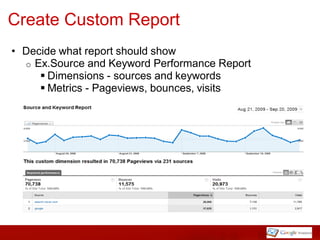
Create Custom Report
• Decide what report should show
  o Ex.Source and Keyword Performance Report
      Dimensions - sources and keywords
      Metrics - Pageviews, bounces, visits
Internal Site Search
Why set this up?
• Visitors use site search as a form of navigation
• Analyze internal search can help identify:
   o Missing or hidden content
   o Ineffective search results
   o Keywords not previously identified for search campaigns
• Set up through Analytics account -> Edit profile
   o Track Searching
   o Perform search on the site you will track to see what part
     of querystring identifies search
       Ex. Google search = q, Ex. Yahoo search = p
• Search Terms Report
   o Can compare metrics between internal search queries
   o Useful for identifying new keywords
The Way Forward: Creating a Data driven Culture
• Inhouse practice vs Outsourcing

• Resource and Self Learning
  o Google Analytics Essential Training at Linda.com
  o Web Analytics an hour by Satish Kaushik
  o Occam's Razor
  o Webinars and Training Session in Bangalore done by
    various organizations at Bangalore

• Take Away for the Next Campaigns
Takeaways for your Next Campaigns
All Digital Ads, Emails, Blogs and Referrals links to be
tagged using the Google URL Builder


                            • Specific Goals to be set up
• Use of Vanity URL’s
                              for that Campaign and put
  for Press and TV
                              Monetary value for each
• SEO Optimization for
                              event/ Goal
  the name of the
                            • Adwords Account to be
  campaign
                              linked    to   the  Google
• Use of PPC and PPI
                              Analytics account to check
  for better visibility
                              for ROI and best Keywords

   Weekly reports to be scheduled for Marketing
   managers every Monday morning by the Agency.
Thank you
Email address : sagar.nitham@gmail.com
Contact No : +91- 9564441036

Google Analytics Session

  • 1.
    Google Analytics Presenter | Sagar Naveen Zalavadiya Ex - Web Analyst @ SapientNitro Online Marketing and Strategy If you cannot measure it, you cannot improve it.” Lord Kelvin
  • 2.
    Agenda • Importance ofWeb Analytics • Google Analytics o Setting up an account in GA, the basics of Data Capture o Metrics and Standard Reporting o Ecommerce Website Measurement o Understanding Goals (Funnel Conversion) o Emails and Campaign Measurement (Tagging, PPC, PPI) o Experimentation using GA (AB and Multivariate Testing) o InPage Analytics (Simplest form of Clickstream data) • The Way Forward o Creating a Data Driven Culture in an organization o Resources and Self Learning
  • 3.
    Importance of WebAnalytics • Web Analytics is the measurement, collection, analysis and reporting of internet data for purposes of understanding and optimizing web usage. • Shift of Business from Brick and Mortar stores to Online. • Everything in the online world is measurable. • Interconnection b/w all online activities
  • 4.
    Online Marketing Termsand Tools • Affiliate Marketing • Referral Channels • SEO & SEM • Google Analytics • Google Adwords • Google Site Optimizer • Running Campaigns
  • 5.
    Setup of GoogleAnalytics • Fairly simple method, involves pasting of sample code on every page of the website. • The javascript code runs whenever the page loads. • Data is stored in form of cookies on the computer
  • 6.
    What Does WebAnalytics Measure? • Visitors o Characteristics  Browser, new vs. return, location • Traffic o Origins  Keywords, refers, pages • Content o Effectiveness  Bounce rate, paths, navigation summary
  • 7.
    Metric and KPI’s •Visitors o A visitor is a unique individual user of a website. o Cookie is first party/random visitor id + first initial timestamp • Visits o Session is defaulted to 30 minutes (closing browser or inactive ends session) • Pageviews o A pageview is a request from a visitor’s browser for a displayable web page ; Refresh = new page view • Session{Length, Depth} o A session is a period of activity by an individual visitor from entrance point to exit point • KPI’s : Should use gauges, not statistical charts ,Averages, Percentages, • Clickthrough Rate : No of users who click on the page and continue to another page or trigger some event • Bounce Rate :Enter on one page do not go to any other page and exit
  • 8.
  • 9.
    Standard Reporting • Audience/Visitors: Number of Visitors , Number of Page views , Page views per Visitor, Bounce Rate , New vs. Returning, Visitor Loyalty , Number of Return Visits , Frequency/ Recency of Visits • Traffic Sources : Direct Traffic, Referring Sites, Search Engines[Paid vs Organic, Keywords, Adwords Integration] • Content : Top Pages ,In-Page Analytics, Time on Page, Exits from that Page Site Search, Event Tracking • Goals : Contact Forms ,Purchase funnel, Newsletter Signups • Ecommerce : Number of Sales ,Conversion Rate, Average Sale Value, Product Performance, Visits until Purchase, Days until Purchase • Event Tracking: Event Categories, Event Actions, Trending Events
  • 10.
    Visitor Acquisition Efficiency Analysis Report Page Efficiency Analysis Report
  • 11.
    Goals • Select pageyou want visitor to see to reach the goal o Goal is usually Thank you or confirmation page  Types of Goals  Thank you page on contact form  PDF Download for White Paper  Newsletter Signup  Feed Subscriptions  More than 15 visits or time > 10mins • Set-up Goals under o Analytics Settings -> Profile Settings -> Conversion Goals and Funnel  Select up to 4 goals per profile  Set up duplicate profiles to add more goals o Enter URL of Goal Page  Ex. /Confirmation.aspx o Name the goal Image via www.headachecare.com
  • 12.
    Funnel Visualization Report •Displays visual representation of certain goal and path before and after each step in funnel (Left = step before, Right = step after) • Funnels show where enter and how go through process o Show where you may lose would be customers
  • 13.
    Goal Value • Assignmonetary value for non-ecommerce goals • Example o Sales team can close 10% of people who request to be contacted o Average Transaction is $500 o Assign $50 (i.e. 10% of $500) to your "Contact Us" goal Image via http://risingsouthfoundation.com
  • 14.
    Email and CampaignTagging • utm_source*: Identify as an advertiser (google, citysearch, newsletter) • utm_medium: Advertising medium (cpc, banner, email) • utm_campaign: Campaign name (product, promo code, or slogan) • Optional campaign variables o utm_term: Paid search keyword o um_content: Use to track different versions of an ad • Google URL Builder here: • Example from recent Newsletter campaign we set up: • http://www.sitename.com/news/in-the- news.aspx/d=84/title=CP?utm_source=Newsletter&utm_medium=email&utm_ca mpaign=9-15-09NL
  • 15.
  • 16.
  • 17.
    InPage Analytics :ClickStream Data
  • 18.
    Create Custom Report •Decide what report should show o Ex.Source and Keyword Performance Report  Dimensions - sources and keywords  Metrics - Pageviews, bounces, visits
  • 19.
    Internal Site Search Whyset this up? • Visitors use site search as a form of navigation • Analyze internal search can help identify: o Missing or hidden content o Ineffective search results o Keywords not previously identified for search campaigns • Set up through Analytics account -> Edit profile o Track Searching o Perform search on the site you will track to see what part of querystring identifies search  Ex. Google search = q, Ex. Yahoo search = p • Search Terms Report o Can compare metrics between internal search queries o Useful for identifying new keywords
  • 20.
    The Way Forward:Creating a Data driven Culture • Inhouse practice vs Outsourcing • Resource and Self Learning o Google Analytics Essential Training at Linda.com o Web Analytics an hour by Satish Kaushik o Occam's Razor o Webinars and Training Session in Bangalore done by various organizations at Bangalore • Take Away for the Next Campaigns
  • 21.
    Takeaways for yourNext Campaigns All Digital Ads, Emails, Blogs and Referrals links to be tagged using the Google URL Builder • Specific Goals to be set up • Use of Vanity URL’s for that Campaign and put for Press and TV Monetary value for each • SEO Optimization for event/ Goal the name of the • Adwords Account to be campaign linked to the Google • Use of PPC and PPI Analytics account to check for better visibility for ROI and best Keywords Weekly reports to be scheduled for Marketing managers every Monday morning by the Agency.
  • 23.
    Thank you Email address: sagar.nitham@gmail.com Contact No : +91- 9564441036