

















MWCP22
January 26th, 2022
Digitalize your approval
processes with Approvals in
Teams
50 min session
Online, in English
Juan Carlos
González Martín
#MWCP22 Modern Workplace Conference Paris 2022 24,25, 26 Jan 2022
Diamond 💎
Platinum 💿
Gold 📀
Suivez-nous tout au long de l’année !
Follow us all year round!
https://aos.community
https://twitter.com/mwcparis
#MWCP22
https://modern-workplace.pro
https://twitter.com/aOSComm
https://www.linkedin.com/company/
ams-community
https://www.linkedin.com/company/
mwcp
https://www.facebook.com/
modernworkplaceconferenceparis
https://www.facebook.com/
aOSCommunity (FR)
https://www.facebook.com/
aosComm (EN)
+ 18 years of experience in diverse Microsoft products and technologies with a
strong background in the SharePoint platform but focused for the last 7 years
on working in the Microsoft 365 Platform and its core workloads. I have spoken
at several community conferences & events since 2008. Co-author of more than
17 books about SharePoint & Office 365 platforms, including the always
updated Office 365 for IT Pros
Juan Carlos González
Office Apps & Services MVP | Microsoft 365
SME & Delivery Manager @RICOH Spain
About Me:
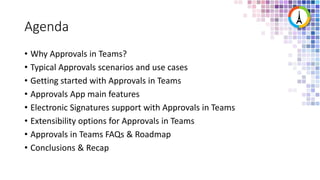
Agenda
• Why Approvals in Teams?
• Typical Approvals scenarios and use cases
• Getting started with Approvals in Teams
• Approvals App main features
• Electronic Signatures support with Approvals in Teams
• Extensibility options for Approvals in Teams
• Approvals in Teams FAQs & Roadmap
• Conclusions & Recap
Why
Approvals in
Teams?
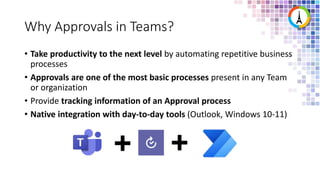
Why Approvals in Teams?
• Take productivity to the next level by automating repetitive business
processes
• Approvals are one of the most basic processes present in any Team
or organization
• Provide tracking information of an Approval process
• Native integration with day-to-day tools (Outlook, Windows 10-11)
Why Approvals in Teams?
• Every organization has several approval systems in place (e-mail,
ServiceNow, SAP, etc)
• Meet the need for unstructured approvals:
• Examples of unstructured approvals are requests that happen in chat, email, face to
face
• Slow turn around time to respond to a request:
• Approvals typically take a long time to get resolution due to being lost somewhere in
an inbox
• Lack of clarity on the status of an Approval and ability to request
delegation:
• State of approval is unclear + users don’t know how to ask and when to follow up
Why Approvals in Teams?
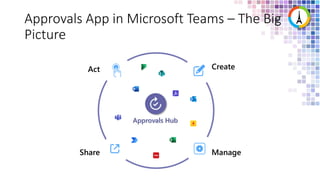
Approvals App in Microsoft Teams – The Big
Picture
Share
Create
Manage
Act
Approvals Hub
Approvals
Scenarios &
Use cases
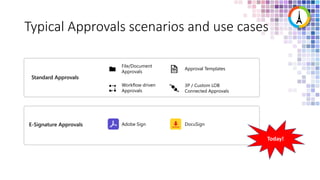
Typical Approvals scenarios and use cases
Standard Approvals
E-Signature Approvals
File/Document
Approvals
Approval Templates
Workflow driven
Approvals
3P / Custom LOB
Connected Approvals
Adobe Sign DocuSign
Today!
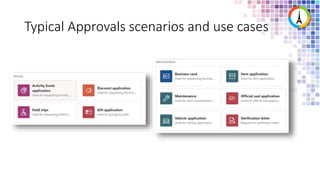
Typical Approvals scenarios and use cases
Getting
started with
Approvals in
Teams
What do I need to start using the Approvals
App in Teams?
• Deploy the Approvals App requires:
• Permissions to create a Database in the Microsoft Dataverse
• Admin role in the target Power Apps environment (It can be a specific Team)
• License for Power Automate, Office 365 or Dynamics 365
• License for Microsoft Forms is required for users to set up new Approval
templates
• To use the Approvals App:
• A Power Automate license assigned (free one is enough) so the user using the
App get the Approvals User role
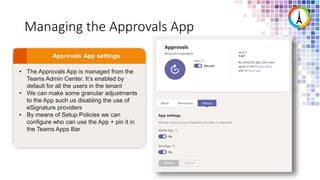
Managing the Approvals App
• The Approvals App is managed from the
Teams Admin Center. It’s enabled by
default for all the users in the tenant
• We can make some granular adjustments
to the App such us disabling the use of
eSignature providers
• By means of Setup Policies we can
configure who can use the App + pin it in
the Teams Apps Bar
Some limits in the Approvals App
• Approvals created and their data are stored in the Microsoft
Dataverse default environment  There is not backup support
provided
• Data gathered in Approval forms (Approval templates) are stored
forever in Forms or at least until Teams/Template owners remove
them
• A Team can contain up to 400 Approval templates and can store up to
50.000 requests (this is a Forms limit)
Demo #1: Approvals
App administration
in the Teams Admin
Center
Approvals
App Main
Features
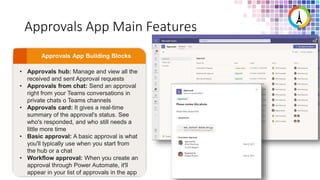
Approvals App Main Features
• Approvals hub: Manage and view all the
received and sent Approval requests
• Approvals from chat: Send an approval
right from your Teams conversations in
private chats o Teams channels
• Approvals card: It gives a real-time
summary of the approval's status. See
who's responded, and who still needs a
little more time
• Basic approval: A basic approval is what
you'll typically use when you start from
the hub or a chat
• Workflow approval: When you create an
approval through Power Automate, it'll
appear in your list of approvals in the app
Demo #2: A first look
to the Approvals App
in Teams
Approvals App Main Features
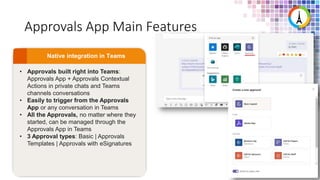
• Approvals built right into Teams:
Approvals App + Approvals Contextual
Actions in private chats and Teams
channels conversations
• Easily to trigger from the Approvals
App or any conversation in Teams
• All the Approvals, no matter where they
started, can be managed through the
Approvals App in Teams
• 3 Approval types: Basic | Approvals
Templates | Approvals with eSignatures
Approvals App Main Features
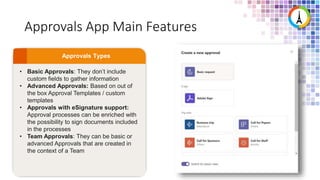
• Basic Approvals: They don’t include
custom fields to gather information
• Advanced Approvals: Based on out of
the box Approval Templates / custom
templates
• Approvals with eSignature support:
Approval processes can be enriched with
the possibility to sign documents included
in the processes
• Team Approvals: They can be basic or
advanced Approvals that are created in
the context of a Team
Approvals App Main Features
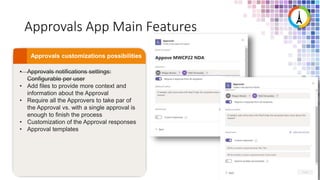
• Approvals notifications settings:
Configurable per user
• Add files to provide more context and
information about the Approval
• Require all the Approvers to take par of
the Approval vs. with a single approval is
enough to finish the process
• Customization of the Approval responses
• Approval templates
Approvals Apps Main Features: A Closer Look
Security
Only the requestor, approver, and the Global Tenant Admin can access the data.
Storage
All Approvals are stored in Dataverse where the admins have full access, and can
configure policies and manage Approval's storage, rollover, and policy in Dataverse
Retention
Approvals last forever or whatever policy the Admin has set.
Connectors
Within Power Automate you can create a new approval flow via a trigger from a system
driven event from one of the hundreds of connectors available or add your own LOB
connector
Demo #3: Basic
Approvals with
Approvals in Teams
Approvals Templates
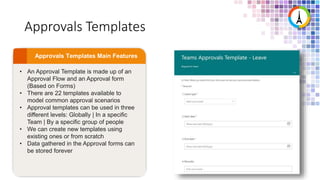
• An Approval Template is made up of an
Approval Flow and an Approval form
(Based on Forms)
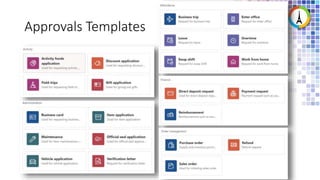
• There are 22 templates available to
model common approval scenarios
• Approval templates can be used in three
different levels: Globally | In a specific
Team | By a specific group of people
• We can create new templates using
existing ones or from scratch
• Data gathered in the Approval forms can
be stored forever
Approvals Templates
Demo #4: Approval
Templates
Electronic
Signatures
support with
Approvals in
Teams
Approval Processes with electronic signatures
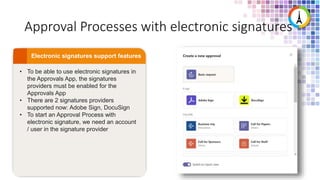
• To be able to use electronic signatures in
the Approvals App, the signatures
providers must be enabled for the
Approvals App
• There are 2 signatures providers
supported now: Adobe Sign, DocuSign
• To start an Approval Process with
electronic signature, we need an account
/ user in the signature provider
Demo #5: Electronic
Signatures in
Approvals Process with
the Approvals App
Extensibility
Options for
Approvals in
Teams
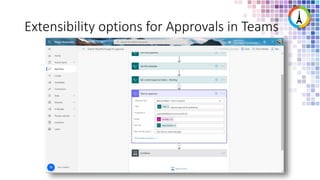
Extensibility options for Approvals in Teams
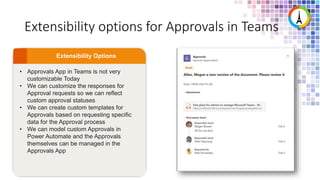
• Approvals App in Teams is not very
customizable Today
• We can customize the responses for
Approval requests so we can reflect
custom approval statuses
• We can create custom templates for
Approvals based on requesting specific
data for the Approval process
• We can model custom Approvals in
Power Automate and the Approvals
themselves can be managed in the
Approvals App
Extensibility options for Approvals in Teams
FAQs &
Roadmap
FAQs & Roadmap
• Basic data for an Approval (Title, Details, Template used) is stored in
Microsoft Teams Dataverse
• If the form of an Approval template is accidentally removed, the
template will be broken and cannot be used
• Approval templates forms cannot be customized with Microsoft
Forms
• Documents attached in Approvals are stored in OneDrive For Business
(in a specific folder)
• Guests users are supported in Approval processes modeled in the
Approvals App
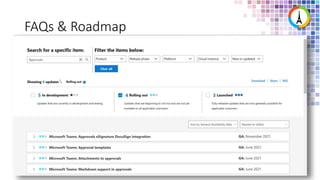
FAQs & Roadmap
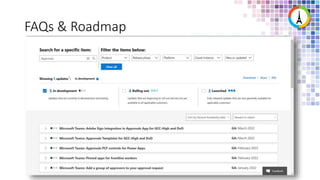
FAQs & Roadmap
Conclusions &
Recap
Conclusions & Recap
• With Approvals in Teams we can digitalize simple Approval processes,
scenario-based Approvals + introduce electronic signatures
• Approvals in Teams is integrated natively in Microsoft Teams as an App +
Contextual actions that simplify the process to start an Approval request no
matter where you are in Teams
• The 22 Approval templates available represent common Approvals use
cases and scenarios. We can create custom Approval templates based on
the 22 ones provided or from scratch
• Electronic signatures in an Approval can be managed from the
infrastructure of the electronic provider used
• We can customize Approvals in 2 levels: custom responses to an Approval
request + custom Approval templates
Bonus: Quick references
• Approvals App overview
 https://docs.microsoft.com/en-us/power-automate/teams/native-
approvals-in-teams
• Managing the Approvals App:
 Approvals application availability in Teams - Microsoft Teams |
Microsoft Docs
• Approvals training resources:
 https://support.microsoft.com/en-us/office/what-is-approvals-a9a01c95-
e0bf-4d20-9ada-f7be3fc283d3
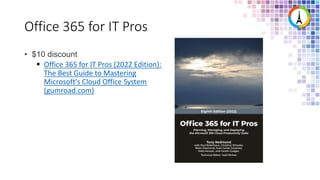
Office 365 for IT Pros
• $10 discount
 Office 365 for IT Pros (2022 Edition):
The Best Guide to Mastering
Microsoft's Cloud Office System
(gumroad.com)
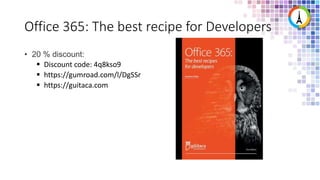
Office 365: The best recipe for Developers
• 20 % discount:
 Discount code: 4q8kso9
 https://gumroad.com/l/DgSSr
 https://guitaca.com
Questions?
Merci pour
votre
attention !
Thanks
for your
attention!
Modern Workplace
Conference Paris 2022
SHARE. DISCOVER.
EXPLORE.
PARTAGER. DÉCOUVRIR.
EXPLORER.

Digitalize your Approval processes with approvals in Microsoft Teams

  • 1.
    MWCP22 January 26th, 2022 Digitalizeyour approval processes with Approvals in Teams 50 min session Online, in English Juan Carlos González Martín
  • 2.
    #MWCP22 Modern WorkplaceConference Paris 2022 24,25, 26 Jan 2022 Diamond 💎 Platinum 💿 Gold 📀
  • 3.
    Suivez-nous tout aulong de l’année ! Follow us all year round! https://aos.community https://twitter.com/mwcparis #MWCP22 https://modern-workplace.pro https://twitter.com/aOSComm https://www.linkedin.com/company/ ams-community https://www.linkedin.com/company/ mwcp https://www.facebook.com/ modernworkplaceconferenceparis https://www.facebook.com/ aOSCommunity (FR) https://www.facebook.com/ aosComm (EN)
  • 4.
    + 18 yearsof experience in diverse Microsoft products and technologies with a strong background in the SharePoint platform but focused for the last 7 years on working in the Microsoft 365 Platform and its core workloads. I have spoken at several community conferences & events since 2008. Co-author of more than 17 books about SharePoint & Office 365 platforms, including the always updated Office 365 for IT Pros Juan Carlos González Office Apps & Services MVP | Microsoft 365 SME & Delivery Manager @RICOH Spain About Me:
  • 5.
    Agenda • Why Approvalsin Teams? • Typical Approvals scenarios and use cases • Getting started with Approvals in Teams • Approvals App main features • Electronic Signatures support with Approvals in Teams • Extensibility options for Approvals in Teams • Approvals in Teams FAQs & Roadmap • Conclusions & Recap
  • 6.
  • 7.
    Why Approvals inTeams? • Take productivity to the next level by automating repetitive business processes • Approvals are one of the most basic processes present in any Team or organization • Provide tracking information of an Approval process • Native integration with day-to-day tools (Outlook, Windows 10-11)
  • 8.
    Why Approvals inTeams? • Every organization has several approval systems in place (e-mail, ServiceNow, SAP, etc) • Meet the need for unstructured approvals: • Examples of unstructured approvals are requests that happen in chat, email, face to face • Slow turn around time to respond to a request: • Approvals typically take a long time to get resolution due to being lost somewhere in an inbox • Lack of clarity on the status of an Approval and ability to request delegation: • State of approval is unclear + users don’t know how to ask and when to follow up
  • 9.
  • 10.
    Approvals App inMicrosoft Teams – The Big Picture Share Create Manage Act Approvals Hub
  • 11.
  • 12.
    Typical Approvals scenariosand use cases Standard Approvals E-Signature Approvals File/Document Approvals Approval Templates Workflow driven Approvals 3P / Custom LOB Connected Approvals Adobe Sign DocuSign Today!
  • 13.
  • 14.
  • 15.
    What do Ineed to start using the Approvals App in Teams? • Deploy the Approvals App requires: • Permissions to create a Database in the Microsoft Dataverse • Admin role in the target Power Apps environment (It can be a specific Team) • License for Power Automate, Office 365 or Dynamics 365 • License for Microsoft Forms is required for users to set up new Approval templates • To use the Approvals App: • A Power Automate license assigned (free one is enough) so the user using the App get the Approvals User role
  • 16.
    Managing the ApprovalsApp • The Approvals App is managed from the Teams Admin Center. It’s enabled by default for all the users in the tenant • We can make some granular adjustments to the App such us disabling the use of eSignature providers • By means of Setup Policies we can configure who can use the App + pin it in the Teams Apps Bar
  • 17.
    Some limits inthe Approvals App • Approvals created and their data are stored in the Microsoft Dataverse default environment  There is not backup support provided • Data gathered in Approval forms (Approval templates) are stored forever in Forms or at least until Teams/Template owners remove them • A Team can contain up to 400 Approval templates and can store up to 50.000 requests (this is a Forms limit)
  • 18.
    Demo #1: Approvals Appadministration in the Teams Admin Center
  • 19.
  • 20.
    Approvals App MainFeatures • Approvals hub: Manage and view all the received and sent Approval requests • Approvals from chat: Send an approval right from your Teams conversations in private chats o Teams channels • Approvals card: It gives a real-time summary of the approval's status. See who's responded, and who still needs a little more time • Basic approval: A basic approval is what you'll typically use when you start from the hub or a chat • Workflow approval: When you create an approval through Power Automate, it'll appear in your list of approvals in the app
  • 21.
    Demo #2: Afirst look to the Approvals App in Teams
  • 22.
    Approvals App MainFeatures • Approvals built right into Teams: Approvals App + Approvals Contextual Actions in private chats and Teams channels conversations • Easily to trigger from the Approvals App or any conversation in Teams • All the Approvals, no matter where they started, can be managed through the Approvals App in Teams • 3 Approval types: Basic | Approvals Templates | Approvals with eSignatures
  • 23.
    Approvals App MainFeatures • Basic Approvals: They don’t include custom fields to gather information • Advanced Approvals: Based on out of the box Approval Templates / custom templates • Approvals with eSignature support: Approval processes can be enriched with the possibility to sign documents included in the processes • Team Approvals: They can be basic or advanced Approvals that are created in the context of a Team
  • 24.
    Approvals App MainFeatures • Approvals notifications settings: Configurable per user • Add files to provide more context and information about the Approval • Require all the Approvers to take par of the Approval vs. with a single approval is enough to finish the process • Customization of the Approval responses • Approval templates
  • 25.
    Approvals Apps MainFeatures: A Closer Look Security Only the requestor, approver, and the Global Tenant Admin can access the data. Storage All Approvals are stored in Dataverse where the admins have full access, and can configure policies and manage Approval's storage, rollover, and policy in Dataverse Retention Approvals last forever or whatever policy the Admin has set. Connectors Within Power Automate you can create a new approval flow via a trigger from a system driven event from one of the hundreds of connectors available or add your own LOB connector
  • 26.
    Demo #3: Basic Approvalswith Approvals in Teams
  • 27.
    Approvals Templates • AnApproval Template is made up of an Approval Flow and an Approval form (Based on Forms) • There are 22 templates available to model common approval scenarios • Approval templates can be used in three different levels: Globally | In a specific Team | By a specific group of people • We can create new templates using existing ones or from scratch • Data gathered in the Approval forms can be stored forever
  • 28.
  • 29.
  • 30.
  • 31.
    Approval Processes withelectronic signatures • To be able to use electronic signatures in the Approvals App, the signatures providers must be enabled for the Approvals App • There are 2 signatures providers supported now: Adobe Sign, DocuSign • To start an Approval Process with electronic signature, we need an account / user in the signature provider
  • 32.
    Demo #5: Electronic Signaturesin Approvals Process with the Approvals App
  • 33.
  • 34.
    Extensibility options forApprovals in Teams • Approvals App in Teams is not very customizable Today • We can customize the responses for Approval requests so we can reflect custom approval statuses • We can create custom templates for Approvals based on requesting specific data for the Approval process • We can model custom Approvals in Power Automate and the Approvals themselves can be managed in the Approvals App
  • 35.
    Extensibility options forApprovals in Teams
  • 36.
  • 37.
    FAQs & Roadmap •Basic data for an Approval (Title, Details, Template used) is stored in Microsoft Teams Dataverse • If the form of an Approval template is accidentally removed, the template will be broken and cannot be used • Approval templates forms cannot be customized with Microsoft Forms • Documents attached in Approvals are stored in OneDrive For Business (in a specific folder) • Guests users are supported in Approval processes modeled in the Approvals App
  • 38.
  • 39.
  • 40.
  • 41.
    Conclusions & Recap •With Approvals in Teams we can digitalize simple Approval processes, scenario-based Approvals + introduce electronic signatures • Approvals in Teams is integrated natively in Microsoft Teams as an App + Contextual actions that simplify the process to start an Approval request no matter where you are in Teams • The 22 Approval templates available represent common Approvals use cases and scenarios. We can create custom Approval templates based on the 22 ones provided or from scratch • Electronic signatures in an Approval can be managed from the infrastructure of the electronic provider used • We can customize Approvals in 2 levels: custom responses to an Approval request + custom Approval templates
  • 42.
    Bonus: Quick references •Approvals App overview  https://docs.microsoft.com/en-us/power-automate/teams/native- approvals-in-teams • Managing the Approvals App:  Approvals application availability in Teams - Microsoft Teams | Microsoft Docs • Approvals training resources:  https://support.microsoft.com/en-us/office/what-is-approvals-a9a01c95- e0bf-4d20-9ada-f7be3fc283d3
  • 43.
    Office 365 forIT Pros • $10 discount  Office 365 for IT Pros (2022 Edition): The Best Guide to Mastering Microsoft's Cloud Office System (gumroad.com)
  • 44.
    Office 365: Thebest recipe for Developers • 20 % discount:  Discount code: 4q8kso9  https://gumroad.com/l/DgSSr  https://guitaca.com
  • 45.
  • 46.
  • 47.
    Modern Workplace Conference Paris2022 SHARE. DISCOVER. EXPLORE. PARTAGER. DÉCOUVRIR. EXPLORER.

Editor's Notes

  • #5 I have also co-authored 17 books and several articles about SharePoint & Office 365 platforms in Spanish and English.
  • #8 Llevar la productividad al siguiente nivel a través de automatizar procesos de negocio repetitivos Las Aprobaciones son uno de los procesos más básicos para cualquier equipo u organización Proporcionar información de trazabilidad de los procesos de aprobación + integración nativa con las herramientas del día a día (Outlook, Windows 10-11)
  • #9 State of approval is unclear + users don’t know how to ask and when to follow up.
  • #10 State of approval is unclear + users don’t know how to ask and when to follow up.
  • #11 State of approval is unclear + users don’t know how to ask and when to follow up.
  • #16  Para usar la App de Approvals se requiere: Licencia de Power Automate asignada, lo que añade al usuario al rol de Approvals User
  • #18 Las Aprobaciones creadas se guardan en el entorno por defecto de Microsoft Dataverse Las Aprobaciones y sus datos se guardan en el entorno por defecto del Microsoft Dataverse  Por defecto no hay soporte de backups Los datos recogidos en los formularios de Aprobación (Plantillas de Aprobaciones) se guardan de forma indefinida en Forms hasta que los Teams owners decidan borrarlos Un Team puede contener un máximo de 400 plantillas de aprobación y puede almacenar hasta 50.000 peticiones (Límites de Forms)
  • #21 Approvals Hub: Gestión y visualización de las aprobaciones enviadas o recibidas Approvals desde chat/mensaje: Lanzar una aprobación desde una conversación de chat / Mensaje en un canal Tarjeta de Aprobación: Visualización en tiempo real del estado de una aprobación Aprobación básica: Aquella que se inicia desde el Hub, un chat o un mensaje Flujos de Aprobación: Los procesos de Aprobación creados en Power Automate aparecen en el Hub
  • #25 Configuración por usuario de las notificaciones Añadir archivos para proporcionar más información y contexto a la aprobación Requerir que todos los Aprobadores participen en la aprobación vs. con una sola Aprobación es suficiente Personalización de las respuestas a una petición de aprobación Plantillas de Aprobaciones
  • #40 Los datos básicos de una Aprobación (Titulo, Detalles, Plantilla) se guardan en el Microsoft Teams Dataverse Si se elimina un Form de un plantilla de Approvals creada, “se romperá” la plantilla que no podrá ser usada Los formularios de Forms de plantillas de Approvals no se pueden personalizar mediante Forms Los documentos que se adjuntan en Aprobaciones se guardan en OneDrive for Business Las Aprobaciones de Approvals permiten que puedan participar usuarios invitados, aunque nos podemos encontrar con situaciones no esperadas
  • #41 Los datos básicos de una Aprobación (Titulo, Detalles, Plantilla) se guardan en el Microsoft Teams Dataverse Si se elimina un Form de un plantilla de Approvals creada, “se romperá” la plantilla que no podrá ser usada Los formularios de Forms de plantillas de Approvals no se pueden personalizar mediante Forms Los documentos que se adjuntan en Aprobaciones se guardan en OneDrive for Business Las Aprobaciones de Approvals permiten que puedan participar usuarios invitados, aunque nos podemos encontrar con situaciones no esperadas
  • #43  Las plantillas de aprobación recogen 22 casos de uso habituales en el uso de aprobaciones y que pueden ser extendidos con nuevas plantillas basadas en las plantillas de Teams o creadas desde cero La firma electrónica de documentos en una aprobación se puede gestionar desde el proveedor de firma seleccionado Podemos personalizar las aprobaciones de Approvals en 2 ámbitos: Respuesta a las peticiones y creando plantillas personalizadas
  • #44  Las plantillas de aprobación recogen 22 casos de uso habituales en el uso de aprobaciones y que pueden ser extendidos con nuevas plantillas basadas en las plantillas de Teams o creadas desde cero La firma electrónica de documentos en una aprobación se puede gestionar desde el proveedor de firma seleccionado Podemos personalizar las aprobaciones de Approvals en 2 ámbitos: Respuesta a las peticiones y creando plantillas personalizadas
  • #45  Las plantillas de aprobación recogen 22 casos de uso habituales en el uso de aprobaciones y que pueden ser extendidos con nuevas plantillas basadas en las plantillas de Teams o creadas desde cero La firma electrónica de documentos en una aprobación se puede gestionar desde el proveedor de firma seleccionado Podemos personalizar las aprobaciones de Approvals en 2 ámbitos: Respuesta a las peticiones y creando plantillas personalizadas
  • #46  Las plantillas de aprobación recogen 22 casos de uso habituales en el uso de aprobaciones y que pueden ser extendidos con nuevas plantillas basadas en las plantillas de Teams o creadas desde cero La firma electrónica de documentos en una aprobación se puede gestionar desde el proveedor de firma seleccionado Podemos personalizar las aprobaciones de Approvals en 2 ámbitos: Respuesta a las peticiones y creando plantillas personalizadas