Digital Image Processing
(UST 2007 Fall
(UST 2007 Fall)
)
(UST 2007 Fall
(UST 2007 Fall)
)
Sang Chul Ahn
asc@imrc.kist.re.kr
asc@imrc.kist.re.kr
Dithering
Dithering
Dithering
Dithering
Dithering
Dithering
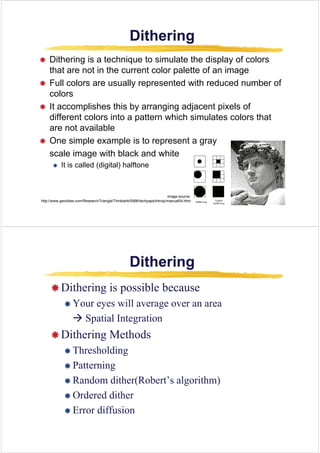
Æ Dithering is a technique to simulate the display of colors
g q p y
that are not in the current color palette of an image
Æ Full colors are usually represented with reduced number of
colors
Æ It accomplishes this by arranging adjacent pixels of
different colors into a pattern which simulates colors that
are not available
Æ O i l l i t t
Æ One simple example is to represent a gray
scale image with black and white
It is called (digital) halftone
Æ It is called (digital) halftone
image source:
http://www.geocities.com/ResearchTriangle/Thinktank/5996/techpaps/introip/manual04.html
Dithering
Dithering
Dithering
Dithering
Æ Dithering is possible because
Æ Your eyes will average over an area
Æ S i l i
Æ Spatial Integration
Æ Dithering Methods
g
Æ Thresholding
Æ Patterning
Æ Patterning
Æ Random dither(Robert’s algorithm)
Æ Ordered dither
Æ Error diffusion
Thresholding
Thresholding
Thresholding
Thresholding
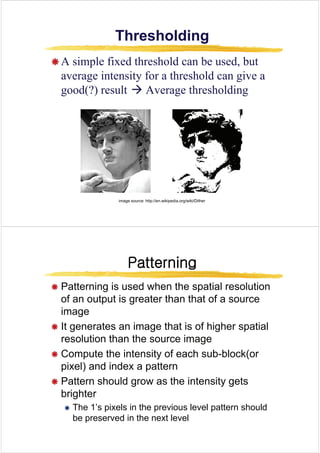
Æ A simple fixed threshold can be used but
Æ A simple fixed threshold can be used, but
average intensity for a threshold can give a
good(?) result Æ Average thresholding
image source: http://en.wikipedia.org/wiki/Dither
Patterning
Patterning
Patterning
Patterning
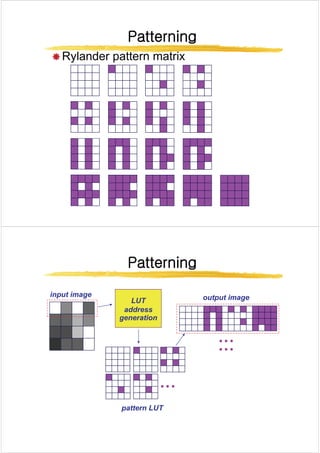
Æ Patterning is used when the spatial resolution
of an output is greater than that of a source
image
image
Æ It generates an image that is of higher spatial
resolution than the source image
Æ Compute the intensity of each sub-block(or
pixel) and index a pattern
Æ Pattern should grow as the intensity gets
brighter
Æ The 1’s pixels in the previous level pattern should
b d i h l l
be preserved in the next level
Patterning
Patterning
Patterning
Patterning
Æ Rylander pattern matrix
Patterning
Patterning
Patterning
Patterning
input image
LUT
address
output image
generation
pattern LUT
Random Dithering
Random Dithering
Random Dithering
Random Dithering
Æ Add a random amount to each pixel before thresholding
p g
Æ Typically add uniformly random amount from [-a,a]
Æ Pure addition of noise to the image
Æ Not good for black and white, but OK for more colors
Æ Add a small random color to each pixel before finding the
l t l i th t bl
closest color in the table
Ordered Dithering
Ordered Dithering
Ordered Dithering
Ordered Dithering
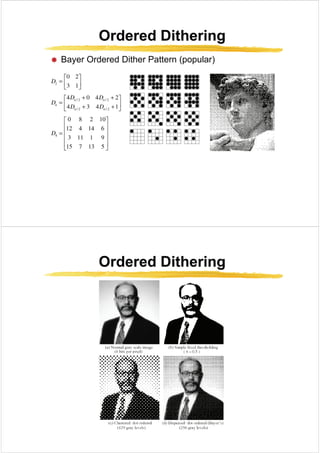
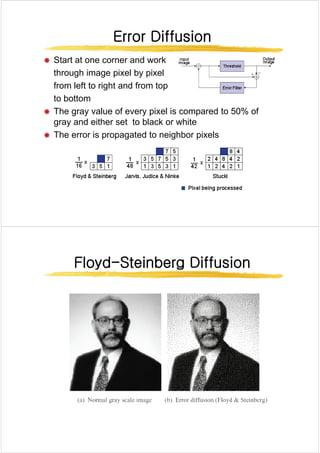
Æ Break the image into small blocks
Æ Define a threshold matrix
Æ Use a different threshold for each pixel of the block
Æ Compare each pixel to its own threshold
Æ The thresholds can be clustered, which looks like a
(di it l) h lft i
newspaper: (digital) halftoning
Æ The thresholds can be “random” which looks better
Ordered Dithering
Ordered Dithering
Ordered Dithering
Ordered Dithering
Æ Bayer Ordered Dither Pattern (popular)
y (p p )
Ordered Dithering
Ordered Dithering
Ordered Dithering
Ordered Dithering
Error Diffusion
Error Diffusion
Error Diffusion
Error Diffusion
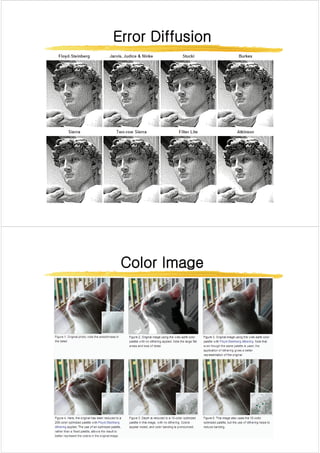
Æ Start at one corner and work
through image pixel by pixel
from left to right and from top
to bottom
Æ The gray value of every pixel is compared to 50% of
gray and either set to black or white
Æ The error is propagated to neighbor pixels
p p g g p
Floyd
Floyd-
-Steinberg Diffusion
Steinberg Diffusion
Floyd
Floyd Steinberg Diffusion
Steinberg Diffusion
Error Diffusion
Error Diffusion
Error Diffusion
Error Diffusion
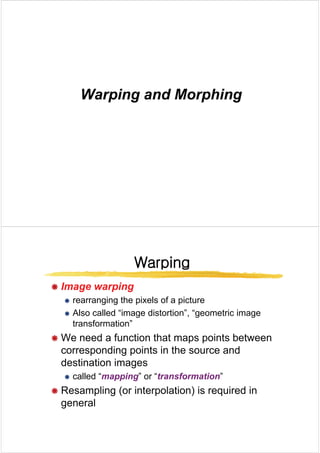
Color Image
Color Image
Color Image
Color Image
Warping and Morphing
Warping
Warping
Warping
Warping
Æ
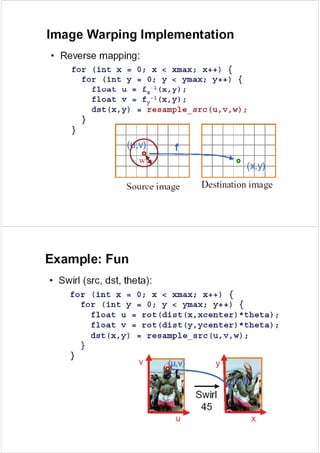
Æ Image warping
Image warping
Æ
Æ Image warping
Image warping
Æ rearranging the pixels of a picture
Æ Also called “image distortion” “geometric image
Æ Also called image distortion , geometric image
transformation”
Æ We need a function that maps points between
corresponding points in the source and
destination images
destination images
Æ called “mapping” or “transformation”
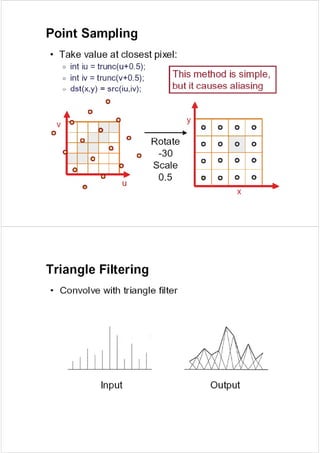
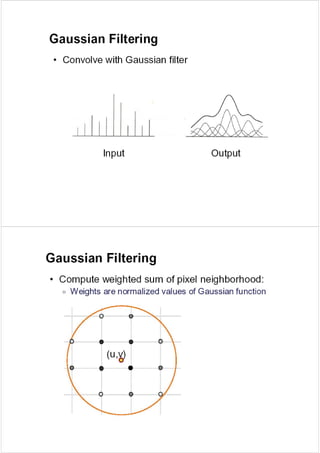
Æ Resampling (or interpolation) is required in
general
Mapping
Mapping
Mapping
Mapping
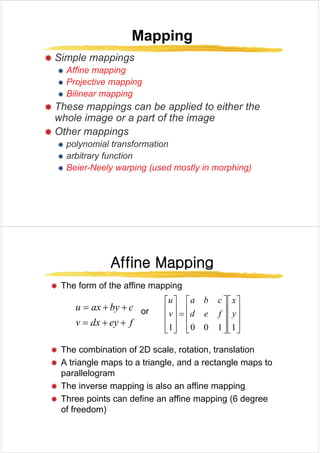
Æ Simple mappings
Æ Affine mapping
Æ Projective mapping
Æ Bilinear mapping
Æ These mappings can be applied to either the
whole image or a part of the image
Æ Other mappings
Æ polynomial transformation
Æ arbitrary function
Æ Beier-Neely warping (used mostly in morphing)
Affine Mapping
Affine Mapping
Affine Mapping
Affine Mapping
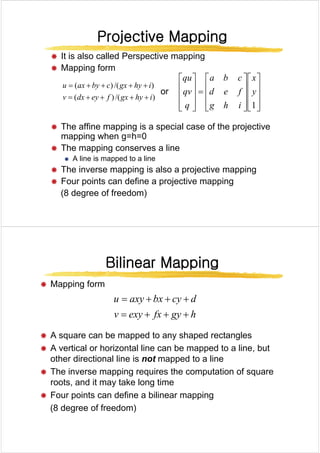
Æ The form of the affine mapping
pp g
or
c
by
ax
u +
+
=
⎥
⎥
⎤
⎢
⎢
⎡
⎥
⎥
⎤
⎢
⎢
⎡
=
⎥
⎥
⎤
⎢
⎢
⎡
y
x
f
e
d
c
b
a
v
u
f
ey
dx
v +
+
= ⎥
⎥
⎦
⎢
⎢
⎣
⎥
⎥
⎦
⎢
⎢
⎣
=
⎥
⎥
⎦
⎢
⎢
⎣ 1
1
0
0
1
y
f
e
d
v
Æ The combination of 2D scale, rotation, translation
Æ A triangle maps to a triangle, and a rectangle maps to
parallelogram
Æ The inverse mapping is also an affine mapping
pp g pp g
Æ Three points can define an affine mapping (6 degree
of freedom)
Projective Mapping
Projective Mapping
Projective Mapping
Projective Mapping
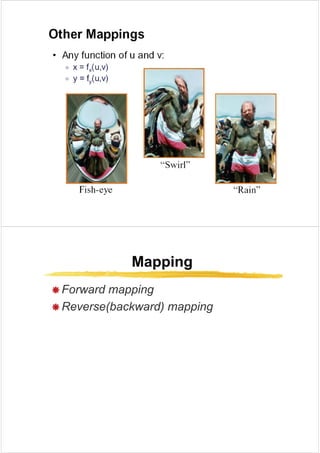
Æ It is also called Perspective mapping
Æ Mapping form
)
/(
)
( i
hy
gx
c
by
ax
u +
+
+
+
= ⎥
⎤
⎢
⎡
⎥
⎤
⎢
⎡
⎥
⎤
⎢
⎡ x
f
d
c
b
a
qu
or
)
/(
)
(
)
(
)
(
i
hy
gx
f
ey
dx
v
y
g
y
+
+
+
+
=
⎥
⎥
⎥
⎦
⎢
⎢
⎢
⎣
⎥
⎥
⎥
⎦
⎢
⎢
⎢
⎣
=
⎥
⎥
⎥
⎦
⎢
⎢
⎢
⎣ 1
y
i
h
g
f
e
d
q
qv
Æ The affine mapping is a special case of the projective
mapping when g=h=0
mapping when g h 0
Æ The mapping conserves a line
Æ A line is mapped to a line
Æ The inverse mapping is also a projective mapping
Æ Four points can define a projective mapping
(8 degree of freedom)
Bilinear Mapping
Bilinear Mapping
Bilinear Mapping
Bilinear Mapping
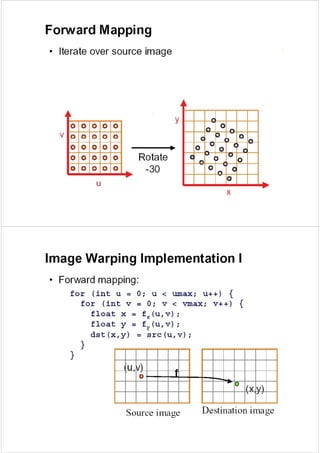
Æ Mapping form
h
gy
fx
exy
v
d
cy
bx
axy
u
+
+
+
=
+
+
+
=
Æ A square can be mapped to any shaped rectangles
h
gy
fx
exy
v +
+
+
=
q pp y p g
Æ A vertical or horizontal line can be mapped to a line, but
other directional line is not mapped to a line
Æ The inverse mapping requires the computation of square
roots, and it may take long time
Æ Four points can define a bilinear mapping
(8 degree of freedom)
Mapping
Mapping
Mapping
Mapping
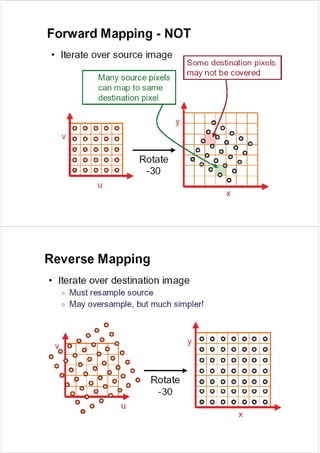
Æ Forward mapping
Æ Forward mapping
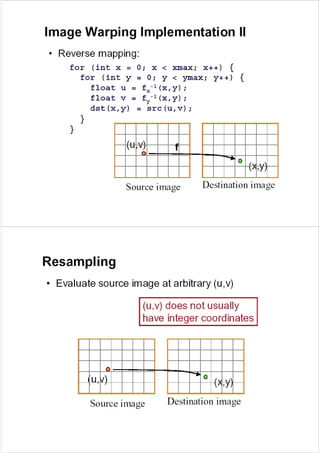
Æ Reverse(backward) mapping
Bilinear Interpolation
Æ A B C D are intensity s )
1
( s
A B
E
Æ A,B,C,D are intensity
values t
s )
1
( s
−
A B
E
sB
A
s
E +
−
= )
1
( )
1
( t
G
sD
C
s
F
sB
A
s
E
+
−
=
+
)
1
(
)
1
( )
1
( t
−
C D
tF
E
t
G +
−
= )
1
(
[ ] [ ]
sD
C
s
t
sB
A
s
t +
−
+
+
−
−
= )
1
(
)
1
(
)
1
(
C D
F
[ ] [ ]
tsD
C
s
t
sB
t
A
s
t
sD
C
s
t
sB
A
s
t
+
−
+
−
+
−
−
=
+
+
+
=
)
1
(
)
1
(
)
1
)(
1
(
)
1
(
)
1
(
)
1
(
Morphing
Morphing
Morphing
Morphing
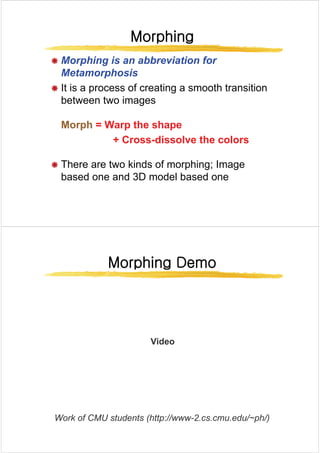
Æ Morphing is an abbreviation for
Metamorphosis
Æ It is a process of creating a smooth transition
between two images
Morph
Morph = Warp the shape
= Warp the shape
+ Cross
+ Cross dissolve the colors
dissolve the colors
+ Cross
+ Cross-
-dissolve the colors
dissolve the colors
Æ There are two kinds of morphing; Image
based one and 3D model based one
Morphing Demo
Morphing Demo
Morphing Demo
Morphing Demo
Vid
Video
W k f CMU t d t (htt // 2 d / h/)
Work of CMU students (http://www-2.cs.cmu.edu/~ph/)
Image Morphing Techniques
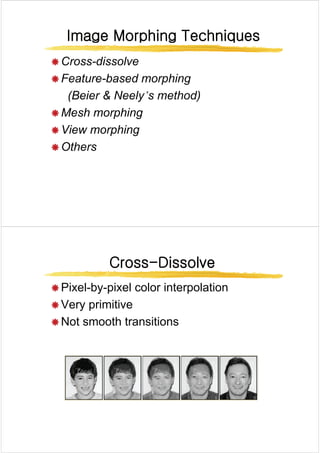
Æ Cross-dissolve
Æ Cross dissolve
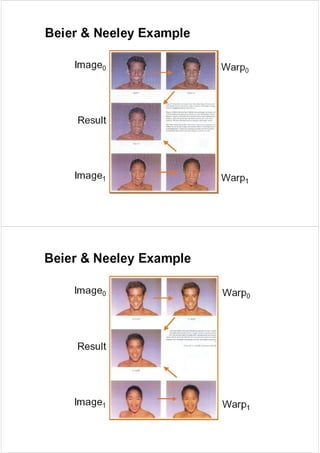
Æ Feature-based morphing
(Beier & Neely’s method)
Æ Mesh morphing
Æ Mesh morphing
Æ View morphing
Æ Others
Cross
Cross-
-Dissolve
Dissolve
Cross
Cross Dissolve
Dissolve
Æ Pixel-by-pixel color interpolation
Æ Pixel by pixel color interpolation
Æ Very primitive
Æ Not smooth transitions
Feature
Feature-
-based Morphing
based Morphing
Feature
Feature based Morphing
based Morphing
Feature
Feature-
-based Morphing(II)
based Morphing(II)
Feature
Feature based Morphing(II)
based Morphing(II)
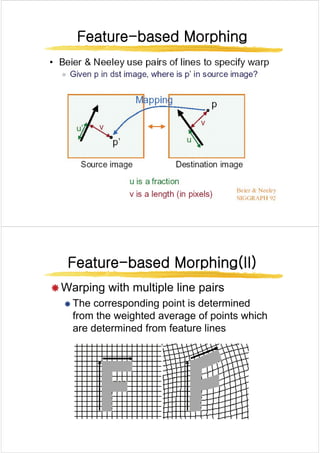
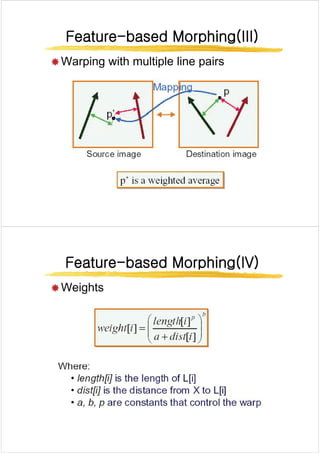
Æ Warping with multiple line pairs
Æ The corresponding point is determined
from the weighted average of points which
are determined from feature lines
Feature
Feature-
-based Morphing(III)
based Morphing(III)
Feature
Feature based Morphing(III)
based Morphing(III)
Æ Warping with multiple line pairs
Feature
Feature-
-based Morphing(IV
based Morphing(IV)
)
Feature
Feature based Morphing(IV
based Morphing(IV)
)
Æ Weights
Æ Weights
Mesh Morphing
Mesh Morphing
Mesh Morphing
Mesh Morphing
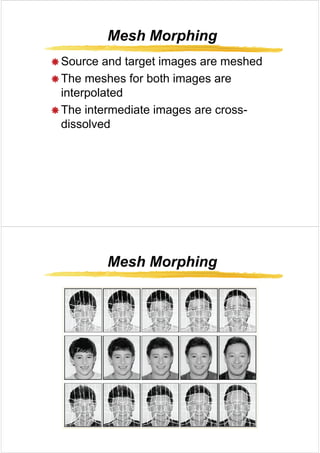
Æ Source and target images are meshed
Æ The meshes for both images are
i t l t d
interpolated
Æ The intermediate images are cross-
Æ The intermediate images are cross
dissolved
Mesh Morphing
Mesh Morphing
Mesh Morphing
Mesh Morphing
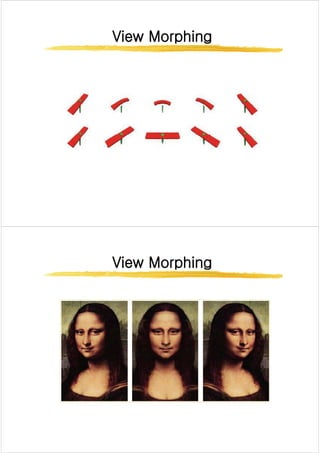
View Morphing
View Morphing
View Morphing
View Morphing
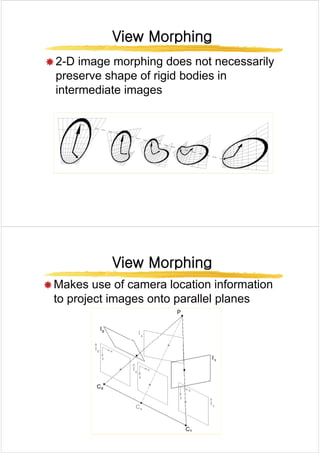
Æ 2-D image morphing does not necessarily
Æ 2 D image morphing does not necessarily
preserve shape of rigid bodies in
intermediate images
intermediate images
View Morphing
View Morphing
View Morphing
View Morphing
Æ Makes use of camera location information
to project images onto parallel planes
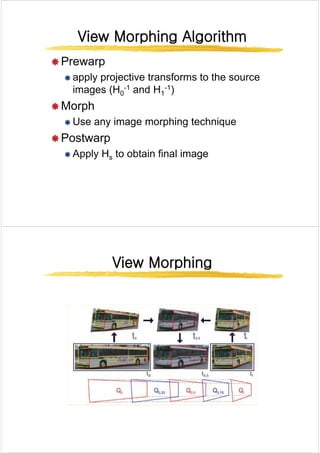
View Morphing Algorithm
Æ Prewarp
Æ Prewarp
Æ apply projective transforms to the source
images (H -1 and H -1)
images (H0
-1 and H1
-1)
Æ Morph
Æ Use any image morphing technique
Æ Postwarp
Æ Postwarp
Æ Apply Hs to obtain final image
View Morphing
View Morphing
View Morphing
View Morphing
View Morphing
View Morphing
View Morphing
View Morphing
View Morphing
View Morphing
View Morphing
View Morphing
View Morphing
View Morphing
View Morphing
View Morphing
Vid
Video

Digital_Image_Processing_Digital_Image_Processing_Dithering_.pdf

  • 1.
    Digital Image Processing DigitalImage Processing (UST 2007 Fall (UST 2007 Fall) ) (UST 2007 Fall (UST 2007 Fall) ) Sang Chul Ahn asc@imrc.kist.re.kr asc@imrc.kist.re.kr Dithering Dithering
  • 2.
    Dithering Dithering Dithering Dithering Æ Dithering isa technique to simulate the display of colors g q p y that are not in the current color palette of an image Æ Full colors are usually represented with reduced number of colors Æ It accomplishes this by arranging adjacent pixels of different colors into a pattern which simulates colors that are not available Æ O i l l i t t Æ One simple example is to represent a gray scale image with black and white It is called (digital) halftone Æ It is called (digital) halftone image source: http://www.geocities.com/ResearchTriangle/Thinktank/5996/techpaps/introip/manual04.html Dithering Dithering Dithering Dithering Æ Dithering is possible because Æ Dithering is possible because Æ Your eyes will average over an area Æ S i l i Æ Spatial Integration Æ Dithering Methods g Æ Thresholding Æ Patterning Æ Patterning Æ Random dither(Robert’s algorithm) Æ Ordered dither Æ Error diffusion
  • 3.
    Thresholding Thresholding Thresholding Thresholding Æ A simplefixed threshold can be used but Æ A simple fixed threshold can be used, but average intensity for a threshold can give a good(?) result Æ Average thresholding good(?) result Æ Average thresholding image source: http://en.wikipedia.org/wiki/Dither Patterning Patterning Patterning Patterning Æ Patterning is used when the spatial resolution Æ Patterning is used when the spatial resolution of an output is greater than that of a source image image Æ It generates an image that is of higher spatial resolution than the source image resolution than the source image Æ Compute the intensity of each sub-block(or pixel) and index a pattern pixel) and index a pattern Æ Pattern should grow as the intensity gets brighter Æ The 1’s pixels in the previous level pattern should b d i h l l be preserved in the next level
  • 4.
    Patterning Patterning Patterning Patterning Æ Rylander patternmatrix Patterning Patterning Patterning Patterning input image LUT address output image generation pattern LUT
  • 5.
    Random Dithering Random Dithering RandomDithering Random Dithering Æ Add a random amount to each pixel before thresholding p g Æ Typically add uniformly random amount from [-a,a] Æ Pure addition of noise to the image Æ Not good for black and white, but OK for more colors Æ Add a small random color to each pixel before finding the l t l i th t bl closest color in the table Ordered Dithering Ordered Dithering Ordered Dithering Ordered Dithering Æ Break the image into small blocks Æ Define a threshold matrix Æ Use a different threshold for each pixel of the block Æ Compare each pixel to its own threshold Æ The thresholds can be clustered, which looks like a (di it l) h lft i newspaper: (digital) halftoning Æ The thresholds can be “random” which looks better
  • 6.
    Ordered Dithering Ordered Dithering OrderedDithering Ordered Dithering Æ Bayer Ordered Dither Pattern (popular) y (p p ) Ordered Dithering Ordered Dithering Ordered Dithering Ordered Dithering
  • 7.
    Error Diffusion Error Diffusion ErrorDiffusion Error Diffusion Æ Start at one corner and work through image pixel by pixel from left to right and from top from left to right and from top to bottom Æ The gray value of every pixel is compared to 50% of Æ The gray value of every pixel is compared to 50% of gray and either set to black or white Æ The error is propagated to neighbor pixels p p g g p Floyd Floyd- -Steinberg Diffusion Steinberg Diffusion Floyd Floyd Steinberg Diffusion Steinberg Diffusion
  • 8.
    Error Diffusion Error Diffusion ErrorDiffusion Error Diffusion Color Image Color Image Color Image Color Image
  • 9.
    Warping and Morphing Warpingand Morphing Warping Warping Warping Warping Æ Æ Image warping Image warping Æ Æ Image warping Image warping Æ rearranging the pixels of a picture Æ Also called “image distortion” “geometric image Æ Also called image distortion , geometric image transformation” Æ We need a function that maps points between Æ We need a function that maps points between corresponding points in the source and destination images destination images Æ called “mapping” or “transformation” Æ Resampling (or interpolation) is required in Æ Resampling (or interpolation) is required in general
  • 10.
    Mapping Mapping Mapping Mapping Æ Simple mappings ÆAffine mapping Æ Projective mapping Æ Bilinear mapping Æ These mappings can be applied to either the whole image or a part of the image Æ Other mappings Æ polynomial transformation Æ arbitrary function Æ Beier-Neely warping (used mostly in morphing) Affine Mapping Affine Mapping Affine Mapping Affine Mapping Æ The form of the affine mapping pp g or c by ax u + + = ⎥ ⎥ ⎤ ⎢ ⎢ ⎡ ⎥ ⎥ ⎤ ⎢ ⎢ ⎡ = ⎥ ⎥ ⎤ ⎢ ⎢ ⎡ y x f e d c b a v u f ey dx v + + = ⎥ ⎥ ⎦ ⎢ ⎢ ⎣ ⎥ ⎥ ⎦ ⎢ ⎢ ⎣ = ⎥ ⎥ ⎦ ⎢ ⎢ ⎣ 1 1 0 0 1 y f e d v Æ The combination of 2D scale, rotation, translation Æ A triangle maps to a triangle, and a rectangle maps to Æ A triangle maps to a triangle, and a rectangle maps to parallelogram Æ The inverse mapping is also an affine mapping pp g pp g Æ Three points can define an affine mapping (6 degree of freedom)
  • 11.
    Projective Mapping Projective Mapping ProjectiveMapping Projective Mapping Æ It is also called Perspective mapping Æ Mapping form ) /( ) ( i hy gx c by ax u + + + + = ⎥ ⎤ ⎢ ⎡ ⎥ ⎤ ⎢ ⎡ ⎥ ⎤ ⎢ ⎡ x f d c b a qu or ) /( ) ( ) ( ) ( i hy gx f ey dx v y g y + + + + = ⎥ ⎥ ⎥ ⎦ ⎢ ⎢ ⎢ ⎣ ⎥ ⎥ ⎥ ⎦ ⎢ ⎢ ⎢ ⎣ = ⎥ ⎥ ⎥ ⎦ ⎢ ⎢ ⎢ ⎣ 1 y i h g f e d q qv Æ The affine mapping is a special case of the projective mapping when g=h=0 mapping when g h 0 Æ The mapping conserves a line Æ A line is mapped to a line Æ The inverse mapping is also a projective mapping Æ Four points can define a projective mapping (8 degree of freedom) Bilinear Mapping Bilinear Mapping Bilinear Mapping Bilinear Mapping Æ Mapping form h gy fx exy v d cy bx axy u + + + = + + + = Æ A square can be mapped to any shaped rectangles h gy fx exy v + + + = q pp y p g Æ A vertical or horizontal line can be mapped to a line, but other directional line is not mapped to a line Æ The inverse mapping requires the computation of square roots, and it may take long time Æ Four points can define a bilinear mapping (8 degree of freedom)
  • 12.
    Mapping Mapping Mapping Mapping Æ Forward mapping ÆForward mapping Æ Reverse(backward) mapping
  • 17.
    Bilinear Interpolation Bilinear Interpolation BilinearInterpolation Bilinear Interpolation Æ A B C D are intensity s ) 1 ( s A B E Æ A,B,C,D are intensity values t s ) 1 ( s − A B E sB A s E + − = ) 1 ( ) 1 ( t G sD C s F sB A s E + − = + ) 1 ( ) 1 ( ) 1 ( t − C D tF E t G + − = ) 1 ( [ ] [ ] sD C s t sB A s t + − + + − − = ) 1 ( ) 1 ( ) 1 ( C D F [ ] [ ] tsD C s t sB t A s t sD C s t sB A s t + − + − + − − = + + + = ) 1 ( ) 1 ( ) 1 )( 1 ( ) 1 ( ) 1 ( ) 1 (
  • 20.
    Morphing Morphing Morphing Morphing Æ Morphing isan abbreviation for Æ Morphing is an abbreviation for Metamorphosis Æ It is a process of creating a smooth transition Æ It is a process of creating a smooth transition between two images Morph Morph = Warp the shape = Warp the shape + Cross + Cross dissolve the colors dissolve the colors + Cross + Cross- -dissolve the colors dissolve the colors Æ There are two kinds of morphing; Image Æ There are two kinds of morphing; Image based one and 3D model based one Morphing Demo Morphing Demo Morphing Demo Morphing Demo Vid Video W k f CMU t d t (htt // 2 d / h/) Work of CMU students (http://www-2.cs.cmu.edu/~ph/)
  • 21.
    Image Morphing Techniques ImageMorphing Techniques Image Morphing Techniques Image Morphing Techniques Æ Cross-dissolve Æ Cross dissolve Æ Feature-based morphing (Beier & Neely’s method) Æ Mesh morphing Æ Mesh morphing Æ View morphing Æ Others Cross Cross- -Dissolve Dissolve Cross Cross Dissolve Dissolve Æ Pixel-by-pixel color interpolation Æ Pixel by pixel color interpolation Æ Very primitive Æ Not smooth transitions
  • 22.
    Feature Feature- -based Morphing based Morphing Feature Featurebased Morphing based Morphing Feature Feature- -based Morphing(II) based Morphing(II) Feature Feature based Morphing(II) based Morphing(II) Æ Warping with multiple line pairs Æ Warping with multiple line pairs Æ The corresponding point is determined from the weighted average of points which from the weighted average of points which are determined from feature lines
  • 23.
    Feature Feature- -based Morphing(III) based Morphing(III) Feature Featurebased Morphing(III) based Morphing(III) Æ Warping with multiple line pairs Æ Warping with multiple line pairs Feature Feature- -based Morphing(IV based Morphing(IV) ) Feature Feature based Morphing(IV based Morphing(IV) ) Æ Weights Æ Weights
  • 25.
    Mesh Morphing Mesh Morphing MeshMorphing Mesh Morphing Æ Source and target images are meshed Æ Source and target images are meshed Æ The meshes for both images are i t l t d interpolated Æ The intermediate images are cross- Æ The intermediate images are cross dissolved Mesh Morphing Mesh Morphing Mesh Morphing Mesh Morphing
  • 26.
    View Morphing View Morphing ViewMorphing View Morphing Æ 2-D image morphing does not necessarily Æ 2 D image morphing does not necessarily preserve shape of rigid bodies in intermediate images intermediate images View Morphing View Morphing View Morphing View Morphing Æ Makes use of camera location information to project images onto parallel planes
  • 27.
    View Morphing Algorithm ViewMorphing Algorithm View Morphing Algorithm View Morphing Algorithm Æ Prewarp Æ Prewarp Æ apply projective transforms to the source images (H -1 and H -1) images (H0 -1 and H1 -1) Æ Morph Æ Use any image morphing technique Æ Postwarp Æ Postwarp Æ Apply Hs to obtain final image View Morphing View Morphing View Morphing View Morphing
  • 28.
    View Morphing View Morphing ViewMorphing View Morphing View Morphing View Morphing View Morphing View Morphing
  • 29.
    View Morphing View Morphing ViewMorphing View Morphing Vid Video