



Group Members:Sanket R. Borhade BE-E-16
Manthan N. Shah BE-G-65
Pravin D. Jadhav BE-E-41
Introduction
• Video-based car navigation systems are
emerging as the next generation technology.
• Object information is gathered via cameras
and then, feature extraction is performed to
obtain edge, colour, object details.
• We are developing a system which comprises
Pedestrian Detection System(PDS) and Lane
Detection and Warning System(LDWS) for
Medium-Class Cars Worldwide.
Need Analysis
• 41% of the total traffic accident casualties are
due to abnormal lane changing.
• More than 535 pedestrians die in road
accidents every year.
• Pune City has the highest rate of accidents
amongst 27 other cities in the India.
• Need for cost effective life saving tool.
• Easy to install in any locomotive.
Need Analysis
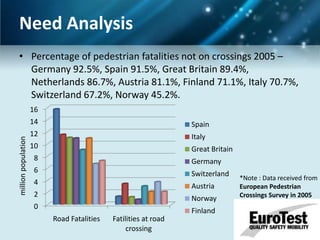
• Percentage of pedestrian fatalities not on crossings 2005 –
Germany 92.5%, Spain 91.5%, Great Britain 89.4%,
Netherlands 86.7%, Austria 81.1%, Finland 71.1%, Italy 70.7%,
Switzerland 67.2%, Norway 45.2%.
16

million population

14

Spain

12

Italy

10

Great Britain

8

Germany

6

Switzerland

4

Austria

2

Norway

0

Finland
Road Fatalities

Fatilities at road
crossing

*Note : Data received from
European Pedestrian
Crossings Survey in 2005
Existing Technologies
•
•
•
•
•
•

Citroen “LDWS”
Mercedes-Benz “Distronic”
Toyota Lexus “AODS”
Nissan “ICC”
European project “PUVAME”
Volvo Collision detection
Volvo web page
Lane Departure System Block diagram
Lane Departure Warning System
(LDWS)

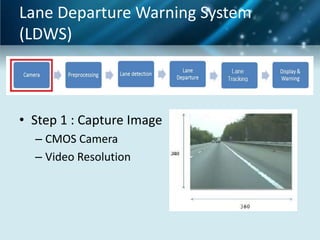
• Step 1 : Capture Image
– CMOS Camera
– Video Resolution
LDWS

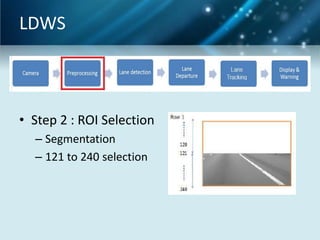
• Step 2 : ROI Selection
– Segmentation
– 121 to 240 selection
LDWS

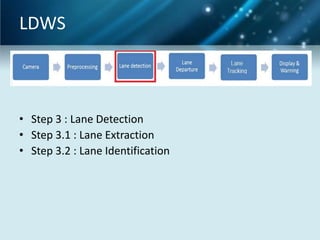
• Step 3 : Lane Detection
• Step 3.1 : Lane Extraction
• Step 3.2 : Lane Identification
LDWS
•
•
•
•

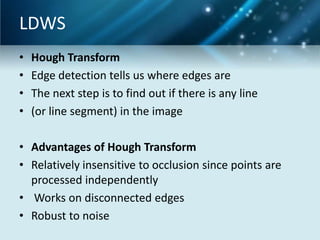
Hough Transform
Edge detection tells us where edges are
The next step is to find out if there is any line
(or line segment) in the image

• Advantages of Hough Transform
• Relatively insensitive to occlusion since points are
processed independently
• Works on disconnected edges
• Robust to noise
LDWS
• A FEW WORDS ABOUT THE LINE EQUATIONS
• y=m*x+k form is most familiar but cannot
handle vertical lines.
• Another form:
• r=x cos θ + y sin θ
• is better.
• 0 ≤ r, 0 ≤ θ < 2π
• any r, 0 ≤ θ ≤ π (don’t need to worry about the
• sign of r)
LDWS
•
•
•
•
•
•
•
•
•

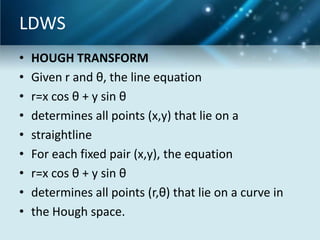
HOUGH TRANSFORM
Given r and θ, the line equation
r=x cos θ + y sin θ
determines all points (x,y) that lie on a
straightline
For each fixed pair (x,y), the equation
r=x cos θ + y sin θ
determines all points (r,θ) that lie on a curve in
the Hough space.
LDWS
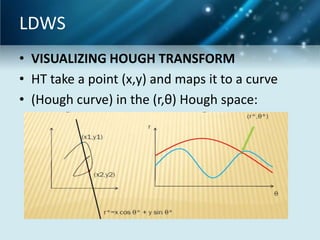
• VISUALIZING HOUGH TRANSFORM
• HT take a point (x,y) and maps it to a curve
• (Hough curve) in the (r,θ) Hough space:
LDWS
•
•
•
•
•
•
•
•
•

HOW HT IS USED
The pair (r*,θ*) that is common to many Hough
curves indicates that the line
r*=x cos θ* y sin θ*
is in the image
How to find the pairs (r,θ) that are common
points of a large number of Hough curves?
Divide the Hough space into bins and do the
counting!
LDWS
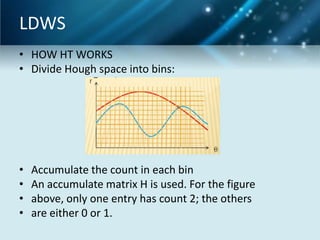
• HOW HT WORKS
• Divide Hough space into bins:

•
•
•
•

Accumulate the count in each bin
An accumulate matrix H is used. For the figure
above, only one entry has count 2; the others
are either 0 or 1.
LDWS
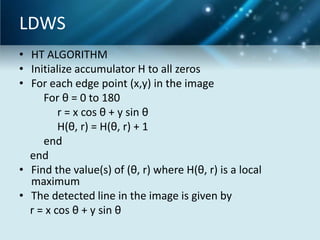
• HT ALGORITHM
• Initialize accumulator H to all zeros
• For each edge point (x,y) in the image
For θ = 0 to 180
r = x cos θ + y sin θ
H(θ, r) = H(θ, r) + 1
end
end
• Find the value(s) of (θ, r) where H(θ, r) is a local
maximum
• The detected line in the image is given by
r = x cos θ + y sin θ
LDWS

• Step 3.1 : Lane Extraction
–
–
–
–

2D FIR filter with mask [-1 0 1]
Hough Transform
LocalMaxFinder
20 candidate lanes

• Step 3.2 : Lane Identification
– Comparing with previous lanes
– Polar to Cartesian
LDWS

• Step 4 : Lane Departure
•
•
•
•
•
•
•

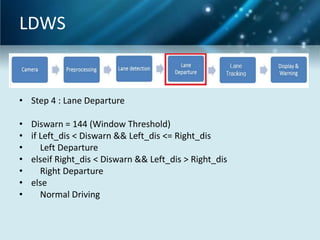
Diswarn = 144 (Window Threshold)
if Left_dis < Diswarn && Left_dis <= Right_dis
Left Departure
elseif Right_dis < Diswarn && Left_dis > Right_dis
Right Departure
else
Normal Driving
LDWS

• Step 4 : Lane Departure
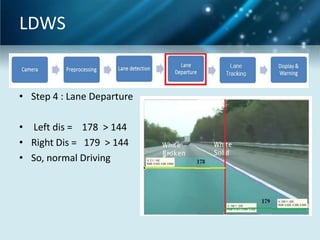
• Left dis = 178 > 144
• Right Dis = 179 > 144
• So, normal Driving
LDWS

• Step 4 : Lane Departure
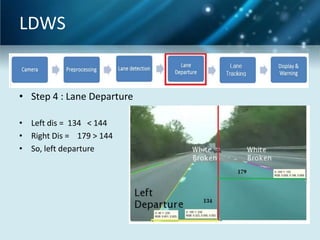
• Left dis = 134 < 144
• Right Dis = 179 > 144
• So, left departure
LDWS

• Step 4 : Lane Departure
•

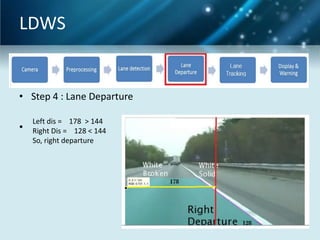
Left dis = 178 > 144
Right Dis = 128 < 144
So, right departure
LDWS

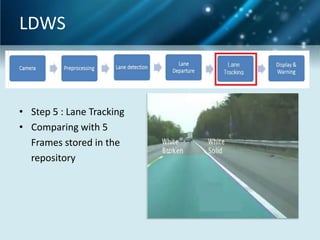
• Step 5 : Lane Tracking
• Comparing with 5
Frames stored in the
repository
LDWS

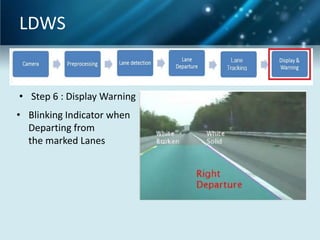
• Step 6 : Display Warning
• Blinking Indicator when
Departing from
the marked Lanes
Pedestrian Detection
• Different Methods :
1.
2.
3.
4.
5.

Histogram of Oriented Gradients (HOG)
Support Vector Machine (SVM)
HAAR Features + Adaboost Classifier
Edgelet Features + Adaboost Classifier
Shapelet Features + Adaboost Classifier
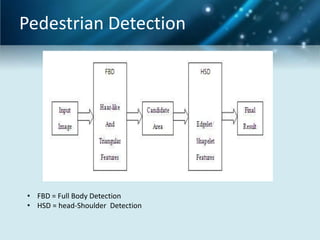
Pedestrian Detection

• FBD = Full Body Detection
• HSD = head-Shoulder Detection
Haar Features
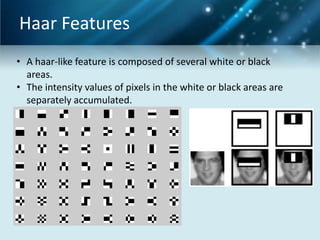
• A haar-like feature is composed of several white or black
areas.
• The intensity values of pixels in the white or black areas are
separately accumulated.
adaboost
• Step 1 :
– select the features with the different forms and types.
These are the basic features types. We can construct
nearly 1000`s of features using only few of them.
– E.g.: There are 5 rectangles associated with haar features
–
–
–
–
–
–
–
–

feature = [1 2; 2 1; 1 3; 3 1; 2 2];
frameSize = 20;
PosImgSize = 200;
NegImgSize = 400;
posWeights = ones(1,PosImgSize)/PosImgSize;
negWeights = ones(1,NegImgSize)/NegImgSize;
% Weights of training set
adaWeights = [posWeights negWeights] ;
Adaboost
Step 2:

(a)

(b)

(c)

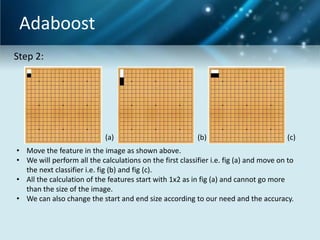
• Move the feature in the image as shown above.
• We will perform all the calculations on the first classifier i.e. fig (a) and move on to
the next classifier i.e. fig (b) and fig (c).
• All the calculation of the features start with 1x2 as in fig (a) and cannot go more
than the size of the image.
• We can also change the start and end size according to our need and the accuracy.
adaboost

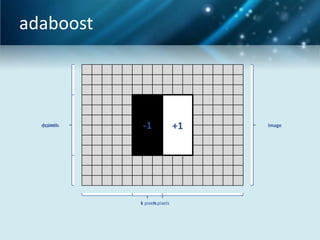
j pixels
mpixels

-1

k pixels pixels
n

+1

Image
Haar Features
For every feature it is necessary to calculate
the sum of all values inside each rectangle
Given base resolution of detector is between
20x20 and 30x30 pixels
For 24x24 detector there is set of over
180,000 features (using only basic features)
AdaBoost (Adaptive Boost)
Step 3:

Iterative learning algorithm
AdaBoost is an algorithm for constructing a
”strong” classifier as linear combination of
“simple” “weak” classifiers h (x):
t

Output the strong classifier:
AdaBoost algorithm example
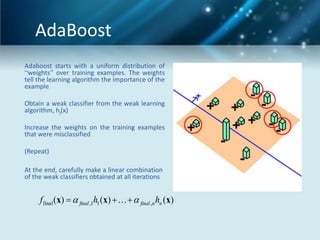
The weights tell the learning
algorithm the importance of
the example.

Adaboost starts with a
uniform distribution of
“weights” over training
examples.

Obtain a weak classifier from the
weak learning algorithm, hj(x).
Increase the weights on the
training examples that were
misclassified.

At the end, carefully make a
linear combination of the
weak classifiers obtained at all
iterations.
AdaBoost
Adaboost starts with a uniform distribution of
“weights” over training examples. The weights
tell the learning algorithm the importance of the
example
Obtain a weak classifier from the weak learning
algorithm, hj(x)
Increase the weights on the training examples
that were misclassified
(Repeat)
At the end, carefully make a linear combination
of the weak classifiers obtained at all iterations

f final (x)   final ,1h1 (x)     final ,n hn (x)
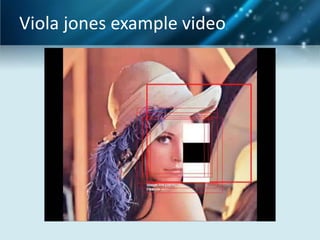
Viola jones example video
• An Edgelet is a short segment of line or
circle.
Why EDGELETS ?
•
•
•
•
•

Simple logic development
Requires less space than templates
Can be used on any type of images
Computation time is lower
Higher detection rates can be obtained
selecting relevant features
Use of Edgelet feature
Step 4:

• Using the pedestrian head region Edgelet.
• This is Head and shoulder detection.
• Process :– Find the edges of both the image using the sobel
method.
– Resize the edgelet into the detected pedestrian
image width.
– Compute difference between image and resized
edgelet and compare for threshold.
Final Indication
Step 5:

• Images passed from the above steps are
checked for their area.
• The Bounding box color is chosen upon the
distance of the pedestrian from the camera.
• RED color – NEAR pedestrian (180 to 480cm)
• GREEN color – FAR pedestrian (>480cm)
• Label provided on top left of bounding box.
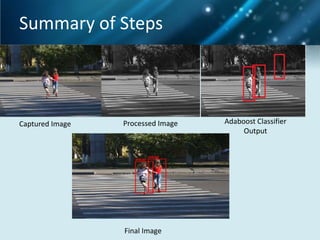
Summary of Steps

Captured Image

Processed Image

Final Image

Adaboost Classifier
Output
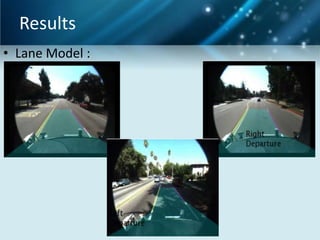
Results
• Lane Model :
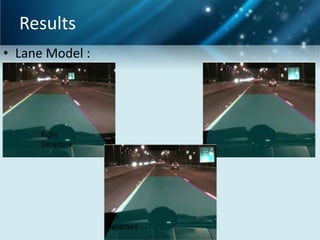
Results
• Lane Model :
Results
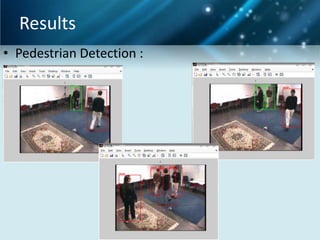
• Pedestrian Detection :
Results
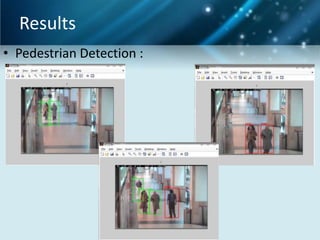
• Pedestrian Detection :
Results
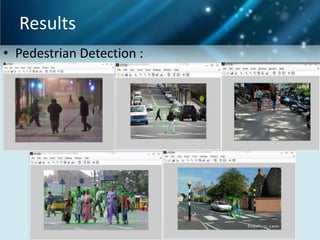
• Pedestrian Detection :
Analysis
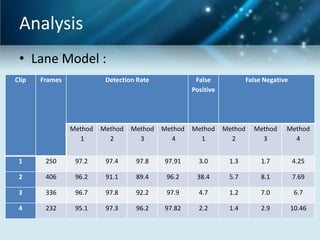
• Lane Model :
Clip

Frames

Detection Rate

False
Positive

False Negative

Method
1

Method
2

Method
3

Method
4

Method
1

Method
2

Method
3

Method
4

1

250

97.2

97.4

97.8

97.91

3.0

1.3

1.7

4.25

2

406

96.2

91.1

89.4

96.2

38.4

5.7

8.1

7.69

3

336

96.7

97.8

92.2

97.9

4.7

1.2

7.0

6.7

4

232

95.1

97.3

96.2

97.82

2.2

1.4

2.9

10.46
Analysis
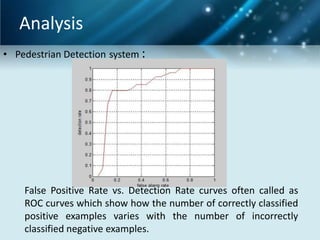
• Pedestrian Detection system :

False Positive Rate vs. Detection Rate curves often called as
ROC curves which show how the number of correctly classified
positive examples varies with the number of incorrectly
classified negative examples.
Conclusion
Lane Detection :
• Maximum accuracy of 97.91%
• Processing Time varies within 0.018 sec to 0.02 sec
and false positive rate of just 3.0
• Works on 640x480 to 320x240 frame size
Pedestrian Detection :
• 5fps for detecting pedestrians at least 100 pixels high
and 3 fps for detecting pedestrians over 50 pixels.
• Works on 640x480 to 320x240 frame sizes
• Accuracy of 95% is achieved with normal weather
conditions.
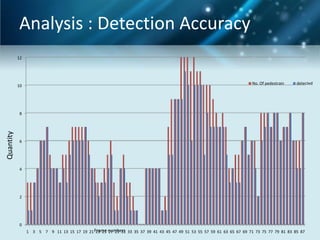
Analysis : Detection Accuracy
12

10

No. Of pedestrain

detected

Quantity

8

6

4

2

0
1 3 5 7 9 11 13 15 17 19 21 Frame numbers 33 35 37 39 41 43 45 47 49 51 53 55 57 59 61 63 65 67 69 71 73 75 77 79 81 83 85 87
23 25 27 29 31
Journals and publications
INTERNATIONAL LEVEL :
• Published the paper on the online journal website “International Journal of Computer
Application” which has impact factor of 0.631.

• ICWET 2012 – international conference on Emerging trends in technology 2012 held in
Thane, India. ISBN (International Standard Book Number) : 978-0-615-58717-2
• AMS2012 – international conference on mathematics and simulation going to be held
in Indonesia.
NATIONAL LEVEL :
• NCCCES2011 -- National Conference on communication control and energy system
held on 29th and 30th august to be held in VELMURUGAN AUDITORIUM at VelTech
Dr.RR and Dr.SR Technical University, Avdi.
Mvs adas
Mvs adas
Mvs adas

Mvs adas

  • 1.
    Group Members:Sanket R.Borhade BE-E-16 Manthan N. Shah BE-G-65 Pravin D. Jadhav BE-E-41
  • 2.
    Introduction • Video-based carnavigation systems are emerging as the next generation technology. • Object information is gathered via cameras and then, feature extraction is performed to obtain edge, colour, object details. • We are developing a system which comprises Pedestrian Detection System(PDS) and Lane Detection and Warning System(LDWS) for Medium-Class Cars Worldwide.
  • 3.
    Need Analysis • 41%of the total traffic accident casualties are due to abnormal lane changing. • More than 535 pedestrians die in road accidents every year. • Pune City has the highest rate of accidents amongst 27 other cities in the India. • Need for cost effective life saving tool. • Easy to install in any locomotive.
  • 4.
    Need Analysis • Percentageof pedestrian fatalities not on crossings 2005 – Germany 92.5%, Spain 91.5%, Great Britain 89.4%, Netherlands 86.7%, Austria 81.1%, Finland 71.1%, Italy 70.7%, Switzerland 67.2%, Norway 45.2%. 16 million population 14 Spain 12 Italy 10 Great Britain 8 Germany 6 Switzerland 4 Austria 2 Norway 0 Finland Road Fatalities Fatilities at road crossing *Note : Data received from European Pedestrian Crossings Survey in 2005
  • 5.
    Existing Technologies • • • • • • Citroen “LDWS” Mercedes-Benz“Distronic” Toyota Lexus “AODS” Nissan “ICC” European project “PUVAME” Volvo Collision detection
  • 6.
  • 7.
    Lane Departure SystemBlock diagram
  • 8.
    Lane Departure WarningSystem (LDWS) • Step 1 : Capture Image – CMOS Camera – Video Resolution
  • 9.
    LDWS • Step 2: ROI Selection – Segmentation – 121 to 240 selection
  • 10.
    LDWS • Step 3: Lane Detection • Step 3.1 : Lane Extraction • Step 3.2 : Lane Identification
  • 11.
    LDWS • • • • Hough Transform Edge detectiontells us where edges are The next step is to find out if there is any line (or line segment) in the image • Advantages of Hough Transform • Relatively insensitive to occlusion since points are processed independently • Works on disconnected edges • Robust to noise
  • 12.
    LDWS • A FEWWORDS ABOUT THE LINE EQUATIONS • y=m*x+k form is most familiar but cannot handle vertical lines. • Another form: • r=x cos θ + y sin θ • is better. • 0 ≤ r, 0 ≤ θ < 2π • any r, 0 ≤ θ ≤ π (don’t need to worry about the • sign of r)
  • 13.
    LDWS • • • • • • • • • HOUGH TRANSFORM Given rand θ, the line equation r=x cos θ + y sin θ determines all points (x,y) that lie on a straightline For each fixed pair (x,y), the equation r=x cos θ + y sin θ determines all points (r,θ) that lie on a curve in the Hough space.
  • 14.
    LDWS • VISUALIZING HOUGHTRANSFORM • HT take a point (x,y) and maps it to a curve • (Hough curve) in the (r,θ) Hough space:
  • 15.
    LDWS • • • • • • • • • HOW HT ISUSED The pair (r*,θ*) that is common to many Hough curves indicates that the line r*=x cos θ* y sin θ* is in the image How to find the pairs (r,θ) that are common points of a large number of Hough curves? Divide the Hough space into bins and do the counting!
  • 16.
    LDWS • HOW HTWORKS • Divide Hough space into bins: • • • • Accumulate the count in each bin An accumulate matrix H is used. For the figure above, only one entry has count 2; the others are either 0 or 1.
  • 17.
    LDWS • HT ALGORITHM •Initialize accumulator H to all zeros • For each edge point (x,y) in the image For θ = 0 to 180 r = x cos θ + y sin θ H(θ, r) = H(θ, r) + 1 end end • Find the value(s) of (θ, r) where H(θ, r) is a local maximum • The detected line in the image is given by r = x cos θ + y sin θ
  • 18.
    LDWS • Step 3.1: Lane Extraction – – – – 2D FIR filter with mask [-1 0 1] Hough Transform LocalMaxFinder 20 candidate lanes • Step 3.2 : Lane Identification – Comparing with previous lanes – Polar to Cartesian
  • 19.
    LDWS • Step 4: Lane Departure • • • • • • • Diswarn = 144 (Window Threshold) if Left_dis < Diswarn && Left_dis <= Right_dis Left Departure elseif Right_dis < Diswarn && Left_dis > Right_dis Right Departure else Normal Driving
  • 20.
    LDWS • Step 4: Lane Departure • Left dis = 178 > 144 • Right Dis = 179 > 144 • So, normal Driving
  • 21.
    LDWS • Step 4: Lane Departure • Left dis = 134 < 144 • Right Dis = 179 > 144 • So, left departure
  • 22.
    LDWS • Step 4: Lane Departure • Left dis = 178 > 144 Right Dis = 128 < 144 So, right departure
  • 23.
    LDWS • Step 5: Lane Tracking • Comparing with 5 Frames stored in the repository
  • 24.
    LDWS • Step 6: Display Warning • Blinking Indicator when Departing from the marked Lanes
  • 25.
    Pedestrian Detection • DifferentMethods : 1. 2. 3. 4. 5. Histogram of Oriented Gradients (HOG) Support Vector Machine (SVM) HAAR Features + Adaboost Classifier Edgelet Features + Adaboost Classifier Shapelet Features + Adaboost Classifier
  • 26.
    Pedestrian Detection • FBD= Full Body Detection • HSD = head-Shoulder Detection
  • 27.
    Haar Features • Ahaar-like feature is composed of several white or black areas. • The intensity values of pixels in the white or black areas are separately accumulated.
  • 28.
    adaboost • Step 1: – select the features with the different forms and types. These are the basic features types. We can construct nearly 1000`s of features using only few of them. – E.g.: There are 5 rectangles associated with haar features – – – – – – – – feature = [1 2; 2 1; 1 3; 3 1; 2 2]; frameSize = 20; PosImgSize = 200; NegImgSize = 400; posWeights = ones(1,PosImgSize)/PosImgSize; negWeights = ones(1,NegImgSize)/NegImgSize; % Weights of training set adaWeights = [posWeights negWeights] ;
  • 29.
    Adaboost Step 2: (a) (b) (c) • Movethe feature in the image as shown above. • We will perform all the calculations on the first classifier i.e. fig (a) and move on to the next classifier i.e. fig (b) and fig (c). • All the calculation of the features start with 1x2 as in fig (a) and cannot go more than the size of the image. • We can also change the start and end size according to our need and the accuracy.
  • 30.
  • 31.
    Haar Features For everyfeature it is necessary to calculate the sum of all values inside each rectangle Given base resolution of detector is between 20x20 and 30x30 pixels For 24x24 detector there is set of over 180,000 features (using only basic features)
  • 32.
    AdaBoost (Adaptive Boost) Step3: Iterative learning algorithm AdaBoost is an algorithm for constructing a ”strong” classifier as linear combination of “simple” “weak” classifiers h (x): t Output the strong classifier:
  • 33.
    AdaBoost algorithm example Theweights tell the learning algorithm the importance of the example. Adaboost starts with a uniform distribution of “weights” over training examples. Obtain a weak classifier from the weak learning algorithm, hj(x). Increase the weights on the training examples that were misclassified. At the end, carefully make a linear combination of the weak classifiers obtained at all iterations.
  • 34.
    AdaBoost Adaboost starts witha uniform distribution of “weights” over training examples. The weights tell the learning algorithm the importance of the example Obtain a weak classifier from the weak learning algorithm, hj(x) Increase the weights on the training examples that were misclassified (Repeat) At the end, carefully make a linear combination of the weak classifiers obtained at all iterations f final (x)   final ,1h1 (x)     final ,n hn (x)
  • 35.
  • 36.
    • An Edgeletis a short segment of line or circle.
  • 37.
    Why EDGELETS ? • • • • • Simplelogic development Requires less space than templates Can be used on any type of images Computation time is lower Higher detection rates can be obtained selecting relevant features
  • 38.
    Use of Edgeletfeature Step 4: • Using the pedestrian head region Edgelet. • This is Head and shoulder detection. • Process :– Find the edges of both the image using the sobel method. – Resize the edgelet into the detected pedestrian image width. – Compute difference between image and resized edgelet and compare for threshold.
  • 39.
    Final Indication Step 5: •Images passed from the above steps are checked for their area. • The Bounding box color is chosen upon the distance of the pedestrian from the camera. • RED color – NEAR pedestrian (180 to 480cm) • GREEN color – FAR pedestrian (>480cm) • Label provided on top left of bounding box.
  • 40.
    Summary of Steps CapturedImage Processed Image Final Image Adaboost Classifier Output
  • 41.
  • 42.
  • 43.
  • 44.
  • 45.
  • 46.
    Analysis • Lane Model: Clip Frames Detection Rate False Positive False Negative Method 1 Method 2 Method 3 Method 4 Method 1 Method 2 Method 3 Method 4 1 250 97.2 97.4 97.8 97.91 3.0 1.3 1.7 4.25 2 406 96.2 91.1 89.4 96.2 38.4 5.7 8.1 7.69 3 336 96.7 97.8 92.2 97.9 4.7 1.2 7.0 6.7 4 232 95.1 97.3 96.2 97.82 2.2 1.4 2.9 10.46
  • 47.
    Analysis • Pedestrian Detectionsystem : False Positive Rate vs. Detection Rate curves often called as ROC curves which show how the number of correctly classified positive examples varies with the number of incorrectly classified negative examples.
  • 48.
    Conclusion Lane Detection : •Maximum accuracy of 97.91% • Processing Time varies within 0.018 sec to 0.02 sec and false positive rate of just 3.0 • Works on 640x480 to 320x240 frame size Pedestrian Detection : • 5fps for detecting pedestrians at least 100 pixels high and 3 fps for detecting pedestrians over 50 pixels. • Works on 640x480 to 320x240 frame sizes • Accuracy of 95% is achieved with normal weather conditions.
  • 49.
    Analysis : DetectionAccuracy 12 10 No. Of pedestrain detected Quantity 8 6 4 2 0 1 3 5 7 9 11 13 15 17 19 21 Frame numbers 33 35 37 39 41 43 45 47 49 51 53 55 57 59 61 63 65 67 69 71 73 75 77 79 81 83 85 87 23 25 27 29 31
  • 50.
    Journals and publications INTERNATIONALLEVEL : • Published the paper on the online journal website “International Journal of Computer Application” which has impact factor of 0.631. • ICWET 2012 – international conference on Emerging trends in technology 2012 held in Thane, India. ISBN (International Standard Book Number) : 978-0-615-58717-2 • AMS2012 – international conference on mathematics and simulation going to be held in Indonesia. NATIONAL LEVEL : • NCCCES2011 -- National Conference on communication control and energy system held on 29th and 30th august to be held in VELMURUGAN AUDITORIUM at VelTech Dr.RR and Dr.SR Technical University, Avdi.