Supporting Instruction with Digital Media
The Role of Classroom Video Share ways we use video Think about the negative aspects of using video Need for video in the classroom? Is video-use a new learning style?
How is video  educational ?  What works with video? Share best practice use of video in the classroom
Advantages of Digital Media Segmented Aligned  Integrated with  lesson plans &  quizzes Highest quality  educational titles Ability to customize content
Share examples of using media to… Introduce concepts and motivate learners  Reinforce the lesson Differentiate  instruction Provide reflection, extension, and enrichment
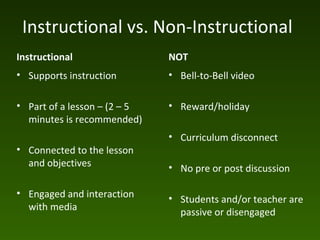
Instructional vs. Non-Instructional  Instructional  Supports instruction Part of a lesson – (2 – 5 minutes is recommended)  Connected to the lesson and objectives  Engaged and interaction with media NOT Bell-to-Bell video Reward/holiday Curriculum disconnect No pre or post discussion Students and/or teacher are passive or disengaged
Before viewing… DECIDE the media’s use  KNOW the material IDENTIFY the instructional need  DETERMINE curriculum objectives CLARIFY learner's needs  PREVIEW to select appropriate segment PLAN for effective use Other ideas?
While viewing: Take an active interest to  increase the learners' involvement Stop and start the video as appropriate to control the instructional pace  Watch students' reactions and reuse video appropriately Should learners take notes? Share out ideas Other thoughts?
After viewing: Review main points Encourage discussion and extension activites Refer to video during lesson Assess students Other ideas?

Digital media in the classroom2

  • 1.
  • 2.
    The Role ofClassroom Video Share ways we use video Think about the negative aspects of using video Need for video in the classroom? Is video-use a new learning style?
  • 3.
    How is video educational ? What works with video? Share best practice use of video in the classroom
  • 4.
    Advantages of DigitalMedia Segmented Aligned Integrated with lesson plans & quizzes Highest quality educational titles Ability to customize content
  • 5.
    Share examples ofusing media to… Introduce concepts and motivate learners Reinforce the lesson Differentiate instruction Provide reflection, extension, and enrichment
  • 6.
    Instructional vs. Non-Instructional Instructional Supports instruction Part of a lesson – (2 – 5 minutes is recommended) Connected to the lesson and objectives Engaged and interaction with media NOT Bell-to-Bell video Reward/holiday Curriculum disconnect No pre or post discussion Students and/or teacher are passive or disengaged
  • 7.
    Before viewing… DECIDEthe media’s use KNOW the material IDENTIFY the instructional need DETERMINE curriculum objectives CLARIFY learner's needs PREVIEW to select appropriate segment PLAN for effective use Other ideas?
  • 8.
    While viewing: Takean active interest to increase the learners' involvement Stop and start the video as appropriate to control the instructional pace Watch students' reactions and reuse video appropriately Should learners take notes? Share out ideas Other thoughts?
  • 9.
    After viewing: Reviewmain points Encourage discussion and extension activites Refer to video during lesson Assess students Other ideas?