HOW TO SOLDER
SOLDERING
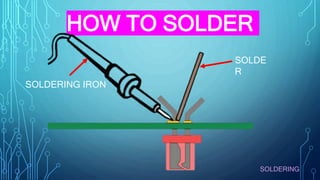
SOLDERING IRON
SOLDE
R
SOLDERING
WHAT IS
SOLDERING
The good thing about learning how to
solder is the fact that you don’t need a
lot to get started. Below we’ll outline
the basic tools and materials you will
need for most of your soldering
projects.
SOLDERING
SOLDERING
A soldering iron is a hand tool that plugs into a
standard 220VAC outlet and heats up in order to melt
solder around electrical connections. This is one of
the most important tools used in soldering. Most
soldering irons have interchangeable tips that can be
used for different soldering applications. Be very
cautious when using any type of soldering iron
because it can heat up to 400 OC which is extremely
hot.
1. SOLDERING
IRON
SOLDERING
Soldering Iron
Tips
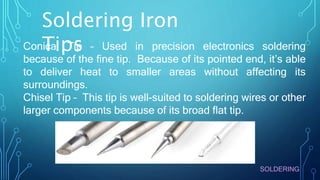
Conical Tip – Used in precision electronics soldering
because of the fine tip. Because of its pointed end, it’s able
to deliver heat to smaller areas without affecting its
surroundings.
Chisel Tip – This tip is well-suited to soldering wires or other
larger components because of its broad flat tip.
SOLDERING
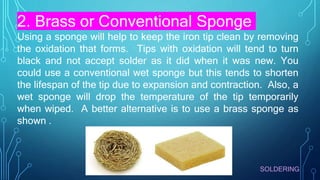
2. Brass or Conventional Sponge
Using a sponge will help to keep the iron tip clean by removing
the oxidation that forms. Tips with oxidation will tend to turn
black and not accept solder as it did when it was new. You
could use a conventional wet sponge but this tends to shorten
the lifespan of the tip due to expansion and contraction. Also, a
wet sponge will drop the temperature of the tip temporarily
when wiped. A better alternative is to use a brass sponge as
shown .
SOLDERING
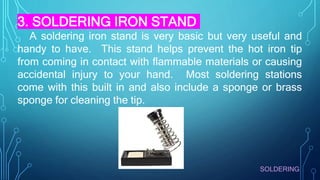
3. SOLDERING IRON STAND
A soldering iron stand is very basic but very useful and
handy to have. This stand helps prevent the hot iron tip
from coming in contact with flammable materials or causing
accidental injury to your hand. Most soldering stations
come with this built in and also include a sponge or brass
sponge for cleaning the tip.
SOLDERING
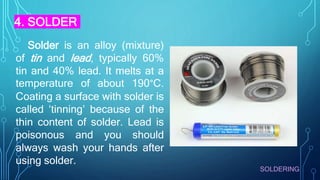
Solder is an alloy (mixture)
of tin and lead, typically 60%
tin and 40% lead. It melts at a
temperature of about 190°C.
Coating a surface with solder is
called ‘tinning’ because of the
thin content of solder. Lead is
poisonous and you should
always wash your hands after
using solder.
4. SOLDER
SOLDERING
4. SOLDER
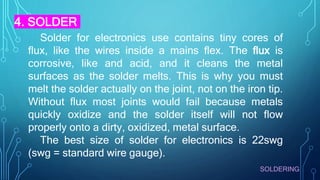
Solder for electronics use contains tiny cores of
flux, like the wires inside a mains flex. The flux is
corrosive, like and acid, and it cleans the metal
surfaces as the solder melts. This is why you must
melt the solder actually on the joint, not on the iron tip.
Without flux most joints would fail because metals
quickly oxidize and the solder itself will not flow
properly onto a dirty, oxidized, metal surface.
The best size of solder for electronics is 22swg
(swg = standard wire gauge).
SOLDERING
4. SOLDER
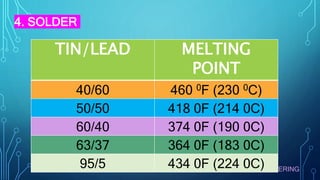
TIN/LEAD MELTING
POINT
40/60 460 0F (230 0C)
50/50 418 0F (214 0C)
60/40 374 0F (190 0C)
63/37 364 0F (183 0C)
95/5 434 0F (224 0C)
SOLDERING
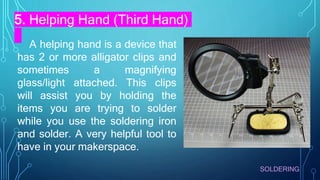
5. Helping Hand (Third Hand)
A helping hand is a device that
has 2 or more alligator clips and
sometimes a magnifying
glass/light attached. This clips
will assist you by holding the
items you are trying to solder
while you use the soldering iron
and solder. A very helpful tool to
have in your makerspace.
SOLDERING
SOLDERING SAFETY
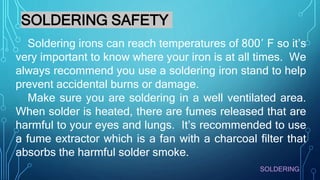
Soldering irons can reach temperatures of 800′ F so it’s
very important to know where your iron is at all times. We
always recommend you use a soldering iron stand to help
prevent accidental burns or damage.
Make sure you are soldering in a well ventilated area.
When solder is heated, there are fumes released that are
harmful to your eyes and lungs. It’s recommended to use
a fume extractor which is a fan with a charcoal filter that
absorbs the harmful solder smoke.
SOLDERING
SOLDERING SAFETY
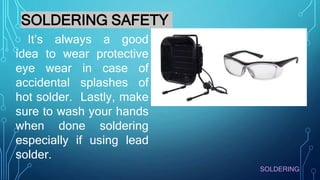
It’s always a good
idea to wear protective
eye wear in case of
accidental splashes of
hot solder. Lastly, make
sure to wash your hands
when done soldering
especially if using lead
solder.
SOLDERING
Before you can start soldering, you need to prep your
soldering iron by tinning the tip with solder. This process will
help improve the heat transfer from the iron to the item you’re
soldering. Tinning will also help to protect the tip and reduce
wear.
Step 1: Begin by making sure the tip is attached to the iron
and screwed tightly in place.
Step 2: Turn on your soldering iron and let it heat up. If you
have a soldering station with an adjustable temp control, set it
to 400′ C/ 752′ F.
TINNING THE TIP
SOLDERING
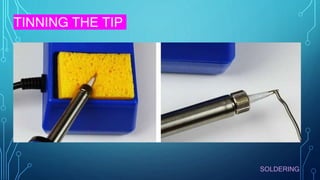
Step 3: Wipe the tip of the soldering iron on a damp wet
sponge to clean it. Wait a few seconds to let the tip heat up
again before proceeding to step 4.
Step 4: Hold the soldering iron in one hand and solder in
the other. Touch the solder to the tip of the iron and make
sure the solder flows evenly around the tip.
TINNING THE TIP
You should tin the tip of your iron before and after each
soldering session to extend its life. Eventually, every tip will
wear out and will need replacing when it becomes rough or
pitted.
SOLDERING
TINNING THE TIP
SOLDERING
HOW TO SOLDER
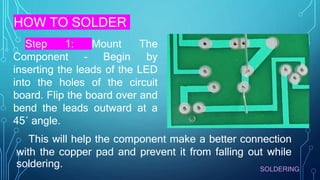
Step 1: Mount The
Component – Begin by
inserting the leads of the LED
into the holes of the circuit
board. Flip the board over and
bend the leads outward at a
45′ angle.
This will help the component make a better connection
with the copper pad and prevent it from falling out while
soldering.
SOLDERING
HOW TO SOLDER
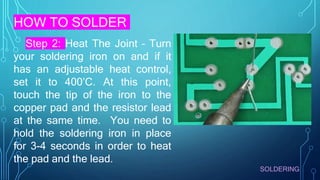
Step 2: Heat The Joint – Turn
your soldering iron on and if it
has an adjustable heat control,
set it to 400’C. At this point,
touch the tip of the iron to the
copper pad and the resistor lead
at the same time. You need to
hold the soldering iron in place
for 3-4 seconds in order to heat
the pad and the lead.
SOLDERING
HOW TO SOLDER
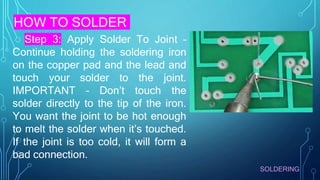
Step 3: Apply Solder To Joint –
Continue holding the soldering iron
on the copper pad and the lead and
touch your solder to the joint.
IMPORTANT – Don’t touch the
solder directly to the tip of the iron.
You want the joint to be hot enough
to melt the solder when it’s touched.
If the joint is too cold, it will form a
bad connection.
SOLDERING
HOW TO SOLDER
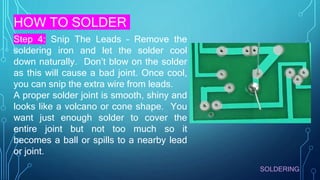
Step 4: Snip The Leads – Remove the
soldering iron and let the solder cool
down naturally. Don’t blow on the solder
as this will cause a bad joint. Once cool,
you can snip the extra wire from leads.
A proper solder joint is smooth, shiny and
looks like a volcano or cone shape. You
want just enough solder to cover the
entire joint but not too much so it
becomes a ball or spills to a nearby lead
or joint.
SOLDERING
HOW TO SOLDER
WIRES
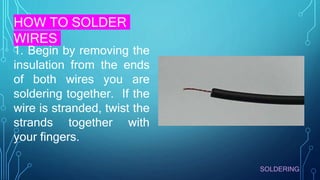
1. Begin by removing the
insulation from the ends
of both wires you are
soldering together. If the
wire is stranded, twist the
strands together with
your fingers.
SOLDERING
HOW TO SOLDER
WIRES
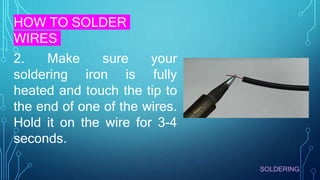
2. Make sure your
soldering iron is fully
heated and touch the tip to
the end of one of the wires.
Hold it on the wire for 3-4
seconds.
SOLDERING
HOW TO SOLDER
WIRES
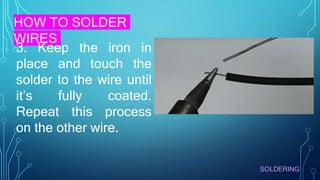
3. Keep the iron in
place and touch the
solder to the wire until
it’s fully coated.
Repeat this process
on the other wire.
SOLDERING
HOW TO SOLDER
WIRES
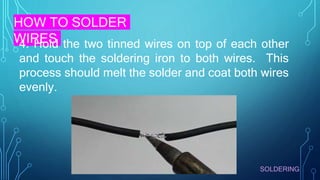
4. Hold the two tinned wires on top of each other
and touch the soldering iron to both wires. This
process should melt the solder and coat both wires
evenly.
SOLDERING
HOW TO SOLDER
WIRES
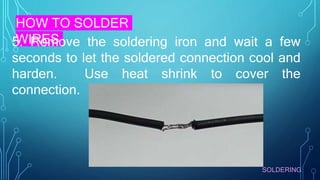
5. Remove the soldering iron and wait a few
seconds to let the soldered connection cool and
harden. Use heat shrink to cover the
connection.

DIFFERENT STEPS IN DOING SOLDERING TECHNIQUE

  • 1.
  • 2.
  • 3.
    The good thingabout learning how to solder is the fact that you don’t need a lot to get started. Below we’ll outline the basic tools and materials you will need for most of your soldering projects. SOLDERING
  • 4.
    SOLDERING A soldering ironis a hand tool that plugs into a standard 220VAC outlet and heats up in order to melt solder around electrical connections. This is one of the most important tools used in soldering. Most soldering irons have interchangeable tips that can be used for different soldering applications. Be very cautious when using any type of soldering iron because it can heat up to 400 OC which is extremely hot. 1. SOLDERING IRON
  • 5.
    SOLDERING Soldering Iron Tips Conical Tip– Used in precision electronics soldering because of the fine tip. Because of its pointed end, it’s able to deliver heat to smaller areas without affecting its surroundings. Chisel Tip – This tip is well-suited to soldering wires or other larger components because of its broad flat tip.
  • 6.
    SOLDERING 2. Brass orConventional Sponge Using a sponge will help to keep the iron tip clean by removing the oxidation that forms. Tips with oxidation will tend to turn black and not accept solder as it did when it was new. You could use a conventional wet sponge but this tends to shorten the lifespan of the tip due to expansion and contraction. Also, a wet sponge will drop the temperature of the tip temporarily when wiped. A better alternative is to use a brass sponge as shown .
  • 7.
    SOLDERING 3. SOLDERING IRONSTAND A soldering iron stand is very basic but very useful and handy to have. This stand helps prevent the hot iron tip from coming in contact with flammable materials or causing accidental injury to your hand. Most soldering stations come with this built in and also include a sponge or brass sponge for cleaning the tip.
  • 8.
    SOLDERING Solder is analloy (mixture) of tin and lead, typically 60% tin and 40% lead. It melts at a temperature of about 190°C. Coating a surface with solder is called ‘tinning’ because of the thin content of solder. Lead is poisonous and you should always wash your hands after using solder. 4. SOLDER
  • 9.
    SOLDERING 4. SOLDER Solder forelectronics use contains tiny cores of flux, like the wires inside a mains flex. The flux is corrosive, like and acid, and it cleans the metal surfaces as the solder melts. This is why you must melt the solder actually on the joint, not on the iron tip. Without flux most joints would fail because metals quickly oxidize and the solder itself will not flow properly onto a dirty, oxidized, metal surface. The best size of solder for electronics is 22swg (swg = standard wire gauge).
  • 10.
    SOLDERING 4. SOLDER TIN/LEAD MELTING POINT 40/60460 0F (230 0C) 50/50 418 0F (214 0C) 60/40 374 0F (190 0C) 63/37 364 0F (183 0C) 95/5 434 0F (224 0C)
  • 11.
    SOLDERING 5. Helping Hand(Third Hand) A helping hand is a device that has 2 or more alligator clips and sometimes a magnifying glass/light attached. This clips will assist you by holding the items you are trying to solder while you use the soldering iron and solder. A very helpful tool to have in your makerspace.
  • 12.
    SOLDERING SOLDERING SAFETY Soldering ironscan reach temperatures of 800′ F so it’s very important to know where your iron is at all times. We always recommend you use a soldering iron stand to help prevent accidental burns or damage. Make sure you are soldering in a well ventilated area. When solder is heated, there are fumes released that are harmful to your eyes and lungs. It’s recommended to use a fume extractor which is a fan with a charcoal filter that absorbs the harmful solder smoke.
  • 13.
    SOLDERING SOLDERING SAFETY It’s alwaysa good idea to wear protective eye wear in case of accidental splashes of hot solder. Lastly, make sure to wash your hands when done soldering especially if using lead solder.
  • 14.
    SOLDERING Before you canstart soldering, you need to prep your soldering iron by tinning the tip with solder. This process will help improve the heat transfer from the iron to the item you’re soldering. Tinning will also help to protect the tip and reduce wear. Step 1: Begin by making sure the tip is attached to the iron and screwed tightly in place. Step 2: Turn on your soldering iron and let it heat up. If you have a soldering station with an adjustable temp control, set it to 400′ C/ 752′ F. TINNING THE TIP
  • 15.
    SOLDERING Step 3: Wipethe tip of the soldering iron on a damp wet sponge to clean it. Wait a few seconds to let the tip heat up again before proceeding to step 4. Step 4: Hold the soldering iron in one hand and solder in the other. Touch the solder to the tip of the iron and make sure the solder flows evenly around the tip. TINNING THE TIP You should tin the tip of your iron before and after each soldering session to extend its life. Eventually, every tip will wear out and will need replacing when it becomes rough or pitted.
  • 16.
  • 17.
    SOLDERING HOW TO SOLDER Step1: Mount The Component – Begin by inserting the leads of the LED into the holes of the circuit board. Flip the board over and bend the leads outward at a 45′ angle. This will help the component make a better connection with the copper pad and prevent it from falling out while soldering.
  • 18.
    SOLDERING HOW TO SOLDER Step2: Heat The Joint – Turn your soldering iron on and if it has an adjustable heat control, set it to 400’C. At this point, touch the tip of the iron to the copper pad and the resistor lead at the same time. You need to hold the soldering iron in place for 3-4 seconds in order to heat the pad and the lead.
  • 19.
    SOLDERING HOW TO SOLDER Step3: Apply Solder To Joint – Continue holding the soldering iron on the copper pad and the lead and touch your solder to the joint. IMPORTANT – Don’t touch the solder directly to the tip of the iron. You want the joint to be hot enough to melt the solder when it’s touched. If the joint is too cold, it will form a bad connection.
  • 20.
    SOLDERING HOW TO SOLDER Step4: Snip The Leads – Remove the soldering iron and let the solder cool down naturally. Don’t blow on the solder as this will cause a bad joint. Once cool, you can snip the extra wire from leads. A proper solder joint is smooth, shiny and looks like a volcano or cone shape. You want just enough solder to cover the entire joint but not too much so it becomes a ball or spills to a nearby lead or joint.
  • 21.
    SOLDERING HOW TO SOLDER WIRES 1.Begin by removing the insulation from the ends of both wires you are soldering together. If the wire is stranded, twist the strands together with your fingers.
  • 22.
    SOLDERING HOW TO SOLDER WIRES 2.Make sure your soldering iron is fully heated and touch the tip to the end of one of the wires. Hold it on the wire for 3-4 seconds.
  • 23.
    SOLDERING HOW TO SOLDER WIRES 3.Keep the iron in place and touch the solder to the wire until it’s fully coated. Repeat this process on the other wire.
  • 24.
    SOLDERING HOW TO SOLDER WIRES 4.Hold the two tinned wires on top of each other and touch the soldering iron to both wires. This process should melt the solder and coat both wires evenly.
  • 25.
    SOLDERING HOW TO SOLDER WIRES 5.Remove the soldering iron and wait a few seconds to let the soldered connection cool and harden. Use heat shrink to cover the connection.